





Dual Run: A Proven Solution for Secure Mainframe Modernization

945
Of your peers have already read this article.
4:30 Minutes
The most insightful time you'll spend today!
CIOs are again evaluating their mainframe investments, balancing rising operational costs and difficulty finding talent with the perceived costs and risks of moving critical applications to the cloud. Increased business agility, technical innovation, computing elasticity, customer insights, and a growing talent pool all encourage CIOs to migrate and modernize from “Big Iron” onto public cloud platforms.
Google Cloud recently announced Dual Run, a new mainframe modernization solution, to help customers mitigate the risk involved in mainframe migrations and accelerate their migration to the cloud. Leaders can leverage Dual Run in their quest to ensure their mainframe modernization projects will succeed and pay off so let’s dive a little deeper into what Dual Run is, how it works, and how it can help you.
Mainframe modernization with a proven technology
Since so many businesses still run mainframes, we decided to partner with Banco Santander—one of the largest banks in the world—to bring Dual Run to our enterprise customers, since they had already built a solution. In fact, Dual Run was built on top of Banco Santander’s unique technology which has already demonstrated proven results in the regulated financial services industry. Now that Dual Run is available, Banco Santander has been using it to bring their data and workloads onto Google Cloud’s trusted infrastructure.
The concept is not new, but the solution is unique
Dual Run enables you to run a parallel production system, allowing you to simultaneously run workloads on your mainframes and on Google Cloud. While many enterprises running mainframes have thought about parallel production concept and a few even tried before, Google Cloud is unique among the hyperscalers to provide such a solution as an offering to its customers.
With a parallel production run, you can perform real-time testing of your applications on Google Cloud and quickly gather data on performance and stability with no disruption to your business. Once you’re satisfied with the functional and performance equivalence of the two systems, you can make the new Google Cloud environment your system of record, while existing mainframe systems can be used as a backup or decommissioned.
In addition to the transformative benefits you get from moving to Google Cloud–such as AI-based scalability, speed, and security–migrating mainframes with Dual Run offers you even more benefits:
Mitigate migration risk: Dual Run reduces risk during the migration by running your business critical systems in parallel with powerful reporting to track the difference between your current and target systems. This ensures there is no impact or risk to your existing mainframes while migrating to Google Cloud.
Secure migration investments: Avoid costly migration mistakes by basing your decisions and actions on empirical data acquired from your production system.
Reduce business testing effort: Compare the functional equivalence of outcomes in the current and target system with production data and drastically reduce the testing cycles of your migrated workload.
Accelerate migration: Speed up the entire mainframe migration process with a well-defined framework, automation components, predefined dashboards, and a tested approach. Empirical reporting available in Dual Run also enables customers in regulated industries to more readily respond to regulator reviews and requests for information.
Your migration journey with Dual Run
Dual Run is packaged with several automation components to aid your migration journey, from assessment all the way through to production.
This chart shows how Dual Run plays a key role throughout your mainframe modernization journey:
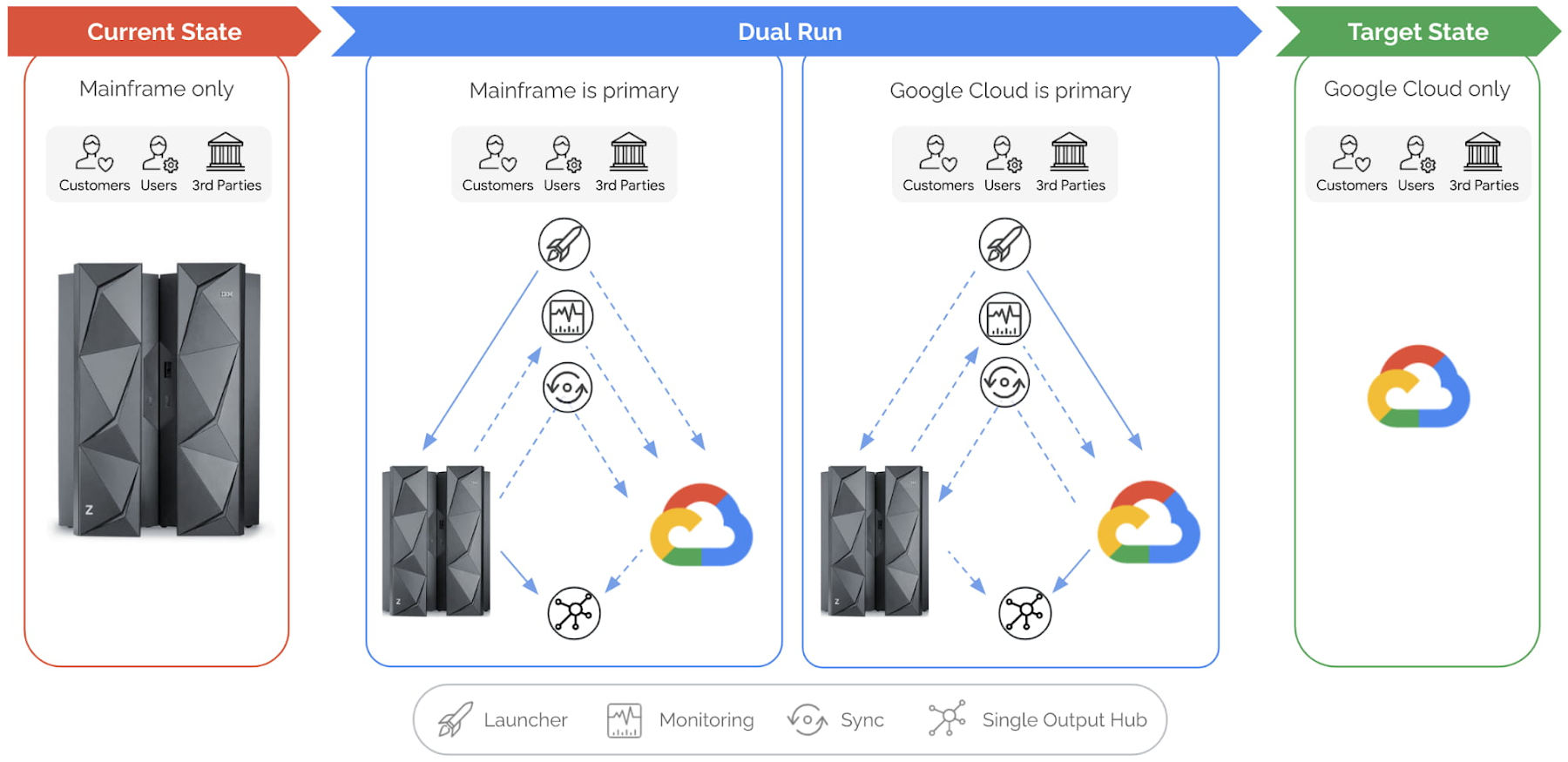
Let’s explore this illustration in a bit more detail, phase by phase:
Current state: This is your starting point, when your production workloads are still running in your mainframe. Dual Run helps you assess your mainframe workload for compatibility on Google Cloud.
After this assessment, Dual Run’s conversion engine helps address the incompatibilities in your current application and then migrates the application and data to Google Cloud. At this stage, you have your current application executing on the mainframe and your migrated application is ready to be executed or tested on Google Cloud.
Dual Run state: In this state, the migrated workload will be executed in two stages.
Dual Run stage 1:
In the first stage of Dual Run, your mainframe will remain as the “primary” system — meaning the response and outputs to other systems are sent from your mainframe — while the migrated workload will be executed in parallel in Google Cloud as “secondary.”
Dual Run performs the following actions as a cyclical process, repeated until you reach your desired migrated application quality is achieved:
- All workloads — batch & transactions — executed in the mainframe are replicated in Google Cloud
- The outcomes from both systems are validated to report any differences, enabling you to take corrective actions in migrated applications
- The functional and performance differences between the two systems will be observed, and the mainframe and Google Cloud data are periodically synchronized to bring both the systems in sync
Typically, most of your migration time will be spent in the first stage of Dual Run until you are satisfied with the results. The key goal for this stage is that your primary, business-critical mainframe workload is not disturbed while your migrated application is tuned to provide the exact same results as your current application.
Dual Run stage 2:
When the Dual Run reporting and results confirm that the migrated application matches your mainframe system, Google Cloud then becomes the “primary” system, while your mainframe will still be executed in parallel as “secondary.” Dual Run will enable you to do a smooth switch between primary and secondary systems through a configuration management system.
Target state: In this final state, the mainframe can be decommissioned while the Dual Run components are removed, enabling an optimal and efficient business execution with Google Cloud.
Summary
For any business or organization that has to migrate or modernize their mainframes, Dual Run offers a unique solution to achieve this with reduced risk and time. In fact, what we’re seeing from our customers is that Dual Run offers the right combination of proven experience, engineering, and strategic partnership that is essential for mainframe migration success. If you would like to learn more, check out our mainframe modernization website.
BURGER KING Germany: Serving Up Marketing Insights and Supply Chain Visibility Easily

13920
Of your peers have already read this article.
8:30 Minutes
The most insightful time you'll spend today!
Do hamburgers really come from Hamburg? This may still be a matter of debate, but the popularity of American-style burger joints not just in Hamburg but all over Germany, is clear. Germany’s top two fast food companies are both burger chains. One of them is BURGER KING®, a global brand that welcomes more than 11 million customers worldwide every day. The company arrived in Germany in 1976, when its first restaurant opened in Berlin. It now operates more than 100 restaurants across Germany, with franchisees operating more than 600 restaurants of their own.
“In the fast food industry, being able to move quickly is very important. That means delivering the right promotion to our app or launching a viral campaign within days. To do that across more than 700 restaurants, we need the support of the right technology.”
—Oliver Mielentz, IT Manager, BURGER KING® Deutschland GmbH
Previously a subsidiary of the U.S. business, BURGER KING® Germany became an independent company in 2015. As a result, it needed to develop its own IT infrastructure, and the changeover needed to happen fast. “We had to put in place systems that would work for the entire network of franchisees and enable us to easily roll out campaigns,” explains Oliver Mielentz, IT Manager at BURGER KING® Deutschland GmbH.
With the help of Google Cloud Premier partner Cloudwürdig, BURGER KING® Germany chose Google Cloud and G Suite as the right combination to suit its needs.
“In the fast food industry, being able to move quickly is very important,” says Oliver. “That means delivering the right promotion to our app or launching a viral campaign within days. To do that across more than 700 restaurants, we need the support of the right technology.”
Building a franchisee platform in just three months
When a business has multiple franchisees, it’s important to make sure everyone is on the same page, especially in the fast-paced fast food environment. “We have to collate data from all our franchisees and produce reports quickly in order to react to changes in customer behavior,” explains Oliver. “That means processing every transaction that takes place in our restaurants.” Following the restructure, BURGER KING® Germany also needed to build a secure invoicing system with data storage and optimize its communication channels.
“Using Tableau with BigQuery, we’re able to produce reports very quickly. Previously, it took much longer, as data had to be fetched manually. Our reaction time is now almost a business day faster.”
—Oliver Mielentz, IT Manager, BURGER KING® Deutschland GmbH
With support from Witter-IT, BURGER KING® Germany chose Cloudwürdig to build its BKD Connect internal platform on Google Cloud. Thanks to the ready-to-go tools on Google Cloud, it was able to put its invoicing system and data warehouse in place in just three months.
For the BURGER KING® Germany data warehouse, Cloudwürdig built an ETL pipeline that channels ticket data for every sale into BigQuery. “Data is gathered from the restaurants,” says Oliver, “and using Tableau with BigQuery, we’re able to produce reports very quickly. Previously, it took much longer, as data had to be fetched manually. Our reaction time is now almost a business day faster.”
As the ticket data for every transaction is stored in BigQuery, the marketing team can easily see exactly which products are selling well. That’s crucial for tweaking promotions as well as monitoring the supply chain to make sure enough produce is delivered to restaurants in response to changes in demand.
“Thanks to BigQuery, we have a speedy data pipeline that enables us to react on the same day to changes in the market and eliminate bottlenecks in production,” says Oliver.
Switching to G Suite to improve communication
To enable franchisees to sign in to its BKD Connect Platform, BURGER KING® Germany needed a secure authentication system. To solve that problem, it chose to provide franchisees with G Suite accounts. “It’s really easy to set up a new franchisee on the platform. I just create a new G Suite account and Drive folder for it, and it’s ready to go,” says Oliver. G Suite also helps the franchise network to run efficiently, as daily reports are automatically saved to Drive and shared to the appropriate regional network. “Thanks to that system, it’s much easier for any team at headquarters to access the information it needs,” Oliver explains.
BURGER KING® Germany also recently extended its use of G Suite across the whole company. “Following an evaluation of our previous email and productivity software, I made the decision to switch solely to G Suite,” says Oliver. BURGER KING® Germany employees now use Gmail, Calendar, and Drive for their day-to-day productivity needs. “We only just completed the migration, but already, everyone’s happy,” says Oliver. “It’s so easy to share a file using Drive or set up a meeting on Calendar.”
“We’re big fans of Hangouts Meet, and we have two rooms here at our Hanover headquarters equipped with Hangouts Meet hardware,” Oliver adds. “The speech quality is good, and it’s helpful to be able to see every participant, especially when you’re running a meeting with multiple franchisees.”
Optimizing infrastructure to power innovative campaigns
The BURGER KING® app, available for iOS and Android, helps the company to deliver a great customer experience. Through their MyBK accounts, guests can access coupons and special promotions. “We had a really interesting campaign for Easter: guests used the app to hunt for virtual Easter eggs,” explains Oliver. “We knew it was going to be big, and our previous back end wouldn’t have been able to handle the traffic.”
To enable the marketing campaign to go ahead, BURGER KING® Germany moved the back end of the app, along with its website, to Google Cloud. For developing and running its web and app back ends, it now uses App Engine and virtual machines on Compute Engine, as well as Memorystore and Cloud Functions. For monitoring and logging, it uses Stackdriver, and Cloud CDN and Cloud DNS to easily handle its traffic.
“We ran the campaign without any performance issues, even though we were receiving several million hits a day,” says Oliver. Since migrating the back end to Google Cloud, the marketing team also launched the popular “Escape the Clown” campaign. “That campaign blew our minds!” says Oliver. “It wouldn’t have been possible without Google Cloud, because it required a lot of back end capacity.”
To develop the app infrastructure it needs, BURGER KING® Germany relies on Cloudwürdig. “Working with Cloudwürdig is great because the team has the same agile mindset as us,” says Oliver. “When we have a new idea, we just set up a meeting, and in a couple of days the new infrastructure is in place. For Escape the Clown, it only took a few weeks to get everything ready to launch.”
Leveraging integrated tools to grow the business
Using Google Cloud together with G Suite enables BURGER KING® Germany to run its franchise network efficiently, while keeping its IT team lean. “Google Cloud and G Suite are the perfect fit for the way of working at BURGER KING® Germany,” says Oliver. “Many of the company’s operatives are often on the road, visiting restaurants and franchisees. With these tools, they can work flexibly and react quickly to the situation on the ground.”
“In order to grow the business, we need to use the data we receive every day to understand exactly what is happening in our restaurants. With the tools provided by Google Cloud, we can get more guests through the door and offer them a better experience.”
—Oliver Mielentz, IT Manager, BURGER KING® Deutschland GmbH
It also helps to keep infrastructure costs under control. “With Google Cloud, we only pay for what we use, which is really important for us,” Oliver explains. “It means we can scale up quickly if we see an opportunity to react to a trend in customer behavior and launch a new marketing campaign that resonates with the moment. When it’s finished, we can then scale down again, and that definitely saves us money.”
BURGER KING® is now working with Cloudwürdig to add more functionality to the BURGER KING® app using Google Kubernetes Engine. “We like to work with customers long-term to support their digital transformation. BURGER KING® Germany is a great example of how one project can develop into a great collaboration,” says Benny Woletz, Managing Director of Cloudwürdig.
BURGER KING® also plans to expand its presence in Germany and gain a greater market share by further tailoring both its marketing and the way it runs its restaurants to answer its guests’ needs. “In order to grow the business, we need to use the data we receive every day to understand exactly what is happening in our restaurants,” says Oliver. “With the tools provided by Google Cloud, we can get more guests through the door and offer them a better experience.”
Answering the 4 Common FAQs on Compute Engine

3858
Of your peers have already read this article.
1:30 Minutes
The most insightful time you'll spend today!
Compute Engine lets you create and run virtual machines (VMs) on Google’s infrastructure, allowing you to launch large compute clusters with ease. When it comes to getting started with Compute Engine, our customers have lots of questions—but some questions come up more often than others.
We looked at an internal list of the most popular Compute Engine documentation pages over a 30-day period to find out what topics were explored by users again and again. Here are the top four questions users have about Compute Engine, in order.
1. What are the different machine families
Compute Engine lets you select the right machine for your needs. You can choose from a curated set of predefined virtual machine (VM) configurations optimized for specific workloads, ranging from small-level purpose to large-scale use cases or create a machine type customized to your needs with our custom machine type feature.
Compute Engine machines are categorized by machine family, including:
- General-purpose: Best price-performance ratio for a variety of standard and cloud-native workloads
- Compute-optimized: Highest performance per core for compute-intensive workloads, such as ad serving or media transcoding
- Memory-optimized: More compute and memory per core than any other family for memory-intensive workloads, such as SAP HANA or in-memory data analytics
- Accelerator-optimized: Designed for your most demanding workloads, such as machine learning (ML) or high performance computing (HPC)
Read the documentation to learn more about each machine family category.
2. How to connect to VMs using advanced methods
In general, we recommend using the Google Cloud Console and the gcloud command-line tool to connect to Linux VM instances. However, some of our customers want to use third-party tools, or require alternative connection configurations.
In these cases, there are several methods that might fit your needs better than the standard connection options:
- Connecting to instances using third-party tools (e.g. Windows PuTTY, Chrome OS Secure Shell app), or MacOS or Linux local terminal)
- Connecting to instances without external IP addresses
- Connecting to instances as the root user Manually connecting between instances and running commands as a service account
Read the documentation to learn about advanced methods for connecting Linux VMs.
3. How to set up OS Login
OS Login lets you use IAM roles and permissions to manage access and permissions to VMs.
OS Login is the recommended way to manage users across multiple instances or projects. OS Login provides:
- Automatic Linux account lifecycle management
- Fine-grained authorization using Google IAM without having to grant broader privileges
- Automatic permissions updates to prevent unwanted access
- Ability to import existing Linux accounts from Active Directory (AD) and Lightweight Directory Access Protocol (LDAP)
You can also add an extra layer of security by setting up OS Login with two-factor authentication or manage organization access by setting up organization policies.
Read the documentation to learn how to configure OS login and connect to your instances.
4. How to manage SSH keys in metadata
Compute Engine allows you to manually manage SSH keys and local user accounts by editing public SSH key metadata.
You can add public SSH keys to instance and project metadata using:
- The Google Cloud Console The gcloud command-line tool
- API methods from the Google Cloud Client Libraries
Read the documentation to learn how to manually manage SSH keys and local user accounts in metadata.
Don’t see your question here? Check out the Compute Engine documentation for all of our recommended guides, tutorials, and resources.
Dassana: Choosing Google Workspace and Google Cloud to accelerate growth and reach goals
3029
Of your peers have already read this article.
2:30 Minutes
The most insightful time you'll spend today!
When Dassana co-founders Gaurav Kumar and Parth Shah, formerly founder and founding engineer at RedLock (now Prisma Cloud by Palo Alto Networks), set out on a new startup journey in 2020, they knew exactly where to start: sign up for Google Workspace.
“Every startup I’ve been at, we used Google Workspace,” said Kumar. “We’ve been using it for so long, and we’re all used to it. It’s like drinking water—you don’t think about it.”
“We’re big on user experience,” explained Shah. “Google is one of the few companies out there that is all about building the right kind of user experience that’s easy to follow. The sharing capabilities are amazing and, of course, easy to use. Docs, Sheets, Slides—we use all of it.”
Dassana, which emerged from stealth with $5 million in seed funding earlier this year, is a next-generation security data lake. It provides a holistic picture of security risk across an organization and its business units by ingesting large volumes of structured data in a schema-less fashion. Their success is a great testament to why startups are choosing not only Google Workspace, but a range of Google Cloud products.
Though the Dassana team was comfortable with Workspace from the start, not all their early technology choices were the best fit for the company, and Google Cloud services became more crucial as the startup evolved. For example, the team opted to use Amazon Web Services (AWS) to start their cloud journey, but ultimately started to explore other cloud options when they decided to run their technology platform on Kubernetes.
“We started looking into which cloud platforms provide the best Kubernetes experience,” said Kumar. “Hands-down, Google Kubernetes Engine (GKE) had the best experience. If you look at product velocity and how GKE has evolved over time, from its early days to GKE Autopilot and all the features and other native integrations—nothing even comes close.”
In particular, Kumar noted that the native integration between Google Workspace and GKE was particularly unique and useful. “When I go to Google Workspace and then go to GKE, my identity is already there,” he said. “I don’t have to integrate or manage anything. If I disable an account in Workspace, it’s also disabled on GKE.”
Another advantage is that GKE allows you to set up Google Groups to work with Kubernetes role-based access control (RBAC) for GKE clusters. This lets administrators maintain users and groups outside of GKE and assign RBAC permissions directly to Groups in Workspace without any extra engineering work or overhead management.
“I can actually use my Workspace identity to give granular controls to my GKE workloads. The integration of Google Groups in GKE and Kubernetes is a lifesaver. It’s saved us a lot of hassles,” said Kumar. Kumar also noted that the platform delivers better performance compared to other solutions thanks to the low latency of Google Cloud’s global network.
Like many startups, Dassana has found a powerful combination in Google Workspace and GKE on Google Cloud that lets them connect technologies, easily collaborate with their teams, and rapidly build their product. The team also recognizes the necessity of continued innovation, and is exploring additional Google Cloud products to help them accelerate their momentum. For example, Dassana plans to use the performance and scale of Cloud Storage buckets to store the company’s data. The team is also investigating how to save time by using Pub/Sub to integrate data directly from Google Workspace and other sources for security analytics.
To learn more about why startups like Dassana are choosing Google Workspace and Google Cloud to accelerate their growth and reach their goals, visit our startup solutions pages for Google Workspace and Google Cloud.
G R Infraprojects Limited Turns to Google Cloud to Run Business-Critical SAP S/4HANA

3481
Of your peers have already read this article.
4:30 Minutes
The most insightful time you'll spend today!
Road construction is booming in India. A recent report prepared by the India Brand Equity Foundation—a trust established by the Department of Commerce—pointed out that in FY 2019 alone, the country added 10,855 kilometers of highways to a road network that spans 5.89 million kilometers. This network is the second largest in the world and transports 90% of passenger traffic and 64.5% of all goods in the country.
The Indian Government has also earmarked road construction as key to plans to increase the nation’s GDP to $5 trillion in coming years, targeting road construction worth $212.8 billion in the two years from April 2020.
G R Infraprojects Limited is well positioned to support the government’s program. The business, which started as a contractor building roads in rural villages in India, now specializes in road engineering, procurement, and construction (EPC), a model whereby private construction firms build roads funded by the government.
The business now undertakes the processing of bitumen, manufacture of thermoplastic road-marking paint and road signage, and fabrication and galvanizing road-crash barriers. Its in-house integration model includes a design and engineering team, as well as manufacturing facilities in Rajasthan, Assam, and Gujarat.
The business recently expanded into rail—another area expected to benefit from extensive government investment—with its competencies including earthworks, materials supply, track lining, and bridge construction.
In this environment—and despite the economic impact of the coronavirus pandemic—G R Infraprojects Limited aims to substantially increase turnover and manpower over the next five years.

Best-in-class infrastructure key to success
Digital transformation is key to enabling growth while best-in-class IT infrastructure is one of the foundations on which the business seeks to build success.
G R Infraprojects Limited’s digital initiatives include deployment of a new document management system and corporate systems that enable remote monitoring, live tracking, effective real-time communication, and efficient data management.
Providing a scalable, reliable cost-effective infrastructure
But most important of all is providing a scalable, reliable, and cost-effective infrastructure to support a business-critical SAP enterprise resource planning system. Over the last few years, versions of SAP have enabled the organization to digitize processes and seamlessly run business-critical functions such as inventory management and finance.
G R Infraprojects Limited initially went live with SAP ECC6.0, with a few hundred team members using the system for business-critical tasks such as tracking stock level and movement and generating financial statements and reports for review and action.
“Google Cloud is a very big brand, so we were easily able to secure the trust from our executive and business teams to run an important system such as SAP S/4HANA on the platform.”—Sachin Kumar Agarwal, Head, Transformation, G R Infraprojects Limited
Lowering maintenance costs
However, as G R Infraprojects Limited grew, projects proliferated, and new markets emerged, the business elected to move to the cloud from an on-premises infrastructure. “We wanted to move because there were so many maintenance costs in on-premises solutions and cloud provided convenience to IT and the broader organization,” explains Sachin Kumar Agarwal, Head, Transformation at G R Infraprojects Limited.
The business also wanted to move to SAP S/4HANA to take advantage of features such as AI, advanced analytics, and machine learning to transform business processes. The system runs on the HANA database, an in-memory database with fast processing speeds and a simplified data model.
G R Infraprojects Limited selected Google Cloud to run SAP S/4HANA because, Sachin says, it is “much better than any other platform,” incorporates a wide range of features, and meets uptime requirements. The cloud service could also scale to support forecast growth without a sharp increase in cost.
Furthermore, Sachin adds, “Google Cloud is a very big brand, so we were easily able to secure the trust from our executive and business teams to run an important system such as SAP S/4HANA on the platform.”
“With Google Cloud, our speed and availability are controlled and optimized day by day. With such a scalable and dynamic platform, we are very happy with the performance.”—Sachin Kumar Agarwal, Head, Transformation, G R Infraprojects Limited
Successful transition with Infrabeat
G R Infraprojects Limited completed the project with assistance from partner InfraBeat over three months and SAP S/4HANA on Google Cloud went live mid-2019. “Our dedicated SAP team worked closely with Infrabeat to deliver the project successfully,” says Sachin. “We needed an experienced partner to assist with the implementation process and Infrabeat performed that role admirably. Both teams supported each other and worked to plan to deliver a great result.”
SAP S/4HANA runs on an infrastructure comprising virtual machine instances delivered through Compute Engine, Cloud Storage, and Cloud NAT to enable the secure transmission and receipt of packets to and from the internet.
G R Infraprojects Limited estimates the cost of running SAP S/4 HANA in Google Cloud is significantly lower than on alternative infrastructure options—freeing up budget for other business priorities.
In addition, moving SAP S/4 HANA to infrastructure as a service through Google Cloud has eliminated the need to assign internal team members to infrastructure management, allowing them instead to focus on higher-value activities.
Google Cloud also incorporates the security needed to protect the data and processes of SAP S/4 HANA from intrusion or disruption and ensure the uptime and continuity required of a business-critical system.
Optimized speed and availability
G R Infraprojects Limited’s decision to run SAP S/4 HANA on Google Cloud is delivering benefits on a daily basis. “With Google Cloud, our speed and availability are controlled and optimized day by day,” says Sachin. “We are very happy with the performance.”
Success with SAP S/4HANA has helped the business decide to move its remaining apps and data to the cloud when its on-premises servers and other equipment reach end of life. G R Infraprojects Limited is already running Active Directory in Google Cloud and Sachin says the cloud platform’s “fast and excellent services” made the decision easy.
“There are definitely instances of various upgrades of our systems and within the organization, and as we talk about our application and mobility requirements, we see Google Cloud playing a crucial role.”—Sachin Kumar Agarwal, Head, Transformation, G R Infraprojects Limited
Adding value
As G R Infraprojects Limited grows, Sachin adds, the business expects Google Cloud to continue to add value. “There are definitely instances of various upgrades of our systems and within the organization, and as we talk about our application and mobility requirements, we see Google Cloud playing a crucial role.”

There are 2 Key Traits You Need to Battle the Slowdown. FM Logistic Know How to Enable Them

6355
Of your peers have already read this article.
4:30 Minutes
The most insightful time you'll spend today!
FM Logistic provides its international customers with complete logistics solutions that cover everything from warehousing and handling, to transport and distribution, co-packing and co-manufacturing, and supply chain optimization. Operating in 14 countries including France, Russia, Poland, India, Vietnam, Brazil, and China, FM Logistic supports its clients by offering specialized services across a number of markets including consumer goods, retail, cosmetics, and health.
“We are in the process of transforming all our tools and integrating new solutions to be able to work faster and more efficiently. Two main IT priorities are mobility and openness, in terms of working from anywhere and being able to interact with other information systems.”
– Communication Manager, FM Logistic
As a business that has existed since 1967 and in 2018 achieved a turnover of €1.178 billion with 9.5% annual growth, FM Logistic is always looking to help secure the company’s position within an evolving sector. To better serve its customers, FM Logistic decided to launch an innovation project in 2017 to transform the internal digital tools of the company and replace its intranet, email, and productivity software. The company looked for an integrated solution that would enable more collaborative ways of working and bring its international operations closer together. The company found that implementing G Suite and LumApps social intranet was the perfect combination.
“We are in the process of transforming all our tools and integrating new solutions to be able to work faster and more efficiently,” says the Communication Manager at FM Logistic. “Two main IT priorities are mobility and openness, in terms of working from anywhere and being able to interact with other information systems.”
A global transformation
For large international companies with global operations, implementing a single integrated solution to enable collaboration across regions while respecting regional variations can be a real challenge.
“We have 26,000 employees spread across a broad geography, with a variation in cultures and technological maturity. There was an aspiration to work in collaboration, but the necessary tools were not in place,” says FM Logistic’s Communication Manager. FM Logistic looked for a solution to enable new, more collaborative work practices, which were flexible in terms of usage and that, most importantly, would work as part of an integrated solution.
To do that, FM Logistic worked with Google Partner Devoteam G Cloud to implement G Suite alongside the LumApps intranet portal. It took six months to complete the migration of 7,000 accounts, with employees accessing the Business or Basic G Suite edition according to their needs. “Before, with our physical infrastructure we found ourselves buying additional hard drives as we ran out of storage,” says the Technical Project Manager at FM Logistic. “That’s no longer a problem, and we can tailor access depending on whether or not employees need unlimited storage .”
“It’s a real advantage to be able to access your account from any device and work from anywhere. Hangouts Meet has been really transformational in that respect: it has reduced the need for travel significantly, even in the few months we’ve been using it so far.”
– Communication Manager, FM Logistic
“We followed Google’s G Suite migration advice and had early adopter ambassadors in every country. By the time we got around to the final country, very little input was needed as they were ready to go!” says the Technical Project Manager. “Many of them were already familiar with the product, so it was very intuitive. Our feedback surveys gave a satisfaction rating of almost 4.5 out of 5 in relation to the transition. We also had significant executive support, with two members of the executive committee on the steering board. That really helped the project to move quickly.”
As a result, employees were quick to understand the benefits of the new system. “It’s a real advantage to be able to access your account from any device and work from anywhere. That was clear from the start,” says the Communication Manager. “Hangouts Meet has been really transformational in that respect: it has reduced the need for travel significantly, even in the few months we’ve been using it so far.”
LumApps: a fully-integrated enterprise hub
One of FM Logistic’s main reasons for choosing G Suite was the seamless integration with LumApps’ intranet portal. LumApps adds value to G Suite, thereby boosting and sustaining employee adoption. FM Logistic chose LumApps to create a hub for its enterprise, where everything is centralized from internal communications to business apps.
“We didn’t want a patchwork of solutions, we needed a platform that worked as an integral whole,” says the Technical Project Manager. “With LumApps, employees access the intranet using their Google authentication and can access all their G Suite tools through the intranet. Moreover, LumApps is Google native, so the integration is seamless and we know that it will evolve to accommodate any changes that might take place.”
“The main advantages we see are communication and knowledge sharing,” says the Communication Manager. “With LumApps, all 26,000 of our employees are now able to access the portal in their own language and access local news.”
For the next step, FM Logistic is considering integrating social communities so that employees can express themselves and be more engaged in the corporate culture.
Supporting digital maturity
Thanks to Drive, employees can now work from wherever they are, and are able to work more efficiently and more collaboratively. “From an administrative point of view, users can benefit from automatic updates, so there is less pressure on the IT department,” says the Technical Project Manager. “And we’re seeing many innovative uses of the tools to work in more efficient ways: many services have gone paperless with Forms, so less time is wasted; commercial agents are using Drive to work together on tenders simultaneously; and with Sheets, tasks are automatically sent from the team manager’s file to employee’s Calendar.”
“G Suite and LumApps are the first step of our digital transformation, in terms of collaboration and moving into the cloud. We have real confidence in our partners LumApps and Google, and we’re investing in those relationships for the long-term benefit of the company.”
– Communication Manager, FM Logistic
Now, FM Logistic wants to further support its employees in exploring all the tools G Suite has to offer. “We are embarking on a second phase to give our employees the skills they need for advanced uses of Docs, Sheets, and Forms,” says the Communication Manager. “It’s a learning curve, but it’s key to our goal of transforming our everyday processes.”
“G Suite and LumApps are the first step of our digital transformation, in terms of collaboration and moving into the cloud. We have real confidence in our partners LumApps and Google, and we’re investing in those relationships for the long-term benefit of the company.”
More Relevant Stories for Your Company

Efficient, Safe and Dynamic Gaming Experience: Aristocrat’s Digital Journey on Google Cloud
Since Aristocrat’s founding in 1953, technology has constantly transformed gaming and the digital demands on our gaming business are a far cry from challenges we faced when we started. As we continue to expand globally, security and compliance are top priorities. Managing IT security for several gaming subsidiaries and our




Skincare Firm Scales 4X in Minutes with SAP on Google Cloud
As the number one skincare brand in the United States, Rodan + Fields must support its team of over 300,000 of independent contractors as well as work to ensure a really personalized experience for customers. To keep pace with the company’s growth, Rodan + Fields realized it needed a more

Hybrid Cloud: The Trade-offs IT Leaders Hate–and a Way Around Them
What do CIOs and CTOs deliver for the company? If you said “technology,” that’s just the beginning. According to their research, McKinsey found that 85% of CIOs and CTOs interviewed in the spring of 2019 said they were essential for at least two of the three most common CEO priorities—revenue acceleration,
What’s Google Cloud Firestore Database and What are its Benefits for Business and Developers?
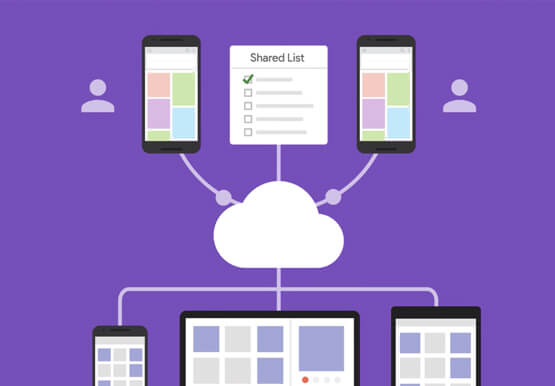
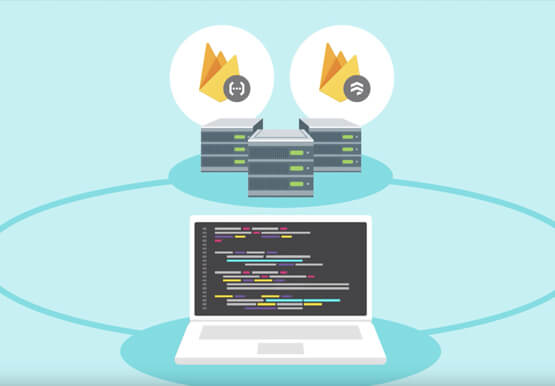
Cloud Firestore is a NoSQL document database that simplifies storing, syncing, and querying data for your mobile and web apps at global scale. Cloud Firestore is a fast, fully managed, serverless, cloud-native NoSQL document database that simplifies storing, syncing, and querying data for your mobile, web, and IoT apps at
