





Discover Gen App Builder: Transform Search and Conversational Experiences Through Generative AI

1246
Of your peers have already read this article.
3:30 Minutes
The most insightful time you'll spend today!
If you’ve been exploring recently-launched consumer generative AI tools like Bard and thinking about how to build similar experiences for your business, Generative AI App Builder, or Gen App Builder for short, is here to get you started.
Gen App Builder is part of Google Cloud’s recently announced generative AI offerings and lets developers, even those with limited machine learning skills, quickly and easily tap into the power of Google’s foundation models, search expertise, and conversational AI technologies to create enterprise-grade generative AI applications.
“Google Cloud’s leading AI technology enables STARZ customers to discover more relevant content, increasing engagement with, and the likelihood of completing the content served to them,” says Robin Chacko, EVP Direct-to-Consumer, STARZ. “We’re excited about how generative AI-powered search will help users find the most relevant content even easier and faster.”
Gen App Builder is exciting because unlike most existing generative AI offerings for developers, it offers an orchestration layer that abstracts the complexity of combining various enterprise systems with generative AI tools to create a smooth, helpful user experience. Gen App Builder provides step-by-step orchestration of search and conversational applications with pre-built workflows for common tasks like onboarding, data ingestion, and customization, making it easy for developers to set up and deploy their apps. With Gen App Builder developers can:
- Build in minutes or hours. With access to Google’s no-code conversational and search tools powered by foundation models, organizations can get started with a few clicks and quickly build high-quality experiences that can be integrated into their applications and websites.
- Combine the power of foundation models with information retrieval to find relevant, personalized information. Enterprises can build apps that understand user intent via natural language, and surface the right information with associated citations and attributions from a company’s public and private data. They can also fully control what data their applications access and the content or topics they want to address.
- Build multimodal apps that can respond with text, images, and other media. Gen App Builder supports not just text, but also other modalities such as images and videos. It allows developers to build apps using a combination of text and images as inputs to find information across documents, photos, and video content, enabling richer customer interactions.
- Combine natural conversations with structured flows. Developers can granularly blend the output of foundation models with controls to ground answers in enterprise content, and step-by-step conversation orchestration to guide customers to the right answers.
- Provide the ability to transact and connect to third party apps and services. Gen App Builder makes it simple to create digital assistants and bots that not only serve content, but also connect to purchasing and provisioning systems to enable transactions from the conversational UI, and escalate customer conversations to a human agent when the context demands.
A new generation of conversational AI experiences and assistants
Consumers of enterprise applications expect to interact with technology in a seamless, conversational way to quickly find the information they need and act on it. Gen App Builder can help reinvent these customer and employee experiences by ingesting large, complex datasets that are specific to your company–from websites, documents, and transactional systems like billing and inventory, to emails, chat conversations, and more. These AI-powered apps can synthesize information across all of these sources to provide specific, actionable responses, using only the data you have provided.
Some of the most popular uses are in customer service, where generative apps can contribute to increasing revenue, customer satisfaction, and customer loyalty. For example, if a retail customer reaches out to modify an order, a virtual agent can help them change it to another product. The customer doesn’t even need to provide the new product name—they can just upload an image and let the agent guide them through the rest. Watch this demo to see how a retail chatbot can use multimodal capabilities to help a consumer navigate various options on the website, including giving the customer ideas on how to use the product and even helping them complete the purchase with the ability to transact within the conversational UI. This scenario could apply to multiple industries and use cases, ranging from consumer goods and public services, to finance and internal corporate systems like intranets.
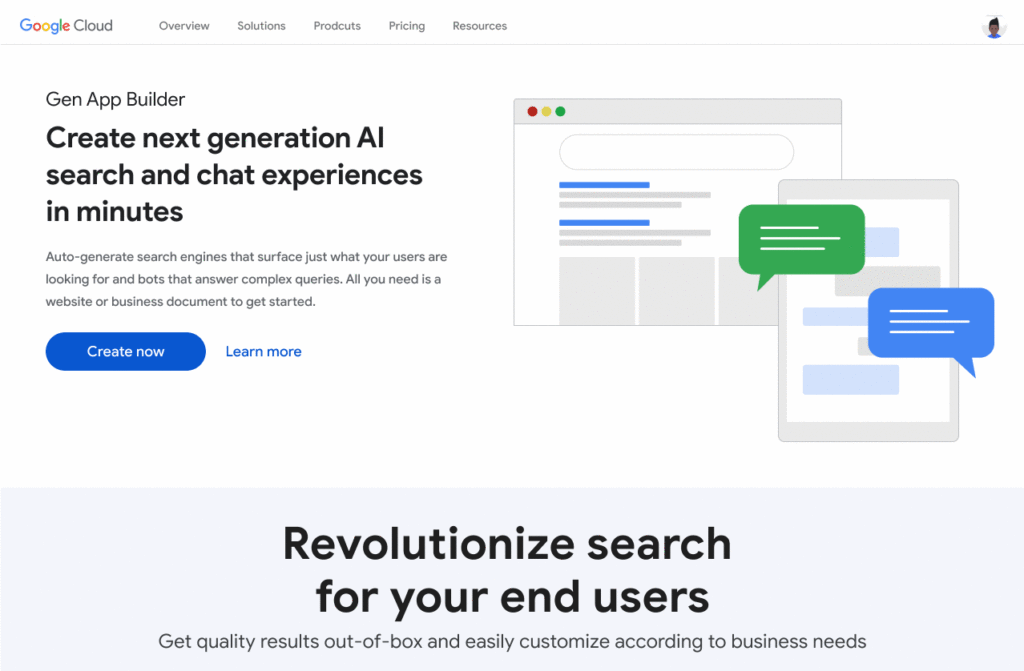
Combining the power of Google-quality search with foundation models
Finding the right information from data across the organization is a critical requirement within any enterprise. Yet it can be challenging to build high-quality enterprise search experiences with existing tools. Current systems struggle to understand user intent, are difficult to implement and customize, and don’t provide a high-quality user experience.
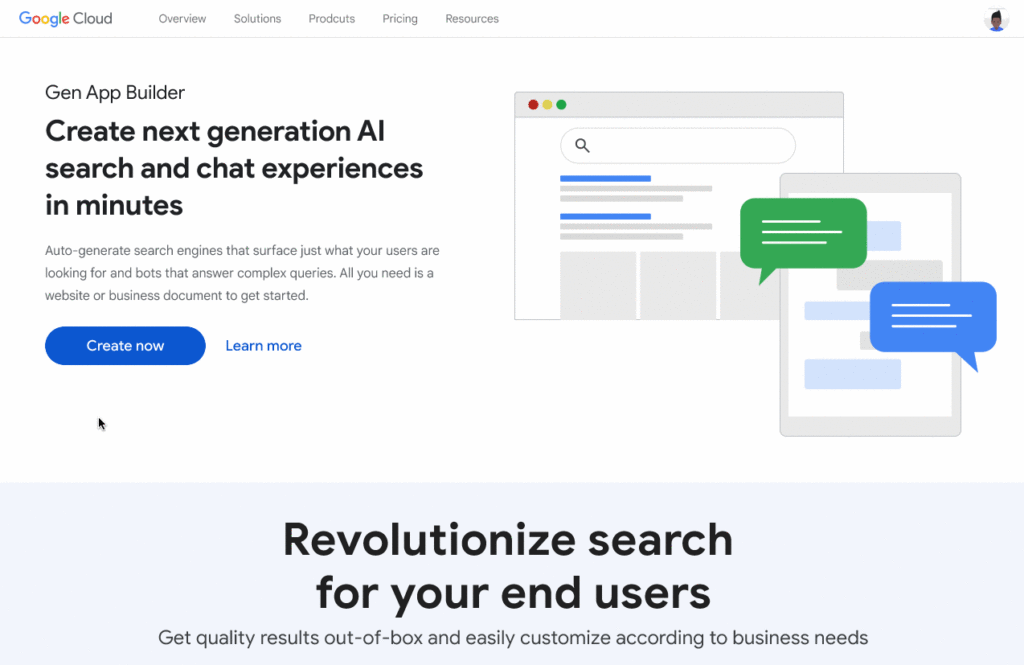
One of the most exciting features of Gen App Builder is the ability to combine the power of Google-quality search with generative AI to help enterprises find the most relevant and personalized information when they need it. With Gen App Builder, enterprises can build conversational search experiences across their public and private data in minutes or hours with no coding experience.
Enabling multimodal search across text, images and video within the enterprise is a key aspect of the search experiences in Gen App Builder. In addition to providing high-quality search results, Gen App Builder can conveniently summarize the results and provide corresponding citations in a natural, human-like fashion. Gen App Builder also automatically extracts key information from the data and enables personalized results for users. Watch this demo to see how these capabilities can come together to transform the search experience for employees at a financial services firm. The ability to integrate Google-quality search within the enterprise’s applications means they can enjoy a new level of data utilization, drive increased process efficiencies, and provide delightful experiences to their employees and customers.
“Customers have been shopping at Macy’s for generations. Being able to deliver 360° personalization and contextual recommendations will help ensure that Macy’s is still providing future generations of shoppers with a seamless, exceptional experience,” said Bennett Fox-Glassman, Senior Vice-President, Customer Journey, Macy’s. “We’ve already realized an increase in revenue per visit and conversion rates had great success using Google Cloud’s AI technology and are looking forward to exploring how these latest announcements bring together Natural Language Processing and Generative AI capabilities to deliver next-gen search and conversational experiences for our customers.”
The ability to intuitively interact with complex data across a variety of sources allows organizations to better serve their customers and deliver more relevant offerings. Combined with conversational and fulfillment abilities, the potential for improving customer engagement and employee productivity is immense. We’re excited to see how developers and enterprises use a mix of these capabilities to power new experiences and revenue opportunities.
If you’re interested in a closer look at the Gen App Builder, tune into this session at the Data Cloud & AI Summit. Take a step forward to getting hands-on and join the waitlist for our trusted tester program. And finally, bookmark our generative AI landing page to keep abreast of the latest news, updates and possibilities from this exciting new world of Gen Apps.
3089
Of your peers have already watched this video.
24:30 Minutes
The most insightful time you'll spend today!
Creating Value With the Breadth and Depth of AI Platform
Watch Craig Wiley, Director of Product Management – Google Cloud, as he breaks down and simplifies AI for enterprises and the adoption of AI.
“As I think about AI, fundamentally AI only does two things. One it helps you grow your market, increase subscribership, increase users, increase their spend or increase their conversion. Or it helps you in the back-end. It can drive efficiencies, reduce costs and drive out waste from the system.
He also talks about how customers have unlocked the power of data by utilizing Google’s AI Platform. From APIs to AutoML to writing your own model code, he will show real-world examples of how customers create value, and critical tips on how to accelerate your own AI journey.
Finally, he will show how can Google Cloud maps business strategy to the right AI absorption strategy and the different ways that Google Cloud can help you deploy AI without compromising flexibility speed, quality or scale.
Home Depot’s Interconnected Retail Experience by Virtue of Google Cloud Migration for SAP Applications

8255
Of your peers have already read this article.
1:30 Minutes
The most insightful time you'll spend today!
With nearly 2,300 stores, The Home Depot is the world’s largest home-improvement chain — a brand that professional contractors and DIYers alike have come to depend on. The home improvement industry continues to experience unprecedented demand and dramatic increases in online ordering accompanied by expanding consumer expectations for things like curbside pickup and same day delivery. The Home Depot’s decision to migrate to cloud-based infrastructure, including the migration of the company’s SAP applications on Google Cloud which began in 2017, has set it up for success in an increasingly digital world, and helped the company adapt to changing market conditions quickly.
Interconnected retail at scale
Building on a strong customer-first philosophy, The Home Depot aims to create what it calls interconnected retail—allowing customers to shop however, whenever, and wherever they want. “So many companies are focused on omni-channel retail,” explains Sam Moses, Vice President of Corporate Systems. “At The Home Depot, we wanted to take it to the next level. Interconnected retail puts the customer at the center of everything and enables them to shop in store, online, or both. Customers can begin a transaction online and continue in-store, or vice-versa.”
To support this strategy, the company’s SAP environment needed to be more agile. Running everything on-premises, from central finance to POS systems, meant that The Home Depot’s IT teams experienced redundancy and repetitive, manual processes. Their data warehouse needed an upgrade to process and analyze growing and increasingly diverse data sets. The Home Depot chose to migrate its SAP environment to Google Cloud to support both the velocity and scale needed for the business as well as critical analytics capabilities needed for its bold digital initiatives. “We chose Google Cloud to support our SAP implementation. Our decision had a lot to do with the relationship between Google Cloud and SAP and also for the applications and services that are offered by Google Cloud, like BigQuery, which are helping to enable data and analytics within our organization,” Moses explains.
After migrating its SAP applications—including S/4HANA, its customer activity repository (CAR), general ledger, e-commerce system, enterprise data warehouse and more to Google Cloud, the company now has the speed, scale and flexibility to tackle enormous spikes in the business, all while staying fully available for their customers. Additionally, The Home Depot was able to transform its financial systems and make them more agile to deliver critical information across multiple business functions in real time.
Maximizing data insights to support customer experiences
By migrating to Google Cloud, The Home Depot is leveraging Google Cloud analytics to build the industry’s most efficient supply chain including more robust demand forecasting, supplier lead times, estimated delivery times and more, all while maintaining better security than before. “We experienced unprecedented change in our customers’ behavior and their buying patterns, which puts a lot of pressure on our supply chain,” explains Moses. “So having the ability to leverage data and analytics gives us insights to know exactly what it is that our customers need.”
The company’s analysts now use BigQuery ML for machine learning directly against the company’s BigQuery data and use AutoML to determine the best model for predictions. The Home Depot’s engineers have also adapted BigQuery to monitor, analyze, and act on application performance data across all its stores and warehouses in real time—capabilities that were not as seamless in the on-premises environment.
With hundreds of projects on Google Cloud, The Home Depot’s cloud journey is well on track, but the company is always looking to the future. “As our customers’ needs have continued to evolve, and as technology has continued to evolve, our relationship with Google will continue to advance — to be able to innovate together, to be able to find new solutions together, to better serve our customers.”
Learn more about how The Home Depot is renovating its retail operation with SAP on Google Cloud.
Leave the Tax Filing to ML: Lending Doc AI’s Automation Classifying and Parsing IT Documents

2986
Of your peers have already read this article.
3:00 Minutes
The most insightful time you'll spend today!
In the United States, Tax Season descends upon the country every April, requiring millions of Americans to spend hours deciphering cryptic documents and performing complex math just to figure out what they owe. Wouldn’t it be grand if there was a way for a computer to take all the relevant documents and extract out exactly what the IRS is looking for? Lending Document AI from Google Cloud supports common document types used for Income Tax Filing, such as W-2s and 1099s. These advancements in machine learning technology now makes it possible to alleviate some anxiety leading up to April 15th.
Lending Document AI is a Document Understanding solution that allows for classification and parsing of documents commonly used in the mortgage lending industry. The data in these unstructured files is then converted into a structured format, which can be stored in a database or used for analysis and calculations. You can read more about the product in the announcement blog post. For this tax filing use case, we will focus on automatically classifying and parsing the 2020 editions of the following forms:
W-2
1099-DIV
1099-INT
1099-MISC
1099-NEC
This sample application creates an automated pipeline where the user can bulk upload a collection of PDFs, the Lending Document Splitter & Classifier will classify each document and send each PDF to the appropriate specialized parser to extract the data, which can then be used to calculate an individual tax return and fill out a 1040 Form.
Overview
Let’s explore how this application works. You can check out the sample code in this GitHub Repository.
Here is an outline of the architecture of this application. As you can see, it utilizes Cloud Run and Firestore in Native Mode for the web application in addition to Document AI.
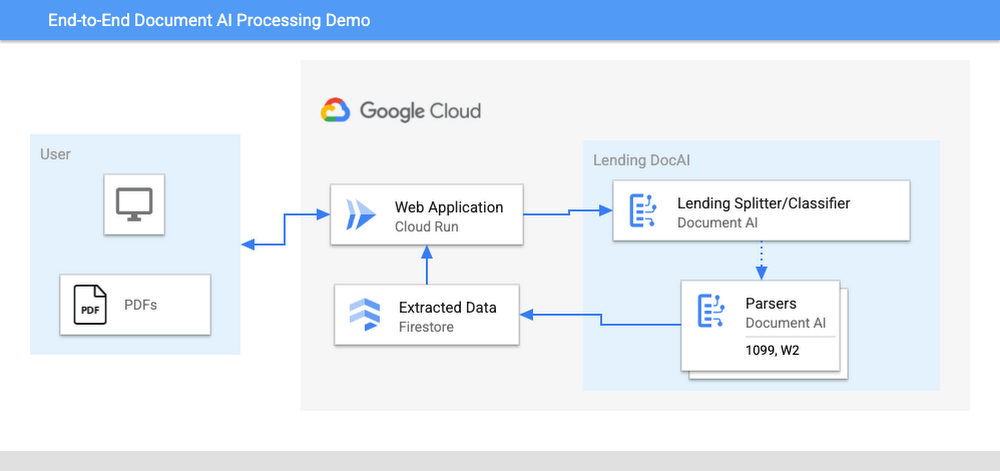
The User uploads multiple PDF files to the web application, hosted on Cloud Run.
An API call is made to the Lending Document Splitter & Classifier for each PDF file.
The output of the classifier (e.g. W-2, 1099-MISC, etc.) is then mapped to an appropriate specialized parser in the Google Cloud Project.
Each document file is sent to the appropriate specialized parser that matches the document type.
The entities are extracted by the parser processor and the data is written to Firestore.
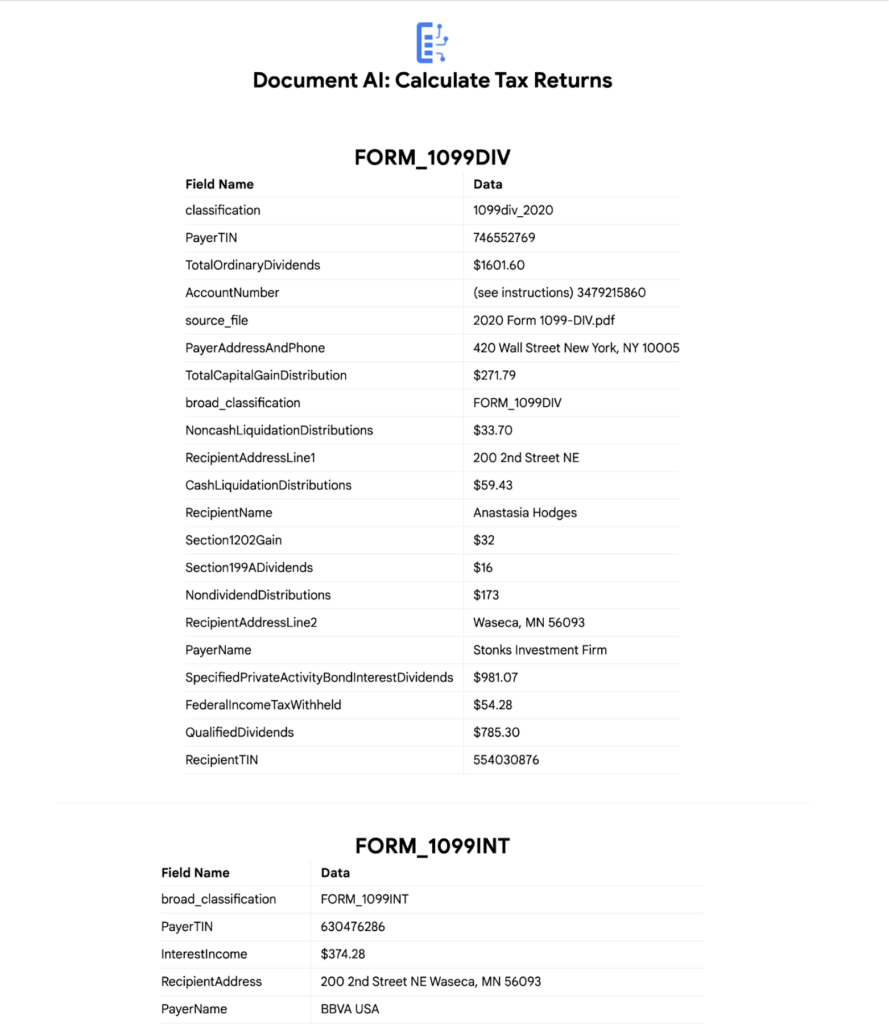
The raw data is now retrieved from Firestore and displayed to the User showing the file classification and extracted values from each form.
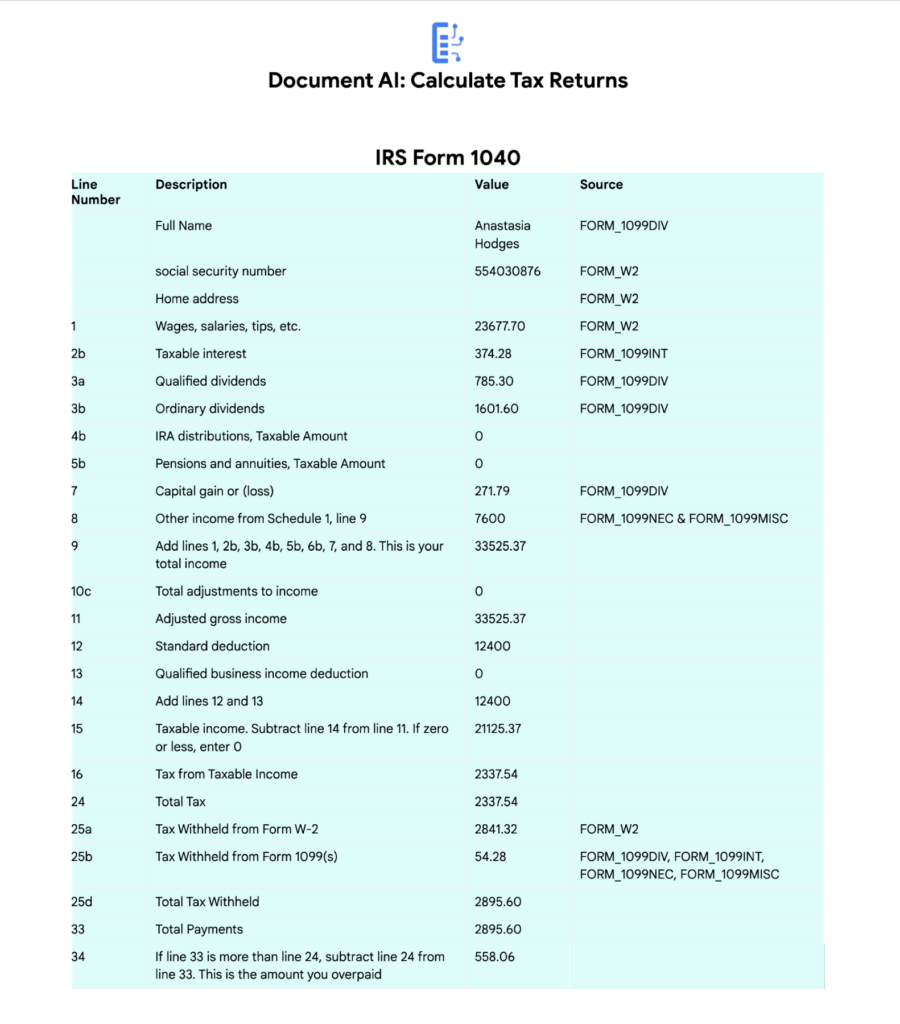
The data values from all the forms are used together to calculate an individual income tax return.
The Calculated Tax Rates/Incomes/Deductions are displayed to the User in a Tabular Format matching the IRS Form 1040. The app also displays which form data was used for each field. (Some output fields use values from multiple forms, such as line 25b.)
Step-by-Step directions
Want to try this out for yourself? Here’s how you can deploy and run this application using a Google Cloud Project. You can run this in Cloud Shell (Quickstart) or on your local machine.
NOTE: The Lending Processors in this Demo are in Limited GA as of March 2022. If you have a business use case for these processors, you can fill out and submit the Document AI limited access customer request form.
Install dependencies
- Clone the GitHub Repository to get the sample code.
git clone https://github.com/GoogleCloudPlatform/document-ai-samples.git
- Enter the directory for the tax pipeline demo
cd document-ai-samples/tax-processing-pipeline-python
- Install Python and the Google Cloud SDK if they aren’t already installed.
- Install the python libraries:
pip install -r requirements.txt
- Create a new Google Cloud project, and enable billing if you don’t already have one.
- Enable the Document AI API:
gcloud services enable documentai.googleapis.com
- Setup application default credentials:
gcloud auth application-default login
Deploy demo application
- Edit the config.yaml file, adding your own Project Details docai_processor_location: us # Document AI Processor Location (us OR eu)
docai_project_id: YOUR_PROJECT_ID # Project ID for Document AI Processors
firestore:
collection: tax_demo_documents # Set with your preferred Firestore Collection Name
project_id: YOUR_PROJECT_ID # Project ID for Firestore Database - Run setup scripts to create the processors and Cloud Run app in your project. python3 setup.py
gcloud run deploy tax-demo –source . - Visit the Deployed Web Page (You should get a link from the deployment command)
Calculate Tax Returns Homepage
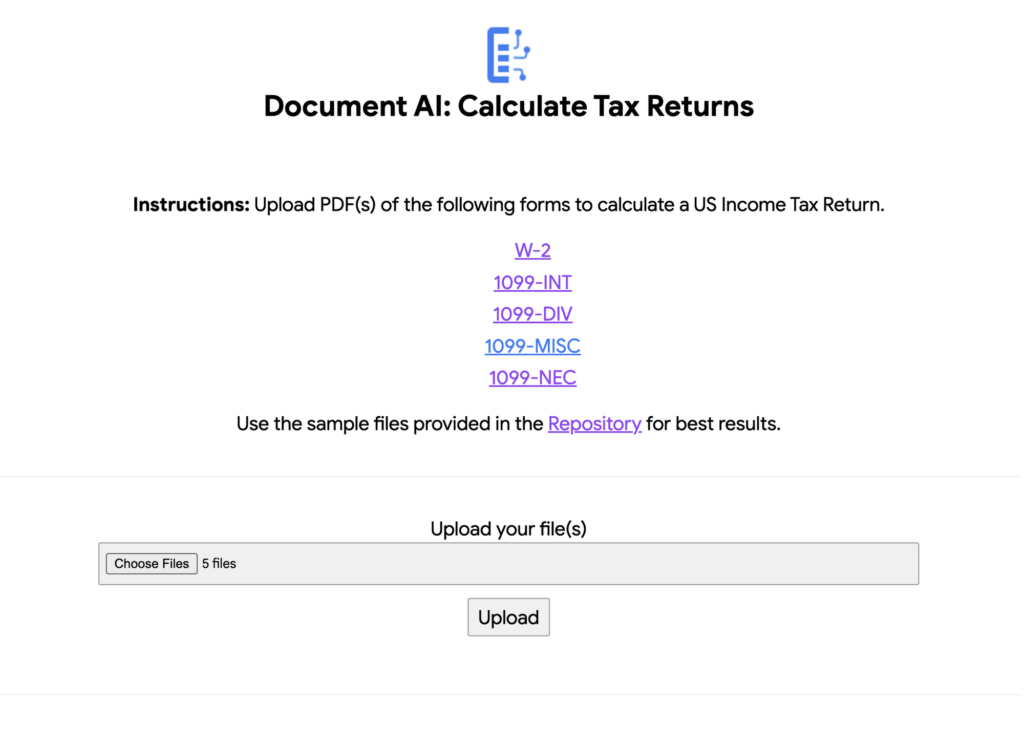
- Upload Documents. I created some sample documents you can download from the sample-docs folder of the repository.
This demo currently supports the following Document Types (2020 Editions)
W-2
1099-DIV
1099-INT
1099-MISC
1099-NEC
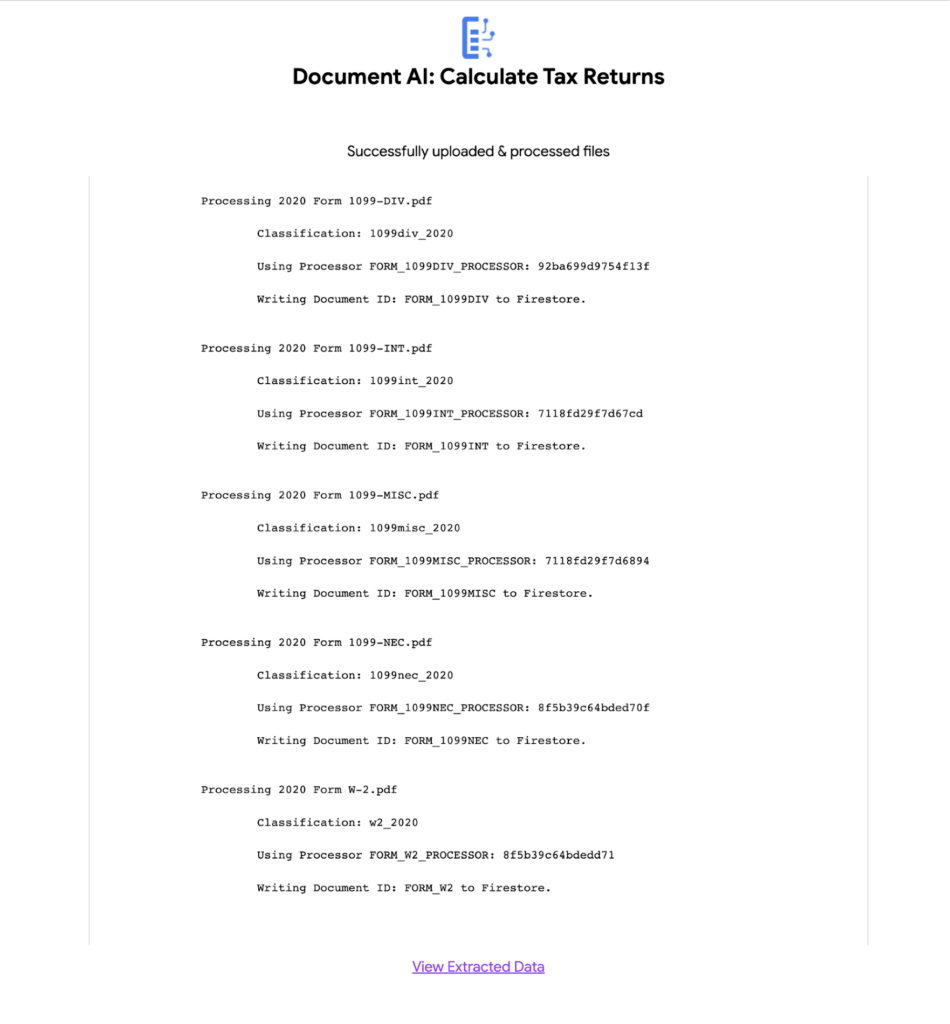
- Click “Upload” Button, wait for processing to complete.
The page will display the steps completed for each document file. These are also written to stdout for troubleshooting purposes.
6. View the extracted values from each file.
7. Click “Calculate Taxes” to see the tax calculation output
Conclusion
Warning: This is NOT financial advice, for educational purposes only.
Congratulations! You now have a fully functional tax processing application that can also be modified for use with other workflows that require data from multiple specialized documents.
The Document AI API is flexible and modular enough that most of the code in this example can be reused for any specialized processor.
Now tax returns can be filed with minimal manual effort!
If you want to learn more about Document AI, check out the Cloud Documentation and these videos:
- Getting started with the Document AI platform
- Process billions of pages and cut operational costs with DocAI
And if you want more hands-on experience, I recommend following these step-by-step codelabs to get started with the key features of Document AI:
4630
Of your peers have already watched this video.
46:44 Minutes
The most insightful time you'll spend today!
Breaking Down AI for IT Leaders: The No-Nonsense Guide
What is machine learning and, critically, what kinds of problems can it solve? It’s an important question, one that forms the fundamental basis of any AI initiative.
Here’s how the Google Cloud thinks about machine learning: It’s about logic, rather than just data.
Valliappa Lakshmanan, Big Data and Machine Learning, Google Cloud Platform, describes why such a framing is useful when it comes to devising new applications for ML and how to utilize it to expand the capabilities of your business.
From Lakshmanan perspective watching many companies in many industries leverage machine learning, he observes how abstraction levels of machine learning are increasing, how data comprehensiveness is becoming more important than data size and why systems can often build on top of preexisting models.
Lakshmanan also speaks about how your IT infrastructure has to change to enable you to take full advantage of machine learning and achieve tremendous business impact and personalization.
3304
Of your peers have already watched this video.
19:00 Minutes
The most insightful time you'll spend today!
Breakthrough Insights Across the Life Sciences Value Chain
New science and patient centricity require increasing reliance on data and deeper insights.
Accenture’s life sciences customers have been demanding answers to this need, and want a solution with an open platform.
Enter INTIENT, Accenture’s life sciences platform that is powered by Google Cloud.
INTIENT generates insights throughout the life sciences value chain from early research through pivotal clinical trials all the way through to delivering care to patients.
In this video, Kevin Julian, Senior Managing Director, Life Sciences, Accenture and Michael Stapleton, Senior Industry Executive, Accenture, discuss enables ground-breaking possibilities through applied intelligence, including the development of personalized therapeutics tailored to a patient’s genetic makeup, the utilization of real world data/evidence in clinical trials, better identification of patients for trials, development of digital therapeutics, and improved patient outcomes — in other words, better regimen adherence.
More Relevant Stories for Your Company

How to Build A Basic Image Search Utility for Natural Language Queries
This post shows how to build an image search utility using natural language queries. Our aim is to use different GCP services to demonstrate this. At the core of our project is OpenAI's CLIP model. It makes use of two encoders - one for images and one for texts. Each encoder

ShareChat Builds its Diverse, Hyperlocal Social Network. Thanks to Google Cloud
Editor’s note: Today’s guest post comes from Indian social media platform ShareChat. Here’s the story of how they improved performance, app development, and analytics for serving regional content to millions of users using Google Cloud. How do you create a social network when your country has 22 major official languages and

Measuring Deforestation in Extractive Supply Chains With ML
Introduction In my experience, I have observed that it’s common in machine learning to surrender to the process of experimenting with many different algorithms in a trial and error fashion, until you get the desired result. My peers and I at Google have a People and Planet AI YouTube series

Smooth AI Adoption for Companies involves Three Principled Phases!
Business leaders see much in Artificial Intelligence, including new ways to save money, serve customers, and figure out what to build. What's often tougher is deciding how to engage. That's understandable, since getting into AI often raises questions about costs, data integrity, project length, and similar issues of planning and
