





Delivering 10X Improvement to Risk and Regulatory Reporting Through Cloud and AI
4994
Of your peers have already read this article.
2:30 Minutes
The most insightful time you'll spend today!
Enterprise agility and the ability to innovate, adapt and respond quickly to the ever-changing risk and regulatory landscape is no longer a choice, but the cornerstone of successful digital transformation and commercial growth. Traditional access to and ways of managing data invariably create challenges in dealing with multiple data repositories, reconciliations, fire-drills, etc.
In response, the move to cloud is increasing significantly. It enables risk analytics and regulatory reporting at scale in a secure environment with data storage, management and encryption capabilities as a standard. In addition, as regulatory reporting requirements become more granular, machine learning can help facilitate new insights and allow for risk management to become more embedded into operational processes.
This webinar will address the day-to-day challenges in risk management and regulatory compliance, while also exploring how technological innovations can provide massive improvements and potential.
Key themes
- Real-life data challenges in the eyes of risk managers: can compliance, fraud detection and identifying liquidity positions be improved through the use of AI?
- Innovative approaches to streamline regulatory reporting to derive deeper customer insights from data at the moment of truth.
- Reimagining operations: how to modernise the data infrastructure to accommodate data explosion, drive flexibility and deliver a more cost effective outcome.
1116
Of your peers have already watched this video.
29:16 Minutes
The most insightful time you'll spend today!
Navigating the AI Landscape: The Future of AI for ML Engineers
A podcast-style video series exploring how AI is shaping our future and how to prepare for changes. Developer advocate, Arwen Hauzhenga, shares his 10+ years of experience in machine learning and generative AI. He discusses the evolution of the field from data mining to data science and large-scale machine learning.
The video contains:
✦ Key developments in AI witnessed over the years
00:00
✦ Democratization of AI is making it more accessible to non-specialists
03:58
✦ AI and ML are leading towards worry-free infrastructure for model training and deployment
08:11
✦ Key pointers for building responsible AI systems
11:53
✦ Identifying the right use case and leveraging capabilities are crucial for successful AI implementation
15:33
✦ Learning machine learning doesn’t require being an expert
19:04
✦ Identifying the right use case and aligning with stakeholders is key to successful AI implementation
22:22
✦ Interacting with technology is changing significantly with AI
25:37
AI-powered Business Messages for Timely, Engaging and Helpful Conversations with Customers

9374
Of your peers have already read this article.
2:00 Minutes
The most insightful time you'll spend today!
Over the last two years, we’ve seen a significant uptick in the number of people using messaging to connect with businesses. Whether it was checking hours of operation, verifying what was in stock, or scheduling a pick-up, the pandemic caused a significant shift in consumer behavior.
- 45% of users are spending more time on messaging services because of the pandemic
- 85% of consumers would like to message brands directly
With the rise in demand for messaging, consumers expect communication with businesses to be speedy, simple, and convenient. For businesses, keeping up with customer inquiries can be a labor-intensive process, and offering 24/7 support outside of store hours can be costly.
To help businesses seamlessly deliver helpful, timely, and engaging conversations with customers when and where they need help, we introduced AI-powered Business Messages.
https://youtube.com/watch?v=fcgP3RHjBLY%3Fenablejsapi%3D1%26
What is AI-powered Business Messages?
With AI-powered Business Messages, you can connect with your customers in their moment of need, in the places they’re looking for answers—such as Google Search, Google Maps, or any brand-owned channel. For instance, check out how Walmart customers in the US are able to receive real-time information on product availability, straight from a search results page.
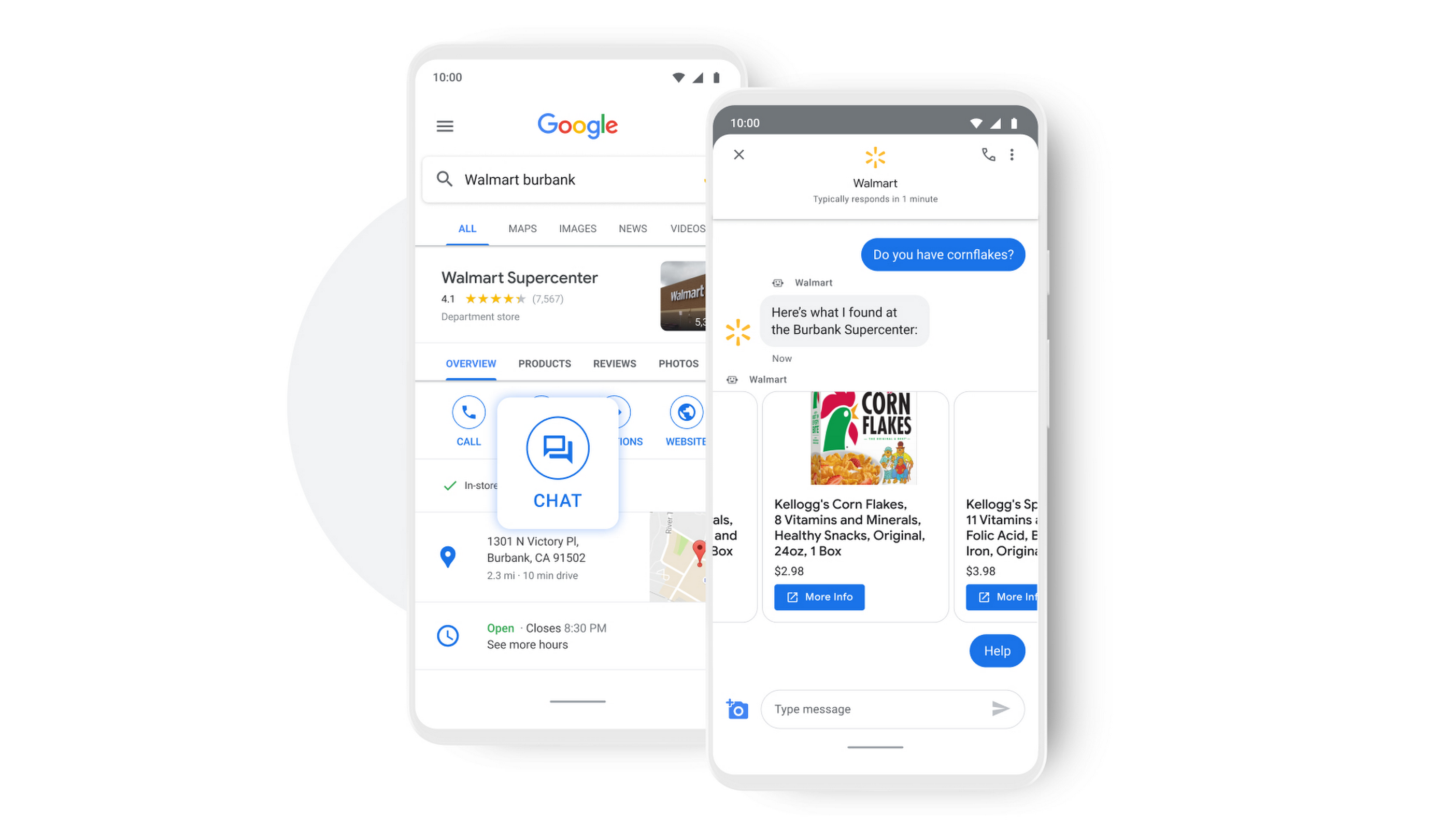
People turn to Google when they are searching for answers to their questions, looking to buy something, or trying to accomplish a particular task with one of our many tools. In fact, 68% of all online experiences begin with a search engine.
At Google, we know how important it is for interactions with a brand to be personalized, helpful, and simple. With AI-powered Business Messages, customers are able to chat with virtual agents that understand, interact, and respond in natural ways.
We are also combining smart automation with the ability for customers to chat with live agents when it’s really needed. This approach saves your customers precious time, while also saving you money. And with Business Messages automatically handling many customer inquiries in the background, businesses have the option to distribute their human customer service agents to address other needs.
Getting started with conversational AI is easy with Bot-in-a-Box
We know it can be difficult to get started with AI. That’s why we are utilizing existing Google AI tools like Dialogflow—part of Google Cloud Contact Center AI—to create the capability within Google’s Business Messages called Bot-in-a-Box, which makes getting started with Conversational AI easy. Bot-in-a-Box allows for fast and effective adoption of automation for businesses of all sizes.
Enabling Business Messages with Bot-in-a-Box can be as simple as leveraging an existing customer FAQ document you already have, whether it’s from a web page or an internal document. And since the conversational AI is powered by Business Messages and Dialogflow working together, your chat bot is able to understand and respond to customer questions automatically without the need to write code.
Bot-in-a-Box also supports other critical journeys like “Custom Intents.” That means that your bot is able to understand the different ways customers express a similar question and respond accurately by using machine learning capabilities.

Finding success
In April 2021, Wake County courthouses in North Carolina partnered with Tango Technology to implement Business Messages when it became apparent that being able to provide the public and attorneys with around-the-clock access to information would significantly reduce the pressure on courthouse staff. Using Bot-in-a-Box, Tango Technology was able to customize a solution for Wake County Courthouse, Justice Center, and Clerk of Superior Court in just four days.
“With the combination of Google’s Business Messages, GCP, and Dialogflow, we were able to spin up an AI-driven bot for the courts in days. And the technology stack allows us to continually improve by adding functionality in an agile process.”— Mike Lotz, Co-Founder, Tango Technology
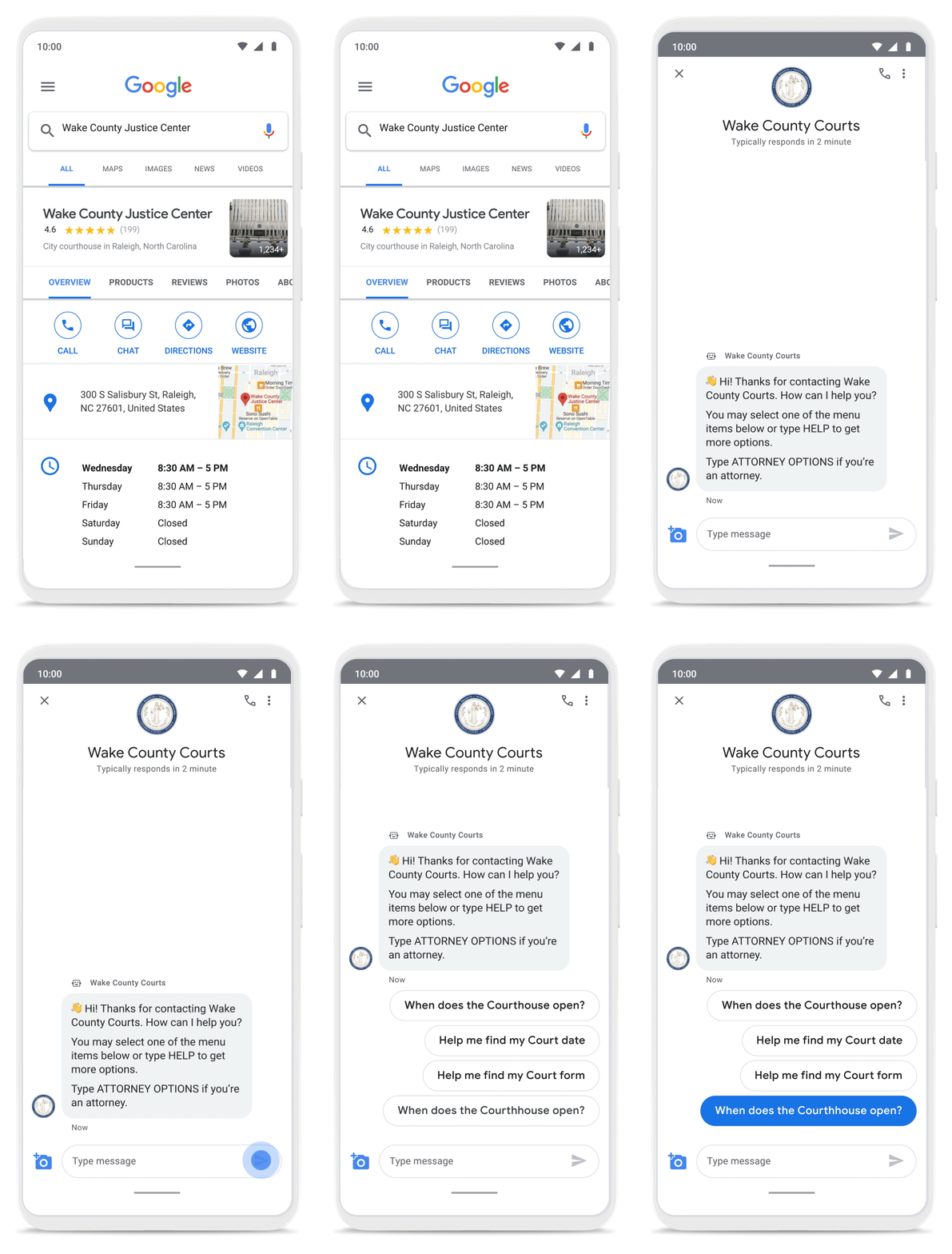
With Business Messages, North Carolina courthouses saw a 37% decrease in the call volume handled by courthouse staff. With 398,298 fewer phone calls during the first year of operation, the AI-based messages helped Wake County Courthouse work more efficiently and productively.
We’ve seen many brands benefiting from AI-powered Business Messages. For instance, Levi’s saw a 30% increase in off-hours shoppers and surpassed 85% customer satisfaction scores after implementing Business Messages. They also drove 30x more store-related questions than Levi’s website chat.
Bring Google’s conversational AI to your storefront with Business Messages
Google’s Business Messages makes it easier for businesses of all sizes to engage their existing or potential customers in a virtual conversation, when and where they need it.
To learn more, watch our Cloud Next session here or visit us at g.co/businessmessages. We have specialized services to help you get started and can share the wisdom of our channel partners and dedicated experts who specialize in unleashing the potential of conversational AI.
IT Team Figures Out Easiest Way to Build Data Pipelines and Create ML Models

14092
Of your peers have already read this article.
5:15 Minutes
The most insightful time you'll spend today!
Building a strong brand in today’s hyper-competitive business environment takes vision. It also requires a flexible, easily managed approach to digital asset management (DAM), so marketing professionals and other stakeholders can easily share, store, track, and manipulate assets to build the brand.
Many of today’s leading companies, including JetBlue, Slack, TripAdvisor, Lyft, and HealthONE, rely on Brandfolder to deliver consistent, organized, and efficient brand experiences. Brandfolder provides an easy-to-use platform that can scale across an entire company with little end-user training, empowering customers to distribute digital assets wherever they are needed. Customers also gain much greater insight into how those assets are used, and how to use them more effectively in marketing campaigns and brand messaging.
“Google Cloud made it easy to build an ML platform to quickly iterate through different brand intelligence use cases and release data-driven product features into the Brandfolder platform.”
—Ajay Rajasekharan, Head of Data Science, Brandfolder
Brandfolder is constantly advancing its development efforts to introduce new data-driven features without complicating the user experience. Big data, artificial intelligence (AI), and machine learning (ML) are key to meeting customers’ unique business needs, and essential for Brandfolder to compete in the fast-moving DAM industry. To enhance these capabilities, Brandfolder sought a public cloud provider that could help it scale its data pipeline cost effectively while providing access to advanced AI technologies.
After graduating from the Techstars startup accelerator program in 2013, Brandfolder tried two other cloud providers before standardizing on Google Cloud Platform (GCP).
“We saw a difference with Google Cloud from the very beginning because the interactions felt like a strategic relationship,” says Jim Hanifen, Head of Product at Brandfolder. “Google gave us startup credits and a lot of face-to-face support, which we hadn’t experienced with other cloud providers. We decided to move our entire infrastructure to Google Cloud Platform.”
Building an ML platform for brand intelligence
After performing an initial lift-and-shift migration of virtual machines (VMs) onto Compute Engine, Brandfolder built an ML platform using GCP managed services to seamlessly deliver its data products. The platform leverages Cloud SQL, Cloud Storage as the data lake, Cloud Dataproc for cloud-native Apache Spark computing clusters, Cloud Composer as the batch job scheduler, Cloud Pub/Sub as the backbone data pipeline, Container Registry to store Docker images, and Google Kubernetes Engine (GKE) as the application orchestrator. Cloud Dataflow brings data into the data lake and into BigQuery for analysis.
“Google Cloud made it easy to build an ML platform to quickly iterate through different brand intelligence use cases and release data-driven product features into the Brandfolder platform,” says Ajay Rajasekharan, Head of Data Science at Brandfolder, who describes the architecture in a detailed blog. “We simply ingest raw application and event data on one end and output an ML service on the other.”
“Moving to Google Cloud Platform allows us to complete more sophisticated data analysis and ML models much faster, and at a much lower cost. We can create brand-specific ML models 12x faster and get them into production quickly to address our customers’ unique business needs.”
—Brett Nekolny, Head of Engineering, Brandfolder
For many general use cases, Brandfolder does not need to build custom ML models, and instead relies on pre-trained API models from GCP. For example, it uses Vision API and Video Intelligence API to auto-tag creative assets on import to enable fast, intuitive searches across images and videos. When more product- and brand-specific modeling is required to address unique customer use cases, Brandfolder builds and trains custom ML models using its GCP pipeline or Cloud AutoML, a suite of products built on Google transfer learning and neural architecture search technology. For example, if a Brandfolder customer makes different types of grills, Brandfolder can use AutoML Vision to train a model to recognize the different grills.
“Moving to Google Cloud Platform allows us to complete more sophisticated data analysis and ML models much faster, and at a much lower cost,” explains Brett Nekolny, Head of Engineering at Brandfolder. “We can create brand-specific ML models 12x faster and get them into production quickly to address our customers’ unique business needs.”
Industry-leading security and performance
Google Cloud’s security model helps Brandfolder give existing and prospective customers peace of mind that their data will be protected. Cloud Identity & Access Management (Cloud IAM) provides enterprise-grade access control, while Cloud Identity-Aware Proxy (Cloud IAP) enables remote users to work more securely without the hassles of a VPN client. GCP also isolates cloud resources into projects, making it easy to assign permissions and keep data and VMs organized and segregated.
“With Google Cloud, everything begins and ends with security, which makes things very easy for us,” says Jim. “If we’re under a security review, we can submit a Google security white paper. If a potential customer has security concerns, we tell them we are hosted on GCP, and those concerns go away.”
To give customers even better application performance for accessing their brand assets, Brandfolder uses Cloud Memorystore, an in-memory data store service for Redis, to cache data and provide sub-millisecond data access for production applications.
“It was much easier for us to use Cloud Memorystore versus running Redis on our compute instances,” says Brett. “The high availability, replication across zones, and automatic failover with no data loss are big for us.”
Global private network interconnects between Google Cloud and the Fastly content delivery network (CDN) dramatically reduce latency, allowing Brandfolder’s customers to deliver and update even very large creative assets quickly around the world.
“What’s beautiful about the relationship between Google and Fastly is that if one of our customers uploads a new version of an asset, we can propagate that out to Fastly, and the new version will automatically show up in all the places where it’s referenced,” says Brett.
“The ability to quickly solve problems with AI has a substantial impact on our revenue, and that’s more apparent every quarter. Few of our competitors are doing product- or brand-specific modeling because it takes a lot of time and resources. We overcame those hurdles with Google Cloud.”
—Jim Hanifen, Head of Product, Brandfolder
Improving employee and customer productivity
Brandfolder also uses Google solutions for real-time collaboration and productivity, using G Suite to connect employees with intuitive, cloud-based apps. Teams use Gmail, Calendar, Docs, Drive, Sheets, Slides, and Hangouts Meet every day to move the business forward. Many of Brandfolder’s customers are also G Suite users, and Brandfolder offers a plug-in that allows them to view their creative assets inside of Docs and pull images in as needed. Customers can also log into Brandfolder with their G Suite credentials, making the solution even easier to use.
“We’ve been using G Suite since the beginning, and it’s helped us collaborate efficiently to build a successful, growing company,” says Jim. “Our teams expect to have that kind of close collaboration, and everyone here enjoys the G Suite experience.”
Driving 99 percent annual business growth
With automated tagging and other innovative AI-based features, Brandfolder is helping customers locate and distribute assets faster. As a result, Brandfolder is building customer loyalty and increasing sales, growing its business by 99 percent year-over-year. Since moving to GCP, Brandfolder has been able to scale its analytics and data pipeline 50x without a corresponding increase in costs and has not had to expand its development team.
“The ability to quickly solve problems with AI has a substantial impact on our revenue, and that’s more apparent every quarter,” says Jim. “Few of our competitors are doing product- or brand-specific modeling because it takes a lot of time and resources. We overcame those hurdles with Google Cloud.”
Master AI Prompt Engineering with 6 Proven Tips

1046
Of your peers have already read this article.
2:30 Minutes
The most insightful time you'll spend today!
As AI-powered tools become increasingly prevalent, prompt engineering is becoming a skill that developers need to master. Large language models (LLMs) and other generative foundation models require contextual, specific, and tailored natural language instructions to generate the desired output. This means that developers need to write prompts that are clear, concise, and informative.
In this blog, we will explore six best practices that will make you a more efficient prompt engineer. By following our advice, you can begin creating more personalized, accurate, and contextually aware applications. So let’s get started!
Tip #1: Know the model’s strengths and weaknesses
As AI models evolve and become more complex, it is essential for developers to comprehend their capabilities and limitations. Understanding these strengths and weaknesses can help you, as a developer, avoid making mistakes and create safer, more reliable applications.
For example, an AI model that is trained to recognize images of blueberries may not be able to recognize images of strawberries. Why? Because the model was only trained on a dataset of blueberry images. If a developer uses this model to build an application that is supposed to recognize both blueberries and strawberries, the application would likely make mistakes, leading to an ineffective outcome, and poor user experience.
It’s important to note that AI models have the ability to be biased. This is due to AI models being trained on data that is collected from the real world, and so it can reflect the inequitable power dynamics inherently rooted in our social hierarchy. If the data that is used to train an AI model is biased, then the model will also be biased. This can lead to problems if the model is used to make decisions that affect people by reinforcing societal biases. Addressing these biases is important to ensure that data is fair, promoting equality, and ensuring the responsibility of AI technology. Prompt engineers should be aware of training limitations or biases so they can craft prompts more effectively and understand what kind of prompting is even possible for a given model.
Tip #2: Be as specific as possible
AI models have the ability to comprehend a variety of prompts. For instance Google’s PaLM 2 can understand natural language prompts, multilingual text, and even programming codes like Python and JavaScript. Although AI models can be very knowledgeable, they are still imperfect, and have the ability to misinterpret prompts that are not specific enough. In order for AI models to navigate ambiguity, it is important to tailor your prompts specifically to your desired outcome.
Let’s say you would like your AI model to generate a recipe for 50 vegan blueberry muffins. If you prompt the model with “what is a recipe for blueberry muffins?”, the model does not know that you need to make 50 muffins. It is thus unlikely to list the larger volume of ingredients you’ll need or include tips to help you more efficiently bake such a large number of muffins. The model can only go off the context that is provided. A more effective prompt would be “I am hosting 50 guests. Generate a recipe for 50 blueberry muffins.” The model is more likely to generate a response that is relevant to your request and meets your specific requirements.
Tip #3: Utilize contextual prompts
Utilize contextual information in your prompts to help the model gain an in-depth understanding of your requests. Contextual prompts can include the specific task you want the model to perform, a replica of the output you’re looking for, or a persona to emulate, from a marketer or engineer to a high school teacher. Defining a tone and perspective for an AI model gives it a blueprint of the tone, style, and focused expertise you’re looking for to improve the quality, relevance, and effectiveness of your output.
In the case of the blueberry muffins, it is important to prompt the model using the context of the situation. The model might need more context than generating a recipe for 50 people. If it needs to be aware that the recipe must be vegan friendly, you might prompt the model by asking it to answer by emulating a skilled vegan chef.
By providing contextual prompts, you can help ensure that your AI interactions are as seamless and efficient as possible. The model will be able to more quickly understand your request and it will be able to generate more accurate and relevant responses.
Tip #4: Provide AI models with examples
When creating prompts for AI models, it is helpful to provide examples. This is because prompts act as instructions for the model, and examples can help the model to understand what you are asking for. Providing a prompt with an example looks something like this: “here are several recipes I like – create a new recipe based on the ones I provided.” The model can now understand the your ability and needs in order to make this pastry,
Tip #5: Experiment with prompts and personas
The way you construct your prompt impacts the model’s output. By creatively exploring different requests, you will soon have an understanding of how the model weighs its answers, and what happens when you interfuse your domain knowledge, expertise, and lived experience with the power of a multi-billion parameter large language model.
Try experimenting with different keywords, sentence structures, and prompt lengths to discover the perfect formula. Allow yourself to step into the shoes of various personas, from work personas such as “product engineer” or “customer service representatives,” to parental figures or celebrities such as your grandmother, a celebrity chef, and explore everything from cooking to coding!
By crafting unique, and innovative, requests replete with your expertise and experience, you can learn which prompts provide you with your ideal output. Further refining your prompts, known as ‘tuning,’ allows the model to have a greater understanding and framework for your next output.
Tip #6: Try chain-of-thought prompting
Chain of thought prompting is a technique for improving the reasoning capabilities of large language models (LLMs). It works by breaking down a complex problem into smaller steps, and then prompting the LLM to provide intermediate reasoning for each step. This helps the LLM to understand the problem more deeply, and to generate more accurate and informative answers. This will help you to understand the answer better and to make sure that the LLM is actually understanding the problem.
Conclusion
Prompt engineering is a skill that all workers, across industries and organizations, will need as AI-powered tools are becoming more prevalent. Remember to incorporate these five essential tips the next time you communicate with an AI model, so you can generate the accurate outputs that you desire. AI will forever continue to develop, constantly refining itself as we use it, so I encourage you to remember that learning, for mind and machine, is a never ending journey. Happy Prompting!
Sopra Steria’s Next-gen Virtual Voice Assistants Powered by Google’s AI and Cisco Contact Center by Activeo

3071
Of your peers have already read this article.
1:30 Minutes
The most insightful time you'll spend today!
With people expecting to access products and services through easy, always-on experiences delivered across channels, transforming approaches to digital services is a must for every business. As a result, business leaders have to strive to provide employees with these same frictionless experiences.
Sopra Steria is a European leader in consulting, digital services and software development, with 46,000 employees in 25 countries that generated revenue of €4.3 billion in 2020. It provides end-to-end solutions that help customers drive their digital transformation to obtain tangible and sustainable benefits, by combining in-depth knowledge of a wide range of business sectors and innovative technologies.
To accomplish its goals, Sopra Steria planned to use conversational artificial intelligence as part of their strategy and began working closely with Google Cloud, Cisco, and Activeo. It believed that, by building out more advanced Virtual Agents for its customers to use to serve them, it could usher in a new era of frictionless experiences in the End-User support services.
“To address customer demands for office and business applications support services, we looked to integrate a new generation of virtual voice assistant into our platform,” says Xavier Leroux, CTO End User Services at Sopra Steria. “We did this using Google’s proven AI and integrated it with our Cisco Contact Center by Activeo.”
As many companies have learned, the need to provide customers with advanced experiences is directly attached to the services offered to their employees. By providing more contextual information and other forms of digital support to staff, those same team members will be better positioned to serve customers.
Solving a complex problem with ease
Sopra Steria sought to solve several challenges for its customers, enabling them to:
- Provide all their employees with seamless, quick access to IT and business support,
- Offer 24/7 phone support capabilities for employees,
- Make services easily deployable, flexible, agile, and available in multiple languages,
- Reduce costs associated with delivering better support services.
Sopra Steria chose Google Cloud Contact Center AI (CCAI), built by Google Cloud and Cisco, as the best option to achieve its vision. Google Cloud CCAI is currently used in some of the world’s largest call centers, building on Google’s expertise in natural language processing.
Sopra Steria implemented CCAI as its new Virtual Assistant on phone channels managed by a Cisco telephony solution, and used Activeo for its integration and implementation support.
The new Virtual Assistant allows Sopra Steria clients to qualify employee requests and direct them to the right agent based on Natural Language Understanding while offering self-service options for basic requests such as password resets. These Virtual Assistants also fully automate complex incident tickets creation in synchronization within the IT service management system.
Google Cloud CCAI covers three main use cases:
- Autonomously handles full-length conversations using natural language,
- Augments operator support through contextual assistance through a desktop application based on live conversation analysis,
- Semantic analysis of all audio and text conversations processed by customer service through Google Cloud machine learning.
Cisco provides native integration of CCAI within its Cisco Contact Center solution as a part of its global partnership with Google Cloud.
“The work we have done with Google Cloud has allowed Sopra Steria to create innovative and personalized conversational services to enhance both employee satisfaction and operator productivity without sacrificing security,” says Christian Laloy, EMEA Contact Center Sales Specialist at Cisco.
Unlocking new, more powerful contact center experiences
Since standing up the new CCAI solution, Sopra Steria has been able to enhance its service catalog through Virtual Assistants. The offering has generated immense interest among existing and new Sopra Steria clients because it can simultaneously reduce average waiting and handling and resolution times while dramatically decreasing service costs.
“The Virtual Assistant serves both the user and operator alike,” says Xavier Leroux. “The user gets a conversational experience like no other and a seamless journey to resolve their requests. With Google Cloud, Cisco and Activeo, we have increased operator efficiency, so they can focus more on adding value to every business interaction.”
More Relevant Stories for Your Company

Conversational AI drives better customer experiences
Conversational AI is opening up a new world of possibilities in areas like customer experience, user engagement, and access to content. In Cloud AI, we’ve taken Google’s groundbreaking machine learning models in speech and natural language processing and applied them to the contact center space, radically improving the customer experience

Enabling Real-time AI with Streaming Ingestion in Vertex AI
Many machine learning (ML) use cases, like fraud detection, ad targeting, and recommendation engines, require near real-time predictions. The performance of these predictions is heavily dependent on access to the most up-to-date data, with delays of even a few seconds making all the difference. But it’s difficult to set up

Notebook Executor Feature of Vertex AI Workbench to Schedule Notebooks Ad Hoc or on Recurring Basis
When solving a new ML problem, it’s common to start by experimenting with a subset of your data in a notebook environment. But if you want to execute a long-running job, add accelerators, or run multiple training trials with different input parameters, you’ll likely find yourself copying code over to




How Marketers Can Turn Information into Action with Machine Learning
The biggest challenge marketers face with machine learning is, "how to get starter"? Instead of getting overwhelmed, they should focus on the applied machine learning by using the algorithms that are already built. Cassie Kozyrkov, the chief decision scientist with Google Cloud, says that marketers who are overwhelmed by everything
