





Cloud TPU v4: powerful and efficient ML infrastructure anywhere

2842
Of your peers have already read this article.
3:30 Minutes
The most insightful time you'll spend today!
Today, ML-driven innovation is fundamentally transforming computing, enabling entirely new classes of internet services. For example, recent state-of-the-art lage models such as PaLM and Chinchilla herald a coming paradigm shift where ML services will augment human creativity. All indications are that we are still in the early stages of what will be the next qualitative step function in computing. Realizing this transformation will require democratized and affordable access through cloud computing where the best of compute, networking, storage, and ML can be brought to bear seamlessly on ever larger-scale problem domains.
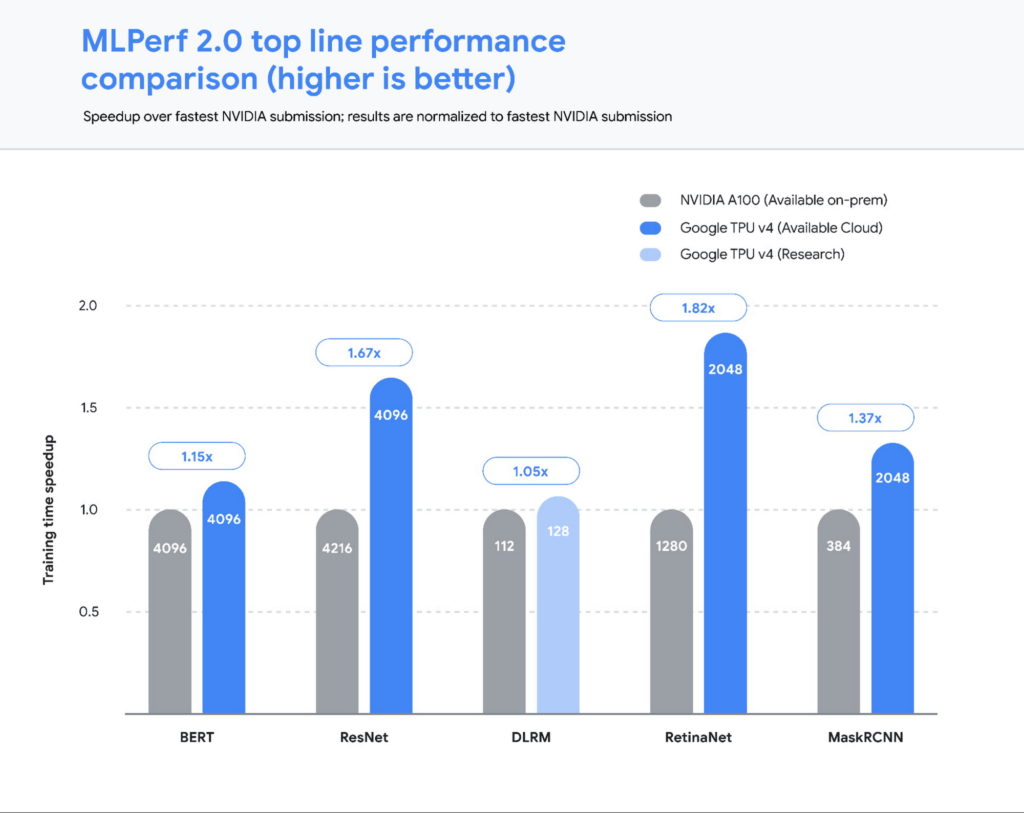
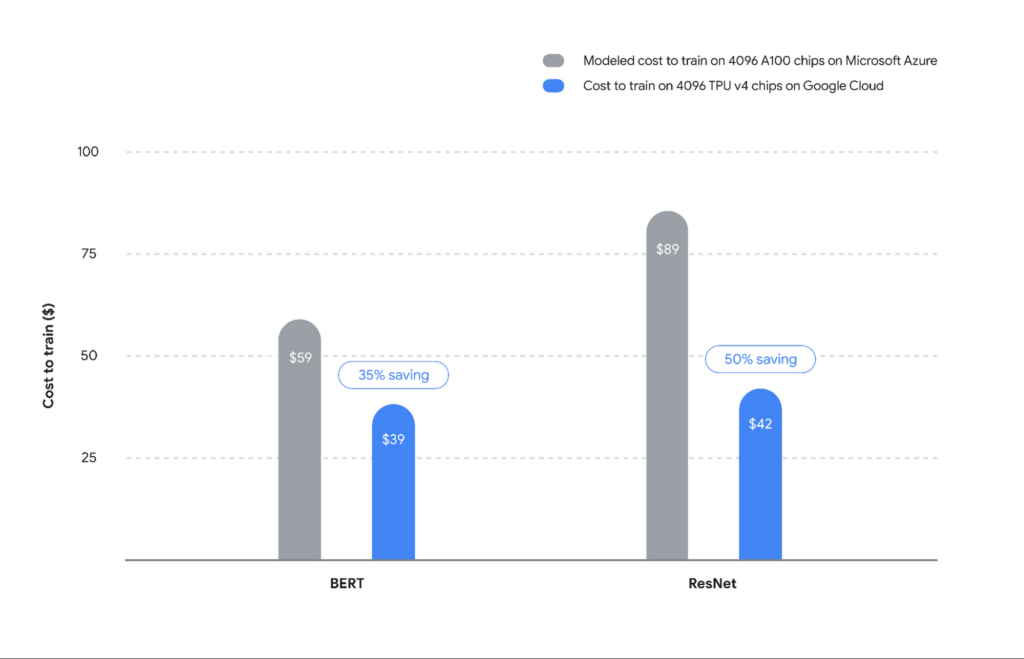
Today’s release of MLPerf™ 2.0 results from the MLCommons® Association highlights the public availability of the most powerful and efficient ML infrastructure anywhere. Google’s TPU v4 ML supercomputers set performance records on five benchmarks, with an average speedup of 1.42x over the next fastest non-Google submission, and 1.5x vs our MLPerf 1.0 submission. Even more compelling — four of these record runs were conducted on the publicly available Google Cloud ML hub that we announced at Google I/O. ML Hub runs out of our Oklahoma data center, which uses over 90% carbon-free energy.
Let’s take a closer look at the results.
Performance at scale…and in the public cloud
Our 2.0 submissions1, all running on TensorFlow, demonstrated leading performance across all five benchmarks. We scaled two of our submissions to run on full TPU v4 Pods. Each Cloud TPU v4 Pod consists of 4096 chips connected together via an ultra-fast interconnect network with an industry-leading 6 terabits per second (Tbps) of bandwidth per host, enabling rapid training for the largest models.
Hardware aside, these benchmark results were made possible in no small part by our work to improve the TPU software stack. Scalability and performance optimizations in the TPU compiler and runtime, including faster embedding lookups and improved model weight distribution across the TPU pod, enabled much of these improvements, and are now widely available to TPU users. For example, we made a number of performance improvements to the virtualization stack to fully utilize the compute power of both CPU hosts and TPU chips to achieve peak performance on image and recommendation models. These optimizations reflect lessons from Google’s cutting-edge internal ML use cases across Search, YouTube, and more. We are excited to bring the benefits of this work to all Google Cloud users as well.
Translating MLPerf wins to customer wins
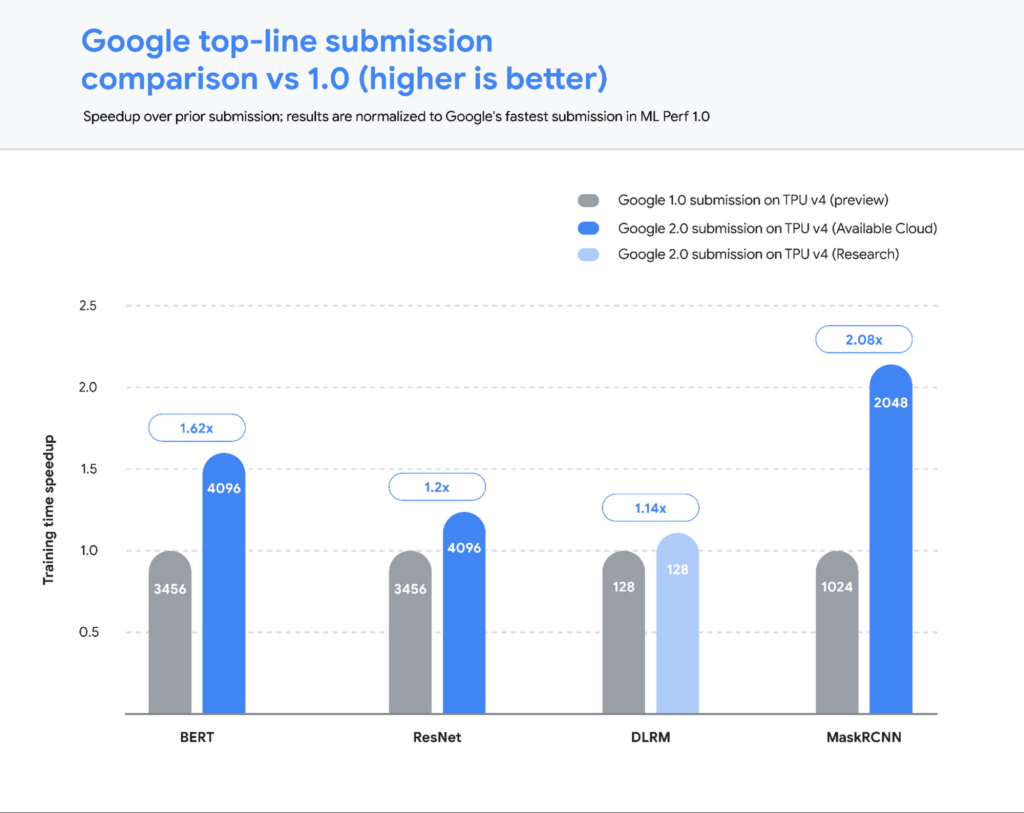
Cloud TPU’s industry-leading performance at scale also translates to cost savings for customers. Based on our analysis summarized in Figure 3, Cloud TPUs on Google Cloud provide ~35-50% savings vs A100 on Microsoft Azure (see Figure 3). We employed the following methodology to calculate this result:2
We compared the end-to-end times of the largest-scale MLPerf submissions, namely ResNet and BERT, from Google and NVIDIA. These submissions make use of a similar number of chips — upwards of 4000 TPU and GPU chips. Since performance does not scale linearly with chip count, we compared two submissions with roughly the same number of chips.
To simplify the 4216-chip A100 comparison for ResNet vs our 4096-chip TPU submission, we made an assumption in favor of GPUs that 4096 A100 chips would deliver the same performance as 4216 chips.
For pricing, we compared our publicly available Cloud TPU v4 on-demand prices ($3.22 per chip-hour) to Azure’s on-demand prices for A1003 ($4.1 per chip-hour). This once again favors the A100s since we assume zero virtualization overhead in moving from on-prem (NVIDIA’s results) to Azure Cloud.
The savings are especially meaningful given that real-world models such as GPT-3 and PaLM are much larger than the BERT and ResNet models used in the MLPerf benchmark: PaLM is a 540 billion parameter model, while the BERT model used in the MLPerf benchmark has only 340 million parameters — a 1000x difference in scale. Based on our experience, the benefits of TPUs will grow significantly with scale and make the case all the more compelling for training on Cloud TPU v4.
Have your cake and eat it too — a continued focus on sustainability
Performance at scale must take environmental concerns as a primary constraint and optimization target. The Cloud TPU v4 pods powering our MLPerf results run with 90% carbon-free energy and a Power Usage Efficiency of 1.10, meaning that less than 10% of the power delivered to the data center is lost through conversion, heat, or other sources of inefficiency. The TPU v4 chip delivers 3x the peak FLOPs per watt relative to the v3 generation. This combination of carbon-free energy and extraordinary power delivery and computation efficiency makes Cloud TPUs among the most efficient in the world.4
Making the switch to Cloud TPUs
There has never been a better time for customers to adopt Cloud TPUs. Significant performance and cost savings at scale as well as a deep-rooted focus on sustainability are why customers such as Cohere, LG AI Research, Innersight Labs, and Allen Institute have made the switch. If you are ready to begin using Cloud TPUs for your workloads, please fill out this form. We are excited to partner with ML practitioners around the world to further accelerate the incredible rate of ML breakthroughs and innovation with Google Cloud’s TPU offerings.
1. MLPerf™ v2.0 Training Closed. Retrieved from https://mlcommons.org/en/training-normal-20/ 29 June 2022, results 2.0-2010, 2.0-2012, 2.0-2098, 2.0-2099, 2.0-2103, 2.0-2106, 2.0-2107, 2.0-2120. The MLPerf name and logo are trademarks of MLCommons Association in the United States and other countries. All rights reserved. Unauthorized use is strictly prohibited. See www.mlcommons.org for more information.
2. MLPerf v1.0 and v2.0 Training Closed. Retrieved from https://mlcommons.org/en/training-normal-20/ 29 June 2022, results 1.0-1088, 1.0-1090, 1.0-1092, 2.0-2010, 2.0-2012, 2.0-2120.
3. ND96amsr A100 v4 Azure VMs, powered by eight 80 GB NVIDIA Ampere A100 GPUs (Azure’s flagship Deep Learning and Tightly Coupled HPC GPU offering with CentOS or Ubuntu Linux) is used for this benchmarking
4. Cost to train is not an official MLPerf metric and is not verified by MLCommons Association. Azure performance is a favorable estimate as described in the text, not an MLPerf result. Computations are based on results from MLPerf v2.0 Training Closed. Retrieved from https://mlcommons.org/en/training-normal-20/ 29 June 2022, results 2.0-2012, 2.0-2106, 2.0-2107.
AI in Manufacturing Already A Mainstream: Google Cloud Study

5691
Of your peers have already read this article.
3:00 Minutes
The most insightful time you'll spend today!
While the promise of artificial intelligence transforming the manufacturing industry is not new, long-ongoing experimentation hasn’t yet led to widespread business benefits. Manufacturers remain in “pilot purgatory,” as Gartner reports that only 21% of companies in the industry have active AI initiatives in production.
However, new research from Google Cloud reveals that the COVID-19 pandemic may have spurred a significant increase in the use of AI and other digital enablers among manufacturers. According to our data—which polled more than 1,000 senior manufacturing executives across seven countries—76% have turned to digital enablers and disruptive technologies due to the pandemic such as data and analytics, cloud, and artificial intelligence (AI). And 66% of manufacturers who use AI in their day-to-day operations report that their reliance on AI is increasing.

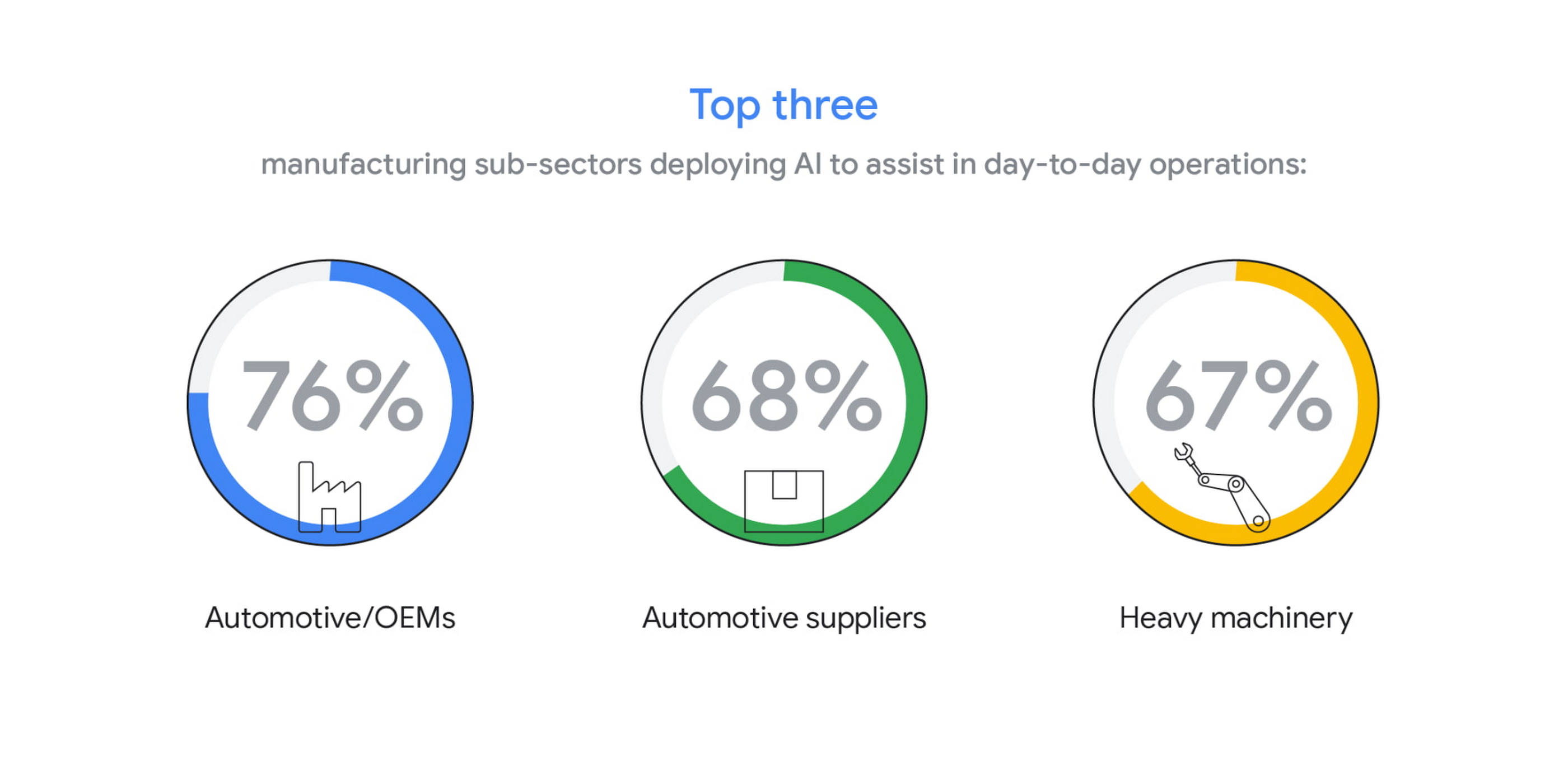
The top three sub-sectors deploying AI to assist in day-to-day operations are automotive/OEMs (76%), automotive suppliers (68%), and heavy machinery (67%).
In fact, Bryan Goodman, Director of Artificial Intelligence and Cloud, Ford Global Data & Insight and Analytics shares, “Our new relationship with Google will supercharge our efforts to democratize AI across our business, from the plant floor to vehicles to dealerships. We used to count the number of AI and machine learning projects at Ford. Now it’s so commonplace that it’s like asking how many people are using math. This includes an AI ecosystem that is fueled by data, and that powers a ‘digital network flywheel.’”
Moving from edge cases to mainstream business needs
Why are manufacturers now turning to AI in increasing numbers? Our research shows that companies who currently use AI in day-to-day operations are looking for assistance with business continuity (38%), helping make employees more efficient (38%), and to be helpful for employees overall (34%). It’s clear that AI/ML technology can augment manufacturing employees’ efforts, whether by providing prescriptive analytics like real-time guidance and training, flagging safety hazards, or detecting potential defects on the assembly line.

In terms of specific AI use cases called out by the research, two main areas emerged: quality control and supply chain optimization. In the quality control category, 39% of surveyed manufacturers who use AI in their day-to-day operations use it for quality inspection and 35% for product and/or production line quality checks. At Google Cloud, we often speak with manufacturers about AI for visual inspection of finished products. Using AI vision, production line workers can spend less time on repetitive product inspections and can instead focus on more complex tasks, such as root cause analysis.
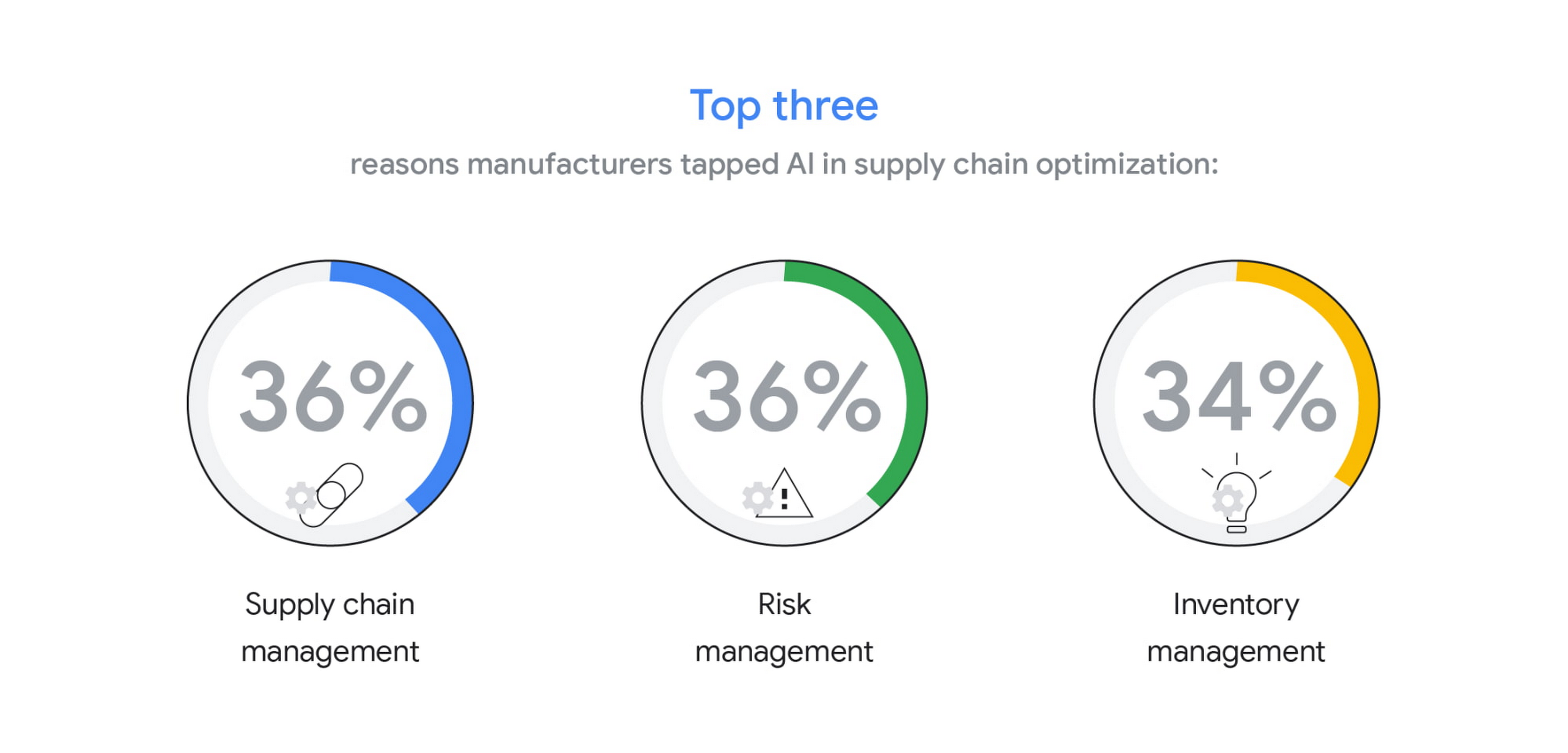
In the supply chain optimization category, manufacturers said they tapped AI for supply chain management (36%), risk management (36%), and inventory management (34%).
In our day-to-day work, we’re seeing many manufacturers rethink their supply chains and operating models to better accommodate for the increased volatility that has been brought about by the pandemic and support the secular trend of consumers asking for increasingly individualized products. We’ll share more on deglobalization in the third installment of our manufacturing insights series.
AI use differs by geography, but not for the reasons you may think
The extent to which AI is already being used today varies quite strongly between geographies, according to our research. While 80% and 79% of manufacturers in Italy and Germany respectively report using AI in day-to-day operations, that percentage plummets in the United States (64%), Japan (50%) and Korea (39%).

It’s tempting to state this disparity is due to an “AI talent gap.” Although the most common barrier, just a quarter (23%) of manufacturers surveyed believe they don’t have the talent to properly leverage AI. Cost, too, does not appear to be a roadblock (21% of those surveyed). Rather, from our observations, the missing link appears to be having the right technology platform and tools to manage a production-grade AI pipeline. This is obviously the focus of our efforts and others in the space, as we believe the cloud can truly help the industry make a step change.
Looking ahead: The Golden Age of AI for manufacturing
The key to widespread adoption of AI lies in its ease of deployment and use. As AI becomes more pervasive in solving real-world problems for manufacturers, we see the industry moving away from “pilot purgatory” to the “golden age of AI.” The manufacturing industry is no stranger to innovation, from the days of mass production, to lean manufacturing, six sigma and, more recently, enterprise resource planning. AI promises to bring even more innovation to the forefront.
To learn more about these findings and more, download our infographic here and our full report here.
Research methodology
The survey was conducted online by The Harris Poll on behalf of Google Cloud, from October 15 – November 4, 2020, among 1,154 senior manufacturing executives in France (n=150), Germany (n=200), Italy (n=154), Japan (n=150), South Korea (n=150), the UK (n=150), and the U.S. (n=200) who are employed full-time at a company with more than 500 employees, and who work in the manufacturing industry with a title of director level or higher. The data in each country were weighted by number of employees to bring them into line with actual company size proportions in the population. A global post-weight was applied to ensure equal weight of each country in the global total.
How Ather Energy is leveraging the Cloud to build and scale smart mobility solutions for India

8411
Of your peers have already read this article.
8:30 Minutes
The most insightful time you'll spend today!
In 2013, long before the world was discussing clean energy and sustainable practices, two IIT Madras graduates — Swapnil Jain and Tarun Mehta — had an idea to develop India’s first-ever electrical scooter.
This was at a time when auto manufacturers were still focusing on fossil-fuel-driven vehicles and ‘eco-friendly’ mobility solutions were more a trendy alternative catering to a niche market.
The duo founded Ather Energy in 2013 and launched their first fully-electric scooter, the Ather S340, in Bengaluru in 2016. Since then, the company has released several new models into the market and is planning to expand to eight more cities by the end of the year.
To support the smooth running of their vehicles, lower costs, improve time to market, and create great customer experience, Ather turned to Google Cloud.
Read the Full Story on YourStory
How to Enhance Incremental Pipeline Performance while Ingesting Data into BigQuery

6345
Of your peers have already read this article.
3:00 Minutes
The most insightful time you'll spend today!
When you build a data warehouse, the important question is how to ingest data from the source system to the data warehouse. If the table is small you can fully reload a table on a regular basis, however, if the table is large a common technique is to perform incremental table updates. This post demonstrates how you can enhance incremental pipeline performance when you ingest data into BigQuery.
Setting up a standard incremental data ingestion pipeline
We will use the below example to illustrate a common ingestion pipeline that incrementally updates a data warehouse table. Let’s say that you ingest data into BigQuery from a large and frequently updated table in the source system, and you have Staging and Reporting areas (datasets) in BigQuery.

The Reporting area in BigQuery stores the most recent, full data that has been ingested from the source system tables. Usually you create the base table as a full snapshot of the source system table. In our running example, we use BigQuery public data as the source system and create reporting.base_table as shown below. In our example each row is identified by a unique key which consists of two columns: block_hash and log_index.
CREATE TABLE reporting.base_table --156 GB processedPARTITION BY TIMESTAMP_TRUNC(block_timestamp, DAY) ASSELECT log_index, data, topics, block_timestamp, block_hashFROM bigquery-public-data.crypto_ethereum.logsWHERE block_timestamp BETWEEN TIMESTAMP '2020-01-01' AND TIMESTAMP '2020-11-30';
In data warehouses it is common to partition a large base table by a datetime column that has a business meaning. For example, it may be a transaction timestamp, or datetime when some business event happened, etc. The idea is that data analysts who use the data warehouse usually need to analyze only some range of dates and rarely need the full data. In our example, we partition the base table by block_timestamp which comes from the source system.
After ingesting the initial snapshot you need to capture changes that happen in the source system table and update the reporting base table accordingly. This is when the Staging area comes into the picture. The staging table will contain captured data changes that you will merge into the base table. Let’s say that in our source system on a regular basis we have a set of new rows and also some updated records. In our example we mock the staging data as follows: first, we create new data, than we mock the updated records:
CREATE TABLE staging.load_delta AS --5 GB processedSELECT log_index, data, topics, block_timestamp, block_hashFROM bigquery-public-data.crypto_ethereum.logsWHERE block_timestamp BETWEEN TIMESTAMP '2020-12-01' AND TIMESTAMP '2020-12-07';INSERT INTO staging.load_delta --2 GB processedSELECT log_index, CONCAT(data, RAND()), topics, block_timestamp, block_hashFROM bigquery-public-data.crypto_ethereum.logs TABLESAMPLE SYSTEM (5 PERCENT)WHERE block_timestamp BETWEEN TIMESTAMP '2020-10-01' AND TIMESTAMP '2020-11-30';
Next, the pipeline merges the staging data into the base table. It joins two tables by unique key and than updates the changed value or inserts a new row
MERGE INTO reporting.base_table T --161 GB processedUSING staging.load_delta SON T.block_hash = S.block_hashAND T.log_index = S.log_indexWHEN MATCHED THEN UPDATE SETT.data = S.dataWHEN NOT MATCHED THEN INSERT (log_index, data, topics, block_timestamp, block_hash)VALUES (log_index, data, topics, block_timestamp, block_hash);
It is often the case that the staging table contains keys from various partitions but the number of those partitions are relatively small. It holds, for instance, because in the source system the recently added data may get changed due to some initial errors or ongoing processes but older records are rarely updated. However, when the above MERGE gets executed, BigQuery scans all partitions in the base table and processes 161 GB of data. You might add additional join condition on block_timestamp:
MERGE INTO reporting.base_table T --161 GB processedUSING staging.load_delta SON T.block_hash = S.block_hashAND T.log_index = S.log_indexAND T.block_timestamp = S.block_timestampWHEN MATCHED THEN UPDATE SETT.data = S.dataWHEN NOT MATCHED THEN INSERT (log_index, data, topics, block_timestamp, block_hash)VALUES (log_index, data, topics, block_timestamp, block_hash);
But BigQuery would still scan all partitions in the base table because condition T.block_timestamp = S.block_timestamp is a dynamic predicate and BigQuery doesn’t automatically push such predicates down from one table to another in MERGE.
Can you improve the MERGE efficiency by making it scan less data? The answer is Yes.
As described in the MERGE documentation, pruning conditions may be located in a subquery filter, a merge_condition filter, or a search_condition filter. In this post we show how you can leverage the first two. The main idea is to turn a dynamic predicate into a static predicate.
Steps to enhance your ingestion pipeline
The initial step is to compute the range of partitions that will be updated during the MERGE and store it in a variable. As was mentioned above, in data ingestion pipelines, staging tables are usually small so the cost of the computation is relatively low.
DECLARE src_range STRUCT<date_min TIMESTAMP, date_max TIMESTAMP> --115 MB processedDEFAULT(SELECT STRUCT(MIN(block_timestamp) AS date_min,MAX(block_timestamp) AS date_max) FROM staging.load_delta);
Based on your existing ETL/ELT pipeline, you can add the above code as-is to your pipeline or you can compute date_min, data_max as part of some already existing transformation step. Alternatively, date_min, data_max can be computed on the Source System side while capturing the next ingestion data batch.
After computing date_min, date_max you pass those values to the MERGE statement as static predicates. There are several ways to enhance the MERGE and prune partitions in the base table based on precomputed date_min, data_max.
If your initial MERGE statement uses a subquery, you can incorporate a new filter into it:
BEGINDECLARE src_range STRUCT<date_min TIMESTAMP, date_max TIMESTAMP> --115 MB processedDEFAULT(SELECT STRUCT(MIN(block_timestamp) AS date_min,MAX(block_timestamp) AS date_max) FROM staging.load_delta);MERGE INTO reporting.base_table T --41 GB processedUSING (SELECT *FROM staging.load_deltaWHERE block_timestamp BETWEEN src_range.date_min AND src_range.date_max) SON T.block_hash = S.block_hashAND T.log_index = S.log_indexAND T.block_timestamp = S.block_timestampWHEN MATCHED THEN UPDATE SETT.data = S.dataWHEN NOT MATCHED THEN INSERT (log_index, data, topics, block_timestamp, block_hash)VALUES (log_index, data, topics, block_timestamp, block_hash);END;
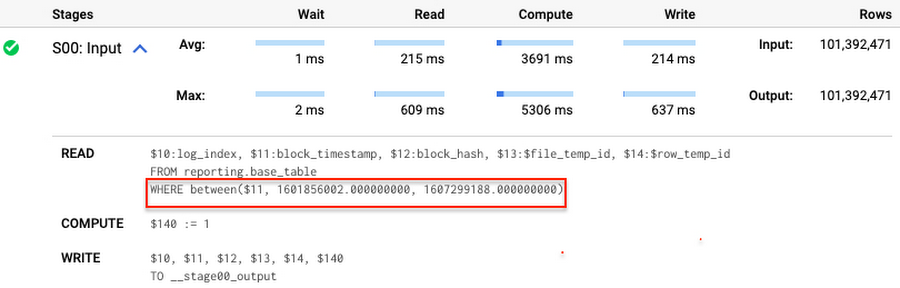
Note that you add the static filter to the staging table and keep T.block_timestamp = S.block_timestamp to convey to BigQuery that it can push that filter to the base table. This MERGE processes 41 GB of data in contrast to the initial 161 GB. You can see in the query plan that BigQuery pushes the partition filter from the staging table to the base table:
This type of optimization, when a pruning condition is pushed from a subquery to a large partitioned or clustered table, is not unique for MERGE. It also works for other types of queries. For instance:
SELECT * -- 41 GB processedFROM reporting.base_table TINNER JOIN staging.load_delta SON T.block_hash = S.block_hashAND T.log_index = S.log_indexAND T.block_timestamp = S.block_timestampWHERE S.block_timestamp BETWEEN TIMESTAMP '2020-10-05' AND TIMESTAMP '2020-12-07'
And you can check the query plan to verify that BigQuery pushed down the partition filter from one table to another.
Moreover, for SELECT statements, BigQuery can automatically infer a filter predicate on a join column and push it down from one table to another if your query meets the following criteria:
- The target table must be clustered or partitioned.
- The result size of the other table, i.e. after applying all filters, must qualify for broadcast join. Namly, the result set must be relatively small, less than ~100MB.
In our running example, reporting.base_table is partitioned by block_timestamp. If you define a selective filter on staging.load_delta and join two tables, you can see an inferred filter on the join key pushed to the target table
SELECT *FROM reporting.base_table TINNER JOIN staging.load_delta SON T.block_timestamp = S.block_timestampWHERE S.block_hash = '0x0c1caa16b34d94843aabfebc0d5a961db358135988f7498a6fdc450ad55f0870'
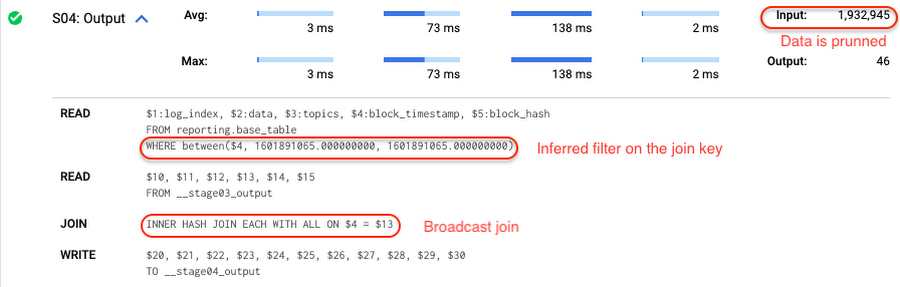
There is no requirement to join tables by partitioning or clustering key to kick off this type of optimization. However, in this case the pruning effect on the target table would be less significant.
But let us get back to the pipeline optimizations. Another way to enhance MERGE is to modify the merge_condition filter by adding static predicate on the base table:
BEGINDECLARE src_range STRUCT<date_min TIMESTAMP, date_max TIMESTAMP> --115 MB processedDEFAULT(SELECT STRUCT(MIN(block_timestamp) AS date_min,MAX(block_timestamp) AS date_max) FROM staging.load_delta);MERGE INTO reporting.base_table T --41 GB processedUSING staging.load_delta SON T.block_hash = S.block_hashAND T.log_index = S.log_indexAND T.block_timestamp BETWEEN src_range.date_min AND src_range.date_maxWHEN MATCHED THEN UPDATE SETT.data = S.dataWHEN NOT MATCHED THEN INSERT (log_index, data, topics, block_timestamp, block_hash)VALUES (log_index, data, topics, block_timestamp, block_hash);END;
To summarize, here are the steps that you can perform to enhance incremental ingestion pipelines in BigQuery. First you compute the range of updated partitions based on the small staging table. Next, you tweak the MERGE statement a bit to let BigQuery know to prune data in the base table.
All the enhanced MERGE statements scanned 41 GB of data, and setting up the src_range variable took 115 MB. Compare it with the initial 161 GB scan. Moreover, given that computing src_range may be incorporated into some existing transformation in your ETL/ELT, it results in a good performance improvement which you can leverage in your pipelines.
In this post we described how to enhance data ingestion pipelines by turning dynamic filter predicates into static predicates and letting BiQuery prune data for us. You can find more tips on BigQuery DML tuning here.
Special thanks to Daniel De Leo, who helped with examples and provided valuable feedback on this content.
5451
Of your peers have already downloaded this article
14:30 Minutes
The most insightful time you'll spend today!
To make great products: do machine learning like the great engineer you are, not like the great machine learning expert you aren’t.
Most of the problems you will face are, in fact, engineering problems. Even with all the resources of a great machine learning expert, most of the gains come from great features, not great machine learning algorithms. So, the basic approach is:
- Make sure your pipeline is solid end to end.
- Start with a reasonable objective.
- Add common-sense features in a simple way.
- Make sure that your pipeline stays solid.
This approach will work well for a long period of time. Diverge from this approach only when there are no more simple tricks to get you any farther. Adding complexity slows future releases.
Once you’ve exhausted the simple tricks, cutting-edge machine learning might indeed be in your future. See the section on Phase III machine learning projects.
This document is arranged as follows:
- The first part should help you understand whether the time is right for building a machine learning system.
- The second part is about deploying your first pipeline.
- The third part is about launching and iterating while adding new features to your pipeline, how to evaluate models and training-serving skew.
- The final part is about what to do when you reach a plateau.
- Afterwards, there is a list of related work and an appendix with some background on the systems commonly used as examples in this document.

3432
Of your peers have already downloaded this article
4:30 Minutes
The most insightful time you'll spend today!
Few industries grapple with the volume of information the financial services industry manages on a daily basis. Whether financial services organizations are analyzing market shifts, or protecting against fraud and money laundering, understanding data and quickly finding the right insights are critical to their success.
Their learnings can be put to use by CFOs across a range of industries.
From the need to analyze more accurately predict revenues based on a variety of market scenarios to finding ways to improve profitability, more CFOs are turning to data, analytics, and machine learning to aid decision-making.
Over the past year, Google has spent a lot of time working with its financial services customers—like HSBC, Citi, UBS, Scotiabank, Two Sigma, and more. And what they’ve found is whether they’re large or small, a startup or a global institution, there are universal themes shared by all.
Here are five ways CFO can use machine learning and the cloud in 2019:
Tackle data silos to unlock the power of their data.
Large, global institutions are using the cloud to overcome the incompatibilities, latencies and blind spots associated with traditional data silos, growing volumes of market data and alternative data sets.
In 2019, we expect to see an increasing number using serverless, advanced data platforms, open APIs, and machine learning capabilities, to make full use of their data for enterprise-wide decision-making with a minimal IT footprint. These decisions will be supported by market data, news and commentary, risk and regulatory data, company data and other specialized and alternative data.
To find out some of the other ways, download the PDF now!
More Relevant Stories for Your Company

Want to Code for the Cloud? Get Started with the Native App Development Track
Earlier this year, we launched the Google Cloud skills challenge, which provides 30 days of free access to training to build your cloud knowledge and an opportunity to earn skill badges that showcase your Google Cloud competencies. Today, we’re adding a Native App Development track to the skills challenge, joining the Getting Started,

How Kinguin Notched Up Shopping Experience with Google Recommendations AI
Over 2.14 billion people worldwide are expected to buy online this year, according to Statista. Online retail sales will account for 22% of all purchases by 2023. But in a competitive retail landscape, positive interactions can mean the difference between a sale and an abandoned shopping cart. One of the leading global
Everything a Marketer Needs to Know About Machine Learning
As consumer expectations grow for more personalized, relevant, and assistive experiences, machine learning is becoming an invaluable tool to help meet those demands. It’s helping marketers create smarter customer segmentations, deliver more relevant creative campaigns, and measure performance more effectively. In fact, 85% of executives believe AI will allow their




The New and Upcoming Infrastructure for Google Cloud’s AI and ML Solutions
How does Google manage to provide its customers a differentiated compute platform experience and define ways to fully leverage its infrastructure supporting its cutting-edge AI and ML offerings? Easy-to-use, scalable and ability to create innovative products and services to end-users at low cost of ownership is the narrative behind Google
