





Cloud KMS with Cloud Storage: Better Performance for High-intensity Workloads

3282
Of your peers have already read this article.
2:30 Minutes
The most insightful time you'll spend today!
Encryption is critical for securing sensitive data while it is stored and transits the cloud. Today, Cloud Storage encrypts data server-side with standard Google-managed encryption keys by default, and can also encrypt data with customer-managed encryption keys that are stored and managed by Cloud Key Management Service (Cloud KMS).
While customers have been able to secure their data on Cloud Storage with Cloud KMS keys for some time, we are always updating our encryption offerings to deliver better performance, lower costs and more capabilities that support critical business workloads. In this post, we’ll discuss some of our latest developments in this space—in particular, performance improvements for high-intensity workloads and support for customer-managed encryption keys (CMEK) for object composition.
Why use Cloud KMS with Cloud Storage?
Cloud KMS enables you to centrally manage your keys in a fast and scalable way that helps to meet your security and compliance needs. Cloud KMS generates customer-managed encryption keys (CMEK) which act as an additional layer of protection on top of Google’s default encryption keys. You can set these keys on a Cloud Storage bucket as a default key, and can easily manage key rotation, replacement or disabling right within Cloud KMS.
In addition to software-based CMEKs, Cloud Storage also supports hardware-based CMEKs hosted in hardware security modules that are FIPS 140-2 Level 3 validated as part of our Cloud HSM service. These enable you to protect your most sensitive workloads without needing to manage HSM cluster operations yourself.
Improving KMS performance for high-intensity workloads
While Cloud HSM is often used to protect the most sensitive data for a customer, especially for those in healthcare and financial services industries, the default quota limits for cryptographic operations on Cloud HSM keys may cause performance bottlenecks for customers aiming to run high-intensity workloads when using Cloud Storage, such as analytics workloads on Hadoop.
We are making improvements to the Cloud KMS request behaviour on Cloud Storage that more effectively batches requests to Cloud KMS to reduce request bandwidth and drive down KMS billing. Identical Cloud KMS requests from Cloud Storage will be batched together for newly written objects and across all supported encryption modes in Cloud KMS, including software-backed customer-managed encryption keys. As a result of these changes, when you are using Cloud KMS you may notice faster encrypt, read and write operations for new data, deduplicated Cloud KMS audit logs and lower overall Cloud KMS charges. Customers running high-intensity workloads should see a significant reduction in throughput to KMS, leading to a reduction in KMS cryptographic operation billing costs for all types of KMS keys, as well as enabling customers to scale the throughput of their HSM-encrypted workloads.
Newly written objects encrypted with Cloud KMS will leverage these changes, whether they are encrypted using software-backed or HSM-backed CMEKs, and no configuration change is needed. If you are looking to use Cloud KMS with Cloud Storage, check out the Cloud KMS page to learn more, especially for setting up a hardware-backed HSM.
Supporting Cloud KMS for object composition
Object composition in Cloud Storage is widely used today for different types of applications, from stitching video segments together for a replay to uploading large datasets for analytics workloads. As more and more customers are leveraging Cloud Storage for these applications, we are expanding object composition capabilities to be flexible across different encryption modes.
Object composition is now supported for customer-managed encryption keys in addition to Google-managed encryption keys and customer-supplied encryption keys. This allows you to manage your own encryption keys while performing object composition for business-critical needs such as compiling sensitive financial datasets.
To compose objects that are encrypted with customer-managed encryption keys, specify the resource name of the Cloud KMS key for encrypting the composed object as a query parameter in the compose request. For the JSON API, construct the following HTTP request, while specifying the Cloud KMS key resource name for the query parameter kmsKeyName.
POST https://storage.googleapis.com/storage/v1/b/bucket/o/destinationObject/compose
For the XML API, specify the Cloud KMS key resource name for the request header x-goog-encryption-kms-key-name. You can also specify a Cloud KMS key when using gsutil to perform object composition. Check out our documentation to try out object composition, or to start composing objects encrypted with customer-managed encryption keys.
Get started with better encryption
Being deliberate about encryption is critical for securing your sensitive data on Cloud Storage. Whether you are composing objects or running analytics workloads, leveraging the latest encryption offerings will deliver faster performance, better security and improved workload scalability. We’re always evolving our encryption products to meet your needs and help you achieve your business goals. To get started with encryption on Cloud Storage, check out our documentation to learn more.
4030
Of your peers have already watched this video.
54:30 Minutes
The most insightful time you'll spend today!
Quick Tips to Get the Most Out of Cloud Spanner
Today, IT Admins and DBAs are inundated with thankless tasks. But they no longer have to deal with that. With Cloud Spanner, they can focus on value-add and innovation instead of maintenance. Creating or scaling a globally replicated database for mission-critical apps now takes a handful of clicks.
Industry-leading high-availability and Google-grade security as defaults, not expensive add-ons, help ensure your apps stay online and more secure.
Cloud Spanner is a powerful product, but many users do not maximize its benefits.
It is the first scalable, enterprise-grade, globally-distributed, and strongly consistent database service built for the cloud specifically to combine the benefits of relational database structure with a non-relational horizontal scale.
This combination delivers high-performance transactions and strong consistency across rows, regions, and continents with an industry-leading 99.999% availability SLA, no planned downtime, and enterprise-grade security. Cloud Spanner revolutionizes database administration and management and makes application development more efficient.
This video highlights best practices, strategies for optimizing applications and workloads, and ways to improve performance and scalability. This live demos shows real-time speed-ups of transactions, queries, and overall performance.
Additionally, this talk explores techniques for monitoring Cloud Spanner to identify performance bottlenecks. Watch now to learn more.
Want to Code for the Cloud? Get Started with the Native App Development Track

6757
Of your peers have already read this article.
2:00 Minutes
The most insightful time you'll spend today!
Earlier this year, we launched the Google Cloud skills challenge, which provides 30 days of free access to training to build your cloud knowledge and an opportunity to earn skill badges that showcase your Google Cloud competencies. Today, we’re adding a Native App Development track to the skills challenge, joining the Getting Started, Data Analytics, Kubernetes, Machine Learning (ML) and Artificial Intelligence (AI) tracks.
The Native App Development track is designed for cloud developers who want to learn to build serverless web apps and Google Assistant applications on Google Cloud using Cloud Run and Firebase. Specifically, you’ll have an opportunity to earn three skill badges in the Native App Dev track: Serverless Firebase Development, Serverless Cloud Run Development, and Build Interactive Apps with Google Assistant. To earn a skill badge, you complete a series of hands-on labs and take a final assessment challenge lab to test your skills.
Here’s an overview of each badge.
Serverless Firebase Development
To earn this skill badge, you’ll learn how to build serverless web apps, import data into a serverless database, and build Google Assistant applications using Firebase, Google’s backend-as-service platform for creating mobile and web applications.
Serverless Cloud Run Development
For this badge, you’ll discover how to use Cloud Run, a fully managed serverless platform, to connect and leverage data stored in Cloud Storage. You’ll learn how to use Cloud Run to build a resilient, asynchronous system with Pub/Sub, build a REST API gateway as well as build and expose services.
Build Interactive Apps with Google Assistant
To earn the final skills badge, you’ll build Google Assistant applications by creating a project in the Actions console, integrating Dialogflow, testing your action in the Actions simulator, and adding Cloud Translation API to your assistant application.
Ready to jump into the skills challenge? Sign up here.
You can also check out this quick video below to learn how to join the skills challenge.
Using Google Cloud’s Backup and DR Service with Logging and Monitoring Tools

1110
Of your peers have already read this article.
2:30 Minutes
The most insightful time you'll spend today!
Backup and DR data is a valuable business asset, and ensuring that it’s safe and accessible is essential. In particular, you want to be able to monitor your backups to ensure that the data is indeed protected and that you can quickly recover it in the event of a disaster, user error, or failed upgrade.
Users of Google Cloud’s Backup and DR service often ask:
- What are the best practices for monitoring my backup and recovery jobs?
- How can I proactively identify issues and troubleshoot?
- How can I create alerts and be notified about important events?
The good news is that Google Cloud Backup and DR now integrates with Cloud Logging and Cloud Monitoring tools. Now, you can monitor backup events, jobs, appliance health, resource consumption and user actions in the same way you monitor other Google Cloud workloads and services.
With this integration, you can now:
- Monitor events related to backup and restore – With detailed Google Cloud Backup and DR service event logs in Cloud Logging, you can now use log based alerts to create a customisable notification, in near-real time. This lets you monitor important events such as backup job failures, jobs that did not run, local backup storage saturation, and network failures.
- Configure fine grained alerting – You can write custom event queries on a wide variety of dimensions such as event severity, application type, application name, job type, job name, error message and many more. This gives a lot of flexibility to define alerts for specific events or conditions within a system, thus reducing noise and helping you identify and fix issues easily.
- Get notified on your preferred notification channel – Google Cloud offers seven pre-built notification channels that let you receive customisable notifications directly over email, SMS, Slack or the Google Cloud mobile app. Alternatively, you can integrate with your own monitoring and event management tools using webhooks or Pub/Sub.
- Derive useful insights to troubleshoot issues – With Log Analytics, you can use BigQuery to query your data using SQL queries and generate operational insights, which can help you reduce time spent troubleshooting. For example, you can analyze the key reasons that backup and restore jobs fail for a given application or application type.
The integration also lets you proactively discover deeper issues related to backup and recovery, such as capacity-related issues or certain job failures that happen periodically, by monitoring recurring events in the logs over time. With log-based metrics, you can:
- Create trend charts to track important metrics such as the number of backup or restore jobs that failed during a day/week/month
- Receive a notification when the number of occurrences crosses a threshold, for example receive a notification if a snapshot pool saturates more than five times a week
- Monitor trends in data, such as latency values in logs, and receive a notification if the values change in an unacceptable way.
Getting started
The time to learn that your backup failed should never be when you go to restore. By integrating our Backup and DR service with Cloud Monitoring and Cloud Logging, you can get valuable assurances about the health of your backup and business continuity processes with the same tools that you use to manage other Google Cloud workloads. To get started, check out the Backup and DR event logs page. You can also watch a video that shows you how to set up and use the service and configure some custom alerts.

Takeaways from Forrester’s Cloud Data Warehouse Q1 2021 Report
DOWNLOAD RESEARCH REPORTS5151
Of your peers have already downloaded this article
20:00 Minutes
The most insightful time you'll spend today!
Cloud data warehouse (CDW) solutions have transformed the delivery of modern analytics and are known to have the capabilities to provision data warehouse of any size in a matter of minutes, autotune queries, scale resources including compute and storage on demand and auto-upgrade to the latest version. As the need for integrated, real-time and self-service analytics scale, CDW vendors continue to focus on native integration with data lakes and object stores; self-service to simplify access and administration for larger and more complex warehouses; and advanced capabilities on parallel processing, compression, partitioning, indexing, query optimization, and dynamic resource provisioning. The most common CDW use cases include customer analytics, AI/machine learning (ML)-based analytics, vertical-specific analytics, and real-time analytics. Customers that are looking to select a CDW vendor need to consider couple of factors.
Download the report learn more 13 leading CDW providers in the Forrester Wave: Cloud Data Warehouse, Q1 2021 report and also explore Google Cloud’s BigQuery for data warehousing.
How Google Cloud & NGIS’ Partnership Powers Sustainability & Responsible Sourcing for Consumer Brands

6213
Of your peers have already read this article.
2:00 Minutes
The most insightful time you'll spend today!
In the competitive world of consumer goods, sustainability matters more than ever. In recent Google survey, 82% of consumers said sustainability is more top of mind now than it was before COVID-191 and 78% said that big businesses have a role to play in helping to fight climate change.2 As well as delivering on customers’ heightened expectations, sustainable business practices can help organizations reduce waste and lower operational costs and even help attract top talent.
Not only is sustainability good for business performance and the bottom line, it’s great for the planet, too. And it’s something we care deeply about at Google. Since our earliest days, we have focused on developing services that significantly improve the lives of billions of people while operating our business in an environmentally sustainable way. In 2007, we were the first major company to become carbon neutral, and in 2017 we were the first to achieve 100% renewable energy. Today, we proudly operate the cleanest cloud in the industry. We’ve also been powering humanitarian, scientific, and environmental initiatives studying geospatial information and making it available for analysis via Google Earth Engine.
Powering the future of responsible sourcing
How does all this relate to CPG supply chains? The world relies on raw materials like palm oil, soy, and cocoa to produce the items we consume every day—such as coffee, chocolate, frozen foods, shampoo, toothpaste, cosmetics, and even household cleaning products. Yet as demand for these materials continues to grow, forests are under threat. Change is needed.
As sustainability moves further into the spotlight, in-demand crops face increased supplier scrutiny. Environmentally conscious companies want to know what percentage of their raw materials is sourced from deforestation-free suppliers—and how they can improve that number. Until recently, many CPG brands have found it hard to get real-time, reliable visibility into operations at a local supplier level, globally.
Google Cloud, in partnership with NGIS, is helping brands gain a deeper understanding of raw material sourcing practices across supplier networks, so they can improve supplier performance and compliance in the fight against deforestation. The TraceMark solution, developed by NGIS, uses Google Earth Engine and BigQuery to analyze and visualize how suppliers behave over time.
Google Earth Engine is the world’s largest archive of open Earth data. It combines a multi-petabyte catalog of satellite imagery and geospatial datasets with planetary-scale analysis capabilities to help people detect changes, map trends, and quantify differences on the Earth’s surface.With Earth Engine, organizations can analyze the potential social, and environmental impacts of the decision they make.
Together, TraceMark, Google Earth Engine and BigQuery help companies visualize, monitor, and measure the impact of suppliers’ farming practices. The process starts with Earth Engine, which aggregates and harmonizes planetary data into images that it has been collecting for decades. Then, boundary maps for different suppliers are created and NGIS applies climate data science and machine learning to turn pixels into insights. Finally, BigQuery and Vertex AI -Google Cloud’s unified artificial intelligence platform are used to produce supplier scoring, which is integrated into downstream ERP and procurement systems to support more informed decision-making.
These efforts support the responsible sourcing of raw materials by making supply chains more agile, transparent and traceable.
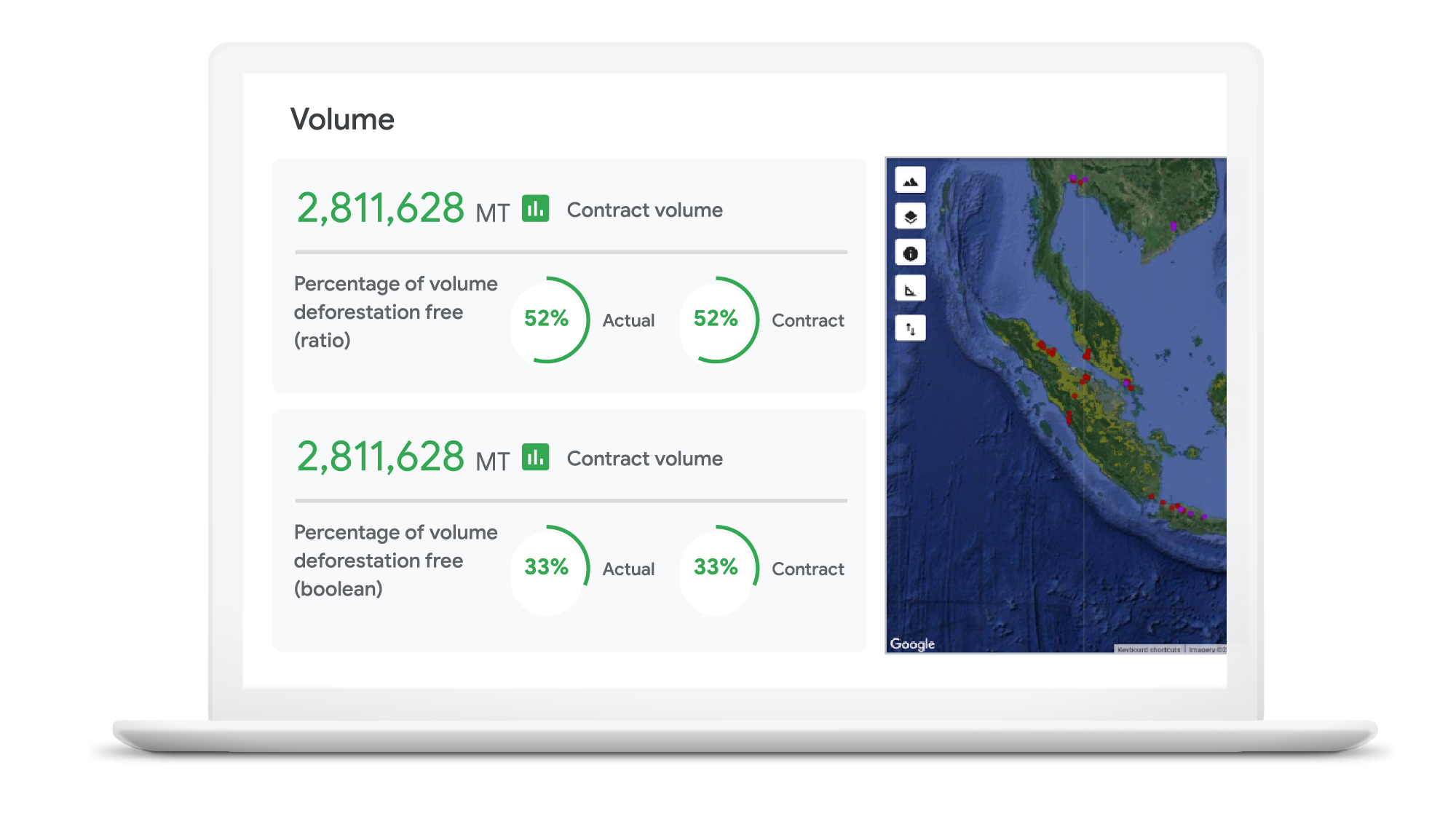
“NGIS is thrilled to work with Google Cloud and its partners to enable business accountability for sustainable practices at all levels of their supply chain,” said Nathan Eaton, Executive Director, NGIS. “Google Earth Engine provides unique geospatial capability that [gives] leaders visibility and control over their environmental footprint and that of their suppliers in a way that was not previously possible.”
Unilever commits to working towards a deforestation-free supply chain
Unilever is a great example of a company committed to using technology in the quest to become more sustainable. Since 2020, Unilever has partnered with Google Cloud to use data for eco-friendly decision-making, particularly when it comes to sustainable commodity sourcing.
By combining the power of cloud computing with satellite imagery and AI, we’re helping Unilever build a more holistic view of the forests, water cycles, and biodiversity that intersect its supply chain. By gaining a complete picture of these ecosystems, Unilever can detect deforestation while simultaneously prioritizing critical areas of forest and habitats in need of protection.
The cleanest cloud for your sustainable transformation
We are excited to bring Google Earth Engine and NGIS to our CPG customers to help them meet their sustainability goals. Looking ahead, we’re committed to furthering our own ambitious sustainability goals and empowering CPG brands with the technology to do more for our environment and our shared future.
Contact your cloud seller to learn more about Tracemark sustainable sourcing solutions and how Google Cloud can help you advance your sustainability initiatives.
Explore TraceMark on the Google Cloud Marketplace
To know more about how we are helping CPGs transform digitally read this ebook
1. Google/C Space, BR, FR, DE, IN, MX, U.K., U.S., qualitative survey activity, n = 528, Nov. 24–Nov. 26, 2020.
2. Google/Ipsos, Google Sustainability, BR, FR, DE, IN, JP, U.K., U.S., n=16,959 online population 18–70, July 2021.
More Relevant Stories for Your Company

Is it Cheaper to Run Oracle Workloads on Google Cloud Than On-Prem? Yes, By 78%
On-premises relational database management systems (RDBMS) are the traditional heart of many core business operations, but cloud-based relational databases provide the agility and scalability of the cloud while eliminating many of the onerous tasks associated with maintaining your own infrastructure. To find out how much more value cloud-based relational databases
What’s Google Cloud Firestore Database and What are it’s Benefits for Business and Developers?
Cloud Firestore is a NoSQL document database that simplifies storing, syncing, and querying data for your mobile and web apps at global scale. Cloud Firestore is a fast, fully managed, serverless, cloud-native NoSQL document database that simplifies storing, syncing, and querying data for your mobile, web, and IoT apps at

Bigtable’s High Performance and Low Opex is Great for Building Personalization
Customer expectations have shifted as a result of evolving needs. Across industries, customers expect that you treat them as individuals, and demonstrate how well you understand and serve their unique needs. This concept—personalization—is the idea that you’re delivering a tailored experience to each customer corresponding to their needs and preferences;
Google Cloud’s Data Analytics May Recap
May was a very busy month for data analytics product innovation. If you didn’t have the chance to attend our inaugural Data Cloud Summit, video replays of all our sessions are now available so feel free to watch them at your own pace. In this blog, I’d like to share some background behind
