





Cloud Bigtable Helps Fraud-detection Company Meet Scalability Demands and Secure Customer Data

7119
Of your peers have already read this article.
3:00 Minutes
The most insightful time you'll spend today!
Editor’s note: Today we are hearing from Jono MacDougall , Principal Software Engineer at Ravelin. Ravelin delivers market-leading online fraud detection and payment acceptance solutions for online retailers. To help us meet the scaling, throughput, and latency demands of our growing roster of large-scale clients, we migrated to Google Cloud and its suite of managed services, including Cloud Bigtable, the scalable NoSQL database for large workloads.
As a fraud detection company for online retailers, each new client brings new data that must be kept in a secure manner and new financial transactions to analyze. This means our data infrastructure must be highly scalable and constantly maintain low latency. Our goal is to bring these new organizations on quickly without interrupting their business. We help our clients with checkout flows, so we need latencies that won’t interrupt that process—a critical concern in the booming online retail sector.
We like Cloud Bigtable because it can quickly and securely ingest and process a high volume of data. Our software accesses data in Bigtable every time it makes a fraud decision. When a client’s customer places an order, we need to process their full history and as much data as possible about that customer in order to detect fraud, all while keeping their data secure. Bigtable excels at accessing and processing that data in a short time window. With a customer key, we can quickly access data, bring it into our feature extraction process, and generate features for our models and rules. The data stays encrypted at rest in Bigtable, which keeps us and our customers safe.
Bigtable also lets us present customer profiles in our dashboard to our client, so that if we make a fraud decision, our clients can confirm the fraud using the same data source we use.

We have configured our bigtable clusters to only be accessible within our private network and have restricted our pods access to it using targeted service accounts. This way the majority of our code does not have access to bigtable and only the bits that do the reading and writing have those privileges.
We also use Bigtable for debugging, logging, and tracing, because we have spare capacity and it’s a fast, convenient location.
We conduct load testings against Bigtable. We started at a low rate of ~10 Bigtable requests per second and we peaked at ~167000 mixed read and write requests per second at absolute peak. The only intervention that was done to achieve this was pressing a single button to increase the number of nodes in the database. No other changes were made.
In terms of real traffic to our production system, we have seen ~22,000 req/s (combined read/write) on Bigtable in our live environment as a peak within the last 6 weeks.
Migrating seamlessly to Google Cloud
Like many startups, we started with Postgres, since it was easy and it was what we knew, but we quickly realized that scaling would be a challenge, and we didn’t want to manage enormous Postgres instances. We looked for a kind of key value store, because we weren’t doing crazy JOINS or complex WHERE clauses. We wanted to provide a customer ID and get everything we knew about it, and that’s where key value really shines.
I used Cassandra at a previous company, but we had to hire several people just for that chore. At Ravelin we wanted to move to managed services and save ourselves that headache. We were already heavy users and fans of BigQuery, Google Cloud’s serverless, scalable data warehouse, and we also wanted to start using Kubernetes. This was five years ago, and though quite a few providers offer Kubernetes services now, we still see Google Cloud at the top of that stack with Google Kubernetes Engine (GKE). We also like Bigtable’s versioning capability that helped with a use case involving upserts. All of these features helped us choose Bigtable.
Migrations can be intimidating, especially in retail where downtime isn’t an option. We were migrating not just from Postgres to Bigtable, but also from AWS to Google Cloud. To prepare, we ran in AWS like always, but at the same time we set up a queue at our API level to mirror every request over to Google Cloud. We looked at those requests to see if any were failing, and confirmed if the results and response times were the same as in AWS. We did that for a month, fine tuning along the way.
Then we took the big step and flipped a config flag and it was 100% over to Google Cloud. At the exact same time, we flipped the queue over to AWS so that we could still send traffic into our legacy environment. That way, if anything went wrong, we could fail back without missing data. We ran like that for about a month, and we never had to fail back. In the end, we pulled off a seamless, issue-free online migration to Google Cloud.
Flexing Bigtable’s features
For our database structure, we originally had everything spread across rows, and we’d use a hash of a customer ID as a prefix. Then we could scan each record of history, such as orders or transactions. But eventually we got customers that were too big, where the scanning wasn’t fast enough. So we switched and put all of the customer data into one row and the history into columns. Then each cell was a different record, order, payment method, or transaction. Now, we can quickly look up the one row and get all the necessary details of that customer. Some of our clients send us test customers who place an order, say, every minute, and that quickly becomes problematic if you want to pull out enormous amounts of data without any limits on your row size. The garbage collection feature makes it easy to clean up big customers.
We also use Bigtable replication to increase reliability, atomicity, and consistency. We need strong consistency guarantees within the context of a single request to our API since we make multiple bigtable requests within that scope. So within a request we always hit the same replica of Bigtable and if we have a failure, we retry the whole request. That allows us to make use of the replica and some of the consistency guarantees, a nice little trade-off where we can choose where we want our consistency to live.https://www.youtube.com/embed/0-eH5u7rrQQ?enablejsapi=1&
We also use BigQuery with Bigtable for training on customer records or queries with complicated WHERE clauses. We put the data in Bigtable, and also asynchronously in BigQuery using streaming inserts, which allows our data scientists to query it in every way you can imagine, build models, and investigate patterns and not worry about query engine limitations. Since our Bigtable production cluster is completely separate, doing a query on BigQuery has no impact on our response times. When we were on Postgres many years ago, it was used for both analysis and real time traffic and it was not the optimal solution for us. We also use Elasticsearch for powering text searches for our dashboard.
If you’re using Bigtable, we recommend three features:
- Key visualizer. If we get latency or errors coming back from Bigtable, we look at the key visualizer first. We may have a hotkey or a wide row, and the visualizer will alert us and provide the exact key range where the key lives, or the row in question. Then we can go in and fix it at that level. It’s useful to know how your data is hitting Bigtable and if you’re using any anti-patterns or if your clients have changed their traffic pattern that exacerbated some issue.
- Garbage collection. We can prevent big row issues by putting size limits in place with the garbage collection policies.
- Cell versioning. Bigtable has a 3d array, with rows, columns, and cells, which are all the different versions. You can make use of the versioning to get history of a particular value or to build a time series within one row. Getting a single row is very fast in Bigtable so as long as you can keep the data volume in check for that row, making use of cell versions is a very powerful and fast option. There are patterns in the docs that are quite useful and not immediately obvious. For example, one trick is to reverse your timestamps (MAXINT64 – now) so instead of the latest version, you can get the oldest version effectively reversing the cell version sorting if you need it.
Google Cloud and Bigtable help us meet the low-latency demands of the growing online retail sector, with speed and easy integration with other Google Cloud services like BigQuery. With their managed services, we freed up time to focus on innovations and meet the needs of bigger and bigger customers.
Learn more about Ravelin and Bigtable, and check out our recent blog, How BIG is Cloud Bigtable?
Wunderkind Leverages Google Cloud to Address the Growing Needs of its Customer Base

5336
Of your peers have already read this article.
1:30 Minutes
The most insightful time you'll spend today!
Editor’s note: We’re hearing here how martech provider Wunderkind easily met the scaling demands of their growing customer base on multiple use cases with Cloud Bigtable and other Google Cloud data solutions.
Wunderkind is a performance marketing channel and we mostly have two kinds of customers: online retailers, and publishers like Gizmodo Media Group, Reader’s Digest, The New York Post and more. We help retailers boost their e-commerce revenue through real-time messaging solutions designed for email, SMS, onsite, and advertising. Brands want to provide a one-to-one experience to more of their customers, and we use our extensive history with best practices in email marketing and technology to help brands reach more customers through targeted messaging and personalized shopping experiences. With publishers, it’s a different value proposition, we use the same platform to provide a non disruptive and personalized ad experience for their website. For example, if you are on their site and then you left, we might show an ad tailored to you when you come back later – depending on the campaign.
After running into limitations with our legacy database system, we turned to Cloud Bigtable and Google Cloud, which helped us be more flexible and easily scale for high traffic demand – which can be a stable 40,000 requests per second, and meet the needs of our growing number of data use cases.
Three different databases power our core product
In our core offering, companies send us user events from their websites. We store these events and later decide (using our secret sauce) if and how to reach out to those users on behalf of our customers. Because many of our customers are retailers, Black Friday and Cyber Monday are big traffic days for us as. On such days, we can get 31 billion events, sometimes as many as 200K events per second. We show 1.6 billion impressions that have seen close to 1 billion pageviews. And at the end of all this, we securely send about 100 million emails. We noticed the same thing for election time; traffic reached the same high volume. We need scalable solutions to support this level of traffic as well as the elasticity to let us pay only for what we use, and that’s where Google Cloud comes in.
So how does this work? Our externally facing APIs, which are running on Google Kubernetes Engine, receive those user events—up to hundreds of thousand per second. All the components in our architecture need to be able to handle this demand. So from our APIs, those events go to Pub/Sub, Dataflow and from there they are written to Bigtable and BigQuery, Google Cloud’s serverless, and highly scalable data warehouse. This business user activity data underpins almost all our products. Events can be things like product views or additions to shopping carts. When we store this data in Bigtable, we use a combination of email address and the customer ID as the Bigtable key and we record the event details in that record.
What do we do with this information next? It’s important to mention that we also mark the last time we received an event about a user in Memorystore for Redis, Google Cloud’s fully managed Redis service. This is important because we have another service that is periodically checking Memorystore for users that have not been active for a campaign-specific period of time (it can be 30 minutes, for example), then deciding whether to reach out to them.
How we decide when we reach out is an intelligent part of our product offering, based on the channel, message, product, etc. When we do reach out, we use Memorystore for Redis as a rate limiter or token bucket. In order not to overwhelm the email or texting providers we send API requests to, we throttle those requests using Memorystore. (We prefer to preemptively throttle the outgoing API requests as opposed to handling errors later.)
When we do reach out, often we will need details for a specific product—let’s say if the website belongs to a retailer. We usually get that information from the retailer through various channels and we store product information in Cloud SQL for MySQL. We pull that information when we need to send an email with product information, and we use Memorystore for Redis to cache that information, since many of the products are repeatedly called. Our Cloud SQL instance has 16 vCPUs, 60GBs of memory and 0.5TB of disk space and when we perform those product information updates, we have about a thousand write transactions per second. We are also in the process of migrating some tables from a self managed MySQL instance, and we keep those tables synchronized with Cloud SQL using Datastream.
Our user history database was originally stored in AWS DynamoDB, but we were running into problems with how they structured the data, and we’d often get hot shards but with no way to determine how or why. That led to our decision to migrate to Bigtable. We set up the migration first by writing the data to two locations from Pub/Sub, performed some backfill of data until that was up and running, and then started working on the reading. We performed this over a few short months, then switched everything to Bigtable.
So, as mentioned, we are using Bigtable for multiple databases. The instance that stores our user events has about 30 TB with about 50 nodes.
Profile management
A second use case for Bigtable is for user profile management, where we track, for example, user attributes based on subscription activity, whether they’ve opted in or out of various lists, and where we apply list-specific rules that determine which targeted emails we send out to users.
Our very own URL shortener
Our third use case for Bigtable is our URL shortener. When our customers build out campaigns and choose a URL, we append tracking information to the query string of the URLs and they become long. Many times, we are sending them via SMS texts, so the URLs need to be short. We originally used an external solution, but made the determination that they couldn’t support our future demands. Our calls tend to be very bursty in nature, and we needed to plan for a future state of supporting higher throughput. We use a separate table in Bigtable for this shortened URL. We generate the short slug that is 62 bit-encoded and use it as the rowkey. We use the long slug as a Protobuf-encoded data structure in one of the row cells and we also have a cell for counting how many times it was used. We use Bigtable’s atomic increment to increase that counter to track how many times the short slug was used.
When the user receives a text message on their phone, they click the short URL, which goes through to us, and we expand it to the long slug (from Bigtable) and redirect them to the appropriate site location. Obviously, for the URL shortener use case, we need to make the conversion very quickly. Bigtable’s low latency helps us meet that demand and we can scale it up to meet higher throughput demands.
Meeting the future with Google Cloud
Our business has grown considerably, and as we keep signing up new clients, we need to scale up accordingly, and Bigtable has met our scaling demands easily. With Bigtable and other Google Cloud products powering our data architecture, we’ve met the demand of incredibly high traffic days in the last year, including Black Friday and Cyber Monday. Traffic for these events went much higher than expected, and Bigtable was there, helping us easily scale on demand.
We are working on leveraging a more cloud native approach and using Google Cloud managed services like GKE, Dataflow, pub/sub, Cloud SQL , Memorystore, BigQuery and more. Google has those 1st party products and we don’t see the value in rolling out or self managing such solutions ourselves..
Thanks to Google Cloud, we now have reliable and flexible data solutions that will help us meet the needs of our growing customer base, and delight their users with fast, responsive, personalized shopping messaging and experiences.
Learn more about Wunderkind and Cloud Bigtable. Or check out our recent blog exploring the differences between Bigtable and BigQuery.
Revolutionizing Healthcare Operations with Data Engine Accelerators

1431
Of your peers have already read this article.
3:00 Minutes
The most insightful time you'll spend today!
Healthcare leaders are increasingly challenged to drive operational improvements throughout their facilities, and inefficiencies can cost organizations both time and money and impact patient outcomes. Additionally, staffing shortages and employee burnout remain a major concern in healthcare. Addressing these challenges can help healthcare providers improve organizational operations, patient experiences and care. However, the information that they need to solve these problems is siloed and challenging to access, buried deep in the patient record or spread across IT systems that don’t speak to one another.
To generate a longitudinal patient view and improve patient care, healthcare providers need to reduce fragmentation, unify, and standardize data across siloed systems of records, care facilities and ultimately make it interoperable. This is the heart of Google Cloud’s Healthcare Data Engine.
In partnership with customers, we are prioritizing a ‘use case’ approach to accelerate the adoption of data interoperability. We initially introduced these accelerators a few months ago, and the response has been overwhelmingly positive. Since then, we have been incorporating feedback from early adopters and making improvements to ensure that these accelerators deliver the best possible value to our customers.
The accelerators are deployable use-case configured ‘starter-kits’ within Healthcare Data Engine designed to quickly surface tailored insights with the goal of enabling higher quality of care. Focused on patient flow, transition of care, and social determinants of health, the accelerators provide aggregated data and visualizations to help customers understand a broad range of facility efficiency metrics, patient insight and health equity measures across their patient populations:
- Patient Flow Explorer: Enables health systems to surface a range of facility efficiency metrics to identify trends and potential drivers of bottlenecks, manage patient admissions, transfers and length of stay, while optimizing departmental capacity management.
- Transition of Care Explorer: Provides medical professionals a consolidated view into a patient’s detail and medical history, illustrating their journeys in different settings within the health system and helps caregivers prioritize patient treatment.
- Social Determinants of Health Explorer: Leverages Healthcare Data Engine and social determinants of health data to identify at risk populations of patients in near-real-time and improve care in under-served communities.
The first three accelerator use cases were designed in collaboration with industry healthcare leaders including Highmark Health, Lifepoint Health, and others, helping organizations address common industry challenges.
“Interoperability is at the heart of Highmark Health’s Living Health strategy and we intend to leverage our blended structure of payor and provider to deliver a differentiated health experience for our patients and members,” said Richard Clarke, chief data and analytics officer, Highmark Health. “Healthcare Data Engine is a central component to enabling that strategy and we are excited about the new accelerators being announced today as they will speed up time-to-value for our members.”
“Google Cloud’s solution-oriented approach brings the best of technology and healthcare together to help improve quality, increase access and ensure equitable care for patients no matter where they live,” said Jessica Beegle, senior vice president and chief innovation officer of Lifepoint Health. “Instead of giving us building blocks that need to be assembled, they are delivering custom-built solutions to help us efficiently tackle key problems in our markets and provide more useful data for our clinical teams to take better care of their patients. Lifepoint is proud to partner with Google Cloud and bring the best of Silicon Valley to communities of all sizes across the United States.”
At Google Cloud, we will continue our partnership with healthcare leaders to identify the most impactful Healthcare Data Engine use cases to support, to help organizations accelerate their data transformations to bring better, more timely care to patients and communities. To learn more about Healthcare Data Engine and other solutions tailored to the healthcare and life sciences space, visit cloud.google.com/healthcare.
1 Developer. 5 Months. A Revenue Generating App With 100K Users With Firebase

7864
Of your peers have already read this article.
5:30 Minutes
The most insightful time you'll spend today!
This is a guest post authored by Firebase customer, Anton Ivanov, Founder & CEO of DealCheck
Real estate investing is a fantastic way to build a stream of passive income and grow your wealth. Numerous studies have pointed out that real estate investing has created more millionaires throughout history than any other form of investing (like this one and this one). So why don’t more people do it?
I asked myself this very question a few years ago after talking to a group of friends about the success I’ve had with real estate, and listening to their reasons why they think it’s out of their reach.
A common theme among them was that they viewed it as something too difficult to learn and master. There were too many steps, the learning curve was steep and there was a lot of room for mistakes for somebody just starting out, especially when analyzing the financial performance of potential investment properties.
Traditionally, most investors used spreadsheets to do the math – which works only if you know what and how you’re calculating something. But if you don’t know that, it’s very easy to make mistakes and overlook things. And no one wants to make mathematical errors before a huge purchase like an investment property.
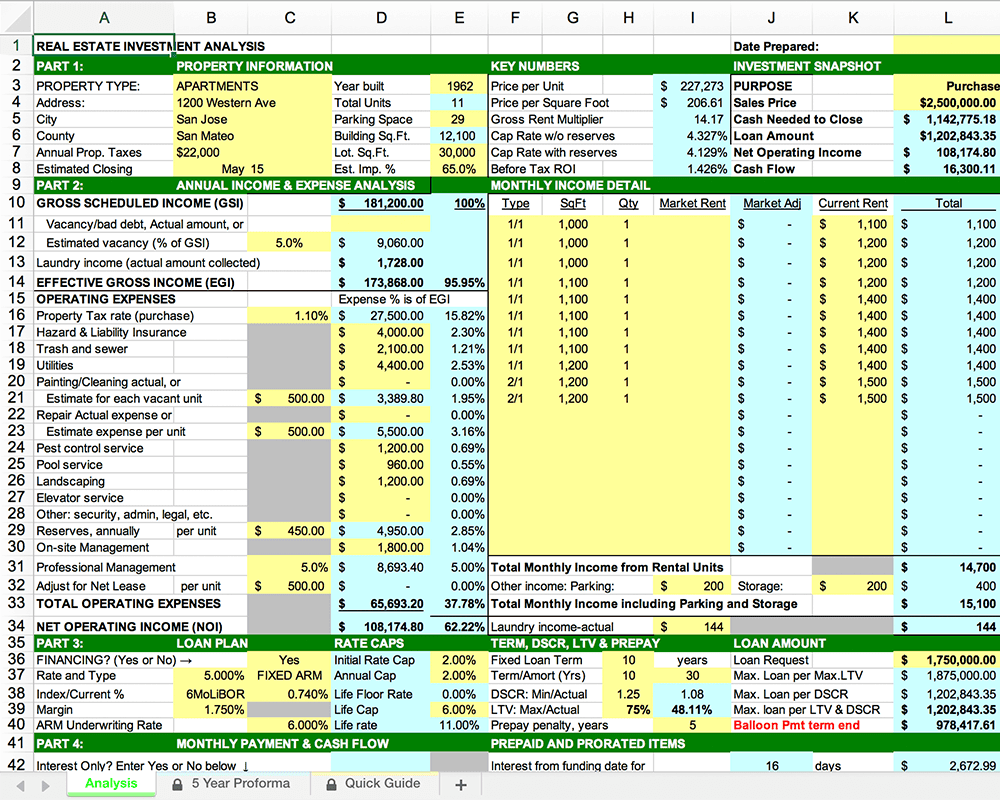
Where do I even begin?!
And that’s when I had the idea to build DealCheck – a cloud-based, easy-to-use property analysis tool for real estate investors and agents. I wanted to create a platform that would help new investors learn the ropes and avoid costly mistakes, but at the same time provide the flexibility to perform more advanced analysis with a click of a button.
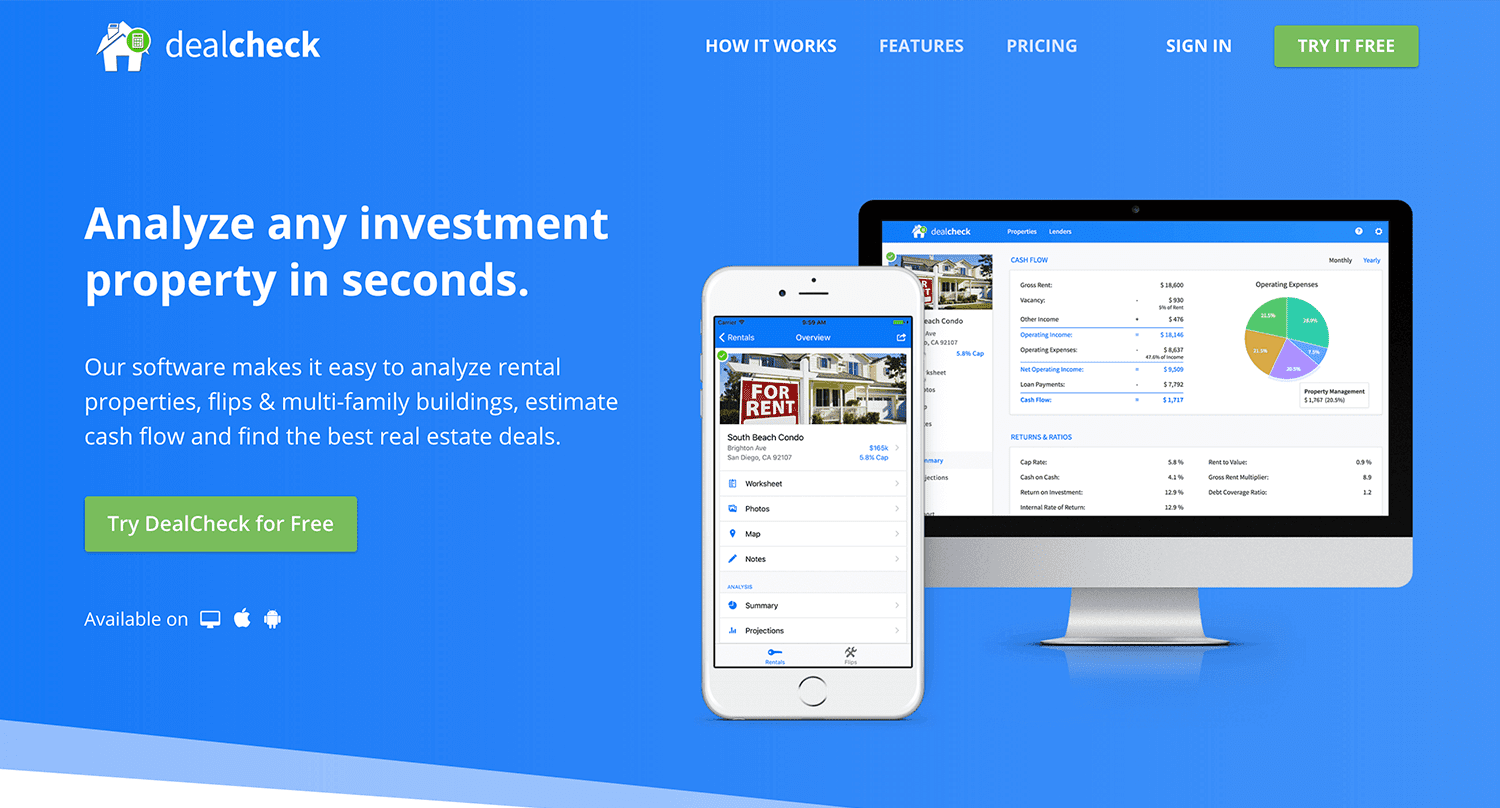
Making real estate investing easier and more accessible.
The Challenges of Solo Development
I was working as a front-end engineer at the time, so I knew I could build the UI myself, but what about the back-end, data storage, authentication, and a bunch of other things you need for a full-functioning cloud app?
I didn’t know anybody I could bring on as a co-founder, so I set out to research what technologies and platforms I could leverage to help me with the back-end and server infrastructure.
Firebase kept popping up again and again and I began to look at it in more detail. It was then recently acquired by Google and its collection of BaaS (backend-as-a-service) modules seemed to offer the exact solution I needed to build DealCheck.
I was especially impressed with the documentation for each feature and how well all of the different technologies could be tied together to create one unified platform.
It wasn’t long before I signed up and started building the first MVP of the app.
Using Firebase to Quickly Build a Scalable Backend
As the only developer on the project, I had limited time and resources to spend on building the back-end, so I set out to use every Firebase feature that was available at the time to my advantage.
My goal was actually to write as little server-side code as possible and instead focus on leveraging the different Firebase modules to solve three specific challenges:
Challenge #1 – Authentication and User Management
The first one was authentication and user management. DealCheck’s users needed the ability to create their accounts so they can view and analyze properties on any device (more on that later). I wanted to have the ability to sign in with email, Facebook or a Google account.
Firebase Authentication was designed specifically for this purpose and I used it to handle pretty much the entire authentication flow. Out-of-the-box, it has support for all the major social networks, cross-network credential linking and the basic account management operations like email changes, password resets and account deletions.
There was no server-side code required at all – I just needed to build the UI on the front-end.
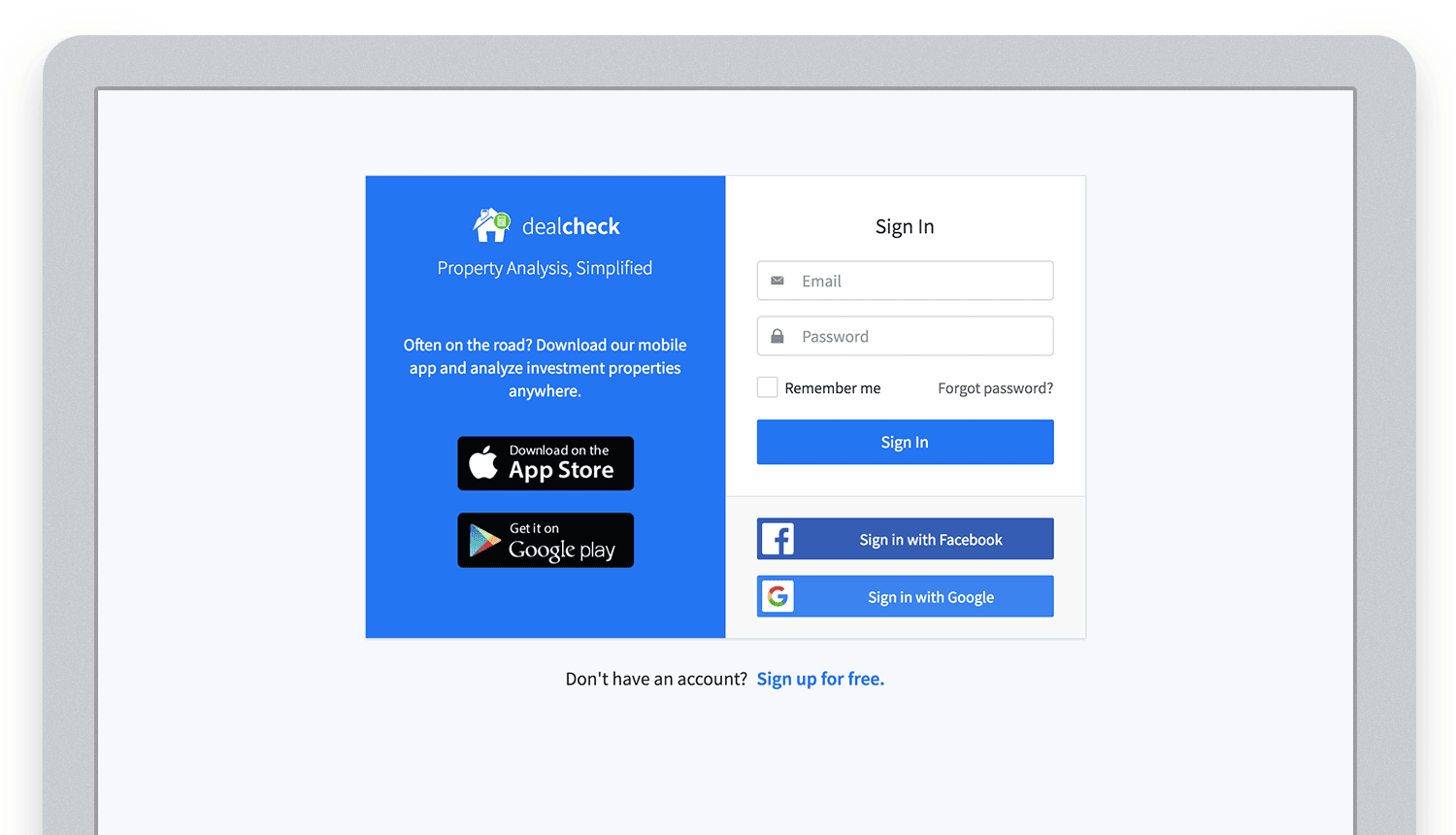
Email, Facebook and Google sign in powered by Firebase.
And as an added benefit, Firebase Authentication ties directly into the Realtime Database product to create a declarative permissions and access control framework that’s easy to implement and maintain. This helped me make sure user data was protected from unauthorized access, but also facilitate data sharing among users.
Challenge #2 – Cloud Storage with Cross-Device Sync
Next up was data storage. I knew that I wanted DealCheck’s users to be able to use the app and analyze properties online, on iOS and Android. So I needed a real-time, cloud-based database solution that could sync data across any device.
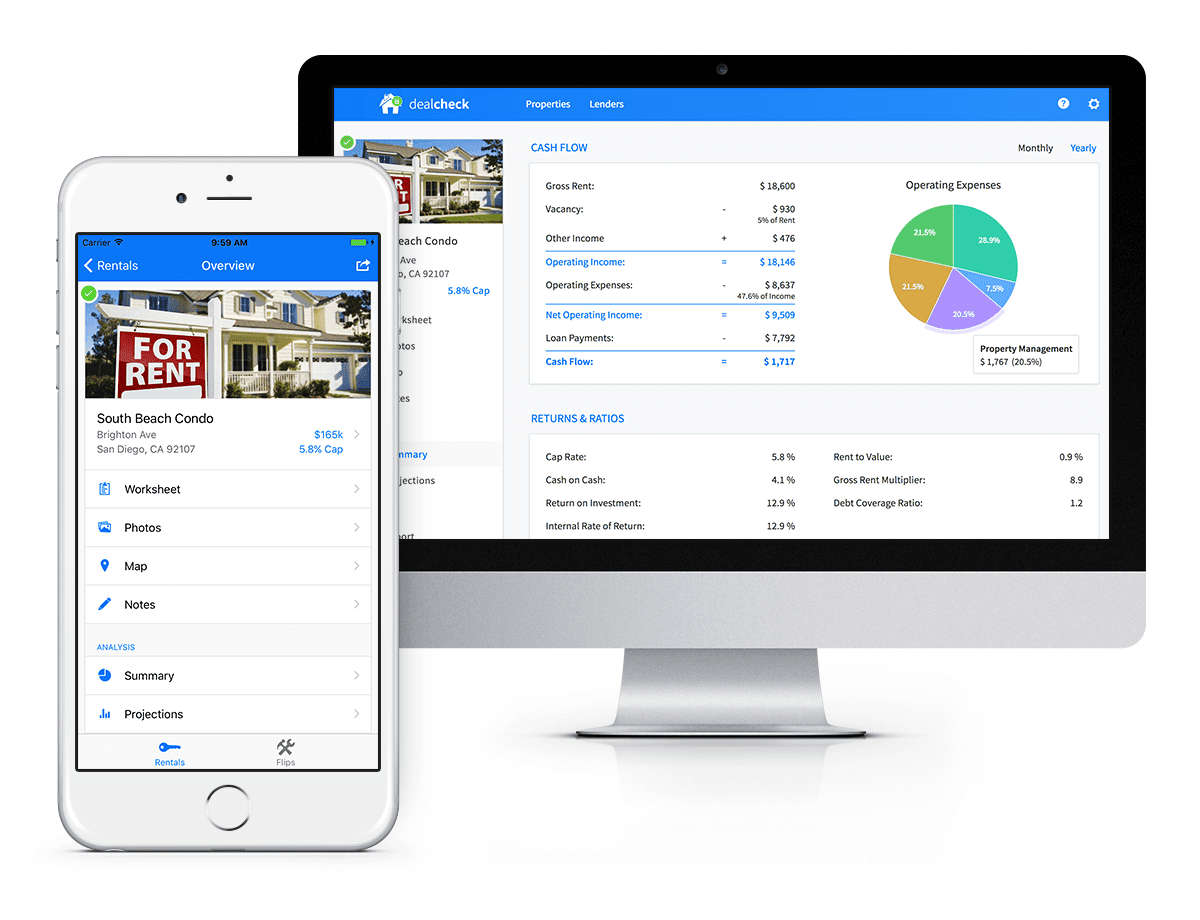
Syncing data across web and mobile is not easy!
Firebase Realtime Database is a NoSQL, JSON-based database solution that was designed exactly for this purpose, and I was actually surprised how great it worked. I used the official AngularJS bindings for Firebase on the front-end to read and write to it directly from the client.
I had to do some extra work on mobile to implement an offline mode with syncing after reconnections, but all-together the code required to make everything work was minimal.
As I mentioned, Firebase Authentication tied directly to the database to facilitate access control, so I really didn’t need to do anything extra there. And I was able to set up automatic daily backups of all the data with a click of a button.
Challenge #3 – Third-Party Integrations
Up to now, I had written exactly 0 lines of server-side code and everything was handled by the client directly. As DealCheck’s development progressed, however, I knew that I would need a server to handle some operations that could not be done in the client.
I wasn’t very experienced with server maintenance and DevOps, but fortunately the Firebase Cloud Functions product was able to solve all of my needs. Cloud Functions are essentially single-purpose functions that can be triggered (or executed) based on a specific HTTP request or events coming from the Authentication, Realtime Database or other Firebase products.
Each function can be run once based on a specific event trigger to perform its prescribed task. You don’t have to worry about provisioning a server instance or managing load – everything is done automatically for you by Firebase.
What’s even cooler, is that Cloud Functions can access the Realtime Database and Cloud Storage buckets of the same project, performing operations on them server-side, as needed.
This is how DealCheck processes subscription payments through Stripe, validates Apple and Google Play mobile subscription receipts, integrates with third-party APIs and updates database records without user interaction.
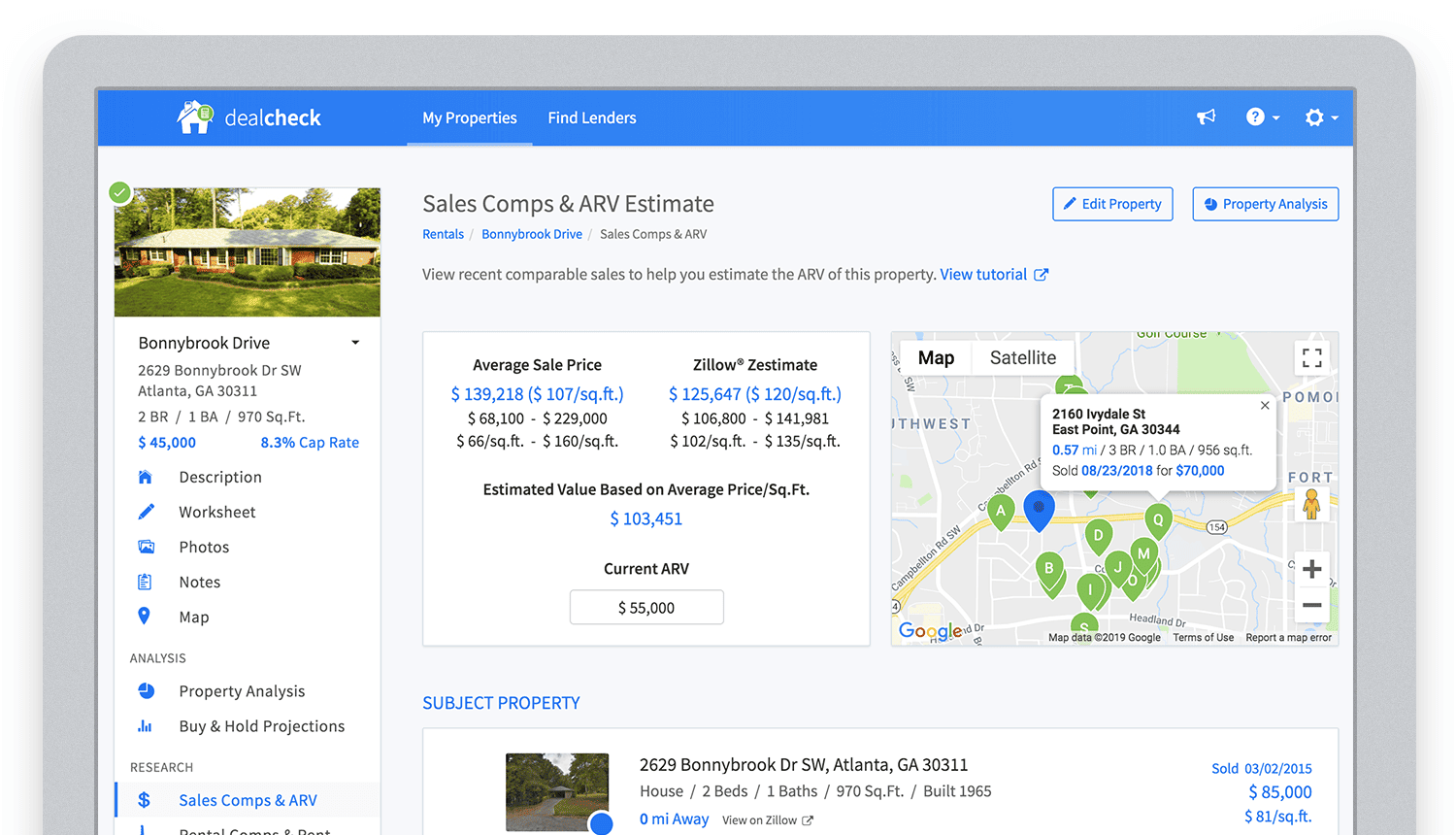
Bringing in sales comparable data from third-party providers into DealCheck.
Cloud Functions became the “glue” that tied the entire back-end infrastructure together.
Growing from an MVP to 100,000 Users with Firebase
The first version of the DealCheck app was built and launched in less than 5 months with just me on the development team. I definitely don’t think that would have been possible without Firebase powering the back-end infrastructure. Maybe the project wouldn’t have ever launched at all.
While Firebase is awesome for quick MVP development, it’s definitely designed to power production applications at scale as well. As DealCheck grew from a small side-project to one of the most popular real estate apps with over 100k users, all of the Firebase products that we use scaled to support the increasing load.
Moreover, the fantastic interoperability of all Firebase modules allows us to develop and release new features much faster because of the reduced coding requirements and ease of configuration.
So next time you’re looking to build an ambitious project with a small team – take a look at how Firebase can help you reduce development time and provide a suite of powerful tools that scale as your business grows.
This is exactly how DealCheck grew from a simple idea to make property analysis easier and faster, to an app that is helping tens of thousands of people grow their wealth and passive income through real estate investing. It’s a truly awesome and fulfilling experience to see your work positively impact so many people and it wouldn’t have been possible without Firebase.
BigQuery Helps Insurance Firms Leverage Previous Storm Data for Better Pricing Insights

8559
Of your peers have already read this article.
2:00 Minutes
The most insightful time you'll spend today!
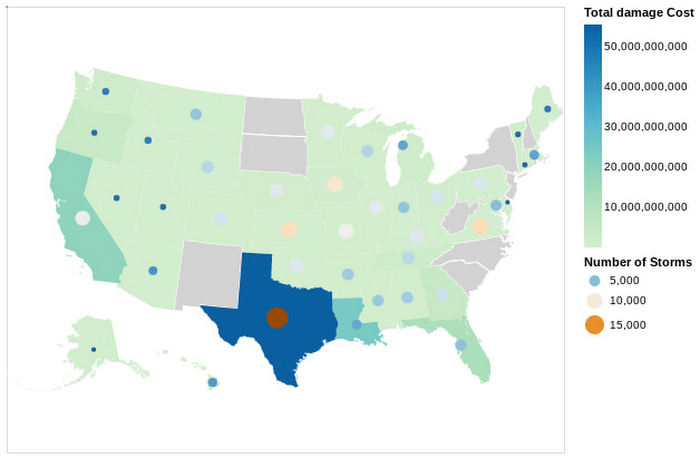
It may be surprising to know that U.S. natural catastrophe economic losses totaled $119 billion in 2020, and 75% (or $89.4B) of those economic losses were caused by severe storms and cyclones. In the insurance industry, data is everything. Insurers use data to influence underwriting, rating, pricing, forms, marketing, and even claims handling. When fueled by good data, risk assessments become more accurate and produce better business results. To make this possible, the industry is increasingly turning to predictive analytics, which uses data, statistical algorithms, and machine learning (ML) techniques to predict future outcomes based on historical data. Insurance firms also integrate external data sources with their own existing data to generate more insight into claimants and damages. Google Cloud Public Datasets offers more than 100 high-demand public datasets through BigQuery that helps insurers in these sorts of data “mashups.”
One particular dataset that insurers find very useful is Severe Storm Event Details from the U.S. National Oceanic and Atmospheric Administration (NOAA). As part of the Google Cloud Public Datasets program and NOAA’s Public Data Program, this severe storm data contains various types of storm reports by state, county, and event type—from 1950 to the present—with regular updates. Similar NOAA datasets within the Google Cloud Public Datasets program include the Significant Earthquake Database, Global Hurricane Tracks, and the Global Historical Tsunami Database.
In this post, we’ll explore how to apply storm event data for insurance pricing purposes using a few common data science tools—Python Notebook and BigQuery—to drive better insights for insurers.
Predicting outcomes with severe storm datasets
For property insurers, common determinants of insurance pricing include home condition, assessor and neighborhood data, and cost-to-replace. But macro forces such as natural disasters—like regional hurricanes, flash floods, and thunderstorms—can also significantly contribute to the risk profile of the insured. Insurance companies can leverage severe weather data for dynamic pricing of premiums by analyzing the severity of those events in terms of past damage done to property and crops, for example.
It’s important to set the premium correctly, however, considering the risks involved. Insurance companies now run sophisticated statistical models, taking into account various factors—many of which can change over time. After all, without accurate data, poor predictions can lead to business losses, particularly at scale.
The Severe Storm Event Details database includes information about a storm event’s location, azimuth (an angle measurement used in celestial coordination), distance, impact, and severity, including the cost of damages to property and crops. It documents:
- The occurrence of storms and other significant weather events of sufficient intensity to cause loss of life, injuries, significant property damage, and/or disruption to commerce.
- Rare, unusual weather events that generate media attention, such as snow flurries in South Florida or the San Diego coastal area.
- Other significant weather events, such as record maximum or minimum temperatures or precipitation that occur in connection with another event.
Data about a specific event is added to the dataset within 120 days to allow time for damage assessments and other analysis.
Driving business insights with BigQuery and notebooks
Google Cloud’s BigQuery provides easy access to this data in multiple ways. For example, you can query directly within BigQuery and perform analysis using SQL.
Another popular option in the data science and analyst community is to access BigQuery from within the Notebook environment to intersperse Python code and SQL text, and then perform ad hoc experimentation. This uses the powerful BigQuery compute to query and process huge amounts of data without having to perform the complex transformations within the memory in Pandas, for example.
In this Python notebook, we have shown how the severe storm data can be used to generate risk profiles of various zip codes based on the severity of those events as measured by the damage incurred. The severe storm dataset is queried to retrieve a smaller dataset into the notebook, which is then explored and visualized using Python. Here’s a look at the risk profiles of the zip codes:
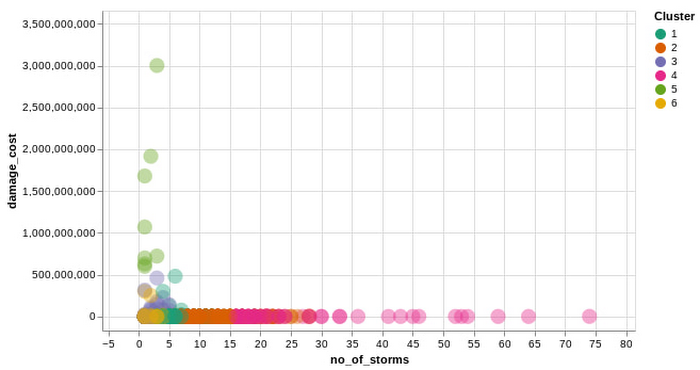
Another Google Cloud resource for insurers is BigQuery ML, which allows them to create and execute machine learning models on their data using standard SQL queries. In this notebook, with a K-Means Clustering algorithm, we have used BigQuery ML to generate different clusters of zip codes in the top five states impacted by severe storms. These clusters show different levels of impact by the storms, indicating different risk groups.
The example notebook is a reference guide to enable analysts to easily incorporate and leverage public datasets to augment their analysis and streamline the journey to business insights. Instead of having to figure out how to access and use this data yourself, the public datasets, coupled with BigQuery and other solutions, provide a well-lit path to insights, leaving you more time to focus on your own business solutions.
Making an impact with big data
Google Cloud’s Public Datasets is just one resource within the broader Google Cloud ecosystem that provides data science teams within the financial services with flexible tools to gather deeper insights for growth. The severe storm dataset is a part of our environmental, social, and governance (ESG) efforts to organize information about our planet and make it actionable through technology, helping people make a positive impact together.
To learn more about this public dataset collaboration between Google Cloud and NOAA, attend the Dynamic Pricing in Insurance: Leveraging Datasets To Predict Risk and Price session at the Google Cloud Financial Services Summit on May 27. You can also check out our recent blog and explore more about BigQuery and BigQuery ML.

Google Leads the Database-as-a-Service Market: Forrester Research
DOWNLOAD RESEARCH REPORTS5480
Of your peers have already downloaded this article
3:00 Minutes
The most insightful time you'll spend today!
Database-as-a-service (DBaaS) has become critical for all businesses to build and support modern business applications and operational systems. It is changing the way companies build and support business applications and operational systems. With DBaaS, organizations can provision a relational or non-relational database of any size in minutes, without needing any technical expertise.
For app developers, it offers a database platform to build simple to sophisticated applications quickly, allowing them to focus on application logic rather than deal with database administration challenges. DBaaS automates the provisioning, administration, backup, recovery, availability, security, and scalability of the database without the need for a database administrator (DBA).
In addition, DBaaS helps enterprises migrate from their on-premises databases to the cloud to save money, support elastic scale, and deliver higher performance for expanding workloads.
Analyst firm Forrester Research in its recent report on the Database-as-a-Service market has named Google Cloud a leader in this space as it supports a broader set of use cases, automation, high-end scalability and performance, and security.
Download this Forrester Research report to understand why enterprises are turning to DBaaS and why Google Cloud is a leader in this space.
More Relevant Stories for Your Company

Cloud Spanner Powers Vimeo to Deliver Consistent UX for across Content
Editor’s note: The video platform Vimeo leverages managed database services from Google Cloud to serve up billions of views around the world each day. Here’s how they deliver a consistent user experience across all their content. Vimeo is the world’s leading video software solution, powering hundreds of thousands of new uploads

Scaling Your Spanner Databases: The Benefits of Read-Only Replicas and Zero-Downtime Moves
As Google Cloud’s fully managed relational database that offers near unlimited scale, strong consistency, and availability up to 99.999%, Cloud Spanner powers applications at any scale in industries such as financial services, games, retail, and healthcare. When you set up a Spanner instance, you can choose from two different kinds of configurations: regional and multi-regional.


Easy Access to Stream Analytics with Google Cloud
By 2025, more than a quarter of the data created in the global datasphere will be real-time in nature. “This is important because in the real-time world, “the window of opportunity diminishes and goes away really fast. You want to be able to respond to your customer needs, their asks,

Harnessing the Power of Data and AI to Transform Life Science Supply Chains
Global life science supply chains are lengthy and complex with many moving parts. One small disruption can create serious delays and affect your ability to deliver therapeutics for patients. Supply chain disruptors Over the last few years, healthcare organizations have encountered a range of obstacles, from both internal and external
