





Cart.com to Transform e-Commerce for Brands Globally

8775
Of your peers have already read this article.
1:30 Minutes
The most insightful time you'll spend today!
The ecommerce playing field has been hard to navigate for most retailers, and Cart.com is on a mission to change that. Traditionally, retailers needing to run their online store, order fulfillment, customer service, marketing, and other essential activities have had to cobble together systems to get the capabilities they need – much less having access to analytics across these functions. The result is costly, siloed ecommerce operations that are difficult to manage and scale.
It’s clearly not a formula for success, yet that’s the reality facing most retailers. Cart.com, in contrast, has set out to democratize ecommerce by giving brands of all sizes the full capabilities they need to take on the world’s largest online retailers. Our end-to-end environment empowers retailers to keep more of their revenue, set up proven strategies for managing all aspects of their business, and act on valuable insights from customer data every step of the way.
Together with our talented team, we’re building a unified ecommerce platform that already provides value to many leading or up and coming brands including Whataburger, GUESS, Dr. Scholl’s, Rowing Blazers, and Howler Bros.
We’re excited about the opportunity ahead as we reimagine traditional approaches to online sales, fulfillment, marketing, accessing growth capital, providing a unified view of all ecommerce and marketing analytics, and other activities. Expectations for Cart.com are high, and we are building a company that can scale to $100B in revenue and beyond. Supported by the Startup Program by Google Cloud and Google Cloud solutions, we’re establishing a technology platform to transform all aspects of ecommerce for brands worldwide.
Partner in disruption
At Cart.com, we’re currently targeting an underserved market. Our ideal customer is beyond demonstrating product-market-fit and is now at an inflection point seeking a growth opportunity. Typically, those companies are generating between $1M and $100M in annual revenue. We’ve seen an enthusiastic response from brands and retailers as well as investors, with backing from investors in just over a year totaling $143 million in three funding rounds.
Our strategy is to build an integrated ecommerce model that combines best-of-breed solutions, many of which we gain through acquisitions and then build upon to provide a streamlined and fully integrated experience for our brands. We’ve made seven acquisitions so far to round out our online store, order fulfillment, marketing services, customer service, and we have launched some integral partnerships including easy access to growth capital through our relationship with Clearco and product protection for customers on every purchase with Extend. Instead of acquiring a data company, we’re building our data platform on Google Cloud, across each operating function for a single-view for brands to harness actionable data. We see Google Cloud as the leader for data management, analytics, machine learning (ML) and artificial intelligence (AI).
Other reasons why we’re building our business on Google Cloud include scalability, excellence, security, reach, and data analytics that are far superior to other environments.
We also feel a cultural and mission alignment with Google Cloud and envision leaning into a long-term partnership of marketing, selling, and disrupting the disruptors together. Equally important to us are the investments Google Cloud is willing to make in early-stage companies like ours. The support through the Google Cloud for Startups program has been outstanding.
Built on Google Cloud
A wide range of Google Cloud solutions provide the foundation for our platform. For instance, Cloud Pub/Sub keeps our services communicating with one another. We rely on fully managed relational databases, like Cloud SQL and Cloud Spanner, to securely handle the huge volume of brand and shopper data generated every day.
Cloud Run allowed us to develop inside of containers before our Kubernetes infrastructure was ready to go. Now, we are taking advantage of all the capabilities in Google Kubernetes Engine. BigQuery integrates with all Google Cloud solutions and offers true data streaming natively out of the box, along with Dataflow for advanced analytics. We also use Container Registry to store and manage our Docker container images. Right now, we’re testing Cloud Composer to evaluate using it for data workflow orchestration instead of Apache Airflow.
The openness of the Google Cloud environment is further enabled by Anthos, which we may deploy soon to perform data integrations quickly as we acquire more companies over the next year. For example, if we acquire a company using Azure, we can easily align it with our Google Cloud ecosystem.
Enabling ecommerce 2.0
Recently, our team has been experimenting with Google Cloud Vertex AI and the fully managed services of AI deployment and ML operations. The capabilities would save us substantial time in the management of the ML lifecycle which allows us to focus more on developing proprietary AI that will transform commerce at scale.
Because Google Cloud is so far ahead in data science, our teams benefit from deep Google Cloud expertise as we look to provide brands with unmatched insights into customers to improve services and revenue. We’re also planning to test Recommendations AI among other tools to deploy customer product recommendations and personalization as turnkey productized offerings. Moving forward, we will likely use Bigtable to aid in serving machine learning to hundreds of thousands of brands due to its low latency and scalability.
Fanatical about brand success
We know that our work with Google Cloud for Startups and use of Google Cloud solutions for best-in-class data management, analytics, ML, and AI will enable us to offer even more transformative services to brands.
We also see the opportunity to use our platform and customer insights to break down barriers between brands, enabling retailers to share information and work better together when it’s in their best interests. What we’re building today on Google Cloud is fundamentally changing what’s possible for retailers of any size everywhere.
As a startup, when recruiting talent or working with prospective customers, it helps to share our success with Google Cloud. We view them as an extension of the Cart.com team. It also validates our business as we continue building a more integrated, holistic approach to commerce that opens new opportunities and drives growth for brands worldwide.
For more details about Cart.com’s vision for unified ecommerce, check out our video.
If you want to learn more about how Google Cloud can help your startup, visit our page here to get more information about our program, and sign up for our communications to get a look at our community activities, digital events, special offers, and more.
Google Unveils New Cloud Region in Delhi NCR to Power India’s Digitization

8323
Of your peers have already read this article.
2:00 Minutes
The most insightful time you'll spend today!
In the past year, Google has worked to surface timely and reliable health information, amplify public health campaigns, and help nonprofits get urgent support to Indians in need. Now, we are continuing to focus on helping India’s businesses accelerate their digital transformation, deepening our commitment to India’s digitization and economic recovery. To support customers and the public sector in India and across Asia Pacific, we’re excited to announce that our new Google Cloud region in Delhi National Capital Region (NCR) is now open.
Designed to help both Indian and global companies alike build highly available applications for their customers, the Delhi NCR region is our second Google Cloud region in India and 10th to open in Asia Pacific.
What customers and partners are saying
Navigating this past year has been a challenge for companies as they grapple with changing customers demands and economic uncertainty. Technology has played a critical role, and we’ve been fortunate to partner with and serve people, companies, and government institutions around the world to help them adapt. The Google Cloud region in Delhi NCR will help our customers adapt to new requirements, new opportunities and new ways of working, like we’ve helped so many companies do in the region:
- InMobi scaled a personalized AI platform to support 120+ million active users. “With the arrival of the Google Cloud Delhi NCR, InMobi Group sees the opportunity to continue closing the gap between our users and products,” says Mohit Saxena, Co-founder and Group CTO of Inmobi. “Glance, especially, has been serving AI-powered personalised content to over 120 million active users. We can’t wait to continue giving them truly meaningful experiences that are speedy, scale well, and are relevant to them, by expanding the use of our current tools working on Google Cloud with the opening of a new region.”
- Groww now supports a sizable user base. “Google Cloud provides great technology that enables us to build and scale infrastructure to millions of users, and the new Google Cloud region in Delhi NCR will continue to help more businesses and startups in India access powerful cloud-based infrastructure, products and services,” says Neeraj Singh, Co-founder and Chief Technology Officer, Groww.
- HDFC Bank is positioned for the future. “At HDFC Bank, we are harnessing technology platforms to both run and build the bank. As we progress to be future ready, the objective is to invest in future technologies that give us scale, efficiency and resiliency. Towards this the Google Cloud region in Delhi NCR will enable us to enhance our resiliency and help us in building an active-active design framework for our new generation applications on cloud,” says Ramesh Lakshminarayanan, CIO, HDFC Bank.
- Dr. Reddy’s Lab built a modern data platform with Google Cloud. “At Dr Reddy’s, we pride ourselves in helping patients regain good health, acting quickly to provide innovative solutions to address patients’ unmet needs and in accelerating access to medicines to people worldwide. Our Google Cloud-powered data platform is helping us realize these objectives and we welcome Google’s investment in the new Delhi NCR region as helping us and other businesses in India make further contributions to our social and economic future,” says Mukesh Rathi, Senior Vice President & CIO, Dr. Reddy’s Laboratories.
- “To survive the disruption caused by the pandemic and to succeed in the long term, organizations need to become digital natives, so they can be more agile, explore new business models and build new capabilities that boost resilience. A cloud-first strategy plays a key role in enabling businesses to do this,” said Piyush N. Singh, Lead – India market unit & lead – Growth and Strategic Client Relationships, Asia Pacific and Latin America, Accenture. “Harnessing the potential of cloud requires the right data infrastructure and this expansion by Google Cloud will undoubtedly help Indian enterprises in their digital transformation journeys.”
A global network of regions
Delhi NCR joins 25 existing Google Cloud regions connected via our high-performance network, helping customers better serve their users and customers throughout the globe. As the second region in India, customers benefit from improved business continuity planning with distributed, secure infrastructure needed to meet IT and business requirements for disaster recovery, while maintaining data sovereignty.
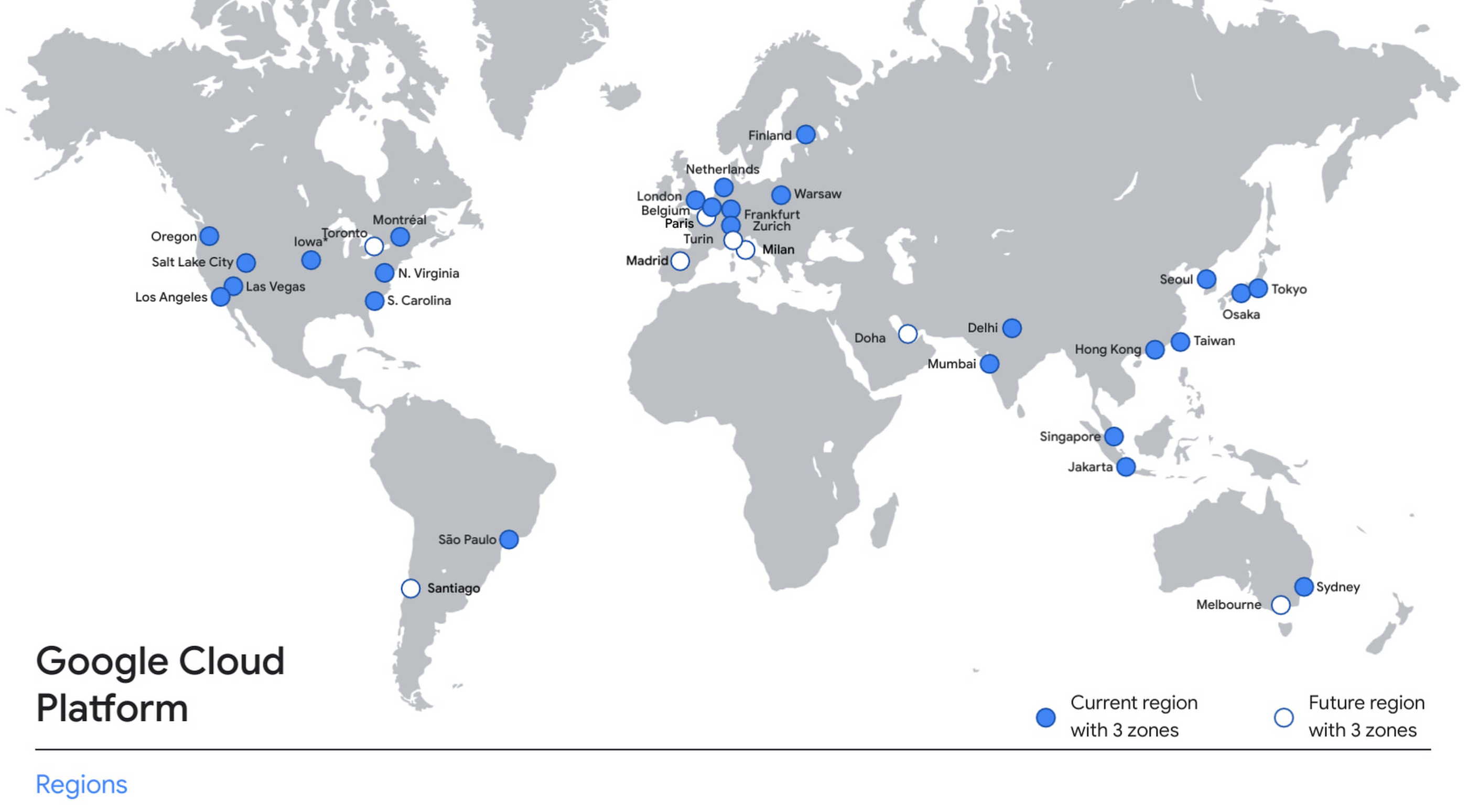
With this new region, Google Cloud customers operating in India also benefit from low latency and high performance of their cloud-based workloads and data. Designed for high availability, the region opens with three availability zones to protect against service disruptions, and offers a portfolio of key products, including Compute Engine, App Engine, Google Kubernetes Engine, Cloud Bigtable, Cloud Spanner, and BigQuery.
Supporting India’s recovery with training and education
Google and Google Cloud will also continue to support our customers with people and education programs. We’re investing in local talent and the local developer community to help enterprises digitally transform and support economic recovery.
Through the India Digitization Fund, we expanded our efforts to support India’s recovery from COVID-19—in particular, through programs to support education and small businesses. In addition to expanding internet access, and investments to help start-ups accelerate India’s digital transformation, we’ve grown our Grow with Google efforts. Businesses can access digital tools to maintain business continuity, find resources like quick help videos, and learn digital skills—in both English and in Hindi.
Helping customers build their transformation clouds
Google Cloud is here to support businesses, helping them get smarter with data, deploy faster, connect more easily with people and customers throughout the globe, and protect everything that matters to their businesses. The cloud region in Delhi NCR offers new technology and tools that can be a catalyst for this change. To learn more, visit the Google Cloud locations page, and be sure to watch the region launch event here.
4887
Of your peers have already watched this video.
1:30 Minutes
The most insightful time you'll spend today!
Accelerate Your Digital Transformation Through a Modern Infrastructure
Learn about the latest advancements to Google Cloud Platform’s unique infrastructure to accelerate enterprise workloads and build planet scalable solutions. Hear how Google Cloud’s infrastructure enables you to solve problems faster, more securely, and at greater scale.
See how Google Cloud is accelerating the support for enterprise workloads like SAP, VMware, and Windows and augmenting new capabilities to better protect and secure your workloads. Discover how Google Cloud enables businesses to build high-scale applications with global scale and reach.
Unlocking Economic Potential: Cloud FinOps

3256
Of your peers have already read this article.
4:00 Minutes
The most insightful time you'll spend today!
Built for a CapEx world, most organizations’ finance systems aren’t set up to take advantage of cloud’s dynamic, OpEx-driven consumption patterns.

GETTY
It may not be a household name yet, but chances are you’ve crossed paths with OpenX today. OpenX, a leader in programmatic advertising, operates one of the world’s largest ad exchanges, serving over 250 billion ad requests per day, connecting more than 30,000 brands and reaching nearly one billion consumers. To make it happen, in 2019, OpenX migrated entirely out of its data centers and became the first major ad-exchange platform to move completely to the cloud.
The OpenX CTO, Paul Ryan, knew that this cloud transformation initiative had the potential to increase costs faster than its revenues. To be successful, he needed his engineering, finance, and business teams to forge a new “cost-aware” culture, complete with effective cost visibility and controls. In other words, he needed Cloud FinOps — an operational framework and cultural shift that brings technology, finance, and business together to drive financial accountability and realize business benefits through cloud transformation.
Ryan laid out a cloud migration roadmap that included cost governance and controls around project ownership, established cost responsibility with engineering teams to accurately forecast cloud consumption, and challenged developers to lower per-unit costs — while at the same time improving performance, scalability, speed and global reach.
It worked! In just 9 months, OpenX reduced their per-unit cost by over 60%. The framework allowed OpenX to launch new regions in a matter of days, reduce their time to market for new features by over 50%, and complete their migration in record time — seven months! “We are now able to stop worrying about legacy infrastructure and focus more on our growth categories,” said Ryan. “Our tech stack is getting smarter and more sophisticated by the day, and we have the flexibility to scale our infrastructure in real-time as the business scales and evolves.”
Unblocking Cloud’s Potential
Cloud holds the key to a successful digital transformation. In fact, McKinsey forecasts that by 2030, the Fortune 500 alone may realize over $1 trillion of EBITDA value drivers associated with public cloud enablement. But unlike OpenX, many companies struggle to achieve near-term value objectives from their cloud investments. Surveys reflect that more than 30% of cloud spend in 2021 was wasted or inefficient, while upwards of 80% of CIOs have yet to achieve the business benefits of migrating to the cloud.
Traditional IT finance processes are ill-suited for cloud infrastructure: Traditional planning and budgeting processes are challenged to address dynamic consumption patterns and complex migrations. Centralized IT budgets using traditional allocations fail to provide the necessary visibility into sources of cost overruns. CapEx-focused cost controls have little ability to manage largely OpEx-driven spend. Trend-based forecasting often inaccurately predicts cloud costs. And developer teams lack access to cost-aware architecture patterns to deploy the applications more efficiently.
Enter Cloud FinOps
At Google we’ve worked with many companies, like OpenX, to help organizations realize the transformational benefits of the cloud by cultivating a culture of transparency and embedding agile processes to manage costs. We’ve distilled these learnings into a Cloud FinOps operational framework that gives organizations the financial governance and accountability they need to grow their business sustainably.
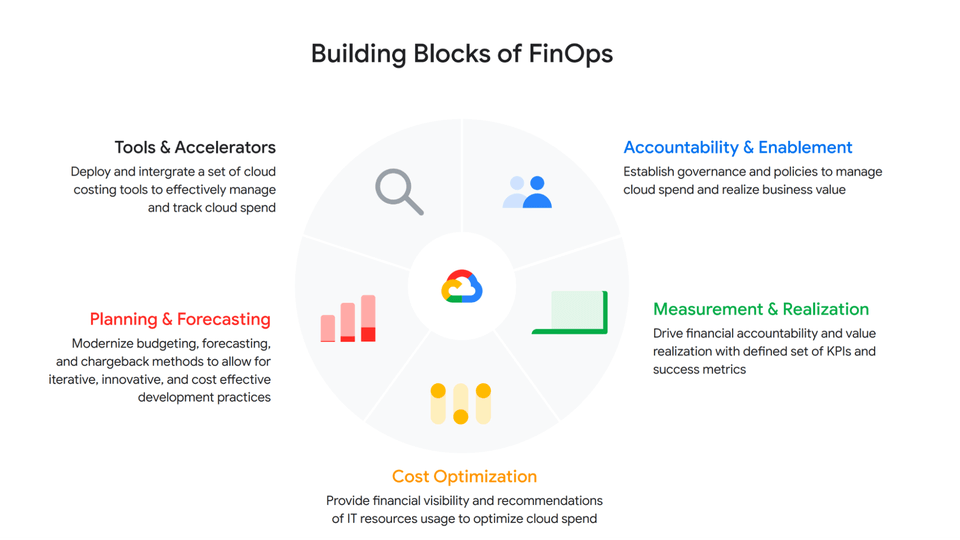
GOOGLE CLOUD
At a high level, a Cloud FinOps approach depends on five key areas:
- Accountability and Enablement
Accountability and enablement aim at instilling a cost-conscious culture across the organization. Oftentimes, this means standing up a cross-functional and dedicated team with members from technology, finance and engineering to establish cloud financial best practices and governance. In various organizations, we’ve seen this through an extension of a Cloud Center of Excellence, a Cloud Business Office or simply a Cloud FinOps team. Enablement focuses on empowering IT, finance and business leaders through training to help them better understand the economics of cloud services and the strategies to efficiently deploy and manage them. Cloud financial training guides teams on how to design cost-effective cloud environments, for example, embracing ”cloud-native” design principles such as auto-scaling/elasticity and Infrastructure as a Code.
- Measurement and Business Value Realization
Effective measurements not only create awareness and enable agile processes, but also support a culture that celebrates success and rewards teams for achieving business objectives. As such, measurement in the service of business value realization is about developing a comprehensive set of long-term benefits and cost KPIs to quantify the total net value of the return on digital transformation. Organizations often start with cost-related KPIs and eventually evolve those KPIs into business value metrics that are mapped to targeted business outcomes.
- Cloud Cost Optimization
Cloud cost optimization is an iterative and continuous process that provides a consistent methodology to manage cloud consumption cost-effectively. There are three key areas of optimization:
Resource optimization – Model cost-effective cloud usage based on utilization and consumption patterns.
Pricing optimization – Manage cloud spend through a continuous analysis of various pricing models. In a Google Cloud context, that might mean Committed Use Discounts, BigQuery flat rate reservations, etc.
Architecture optimization – Build applications with a cost-aware architecture by leveraging newer generation compute instances (like Tau VMs, which offer an industry-leading 42% better price-performance versus comparable offerings), or using managed services and serverless technology to offload operational overhead.
For example, video hosting, sharing and services platform provider Vimeo built transcoding pipelines by using Google Cloud Spot VMs to optimize their infrastructure spend. To do so, they created fault-tolerant workloads that could withstand preemptions, and in exchange, got up to a 91% discount compared to using regular on-demand instances.
- Planning and Forecasting
In the cloud, accurately forecasting your finances requires rethinking of traditional approaches to depreciation and trend-based forecasting of maintenance and licensing costs. One way to improve the accuracy of your dynamic cloud needs is to use workload-specific forecasting models that leverage a combination of trend-based models for steady-state workloads, driver-based models for scaling applications, as well as monthly variance analysis. In other words, you can define cloud budgets and forecasts by monitoring cloud consumption trends, allocating cloud cost pools with a proper tagging strategy that’s mapped to a chart of accounts in a general ledger, and conducting a cost-benefit analysis based on cloud infrastructure, implementation, and support costs.
- Tools and Accelerators
Without the proper tools and processes in place, understanding and managing cloud costs can be complex — and this especially true as organizations scale their business in the cloud. By deploying proper cloud cost management tools and accelerators such as Looker Cloud Cost Management and automation scripts to set guardrails and enforce cost control policies, organizations can effectively manage and track cloud spend with access to near-real-time billing and cost data to make better informed business decisions.
The key objectives of Google Cloud Cost Management tools are to make it as simple as possible for organizations to get visibility into their current and forecasted costs with built-in reporting and customizable dashboards; help drive greater accountability for cloud spending across the organization by providing flexible ways to organize cloud resources and allocate costs; provide strong financial governance controls to reduce the risk of overspending; and offer intelligent recommendations for optimizing cloud costs and usage.
Start Saving with Cloud
Businesses are continuously seeking to better operate and manage their cloud environments and the need is ever increasing to transparently manage cloud spend, optimize costs, and obtain their desired business agility. By enhancing your Cloud FinOps capabilities and adopting principles of continuous cost optimization, you too can accelerate the business value of cloud computing.
Special thanks to Bruce Warner, Daniel Petibone, Nihar Jhawar and FinOps Foundation community for their contributions and sharing their domain expertise to this important Cloud FinOps topic.
8 Must-Have Google Cloud Products for Startups

3182
Of your peers have already read this article.
2:30 Minutes
The most insightful time you'll spend today!
Startups worldwide turn to Google Cloud tools to build fast on a strong and easy to use platform that helps them get to market and launch products faster, all while building on the cleanest cloud in the industry. Startups leverage Google Cloud and our Google for Startups Cloud Program to go from idea to IPO, and there are a variety of products on Google Cloud that can help them.
Here are the 8 top products that startups use on Google Cloud to innovate and grow:
Firebase for app development
Speed up innovation with Firebase, a mobile development platform that’s fully integrated with Google Cloud. Work in a simpler cloud environment, easily pull in products or services, and build your apps faster.
Cloud SQL for database needs
Build your startup’s foundation with Cloud SQL, a fully managed relational database solution that integrates with Google Cloud services. Create and connect to your first database in minutes and scale with a single API call.
AI and machine learning products
Solve tough problems with AI and machine learning products, built with the best of Google’s technology. Train deep learning and machine learning models cost-effectively so you can iterate and innovate faster.
BigQuery for data analytics
Drive agility with BigQuery, a serverless, cost-effective, multi-cloud data warehouse. Query streaming data in real time, predict business outcomes with built-in machine learning, and share analytics with just a few clicks.
Google Kubernetes Engine (GKE) for containers
Unlock faster, more secure app development with GKE, the most scalable Kubernetes platform. Streamline operations with release channels that fit your business needs and leave cluster monitoring to Google engineers.
Looker for data visualization
Get more from your data to keep moving ahead of the competition with Looker, a trusted business intelligence and data platform. Generate real-time reports and get insights at the right time with proactive alerts.
Cloud Run for serverless computing
Create scalable containerized apps in any programming language on Cloud Run, a fully managed compute platform. Pair it with container tools like Cloud Build and Docker, and only pay when your code is running.
Cloud Armor for security
Protect your startup from Web attacks with Cloud Armor, a leading Distributed Denial-of-Service (DDOS) defense service. Use it with an HTTP Load Balancer for Managed Instance Groups across regions to keep your workloads highly available and secure.
To learn more about products best-suited to the unique demands of startups, check out our startups solution page. Our team is looking forward to discussing how these products can help you. If you’re not already in the program, you can get started here.
If you want to learn more about how Google Cloud can help your startup, visit our page here to get more information about our program, and sign up for our communications to get a look at our community activities, digital events, special offers, and more.
3 Important Factors to Consider for Moving Large-scale On-prem Data to Cloud with Storage Transfer Service

3524
Of your peers have already read this article.
1:30 Minutes
The most insightful time you'll spend today!
Organizations have been moving their on-premises data and applications to the cloud for the past several years, driven by reasons as varied as application modernization and content delivery to archival. In particular, we have seen migration momentum pick up in sectors like media and entertainment, where customers are rethinking how they monetize and store their valuable historical content, often while exploring Google Cloud’s many analytical and AI solutions.
Many of these customers are interested in moving their unstructured data from on-premises appliances to Google’s Cloud Storage. Over the past year, we’ve noticed an uptick in larger migrations, where customers move tens of petabytes or more of on-premises file data to Google’s flexible, secure object storage.
For customers like Telecom Italia/TIM Brasil, Google’s fully managed Storage Transfer Service played a key role in making this transformation possible by moving data from on-premises filesystems to extensible, low-cost Cloud Storage over the network.
“Storage Transfer Service helped us move petabyte-scale data from on-premises filesystem to Google Cloud in a highly performant and fully-managed way,” said Auana Mattar, CIO at Telecom Italia/TIM Brasil. “Setting up the transfer pipeline required performing some tests to figure out the ideal number of agents and networking settings in our on-prem environment. Once the initial setup was done, transferring data was seamless, and the service was able to saturate a 20 Gbps Partner Interconnect link.”
While large-scale cloud migrations can be intimidating, there are a number of actions that customers can take to ensure that a multi-petabyte data transfer goes as smoothly as possible. In the past, we’ve shared general architectural guidance for customers new to their cloud journey. And for customers looking for options, Google has multiple paths to move on-premises file data to the cloud, including our fully offline Transfer Appliance.
In this blog post, we’ll provide an updated perspective focused on how to use Storage Transfer Service to move data from on-prem to the cloud. Specifically, we’ll look at three different factors to consider prior to moving large amounts of data from your on-premises filesystem to Cloud Storage with our Storage Transfer Service.
Understanding the source files and filesystem
If you are moving data from an on-premises filesystem, you should be aware of how your source files, and your source filesystem, can impact transfer performance.
Each copy you make to Cloud Storage incurs some overhead from associated operations like metadata transfer, checksumming, and encryption. This means that, for a given amount of storage, transferring large numbers of very small files will take longer. As a rule of thumb, Storage Transfer Service will be most performant when moving files that are 16 MB or larger.
If you have a large number of smaller files, you may choose to batch them using tools like tar and upload as a single object. This will improve transfer performance but will limit how you can use those files in Cloud Storage. It’s an option best considered for use cases like archival storage, where the data transferred to Google Cloud may not be managed or accessed regularly. Our Nearline, Coldline, and Archive archival tiers offer excellent performance should you ever need to retrieve the archived data.
The source filesystem may also slow down transfer performance, particularly if the filesystem has limited read throughput. Tools like Fio can be used to test read throughput. We’ve included a command below to run a series of 1MB sequential read operations in Fio and to generate a report:
#Install fio> sudo apt install -y fio#Create a new directory fiotest> TEST_DIR=/mnt/mnt_dir/fiotest> sudo mkdir -p $TEST_DIR#Test read throughput> sudo fio --directory=$TEST_DIR --direct=1 --rw=randread --randrepeat=0 --ioengine=libaio --bs=1M --iodepth=8 --time_based=1 --runtime=180 --name=read_test --size=1G
Fio will then generate a report. The final line labeled ‘bw’ represents the total aggregate bandwidth of all threads, and it can be used as a proxy for read throughput. In general, you should strive for read throughput (‘bw’) that is 1.5x of your desired upload throughput or speed. (And one easy way to increase read throughput is to ensure that the filesystem itself is not imposing any limits on maximum throughput.)
Optimizing Storage Transfer Service resources
Within the Storage Transfer Service, there are a few settings that we can adjust ahead of time to ensure optimal performance for a larger workload.
First, we should ensure that we have the right number of transfer agents for our source data. We would advise that, for any transfer job larger than 1 GB, you start with at least three agents in separate VMs, with each agent assigned at least 4 vCPU and 8 GB of RAM. In addition to providing a foundation for performant data transfer, this architecture also ensures that the transfer is fault tolerant should one agent machine become unavailable.
Google Cloud supports up to 100 concurrent agents for a given Google Cloud project. To help you identify the right number of agents to support your workload, you should start your larger transfer first, then wait three minutes after adding each agent to ensure that throughput has stabilized.
In general, each agent can facilitate roughly 1 Gbps of throughput for up to 10 agents, at which point it may be necessary to add more agents for a very large amount of network bandwidth. For example, in one larger migration, a customer with 20 Gbps of dedicated network capacity ran ~30 agents at once. These numbers illustrate what was required at one enterprise data center. Across all of your environments, it is important to test and monitor your throughput via Cloud Monitoring to ensure you have the right configuration for your transfer goals.
Another area to optimize is where and how you install your agents. As we mentioned earlier, agents should be installed in separate VMs, and each host machine should dedicate at least 4 vCPUs and 8 GB of memory per agent. This is a starting off point, and larger, long-running transfers may require additional CPU or memory. For those longer jobs, we advise that you monitor CPU utilization and unused memory closely to ensure optimal performance. You should provision more CPUs when utilization exceeds 70%. Similarly, you should be ready to provision additional memory when the agent has less than 1GB of unused memory.
Preparing your network for large-scale data transfer
The third and final area to consider is your network connectivity. While it can be easy to reduce this to the bandwidth between the source filesystem and the Google Cloud bucket, the network includes two other components that can be easier to configure: first, the network interface from the on-premises agents to the WAN; and second, the agents’ connection to the on-premises filesystem.
For the first component, the network interface from the on-premises agents to the WAN, the general guidance is to not let this become a bottleneck. Specifically, you should ensure that this interface is greater than or equal to the bandwidth you require to read from the filesystem, plus the upload bandwidth to write to Google Cloud. In other words, if you plan on moving 10 Gbps of data from on-premises to Google Cloud, you will need 20 Gbps of bandwidth between the on-premises agents to the WAN: 10 Gbps to read from the networked filesystem, and 10 Gbps to transfer and write to Google Cloud.
On-premises filesystems, and on-premises networks, come in many flavors. For the second component, how the agents connect to an on-premises filesystem, our general rule is to be mindful of latency and to test regularly. It is essential to ensure that agents run on machines that can access a networked filesystem with very low latency.
Finally, if you are trying to maximize transfer performance, make sure you’ve configured your network to avoid bandwidth restrictions between on-premises filesystem and Google Cloud that might impact transfer speed. Storage Transfer Service will allow you to cap the bandwidth used by transfer, making it easy to minimize any impact on other production applications. Consider using tools like lperf3, tcpdump, and gsutil to measure the network bandwidth available to upload to Cloud Storage.
In particular, gsutil is worth some additional detail. Gsutil is a Python tool that can help you perform a number of object storage management tasks in Google Cloud, including checking your agent’s connection to the Cloud Storage APIs. It can be installed via the Google Cloud SDK, or separately. In this case, you should also ensure that gsutil is available in the same on-premises VM as the Storage Transfer Service agent.
If you’d like to use gsutil to test connectivity to Google Cloud, here’s the command:
gsutil cp test.txt gs://my-bucketReplace:my-bucket with the name of your Cloud Storage bucket.
CP is a copy command that lets you copy data from on-premises to the cloud. In this case, gsutil is copying a test document, test.txt, to ensure that you have a connection with the Google Cloud APIs. You will need to create a test document before running this command.
Test twice, transfer once
One overarching theme across all factors is that testing can help you understand performance. For many customers, a large-scale data transfer from an on-premises filesystem to Google Cloud is an unusual event. And as with any unusual event in enterprise IT, it is a great idea to make sure that each party – from network administrators to filesystem and storage experts to cloud architects – is able to test their domain multiple times, to ensure the event will proceed seamlessly.
As you fine tune your testing in advance of a data transfer, you may want to learn more about your options for obtaining more network bandwidth, orchestrating transfer from SMB filesystems, or even how to make the right choices to save money on object storage. And we plan to share more in our blog about how customers have used our transfer offerings in the months ahead. Advanced agent setup | Cloud Storage Transfer Service Documentation
For more information about Storage Transfer Service and how to get started, please take a look at our documentation or get started via the Google Cloud console.
More Relevant Stories for Your Company




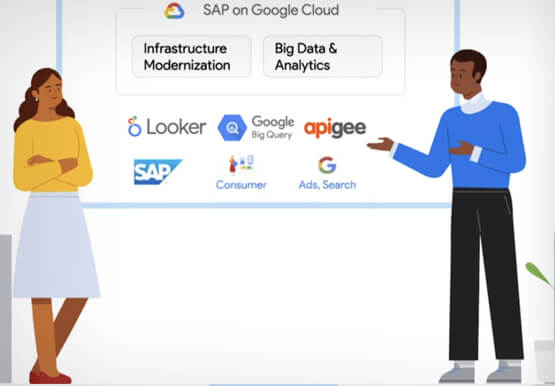
Why Enterprises Should Choose Google Cloud for their SAP Workloads
Change is a constant for SAP customers. Now more than ever, SAP customers need solutions that provide them business agility, rock solid availability and security and true economic value. Learn how Google Cloud can guide your SAP journey to the cloud with simple and no cost migrations, powerful infrastructure and
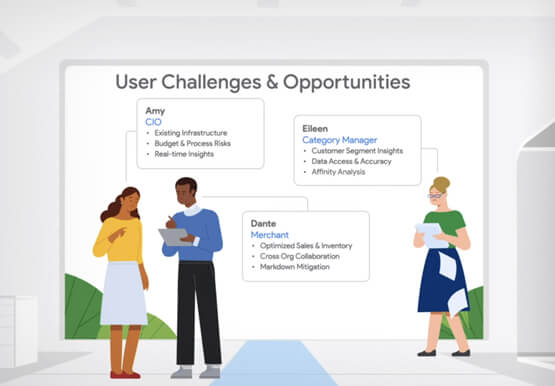

Value Realization with Google Cloud for Retail SAP Data
Retail engagements have changed drastically over the last few years, and by the virtue of COVID-19 pandemic, retail data and customers' expectations plummeted. To drive value and transformation across the entire value-chain retailers can make most of Google Cloud's secure, reliable IaaS by migrating their SAP systems and taking advantage

Maximizing the Value of Your Cloud Migration
Technology leaders have shifted many apps and workloads to public cloud, and they are not finished; 63% plan further expansion in the next 12 months. According to this newly resealed Forrester report, enterprises are migrating all types of apps and workloads to cloud and the migration provides firms with a

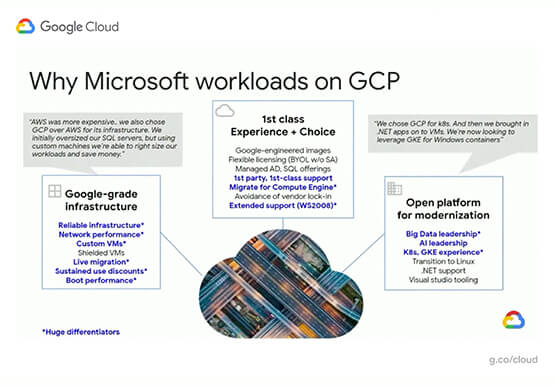
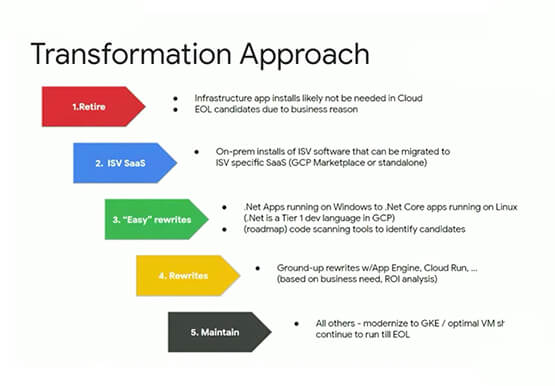
Modernize your Windows Workloads by Migrating them to Google Cloud
Google has plenty to offer when it comes to migrating and modernizing traditional enterprise Windows workloads to the cloud. Explore different approaches for re-hosting, modernizing, and transforming Windows applications, and the benefits of moving to Google Cloud. Learn from demos on some of the cutting-edge technologies that can offload some
