





Built on Google Cloud, Enexor’s Bio-CHP Unit Powers 100 Homes with Renewable Energy!

4785
Of your peers have already read this article.
2:00 Minutes
The most insightful time you'll spend today!
Editor’s note: Earth Day reminds us that we all can contribute to creating a cleaner, healthier, and more sustainable future. Google Cloud is excited to celebrate innovative startup companies developing new technology and driving sustainable change. On this year’s Earth Day we’re highlighting Enexor BioEnergy and their initiative to produce clean, sustainable energy from plastic and agro-waste with the help of Google Cloud solutions.
Picture a world without electricity where billions of people burn dangerous fuels and trash from landfills to cook meals and heat their homes. Children constantly cough, choking on toxic smoke that lingers in houses and sickens entire families. Because there are no pumps or purification plants, contaminated water is hauled in buckets from dirty rivers and polluted wells. Without power or lights, hospitals and emergency medical clinics can only provide basic services during the day.
Although it is 2022, this harsh life is a reality for billions of people living in developing countries around the world.
Producing clean energy from plastics and organic-waste
This Earth Day, let’s imagine what life would be like in these countries if people had access to safe and inexpensive bioenergy. In this world, indoor air is fresher. Clean water runs from faucets, while homes, businesses, and schools have electricity. Doctors and nurses have the power to treat patients 24 hours a day and save lives with advanced medical equipment. Local economies boom and entrepreneurs thrive.
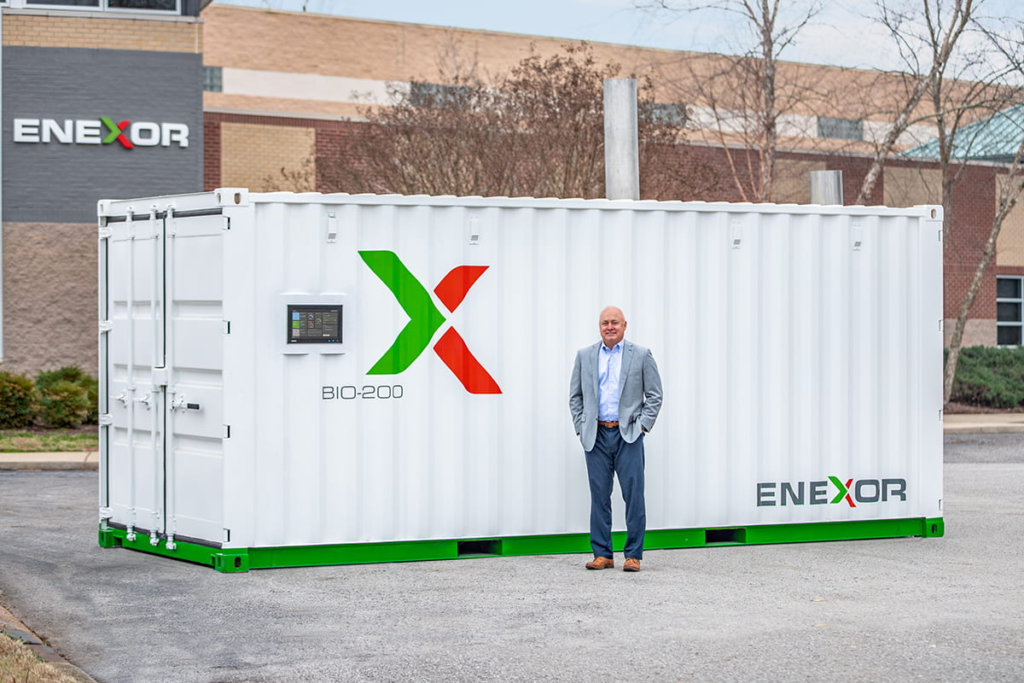
This is the sustainable future Enexor BioEnergy and its partners are building—one village at a time. With the Enexor Bio-CHP™ system, we produce clean and sustainable energy from discarded plastics, organic, and biomass-waste such as rice and corn husks, seaweed, coconuts, and other biomatter while offsetting significant Carbon emissions. The Bio-CHP can be commissioned and easily installed in just a single day, with multiple systems installed side-by-side when more power is needed. By being offered under its novel Energy-as-a-Service business model, Enexor ensures that the Bio-CHP can generate immediate environmental positive impact and customer adoption.
Each Bio-CHP unit generates enough energy to power over 100 homes—and provides much-needed renewable electricity and thermal power for schools, businesses, manufacturing facilities, water pumps, Wi-Fi systems, and telecommunications towers. The Bio-CHP creates clean energy by safely oxidizing plastics and biomatter in a secure container using a high-temperature system to power a micro-turbine. This produces bioenergy, significantly reducing harmful greenhouse gas emissions.
By solving a community’s waste issues while providing more affordable renewable energy, the Bio-CHP also creates new economic opportunities and improved outcomes where it is installed. This includes using its inexpensive power to expand local services and offerings, and empowering local community clean up efforts by incentivizing waste collection via blockchain-enabled digital currencies and services such as PayGo. Additionally, the Bio-CHP is an ideal solution for businesses who desire to maximize their own sustainability efforts, gain greater energy resiliency, and save money on their current energy and waste costs.
Engaging in Google for Startups Accelerator: Climate Change
When developing the Bio-CHP, we realized we needed a reliable and experienced partner to help us incorporate the best in class machine learning and artificial intelligence into our technology. That’s why we joined the Google for Startups Accelerator and participated in the Google for Startups Accelerator: Climate Change.
The accelerator introduced us to other companies working to create a sustainable future and opened new opportunities for collaboration and partnerships. The accelerator also continues to give our small team access to the best of Google Cloud’s people, programs, and solutions. We especially want to highlight Google Cloud’s dedicated startup experts and the incredible technical support they provide, as well as the Google Cloud research credits we used to explore new solutions.
As an example, Enexor is developing a predictive maintenance tool that automatically adjusts Bio-CHP operations to match fuel composition. Another tool in development proactively identifies and flags potential Bio-CHP system and component failures—before they occur.
Google Cloud’s dedicated startup experts work closely with Enexor to develop predictive models for these tools and Enexor also used the Google Cloud research credits that were provided to build these advanced models on TensorFlow, Vertex AI, Cloud CDN and AutoML. Since each system is remotely monitored from Enexor’s global headquarters in Tennessee, predictive maintenance tools also increase the safety, reliability, and efficiency of Bio-CHP in off-grid locations.
Generating 13 billion kWh of clean power by 2040
In the future, Enexor plans to explore additional Google Cloud solutions such as BigQuery to crunch larger datasets, Google Data Studio to build dashboards, and perhaps even Google Cloud Tensor Processing Units (TPUs) to more efficiently process machine learning (ML) workloads.
These solutions will help Enexor to achieve three primary goals by 2040: to generate 13 billion kWh of clean power, reduce 120 million tons of CO₂, and provide one million people with access to clean and sustainable energy. With each Bio-CHP system, Enexor annually reduces up to 2,000 metric tons of CO₂ equivalent emissions by decreasing methane emissions released from landfills, offsetting fossil fuel-based power generation with carbon credits and minimizing waste disposal transportation emissions.
Enexor is now preparing to deploy the Bio-CHP in Accra, Ghana where it will convert organic and plastic manufacturing waste into sustainable energy. Enexor is also looking forward to working with the local Accra community and NGOs to collect discarded plastics and organic waste diverting it from ending in the rivers and oceans and instead using them as renewable fuel sources. We can’t wait to see what we accomplish next as we celebrate Earth Day 2022 and think about the sustainable future Enexor is helping to empower.
If you want to learn more about how Google Cloud can help your startup, visit our page here to get more information about our program, and sign up for our communications to get a look at our community activities, digital events, special offers, and more.
Two Ways to Deploy SAP HANA System on Google Cloud

7888
Of your peers have already read this article.
4:00 Minutes
The most insightful time you'll spend today!
Many of the world’s leading companies run on SAP—and deploying it on Google Cloud extends the benefits of SAP even further. Migrating your current SAP S/4HANA deployment to Google Cloud—whether it resides on your company’s on-premises servers or another cloud service—provides your organization with a flexible virtualized architecture that lets you scale your environment to match your workloads, so you pay only for the compute and storage capacity you need at any given moment. Google Cloud includes built-in features, such as Compute Engine live migration and automatic restart, that minimize downtime for infrastructure maintenance. And it allows you to integrate your SAP data with multiple data sources and process it using Google Cloud technology such as BigQuery to drive data analytics.
SAP server-side architecture consists of two layers: the SAP HANA database, and the Netweaver application layer. In this blog post, we’ll look at the options and steps for moving the database layer to Google Cloud as a lift and shift or rehost, a straightforward approach that entails moving your current SAP environment unchanged onto Google Cloud.
Deploying an SAP HANA system on Google Cloud
Google Cloud offers SAP-certified virtual machines (VMs) optimized for SAP products, including SAP HANA and SAP HANA Enterprise Cloud, as well as dedicated servers for SAP HANA for environments greater than 12TB. (For a complete list of VM and hardware options, visit the Certified and Supported SAP HANA Hardware Directory.)
Before proceeding with a rehost migration to Google Cloud, your current (source) environment and Google Cloud (target) environments should meet these specifications:
Prerequisites:
- The configuration of the Google Cloud environment (i.e., VM resources, SSD storage capacity) should be identical to that of the source environment. If the underlying hardware is different, however, you must use Option 2 for your migration, detailed below.
- Both environments should be running the same operating system (SUSE or RHEL Linux).
- The HANA version, instance number, and system ID (SID) should be identical.
- Schema names must remain the same.
- Establishing the network connection between the on-premises environment and Google Cloud will be required in this phase to support rehost of the SAP application.you can use Cloud VPN or Dedicated Interconnect. Learn more about Dedicated Interconnect and Cloud VPN.
Note: Depending on your internet connection and bandwidth requirements, we recommend using a Dedicated Interconnect over Cloud VPN for production environments.
We offer a number of automated processes to accelerate your cloud journey. To deploy the SAP HANA system on Google Cloud, you can use the Google Cloud Deployment manager or Terraform and Ansible scripts available on GitHub with configuration file templates to define your installation. For more details, see the Google Cloud SAP HANA Planning Guide.
Note: To deploy SAP HANA on Google Cloud machine types that are certified by SAP for production, please review the Certification for SAP HANA on Google Cloud page.
Moving an SAP HANA Database to Google Cloud
There are two different options you can use to rehost your SAP HANA database to Google Cloud, and each has pros and cons that you should consider when deciding on your approach.
Option 1: Asynchronous replication uses SAP’s built-in replication tool to provide continuous data replication from the source system (also known as the primary system) to the destination or secondary system—in this case residing on Google Cloud. It’s best for mission-critical applications for which minimum downtime is a high priority, and for large databases. In addition, the high level of automation means that the process requires less manual intervention. Here’s where you can learn more on HANA Asynchronous Replication.
Option 2: Backup and restore relies on SAP’s backup utility to create an image of the database that is then transferred to Google Cloud, where it is restored in the new environment. Downtime for this method varies by database size, so large databases may require more downtime via this method vs. asynchronous replication. It also involves more manual tasks. However, it requires fewer resources to perform, making it an attractive option for less urgent use cases. Here’s where you can learn more on SAP HANA database Backup and restore.

How to migrate the SAP HANA database to Google Cloud using Asynchronous Replication

- Create and configure Dedicated Interconnect or Cloud VPN between the current environment and Google Cloud.
- Set up SAP HANA asynchronous replication. You can configure system replication using SAP HANA Cockpit, SAP HANA Studio, or hdbnsutil. See Setting Up SAP HANA System Replication in the SAP HANA Administration Guide.
- Be sure to use the same instance number and HANA SID in the template as the primary instance.
- Configure the Google Cloud instance as the secondary node for using HANA Asynchronous replication.
- Perform data validation once full data replication is completed to the SAP HANA database in Google Cloud. To learn more: HANA System Replication overview.
- Perform an SAP HANA takeover on your standby database. This switches your active system from the current primary system onto the secondary system on Google Cloud. Once the takeover command runs, the system on Google Cloud becomes the new primary system.To learn more: HANA Takeover.
How to migrate the SAP HANA database to Google Cloud using Backup and Restore

- Create a full backup of your SAP HANA database in your current environment.
- Create a new storage bucket in your Google Cloud environment. Visit Creating Storage Buckets in the Google Cloud Storage documentation.
- Download and install gsutil onto the source environment and run it to upload the HANA backup to the Google Cloud storage bucket. To install gsutil utility on any computer or server, visit Install gsutil in the Google Cloud Storage documentation.
Note: You can run parallel multi thread/multi processing in gsutil to copy large files more quickly. - Recover the HANA database on Google Cloud using SAP’s RECOVER DATABASE statement. See RECOVER DATABASE Statement (Backup and Recovery) in the SAP HANA SQL Reference Guide for SAP HANA Platform.
Note: BackInt agent is an integrated SAP interface tool used for HANA database on Google Cloud.Backint agent for SAP HANA can be used to store and retrieve backups directly from Google Cloud Storage. It is supported and certified by SAP on Google Cloud. To learn more: SAP HANA Backint Agent on Google Cloud.
In summary, we recommend using Asynchronous Replication (Option 1) for mission-critical applications that require the lowest downtime window. For all other applications, we recommend Backup and Restore (Option 2), as this approach requires fewer resources. It’s also a great way to implement the backup and restore functionality on Google Cloud.
A rehost migration is the most straightforward path to getting your SAP on HANA system up and running on Google Cloud. And the sooner you migrate, the sooner you can take advantage of the many benefits Google Cloud brings to your SAP solution. For more information on the different migration options please review: SAP on Google Cloud: Migration strategies.
Learn more about deploying SAP on Google Cloud. Technical resources can be found here.
3365
Of your peers have already watched this video.
2:00 Minutes
The most insightful time you'll spend today!
Twitter Charts #HybridCloud Journey With Google Cloud
Social media giant Twitter needs no introduction. The 24/7 live platform, which crunches massive volumes of data every second, was using its data centers for a lot of its infrastructure and used the cloud for some of what it does.
However, it needed ever more storage and compute resources and looked at the cloud. The task involved transferring an estimated 300-400 petabytes of data to the cloud.
So, Twitter embarked on a rigorous evaluation process to determine if that was even possible. It did in-depth analysis with many engineers over many months. Finally, the company went to Google and it became obvious that this was a high-performance, high-quality cloud. When Twitter aggregated the network differences, the savings from having more flexible resources, the resulting difference was dramatic.
As a result, Twitter was impressed with Google Cloud’s performance, the flexibility it offered in scaling both storage and compute independently, and the suite of products that Google provided.
See how this move enabled Twitter to separate compute and storage needs and merge enthusiastically into a hybrid cloud strategy for the future.
Hybrid Work with Google Workspace: What Customers can Expect

5854
Of your peers have already read this article.
4:00 Minutes
The most insightful time you'll spend today!
In June, we shared our vision for navigating the future of hybrid work with a single connected experience in Google Workspace. Now, as many of our customers begin to embark on their own hybrid journeys, I wanted to share how we’re helping them bridge the gaps in this new way of working.
A dedicated place for team collaboration: Spaces are now live
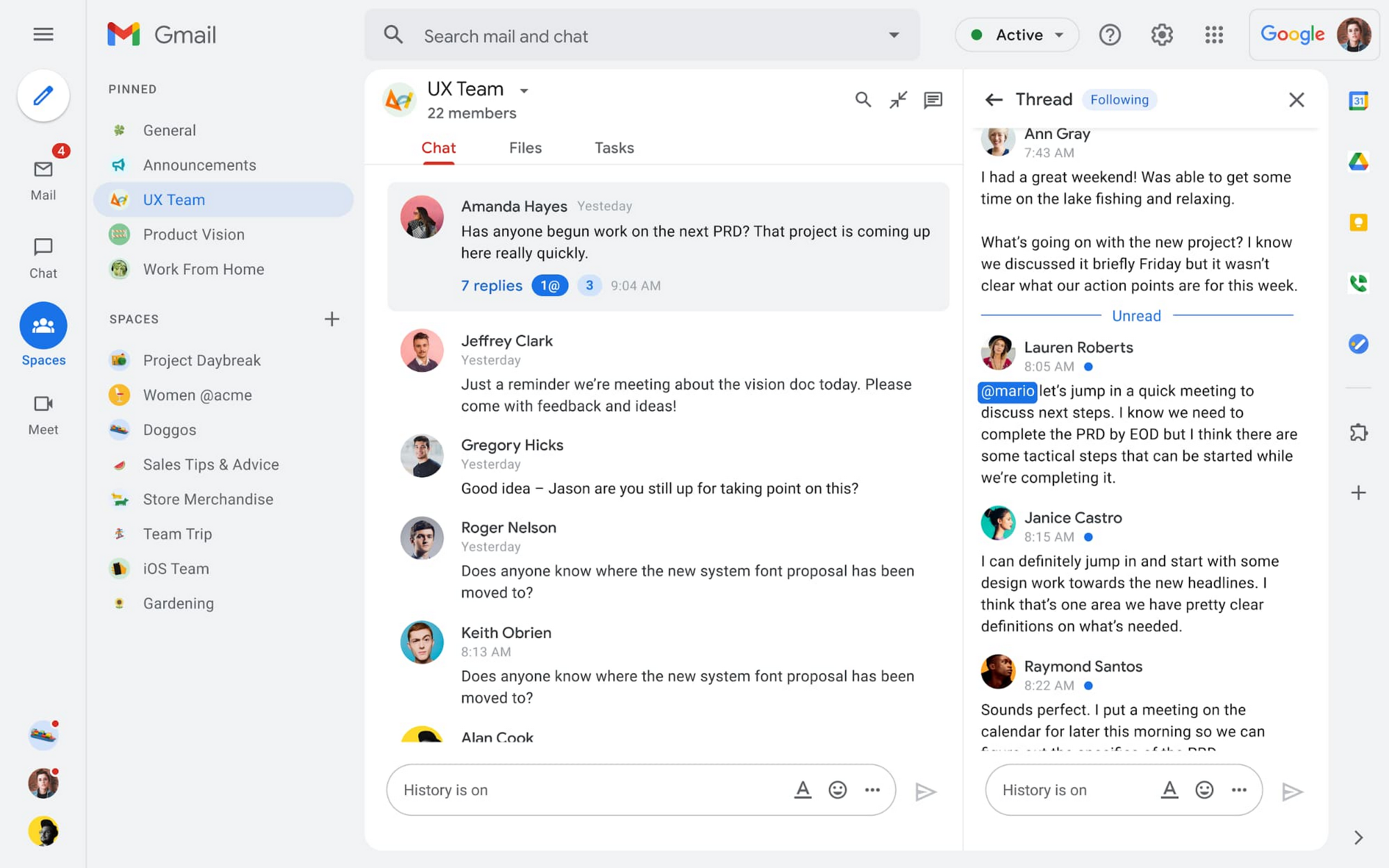
Spaces are the central place for team collaboration in Workspace and starting today, Spaces are live for all users. Spaces are unique in that they are tightly integrated with Google Workspace tools like Calendar, Drive, Docs, Sheets, Slides, Meet, and Tasks, providing a better way for people to engage in topic-based discussions, share knowledge and ideas, move projects forward and build communities and team culture.
We hear from our customers that they’re continuing to work across a broad range of locations and working hours, and that Spaces can be a central hub for collaboration, both in real time and asynchronously. Instead of starting an email chain or scheduling a video meeting, teams can come together directly in a Space to move projects and topics along, whether it’s a team of 10 for “2022 Roadmap Planning” or a team of 1,000 for the “Company-wide All-Hands.”
With Spaces, teams can share ideas, collaborate on documents, and manage tasks from a single place. Because all their work is preserved for future reference, team members can easily jump in and contribute at a time that works best for them, seeing a full history of the conversations, context, and content along the way. Using Spaces has already helped my own team, which is spread across time zones and varied in its working styles. It’s been helpful to rely on Spaces to retain and structure foundational knowledge, whether it’s for onboarding a new teammate or preserving context when someone moves to a new role.
We’re just getting started with Spaces and I’m excited to share a little more about where we’ll take it next.
In the coming months, our users will see:
- Streamlined navigation: A flexible user interface helps users easily access their inbox, chats, Spaces and meetings—all from a single location—so they can stay on top of everything that’s important.
- Discoverable Spaces: Spaces and their content can be made discoverable to all members of an organization, so other people can find and join the conversation. Administrators can also set discoverability as the default for their organization.
- Enhanced search: Allows users to easily find content from within and across Spaces, or even discover new Spaces to join. “Search everything” in Spaces opens up powerful new collaboration possibilities and makes it easier to access the team’s collective knowledge base.
- In-line topic threading: The ability to reply to any message within a Space fuels deeper discussions and collaboration across teams and organizations.
- Robust security & admin features: Tools for content moderation, managing Spaces, and establishing the right rules for healthy communication across domains and companies.
Making meetings more hybrid friendly
Spaces will play an important role in laying the groundwork for meetings and, in some cases, reduce the number of meetings a team needs to gain alignment. Having a dedicated space for asynchronous collaboration, with access to all the right content and context, will help teams be more deliberate about scheduling meetings. This is top of mind for us and many of our customers given the rise in meeting fatigue over the last 18 months. But when having a meeting genuinely feels worthwhile, the experience of transitioning into (and out of) it from different collaboration touchpoints should be seamless.
Over the past few months, in collaboration with many customers and across teams within Google, we developed a handbook for navigating hybrid work that includes best-practice blueprints for the five most common hybrid meeting types. Because meetings are a foundational piece of hybrid work, our goal is to make them as productive, immersive and inclusive as possible.
Scheduling meetings that work across the entire team
With hybrid work, many teams—my own included—have locations and working hours that can change daily. When many of us were together in the office, we might have tended to schedule meetings at a time that favored the “in-office majority,” but now it’s especially important to schedule meetings that scale across the entire distributed team.
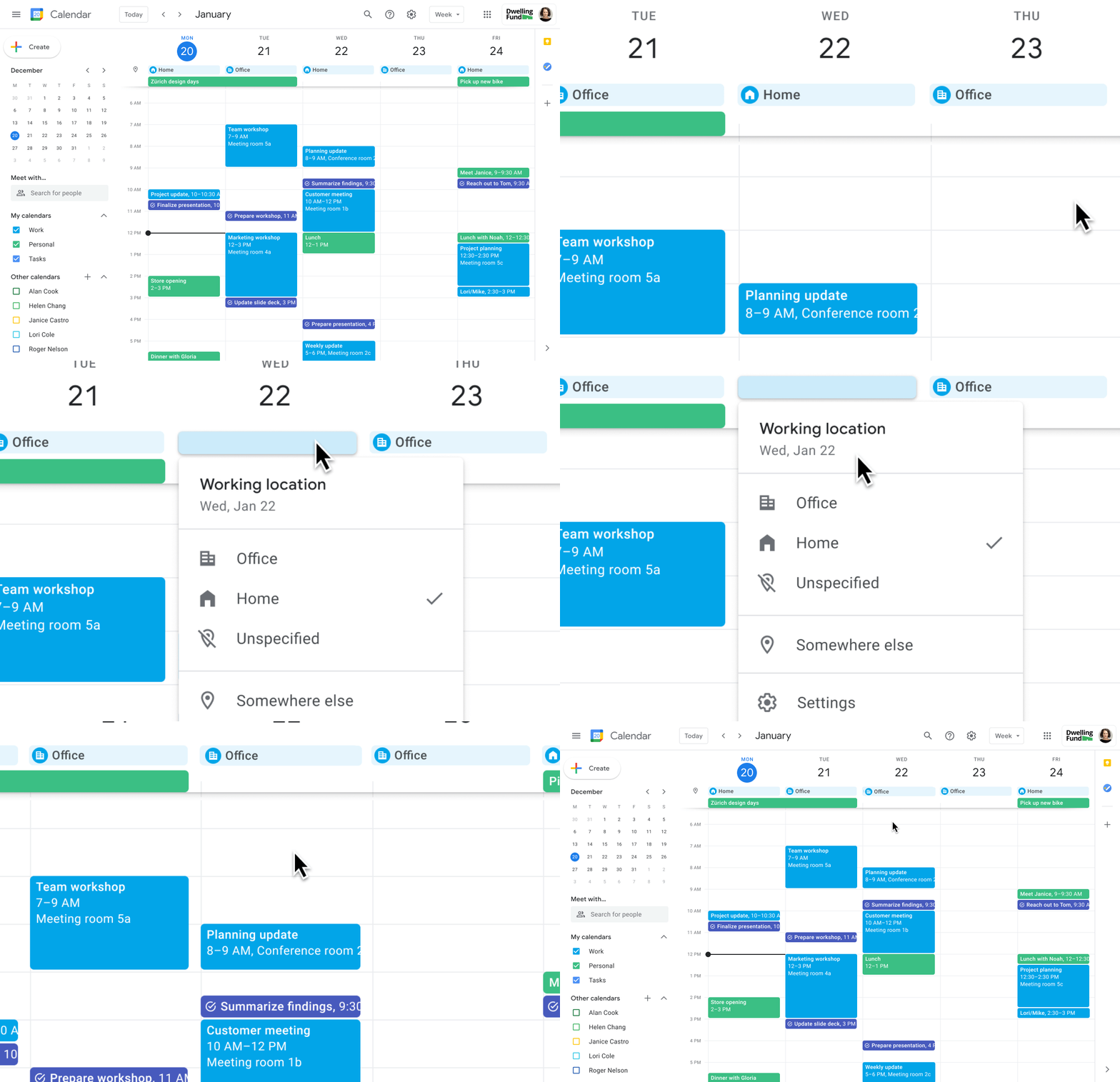
Now, beyond indicating their virtual or physical presence when accepting meeting invites, team members can set their location for each work day in Calendar. When combined, these capabilities allow meeting organizers and on-site support teams to plan for the right mix of in-person and virtual attendance. They can also provide greater visibility and help set expectations across hybrid teams.
Making meetings more spontaneous
Remember when you’d casually bump into a colleague in the office hallway or a break room and start a conversation that sparked new ideas? That’s perhaps the thing I’m looking forward to most as more of my team plan their part-time return to the office. These casual encounters were always a great way to build relationships and learn about topics that might not come up in structured meetings. To help enable these spontaneous connections when teammates aren’t in the office together, we’re bringing Google Meet calling to Workspace.
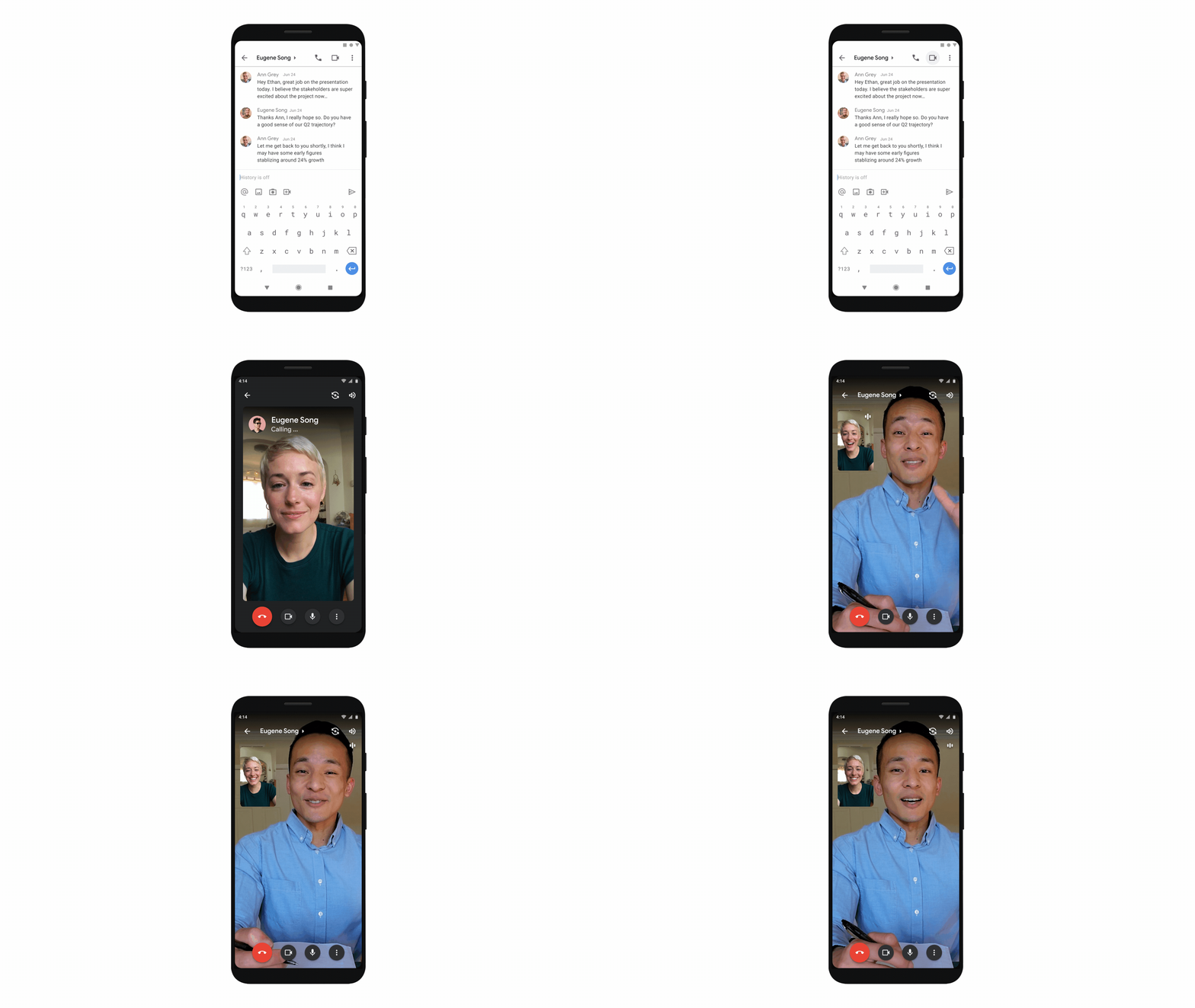
Google Meet calling is a seamless experience of initiating a video or audio call between one or more participants, complementing more structured, scheduled video meetings. Our intention is to bring Meet calling to all the natural endpoints in Workspace where you’d initiate an ad-hoc call including chats, people cards, and Spaces, but this will come first to one-to-one chats within the Gmail mobile app. Soon I’ll be able to call members of my team directly from a one-to-one chat. This will ring their device running the Gmail mobile app and send a call chip to our chat on their laptop, so they can easily answer from any device. It’s not quite the same as a spontaneous hallway conversation, but it might be the next best thing in a hybrid setting.
Ensuring collaboration equity in hybrid meetings
How do we ensure that hybrid meetings aren’t two meetings in one, divided between those in-person and those who are remote? Effective hybrid meetings need a unified experience so that the people sitting together in the same room can interact with their remote colleagues seamlessly, without it ever feeling like there are two parallel conversations.
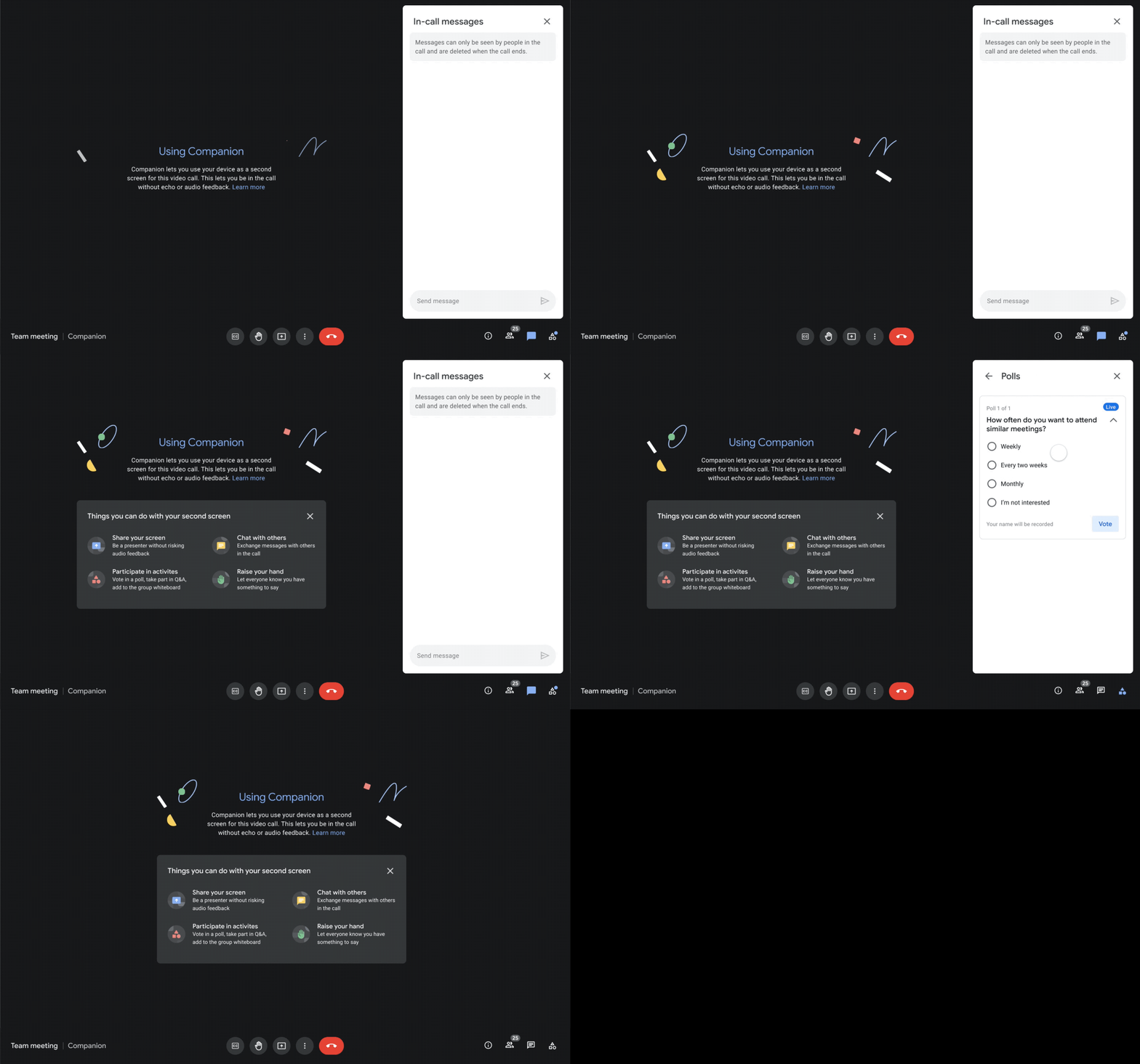
We designed Companion mode in Google Meet to specifically meet this challenge and we’ll start rolling it out to customers in November. With Companion mode I can host or join a meeting from within a conference room using my laptop while leveraging the in-room audio and video—and it all happens without any awkward audio feedback. This functionality lets me share content or see presentations up close on my own device, access the meeting chat and whiteboard, initiate and vote on polls, or post a question in Q&A, just as I would from home. And to ensure that users have greater choice over how they participate in meetings, live-translated captions will be available in Meet and through Companion mode by the end of the year. We’re currently working on translating meetings in English to French, German, Spanish and Portuguese, with many more languages coming in the future.
Expanding choice and flexibility for meeting hardware
While Companion mode keeps people in the room seamlessly connected to their remote colleagues, meeting hardware plays a crucial role in making hybrid meetings feel more immersive and human, with the ability for everyone to be clearly seen and heard. To provide more flexibility and choice on this foundation of how we come together in a hybrid work world, we’re announcing an expanded Google Meet hardware portfolio and interoperability with other conference room solutions.
First, we’re announcing two new all-in-one video conferencing devices to complement our Series One Room Kits. The Series One Desk 27 is an all-in-one 27” device that’s perfect for small shared spaces or your desktop, either in the office or at home. Series One Board 65 is an all-in-one 65” 4K device that can be paired with an optional stand for ultimate configuration flexibility—turning any room or space into a video collaboration hub in minutes.
Both devices feature collaboration capabilities with the Jamboard app built right in, and each can be used as an external display. While optimized for Google Meet, USB-C connection from your laptop gives you the flexibility to use the meeting app of your choice while leveraging the high-fidelity audio and high-definition video on Series One Desk 27 and Board 65. You can learn more about these devices developed in partnership with Avocor through our on-demand webinar starting at 9 AM PT today.
https://www.youtube.com/embed/BR81EAce5BQ?enablejsapi=1&
We’re also proud to announce new third-party devices coming to the Google Meet hardware ecosystem. Google has certified the Logitech Rally Bar Mini and Rally Bar for Google Meet, which provide complete room solutions for small and mid-sized rooms. You can learn more about these Google Meet-certified products in Logitech’s September 21 webinar. Additionally, the Rayz Rally Pro is a new mobile device speaker dock by Appcessori that will automatically launch Google Meet for video meetings and provide an improved audio experience from your mobile device.
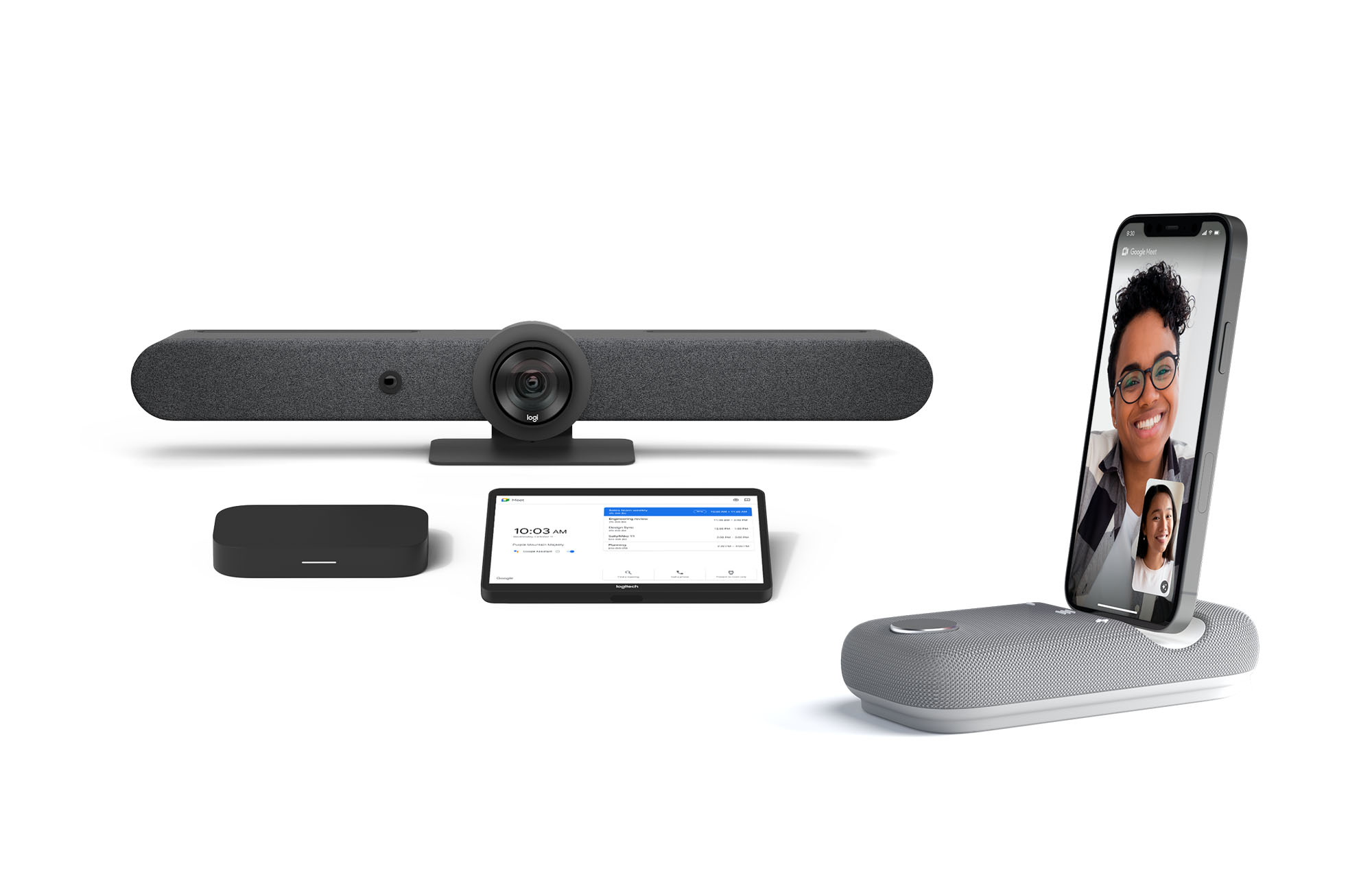
Certified Google Meet hardware ensures high-quality video and audio in meetings and is easy to deploy and manage. You can view our full Google Meet device portfolio and purchase directly from approved resellers by visiting the Google Meet Hardware website.
While Google Meet customers enjoy a full-featured experience on Meet hardware, we realize they sometimes need to connect with people outside of their video calling network. To enable this, organizations can use Pexip for Google Meet to seamlessly join Meet meetings from the widest range of third-party video conferencing solutions. Today, we’re also announcing support for bidirectional interoperability with devices from Webex by Cisco and Google Meet hardware. Soon you’ll be able to launch a Google Meet meeting on Webex hardware and a Webex meeting on Google Meet hardware. Calling interoperability between Meet and Webex is supported on Series One Board 65, Series One Desk 27, and the rest of the Google Meet hardware portfolio, as well as Webex Room Series, Room Kit Series, Desk Series and Board Series. We expect general availability later this year. You can find more details here. We plan to give Meet users even broader calling interoperability with support for other conferencing services in the near future.
Navigating hybrid work is a journey
We’re thrilled to bring these new Google Workspace experiences and devices to our customers, but we also realize that navigating hybrid work will be a journey of learning and adaptation for every organization. Two resources we recently developed can help along the way:
- Navigating hybrid work: A Google Workspace handbook
- The newly launched Future of Work site from Google Workspace, where you can keep up with all the ways work is changing.
Bridging the gaps in the emerging hybrid work world will necessarily be a combination of technology, workplace culture, and reimagining the use of physical spaces. But developing a “hybrid-first” mindset starts with the tools people use every day to connect, create, and collaborate, and Google Workspace will continue to play a crucial role in that evolution.
3491
Of your peers have already downloaded this article
1:30 Minutes
The most insightful time you'll spend today!
Reduce risks, increase uptime, and free up working capital with Google Cloud’s SAP Business Continuity Program. Working closely with our experienced partner community, we will ease the lift and shift of your on premises or hosted SAP environments with simple, no-cost migrations.
Gain a future-proof digital business platform with integrated artificial intelligence, machine learning, and advanced analytics that deliver deep insights for all who need them.
Get the performance, compute power, flexibility, scalability, availability, and security you need for your current and future business needs with SAP on Google Cloud. Download this factsheet to learn more.
Google Cloud Region in Columbus to Accelerate Ohioan Businesses and Tech Transformation

3205
Of your peers have already read this article.
1:30 Minutes
The most insightful time you'll spend today!
Digital tools such as cloud computing are fueling economic transformation across the US, including Ohio. Google continues to invest across cities and communities in Ohio, bringing over 200 jobs to the state, and helping provide $12.85 billion of economic activity for tens of thousands of Ohio businesses, nonprofits, publishers, creators and developers. To further accelerate the transformation of all Ohioan businesses and technologists, we’re thrilled to announce our newest Google Cloud region in Columbus, Ohio is open. The Columbus cloud region brings a second region to the Midwest, the 10th region to North America, and grows our global cloud region count to 33.
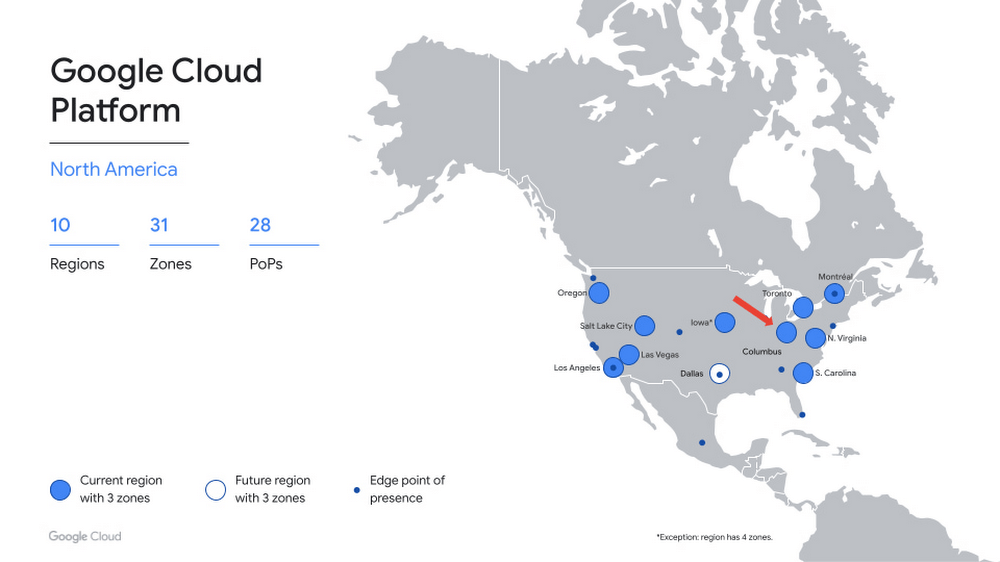
A region for the Buckeye State
Now open to Google Cloud customers, the Columbus region (us-east5) provides you with the speed and availability you need to innovate faster, build high-performing applications, and serve local customers — all on the cleanest cloud in the industry. Additionally, the region gives you added flexibility to distribute your workloads across the central, midwest, and eastern US.
The Columbus region offers immediate access to three zones, for high availability workloads, and our standard set of products, including Compute Engine, Google Kubernetes Engine, Cloud Storage, Persistent Disk, CloudSQL, and Cloud Identity. Our private backbone connects Columbus to our global network more quickly and securely. In addition, you can integrate your on-premises workloads with our new region using Cloud Interconnect. This means that Columbus-based customers can expand globally from their front door, and those based outside the region can more easily reach their users in the Midwest.
What customers are saying
Industries including retail, financial services, and IT are investing in Columbus. Organizations across these verticals have turned to the Google Cloud to innovate faster and help solve their most complex challenges
“As Wendy’s continues to innovate in new ways to create fast, frictionless, and fun interactions that redefine the way customers visit and enjoy our restaurants, our partnership with Google Cloud is a key enabler to delivering on our AI/ML and data analytics strategies. The proximity of the new Google Cloud region to Wendy’s headquarters provides the ability for us to move and scale quickly as business needs evolve. Additionally, Google Cloud’s investment in Columbus positions central Ohio as a true technology hub, which further boosts Wendy’s and other regional employers’ ability to recruit innovative talent,” said Kevin Vasconi, Chief Information Officer, Wendy’s.
“Huntington National Bank’s API Architecture is a central component to our growth and technology strategy. As our business segments grow from an offering and geographic perspective, we must evolve our technology to provide the optimal experience for our customers and our partners. Collaborating directly with Google Cloud on the build out of their cloud region in Central Ohio, provides the access our technology teams need to innovatively scale our infrastructure to meet the demands of our business with increased availability, lower latency, and greater resiliency,” said Geoff Preston, Chief Architect, Huntington National Bank.
“Google Cloud has been instrumental in our ability to scale and optimize data management and compute resources. We prioritize scale, elasticity and resilience in cloud services and Google Cloud delivers all three globally and locally. With Google Cloud security, we can efficiently process the quantities of application data required to accelerate alert detection and reduce response times for the critical infrastructure our customers depend on to enable the continuity of their vital applications.” said Sheryl Haislet, Chief Information Officer at Vertiv, a global provider of critical digital infrastructure and continuity systems headquartered in Columbus, Ohio, that leverages Google Cloud solutions to provide resilience for its operations and to better support customers.
“The addition of the new cloud region in Ohio continues to demonstrate Google Cloud’s commitment to the enterprise space and their presence in the region,” said Chris Delong, Chief Technology Officer, Designer Brands Inc. / DSW
What’s next
We are thrilled to welcome you to our new cloud region in Columbus, and eagerly await to see what you build with our platform. Register here for our Cloud Study Jam in June – an event for local developers to get hands-on training with Google Cloud. Stay tuned for more region announcements and launches this year, including our next U.S. region in Dallas, TX. And for more information, contact sales to get started with Google Cloud today.
More Relevant Stories for Your Company




BK Medical’s Lift and Shift of SAP Environs on Google Cloud Results in Real-time Success
BK Medical is known for designing active imaging systems to help care providers visualize anatomy and provide real-time guidance to aid surgical interventions. After becoming an entity independent of the parent company, Analogic corporation, BK Medical decided to separate its SAP environs from the latter, and move into cloud. After

Google Cloud Announces Improvements in Private Catalog to Drive Terraform Deployments
As an enterprise admin, when you choose to use Google Cloud Private Catalog to enable curated, self-serve Google Cloud infrastructure provisioning, you need the ability to manage your organization’s deployments. Today, we’re pleased to announce support for several improvements to Terraform driven deployments through Private Catalog. With this new release, you can

City of San Jose Ensures Critical Services Reach Community Using AI Translation
San José is one of the most diverse U.S. cities, with residents speaking more than 100 languages. Several years ago, we set out to improve city community interactions through more equitable service management and delivery. This demanded a new approach to automating the intake of requests from a majority population

Confidential Computing: Google Cloud Security, Project Zero and AMD Come Together to Secure Sensitive Workloads
At Google Cloud, we believe that the protection of our customers’ sensitive data is paramount, and encryption is a powerful mechanism to help achieve this goal. For years, we have supported encryption in transit when our customers ingest their data to bring it to the cloud. We’ve also long supported
