





Building Effective Visibility into Technology Assets Used in Healthcare

3182
Of your peers have already read this article.
4:00 Minutes
The most insightful time you'll spend today!
When technology just works, it’s easy to trust. But too often, we place our trust in technology that doesn’t deserve it. When we do this with technology to provide healthcare, we put the safety of patients and the security and reliability of our global healthcare system at risk.
The institutions that make up our global healthcare system also place their trust in cybersecurity measures and technology to keep their systems running and repelling the unceasing wave of attacks they face. We often hear about the institutions that succumb to cyberattacks, but we don’t read much about the institutions that have been successful at defending their digital perimeter, and ultimately protected their ability to treat and protect patients.
Why were some institutions successful and others not as much? What cybersecurity capabilities made the healthcare institution resilient from these attacks? As we covered in our previous post on how healthcare can strengthen its cybersecurity resilience, establishing visibility and antifragility practices are necessary to repel attackers and build trust in the security and reliability of the technology our global healthcare system relies on.
As we continue our series on healthcare and cybersecurity, we’ll focus next on establishing sustainable visibility mechanisms so cybersecurity teams working in our global healthcare system can secure and preserve patient care and safety.
Visibility is akin to a patient taking 20 different medications but their doctor only knows about 10 of them. That’s the current state of many healthcare organizations’ relationship to the technology used on their networks and systems: They aren’t always aware of what technology is in use, whether it has vulnerabilities, how serious those vulnerabilities are, or how one weakness could lead to another or cascade out of control.
Visibility maps those technology assets (including the software, hardware, configurations, protections, who built it, and where the component parts come from) and help prioritize the importance of those assets in keeping systems and networks secure, no matter how complex the healthcare organization’s use of technology might be.
Building effective visibility
Building visibility into technology assets requires a structured approach. As mentioned in the first blog in this series, using a guide like the NIST Cybersecurity Framework (CSF) provides an important mental model we can use to get a clear picture of the strengths and weaknesses of an organization’s cybersecurity risk profile, and how it applies to the assets the organization seeks to protect.
Cybersecurity author and leader Sounil Yu’s book Cyber Defense Matrix provides an important interpretation of the NIST CSF framework that can help us better understand what visibility we have into technology assets and how they are protected. Visibility is about more than just seeing all assets we have all at once. It’s also about understanding which assets are mission-critical and must be protected at all costs versus which ones are perhaps important but less crucial overall. Without the right balance, we end up trying to protect everything while not protecting what matters enough. This is where structural awareness comes in.
Structural awareness, or the conscious understanding and state of an organization’s assets, is established as one implements controls captured in the NIST CSF functions Identify and Protect. These controls focus on identifying assets, their bill of materials, their creators, their dependencies on other assets, the protections and vulnerabilities they have, and the threats they face. While visibility helps create an accurate map of technology assets, structural awareness builds on that visibility and answers questions such as, “What are the ways the threat actor could compromise that asset? What could be lost? How would it most likely happen? Would I know?”
Yu says that structural awareness is efficiently achieved with the help of automation, and is not as people-intensive as many practitioners, decision-makers, and executives might think. If a cyberattack is like an explosion, cybersecurity teams’ structural awareness helps them understand how the explosion could happen before (or ‘left of’) it goes ‘boom’.
It’s also important to remember that while structural awareness is related to situational awareness in some ways, they are different concepts. Situational awareness refers to mechanisms that are used to detect and respond to an event. Structural awareness mechanisms are ‘left of boom,’ or mechanisms that protect your assets so that events don’t happen. The goal is to stay ‘left of boom’ and avoid being ‘right of boom’. Being proactive in your protections and being ready to respond in either case is really important, nonetheless.
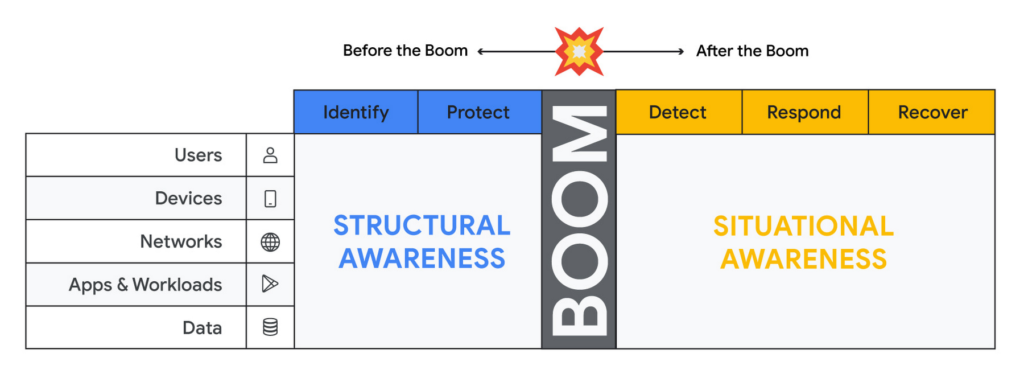
Thinking about assets in terms of users, devices, networks, applications and workloads and data (asset classes), and adopting mechanisms to discover assets of each type through visibility controls suggested by the NIST CSF, will lead to developing structural awareness. Structural awareness can help avoid the boom, but if the boom does happen, it can also help shape the situational awareness needed to react. The Cyber Defense Matrix is an ongoing project, and you can read more about it (and contribute to it) here.
Framing asset discovery for resilience
Cybersecurity teams must map out their organizations’ most critical healthcare services and systems that support them, but that’s easier said than done. Asset discovery can feel overwhelming. Trying to find, count, and audit the hardware, software, users, and data down to the component across even a small part of one’s technology footprint can feel like pushing a dead car up a steep hill. The way to make this easier is to prioritize this effort in the parts of the business where the impact of a quality or safety issue has the potential to create the most harm to the organization and those who depend on it.
A smart place to begin the process to find and evaluate the measurements that an institution uses to monitor those processes.
Healthcare providers: Start with the quality and safety measurements which must be submitted to various regulatory agencies in order to maintain licenses to operate.
- Health insurers: Look at the performance improvement metrics used to ensure subscriber benefits, quality requirements, and legal mandates are being met.
- Health IT services: Use service level agreements for measuring contract compliance with things like uptime, recovery time and point objectives, and response turnarounds.
- Life sciences organizations: Begin with the relevant Good Practice definitions and the metrics used to monitor quality and safety levels of products and services.
When analyzing the types of technology unique to healthcare – like network-connected medical devices such as infusion pumps, implantable pacemakers, ventilators, EKG equipment, and MRI machines – it’s important to ask what are the immediate safety hazards if there was a cyberattack. Not sure how to answer that question? The International Medical Device Regulators Forum produced a risk categorization model that could be helpful in framing that response. Operational technology, like blood bank and sample refrigerators, climate control, air handling, infection control and pneumatic tube systems, may also be used to identify and prioritize inventory efforts.
Once priorities have been set, teams can begin gathering data on critical services, the owners of those services, the systems those owners rely on, and the technology itself.
Inventory tactics on Google Cloud
Building service-technology mapping is not a one-time exercise. Organizations should take the time to automate inventory creation and maintenance, so they can maintain an up-to-date view of all the items in their environment at any given time. This is especially for organizations that have highly dynamic environments.
Google Cloud provides best practices on discovering and cataloging assets in its Cloud Architecture Center. Implement controls found in the Identity and Protect categories using the NIST Framework & Google Cloud technical paper. Automation is your friend when building and maintaining a complete and accurate inventory. Google Cloud Asset Inventory and Security Command Center can be used to inventory a variety of resources running in Google Cloud. Cloud Build, Google Cloud’s CI/CD platform, implements SLSA 1 and provides a trustworthy audit of software artifacts deployed through a managed pipeline. Cloud DLP inventories and labels data stored on Google Cloud Storage and services like BigQuery.
Meanwhile, a number of Google Cloud Marketplace partners have solutions that can help build a comprehensive inventory, and innovation continues to improve our technological options. One emerging field of security technology, called attack surface management, helps discover previously-unknown assets. Finally, our next blog on resilience discusses how to use a software bill of materials (also known by the breezy acronym SBOM) to gain visibility and structural awareness into applications.
It’s important to remember that when starting down this path, the goal is not to gain 100% visibility into every single component on every single device attached to every network supporting every service running. Success or failure is not achieved when the inventory process has reached an arbitrarily-determined ‘percentage complete.’ We want to prioritize expanding visibility and developing structural awareness on assets where safety and quality are at risk, so we can improve their resilience.
And finally, we feel it’s important to emphasize that in the past, healthcare industries have focused mainly on protecting the confidentiality of data. While that’s important, we must evolve security programs beyond protecting confidentiality as its primary (and some cases, only) focus.
To be resilient, we must design and build cybersecurity capabilities that deliver safety, integrity, and availability of the technology that cares for patients directly. As we gain visibility into the technology we depend on to keep us healthy, we improve our understanding about which parts of it we can trust, and which parts we can’t. Improving visibility is an important early step on our path to resilience.
You Need Enhanced Security for a Successful Cloud Transformation

2641
Of your peers have already read this article.
1:30 Minutes
The most insightful time you'll spend today!
Twenty years ago, organizations discovered the magic of server virtualization. Among the many benefits of virtualization, it heralded the end of the need for one physical server per application and the beginning of managing software-defined infrastructure. It helped automate building and installing systems, and it helped lay foundations for today’s Continuous Integration/Continuous Delivery mechanisms and DevOps practices. However, the adoption of virtualization was not always smooth and several hurdles stood in its path. Today’s organizations are facing similar obstacles in their journey to the cloud.
Organizations that wanted to virtualize their server environment two decades ago faced a significant challenge that was neither technical nor budgetary, but organizational, stretching across IT teams and beyond. The first team to be concerned about virtualization was the one in charge of installing the physical servers in the racks of the datacenter, managing the physical network connections and operating environmental controls, such as HVAC and power systems. These tasks were drastically reduced, if not outright eliminated.
The second team affected by this shift in technology was the one responsible for installing the operating system and running the post-install procedures. Their job almost completely disappeared as most virtual machines were automatically instantiated from templates.
As a result, successful adoption relied on the ability to smooth these organizational changes. Along the way, training the staff and making sure they acquire the new skills necessary to operate the virtualization infrastructure was critical. And usually, the affected teams eventually found that their new responsibilities were different but still essential to the organization, and perhaps even more appealing.
Virtualizations lessons for cloud transformation regulators
Discussions on virtualization didn’t end with these internal changes when organizations were operating in a regulated environment. They needed to engage closely with their regulators. Regulated organizations often considered the hypervisor solely as an additional layer of software with potential vulnerabilities.
This viewpoint raised risks (such as virtual machine escape) that didn’t exist with physical servers. Even if this is taken into account and the risks mitigated, it should have been considered in balance with all the benefits of machine virtualization, including security benefits such as asset identification, harmonization, and smoother patch management.
While the relevance and benefits of virtualization are now widely accepted, history has repeated itself as similar issues have arisen for organizations facing cloud migrations. When large cloud service providers (CSP) began supporting critical workloads for their customers, regulators increased their oversight over CSPs and issued guidance concerning cloud adoption. This happened in the European financial sector, with guidelines from the European Supervisory Authorities (European Banking Authority, European Securities and Market Authority and European Insurance and Occupational Pensions Authority,) and the coming Digital Operational Resilience Act regulation.
These regulations can help establish trust between providers and customers. As regulator decisions are vital for organizations, there is an opportunity now with cloud technology to balance the risks with the benefits and take into consideration all the ways CSPs can help organizations improve their overall security and compliance levels.
Cultural transformation can drive cloud transformation
Another similarity between cloud transformation and the journey to virtualization is the required internal transformation. When an organization decides to start its journey to the cloud, training its staff with the new technology and tools is a necessary step, but probably not the first nor the most arduous to make. A change of mindset is paramount to fully incorporate all the cloud benefits, in particular regarding security.
This new approach begins with a deep transformation at the organizational level. Organizations should avoid viewing the cloud as a datacenter because there’s so much more potential to cloud technology. This new approach and its accompanying organizational transformation is driven by two factors: The burdens that the CSP removes from the customer, and the new flexibility that software-defined infrastructure brings to the table.
The CSP directly manages several tasks and services, and their security, which means that they’re no longer a direct concern for the customer. These responsibilities include data center management, security-hardened hardware, default encryption for data at rest and data in transit, and resilient network management.
Since all the infrastructure used by the organization to manage its workloads is software defined, it brings much more flexibility to what can be done with it. Software-defined infrastructure can more easily enable security guardrails and continuous compliance that weren’t possible before.
While there’s a temptation to approach an organization’s cloud transformation as merely a “lift and shift” operation from on-premises infrastructure, the reality is that approach reduces the potential gains a cloud transformation can bring to an organization. Moving systems to the cloud accounts for a small portion of the potential impact, while updating the mindset can be truly transformational. Development, architecture and security processes need to be rebuilt; this inevitably requires a deeper transformation of the organization.
The next step is to transform the operations, to align them with the overall organization and the new defined processes, operationalize CI/CD and build DevOps practices. After that, the technological gap will be adjusted, moving the new tools and teaching teams how to best use them.
The important point here is the order of the transformation to manage: organization, operations and technologies (O-O-T) and not the other way round (T-O-O). Of course, these three steps should not be considered completely sequential, as technology plays an important role in the organization and the operations. However, it is essential to support the development of personnel and frameworks to take full advantage of the transformation opportunity, rather than primarily focusing on the tooling.
In addition, at Google Cloud, we believe in a shared fate that goes far beyond the usual shared responsibility model. We think it is part of our duty to help our customers to achieve their goals in their scope of responsibility. We prepare secure landing zones and guide the customers, we bring transparency to security controls and help them with cyber-insurance.
Our shared objective with our customers is to continuously improve security. Our Google Cybersecurity Action Team initiative helps us to be engaged alongside our customers, provide them with necessary guidance, support them in their security and compliance strategies, and assist their organizational and operational transformation in their cloud journey.
- Listen to a related podcast “How to Apply Lessons from Virtualization Transition to Make Cloud Transformation Better”
- Listen to “Preparing for Cloud Migrations from a CISO Perspective, Part 1”
- Read “The journey to the cloud mitigates enterprise risk”
- Also, review “Megatrends drive cloud adoption—and improve security for all”
- Visit Google Cybersecurity Action Team website
4905
Of your peers have already watched this video.
4:00 Minutes
The most insightful time you'll spend today!
Application Development with Kpt
Learn how to create and customize configuration packages with Kpt to build applications and adhere to configuration-as-data philosophy.
Google Unveils New Cloud Region in Delhi NCR to Power India’s Digitization

8351
Of your peers have already read this article.
2:00 Minutes
The most insightful time you'll spend today!
In the past year, Google has worked to surface timely and reliable health information, amplify public health campaigns, and help nonprofits get urgent support to Indians in need. Now, we are continuing to focus on helping India’s businesses accelerate their digital transformation, deepening our commitment to India’s digitization and economic recovery. To support customers and the public sector in India and across Asia Pacific, we’re excited to announce that our new Google Cloud region in Delhi National Capital Region (NCR) is now open.
Designed to help both Indian and global companies alike build highly available applications for their customers, the Delhi NCR region is our second Google Cloud region in India and 10th to open in Asia Pacific.
What customers and partners are saying
Navigating this past year has been a challenge for companies as they grapple with changing customers demands and economic uncertainty. Technology has played a critical role, and we’ve been fortunate to partner with and serve people, companies, and government institutions around the world to help them adapt. The Google Cloud region in Delhi NCR will help our customers adapt to new requirements, new opportunities and new ways of working, like we’ve helped so many companies do in the region:
- InMobi scaled a personalized AI platform to support 120+ million active users. “With the arrival of the Google Cloud Delhi NCR, InMobi Group sees the opportunity to continue closing the gap between our users and products,” says Mohit Saxena, Co-founder and Group CTO of Inmobi. “Glance, especially, has been serving AI-powered personalised content to over 120 million active users. We can’t wait to continue giving them truly meaningful experiences that are speedy, scale well, and are relevant to them, by expanding the use of our current tools working on Google Cloud with the opening of a new region.”
- Groww now supports a sizable user base. “Google Cloud provides great technology that enables us to build and scale infrastructure to millions of users, and the new Google Cloud region in Delhi NCR will continue to help more businesses and startups in India access powerful cloud-based infrastructure, products and services,” says Neeraj Singh, Co-founder and Chief Technology Officer, Groww.
- HDFC Bank is positioned for the future. “At HDFC Bank, we are harnessing technology platforms to both run and build the bank. As we progress to be future ready, the objective is to invest in future technologies that give us scale, efficiency and resiliency. Towards this the Google Cloud region in Delhi NCR will enable us to enhance our resiliency and help us in building an active-active design framework for our new generation applications on cloud,” says Ramesh Lakshminarayanan, CIO, HDFC Bank.
- Dr. Reddy’s Lab built a modern data platform with Google Cloud. “At Dr Reddy’s, we pride ourselves in helping patients regain good health, acting quickly to provide innovative solutions to address patients’ unmet needs and in accelerating access to medicines to people worldwide. Our Google Cloud-powered data platform is helping us realize these objectives and we welcome Google’s investment in the new Delhi NCR region as helping us and other businesses in India make further contributions to our social and economic future,” says Mukesh Rathi, Senior Vice President & CIO, Dr. Reddy’s Laboratories.
- “To survive the disruption caused by the pandemic and to succeed in the long term, organizations need to become digital natives, so they can be more agile, explore new business models and build new capabilities that boost resilience. A cloud-first strategy plays a key role in enabling businesses to do this,” said Piyush N. Singh, Lead – India market unit & lead – Growth and Strategic Client Relationships, Asia Pacific and Latin America, Accenture. “Harnessing the potential of cloud requires the right data infrastructure and this expansion by Google Cloud will undoubtedly help Indian enterprises in their digital transformation journeys.”
A global network of regions
Delhi NCR joins 25 existing Google Cloud regions connected via our high-performance network, helping customers better serve their users and customers throughout the globe. As the second region in India, customers benefit from improved business continuity planning with distributed, secure infrastructure needed to meet IT and business requirements for disaster recovery, while maintaining data sovereignty.
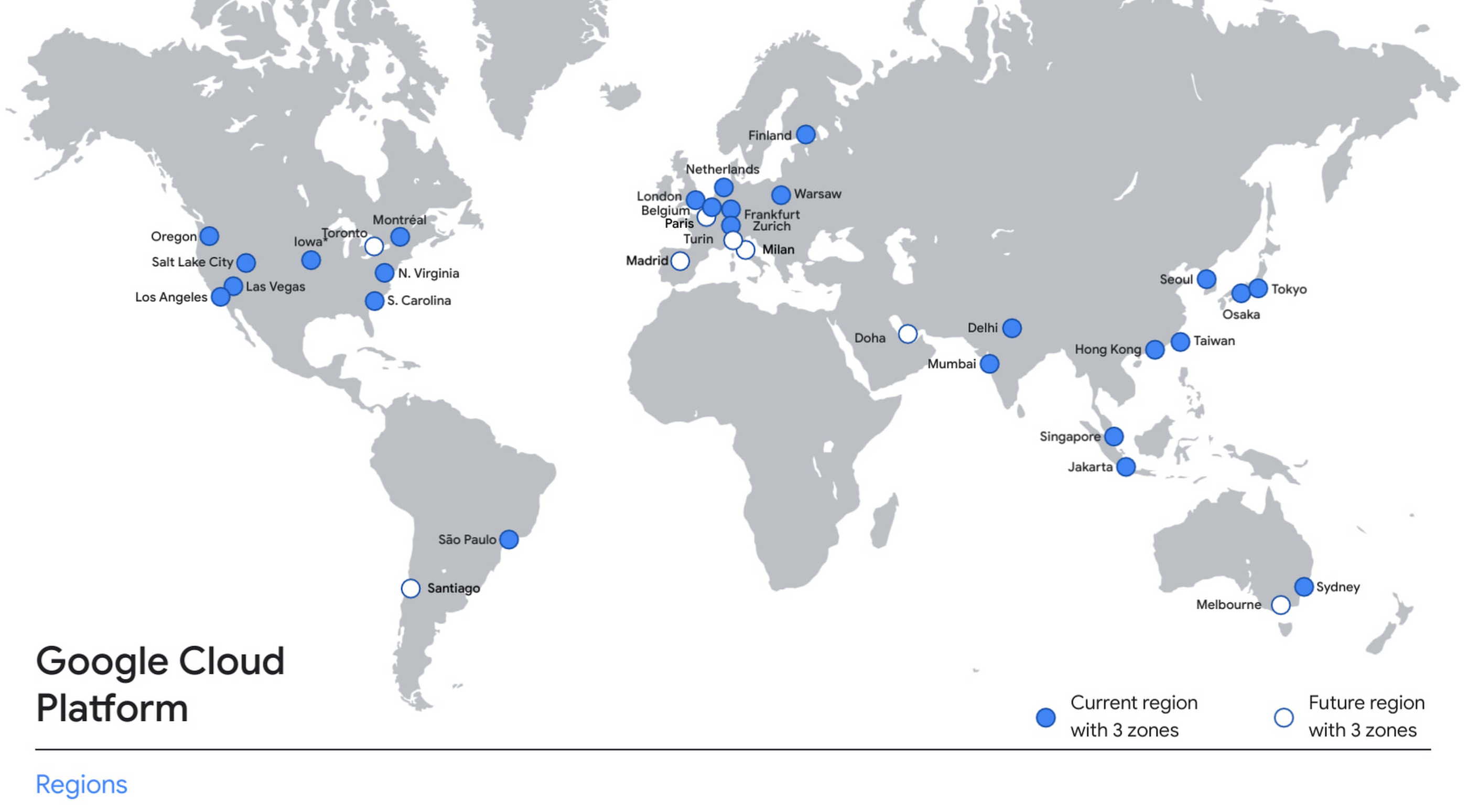
With this new region, Google Cloud customers operating in India also benefit from low latency and high performance of their cloud-based workloads and data. Designed for high availability, the region opens with three availability zones to protect against service disruptions, and offers a portfolio of key products, including Compute Engine, App Engine, Google Kubernetes Engine, Cloud Bigtable, Cloud Spanner, and BigQuery.
Supporting India’s recovery with training and education
Google and Google Cloud will also continue to support our customers with people and education programs. We’re investing in local talent and the local developer community to help enterprises digitally transform and support economic recovery.
Through the India Digitization Fund, we expanded our efforts to support India’s recovery from COVID-19—in particular, through programs to support education and small businesses. In addition to expanding internet access, and investments to help start-ups accelerate India’s digital transformation, we’ve grown our Grow with Google efforts. Businesses can access digital tools to maintain business continuity, find resources like quick help videos, and learn digital skills—in both English and in Hindi.
Helping customers build their transformation clouds
Google Cloud is here to support businesses, helping them get smarter with data, deploy faster, connect more easily with people and customers throughout the globe, and protect everything that matters to their businesses. The cloud region in Delhi NCR offers new technology and tools that can be a catalyst for this change. To learn more, visit the Google Cloud locations page, and be sure to watch the region launch event here.
Google Products Helps HMH’s Healthcare Staff Work from Anywhere Efficiently and Securely!

10254
Of your peers have already read this article.
3:00 Minutes
The most insightful time you'll spend today!
Hackensack Meridian Health (HMH) executive Mark Eimer explains how an ambitiously-timed rollout of a comprehensive suite of Google products helped the entire organization—from doctors to IT staff—achieve better security, cultivate a more equitable work environment, and ultimately, improve patient outcomes.
How does a recently merged, 17-hospital healthcare system fast-track a platform migration and hardware rollout securely and in a way that improves work for everyone, regardless of location or role? These are the questions that kept me up at night in early 2020, when the pandemic demanded a “big bang”—something our legacy laptops and operating systems couldn’t handle.
We began our work with Google in 2020 with the adoption of Chrome as our default browser. As we migrated platforms, keeping patient data safe was of the utmost importance to us, along with providing every staff member with the tools they needed to work virtually. Our staff often experienced issues accessing our web-based applications using Internet Explorer or Edge Browser, a problem that went away when we switched to Chrome. Chrome’s versatile compatibility also made it easier for my team to migrate all of our web-based operations, and Chrome’s security and manageability were key components to making this switch a huge win for the organization.
The success of this migration led us to extend our Google partnership to patient care applications—where Google’s expertise in AI and ML helps scale the use of diagnostics tools and improve other aspects of the patient journey.

Achieving security at every step
Like so many other healthcare organizations, we’ve been concerned about ransomware attacks. This is part of why we moved to Google Workspace and distributed over 3,000 Chrome OS devices in kiosk mode in March of 2020, when many of us went remote due to the pandemic. We were very concerned about team members accessing corporate applications through home devices that were running EOL operating systems (WIN7), as well as a general lack of antivirus and encryption measures.
We were protected by the fact that Google’s software and hardware both had built-in security features that we needed to stave off sophisticated attackers. For example, Chrome OS automatically updates to the latest security update and encrypts data living outside the cloud on the hardware. These features protected us from security-related disruptions, letting us securely move a huge library of file shares and emails across thousands of accounts to Google Chrome OS in just four months.
A year later, in March 2021, we migrated the enterprise over to Google Workspace and saw an immediate reduction in spam by 30% from the inherent built-in AI/ML. This meant staff were less likely to receive (and click through) phishing attempts. My team could connect, create, and collaborate easily and securely—even as more of us were working from home and needed to access sensitive data remotely.
Leveling the playing field
As an organization, we were surprised by how many team members didn’t have personal computers at home. We quickly decided that if we needed team members to work from home, the health network would have to supply hardware. Chromebooks’ lower price tag compared to PCs—on top of their built-in security controls—allowed us to purchase, deploy, and support that initial distribution of 3,000 Chromebooks to team members in less than three weeks, providing devices to every eligible remote employee instead of just a select few. This was vital to reaching our equitable technology goal as part of our diversity and inclusion initiative: everybody has the same tools to do good work.
When all employees have what they need to do their jobs well, we get better patient outcomes. Before we began this cloud adoption journey, patient and staff experiences were different within the hospitals and outside of them.
Now it’s the same wherever our staff is, and we’ve seen efficiency and accessibility benefits extend to the patient side. For example, we built a web-based contact center that supports 80 locations that use Workspace and Chrome OS devices. Since customer service, admin, and providers are all on the same system, it has become a one-stop shop for patients.
Furthermore, through the Grow with Google program, we were able to provide another benefit to employees that drove our equity goals. Google trained 50 non-IT staff members—from environmental services, food and nutrition, and other non-tech areas who were interested in making a career change to IT—on the Google products we were using. They may not have thought about switching to a career in IT before the Grow with Google program came to our organization, but through this partnership, they now have that opportunity.
A strategic, long-term partner
With any large-scale rollout, the work doesn’t end once laptops are in employee hands. Google has shown their commitment to long-term collaboration as they continuously optimize their products for the unique needs of healthcare providers and go the extra mile in tailoring tools to our staff’s workflows.
For example, on the Chrome OS side, the Google team has helped our registration desks and document centers with device integration for hardware like credit card readers and e-signature pads. They’ve also helped us meet security and privacy requirements mandated by state and federal governments around HIPAA, Medicaid, and Medicare reimbursements. Over this next year, we’ll look at a feature roadmap with Google Cloud to deliver further enhancements, iterating on the product itself to meet our needs for the present and the future.

Delivering the future of healthcare
The benefits we’ve seen around security and usability—and the ability to provide all staff with equal access to Google’s technology—are why we’re expanding our partnership with Google to both the administrative and clinical sides of HMH. In addition to further Google rollouts with corporate, next year we’re distributing Chromebooks to all 350 of our ambulatory clinics.
We’re also working with the Google professional services team to create a custom AI model that analyzes 3D mammogram images. This AI model will enable two providers to read mammograms—which adheres to international best practices but is currently rare in the US—without requiring additional time. Conducting double readings of mammograms will yield better health outcomes for our patients, such as a lower patient recall rate and an increased accuracy in detecting breast cancer.
We’re currently building the model using a variety of Google Cloud products, including Cloud Healthcare API. Once complete, this model is expected to be trained, deployed, and maintained in Google’s Vertex AI, allowing our providers to be more productive as they make clinical decisions with AI support. As the model is proven over time, we plan to make the predictive services accessible to other healthcare organizations.
With Google, we’re able to achieve a unified architecture for storing data as well as training and deploying AI models, which enable our staff to work more efficiently and securely from anywhere. While I may not be able to predict the future as accurately as AI can, I foresee our continued partnership with Google as a key part of HMH’s improved provider and patient outcomes.
Bringing Multiple Security Elements Together: Chrome

5393
Of your peers have already read this article.
2:00 Minutes
The most insightful time you'll spend today!
Security and the way we’ve been able to advance user protections over the years is hands down one of my favorite topics when it comes to Chrome. I’ve been on the Chrome team for over 14 years and have seen the browser evolve to become a critical tool that helps people get work done at home or in the office. At the same time, Chrome is often the best line of defense to protect users against malicious software on the internet.
Now more than ever, security has to be top of mind for IT and security teams. Cybercrime is up 600% due to the COVID-19 pandemic, and remote work has increased the average cost of a data breach by $137,000. Those numbers are staggering. And IT teams need to make sure every piece of their tech stack helps support their security needs.
Chrome has worked for years to quickly mitigate risks, block malicious sites and content, and proactively improve web security to keep your users and corporate data safe, pioneering new layered defenses like sandboxing and site isolation. When we think of security and Chrome, we believe it takes multiple elements of security coming together to give organizations the best protection possible.
Security you don’t have to think about: Chrome has many built in protections in place by default that benefit all users. This includes our team’s work to minimize zero days and roll out fixes quickly. With auto updates enabled, Chrome offers enterprises fast and automatic fixes for zero day vulnerabilities. The Chrome security team recently published a post explaining the state of in-wild-bugs that’s worth a read. More examples of the defense-in-depth Chrome offers include capabilities like site isolation and sandboxing that keep malicious code from affecting other visited sites or impacting user machines. Our scanning infrastructure helps us detect and remove harmful extensions from the Chrome Web Store (in fact, last year we saw an almost 90% drop in malware) to prevent your end users from getting infected with malicious extensions. These are protections built directly into Chrome that automatically keep your users and organization safe.
Protections for Chrome users: We provide additional layers of protection that keep your end users safe while they’re on the web and give them helpful information whenever there are potential security risks. For example, Safe Browsing, offered natively in Chrome, helps protect devices by showing warnings to users when they attempt to navigate to dangerous sites or download malicious files. We also give users insights into the safety of their passwords, letting them know if their passwords have been compromised, or even prompting them to change their corporate password if they try to re-use it against company policies. You users are working hard to get things done, and Chrome’s layered security supports their workflows while helping them stay safe on the web.
Enterprise Controls: Every organization has unique security needs. That’s why Chrome provides enterprises with advanced safeguards and granular policy management to help meet those security goals. With hundreds of policy options, admins can use a variety of management tools, including Chrome Browser Cloud Management, to customize the browser. Chrome Browser Cloud Management goes even further, providing powerful enterprise extension management, a security priority for many organizations. Our extension request workflow allows end users to request extensions and admins to allow or deny extension requests. We also recently released extension pinning that allows admins to pin to specific versions of extensions to support any internal security review processes.
Visibility and reporting is another focus area to support IT teams. Through Chrome Browser Cloud Management, administrators can get more insight into their browser environment. This data can help IT teams make security decisions, better understand the devices running Chrome and investigate if issues arise.
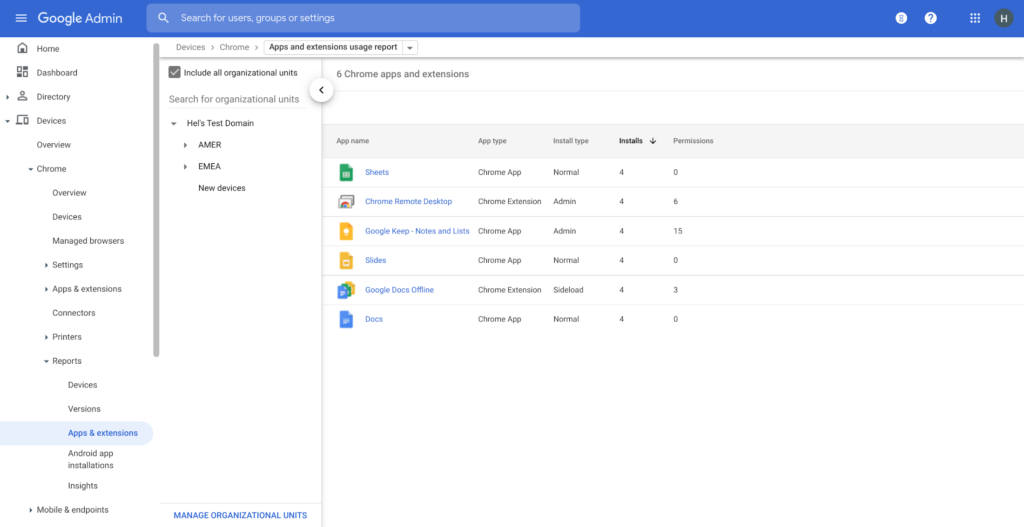
Zero trust security: Finally, Chrome can help modernize an enterprise’s security strategy by migrating to Zero Trust access models. BeyondCorp Enterprise helps secure endpoints by directly integrating Threat and Data Protection in Chrome. This protects against intentional or accidental data loss and prevents malware and phishing in real-time. Additionally, Chrome and BeyondCorp Enterprise provide device trust and endpoint security signals directly from the browser, significantly easing deployment of zero-trust in your environment. In 2022, we plan to partner with leading players in the cybersecurity and zero trust space to add additional integrations.
For security recommendations, check out the new Chrome 2.1 CIS Benchmark that covers independent recommendations on which Chrome policies to configure to help support organizations’ security and compliance needs.
More Relevant Stories for Your Company

Google Announces New Cloud Region in Israel to Meet Growing Customer Demands
Google has long looked to Israel for globally impactful technologies including popular Search features, Waze, Live Caption, Duplex and flood forecasting. At our Decode with Google 15RAEL event last week, we celebrated 15 years of Google innovation in Israel and our longstanding support of the country’s vibrant startup ecosystem. Over the years, we’ve expanded our enterprise

New Certificate Manager Helps Leverage Google’s Network Security and Performance
We’re excited to announce the public preview of Certificate Manager and its integration with External HTTPS Load Balancing. Certificate Manager enables you to use External HTTPS Load Balancing with as many certificates or domains as you need. You can bring your own TLS certificates and keys if you have an

Google Cloud Leads the Pack Among Data Security Vendors: Forrester
In its 25-criterion evaluation of data security portfolio providers, Forrester identified the 13 most significant ones and researched, analyzed, and scored them. Here's a summary of what Forrester said about Google Cloud Google puts cloud and cloud security at the center of its strategy. Capabilities from Google Cloud Platform, G Suite,

Strategic Consulting, Training & Implementation Guidelines with Public Sector PSO Helps Governments Stay Compliant
Did you know that by 2025, enterprise IT spending on public cloud computing will overtake traditional IT spending? In fact, 51% of IT spend in application software, infrastructure software, business process services, and system infrastructure will transition to the public cloud, compared to 41% in 20221.. As enterprises continue to
