





Best Kept Security Secrets: How to Resolve Cloud Trust Paradox with Cloud EKM

4632
Of your peers have already read this article.
2:30 Minutes
The most insightful time you'll spend today!
Whether driven by government policy, industry regulation, or geo-political considerations, the evolution of cloud computing has led organizations to want even more control over their data and more transparency from their cloud services. At Google Cloud, one of the best tools for achieving that level of control and transparency is a bit of technological magic we call Cloud External Key Manager (EKM).
Cloud EKM can help you protect your cloud data at rest with encryption keys which are stored and managed in a third-party key management system that’s outside Google Cloud’s infrastructure, and ultimately outside Google’s control. This can help you achieve full separation between your encryption keys and your data stored in the cloud. Cloud EKM works with symmetric and asymmetric encryption keys, and offers organization policies that allow for fine-grained control over what types of keys are used. Via Key Access Justification (KAJ) it also offers a way for clients to control each key use.
At their core, many cloud security and cloud computing discussions are about the kinds of trust that Cloud EKM specifically and encryption more broadly can help create. While the concept of digital trust is much bigger than cybersecurity and its tripartite components of security, privacy, and compliance, one of the most crucial themes of cloud computing is the cloud trust paradox. In order to trust the cloud more, you must be able to trust it less, and external control of keys and their use can help reduce concerns over unauthorized access to sensitive data.

How it works
From our Cloud EKM documentation, you can use keys that you manage within a supported external key management partner to protect data within Google Cloud. You can protect data at rest in services that support CMEK, or by calling the Cloud Key Management Service API directly.
Cloud EKM provides several benefits:
- Key provenance: You control the location and distribution of your externally-managed keys. Externally-managed keys are never cached or stored within Google Cloud. Google cannot see them. Instead, Cloud EKM communicates directly with the external key management device for each request.
- Access control: You manage access to your externally-managed keys. Before you can use an externally-managed key to encrypt or decrypt data in Google Cloud, you must grant the Google Cloud project access to use the key. You can revoke this access at any time.
- Centralized key management: You can manage your keys and access policies from a single location and user interface, whether the data they protect resides in the cloud or on your premises. The system that managed the keys is entirely outside Google control.
In all cases, the key resides on the external system, and is never sent to Google.
Here’s how it works:
- Create or use an existing key in a supported external key management partner system. This key has a unique URI.
- Grant your Google Cloud project access to use the key, in the external key management partner system.
- Create a Cloud EKM key in your Google Cloud project, using the URI for the externally-managed key.
The Cloud EKM key and the external key management partner key work together to protect your data. The external key is never exposed to Google and cannot be accessed by Google employees. Furthermore, Cloud EKM can be combined with Key Access Justifications (KAJ) to establish cryptographic control over data access.
KAJ with Cloud EKM can give customers the ability to deny Google Cloud administrators access to their data at rest for any reason, even in situations typically exempted from customer control, such as outages or responses to third-party data requests. KAJ does this by providing customers a clear reason why data is being decrypted, which they can use to programmatically decide whether to permit decryption and thus allow access to their data.
Previously, we’ve discussed three patterns where keeping the keys off the cloud may in fact be truly necessary or outweighs the benefits of cloud-based key management. Here’s a brief summary of those three scenarios where Cloud EKM can help solve these Hold Your Own Key dilemmas.
Scenario 1: The last data to go to the cloud
As organizations complete their digital transformations by migrating data processing workloads to the cloud, there is often a pool of data that can not be moved to the cloud. Perhaps it’s the most sensitive data, the most regulated data, or the data with the toughest internal security control requirements.
Finance, healthcare, manufacturing and other heavily-regulated organizations face myriad risk, compliance, and policy reasons that may make it challenging to send some of their data to a public cloud provider. However, the organization may be willing to migrate this data set to the cloud as long as it is encrypted and they have sole possession of the encryption keys.
Scenario 2: Regional regulations and concerns
Regional requirements are playing a larger role in how organizations migrate to and operate workloads in the public cloud.
Some organizations are already facing situations where they are based in one country and want to use a cloud provider based in a different country, but they aren’t comfortable with or legally allowed to give the provider access to encryption keys for their stored data. Here the situations are more varied, and can include an organization’s desire to stay ahead of evolving regulatory demands or industry-specific mandates.
Ultimately, this scenario allows organizations to utilize Google Cloud while keeping their encryption keys in the location of their choice, and under their physical and administrative control.
Scenario 3: Centralized encryption key control
The focus here is on operational efficiency. Keeping all the keys within one system to cover multiple cloud and on-premise environments can help reduce overhead and attack surface, thus helping to improve security. As Gartner researchers concluded in their report, “Develop an Enterprisewide Encryption Key Management Strategy or Lose the Data1,” organizations are motivated to reduce the number of key management tools.
“By minimizing the number of third-party encryption solutions being deployed within an environment, organizations can focus on establishing a cryptographic center of excellence,” Gartner researchers said
Given that few organizations are 100% cloud-based today for workloads that require encryption, keeping keys on-prem can streamline key management. Centralizing key management can give the cloud user a central location to enforce policies around access to keys and access to data-at-rest, while a single set of keys can help reduce management complexity. A properly implemented system with adequate security and redundancy outweighs the need to have multiple systems.
Do I need Cloud EKM?
Whether protecting highly sensitive data, retaining key control to address geopolitical and regional concerns, or supporting hybrid and multi-cloud architectures, Cloud EKM is best suited for those Google Cloud customers who must keep their encryption keys off of the cloud and always under their full control.
To learn more about Cloud EKM, please review these resources:
- Our research explaining why Google Cloud users can benefit from Cloud EKM
- The most recent updates to Cloud EKM
- Take a deeper dive into the cloud trust paradox
- Gartner, Develop an Enterprisewide Encryption Key Management Strategy or Lose the Data, David Mahdi, Brian Lowans, March 2022.
Ubuntu Pro Images Now Available on Google Cloud

4835
Of your peers have already read this article.
2:00 Minutes
The most insightful time you'll spend today!
Today, we’re pleased to announce the general availability of Ubuntu Pro images on Google Cloud, providing customers with an improved Ubuntu experience, expanded security coverage, and integration with critical Google Cloud features. In partnership with Canonical, we’re making it even easier for customers that have fully embraced open source to ensure security and compliance for their most mission-critical and enterprise workloads.
With Ubuntu Pro on Google Cloud, you now have access to features like:
- 10-year lifetime security updates – Canonical backs Ubuntu Pro for 10 years with security updates and a guaranteed upgrade path.
- FIPS & CC-EAL2 certification – Ubuntu Pro includes components that meet requirements from entities like FedRAMP, HIPAA, ISO, and PCI.
- Open-source security coverage – Protect your most important open-source workloads including MongoDB, Apache Kafka, Redis, NGINX, and PostgreSQL.
- Multi-version availability – Pro images are available for the three most popular Ubuntu Server distributions: 16.04 LTS, 18.04 LTS, and 20.04 LTS.
- Kernel Livepatch – Kernel patches are delivered immediately without having to reboot your VMs.
- Optional CIS and DISA STIG profiles – Choose from two leading profiles to harden your environment according to industry benchmarks.
- Cloud-based pricing – Ubuntu Pro does not require a contract, and pricing tracks with the underlying compute cost depending on the instance type.
Extended Security Maintenance (ESM) for Ubuntu 16.04 LTS with Ubuntu Pro
Availability of Ubuntu Pro images is especially important if you’re an Ubuntu 16.04 LTS customer and want extended security maintenance (ESM) for your virtual machines but don’t want to upgrade to Ubuntu 18.04 LTS or Ubuntu 20.04 LTS versions immediately. ESM is included with Ubuntu Pro 16.04. You can move your workloads from Ubuntu 16.04 LTS VM instances to Ubuntu Pro 16.04 instances to continue receiving ESM and all the above-mentioned benefits, without having to test your applications on a new version of the OS.
Gojek has evolved from offering just ride-hailing to a suite of more than 20 services today, serving everyday solutions for millions of users across Southeast Asia.
“We needed more time to comprehensively test and migrate our Ubuntu 16.04 LTS workloads to Ubuntu 20.04 LTS, which would mean stretching beyond the standard maintenance timelines for Ubuntu 16.04 LTS. With Ubuntu Pro on Google Cloud, we now have the ability to postpone this, and in moving our 16.04 workloads to Ubuntu Pro, we benefit from its live kernel patching and improved security coverage for our key open source components.”—Kartik Gupta, Engineering Manager for CI/CD & FinOps at Gojek
“With the launch of Ubuntu Pro on Google Cloud, we build on our joint investments with Google to optimize Ubuntu performance on Google Cloud, and add comprehensive security patching and Long Term Support for another 30,000 open source packages—the widest range of security-maintained open source on the planet,” said Mark Shuttleworth, CEO of Canonical. “As the world moves to open source for everything, Canonical offers the safety net of security maintenance that enterprises count on to unleash their developers.”
Getting started
Getting started with Ubuntu Pro on Google Cloud is simple. You can now purchase these premium images directly from Google Cloud by selecting Ubuntu Pro as the operating system straight from the Google Cloud Console.
To learn more about Ubuntu Pro on Google Cloud, please visit the documentation page and read the announcement from Canonical.
Securing Sensitive Data in the Cloud: Google Cloud’s CDMC-Certified Solution

1121
Of your peers have already read this article.
3:30 Minutes
The most insightful time you'll spend today!
As enterprises accelerate adoption of cloud-based services and products, they face a common challenge: How can they effectively secure and govern rapidly expanding volumes of their most sensitive data in new environments?
Today, Google Cloud released an architectural whitepaper and accompanying source code for a solution which successfully completed an assessment facilitated by KPMG LLP and has been accredited by the Enterprise Data Management Council (EDM Council) as a Cloud Data Management Capabilities (CDMC) Certified Cloud Solution. The architecture, which includes Google Cloud’s BigQuery and Dataplex Data Catalog, has been validated against CDMC’s control framework and can be used by new or existing Google Cloud clients wanting to migrate their sensitive data to the cloud with greater confidence.
“This is an exciting milestone for Google Cloud and the CDMC framework,” said John Bottega, president of EDM Council. “Google is advancing cloud adoption across all industries. Now as a CDMC Certified Cloud Solution, their clients can have the added certainty that Google’s architecture has the key controls and accepted best practices in place to protect their data in the cloud.”
Introducing CDMC
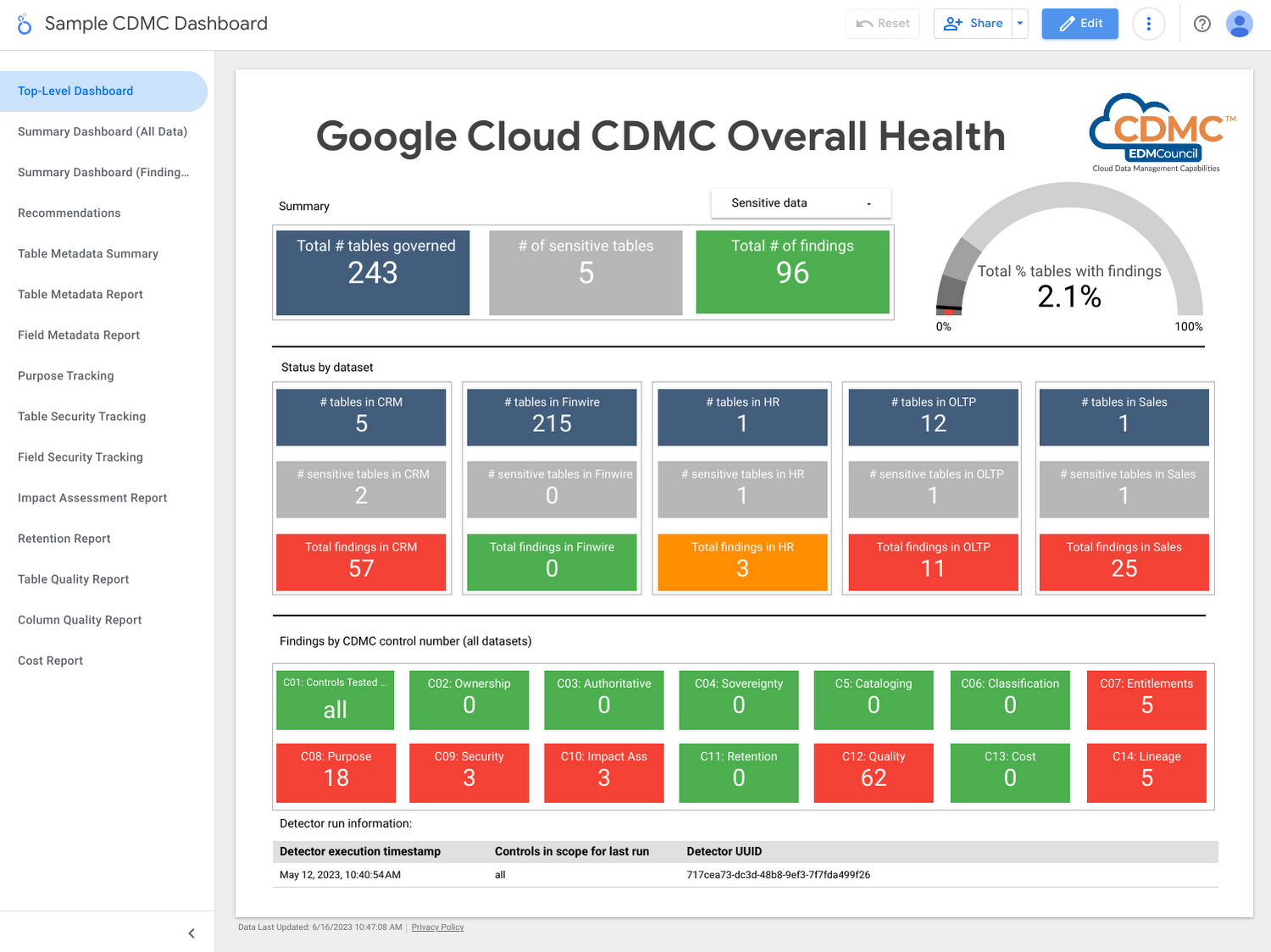
The CDMC framework, developed and published by EDM Council, provides a set of data management capabilities, standards, and best practices for securing their cloud implementations. Contributors to the framework include large global enterprises across regulated industries, major cloud service providers, technology service organizations, and advisory firms.
The EDM Council also provides a data management assessment framework which includes a framework composed of 14 key controls and corresponding assessment procedures, which are used to validate that sensitive data is being managed effectively. To become a CDMC Certified Cloud Solution, the Google Cloud team designed, implemented, and documented a reference architecture which met the control requirements and was then assessed by KPMG LLP.
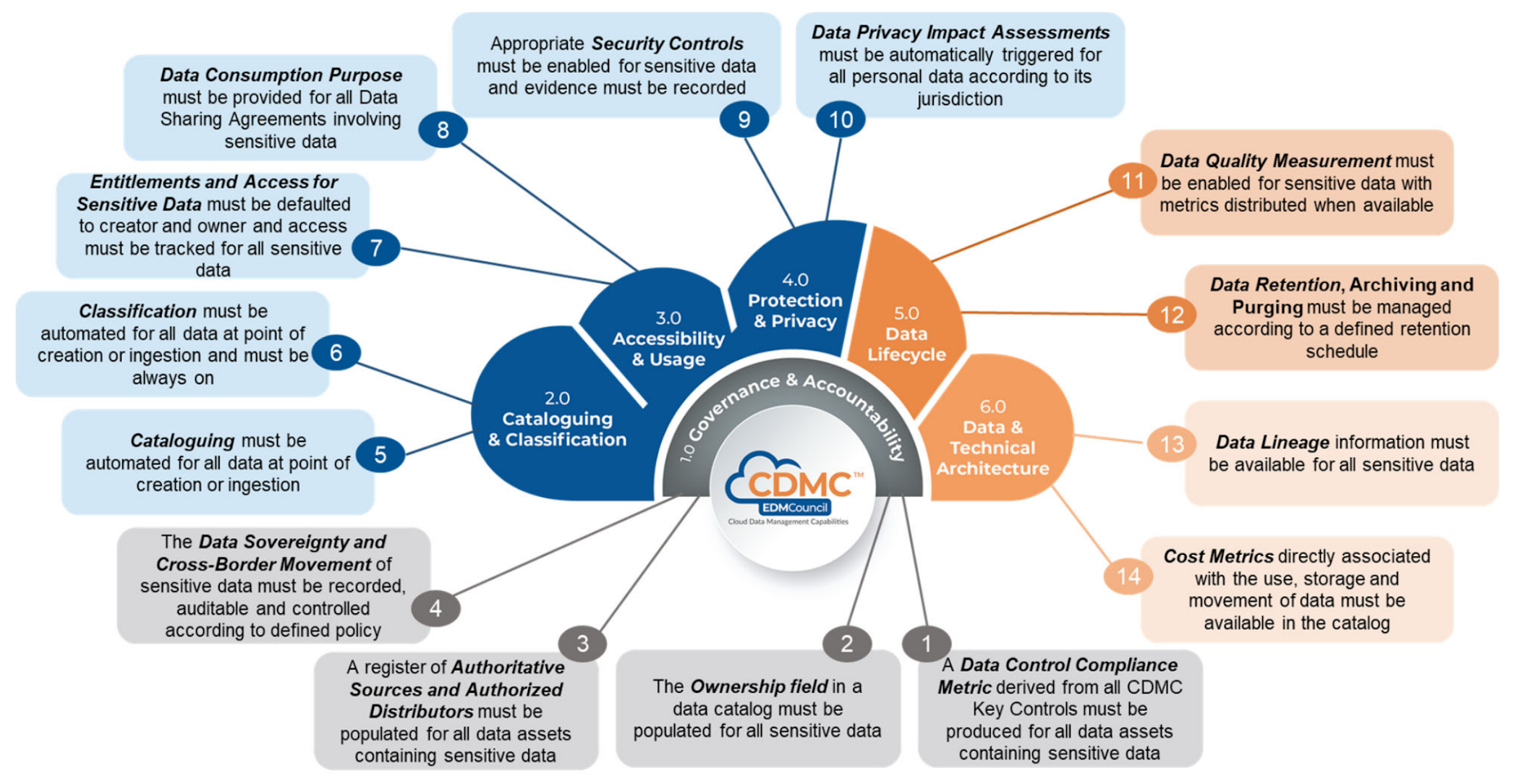
Using the solution, customer data assets are automatically classified and tagged with business metadata, their lifecycle is managed, and a reporting engine that proactively scans and publishes findings provides security administrators information about misconfigurations and security issues via a single dashboard.
Who should use this framework?
- CDOs and CISOs: The CDMC framework provides a systematic approach to handling sensitive data in the cloud and is a good starting point for chief digital officer-level discussions around what governance and security controls should be applied to different types of sensitive data. The Google Cloud CDMC assets can help with determining practical scope and efforts needed to implement the CDMC controls within your organization.
- Data platform architects and engineers: The Google Cloud reference architecture provides reusable patterns that can be adopted and customized to suit the particular needs of your organization, as well as your existing architecture and technology stack.
- Data owners and data stewards: Once implemented, the resulting classification, automation, findings, and reports should reduce the manual burden of effectively governing sensitive data at scale.
Architecture
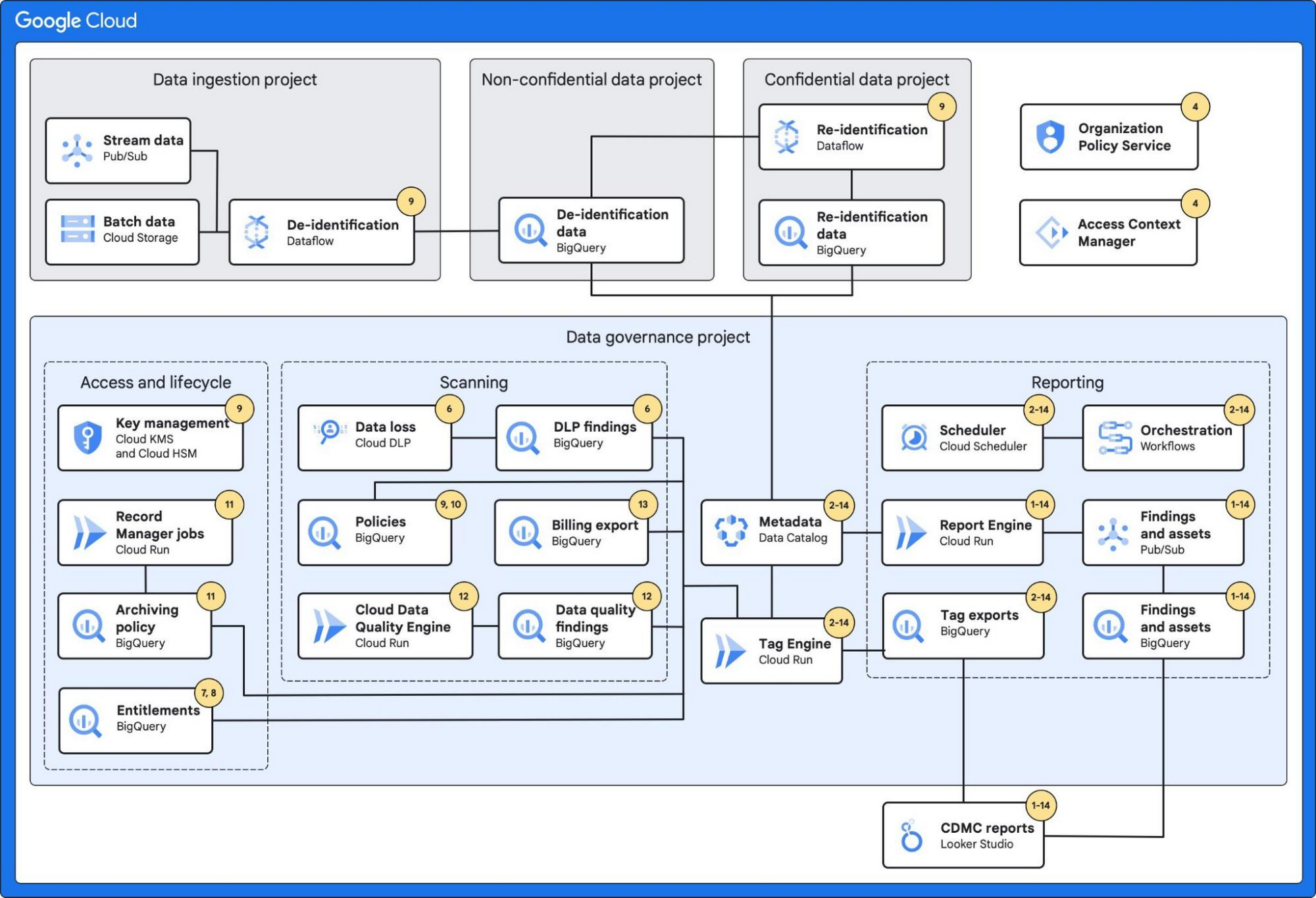
The architecture combines a number of Google Cloud’s services with built-in platform capabilities and data-protection services to protect data at scale.
These services include:
- BigQuery, which can fully manage a serverless data warehouse that enables scalable analysis for petabytes of data.
- Dataplex’s Data Catalog, which can fully manage highly scalable data discovery and metadata management with built-in data lineage features.
- Cloud Data Loss Prevention, which provides tools to classify and mask sensitive data.
- VPC Service Controls, which defines a security perimeter around Google Cloud resources to mitigate data exfiltration risks.
- Looker Studio, which provides a sample dashboard to visualize the overall health of the environment.
Additionally, the architecture leverages:
- Secure Data Warehouse Blueprint, which adheres to practices for data governance when creating, deploying, and operating a data warehouse in Google Cloud.
- Tag Engine, which automates the process of creating and populating metadata tags in Data Catalog.
The diagram below highlights the Google Cloud services used and how they mapped to the 14 CDMC key controls:
Further information
To get started, Google Cloud customers can:
How Air Asia’s CIO Ensures Its 22,000 Employees Service Customers Efficiently and Preserve Security

3531
Of your peers have already read this article.
2:48 Minutes
The most insightful time you'll spend today!
At AirAsia, we operate a fleet of more than 270 aircraft across 23 markets, fly to more than 150 destinations and carry 100m guests each year. We’ve also been named the world’s best low-cost carrier for 11 years running. To accomplish all of this, we rely heavily on our 22,000 Allstars (employees). As AirAsia co-founder Tony Fernandes likes to say, “it has always been about the people.”
In my role as CIO, it’s critical that I give our Allstars the tools and technology they need to get their jobs done, while at the same time ensuring that our company’s data is protected and secure. While this is challenging enough in normal circumstances, we’re also in the midst of rapidly moving from legacy on-premises technologies to the cloud. Google Cloud has been a critical partner for us on this journey.
Identity challenges
AirAsia, like many other enterprises, has relied on a legacy on-premises directory for many years. As our company has quickly grown and expanded to new markets and regions, we’ve had to manage multiple servers across a number of on-premises data centers and the public cloud, which has proved costly and time-consuming.
Our Allstars, located all across Asia, need to easily access a number of legacy on-premises apps in addition to a growing number of SaaS apps. As a business, we also needed a more seamless integration between our HR system of record and our identity solution for user provisioning and lifecycle management. Solving these challenges with our existing on-premises directory was simply not feasible for us.
In recent years, we partnered with Google Cloud to help drive our digital transformation, including moving dozens of workloads and apps to Google Cloud Platform (GCP), deploying G Suite as our collaboration and productivity solution for all of our employees, and replacing thousands of Windows laptops with fast and secure Chromebooks.
We brought up our identity concerns with the Google Cloud team, and after a number of conversations, we decided to deploy Cloud Identity, Google’s cloud-based identity, and access management solution, to help address the identity challenges we were facing.
Why Cloud Identity for AirAsia?
We ended up choosing Cloud Identity for a few key reasons. Here at AirAsia, we are eager to move to the cloud as quickly as possible, and moving identity management to the cloud is a key enabler of this and our broader digital transformation. Managing identities from the cloud also enables us to have a single identity and set of credentials for each employee, which they can use to access all of the applications they need to be productive, both in the cloud and on-premises.
In addition, deploying Cloud Identity is a key step towards enabling the BeyondCorp (or zero trust) security model, which we feel is the best approach to strengthen our security posture and fight modern threats. Cloud Identity also integrates seamlessly with our existing technologies, which includes not only Google Cloud products like GCP, G Suite, and Chrome OS, but also third-party tools like Citrix, Papercut, and others.
And finally, Cloud Identity offered us significant cost and resource savings. With Cloud Identity in place, our IT department can spend less time worrying about managing multiple on-premises directory servers and can instead focus on delivering value to our Allstar employees.
Redefining Network Security with Google Cloud’s Secure Web Proxy

1202
Of your peers have already read this article.
3:30 Minutes
The most insightful time you'll spend today!
Google Cloud provides multiple layers of security to help customers stay ahead of evolving threats and keep their cloud workloads safe. Today at our annual Security Summit, we are excited to announce the general availability of Secure Web Proxy, a new cloud-first network security offering that provides web egress traffic inspection, protection, and control. Secure Web Proxy (Cloud SWP) can help networking and security teams implement Zero Trust networking principles, discover malicious activity, and support forensic investigations
How Secure Web Proxy works
You configure workloads to use Secure Web Proxy as a gateway. Web requests can originate from virtual machine (VM) instances, containers, serverless environments, and workloads outside of Google Cloud connected by Cloud VPN or Cloud Interconnect. Policies and rules in Cloud SWP will be applied to traffic sent from these workloads to the internet.
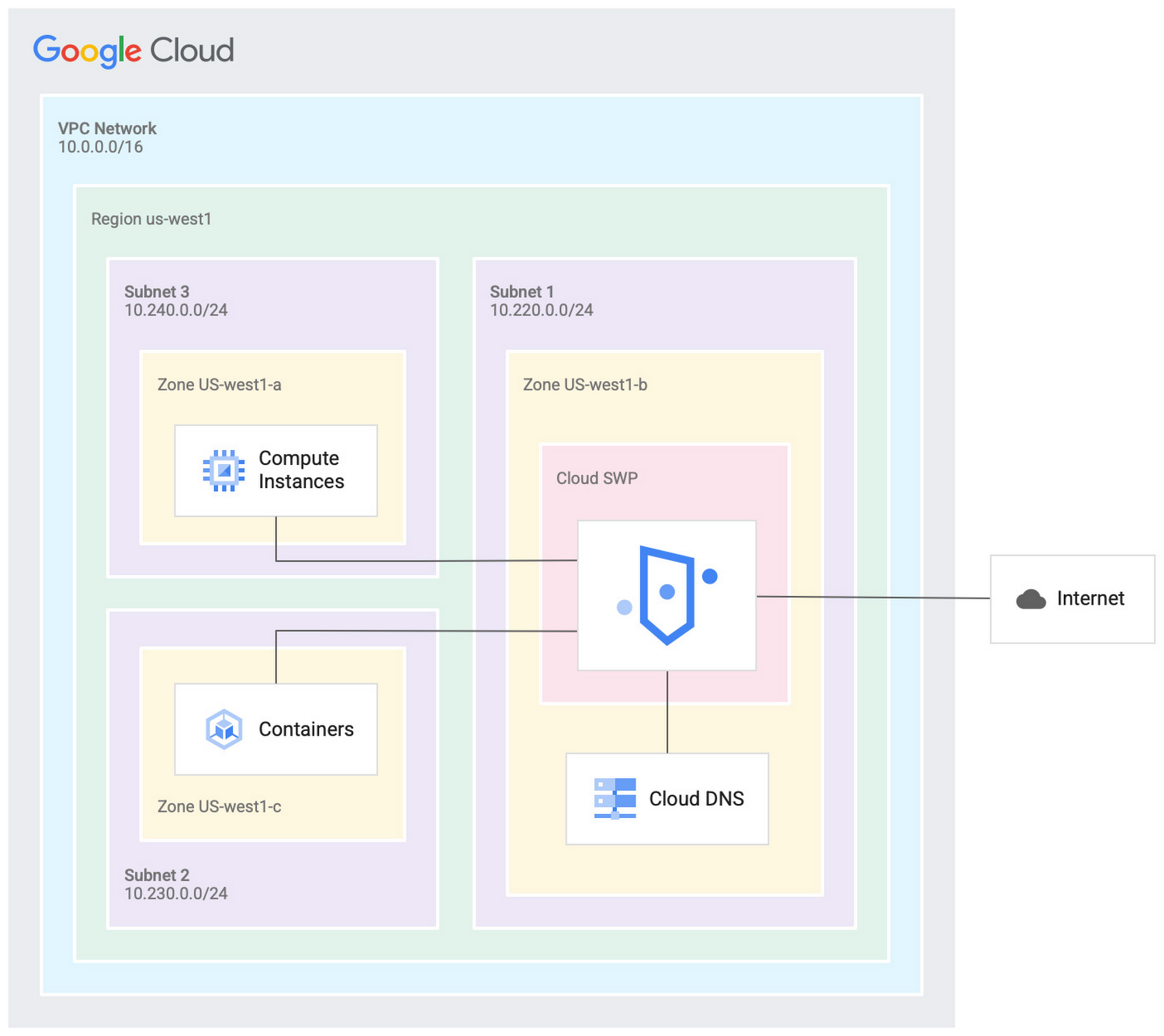
Cloud SWP helps enable organizations to enforce granular access policies, limiting egress web traffic based on source, identities, destination, or request types. With Cloud SWP you can create policies with Google Cloud Identity Access Management (IAM) context using service accounts and secure tags to block egress. For example, you can set a policy to limit a service account to sending traffic to a specific outbound destination.
Secure Web Proxy offers a scalable TLS inspection service that lets you intercept TLS traffic, inspect the encrypted request, and enforce your policies. Cloud SWP integrates with Cloud Logging to record metrics and transaction logs for requests handled by the proxy.
Common use cases for Secure Web Proxy
Many organizations employ a proxy like Cloud SWP to programmatically restrict workload access to only trusted external web services.
You can also use Cloud SWP to monitor outbound access. The proxy identifies traffic that doesn’t conform to policy and logs it to Cloud Logging. This allows you to monitor internet usage, discover and disrupt threats on your network by spotting command and control traffic or anomalous data transfers. Logs can be also used in forensics to investigate security events and incidents involving egress web traffic.
Operational benefits
Secure Web Proxy is another example of how Google Cloud continues to deliver built-in, cloud-first security capabilities that offer operational efficiencies for our customers.
Cloud SWP is easy to deploy and manage because it is a managed service. Unlike frequently deployed proxy solutions, it does not require users to configure virtual machines (VMs) to run and scale the proxy. Security patching is handled automatically. As your business and outbound traffic grows, Cloud SWP takes care of growing your proxy infrastructure for you.
Secure Web Proxy can also help make cloud migrations more seamless. If you are using an on-premises proxy, you can easily port the existing proxy’s policies to Cloud SWP when you migrate the app, maintaining the same egress protection in the cloud as you had on-premises.
Customer testimonials
Preview customers validated the operational and security value of implementing Cloud SWP:
“Google’s Secure Web Proxy is a powerful tool that can help businesses of all sizes protect their cloud workloads from online threats. By using the granular policy controls and TLS inspection, we are ensuring that our cloud applications only access approved external destinations. Additionally we are able to comply with data security regulations,” said David Saleh, director, Cloud Architecture and Application Security, ATB Financial.
“Secure Web Proxy has helped us to improve our security in Google Cloud. We are now able to filter outbound HTTP and HTTPS traffic from our applications. In addition, having a native solution will allow us to replace the VM-based solution we currently have, providing us with cost savings and continuing to deliver on our strategy of replacing products with cloud native services,” said Roberto Vega, cloud analyst, Carrefour.
Getting started with Secure Web Proxy
You can get started with Cloud SWP by visiting our documentation page to learn more about Cloud SWP prerequisite requirements and configuration options. If you want to quickly evaluate Cloud SWP for your cloud environment, use the SWP evaluation guide for step-by-step instructions. Be sure to check out all our sessions at this year’s Google Cloud Security Summit.
Announcing easier de-identification of Google Cloud Storage data

2881
Of your peers have already read this article.
2:30 Minutes
The most insightful time you'll spend today!
Many organizations require effective processes and techniques for removing or obfuscating certain sensitive information in the data they store. An important tool to achieve this goal is de-identification. Defined by NIST as a technique that “removes identifying information from a dataset so that individual data cannot be linked with specific individuals. De-identification can reduce the privacy risk associated with collecting, processing, archiving, distributing or publishing information.
Always striving to make data security easier, today we are happy to announce the availability of a de-identification action for our Cloud Storage inspection jobs. Now, you can de-identify Cloud Storage objects, folders, and buckets without needing to run your own pipeline or custom code. Additionally, we have enhanced our transforms by adding a new dictionary replacement method that can help you achieve stronger privacy protection – especially with unstructured data you might store like customer support chat logs.
The “De-identify findings” Action
The “de-identify findings” action for Cloud DLP inspection jobs is a fully managed feature that creates a de-identified copy of the data objects that are inspected. This means that you can inspect a Cloud Storage bucket for sensitive data like Personal Identifiable Information (PII) and then create a redacted copy of these objects all with a few clicks in the Console UI. No need to write custom code or manage complex pipelines and since it’s fully managed, it will auto-scale for you without you needing to manage quota.
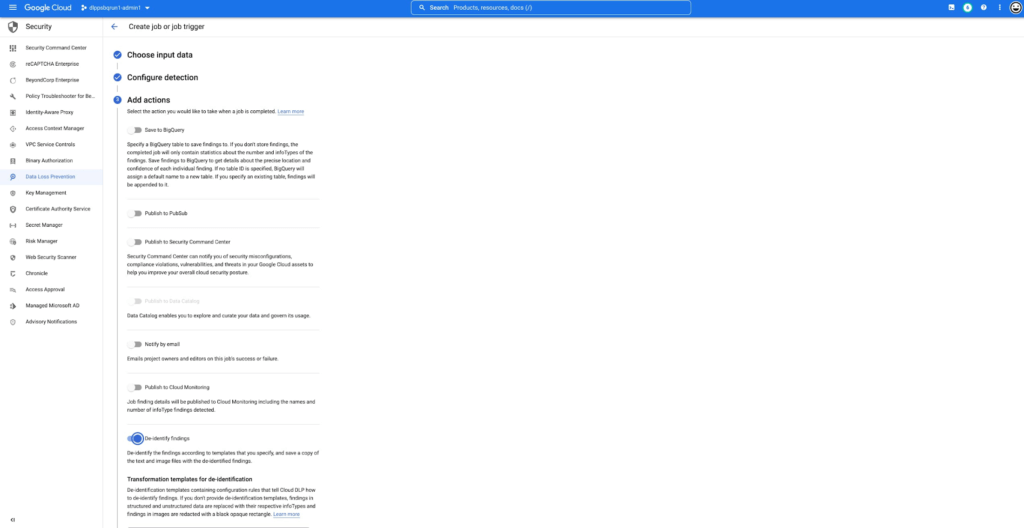
This new action supports the following data types:
- Text files
- Comma- or tab-separated values
- Images (see regional limitations)
Once enabled, the DLP job will perform an inspection of the data and produce a de-identified copy of all supported files into the output bucket or folder.
You can also use the new de-identify action on Job Triggers to automatically de-identify new content as it appears on a recurring schedule. This is useful for creating a workflow with a safe drop zone for incoming files that need to be de-identified before being made accessible.
What can automatic De-identification do?
Cloud DLP provides a set of transformation techniques to de-identify sensitive data while attempting to make the data still useful for your business. These techniques include:
- Redaction: Deletes all or part of a detected sensitive value.
- Replacement: Replaces a detected sensitive value with a specified surrogate value.
- Masking: Replaces a number of characters of a sensitive value with a specified surrogate character, such as a hash (#) or asterisk (*).
- Crypto-based tokenization: Encrypts the original sensitive data value using a cryptographic key. Cloud DLP supports several types of tokenization, including transformations that can be reversed, or “re-identified.”
- Bucketing: “Generalizes” a sensitive value by replacing it with a range of values. (For example, replacing a specific age with an age range, or temperatures with ranges corresponding to “Hot,” “Medium,” and “Cold.”)
- Date shifting: Shifts sensitive date values by a random amount of time.
- Time extraction: Extracts or preserves specified portions of date and time values.
New Dictionary Replace method
When a sensitive data element is found, dictionary replacement replaces it with a randomly selected value from a list of words that you provide. This transformation method is especially useful if you want the redacted output to have more realistic surrogate values.
Consider the following example: You collect customer support chat logs as part of providing service to your customers. These support chat logs contain various types of Personal Identifiable Information (PII) including people’s names and email addresses. Cloud DLP can find and de-identify the sensitive elements with static replacements such as “[REDACTED]” to help prevent someone from seeing this sensitive data.
With the new dictionary replacement method you can instead replace these findings with a randomly selected value from a dictionary. This dictionary replacement provides two key benefits over static replacement:
- The resulting output can look more realistic
- Because the output looks more realistic, it can help conceal any residual names (a privacy de-identification technique sometimes referred to as “hiding in plain sight”)
An example of this:
Input:
[Agent] Hi, my name is Jason, can I have your name?
[Customer] My name is Valeria
[Agent] In case we need to contact you, what is your email address?
[Customer] My email is v.racer@example.org
[Agent] Thank you. How can I help you?
De-identified Output:
[Agent] Hi, my name is Gavaia, can I have your name?
[Customer] My name is Bijal
[Agent] In case we need to contact you, what is your email address?
[Customer] My email is happy.elephant44@example.org
[Agent] Thank you. How can I help you?
As you can see in the output, the names and email addresses have been replaced with a random value that both protects the original sensitive information but also makes the output look more realistic. This can make the data more useful and help “hide” any residual PII.
Next Steps:
To learn more about De-Identification check out our Technical Docs, try De-identification of Storage in the Cloud Console and Watch a recent Google I/O talk on De-identification of data.
More Relevant Stories for Your Company

Google Cloud’s Metric Scope Makes Multi-project Monitoring Simple
Customers need scale and flexibility from their cloud and this extends into supporting services such as monitoring and logging. Google Cloud’s Monitoring and Logging observability services are built on the same platforms used by all of Google that handle over 16 million metrics queries per second, 2.5 exabytes of logs per month, and over

Enhanced Risk Management: Google Cloud & CyberGRX’s Innovative Collaboration
Risk managers know there is one assessment type that’s foundational for every risk management program: the vendor risk assessment. Understanding the risk posture of your vendors and third parties, including your cloud providers, is an important part of an effective risk management program. While collecting and analyzing information can often

Protect Users in Apps with Multi-Factor Authentication
These days, using a password alone to secure user accounts containing sensitive, identifiable, or private information just isn’t sufficient. Passwords are often subject to reuse and can easily be phished and stolen. With this in mind, we recently teamed up with researchers from New York University and the University of

Three Lesser-Known Ways to Protect Your Customers and Business From Phishing and Fraud
Your users are critical to your business, and you need security controls to keep them — and your business — safe. Built from years of Google Cloud technology and experience, these security features focus on keeping users safe on the web. You can reduce online fraud (chargebacks, hijackings, and abuse)
