





Migrating MySQL to Spanner? Here’s What You Need to Know

5627
Of your peers have already read this article.
2:00 Minutes
The most insightful time you'll spend today!
Since its initial release in 1995, MySQL has not only been the de-facto database for many data storage needs, but has gathered much attention over the years as one of the most well-recognized databases around when it comes to Relational Database Management Systems and transactional data processing.
Any application in retail, e-commerce, or banking has likely had its fair share of business depending on a relational database for its transactional needs. Many of these applications are built on MySQL due to its flexibility, open source nature, and strong community support.
Whether in the context of a migration from a relational database (like MySQL or PostgreSQL) , migration from a NoSQL database (like Cassandra), or a green grass workload, many companies turn to Cloud Spanner seeking a high availability SLA (99.99% for regional instances and 99.999% for multi region instances), unlimited scale, and low operational overhead – no patching required, no maintenance or other planned downtimes, just to name a few benefits.
The tooling and open source ecosystem around Spanner has evolved and grown ever since the service was introduced. HarbourBridge is a part of this ecosystem, and it’s meant to help customers port their existing MySQL or PostgreSQL schema to a Cloud Spanner schema.
Application Migration Tips
Despite helpful tools like HarbourBridge, database migrations are never trivial. Here are a few things to pay attention to when migrating from MySQL to Spanner, and how to update your application logic to address them.
Note – The following snippets use the PHP client for Cloud Spanner. A couple of the snippets reference a partial Magento port that our friends over at Searce have been working on. Once you understand the operations, you should be able to implement the same in any of the other languages that Cloud Spanner supports.
Cloud spanner enforces strict data types
In a MySQL query, the value of an attribute can be referenced as either a string or an integer. Example:
- select * from catalog_eav_attribute where attribute_id = 46;
- select * from catalog_eav_attribute where attribute_id = “46”;
Both are valid and equivalent.
In Cloud Spanner, the query will return an error if you try to reference an integer type by using a string representation.
Here is an example of a working query from Cloud Spanner:
- select * from catalog_eav_attribute where attribute_id = 46; — this will work
- Select * from catalog_eav_attribute where attribute_id = “46” — will fail, since we are supplying a string with “46”
You may use a function like the following to assist you with such transformations.
/*** Formats the SQL for Cloud Spanner* Example* Input SQL : <select statement> WHERE* (`product_id` = '340') ORDER BY position ASC* Output SQL : <select statement> WHERE* (`product_id` = 340) ORDER BY position ASC* In the above example integer*`340` is sanitized by removing single quotes.* Sanitization is required since Cloud Spanner* has strict typing* @param string $sql* @return string $sql*/public function sanitizeSql(string $sql){if (preg_match_all("/('[^']*')/", $sql, $m)) {$matches = array_shift($m);for($i = 0; $i < count($matches); $i++) {$curr = $matches[$i];$curr = filter_var($curr,FILTER_SANITIZE_NUMBER_INT);if (is_numeric($curr)) {$sql = str_replace($matches[$i],$curr, $sql);}}}return $sql;}
Using sequences in primary keys is not a Spanner best practice
Cloud Spanner does not implement a sequence generator, and it is not a Spanner best practice to use sequential IDs because doing so can cause hotspotting.
An alternative mechanism of generating a unique primary key is to use a UUID or any other similar mechanisms that result in non-sequential values. For more information, please refer to this article.
In order to convert all existing primary keys to a UUID pattern, you can change the schema using the snippet here
You may use this code snippet to modify the application code to generate the UUID for the auto increment. There are other ways to do this as well, such as using PHP built-in uniqid function.
/*** Generate UUID.* @return string*/public function getAutoIncrement(){if (function_exists('com_create_guid') === true) {return trim(com_create_guid(), '{}');}return sprintf('%04X%04X-%04X-%04X-%04X-%04X%04X%04X',mt_rand(0, 65535), mt_rand(0, 65535),mt_rand(0, 65535), mt_rand(16384, 20479),mt_rand(32768, 49151), mt_rand(0, 65535),mt_rand(0, 65535), mt_rand(0, 65535));}
Implicit casting and the need for explicit casting of field data types
Both MySQL and Cloud Spanner follow the SQL standard, hence much of the query syntax is the same. One notable difference is that the Cloud Spanner field types are implicitly cast to an appropriate data type out of the ones mentioned here. When implicit casting of the field type fails, Spanner returns a read error, so it would be safer to perform the casting to the appropriate type when issuing the SELECT statement.
Modify application code to cast to respective data type before execution of query.
$con = $this->getSpannerConnection();/*** Cloud Spanner follows strict type so cast the columns appropriately*/$select = $con->addCast($select, "`t_d`.`value`", 'string');$select = $con->addCast($select, "`t_s`.`value`", 'string');$select = $con->addCast($select, "IF(t_s.value_id IS NULL,t_d.value, t_s.value)", 'string');$values = $con->fetchAll($select);
Modify the application code to cast the column to its respective type
/*** Cast the column with type* @param string $sql* @param string $col* @param string $type* @return string*/public function addCast(string $sql,string $col, string $type){$cast = "cast(".$col." as ".$type.")";return str_replace($col, $cast, $sql);}
Using interleaved tables to improve read performance
Cloud Spanner’s table interleaving is a great choice for many parent-child relationships where the child table’s primary key includes the parent table’s primary key columns. Interleaving ensures that child rows are collocated with their parent rows, which can significantly improve query performance.
Refer to the statements here for a few samples of creating interleaved tables. To learn more about table interleaving, visit the documentation.
Conclusion
Database migrations are complicated. Hopefully, using HarbourBridge and the list of tips in this article can make that task easier. For additional tips, please take a look at this migration guide and read more about HarbourBridge.
Chrome OS’s Hybrid Work Model Powers Google’s Return to Work Strategy

7509
Of your peers have already read this article.
1:30 Minutes
The most insightful time you'll spend today!
The pandemic continues to deeply affect our lives around the globe. In some places, new cases are surging and returning to work is the last thing on people’s minds. In other areas, conditions are improving and companies are starting to think about transitioning their workforce back to the office.
Exactly when and how to do this remains complex and varies by country, industry, and company. What’s certain is that hybrid work will become an essential part of the business world moving forward. And finding solutions that bridge the gap between “in-person” and “somewhere else” are crucial.
At Google, we’ve been focused on what the hybrid transformation means for us. To prepare for hybrid work, using modern solutions is a key enabler.
Chrome OS: Supporting Google’s return to office strategy
At Google, we’ll move to a hybrid work week where most Googlers spend approximately three days in the office and two days wherever they work best. It’s no surprise that as the modern, secure, cloud-first platform, Chrome OS is playing a key role in our transition to a hybrid work model. Because Chrome OS devices can easily be shared, more flexible working models and spaces are now possible. And with user profiles stored in the cloud and collaboration solutions like Google Workspace, employees can log in to any Chrome OS device, access what they need and pick up where they left off.
Here are just a few ways we are using Chrome OS and its tools to support the return to the office:
- In select office locations, Googlers can reserve desks through an internal booking tool set up with a high-performance Chromebox, keyboard, mouse, and monitor. Employees can log in to the Chromebox which syncs their cloud profile, and start working with the same environment they have on all their Chrome OS devices.
- We’re announcing new docking stations that are designed for Chrome OS devices and allow employees to bring in their Chromebook from home, connect to the dock with one USB-C cable, and use a monitor, keyboard, and mouse for a full desktop experience.
- Every Chrome OS device enables a zero-trust security working model with BeyondCorp Enterprise providing our workforce with simple and secure access to applications while providing additional security controls for IT.
- We’ve deployed the new Chrome OS Readiness Tool to our extended workforce to identify employees that are able to switch to Chrome OS. This allows us to expand the latest security, deployment, and manageability benefits to more of the workforce.
Additional ways Chrome OS is helping organizations with return to office
We aren’t the only ones supporting our return to office and hybrid work strategy with Chrome OS. We’ve heard more ways our customers are using Chrome OS to make the transition as smooth as possible. These include:
- Streamlining deployment and management of Chrome OS devices using zero-touch enrollment which allows devices to automatically enroll into a corporate domain without IT configuration.
Grab & Go Chromebooks being used for frontline and hybrid information workers, allowing employees to grab a Chromebook from a cart and get to work right away. - Parallels Desktop for Chrome OS being deployed to allow employees to access Windows or legacy apps locally on their Chrome OS devices.
- Existing Windows and Mac devices being modernized and repurposed to run a Chrome OS experience using CloudReady. (Google is currently offering a CloudReady promotion. Learn more here.)
While the Chrome OS team has been working towards making remote working as seamless as possible for IT, we’ve also made advancements in supporting traditional technology that’s required in the office.
- In October, we announced Chrome Enterprise Recommended: a collection of identity, printing, productivity, communications, and virtualization solutions that are verified to run great on Chrome OS.
- With the increased usage of video conferencing on Chrome OS devices, we’ve made improvements to Google Meet and Zoom performance including camera and video improvements to reduce any unnecessary processing and features that intelligently adapt to your device, your network, and what you are working on.
- For improved access to Windows and legacy apps, VMware Horizon introduced multi-monitor support and USB redirection and Citrix Workspace released a tech preview with webcam enhancements and Microsoft Teams optimizations.
- We integrated with the Okta Workflows platform, so IT administrators can include Chrome OS in it’s access logic and deploy quickly without code. Recently, we’ve added the ability to require users to reauthenticate on their Chrome OS device once Okta has detected that the user has changed their password. Try out this new capability by signing up for our Trusted Tester program.
- We’ve increased our support for direct IP printing with additional printer models since the beginning of 2020. In addition, we have made improvements to management features, including support for multiple print servers and launched policy APIs to provide a better IT admin experience.
Join us for a digital event with Modern Computing Alliance and its newest member HP
Last year we announced the launch of the Modern Computing Alliance—a collaboration of industry leaders including Box, Chrome Enterprise, Citrix, Dell, Google Workspace, Imprivata, Intel, Okta, RingCentral, Slack, VMware, and Zoom aim to create the pioneering solutions that businesses need. We are thrilled to introduce HP, who brings their innovative hardware and enterprise hardware expertise to the Modern Computing Alliance and has been working closely with the alliance to ensure true silicon-to-cloud innovation.
As an alliance, we’ve been deeply engaged in the hybrid work shift. We invite you to join us for a digital event where we discuss questions about returning to work. Like how product design can encourage participation and collaboration regardless of where employees are, important security issues to keep in mind, and what factors businesses should consider to support a safe, working environment.
Home. Heading back. Hybrid.
Hear from the experts on hybrid work and return to office.
Date: May 20th, 2021
Register here.
If you are ready to try Chrome OS today, it’s easy to get started. You can contact us to get connected to a partner, sign up for a free 30-day trial of Chrome Enterprise Upgrade to start managing Chrome OS devices, or deploy the Chrome OS Readiness Tool to identify employees that are ready to switch to Chrome OS.POSTED IN:
Let Your Organization Thrive in Hybrid Work with Google Workspace

3122
Of your peers have already read this article.
2:30 Minutes
The most insightful time you'll spend today!
Flexible ways of working have become second nature for people everywhere, especially for the more than 8 million customers that use Google Workspace in their offices, homes, or on mobile devices.
However, the rise of hybrid work has also demonstrated the importance of choice. People don’t want to be locked into a single app or in a closed environment. They want to use productivity tools like email, video conferencing, and chat in a seamless way with other critical apps that perform functions like helping to stay in touch with customers, visualizing data, managing projects, building creative designs, and much more.
Enabling all of those products to work well together — without boundaries or walled gardens — is essential to helping teams and organizations maximize hybrid work. This week at Google Cloud Next, we’re taking significant steps towards making Google Workspace the most open and extensible productivity platform for users worldwide.
Today, we’re launching third-party smart chips in Docs, along with new integrations and enhanced API capabilities for Meet, Chat and Spaces, delivering entirely new ways to use third-party applications within or alongside Google Workspace, allowing organizations to get more value from the solutions they’ve already invested in. The new integrations are with some of the most popular enterprise applications in use today — AO Docs, Asana, Atlassian, Figma, LumApps, Miro, Tableau, and Zendesk — and will help transform the way people work every day.
Together, with our partners, we’re enabling an open ecosystem for hybrid work and ensuring that Google Workspace’s most helpful features don’t stay proprietary.
Bringing smart chips to popular third-party applications
When we launched smart canvas, we gave Google Workspace users the ability to bring the people and information they needed into Docs through simple @-mentions, creating interactive mentions of people, files, meetings, templates, and more. Today, we’re expanding smart chips to our ecosystem of partners, allowing our users to add even more rich data, more context, and critical information right into the flow of their work.
With these new third-party smart chips, you will be able to tag and see critical information from partner applications using @-mentions, and easily insert interactive information and previews from third-party apps directly into a Google Doc.
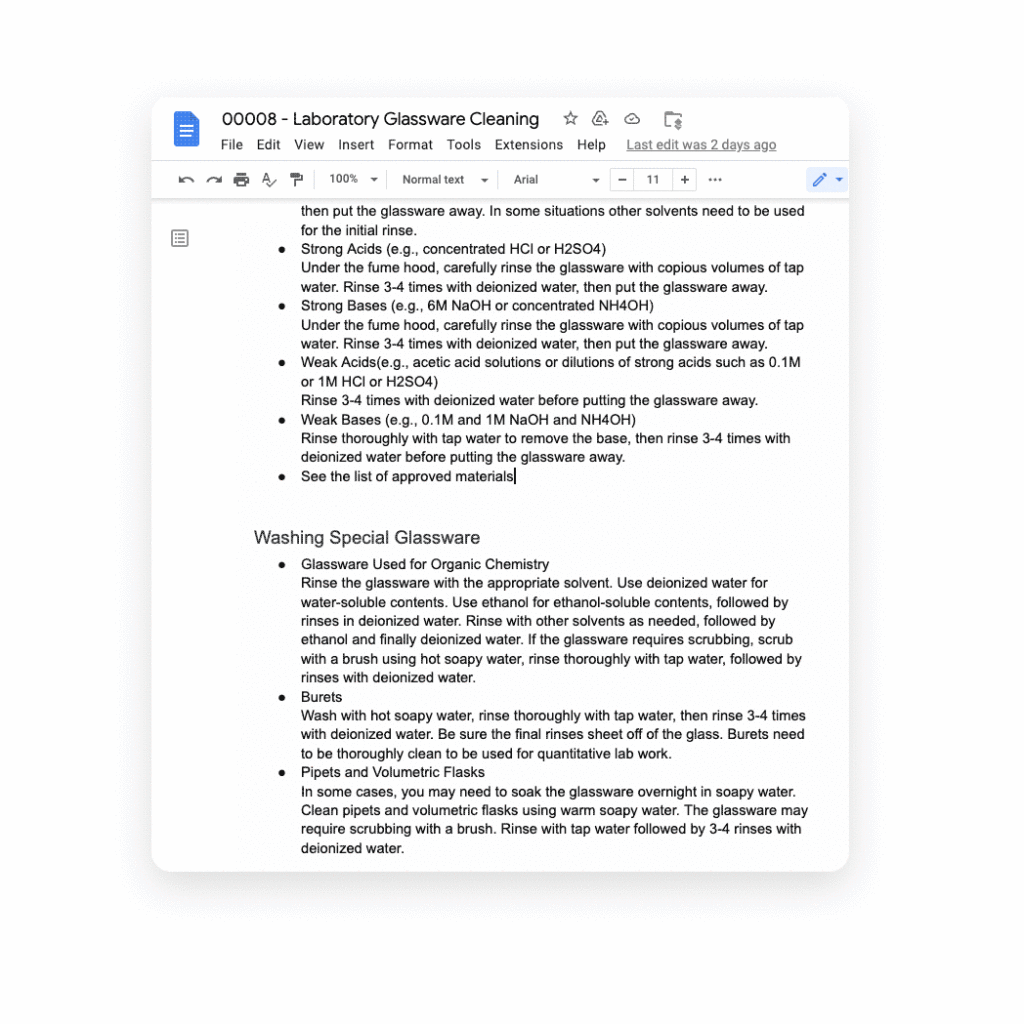
Several of our partners including AO Docs, Atlassian, Asana, Figma, Miro, Tableau, and ZenDesk, are now developing third-party smart chips to add more value to your Google Docs experience:
- AODocs, a fast-growing content services platform, is creating a smart chip that will allow you to link to and interact with controlled documents using AODocs’ content management capabilities within Google Docs.
- Asana, the leading work management platform, is creating smart chips that will enable you to see and manage your tasks and projects easily within a Doc.
- Atlassian, a leading provider of team collaboration and productivity software, is creating smart chips for both its Jira and Confluence apps, enabling you to visualize key details for your project plans directly in a Doc.
- Figma, a design platform for teams who build products together, is using smart chips to embed helpful information about brainstorms, diagrams, and prototypes that are foundational to a product design project into Docs. The chips provide a visual thumbnail of the project so you can easily tell what you’re clicking into.
- Tableau, the analytics platform, is building a new smart chip that will enable Google Docs users to see a live preview of data visualizations and related dashboard metadata.
- Miro, the leading visual collaboration platform, is creating smart chips that will enable you to transform a Miro link into a useful, visual frame of reference that gives preview, title, and other information needed to get a quick summary of your work in a visual format.
- Zendesk, the popular customer service platform, is building smart chips to show users all the relevant and pertinent information for a given Zendesk ticket without leaving Google Docs.
These new smart chip experiences from our partners are examples of the value and innovation we can provide to users and organizations by committing to openness and extensibility.
Smart chips will be available to developers to build out their app integrations in the coming weeks, and will be available to all users in Docs starting January 2023.
Adding third-party capabilities to Google Meet
Google Meet is more than just a video conferencing tool — it’s a hub for collaboration. Earlier this year, we rolled out the capability to join meetings and present directly from Google Docs, Sheets, and Slides to make it easier for people to work together in real-time. We also built an integration with Miro, allowing you to initiate collaboration on Miro whiteboards directly from a Meet call. Now, we’re extending that capability to more third-party applications.
Two new tools for developers — the Google Meet API and Google Meet add-on SDK — will enable our partners to bring their apps together with Google Meet, providing new seamless ways for our customers to use their favorite tools with Google Meet.
With our new Meet add-on SDK, partners can bring the power and functionality of their apps into Meet, where users can then collaborate using other products without leaving the meeting space. For example, Figma is utilizing this SDK to bring its popular design and whiteboarding capabilities into Google Meet. Our shared customers will now be able to collaborate within Figma in real time during Google Meet video calls.
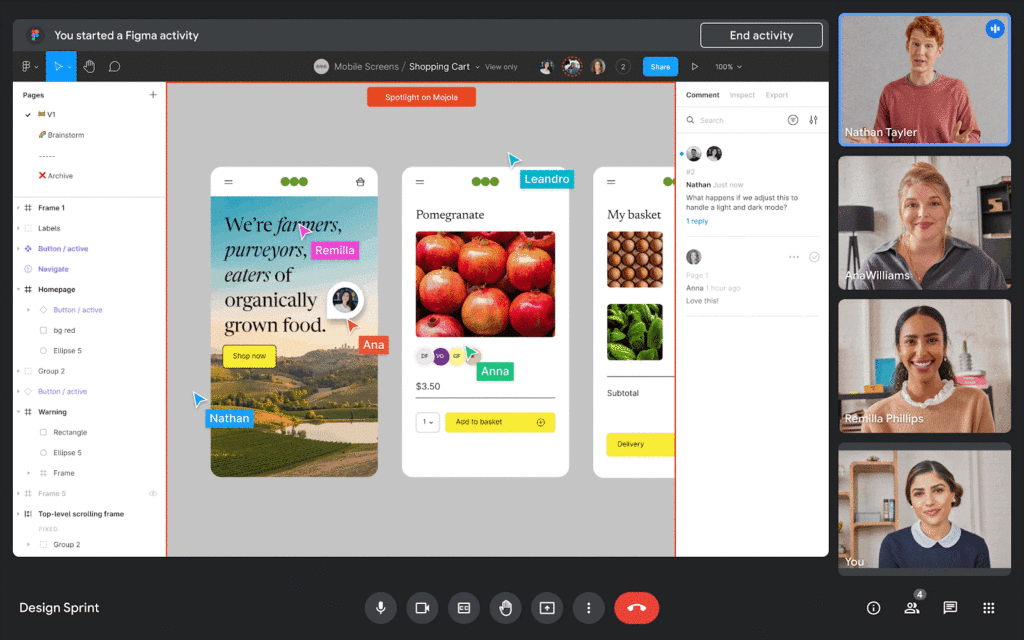
We’re also announcing new Meet API that will enable users to schedule and launch meetings directly from third-party applications. These APIs will also enable users to see whether a meeting is currently live and who is currently in the meeting — all without leaving the application of their choice.
Asana is working to bring the new Meet API together with Drive APIs to create or link to an existing Google Meet meeting directly from a task in Asana. In addition, we’re working with Asana to explore functionality that would allow users to add tasks to a meeting, create a clear agenda for the team, and assign pre-work so teams arrive prepared for a purposeful meeting. We believe that together, Asana and Google Meet can make meetings more actionable by helping users prepare and host results-focused meetings.
Figma is working on bringing Figma and Figjam files right into Meet with this new Meet integration, giving teams the ability to brainstorm and build designs together right in the flow of a meeting. All participants can contribute and engage through Meet, so more voices are heard and projects move forward faster.
We’re also making it easy for people to find and launch partner applications within Google Meet. Joint partner and Workspace customers will be able to discover and install Meet add-ons directly within the Meet UI — even during a live meeting. And of course, partners can register their apps in the Google Workspace Marketplace, helping them reach millions of Workspace users.
The Google Meet API will be available for early access later this year, and the Meet add-on SDK will be available for early access by the end of 2022.
Bringing partner applications into Google Chat and Spaces
Developers already use our Chat and Spaces APIs to add new experiences to Google Workspace. For instance, they are enabling third-party applications to automatically add people to Chat Spaces in time-sensitive, critical scenarios like incident response.
Now, we’re expanding the Chat and Spaces APIs to enable more functionality between Google Chat and our partners’ applications. Soon, these apps will be able to automatically create 1:1 direct messages or group chats programmatically. These apps will also be able to read and write Chat messages without requiring a user to launch an app, further extending the capabilities to allow for contextual understanding of conversations.
For example, imagine you’re discussing an upcoming project with your team in a space, and when you start working on the project in a given app, the app suggests adding a related link or Doc based on the Chat conversation. An app could also automatically copy all messages from one space to another to ensure important messages are shared as broadly as possible with your team.
These are just a few ways partner apps using the Chat and Spaces APIs will be able to enhance user experiences in Chat. Several of our partners are already leveraging these Chat and Spaces APIs to create unique Chat experiences:
Asana is currently using the new Chat and Spaces APIs to notify users and act on Asana tasks right from Google Chat, including actions such as marking a task complete, reassigning a task or even creating an entirely new task, all without leaving Google Chat.
LumApps, the widely-used employee experience platform, is building a new integration with Chat that will enable our joint users to launch a private Google Chat with another employee, directly from their LumApps user directory. Bringing together these two common use cases — finding a coworker and initiating a conversation — helping Google Workspace and LumApps customers communicate more seamlessly and quickly.

Some capabilities for the Chat and Spaces APIs are already available in the Developer Preview Program, with more APIs launching in the next few weeks. Make sure you check out the Developer Preview Program for more details.
The power of an ecosystem
We’re committed to making Google Workspace the most capable, open, and extensible platform for users, and delivering a product that reflects reality for workers today: work doesn’t get done in a single application or a legacy suite of programs anymore.
Together with our partners, we can deliver more helpful, flexible tools, create best in class capabilities for hybrid work, and enable entirely new ways of communicating and collaborating.
You can learn more about Google Workspace add-ons and integrations here, our partner applications here, and read more about the benefits of modernizing legacy office programs here. You can also express interest in partnering with Google Workspace here.

Collaboration Helps Nielsen Gain Better Consumer Insights and Save Costs by 20%
DOWNLOAD CASE STUDY4855
Of your peers have already downloaded this article
5:00 Minutes
The most insightful time you'll spend today!
The Nielsen Company is one of the world’s most well-known and respected marketing research firms, with operations in over 100 countries. Its 56,000 employees work to provide insights and data that give customers a better understanding of what people watch, listen to, and buy.
Those insights are essential to companies in a variety of industries, including media and entertainment, consumer products, and retail, that must stay in touch with customers in a fast-changing marketplace.
In order to help customers get the information they need to increase ad sales and boost market share, Nielsen must empower its employees to collaborate across markets and global offices.
But Nielsen’s employees were working out of individual e-mail inboxes that delayed decision-making and made it difficult for the company to take immediate action on time-sensitive information.
The company saw an opportunity to improve collaboration by moving productivity apps to the cloud—Google Cloud’s G Suite—allowing employees to work anytime, anywhere, and on any device and collaborating in real-time.
“In keeping with our cloud-first strategy and digital transformation, we wanted to give our employees state-of-the-art collaboration tools,” says Kimberly Anstett, CIO at Nielsen. “We knew that a global, cloud-based toolset would help change the way everyone in the company works and maximize the value we deliver to our customers.”
6899
Of your peers have already watched this video.
14:21 Minutes
The most insightful time you'll spend today!
How Anthos Helps Organizations Implement Multi and Hybrid Cloud Strategy
Organizations have become increasingly focused on using modernization solutions to build competitive advantage, for faster time to market, serve customers better and seamlessly operate in hybrid and multi-cloud environments. Anthos by Google Cloud, a managed application platform plays an important role in application modernization and also in empowering customers to deploy a hybrid or multi-cloud strategy with opensource technologies and platforms like Kubernetes.
Watch the video to refer to the real use-cases of Anthos for application modernization and hybrid/multi cloud deployment across retail, digital natives, banking and manufacturing space.
Also, explore the latest tool, Migrate for Anthos if you are a traditional enterprise looking to skip rewriting of applications and lift-and-shift process!
7780
Of your peers have already watched this video.
1:52 Minutes
The most insightful time you'll spend today!
Video: How Whirlpool’s 90,000 Employees Collaborate to Bring 100 New Products to Market Every Year
As one of the world’s largest manufacturing companies, Whirlpool needs no introduction. The 104-year-old company manufactures home appliances from over 70 manufacturing and technology research centers around the world.
Innovation has been the company’s focus since its inception and that’s evident from the fact that it introduced close to 100 new products in 2017 alone.
For any company to be that innovative, it needs creative minds to collaborate and work towards the same goal, all at once. That’s especially true for Whirlpool that has over 90,000 employees across the globe.
“The need that we have to be connected, the speed with which we need to operate has gone up,” says a Whirlpool executive.
And that’s why, Whirlpool switched to G Suite, Google Cloud’s collaboration and productivity tool that brings together the power of Gmail, Docs, Drive, and Calendar all in one place.
“The opportunity to make a global company feel local, entrepreneurial, and fast-paced, is a big challenge. Google Apps helps us get there. What we’ve really done is create an opportunity for people to collaborate truly on a global basis, regardless of location, place and time. That makes a huge difference in terms of the speed with which we can operate,” says a Whirlpool executive.
More Relevant Stories for Your Company

Google’s Default Messaging Apps for AT&T Android Users Ensure Richer Conversations
Today, we’re announcing that we’re working with AT&T to establish Messages by Google as the default messaging application for all AT&T customers in the United States using Android phones. The collaboration aims to help accelerate the industry toward global Rich Communication Services (RCS) coverage and interoperability to offer a consistent, secure, and

IT Team Figures Out Easiest Way to Build Data Pipelines and Create ML Models
Building a strong brand in today's hyper-competitive business environment takes vision. It also requires a flexible, easily managed approach to digital asset management (DAM), so marketing professionals and other stakeholders can easily share, store, track, and manipulate assets to build the brand. Many of today's leading companies, including JetBlue, Slack,

100 Stores. 5 States. How Schnucks Pulled Off a Mammoth Collaboration Feat
As a family supermarket chain since 1939, Schnuck Markets Inc. depends on driving efficiency and volume sales to achieve its mission, identifying customer service and community partnerships among its key differentiators. In order to commit its maximum resources for success, Schnucks continues to focus on streamlining operations and achieving greater efficiency. Management

Google Cloud’s Virtual Appointment Scheduling Tool (VAST) Helps State of Arizona Recover from Unemployment Situation
When the world was forced to go primarily online, state governments also faced the reality of needing to provide community services without the health risk of meeting in person. Old systems that relied on interpersonal contact could not keep up. An unprecedented number of displaced workers swamped every unemployment system.
