





A Recap on Google Cloud Databases and Storage Options- Part 2

3961
Of your peers have already read this article.
6:00 Minutes
The most insightful time you'll spend today!
Isaac Newton said, “If I have seen farther than others it is because I have stood on the shoulders of giants.” He meant that in order to explain the Law of Gravity, he used the work of major thinkers who came before him in order to make intellectual progress (as-in giving credit). In the 1640’s (yes, the time of the English Civil War and the start of the mini Ice Age), we can say the Age of Reason began and the word “data” was also (re)born in a way.
Why? Hard to assert a specific reason, it could be apropos of all those events of that decade, and somewhere amidst all that, the scientists and Churchmen (rather Churchman, Henry Hammond who really coined the term data) started to pen down their credit in books and there was a continued proliferation of data to reason their finding (and most times to reason why their work was better than that of the others). And thus comes to us the word datum from the Latin verb dare (it means “to give”, not the English dare).
Dare to Recap History?
Data is history captured through language (it has become the future as well, but that is for another day). Now we all like history (well, most of us). But it is highly likely the context gets lost in the complexity and style of definition. One way to mitigate that risk is to have a clear set of definitions (language), sustained hold of events (history), a clean process of capture (extract) and a scalable process for translation and aggregation (transform). If we want our data to be successful and rise to the occasion, then we need to keep these ways to mitigate the risk of complexity in mind.
And this is exactly what we discussed in the Part 1 of this blog series, Data Modeling Basics—the various business attributes, technical aspects, design questions, and considerations for designing your database model.
In this blog…
We will look into the different databases and storage options in Google Cloud, a brief note on each one of them, when to choose one over the other, interesting alternatives, exceptions and if you make it to the end of the blog, a fun challenge to make sure we put this little tech nugget to an ACID test (see what I did there?). If you are a cloud enthusiast, a database practitioner, a data geek, or a general wonderer of life with computing, you may find this engaging…
Google Cloud Storage Options
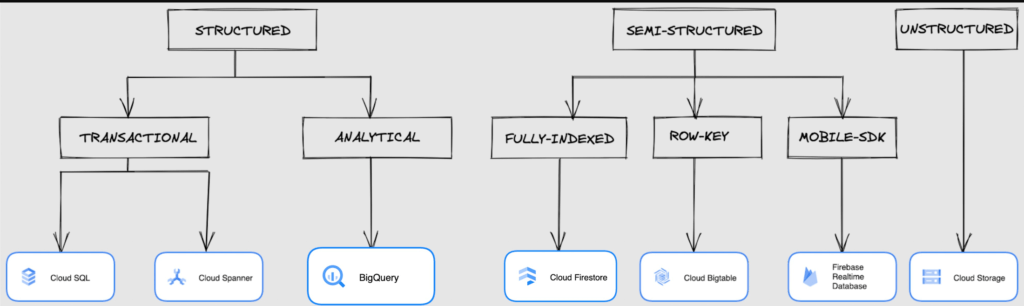
We at Google Cloud, have realized how hard it is to go through these laundry list assessment aspects and have made it simpler for you with a Decision Tree. (Of course, It ain’t Christmas if not for the tree):
If only the world was always “Structured”
In a structured world, you will know all the attributes on a first-name basis (I mean to say that you will have a well defined fixed set of attributes that can be modeled in a table of rows and columns), and the applications are transactional or analytical in orientation. Transactional Structured Data operate one row at a time generally and they need to adhere to ACID compliance. (Ah. Now you connect the dots, if not already.) ACID properties are Atomicity, Consistency, Isolation, and Durability. Cloud SQL and Cloud Spanner are our Google Cloud choices for Transactional Structured Data use cases.
Let’s look at the below aspects for each type and structure of data:
- Why that option? (highlights and key features)
- When to choose?
- When not to choose?
- Security aspects
Cloud SQL
- Fully Managed, cloud-native RDBMS (Relational DataBase Management System) that offers both MySQL, PostgreSQL, SQL Server engines
- Cloud SQL is accessible from apps running on App Engine, GKE, or Compute Engine
Note: A managed database is one that does not require as much administration and operational support (creating databases, performing backups, updating the operating system of database instances) as an unmanaged database.
When to use Cloud SQL?
- Typical online transaction processing (OLTP) workloads
- Lift and shift of on-premise SQL databases (or from anywhere else) to cloud
- Regional applications that do not need to store > 30 TB of data in a single instance
When not to use Cloud SQL?
Cloud SQL is not an appropriate storage system for online analytical processing (OLAP) workloads or data that requires dynamic schemas on a per-object basis.
Security
Data stored is encrypted both in transit and at rest. Have built-in support for access control, using network firewalls to manage database access.
Cloud Spanner
Relational, horizontally scalable, global database with strong consistency- Supports schemas, ACID transactions, and SQL queries (ANSI 2011)
- Scales horizontally in regions, but can also scale across regions for workloads that have more stringent availability requirements
When to use Cloud Spanner?
- For large amounts of data and when you require high transactional consistency
- When you require sharding for higher throughput, access and low latency
When not to use Cloud Spanner?
Cloud Spanner is not an appropriate storage system for online analytical processing (OLAP) workloads
Security
Security features in Spanner include data-layer encryption, audit logging, and Identity and Access Management (IAM) integration.
Analytical Structure is when we want the data to tell us an aggregated or enhanced story, for which we use limited columns and multiple rows and hence mostly use a Column-Oriented storage mechanism. Column-oriented storage is if we want to store the data in the tables by columns instead of by rows, and this column-oriented storage is done to efficiently access only a subset of columns for querying. BigQuery is the data warehouse option for analytics needs.
BigQuery
BigQuery is a fully managed Data Warehouse for analytics with built-in data transfer service- Peta-byte scale, low-cost warehouse that supports loading data through the web interface, command line tools, and REST API calls
- Incorporates features for machine learning, business intelligence, and geospatial analysis that are provided through BigQuery ML, BI Engine, and GIS.
Note: A data warehouse stores large quantities of data for query and analysis instead of transactional processing.
When to use BigQuery?
For use cases that cover process analytics and optimization, big data (Petabyte scale) processing and analytics, data warehouse modernization, machine learning-based behavioral analytics, and predictions
When not to use BigQuery?
BigQuery is not a Transactional database and is oriented on running analytical queries, not for simple CRUD operations and queries.
Security
BigQuery provides encryption at rest and in transit. Cloud Data Loss Prevention (Cloud DLP) can be used to scan the BigQuery tables and to protect sensitive data and meet compliance requirements. BigQuery supports access control of datasets and tables using Identity and Access Management (IAM).
And then we have the Semi-structured and the Unstructured world of data that we will address in the below sections.
Cloud Firestore (Cloud Datastore)
Firestore is the next major version of Datastore and a re-branding of the product. Taking the best of Datastore and the Firebase Realtime Database, Firestore is a NoSQL document database built for automatic scaling, high performance, and ease of application development.
- A fully managed, serverless NoSQL Google Cloud database designed for the development of serverless apps that stores JSON data
- Can be used to store, sync, and query data for web, mobile, and IoT applications
- Automatically handles sharding and replication making it highly available, durable, and scalable
- Provides ACID transactions, SQL-like queries, indexes, and more
- If a client does not have network connectivity, the Firestore API lets your app persist data to a local disk and synchronizes itself with the current server state once connectivity is reestablished
When to use?
For use cases of app development, live synchronization, offline support, multi-user collaborative applications, leader board, etc.
When not to use?
Not a relational database so not meant for relational structured data use cases.
Security
Firestore Security Rules support serverless authentication and authorization for the mobile and web client libraries. Identity and Access Management (IAM) manages database access.
Cloud Bigtable
- Bigtable is a wide-column, fully managed, high-performance NoSQL database service designed for terabyte- to petabyte-scale workloads
- Bigtable is battle tested on Google internal Bigtable database infrastructure that powers Google Search, Google Analytics, Google Maps, and Gmail
- Provides consistent, low-latency, and high-throughput storage for large-scale NoSQL data
When to use?
- For large amounts of single key data and is preferable for low-latency, high throughput workloads
- For real-time app serving workloads and large-scale analytical workloads
When not to use?
While Bigtable is considered an OLTP system, it doesn’t support multi-row transactions, SQL queries or joins. For those use cases, consider either Cloud SQL or Datastore.
Security
- All the data at rest in Cloud Bigtable is encrypted using Google’s default encryption, by default.
- Instead of Google managing the encryption keys that protect your data, your Bigtable instance can also be protected using a key that you manage (customer-managed encryption keys (CMEK)) in Cloud Key Management Service (Cloud KMS).
Cloud Storage
- Google Cloud Storage is an object storage system that is durable and highly available, persists unstructured data like images, videos, data files, videos, backup, and other data
- It is unstructured and so the files in the cloud storage are atomic that you read the entire file but you cannot access specific blocks in the files
- Cloud Storage is available in multiple classes, depending on the availability and performance required for apps and services
- Standard – Offers the highest levels of availability and is appropriate for storing data that requires low-latency access
Nearline – Low-cost, highly durable, fast-access storage service for storing data that you access less than once per month
Coldline – Very-low-cost, highly durable, fast-access storage service for storing data that you intend to access less than once per quarter
Archive – Lowest-cost, highly durable, fast-access storage service for storing data that you intend to access less than once per year
Security
Files in Cloud Storage are organized by project into individual buckets. These buckets can support either custom access control lists (ACLs) or centralized identity and access management (IAM) controls.
Firebase Realtime Database
- Firebase is a realtime, NoSQL, Google Cloud database that is a part of the Firebase platform that allows you to store and sync data in real-time and includes caching capabilities for offline use
- Data is stored as JSON and synchronized in real-time to every connected client and remains available when app goes offline
When to use?
For mobile and web app development, development of apps that work across devices
When not to use?
Not in relational dataset use cases. The Realtime Database is a NoSQL database and as such has different optimizations and functionality compared to a relational database. The Realtime Database API is designed to only allow operations that can be executed quickly.
Security
The Realtime Database provides a flexible, expression-based rules language, called Firebase Realtime Database Security Rules, to define how your data should be structured and when data can be read from or written to. When integrated with Firebase Authentication, developers can define who has access to what data, and how they can access it.
That’s a rather packed read. But I hope you find this useful to understand comprehensively the basics of data, storage options and databases in Google Cloud Platform.
Next Steps, before I go…
In the blog part 1 of the series, I ended with an action item – “How would you model a NoSQL solution for an application that needs to query the lineage between individual entities that are represented in pairs?”.
Well, my answer is Firestore. As part of this episode, why don’t you take some time to go over the options and key aspects that attribute to this.
No More ‘Tab Game’ with Easy Tutorials on Google Cloud Console

3534
Of your peers have already read this article.
2:00 Minutes
The most insightful time you'll spend today!
When it comes to learning how to implement some technology, we all have our own version of what I call the “tab game”—that is, your setup for all the tabs and windows you need open at once. You may have several monitors so you can see documentation, your IDE, and terminal windows at the same time. You may have several guides and references open at once in one window to get all the information you need.

Personally, I like to work just from my laptop because I like to move around and work from various comfy spots. I think my tab game would probably enrage most devs because it involves a lot of swiping back and forth between windows *and* toggling tabs. It’s not pretty. That is, it wasn’t pretty until I discovered tutorials in the Google Cloud Console!
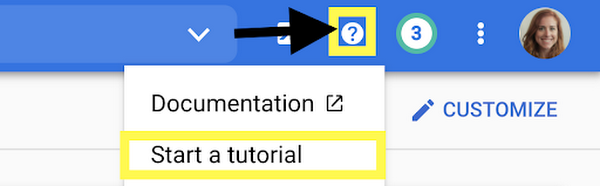
Jen really didn’t know about tutorials in the Google Cloud Console?
Yes, I honestly didn’t know about them! I’m sharing about it because if I can work for Google and not know, then I can’t be the only one, and it would be a shame to miss out on this because it’s a brilliant idea. Also I wrote some pretty sweet tutorials for the console, but I swear that the main reason I’m telling you is because it’s a cool thing!
There are several reasons that these tutorials are great:
- You can view the instructions and the console at the same time. No more playing the tab game!
- The tutorials include links and highlights, making it easy to find the screens and buttons you’re looking for
- You can run code from Cloud Shell, so you don’t need a separate window for an IDE
- You can use the demo data provided to try things out, or you can apply the steps to your existing projects using data that suits your app’s needs
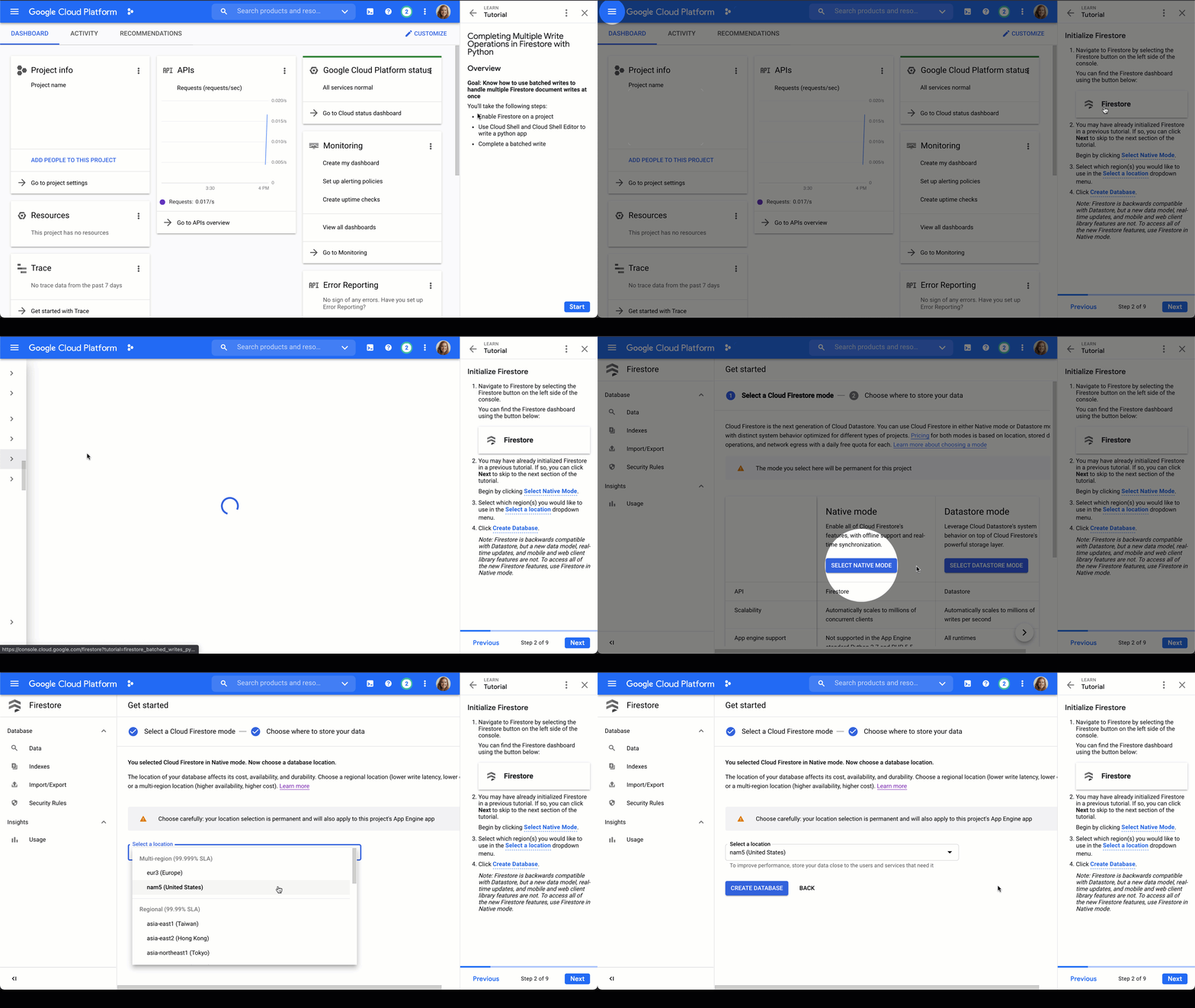
Firestore tutorials
I’m developing a series of tutorials in the Google Cloud Console designed to take you through everything you need to know about Firestore–from manually adding data in the Google Cloud Console to triggering Cloud Functions to make changes for you. Below are links and summaries for the currently available tutorials. Check back regularly to find the latest additions as they’re released!
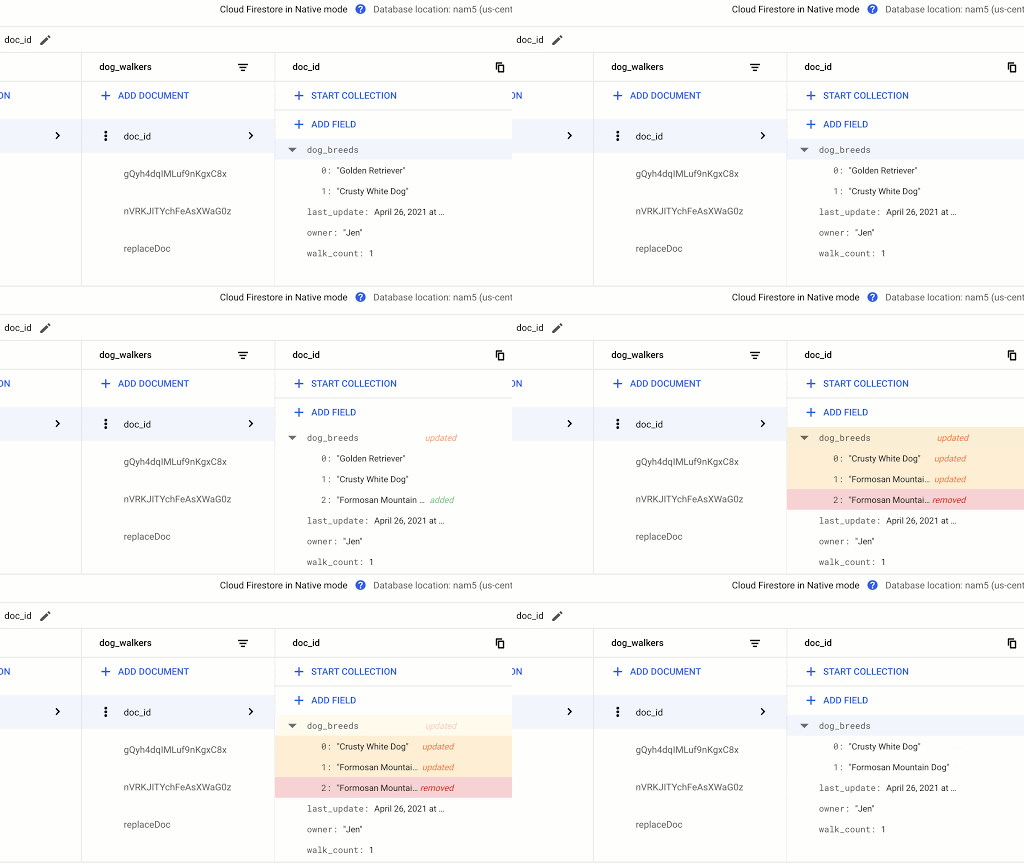
- Enable Firestore on a project
- Learn about the Firestore data model
- Add a collection of documents
- Add fields to a document
- Delete documents and collections
Updating Data in Firestore using Node.js or using Python
- Add a collection of documents
- Explore available data types
- Replace the data of document
- Replace fields in a document
- Handle special cases: incrementing, timestamps, and arrays
Reading Data from Firestore using Node.js or using Python
- Add a collection of documents
- Explore available data types
- Read a collection
- Read a single document
- Order documents
- Query documents
Transactions in Firestore using Node.js
- Add a collection of documents
- Update data without a transaction to observe issue
- Complete a transaction
- Complete a batched write
Batched Writes in Firestore using Node.js or using Python
- Use Cloud Shell and Cloud Shell Editor to write a Node.js or Python app
- Complete a batched write
Firestore triggers for Cloud Functions
- Initialize Cloud Functions using the Firebase CLI
- Write a Cloud Function triggered by a new document write to Firestore
- Add data to Firestore in the Cloud console Firestore dashboard
- Create a web app that uses Firestore using the Firebase SDK
- Deploy Firestore security rules that enable access to the required data
- Enable data persistence in the web app
- Observe app behavior with and without network connection
Chime in
Is there a particular action or concept in Firestore that you’d like to see a tutorial for? Is there another Google Cloud product that you want to learn more about? Tweet @ThatJenPerson and you may just see your suggestion come to life in the Google Cloud Console!
BigQuery ML for Sentiment Analysis: How to Make the Most of Your Data

1818
Of your peers have already read this article.
4:30 Minutes
The most insightful time you'll spend today!
Introduction
We recently announced BigQuery support for sparse features which help users to store and process the sparse features efficiently while working with them. That functionality enables users to represent sparse tensors and train machine learning models directly in the BigQuery environment. Being able to represent sparse tensors is a useful feature because sparse tensors are used extensively in encoding schemes like TF-IDF as part of data pre-processing in NLP applications and for pre-processing images with a lot of dark pixels in computer vision applications.
There are numerous applications of sparse features such as text generation and sentiment analysis. In this blog, we’ll demonstrate how to perform sentiment analysis with the space features in BigQuery ML by training and inferencing machine learning models using a public dataset. This blog also highlights how easy it is to work with unstructured text data on BigQuery, an environment traditionally used for structured data.
Using sample IMDb dataset
Let’s say you want to conduct a sentiment analysis on movie reviews from the IMDb website. For the benefit of readers who want to follow along, we will be using the IMDb reviews dataset from BigQuery public datasets. Let’s look at the top 2 rows of the dataset.
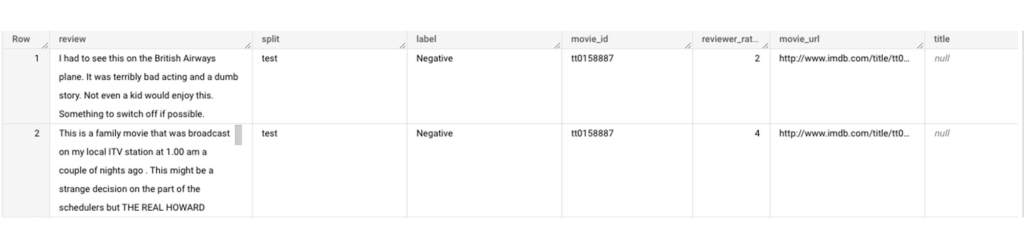
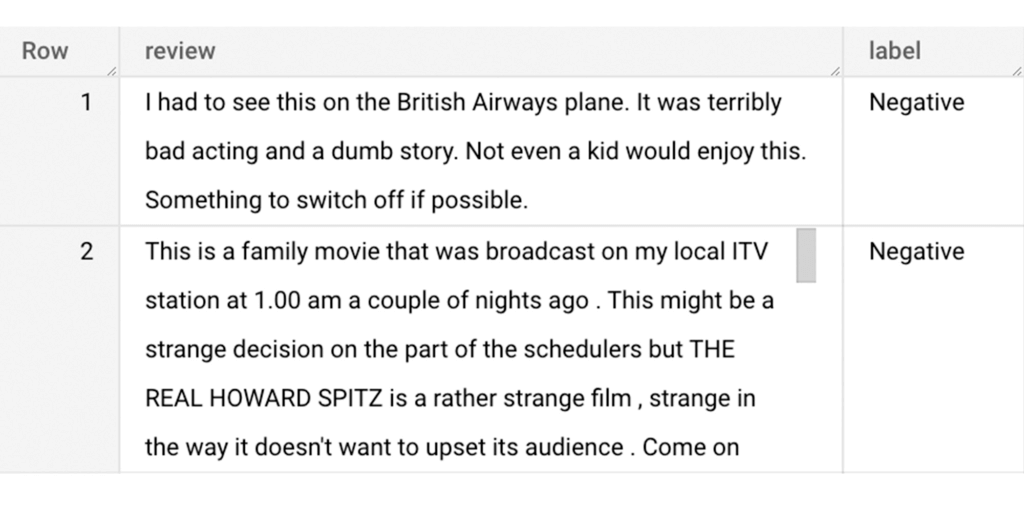
Although the reviews table has 7 columns, we only use reviews and label columns to perform sentiment analysis for this case. Also, we are only considering negative and positive values in the label columns. The following query can be used to select only the required information from the dataset.
SELECT
 review,
 label,
FROM
 `bigquery-public-data.imdb.reviews`
WHERE
 label IN ('Negative', 'Positive')
The top 2 rows of the result is as follows:
Methodology
Based on the dataset that we have, the following steps will be carried out:
- Build a vocabulary list using the review column
- Convert the review column into sparse tensors
- Train a classification model using the sparse tensors to predict the label (“positive” or “negative”)
- Make predictions on new test data to classify reviews as positive or negative.
Feature engineering
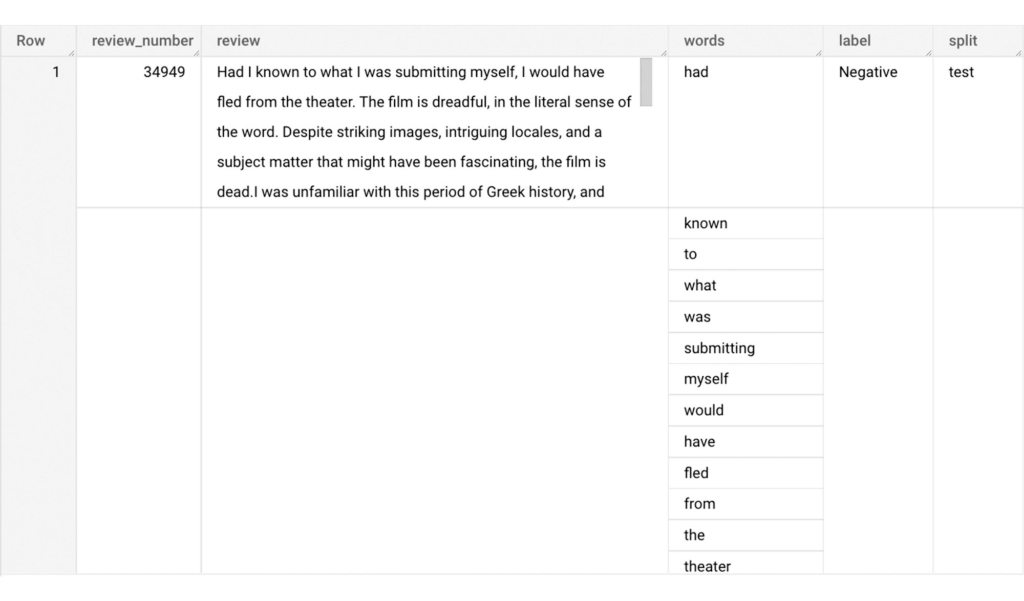
In this section, we will convert the text from the reviews column to numerical features so that we can feed them into a machine learning model. One of the ways is the bag-of-words approach where we build a vocabulary using the words from the reviews and select the most common words to build numerical features for model training. But first, we must extract the words from each review. The following code creates a dataset and a table with row numbers and extracted words from reviews.
-- Create a dataset named `sparse_features_demo` if doesn’t exist
CREATE SCHEMA IF NOT EXISTS sparse_features_demo;


-- Select unique reviews with only negative and positive labels
CREATE OR REPLACE TABLE sparse_features_demo.processed_reviews AS (
 SELECT
   ROW_NUMBER() OVER () AS review_number,
   review,
   REGEXP_EXTRACT_ALL(LOWER(review), '[a-z]{2,}') AS words,
   label,
   split
 FROM (
   SELECT
     DISTINCT review,
     label,
     split
   FROM
     `bigquery-public-data.imdb.reviews`
   WHERE
     label IN ('Negative', 'Positive')
 )
);
The output table from the query above should look like this:
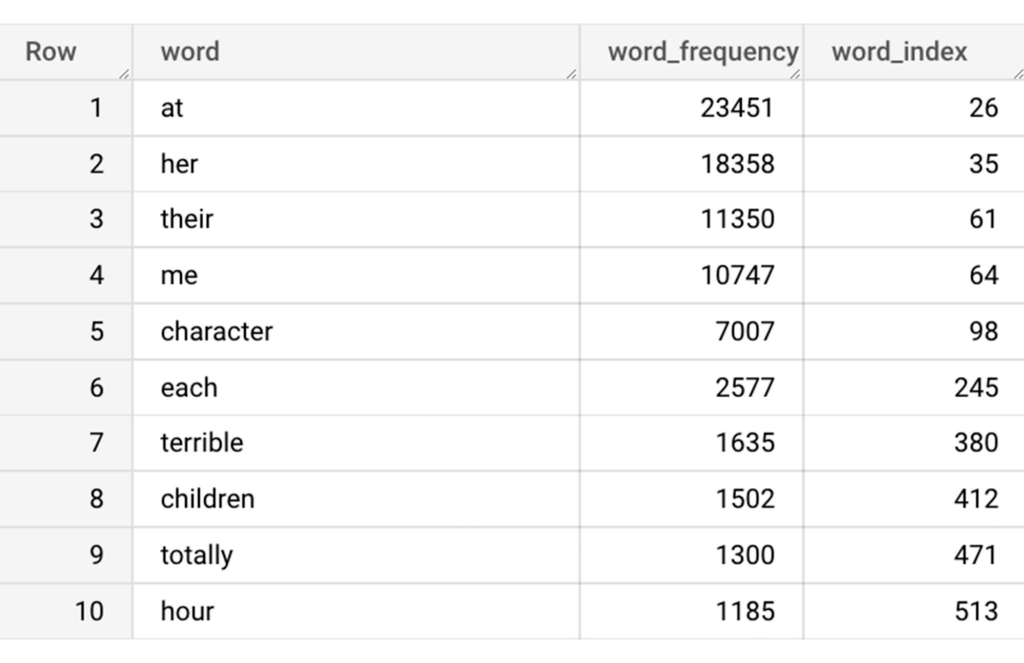
The next step is to build a vocabulary using the extracted words. The following code creates a vocabulary including word frequency and word index from reviews. For this case, we are going to select only the top 20,000 words to reduce the computation time.
-- Create a vocabulary using train dataset and select only top 20,000 words based on frequency
CREATE OR REPLACE TABLE sparse_features_demo.vocabulary AS (
 SELECT
   word,
   word_frequency,
   word_index
 FROM (
   SELECT
     word,
     word_frequency,
     ROW_NUMBER() OVER (ORDER BY word_frequency DESC) - 1 AS word_index
   FROM (
     SELECT
       word,
       COUNT(word) AS word_frequency
     FROM
       sparse_features_demo.processed_reviews,
       UNNEST(words) AS word
     WHERE
       split = "train"
     GROUP BY
       word
   )
 )
 WHERE
   word_index < 20000 # Select top 20,000 words based on word count
);
The following shows the top 10 words based on frequency and their respective index from the resulting table of the query above.
Creating a sparse feature
Now we will use the newly added feature to create a sparse feature in BigQuery. For this case, we aggregate word_index and word_frequency in each review, which generates a column as ARRAY[STRUCT] type. Now, each review is represented as ARRAY[(word_index, word_frequency)].
-- Generate a sparse feature by aggregating word_index and word_frequency in each review.
CREATE OR REPLACE TABLE sparse_features_demo.sparse_feature AS (
 SELECT
   review_number,
   review,
   ARRAY_AGG(STRUCT(word_index, word_frequency)) AS feature,
   label,
   split
 FROM (
   SELECT
     DISTINCT review_number,
     review,
     word,
     label,
     split
   FROM
     sparse_features_demo.processed_reviews,
     UNNEST(words) AS word
   WHERE
     word IN (SELECT word FROM sparse_features_demo.vocabulary)
 ) AS word_list
 LEFT JOIN
   sparse_features_demo.vocabulary AS topk_words
   ON
     word_list.word = topk_words.word
 GROUP BY
   review_number,
   review,
   label,
   split
);
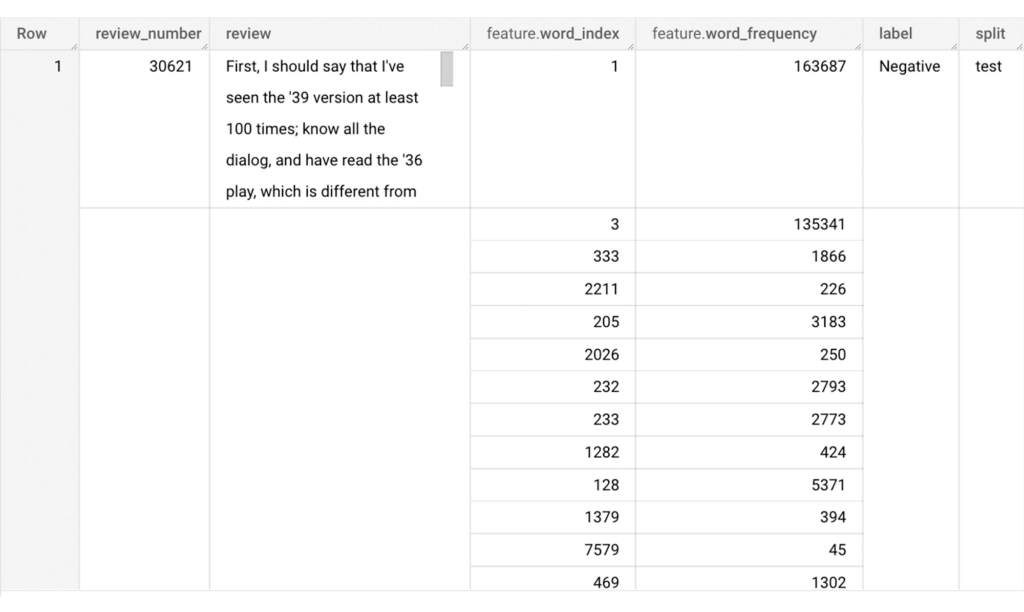
Once the query is executed, a sparse feature named `feature` will be created. That `feature` column is an `ARRAY of STRUCT` column which is made of `word_index` and `word_frequency` columns. The picture below displays the resulting table at a glance.
Training a BigQuery ML model
We just created a dataset with a sparse feature in BigQuery. Let’s see how we can use that dataset to train with a machine learning model with BigQuery ML. In the following query, we will train a logistic regression model using the review_number, review, and feature to predict the label:
-- Train a logistic regression classifier using the data with sparse feature
CREATE OR REPLACE MODEL sparse_features_demo.logistic_reg_classifier
 TRANSFORM (
   * EXCEPT (
       review_number,
       review
     )
 )
 OPTIONS(
   MODEL_TYPE='LOGISTIC_REG',
   INPUT_LABEL_COLS = ['label']
 ) AS
 SELECT
   review_number,
   review,
   feature,
   label
 FROM
    sparse_features_demo.sparse_feature
 WHERE
   split = "train"
;
Now that we have trained a BigQuery ML Model using a sparse feature, we evaluate the model and tune it as needed.
-- Evaluate the trained logistic regression classifier
SELECT * FROM ML.EVALUATE(MODEL sparse_features_demo.logistic_reg_classifier);
The score looks like a decent starting point, so let’s go ahead and test the model with the test dataset.

-- Evaluate the trained logistic regression classifier using test data
SELECT * FROM ML.EVALUATE(MODEL sparse_features_demo.logistic_reg_classifier,
 (
   SELECT
     review_number,
     review,
     feature,
     label
   FROM
     sparse_features_demo.sparse_feature
   WHERE
     split = "test"
 )
);
The model performance for the test dataset looks satisfactory and it can now be used for inference. One thing to note here is that since the model is trained on the numerical features, the model will only accept numeral features as input. Hence, the new reviews have to go through the same transformation steps before they can be used for inference. The next step shows how the transformation can be applied to a user-defined dataset.
Sentiment predictions from the BigQuery ML model
All we have left to do now is to create a user-defined dataset, apply the same transformations to the reviews, and use the user-defined sparse features to perform model inference. It can be achieved using a WITH statement as shown below.
WITH
 -- Create a user defined reviews
 user_defined_reviews AS (
   SELECT
     ROW_NUMBER() OVER () AS review_number,
     review,
     REGEXP_EXTRACT_ALL(LOWER(review), '[a-z]{2,}') AS words
   FROM (
     SELECT "What a boring movie" AS review UNION ALL
     SELECT "I don't like this movie" AS review UNION ALL
     SELECT "The best movie ever" AS review
   )
 ),


 -- Create a sparse feature from user defined reviews
 user_defined_sparse_feature AS (
   SELECT
     review_number,
     review,
     ARRAY_AGG(STRUCT(word_index, word_frequency)) AS feature
   FROM (
     SELECT
       DISTINCT review_number,
       review,
       word
     FROM
       user_defined_reviews,
       UNNEST(words) as word
     WHERE
       word IN (SELECT word FROM sparse_features_demo.vocabulary)
   ) AS word_list
   LEFT JOIN
     sparse_features_demo.vocabulary AS topk_words
     ON
       word_list.word = topk_words.word
   GROUP BY
     review_number,
     review
 )


-- Evaluate the trained model using user defined data
SELECT review, predicted_label FROM ML.PREDICT(MODEL sparse_features_demo.logistic_reg_classifier,
 (
   SELECT
     *
   FROM
     user_defined_sparse_feature
 )
);
Here is what you would get for executing the query above:
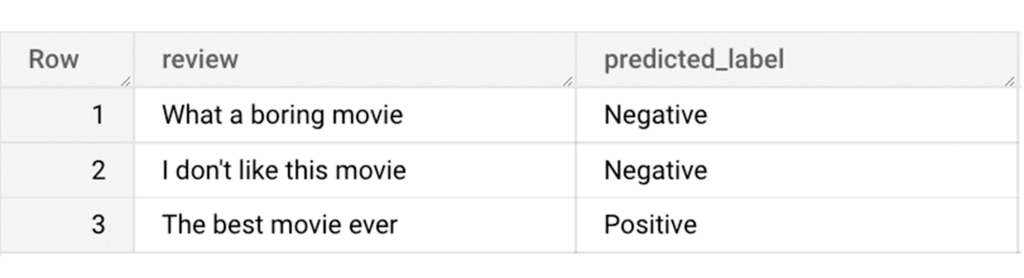
And that’s it! We just performed a sentiment analysis on the IMDb dataset from a BigQuery Public Dataset using only SQL statements and BigQuery ML. Now that we have demonstrated how sparse features can be used with BigQuery ML models, we can’t wait to see all the amazing projects that you would create by harnessing this functionality.
If you’re just getting started with BigQuery, check out our interactive tutorial to begin exploring.

Google Leads the Database-as-a-Service Market: Forrester Research
DOWNLOAD RESEARCH REPORTS5490
Of your peers have already downloaded this article
3:00 Minutes
The most insightful time you'll spend today!
Database-as-a-service (DBaaS) has become critical for all businesses to build and support modern business applications and operational systems. It is changing the way companies build and support business applications and operational systems. With DBaaS, organizations can provision a relational or non-relational database of any size in minutes, without needing any technical expertise.
For app developers, it offers a database platform to build simple to sophisticated applications quickly, allowing them to focus on application logic rather than deal with database administration challenges. DBaaS automates the provisioning, administration, backup, recovery, availability, security, and scalability of the database without the need for a database administrator (DBA).
In addition, DBaaS helps enterprises migrate from their on-premises databases to the cloud to save money, support elastic scale, and deliver higher performance for expanding workloads.
Analyst firm Forrester Research in its recent report on the Database-as-a-Service market has named Google Cloud a leader in this space as it supports a broader set of use cases, automation, high-end scalability and performance, and security.
Download this Forrester Research report to understand why enterprises are turning to DBaaS and why Google Cloud is a leader in this space.
Bitly’s Big Move: A Story of Massive Data Migration to Google’s Cloud Bigtable

963
Of your peers have already read this article.
3:30 Minutes
The most insightful time you'll spend today!
Editor’s note: Bitly, the link & QR Code management platform, migrated 80 billion rows of link data to Cloud Bigtable. Here’s how and why they moved this data from a MySQL database, all in just six days.
Our goal at Bitly is simple: Make your life easier with connections. Whether you’re sharing links online, connecting the physical and digital worlds with custom QR Codes or creating a killer Link-in-bio, we’re here to help make that happen.
Bitly customers run the gamut from your local middle school to most of the Fortune 500 with every use case you can think of in play. On a typical day, we process approximately 360 million link clicks and QR Code scans and support the creation of 6-7 million links or QR Codes for more than 350,000 unique users.
At the heart of our platform is link data consisting of three major datasets for the approximately 40 billion active links in our system (and counting). For years we stored this data in a self-managed, manually sharded MySQL database. While that setup served us well over time, it did present some challenges as we looked to expand and move into the future.
MySQL: Challenges and growing pains
First, performing operational actions like software and security upgrades or database host provisioning — all while keeping the databases 100% available for our customers — was challenging to say the least.
Additionally, the backup and restore process was both costly and time-consuming. Daily backups for the growing dataset took almost an entire day to complete. And if we ever had to restore the entire data set, it would have undoubtedly taken at least two people working for several days — not a fun prospect and thankfully something we never had to do.
While manual sharding for MySQL offers good key distribution across physical and logical shards, it’s pretty high-maintenance — we tried to avoid touching our sharding config because of how error-prone making changes was. And even with a forward-thinking shard allocation, we found this approach to have a limited lifespan.
And finally, when we turned our attention towards multi-region and global distribution, manually sharded MySQL proved to be a major hurdle, especially compared to the convenience of a managed service that handles geo-distribution for us.
As we thought about the future of our data and how to best meet our expansion goals, we determined that an update was necessary. We needed a system more set up for growth and increased reliability, preferably one with built-in functionality for replication and scaling. Investigation and research brought us to Cloud Bigtable, Google Cloud’s enterprise-grade NoSQL database service.
The Bitly link, in a nutshell
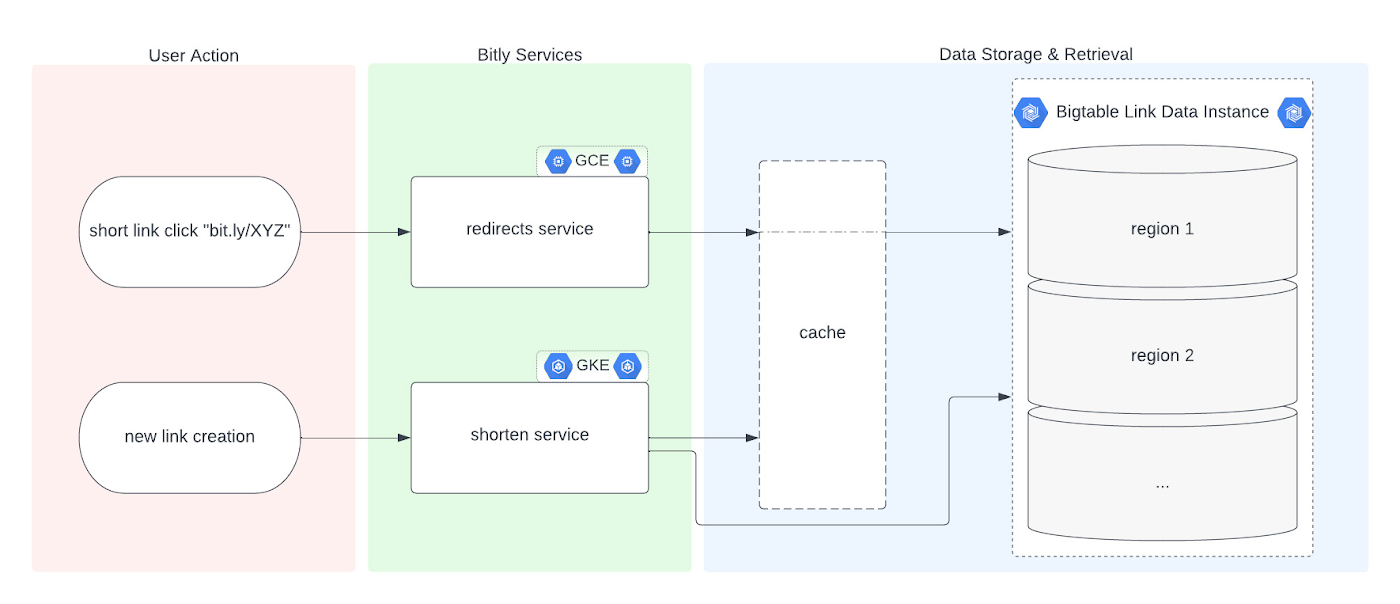
Before we dive into the Bigtable migration, it’s useful to understand the basics of our link management system. When a user shortens a long URL with Bitly, information is saved to the backend data stores through our API layer. This information consists of a Bitly short link and the corresponding destination link for proper routing, as well as some additional metadata. When a user clicks the Bitly short link, our services query these same backend data stores for the redirect destination for the request. This basic flow, which also includes other Bitly link options like custom back-halves, is the backbone of the Bitly link management platform.
Where Bigtable comes in
As mentioned, after researching our options, the solution that best fit our needs was Bigtable. It offered the features we were looking for, including:
- A 99.999% SLA
- Limitless scale
- Single-digit millisecond latency
- A built-in monitoring system
- Multi-region replication
- Geo-distribution, which allows for seamless replication of data across regions and reduces latency
- On-demand scaling of compute resources and storage, which adjusts to user traffic and allows our system to grow and scale as needed
- Seamless integration with our general architecture; we use Google Cloud services for many other parts of our system, including the APIs that interact with these databases
- A NoSQL database that doesn’t require relational semantics, as the datasets we’re migrating are indexed on a single primary key in our applications
Making the move
We targeted three of our major, self-managed datasets to migrate. The larger two were organized in a sharded database architecture. The first thing we did for migration was prepare the new Bigtable database. We iterated over a schema design process and conducted a thorough performance analysis of Bigtable to ensure an uninterrupted user experience during and after the migration. After that, we made minor adjustments to our application code so that it could seamlessly integrate and interact with Bigtable. Finally, we implemented a robust post-migration disaster recovery process to mitigate any potential risks.
During the actual migration, we enabled our applications to start a “dual writes” phase. This involved concurrently writing new link data to both our existing MySQL and the new Bigtable tables. Once data started writing to our Bigtable instance, we ran our migration scripts. We used a Go script to walk each of the existing MySQL datasets and insert each row into Bigtable. This enabled us to clean up outdated information and backfill older records with newer field data.
Cleaning up clutter along the way
In the process of migration, we were actually able to free up a huge amount of storage. Because of the elimination of an early feature of the Bitly platform, we were able to exclude from the migration to Bigtable a little less than half of the total data stored in MySQL. Since we were creating a completely clean dataset, we had the opportunity simply to skip those unneeded rows during the migration.
Altogether, the migration process walked through 80 billion MySQL rows, which resulted in just over 40 billion records finding their new home in Bigtable. In the end, our starting point with Bigtable is a 26 TB dataset, not including replication. A set of concurrent Go scripts running in parallel on a handful of machines allowed us to complete this migration project in six days. (Go rarely disappoints.)
Write twice, cut once – validation before migration
Next up was the data validation and cutover period when we started returning data from Bigtable, but continued to write to MySQL as a precaution in case we needed to roll back at any point.
As we dove into the validation process, we compared the data between MySQL and Bigtable and noted any discrepancies whenever a link was clicked or created. After verifying that all our responses were stable, we proceeded with a gradual cutover process, rolling out in percentages until we reached 100% Bigtable for all writes and reads. After a comfortable run period, we’ll turn off the dual writes completely and finally decommission our workhorse MySQL hosts to live on a farm upstate.
Google’s got Bitly’s back(ups)
Our data is our lifeline, and we’re doing everything we can to ensure it’s always protected. We put together a redundancy plan using both Bigtable backups as well as a process for keeping a copy of the data outside Bigtable for true disaster recovery.
The first line of defense involves a switchover to the backup Bigtable dataset in case we need it. Beyond that, we’ve implemented two more layers of defense to protect against instance failure, corrupted data, and any other data failure that would require a restore of one or more tables from backup.
For this process, we start by creating daily Bigtable backups of our tables that we store for a fixed number of days. Second, we execute a Dataflow job to export our data from Bigtable into Cloud Storage approximately every week. And, if the need arises, we can use Dataflow to import our data back from Cloud Storage into a new Bigtable table.
While running the Dataflow jobs to export from Bigtable to Cloud Storage, we’ve seen an impressive export speed of 7-8 million rows read per second on average and up to 15 million per second at times. All the while, our production reads and writes continued without disruption. When we tested the Cloud-Storage-to-Bigtable restore job, the write speed, expectedly, increased with instance scale — at the maximum node quota for our regions, we observed an average of just under 2 million rows per second written to our new table.
Short links for the long haul
As mentioned above, not only did Bigtable meet our technical requirements and operational needs, but we also chose Bigtable because it sets us up for future growth. Its ability to scale seamlessly over time while improving our system availability SLA was a major factor in our decision.
As we increase our scale by 5x, 10x, or more, it’s imperative that our data backbone scales accordingly and that the SLAs we provide to customers stay stable or even add another coveted “9”. We have big plans in the coming years and Bigtable will help us achieve them.
Interested in learning more? We found the following resources to be useful in our journey to Bigtable evaluation and ultimate adoption:
- Evaluate Bigtable schema design for your relational database and application workloads
- Understand how to increase availability and distribute data globally with Bigtable replication in any region combination of your choice
- Learn more about Bigtable backups and importing/exporting data with Bigtable Dataflow templates
Bonus: If you’re interested in learning more of the nuts and bolts of how we migrated the data, I’ll be talking all about that very topic at GopherCon 2023 this September in San Diego!
Canadian Bank’s SAP Workload Moved to BigQuery Helps Unlock New Business Opportunities

7365
Of your peers have already read this article.
2:00 Minutes
The most insightful time you'll spend today!
When ATB Financial decided to migrate its vast SAP landscape to the cloud, the primary goal was to focus on things that matter to customers as opposed to IT infrastructure. Based in Alberta, Canada, ATB Financial serves over 800,000 customers through hundreds of branches as well as digital banking options. To keep pace with competition from large banks and FinTech startups and to meet the increasing 24/7 demands of customers, digital transformation was a must. To support this new mandate, in 2019, ATB migrated its extensive SAP backbone to Google Cloud. In addition to SAP S/4 HANA, ATB runs SAP financial services, core banking, payment engine, CRM and business warehouse on Google Cloud.
In parallel, changes were needed to ATB’s legacy data platform. The platform had stability and reliability issues and also suffered from a lack of historical data governance. Analytics processes were ad hoc and manual. The legacy data environment was also not set up to tackle future business requirements that come with a high dependency on real-time data analysis and insights.
After evaluating several potential solutions, ATB chose BigQuery as a serverless data warehouse and data lake for its next-generation, cloud-native architecture. “BigQuery is a core component of what we call our data exposure enablement platform, or DEEP,” explains Dan Semmens, Head of Data and AI at ATB Financial. According to Semmens, DEEP consists of four pillars, all of which depend on Google Cloud and BigQuery to be successful:
- Real-time data acquisition: ATB uses BigQuery throughout its data pipeline, starting with sourcing, processing, and preparation, moving along to storage and organization, then discovery and access, and finally consumption and servicing. So far, ATB has ingested and classified 80% of its core SAP banking data as well as data from a number of its third-party partners, such as its treasury and cash management platform provider, its credit card provider, and its call center software.
- Data enrichment: Before migrating to Google Cloud, ATB managed a number of disconnected technologies that made data consolidation difficult. The legacy environment could handle only structured data, whereas Google Cloud and BigQuery lets the bank incorporate unstructured data sets, including sensor data, social network activity, voice, text, and images. ATB’s data enrichment program has enabled more than 160 of the bank’s top-priority insights running on BigQuery, including credit health decision models, financial reporting, and forecasting, as well as operational reporting for departments across the organization. Jobs such as marketing campaigns and month-end processes that used to take five to eight hours now run in seconds, saving over CA$2.24 million in productivity.
- Self-service analytics: Data for self-service reporting, dashboarding, and visualization is now available for ATB’s 400+ business users and data analysts. Previously, bringing data and analytics to the business users who needed it while ensuring security was burdensome for IT, fraught with recurrent data preparation and other highly manual elements. Now, ATB automates much of its data protection and governance controls through the entire data lifecycle management process. Data access is not only open to more team members but it is faster and easier to acquire without compromising security. And it’s not just raw data that users can access. ATB uses BigQuery to define its enterprise data models and create what it calls its data service layer to make it easier for team members to visualize their data.
- AI-assisted analytics and automation: Through Google Cloud and BigQuery, ATB has been able to publish data and ML models that provide alerts and notifications via APIs to customer service agents. These real-time recommendations allow customer service agents to provide more tailored service with contextualized advice and suggested new services. So far, the company has deployed more than 40 ML models to generate over 20,000 AI-assisted conversations per month. Thanks to improved customer advocacy and less churn, the bank has realized more than CA$4 million in operating revenue. During the ongoing COVID crisis, the system was also able to predict when business and personal banking customers were experiencing financial distress so that a relationship manager could proactively reach out to offer support, such as payment deferral or loan restructuring. The AI tools provided by BigQuery are also helping ATB detect fraud that previously evaded rules-based fraud detection by using broader sets of timely and accurate data.
Thanks to the speed and ease of moving data from SAP to BigQuery, ATB is using artificial intelligence (AI) and machine learning (ML) to do things it previously hadn’t thought possible, including sophisticated fraud prevention models, product recommendations, and enriched CRM data that improves the customer experience.
Using the power of Google Cloud and BigQuery, ATB Financial has been able to draw more value from its SAP data while lowering cost and improving security and reliability. Speed to provide data sets and insights to internal team members has improved 30%. The bank also has seen a 15x reduction in performance incidents while improving data governance and security. Dan Semmens projects that the digital transformation strategy built on Google Cloud and BigQuery has both saved millions compared to its on-premises environment and has also realized millions in new business opportunities.
Semmens is looking toward the future that includes initiatives like Open Banking and greater ability to provide real time personalized advice for customers to drive revenue growth. “We see our data platform as foundational to ATB’s 10-year strategy,” he says. “The work we’ve undertaken over the past 18 months has enabled critical functionality for that future.”
Learn more about how ATB Financial is leveraging BigQuery to gain more from SAP data. Visit us here to explore how Google Cloud, BigQuery, and other tools can unlock the full value of your SAP enterprise data.
More Relevant Stories for Your Company

Migrating From Oracle OLTP System to Cloud Spanner
Spanner uses certain concepts differently from other enterprise database management tools, so you might need to adjust your application to take full advantage of its capabilities. You might also need to supplement Spanner with other services from Google Cloud to meet your needs. Migration constraints When you migrate your application

Architecting Multi-region Database Disaster Recovery for MySQL
Enterprises expect extreme reliability of the database infrastructure that’s accessed by their applications. Despite your best intentions and careful engineering, database errors happen, whether that’s machine crashes or network partitioning. Good planning can help you stay ahead of problems and recover more quickly when issues do occur. This blog shows one approach

Home Depot’s Interconnected Retail Experience by Virtue of Google Cloud Migration for SAP Applications
With nearly 2,300 stores, The Home Depot is the world’s largest home-improvement chain — a brand that professional contractors and DIYers alike have come to depend on. The home improvement industry continues to experience unprecedented demand and dramatic increases in online ordering accompanied by expanding consumer expectations for things like

Google Cloud Data Heroes Series: Honoring Data Practitioner’s Journey and Learning with GCP
Google Cloud Data Heroes is a series where we share stories of the everyday heroes who use our data analytics tools to do amazing things. Like any good superhero tale, we explore our Google Cloud Data Heroes’ origin stories, how they moved from data chaos to a data-driven environment, what
