





A Breakdown of Cloud-based Data Ingestion Practices

8830
Of your peers have already read this article.
3:00 Minutes
The most insightful time you'll spend today!
Businesses around the globe are realizing the benefits of replacing legacy data silos with cloud-based enterprise data warehouses, including easier collaboration across business units and access to insights within their data that were previously unseen. However, bringing data from numerous disparate data sources into a single data warehouse requires you to develop pipelines that ingest data from these various sources into your enterprise data warehouse. Historically, this has meant that data engineering teams across the organization procure and implement various tools to do so. But this adds significant complexity to managing and maintaining all these pipelines and makes it much harder to effectively scale these efforts across the organization. Developing enterprise-grade, cloud-native pipelines to bring data into your data warehouse can alleviate many of these challenges. But, if done incorrectly, these pipelines can present new challenges that your teams will have to spend their time and energy addressing.
Developing cloud-based data ingestion pipelines that replicate data from various sources into your cloud data warehouse can be a massive undertaking that requires significant investment of staffing resources. Such a large project can seem overwhelming and it can be difficult to identify where to begin planning such a project. We have defined the following principles for data pipeline planning to begin the process. These principles are intended to help you answer key business questions about your effort and begin to build data pipelines that address your business and technical needs. Each section below details a principle of data pipelines and certain factors your teams should consider as they begin developing their pipelines.
Principle 1: Clarify your objectives
The first principle to consider for pipeline development is clarify your objectives. This can be broadly defined as taking a holistic approach to pipeline development that encompasses requirements from several perspectives: technical teams, regulatory or policy requirements, desired outcomes, business goals, key timelines, available teams and their skill sets, and downstream data users. Clarifying your objectives clearly identifies and defines requirements from each key stakeholder at the beginning of the process and continually checks development against these requirements to ensure the pipelines built will meet these requirements.This is done by first clearly defining the desired end state for each project in a way that addresses a demonstrated business need of downstream data users. Remember that data pipelines are almost always the means to accomplish your end state, rather than the end state itself. An example of an effectively defined end-state is “enabling teams to gain a better understanding of our customers by providing access to our CRM data within our cloud data warehouse” rather than “move data from our CRM to our cloud data warehouse”. This may seem like a merely semantic difference, but framing the problem in terms of business needs helps your teams make technical decisions that will best meet these needs.
After clearly defining the business problem you are trying to solve, you should facilitate requirement gathering from each stakeholder and use these requirements to guide the technical development and implementation of your ingestion pipelines. We recommend gathering stakeholders from each team, including downstream data users, prior to development to gather requirements for the technical implementation of the data pipeline. These will include critical timelines, uptime requirements, data update frequency, data transformation, DevOps needs, and security, policy, or regulatory requirements by which a data pipeline must meet.
Principle 2: Build your team
The second principle to consider for pipeline development is build your team. This means ensuring you have the right people with the right skills available in the right places to develop, deploy, and maintain your data pipelines. After you have gathered your pipeline requirements, you can begin to develop a summary architecture that will be used to build and deploy your data pipelines. This will help you identify the human talent you will need to successfully build, deploy, and manage these data pipelines and identify any potential shortfalls that would require additional support from either third-party partners or new team members.
Not only do you need to ensure you have the right people and skill sets available in aggregate, but these individuals need to be effectively structured to empower them to maximize their abilities. This means developing team structures that are optimized for each team’s responsibilities and their ability to support adjacent teams as needed.
This also means developing processes that prevent blockers to technical development whenever possible, such as ensuring that teams have all of the appropriate permissions they need to move data from the original source to your cloud data warehouse without violating the concept of least privilege. Developers need access to the original data source (depending on your requirements and architecture) in addition to the destination data warehouse. Examples of this are ensuring that developers have access to develop and/or connect to a Salesforce Connected App or read access to specific Search Ads 360 data fields.
Principle 3: Minimize time to value
The third principle to consider for pipeline development is minimize time to value. This means considering the long-term maintenance burden of a data pipeline prior to developing and deploying it in addition to being able to deploy a minimum viable pipeline as quickly as possible. Generally speaking, we recommend the following approach to building data pipelines to minimize their maintenance burden: Write as little code as possible. Functionally, this can be implemented by:
1. Leveraging interface-based data ingestion products whenever possible. These products minimize the amount of code that requires ongoing maintenance and empower users who aren’t software developers to build data pipelines. They can also reduce development time for data pipelines, allowing them to be deployed and updated more quickly.
- Products like Google Data Transfer Service and Fivetran allow for managed data ingestion pipelines by any user to centralize data from SaaS applications, databases, file systems, and other tooling. With little to no code required, these managed services enable you to connect your data warehouse to your sources quickly and easily.
- For workloads managed by ETL developers and data engineers, tools like Google Cloud’s Data Fusion provide an easy-to-use visual interface for designing, managing and monitoring advanced pipelines with complex transformations.
2. Whenever interface-based products or data connectors are insufficient, use pre-existing code templates. Examples of this include templates available for Dataflow that allow users to define variables and run pipelines for common data ingestion use cases, and the Public Datasets pipeline architecture that our Datasets team uses for onboarding.
3. If neither of these options are sufficient, utilize managed services to deploy code for your pipelines. Managed services, such as Dataflow or Dataproc, eliminate the operational overhead of managing pipeline configuration by automatically scaling pipeline instances within predefined parameters.
Principle 4: Increase data trust and transparency
The fourth principle to consider for pipeline development is increase data trust and transparency. For the purposes of this document, we define this as the process of overseeing and managing data pipelines across all tools. Numerous data ingestion pipelines that each leverage different tools or are not developed under a coordinated management plan can result in “tech sprawl”, which significantly increases the management overhead of data ingestion pipelines as the quantity of data pipelines increases. This becomes especially cumbersome if you are subject to service-level agreements, or legal, regulatory, or policy requirements for overseeing data pipelines. Preventing tech sprawl is, by far, the best strategy for dealing with it by developing streamlined pipeline management processes that automate reporting. Although this can theoretically be achieved by building all of your data pipelines using a single cloud-based product, we do not recommend doing so because it prevents you from taking advantage of features and cost optimizations that come with choosing the best product for your use case.
A monitoring service such as Google Cloud Monitoring Service or Splunk that automates metrics, events, and metadata collection from various products, including those hosted in on-premise and hybrid computing environments, can help you centralize reporting and monitoring of your data pipelines. A metadata management tool such as Google Cloud’s Data Catalog or Informatica’s Enterprise Data Catalog can help you better communicate the nuances of your data so users better understand which data resources are best fit for a given use case. This significantly reduces your pipeline’s governance burden by eliminating manual reporting processes that often result in inaccuracies or lagging updates.
Principle 5: Manage costs
The fifth principle to consider for pipeline development is manage costs. This encompasses both the cost of cloud resources and the staffing costs necessary to design, develop, deploy, and maintain your cloud resources. We believe that your goal should not necessarily be to minimize cost, but rather maximizing the value of your investment. This means maximizing the impact of every dollar spent by minimizing waste in cloud resource utilization and human time. There are several factors to consider when it comes to managing costs:
- Use the right tool for the job – Different data ingestion pipelines will have different requirements for latency, uptime, transformations, etc. Similarly, different data pipeline tools have different strengths and weaknesses. Choosing the right tool for each data pipeline can help your pipelines operate significantly more efficiently. This can reduce your overall cost, free up staffing time to focus on the most impactful projects, and make your pipelines much more efficient.
- Standardize resource labeling – Implement and utilize a consistent labeling schema across all tools and platforms to have the most comprehensive view of your organization’s spending. One example is requiring all resources to be labeled by the cost center or team at time of creation. Consistent labeling allows you to monitor your spend across different teams and calculate the overall value of your cloud spending.
- Implement cost controls – If available, leverage cost controls to prevent errors that result in unexpectedly large bills.
- Capture cloud spend – Capture your spend on all cloud resource utilization for internal analysis using a cloud data warehouse and a data visualization tool. Without it, you won’t understand the context of changes in cloud spend and how they correlate with changes in business.
- Make cost management everyone’s job – Managing costs should be part of the responsibilities of everyone who can create or utilize cloud resources. To do this well, we recommend making cloud spend reporting more transparent internally and/or implementing chargebacks to internal cost centers based on utilization.
Long-term, the increased granularity in cost reporting available within Google Cloud can help you better measure your key performance indicators. You can shift from cost-based reporting (i.e. – “We spent $X on BigQuery storage last month”) to value-based reporting (i.e. – “It costs $X to serve customers who bring in $Y revenue”).
To learn more about managing costs, check out Google Cloud’s “Understanding the principles of cost optimization” white paper.
Principle 6: Leverage continually improving services
The sixth principle is leverage continually improving services. Cloud services are consistently improving their performance and stability, even if some of these improvements are not obvious to users. These improvements can help your pipelines run faster, cheaper, and more consistently over time. You can take advantage of the benefits of these improvements by:
- Automating both your pipelines and pipeline management: Not only should data pipelines be automated, but almost all aspects of managing your pipelines can also be automated. This includes pipeline/data lineage tracking, monitoring, cost management, scheduling, access management and more. This helps reduce long-term operational costs of each data pipeline that can significantly alter your value proposition and prevent any manual configurations from negating the benefits of later product improvements.
- Minimizing pipeline complexity whenever possible: While ingestion pipelines are relatively easy to develop using UI-based or managed services, they also require continued maintenance as long as they are in use. The most easily maintained data ingestion pipelines are typically the ones that minimize complexity and leverage automatic optimization capabilities. Any transformation in a data ingestion pipeline is a manual optimization of the pipeline that may struggle to adapt or scale as the underlying services improve. You can minimize the need for such transformations by building ELT (extract, load, transform) pipelines rather than ETL (extract, transform, load) pipelines. This pushes transformations down to the data warehouse that is use a specifically optimized query engine to transform your data rather than manually configured pipelines.
Next steps
If you’re looking for more information about developing your cloud-based data platform, check out our Build a modern, unified analytics data platform whitepaper. You can also visit our data integration site to learn more and find ways to get started with your data integration journey.
Once you’re ready to begin building your data ingestion pipelines, learn more about how Cloud Data Fusion and Fivetran can help you make sure your pipelines address these principles.
Simplifying Unstructured Data Analytics with BigQuery ML and Vertex AI: A Comprehensive Guide

1551
Of your peers have already read this article.
6:30 Minutes
The most insightful time you'll spend today!
Unstructured data such as images, speech and textual data can be notoriously difficult to manage, and even harder to analyze. The analysis of unstructured data includes use cases such as extracting text from images using OCR, sentiment analysis on customer reviews and simplifying translation for analytics. All of this data needs to be stored, managed and made available for machine learning.
The new BigQuery ML inference engine empowers practitioners to run inferences on unstructured data using pre-trained AI models. The results of these inferences can be analyzed to extract insights and improve decision making. This can all be done in BigQuery, using just a few lines of SQL.
In this blog, we’ll explore how the new BigQuery ML inference engine can be used to run inferences against unstructured data in BigQuery. We’ll demonstrate how to detect and translate text from movie poster images, and run sentiment analysis against movie reviews.
BigQuery ML’s new inference engine
Google Cloud is home to a suite of pre-trained AI models and APIs. The BigQuery ML inference engine can call these APIs and manage the responses on your behalf. All you have to do is define the model you want to use and run inferences against your data. All of this is done in BigQuery using SQL. The inference results are returned in JSON format and stored in BigQuery for analysis.
Why run your inferences in BigQuery?
Traditionally, working with AI models to run inferences required expertise in programming languages like Python. The ability to run inferences in BigQuery using just SQL can make generating insights from your data using AI simple and accessible. BigQuery is also serverless, so you can focus on analyzing your data without worrying about scalability and infrastructure.
The inference results are stored in BigQuery, which allows you to analyze your unstructured data immediately, without the need to move or copy your data. A key advantage here is that this analysis can also be joined with structured data stored in BigQuery, giving you the opportunity to deepen your insights. This can simplify data management and minimize the amount of data movement and duplication required.
Which models are supported?
For now, the BigQuery ML inference engine can be used with these pre-trained Vertex AI models:
- Vision AI API: This model can be used to extract features from images managed by BigQuery Object Tables and stored on Cloud Storage. For example, Vision AI can detect and classify objects, or read handwritten text.
- Translation AI API: This model can be used to translate text in BigQuery tables into over one hundred languages.
- Natural Language Processing API: This model can be used to derive meaning from textual data stored in BigQuery tables. For example, features like sentiment analysis can be used to determine whether the emotional tone of text is positive or negative.
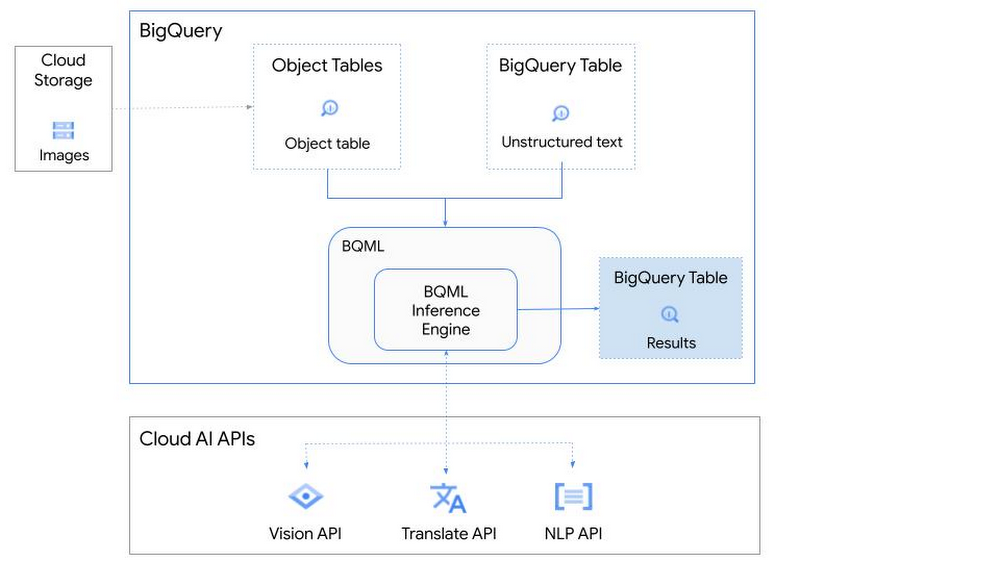
So, how does this work in practice? Let’s look at an example using images of movie posters

- We will define our pre-trained models for Vision AI, Translation AI and NLP AI in BigQuery ML.
- We’ll then use Vision AI to detect the text from some classic movie posters images.
- Next, we’ll use Translation AI to detect any foreign posters and translate them to a language of our choosing – English in this case.
- Finally, we’ll combine our unstructured data with structured data in BigQuery.
We’ll use the extracted movie titles from our movie posters to look up the viewer reviews from the BigQuery IMDB public dataset. We can then run sentiment analysis against these reviews using NLP AI.
Note: The BigQuery ML inference engine is currently in Preview. You will need to complete this enrollment form to have your project allowlisted for use with the BQML Inference Engine.
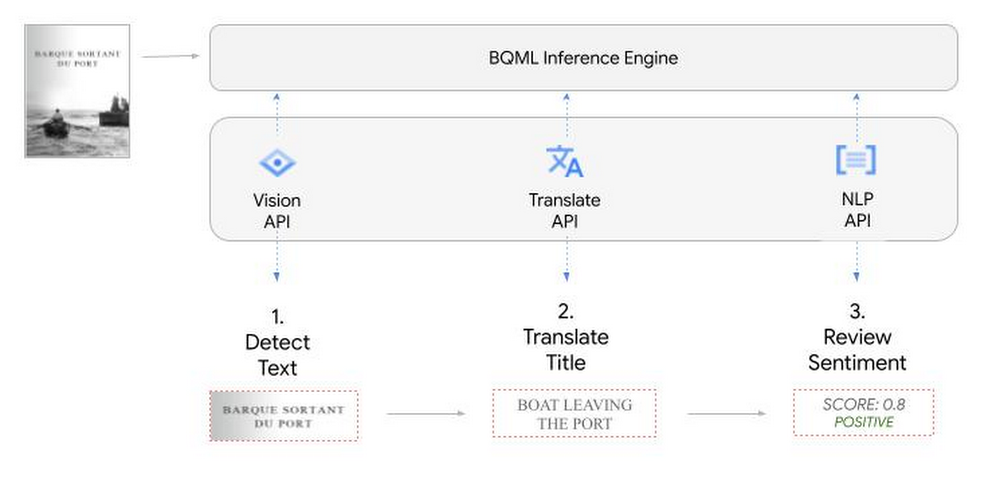
We’ll give examples of the BigQuery SQL needed to define your models and run your inferences. You’ll want to check out our notebook for a detailed guide on how to get this up and running in your Google Cloud project.
1. Define your AI Models in BigQuery
You will need to enable the APIs listed below, and also create a Cloud resource connection to enable BigQuery to interact with these services.
| API | Model Name |
| Vision AI API | Cloud_ai_vision_v1 |
| Translation AI API | Cloud_ai_translate_v3 |
| NLP AI API | Cloud_ai_natural_language_v1 |
You can then run the CREATE MODEL query for each AI service to create your pretrained models, replacing the model_name as required.
CREATE OR REPLACE MODEL
`{PROJECT_ID}.{DATASET_ID}.{VISION_MODEL_NAME}`
REMOTE WITH
CONNECTION `{PROJECT_ID}.{REGION}.{CONN_NAME}`
OPTIONS ( remote_service_type = '<model_name>' );
2. Use the Vision AI API to detect text in images stored in Cloud Storage
You will need to create an object table for your images in Cloud Storage. This read-only object table provides metadata for images stored in Cloud Storage:
CREATE OR REPLACE EXTERNAL TABLE
`{PROJECT_ID}.{DATASET_ID}.{OBJECT_TABLE_NAME}`
WITH
CONNECTION `{REGION}.{CONN_NAME}`
OPTIONS (object_metadata = 'SIMPLE', uris = ['{BUCKET_LOCATION}/*']);
To detect the text from our posters, you can then use ML.ANNOTATE_IMAGE and specify the text_detection feature.
SELECT
       ml_annotate_image_result.full_text_annotation.text AS text_content,
       *
FROM
       ML.ANNOTATE_IMAGE(
         MODEL `{PROJECT_ID}.{DATASET_ID}.{VISION_MODEL_NAME}`,
         TABLE `{DATASET_ID}.{OBJECT_TABLE_NAME}`,
         STRUCT(['TEXT_DETECTION'] AS vision_features));
A JSON response will be returned to BigQuery that includes the text content and language code of the text. You can parse the JSON to a scalar result using the dot annotation highlighted above.

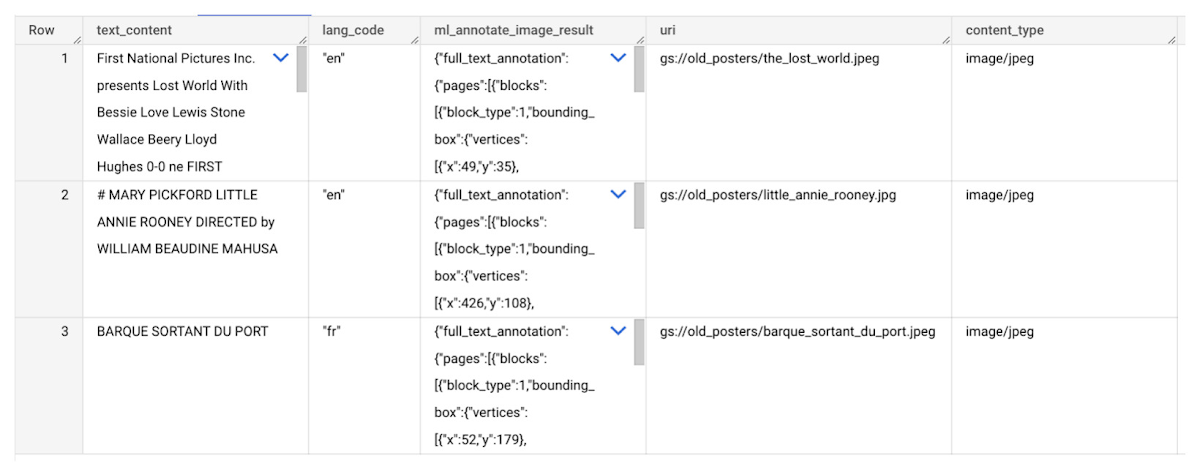
3. Use the Translation AI API to translate foreign movie titles
ML.TRANSLATE can now be used to translate the foreign titles we’ve extracted from our images into English. You just need to specify the target language and the table of the movie posters for translation:
SELECT
text_content,
STRING(ml_translate_result.translations[0].detected_language_code)
as original_language,
STRING(ml_translate_result.translations[0].translated_text)
as translated_title
FROM
  ML.TRANSLATE(
MODEL `{PROJECT_ID}.{DATASET_ID}.{TRANSLATE_MODEL_NAME}`,
TABLE `{DATASET_ID}.image_results`,
STRUCT('TRANSLATE_TEXT' as translate_mode, "en" as target_language_code));
Note: The table column with the text you want to translate must be named text_content:
The table of results will include json that can be parsed to extract both the original language and the translated text. In this case, the model has detected that title text is in French and has translated it to English:

4. Finally, use natural language processing (NLP) to run sentiment analysis against movie reviews
You can easily join inference results from your unstructured data with other BigQuery datasets to bolster your analysis. For example, we can now join the movie titles we extracted from our posters with thousands of movie reviews stored in BigQuery’s IMDB public dataset `bigquery-public-data.imdb.reviews`.
You can use ML.UNDERSTAND_TEXT with the analyze_sentiment feature to run sentiment analysis against some of these reviews to determine whether they are positive or negative:
SELECT
   primary_title, start_year, text_content AS review,
   FLOAT64(ml_understand_text_result.document_sentiment.score) AS score,
   FLOAT64(ml_understand_text_result.document_sentiment.magnitude) AS magnitude,
FROM
   ML.UNDERSTAND_TEXT(
     MODEL `{PROJECT_ID}.{DATASET_ID}.{NLP_MODEL_NAME}`,
           (
           SELECT
             primary_title, start_year, review AS text_content
           FROM
             `bigquery-public-data.imdb.title_basics` titles
           JOIN
             `bigquery-public-data.imdb.reviews` reviews
           ON
             reviews.movie_id = titles.tconst
           WHERE
             UPPER(titles.primary_title) = 'THE LOST WORLD' AND
             start_year = 1925
           ),
      STRUCT("analyze_sentiment" AS nlu_option)) ;
Note: The table column with the text you want to analyze must be named text_content:
The JSON response will include a score and magnitude. The score indicates the overall emotion of the text while the magnitude indicates how much emotional content is present:
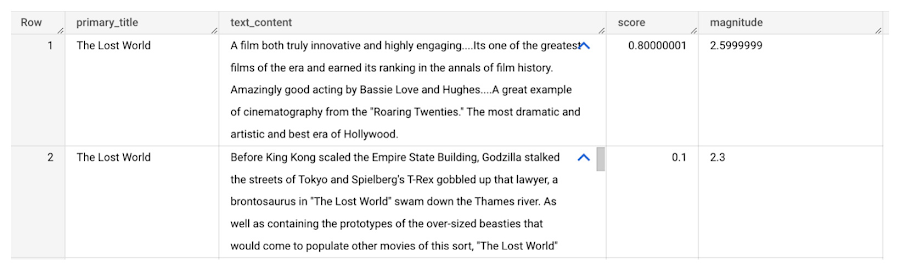
So, how did the Lost World compare with other movies that year?
To wrap up, we’ll compare the average review score of the 1925 Lost World movie to other movies released that year to see which was more popular. This can be done using familiar SQL analysis:
SELECT
 primary_title, start_year,
 AVG(FLOAT64(ml_understand_text_result.document_sentiment.score))AS av_score,
 AVG(FLOAT64(ml_understand_text_result.document_sentiment.magnitude)) AS av_magnitude
FROM
 ML.UNDERSTAND_TEXT(
   MODEL `{PROJECT_ID}.{DATASET_ID}.{NLP_MODEL_NAME}`,
         (
         SELECT
           primary_title, start_year, movie_id, review AS text_content
         FROM
           `bigquery-public-data.imdb.title_basics` titles
         JOIN
           `bigquery-public-data.imdb.reviews` reviews
         ON
           reviews.movie_id = titles.tconst
         WHERE
           start_year = 1925
         ),
   STRUCT("analyze_sentiment" AS nlu_option))
GROUP BY
   primary_title, start_year
ORDER BY
   av_score DESC;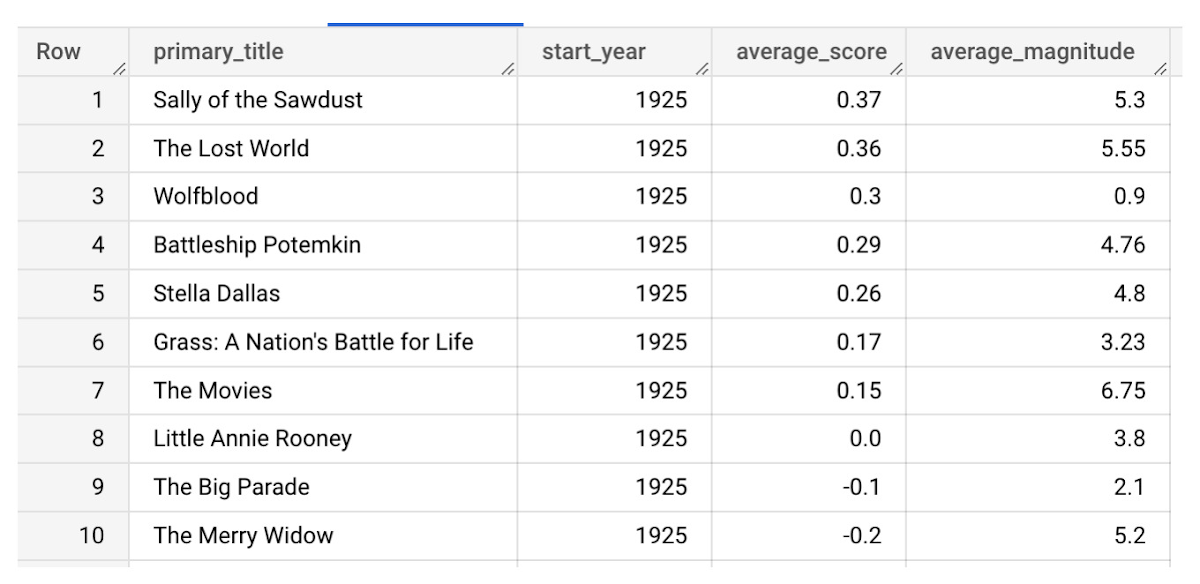
It looks like The Lost World narrowly missed out on the top spot to Sally of the Sawdust!
Want to learn more?
Check out our notebook for a step by step guide on using the BQML inference engine for unstructured data in Google Cloud. You can also check out our Cloud AI service table-valued functions overview page for more details. Curious about pricing? The BQML Pricing page gives a breakdown of how costs are applied across these services.
How TapClicks’ Google Cloud Migration Makes Life Easy for Marketers

8546
Of your peers have already read this article.
2:00 Minutes
The most insightful time you'll spend today!
Editor’s note: In this blog post we learn how TapClicks migrated to Google Cloud to offer their marketing customers a unified platform for data management, operations, insights, and analysis.
TapClicks is a smart marketing cloud, powered by data, that unifies our customer’s marketing. By choosing to migrate our core applications last year to Google Cloud, we cut costs, solved data-sharing concerns for our customers, and opened our stack up to a new ecosystem of possibilities.
The core problem that we’re solving for our customers is how to manage their marketing infrastructures data and operations. Life isn’t easy for marketers now. There are 7,000 different vendors servicing this space today – creating much complexity between digital agencies, media, and brands. Marketers face challenges in navigating all of these systems, logging in and out, understanding pacing goals, and managing the flow of marketing data so they can analyze and report internally as well as to their clients at scale.
We unify omnichannel campaign data (250 API connectors and 6000 Smart Connectors ™ ) from a plethora of marketing sources on an automated data warehousing solution, creating simplicity for organizations. Over 4,000 agencies, media companies, and brands use our Marketing Operations and Data Management Platform, which imports data at scale and creates an automatic data warehouse on Google Cloud. Teams can also leverage TapClicks, like our world class Facebook connector, to import data directly into Google Data Studios. Beyond importing and storing, we also provide data exporting to other Google solutions like Google Data Studio and Google Sheets. We also create interactive dashboards that let stakeholders and clients analyze their data, as well as automated, multi-channel reports that go out to clients at specified times. So channel comparisons, optimizations, attribution, and calculations are easily performed. Some of our customers are able to generate hundreds of thousands of individual reports and dashboards for their clients.
Although we may be best known for our reporting and analytics, we also empower teams managing the marketing operations workflow from customers and internal stakeholders, especially at scale. Our user-friendly, configurable system helps manage their orders and campaigns. Through automation of this process, we deliver tremendous amounts of efficiency, time saving, cost savings, and reduction of errors. The combination of these solutions makes up our unified platform, with additional capabilities like marketing intelligence that offers competitive and brand-level analysis. This is a disruptive solution in use by all leading media companies, agencies and many brands.
Partnering for possibilities
We faced a few challenges with our original tech stack, which included a mix of the leader in web services revenue, leaders in high performance data warehousing, as well as vendors on bare metal servers.
- One challenge was around costs, which were growing.
- Second, many of our customers work with multiple brands, and are very hesitant to share their data with the leader in web services, who’s often viewed as their competitor.
- Third, these vendors are more focused on their own revenue rather than a true long term partnership that would enable their customers to enjoy similar success as they have experienced.
When looking at other cloud providers, Google Cloud emerged for us as the front runner. They were competitive on costs, and their native Kubernetes support was superior— a big selling point for our DevOps team. There’s also a movement in the marketing and advertising industry away from AWS toward Google Cloud because of the data-sharing concern. Finally, most of our customers are already using Google Cloud tools, so there’s brand recognition and familiarity there, and easier integrations with their own systems.
Migrating to Google Cloud
Our migration, which took about five months, involved moving a significant chunk of our infrastructure, including our core applications, using Google Kubernetes Engine (GKE). In our legacy architecture, each of our clients was assigned to one of our virtual machines (VMs), and there was a lot of unused capacity because we had to provision for the max usage. We appreciated GKE’s cloud native capabilities, especially autoscaling, a huge benefit for our web application. We have varying usage patterns during the day, and though our application is mostly used during business hours, there are also days in the month of higher usage, and autoscaling saves us time and costs. GKE also makes deployments much easier, and we anticipate a lot of benefits there for our developer environments. We’ve moved some of our microservices into GKE and plan to move more in the future. All in all, we were able to migrate our core products and the bulk of our AWS spend successfully to Google Cloud.
We also moved from our other vendors Relational Database Service (RDS) to running MySQL on our own VMs on Google Cloud, which gives us more flexibility in terms of settings and fine tuning. We’re still trying to find the best mix as we’re modernizing our infrastructure, and we took this opportunity to migrate from MySQL 5.7 to 8.0.
Our next stage is exploring more of the capabilities and services of Google Cloud, including BigQuery, which we’re considering for our own data warehouse. The fact that we could also run Snowflake on Google Cloud, if needed, was another selling point for our migration.
We’re especially interested in BigQuery ML’s machine learning and natural language processing capabilities, which enabled better predictive insights. Our customers want insights from their campaigns— which are working, which are paying off, where should they invest next? Using our platform, they’re looking not only to generate reporting, but also identify opportunities to improve campaign performance. We plan to use AI and ML to improve those capabilities, so that our customers can seamlessly unlock insight and intelligence from their marketing data and campaigns.
Double-clicking on Google Cloud
For us, being able to deeply leverage and partner with Google Cloud to deliver those solutions on a single stack is critical, and we think our customers will love it. We see TapClicks and Google Cloud partnering at a level beyond what you typically see in a cloud provider relationship. Already, fifty percent of our company is working with various Google Cloud solutions, and we envision TapClicks and Google Cloud as extensions of each other, providing a single, powerful platform solution.
Google Cloud understands the partnership concept, and their team was able to shine a light on their services and what they could bring to the table. Compared to our previous experiences, dealing with the Google Cloud team has been a true pleasure. Now that we’ve migrated, we’re ready to take our next steps into the services available to us in the Google Cloud ecosystem, and the problems we’ll continue to solve for our customers. Learn more about TapClicks and BigQuery ML.
5539
Of your peers have already watched this video.
1:30 Minutes
The most insightful time you'll spend today!
Pega Systems Migrates SAP Servers to Google Cloud in Just 9 Weeks!
Pega Systems’ financial data on SAP environs were on a hosting platform that lacked agility. By moving nearly 30 SAP servers to Google Cloud in just 9 weeks, Pega Systems was able to unlock data and integrate BigQuery into SAP HANA to deliver personalization for clients and embark on an exciting journey with Google Cloud! Watch now.
Memorystore for Redis Read Replicas to Scale App Read Requests by 6X

5517
Of your peers have already read this article.
2:00 Minutes
The most insightful time you'll spend today!
Modern applications need to process large-scale data at millisecond latency to provide experiences like instant gaming leaderboards, fast analysis of streaming data from millions of IoT sensors, or real-time threat detection of malicious websites. In-memory datastores are a critical component to deliver the scale, performance, and availability required by these modern applications.
Memorystore makes it easy for developers building applications on Google Cloud to leverage the speed and powerful capabilities of the most loved in-memory store: Redis. Memorystore for Redis standard tier instances are a popular choice for applications requiring a highly available Redis instance. Standard tier provides a failover replica across zones for redundancy and provides fast failover with a 99.9% SLA. However, in some cases, your applications will require more read throughput from a standard tier instance. One of the common patterns customers use to scale read queries in Redis is leveraging read replicas.
Introducing Memorystore for Redis Read Replicas
Today we are excited to announce the public preview of Memorystore for Redis Read Replicas, which allows you to seamlessly scale your application’s read requests by 6X with the click of a button.
With read replicas, you can easily add up to five replicas and leverage the read endpoint to automatically load balance read queries across all the available replicas, increasing read performance linearly with each replica added. Additionally, Memorystore’s support for Redis 6 introduced multi-thread I/O, increasing performance significantly for M3 and higher configurations. Combined, you can achieve read requests of more than a million requests per second.
You will benefit from this new functionality in several ways. You will be able to scale on demand with up to five read replicas and use read endpoint with any redis client to easily load balance read queries across multiple replicas. This new functionality will also improve availability with automatic distribution of replicas across multiple zones. With read replicas, you will also be able to minimize application downtime with fast failover to the replica with the least replication lag. In the future, Memorystore will also easily enable read replicas on existing standard tier instances to increase read throughput.
You can learn more about how to configure and use read replicas in the Read Replicas Overview.
Improving performance with Read Replicas and Redis 6
With the launch of read replicas, you can easily increase the read throughput of a Memorystore instance. You can further enhance the read performance by leveraging Redis version 6 along with read replicas.
To understand why combining read replicas and Redis 6 can significantly improve your application’s read performance, let’s look at the various Memorystore configurations that you can use with your applications today. Memorystore Basic and Standard offerings provide different capacity tiers. The capacity tier determines the single node performance of a basic and standard tier instance.
The table below outlines the configuration of the various capacity tiers:
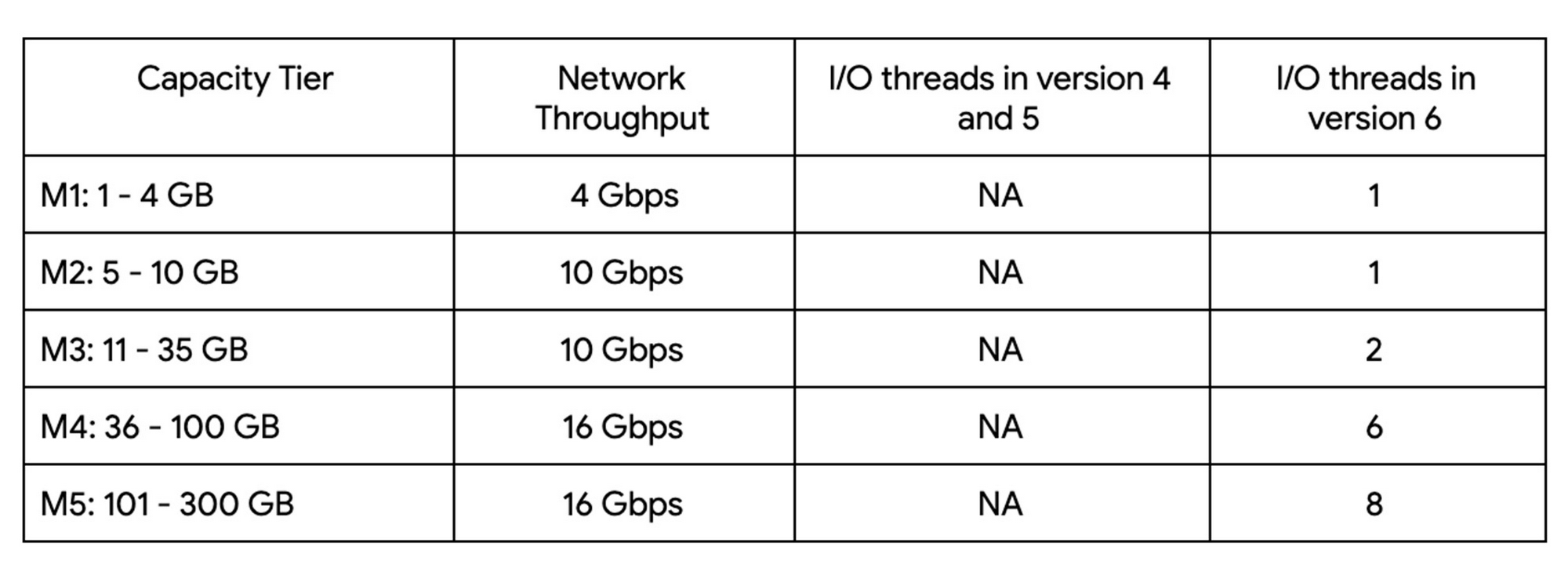
Up until version 5, Redis processed commands using a single thread. The processing involved reading the request, parsing the request, processing the request, and writing the response back to the socket. This approach means that all of the processing, which includes writing the response, was sequentially processed by a single vCPU regardless of the number of vCPUs available in the instance.
Redis 6 introduced I\O threading which allows writing the response using parallel threads. This functionality enables Redis 6 to more effectively leverage available vCPUs, thereby increasing the overall throughput compared to lower versions. Memorystore for Redis version 6 leverages I\O threading and automatically configures the optimal number of I\O threads to achieve the best possible performance for the various capacity tiers. We have also improved the overall network throughput for all redis versions by leveraging improvements in the Google Cloud infrastructure. Together these improvements deliver significant performance improvements and come at no additional cost to you.
So what can you expect from using Redis 6? As outlined in the table, Redis version 5 and lower uses a single thread to process the write requests for all tiers while Redis 6 uses a larger number of I\O threads at higher capacity tiers which provides substantially incremental throughput for higher capacity tiers.
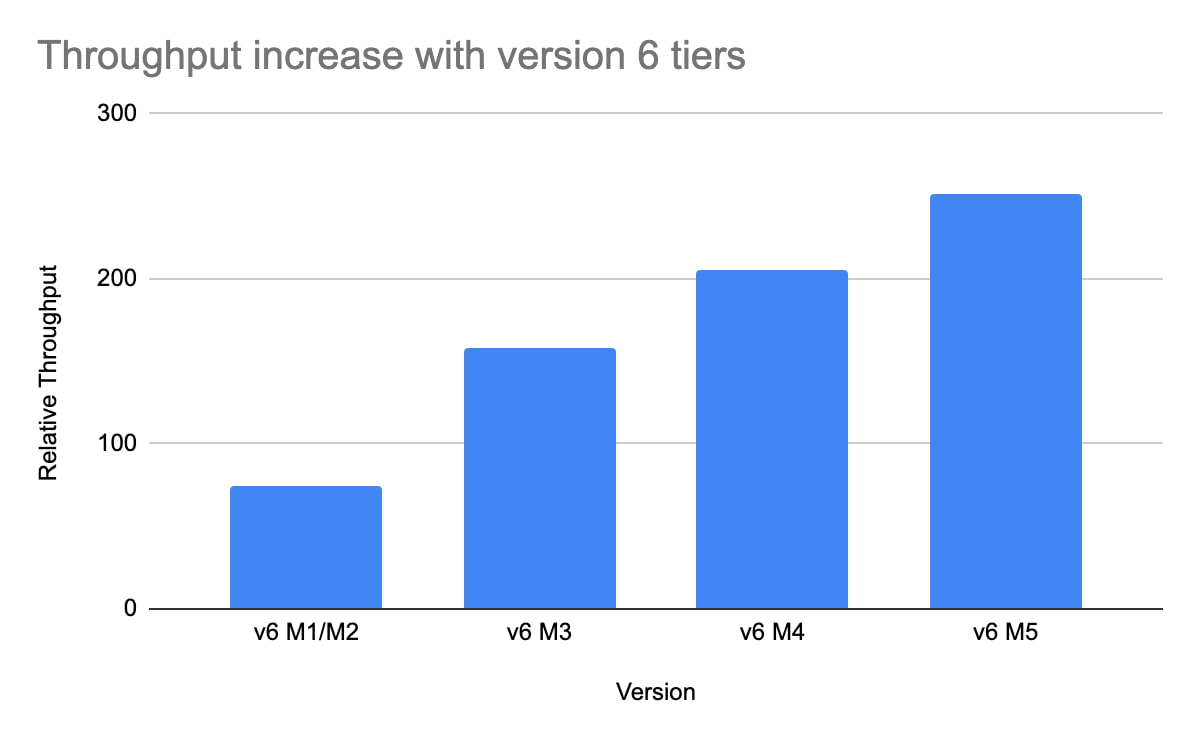
For example, using a Redis 6 standard tier instance with a capacity of 101 GB (M5), we have observed up to a 200% improvement in read/write performance compared to version 5, though the actual value you’ll see is dependent on your workload. You can get the benefits of Redis 6 by upgrading an existing instance or by deploying a new instance.
By enabling read replicas on an instance using Redis 6, you can further improve the read performance. Read throughput scales linearly with the number of replicas so you can increase your read queries on an instance by up to 500% using five read replicas. By combining Redis 6 and read replicas, you can see a 10X increase in read performance compared to a version 5 standard tier instance with no read replicas.
We are excited about the launch of read replicas but this is just one step in our journey to deliver the scale you need at the best price-performance. You can learn more about read replicas pricing on our Memorystore pricing page and get started using the Read Replicas Overview.
Unlocking Data Value: Latest Data Platforms and Announcements at the Next 21

6425
Of your peers have already read this article.
3:30 Minutes
The most insightful time you'll spend today!
Today at Google Cloud Next we are announcing innovations that will enable data teams to simplify how they work with data and derive value from it faster. These new solutions will help organizations build modern data architectures with real-time analytics to power innovative, mission-critical, data-driven applications.
Too often, even the best minds in data are constrained by ineffective systems and technologies. A recent study showed that only 32% of companies surveyed gained value from their data investments. Previous approaches have resulted in difficult to access, slow, unreliable, complex, and fragmented systems.
At Google Cloud, we are committed to changing this reality by helping customers simplify their approach to data to build their data clouds. Google Cloud’s data platform is simply unmatched for speed, scale, security, and reliability for any size organization with built-in, industry-leading machine learning (ML) and artificial intelligence (AI), and an open standards-based approach.
Vertex AI and data platform services unlock rapid ML modeling
With the launch of Vertex AI in May 2021, we empowered data scientists and engineers to build reliable, standardized AI pipelines that take advantage of the power of Google Cloud’s data pipelines. Today, we are taking this a step further with the launch of Vertex AI Workbench, a unified user experience to build and deploy ML models faster, accelerating time-to-value for data scientists and their organizations. We’ve integrated data engineering capabilities directly into the data science environment, which lets you ingest and analyze data, and deploy and manage ML models, all from a single interface.
Data scientists can now build and train models 5X faster on Vertex AI than on traditional notebooks. This is primarily enabled by integrations across data services (like Dataproc, BigQuery, Dataplex, and Looker), which significantly reduce context switching. The unified experience of Vertex AI let’s data scientists coordinate, transform, secure and monitor Machine Learning Operations (MLOps) from within a single interface, for their long-running, self-improving, and safely-managed AI services.
“As per IDC’s AI StrategiesView 2021, model development duration, scalable deployment, and model management are three of the top five challenges in scaling AI initiatives,” said Ritu Jyoti, Group Vice President, AI and Automation Research Practice at IDC. “Vertex AI Workbench provides a collaborative development environment for the entire ML workflow – connecting data services such as BigQuery and Spark on Google Cloud, to Vertex AI and MLOps services. As such, data scientists and engineers will be able to deploy and manage more models, more easily and quickly, from within one interface.”
Ecommerce company, Wayfair, has transformed its merchandising capabilities with data and AI services. “At Wayfair, data is at the center of our business. With more than 22 million products from more than 16,000 suppliers, the process of helping customers find the exact right item for their needs across our vast ecosystem presents exciting challenges,” said Matt Ferrari, Head of Ad Tech, Customer Intelligence, and Machine Learning; Engineering and Product at Wayfair. “From managing our online catalog and inventory, to building a strong logistics network, to making it easier to share product data with suppliers, we rely on services including BigQuery to ensure that we are able to access high-performance, low-maintenance data at scale. Vertex AI Workbench and Vertex AI Training accelerate our adoption of highly scalable model development and training capabilities.”
BigQuery Omni: Breaking data silos with cross-cloud analytics and governance
Businesses across a variety of industries are choosing Google Cloud to develop their data cloud strategies and better predict business outcomes — BigQuery is a key part of that solution portfolio. To address complex data management across hybrid and multicloud environments, this month we are announcing the general availability of BigQuery Omni, which allows customers to analyze data across Google Cloud, AWS, and Azure. Healthcare provider, Johnson and Johnson was able to combine data in Google Cloud and AWS S3 with BigQuery Omni without needing data to migrate.
This flexible, fully-managed, cross-cloud analytics solution allows you to cost-effectively and securely answer questions and share results from a single pane of glass across your datasets, wherever you are. In addition to these multicloud capabilities, Dataplex will be generally available this quarter to provide an intelligent data fabric that enables you to keep your data distributed while making it securely accessible to all your analytics tools.
Spark on Google Cloud simplifies data engineering
To help make data engineering even easier, we are announcing the general availability of Spark on Google Cloud, the world’s first autoscaling and serverless Spark service for the Google Cloud data platform. This allows data engineers, data scientists, and data analysts to use Spark from their preferred interfaces without data replication or custom integrations. Using this capability, developers can write applications and pipelines that autoscale without any manual infrastructure provisioning or tuning. This new service makes Spark a first class citizen on Google Cloud, and enables customers to get started in seconds and scale infinitely, regardless if you start in BigQuery, Dataproc, Dataplex, or Vertex AI.
Spanner meets PostgreSQL: global, relational scale with a popular interface
We’re continuing to make Cloud Spanner, our fully managed, globally scalable, relational database, available to more customers now with a PostgreSQL interface, now in preview. With this new PostgreSQL interface, enterprises can take advantage of Spanner’s unmatched global scale, 99.999% availability, and strong consistency using skills and tools from the popular PostgreSQL ecosystem.
This interface supports Spanner’s rich feature set that uses the most popular PostgreSQL data types and SQL features to reduce the barrier to entry for building transformational applications. Using the tools and skills they already have, developer teams gain flexibility and peace of mind because the schemas and queries they build against the PostgreSQL interface can be easily ported to another Postgres environment. Complete this form to request access to the preview.
Our commitment to the PostgreSQL ecosystem has been long standing. Customers choose Cloud SQL for the flexibility to run PostgreSQL, MySQL and SQL Server workloads. Cloud SQL provides a rich extension collection, configuration flags, and open ecosystem, without the hassle of database provisioning, storage capacity management, or other time-consuming tasks.
Auto Trader has migrated approximately 65% of their Oracle footprint to Cloud SQL, which remains a strategic priority for the company. Using Cloud SQL, BigQuery, and Looker to facilitate access to data for their users, and with Cloud SQL’s fully managed services, Auto Trader’s release cadence has improved by over 140% (year-over-year), enabling an impressive peak of 458 releases to production in a single day.
Looker integrations make augmented analytics a reality
We are announcing a new integration between Tableau and Looker that will allow customers to operationalize analytics and more effectively scale their deployments with trusted, real-time data, and less maintenance for developers and administrators. Tableau customers will soon be able to leverage Looker’s semantic model, enabling new levels of data governance while democratizing access to data. They will also be able to pair their enterprise semantic layer with Tableau’s leading analytics platform. The future might be uncertain, but together with our partners we can help you plan for it.
We remain committed to developing new ways to help organizations go beyond traditional business intelligence with Looker. In addition to innovating within Looker, we’re continuing to integrate within other parts of Google Cloud. Today, we are sharing new ways to help customers deliver trusted data experiences and leverage augmented analytics to take intelligent action.
First, we’re enabling you to democratize access to trusted data in tools where you are already familiar. Connected Sheets already allows you to interactively explore BigQuery data in a familiar spreadsheet interface and will soon be able to leverage the governed data and business metrics in Looker’s semantic model. It will be available in preview by the end of this year.
Another integration we’re announcing is Looker’s Solution for Contact Center AI, which helps you gain a deeper understanding and appreciation of your customers’ full journey by unlocking insights from all of your company’s first-party data, such as contextualizing support calls to make sure your most valuable customers receive the best service.
We’re also sharing the new Looker Block for Healthcare NLP API, which provides simplified access to intelligent insights from unstructured medical text. Compatible with Fast Healthcare Interoperability Resources (FHIR), healthcare providers, payers, and pharma companies can quickly understand the context and relationships of medical concepts within the text, and in turn, can begin to link this to other clinical data sources for additional AI and ML actions.
Bringing the best of Google together with Google Earth Engine and Google Cloud
We are thrilled to announce the preview of Google Earth Engine on Google Cloud. This launch makes Google Earth Engine’s 50+ petabyte catalog of satellite imagery and geospatial data sets available for planetary-scale analysis. Google Cloud customers will be able to integrate Earth Engine with BigQuery, Google Cloud’s ML technologies, and Google Maps Platform. This gives data teams a way to better understand how the world is changing and what actions they can take — from sustainable sourcing, to saving energy and materials costs, to understanding business risks, to serving new customer needs.
For over a decade, Earth Engine has supported the work of researchers and NGOs from around the world, and this new integration brings the best of Google and Google Cloud together to empower enterprises to create a sustainable future for our planet and for your business.
At Google Cloud, we are deeply grateful to work with companies of all sizes, and across industries, to build their data clouds. Join my keynote session to hear how organizations are leveraging the full power of data, from databases to analytics that support decision making to AI and ML that predict and automate the future. We’ll also highlight our latest product innovations for BigQuery, Spanner, Looker, and Vertex AI.
I can’t wait to hear how you will turn data into intelligence and look forward to connecting with you.
More Relevant Stories for Your Company

How BigQuery’s Unique Features Support Your Data at Petabyte-scale
Organizations rely on data warehouses to aggregate data from disparate sources, process it, and make it available for data analysis in support of strategic decision-making. BigQuery is the Google Cloud enterprise data warehouse designed to help organizations to run large scale analytics with ease and quickly unlock actionable insights. You

Spot Slow MySQL Queries Fast with Stackdriver Monitoring
When you’re serving customers online, speed is essential for a good experience. As the amount of data in a database grows, queries that used to be fast can slow down. For example, if a query has to scan every row because a table is missing an index, response times that

Google Cloud Data Heroes Series: Honoring Data Practitioner’s Journey and Learning with GCP
Google Cloud Data Heroes is a series where we share stories of the everyday heroes who use our data analytics tools to do amazing things. Like any good superhero tale, we explore our Google Cloud Data Heroes’ origin stories, how they moved from data chaos to a data-driven environment, what

Countries can Tackle Food Wastage Crisis Using Google’s Data Analytics
With over ⅓ of the food in the USA ending up as waste according to the USDA, it is a compelling challenge to address this travesty. What will happen to hunger, food prices, trash reduction, water consumption, and overall sustainability when we stop squandering this abundance? Beginning with the departure
