





3181
Of your peers have already watched this video.
26:27 Minutes
The most insightful time you'll spend today!
Redefining the approach to mobile security
When it comes to mobile security, everyone assumes open means unsecure.
There are three terms that people often confuse: vulnerability, malware, and exploit.
A vulnerability is really nothing more than a software flaw that is potentially exposed, where there is a possibility of it being attacked. It doesn’t mean it will ever be attacked and it doesn’t mean it will ever be exposed.
Malware is software–again, it’s software–that is designed to disrupt, damage, or gain unauthorized access to a computer system.
An exploit is also software and it’s designed to take advantage of a vulnerability. And in most cases, it’s designed to typically do malicious things, such as install malware.
So, a vulnerability does not equal an exploit. A vulnerability is a chance.
Discover how to debunk these security myths and learn how the latest multi-layered security protections, encompassing software, and hardware and application levels now leverage the power of machine learning to protect your device fleet. Mark Burr, an Android expert, shares the latest on enterprise security innovations, backed by third-party validation.
How to Configure GCP for Live Network Forensics

3054
Of your peers have already read this article.
3:00 Minutes
The most insightful time you'll spend today!
Forensics is the application of science to criminal and civil laws. It is a proven approach for gathering and processing evidence at a crime scene. An integral step in the forensics process is the isolation of the scene without contaminating or modifying the evidence. The isolation step prevents any further contamination or tampering with possible evidence. The same philosophy can be applied to the investigation of digital events.
In this post we will review methods, tactics and architecture designs to isolate an infected VM while still making it accessible to forensic tools. The goal is to allow access so that data and evidence can be captured while protecting other assets. There are many forensic tools for networking that can be used to analyze the captured traffic. This post does not cover these tools but rather how to configure GCP to capture live traffic in the most efficient and secured way. Once traffic is captured, customers can use whatever tools they prefer to run the analysis. More details about these tools and required agents can be found here and details about open source tooling that Google and others are developing are available here.
In cloud security context, when a VM shows signs of compromise, the most common immediate reaction is to take a snapshot, shut down the instance and relocate the image snapshot to an isolated environment, a method known as “dead analysis”. However, shutting down the instance will impede an important step in the investigation and digital forensics, as some important information in a buffer or the RAM may be lost.
The other forensic approach is “live analysis”, in which the VM is kept on and evidence is gathered from the VM directly. Live forensics enables the imaging of RAM, bypasses most hard drives and software encryption, determines the cause of abnormal traffic, and is extremely useful when dealing with active network intrusions. This process is usually performed by forensic analysts. For example, if there is a good chance the malware resides only in memory then live forensics is, in some cases, the only way to capture and analyze the malware. In this method, in addition to disk and memory evidence, a forensic analysis can also capture live-network from data sent over the compromised VM network interfaces. Some of the benefits of collecting live networks are reconstruction and visualizing traffic flow in real-time, in particular during active network intrusions or attacks.
In the cloud, a VM must be isolated when it becomes apparent that an incident has happened, in order to protect other VMs from being infected. Our Cloud Forensics 101 session covers the process and required artifacts, such as logs, that need to be collected for cloud forensics.
What happens when your image is compromised
Let’s now assume that one of the VMs in your infrastructure has been compromised and alarms are coming from products such as GCP’s Cloud Security and Command Center, Chronicle backstory or your SIEM.
An incident response plan consists of 3 phases: preparation (actions taken before an attack), detection (actions taken during an attack) and response (actions taken after an attack). During the detection phase, the Computer Security Incident Response Team (CSIRT) or threat analysts decide whether live acquisition analysis is required. If live forensics is required, for example when it is vital to acquire a VM’s RAM, then one of the first courses of action is to isolate and contain the VM from the rest of the world and connect the Forensics VPC to the VM for investigation. The forensics VPC resides in a forensics GCP project, it includes digital forensics tools to capture evidence from the VM such as SANS Investigative Forensics Toolkit – SIFT, The Sleuth Kit, Autopsy, Encase, FTK and alike. These tools are already installed, configured, tested and ready to use. The forensics project will also save and preserve evidence such as disk and memory images for forensic review.
We’ll cover two scenarios in this post, the first scenario is to isolate the image and connect the forensics VPC to the image for live acquisition.
In the second scenario we will also capture live traffic from the isolated image for live network digital forensics. To capture live traffic from the infected VM, we will leverage the GCP Packet Mirroring service to duplicate all traffic going in and out of the VM and send it to a Forensics VPC for analysis. Network forensics analysis tools such as Palo Alto VM-Series for IDS, ExtraHop Reveal(x), CheckPoint CloudGuard, Arkime (formerly Moloch), Corelight are installed, configured and ready for deployment in the Forensics VPC, these tools will be used to analyze the duplicate network traffic.
Isolating the infected VM from other resources and connecting the forensics VPC
As part of the Incident Response plan preparation phase, the CSIRT created a Google Cloud Forensics Project. Since the Forensics project will be used only when needed, it’s better to automate the creation of the project and its resources with a tool such as Terraform. It is important to grant access to this project only to individuals and groups who deal with incident response and forensics, such as CSIRT. As shown in figure 1, the Forensics project on the right includes its own VPC, non-overlapped subnet and VM images with pre-installed and pre-configured forensics tools. Internal load-balancer and instance-groups are also configured, we will use these resources to capture live traffic, as described later in this post.
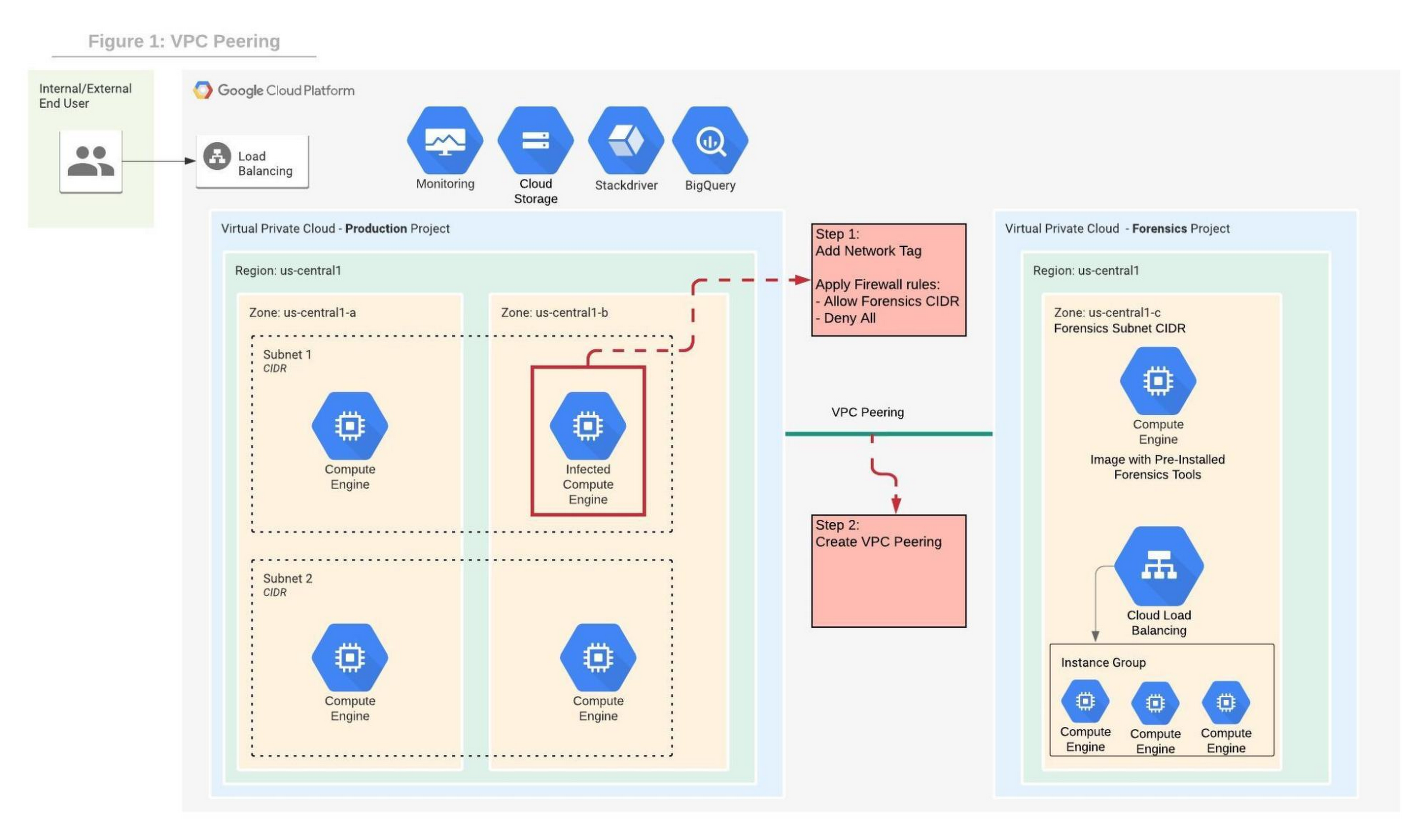
In order to contain the spread of any malware or network activity, such as data exfiltration, we’ll isolate the VM with VPC firewall rules. The GCP VPC firewall is a distributed firewall that always enforces its rules, protecting the instances regardless of their configuration and operating systems. In other words, the compromised VM cannot override the firewall enforcement if its policies follow the principle of least privilege . Rules can be applied to all instances in the network, target network tags or service accounts.
Step 1 in the diagram above shows how an infected VM is isolated from the rest of the network by firewall rules that deny any ingress and egress traffic from any CIDR beside the forensics subnet CIDR. The infected VM is tagged with a unique network tag, for example “<image-name>_InfectedVM”, then firewalls rules are applied on the network tag. This ensures that the infected VM is isolated from the project and the Internet while enabling access to the VM via VPC peering which we’ll configure in step-2. You can learn more about VPC firewalls rules here.
In step 2, the VPC from the forensics project is peered with the VPC in the production project. When VPC peering is established routes are exchanged between the VPCs. By default, VPC peering exchanges all subnet routes, however, custom routes can also be filtered if required. At this point, the VM from the forensics project can communicate with the infected VM and start the live forensics analysis job using the pre-installed and pre-configured forensics tools.
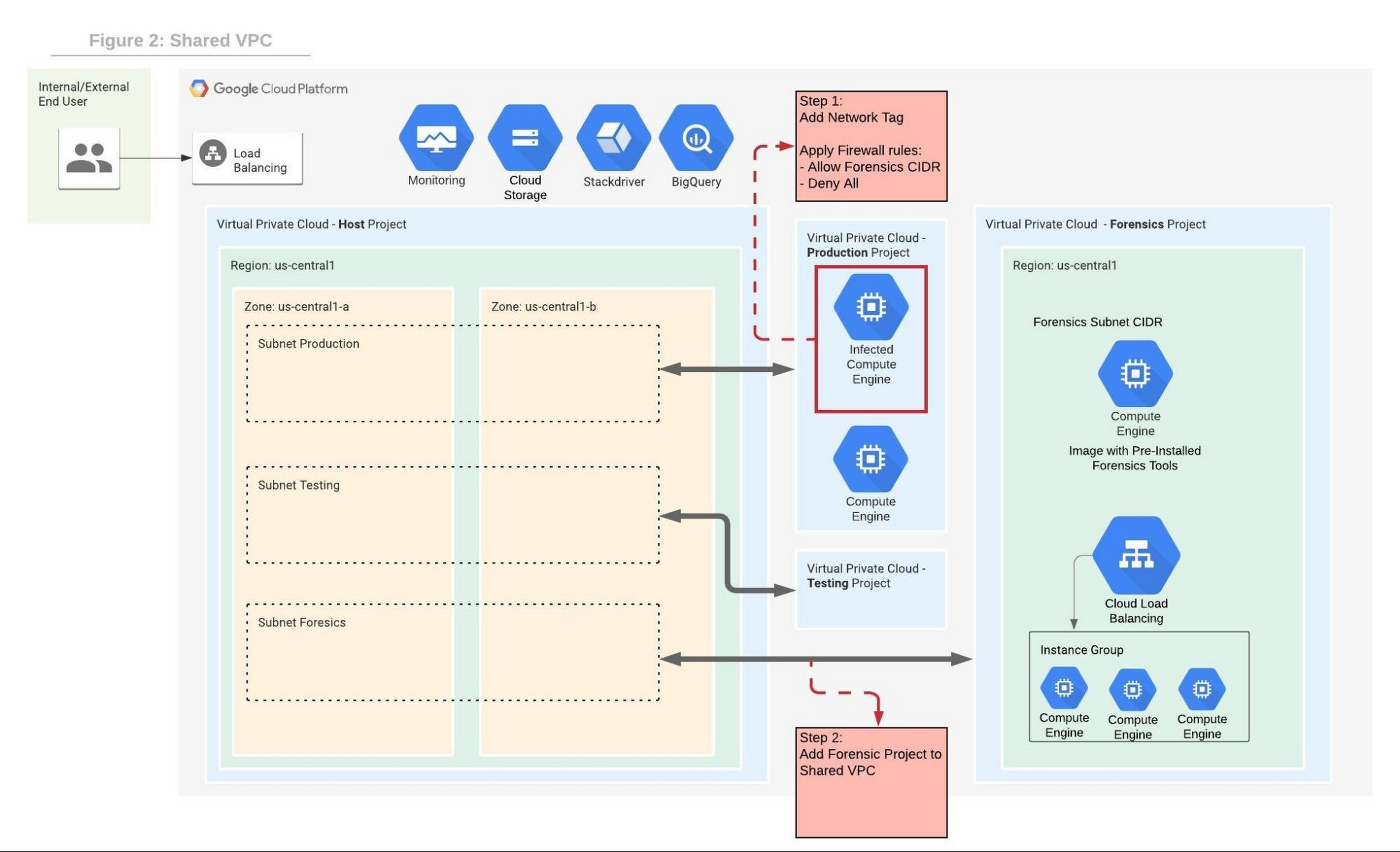
Shared VPC is a network construct that allows you to connect resources from multiple projects, called service-projects, to a common VPC in a host-project. VPCs from different projects can securely communicate with each other via the hosted project network while centralizing the network administration. Figure 2 depicts Shared VPC topology, rather than using VPC peering, during step 2 the Forensics project is simply attached to the host project. After the attachment, the Shared VPC allows the forensics tools to communicate with the infected VMs.
Capturing live network traffic with Google Traffic Mirroring
If live network forensics is required, for example during active network intrusions, then the incoming and outgoing traffic needs to be duplicated and captured. While VPC Flow logs capture the networking metadata telemetry, this is not enough for live network forensics analysis. GCP Packet Mirroring clones the traffic of a specified instance in a VPC and forwards it to a specified internal load balancer which collects the mirrored traffic and sends it to an attached instance group. Packet mirroring captures all the traffic from the specified subnet, network tags, or instance name.
Figure 3 depicts the steps that allow the compromised VM to communicate with the rest of the world (for example beaconing with C&C) while capturing all traffic for investigation in a peered VPC deployment.
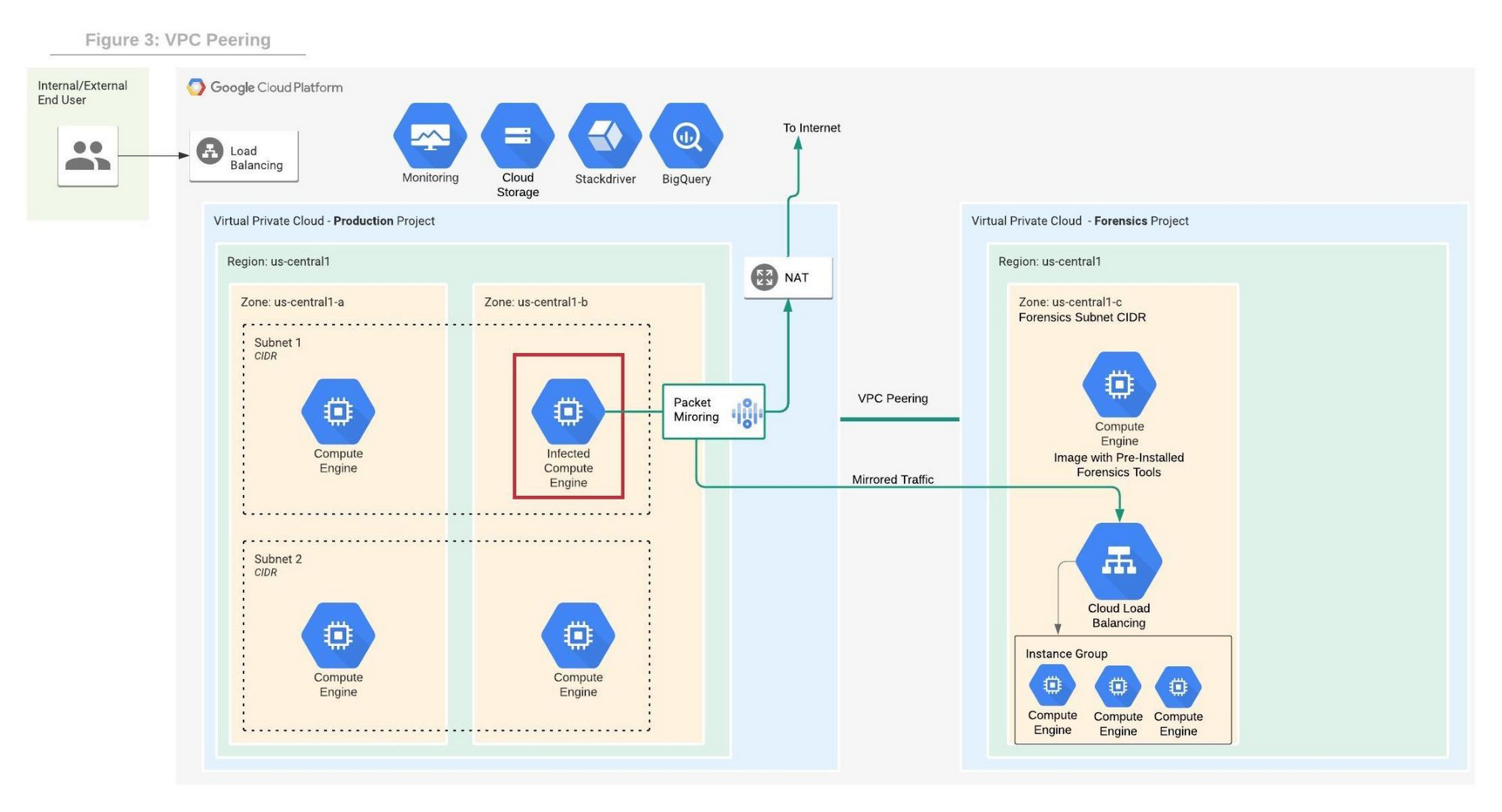
Figure 4 depicts the steps that allow the compromised VM to communicate with the rest of the world while capturing all traffic for investigation in a shared VPC deployment.
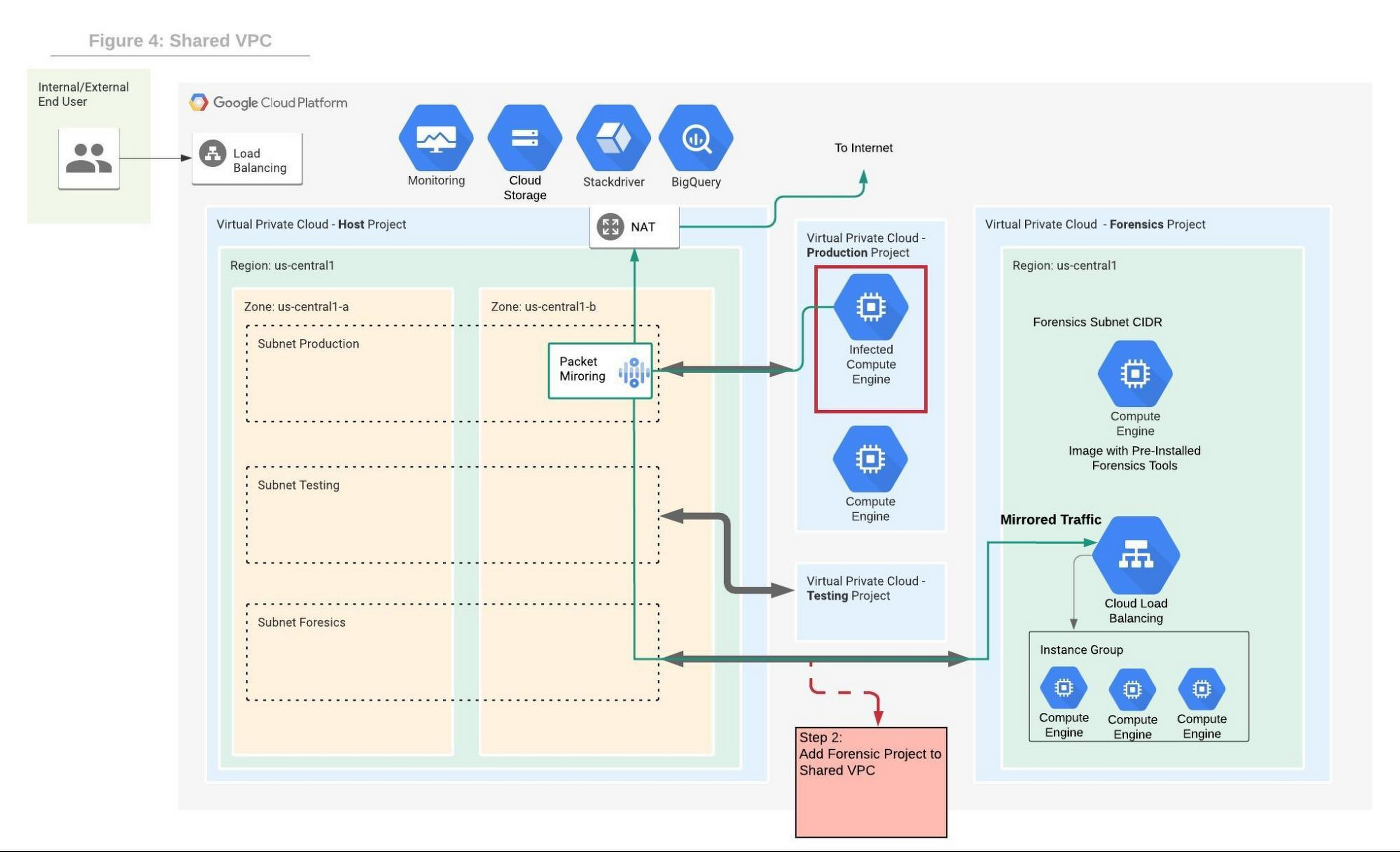
We will use the Forensics’ project internal load balancer and the instance group VMs which include packet capture and analysis tools. Note that production and forensics networks must be in the same region. Detailed steps to configure packet mirroring are available on this page.
If you are using a Shared VPC then check the Packet Mirroring configuration for Shared VPC for configuration details. Figure 4 depicts the packet mirroring flow in a shared VPC topology.
It is recommended to automate and periodically test the process to make sure that in case of an incident, the entire setup and Forensics toolchain can be quickly deployed. If after initial investigation a suspicious destination, such as a Command and Control [C&C] Server, has been identified, then the Packet Mirroring policy can be adjusted with a policy filter that only mirrors traffic from that C&C server IP address.
An incident management plan must be in place for companies using cloud services, and this plan should also include the option of using live acquisition when necessary. design and preparation for forensics acquisition allows the company to build the infrastructure that can be deployed and connected to the appropriate VM automatically. The architectures described in this post can help the process of collecting and preserving vital evidence for the forensic process, while the incident response team resolves the incident.
Confidential GKE Nodes: Now Available on Compute Optimized C2D VMs

1250
Of your peers have already read this article.
1:30 Minutes
The most insightful time you'll spend today!
Today, we are happy to announce that Confidential GKE Nodes are available on compute optimized C2D VMs.
Many companies have adopted Google Kubernetes Engine (GKE) as a key component in their application infrastructure. In some cases, the advantages of using containers and Kubernetes can surpass those of traditional architectures, but migrating to and operating apps in the cloud often requires strategic planning to reduce risk and prevent data breaches. This is where Confidential GKE Nodes can be utilized to enhance the security of your GKE clusters or node pools.
Confidential GKE Nodes leverage specialized hardware to encrypt data in-use and are ideal for organizations processing sensitive data in the cloud. To make it easier to start using Confidential GKE Nodes, GKE standard workloads you run today can run as confidential GKE workloads without code changes on your end.
Security underpinnings of Confidential GKE Nodes
As we expand the Confidential Computing product portfolio from Confidential VMs to Confidential GKE Nodes to Confidential Dataproc, ensuring high performance is key. Confidential GKE Nodes are built on the same technology foundation as Confidential VM and utilize the Secure Encrypted Virtualization (SEV) capability of AMD EPYC™ processors. This feature allows you to keep data encrypted in memory with node-specific, dedicated keys that are generated and managed by the processor. The keys are generated in hardware during node creation and reside solely within the processor, making them unavailable to Google Cloud or other nodes running on the host.
Combined with the high performance of C2D VMs
Previously, Confidential GKE Nodes were generally available only on general purpose N2D VMs, but now they’re also available on compute optimized C2D VMs. The C2D machine series provides VM sizes ranging from 2 vCPUs to 112 vCPUs, offers up to 896 GB of memory, and are suited for performance-intensive workloads. C2D standard and C2D high-CPU machines serve compute-bound workloads including high-performance web servers and media transcoding. C2D high-memory machines serve specialized workloads such as high-performance computing (HPC) and electronic design automation (EDA), which require more memory.
Confidential GKE Nodes on compute-optimized C2D VMs could be a fit for use cases that require high performance and security. You can achieve encryption in-use for data processed inside your GKE cluster or just on specific node pools, without significant performance degradation. This is relevant for industries such as financial services, healthcare, retail, blockchain, and telecommunications, which often have sensitive data or personally identifiable information (PII) that requires additional security measures.
How MATRIXX used Confidential GKE Nodes
MATRIXX Software chose Confidential GKE Nodes to provide transparent encryption for data in-use to supplement encryption for data at-rest to secure personal subscriber data as required by privacy regulations.
MATRIXX Digital Commerce Platform (DCP) is a real-time 5G monetization for the communications industry, serving many of the world’s largest operator groups, regional carriers, and emerging digital service providers. MATRIXX used Google Cloud Confidential GKE Nodes to deliver a cloud-first digital commerce solution that enables commercial and operational agility for current and new telco business models.
A whitepaper titled “Protecting Your 5G Revenue Stream in the Cloud,” described how when MATRIXX DCP is deployed with Confidential Computing on Google Cloud, “its subscriber data, account balances, network events and charges/revenue streams are encrypted in use without making any code changes to the application or compromising on performance.”
Confidential GKE Nodes are globally available
At Google Cloud, we’re committed to investing in Confidential Computing, so we’ve expanded our support to VM families like C2D VMs. Confidential GKE Nodes running on C2D VMs are available in regions across the globe, including us-central1 (Iowa), asia-southeast1 (Singapore), us-east1 (South Carolina), us-east4 (North Virginia), asia-east1 (Taiwan), and europe-west4 (Netherlands). Note that Confidential GKE Nodes are available where C2D or N2D machines are available.
Pricing for Confidential GKE Nodes
There is no additional cost to deploy Confidential GKE Nodes, other than the costs of Compute Engine and Confidential VM pricing.
Try out Confidential GKE Nodes for cluster-level enablement
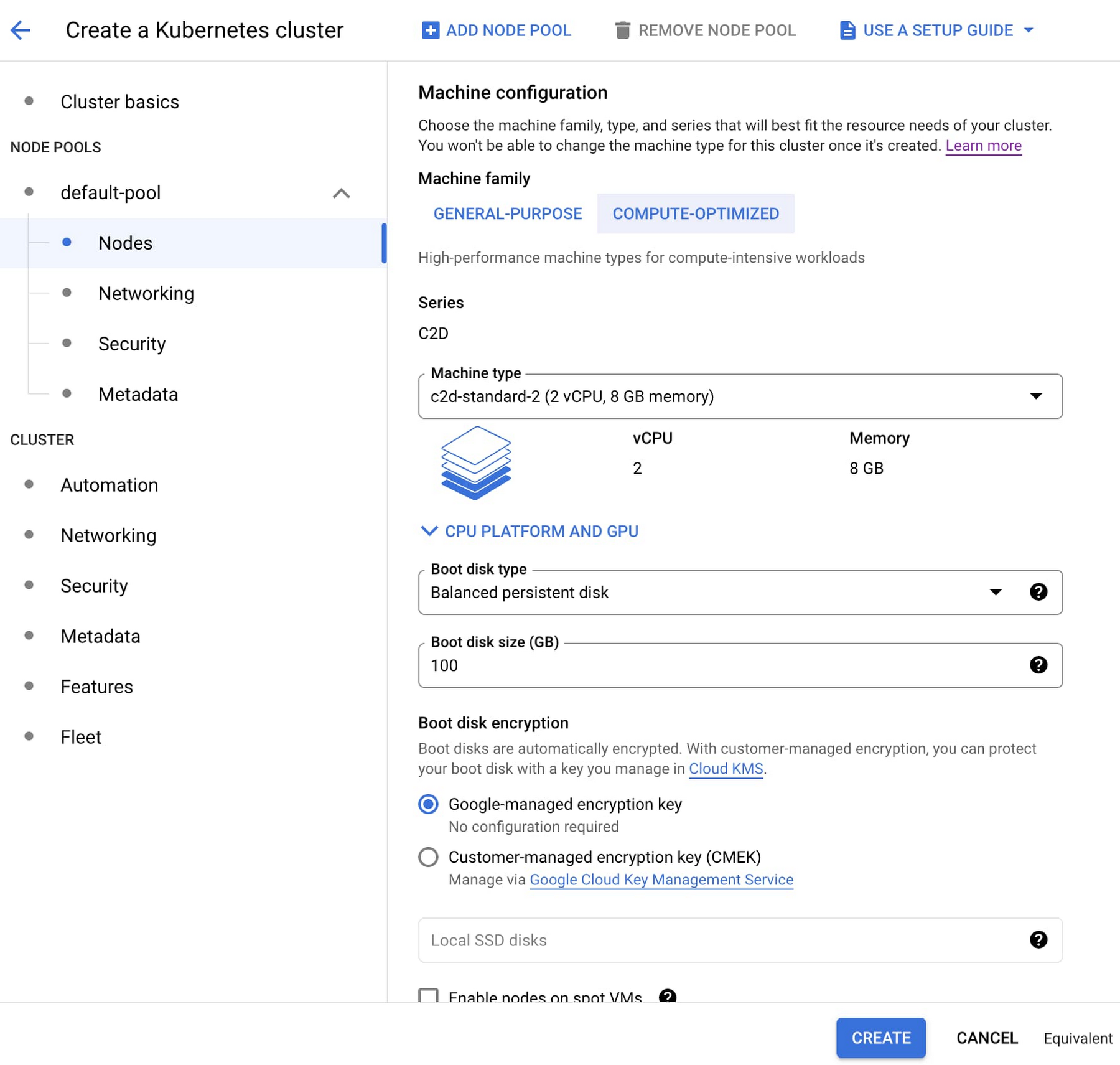
- First, go to the Google Kubernetes Engine page in the Google Cloud console. In the top navigation bar, click Create. In the Create Cluster modal, choose ‘Standard: You manage your cluster’ and click Configure.
- Next, from the left navigation pane, under Cluster, click Security. Select the ‘Enable Confidential GKE Nodes’ checkbox.
- Then, from the left navigation pane again, under Node Pools, click Nodes. Under Machine Configuration and Machine family, select the Compute-optimized tab, and choose a C2D machine type.
Configure the rest of the cluster as desired and click Create.
Making secure design choices should be easy, especially when the workloads involve high-performance processing of sensitive data. You can help protect your sensitive applications and data today by adding Confidential GKE Nodes to your GKE workloads. Learn more about Confidential Computing here.
Google Announces New Cloud Region in Israel to Meet Growing Customer Demands

4853
Of your peers have already read this article.
2:00 Minutes
The most insightful time you'll spend today!
Google has long looked to Israel for globally impactful technologies including popular Search features, Waze, Live Caption, Duplex and flood forecasting. At our Decode with Google 15RAEL event last week, we celebrated 15 years of Google innovation in Israel and our longstanding support of the country’s vibrant startup ecosystem.
Over the years, we’ve expanded our enterprise investments in the country, too. In addition to our over a decade long investment in the space, Google has acquired Israeli-based companies like Alooma, Elastifile and Velostrata, and Uri Frank joined Google Cloud last month to lead our server chip design team from our offices in Tel Aviv and Haifa.
As we continue to meet growing demand for cloud services in Israel, we’re excited to announce that a new Google Cloud region is coming to Israel to make it easier for customers to serve their own users faster, more reliably and securely.
Our global network of Google Cloud regions are the foundation of the cloud infrastructure we’re building to support our customers. With cloud’s 25 regions and 76 zones around the world, we deliver high-performance, low-latency services and products for Google Cloud’s enterprise and public sector customers. With each new Google Cloud region, customers get access to secure infrastructure, smarter analytics tools, an open platform and the cleanest cloud in the industry.
Having a region in Israel will help accelerate innovation for customers of all sizes, including PayBox, a digital wallet application owned by Discount Bank, one of Israel’s largest banks. “When we acquired PayBox, our goal was to improve the security and the user experience for its products, but we also wanted to keep the startup’s agility and innovation. Google Cloud has enabled us to do just that,” said Sarit Beck-Barkai, Managing Director of PayBox at Discount Bank.
“We are very excited that leading vendors like Google are investing and launching a local cloud region in Israel. This will make a significant change in the technology landscape of the public-sector, enterprise and SMB markets in Israel. Matrix is proud to be a major part of the transition to the cloud,” said Moti Gutman, CEO at Matrix, technology services company and Google Cloud partner.
“In the last year, Panorays more than tripled its customer base and scaled its infrastructure, practically at the click of a button. Google Cloud made it easy for us to scale without worrying about DevOps, which meant that our engineers could focus on developing new and better features for our customers. The new region launching in Israel will allow us to serve our local customer base even better, as we’ll be able to experience higher availability and deploy resources in specific regions, thus reducing latency.” said Demi Ben-Ari, Co-founder and CTO, Panorays, a third-party security platform and Google Cloud customer.
“This new cloud region will provide even better access and growth potential for our mutual customers with tech hubs in the region. We are serving hyper growth companies who need Google Cloud’s services and will benefit greatly from this regional presence,” said Yoav Toussia-Cohen, CEO of DoiT International.
When it launches, the Israel region will deliver a comprehensive portfolio of Google Cloud products to private and public sector organizations locally. We look forward to welcoming you to the Israel region, and we’re excited to support your growing business on our platform.
Learn more about our global cloud infrastructure, including new and upcoming regions, here.
Google Unveils New Cloud Region in Delhi NCR to Power India’s Digitization

8327
Of your peers have already read this article.
2:00 Minutes
The most insightful time you'll spend today!
In the past year, Google has worked to surface timely and reliable health information, amplify public health campaigns, and help nonprofits get urgent support to Indians in need. Now, we are continuing to focus on helping India’s businesses accelerate their digital transformation, deepening our commitment to India’s digitization and economic recovery. To support customers and the public sector in India and across Asia Pacific, we’re excited to announce that our new Google Cloud region in Delhi National Capital Region (NCR) is now open.
Designed to help both Indian and global companies alike build highly available applications for their customers, the Delhi NCR region is our second Google Cloud region in India and 10th to open in Asia Pacific.
What customers and partners are saying
Navigating this past year has been a challenge for companies as they grapple with changing customers demands and economic uncertainty. Technology has played a critical role, and we’ve been fortunate to partner with and serve people, companies, and government institutions around the world to help them adapt. The Google Cloud region in Delhi NCR will help our customers adapt to new requirements, new opportunities and new ways of working, like we’ve helped so many companies do in the region:
- InMobi scaled a personalized AI platform to support 120+ million active users. “With the arrival of the Google Cloud Delhi NCR, InMobi Group sees the opportunity to continue closing the gap between our users and products,” says Mohit Saxena, Co-founder and Group CTO of Inmobi. “Glance, especially, has been serving AI-powered personalised content to over 120 million active users. We can’t wait to continue giving them truly meaningful experiences that are speedy, scale well, and are relevant to them, by expanding the use of our current tools working on Google Cloud with the opening of a new region.”
- Groww now supports a sizable user base. “Google Cloud provides great technology that enables us to build and scale infrastructure to millions of users, and the new Google Cloud region in Delhi NCR will continue to help more businesses and startups in India access powerful cloud-based infrastructure, products and services,” says Neeraj Singh, Co-founder and Chief Technology Officer, Groww.
- HDFC Bank is positioned for the future. “At HDFC Bank, we are harnessing technology platforms to both run and build the bank. As we progress to be future ready, the objective is to invest in future technologies that give us scale, efficiency and resiliency. Towards this the Google Cloud region in Delhi NCR will enable us to enhance our resiliency and help us in building an active-active design framework for our new generation applications on cloud,” says Ramesh Lakshminarayanan, CIO, HDFC Bank.
- Dr. Reddy’s Lab built a modern data platform with Google Cloud. “At Dr Reddy’s, we pride ourselves in helping patients regain good health, acting quickly to provide innovative solutions to address patients’ unmet needs and in accelerating access to medicines to people worldwide. Our Google Cloud-powered data platform is helping us realize these objectives and we welcome Google’s investment in the new Delhi NCR region as helping us and other businesses in India make further contributions to our social and economic future,” says Mukesh Rathi, Senior Vice President & CIO, Dr. Reddy’s Laboratories.
- “To survive the disruption caused by the pandemic and to succeed in the long term, organizations need to become digital natives, so they can be more agile, explore new business models and build new capabilities that boost resilience. A cloud-first strategy plays a key role in enabling businesses to do this,” said Piyush N. Singh, Lead – India market unit & lead – Growth and Strategic Client Relationships, Asia Pacific and Latin America, Accenture. “Harnessing the potential of cloud requires the right data infrastructure and this expansion by Google Cloud will undoubtedly help Indian enterprises in their digital transformation journeys.”
A global network of regions
Delhi NCR joins 25 existing Google Cloud regions connected via our high-performance network, helping customers better serve their users and customers throughout the globe. As the second region in India, customers benefit from improved business continuity planning with distributed, secure infrastructure needed to meet IT and business requirements for disaster recovery, while maintaining data sovereignty.
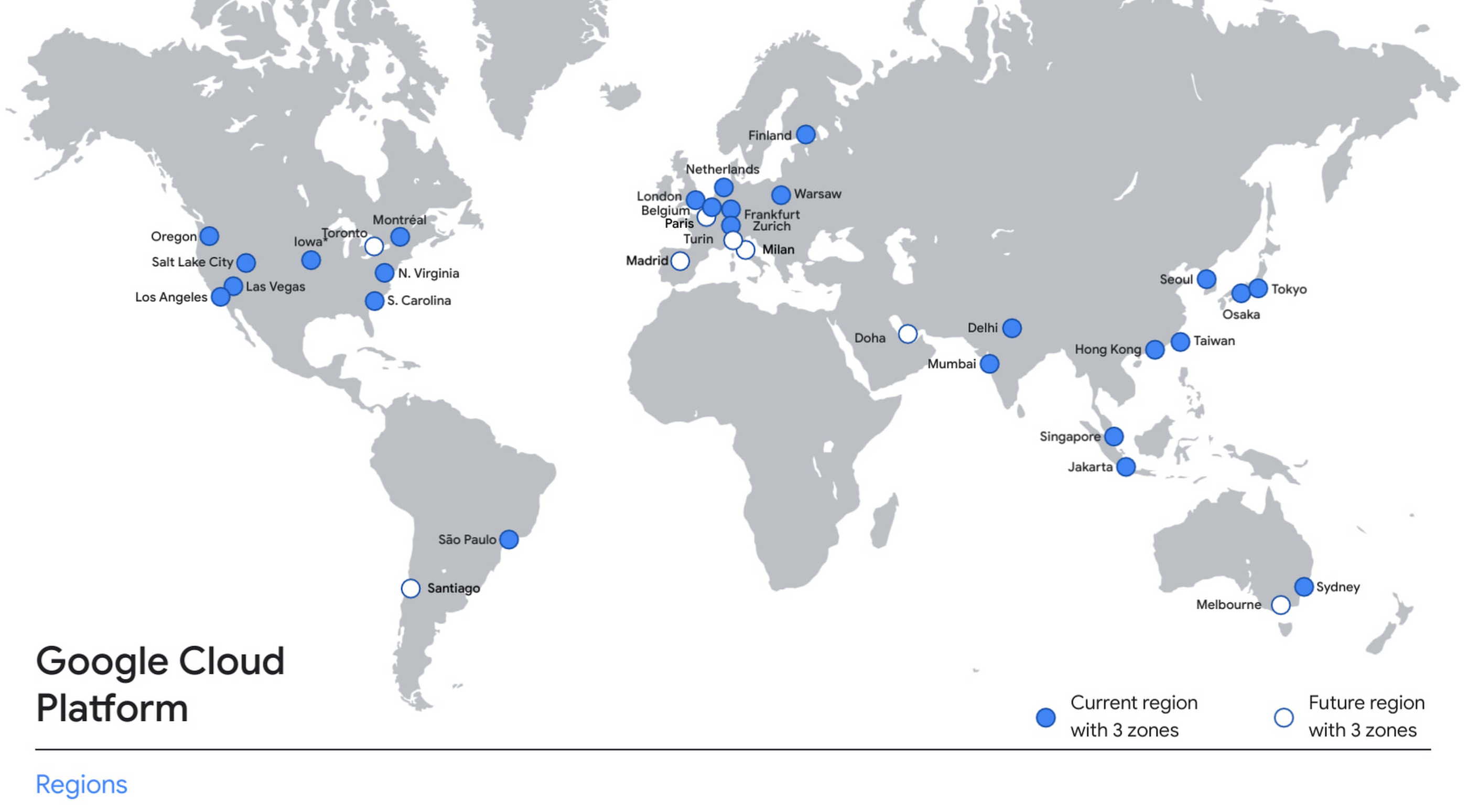
With this new region, Google Cloud customers operating in India also benefit from low latency and high performance of their cloud-based workloads and data. Designed for high availability, the region opens with three availability zones to protect against service disruptions, and offers a portfolio of key products, including Compute Engine, App Engine, Google Kubernetes Engine, Cloud Bigtable, Cloud Spanner, and BigQuery.
Supporting India’s recovery with training and education
Google and Google Cloud will also continue to support our customers with people and education programs. We’re investing in local talent and the local developer community to help enterprises digitally transform and support economic recovery.
Through the India Digitization Fund, we expanded our efforts to support India’s recovery from COVID-19—in particular, through programs to support education and small businesses. In addition to expanding internet access, and investments to help start-ups accelerate India’s digital transformation, we’ve grown our Grow with Google efforts. Businesses can access digital tools to maintain business continuity, find resources like quick help videos, and learn digital skills—in both English and in Hindi.
Helping customers build their transformation clouds
Google Cloud is here to support businesses, helping them get smarter with data, deploy faster, connect more easily with people and customers throughout the globe, and protect everything that matters to their businesses. The cloud region in Delhi NCR offers new technology and tools that can be a catalyst for this change. To learn more, visit the Google Cloud locations page, and be sure to watch the region launch event here.
Google Launches Smart Canvas to Stir-up Collaboration in Google Workspace

5453
Of your peers have already read this article.
2:00 Minutes
The most insightful time you'll spend today!
After more than a year of remote collaboration, many people are showing signs of digital fatigue. Throughout the pandemic, millions of employees bridged the physical distances with their colleagues by making themselves more available, joining a deluge of virtual meetings, and leaning into a dizzying array of tools and applications. As part of our mission to build the future of work, we’re addressing these challenges in Google Workspace.
As we announced today at I/O, we’re launching smart canvas—a new product experience that delivers the next evolution of collaboration for Google Workspace. Between now and the end of the year, we’re rolling out innovations that make it easier for people to stay connected, focus their time and attention, and transform their ideas into impact.
Specifically, we’re enhancing the apps that hundreds of millions of people use every day—like Docs, Sheets, and Slides—to make them even more flexible, interactive, and intelligent. With smart canvas, we’re bringing the content and connections that transform collaboration into a richer, better experience in Google Workspace.
When we launched Google Docs and Sheets 15 years ago, these apps introduced the world to a new way of working. They enabled anytime, anywhere teamwork—a stark contrast to the legacy tools that were designed for an era of individual work on office desktops. For over a decade now, we’ve been pushing documents away from being just digital pieces of paper and toward collaborative, linked content inspired by the web. Smart canvas is our next big step.https://www.youtube.com/embed/SDBbFETGiA4?enablejsapi=1&
Making collaboration more flexible and helpful
The evolving hybrid work model gives new urgency to existing collaboration challenges. How do teams stay focused and connected as they work together, regardless of where people are located? With smart canvas, we’re building deeper connections across Google Workspace to transform collaboration anywhere it happens.
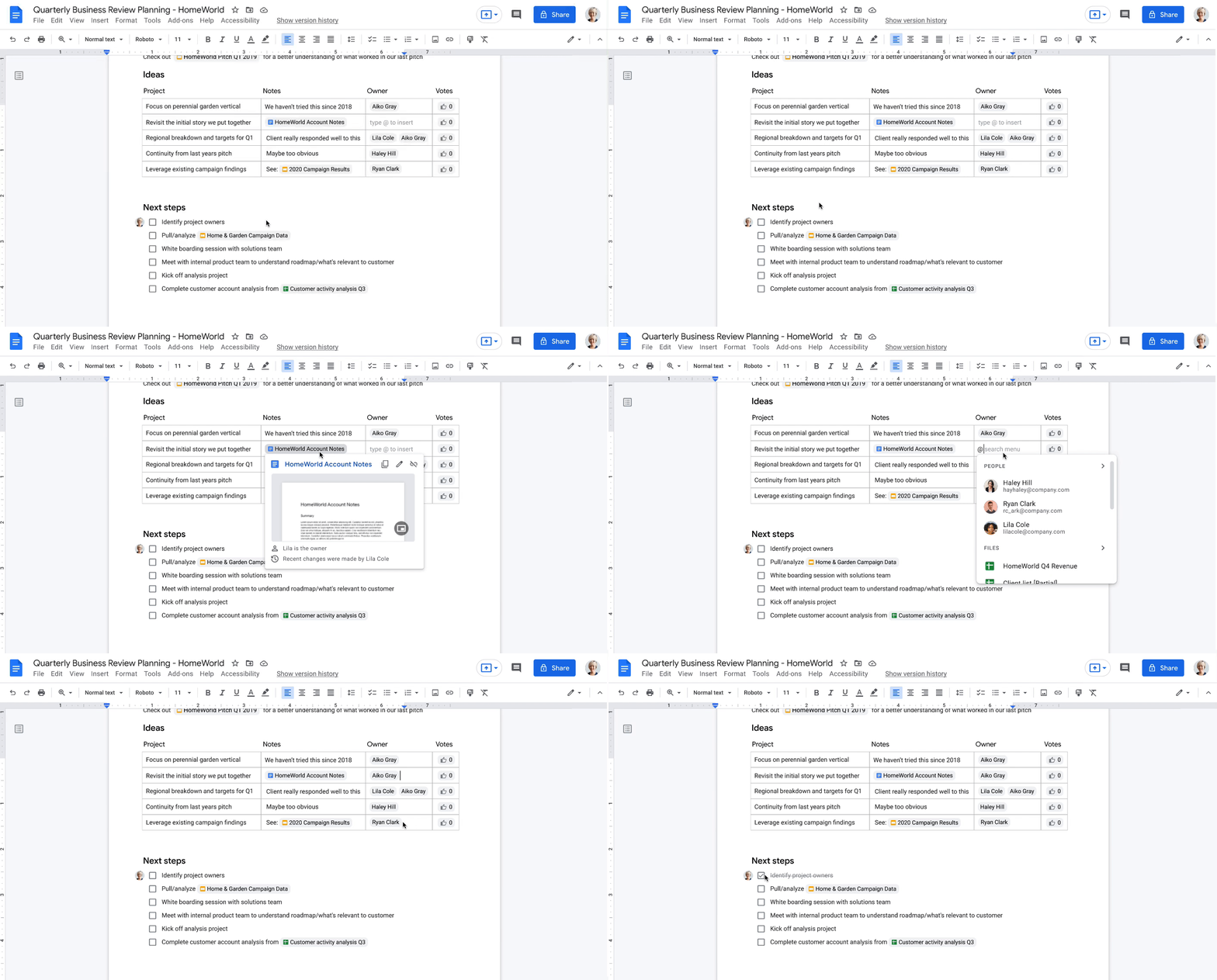
For example, we’re taking something that people already use every day—@-mentions—to open up new, powerful collaboration capabilities. New interactive building blocks—smart chips, templates, and checklists—will connect people, content, and events into one seamless experience.
Already available, when you @ mention a person in a document, a smart chip shows you additional information like the person’s location, job title, and contact information. And starting today, we’re introducing new smart chips in Docs for recommended files and meetings. To insert smart chips into your work, simply type “@” to see a list of recommended people, files, and meetings. From web or mobile, your collaborators can then quickly skim associated meetings and people or preview linked documents, all without changing tabs or contexts. Smart chips will come to Sheets in the coming months.
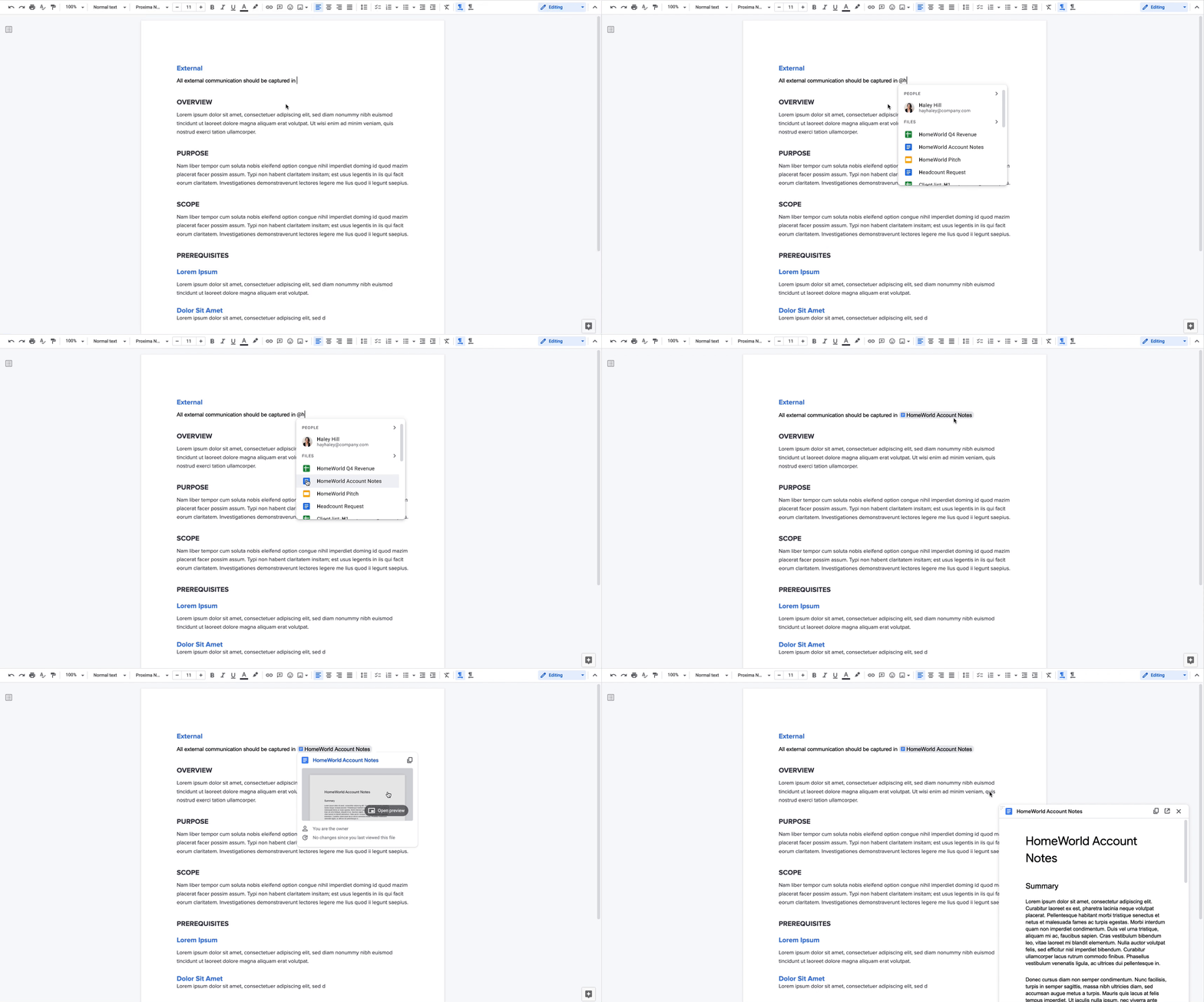
Additionally, we’re making it easier to drive projects forward by streamlining common team workflows. Starting today in Docs, checklists are available on web and mobile, and you’ll soon be able to assign checklist action items to other people. These action items will show up in Google Tasks, making it easier for everyone to manage a project’s To Do list.
We’re also introducing table templates in Docs. Topic-voting tables will allow you to easily gather team feedback while project-tracker tables will help you capture milestones and statuses on the fly. And a new document template for capturing meeting notes will automatically import any relevant information from a Calendar meeting invite, including smart chips for attendees and attached files.
With our new pageless format in Docs, you’ll be able to remove the boundaries of a page to create a surface that expands to whatever device or screen you’re using, making it easier to work with wide tables, large images, or detailed feedback in comments. And if you want to print or convert to PDF, you’ll be able to easily switch back to a paginated view.
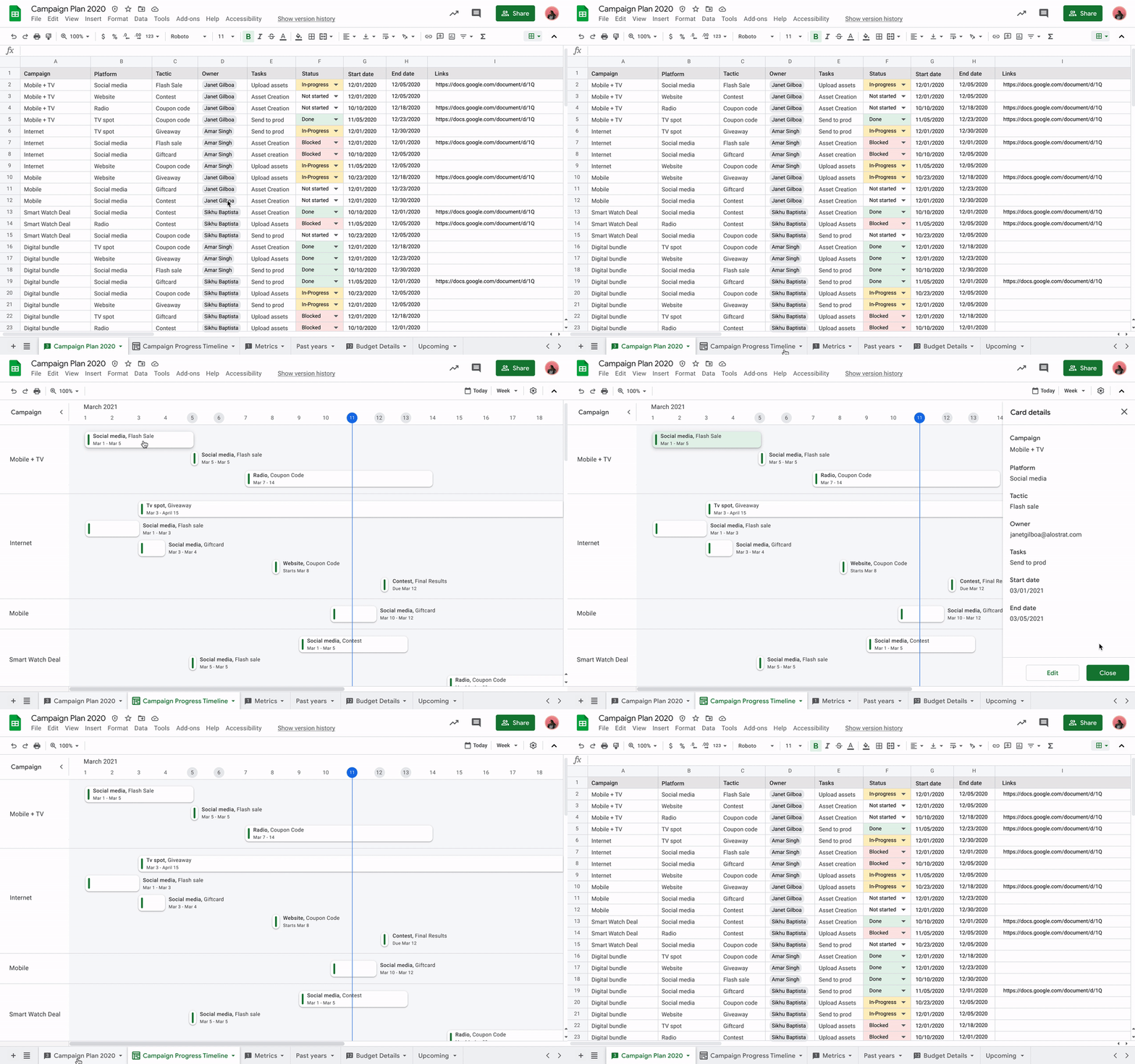
Meanwhile, you’ll be able to toggle between new views in Sheets to better manage and interact with your data. Our first launch will be a timeline view that makes tracking tasks easier and faster. This flexible view allows you to organize your data by owner, category, campaign, or whichever attribute fits best. Using a dynamic, interactive timeline strengthens your ability to manage things like marketing campaigns, project milestones, schedules, and cross-team collaborations.
Fostering human connection—wherever people work
With smart canvas and innovations in Google Meet, we’re making it easy to bring the voices and faces of your team directly into the collaboration experience, to help people share ideas and solve problems together from anywhere. As part of that, we’re building tighter integrations between our communication and collaboration tools so you can pull content into conversations and conversations into content.
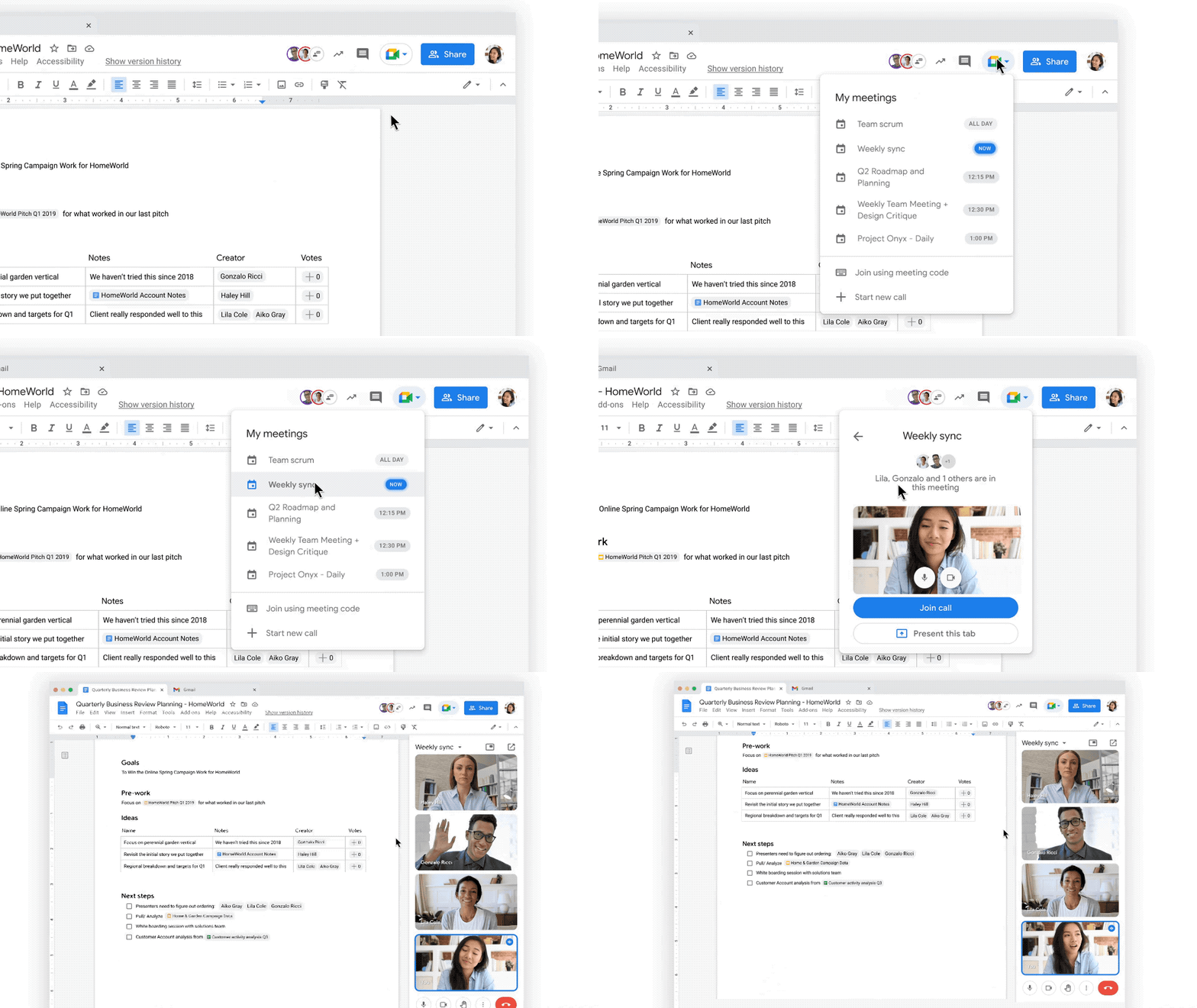
Starting today, we’re rolling out the ability to present your content to a Google Meet call on the web directly from the Doc, Sheet, or Slide where you’re already working with your team. Jumping between collaborating in a document and a live conversation without skipping a beat helps the project—and the team—stay focused. And in the fall, we’re bringing Meet directly to Docs, Sheets, and Slides on the web, so people can actually see and hear each other while they’re collaborating.
Live captions and translations in Google Meet will also play a crucial role in keeping people connected as they work together in distributed teams. We currently offer live captions in five languages, with more on the way. And we’re introducing live translations of captions later this year, starting with English-language live captions translated into Spanish, Portuguese, French, or German, with many more languages to follow.
With recent enhancements to Google Meet, we’re also giving people more control and flexibility over the meeting experience, including more space to see people and content, plus the ability to pin and unpin content and video feeds. And to help with meeting fatigue, you can now turn off your self-feed entirely.
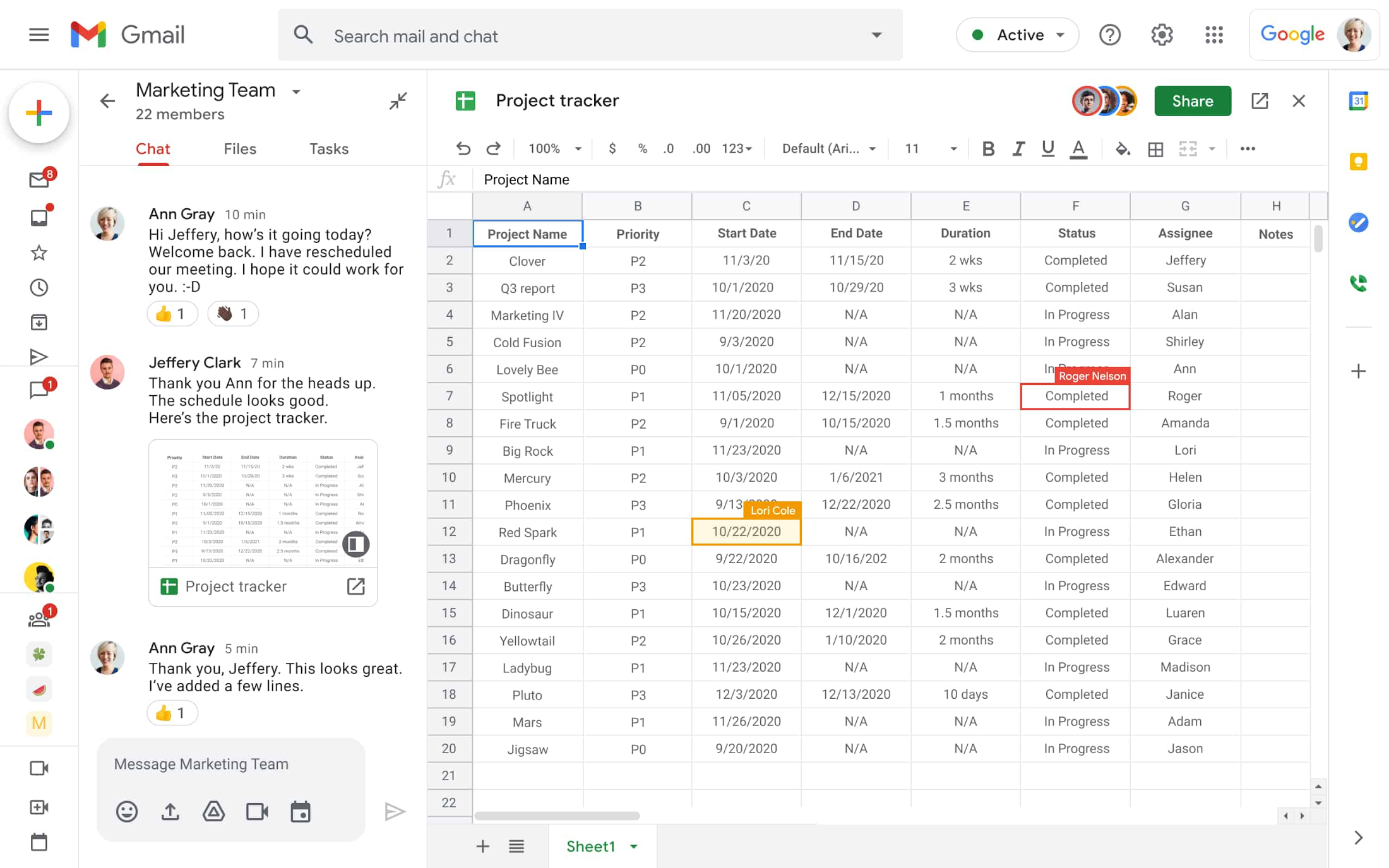
Because we know that collaboration is fluid and fast-moving, we’re making it easier for teams to give feedback on the fly and to move seamlessly between conversations and building content together. Teams can now jump from a discussion in Google Chat directly to building content together. Creating and editing Sheets and Docs from Google Chat rooms is already live in our web experience, and we’ll enable it for Slides in the coming weeks. And to gauge the team’s reactions along the way, we’re introducing emoji reactions in Docs in the next few months.
Working smarter and safer
Google Workspace is already infused with powerful intelligence that enables people to make the best use of their time and attention. Whether it’s with the two billion grammar suggestions we surface in Docs every month, or the intelligent file suggestions in Drive’s Priority and Quick Access features that cut file finding time by 50%.
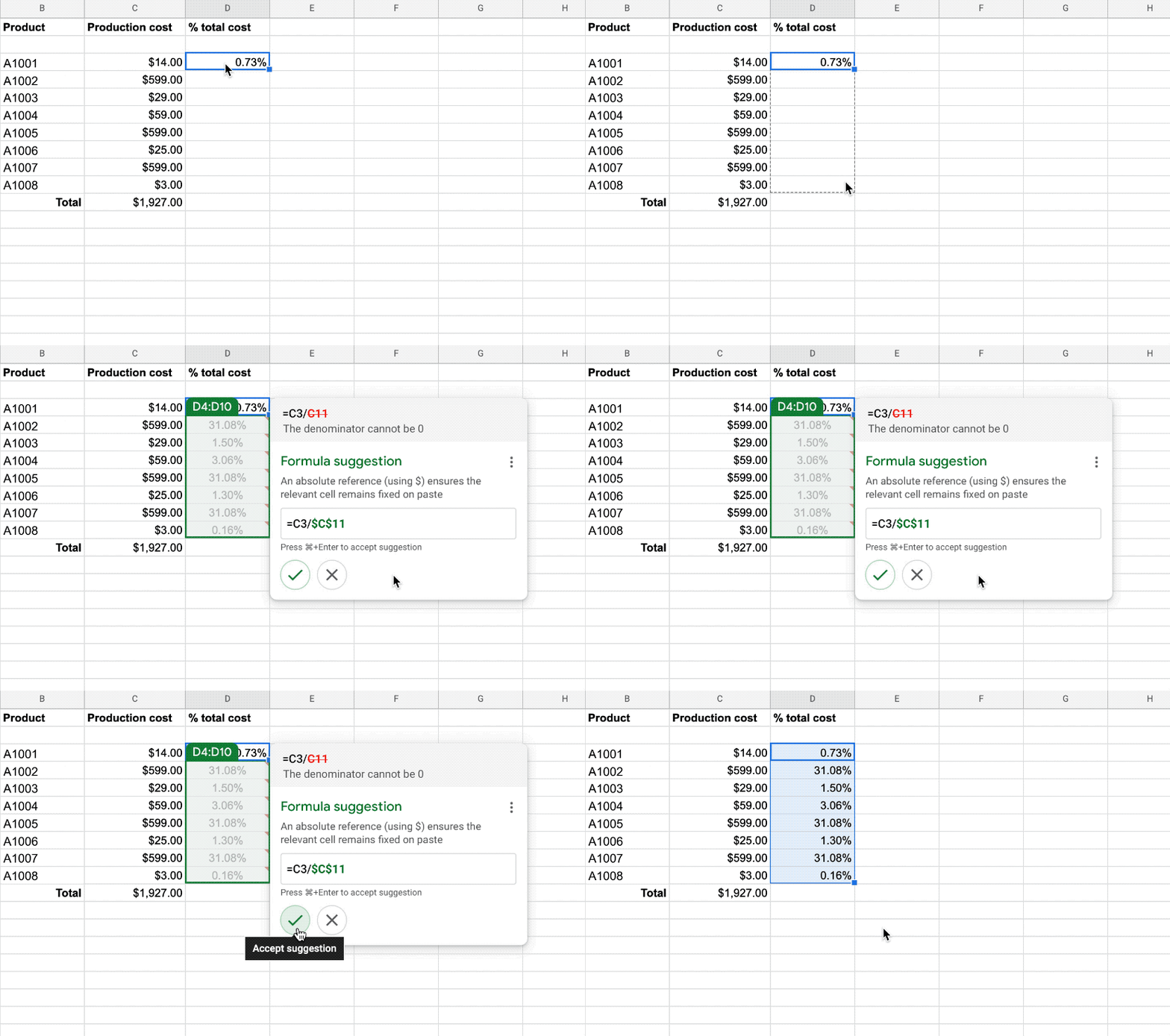
To help everyone work smarter, in the next few months we’re introducing additional assisted writing features in Docs on the web. This includes warnings about offensive words and language, as well as other stylistic suggestions that can speed up editing and help make your writing more impactful. We’re also adding more assisted analysis functionality in our Sheets web experience, with formula suggestions that make it easier for everyone, not just analysts, to derive insights from data. Sheets intelligence helps you build and troubleshoot formulas, making data analysis faster and reducing errors.
As smart canvas evolves, we’re making it easy for businesses to connect the apps and tools they rely on to Google Workspace. This builds on our history of supporting a variety of add-on features that take the friction out of collaboration—from adding e-signatures directly in Google Workspace with DocuSign to the Salesforce connector that integrates with Sheets. To help people work even smarter, we recently announced that AppSheet Automation is generally available, so that you can automate time-consuming tasks—like approving invoices and onboarding new hires—without having to write a single line of code.
Looking ahead, we’re planning to build additional APIs so you can bring the information and actions you need from third-party tools directly into smart canvas elements like smart chips, checklists, and table templates.
And because trust is at the center of all collaboration within Google Workspace, today we’re also launching advanced capabilities that help protect users against security threats and abuse as they work together.
Transforming how people work to deliver real-world innovation
While there’s no one way to collaborate, we know from our customers that transforming how people work results in real-world innovation.
Google Workspace fuels a new way of working together. It lets our teams around the world—whether they’re in the office, at home, or in the grocery store aisle—work more flexibly and translate their ideas into new ways of delighting customers.
—Thibaud Cainne, Global Head of Tech Infra and Digital Workplace, Carrefour
Transformation happens at all levels, and often in every tool. We were able to get 17,000 of our people to make the shift from Excel to Google Sheets in just six months by demonstrating how we could optimize, automate, and connect spreadsheets and their data. That kind of collaboration leads to real-world innovation for our clients.
—Monica Andrea Diaz Pinzon, Chief of Digital Transformation (Special Projects), Banco Davivienda
We built a digital hub on Google Workspace to transform the way we connect with employees and partners across multiple locations and organizations. It allowed us to spin up major research projects in days instead of months, including delivery of major COVID-19 vaccine studies.
—Justin Riordan-Jones, Head of System and Information (Research), Department of Health & Social Care, National Institute for Health Research (UK)
As smart canvas drives the next era of collaboration in Google Workspace, we remain committed to providing a solution that’s flexible, helpful, and that fuels innovation for organizations in every industry. On the frontlines, in corporate offices, and across the countless workspaces in between, Google Workspace will continue to transform how work gets done.
More Relevant Stories for Your Company

Chrome OS’s Hybrid Work Model Powers Google’s Return to Work Strategy
The pandemic continues to deeply affect our lives around the globe. In some places, new cases are surging and returning to work is the last thing on people’s minds. In other areas, conditions are improving and companies are starting to think about transitioning their workforce back to the office. Exactly

How Firewall Insights can Simplify Corporate Firewall Rules
Corporate firewalls typically include a massive number of rules, which accumulate over time as new workloads are added. When rules stack up piecemeal like this, misconfigurations occur that, at best, create headaches for security administrators, and at worst, create vulnerabilities that lead to security breaches. To address this, we have

Highmark & Google’s Secure-by-design Technique to Bring the Living Health Solution to Life
In an industry as highly regulated as healthcare, building a single secure and compliant application that tracks patient care and appointments at a clinic requires a great deal of planning from development and security teams. So, imagine what it would be like to build a solution that includes almost everything
Google Cloud’s Invisible Security Vision: Key Highlights
Yesterday we held our final Google Cloud Security Talks event of 2021. Our event focused on zero trust and covered everything from Google’s history with BeyondCorp to our strategic thinking when it comes to applying zero trust principles to production environments. We shared product updates across the portfolio and talked about how
