





5 Compelling Ways to Practice the Principle of Least Privilege for Security Leaders

3565
Of your peers have already read this article.
4:30 Minutes
The most insightful time you'll spend today!
When it comes to security, managing access is a foundational capability—whether you’re talking about a physical space or your cloud infrastructure. If you were securing an office, you wouldn’t give every employee a master key that can open the front door, the mailbox, and the safe. Likewise, when you’re securing your cloud infrastructure, you should limit employees’ access based on their role and what they require to do their job.
This concept is known as the principle of least privilege, which NIST’s Computer Security Resource Center defines as: “A security principle that restricts the access privileges of authorized personnel… to the minimum necessary to perform their jobs.” In practice, this means assigning credentials and privileges only as needed to both users and services, and removing any permissions that are no longer necessary.
Keeping the principle of least privilege in mind, here are five practical tips to minimize the surface area of exposed resources on Google Cloud Platform (GCP) and defend against some common attacks.
Avoid excessive use of broad primitive roles
Primitive roles like Owner and Editor grant wide-ranging access to all project resources. To tighten access security, consider using more specific predefined roles in Cloud Identity and Access Management (IAM), or defining custom roles that are better suited to your organization. For example, if you have a Cloud SQL database, instead of granting the project-wide Editor role to everybody, you could grant the cloudsql.editor role to users who create new databases, cloudsql.client to those who only need to connect to existing databases, and limit cloudsql.admin to database administrators.
Our policy design page has some sample structures and policies for different types of organizations, including startups, large enterprises, and education and training customers.
Assign roles to groups, not individuals
If you assign an IAM role directly to an individual, they retain the rights granted by that role even if they change roles, move around your organization, or no longer require them. A safer and more maintainable option is to place users into logical groups. For example, to manage databases, you could create db-editors, db-viewers, and db-admins groups, and let users inherit roles from these groups:
Groups can be created within the Admin Console for any G Suite domain, or federated from an external tool like Active Directory. By using groups for ownership, you can also avoid “orphaned” projects and resources—where a project or resource has a single owner who leaves the organization.
You can assign roles at the organization, folder, project, or resource level. This lets larger organizations easily manage roles for, say, a specific developer team or the entire accounting department. Be aware, however, that a child resource cannot limit roles granted by a parent: a user’s project-level cloudsql.viewer role, for example, will override any resource-level restrictions on any database in the same project.
Reduce the risks of default service account behavior
Service accounts are a special type of account intended for apps that need to access data. If the app’s own private credentials are compromised, however, the attacker then has all the access granted to the app by the service account’s roles.
The Compute Engine default service account, which has the editor role, is enabled for all instances created in a project unless you specify otherwise.
Creating a custom service account to use for creating instances and limiting its roles to the minimum necessary significantly reduces risk. For example, many apps using Cloud SQL only need the cloudsql.client role that lets them connect to an existing database.
An alternative approach is to grant the instance service account minimal privileges and create dedicated service accounts for your apps. This gives you more fine-grained control over each app’s privileges, although you will need to carefully manage the service account credentials.
Reduce risk and control access to your project by using networking features
To enable inter-resource communication, new GCP projects initially have a default network connecting all resources in that project. This is convenient for development, but in this default configuration, if an attacker gains unauthorized access to one resource, they may be able to reach others as well.
To limit this risk, don’t use the default network in production and explicitly specify accepted source IP ranges, ports, and protocols in network firewalls. You should also separate sensitive apps into individual virtual private clouds (VPCs), and if inter-app connectivity is required, use a Shared VPC. In each VPC, use different subnets for public facing services (e.g., web servers and bastion hosts) and private backend services. Allocate public IPs only to instances in the public subnet and add firewall rules with network tags to control which services can communicate with each other. Finally, grant permission to create or modify firewalls and routes only to those directly responsible for the network.
The Secure Instances and Apps with Custom Networks codelab walks you through setting up the public/private subnet configuration above. The Policy design for customers article we mentioned earlier also contains sample network designs for common use cases. For guidance on the tradeoffs of single, multiple, and shared VPCs, see Best practices and reference architectures for VPC design.
Consider using managed platforms and services
If you deploy and manage your own applications, you are responsible for security configuration, including the maintenance of accounts and permissions. You can limit your responsibilities by hosting your apps on managed platforms like Cloud Run, App Engine, or Cloud Functions, or by using fully managed services for databases and processing frameworks like Cloud SQL for MySQL and Postgres, Cloud Dataproc for Hadoop and Spark, and Cloud Memorystore for Redis.
A final note
Security is a priority in all aspects of Google Cloud, but cloud security is a shared responsibility, and ultimately you are responsible for making the right configuration and product choices for your organization to protect your data on GCP. These tips are a great starting point to help reduce your attack surface and help you make more informed risk decisions.
5 Compelling Ways to Practice the Principle of Least Privilege for Security Leaders
3566
Of your peers have already read this article.
4:30 Minutes
The most insightful time you'll spend today!
When it comes to security, managing access is a foundational capability—whether you’re talking about a physical space or your cloud infrastructure. If you were securing an office, you wouldn’t give every employee a master key that can open the front door, the mailbox, and the safe. Likewise, when you’re securing your cloud infrastructure, you should limit employees’ access based on their role and what they require to do their job.
This concept is known as the principle of least privilege, which NIST’s Computer Security Resource Center defines as: “A security principle that restricts the access privileges of authorized personnel… to the minimum necessary to perform their jobs.” In practice, this means assigning credentials and privileges only as needed to both users and services, and removing any permissions that are no longer necessary.
Keeping the principle of least privilege in mind, here are five practical tips to minimize the surface area of exposed resources on Google Cloud Platform (GCP) and defend against some common attacks.
Avoid excessive use of broad primitive roles
Primitive roles like Owner and Editor grant wide-ranging access to all project resources. To tighten access security, consider using more specific predefined roles in Cloud Identity and Access Management (IAM), or defining custom roles that are better suited to your organization. For example, if you have a Cloud SQL database, instead of granting the project-wide Editor role to everybody, you could grant the cloudsql.editor role to users who create new databases, cloudsql.client to those who only need to connect to existing databases, and limit cloudsql.admin to database administrators.
Our policy design page has some sample structures and policies for different types of organizations, including startups, large enterprises, and education and training customers.
Assign roles to groups, not individuals
If you assign an IAM role directly to an individual, they retain the rights granted by that role even if they change roles, move around your organization, or no longer require them. A safer and more maintainable option is to place users into logical groups. For example, to manage databases, you could create db-editors, db-viewers, and db-admins groups, and let users inherit roles from these groups:
Groups can be created within the Admin Console for any G Suite domain, or federated from an external tool like Active Directory. By using groups for ownership, you can also avoid “orphaned” projects and resources—where a project or resource has a single owner who leaves the organization.
You can assign roles at the organization, folder, project, or resource level. This lets larger organizations easily manage roles for, say, a specific developer team or the entire accounting department. Be aware, however, that a child resource cannot limit roles granted by a parent: a user’s project-level cloudsql.viewer role, for example, will override any resource-level restrictions on any database in the same project.
Reduce the risks of default service account behavior
Service accounts are a special type of account intended for apps that need to access data. If the app’s own private credentials are compromised, however, the attacker then has all the access granted to the app by the service account’s roles.
The Compute Engine default service account, which has the editor role, is enabled for all instances created in a project unless you specify otherwise.
Creating a custom service account to use for creating instances and limiting its roles to the minimum necessary significantly reduces risk. For example, many apps using Cloud SQL only need the cloudsql.client role that lets them connect to an existing database.
An alternative approach is to grant the instance service account minimal privileges and create dedicated service accounts for your apps. This gives you more fine-grained control over each app’s privileges, although you will need to carefully manage the service account credentials.
Reduce risk and control access to your project by using networking features
To enable inter-resource communication, new GCP projects initially have a default network connecting all resources in that project. This is convenient for development, but in this default configuration, if an attacker gains unauthorized access to one resource, they may be able to reach others as well.
To limit this risk, don’t use the default network in production and explicitly specify accepted source IP ranges, ports, and protocols in network firewalls. You should also separate sensitive apps into individual virtual private clouds (VPCs), and if inter-app connectivity is required, use a Shared VPC. In each VPC, use different subnets for public facing services (e.g., web servers and bastion hosts) and private backend services. Allocate public IPs only to instances in the public subnet and add firewall rules with network tags to control which services can communicate with each other. Finally, grant permission to create or modify firewalls and routes only to those directly responsible for the network.
The Secure Instances and Apps with Custom Networks codelab walks you through setting up the public/private subnet configuration above. The Policy design for customers article we mentioned earlier also contains sample network designs for common use cases. For guidance on the tradeoffs of single, multiple, and shared VPCs, see Best practices and reference architectures for VPC design.
Consider using managed platforms and services
If you deploy and manage your own applications, you are responsible for security configuration, including the maintenance of accounts and permissions. You can limit your responsibilities by hosting your apps on managed platforms like Cloud Run, App Engine, or Cloud Functions, or by using fully managed services for databases and processing frameworks like Cloud SQL for MySQL and Postgres, Cloud Dataproc for Hadoop and Spark, and Cloud Memorystore for Redis.
A final note
Security is a priority in all aspects of Google Cloud, but cloud security is a shared responsibility, and ultimately you are responsible for making the right configuration and product choices for your organization to protect your data on GCP. These tips are a great starting point to help reduce your attack surface and help you make more informed risk decisions.
Strengthening Your Network: The Benefits of Network Firewall Policies Over VPC Firewall Rules

1261
Of your peers have already read this article.
3:30 Minutes
The most insightful time you'll spend today!
In the fall of 2022, we announced new policy constructs for Google Cloud Firewall, a scalable, cloud-first firewall service that helps secure traffic flow to and from workloads in Google Cloud, and whose distributed architecture enables simplified, granular control including micro-segmentation. Whereas legacy VPC firewall rules included network tags that were not governed by our IAM infrastructure, Cloud Firewall’s new network firewall policies with IAM-governed tags conform to our hierarchical control model and can help improve security operations.
We recommend that customers migrate from VPC firewall rules to the newly introduced network firewall policies. To assist with the migration, we developed a migration tool that creates a global network firewall policy and converts existing VPC firewall rules into the new policy.
With Google Cloud’s network firewall policies, we offer rules defined on a per-VPC network basis, either for all regions of the network (global network firewall policies) or a single region (regional network firewall policies). Granular controls enforced at the virtual machine (VM) level using IAM-governed Tags deliver intra-subnet micro-segmentation with pervasive policy coverage that automatically applies to workloads wherever they are deployed, independent of network architecture.
Network firewall policies allow for:
- Batch editing of multiple rules within a single policy, which saves time, simplifies rule management, and eliminates race conditions created by single rule update patterns
- A single resource to contain all the firewall rule sets applied to a VPC network, making it easy to modify and update the firewall configurations with unified APIs on the single resource
- Granular IAM controls based on your needs and requirements, such as separate IAM permissions for firewall policy creation, update, and association
- Sharing and attaching of firewall configurations across VPC networks in the same project, which simplifies configuration and management
With these increased capabilities, the combination of the new policy structures and the IAM-governed tags can help simplify operations, while achieving more reliable granular control and the implementation of least-privilege policies.
Going forward, all new enhancements and features for Cloud Firewall will only be supported through firewall policies. Network firewall policies and Tags integration are part of the Cloud Firewall Essentials tier, which is offered to customers at no additional charge. We encourage customers to migrate to network firewall policies to take advantage of future Cloud Firewall product enhancements, such as the Threat Intelligence, FQDN, and geo-location filtering features introduced in the Cloud Firewall Standard tier. For more details, please see our Cloud Firewall Standard announcement blog.
Network firewall policy migration tool overview
The new migration tool helps you convert existing VPC firewall rules into the new policy. This tool does not delete or affect existing VPC firewall rules. Once the new global network firewall policy is created, you can attach the network firewall policy to a VPC. You also have the option to swap the evaluation order of network firewall policies and VPC firewall rules.
Existing VPC firewall rules can be removed after you confirm the newly created network firewall policy works as intended. The best way to verify this is to enable firewall logging on both the existing VPC firewall rules and the new network firewall policy. After the evaluation order has been swapped to evaluate the new global policy first, you can review the firewall logs to confirm that the new network firewall policy rules are evaluated and hit as intended, and the hit count for the equivalent VPC firewall rules are shadowed and no longer getting hits. Support for the hit count and shadowed rule analysis will also be available in the upcoming release of Firewall Insights. More details can be found in the migration tool guide.
You can access the migration tool as a gcloud command. There are two mandatory arguments in this command: (1) the source VPC Network (SOURCE_VPC_NETWORK) and (2) the target network firewall policy (TARGET_NETWORK_FIREWALL_POLICY).
gcloud compute firewall-rules migrate --source-network=SOURCE_VPC_NETWORK –target-firewall-policy=TARGET_NETWORK_FIREWALL_POLICY [OTHER_FLAGS]
Please note, a network firewall policy with the same name cannot exist before running this command, since the migration tool will create it.
Additionally, logging will remain unchanged for any migration, meaning that if a VPC firewall rule has logging turned on, the migration tool will leave it on and if logging is turned off, the migration tool will keep it off.
For a more detailed guide, including information on how to change the rule evaluation order, and how to migrate from VPC firewall rules that contain network tags and/or service accounts, please refer to the migration guide.
Migrate today
We encourage you to migrate your firewall configuration from VPC firewall rules to the newly introduced network firewall policies to enhance your security posture with a fully distributed, cloud-first stateful inspection firewall service. In addition, migrating to network firewall policies ensures you will have access to the latest firewall features, such as Cloud Firewall Standard. The migration tool is here to help you with this transition. Check out the guide to learn more.
Google Cloud Content Protection: Unlock the Power of CSAP for Security

1309
Of your peers have already read this article.
2:45 Minutes
The most insightful time you'll spend today!
Content production is increasingly happening in the cloud. While moving a creative process that spans three centuries into the modern era brings challenges and risks, MovieLabs is one organization that takes digital transformation seriously.
A nonprofit research and development group founded by a consortium of the major Hollywood studios, MovieLabs describes their mission as “exploring innovative solutions to industry challenges shared by both our member studios and the broader production, post-production and distribution ecosystem.”
In more than 50 pages of densely-packed ideas and principles, MovieLab’s The Evolution of Media Production lays out an ambitious and revelatory vision for streamlining media production in the cloud. The key themes are summarized in 10 declarative statements, which envision a new modality for media production by the year 2030:
- All assets are created or ingested straight into the cloud and do not need to be moved.
- Applications come to the media.
- Propagation and distribution of assets is a “publish” function.
- Archives are deep libraries with access policies matching speed, availability and security to the economics of the cloud.
- Preservation of digital assets includes the future means to access them and edit them.
- Every individual on a project is identified and verified, and their access permissions are efficiently and consistently managed.
- All media creation happens in a highly secure environment that adapts rapidly to changing threats.
- Individual media elements are referenced, accessed, tracked and interrelated using a universal linking system.
- Media workflows are non-destructive and dynamically created using common interfaces, underlying data formats and metadata.
- Workflows are designed around real-time iteration and feedback.
The four bolded statements above are further explored in a follow-up whitepaper from MovieLabs, The Evolution of Production Security, which likewise offers six statements about what secure production in the cloud should look like:
- Security is Intrinsic and does not Inhibit Creative Processes
- The Security Architecture Addresses Challenges Specific to Cloud Workflows
- Production Workflows, Processes, and Assets are Secure, even on Untrusted Infrastructure
- The Content Owner Controls Security and Workflow Integrity
- The Security Can Be Scaled to Appropriate Levels and Can Integrate
- The Security Architecture Limits the Spread of any Breach and is Adaptable
The key to understanding these two papers is repeated in their titles: Evolution. Neither document is meant to outline solely what’s possible today; rather they are beacons guiding us toward a future in which the movie business is truly transformed by the cloud operating model. That means a future where media productions run much more like software supply chains: with speed, agility, and scale, and without sacrificing availability or security.
The good news is that it is possible to deploy secure production workloads in the cloud today. Using some of the built-in security features of Google Cloud, content producers can achieve Common Security Architecture for Production (CSAP) “Level 100” security for their assets (using the CSAP scale L100-L300).
However, we think that “evolution” word is important. As many companies have learned, operating an infrastructure cloud can be costly and often presents new threat vectors for attackers. Our mission at Google Cloud is to provide scalable, reliable services for traditional IT functions and to accelerate the abilities of every organization to digitally transform its business.
We believe the era of the transformation cloud is dawning, and companies who have been successfully operating in the cloud for years are now looking for ways to reduce costs while maintaining the cloud-scale advantages of agility and global reach. This aligns perfectly with the evolutionary vision of the MovieLabs papers, which envision media workflows changing radically to embrace cloud dynamism without all the unnecessary asset movement and complexity.
An important part of that vision from Google Cloud is that cloud service providers should remain open and interoperable with other clouds and infrastructures.
Here is a quickstart guide to mapping the L100 CSAP requirements to Google Cloud:
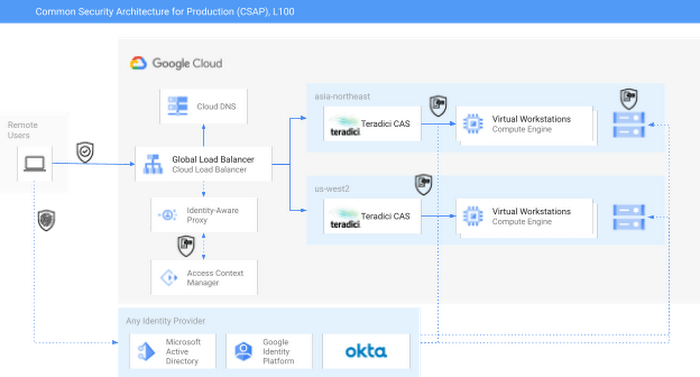
As you can see in the diagram, external identity providers (IdPs) such as Okta or Active Directory can serve as core security components of a CSAP L100 architecture. Alternatively, Google Cloud services such as Cloud Identity or Managed AD could be substituted.
Next, Google Cloud’s Identity-Aware Proxy (IAP) can be used in combination with Access Context Manager (ACM) to act as the first Policy Enforcement Point. This is an optional step, since it is somewhat redundant with the routing and authorization function performed by the native HP/Teradici Connection Brokers. However, IAP and ACM are core components of Google Cloud’s BeyondCorp architecture, on which CSAP is based. Additionally, adopting IAP with ACM offers productions the ability to swap out the Teradici PCoIP protocol for an alternative, such as Unity’s Parsec, without sacrificing security.
The Teradici Connection Broker is also a Policy Enforcement Point, since groups and role membership can be used to enforce access to specific workstations.
Finally, the identity context for each user is passed through to the storage layer. For some productions, Google Cloud Storage (GCS) buckets may offer enough functionality; GCS offers an S3-compatible API which should make it easy to immediately adopt OSS tools built for S3. Other options for this include the managed NetApp Cloud Volumes and Dell PowerScale for Google Cloud services. Both of these are managed shared storage services which offer file-level access controls using standard SMB/NFS permissions. There are also a variety of third-party filers available in the Google Cloud Marketplace, such as Nasuni. You can read more about those here.
For added security, both NetApp and PowerScale should be configured to use the private services access model in Google Cloud. This effectively limits any external access to these resources by only allowing traffic from user-managed VPCs into the Google-managed and peered VPC.
Following this architecture, you can see how to achieve CSAP L100 compliance by using either only Google Cloud services or a mix of managed and cloud-first services. In either scenario, access is managed through a unified control plane and based on both user identity and role. Zero Trust principles such as context-aware access and dynamic rulesets could further be applied to the Authentication step using either Google Cloud IAP or the equivalent services from Okta, Active Directory, or others.
At this weekend’s National Association of Broadcasters conference, Google experts will be talking about the cloud and content production, and the intersection of AI and media. The journey to 2030 is only just beginning.
End Security Risks with the Unattended Projects Recommender Feature

6144
Of your peers have already read this article.
3:00 Minutes
The most insightful time you'll spend today!
In fast-moving organizations, it’s not uncommon for cloud resources, including entire projects, to occasionally be forgotten about. Not only such unattended resources can be difficult to identify, but they also tend to create a lot of headaches for product teams down the road, including unnecessary waste and security risks.
To help you prune your idle cloud resources, we’re excited to introduce Unattended Project Recommender. It’s a new feature of Active Assist that provides you with a one-stop shop for discovering, reclaiming, and shutting down unattended projects. With actionable and automatic recommendations, you no longer have to worry about wasting money or mitigating security risks presented by your idle resources. Unattended Project Recommender uses machine learning to identify, with a high degree of confidence, projects that are likely abandoned based on API and networking activity, billing, usage of cloud services, and other signals. This feature is available via the Recommender API today, making it easy for you to integrate with your company’s existing workflow management and communication tools, or export results to a BigQuery table for custom analysis.
Thousands of projects can be unattended in large organizations, presenting major security risks
Your cloud projects can go abandoned or unattended for a number of reasons — ranging from a test environment that’s no longer needed, to project cancellation, to project owner switching jobs, and more. Not only can such projects contribute to your cloud bill (waste) but they may contain security issues such as open firewalls or privileged service account keys that attackers can exploit to get a hold of your cloud resources for cryptocurrency mining or, worse, compromise your company’s sensitive data. These security risks tend to grow over time because the latest best practices and patches are usually not applied to unattended projects.
We experience this issue here at Google, too… In fact, it has been on Google’s internal security team’s radar for some time now, so we joined forces and looked into this problem together, starting with our very own “google.com” organization cloud projects. We quickly found some projects that were unattended, but remediating this issue was easier said than done due to challenges in several areas:
- Detection: With lots of signals available to you via sources like Cloud Monitoring, what are the right ones you should look at (e.g. API, networking, user activity)? How can you tell the difference between an unattended project and a project that has a low level of activity by design (e.g. a “shell” project that holds an auth token)?
- Remediation: Once you have identified a project that seems abandoned, how do you go about ensuring that it’s indeed an unattended project? How do you reduce the risk of deleting something that might be essential to a production workload, causing irreversible data loss? How do you solve this at the scale of your entire organization, beyond a one-time cleanup?
Over the course of 2021 we built and tested a Google-internal prototype first, cleaning up many of our internal unattended projects, and then worked with a number of Google Cloud customers to build and tune this feature based on real-life data (thank you to all of our early adopters for working with us and your generous feedback that helped us shape this feature!) It was not uncommon for us to come across organizations with thousands of unattended projects, and we’re very excited to bring Unattended Project Recommender to all customers, in public preview.
Discovering and acting on unattended project recommendations
Unattended Project Recommender analyzes usage activity across all projects under your organization, including the following data:
- API activity (e.g. service accounts with authentication activity, API calls consumed)
- Networking activity (ingress and egress)
- Billing activity (e.g. services with billable usage)
- User activity (e.g. active project owners)
- Cloud services usage (e.g. number of active VMs, BigQuery jobs, storage requests)
Based on these signals, it can generate recommendations to clean up projects that have low usage activity (where “low usage” is defined using a machine learning model that ranks projects in your organization by level of usage), or recommendations to reclaim projects that have high usage activity but no active project owners. Here’s what an example post-processed summary list of recommendations can look like for the “foobar” organization that has 3 projects:
Project ID: demo-project-307815Recommendation: CLEANUP_PROJECTProject ID: new-projectRecommendation: N/AProject ID: bobs-playground-projectRecommendation: RECLAIM_PROJECT
In addition to the recommendations, you can also examine the underlying project activity insights that the recommendations are based upon. The insights provide additional information that can be useful for integration with your organization’s existing workflows and automation (e.g. send an auto-generated email or chat message to project owners based on the list provided by the owners field). Here’s an example insight payload:
content:activeAppengineInstanceDailyCount: 0activeCloudsqlInstanceDailyCount: 0activeGceInstanceDailyCount: 3activeServiceAccountDailyCount: 1apiClientDailyCount: 18922 // Daily average API calls producedbigqueryInflightJobDailyCount: 0bigqueryInflightQueryDailyCount: 0bigqueryStorageDailyBytes: 0bigqueryTableDailyCount: 0consumedApiDailyCount: 0 // Daily average API calls consumeddatastoreApiDailyCount: 0gcsObjectDailyCount: 11gcsRequestDailyCount: 0gcsStorageDailyBytes: 2663548hasActiveOauthTokens: false // OAuth tokens used in the last 180 dayshasBillingAccount: truenumActiveUserOwners: 1owners: // List of project owners- activeOnProject: falsemember: user:user1@example.com- activeOnProject: truemember: user:user2@example.comserviceWithBillableUsage:– Cloud Storage- Compute EnginevpcEgressDailyBytes: 264456938 // Daily average VPC egress bytesvpcIngressDailyBytes: 392435047 // Daily average VPC ingress bytesusagePercentile: 20 // Level of usage relative to other projects
GCP projects are used in many different ways and for many different purposes. In case you get a recommendation to delete a project that’s being used in a way that’s out of the scope for this feature, you can dismiss the recommendation and it will stop showing up for the given project.
Restoring deleted projects
When you choose to shut down a project using the projects.delete() method, it gets marked for deletion. After a project is marked for deletion, it becomes unusable, all resources within that project are shut down, and a 30-day wait period for the project and all of its data to get fully deleted begins.
In case a useful project is accidentally shut down, you have the option to restore the project within that 30-day wait period. Since restoring allows you to recover most but not necessarily all of your project data and resources, we recommend carefully examining the utilization insights associated with a project and considering any additional utilization signals that may not be captured by the Unattended Project Recommender before taking the cleanup action.
Early customer success stories
A number of enterprise customers are already using Unattended Project Recommender to keep their organizations clean of unattended projects and resources.
Decathlon, a French sporting goods retailer, is excited for the insight Unattended Project Recommender will bring to their environment, and are already deploying it as a part of their latest cloud security initiatives.
“After a thorough test of this feature and the validation of our CISO, we ended up deleting our first 775 projects, and no one complained! A great help to improve our security. The next step for us will be to operationalize it at scale, and implement a company wide policy for unattended resource management.” —Adeline Villette, Cloud Security Officer
For Veolia, one of the world’s largest water, waste and energy management companies, not only does this feature reduce security risks and waste, but also helps drive cultural shift and alignment with its ecological transformation strategy.
“This feature allows us to reduce our costs and security debt on assets that are no longer in use, and is also fully in line with Veolia’s philosophy of limiting its carbon footprint. After having tested Unattended Project Recommender on more than 3,000 projects throughout our organization, we are looking to bring it as proactive alerts to our project owners at scale.”—Thomas Meriadec, Product Manager
Box, a secure cloud content management provider, views it as a foundation for building a repeatable process to remediate unused resources.
“Unattended Project Recommender is a great fit for us. It gives us a unified view of project usage across our entire organization and enables us to address security risks of legacy projects in a systematic and organized manner, ensuring an even safer environment.” —Matt Bowes, Staff Security Engineer
Getting started with the Unattended Project Recommender
To help you get started, we’ve prepared a Cloud Shell tutorial (source code) that you can use to find unattended project recommendations within your own Projects/Folders/Organization. Click this button to clone the tutorial from GitHub and run in your Cloud Shell environment:

As you can see, listing recommendations for your projects only takes a few clicks with the tutorial (special thanks to Lanre Ogunmola, Security & Compliance Specialist, for making this look so easy)! For additional detail on using the gcloud CLI or API to discover unattended project recommendations, please refer to the documentation page.
You can also automatically export all recommendations from your Organization to BigQuery and then investigate the recommendations with DataStudio or Looker, or use Connected Sheets that let you use Google Workspace Sheets to interact with the data stored in BigQuery without having to write SQL queries.
As with any other Recommender, you can choose to opt out of data processing at any time by disabling the appropriate data groups in the Transparency & control tab under Privacy & Security settings.
We hope that you can leverage Unattended Project Recommender to improve your cloud security posture and reduce cost, and can’t wait to hear your feedback and thoughts about this feature! Please feel free to reach us at active-assist-feedback@google.com and we also invite you to sign up for our Active Assist Trusted Tester Group if you would like to get early access to the newest features as they are developed.
Fully-managed-zero-trust Security Solution, Traffic Director Integrated with CA Service

4980
Of your peers have already read this article.
1:30 Minutes
The most insightful time you'll spend today!
We created Traffic Director to bring to you a fully managed service mesh product that includes load balancing, traffic management and service discovery. And now, we’re happy to announce the availability of a fully-managed zero-trust security solution using Traffic Director with Google Kubernetes Engine (GKE) and Certificate Authority (CA) Service.
When platform administrators and security professionals think about modernizing their applications with a forward-looking security posture, they look for “zero-trust” security. This security posture is based on few fundamental blocks:
- A means of allocating and asserting service identity (for example, using X.509 certificates)
- Mutual authentication (mTLS) or server authentication (TLS)
- Encryption for all traffic flows (TLS encryption)
- Authorization checks and minimal privileges
- Infrastructure to make all of the above manageable and reliable
Traffic Director does this by integrating with CA Service, a highly available private CA which issues private certificates expressing service identities, and provides a managed mTLS certificate infrastructure with full certificate lifecycle management. Together, these solve both certificate issuance and CA rotation complexities.
With Traffic Director managing your service-to-service security, you can now enjoy end-to-end encryption, service-level authentication and granular authorization policies for your service mesh.

With this new capability, you can now:
- Implement mutual TLS (mTLS) and TLS between your services, including certificate lifecycle management. Communications within your mesh are authenticated and encrypted.
- Enable identity-based authorization, as well as authorization based on other parameters (such as the request method). These concepts underpin role-based access controls (RBAC) and enable you to take a “least privileges” stance where only authorized services can communicate with each other based on ALLOW/DENY rules.
mTLS is supported whether you’re using Envoy or proxyless gRPC for your service mesh. Authorization support for proxyless gRPC is coming later this year. Check out our documentation to learn more and get started with Envoy or proxyless gRPC.
More Relevant Stories for Your Company
Google Cloud’s Invisible Security Vision: Key Highlights
Yesterday we held our final Google Cloud Security Talks event of 2021. Our event focused on zero trust and covered everything from Google’s history with BeyondCorp to our strategic thinking when it comes to applying zero trust principles to production environments. We shared product updates across the portfolio and talked about how

Latest News: Secure Digital Infrastructure Services with Apigee Advanced API Security for Google Cloud
Organizations in every region and industry are developing APIs to enable easier and more standardized delivery of services and data for digital experiences. This increasing shift to digital experiences has grown API usage and traffic volumes. However, as malicious API attacks also have grown, API security has become an important

Google Cloud Announces General Availability of BigQuery Row-level Security
Data security is an ongoing concern for anyone managing a data warehouse. Organizations need to control access to data, down to the granular level, for secure access to data both internally and externally. With the complexity of data platforms increasing day by day, it's become even more critical to identify

Tips and Best Practices: Ensuring Cloud Configuration Compliance
Security is often seen as a zero-sum game between “go fast” or “stay secure.” We would like to challenge this school of thought and introduce a framework to change that paradigm to a “win-win game,” so you can do both—“go fast” and “stay secure.” Historically, application security tools have been
