





15 Companies–from Korean Air to Salesforce–Share How G-Suite and Google Meet Help Them Battle COVID-19

5055
Of your peers have already read this article.
4:30 Minutes
The most insightful time you'll spend today!
More than a decade ago we introduced secure, easy-to-use business collaboration and productivity apps (now known as G Suite), and we envisioned a new way of working in the cloud. And although we always knew the value of cloud-based collaboration, it is more important than ever at a time like this.
Over the past several weeks, we’ve seen Google Meet—G Suite’s video conferencing solution—help millions of people stay connected, whether it’s colleagues working at home, companies livestreaming to global employees, doctors caring for patients, banks providing loans, retailers and restaurants helping the elderly place orders for home delivery or curbside pickup, social services conducting welfare checks, governments serving citizens, or schools staying in session.
In the first week of April Earlier this week, we surpassed a new milestone, with more than 2 million new users connecting on Google Meet every day, and they’re spending over 2 billion minutes together—that’s more than 3,800 years of secure meetings in a single day. We’re humbled by the huge responsibility that comes with this growth, and we’re determined to continue doing our part to help.
Here’s a little more on what that means.
Meet, and all of G Suite, runs on Google’s secure, resilient global infrastructure, which helps us reliably manage our capacity to keep our services up and running. With Meet, organizations around the world can take advantage of the same secure-by-design infrastructure, built-in protection, and global network that Google uses to secure your information and safeguard your privacy. You can learn more in our Google Meet security blog post.
Last month, we made advanced Google Meet video-conferencing capabilities available at no cost to all G Suite and G Suite for Education customers. We’ve now extended that availability to September 30, 2020 to ensure businesses, organizations, institutions, and educators continue to be supported during this time.
Earlier this year, G Suite also hit another important milestone, surpassing six million paying businesses and organizations. We’re acutely aware of our responsibility to these teams as they support their own constituents, patients, students, and customers during this pandemic. Here are a few stories they’ve shared.
Cambridge Health Alliance, a health system with 140,000 patients in Cambridge, Somerville, and Boston’s Metro North region, has relied on G Suite to support its staff and caregivers. “We didn’t realize how integral G Suite had become to our daily work until dealing with a pandemic where consistent communication with our CHA staff was of utmost importance,” said James LaPlante, Sr. Director, Technology and Biomedical Services. “With one click, staff have been able to connect from their Gmail, Calendar, or from Meet-enabled conference rooms across three hospitals, 15 health centers, or from home.”
In the UK, Hackney Council is using G Suite, Meet and Chromebooks to keep its team of 4,000 staff connected and to make sure that essential services can still be delivered for its citizens.
In Peru, the Judiciary branch is using Meet to continue operating during the nation-wide quarantine. Through video conferences they are carrying out both internal meetings and also hearings. By doing this, attorneys, lawyers and judiciary clerks don’t have to physically attend court, keeping the virus from spreading, while maintaining the administration of justice in the country.
Korean Air has transformed its internal business system with G Suite since July 2019, creating a positive company culture. Employees communicate effectively with G Suite in a variety of ways, including chat, voice, and video, which reduces decision-making time. Korean Air recently opened a ‘Google G Suite Meeting Room’ within the company to further enhance its cloud-native communication capabilities and accelerate mobile-based collaboration.
German manufacturing company KAESER Compressors adopted G Suite in 2018, which allowed them to transition 4,000 employees to working from home smoothly, with minimal disruption. They are using G Suite to connect with customers and job applicants.
When their news anchor voluntarily self-quarantined after suspecting he had been in contact with a person with COVID-19 during a convention, Milenio Televisión, a Mexican television cable news channel, had to figure out how to keep their show on the air. They chose Meet for its security, and high quality image and sound. Milenio Televisión is now broadcasting multiple shows through Meet and has been using the tool to have video conferences with correspondents in other countries.
To help its staff cope with the impact of COVID-19, Italian bank Credem (Credito Emiliano S.p.A.) relied on G Suite, in particular Drive, Docs, and Meet, to seamlessly adapt to a collaborative work-from-home environment. It’s also helping them maintain business continuity, relying on Meet to continue to meet one-on-one with customers.
In the Philippines, the Department of ICT (DICT) is responsible for the planning and development of information and communications technology. As a result of COVID-19, the department has been continuously seeking ways to improve its programs and services to help quarantined workers and citizens, including use of GovMail, which is built on G Suite, Google Chat, and Google Meet. “The migration to cloud-based GovMail which started last year has proven to be particularly useful for remote government operations in this time. Coordination between government agencies is more organized, resulting in faster responses benefitting their constituents,” said Emmanuel Rey Caintic, DICT Assistant Secretary for Digital Philippines.
Kärcher, a German company known for its wide range of cleaning products, had initially planned to roll out G Suite to its workforce by 2021. In response to the pandemic, Kärcher rapidly accelerated their rollout, deploying G Suite to its entire 14,000 workforce in only five days. As of the end of March, Kärcher’s number of weekly active Meet and Chat users has grown by 20X.
Salesforce’s CRM solution brings companies and customers together, and they turned to G Suite to bring their own teams together. “With Salesforce employees working from home given COVID-19, innovative solutions like Meet are even more critical for effective virtual collaboration,” said Andy White, VP, Platform Engineering Salesforce. “Even with 2x our daily video calls—50,000 every workday—Google Cloud’s scale and support keep our teams reliably and seamlessly connected.”
The team at Shopify, a leading global commerce company, is relying on Meet to help them keep their workforce connected. “Even with the demand surges seen around the world, recently we had a 20 person meeting livestream to 4,000 people and there were no issues,” said Garth Pyper, Director of Technical Infrastructure. “Google Meet is our primary means of video conferencing across 5,000 people at Shopify, and we are grateful for the security, reliability, and flexibility it provides.”
With the global move to a fully remote workforce during COVID-19, software company Xero has embraced G Suite to help them make a smooth transition. “Google Meet is vital in keeping our teams socially connected, and Docs, Gmail and the full G Suite family of apps has the team’s productivity and collaboration working as if we were in the office. The reliability and performance of G Suite has allowed the IT team to focus on other challenges we face with a remote workforce.”
In Singapore, NTUC Fairprice Co-Operative, the largest supermarket chain of the island nation, has experienced a surge of 400%+ increase in capacity needs as customers urgently prepare for COVID-19 with in store and online purchases of all the necessities. With the help of G Suite, NTUC was able to handle this increased demand even as they transitioned the vast majority of their workforce to remote work.
Schnucks, a family-owned supermarket retailer with 100 stores in Missouri, Illinois, Indiana, Iowa and Wisconsin, was able to think outside the box to keep their business running and employees safe and connected. “We are running our Helpdesk 24/7 on Google Meet so that both our corporate and in-store employees can join in and get questions answered quickly. Our transportation department is able to practice social distancing by using a Google Meet ‘hotline’ as the WFH dispatch platform.”
Meet had long been the standard collaboration tool for TELUS International, which provides customer experience solutions for global brands. “The Meet platform has helped us maintain and foster our caring culture as we transitioned from an on-site workforce to a work from home model,” said Michael Ringman, Chief Information Officer. “Whether through real-time collaboration, live meetings or a little stress relief with some virtual happy hours, our team’s ability to reliably connect ‘face-to-face’ through Google Meet has been integral to keeping us engaged despite the distance between us.”
These are just a few of the many stories we’ve heard. We’ll continue to support all our users to stay connected in the cloud. Read more on how Google Cloud is supporting businesses and communities here.
5027
Of your peers have already watched this video.
1:50 Minutes
The most insightful time you'll spend today!
Small Fish Farmer Shows Big Corporates How to Be More Efficient
Red Deer, Canada is known for a lot of things. It’s the first city in Canada, for example, to have had a court case to include female jurors.
But, more recently, it’s made headlines for something on the outskirts of the city.
Just 22 minutes out of Red Deer is the Smoky Trout Farm, a family-run fish farm business that also specializes in lake and pond water management.
What’s amazing is how this tiny operation is taking a leaf out of the IT strategy followed by large corporations, including the likes of Whirlpool, Usha Martin, and Salesforce.
Smoky Trout Farm, started out by supplying rainbow trout to owners of private ponds and lakes in 1998. The nature of the business, however, made time a precious commodity. By 2016, the father and son duo, Dan and Max Menard, who started the business, found themselves unable to do more because they didn’t have the time.
“It’s 24×7. If we have something happen, then you can start to lose your crop (of fish) in 15 minutes. Consequently, someone is always here (the Smoky Trout Farm HQ). It has its days,” says Dan.
That’s when Dan’s other son Ray Menard decided to pitch in. He introduced the business to G-Suite, ensuring they could collaborate better and be more efficient.
“I was trying to make it more efficient so that they’d have more time to do what they do best. Google was basically an instant solution,” says Ray.
Find out how Smoky Trout Farm bucked the trend and the benefits it achieved. Watch this two-minute video.
6563
Of your peers have already watched this video.
17:00 Minutes
The most insightful time you'll spend today!
Eli Lilly’s Custom-built Translation Service Leverages Google’s Translation Engine
Eli Lilly leverages Google Cloud’s machine translation to globalize content to serve their multilingual employees. Watch the video to learn how the healthcare company built an in-house solution powered by Google Cloud APIs to address the challenge of translating multilingual content at scale. Also explore Google’s innovations and investments into services for language translations produced for machine learning (also called as machine translation or neural machine translation) for safe and secure documents and text translation via an easy-to-use interface and API.
Building the future of work with Google Workspace

4408
Of your peers have already read this article.
7:30 Minutes
The most insightful time you'll spend today!
Since we launched Google Workspace last October, we’ve heard from many of our customers—from global enterprises to small businesses—about the new ways they’re connecting, creating, and collaborating, often across living rooms, time zones, and continents. This response propels us on our mission to build for the future with a solution that’s flexible, helpful, and inspires innovation. We’re proud to support the millions of customers and billions of end-users who trust Google Workspace to bring their own future visions to life.
Today, we’re excited to announce new innovations in Google Workspace that will further empower all the ways work happens—and deepen its impact—in an ever-changing world. These updates include a frontline worker solution, a set of features to help people find more time and focus, and powerful tools for strengthening collaboration.
Learning from our own transformation
At Google, like many of the organizations we support, we’ve been in a state of change, experimentation, and transformation this past year, as we reimagine what work will look like in the post-pandemic future. According to a Gartner survey, 90% of respondents plan to allow employees to work remotely at least part of the time even after the COVID-19 vaccine is widely adopted. This hybrid blend of at-home and in-office work will become the norm for many businesses.
As a company, we’ve been focused on how we can make this new hybrid work model support collaboration and innovation, and enhance inclusion and wellbeing for Google employees. We’re especially interested in what we call collaboration equity, or the ability to contribute equally, regardless of location, role, experience level, language, and device preference. We’ve been experimenting with ways to bridge the gap between the in-person and the “somewhere else” by pushing our technology and the physical spaces of our campuses to be more inclusive. We’re looking for ways to maximize participation everywhere we can—from personal desk space to conference rooms to group collaboration areas.
Google Workspace is at the nexus of Google’s own transformation. After all, Google Workspace was built in the cloud to power flexible, real-time, anywhere creation and equitable collaboration. Whether it’s with our Google Meet Series One hardware kits that enable safe, touch-free meetings and use Google AI to create immersive and inclusive experiences for all. Or the ways we help people focus their time and attention with intelligent, proactive suggestions that thoughtfully connect distributed content, people, and conversations. Or the features that promote inclusion, like live captions in multiple languages, so that everyone can participate effectively in video meetings.
It’s all part of Google Workspace’s mission to enable a hybrid work experience that enhances collaboration, strengthens human connection, and increases wellbeing for people—wherever they are and however they work.
And we’re inspired to hear how Google Workspace has been at the center of our customers’ evolving work plans, helping to forge human connection during a time of change for businesses like Sony Pictures Imageworks and Airbus.
“As we look to the next chapter in the future of work, Google Workspace will continue to keep us connected, wherever we are. Google Meet helps us build trust and relationships, not only within the studio, but with a worldwide network of talent. And Chat is our go-to for sharing ideas and feedback during production meetings in real-time. Google Workspace is how we work together to create together!”
– Mike Ford, VP, Software Development and Systems Engineering at Sony Pictures Imageworks
“Airbus has spent the past year thinking about what it actually means to return to work and we’re looking to support greater flexibility with Google Workspace in a leading role. In 2020, we held 5.6M Google Meet sessions and we now have more than 70,000 shared Drives where people collaborate. Google Workspace has changed the way people work at Airbus and that will continue as the solution empowers the hybrid work reality.”
– Andrew Plunkett, Airbus Vice President Digital Workplace
New ways to help businesses make an impact in changing times
Today, we’re announcing new tools and features to help people make the most of their time, collaborate equally, and deliver more impact. We’re also announcing new security tools with Assured Controls and expanded Data Regions coverage. Assured Controls will allow customers to make decisions about how to control provider access, while expanded Data Regions coverage helps customers choose where their data is geographically located at rest.
Enabling collaboration equity on the frontlines
From nurses to grocery store associates to warehouse employees, essential frontline workers have played a crucial and often heroic role during the pandemic. Despite their importance, those on the frontlines seldom have access to the same collaboration and communication tools that keep knowledge workers informed and connected. As a result, frontline workers often resort to their own personal devices and apps to get the information they need, when they need it.
In the coming weeks, we’ll be launching Google Workspace Frontline with these challenges in mind. This will open up communication and collaboration channels between frontline workers and corporate teams in a way that’s safe and secure. Workspace Frontline is a custom solution that includes communication and collaboration apps like Gmail, Chat, Docs, Drive, and more, as well as business-grade support and security features like advanced endpoint management that help keep a company’s data secure.
We’ve also made it easier for business teams to build custom AppSheet apps directly from Google Sheets and Drive, so that frontline workers can digitize and streamline their work, whether it’s collecting data in the field, reporting safety risks, or managing customer requests. By closing the gap between the frontline and the corporate team, we’re giving frontline workers secure access, on any device, to the information they need to be at their best.
Managing time and attention
To help people save valuable time, we’re excited to share that using Google Workspace with Google Assistant is now generally available. You can ask Google what’s next on your work calendar, to quickly join meetings, or to send a message. Google Assistant is currently available for Google Workspace on supported mobile devices and is in beta for smart speakers and Smart Displays, like Nest Hub Max. Google Workspace customers can learn how to enable this feature for their users here.
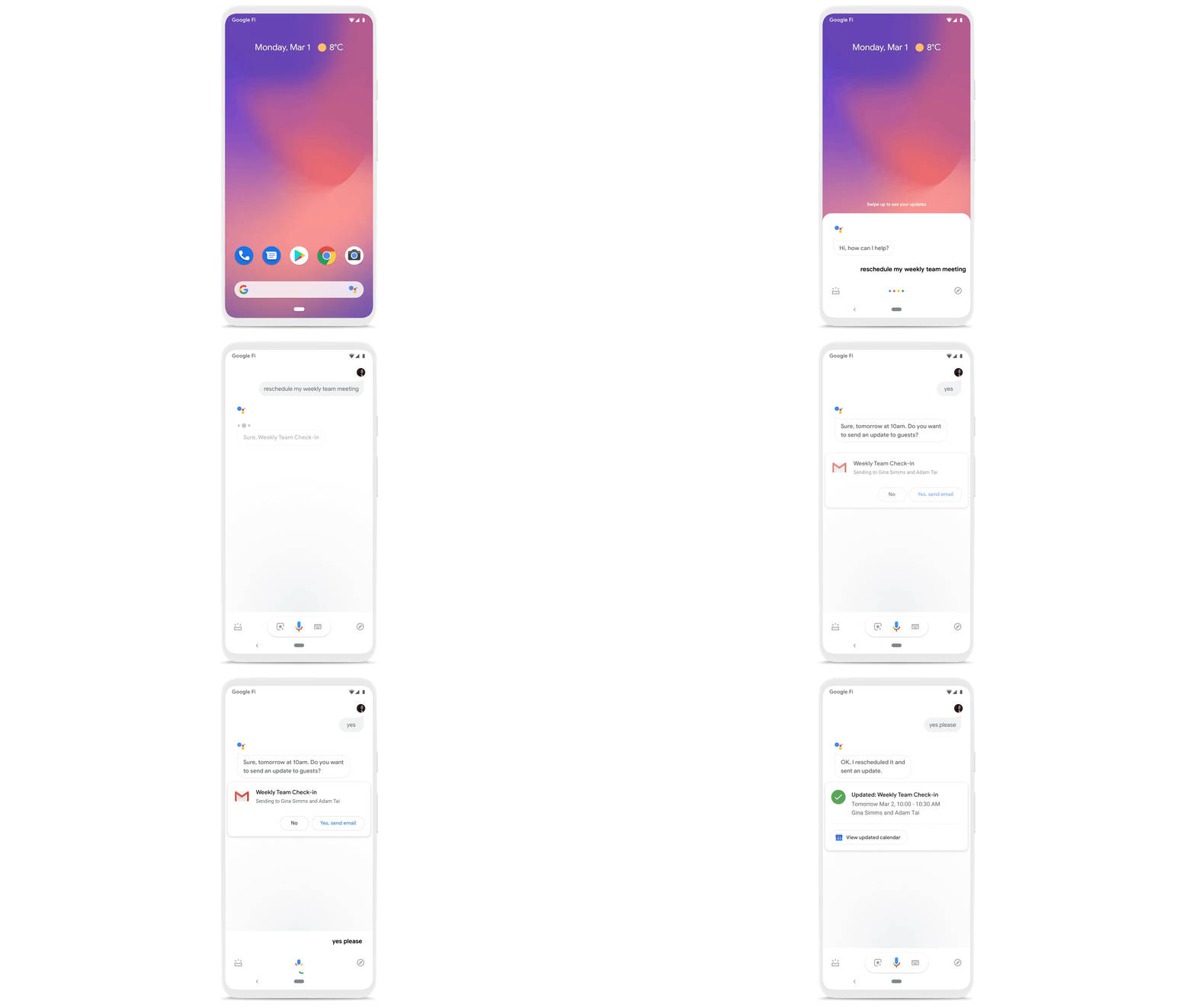
Elsewhere on the time management front, a key trend we’re seeing in today’s workforce is the juggling of professional and personal responsibilities, with many employees now working in “sprints,” like two- to four-hour blocks of time instead of the traditional workday. As more businesses embrace a flexible, hybrid model, we expect this trend to continue, and we’ll all need tools to help us achieve better work-life balance and make the best use of our time.
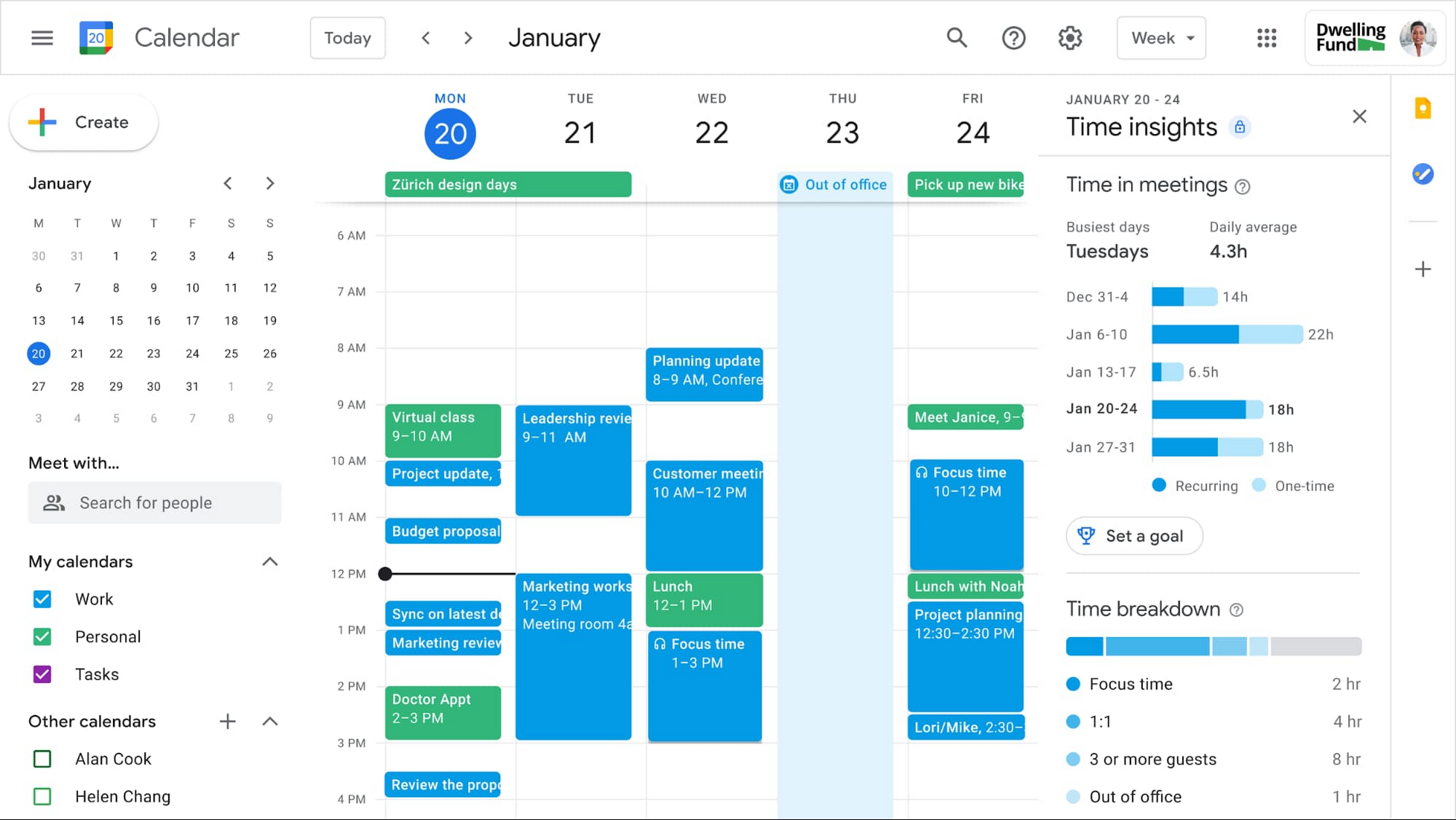
In the coming weeks, we’re releasing an integrated set of features in Google Workspace that help people easily share their work hours and location, while also finding more time to focus on what matters most. Features like segmentable working hours, recurring out-of-office entries, and location indicators let employees share their availability and location with their colleagues. Meanwhile, a new event type—Focus Time—lets people minimize distractions by limiting notifications during these event windows. All these availability and location indicators will show up seamlessly across Google Workspace, as teams engage with Calendar, Meet, Chat, and Gmail. We’ll also be delivering Time Insights to Google Workspace users (visible to the employee only, not their manager), so that employees can assess how they’re spending their time against their own priorities.
Strengthening collaboration equity for all
Ever since we pioneered real-time document editing fifteen years ago, collaboration has been a cornerstone for Google Workspace. In the coming months, we’ll make collaboration more equitable and accessible in a number of ways. First, we’re creating second-screen experiences in Google Meet for those using a mix of devices to host their meetings, like Google Meet hardware for those in conference rooms and Nest Hub Max for those at home. With new second-screen capabilities, people can present and fully participate in the Google Meet experience, including with chat, polls, and Q&As, from any device, no matter where they are.
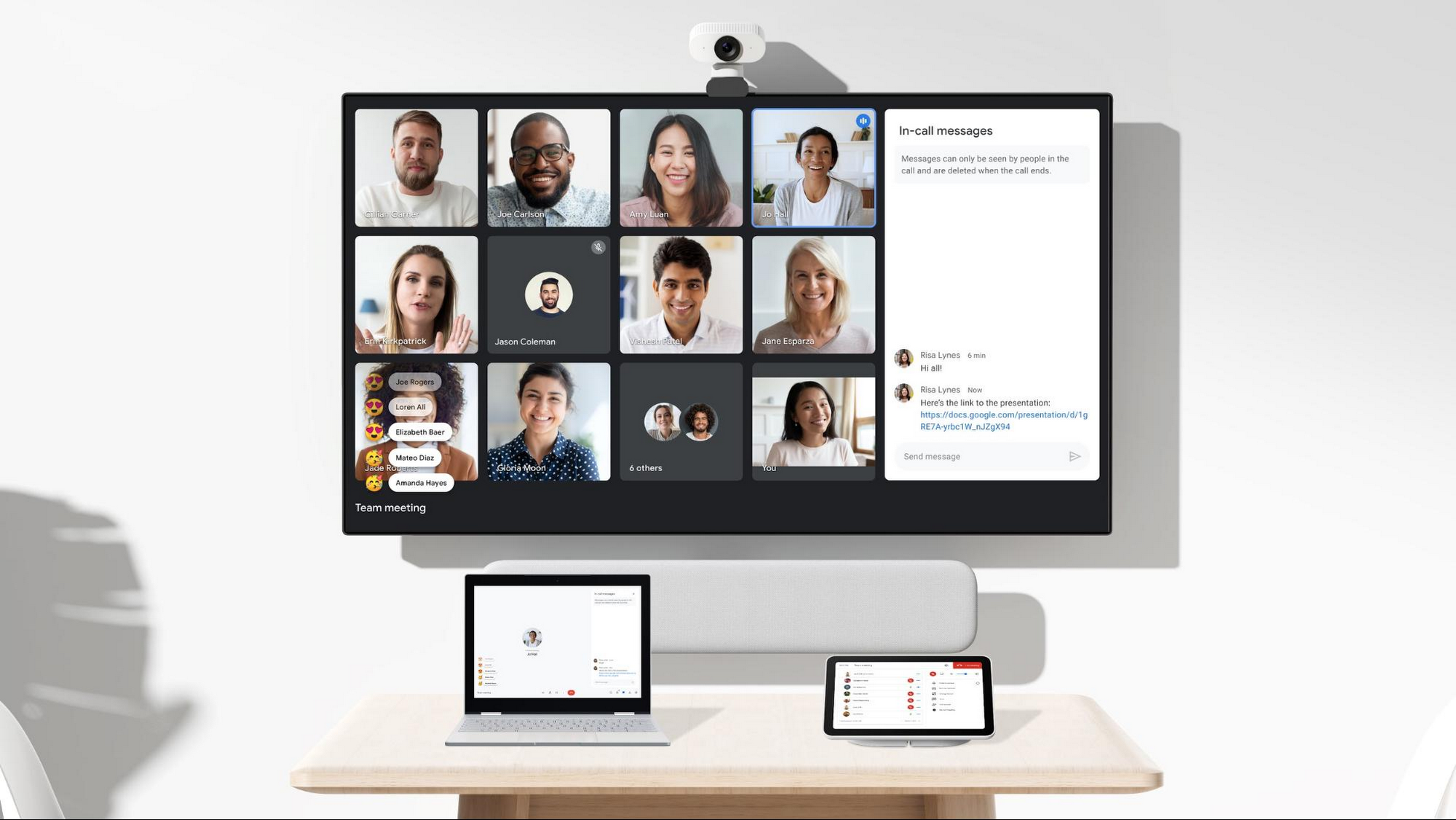
And specifically for those joining meetings from their mobile devices, we’re making it easier to have a bigger impact on a smaller screen. We’re rolling out mobile tile view so you can see more people at once, while split-screen and picture-in-picture support on Meet mobile will help you seamlessly chat or browse your Gmail without missing the visual thread of a meeting. Mobile support for background replace, Q&A, and polls will also help you stay productive and connected on the go.
Live streams will also become more powerful and inclusive in Google Workspace with the addition of Q&A, polls, and live captions (in English, Spanish, German, Portuguese, and French). And because we recognize how organizations are connecting across different groups of people, we’re also enabling live streaming across multiple Google Workspace domains within the same organization.
Finally, to give teams even more ways to connect and collaborate, we’re adding Chat, Jamboard, and Calendar to Google Workspace Essentials.
Building the future of work—together
If there’s a mantra that captures the last year of work, it might be “flexibility in the face of change.” It’s how our customers and our own employees have bridged the physical distances to continue making an impact in a rapidly changing world. As work continues to evolve for all of us, Google Workspace is committed to providing a solution that’s flexible, helpful, and that fuels innovation. We’re also committed to enabling collaboration equity wherever and however we can. At its core, this has been our mission for more than a decade and we’re excited to partner with our customers and users to continue bringing it to life.
Bigbasket: Delivering Groceries Across 25 Cities in India

7325
Of your peers have already read this article.
1:30 Minutes
The most insightful time you'll spend today!
When Bigbasket was founded in December 2011, it guaranteed to deliver goods within a one-hour delivery slot of its customers’ choosing or it would refund them 10 percent of their orders. The company also introduced an express service, delivering groceries within 90 minutes of an order being placed.
Bigbasket needed a mapping platform that could help it meet its delivery times, and offer a familiar interface to customers. MediaAgility, a digital consulting company, recommended Google Maps Platform to Bigbasket.
When customers use the Bigbasket mobile app to place orders, they select their locations on a Google Map. The prices and availability of groceries varies according to location, so a customer’s location determines the cost of the order and what can be ordered.
Google Maps Platform Results
- Bigbasket handles more than one million orders per month, and delivers in more than two dozen cities in India
- Bigbasket now has more than four million customers
- Orders are delivered on time, increasing customer loyalty
It is also used to determine driver routes. Bigbasket used the Maps Javascript API to build a web-based app for the company’s backend that tracks all orders and delivery progress. Dispatchers use the Directions API to match drivers with orders and customers, and the Distance Matrix API to get estimate the time of arrival for deliveries. As dispatchers track the progress of deliveries on the map, they can tweak routes as necessary.
“We’ve built Bigbasket from the ground up using Google Maps Platform. It makes sure we have the right customer locations and deliver to them on time. We couldn’t have started Bigbasket without Google Maps. It helps us to be fast and efficient, and make sure our customers get what they’ve ordered quickly,” said Pramod Jajoo, Chief Technology Officer, Bigbasket
6 ways Google Workspace helps IT admins safely use BYOD

4198
Of your peers have already read this article.
6:30 Minutes
The most insightful time you'll spend today!
Many organizations, including Google, have moved quickly to embrace working from home. With this widespread remote work, it’s never been more important for IT admins to be certain that every device in their organization is secure, even when that device isn’t company-owned.
We pioneered zero-trust security through our BeyondCorp strategy and leverage it to offer advanced security for G Suite* users to protect secure access for all devices. Admins can enforce these controls across G Suite and other corporate applications and data, ensuring consistent security and user experience across your organization.
Today, we’re laying out six key controls that IT admins can use within G Suite to help keep their organizations safe when using the bring your own device approach (BYOD). You can also review our detailed security checklist here, and learn more from our course on Managing G Suite here.
Secure mobile and desktop devices with endpoint management

BYOD devices can differ widely across an organization, with a range of OS versions, hardware modes, patch versions, and more, so it’s impossible to rely on a one-size-fits-all approach to device management. With Google endpoint management, IT admins can easily support a variety of mobile and desktop devices by enforcing measures like minimum software versions and blocking jailbroken or rooted devices, in many cases without requiring full device rights for employee privacy.
When it comes to managing mobile devices, G Suite offers basic and advanced mobile device management:
- With basic mobile device management, BYOD devices are secured with baseline security features with no end user friction. Admins can enforce a passcode, get a device inventory, wipe Google accounts remotely, and even remotely install applications on Android devices.
- With advanced mobile device management, admins can apply more policy controls over BYOD devices, and Android users can keep their personal data private and separate from their work data with Android Work Profiles. You can also allow and manage work apps on iOS and Android devices.
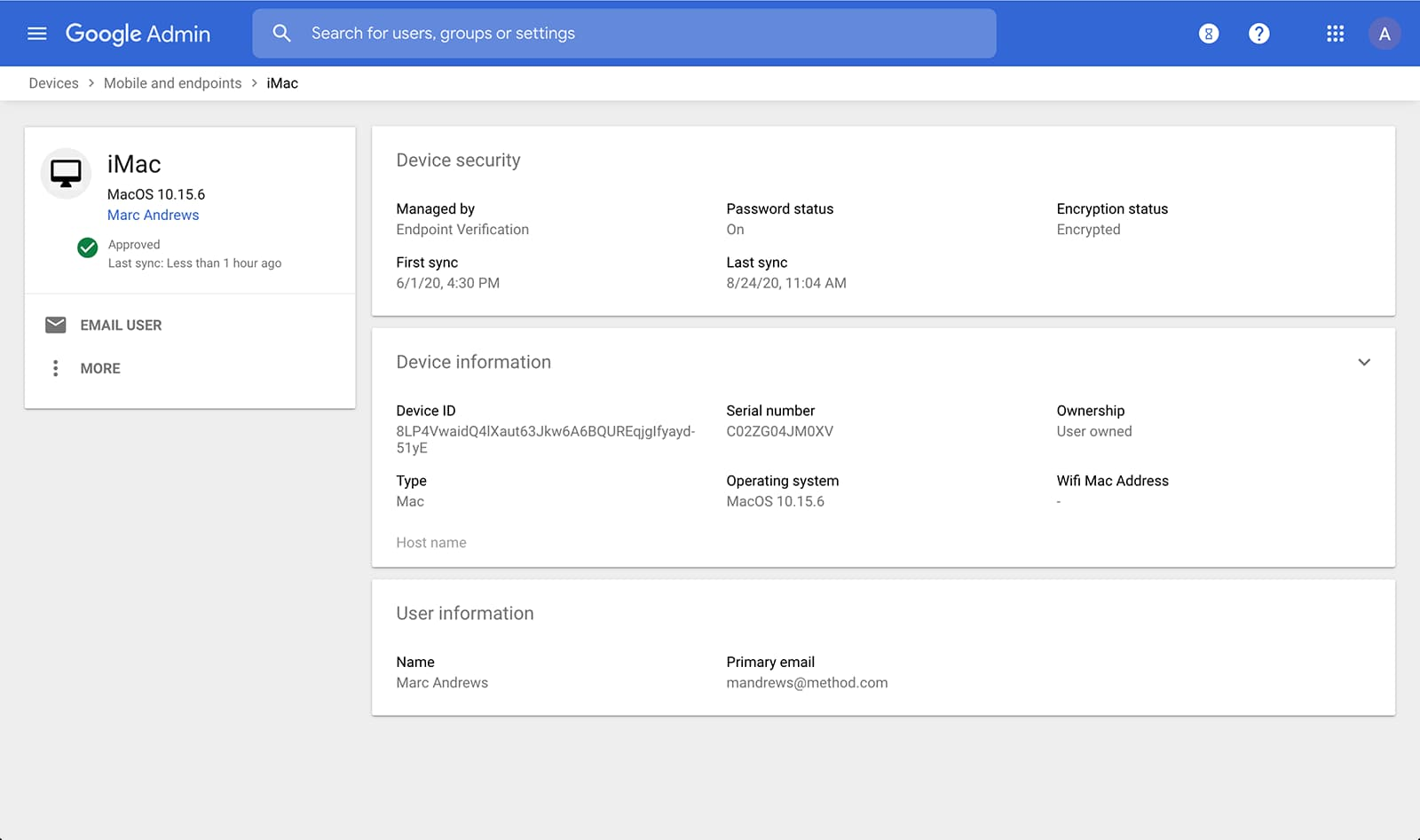
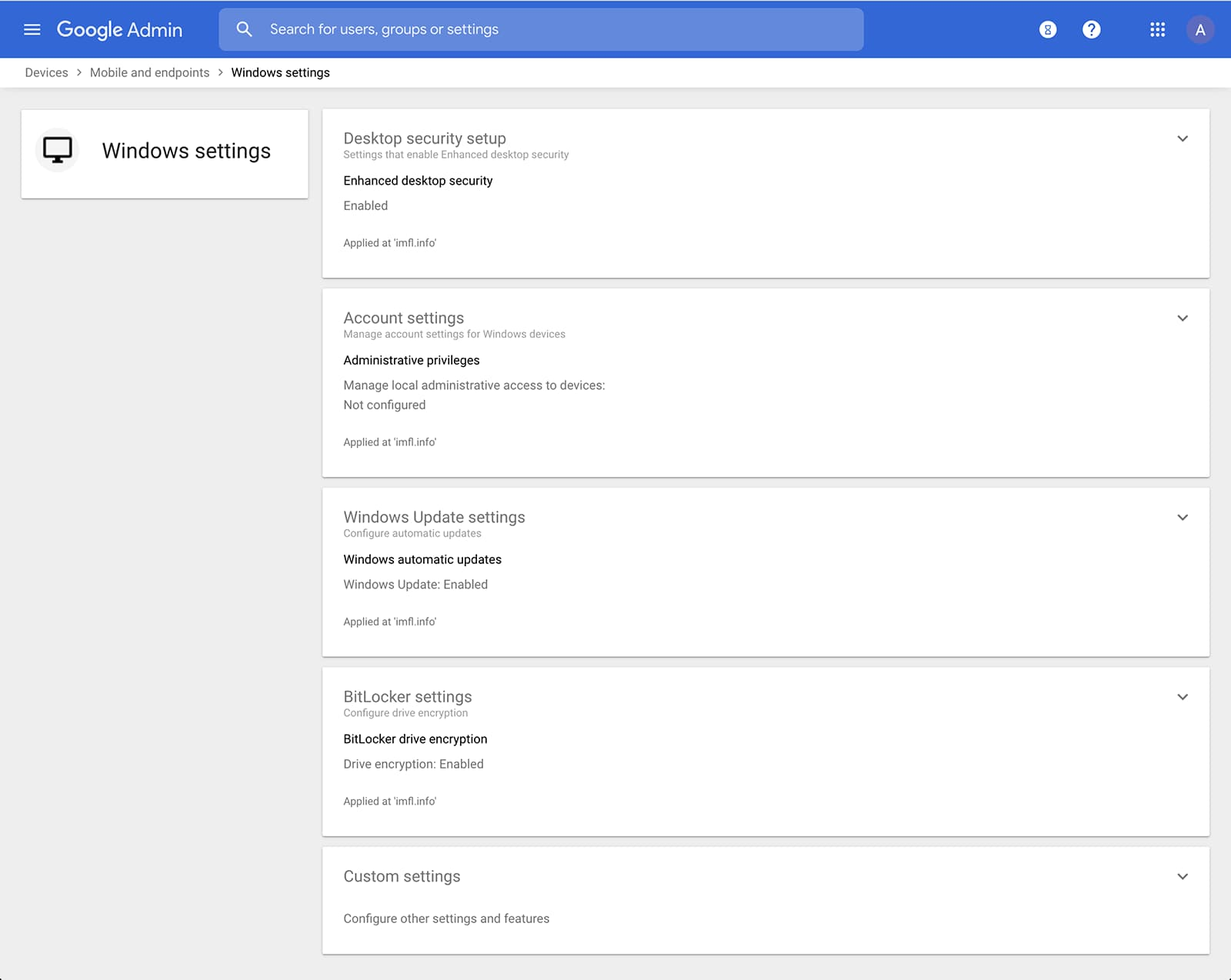
Admins can also manage and secure desktop devices with fundamental device management and enhanced desktop security for Windows. With fundamental device management, when a user logs into G Suite through any browser on a Windows, Mac, Chrome, or Linux device, that device will be automatically enrolled with endpoint management. This provides a base level of security to every desktop device that accesses G Suite data. With enhanced desktop security for Windows, admins can easily manage and secure Windows 10 devices through the admin console.
Enable secure connections without a corporate VPN using context-aware access
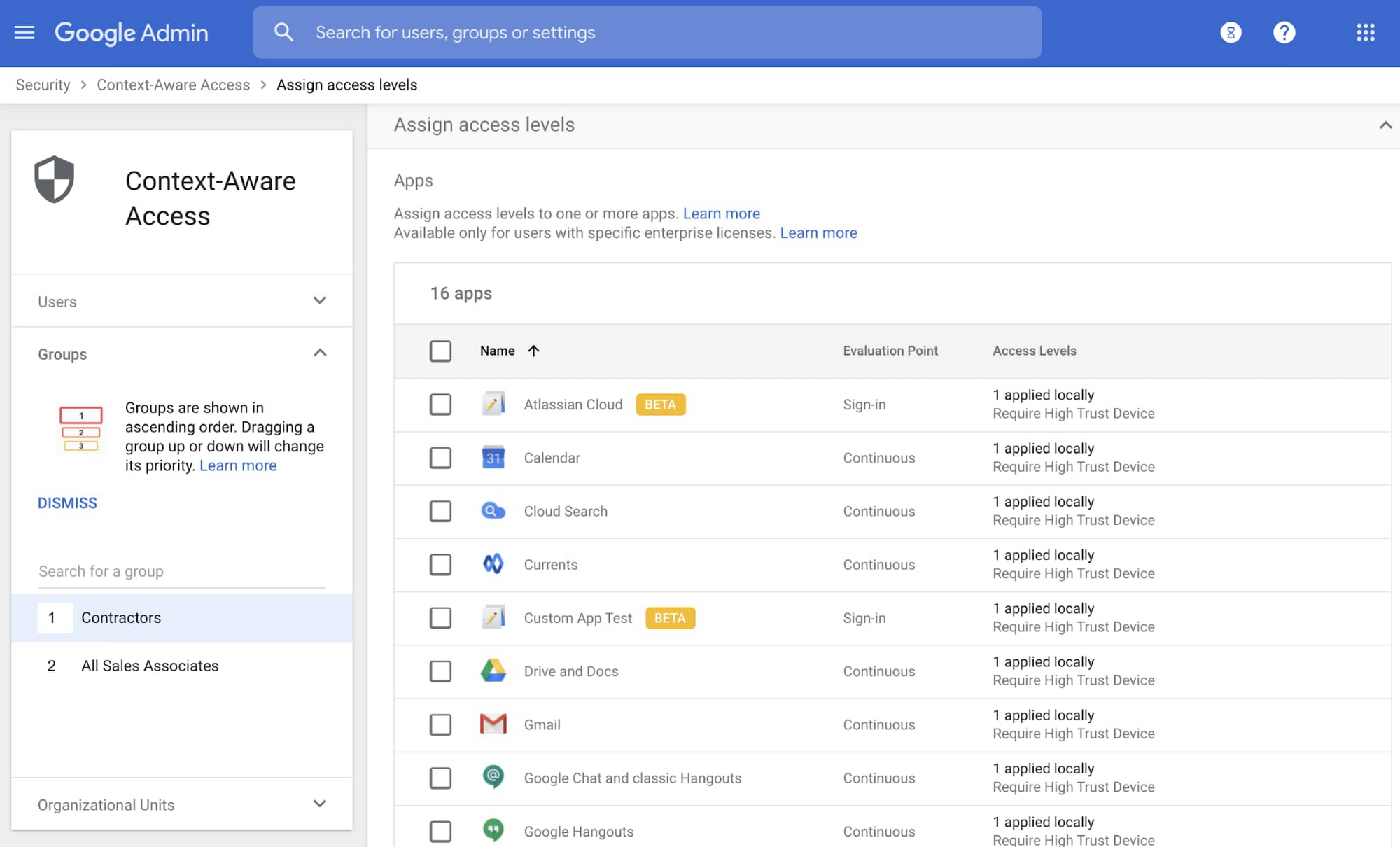
Context-aware access offers protection from unwanted access to G Suite services without the need for a VPN, and allows admins to set up different access levels based on a user’s identity and the context of the request, taking into account factors such as the country, device security status, and IP address of the request. For example, you can require BYOD devices accessing G Suite to meet encryption and password requirements, or restrict contractors from accessing G Suite from company managed Chromebooks.
Control data access with app access control
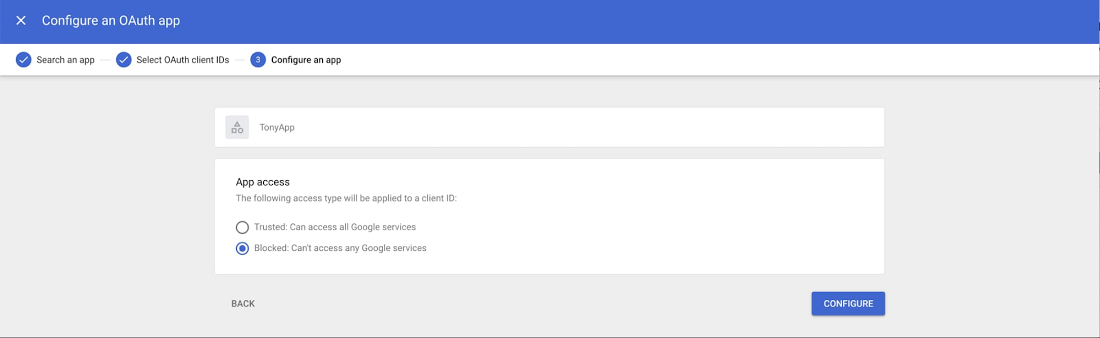
It’s important to protect all devices in your organization—corporate or BYOD—from malicious apps trying to gain access to corporate data. Using app access control, admins can take steps to prevent these apps from tricking users into mistakenly granting access to corporate data. With this feature, admins can choose which third-party apps are allowed to access users’ G Suite data by explicitly trusting, limiting, or blocking access for apps.
Enforce 2-Step Verification
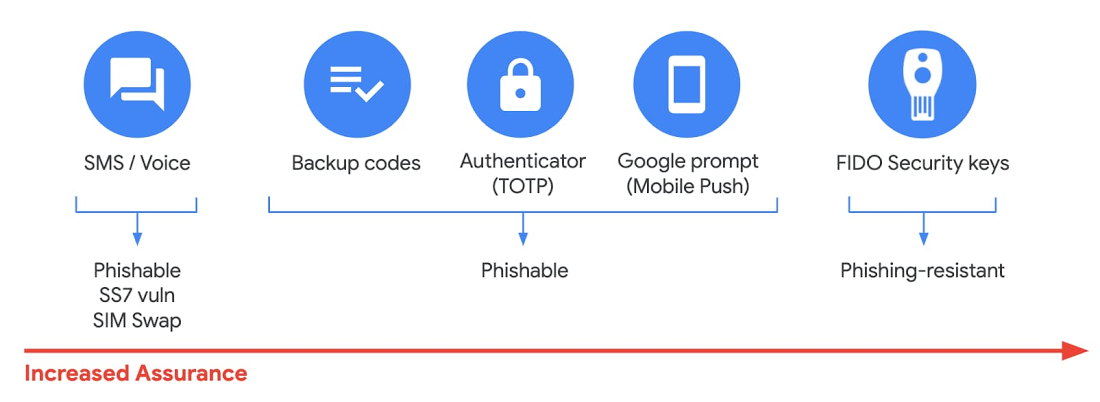
With 2-Step Verification, admins can reduce the risk of unauthorized access by asking users for additional proof of identity when signing in. And you can now use the Advanced Protection Program—our strongest protection for users at risk of targeted attacks. With the Advanced Protection Program for the enterprise, we’ll enforce a specific set of policies for enrolled users including security key enforcement, blocking access to untrusted apps and enhanced scanning for email threats
If you choose not to use security keys for any reason, you have multiple other options to enforce 2-Step Verification on BYOD devices. For Android and iOS, you can use Google prompt, Google Authenticator, text message, or phone call options for a second verification step.
Prevent data loss and leakage with data loss prevention
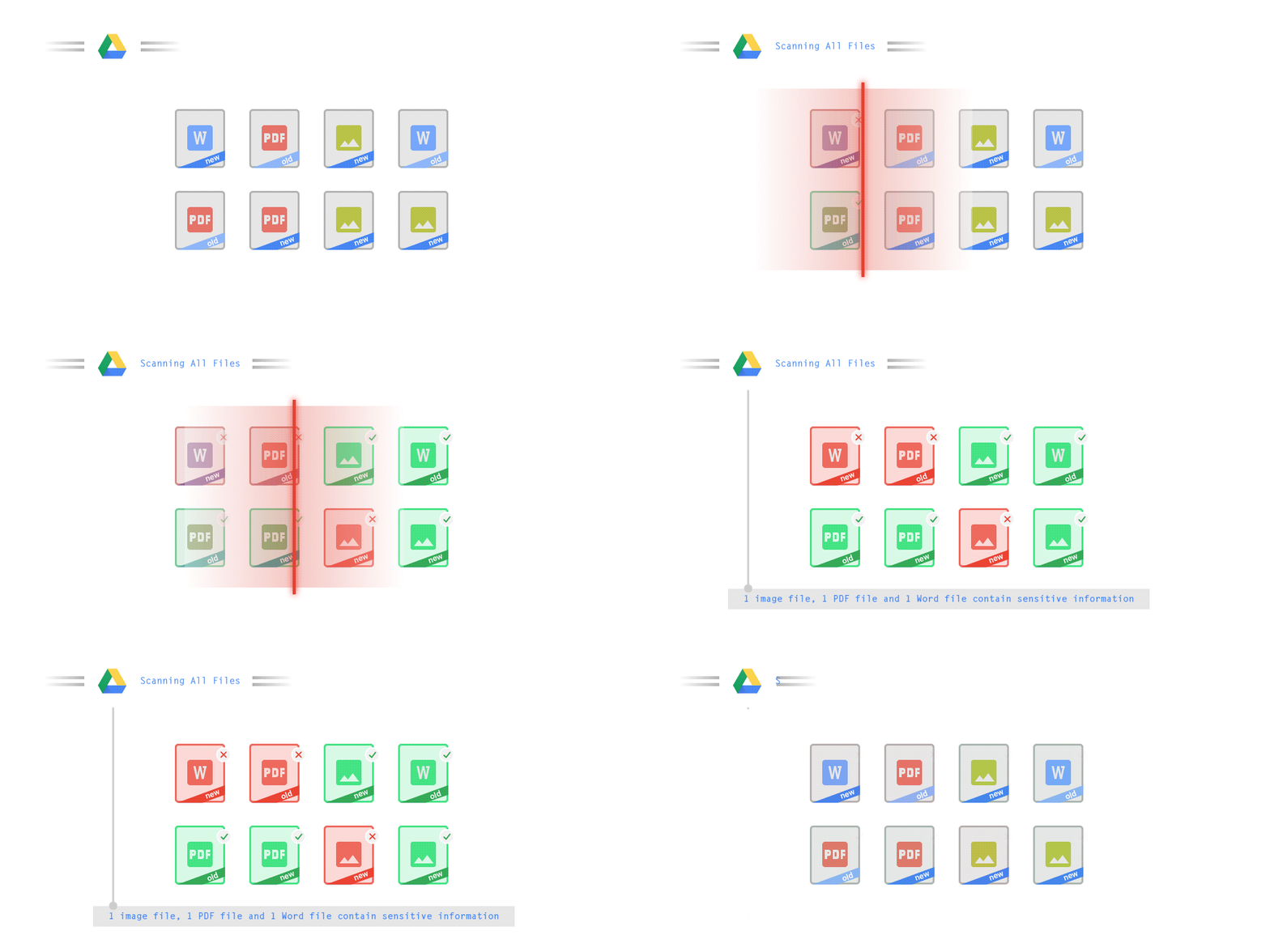
We know that as an admin, one of your highest priorities is to keep internal information safe and secure. That’s why we developed data loss prevention (DLP) policies to help protect sensitive information in Drive, Docs, Sheets, Slides, and Gmail from loss, misuse, or being accessed by unauthorized users. With G Suite DLP, admins can choose which types of data are sensitive and exactly how to protect them. Our controls enable easy detection of a wide variety of common info types, and administrators can supplement this with custom content detectors to meet their organization’s needs. You can also classify files in Drive automatically using DLP rules (beta) to categorize your data by sensitivity levels. DLP works on all the devices in your organization, including BYOD ones, since the protection is at the data and application level.
In addition to DLP, you can use DXP for iOS devices to restrict the copy/pasting of G Suite data to other accounts, personal or otherwise. DXP for iOS can also restrict users’ ability to drag and drop files from specific apps within their G Suite account. Similarly, you can use Google endpoint management to configure Android devices to prevent data sharing between personal and work profiles.
Make retention and eDiscovery possible on all your devices with Vault

To support your organization’s retention and eDiscovery needs, Vault enables corporate data that’s stored in G Suite and accessed by BYOD devices to be available for all your information governance needs. No matter the owner of the device, your organization’s data stored in Gmail, Drive, Chat, Groups, Voice, and Meet are accessible to Vault.
Using the zero-trust security model, the G Suite features above work together to keep your data protected and organization secure across all devices, whether they’re corporate-owned or BYOD.
(*Google Workspace was previously G Suite)
More Relevant Stories for Your Company



PwC uses Connected Sheets to scale data insights
It’s important for teams across the business to understand customer adoption of products and services, whether it’s the product team tracking usage of a newly released feature or the support team trying to anticipate incoming service requests. Similarly, IT teams need to analyze the adoption of an organization’s internal applications

Collaboration Helps Healthcare Firm Roche Group Focus on Saving Lives
Dr. Alan Hippe, CFO & CIO, Roche Group, shares how collaboration tools help healthcare firms like the Roche Group take timely decisions that help them focus on saving patients’ lives. For over 110 years, Roche has been pioneering the discovery, development, production and marketing of novel healthcare solutions. Our focus



L’Oréal: Managing Big-data Complexity with Google Cloud
L’Oreal is a global company with a presence in 150 countries worldwide. Between managing all of its brands and requirements for different countries, L’Oreal looks to data to make insightful business decisions. How does L’Oreal unify its data across all its systems and databases? How does L’Oreal make the data

How Google is Showing the Way to the Differently-abled: A Blind Program Manager’s Account
What does “accessibility” mean to businesses? It’s not just about making sure that your office or retail space is accessible to workers and customers who have mobility challenges, it’s also about making sure that your apps, digital tools and content are also more accessible to everyone. Our product teams work
