





Business Messages drives 85% CSAT scores for Levi Strauss

4279
Of your peers have already read this article.
3:30 Minutes
The most insightful time you'll spend today!
Founded in 1853, clothing company Levi Strauss & Co. gained fame for their Levi’s® denim jeans. Over 150 years later, Levi’s is a globally-recognized brand that sells jeans and other apparel in more than 3,100 retail stores across 110 countries.
The summary
During the COVID-19 pandemic, Levi’s saw that their shoppers were investing more time in pre-purchase research. They realized that being able to provide customers with information around the clock in an easily accessible way could greatly improve interest, engagement, and eventually purchase behavior. In June 2020, Levi’s partnered with customer experience automation provider Linc Global to integrate Google’s Business Messages into Levi’s customer experience (CX) strategy and cross-channel chat experiences. Business Messages soon brought in customer satisfaction (CSAT) scores of over 85 percent, and drove 30x more store-related questions than Levi’s onsite web chat. In addition, most Business Messages conversations occurred outside store hours, allowing Levi’s to respond to inquiries more quickly.
The challenge
Levi’s knows customers want to drive these interactions on their own terms and timelines— and on their own preferred communications channel. With store hours often impacted by the pandemic, the company needed 24/7 service to answer the 30% increase in off-hours shoppers. Google’s Business Messages allowed customers to connect with Levi’s without visiting the website, going to a store or making a phone call. Anisa Kumar, VP Global DTC says, “Rolling out CX automation on web chat provided a new way for customers to find answers to their pre purchase and other questions that regularly resulted in a call to customer service. Launching with Google’s Business Messages was the logical next step in providing our customers with a best-in-class customer experience.”
The approach
Levi’s worked with Linc Global, a CX automation platform, to set up Google’s Business Messages on Google Maps for five, then 50, stores, before expanding to more than 200 stores. “Customers can message us through Google Maps even after stores are closed. They can search for products and see product information and availability at their local store, plus get details about hours and COVID-19 related updates to make shopping easier,” said Kumar. The company then added Business Messages on Google Search for a rich messaging experience that synchronized with their regular webchat channel. “Consumers can have their entire messaging experience be on Google—and then visit our website or a physical store to complete a purchase recommended to them in Business Messages,” says Rico Arrastia, VP Product & Experience at Levi Strauss & Co.
The results
Two months after launching Google’s Business Messages, Levi’s CSAT scores for the channel surpassed 85%. And four months after launch, Levi’s found that this new channel drove 30x more store-related questions than web chat.
Additionally, Levi’s noted that 31% of Business Messages conversations were product-related, indicating that shoppers preferred targeted engagement to unstructured browsing. For Levi’s, Business Messages helps cross-sell or suggest products to customers based on an individual’s past purchases, personal information, and behaviors.
Levi’s is now a big proponent of Business Messages as a way to meaningfully engage with customers and stand out from other brands. Arrastia shares, “Business Messages not only creates a stronger customer experience but also enables us to do a much better job at ‘hearing’ shoppers.”

7562
Of your peers have already downloaded this article
10:00 Minutes
The most insightful time you'll spend today!
There’s no doubt that Google Cloud is one of the most recognizable user interfaces in the world—everybody knows how to use it to find the information they need. It has upheld this standard of ease-of-use throughout their entire suite of cloud applications for business.
Simply put, G Suite—Google Cloud’s collaboration and productivity platform—provides an environment where people feel comfortable. Because of this, there is naturally less friction and resistance to adoption.
While moving to the cloud has tremendous benefits, but it’s a big change. Big changes at companies require thoughtful guidance and communication even when the change has as much upside as G Suite.
That’s why Google Cloud gives you plenty of tools, training resources, templates, and examples for quick transition and minimal disruption.
G Suite contains productivity-boosting features like multi-person, real-time collaboration in Google Drive and fast message search in Gmail. Though these apps are top of their class, it’s their seamless integration that really helps business operations shine.
That’s probably why 64% of Fortune 500 companies trust Google Cloud with their data. Download this ebook to find more fascinating numbers around how Google Cloud can help you leverage a comprehensive collaboration platform that gives a competitive edge to your business.
New ways Google Workspace works with tools you already use

4039
Of your peers have already read this article.
6:30 Minutes
The most insightful time you'll spend today!
Looking back on 2020, it’s clear that the ways we work have rapidly transformed—from the rise of remote work and increasingly digitized processes, to balancing time across work and personal responsibilities. But one thing hasn’t changed—businesses still rely on a staggering number of applications to get work done. Working from home and the associated pressures on productivity have only emphasized the need for fewer tools that do more, are easy to use from anywhere, and seamlessly integrate with other software.
Google Workspace helps you get more done—with communication and collaboration tools known and loved by billions of users, thoughtfully connected together. And while billions of users choose our apps, we recognize that they also need to effectively collaborate with partners, customers, and even teammates that might use other tools. In particular, we know that many people work with a mix of Google Workspace and Microsoft applications—for example, while migrating to Google Workspace or collaborating with external vendors or clients. That’s why we make it easy for you to use Google Workspace with Microsoft Office and Office 365, helping you collaborate productively from any device with anyone, regardless of what tools you use.
Save time with helpful intelligence and faster workflows in Google Workspace
Creating and collaborating on content is at the heart of getting work done. When working with content received from customers, partners, or teammates, employees shouldn’t lose time converting files or working in unfamiliar tools.
With Google Drive, you can store and share over 100 different file types and formats, including Microsoft Word, Excel, and PowerPoint files, as well as PDFs, images, and videos. And by using intelligent features like Priority and Quick Access in Drive, you can find files nearly 50% faster.
With Office editing, users can also easily edit Microsoft Office files in Google Docs, Sheets, and Slides without converting them, with the added benefit of layering on Google Workspace’s enhanced collaborative and assistive features. From assigning action items via comment, to writing faster with Smart Compose, to accelerating data entry with Sheets Smart Fill, Office editing brings Google Workspace functionality to your Office files. And we recently extended Office editing to the Docs, Sheets, and Slides mobile apps as well, so you can easily work on Office files on the go.
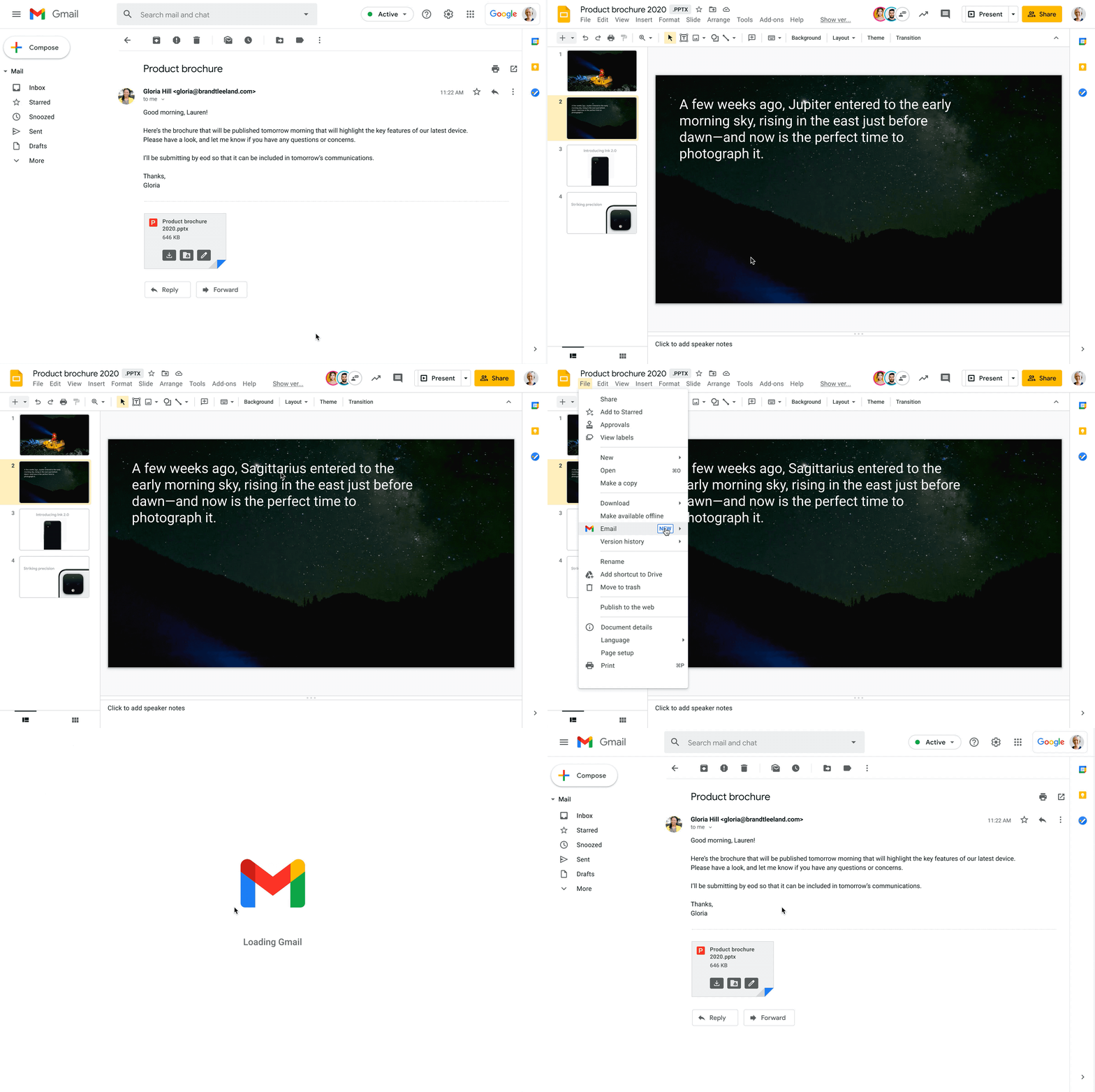
Starting today, you can also open Office files for editing directly from a Gmail attachment, further simplifying your workflows. For example, when you receive a Word document as an email attachment, you can open it and start editing in Docs with a single click while still preserving the Word file format. Then you can respond to the original email thread and include the updated file, right from Docs—saving you time by eliminating steps like downloading the file to edit, or searching for the relevant email to reattach it to.
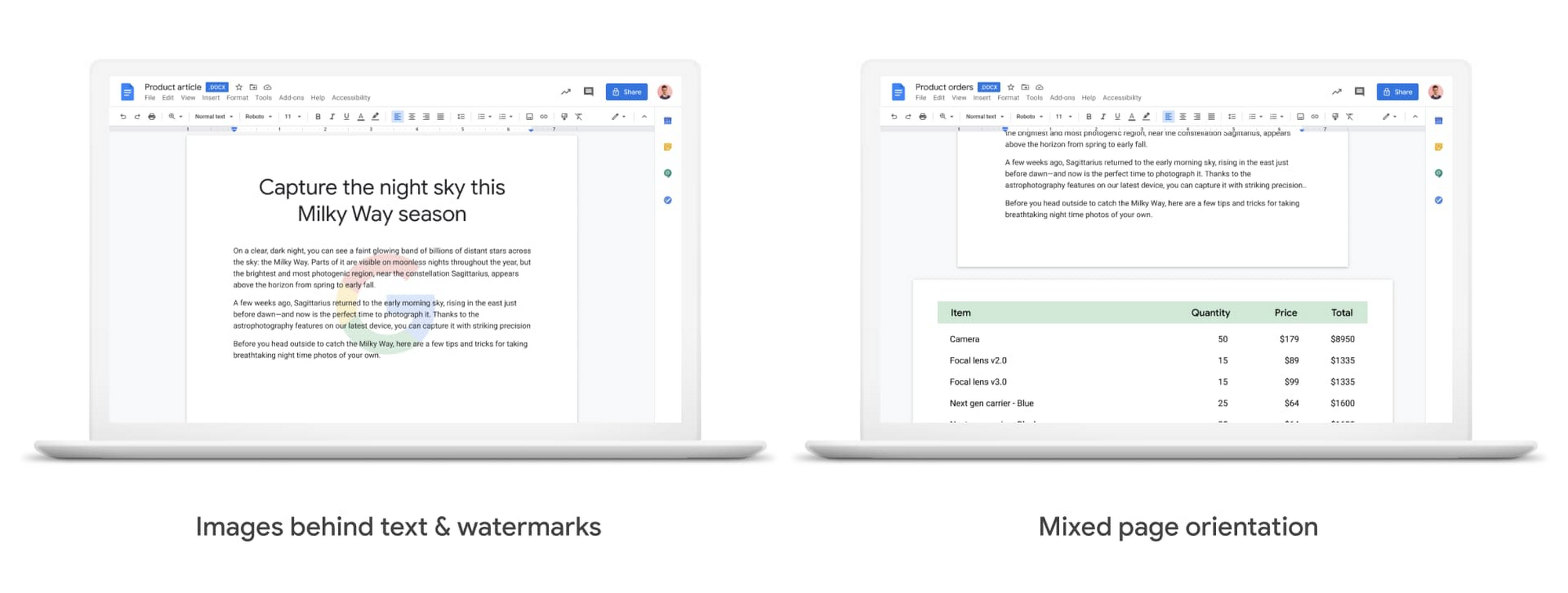
We also know it’s important that your Office files look consistent when opened in Docs, Sheets, and Slides, so we continue to support additional formatting options used in Office files. Today, we’re announcing mixed page orientation support in Docs, so you can create Docs or edit Word files with mixed landscape and portrait pages. And next year, we’ll add support for inserting images behind text and watermarks, to give you further flexibility.
Finally, when it comes to spreadsheets, we know that many organizations maintain both Excel and Sheets, especially when relying heavily on macros that have been built over time to automate processes. In Sheets, it’s easy for anyone to record macros, without having to write any code. And to make it easier for teams to transition from Excel to Sheets or support co-existence of these tools, we have also launched a new Macro Conversion add-on that helps users migrate macros from Excel to Sheets. This way, teams can save time through automation, without having to start from scratch.https://www.youtube.com/embed/CUKAUFoa86M
Stay connected with others, wherever you are
Business growth is fueled by people connecting and generating ideas together, whether they are working from the same office or dispersed around the globe. Google Workspace makes it easy to schedule time and meet with others, helping you maintain a connection with your collaborators and accomplish more together, from any device, anywhere.
To make and maintain these connections, people need an easy way to schedule time with others, regardless of which calendaring system they are using. Some organizations run mixed calendaring environments, for example, during a migration to Google Workspace or merger, where one company is not on Google Workspace. To help in such scenarios, the Google Calendar Interop tool makes it easy for people to schedule and book resources regardless of which system they’re on. With Calendar Interop, teams across systems can see each other’s free/busy status, event details, and book shared resources, so that they don’t need an endless exchange of chats or emails to land on a time that works for both parties.
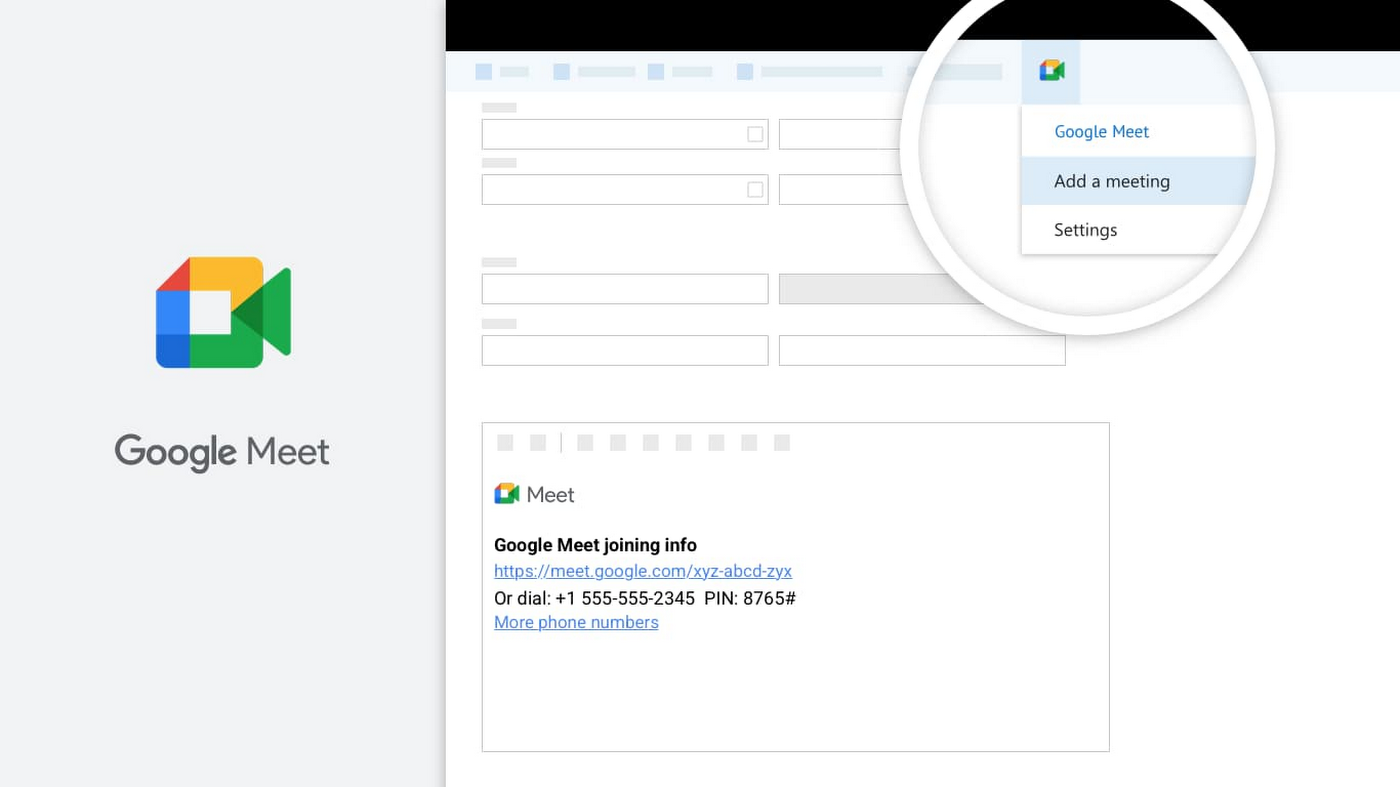
Google Meet is another powerful tool for keeping employees connected, wherever they are. With Meet, it’s easy for teams to connect via secure, enterprise-grade video conferencing from any device—laptop, mobile, or even dial-in via phone. Google Workspace customers can invite anyone to join a Meet call, including people using Outlook who don’t have a Google Account. Or if using Outlook to schedule events, users can easily add Meet video conferencing details using the Google Meet add-in for Microsoft Outlook. With a simple tap of the meeting link in your email or calendar, you can easily connect face-to-face with your collaborators, helping maintain that human connection that drives work forward.
Be productive from anywhere with custom solutions
Often, certain tasks and processes require employees to develop custom applications to manage them. Understanding how to code can be a huge barrier for employees faced with this challenge, but Google Cloud’s AppSheet enables anyone to build applications without having to write code. AppSheet is available to all Google Workspace users and has a number of tight integrations that make it easy to build custom apps on top of Google Workspace apps, like Google Sheets.
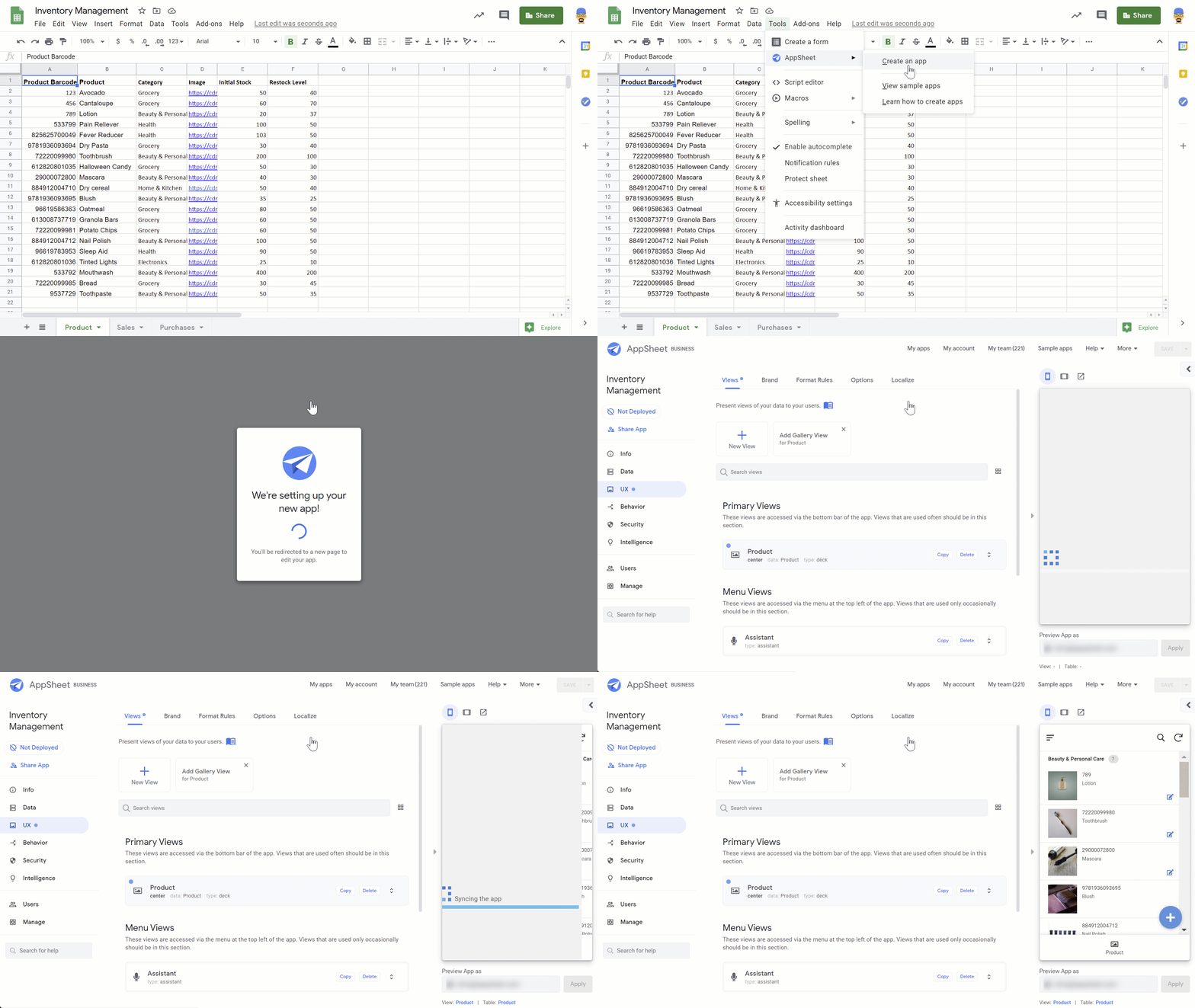
AppSheet is designed to work on any device and can connect to your data and spreadsheets, wherever they live. While AppSheet and Google Workspace are tightly integrated, AppSheet also easily connects to O365 data sources such as Excel spreadsheets stored in OneDrive or SharePoint. AppSheet creates a bridge between environments—custom apps and automations can connect to Google Workspace and Microsoft Office apps simultaneously, so that teams and processes split between environments can be managed more seamlessly. Plus, with AppSheet, even Microsoft users can easily incorporate Google’s leading AI and machine learning capabilities, like optical character recognition and sentiment analysis, into their apps.
Flexibility is important when it comes to effective collaboration, and we’ll continue to invest in the many ways Google Workspace can work seamlessly with the rest of the tools you use—helping you accomplish more, faster. Visit our learning center for more info on topics like working with Office files in our apps, or check out these helpful switching guides if your organization is currently transitioning from Microsoft Office to Google Workspace.
TELUS and Google Cloud Partner to Move Towards a More Sustainable Future

4482
Of your peers have already read this article.
2:30 Minutes
The most insightful time you'll spend today!
Environmental sustainability is a key priority for TELUS, a world-leading communications technology company. It continues to rank in the top 100 most sustainably managed companies in the world, and seeks to make a healthier planet for all by leveraging its global-leading technology, compassion to drive social change and reduce our collective carbon footprint through innovative technologies and sustainable business practices.
TELUS surpassed its sustainability objectives in 2019 and is now on a journey to procure all of its electricity from renewable or low-emitting sources by 2025. Next, it aims to achieve net carbon neutrality for its operations by 2030. TELUS has also been named to the Dow Jones Sustainability Index for 21 consecutive years, a feat unmatched by any other North American telecom or cable company. In 2021, it became the first company in Canada to release a Sustainability-linked bond (SLB) framework and complete an SLB offering, formally linking TELUS financing to its environmental performance.
“We’ve spent the last decade becoming a global leader in sustainability, helping make the planet healthier by ensuring that our operations are as environmentally responsible as possible,” said Geoff Pegg, Head of Sustainability and Environment at TELUS.
In part, TELUS’ strategy is focused on three key areas:
- Seek the best renewable energy options available
- Focus on migrating workloads to the cloud
- Embrace a multiplier effect through the use of sustainable partners
Renewable energy impact
Part of this environmental responsibility involves investing heavily in renewable energy sources through power purchase agreements (PPAs) that help renewable energy providers like wind farms and solar companies develop their infrastructure. TELUS executed PPAs with four Alberta-based solar and wind facilities to provide 100 per cent of its electricity load demand in a province where one-third of the grid is powered by coal.
As a technology company, electricity represents a large portion of TELUS’ energy needs: 80 percent of the operational carbon footprint comes from the power requirements for TELUS’ network and administrative buildings, Pegg explains. While TELUS is using renewable energy sources and low-emitting energy grids to power its buildings and network, there’s also the often-forgotten part of the carbon emissions equation: the energy it takes to power data centers. As the International Energy Agency recently reported, data centers represent 1 percent of the global electricity demand and that figure is expected to keep rising as the world increases usage of data-heavy technologies.
“It’s probably no surprise that everyone, whether you’re a business or a consumer, is concerned about reducing carbon emissions,” said Chris Talbott, the Google Cloud Sustainability Lead. “A lot of us think about the carbon emissions associated with our cars or with the electricity that powers our homes, but oftentimes we forget about the carbon emissions that come from the digital services that we use or the networks required to deliver that data.”
As a leader in sustainability, how can TELUS meet the energy demands of its customers while also protecting the environment? One way is through the company’s previously announced collaboration with Google Cloud. The two companies are working together to build a more sustainable world through technology and reduce TELUS’ carbon footprint, create value along the entire supply chain, and optimize industry solutions for social impact through data analytics and machine learning.
Taking a cloud first approach — reducing carbon emissions with green cloud computing
Google became carbon neutral in 2007 and has achieved 100 per cent renewable energy matching every year since 2017. Google has invested in renewable energy to match the electricity we use across our entire operations, including Google Cloud, meaning every workload that TELUS runs on Google Cloud has been matched with renewable energy purchases.
“The operational carbon footprint of running anything on Google Cloud is zero,” Talbott said. Also, by working with Google, TELUS gets the benefit of economies of scale using less electricity. Not only is TELUS leveraging Google data centers, it’s also relying on the digital collaboration made possible by Google Workspace to reduce the amount of travel required by employees attending meetings in different offices. Collaboration tools like Google Meet can reduce the carbon footprint of in-person conferences by 94 percent.
Google compensates for the environmental footprint of any electricity used in the data center and out to the edge network. “You can feel pretty good about using Google Meet because it’s carbon-neutral,” Talbott said.
Multiplier through sustainable partnerships — green cloud computing radiates out
By supporting TELUS in its environmental sustainability efforts, Google Cloud is also enabling TELUS to do the same for its various partnerships. For example, powered by Google Cloud’s infrastructure and data analytics capabilities, TELUS is partnering with Picacity (formerly NXN Digital) and Google Cloud to deliver an ecosystem of integrated smart technologies that enable cities to improve the lives of their residents.
From dynamic traffic signaling that reduces congestion and emissions, to data analytics that create smarter, more efficient city planning, the partnership is transforming the way municipalities operate in our increasingly digital world.The partnership is built on four foundational pillars of infrastructure and environmental sustainability, intelligent transportation, public safety and security, and health. In the case of intelligent transportation, this means sensors, cameras, and other devices are built into or near roads, sidewalks, and bike paths to provide data for innovative software to improve traffic flow in real time. The data can then foster informed decisions about infrastructure, city planning, fleet optimization, and public safety.
All of these environmental measures may seem small when compared with the enormity of the problem that is climate change, but as Talbott said, “Change begins with the small decisions we make every day such as paying attention to the practices of companies that we’ve come to rely on daily in the modern world. They may seem small and in the margins, but at scale, this is how we can make a real impact.”
4643
Of your peers have already watched this video.
1:30 Minutes
The most insightful time you'll spend today!
How a Furniture Retailer Found a Cool Way to Innovate Every Day and Beat Competition
MADE.COM is a London-based company that designs and retails homewares and furniture online, and across a network of experiential showrooms in Europe.
Founded by serial entrepreneur Ning Li and Brent Hoberman, with Julien Callède and Chloe Macintosh in 2010, the company works with independent designers to create world-class furniture for its customers at affordable prices.
With a team of over 150 people, spread across four countries, collaboration was beginning to be a huge challenge and would eventually slow them down. In a competitive market, that’s something it couldn’t afford.
“For a company that was built online, it’s in our culture to do things fast. That’s the big part of our culture: moving fast and keep innovating every day,” says Li.
In order to make that possible, MADE.COM turned to G Suite. Watch the video to find out how G Suite makes that happen.
Gmail Turns 18, Has 3 Billion Users! A Product Lead Breaks Down How Gmail Stays Interesting

3806
Of your peers have already read this article.
1:30 Minutes
The most insightful time you'll spend today!
This April, Gmail will be 18 years old. That’s a big milestone, given that email as a medium just turned 50.
Launched in 2004—with its 1 GB free storage, conversation based grouping, and enhanced search capabilities—Gmail quickly became one of the most popular email services in the world.
What started off as Paul Buchheit’s side project is now part of Google Workspace, a solution that’s used by over 3 billion users.
Yet despite this growth and Gmail’s long history, the product continues to find new ways to delight its users with great experiences, new features, and constant innovation.
How does the product team do it?
To help us unpack this question, I interviewed Matthew Izatt, Product Lead for Gmail.
Matthew has been building and growing Gmail for the last 10+ years. He started off in mobile where he built the Android and iOS apps for Gmail, and eventually he became the lead product owner for all of Gmail’s front end. He also led the development of the new Gmail in 2018, which was a complex rebuild of the technical architecture and visual design, along with the addition of multiple enterprise focused features. Since then, he has been leading Google’s charge on redefining how we work as the product lead for the Workspace Platform and Partnerships efforts with a team of over 100.
What follows is an edited version of our interview.
Mustafa Kapadia: Matt, thank you for joining us. Now, before we jump into how your team does its magic, can you please share with me some of the challenges you face when you build a new feature or experience on Gmail?
Matthew Izatt: Thanks Mustafa. And I think this is a great place to start.
One of the biggest challenges is that Google Workspace is used by over 3 billion users, and while that is great, there are many different ways of using our product. It’s not like a doorbell, where there is only one way of using it. With Gmail, it’s like an infinite Swiss army knife, where everyone has their own favorite way of using the product.
Second, Gmail is a critical product for many of our users. Yes, it’s fun to use, but people use it to get important work done—sending job proposals, emailing with their kids’ teachers, or booking medical appointments. This is why we have to be careful about what we experiment with and what we roll out. We can’t just throw things out there and see what works. We have to do our homework.
Third, we have to constantly innovate and think outside the box. Email is an old product, but it continues to evolve. Every day we have new startups reinventing email and challenging the big players. If we are to remain a market leader, we literally have to rethink the product every few years. Which is why creating the new Gmail was so much fun.
Mustafa: I don’t envy you. This is not an easy product to build. Going back to something you touched on: Given these hurdles, how do you build these great experiences? Is there an example that you can share with us?
Matt: A specific example I always like to share is the story of how we came up with the right display density on our thread list. The thread list is your inbox; it’s the list of all the messages that you have. The display density is how that information is presented to you.
In Gmail you can choose to have fewer messages with a lot of information about each message. Or you can choose to see a larger number of messages with much less information about each message.
It really comes down to your preferences. And it’s one of the reasons why so many users like using Gmail. In fact, being able to set inbox display preferences is actually one of the top 10 most used settings within Gmail.
Mustafa: So you were really trying to give users choice on how they would like their information presented?
Matt: Exactly. Now, we could have added 100 different levers so that every user could customize their email feed to an infinite degree. While that is possible from a coding perspective, it’s not practical for three reasons.
First, infinite choice sounds good on paper, but in reality, too many options creates a confusing user experience. Second, development would take many months—maybe even a year. And third, it would be a long-term maintenance nightmare.
Mustafa: So how did you go about doing it? Share with me the inner workings of Gmail in Google Workspace. How is the sausage made?
Matt: Well, it came down to four key steps, working closely with our amazing UX Research team.
First came the primary research to find out if building this experience was worth doing. After all, what is the point of building it if no one wants it? For this we actually sat down with real users inside and outside of Google to understand their needs.
Second, we brainstormed 100 potential solutions and narrowed them down to 8 options. Then we mocked up each of the 8 options to see how they looked.

While it would have been easy to just pick the option we liked the most and build it, we wanted to create what our users want, not what we like the most. So we took those options and surveyed the users from step 1 again. We specifically asked them to rank their preferences across three dimensions: Love It, Hate It, or Meh!
Based on the user responses, we realized that 3 configurations would meet the needs of most users. These were the three options we developed and deployed to Google Workplace.
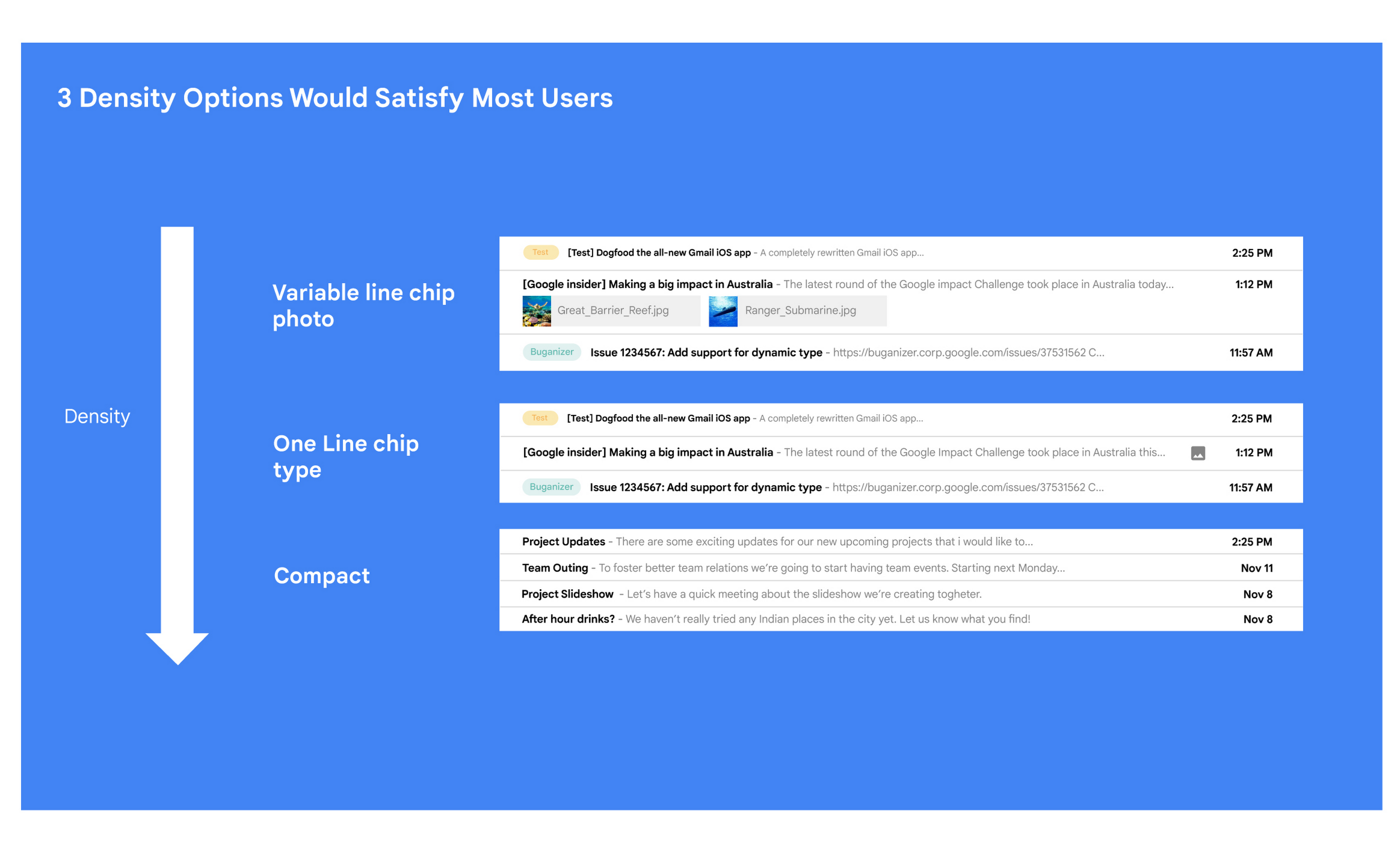
Mustafa: I love how you used data to guide your decision of what to build. This really is Google’s secret sauce—first-hand data collected from users.
Matt: Absolutely. Without their feedback, we would have never been able to narrow down to the 3 options that would satisfy most of our users.
Mustafa: Talking about risks: Getting user feedback and validating before you build is one way to de-risk your product, but you even de-risked your product launch strategy, correct?
Matt: Yes. Sometimes we launch features individually. Sometimes we launch them as a group. In this particular case, we had a lot of moving parts. We had a complete UI redesign, 10 or 12 new features, and architecture changes.
So to de-risk this, we put in place—I kid you not—a 26-stage launch process. We started off with the technical architecture changes—stuff that the user would not notice—to make sure that it was working. And we did it in small increments.
Then we rolled out a few features at a time, launching it first to our early access program—where users have opted in to receive updates. We measured their reaction and satisfaction first, and then moved on to the next group.
At every stage, we kept our blast radius small and put in these checks and balances where we could launch, measure reaction, and then reassess our strategy. And that worked out pretty well for us for this massive launch.
Mustafa: Agreed! Thank you for taking the time to talk to me. And good luck with building the next version of Gmail.
Matt: Thanks for having me.
More Relevant Stories for Your Company

How Kisan Network is Connecting Over 30,000 Farmers to Help them Reap Over 10% More Profits from Their Crops
For many people, an Ivy League education is a promise of a better future. But Aditya Agarwalla, who studied computer science at Princeton, didn’t want to limit that future to just himself. He wanted to share his good fortune and create a positive social impact in his home country of

Why I Moved to the G Suite: Rentokil CIO
Whether it's getting rid of pests, cleaning up a crime scene or tending to office plants, Rentokil Initial is a service business whose primary aim is to offer customers the best possible standard. This can only be achieved if teams work closely together, sharing expertise and ideas and communicating constantly.

Google Cloud’s Journey about Building DEI into Business
Diversity, equity, and inclusion (DEI) are more than buzzwords, they are critical components of workplace culture that have real, tangible impacts on your entire organization. Well-executed and robust DEI initiatives ensure that every single employee feels welcomed and valued when they are at work. And that’s not all—done right, DEI

Sneak peek: What’s to come in Chrome Browser for the enterprise
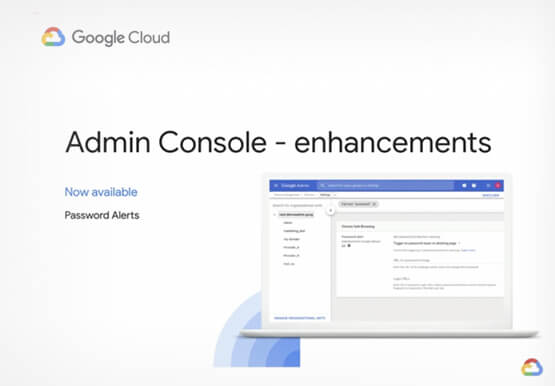
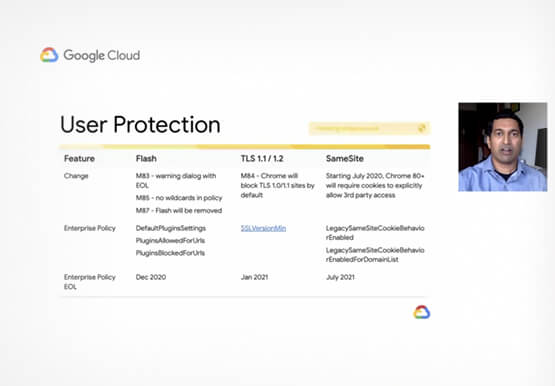
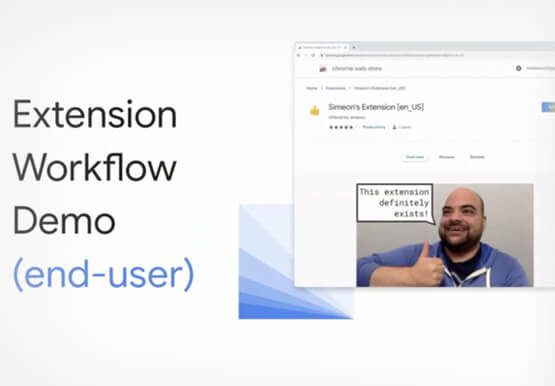
The Chrome Browser Cloud Management accomplishes three goals. First, it is a single destination for applying Chrome Browser policies across Windows, Mac, and Linux from one pane of glass. Second, admins can gain easy insight into their deployment, including getting a list of extensions installed in their fleet. And third,
