





The Fantastic Story of How BMG Enables a Micropayments Strategy So Music Artists Get Paid

7440
Of your peers have already read this article.
3:30 Minutes
The most insightful time you'll spend today!
The music industry is rapidly changing. Only 20 years ago, the availability of music and the infrastructure that was required to make an album a sales success were incredibly complex and expensive. With the decline of physical sales and a fundamental shift to digital, music streaming now accounts for more than half of all sales globally.
At the same time, technology has democratized music-making; in many ways, it has made the musical landscape more diverse. Artists can upload their music with the click of a button. But while it’s easier for creators to share their songs with audiences, getting paid has become more fragmented.
Although music is booming, people no longer buy it outright. Instead, listeners download music digitally or subscribe to streaming services to have their libraries with them at all times. To monetize digital content effectively, artists need to know when, where, and how often their songs are played on each service. To help them navigate this complicated royalties landscape and maximize their profits, Berlin-based international music company BMG provides customized, transparent, and fair services to songwriters and artists.
With publishing and recording divisions under one roof, the subsidiary of international media giant Bertelsmann works with both emerging artists and established stars, including John Legend, Kylie Minogue, Mick Jagger, and Keith Richards. With the MyBMG web and mobile application, clients can view and analyze their royalty details in real time and collect payment. When a new record is released, BMG uses data to maximize its impact and revenue for its creators.
“We make sure that everyone who uses our clients’ music knows who needs to be paid the associated royalties, then we collect these royalties and share them out quickly and transparently,” explains Sebastian Hentzschel, Chief Information Officer at BMG. “When our artists release new music, we make sure that it’s marketed and promoted effectively around the world.”
“We needed a scalable solution for our royalty workloads that was intuitive for our developers. We also wanted a partner, not a client-vendor relationship. With autoscaling via BigQuery, excellent customer support, and a clean and simple user interface, Google Cloud ticks every box for us.”
—Gaurav Mittal, Vice President Group Technology, BMG
Getting up to speed with a new way of paying artists
In this digital world, artists aren’t just paid every time a fan buys an album—they’re paid a small amount, or royalty, for each song downloaded or streamed by a listener. So, when the industry shifted to digital, the volume of data that BMG needed to handle grew exponentially. “One CD sale is equivalent to about 1,500 streamed songs or plays,” says Gaurav Mittal, Vice President Group Technology at BMG. “That means IT departments have to process 1,500 times the amount of data to calculate payments for artists, and this makes scalable micropayment processing very important.”
Until 2019, BMG’s infrastructure was entirely hosted on-premises. Hardware limitations made it challenging to scale on-demand, making it harder to handle the data peaks that royalty processing can bring. “With our on-premises infrastructure, we were going to hit a ceiling in a few years,” says Gaurav. “We still managed to process royalty payments for our clients, but it was increasingly time consuming and expensive. To keep focusing on our clients, rather than our infrastructure, we decided to migrate to Google Cloud.”
From the outset, Gaurav and his team had a clear vision for the partnership: “Most importantly, we needed a scalable solution for our royalty workloads that was intuitive for our developers. We also wanted a partner, not a client-vendor relationship,” he says. “With autoscaling via BigQuery, excellent customer support, and a clean and simple user interface, Google Cloud ticks every box for us.”
Keeping artists happy with business-as-usual payouts during migration
To move applications to the cloud while keeping payment cycles on track for its artists, BMG teamed up with Google Cloud partner Rackspace Technology. “We selected Rackspace Technology because it combines strong technical muscle and a global footprint, with the customer service of a local boutique firm,“ shares Gaurav.
BMG’s own technology team put together the outline for the Google Cloud architecture, which they passed on to Rackspace Technology for optimizations and the ultimate stamp of approval. Whenever Gaurav and his developers needed support, Rackspace Technology was ready to go. “So far, we’ve migrated 17 applications successfully, and Rackspace Technology has been 100% spot-on with each suggestion,” says Gaurav. “I can’t recall a single flaw in a Rackspace Technology-approved architecture, and that really says something.”
When BMG began its migration in August 2019, the team developed an ambitious two-year plan. Only 14 months later, however, the project is more than 75% complete. Among the solutions that BMG is using today are Cloud Storage to securely store 130 TB of data, and Cloud SQL as its standard database technology. The web applications run on Compute Engine, App Engine, and Google Kubernetes Engine.
“After successfully moving a few applications, it was clear that with the strong teamwork of BMG and Rackspace Technology, together with the ease of use of Google Cloud, we could speed up the project without sacrificing quality,” says Gaurav. “We’re set to complete our migration six months before schedule, helping us to quickly move out of our hybrid environment.”
“Our income-tracking teams are very savvy on the data, and the simplicity of Google Cloud empowers them to self-serve analytics, rather than wait for IT. Our teams are much more productive.”
—Gaurav Mittal, Vice President Group Technology at BMG
Royalty reporting and processing with BigQuery and Dataproc
So far, all of BMG’s critical workloads are up and running on Google Cloud. Royalty calculations, for example, which require incredible processing power and the collection of many micropayments to ensure full and timely payout, run entirely on Dataproc with output stored on BigQuery for downstream integration and reporting.
Enabling more harmonious workflows through self-serve analytics
As the new beating heart of BMG’s royalty reporting, BigQuery changed the rhythm of collaboration company-wide. In the past, income tracking teams had to contact IT departments if they needed deeper data insights for their work. By integrating Data Catalog with BigQuery, BMG has made the data more accessible to all teams. This helps them detect missing income and new revenue streams independently, maximizing profits for artists.
“Our income-tracking teams are very savvy on the data, and the simplicity of Google Cloud empowers them to self-serve analytics, rather than wait for IT,” says Gaurav. “Our teams are much more productive.”
“Google Cloud enables us to be more client focused and deliver better features faster. We believe it’s just the beginning. We offer rights and royalty services for music publishing, recorded music, neighboring rights, and books. Without scalability limitations, it’s absolutely conceivable to offer our platform as a service to other companies or industries, such as gaming. Google Cloud has opened a world of possibilities.”
—Sebastian Hentzschel, Chief Information Officer, BMG
With a leaner IT environment, BMG can focus its effort on the needs of its clients. Beyond improvements in royalty processing, it can concentrate on app development, releasing new features and enhancements more frequently. By hosting applications on Google Kubernetes Engine, App Engine, and Compute Engine, BMG has built a CI/CD pipeline with automated deployments and testing to significantly speed up workflows.
“In our old system, it could take several weeks to set up an environment,” says Gaurav. “With Google Kubernetes Engine, any of our developers can complete the process in a few clicks. Having that autonomy makes our developers more motivated and self-driven.”
“Google Cloud enables us to be more client focused and deliver better features faster,” adds Sebastian. “We believe it’s just the beginning. We offer rights and royalty services for music publishing, recorded music, neighboring rights, and books. Without scalability limitations, it’s absolutely conceivable to offer our platform as a service to other companies or industries, such as gaming. Google Cloud has opened a world of possibilities.”
With the migration almost complete, BMG is looking forward to its next technology project. It plans to leverage AutoML to further scale and automate royalty tracking with machine learning. On the marketing side, advanced analytics will help BMG determine the effectiveness of promotional campaigns around the world, further increasing profits for artists. By connecting Google Data Studio to BigQuery, BMG will increase the quality of its analyses, helping musicians better understand the reach of their music around the world.
In the end, Gaurav shares, helping musicians is what it all comes down to. “We’re a new kind of music company because we build our services around our artist, songwriter, and publisher clients, not the other way around,” he says. “Google Cloud is helping us maintain strong relationships with our clients, and that’s music to our ears.”
Migrating MySQL to Spanner? Here’s What You Need to Know

5622
Of your peers have already read this article.
2:00 Minutes
The most insightful time you'll spend today!
Since its initial release in 1995, MySQL has not only been the de-facto database for many data storage needs, but has gathered much attention over the years as one of the most well-recognized databases around when it comes to Relational Database Management Systems and transactional data processing.
Any application in retail, e-commerce, or banking has likely had its fair share of business depending on a relational database for its transactional needs. Many of these applications are built on MySQL due to its flexibility, open source nature, and strong community support.
Whether in the context of a migration from a relational database (like MySQL or PostgreSQL) , migration from a NoSQL database (like Cassandra), or a green grass workload, many companies turn to Cloud Spanner seeking a high availability SLA (99.99% for regional instances and 99.999% for multi region instances), unlimited scale, and low operational overhead – no patching required, no maintenance or other planned downtimes, just to name a few benefits.
The tooling and open source ecosystem around Spanner has evolved and grown ever since the service was introduced. HarbourBridge is a part of this ecosystem, and it’s meant to help customers port their existing MySQL or PostgreSQL schema to a Cloud Spanner schema.
Application Migration Tips
Despite helpful tools like HarbourBridge, database migrations are never trivial. Here are a few things to pay attention to when migrating from MySQL to Spanner, and how to update your application logic to address them.
Note – The following snippets use the PHP client for Cloud Spanner. A couple of the snippets reference a partial Magento port that our friends over at Searce have been working on. Once you understand the operations, you should be able to implement the same in any of the other languages that Cloud Spanner supports.
Cloud spanner enforces strict data types
In a MySQL query, the value of an attribute can be referenced as either a string or an integer. Example:
- select * from catalog_eav_attribute where attribute_id = 46;
- select * from catalog_eav_attribute where attribute_id = “46”;
Both are valid and equivalent.
In Cloud Spanner, the query will return an error if you try to reference an integer type by using a string representation.
Here is an example of a working query from Cloud Spanner:
- select * from catalog_eav_attribute where attribute_id = 46; — this will work
- Select * from catalog_eav_attribute where attribute_id = “46” — will fail, since we are supplying a string with “46”
You may use a function like the following to assist you with such transformations.
/*** Formats the SQL for Cloud Spanner* Example* Input SQL : <select statement> WHERE* (`product_id` = '340') ORDER BY position ASC* Output SQL : <select statement> WHERE* (`product_id` = 340) ORDER BY position ASC* In the above example integer*`340` is sanitized by removing single quotes.* Sanitization is required since Cloud Spanner* has strict typing* @param string $sql* @return string $sql*/public function sanitizeSql(string $sql){if (preg_match_all("/('[^']*')/", $sql, $m)) {$matches = array_shift($m);for($i = 0; $i < count($matches); $i++) {$curr = $matches[$i];$curr = filter_var($curr,FILTER_SANITIZE_NUMBER_INT);if (is_numeric($curr)) {$sql = str_replace($matches[$i],$curr, $sql);}}}return $sql;}
Using sequences in primary keys is not a Spanner best practice
Cloud Spanner does not implement a sequence generator, and it is not a Spanner best practice to use sequential IDs because doing so can cause hotspotting.
An alternative mechanism of generating a unique primary key is to use a UUID or any other similar mechanisms that result in non-sequential values. For more information, please refer to this article.
In order to convert all existing primary keys to a UUID pattern, you can change the schema using the snippet here
You may use this code snippet to modify the application code to generate the UUID for the auto increment. There are other ways to do this as well, such as using PHP built-in uniqid function.
/*** Generate UUID.* @return string*/public function getAutoIncrement(){if (function_exists('com_create_guid') === true) {return trim(com_create_guid(), '{}');}return sprintf('%04X%04X-%04X-%04X-%04X-%04X%04X%04X',mt_rand(0, 65535), mt_rand(0, 65535),mt_rand(0, 65535), mt_rand(16384, 20479),mt_rand(32768, 49151), mt_rand(0, 65535),mt_rand(0, 65535), mt_rand(0, 65535));}
Implicit casting and the need for explicit casting of field data types
Both MySQL and Cloud Spanner follow the SQL standard, hence much of the query syntax is the same. One notable difference is that the Cloud Spanner field types are implicitly cast to an appropriate data type out of the ones mentioned here. When implicit casting of the field type fails, Spanner returns a read error, so it would be safer to perform the casting to the appropriate type when issuing the SELECT statement.
Modify application code to cast to respective data type before execution of query.
$con = $this->getSpannerConnection();/*** Cloud Spanner follows strict type so cast the columns appropriately*/$select = $con->addCast($select, "`t_d`.`value`", 'string');$select = $con->addCast($select, "`t_s`.`value`", 'string');$select = $con->addCast($select, "IF(t_s.value_id IS NULL,t_d.value, t_s.value)", 'string');$values = $con->fetchAll($select);
Modify the application code to cast the column to its respective type
/*** Cast the column with type* @param string $sql* @param string $col* @param string $type* @return string*/public function addCast(string $sql,string $col, string $type){$cast = "cast(".$col." as ".$type.")";return str_replace($col, $cast, $sql);}
Using interleaved tables to improve read performance
Cloud Spanner’s table interleaving is a great choice for many parent-child relationships where the child table’s primary key includes the parent table’s primary key columns. Interleaving ensures that child rows are collocated with their parent rows, which can significantly improve query performance.
Refer to the statements here for a few samples of creating interleaved tables. To learn more about table interleaving, visit the documentation.
Conclusion
Database migrations are complicated. Hopefully, using HarbourBridge and the list of tips in this article can make that task easier. For additional tips, please take a look at this migration guide and read more about HarbourBridge.
Google Cloud Helps Northwell Health to Boost Caregiver Productivity and Access to Right Care Using AI

7971
Of your peers have already read this article.
2:00 Minutes
The most insightful time you'll spend today!
Lung cancer is the leading cause of cancer death in the United States and like any cancer, early detection is crucial to survival. Screening at-risk populations is an important part of reducing mortality, and if concerning nodules are found on imaging, further testing may be required. Today, we’ll share how Northwell Health uses Google Cloud products such as Cloud Healthcare APIs and BigQuery to increase caregiver productivity and deliver better care for patients with findings that indicate potential development of lung cancer.
Northwell is New York’s largest healthcare provider
Northwell Health is New York’s largest healthcare provider with 23 hospitals and nearly 800 outpatient facilities. Northwell’s nearly 4,000 doctors care for millions of patients each year, and at this scale, there is an immense amount of healthcare data to manage. To better manage and leverage this data, Northwell Health partnered with Google Cloud starting in 2018.
Enabling caregivers to spend more time with patients
Nic Lorenzen, the lead developer of Northwell Emerging Technology and Innovation team, has a mission to put together data for caregivers in a way that makes sense. It is no secret that inefficient electronic health records systems have a negative impact on a physician’s ability to deliver quality care. Traditional EHRs have information distributed across many tabs, which forces caregivers to spend considerable time at the computer trying to find information. Moreover, speed of care matters. If care is delayed, patients may have to spend more time in the hospital and may suffer worse health outcomes.
To solve this problem, Nic’s team focused on giving caregivers the most relevant pieces of data at the right time by developing an intelligent clinician rounding app. The data needed to derive these insights can depend on the caregiver’s role–a nurse cares about different things than a cardiologist. This system aggregates multiple data sources, and provides patient-specific insights to caregivers.
This system would not have been possible before with traditional EHRs and data warehouses that have proprietary data models and rarely sync data in real time. Now with data easily accessible through Google Cloud’s Healthcare solutions, Nic’s team can deliver the right clinical information to the right people instantly. These days, Nic says, “instead of spending 75% of our time dealing with architecting the underlying platforms, we spend 75% of our time focused on higher value use cases for clinicians and patients. Google Cloud’s Healthcare solutions have greatly improved our developer productivity and time to value.”
Caregivers have found this new system to be a game changer.Before the implementation of this system, caregivers would spend, on average, seven to nine minutes finding the data needed to make medical decisions for one patient. Now, that aggregated information is delivered to a caregiver’s mobile device in less than a second.
Ensuring patients get the right care with the power of AI
There are a number of reasons why patients might not get the care that they need. For example, patients today can go to multiple hospitals and clinics settings, and coordinating care across multiple facilities is complex. Regional hospitals and clinics have their own siloed view of their data, so pertinent information gathered by one clinic might not be seen by another. These gaps in clinical data lead to gaps in patient care.
When a patient gets radiologic imaging, they may have findings unrelated to the reason they initially got the imaging. For example, a chest CT for a car accident might reveal an incidental lung nodule that could be cancerous. Unfortunately, research shows that a large portion of patients do not get follow up for these incidental findings because it isn’t the primary reason why the patient is seeing a doctor. Moreover, social determinants of health are a factor that affects which patients receive follow-up care. Identifying these patients and providing the necessary follow up care prevents adverse events related to delayed detection of cancer.

With Cloud Healthcare solutions, Northwell built an AI model to identify these patients so that oncologists can appropriately follow up with patients who have findings suspicious for lung cancer. The AI model detects incidental pulmonary nodules in radiology reports so that doctors can then contact the patients that need follow-up care. Nic says his team was able to build this system in a week: “Google Cloud did a lot of heavy-lifting for us and allowed us to get to the AI applications much faster. It allowed us to build a platform that just works.”
Healthcare systems can now rapidly generate healthcare insights with one end-to-end solution, Google Cloud Healthcare Data Engine. It builds on and extends the core capabilities of the Google Cloud Healthcare API to make healthcare data more immediately useful by enabling an interoperable, longitudinal record of patient data. Northwell Health uses Google Cloud as the core of their platform, enabling their developers to create solutions to the most pressing healthcare problems.
Special thanks to Kalyan Pamarthy, Product Management Lead on Cloud Healthcare and Natural Language APIs for contributing to this blog post.
Memorystore for Redis Read Replicas to Scale App Read Requests by 6X

5516
Of your peers have already read this article.
2:00 Minutes
The most insightful time you'll spend today!
Modern applications need to process large-scale data at millisecond latency to provide experiences like instant gaming leaderboards, fast analysis of streaming data from millions of IoT sensors, or real-time threat detection of malicious websites. In-memory datastores are a critical component to deliver the scale, performance, and availability required by these modern applications.
Memorystore makes it easy for developers building applications on Google Cloud to leverage the speed and powerful capabilities of the most loved in-memory store: Redis. Memorystore for Redis standard tier instances are a popular choice for applications requiring a highly available Redis instance. Standard tier provides a failover replica across zones for redundancy and provides fast failover with a 99.9% SLA. However, in some cases, your applications will require more read throughput from a standard tier instance. One of the common patterns customers use to scale read queries in Redis is leveraging read replicas.
Introducing Memorystore for Redis Read Replicas
Today we are excited to announce the public preview of Memorystore for Redis Read Replicas, which allows you to seamlessly scale your application’s read requests by 6X with the click of a button.
With read replicas, you can easily add up to five replicas and leverage the read endpoint to automatically load balance read queries across all the available replicas, increasing read performance linearly with each replica added. Additionally, Memorystore’s support for Redis 6 introduced multi-thread I/O, increasing performance significantly for M3 and higher configurations. Combined, you can achieve read requests of more than a million requests per second.
You will benefit from this new functionality in several ways. You will be able to scale on demand with up to five read replicas and use read endpoint with any redis client to easily load balance read queries across multiple replicas. This new functionality will also improve availability with automatic distribution of replicas across multiple zones. With read replicas, you will also be able to minimize application downtime with fast failover to the replica with the least replication lag. In the future, Memorystore will also easily enable read replicas on existing standard tier instances to increase read throughput.
You can learn more about how to configure and use read replicas in the Read Replicas Overview.
Improving performance with Read Replicas and Redis 6
With the launch of read replicas, you can easily increase the read throughput of a Memorystore instance. You can further enhance the read performance by leveraging Redis version 6 along with read replicas.
To understand why combining read replicas and Redis 6 can significantly improve your application’s read performance, let’s look at the various Memorystore configurations that you can use with your applications today. Memorystore Basic and Standard offerings provide different capacity tiers. The capacity tier determines the single node performance of a basic and standard tier instance.
The table below outlines the configuration of the various capacity tiers:
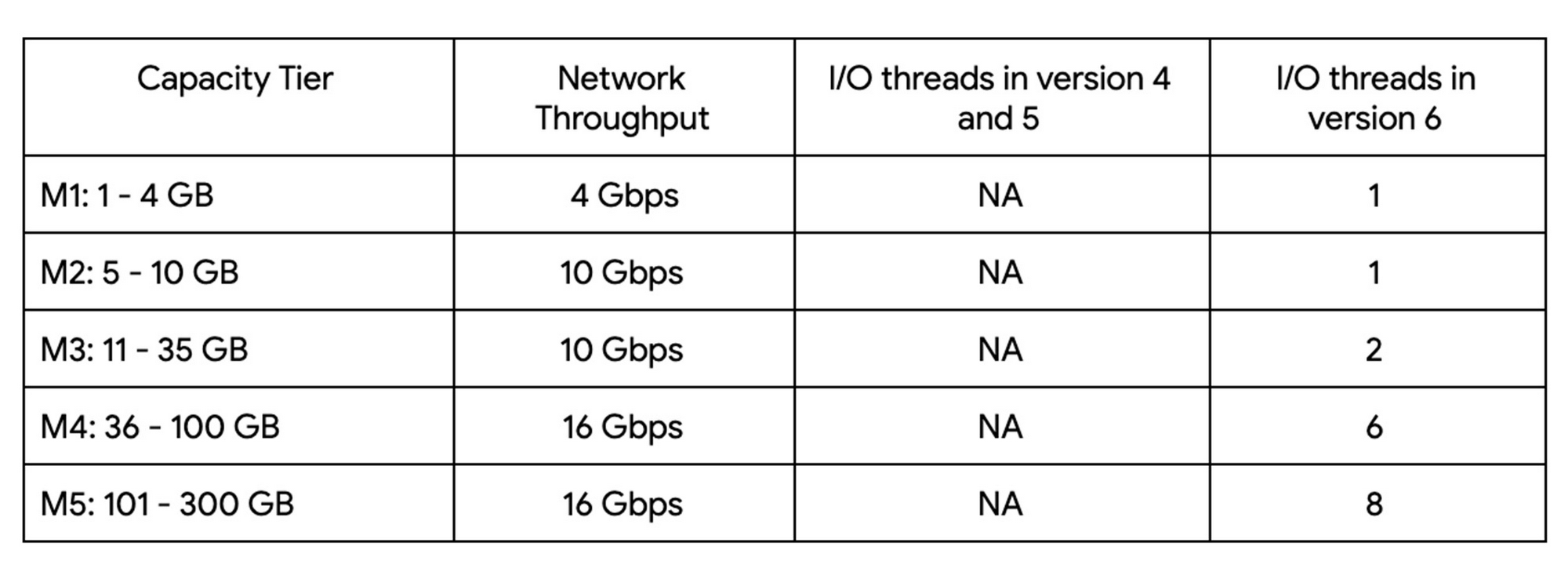
Up until version 5, Redis processed commands using a single thread. The processing involved reading the request, parsing the request, processing the request, and writing the response back to the socket. This approach means that all of the processing, which includes writing the response, was sequentially processed by a single vCPU regardless of the number of vCPUs available in the instance.
Redis 6 introduced I\O threading which allows writing the response using parallel threads. This functionality enables Redis 6 to more effectively leverage available vCPUs, thereby increasing the overall throughput compared to lower versions. Memorystore for Redis version 6 leverages I\O threading and automatically configures the optimal number of I\O threads to achieve the best possible performance for the various capacity tiers. We have also improved the overall network throughput for all redis versions by leveraging improvements in the Google Cloud infrastructure. Together these improvements deliver significant performance improvements and come at no additional cost to you.
So what can you expect from using Redis 6? As outlined in the table, Redis version 5 and lower uses a single thread to process the write requests for all tiers while Redis 6 uses a larger number of I\O threads at higher capacity tiers which provides substantially incremental throughput for higher capacity tiers.
For example, using a Redis 6 standard tier instance with a capacity of 101 GB (M5), we have observed up to a 200% improvement in read/write performance compared to version 5, though the actual value you’ll see is dependent on your workload. You can get the benefits of Redis 6 by upgrading an existing instance or by deploying a new instance.
By enabling read replicas on an instance using Redis 6, you can further improve the read performance. Read throughput scales linearly with the number of replicas so you can increase your read queries on an instance by up to 500% using five read replicas. By combining Redis 6 and read replicas, you can see a 10X increase in read performance compared to a version 5 standard tier instance with no read replicas.
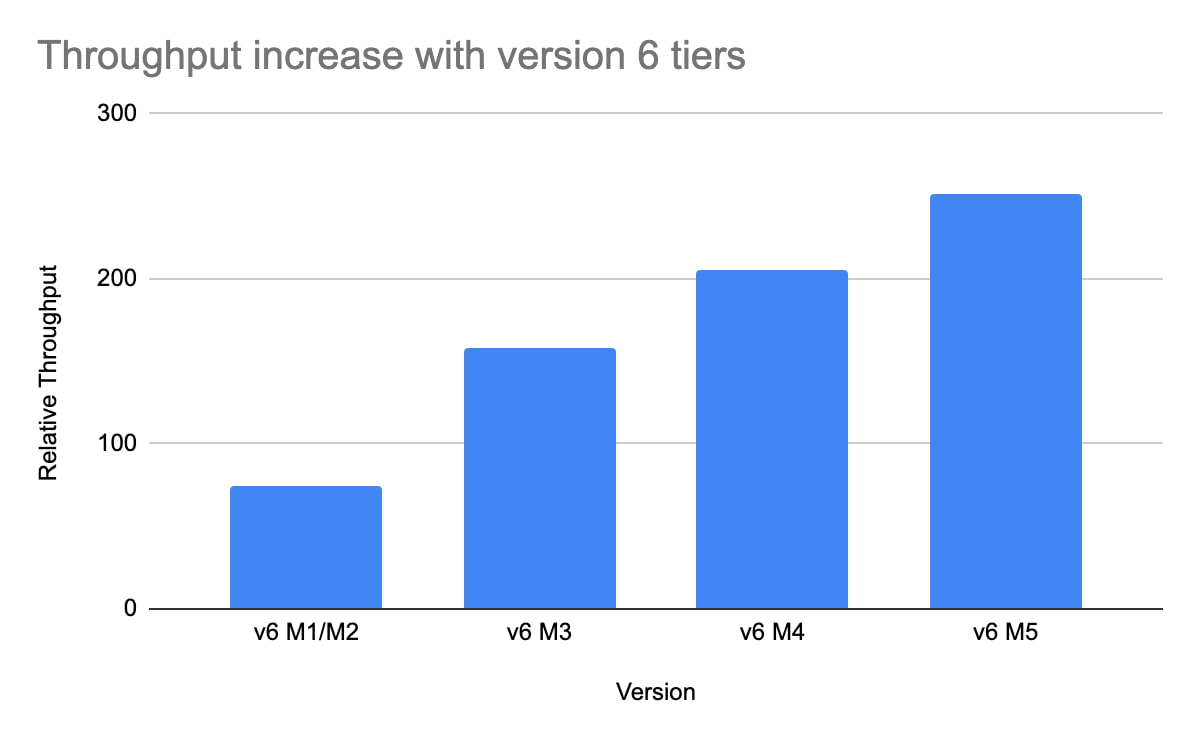
We are excited about the launch of read replicas but this is just one step in our journey to deliver the scale you need at the best price-performance. You can learn more about read replicas pricing on our Memorystore pricing page and get started using the Read Replicas Overview.
Making Mothers’ Day Special: How Google Cloud Migration for 1-800-FLOWERS.COM, Inc Impacts CX

6838
Of your peers have already read this article.
2:30 Minutes
The most insightful time you'll spend today!
Editor’s note: In honor of Mother’s Day, we look at how 1-800-FLOWERS.COM, Inc. migrated to Google Cloud as part of its digital transformation to quickly deploy seamless and convenient customer experiences across multiple brands on Mother’s Day and every day.
As a leading provider of gifts designed to help customers express, connect, and celebrate, 1-800-FLOWERS.COM, Inc. has embraced cloud technologies to grow and transform its business through constant innovation. As part of our digital transformation, we recently completed the migration of our ecommerce platform and other services to Google Cloud. We’ve transitioned from a monolithic to a microservices platform, moved many workloads from our on-premises data centers to our Google Cloud environment, and scaled both horizontally and vertically.
Since our migration, we’ve developed efficient processes to launch new brands, improved the customer experience across all brands, and seen significantly increased site traffic.
Nurturing a more delightful customer journey
Customer delight is at the core of everything we do. Whether it be with a flower bouquet, a sweet treat, or a personalized keepsake, our mission is to deliver smiles. With the rise of the COVID-19 pandemic, we’ve all been challenged to find unique and safe ways to continue honoring the special connections in our lives and celebrating occasions with loved ones. Our customers have adapted by doing things such as sending gifts to isolated loved ones, sharing the same meal together virtually, or using video to engage with others through group activities like flower arranging and building charcuterie boards.
The customer experience is a top priority for us, and we constantly look for innovative ways to enhance the customer journey across our ecommerce platform of more than a dozen brands. As a result, we’ve continued to see a rise in demand as customers enjoy the ease and convenience of our site and discover our full family of brands.
Migrating to a cloud-first mindset
As we’ve continued to innovate and iterate on the customer experience, we knew we wanted to evolve our platform. We wanted to shift to a microservices platform, which would allow our team the opportunity to release updates to our site more often and set up the right continuous integration/continuous deployment (CI/CD) practices.
Working with Google Cloud, we were able to move our ecommerce platform to the cloud and standardize our site and brand deployment by building one release that could then be repeated across all of our brands. We built everything in a modular fashion, including microservices and code libraries, so that sites could be easily constructed and replicated for each brand. And because of this, we were able to launch Shari’s Berries extremely quickly after we acquired the brand in 2019.
Moving our platform to a completely homegrown solution of microservices was a daunting task. But our team handled it beautifully through load-testing, stress-testing, and building new monitoring tools. And with Google Cloud supporting us all along the way, managing the migration process was simple and easy from start to finish.
Arranging a better bouquet of services
Currently, we’ve migrated every customer-facing touchpoint for all of our brands to Google Cloud—whether it’s on the web or mobile, our AI bots, or our chat interfaces.
- We run on Google Kubernetes Engine and Istio.
- We have nearly 200 microservices built to help power our entire ecommerce stack across several cloud services running on Google Cloud.
- We’re utilizing BigQuery for our offline intelligence.
Results are coming up roses
Our new stack on Google Cloud has benefits for both us and our customers. We moved from a session-based to a token-based system, which provides enhanced security as well as a consistent, convenient experience across all our brands. Using service workers and a single-page app, we are able to download all the relevant site content to the browser in under two seconds to create an instant-click experience for each and every customer. We also use Google Analytics to measure our user interactions and provide personalized results to each customer. Our hope is that with this new system, we can learn from customer behavior to offer gift givers a more personalized shopping experience during each visit.
The benefits of our new tech stack have not only helped us enhance the solutions we offer to customers today, they’ve also enabled us to offer new ones at lightning speed. With our legacy system, we used to release new code once a week or once a month. Now, even during our peak periods, we’re able to release 10 to 15 times a day and can deploy and pivot quickly to create new microservices and microsites on the fly—often without having to touch any code.
Efficiencies abound
The benefits of moving our platform to Google Cloud have extended to our internal teams as well. Before the migration, we had only two environments for developing and testing, which made it time-consuming to test updates before they went into production. Now with Google Cloud, we have several different journey teams—which are made up of developers, product owners, and technical owners—all working in several different environments, solving problems, and creating new solutions together.
Everyone is now empowered to be self-sufficient, developing and releasing microservices on their own when they’re ready. This has given our developers more time to take part in continued development and learning opportunities. For example, we offer lunch-and-learn sessions as well as other resources for everyone to take advantage of so they can continue to learn and refine their skills.
Planting the seeds for future growth
As we look to the future and think about how we help our customers express, connect, and celebrate, we’ll continue to collaborate across teams to deliver solutions that spread smiles. Specifically, we’re exploring additional use of AI to help us better serve our customers across all our brands.
We’ve enjoyed the ongoing support we’ve received from the Google Cloud team as they help us build new solutions and design a road map for the future. Their support has helped the 1-800-FLOWERS.COM, Inc. team to realize the power of the cloud and bring the very best experience to our customers.
Learn more about 1-800-FLOWERS.COM, Inc., or check out our recent blog about cloud migration for the real world.
Boost Database Performance with AlloyDB Index Advisor: The Ultimate Optimization Tool

1382
Of your peers have already read this article.
4:00 Minutes
The most insightful time you'll spend today!
Intro
One of the time consuming tasks for DBAs is to maximize query performance. To optimize slow-running queries, they often have to do detailed analysis, understand optimizer plans, and go through a lot of trial and error before getting to the best set of indexes that help with improved query performance. However, even with expert knowledge of a database’s internals, it is challenging to choose an effective set of indexes, especially when workloads change over time. The complexity of queries including several joins, filters, and subqueries make the process of identifying the right set of indexes very challenging for DBAs. Also, the effect of an index on the query plan needs to be taken into account when considering further indexes. Creating an index may cause the query optimizer to select completely different join orders and join/scan methods. This effect is hard to predict and quantify for DBAs.
Imagine if the database itself is intelligent enough to identify such queries, and recommends creating specific B-tree indexes?
Google Cloud’s AlloyDB for PostgreSQL is a fully-managed and fully PostgreSQL-compatible database for demanding transactional and analytical workloads that provides enterprise-grade performance and availability. AlloyDB offers Index Advisor, a built-in feature that helps alleviate the guesswork of tuning query performance with deep analysis of the different parts of a query including subqueries, joins, and filters. It periodically analyzes the database workload, identifies queries that can benefit from indexes, and recommends new indexes that can increase query performance.
How the AlloyDB Index Advisor works
First, let’s review a few AlloyDB terms relevant to the Index Advisor’s work.
- PostgreSQL’s system catalog has schema metadata, such as information about tables and columns, and internal bookkeeping information.
- HypoPG is an open source PostgreSQL extension that helps with hypothetical indexes without actually creating them to see if the index helps with query execution.
- Query Optimizer generates optimal execution plan.
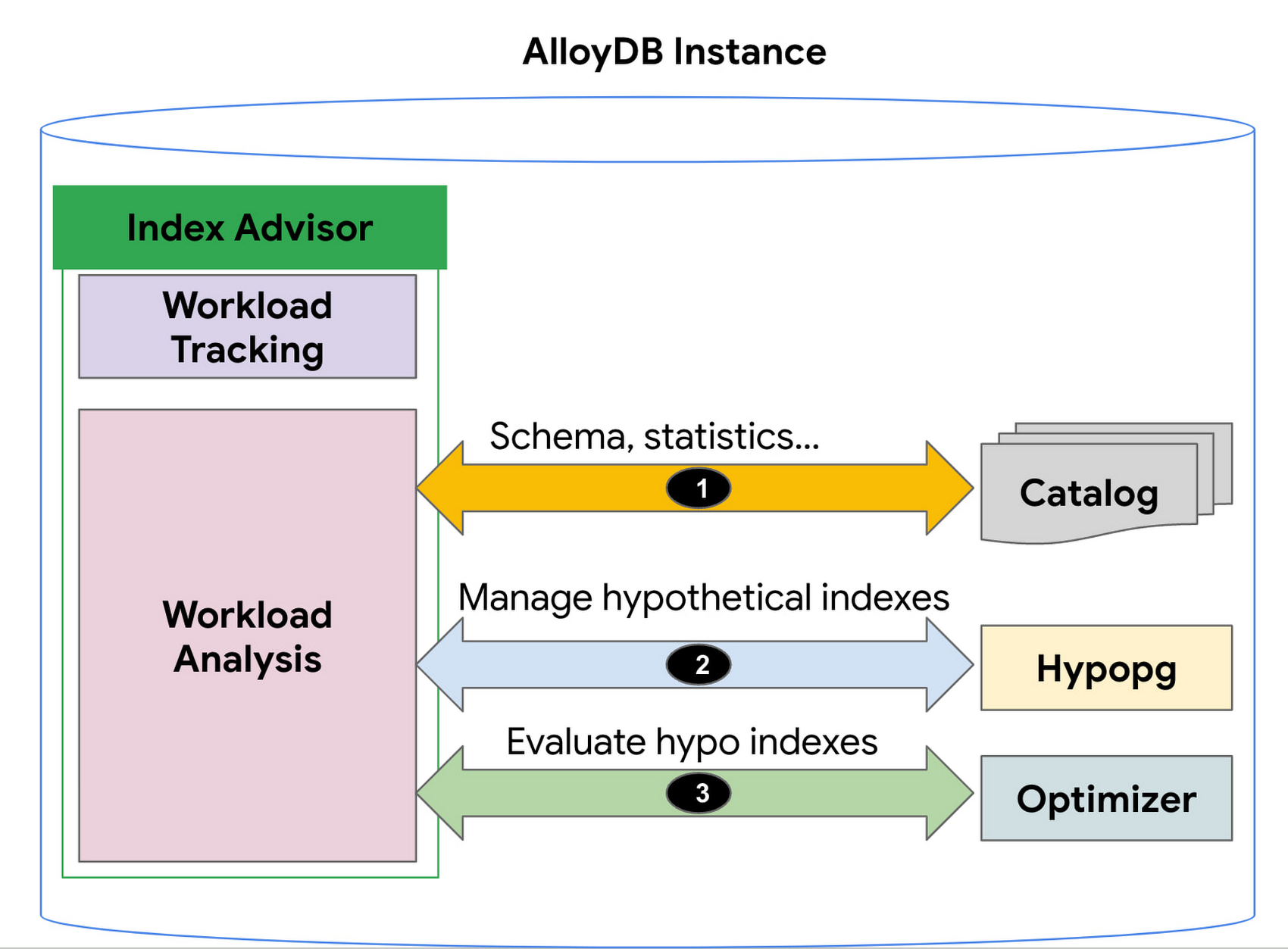
1. AlloyDB’s Index Advisor tracks the user query workload and analyzes it using statistics from the system catalog; it then identifies queries that could be improved significantly and potential candidate indexes for those cases. Note that there could be a large number of candidate indexes.
2. The Index Advisor evaluates each of these queries using hypothetical indexes based on the HypoPG, an open source extension and AlloyDB’s Query Optimizer.
3. The results of this evaluation are used to intelligently select the best set of indexes for the workload and to generate recommendations.
You can then simply copy and run the suggested index creation SQL commands. The Index Advisor consumes minimal resources and analyzes queries at a frequency that you define. It can also be constrained to have a user-specified maximum storage budget for the new indexes it recommends.
How to use the Index Advisor
1. Index Advisor is enabled by default. Its recommendation engine analyzes your workload at the specified frequency (every 24 hours by default) to capture any potential new index recommendations.
2. Run your queries that are representative of your workload to the instance. Index advisor tracks these queries automatically.
3. To request an index recommendation immediately, you can use the google_db_advisor_recommend_indexes() function. This function performs on-demand analysis and recommends indexes for the top 100 queries. SELECT * FROM google_db_advisor_recommend_indexes();
4. To view the recommended indexes and the queries based on periodic analysis, use the following query (also see the Usage Example section). SELECT DISTINCT recommended_indexes, queryFROM google_db_advisor_workload_report r JOIN google_db_advisor_workload_statements sON r.query_id = s.query_id;
Note that Index advisor analyzes queries issued by the connected user. For the user with the pg_read_all_stats role, it analyzes all tracked queries.
Currently, Index advisor only recommends new indexes. In future, the Index Advisor could be used to report unused indexes as well; dropping these can reduce index maintenance overhead for your transactional workload.
Evaluation
We will discuss two cases in this section.
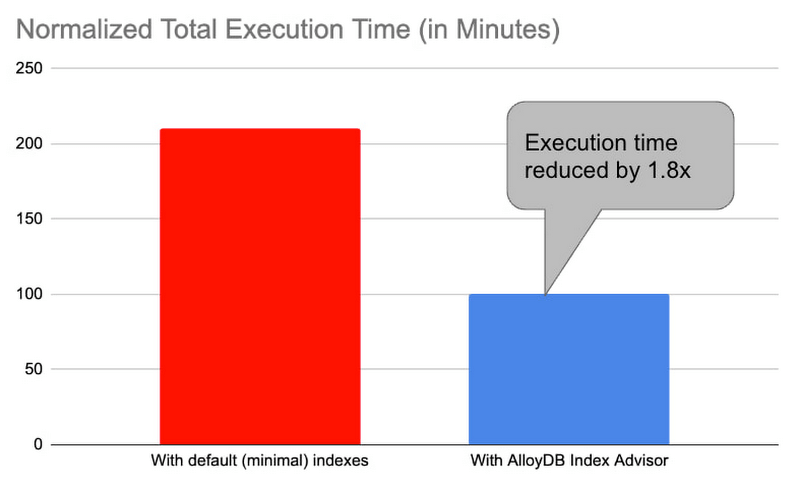
1. Decision support benchmark: We used a sample internal benchmark that modeled a decision support system. The benchmark dataset contained 450+ columns across 24 tables. The result quantified the performance of 100+ complex analytical queries. The benchmark initially had a minimal number of indexes and the normalized total query execution time was around 200+ minutes. We then enabled the AlloyDB Index Advisor and it recommended an additional 17 indexes. Creating those indexes and re-running the queries reduced the total execution time by half to ~100 minutes (1.8x).
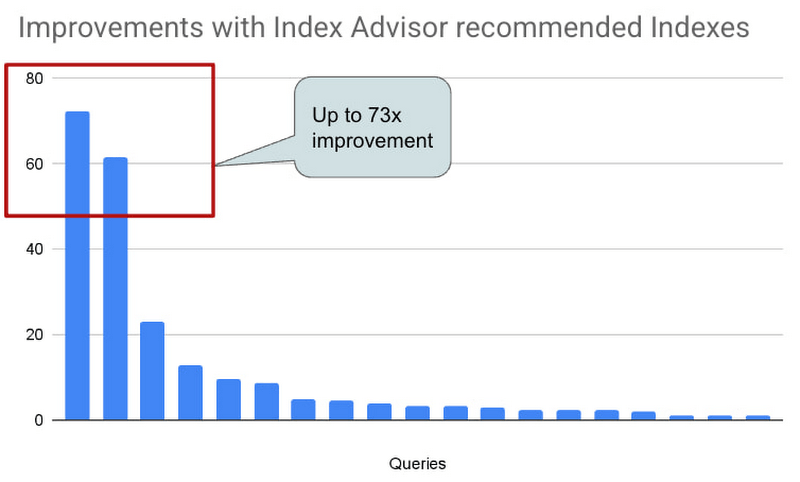
2. Real-world AlloyDB customer workload: This is a real-world workload from a large financial customer. They have a portfolio of complex analytical queries and business insights demand fast response times. Before using Index Advisor, DBAs had already created a few indexes that they considered to be useful to speed up these queries. Many of their queries joined 30+ tables, had 10+ filters and multiple subqueries. Those made it complex for DBAs to correctly identify the most beneficial indexes to create. AlloyDB Index Advisor analyzed these complex structures and identified four additional indexes. By adding the suggested indexes, performance of 17 queries were up by 5x – 73x. The response time of these queries dropped from seconds to milliseconds.
Usage Example
An example: We use the following example to demonstrate the use of Index Advisor. The example simulates a retail application performing analytics on its orders table.
1. Create a sample orders table.
CREATE TABLE orders (
    o_orderkey bigint NOT NULL,
    o_custkey int NOT NULL,
    o_orderstatus "char" NOT NULL,
    o_totalprice numeric(13,2) NOT NULL,
    o_orderdate date NOT NULL,
    o_orderpriority character varying(15) NOT NULL,
    o_clerk character varying(15) NOT NULL,
    o_shippriority int NOT NULL,
    o_comment character varying(79) NOT NULL
);
2. Insert 100K random orders into the table.
INSERT INTO orders
SELECT col, col, substr(md5(random()::text), 1, 1), random(), date '2023-01-01' + col * interval '1 hour', substr(md5(random()::text), 1, 1), concat('clerk', col), col%10, concat('comment', col)
 FROM generate_series(1,1000000) g(col);
3. Analyze the table to populate statistics.
ANALYZE orders;4. Run a query that counts the number of orders in the second week of Jan. You can run the query with timing on so that you can see how long it takes to run the query before and after the index is created.
\timing
SELECT COUNT(*) FROM ORDERS WHERE o_orderdate >= '2023-01-09' and o_orderdate <= '2023-01-15';

Time: 42.196 ms
5. Manually request an index recommendation.
SELECT * FROM google_db_advisor_recommend_indexes();
                      index                       | estimated_storage_size_in_mb
--------------------------------------------------+------------------------------
 CREATE INDEX ON "public"."orders"("o_orderdate") |                           25
(1 row)
6. View recommended indexes for tracked queries.
SELECT DISTINCT recommended_indexes, query
FROM google_db_advisor_workload_report r, google_db_advisor_workload_statements s
WHERE r.query_id = s.query_id AND recommended_indexes != '';
               recommended_indexes                |                                             query
--------------------------------------------------+------------------------------------------------------------------------------------------------
 CREATE INDEX ON "public"."orders"("o_orderdate") | SELECT COUNT(*) FROM ORDERS WHERE o_orderdate >= '2023-01-09' and o_orderdate <= '2023-01-15';
(1 row)
6. View recommended indexes for tracked queries.
SELECT DISTINCT recommended_indexes, query
FROM google_db_advisor_workload_report r, google_db_advisor_workload_statements s
WHERE r.query_id = s.query_id AND recommended_indexes != ”;
recommended_indexes | query
————————————————–+————————————————————————————————
CREATE INDEX ON “public”.”orders”(“o_orderdate”) | SELECT COUNT(*) FROM ORDERS WHERE o_orderdate >= ‘2023-01-09’ and o_orderdate <= ‘2023-01-15’;
(1 row)
7. Add the recommended index.
CREATE INDEX ON "public"."orders"("o_orderdate");8. Re-run the query.
\timing
SELECT COUNT(*) FROM ORDERS WHERE o_orderdate >= '2023-01-09' and o_orderdate <= '2023-01-15';

Time: 1.403 ms  (compared to 42.196ms before the index)
Learn more
- To learn more about AlloyDB’s Index Advisor, see Enable and use the index advisor | AlloyDB for PostgreSQL | Google Cloud
- To learn about AlloyDB, read AlloyDB for PostgreSQL intelligent scalable storage | Google Cloud Blog
- Start building on Google Cloud with $300 in free credits and 20+ always free products. https://cloud.google.com/free
More Relevant Stories for Your Company

5 Best Practices for Cloud Cost Optimization
When customers migrate to Google Cloud Platform (GCP), their first step is often to adopt Compute Engine, which makes it easy to procure and set up virtual machines (VMs) in the cloud that provide large amounts of computing power. Launched in 2012, Compute Engine offers multiple machine types, many innovative features, and is available in

Unlocking Data Value: Latest Data Platforms and Announcements at the Next 21
Today at Google Cloud Next we are announcing innovations that will enable data teams to simplify how they work with data and derive value from it faster. These new solutions will help organizations build modern data architectures with real-time analytics to power innovative, mission-critical, data-driven applications. Too often, even the best minds

Google Cloud’s Transfer Services Helps Move Nuro’s Petabytes of Data from Edge to the Cloud
Engineers that build last-mile delivery services belong to an elite order, a hallowed subcategory. Delivery customers are incredibly demanding when it comes to speed and convenience, and the services they use must take variables like increased traffic, road conditions, human error, and even driver availability into account every day. Nuro

Demystifying Transactional Locking in Cloud Spanner
Cloud Spanner is a fully managed relational database with unlimited scale, strong consistency, and up to 99.999% availability. It is designed for highly concurrent applications that read and update data, for example, to process payments or for online game play. To ensure the consistency across multiple concurrent transactions, Cloud Spanner
