





2908
Of your peers have already watched this video.
36:00 Minutes
The most insightful time you'll spend today!
What’s New in BigQuery, Google Cloud’s Modern Data Warehouse
The demands that today’s enterprise has from data go far beyond the capabilities of traditional data warehousing. For many leaders, the need to digitally transform their businesses is a key driver for data analytics spending.
Businesses want to make real-time decisions from fresh information as well as make predictions from their data in order to remain competitive.
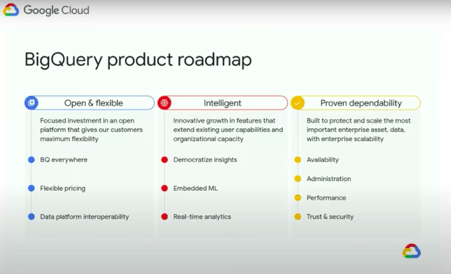
In this video, watch Sudhir Hasbe, Director of Product Management, Data Analytics, Google Cloud and Tino Tereshko, Product Manager, BigQuery, Google Cloud demonstrate what’s new in BigQuery, Google Cloud’s enterprise data warehouse, and hear about all the latest feature innovations and see some amazing demos.
4313
Of your peers have already watched this video.
20:00 Minutes
The most insightful time you'll spend today!
The New and Upcoming Infrastructure for Google Cloud’s AI and ML Solutions
How does Google manage to provide its customers a differentiated compute platform experience and define ways to fully leverage its infrastructure supporting its cutting-edge AI and ML offerings? Easy-to-use, scalable and ability to create innovative products and services to end-users at low cost of ownership is the narrative behind Google Cloud’s AI and ML solutions. Explore Google Cloud’s ML infrastructure and accelerator innovation for 2021.
Watch the video to find out how Google Cloud’s leadership in AI through Google research, Deep Mind and also practical application of AI within Google Products drive innovative platforms and offerings that cater to customers’ AI and ML use cases!
6428
Of your peers have already watched this video.
1:30 Minutes
The most insightful time you'll spend today!
Value Realization with Google Cloud for Retail SAP Data
Retail engagements have changed drastically over the last few years, and by the virtue of COVID-19 pandemic, retail data and customers’ expectations plummeted. To drive value and transformation across the entire value-chain retailers can make most of Google Cloud’s secure, reliable IaaS by migrating their SAP systems and taking advantage of integrations, insights and innovations. In times of change retail companies can gain maximum visibility of SAP data unlocking Google Cloud’s infrastructure modernization and Big Data and analytics capabilities. Watch the video to understand how Google Cloud and SAP partnership is a golden handshake for retail businesses’ future.
Geospatial Data for Business Apps Drive Sustainable and Accurate Decision-making

4346
Of your peers have already read this article.
1:30 Minutes
The most insightful time you'll spend today!
Organizations that collect geospatial data can use that information to understand their operations, help make better business decisions, and power innovation. Traditionally, organizations have required deep GIS expertise and tooling in order to deliver geospatial insights. In this post, we outline some ways that geospatial data can be used in various business applications.
Assessing environmental risk
Governments and businesses involved in insurance underwriting, property management, agriculture technology, and related areas are increasingly concerned with risks posed by environmental conditions. Historical models that predict natural disasters like pollution, flooding, and wildfires are becoming less accurate as real-world conditions change. Therefore, organizations are incorporating real-time and historical data into a geospatial analytics platform and using predictive modeling to more effectively plan for risk and to forecast weather.
Selecting sites and planning expansion
Businesses that have storefronts, such as retailers and restaurants, can find the best locations for their stores by using geospatial data like population density to simulate new locations and to predict financial outcomes. Telecom providers can use geospatial data in a similar way to determine the optimal locations for cell towers. A site selection solution can combine proprietary site metrics with publicly-available data like traffic patterns and geographic mobility to help organizations make better decisions about site selection, site rationalization, and expansion strategy.
Planning logistics and transport
For freight companies, courier services, ride-hailing services, and other companies that manage fleets, it’s critical to incorporate geospatial context into business decision-making. Fleet management operations include optimizing last-mile logistics, analyzing telematics data from vehicles for self-driving cars, managing precision railroading, and improving mobility planning. Managing all of these operations relies extensively on geospatial context. Organizations can create a digital twin of their supply chain that includes geospatial data to mitigate supply chain risk, design for sustainability, and minimize their carbon footprint.
Understanding and improving soil health and yield
AgTech companies and other organizations that practice precision agriculture can use a scalable analytics platform to analyze millions of acres of land. These insights help organizations understand soil characteristics and help them analyze the interactions among variables that affect crop production. Companies can load topography data, climate data, soil biomass data, and other contextual data from public data sources. They can then combine this information with data about local conditions to make better planting and land-management decisions. Mapping this information using geospatial analytics not only lets organizations actively monitor crop health and manage crops, but it can help farmers determine the most suitable land for a given crop and to assess risk from weather conditions.
Managing sustainable development
Geospatial data can help organizations map economic, environmental, and social conditions to better understand the geographies in which they conduct business. By taking into account environmental and socio-economic phenomena like poverty, pollution, and vulnerable populations, organizations can determine focus areas for protecting and preserving the environment, such as reducing deforestation and soil erosion. Similarly, geospatial data can help organizations design data-driven health and safety interventions. Geospatial analytics can also help an organization meet its commitments to sustainability standards through sustainable and ethical sourcing. Using geospatial analytics, organizations can track, monitor, and optimize the end-to-end supply chain from the source of raw materials to the destination of the final product.
What’s next
Google Cloud provides a full suite of geospatial analytics and machine learning capabilities that can help you make more accurate and sustainable business decisions without the complexity and expense of managing traditional GIS infrastructure. Get started today by learning how you can use Google Cloud features to get insights from your geospatial data, see Geospatial analytics architecture.
Acknowledgements: We’d like to thank Chad Jennings, Lak Lakshmanan, Kannappan Sirchabesan, Mike Pope, and Michael Hao for their contributions to this blog post and the Geospatial Analytics architecture.
Guide for Measuring Cloud Spanner Performance for Your Custom Workload

4825
Of your peers have already read this article.
3:00 Minutes
The most insightful time you'll spend today!
Database migration to a new database platform or technology can be daunting for various reasons. One of the common concerns is database performance. It is hard to evaluate database performance early in the evaluation cycle without performing actual data migration and application changes. This becomes even more important in the case of Cloud Spanner where modernization is required at both the database and application layers.
The traditional approach to evaluate database performance is to deploy the application and database together, migrate historical data to the new database and then simulate load tests by running an application on the new database. Doing all this for an early performance evaluation of Cloud Spanner may feel like a lot of effort.
In this post, we will explore a middle ground to performance testing using JMeter. Performance test Cloud Spanner for a custom workload before making application code changes and executing data migration. More detailed step-by-step guide is published here.
Goals
- Estimate the number of Cloud Spanner nodes needed (and get a cost estimate).
- Performance test the most frequently used set of queries and transactions.
- Demonstrate the ability to scale horizontally.
- Better understand the optimizations needed for schema and sql queries.
- Determine latency of DML operations.
Limitations
- You cannot test using non-java client libraries.
- It is more complex to test non-jdbc compliant features like mutations, parallel reads etc.
Preparing for performance tests
- Identify top SQL queries, latency, frequency / hour and avg number of rows returned or updated for each. This information will also serve as a baseline for the current system.
- Determine Cloud Spanner region / multi-region deployment. Ideally, load should be generated from the Cloud Spanner instance’s leader region for minimum latency and best performance. Read Demystifying Cloud Spanner multi-region configurations for more details on various configurations of Cloud Spanner.
- Estimate the number of Cloud Spanner nodes required for a given workload based on (step 1). It is recommended to have a minimum of 2 nodes for linear scaling.
Note: Peak performance numbers of regional performance and multi regional performance are published. It is based on a 1KB single row transaction with no secondary indexes. - Request quota for Cloud Spanner nodes on a given region / multi-region. It can take up to 1 business day.
Setting up Cloud Spanner
Creating the schema for Cloud Spanner
You can use the following tools to generate a schema for Cloud Spanner if you are migrating from the following source databases. Alternatively, you can model the schema manually. Schema design has a huge performance impact, hence it is recommended to review the schema very carefully.
| Source | Target | Tool(s) | |
| 1. | MySQL / MariaDB | Cloud Spanner | HarbourBridgeStriim |
| 2. | Postgresql | Cloud Spanner | HarbourBridgeStriim |
| 3. | Oracle | Cloud Spanner | Striim |
| 4. | SQL Server | Cloud Spanner | Striim |
Note: Manual review and tuning of schema will be needed to optimize and mitigate potential hotspots. You will need to keep in mind schema design best practices when modeling your schema.
Populating seed data into Cloud Spanner
Performance of a database depends on the amount of data present. Existing data (and indexes) determines how much data is scanned on select queries and therefore performance. Hence, it is important to seed data into Cloud Spanner before performance testing.
For most realistic results, data should be migrated from an existing production source. Sometimes you cannot do that due to schema changes. One way is to utilize a custom ETL job to export and transform data and then import into Cloud Spanner. Another alternative could be to mock seed data using JMeter(More details in later sections).
JMeter performance tests
Writing Tests
JMeter will interact with Cloud Spanner just like your application. It will perform DML operations the same way as your application does. Hence, tests need to simulate production like transactions. For example if a transaction is made up of insert and/or update statements in several tables within transaction boundaries then JMeter should mimic the same.
JMeter has the following hierarchy:
Test Plan > Thread Group(s) > Sampler(s) (aka test)
Test plan is a top level component. It can contain global properties and libraries (like jdbc driver etc).
Thread Group(s) are representative of a database transaction. It contains one or more sampler(s). All the samplers within a thread group execute serially.
Sampler(s) should represent a single DML call. If your transaction needs to have multiple dml calls, you should create multiple samplers. Typically you will use JDBC Sampler for database calls. You can also use JSR 223 Sampler as described here, in case you need to use mutations or parallel reads etc. Results from one sampler can be passed to the next, as in real world application.
Executing tests and collecting results
JMeter tests should be executed as physically close to Cloud Spanner instances as possible to minimize network latency. Therefore it is best to execute them from Compute Engine (via private service connect) from the same region as the Cloud Spanner instance. In-case of multi region Cloud Spanner, GCE instances should be created in the Leader Region of the Cloud Spanner instance for lowest network latency.
JMeter should be executed via command line, it is a CPU intensive application so make sure you have allocated enough resources on the VM.
Refer to the Cloud Spanner monitoring dashboard to ensure that your Cloud Spanner instance’s CPU utilization is at or below the recommended values. In addition, use introspection tools to investigate performance issues with your database.
You might need to optimize your queries (add indexes) and re-execute tests in multiple waves to tune the performance as needed.
Try it yourself
Follow a detailed step by step tutorial on Measure Cloud Spanner performance test using JMeter to test Cloud Spanner performance yourself.
How Vertex AI NAS is Suitable for Most Advanced ML Workloads

4461
Of your peers have already read this article.
3:00 Minutes
The most insightful time you'll spend today!
Vertex AI launched with the premise “one AI platform, every ML tool you need.” Let’s talk about how Vertex AI streamlines modeling universally for a broad range of use cases.
The overall purpose of Vertex AI is to simplify modeling so that enterprises can fast track their innovation, accelerate time to market, and ultimately increase return on ML investments. Vertex AI facilitates this in several ways. Features like Vertex AI Workbench, for example, speed up training and deployment of models by five times compared to traditional notebooks. Vertex AI Workbench’s native integration with BigQuery and Spark means that users without data science expertise can more easily perform machine learning work. Tools integrated into the unified Vertex AI platform, such as state of the art pre-trained APIs and AutoML, make it easier for data scientists to build models in less time. And for modeling work that lends itself best to custom modeling, Vertex AI’s custom model tooling supports advanced ML coding, with nearly 80% fewer lines of code required (compared to competitive platforms) to train a model with custom libraries. Vertex AI delivers all this while maintaining a strong focus on Explainable AI.
Yet organizations with the largest investments in AI and machine learning, with teams of ML experts, require extremely advanced toolsets to deliver on their most complex problems. Simplified ML modeling isn’t relegated to simple use cases only.
Let’s look at Vertex AI Neural Architecture Search (NAS), for instance.
Vertex AI NAS enables ML experts at the highest level to perform their most complex tasks with higher accuracy, lower latency, and low power requirements. Vertex AI NAS originates from the deep experience Alphabet has with building advanced AI at scale. In 2017, the Google Brain team recognized we need a better way to scale AI modeling, so they developed Neural Architecture Search technology to create an AI that generates other neural networks, trained to optimize their performance in a specific task the user provides. To the astonishment of many in the field, these AI-optimized models were able to beat a number of state of the art benchmarks, such as ImageNet and SOTA mobilenets, setting a new standard for many of the applications we see in use today, including many Google-internal products. Google Cloud saw the potential of such a technology and shipped in less than a year a productized version of the technique (under the brand AutoML). Vertex AI NAS is the newest and most powerful version of this idea, using the most sophisticated innovation that has emerged since the initial research.
Customer organizations are already implementing Vertex AI NAS for their most advanced workloads. Autonomous vehicle company Nuro is using Vertex AI NAS, and Jack Guo, Head of Autonomy Platform at the company, states, “Nuro’s perception team has accelerated their AI model development with Vertex AI NAS. Vertex AI NAS have enabled us to innovate AI models to achieve good accuracy and optimize memory and latency for the target hardware. Overall, this has increased our team’s productivity for developing and deploying perception AI models.”
And our partner ecosystem is growing for Vertex AI NAS. Google Cloud and Qualcomm Technologies have collaborated to bring Vertex AI NAS to the Qualcomm Technologies Neural Processing SDK, optimized for Snapdragon 8. This will bring AI to different device types and use cases, such as those involving IoT, mixed reality, automobiles, and mobile.
Google Cloud’s commitments to making machine learning more accessible and useful for data users, from the novice to the expert, and to increasing the efficacy of machine learning for enterprises are at the core of everything we do. With the suite of unified machine learning tools within Vertex AI, organizations can take advantage of every ML tool they need on one AI platform.
Ready to start ML modeling with Vertex AI? Start building for free. Want to know how Vertex AI Platform can help your enterprise increase return on ML investments? Contact us.
More Relevant Stories for Your Company
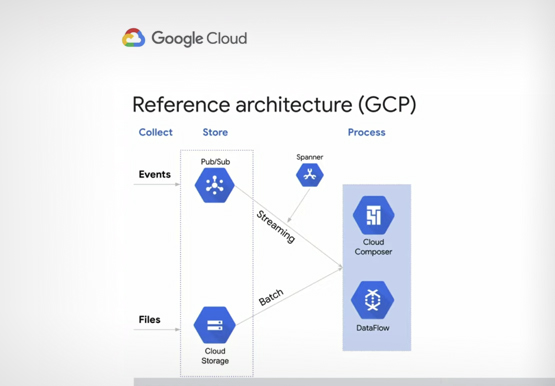

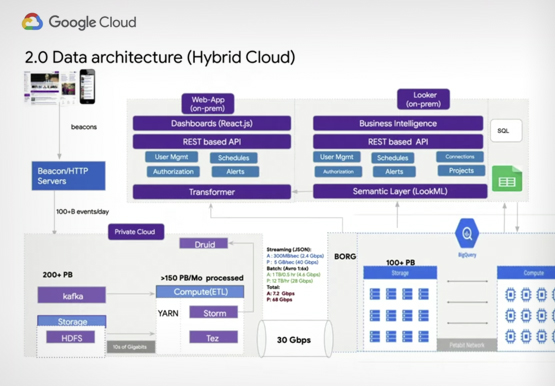

Verizon Media Shows the Solution Architecture it Uses for a 100+ PB Analytics Platform
Verizon Media owns and operates more than a dozen brands including Yahoo Mail, Yahoo News, AOL, Huffington Post, TechCrunch, and Engadget among others. These web properties are visited by millions of users on a daily basis. In this session, Shakil Memon, Customer Engineer, Google Cloud and Nikhil Mishra, Sr Director,

Vector Search: The Tech Powering Billions of Search Results for Google Users
Recently, Google Cloud partner Groovenauts, Inc. published a live demo of MatchIt Fast. As the demo shows, you can find images and text similar to a selected sample from a collection of millions in a matter of milliseconds: Image similarity search with MatchIt Fast Give it a try — and either select a preset

Google Cloud’s Firebase Realtime Database and BigQuery AllowsCastbox to Ramp Up Customer Experience
Demand for spoken audio content such as podcasts remains robust despite the proliferation of video services and other entertainment options for consumers. Shibin Li, Co-founder of Castbox, credits growth of the global podcast platform to the following: speed and availability, market-leading features, the proliferation of smart devices to deliver audio content,
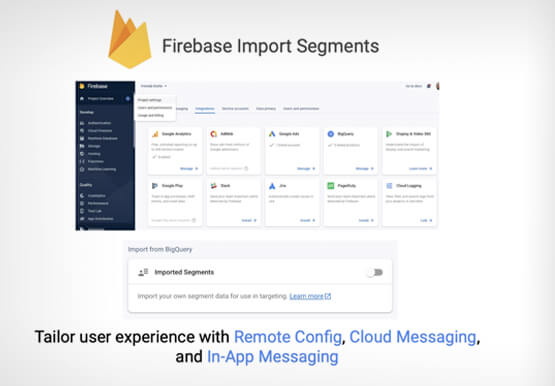
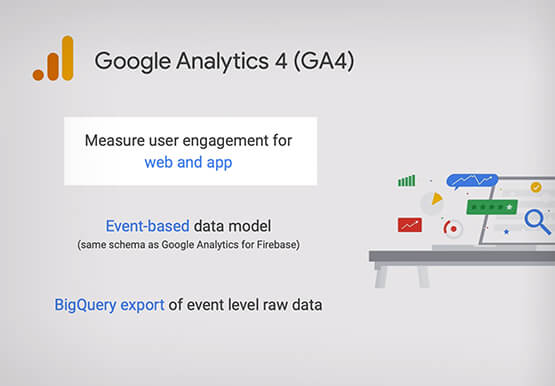

Predict User Churn on Gaming Apps with Google Analytics Data using BigQuery ML
User retention can be a major challenge for mobile game developers. According to the Mobile Gaming Industry Analysis in 2019, most mobile games only see a 25% retention rate for users after the first day. To retain a larger percentage of users after their first use of an app, developers can
