





3343
Of your peers have already watched this video.
25:30 Minutes
The most insightful time you'll spend today!
How to Build a Platform on Google Cloud from the Ground Up
Building distributed applications is hard! Building globally scalable distributed applications is harder. Maintaining and growing these services as your business grows is even harder.
Watch this video to know how to create a globally scalable platform for your business on Google Cloud using service meshes. It shows how to build a platform on Google Cloud from the ground up.
This content is agreed upon and a combined effort between SA, Anthos PM (specifically Istio and Anthos Service Mesh), and Anthos engineering.
Join Ameer Abbas, Solutions Architect at Google Cloud, as he goes through (design opinions and reasonings for) project hierarchy in a Google Cloud org, setting up global networking and GKE cluster, service mesh (Istio and ASM), observability, and, common tools and golden signals. After watching this video, you will be able to learn how to think about SLOs, SLAs, security and how to secure traffic between services (mTLS) or from an end user to a service running in your mesh. You will also learn routing and other multicluster routing considerations and, other common operational tasks like adding or migrating an application to the mesh, rolling out new versions of applications, DR and other hybrid or multi-cloud considerations.
A French News Company’s Web Modernization Journey with Cloud Run

3495
Of your peers have already read this article.
1:30 Minutes
The most insightful time you'll spend today!
Editor’s note: Today’s post documents the solution to a problem of how to scale website infrastructure as it moves from on-prem to the cloud. It is the result of collaboration between technical teams of Les Echos Le Parisien Annonces (a division of Groupe Les Echos, subsidiary company of LVMH) and Google in the spirit of finding the best tool for the job together.
All technology starts aging from the first day you set it up, and over time becomes in need of some renewal. At Les Echos Le Parisien Annonces (a division of Groupe Les Echos, subsidiary company of LVMH), we complement the main site (“publication annonce légale”) with a number of local market sites for different regions within metropolitan France, as well as French readers in territories across the world. Each local market site offers a variety of services and content, which are served by a set of CMS-driven sites.
Historically these sites were served from dedicated on-prem infrastructure. As the number of sites grew, vertical scaling was used to increase the capacity of the machine. Over time, this approach presented challenges. First, each new site involved modifying multiple shared configurations, and modifying several monolithic parts of the architecture. Because all the sites shared parts of the serving stack, an issue that developed for one site could take down all of the sites. The reliability of the serving path was not able to reach the availability we and our customers expected. Les Echos and Google put their heads together to solve this with a new serverless deployment pattern where each new site can be quickly and independently launched.
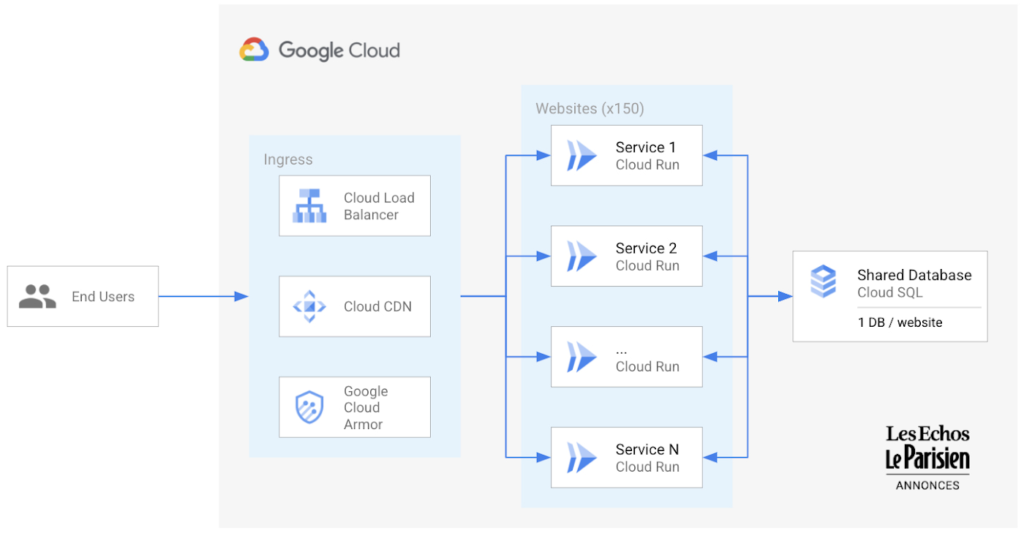
Each site, running a conventional PHP CMS solution, is now containerized and deployed as its own Cloud Run service with an independent configuration and database. This means each site scales vertically, including down to zero at times of day when that locale is quiet. Because Cloud Run is available across GCP regions, we can deploy sites closest to the market we want to reach. To further enhance our customer experience, each of these sites is run behind Cloud Global Load Balancing with Cloud Armor and Cloud CDN, providing extra security and performance. The initial pilot of 30 sites has performed well, and the remainder of the 150 current sites are now being migrated. Adding new sites has gone from taking hours to minutes. This allows Les Echos to quickly explore new opportunities in markets that previously would have taken much longer to assess and qualify for investing in a new site.
Adopting this serverless approach has been a successful step in the modernization journey to Google Cloud, allowing us to use containers to take existing software and both re-architect and re-platform to support growth while reducing toil.
The Unintended Consequences of Scale

3519
Of your peers have already read this article.
3:00 Minutes
The most insightful time you'll spend today!
Cloud infrastructure offers so many advantages: on-demand scalability, built-in security, and a bevy of tooling to scale your business at the speed of the Internet.
It enables companies to pursue “blitzscaling,” as Reid Hoffman calls it. Capital expenses that take years or decades to pay off are no longer required to establish global networking, compute capacity, storage resources, and application enablement tooling. By renting these assets from cloud providers, you can translate capital costs to operational costs, help your company to manage resources efficiently, keep expenses aligned with growth trajectory, and develop a portfolio of business-driving technology assets faster than would have previously been possible.
Certainly, this is the message from many founders and venture capitalists: move to the cloud, build a ton of software, scale like crazy, and win. Sounds great, right?
But history has shown us that the process is not quite this simple. Scale can be great and is a prerequisite to many of today’s most exciting business opportunities — but scale also frequently produces unintended consequences. You need to be able not only to achieve scale but also to manage it.
When scale produces bloat
To understand how unforeseen impacts can ripple out from a rapidly-scaled technology, consider the first mass-produced vehicle, the Model T. The first production model was produced in 1908, and less than two decades later, Ford had produced 15 million. This rapid growth profoundly affected urban living for decades.
Thanks to cars, fewer workers needed to live near cities or along major public transportation lines. The ease-of-access to personal transportation led to suburban population centers and, ultimately, urban sprawl. “Sub-cities” extricated homeowners from the density of urban population centers but also created a complex web of unintended consequences: new and often duplicative administrative bodies, new taxes, new zoning laws, and more intricate infrastructure projects. We are arguably still dealing with this fallout today as communities grapple with antiquated zoning laws and, in their attempts to find ways forward, often produce only more sprawl.
If your technology is in the cloud, you may be challenged with similar issues. For example, when developers build software in the cloud, many of the barriers to building software are removed. As a result, developers build a lot of software — but often without a lot of intentional design. This in turn results in companies building a large number of disparate systems and overwhelming app sprawl.
The cloud can help you proliferate technologies so quickly, in other words, that effective management and re-use of resources becomes incredibly tough.
Managing scale
Software assets are often seen as comprising the “brains” of a company — but to effectively grow, you should consider not only brains but also the digital nervous system. You need systems that connect the brains to all of the other important limbs that have to coordinate in order for your company to drive value.
One way of creating this nervous system and managing this complexity is to leverage the facade design pattern: applying an API layer that abstracts the underlying complexity of multiple systems into an elegant, reliable interface that encourages discovery and re-use of applications, functions, and other technology artifacts such as build and deployment pipelines.
For example, too many enterprises build a new digital “road” for each application that needs to authenticate or authorize users. Instead, you can leverage a facade pattern to help establish one “main road” for these purposes, encourage reuse of the road for new projects, and — with API management — monitor and control all traffic along the road. For tasks such as aligning risk and compliance operations or unifying developer onboarding functions, the distinction between reusing elegant roads and continually building new complicated ones could not be more important.
API management tools mean you can establish a single-pane-of-glass view into your network of digital roads and destinations or, if you prefer the biology metaphor, into the nervous system routes connecting your company’s software brains. This view becomes a point at which suspicious API usage patterns can be detected, reported, and handled and through which business-driving insights from legitimate traffic can be gleaned. Rather than dealing with IT sprawl, you can maintain visibility over your assets, control how they are used, roll out experimental digital products and get immediate feedback on adoption, and generate analytics to help you effectively divest from and invest in opportunities as the market demands.
More is not always better
More is not always better, and, in fact, it is sometimes worse.
It’s a time-worn sales axiom that would-be customers are more likely to make a choice when presented with two or three options rather than fifty, for example, and virtually all of us can relate to moments of “analysis paralysis” triggered by too many choices. These dynamics of choice are such that the diminishing marginal utility of each choice can detract from each option: with each choice comes a little stress, and as these stresses accumulate, customer satisfaction suffers. IT systems are no different; if developers building new connected experiences are left to their own designs, rather than encouraged with standardized resources and best practices, their work may add to complexity and customer dissatisfaction.
One need look only at the various open air markets around the world to see this point in action. They may offer many things to see but the experience is anything but efficient. The multitude of shops selling similar and duplicate items, the zigzag layout, and the expected friction from bargaining with each vendor all mean concepts such as market-wide product discovery and product inventory go out the window. If your developer experience mirrors these marketplaces, your efforts to scale are more likely to tangle up your operations than to satisfy customers.
Contrast this experience with luxury retail experiences where product areas are clearly demarcated in different retail spaces, product explanations accompany showcase items, inventory is available locally or ready to ship, clear pricing is readily available, and similar stores are intentionally anchored to strategic physical areas to encourage customer flow among them. The developer programs that cloud efforts are often meant to enable require a similar focus on luxurious experiences.
If your growth strategy creates bloat, internal developers will not use resources efficiently and your ability to share resources with external partners will likely be hamstrung. Applying API facades helps to ensure that your growing software portfolio is not a complicated maze to be navigated but rather a series of technology products for developers to leverage.
Indeed, you should think of the API itself as a product, not just a way of surfacing or connecting technology. The better the product, the more easily it can be managed, the better the experience developers will have using it, and the more control you’ll have harnessing the cloud to extend your business’s footprint.
5 Best Practices for Cloud Cost Optimization

5798
Of your peers have already read this article.
3:30 Minutes
The most insightful time you'll spend today!
When customers migrate to Google Cloud Platform (GCP), their first step is often to adopt Compute Engine, which makes it easy to procure and set up virtual machines (VMs) in the cloud that provide large amounts of computing power. Launched in 2012, Compute Engine offers multiple machine types, many innovative features, and is available in 20 regions and 61 zones!
Compute Engine’s predefined and custom machine types make it easy to choose VMs closest to your on-premises infrastructure, accelerating the workload migration process cost effectively. Cloud allows you the pricing advantage of ‘pay as you go’ and also provides significant savings as you use more compute with Sustained Use Discounts.
As Technical Account Managers, we work with large enterprise customers to analyze their monthly spend and recommend optimization opportunities. In this blog, we will share the top recommendations that we’ve developed based on our collective experience working with GCP customers.
Getting ready to save
Before you get started, be sure to familiarize yourself with the VM instance pricing page—required reading for anyone who needs to understand the Compute Engine billing model and resource-based pricing. In addition to those topics, you’ll also find information about the various Compute Engine machine types, committed use discounts and how to view your usage, among other things.
Another important step to gain visibility into your Compute Engine cost is using Billing reports in the Google Cloud Console and customizing your views based on filtering and grouping by projects, labels and more. From there you can export Compute Engine usage details to BigQuery for more granular analysis. This allows you to query the datastore to understand your project’s vCPU usage trends and how many vCPUs can be reclaimed. If you have defined thresholds for the number of cores per project, usage trends can help you spot anomalies and take proactive actions. These actions could be rightsizing the VMs or reclaiming idle VMs.
Now, with these things under your belt, let’s go over the five ways you can optimize your Compute Engine resources that we believe will give you the most immediate benefit.
1. Apply Compute Engine rightsizing recommendations
Compute Engine’s rightsizing recommendations feature provides machine type recommendations that are generated automatically based on system metrics gathered by Stackdriver Monitoring over the past eight days. Use these recommendations to resize your instance’s machine type to more efficiently use the instance’s resources. It also recommends custom machine types when appropropriate. Compute Engine makes viewing, resizing and other actions easier right from the Cloud Console as shown below.
Recently, we expanded Compute Engine rightsizing capabilities from just individual instances to managed instance groups as well. Check out the documentation for more details.

For more precise recommendations, you can install the Stackdriver Monitoring agent which collects additional disk, CPU, network, and process metrics from your VM instances to better estimate your resource requirements. You can also leverage the Recommender API for managing recommendations at scale.
2. Purchase Commitments
Our customers have diverse workloads running on Google Cloud with differing availability requirements. Many customers follow a 70/30 rule when it comes to managing their VM fleet—they have constant year-round usage of ~70%, and a seasonal burst of ~30% during holidays or special events.
If this sounds like you, you are probably provisioning resources for peak capacity. However, after migrating to Google Cloud, you can baseline your usage and take advantage of deeper discounts for Compute workloads. Committed Use Discounts are ideal if you have a predictable steady-state workload as you can purchase a one or three year commitment in exchange for a substantial discount on your VM usage.
We recently released a Committed Use Discount analysis report in the Cloud Console that helps you understand and analyze the effectiveness of the commitments you’ve purchased. In addition to this, large enterprise customers can work with their Technical Account Managers who can help manage their commitment purchases and work proactively with them to increase Committed Use Discount coverage and utilization to maximize their savings.
3. Automate cost optimizations
The best way to make sure that your team is always following cost-optimization best practices is to automate them, reducing manual intervention.
Automation is greatly simplified using a label—a key-value pair applied to various Google Cloud services. For example, you could label instances that only developers use during business hours with “env: development.” You could then use Cloud Scheduler to schedule a serverless Cloud Function to shut them down over the weekend or after business hours and then restart them when needed. Here is an architecture diagram and code samples that you can use to do this yourself.
Using Cloud Functions to automate the cleanup of other Compute Engine resources can also save you a lot of time and money. For example, customers often forget about unattached (orphaned) persistent disk, or unused IP addresses. These accrue costs, even if they are not attached to a virtual machine instance. VMs with the “deletion rule” option set to “keep disk” retain persistent disks even after the VM is deleted. That’s great if you need to save the data on that disk for a later time, but those orphaned persistent disks can add up quickly and are often forgotten! There is a Google Cloud Solutions article that describes the architecture and sample code for using Cloud Functions, Cloud Scheduler, and Stackdriver to automatically look for these orphaned disks, take a snapshot of them, and remove them. This solution can be used as a blueprint for other cost automations such as cleaning up unused IP addresses, or stopping idle VMs.
4. Use preemptible VMs
If you have workloads that are fault tolerant, like HPC, big data, media transcoding, CI/CD pipelines or stateless web applications, using preemptible VMs to batch-process them can provide massive cost savings. In fact, customer Descartes Labs reduced their analysis costs by more than 70% by using preemptible VMs to process satellite imagery and help businesses and governments predict global food supplies.
Preemptible VMs are short lived— they can only run a maximum of 24 hours, and they may be shut down before the 24 hour mark as well. A 30-second preemption notice is sent to the instance when a VM needs to be reclaimed, and you can use a shutdown script to clean up in that 30-second period. Be sure to fully review the full list of stipulations when considering preemptible VMs for your workload. All machine types are available as preemptible VMs, and you can launch one simply by adding “-preemptible” to the gcloud command line or selecting the option from the Cloud Console.
Using preemptible VMs in your architecture is a great way to scale compute at a discounted rate, but you need to be sure that the workload can handle the potential interruptions if the VM needs to be reclaimed. One way to handle this is to ensure your application is checkpointing as it processes data, i.e., that it’s writing to storage outside the VM itself, like Google Cloud Storage or a database. As an example, we have sample code for using a shutdown script to write a checkpoint file into a Cloud Storage bucket. For web applications behind a load balancer, consider using the 30-second preemption notice to drain connections to that VM so the traffic can be shifted to another VM. Some customers also choose to automate the shutdown of preemptible VMs on a rolling basis before the 24-hour period is over, to avoid having multiple VMs shut down at the same time if they were launched together.
5. Try autoscaling
Another great way to save on costs is to run only as much capacity as you need, when you need it. As we mentioned earlier, typically around 70% of capacity is needed for steady-state usage, but when you need extra capacity, it’s critical to have it available. In an on-prem environment, you need to purchase that extra capacity ahead of time. In the cloud, you can leverage autoscaling to automatically flex to increased capacity only when you need it.
Compute Engine managed instance groups are what give you this autoscaling capability in Google Cloud. You can scale up gracefully to handle an increase in traffic, and then automatically scale down again when the need for instances is lowered (downscaling). You can scale based on CPU utilization, HTTP load balancing capacity, or Stackdriver Monitoring metrics. This gives you the flexibility to scale based on what matters most to your application.
High costs do not compute
As we’ve shown above, there are many ways to optimize your Compute Engine costs. Monitoring your environment and understanding your usage patterns is key to understanding the best options to start with, taking the time to model your baseline costs up front. Then, there are a wide variety of strategies to implement depending on your workload and current operating model.
For more on cost management, check out our cost management video playlist. And for more tips and tricks on saving money on other GCP services, check out our blog posts on Cloud Storage, Networking and BigQuery cost optimization strategies. We have additional blog posts coming soon, so stay tuned!
5387
Of your peers have already watched this video.
4:00 Minutes
The most insightful time you'll spend today!
AppSheet is Useful for Schools & Universities to Custom-build Apps
AppSheet, Google Cloud’s no-code platform that eases application development and automation process without writing even a line of code. In the education space, AppSheet can come in handy easily as a unified platform to build custom applications that also integrates seamlessly with Workspace, allowing schools and universities to save on time and resources on updating IT infrastructure.
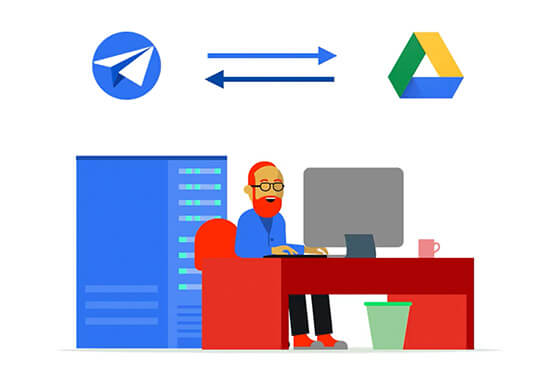
From updating sheets, sharing documents and study material over drive to scheduling events on Calendar, organizing lectures and team meets over Meets, AppSheet allows easy collaboration and access. Watch the video to build apps that are best for your University or school using Google Cloud’s AppSheet!

Le Figaro Uses Google Firebase to Personalize Experiences and Generates 3X Revenue Results
DOWNLOAD CASE STUDY8312
Of your peers have already downloaded this article
1:45 Minutes
The most insightful time you'll spend today!
Le Figaro, established in 1826, is France’s oldest and largest daily morning newspaper. The company’s mission is to provide timely, digestible and engaging news to their readers. As one of the first in the industry to offer digital content, Le Figaro engages their subscribers across 11 Android, iOS and web apps that cover news, sports, lifestyle and games. Le Figaro has about 22M monthly active users on their mobile and web apps and 120K paid digital subscribers.
The Challenge
In a saturated news app market, Le Figaro was looking to increase paying customers and to retain existing paid subscribers. To do this, Le Figaro’s development team needed to engage readers with personalized content at the right price point, but how could they pull it off with limited time and resources?
The Solution
Le Figaro used a number of Firebase products to retain existing users and increase paid subscriptions. They sent targeted notifications through Firebase Cloud Messaging reminding customers to follow topics and journalists they found interesting. This helped reduce churn by keeping subscribers engaged in content they valued. They also tested different subscription amounts using Firebase A/B testing, which helped Le Figaro identify the price points that led to the highest number of conversions among both Android and iOS users.
“Using Firebase has completely transformed Le Figaro’s digital business by making it easy to rapidly innovate and personalize content for our readers. With Firebase we have seen continuous increases in retention, downloads and screen time in our apps!”
Valentin Paquot, Mobile CTO, Le Figaro
Le Figaro found their biggest increase in paid subscriptions came from embedding real time interactive infographics into their mobile and web app articles. When a user added information into the infographic, it triggered a Cloud Function that accessed data stored in Cloud Firestore and returned a personalized infographic to the user in real time.
For example, in the article “Are you rich?” readers could input their income into the infographic and compare it against different income groups in Paris instantaneously. The infographics was behind a paywall and users had to subscribe to gain access.
According to Le Figaro, this infographic saw 3X the rate of paid subscription sign-ups compared to their other infographics. The team built this interactive infographic system in 3 days instead of their average time of 2-3 weeks using a traditional backend service. Using Cloud Functions and Cloud Firestore, they estimate they were able to reduce development time by 86%.
More Relevant Stories for Your Company

Transforming Media Industry: Three Strategies for Media Leaders to Leverage Generative AI
The digital era turned the traditional formula for media and entertainment success on its head, ushering in new technologies that have changed how content is produced, distributed, experienced, and monetized. Audiences have more choice, flexibility, and power over what they consume, and today’s media companies have to embrace ongoing transformation


Simplified Document Processing with AppSheet Automation
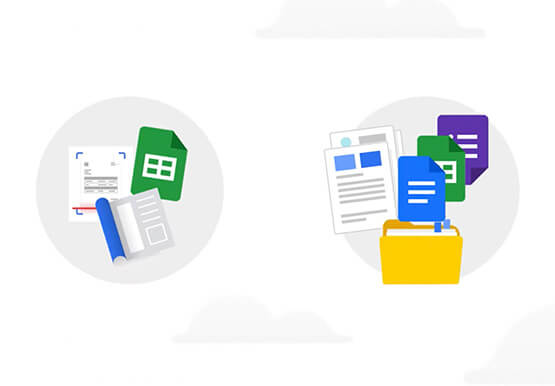
Move over legacy, time-consuming systems and processes to update data from documents and invoices into disparate data systems. AppSheet integrates no-code development with Google Cloud's state-of-the-art Document AI to automate the data extraction and validation from invoices, documents, receipts, etc. You can end all 'guesstimates' and rely on the accuracy



API Management with Istio
Kubernetes can be a great orchestration platform for your microservices but these services can grow complex and difficult to manage. Istio simplifies the life of organizations contemplating a “microservices” approach, or who are simply deploying many services that communicate with each other. Istio creates a “service mesh” that routes traffic

NCR’s Emerald Leverages Google Cloud to Help Grocers Boost Operational Agility
In recent years, the grocery industry has had to shift to facilitate a wider variety of checkout journeys for customers. This has meant ensuring a richer transaction mix, including mobile shopping, online shopping, in-store checkout, cashierless checkout or any combination thereof like buy online, pickup in store (BOPIS). What’s more,
