






Guide: Bring new life to your databases with an Oracle migration
READ FULL INTRODOWNLOAD AGAIN3701
Of your peers have already downloaded this article
16:30 Minutes
The most insightful time you'll spend today!
11 Reasons Why Developers and DB Admins in APAC Are Moving to Google Cloud SQL From AWS RDS

4680
Of your peers have already read this article.
1:45 Minutes
The most insightful time you'll spend today!
We wanted to find out which of the most popular database services on two of the biggest cloud provider (AWS and Google), developers preferred to use.
More specifically, we wanted views from enterprises in the region (it’s hard to impossible to find data that’s specific to India.)
To simplify our quest, we looked at the most popular database services on AWS and then looked at the equivalent Google Cloud offering.
That’s how we came to pit AWS RDS and Google Cloud SQL.
For the uninitiated: Cloud SQL is a fully managed database service that makes it easy to set up and manage your relational PostgreSQL, MySQL, and SQL Server databases in the cloud.
It is ideal for: WordPress, backends, game states, CRM tools, MySQL, PostgreSQL, and Microsoft SQL Servers.
Based on real feedback from companies in the APAC region, there are 11 reasons why Google Cloud SQL is better.
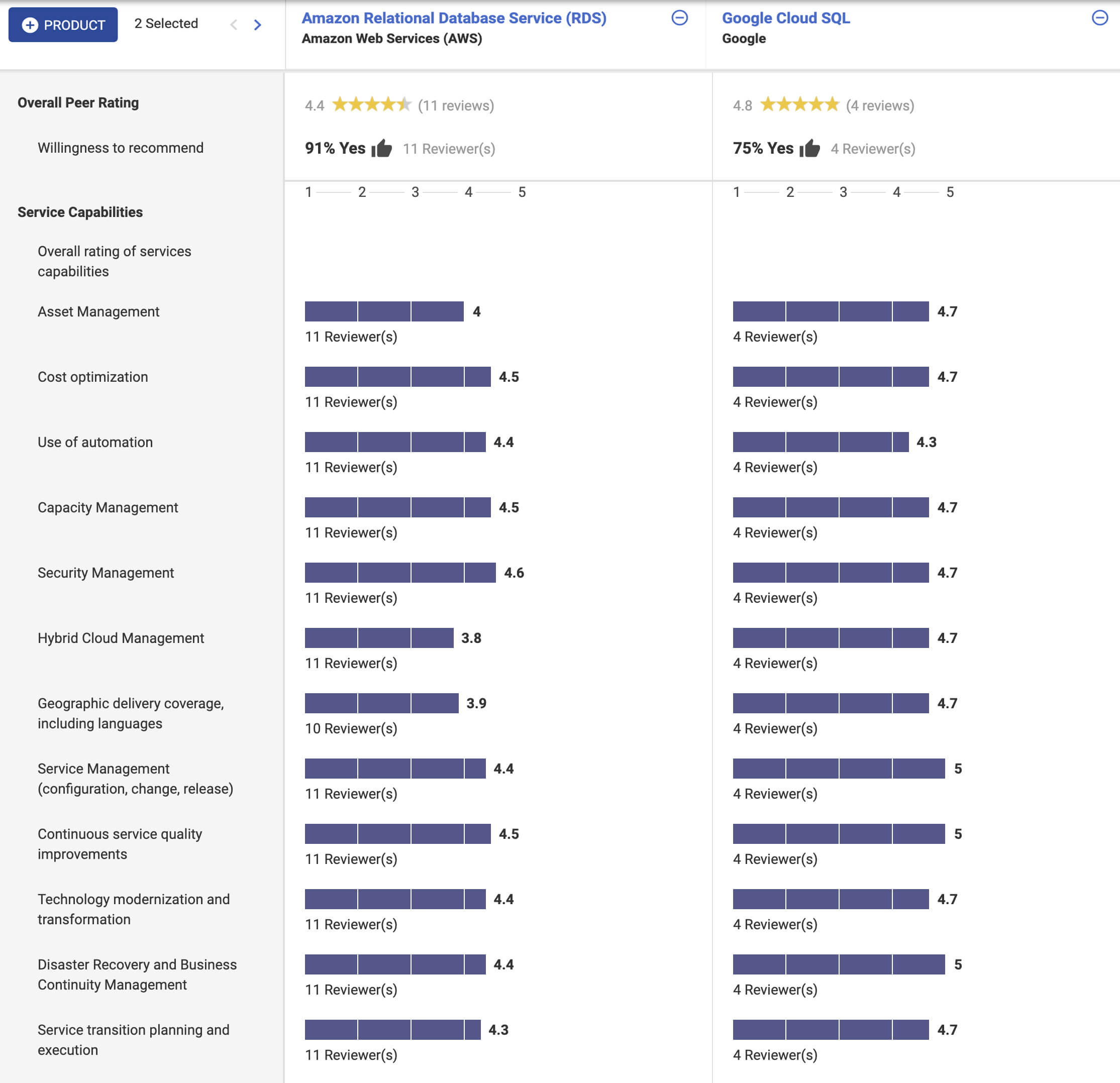
In addition, according to Stackshare and ITcentralstation, the biggest reason developers prefer Google Cloud SQL? Because it’s fully managed, easy to set up, easy to manage and it’s really scalable.
As one user says:
Its most valuable feature is that it’s scalable. I can start off with a base of a lot of data and move as much as I want and it’s the same as if asked to do a lot of infrastructure changes… it’s easy to use, simple, and user-friendly. The setup was straightforward. Just a couple of clicks, and we were done. My suggestion to anyone thinking about this solution is to jump into it head-first!
Become Truly Data-driven with Unified Analytics Platform Built on Google Cloud

3679
Of your peers have already read this article.
2:00 Minutes
The most insightful time you'll spend today!
Every company these days is becoming a data company whether they know it or not. This results in preparing the company to create an ecosystem for data processing. Traditionally, organisations’ data ecosystems consisted of point solutions that used to provide data services. For example, one of the most common questions we get from customers is, “Do I need a data lake, or should I consider a data warehouse? Do you recommend I consider both?” Traditionally, these two architectures have been viewed as separate systems, applicable to specific data types and user skill sets. Increasingly, we are seeing a blurring of lines between data warehouses and data lakes, which provide customers with an opportunity to create a more comprehensive platform that gives them the best of both worlds.
What if we don’t need to compromise? And we create an end-to-end solution compromising the entire data management and processing stages, from data collection to serving. Thus, Data platforms are typically used to store vast amounts of data in varying formats and doing so without compromising on latency. At the same time, providing a platform for all users throughout the data lifecycle.
Emerging Trends
There are data solutions and architectures we’re seeing and anticipating. Emerging concepts include data lakehouses, data meshes, and data vaults. Some are not new and have been around in different shapes and formats, however, all of them work naturally within a Google Cloud environment. Lets look into both ends of the spectrum of enabling data and enabling teams.
Data mesh facilitates a decentralized approach to data ownership, allowing individual lines of business to publish and subscribe to data in a standardized manner, instead of forcing data access and stewardship through a single, centralized team. On the other hand, a data lake house brings raw and processed data closer together, allowing for a more streamlined and centralized repository of data needed throughout the organization. Processing can be done in transit via ELT, reducing the need to copy datasets across systems. This allows for easier data exploration and easier governance. Data vault is designed to separate data driven and model driven parts, so the way data is integrated in the raw vault enables parallel loading so that large implementations can scale out easily.
In Google Cloud, there is no need to keep them separate. In fact, with interoperability among our portfolio of data analytics products, you can easily provide access to data residing in different places, effectively bringing your data lake and data warehouse together on a single platform.
Let’s look at some of the technological innovations that make this reality. BigQuery’s storage API allows treating a data warehouse like a data lake, letting you access the data residing in BigQuery. For example, you can use Spark to access data residing in the data warehouse without it affecting performance of any other jobs accessing it. This is all made possible by the underlying architecture, which separates compute and storage.
We continue to offer specialized products and solutions around data lake and data warehouse functionality but over time we expect to see a significant enough convergence of the two systems that the terminology will change. At Google Cloud, we consider this combination an “analytics data platform”.
Tactical or Strategical
Key differentiators of Google Cloud’s data analytics platform are being open, intelligent, flexible, and tightly integrated. There are many technologies in the market which provide tactical solutions that may feel comfortable and familiar. However, this can be a rather short-term approach that simply lifts and shifts a siloed solution into the cloud. In contrast, an analytics data platform built on Google Cloud provides modern data warehousing and data lake capabilities with close integration to our AI Platform. It also provides built-in streaming, ML, and geospatial capabilities and an in-memory solution for BI use cases. Depending on your organizational data needs, Google Cloud has the set of products, tools, and services to create the right data platform for you.
To become a truly data-driven organization, the first step is to design and implement an analytics data platform that meets your technical and business needs. Whether you want to empower teams to own, publish, and share their data across the organization, or you want to create a streamlined store of raw and processed data for easier discovery, there is a solution that best meets the needs of your company.
To learn more about the elements of a unified analytics data platform built on Google Cloud, and the differences in platform architectures and organizational structures, read our Unified Analytics Platform paper.
Recommendations for Modelling SAP Data inside BigQuery

8447
Of your peers have already read this article.
4:00 Minutes
The most insightful time you'll spend today!
Over the past few years, many organizations have experienced the benefits of migrating their SAP solutions to Google Cloud. But this migration can do more than reduce IT maintenance costs and make data more secure. By leveraging BigQuery, SAP customers can complement their SAP investments and gain fresh insights by consolidating enterprise data and easily extending it with powerful datasets and machine learning from Google.
BigQuery is a leading cloud data warehouse, fully managed and serverless, and allows for massive scale, supporting petabyte-scale queries at super-fast speeds. It can easily combine SAP data with additional data sources, such as Google Analytics or Salesforce, and its built-in machine learning lets users operationalize machine learning models using standard SQL — all at a comparatively low cost.
If your SAP-powered organization is looking to supercharge its analytics with the strength of BigQuery, read on for considerations and recommendations for modeling with SAP data. These guidelines are based on our real-world implementation experience with customers and can serve as a roadmap to the analytics capabilities your business needs.
Considerations for data replication
Like most technology journeys, this one should start with a business objective. Keeping your intended business value and goals in mind is critical to making the right decisions in the early steps of the design process.
When it comes to replicating the data from an SAP system into BigQuery, there are multiple ways to do it successfully. Decide which method will work best for your organization by answering these questions:
- Does your business need real-time data? Will you need to time travel into past data?
- Which external datasets will you need to join with the replicated data?
- Are the source structures or business logic likely to change? Will you be migrating the SAP source systems any time soon? For instance, will you be moving from SAP ECC to SAP S/4HANA?
You’ll also need to determine whether replication should be done on a table-by-table basis or whether your team can source from pre-built logic. This decision, along with other considerations such as licensing, will influence which replication tool you should use.
Replicating on a table-by-table basis
Replicating tables, especially standard tables in their raw form, allows sources to be reused and ensures more stability of the source structure and functional output. For example, the SAP table for sales order headers (VBAK) is very unlikely to change its structure across different versions of SAP, and the logic that writes to it is also unlikely to change in a way that affects a replicated table.
Something else to consider: Reconciliation between the source system and the landing table in BigQuery is linear when comparing raw tables, which helps avoid issues in consolidation exercises during critical business processes, such as period-end closing. Since replicated tables aren’t aggregated or subject to process-specific data transformation, the same replicated columns can be reused in different BigQuery views. You can, for instance, replicate the MARA table (the material master) once and use it in as many models as needed.
Replicating pre-built logic
If you replicate pre-built models, such as those from SAP extractors or CDS views, you don’t need to build the logic in BigQuery, since you’re using existing logic. Some of these extraction objects have embedded delta mechanisms, which may complement a replication tool that can’t handle deltas. This will save initial development time, but it can also lead to challenges if you create new columns, or if customizations or upgrades change the logic behind the extraction.
It’s also important to note that different extraction processes may transform and load the same source columns multiple times, which creates redundancy in BigQuery and can lead to higher maintenance needs and costs. However, replicating pre-built models may still be a good choice, since doing so can be especially useful for logic that tends to be immutable, such as flattening a hierarchy, or logic that is highly complex.
How you approach replication will also depend on your long-term plans and other key factors — for example, the availability (and curiosity) of your developers, and the time or effort they can put into applying their SQL knowledge to a new data warehouse.
With either replication approach, bear in mind when designing your replication process that BigQuery is meant to be an append-always database — so post-processing of data and changes will be required in both cases.
Processing data changes
The replication tool you choose will also determine how data changes are captured (known as CDC – change data capture). If the replication tool allows for it (for example as SAP SLT does) the same patterns described in the CDC with BigQuery documentation also apply to SAP data.
Because some data, like transactions, are known to be less static than others (e.g., master data), you need to decide what should be scanned in real time, what will require immediate consistency, and what can be processed in batches to manage costs. This decision will be based on the reporting needs from the business.
Consider the SAP table BUT000, containing our example master data for business partners, where we have replicated changes from an SAP ERP system:

In an append-always replication in BigQuery, all updates are received as new records. For example, deleting a record in the source will be represented as a new record in BigQuery with a deletion flag. This applies to whether the records are coming from raw tables like BUT000 itself or pre-aggregated data, as from a BW extractor or a CDS view.
Let’s take a closer look at data coming particularly from the partners “LUCIA” and “RIZ”. The operation flag tells us whether the new record in BigQuery is an insert (I), update (U) or deletion (D), while the timestamps help us identify the latest version of our business partner.

If we want to find the latest updated record for the partners LUCIA and RIZ, this is what the query would look like:
SELECT partner,ARRAY_AGG(i1 ORDER BY i1.recordstamp DESC LIMIT 1) AS rowFROM SAP_ECC.but000 i1WHERE partner in ('LUCIA','RIZ')GROUP BY partner
With the following result:

After identifying stale records for “LUCIA” and “RIZ” business partners, we can proceed to deleting all stale records for “LUCIA” if we do not want to retain the history. In this example, we are using a different table to which the same replication has been done, for the purpose of comparison and to check that all stale records have been deleted for the selection made and that we only kept last updated records. For example:
DELETE SAP_HANA.but000 i1WHEREi1.recordstamp < TIMESTAMP_SUB(CURRENT_TIMESTAMP(), INTERVAL 3 HOUR) ANDi1.recordstamp < (SELECT MAX(recordstamp) FROM SAP_HANA.but000 i2WHEREi1.partner = i2.partnerand partner="LUCIA")
You can also use the following query to retrieve stale records for “LUCIA” partner before moving forward with deletion
SELECT partner, operation_flag, recordstamp FROM SAP_HANA.but000 i1WHEREi1.recordstamp < TIMESTAMP_SUB(CURRENT_TIMESTAMP(), INTERVAL 3 HOUR)ANDi1.recordstamp < (SELECT MAX(recordstamp) FROM SAP_HANA.but000 i2WHEREi1.partner = i2.partnerand partner="LUCIA")
Which produces all of the records, except the latest update:

Partitioning and clustering
To limit the number of records scanned in a query, save on cost and achieve the best performance possible, you’ll need to take two important steps: determine partitions and create clusters.
Partitioning
A partitioned table is one that’s divided into segments, called partitions, which make it easier to manage and query your data. Dividing a large table into smaller partitions improves query performance and controls costs because it reduces the number of bytes read by a query.
You can partition BigQuery tables by:
- Time-unit column: Tables are partitioned based on a “timestamp,” “date,” or “datetime” column in the table.
- Ingestion time: Tables are partitioned based on the timestamp recorded when BigQuery ingested the data.
- Integer range: Tables are partitioned based on an integer column.
Partitions are enabled when the table is created, as in the example below. A great tip is to always include the partition filter as shown on the left-hand side of the query.

Clustering
Clustering can be created on top of partitioned tables by applying the fields that are likely to be used for filtering. When you create a clustered table in BigQuery, the table data is automatically organized based on the contents of one or more of the columns in the table’s schema. The columns you specify are then used to colocate related data.
Clustering can improve the performance of certain query types — for example, queries that use filter clauses or that aggregate data. It makes a lot of sense to use them for large tables such as ACDOCA, the table for accounting documents in SAP S/4HANA. In this case, the timestamp could be used for partitioning, and common filtering fields such as the ledger, company code, and fiscal year could be used to define the clusters.

A great feature is that BigQuery will also periodically recluster the data automatically.
Materialized views
In BigQuery, materialized views are precomputed views that periodically cache the results of a query for better performance and efficiency. BigQuery uses precomputed results from materialized views and, whenever possible, reads only the delta changes from the base table to compute up-to-date results quickly. Materialized views can be queried directly or can be used by the BigQuery optimizer to process queries to the base table.
Queries that use materialized views are generally completed faster and consume fewer resources than queries that retrieve the same data only from the base table. If workload performance is an issue, materialized views can significantly improve the performance of workloads that have common and repeated queries. While materialized views currently only support single tables, they are very useful common and frequent aggregations like stock levels or order fulfillment.
Further tips on performance optimization while creating select statements can be found in the documentation for optimizing query computation.
Deployment pipeline and security
For most of the work you’ll do in BigQuery, you’ll normally have at least two delivery pipelines running — one for the actual objects in BigQuery and the other to keep the data staging, transforming, and updated as intended within the change-data-capture flows. Note that you can use most existing tools for your Continuous Integration / Continuous Deployment (CI/CD) pipeline — one of the benefits of using an open system like BigQuery. But, if your organization is new to CI/CD pipelines, this is a great opportunity to gradually gain experience. A good place to start is to read our guide for setting up a CI/CD pipeline for your data-processing workflow.
When it comes to access and security, most end-users will only have access to the final version of the BigQuery views. While row and column-level security can be applied, as in the SAP source system, separation of concerns can be taken to the next level by splitting your data across different Google Cloud projects and BigQuery datasets. While it’s easy to replicate data and structures across your datasets, it’s a good idea to define the requirements and naming conventions early in the design process so you set it up properly from the start.
Start driving faster and more insightful analytics
The best piece of advice we can give you is this: Try it yourself. Anyone with SQL knowledge can get started using the free BigQuery tier. New customers get $300 in free credits to spend on Google Cloud during the first 90 days. All customers get 10 GB storage and up to 1 TB queries/month, completely free of charge. In addition to discovering the massive processing capabilities, embedded machine learning, multiple integration tools, and cost benefits, you’ll soon discover how BigQuery can simplify your analytics tasks.
If you need additional assistance, our Google Cloud Professional Services Organization (PSO) and Customer Engineers will be happy to help show you the best path forward for your organization. For anything else, contact us at cloud.google.com/contact.
GCP Launches Datastream, A Serverless Change Data Capture and Replication Service

5613
Of your peers have already read this article.
1:30 Minutes
The most insightful time you'll spend today!
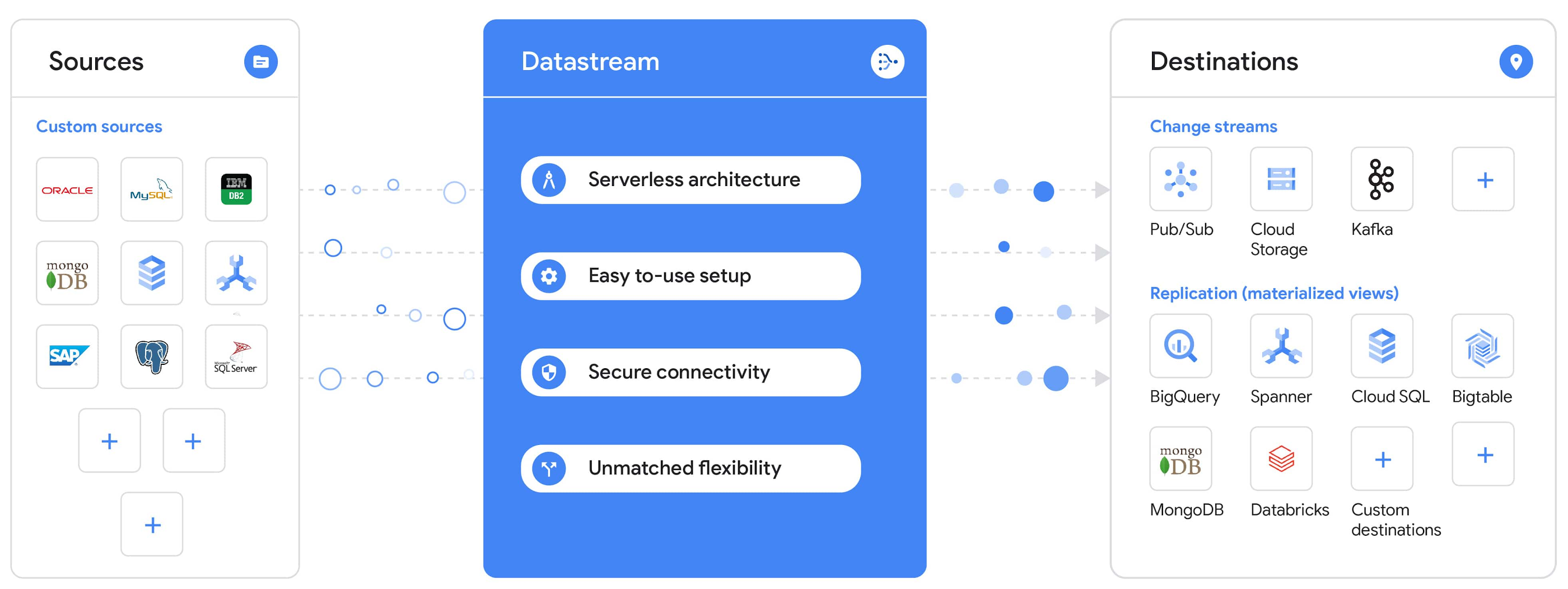
Today, we’re announcing Datastream, a serverless change data capture (CDC) and replication service, available now in preview. Datastream allows enterprises to synchronize data across heterogeneous databases, storage systems, and applications reliably and with minimal latency to support real-time analytics, database replication, and event-driven architectures. You can now easily and seamlessly deliver change streams from Oracle and MySQL databases into Google Cloud services such as BigQuery, Cloud SQL, Google Cloud Storage, and Cloud Spanner, saving time and resources and ensuring your data is accurate and up-to-date.
“Global companies are demanding change data capture to provide replication capabilities across disparate data sources, and provide a real-time source of streaming data for real-time analytics and business operations,” says Stewart Bond, Director, Data Integration and Intelligence Software Research at IDC.
However, companies are finding it difficult to realize these capabilities because commonly used data replication offerings are costly, cumbersome to set up, and require significant management and monitoring overhead to run flexibly or at scale. This leaves customers with a difficult-to-maintain and fragmented architecture.
Datastream’s differentiated approach
Datastream is taking on these challenges with a differentiated approach. Its serverless architecture seamlessly and transparently scales up or down as data volumes shift in real time, freeing teams to focus on delivering up-to-date insights instead of managing infrastructure. It also provides the streamlined customer experience, ease of use, and security that our customers have come to expect from Google Cloud, with private connectivity options built into the guided setup experience.
Datastream integrates with purpose-built and extensible Dataflow templates to pull the change streams written to Cloud Storage, and create up-to-date replicated tables in BigQuery for analytics. It also leverages Dataflow templates to replicate and synchronize databases into Cloud SQL or Cloud Spanner for database migrations and hybrid cloud configurations.
Datastream also powers a Google-native Oracle connector in Cloud Data Fusion’s new replication feature for easy ETL/ELT pipelining. And by delivering change streams directly into Cloud Storage, customers can leverage Datastream to implement modern, event-driven architectures.
Customers tell us about the benefits they’ve found using Datastream. That includes Schnuck Markets, Inc., “Leveraging Datastream, we’ve been able to replicate data from our on-premises databases to BigQuery reliably and with little impact to our production workloads. This new method replaced our batch processing and allowed for insights to be leveraged from BigQuery quicker,” says Caleb Carr, principal technologist from Schnuck Markets. “Furthermore, implementing Datastream removed the need for our analytics group to reference on-premises databases to do their work and support our business users.”
Cogeco Communications, Inc. used Datastream to also realize the value of low-latency data access. “Datastream unlocked new customer interaction opportunities not previously possible by enabling low-latency access in BigQuery to our operational Oracle data.” says Jean-Lou Dupont, Senior Director, Enterprise Architecture, Cogeco Communications, Inc. “This streamlined integration process brings data from hundreds of disparate Oracle tables into a unified data hub. Datastream enabled us to achieve this with 10X time and effort efficiency.”
In addition, Major League Baseball (MLB) used Datastream’s replication capabilities to migrate their data from Oracle to Cloud SQL for PostgreSQL. “As we’re modernizing our applications, replicating the database data reliably out of Oracle and into Cloud SQL for PostgreSQL is a critical component of that process,” says Shawn O’Rourke, manager of technology at MLB. “Using Datastream’s CDC capabilities, we were able to replicate our database securely and with low latency, resulting in minimal downtime to our application. We can now standardize on this process and repeat it for our next databases, regardless of scale.”
Our partner HCL has worked with many organizations looking to get more out of their data and plan for the future. “HCL customers across every industry are looking for ways to extract more value out of their vast amounts of data,” says Siva G. Subramanian, Global Head for Data & Analytics at HCL Google Business Unit. “CDC plays a big part in the solutions we offer to our customers using Google Cloud. Datastream enables us to deliver a secure and reliable solution to our customers that’s easy to set up and maintain. CDC is a key and integrated part of Google Cloud Data Solutions.”
“Google Cloud’s new CDC offering, Datastream, is a differentiator for Google among hyperscale cloud service providers, by supporting replication of data from Oracle and MySQL databases into the Google Cloud environment using a serverless cloud-native architecture, which removes the burden of infrastructure management for organizations, and provides elastic scalability to handle real-time workloads,” says Stewart Bond, Director, Data Integration and Intelligence Software Research at IDC.
Datastream under the hood
Datastream reads CDC events (inserts, updates, and deletes) from source databases, and writes those events with minimal latency to a data destination. It leverages the fact that each database source has its own CDC log—for MySQL it’s the binlog, for Oracle it’s LogMiner—which it uses for its own internal replication and consistency purposes. Using Google-native, agentless, high-scale log reader technology, Datastream can quickly and efficiently generate change streams populated by events based on the database’s CDC log while minimizing performance impact on the source database.
Each generated event includes the entire row of data from the database, with the data type and value of each column. The original source data types, whether it’s, for example, an Oracle NUMBER type or a MySQL NUMERIC type, are normalized into Datastream unified types. The unified types represent a lossless superset of all possible source types, and the normalization means data from different sources can easily be processed and queried downstream in a source-agnostic way. Should a downstream system need to know the original source data type, it can perform a quick API call to Datastream’s Schema Registry, which stores up-to-date, versioned schemas for every data source. This also allows for in-flight downstream schema drift resolution as source database schemas change.
The generated streams of events, referred to as “change streams,” are then written as files, either in JSON or Avro format during preview or in other formats like Parquet in the future, into a Cloud Storage bucket organized by source table and event times. Files are rotated as table schemas change, so events in a single file always have the same schema, as well as on a configurable file size or rotation frequency setting. This way customers can find the best balance between the speed of data availability and the file size that makes the most sense for their business use case.
Through its integration with Dataflow, Datastream powers up-to-date, replicated tables for analytics over BigQuery, and for data replication and synchronization to Cloud SQL and Spanner. Datastream refers to these constantly updated tables as “materialized views.” They are kept up-to-date via Dataflow template-based upserts into Cloud SQL or Spanner, or through consolidations into BigQuery. The consolidations, performed as part of the Dataflow template, take the change streams that are written into a log table in BigQuery, and push those changes into a final table, which mirrors the table from the source.

Datastream offers a variety of secure connectivity methods to sources, so your data is always safe in transit. And with its serverless architecture, Datastream can scale up and down readers and processing power to seamlessly keep up with the speed of data and ensure minimal latency end to end. As data volumes decrease, Datastream automatically scales back down—the result is a “pay for what you use” pricing model, where you never have to pay for idle machines or worry about bottlenecks and delays during data peaks.
Get started with Datastream
Datastream, now available in preview, supports streaming change data from Oracle and MySQL sources, hosted either on-premises or in the cloud, into Cloud Storage. You can start streaming your data today for $2 per GB of data processed by Datastream.
To get started, head over to the Datastream area of your Google Cloud console, under Big Data, and click Create Stream. There you can:
- Initiate stream creation, and see what actions you need to take to set up your source and destination for successful streaming.
- Define your source and destination, whose connectivity information is saved as connection profiles you can re-use for other streams. Sources support multiple connectivity options, with both private and public connectivity options to suit your business needs.
- Select the source data you’d like to stream, and which you’d like to exclude.
- Test your stream to ensure it will be successful when you’re ready to go.
Start your stream and your database’s CDC data will start to flow to your Cloud Storage bucket! From there you can integrate with Dataflow templates to load data into BigQuery, Spanner, or Cloud SQL. Datastream’s preview is supported in us-central1, europe-west1, and asia-east1, with additional regions coming soon.https://www.youtube.com/embed/FZG4w4Vbj38?enablejsapi=1&
Datastream will become generally available later this year, and will soon expand its support to also include PostgreSQL and SQL Server as sources, as well as out-of-the-box integration with BigQuery for easy delivery of up-to-date replicated tables for analytics, and message queues like Pub/Sub for real-time change stream access.
For more resources to help get you started with change streaming, check out the Datastream documentation.
“It’s an Astonishing Difference”: What Data Operation Execs say About Google Cloud’s Data Warehouse

5663
Of your peers have already read this article.
8:30 Minutes
The most insightful time you'll spend today!
The popularity of meal kit delivery services has surged in recent years as consumer attitudes toward home cooking and grocery shopping have shifted. As a pioneer in the category, Blue Apron helps its customers create incredible home cooking experiences by sending culinary-driven recipes with high-quality ingredients and step-by-step instructions straight to customers’ doors. Blue Apron also offers a monthly wine subscription service and a la carte culinary tools and products through its marketplace.
If that sounds simple, it isn’t.
Ingredients for the meal kits must be sourced at the right time, quality, and price. Orders must be packed efficiently and in exactly the right proportions. Most importantly, meal kits must be delivered to the customer fresh and on time.
To meet these criteria and make data meaningful and intuitive to its managers, one of the tools Blue Apron relies on is Looker, an analytics platform that lets business users explore data and ask sophisticated questions using familiar terms. Looker integrates its solution with Google Cloud Platform to help customers modernize their analytics.
“The combination of Looker and Google BigQuery is powerful, allowing us to get data-hungry analysts essential information much faster. Because we choose to pay by the query, it’s also flexible and cost effective—plus storage is cheap, so we can just put data in and query what we need.”
—Sam Chase, Tech Lead, Data Operations, Blue Apron
Blue Apron previously used Looker with a single database instance hosted on another cloud provider. As data volumes grew and queries became more complex, it became difficult to scale. Blue Apron’s only options were choosing ever-larger server classes and increasing storage throughput by purchasing a higher number of provisioned IOPS. To improve speed, scalability, and cost efficiency, Blue Apron moved its data warehouse to Google BigQuery.
“The combination of Looker and Google BigQuery is powerful, allowing us to get data-hungry analysts essential information much faster,” says Sam Chase, Tech Lead, Data Operations at Blue Apron. “Because we choose to pay by the query, it’s also flexible and cost effective—plus storage is cheap, so we can just put data in and query what we need.”
“After we moved to Google BigQuery, query time was reduced exponentially. It’s an astonishing difference, allowing us to run 300 queries per day.”
—Sam Chase, Tech Lead, Data Operations, Blue Apron
The analytics platform of the future
When you’re making business decisions about a customer’s dinner, speed matters. Looker takes full advantage of the power of Google BigQuery, making it easy to build a data exploration platform.
Blue Apron’s applications publish event data to Kafka—approximately 140 million events per day—and data is then streamed into Google BigQuery, which performs lightning-fast queries on both streamed and static data. Now, business users and analytics teams can make decisions based on near real-time information in Looker, instead of waiting until the next business day for results.
“After we moved to Google BigQuery, query time was reduced exponentially. It’s an astonishing difference, allowing us to run 300 queries per day,” says Sam.
Previously, Blue Apron spent up to a week out of every month optimizing its data warehouse to attempt to improve query performance. With Google BigQuery, all maintenance is handled by Google, reclaiming 25% of up to two engineers’ time. Even when multiple people are using Looker concurrently, query performance never degrades and storage never runs out.
“Because Google BigQuery is architected as a giant, shared cluster, growth is smooth,” says Lloyd Tabb, Founder and CTO of Looker. “Like a race car going from 0 to 120 mph, there are no shift points, just smooth acceleration. To us, it looks like the future.”
An empowering, integrated toolset
Looker takes advantage of aggressive caching and support for date-based table partitioning in Google BigQuery to increase performance, simplify the load process, and improve data manageability. By partitioning data by time, Blue Apron can also take advantage of better long-term storage pricing without sacrificing query performance. When using Google BigQuery with Looker, analysts can easily see how much data is going to be scanned before each query is run.
Blue Apron is also using Looker for Google BigQuery Data Transfer Service to provide actionable analytics for all of the company’s Google marketing data from Google AdWords and DoubleClick by Google in one place to understand campaign performance across channels, saving its data operations team months of work. Using Looker Blocks, marketers can quickly make sense of the data with reports and dashboards, and set alerts when campaign performance hits certain thresholds.
“Everyone at Blue Apron is excited about using Google BigQuery with Looker. Business users and marketers are more empowered to look for answers, instead of waiting for analytics teams. Because users know they can get results rapidly, our business processes are evolving and improving.”
—Sam Chase, Tech Lead, Data Operations, Blue Apron
Looker Blocks for Google AdWords and DoubleClick by Google provide all the analysis you’d get straight from the Google console, plus additional value-add analysis that’s impossible to replicate without SQL. Complex metrics such as ROI on ad spend, flexible multi-touch attribution, and predictive lifetime value empower marketers with a better understanding of their customers and where to spend their next dollar.
In addition to these turnkey dashboards and pieces of analysis, marketers can customize views to meet their unique needs and workflows. These capabilities help the Blue Apron marketing team make decisions regarding the allocation of spend to maximize customer acquisition and retention.
“Everyone at Blue Apron is excited about using Google BigQuery with Looker,” says Sam. “Business users and marketers are more empowered to look for answers, instead of waiting for analytics teams. Because users know they can get results rapidly, our business processes are evolving and improving.”
For data cleansing and transformation, Blue Apron uses Google Cloud Dataproc to run fully managed Apache Spark clusters on Google Cloud Platform. It’s also leveraging Google BigQuery integration with G Suite to bring data into Google Sheets for further distribution and analysis.
“Transferring data between Google tools is fast because it all happens on the Google network,” says Sam. “We can pull data from Google BigQuery, run transformations with Spark, and then write it back to Google BigQuery. That’s very helpful in providing our business users and data analysts with the richest, most current data.”
A perfect match for better insights
As Blue Apron seeks to expand its reach and deepen its engagement with customers, it is making Google BigQuery and Looker available to more users, providing a high-quality interactive analytics experience. “Our ability to pull a lot of data in and compute fast results affects everyone in our company,” says Sam. “Using Google BigQuery and Looker to iterate quickly and build new models to make our operations more efficient will directly impact our customers.”
For Looker, Google BigQuery represents the next step in data warehouse evolution. “Google BigQuery is a perfect match for Looker, combining easy setup with near infinite scale-out and elasticity,” says Lloyd. “People can make smarter decisions faster that directly benefit their business and customers.”
More Relevant Stories for Your Company

Is it Cheaper to Run Oracle Workloads on Google Cloud Than On-Prem? Yes, By 78%
On-premises relational database management systems (RDBMS) are the traditional heart of many core business operations, but cloud-based relational databases provide the agility and scalability of the cloud while eliminating many of the onerous tasks associated with maintaining your own infrastructure. To find out how much more value cloud-based relational databases
Google Spanner Wins SIGOPS Hall of Fame Award 2022
Earlier this month, SIGOPS announced that it had selected the paper, “Spanner: Google’s Globally-Distributed Database" for the 2022 SIGOPS Hall of Fame Award, an honor bestowed on the most influential Operating Systems papers published by the organization. In giving this award, the award committee stated: “Spanner showed how to balance

New Enterprise Capabilities and Changes to Cloud Spanner Reduces Cost of Running Workloads by 90 Percent
Customers love Cloud Spanner because it gives them the benefits of relational semantics and SQL while also delivering the scale and availability of non-relational databases. Many of these customers want to move even more of their work to Spanner, and have requested smaller instance sizes to support development, testing and

How TapClicks’ Google Cloud Migration Makes Life Easy for Marketers
Editor’s note: In this blog post we learn how TapClicks migrated to Google Cloud to offer their marketing customers a unified platform for data management, operations, insights, and analysis. TapClicks is a smart marketing cloud, powered by data, that unifies our customer’s marketing. By choosing to migrate our core applications last
