





4131
Of your peers have already watched this video.
23:18 Minutes
The most insightful time you'll spend today!
Securing Remote Workers with Google and Chrome Enterprise
With the proliferation of COVID-19 across the globe, the need for a remote working strategy has become paramount to keep businesses running.
A Gartner survey found that 88% of organizations have asked their employees to work remotely. And 97% of the organizations canceled work-related travel. However, only 10% of the organizations planned to reduce working hours. For us, this shows that despite the prevalence of coronavirus across the world, business demands require that work must go on.
Technologies such as Chromebooks, Chrome Browser, and SaaS applications have helped make this strategy a reality, providing access to critical data wherever employees may be working from during this challenging time.
However, this way of working has created new security challenges for IT departments, who may not be equipped to address these issues.
This session provides a walkthrough of many of Google’s solutions, such as Chrome devices, Chrome Enterprise Upgrade, BeyondCorp Remote Access, and Chrome Browser Cloud Management to ensure your business can keep secure, even in a remote working environment.
3857
Of your peers have already watched this video.
1:06 Minutes
The most insightful time you'll spend today!
PwC uses Connected Sheets to scale data insights
It’s important for teams across the business to understand customer adoption of products and services, whether it’s the product team tracking usage of a newly released feature or the support team trying to anticipate incoming service requests. Similarly, IT teams need to analyze the adoption of an organization’s internal applications and systems, so they know what tools employees are using and how they are being used. But product adoption datasets are often too large for traditional spreadsheets to handle, and new data is continuously being added.
Connected Sheets can provide teams access to large, powerful, and up-to-date usage datasets, in the familiar Sheets interface. PwC, a global professional services organization, uses Connected Sheets as part of its efforts to make technology and data more accessible across its workforce. One way PwC uses Connected Sheets is to monitor and analyze the internal adoption of tools like G Suite.
Says Peter Van Nieuwerburgh, Global Change Manager at PwC, “If you look at our own adoption dashboarding, it’s more than three terabytes of data—good luck putting that in any spreadsheet. With Connected Sheets, we’re not really pulling the data into the spreadsheet, rather it lives in the database where it belongs. The ability to so easily analyze and visualize the data is really powerful.”
Connected Sheets helps to scale data-driven decision-making at your organization, by making powerful data easily accessible across your sales, finance, product, and IT teams.
Learn to Easily Administer Multi-cluster Kubernetes Environs: Part 4 KRM Series

5577
Of your peers have already read this article.
4:00 Minutes
The most insightful time you'll spend today!
This is part 4 in a multi-part series about the Kubernetes Resource Model. See parts 1, 2, and 3 to learn more.
Kubernetes clusters can scale. Open-source Kubernetes supports up to 5,000 Nodes, and GKE supports up to 15,000 Nodes. But scaling out a single cluster can only get you so far: if your cluster’s control plane goes down, your entire platform goes down; if the Cloud region running your cluster has a service interruption, so does your app.
Many organizations choose, instead, to operate multiple Kubernetes clusters. Besides availability, there are lots of reasons to consider multi-cluster, such as allocating a cluster to each development team, splitting workloads between cloud and on-prem, or providing burst capability for traffic spikes.
But operating a multi-cluster platform comes with its own challenges. How to consistently administer many clusters at once? How to keep the clusters secure? How to deploy and monitor applications running across multiple clusters? How to seamlessly fail over from one region to another?
This post introduces a few tools that can help platform teams more easily administer a multi-cluster Kubernetes environment.
The platform base layer, with Config Sync
In the last post, we explored how thoughtful platform abstractions can help reduce toil for app developers- including for a multi-cluster environment, where automation such as CI/CD handles all interactions with the staging and production clusters. But equally important is the platform base layer, the Kubernetes resources and configuration that are shared across services. Your platform base layer might consist of Namespaces, role-based access control, and shared workloads like Prometheus.
Platform abstractions depend on the existence of these base-layer resources. And so does the security and stability of your platform as a whole. It’s important that these resources not only get deployed, but also stay put. CI/CD is great for deploying resources, but what about making sure resources stay deployed? What if a Kubernetes Namespace gets deleted? Or a Prometheus StatefulSet is modified?
Kubernetes’ job is to ensure that the cluster’s actual state matches the desired state. But sometimes, the “desired” state isn’t desired at all – it’s a developer who mistakenly modified a resource, or a bad actor that’s gained access into the system. For this reason, a platform base layer needs more than a one-and-done CI/CD pipeline. A tool called Config Sync can help with this.
Config Sync is a Google Cloud product that can sync Kubernetes resources from a Git repository to one or more GKE or Anthos clusters. Unlike CI/CD tools like Cloud Build, Config Sync watches your clusters constantly, making sure that the intended resource state in the cluster always matches what’s in Git. Config Sync is designed primarily for base-layer resources like namespaces and RBAC. In this way, Config Sync is complementary to, not a replacement for, CI/CD.
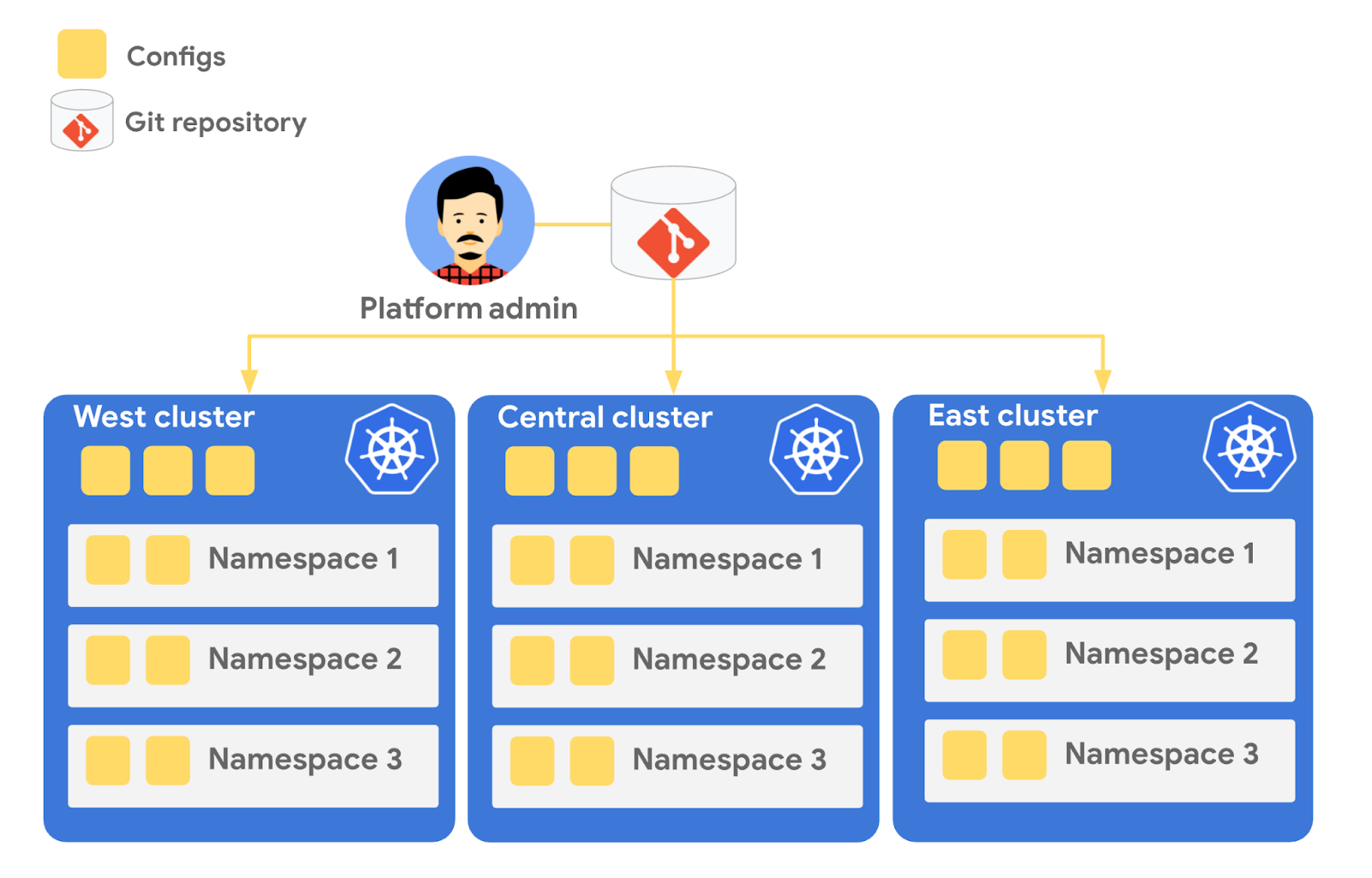
Config Sync runs in a Pod inside your Kubernetes cluster, watching your Git config repo for changes, and also watching the cluster itself for any divergence from your desired state in Git. If any configuration drift is detected from what’s stored in Git, Config Sync will update the API Server accordingly.
You can point multiple Config Sync deployments at the same Git repo, allowing you to manage the base-layer platform resources for multiple clusters using the same source of truth. And by using Git as the landing zone for config, you can benefit from some of the GitOps principles we discussed in part 2, including the ability to audit and roll back configuration changes.
Let’s walk through an example of how to manage base-layer resources with Config Sync.
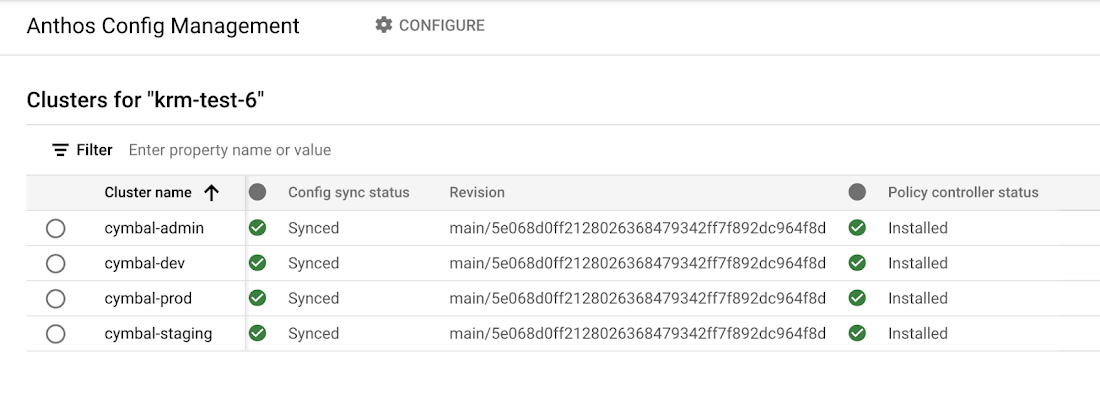
The Cymbal Bank platform consists of four GKE clusters: admin, dev, staging, and prod. We can install Config Sync on all four clusters using the gcloud tool or the Google Cloud Console, pointing all four clusters at a single Git repository, called cymbalbank-policy. Note that this repo is separate from the application source and config repos, and is managed by the platform team. From the Console, we can see that all four clusters are synced to the same commit of the cymbalbank-policy repo.
Now, let’s say that the Cymbal Bank platform team wants to limit the amount of CPU and memory resources each application team can request for their service. Kubernetes ResourceQuotas help impose these limits, and prevent unexpected Pod evictions.
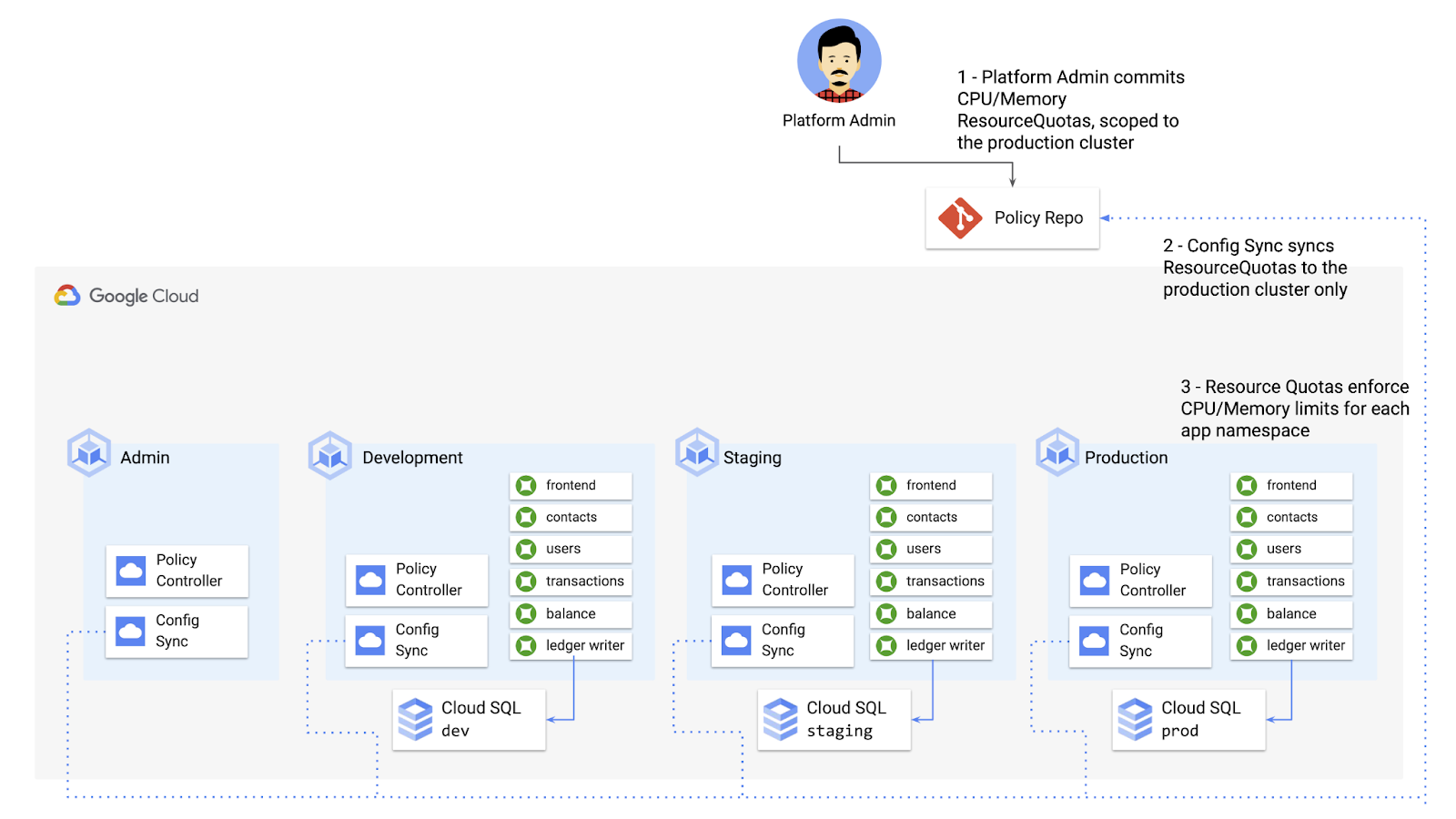
The platform team can define a set of ResourceQuotas for each application namespace. They can also scope the resources to only be applied to a subset of clusters – for instance, to the production cluster only. (If no cluster name selector is specified, Config Sync will deploy the resource to all clusters by default.)
apiVersion: v1kind: ResourceQuotametadata:name: production-quotanamespace: frontendannotations:configsync.gke.io/cluster-name-selector: cymbal-prodspec:hard:cpu: 700mmemory: 512Mi
From here, the platform team can commit the resources to the cymbalbank-policy repo, and Config Sync, always watching the policy repo, will deploy the resources to the production cluster:
NAMESPACE NAME AGE REQUEST LIMITbalancereader production-quota 6m56s cpu: 300m/700m, memory: 612Mi/512Mi
If a developer tries to delete one of the ResourceQuotas, Config Sync will block the request, helping to ensure that these base-layer resources stay put.
error: You must be logged in to the server (admission webhook "v1.admission-webhook.configsync.gke.io" denied the request: requester is not authorized to delete managed resources)
In this way, Config Sync can help platform teams ensure the stability of that platform base-layer, as well as ensure resource consistency across multiple clusters at once. This, in turn, can help organizations mitigate the complexity of adding new clusters to their environment.
Enforce policies on Kubernetes resources
Config Sync is a powerful tool on its own, and can work with any Kubernetes resource that your cluster recognizes. This includes Custom Resource Definitions (CRDs) installed with add-ons like Anthos Service Mesh.
But Config Sync, by default, doesn’t have an idea of “good or bad” Kubernetes resources. It will deploy whatever resources land in Git, even resources that might pose a security risk to your organization. Security is an essential feature of any developer platform, and when it comes to Kubernetes, it’s important to think about security from the initial software design stages, and set up your clusters with security best-practices in mind.
But it’s just as important to think about security at deploy-time. Who and what can access your clusters? What kinds of Kubernetes resources – and fields within those resources- are allowed? These decisions will depend on lots of factors, including the kinds of data your application deals with, and any industry-specific regulations.
One common security use case for KRM is the need to monitor incoming Kubernetes resources, whether they’re coming in through kubectl, CI/CD, or Config Sync. But if you have multiple clusters, your Kubernetes environment has multiple API Servers, and therefore multiple entry points.
A Google tool called Policy Controller can help automate resource monitoring across multiple clusters. Policy Controller is a Kubernetes admission controller that can accept or reject incoming resources based on custom policies you define. Policy Controller is based on the OpenPolicyAgent Gatekeeper project, and it allows you to define policies, or “Constraints,” as KRM. This means you can deploy them using Config Sync, via Git. Once deployed, Policy Controller uses your Constraints as a set of rules to evaluate all incoming KRM, rejecting resources that fall out of compliance.
Let’s walk through an example. Say that the Cymbal Bank security team wants to ensure that no code in development is accessible to the public. Kubernetes Services of type LoadBalancer expose public IP addresses by default, so the platform team wants to define a PolicyController constraint that blocks Services of that type on the development GKE cluster.
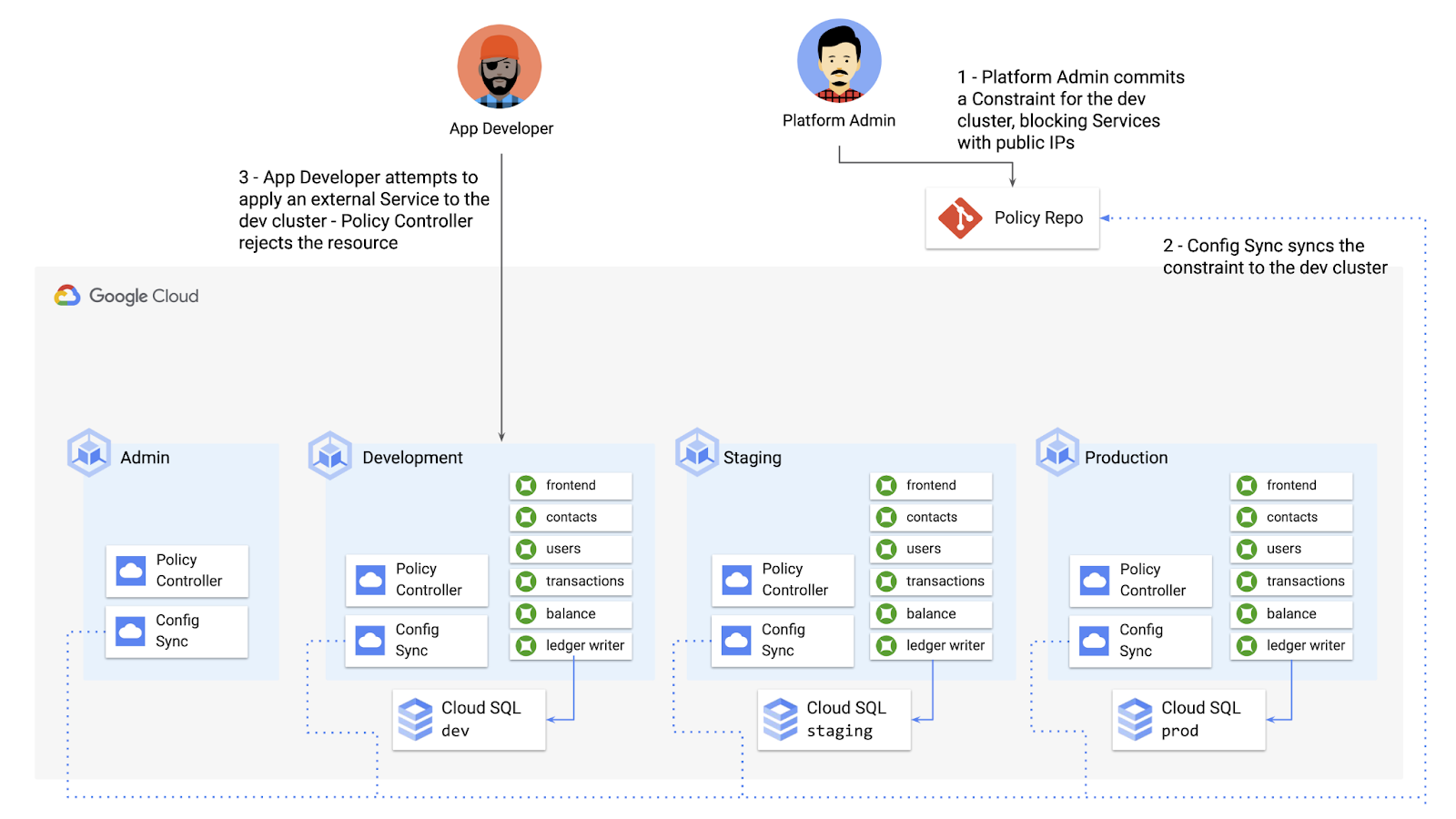
To do this, the platform team can define a Policy Controller Constraint as KRM. This Constraint uses a Constraint Template, provided through the pre-installed Constraint Template library. The ConstraintTemplate defines the logic of the policy itself, and the Constraint makes the template concrete, populating any variables needed to execute the policy logic. Here, we’re also adding a Config Sync cluster name annotation, to scope this resource to apply only to the development cluster.
apiVersion: constraints.gatekeeper.sh/v1beta1kind: K8sNoExternalServicesmetadata:name: dev-no-ext-servicesannotations:configsync.gke.io/cluster-name-selector: cymbal-devspec:internalCIDRs: []
The platform team can then commit the resource to the cymbalbank-policy repo, and Config Sync will deploy the resource to the development cluster.
From here, if an app developer tries to create an externally-accessible Kubernetes Service, Policy Controller will block the resource from being created.
for: "constraint-ext-services/contacts-svc-lb.yaml": admission webhook "validation.gatekeeper.sh" denied the request: [denied by dev-no-ext-services] Creating services of type `LoadBalancer` without Internal annotation is not allowed
The platform team can define as many of these Constraints as they want, each defining a separate policy.
Writing custom policies
The Policy Controller Constraint Template library provides a lot of functionality, from blocking privileged containers, to requiring certain resource labels, to preventing app teams from deploying into certain namespaces. But if you want to enforce custom logic on your organization’s KRM, you can do so by writing a custom Constraint Template.
Constraint Templates are written in a query language called Rego. Rego was designed for policy rule evaluation, and it can introspect Kubernetes resource fields to make a conclusion as to whether the resource is allowed or not.
For instance, let’s say that the platform team wants to limit the number of containers allowed inside a single application Pod. Too many containers per Pod can cause outage risks— when one container crashes, the entire Pod crashes.
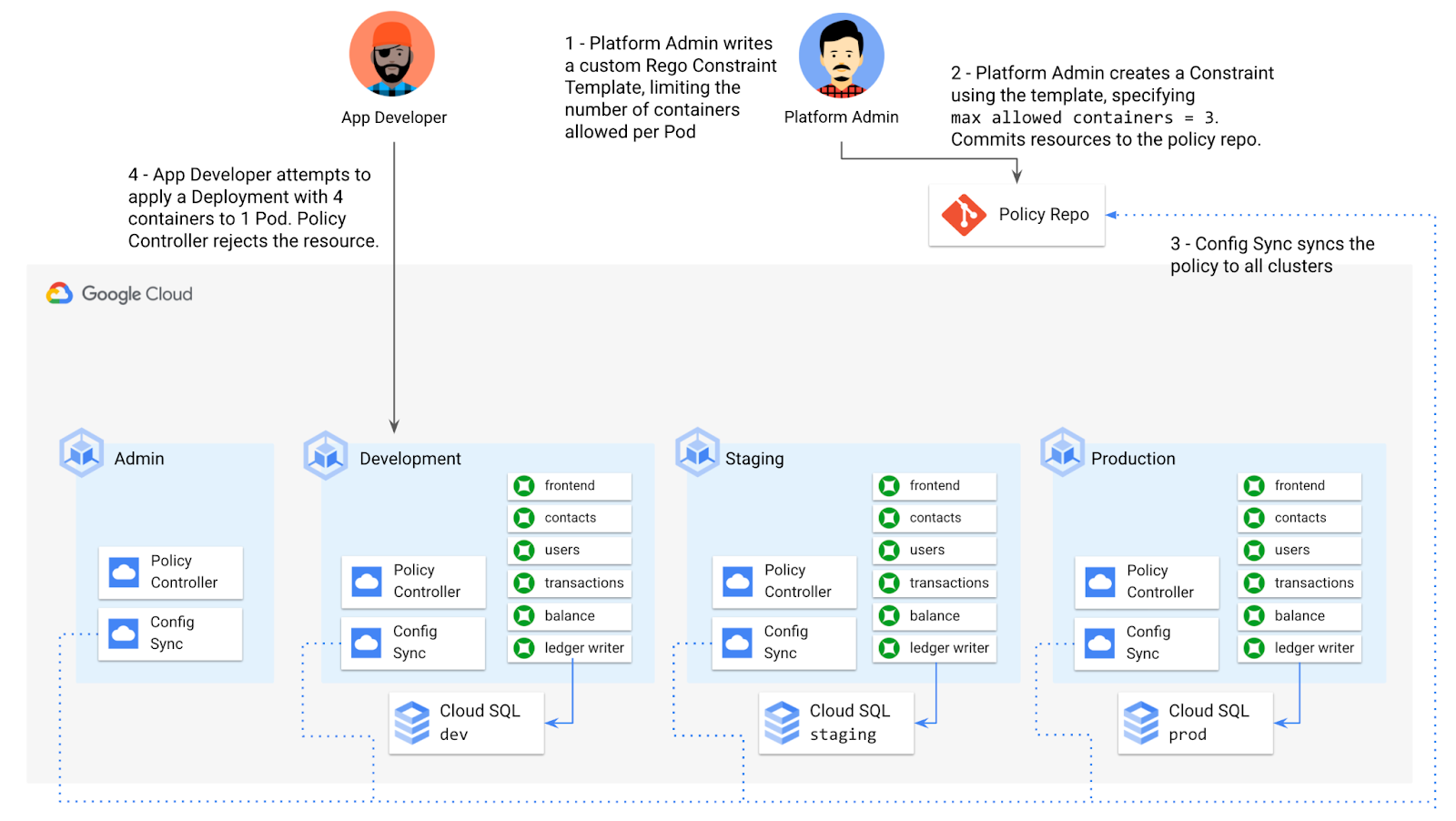
To enforce this policy, the platform team can define a Constraint Template, using the Rego language, that looks inside a resource to ensure that the number of containers per Pod is within the allowed limit:
apiVersion: templates.gatekeeper.sh/v1beta1kind: ConstraintTemplatemetadata:name: k8slimitcontainersperpodspec:crd:spec:names:kind: K8sLimitContainersPerPodvalidation:openAPIV3Schema:properties:allowedNumContainers:type: integertargets:- target: admission.k8s.gatekeeper.shrego: |package k8slimitcontainersperpodnumTemplateContainers := count(input.review.object.spec.template.spec.containers)numRunningContainers := count(input.review.object.spec.containers)containerLimit := input.parameters.allowedNumContainerstemplate_containers_over_limit = true {numTemplateContainers > containerLimit}running_containers_over_limit = true {numRunningContainers > containerLimit}violation[{"msg": msg}] {template_containers_over_limitmsg := sprintf("Number of containers in template (%v) exceeds the allowed limit (%v)", [numTemplateContainers, containerLimit])}violation[{"msg": msg}] {running_containers_over_limitmsg := sprintf("Number of running containers (%v) exceeds the allowed limit (%v)", [numRunningContainers, containerLimit])}Then, the platform team can define a concrete Constraint, using this Constraint Template, to set the number of allowed containers per Pod to 3:apiVersion: constraints.gatekeeper.sh/v1beta1kind: K8sLimitContainersPerPodmetadata:name: limit-three-containersspec:parameters:allowedNumContainers: 3
Finally, the platform team can push these resources to the cymbalbank-policy repo, and Config Sync will deploy the policy to all four clusters. If a developer tries to define a Kubernetes Deployment containing more containers per pod than what’s allowed, the resource will be blocked at deploy time:
Error from server ([limit-three-containers] Number of containers in template (4) exceeds the allowed limit (3)): error when creating "constraint-limit-containers/test-workload.yaml": admission webhook "validation.gatekeeper.sh" denied the request: [limit-three-containers] Number of containers in template (4) exceeds the allowed limit (3)
Custom Constraint Templates can give platform teams lots of flexibility in the types of policies they define and enforce in a Kubernetes environment.
Integrating policy checks into CI/CD
As we explored earlier, Config Sync and CI/CD are complementary tools. Config Sync works great for base-layer platform resources and policies, whereas CI/CD works well for application tests and deployment.
But one pitfall of having two separate KRM deployment mechanisms is that app developers may not know that their resources are out of policy until they try to deploy them into production. This is especially true if some policies are scoped only to production, as we saw with the ResourceQuota example. Ideally, the platform team has a way to empower developers and code reviewers to know ahead of time whether new or modified resources are still in compliance. We can enable this use case by integrating policy checks into the existing Cymbal Bank CI/CD.
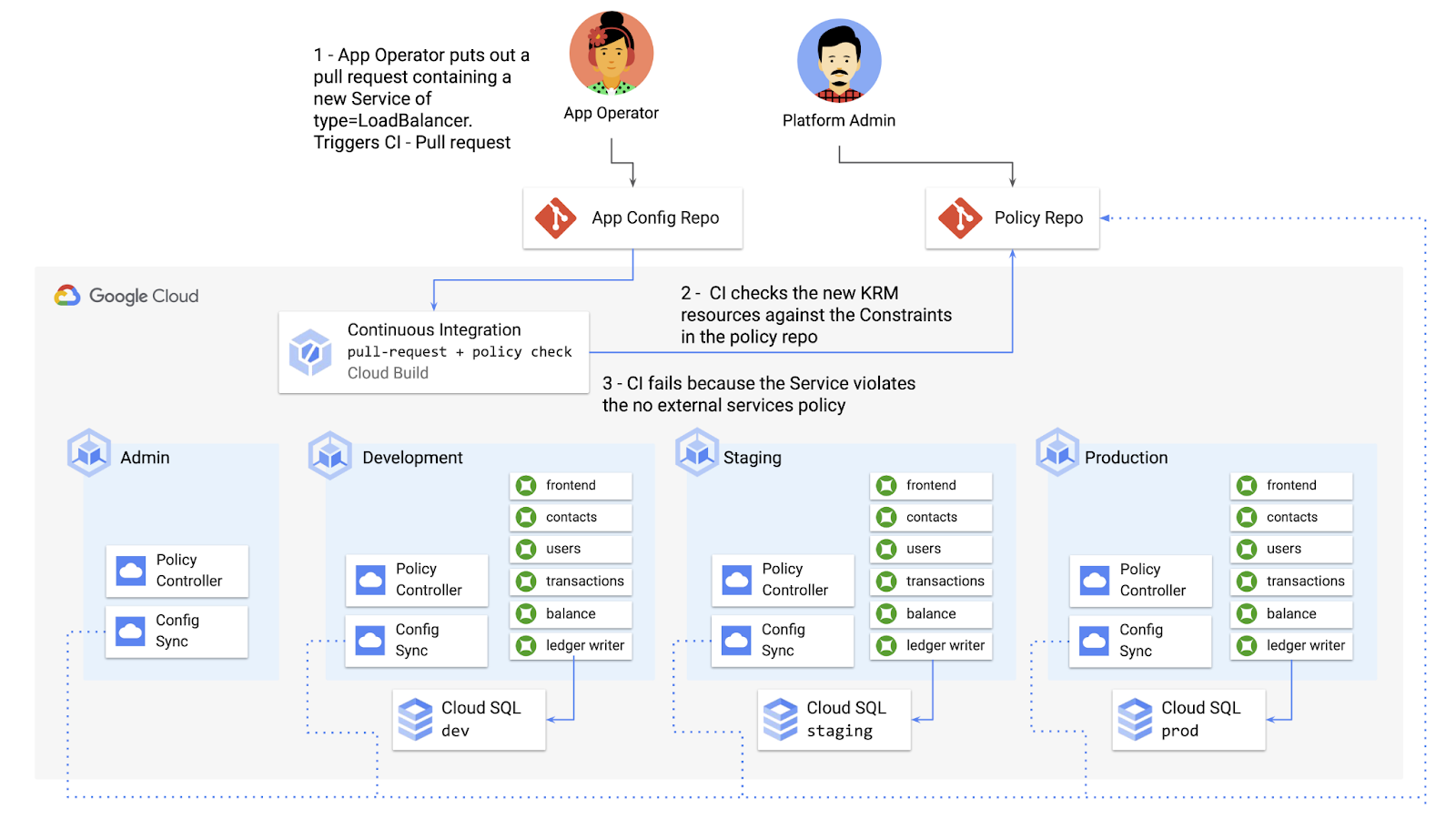
Policy Controller operates, by default, as a Kubernetes Admission Controller running inside the cluster. But Policy Controller also provides a “standalone” mode, running inside a container, that can be used outside of a cluster, such as from inside a Cloud Build pipeline.
In the example below, Cloud Build executes Policy Controller checks by getting the cymbalbank-app-config manifests, cloning the cymbalbank-policy resources, and using the “policy-controller-validate” container image to evaluate the app manifests against the policies.
steps:- id: 'Render prod manifests'name: 'gcr.io/google.com/cloudsdktool/cloud-sdk'entrypoint: '/bin/sh'args: ['-c', 'mkdir hydrated-manifests && kubectl kustomize overlays/prod > hydrated-manifests/prod.yaml']- id: 'Clone cymbalbank-policy repo'name: 'gcr.io/kpt-dev/kpt'entrypoint: '/bin/sh'args: ['-c', 'kpt pkg get https://github.com/$$GITHUB_USERNAME/cymbalbank-policy.git@main constraints&& kpt fn source constraints/ hydrated-manifests/ > hydrated-manifests/kpt-manifests.yaml']secretEnv: ['GITHUB_USERNAME']- id: 'Validate prod manifests against policies'name: 'gcr.io/config-management-release/policy-controller-validate'args: ['--input', 'hydrated-manifests/kpt-manifests.yaml']availableSecrets:secretManager:- versionName: projects/${PROJECT_ID}/secrets/github-username/versions/1env: 'GITHUB_USERNAME'timeout: '1200s' #timeout - 20 minutes
From here, an app developer or operator can know if their resources violate org-wide policies, by looking at the Cloud Build output for their Pull Request:
Status: Downloaded newer image for gcr.io/config-management-release/policy-controller-validate:latestError: Found 1 violations:[1] Number of containers in template (4) exceeds the allowed limit (3)
By integrating policy checks into CI/CD, app development teams can understand whether their resources are in compliance, and platform teams add an additional layer of policy checks to the platform.
Overall, Config Sync and Policy Controller can provide a powerful toolchain for standardizing base-layer config across a multi-cluster environment. Check out the Part 4 demo to try out each of these examples.
And stay tuned for Part 5, where we’ll learn how to use KRM to manage cloud-hosted resources.
Google Workspace Bolsters Data Security by Adding Client-Side Encryption to Gmail and Calendar

1574
Of your peers have already read this article.
4:30 Minutes
The most insightful time you'll spend today!
Editor’s note: This post originally appeared on the Google Workspace blog.
We consistently hear from our customers that the privacy of their data is top of mind, which is why we’ve built state-of-the-art security and privacy-preserving technologies into our products — to keep customer data private and secure. We’ve put Google AI to work on behalf of our customers to automatically stop the majority of online threats before they emerge. Gmail, for example, automatically blocks more than 99.9% of spam, phishing, and malware. These defenses, together with our unique encryption capabilities like client-side encryption (CSE), help our customers such as Groupe Le Monde, PwC, and Verizon, meet their security, privacy, compliance, and digital sovereignty requirements.
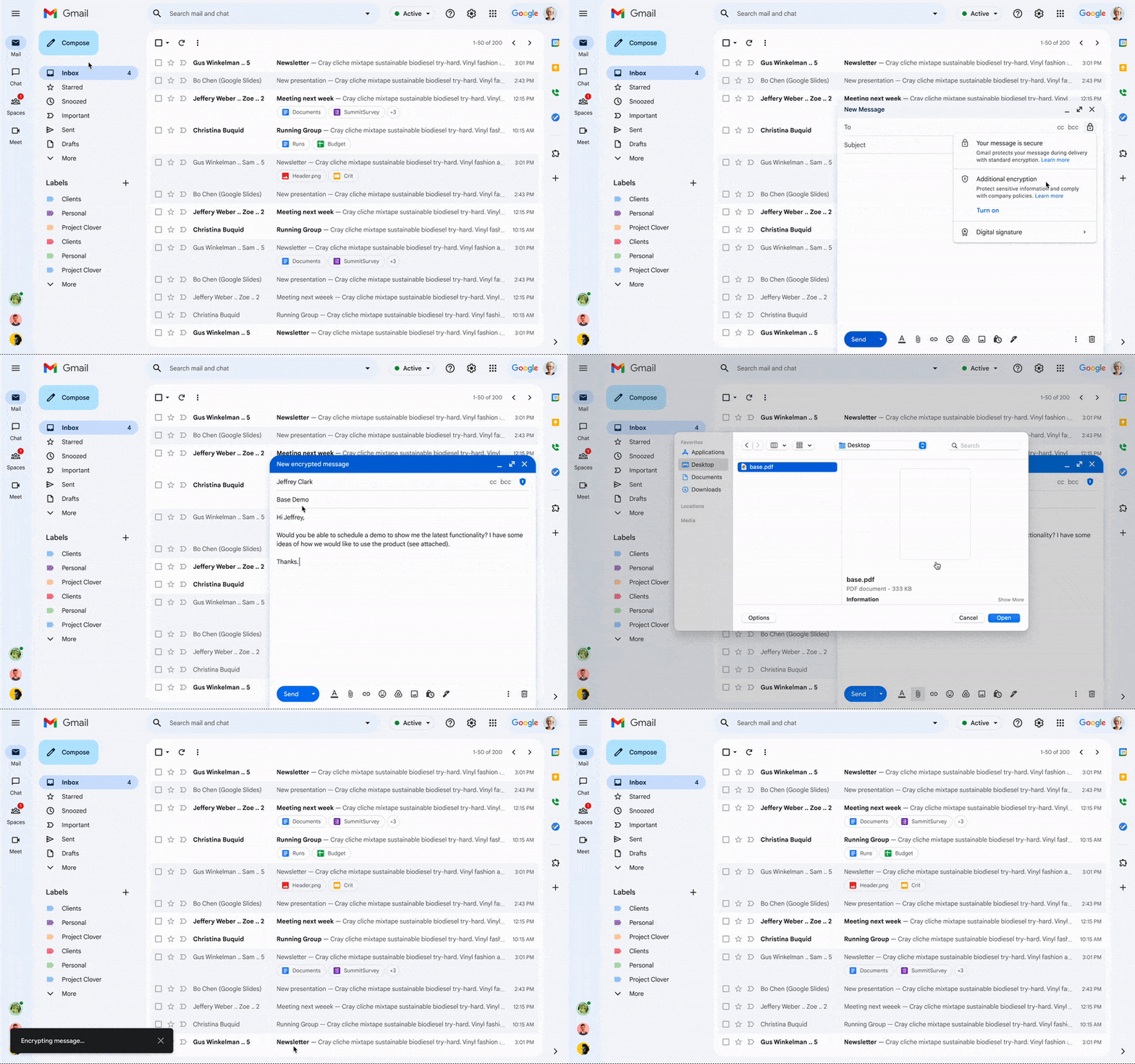
Last year, we enabled CSE for Drive, Docs, Slides, Sheets, and Meet, and today we’re excited to share that CSE is generally available for Gmail and Calendar, enabling even more organizations to become arbiters of their own data and the sole party deciding who has access to it. We recognize sovereign controls are important to customers and have accelerated delivery of these encryption capabilities to support our customers in maintaining control over their data and meeting their regulatory compliance needs.
Guarantee complete control of your data for the most challenging regulations
The expansion of CSE capabilities across Google Workspace helps to significantly reduce the burden of compliance for enterprises and public sector organizations. It gives organizations higher confidence that any third party, including Google and foreign governments, cannot access their confidential data. Workspace already encrypts data at rest and in transit by using secure-by-design cryptographic libraries. Client-side encryption takes this encryption capability to the next level by ensuring that customers have sole control over their encryption keys — and thus complete control over all access to their data. Starting today, users can send and receive emails or create meeting events with internal colleagues and external parties, knowing that their sensitive data (including inline images and attachments) has been encrypted before it reaches Google servers.
Users can continue to collaborate across other essential apps in Google Workspace while IT and security teams can ensure that sensitive data stays compliant with regulations. As customers retain control over the encryption keys and the identity management service to access those keys, sensitive data is indecipherable to Google and other external entities.
One key use case for CSE in this context centers on helping organizations subject to regulatory requirements, such as PwC, remain compliant, by meeting the need for the highest levels of encryption for certain types of communication.
“We have been searching for the capability to guarantee that our encrypted communications remain inaccessible to third-parties, including our technology providers, for some time. Google appears to be uniquely positioned with client-side encryption in providing us with complete control over our sensitive data, ensuring that we remain compliant as an organization in the ever changing world of data regulation. These features now being available across Google Workspace represent a pivotal moment for us. We’re enthusiastic about the ability to continue to benefit from the efficiency in working that Workspace provides us with, whilst at the same time maintaining trust with our customers that their confidential data will stay private and compliant,” said Shaun Bookham, UK Operations & Technology Director at PwC.
One of our global telecommunications customers, Verizon, is leveraging CSE to gain complete control over their sensitive data, ensuring that they remain compliant as an organization while supporting customers in highly regulated industries. This opens doors for the company to deliver an exceptional experience for its customers, by extending the level of data protection and privacy to their clients.
“At Verizon, we adhere to governance requirements related to access of our sensitive data while also providing the best experience coupled with deep trust. We have worked alongside Google to develop new encryption solutions and are excited to explore their utilization,” said Russell Leader, Director Collaboration and Mobility at Verizon.
Protecting an organization’s most important assets
The regulatory requirements for separation between an organization’s data and their cloud provider’s environment has resulted in important use cases for client-side encryption — from keeping sensitive R&D data extremely private, even from an organization’s SaaS provider, to scenarios where confidentiality is paramount to the success or failure of a mission-critical operation.
Customers, such as media giant Groupe Le Monde, rely on client-side encryption to protect their most crucial assets. By leveraging client-side encryption across Workspace, Groupe Le Monde can be assured that their communications, appointments, and files will not be subject to leaks, thus helping to keep their journalists safe.
“Client-side encryption gives us the next level of privacy, to ensure integrity within the journalistic process. This allows us to guarantee a higher level of security for our journalists, and to protect our sensitive content,” said Sacha Morard, Chief Technology Officer at Groupe Le Monde.
Another industry-leading Google Workspace enterprise customer uses client-side encryption to protect their most sensitive projects. For these projects, the customer is the sole owner of their encryption keys, thereby protecting their critical intellectual property and maintaining their data sovereignty requirements.
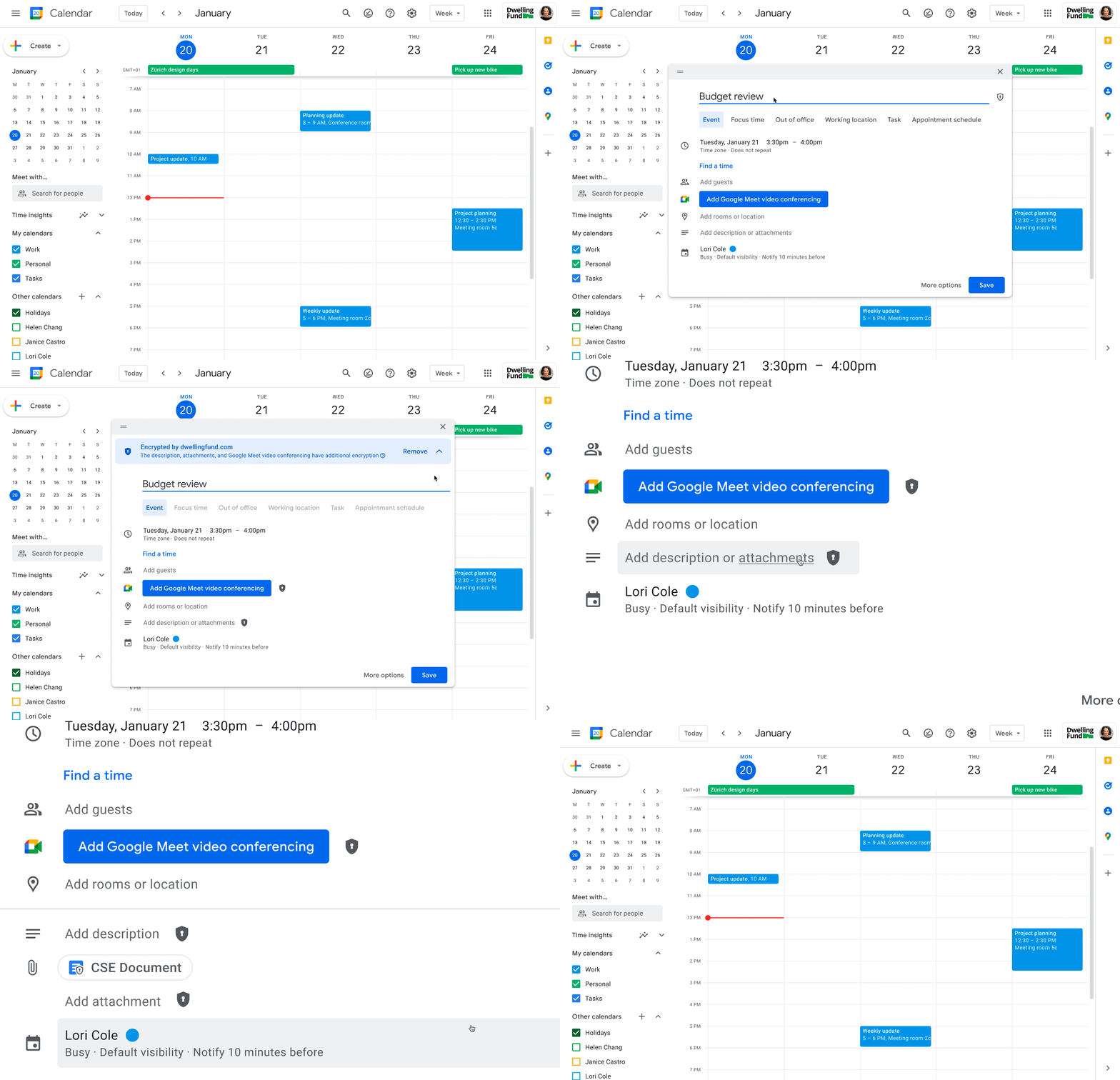
While each customer’s digital transformation journey is different, with all essential Google Workspace apps now being covered by CSE, companies of all sizes in all industries can benefit from these protections.
Starting today, client-side encryption is available globally to customers with Workspace Enterprise Plus, Education Standard, and Education Plus. To learn more about client-side encryption and how to get started today, watch our presentation from Google Cloud Next ’22 and check out the documentation.
New Google Research Innovators tackle wide range of challenges

955
Of your peers have already read this article.
2:30 Minutes
The most insightful time you'll spend today!
Now in its third year, the Google Cloud Research Innovators program has invited 37 new participants to work with each other and Google experts to accelerate their most promising projects. The program offers select researchers expanded technical and networking support from Google professionals, access to Google’s latest cloud technologies, and additional Google Cloud research credits. By collaborating across fields, sharing resources, and disseminating knowledge, Research Innovators aim to drive new discoveries and solve problems faster.
This year’s cohort includes researchers in a wide range of fields at North American institutions. They meet once a month with mentors and participate in research conferences and special training days. Here are a few of the Research Innovators solving real-world problems with Google Cloud:
- Elisa Chen at the University of Chicago uses Vertex AI Vision to develop a model that recognizes faces in illustrations in order to examine race, age, and gender representations in award-winning children’s books in the U.S.
- Swapneel Mehta at New York University uses Google Cloud’s machine learning and data processing tools to analyze disinformation online.
- Christopher Weber at the University of Arizona uses BigQuery and Data Studio to analyze voter registration data and visualize political behavior.
- Guangming Zheng at the University of Maryland develops algorithms to identify cyanobacteria in freshwater lakes through satellite imagery, which can help assess threats to human health and ecosystems.
Previous Research Innovators have already generated scientific breakthroughs and had broad social impact: Tapio Schneider developed a ClimateMachine to simulate cloud cover, Richard Fernandes designed an app to monitor Canada’s leaf canopy, and Christoph Gorgulla accelerated drug discovery for COVID-19 treatments. Some of these innovators are now mentoring this year’s cohort to further advance the program’s goals and pass along its benefits.
If you’re a researcher interested in exploring the benefits of the cloud for your projects, apply here for access to the Google Cloud research credits program in eligible countries. To engage with the latest challenges and solutions in research and technology, sign up for NEXT, Google’s global exhibition of inspiration, innovation, and education in San Francisco August 29-31.
Eight Steps to Align Hybrid Work with Diversity, Equity and Inclusion (DEI) Principles

3806
Of your peers have already read this article.
2:00 Minutes
The most insightful time you'll spend today!
Many executives across the globe are feeling the effects of a recent pivot to hybrid work models. This massive transition represents a significant departure from existing office culture. As business leaders look to operationalize their flexible work model infrastructure, they’re also evaluating what it takes to attract and retain employees in this new landscape. Instead of seeing these as separate initiatives, business leaders have a unique opportunity to collectively overhaul corporate culture, focusing on hybrid work and diversity, equity, and inclusion (DEI) strategies in tandem.
Combining DEI and hybrid work strategies provides a more inclusive culture
Focusing on diversity, equity, and inclusion doesn’t mean business leaders are offering an underrepresented individual a specific role or platform because they fit a certain demographic category. Lack of job quality criteria leads to animosity and cultural inequality. Here, diversity means creating a meritocracy with equal pay and equal opportunity for all.
Organizations that thoughtfully combine DEI and hybrid work strategies will produce cultures that improve employee experience and business agility. Integrated DEI and hybrid workplace support better business outcomes by:
Increasing the total available talent pool. A business must cast a wide net for candidates by expanding how and where it searches. Adding a flexible work schedule policy expands potential talent by allowing parents, caregivers, and others to select the hours that work best for their family obligations. Remote work also holds a higher priority in job seekers’ desires. For example, a FlexJobs survey revealed that 24% of workers say the ability to work from home is so important to them that they are willing to take a 10-20% pay cut to work remotely, and 21% would give up some vacation time.
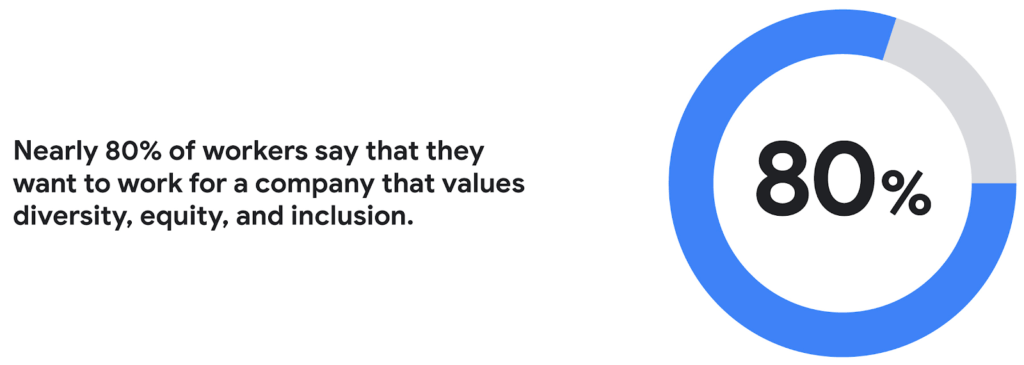
Creating a more inclusive culture. Job seekers want to work for companies that prioritize DEI. According to a recent CNBC and SurveyMonkey Workforce survey, nearly 80% of workers say that they want to work for a company that values diversity, equity, and inclusion. A DEI-centric work culture allows job seekers to feel like there’s a place for them.
Fostering innovation and profitability with broader perspectives. In general, diversity and inclusion promotes the expression of ideas from people with different backgrounds, leading to breakthroughs in creativity, innovation, and attracting new customers. Workplace DEI programs create an employee base that closely mirrors a customer base. A diverse team is less likely to miss potential market opportunities if representative of a broad range of ethnicity, race, age, assigned sex, and socioeconomic backgrounds. A 2020 McKinsey analysis found that companies in the top quartile for ethnic and cultural diversity on executive teams were 36% more likely to have above-average profitability than companies in the fourth quartile.
Hybrid work should not derail DEI efforts
While there are numerous benefits to integrating DEI and hybrid work strategies, it would be naive to think it won’t bring challenges. Businesses run the risk of creating new inequities and exacerbating existing ones as they move to hybrid models. One potential issue lies in which employees can work remotely. An HBR article shared how pre-Covid less than 30% of all workers could work from home; only 16% of Latinx workers and 19% of Black workers had remote flexibility, compared to 37% of Asian workers and 30% of white workers.
Even for employees who can work remotely, it’s essential to eliminate “proximity bias.” A study by SHRM found that 67% of surveyed supervisors admitted to considering remote workers more easily replaceable than onsite workers at their organization. Additionally, 72% said they would prefer all of their teams to be working in the office.
A successful hybrid environment strikes a balance between flexibility and inclusivity where individuals feel valued, and everyone has equal opportunities for advancement. In another study, researchers concluded that remote workers and office workers were promoted at the same rate, but found that remote workers’ salaries grew more slowly. Leading companies recognize that physically being at the office full-time isn’t necessary to produce great results.
8 steps to creating a diverse hybrid work culture
As DEI becomes a new business imperative, organizations must work to minimize unconscious bias, creating market-based salaries for all workers, and introducing educational programs that support talent development. Here are some concrete steps you can take to get started.
- Educate current and future leaders on DEI and hybrid work issues. As you build hybrid work strategies, it’s crucial to discover and understand unconscious biases. According to Deloitte, companies need a holistic DEI learning strategy, including unconscious bias training and developing the conditions for long-term behavior changes.
- Embrace tools that support DEI and hybrid workplaces. Organizations can leverage technology and AI-enabled HR software to support their efforts. Collaboration tools provide everyone with a voice regardless of where they are (for example, using Spaces for team chats in Google Workspace so that everyone has access to the same information). Video call features such as transcriptions and translation can help the hearing-and-vision-impaired and employees who speak different languages. It’s also possible to purchase recruiting solutions with AI technology to reduce the chance of bias or discrimination when reviewing candidates.
- Strengthen culture by marrying DEI with meritocracy. There should also be explicit guidelines to ensure the systems and processes for hiring and promoting individuals are both transparent and equitable. One method for accomplishing this goal is to define detailed job requirements and metrics per role to understand what skills are associated with specific functions. It’s also essential to ensure you’ve designed these processes in a way that screens out bias. Leading companies will deploy analytics tools to evaluate the systems’ fairness and track if the systems are progressing against diversity targets.
- Create upskilling programs to train employees. Many organizations struggle to find talent with the right skill sets. One solution to this problem is to invest in educating existing employees. Companies must develop diverse talent at every level to create a pipeline of candidates that progresses into senior management. Similar to the way companies offered management training programs to college graduates, organizations should design programs that provide skills enhancement for entry and mid-level employees. Almost every job will require a certain level of technical skill—organizations must upskill existing talent.
- Restructure compensation before employees leave. It’s easier to retain an employee than to onboard and train a new hire. According to the Atlanta Federal Reserve Bank’s wage growth tracker, wages for people who have switched jobs have outpaced those who’ve stayed at one employer since 2011. One way to retain talent is to right-size salaries to a competitive market rate.
- Remember that money isn’t everything. While individuals may switch jobs for money, they often stay in a position for the culture. Creating a leading employee experience helps organizations keep talent. Work from home programs, flexible work schedules, and advanced programs such as childcare benefits help build the foundation. But increasingly, individuals are looking for a sense of belonging. According to research from McKinsey, employees who feel included are three times more likely to report being excited about working for their organization and committed to its success. Another McKinsey report focusing on attrition shows that employees primarily leave companies because they don’t feel valued or don’t have a sense of belonging.
- Don’t forget to commit the resources. Most organizations built their cultures before DEI and hybrid work were requirements. These companies must invest in new work tools and educational programs, and create new hiring and talent management practices. A business can make a more significant impact with fewer resources by ensuring purchases and processes support flexible and inclusive work cultures.
- Make sure actions are backed up with DEI transparency measurements. The pressure to support DEI could lead to situations where activities are celebrated over results. While it’s not easy to be vulnerable and transparent about where the problems exist, employers should take stock of where they are today. They should present this authentically, create goals for the future, and design a measurable action plan to track its progress. With so many variables and unknowns, it’s crucial for talent leaders to track the way that hybrid work and DEI efforts advance.
Diversity should be part of your efforts because it’s the culture you want to create. However, ignoring diversity efforts can also come with ramifications. For example, Goldman Sachs announced in 2021 that the firm would only underwrite IPOs in the United States and Europe for companies with at least two diverse board members. Meanwhile, the U.S. Securities and Exchange Commission adopted new rules this summer that require Nasdaq-listed companies to have at least two diverse directors – including one woman and at least one member of an underrepresented community.
In order for the benefits of diversity to emerge in the workplace, companies need to enact cultural and behavioral change. As stated in the ICSM report, “Never become too comfortable with your efforts, as there is always room for improvement with diversity at your organization, whether you see it or not.” It’s clear that what organizations have done to attract talent in the past isn’t resonating the same way today. A diverse workforce delivers better ideas and stronger communities, building deeper relationships with customers along the way. Moving forward, it’s expected that a company’s investment in a diverse, inclusive, and hybrid work culture will set it apart from its competition, leading to increased business agility and better financial outcomes.
More Relevant Stories for Your Company

Future of Work: What You Don’t Know Will Cost You
The future of work is here—it’s just not evenly distributed. Indeed, many of the technologies, trends, and cultural norms that will drive tomorrow’s workplaces are already reshaping organizations around the world today. We examine this topic in a new Google Cloud report on the future of collaboration and productivity, featuring

How Kisan Network is Connecting Over 30,000 Farmers to Help them Reap Over 10% More Profits from Their Crops
For many people, an Ivy League education is a promise of a better future. But Aditya Agarwalla, who studied computer science at Princeton, didn’t want to limit that future to just himself. He wanted to share his good fortune and create a positive social impact in his home country of

YoungCapital Scales Up with Ease With Chrome Enterprise and G Suite
When your business is rapidly adding new employees, expanding to new countries, and always focused on staying ahead of the competition, you have to take a hard look at the tools that are slowing you down—and swap them out for better ones that can keep pace with the company. We’re

Workspace powers business as usual for Optiva during COVID-19
Established companies in any industry, including telecommunications, often take a cautious approach when it comes to adopting new technology. This is true of any technology and especially of tools used across entire organizations and at all levels—like collaboration and communication tools. I joined Optiva Inc. as its Chief Marketing Officer
