






Google Cloud named a Leader in API Management Solutions in The Forrester Wave
READ FULL INTRODOWNLOAD AGAIN3544
Of your peers have already downloaded this article
10:00 Minutes
The most insightful time you'll spend today!
Can Your Company Use Video AI? You’d Be Surprised at the Answer

5741
Of your peers have already read this article.
4:30 Minutes
The most insightful time you'll spend today!
Video AI is a powerful way to enable content discovery and engaging video experiences.
Here, try it out right now!
Google Cloud’s easy-to-access video AI solutions can accomplish a bunch of things. Here are a few:
Precise video analysis: Video Intelligence API automatically recognizes more than 20,000 objects, places, and actions in stored and streaming video. It also distinguishes scene changes and extracts rich metadata at the video, shot, or frame level. Use in combination with AutoML Video Intelligence to create your own custom entity labels to categorize content. Imagine being able to categorise hundreds of videos of customer interactions quickly to improve service training!
Recommended content: Build a content recommendation engine with labels generated by Video Intelligence API and a user’s viewing history and preferences. This will simplify content discovery for your users and guide them to the most relevant content that they want.
Simplify media management: Find value in vast archives by making media easily searchable and discoverable. Easily search your video catalog the same way you search text documents. Extract metadata that can be used to index, organize, and search your video content, as well as control and filter content for what’s most relevant.Imagine being able to locate insight in hundreds of enterprise videos to improve productivity and customer experience!
Easily create intelligent video apps: Gain insights from video in near real time using the Video Intelligence Streaming Video APIs, and trigger events based on objects detected. Build engaging customer experiences with highlight reels, recommendations, interactive videos, and more. Marketers, imagine being able to trigger a customer workflow, in real time, based on a live customer interactions.
Automate expensive workflows: Reduce time and costs associated with transcribing videos and generating closed captions, as well as flagging and filtering inappropriate content.
Content moderation: Identify when inappropriate content is being shown in a given video. You can instantly conduct content moderation across petabytes of data and more quickly and efficiently filter your content or user-generated content.
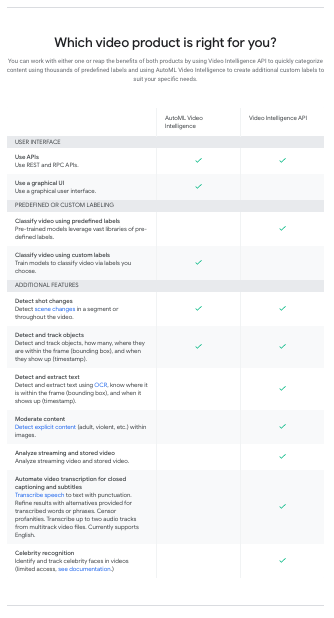
What can your organisation do with video AI?
Google Cloud’s Suite of DevOps Speeds Up ForgeRock’s Development

5699
Of your peers have already read this article.
3:00 Minutes
The most insightful time you'll spend today!
Editor’s note: Today we hear from ForgeRock, a multinational identity and access management software company with more than 1,100 enterprise customers, including a major public broadcaster. In total, customers use the ForgeRock Identity Platform to authenticate and log in over 45 million users daily, helping them manage identity, governance, and access management across all platforms, including on-premises and multicloud environments.
Operating at that kind of scale isn’t easy. In this blog post, ForgeRock Engineering Director, Warren Strange discusses the three things that help make their developers efficient and productive, and the Google Cloud tools they use along the way.
At ForgeRock, we’ve been an early adopter of Kubernetes, viewing it as a strategic platform. Running on Kubernetes allows us to drive multicloud support across Google Kubernetes Engine (GKE), Amazon (EKS), and Azure (AKS). So no matter which cloud our customers are running on, we are able to seamlessly integrate our products into customers’ environments.
Making it easier for ForgeRock’s developers and operators to build, deploy and manage applications has been crucial in our ability to continually provide high quality solutions for our customers. We’re always looking for tools to improve productivity and keep our developers focused on coding instead of configuration. Google Cloud’s suite of DevOps tools have streamlined three specific practices to help keep our developers productive:
1. Make developers productive within IDEs
Developer productivity is core to the success of any organization, including ForgeRock. Since developers spend most of their time within their IDE of choice, our goal at ForgeRock has been to make it easier for our developers to write Kubernetes applications within the IDEs they know and love. Cloud Code helps us precisely with that: it makes the process of building, deploying, scaling, and managing Kubernetes infrastructure and applications a breeze.
In particular, working with the Kubernetes YAML syntax and schema takes time, and a lot of trial and error to master. Thanks to YAML authoring support within Cloud Code, we can easily avoid the complicated and time consuming task of writing YAML files at ForgeRock. With YAML authoring support, developers save time on every bug. Cloud Code’s inline snippets, completions, and schema validation, a.k.a. “linting,” further streamline working with YAML files.
The benefits of Cloud Code extend to local development as well. Iterating locally on Kubernetes applications often requires multiple manual steps, including building container images, updating Kubernetes manifests, and redeploying applications. Doing these steps over and over again can be a chore. Cloud Code supports Skaffold under the hood, which tracks changes as they come and automatically rebuilds and redeploys—reducing repetitive development tasks.
Finally, developing for Kubernetes usually involves jumping between the IDE, documentation, samples etc. Cloud Code reduces this context switching with Kubernetes code samples. With samples, we can get new developers up and running quickly. They spend less time learning about configuration and management of the application—and spend more time on writing and evolving the code.
2. Drive end-to-end automation
To further improve developer productivity, we’ve focused on end-to-end automation: from writing code within IDEs, to automatically triggering CI/CD pipelines and running the code in production. In particular, Tekton, Cloud Build, Container Registry, and GKE have been critical to Forgerock as we streamline the flow of code, feedback and remediation through the build and deployment processes. The process looks something like this:
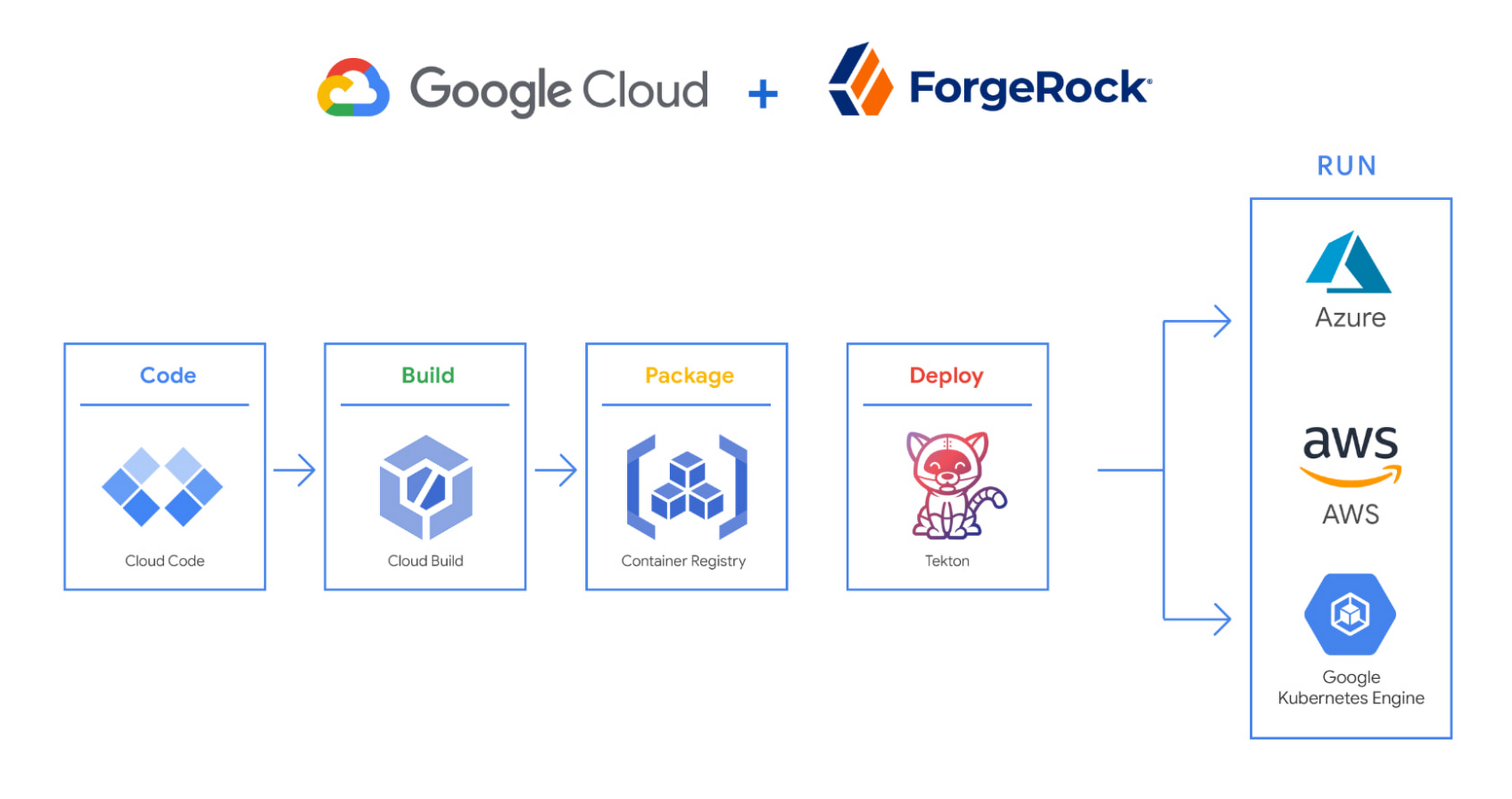
We begin by developing Kubernetes manifests and dockerfiles using Cloud Code. Then we use Skaffold to build containers locally, while Cloud Build helps with continuous integration (CI). The Cloud Build GitHub app allows us to automate builds and tests as part of our GitHub workflow. Cloud Build is differentiated from other continuous integration tools since it is fully serverless. It scales up and scales down in response to load, with no need for us to pre-provision servers or pay in advance for additional capacity. We pay for the exact resources we use.
Once the image is built by Cloud Build, it is stored, managed, and secured in Google’s Container Registry. Just like Cloud Build, Container Registry is serverless, so we only pay for what we use. Additionally, since Container Registry comes with automatic vulnerability scanning, every time we upload a new image to Container Registry, we can also scan it for vulnerabilities.
Next, a Tekton pipeline is triggered, which deploys the docker images stored in Container Registry and Kubernetes manifests to a running GKE cluster. Along with Cloud Build, Tekton is a critical part of our CI/CD process at ForgeRock. Most importantly, since Tekton comes with standardized Kubernetes-native primitives, we can create continuous delivery workflows very quickly.
After deployment, Tekton triggers a functional test suite to ensure that the applications we deploy perform as expected. The test results are posted to our team Slack channel so all developers have instant access and insights about each cluster. From there, we are able to provide our customers with their finished product request.
3. Leverage multicloud patterns and practices
The industry has seen a shift towards multicloud. Organizations have adopted multicloud strategies to minimize vendor lock-in, take advantage of best-in-class solutions, improve cost-efficiencies, and increase flexibility through choice.
At ForgeRock, we’re big proponents of multicloud. Part of that comes from the fact that our identity and access management product works across Google Cloud, AWS, and Azure. Developing products using open-source technologies such as Kubernetes has been particularly helpful in driving this interoperability.
Tekton has been another critical project that has allowed us to prevent vendor lock-in. Thanks to Tekton, our continuous delivery pipelines can deploy across any Kubernetes cluster. Most importantly, since Tekton pipelines run on Kubernetes, these pipelines can be decoupled from the runtime. Like Tekton and Kubernetes, both Cloud Build and Container Registry are based on open technologies. Community-contributed builders and official builder images allow us to connect to a variety of tools as a part of the build process. And finally, with support for open technologies like Google Cloud buildpacks within Cloud Build, we can build containers without even knowing Docker.
Making it easier for developers and operators to build, deploy and manage applications is critical for the success of any organization. Driving developer productivity within IDEs, leveraging end-to-end automation, and support for multi-cloud patterns and practices are just some of the ways we are trying to achieve this at ForgeRock. To learn more about ForgeRock, and to deploy the ForgeRock Identity Platform into your Kubernetes cluster, check out our open-source ForgeOps repository on GitHub.
Google Unveils New Cloud Region in Delhi NCR to Power India’s Digitization

8341
Of your peers have already read this article.
2:00 Minutes
The most insightful time you'll spend today!
In the past year, Google has worked to surface timely and reliable health information, amplify public health campaigns, and help nonprofits get urgent support to Indians in need. Now, we are continuing to focus on helping India’s businesses accelerate their digital transformation, deepening our commitment to India’s digitization and economic recovery. To support customers and the public sector in India and across Asia Pacific, we’re excited to announce that our new Google Cloud region in Delhi National Capital Region (NCR) is now open.
Designed to help both Indian and global companies alike build highly available applications for their customers, the Delhi NCR region is our second Google Cloud region in India and 10th to open in Asia Pacific.
What customers and partners are saying
Navigating this past year has been a challenge for companies as they grapple with changing customers demands and economic uncertainty. Technology has played a critical role, and we’ve been fortunate to partner with and serve people, companies, and government institutions around the world to help them adapt. The Google Cloud region in Delhi NCR will help our customers adapt to new requirements, new opportunities and new ways of working, like we’ve helped so many companies do in the region:
- InMobi scaled a personalized AI platform to support 120+ million active users. “With the arrival of the Google Cloud Delhi NCR, InMobi Group sees the opportunity to continue closing the gap between our users and products,” says Mohit Saxena, Co-founder and Group CTO of Inmobi. “Glance, especially, has been serving AI-powered personalised content to over 120 million active users. We can’t wait to continue giving them truly meaningful experiences that are speedy, scale well, and are relevant to them, by expanding the use of our current tools working on Google Cloud with the opening of a new region.”
- Groww now supports a sizable user base. “Google Cloud provides great technology that enables us to build and scale infrastructure to millions of users, and the new Google Cloud region in Delhi NCR will continue to help more businesses and startups in India access powerful cloud-based infrastructure, products and services,” says Neeraj Singh, Co-founder and Chief Technology Officer, Groww.
- HDFC Bank is positioned for the future. “At HDFC Bank, we are harnessing technology platforms to both run and build the bank. As we progress to be future ready, the objective is to invest in future technologies that give us scale, efficiency and resiliency. Towards this the Google Cloud region in Delhi NCR will enable us to enhance our resiliency and help us in building an active-active design framework for our new generation applications on cloud,” says Ramesh Lakshminarayanan, CIO, HDFC Bank.
- Dr. Reddy’s Lab built a modern data platform with Google Cloud. “At Dr Reddy’s, we pride ourselves in helping patients regain good health, acting quickly to provide innovative solutions to address patients’ unmet needs and in accelerating access to medicines to people worldwide. Our Google Cloud-powered data platform is helping us realize these objectives and we welcome Google’s investment in the new Delhi NCR region as helping us and other businesses in India make further contributions to our social and economic future,” says Mukesh Rathi, Senior Vice President & CIO, Dr. Reddy’s Laboratories.
- “To survive the disruption caused by the pandemic and to succeed in the long term, organizations need to become digital natives, so they can be more agile, explore new business models and build new capabilities that boost resilience. A cloud-first strategy plays a key role in enabling businesses to do this,” said Piyush N. Singh, Lead – India market unit & lead – Growth and Strategic Client Relationships, Asia Pacific and Latin America, Accenture. “Harnessing the potential of cloud requires the right data infrastructure and this expansion by Google Cloud will undoubtedly help Indian enterprises in their digital transformation journeys.”
A global network of regions
Delhi NCR joins 25 existing Google Cloud regions connected via our high-performance network, helping customers better serve their users and customers throughout the globe. As the second region in India, customers benefit from improved business continuity planning with distributed, secure infrastructure needed to meet IT and business requirements for disaster recovery, while maintaining data sovereignty.
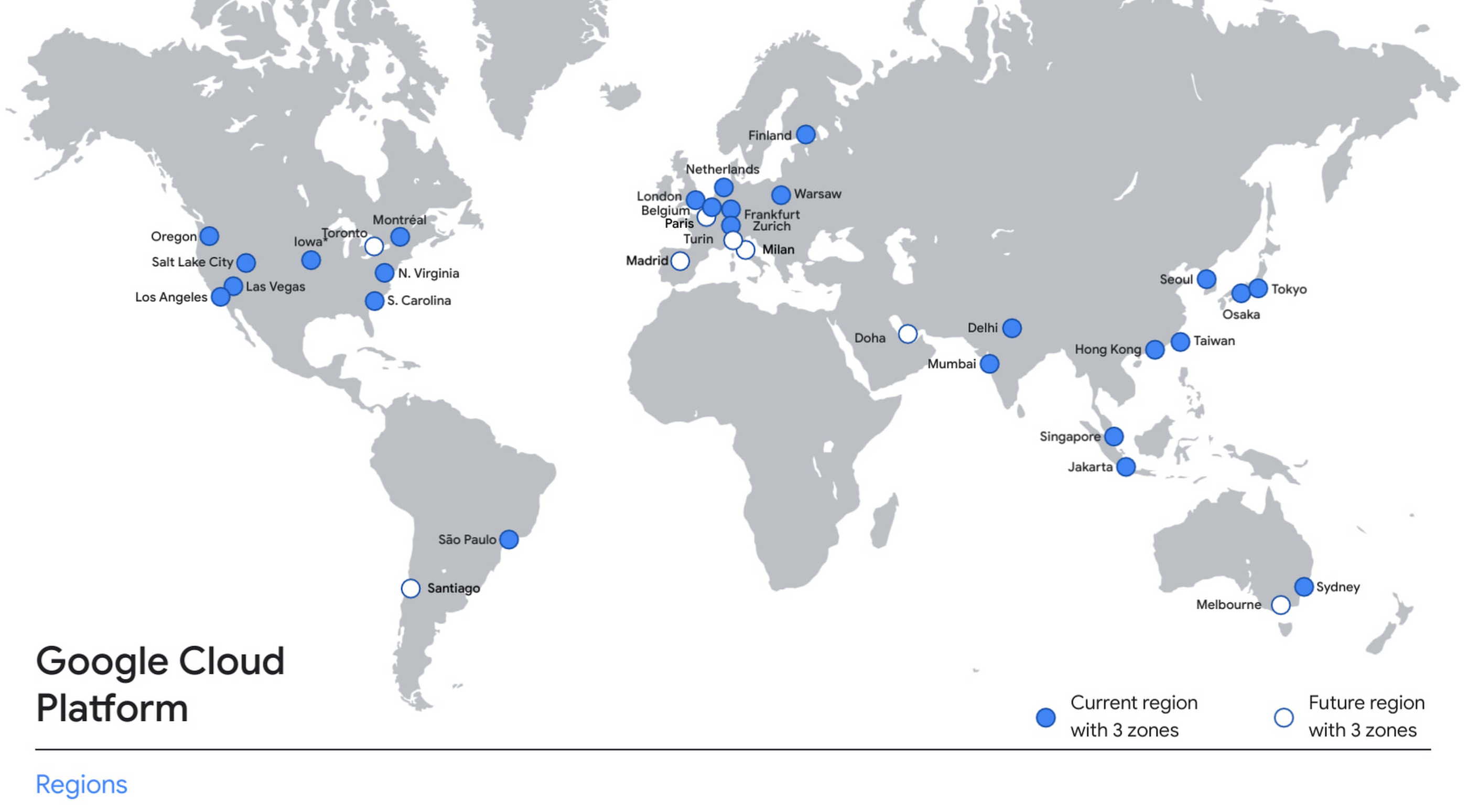
With this new region, Google Cloud customers operating in India also benefit from low latency and high performance of their cloud-based workloads and data. Designed for high availability, the region opens with three availability zones to protect against service disruptions, and offers a portfolio of key products, including Compute Engine, App Engine, Google Kubernetes Engine, Cloud Bigtable, Cloud Spanner, and BigQuery.
Supporting India’s recovery with training and education
Google and Google Cloud will also continue to support our customers with people and education programs. We’re investing in local talent and the local developer community to help enterprises digitally transform and support economic recovery.
Through the India Digitization Fund, we expanded our efforts to support India’s recovery from COVID-19—in particular, through programs to support education and small businesses. In addition to expanding internet access, and investments to help start-ups accelerate India’s digital transformation, we’ve grown our Grow with Google efforts. Businesses can access digital tools to maintain business continuity, find resources like quick help videos, and learn digital skills—in both English and in Hindi.
Helping customers build their transformation clouds
Google Cloud is here to support businesses, helping them get smarter with data, deploy faster, connect more easily with people and customers throughout the globe, and protect everything that matters to their businesses. The cloud region in Delhi NCR offers new technology and tools that can be a catalyst for this change. To learn more, visit the Google Cloud locations page, and be sure to watch the region launch event here.
Don’t Just Move to the Cloud, Modernize With Google Cloud
3496
Of your peers have already read this article.
2:00 Minutes
The most insightful time you'll spend today!
Our customers tell us they don’t just want to migrate their applications from point A to point B, they want to modernize their applications with cloud-native technologies and techniques, wherever those applications may be.
Today, we’re excited to tell you about a variety of new customers that are using Anthos to transform their application portfolio, as well as new cloud migration, API management, and application development offerings:
- New customers leveraging Anthos for a variety of on-prem, cloud and edge use cases
- The general availability of Migrate for Anthos
- Apigee hybrid in general availability
- The general availability of Cloud Code
Accelerating app modernization with Anthos
Anthos was the first open app modernization platform to offer a unified control plane and service delivery across diverse cloud environments—managed cloud, on-premises and edge. Since it became generally available in the spring, organizations across a variety of industries and geographies have turned to Anthos to bring the benefits of cloud, containers and microservices to their applications.
According to the findings from Forrester’s Total Economic Impact study, customers adopting Anthos have seen up to 5x return on investment based on the savings from ongoing license and support costs, and the incremental savings from operations and developer productivity. For one customer in the financial services industry, rolling out new features and updates to their core banking application used to take at least a quarter. Now with Anthos, they were able to eliminate months long development and release cycles, and roll out on a weekly basis. That’s a 13x improvement on time to market.
This week, several new European Anthos customers will take the stage at Next UK to talk about how they’re using Anthos to transform their IT operations.
Kaeser Kompressoren SE of Coburg, Germany, is a provider of compressed air products and services. The company needed a consistent platform to deploy and manage existing on-prem SAP workloads, like SAP Data Hub, and also wanted to be able to tap into other services running in Google Cloud to get more value from those environments.
“Application modernization is enabling business innovation for Kaeser,” said Falko Lameter, CIO. “To gain better insights from data, we knew we needed to incorporate advanced machine learning and data analytics in all our applications. We chose Google Cloud’s Anthos because it offered the flexibility to incrementally modernize our legacy application on-premises without business disruption, while allowing us to run other applications on Anthos in Google Cloud and take advantage of its managed data analytics and ML/AI services.”
Then there’s Denizbank. Based in Turkey, Denizbank provides a variety of commercial banking services, and established the first Digital Banking Department in Turkey in 2012. Denizbank turned to Anthos for an open application modernization platform to help it develop its next-generation mobile banking applications.
“We operate in 11 different countries and have to comply with various regulatory requirements like data locality and sovereignty, which mandates some or all applications to reside on premises in certain countries, while the rest of the apps can move to the cloud in other countries,” said Dilek Duman, COO of DenizBank. “We chose Google Cloud’s Anthos for its flexibility to modernize our existing application investments with ease, and to deliver AI/ML powered software faster while improving operational security and governance. Anthos gives us the ability to have a unified management view of our hybrid deployments, giving us a consistent platform to run our banking workloads across environments.”
Anthos is even starting to be deployed to edge locations, where, thanks to its 100% software-based design, it can run on any number of hardware form factors. We’re in advanced discussions with customers in telecommunications, retail, manufacturing and entertainment about using Anthos for edge use cases, as well as with global hardware OEMs.
Move and modernize with Migrate for Anthos
In addition to leveraging cloud technology for their on-premises environments with Anthos, customers also want to simultaneously migrate to the cloud and modernize with containers. That’s why we’re happy to announce the general availability of Migrate for Anthos, which provides a fast, low-friction path to convert physical servers or virtual machines from a variety of sources (on-prem, Amazon AWS, Microsoft Azure, or Google Compute Engine) directly into containers in Anthos GKE.
Migrate for Anthos makes it easy to modernize your applications without a lot of manual effort or specialized training. After upgrading your on-prem systems to containers with Migrate for Anthos, you’ll benefit from a reduction in OS-level management and maintenance, more efficient resource utilization, and easy integration with Google Cloud services for data analytics, AI and ML, and more.
DevFactory aims to offload repetitive tasks in software development so that dev teams can focus on coding and productivity. As advocates for optimization through containers, they found Migrate for Anthos a key way to help deliver on their goals:
“We usually see less than 1% resource utilization in data centers. Migrate for Anthos is a remarkable tool that allows us to migrate data center workloads to the cloud in a few simple steps,” said Rahul Subramaniam, CEO, Devfactory. “By automatically converting servers and virtual machines into containers with Migrate for Anthos, we get better resource utilization and dramatically reduced costs along with managed infrastructure in the end state, which makes this a very exciting and much-needed solution.”
Migrate for Anthos is available at no additional cost, and can be used with or without an Anthos subscription.
API-first, everywhere, with Apigee hybrid
To drive modernization and innovation, enterprises are increasingly adopting API-first approaches to connecting services across hybrid and multi-cloud environments. To address the need for hybrid API management, we’re announcing the general availability of Apigee hybrid, giving you the flexibility to deploy your API runtimes in a hybrid environment, while using cloud-based Apigee capabilities such as developer portals, API monitoring, and analytics. Apigee hybrid can be deployed as a workload on Anthos, giving you the benefits of an integrated Google Cloud stack, with Anthos’ automation and security benefits.
Gap Inc. uses Apigee to publish, secure, and analyze APIs and easily onboard the development teams working with those APIs. Apigee hybrid will help Gap Inc. overcome the traditional tradeoffs between on-premises and cloud, providing the best of both worlds.
“With Apigee hybrid, we can have an easy to manage, localized runtime for scenarios where latency or data sensitivity require it. At the same time, we can continue to enjoy all the benefits of Apigee such as Apigee’s developer portal and its rich API-lifecycle management capabilities,” said Patrick McMichael, Enterprise Architect at Gap Inc.
Simplifying the developer experience
Google Cloud application development tools are designed to help you simplify creating apps for containers and Kubernetes, incorporate security and compliance into your pipelines, and scale up or down depending on demand, so you only pay for what you use.
With these goals in mind, last week, we announced the general availability of Cloud Run and Cloud Run for Anthos. Cloud Run is a managed compute platform on Google Cloud that lets you run serverless containers on on a fully managed environment or on Anthos. With Cloud Run fully managed, you can easily deploy and run stateless containers written in any language, and enjoy serverless benefits such as automatic scale up and scale down and pay-for-use—without having to manage the underlying infrastructure.
Cloud Run for Anthos, meanwhile, brings those same serverless developer experience to Anthos managed clusters, giving developers access to a modern, serverless compute platform while their organization modernizes its on-prem environment with Kubernetes.
Easier Kubernetes development with Cloud Code
Today, we’re excited to announce the general availability of another important member of the Google Cloud application development stack: Cloud Code, which lets developers write, debug and deploy code to Google Cloud or any Kubernetes cluster through extensions to popular Integrated Developer Environments (IDEs) such as Visual Studio Code and IntelliJ.
Developers are most productive while working in their favorite IDE. By embracing developers’ existing workflow and tools, Cloud Code makes working with Kubernetes feel like you are working with a local application, while preserving the investment you’ve made to configure your tools to your own specific needs. Cloud Code dramatically simplifies the creation and maintenance of Kubernetes applications.
In addition, Cloud Code speeds up development against Kubernetes by extending the edit-debug-review “inner loop” to the cloud. You get rapid feedback on your changes, ensuring that they’re of high quality. And when it comes to moving code to the production environment, Cloud Code supports popular continuous integration and delivery (CI/CD) tools like Cloud Build.
Finally, with Cloud Code, diagnosing issues does not require a deep understanding of Kubernetes, thanks to connected debuggers and cluster-wide logging that help you address issues all from the context of your favorite tool.
Toward modern, efficient applications
Application modernization means a lot of things to a lot of people. Depending on your environment, it can mean updating VMs to containers and Kubernetes, it can mean moving them to the cloud, or it can mean distributing them to edge locations and unifying workloads with consistent API and service management. For others, application modernization means using cloud-native tools and concepts like serverless and CI/CD. Whatever your definition, we can help you realize your business and modernization goals, achieving greater agility while improving overall governance.
New Map Customization Features for Enhanced User Experiences

5566
Of your peers have already read this article.
1:30 Minutes
The most insightful time you'll spend today!
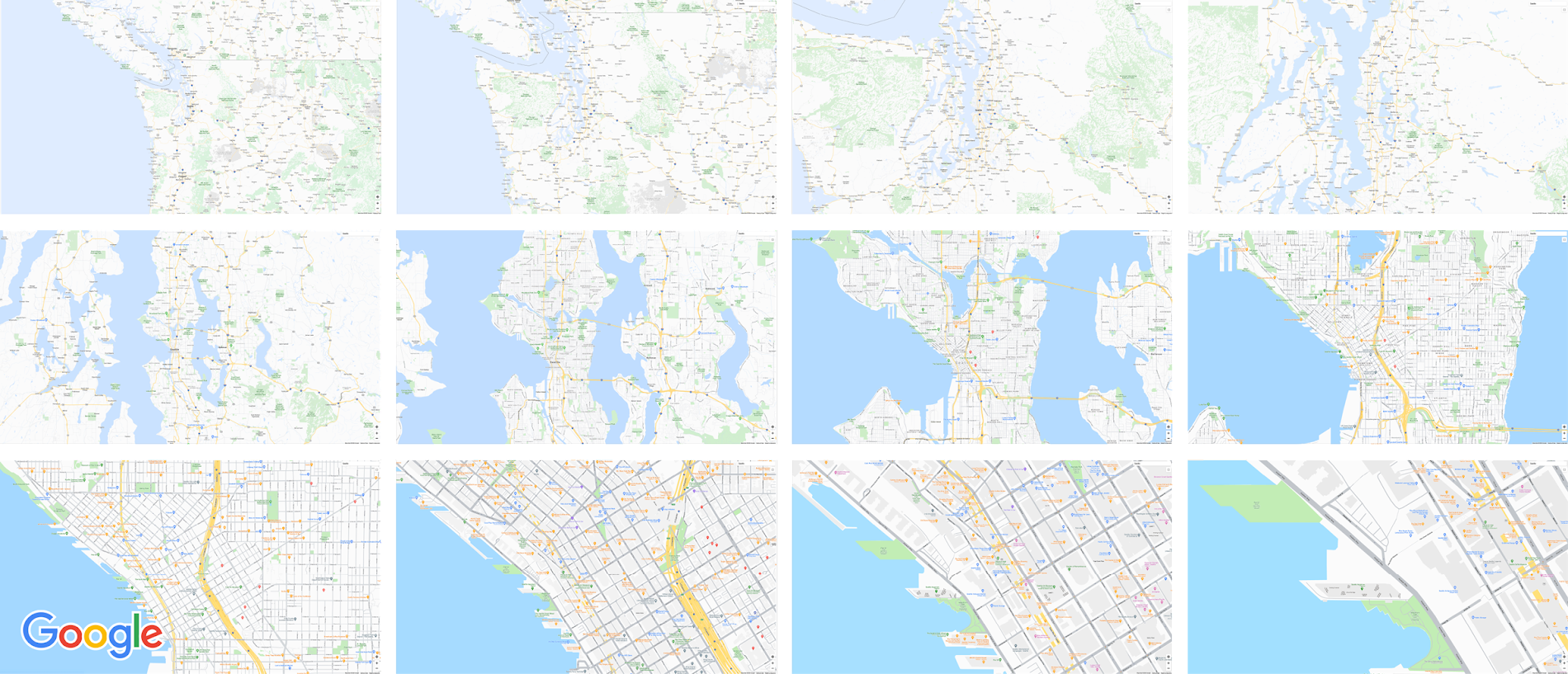
A customized map can be key to delivering a frictionless experience that engages users and sets you apart in users’ minds–whether you’re a real estate company fine-tuning points of interest (POIs) on a map to help buyers decide where to live, or a regional pharmacy styling a map to ensure your locations stand out from the competition. That’s why we’ve focused on empowering you with these capabilities through features like POI density and POI filtering controls, zoom level customization, and even industry-optimized map styles. But we’re not done helping you take your map to the next level. Today, we’re making two updates generally available—a new Maps SDK for Android and the extension of Cloud-based maps styling features to our Android and iOS SDKs. Together they enhance the native mobile map experience and make it easier for you to deliver consistent, optimized maps across all your platforms. We’ll also give you an early look at additional features that we’re working on.
Update your Maps SDKs for Android for an enhanced user experience
Developers around the world depend on the Maps SDK for Android to power critical experiences like helping drivers make a delivery or helping retailers visually confirm an order’s shipping address. With consumers spending an increasing amount of time in apps, it’s more important than ever that mobile experiences meet the high consumer expectations that come with essential, everyday use.
Today we released version 18.0.0 of the Maps SDK for Android, which delivers an enhanced map experience to app users, thanks to a new renderer. The new renderer introduces optimizations to our tile serving and rendering architecture, reducing payload size. This can help to reduce network load, on-device processing, and memory consumption for a more stable and smoother end-user experience. You’ll also see specific improvements with map labels. Now more fluid and clearly positioned, they pave the way for future marker management features. We’ve also enhanced overall gesture handling for better animations and smoother panning and zooming.
Because the Maps SDK for Android continues to be distributed as part of the Google Play services SDK, you can upgrade to v18.0.0 along with all its improvements with no increase to your APK size.
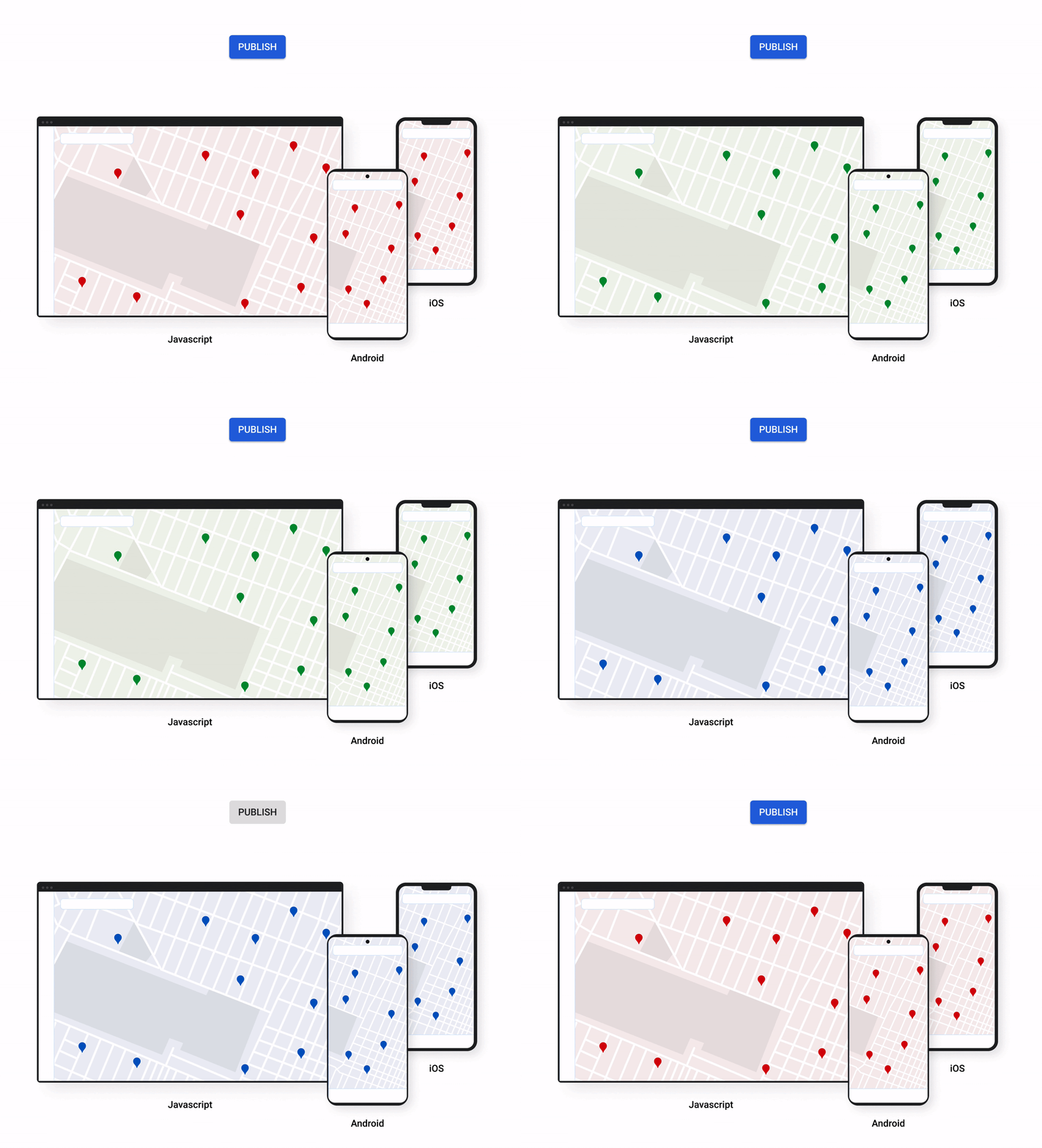
A consistent cross-platform maps experience with Cloud-based maps styling for mobile
Earlier this year at Google I/O, we announced the general availability of Cloud-based maps styling for JavaScript. Since then customers have used the richer customization capabilities and efficient cloud-enhanced deployment workflow to power millions of mapping experiences, from a curated interactive map of Munich to fun virtual Easter egg hunts hosted by Cadbury. Starting today, Cloud-based maps styling features are supported in the GA versions of our Maps SDK for Android (v18+) and Maps SDK for iOS (V5.0+).
Cloud-based maps styling moves map customization code off the client and into the cloud–where it can be easily modified to use new features or test new configurations. This decoupling of client code and customization code makes it easy to manage a single branded and optimized style across any number of apps across all supported platforms. It also makes it possible to simultaneously publish changes to a map style across platforms and install bases with the click of a button. Cloud-based maps styling is the foundation for a growing set of new customization features including POI filtering and POI boosting, zoom level customization, landmarks, and commercial corridor styling.
Mobile developers can now take advantage of Cloud-based maps styling features and simple cross-platform customizations for their Dynamic Maps by creating a MapID in Google Cloud Console and using it within their Maps SDK for Android or Maps SDK for iOS. Dynamic maps loaded with a Map ID via our Maps SDK for Android or Maps SDK for iOS will be billed to the same SKU as Maps JavaScript API (Dynamic Maps) and covered under the same $200 monthly credit and volume pricing. Developers can upgrade to the new Maps SDK for Android and continue using client-styled maps for no charge as they always have.
Additional capabilities we’re working on¹
We know you have a range of map customization needs to engage your users with differentiated experiences. We’re working on developing more Cloud-based maps styling features–focused on marker capabilities, map elements, and data-driven styling–to help you do just that. We’re working on a new set of markers capabilities, easier pin customizations, marker collision management, performance optimizations, and the ability to build custom marker elements that you can use to quickly deploy deeply customized, highly optimized marker-driven experiences. For those seeking greater detail in their maps, we’re working on expanding the availability and customization of detailed street maps to even more cities. We’re also working on features to make it easier to programmatically style map elements by exposing new APIs to enable things like the simple creation of choropleths by styling Google geographical boundaries based on your data.
This is just a peek into what we’re excited to be building for our developer community. While we’re working hard to bring these additional features to life, visit our website to learn more and our developer documentation to start customizing and enhancing your mobile maps.
¹Product capabilities, timeframes, and features are subject to change.
More Relevant Stories for Your Company

A Road to Possibilities: Google Maps Platform Website
For more than 15 years, developers have used Google Maps Platform to deliver location-based experiences to their end users and used location intelligence to optimize their businesses. Along this journey, we’ve made a variety of changes to better support our community as needs have changed and new industries and technologies

Fully-managed-zero-trust Security Solution, Traffic Director Integrated with CA Service
We created Traffic Director to bring to you a fully managed service mesh product that includes load balancing, traffic management and service discovery. And now, we’re happy to announce the availability of a fully-managed zero-trust security solution using Traffic Director with Google Kubernetes Engine (GKE) and Certificate Authority (CA) Service. When platform administrators and security

Google Announces Cloud Functions’ Native Integration with Secret Manager
Google Cloud Functions provides a simple and intuitive developer experience to execute code from Google Cloud, Firebase, Google Assistant, or any web, mobile, or backend application. Oftentimes that code needs secrets—like API keys, passwords, or certificates—to authenticate to or invoke upstream APIs and services. While Google Secret Manager is a fully-managed, secure, and


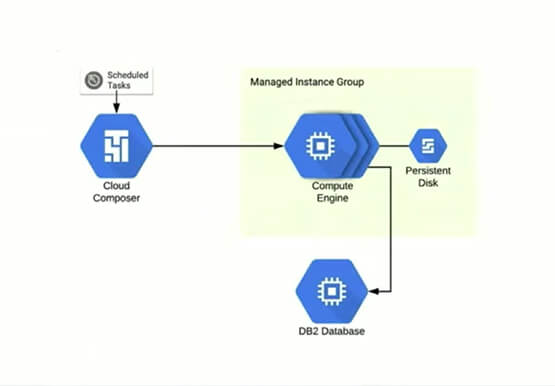

Reduce Costs, Increase Profits by Modernizing Your Mainframe Applications with Google Cloud
Mainframe powers much of global commerce and for decades—with its proprietary platform and legendary lock-in—was resistant to effective competition. Even years after most organizations began adopting public cloud, migrating off the mainframe remains too complex for many organizations to undertake. Google Cloud brings a unique, automated approach to modernization enabling
