





3366
Of your peers have already watched this video.
31:30 Minutes
The most insightful time you'll spend today!
Contact Center AI: The State of the Union
Did you know 31% of CIOs say that they have already deployed conversational AI platforms? And that this represents a 50% year on year growth?
Much of this is driven by customer preferences. By 2023, customers will prefer speech interfaces to initiate self-service activities. Additionally, by 2023, 40 percent of contact center interactions will be fully automated by AI.
Here are the facts: The latest advances in voice AI are opening the door to a massive transformation of customer experiences. The revolution driven by Contact Center AI (CCAI) is here today and you can benefit from it quickly.
Hear about the state of the Google CCAI offering through real-life customer stories.

5652
Of your peers have already downloaded this article
5:30 Minutes
The most insightful time you'll spend today!
Public cloud, big data, and AI technologies offer competitive advantages and cost savings for capital markets firms ready to make the transition. This paper discusses the three phases capital markets firms go through in transitioning to public cloud, and the workloads, benefits, and cultural changes that characterize the three phases:
Infrastructure Optimizers: The first step on the public cloud journey, where firms focus on migrating specific workloads to save costs.
Cautious Strategists: Firms build on the success of their first public cloud migrations, and begin to change the way they develop technology to increase cost savings and start taking advantage of capabilities only available on public cloud.
Transformative Innovators: Firms shift to a fully public cloud-enabled mentality, and fully leverage the flexibility and agility of the public cloud to build industry-changing solutions and attract top IT talent.
Additionally, we reveal the five things that capital markets innovators who have advanced to the transformation phase do well in their adoption of cloud, big data, and AI technologies across the front, middle, and back office functions.
Google Cloud’s Med-PaLM 2: Pioneering Ethical AI Solutions for the Medical Domain

916
Of your peers have already read this article.
3:30 Minutes
The most insightful time you'll spend today!
Healthcare breakthroughs change the world and bring hope to humanity through scientific rigor, human insight, and compassion. We believe AI can contribute to this, with thoughtful collaboration between researchers, healthcare organizations and the broader ecosystem.
Today, we’re sharing exciting progress on these initiatives, with the announcement of limited access to Google’s medical large language model, or LLM, called Med-PaLM 2. It will be available in coming weeks to a select group of Google Cloud customers for limited testing, to explore use cases and share feedback as we investigate safe, responsible, and meaningful ways to use this technology.
Med-PaLM 2 harnesses the power of Google’s LLMs, aligned to the medical domain to more accurately and safely answer medical questions. As a result, Med-PaLM 2 was the first LLM to perform at an “expert” test-taker level performance on the MedQA dataset of US Medical Licensing Examination (USMLE)-style questions, reaching 85%+ accuracy, and it was the first AI system to reach a passing score on the MedMCQA dataset comprising Indian AIIMS and NEET medical examination questions, scoring 72.3%.
Industry-tailored LLMs like Med-PaLM 2 are part of a burgeoning family of generative AI technologies that have the potential to significantly enhance healthcare experiences. We’re looking forward to working with our customers to understand how Med-PaLM 2 might be used to facilitate rich, informative discussions, answer complex medical questions, and find insights in complicated and unstructured medical texts. They might also explore its utility to help draft short- and long-form responses and summarize documentation and insights from internal data sets and bodies of scientific knowledge.
Innovating responsibly with AI
Since last year, we’ve been researching and evaluating Med-PaLM and Med-PaLM 2, assessing it against multiple criteria — including scientific consensus, medical reasoning, knowledge recall, bias, and likelihood of possible harm — which were evaluated by clinicians and non-clinicians from a range of backgrounds and countries.
Med-PaLM 2’s impressive performance on medical exam-style questions is a promising development, but we need to learn how this can be harnessed to benefit healthcare workers, researchers, administrators, and patients. In building Med-PaLM 2, we’ve been focused on safety, equity, and evaluations of unfair bias. Our limited access for select Google Cloud customers will be an important step in furthering these efforts, bringing in additional expertise across the healthcare and life sciences ecosystem.
What’s more, when Google Cloud brings new AI advances to our products, our commitment is two-fold: to not only deliver transformative capabilities, but also ensure our technologies include proper protections for our organizations, their users, and society. To this end, our AI Principles, established in 2017, form a living constitution that guides our approach to building advanced technologies, conducting research, and drafting our product development policies.
From AI to generative AI
Google’s deep history in AI informs our work in generative AI technologies, which can find complex relationships in large sets of training data, then generalize from what they learn to create new data. Breakthroughs such as the Transformer have enabled LLMs and other large models to scale to billions of parameters, letting generative AI move beyond the limited pattern-spotting of earlier AIs and into the creation of novel expressions of content, from speech to scientific modeling.
Google Cloud is committed to bringing to market products that are informed by our research efforts across Alphabet. In 2022, we introduced a deep integration between Google Cloud and Alphabet’s AI research organizations, which allows Vertex AI to run DeepMind’s groundbreaking protein structure prediction system, AlphaFold.
Much more is on the way. In one sense, generative AI is revolutionary. In another, it’s the familiar technology story of more and better computing creating new industries, from desktop publishing to the internet, social networks, mobile apps, and now, generative AI.
Building on AI leadership
Additionally, today we’re announcing a new AI-enabled Claims Acceleration Suite, designed to streamline processes for health insurance prior authorization and claims processing. The Claims Acceleration Suite helps both providers of insurance plans and healthcare to create operational efficiencies and reduce administrative burdens and costs by converting unstructured data into structured data that help experts make faster decisions and improve access to timely patient care.
On the clinical side, last year we announced Medical Imaging Suite, an AI-assisted diagnosis technology being used by Hologic to improve cervical cancer diagnoses and Hackensack Meridian Health to predict metastasis in patients with prostate cancer. Elsewhere, Mayo Clinic and Google have collaborated on an AI algorithm to improve the care of head and neck cancers, and Google Health recently partnered with iCAD to improve breast cancer screening with AI.
From these examples and more, it’s clear that the healthcare industry has moved from testing AI to deploying it to improve workflows, solve business problems, and speed healing. With this in mind, we expect rapid interest in and uptake of generative AI technologies. Healthcare organizations are eager to learn about generative AI and how they can use it to make a real difference.
Looking ahead
The power of AI has reinforced Google Cloud’s commitment to privacy, security, and transparency. Our platforms are designed to be flexible, including data and model lineage capabilities, integrated security and identity management services, support for third-party models, choice and transparency on models and costs, integrated billing and entitlement support, and support across many languages.
While we’ll have some innovations like Med-PaLM 2 that are tuned for healthcare, we also have products that are relevant across industries. Last month, we announced several generative AI capabilities coming to Google Cloud, including Generative AI support in Vertex AI and Generative AI App Builder, which are already being tested by a number of customers. Developers and businesses already use Vertex AI to build and deploy machine learning models and AI applications at scale, and we recently added Generative AI support in Vertex AI. This gives customers foundation models they can fine-tune with their own data, and the ability to deploy applications with this powerful new technology. We also launched Generative AI App Builder to help organizations build their own AI-powered chat interfaces and digital assistants in minutes or hours by connecting conversational AI flows with out-of-the-box search experiences and foundation models.
As AI proves its value, it’s likely there will be increased focus on high-quality data collection and curation in healthcare and life sciences. Improving the flow and unification of data across health care systems, referred to as data interoperability, is one of the most important building blocks to leveraging AI, and it helps organizations run more effectively, improve patient care, and helps people live healthier lives. We expect to continue our investments in technology, infrastructure, and data governance.
We’re committed to realizing the potential of this technology in healthcare. By working with a handful of trusted healthcare organizations early on, we’ll learn more about what can be achieved, and how this technology can safely advance. For all of us, the prospects are inspiring, humbling, and exciting.
If you’re interested in exploring generative AI on Cloud, you can sign-up for our Trusted Tester program or reach out to your Google Cloud sales representative.
Smart Reply: How the AI-augmented Chat Helps Scale Google’s Tech Support Operations

2904
Of your peers have already read this article.
3:00 Minutes
The most insightful time you'll spend today!
As Googlers transitioned to working from home during the pandemic, more and more turned to chat-based support to help them fix technical problems. Google’s IT support team looked at many options to help us meet the increased demand for tech support quickly and efficiently.
More staff? Not easy during a pandemic.
Let service levels drop? Definitely not.
Outsource? Not possible with our IT requirements.
Automation? Maybe, just maybe…
How could we use AI to scale up our support operations, making our team more efficient?
The answer: Smart Reply, a technology developed by a Google Research team with expertise in machine learning, natural language understanding, and conversation modeling. This product provided us with an opportunity to improve our agents’ ability to respond to queries from Googlers by using our corpus of chat data. Smart Reply trains a model that provides suggestions to techs in real time. This reduces the cognitive load when multi-chatting and helps a tech drive sessions towards resolution.
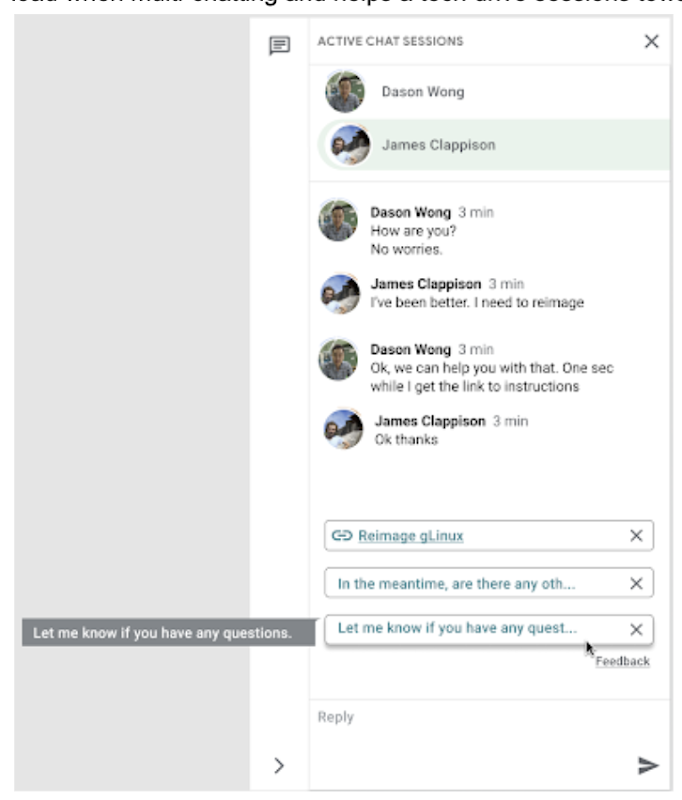
In the solution detailed below, our hope is that IT teams in a similar situation can find best practices and a few shortcuts to implementing the same kind of time saving solutions. Let’s get into it!
Challenges in preparing our data
Our tech support service for Google employees—Techstop—provides a complex service, offering support for a range of products and technology stacks through chat, email, and other channels.
Techstop has a lot of data. We receive hundreds of thousands of requests for help per year. As Google has evolved we’ve used a single database for all internal support data, storing it as text, rather than as protocol buffers. Not so good for model training. To protect user privacy, we want to ensure no PII (personal identifiable information – e.g. usernames, real names, addresses, or phone numbers) makes it into the model.
To address these challenges we built a FlumeJava pipeline that takes our text and splits each message sent by agent and requester into individual lines, stored as repeated fields in a protocol buffer. As our pipe is executing this task, it also sends text to the Google Cloud DLP API, removing personal information from the session text, replacing it with a redaction that we can later use on our frontend.
With the data prepared in the correct format, we are able to begin our model training. The model provides next message suggestions for techs based on the overall context of the conversation. To train the model we implemented tokenization, encoding, and dialogue attributes.
Splitting it up
The messages between the agent and customer are tokenized: broken up into discrete chunks for easier use. This splitting of text into tokens must be carefully considered for several reasons:
- Tokenization determines the size of the vocabulary needed to cover the text.
- Tokens should attempt to split along logical boundaries, aiming to extract the meaning of the text.
- Tradeoffs can be made between the size of each token, with smaller tokens increasing processing requirements but enabling easier correlation between different spans of text.
There are many ways to tokenize text (SAFT, splitting on white spaces, etc.), here we chose sentence piece tokenization, with each token referring to a word segment.
Prediction with encoders
Training the neural network with tokenized values has gone through several iterations. The team used an Encoder-Decoder architecture that took a given vector along with a token and used a softmax function to predict the probability that the token was likely to be the next token in the sentence/conversation. Below, a diagram represents this method using LSTM-based recurrent networks. The power of this type of encoding comes from the ability of the encoder to effectively predict not just the next token, but the next series of tokens.
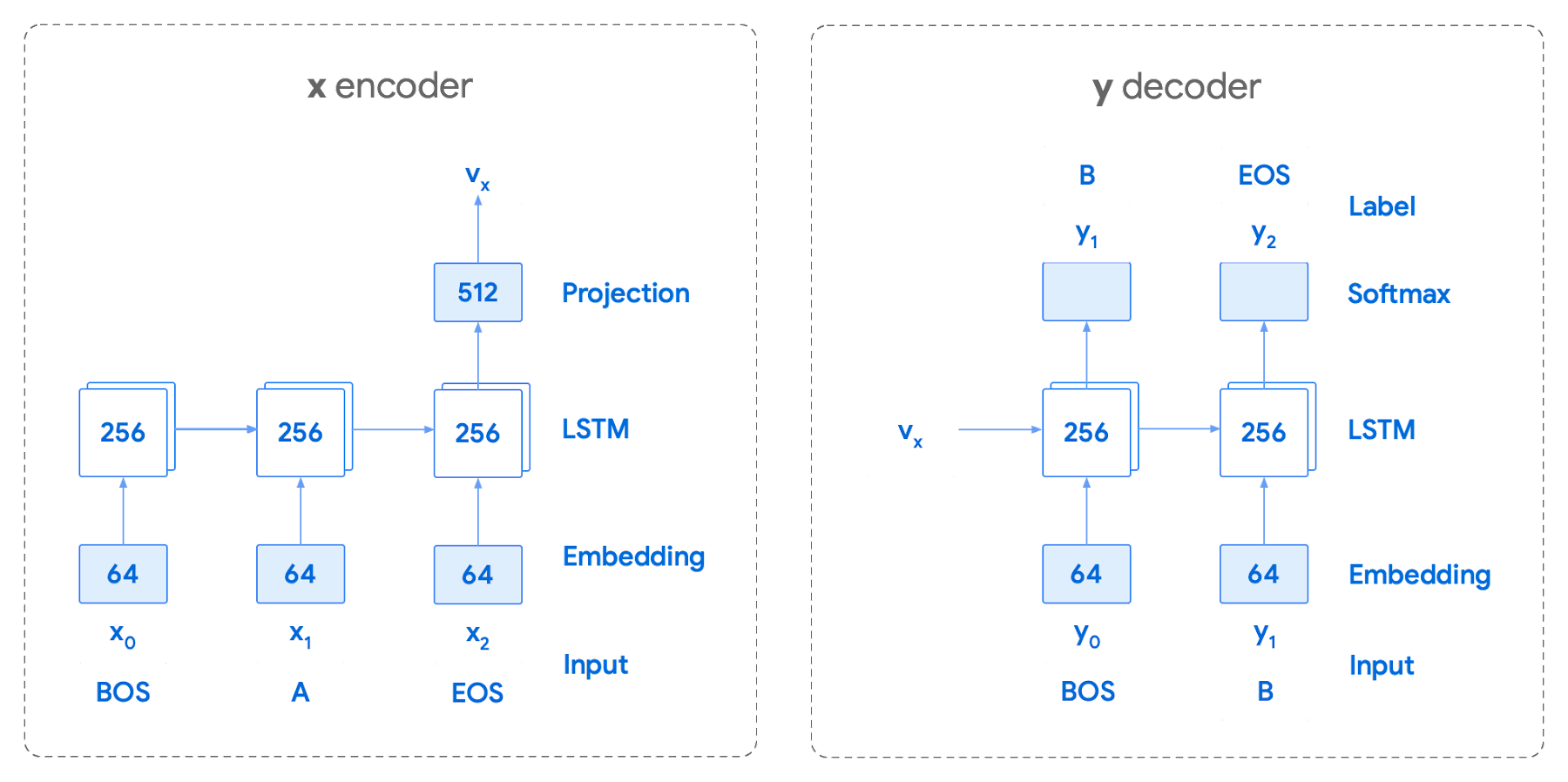
This has proven very useful for Smart Reply. In order to find the optimal sequence, an exponential search over each tree of possible future tokens is required. For this we opted to use beam search over a fixed-size list of best candidates, aiming to avoid increasing the overall memory use and run time for returning a list of suggestions. To do this we arranged tokens in a trie, and used a number of post processing techniques, as well as calculating a heuristic max score for a given candidate, to reduce the time it takes to iterate through the entire token list. While this improves the run time, the model tends to prefer shorter sequences.
In order to help reduce latency and improve control we decided to move to an Encoder-Encoder architecture. Instead of predicting a single next token and decoding a sequence of following predictions with multiple calls to the model, it instead encodes a candidate sequence with the neural network.
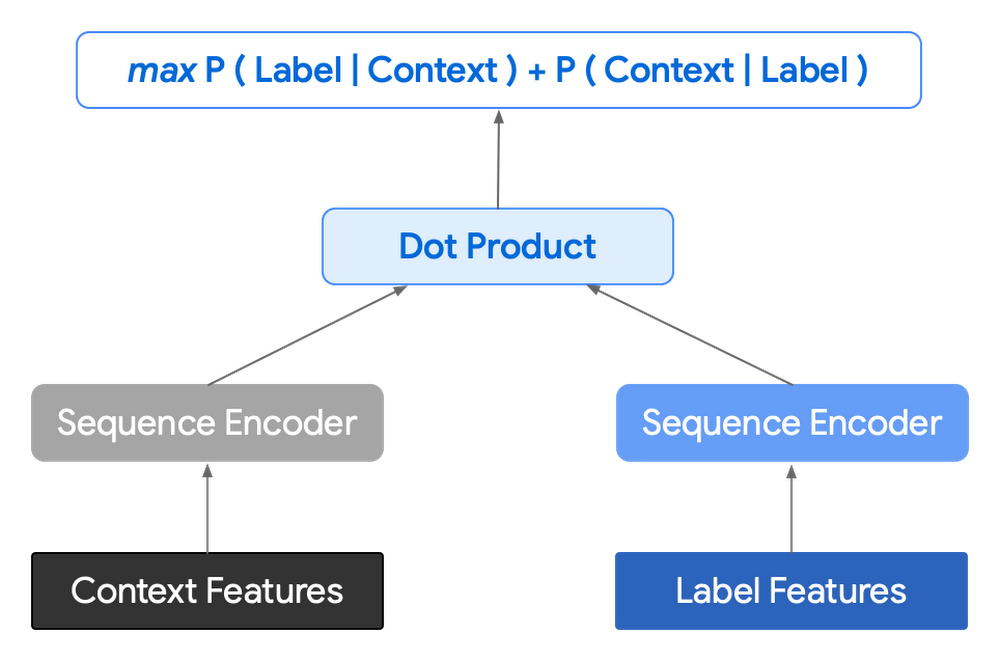
In practice, the two vectors – the context encoding and the encoding of a single candidate output – are combined with dot product to arrive at a score for the given candidate. The goal of this network is to maximize the score for true candidates – e.g. candidates that did appear in the training set – and minimize false candidates.
Choosing how to sample negatives affects the model training greatly. Below are some strategies that can be employed:
- Using positive labels from other training examples in the batch.
- Drawing randomly from a set of common messages. This assumes that the empirical probability of each message is sampled correctly.
- Using messages from context.
- Generating negatives from another model.
As this encoding generates a fixed list of candidates that can be precomputed and stored, each time a prediction is needed, only the context encoding needs to be computed, then multiplied by the matrix of candidate embeddings. This reduces both the time from the beam search method and the inherent bias towards shorter responses.
Dialogue Attributes
Conversations are more than simple text modeling. The overall flow of the conversation between participants provides important information, changing the attributes of each message. The context, such as who said what to whom and when, offers useful bits of input for the model when making a prediction. To that end the model uses the following attributes during its prediction:
- Local User ID’s – we set a finite number of participants for a given conversation to represent the turn taking between messages, assigning values to those participants. In most cases for support sessions there are 2 participants, requiring ID 0, and 1.
- Replies vs continuations – initially modeling focused only on replies. However, in practice conversations also include instances where participants are following up on the previously sent message. Given this, the model is trained for both same-user suggestions and “other” user suggestions.
- Timestamps – gaps in conversation can indicate a number of different things. From a support perspective, gaps may indicate that the user has disconnected. The model takes this information and focuses on the time elapsed between messages, providing different predictions based on the values.
Post processing
Suggestions can then be manipulated to get a more desirable final ranking. Such post-processing includes:
- Preferring longer suggestions by adding a token factor, generated by multiplying the number of tokens in the current candidate.
- Demoting suggestions with a high level of overlap with previously sent messages.
- Promoting more diverse suggestions based on embedding distance similarities.
To help us tune and focus on the best responses the team created a priority list. This gives us the opportunity to influence the model’s output, ensuring that responses that are incorrect can be de-prioritized. Abstractly it can be thought of as a filter that can be calibrated to best suit the client’s needs.
Getting suggestions to agents
With our model ready we now needed to get it in the hands of our techs. We wanted our solution to be as agnostic to our chat platform as possible, allowing us to be agile when facing tooling changes and speeding up our ability to deploy other efficiency features. To this end we wanted an API that we could query either via gRPC or via HTTPs. We designed a Google Cloud API, responsible for logging usage as well as acting as a bridge between our model and a Chrome Extension we would be using as a frontend.
The hidden step, measurement
Once we had our model, infrastructure, and extension in place we were left with the big question for any IT project. What was our impact? One of the great things about working in IT at Google is that it’s never dull. We have constant changes, be it planned or unplanned. However, this does complicate measuring the success of a deployment like this. Did we improve our service or was it just a quiet month?
In order to be satisfied with our results we conducted an A/B experiment, with some of our techs using our extension, and the others not. The groups were chosen at random with a distribution of techs across our global team, including a mix of techs with varying levels of experience ranging from 3 to 26 months.
Our primary goal was to measure tech support efficiency when using the tool. We looked at two key metrics as proxies for tech efficiency:
- The overall length of the chat.
- The number of messages sent by the tech.
Evaluating our experiment
To evaluate our data we used a two-sample permutation test. We had a null hypothesis that techs using the extension would not have a lower time-to-resolution, or be able to send more messages, than those without the extension. The alternative hypothesis was that techs using the extension would be able to resolve sessions quicker or send more messages in approximately the same time.
We took the mid mean of our data, using pandas to trim outliers greater than 3 standard deviations away. As the distribution of our chat lengths is not normal, with significant right skew caused by a long tail of longer issues, we opted to measure the difference in means, relying on central limit theorem (CLT) to provide us with our significance values. Any result with a p-value between 1.0 and 9.0 would be rejected.
Across the entire pool we saw a decrease in chat lengths of 36 seconds.
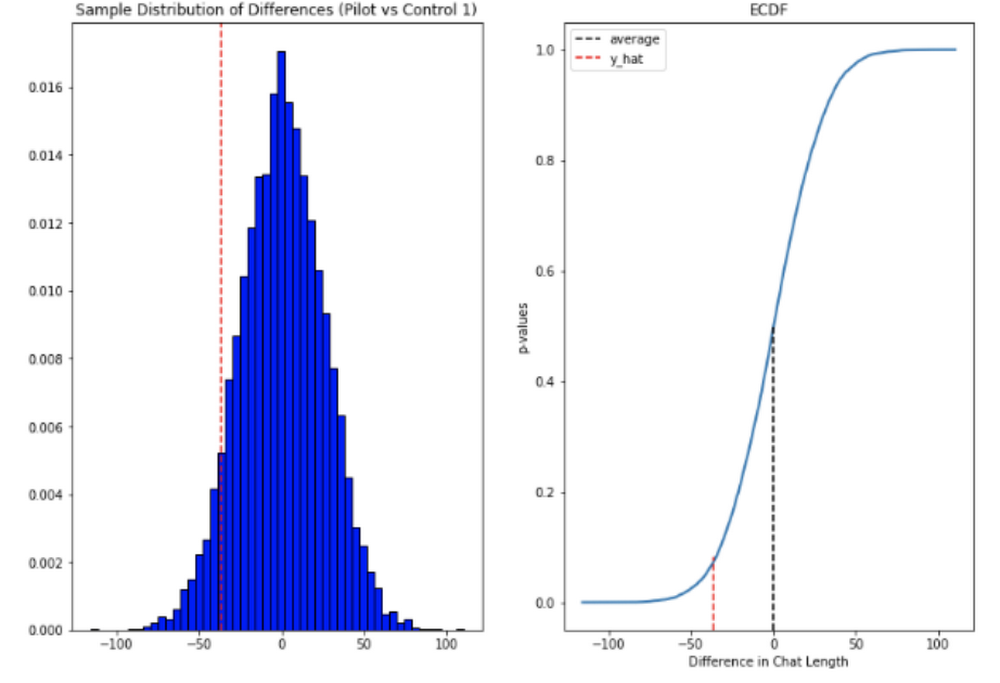
In reference to the number of chat messages we saw techs on average being able to send 5-6 messages more in less time.
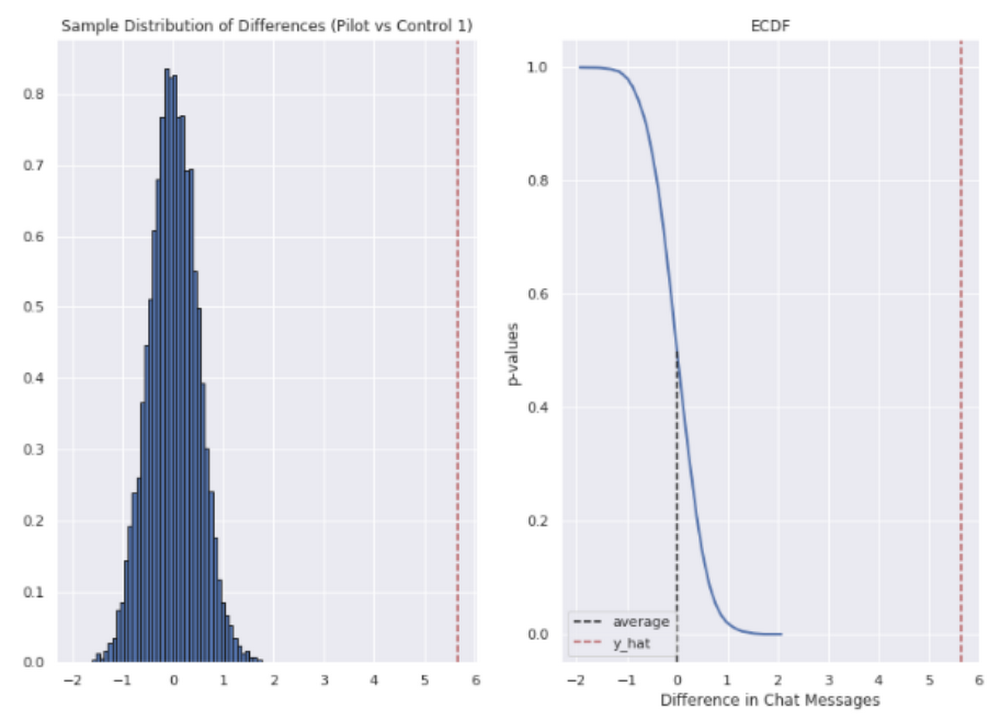
In short, we saw techs were able to send more messages in a shorter period of time. Our results also showed that these improvements increased with support agent tenure, and our more senior techs were able to save an average of ~4 minutes per support interaction.
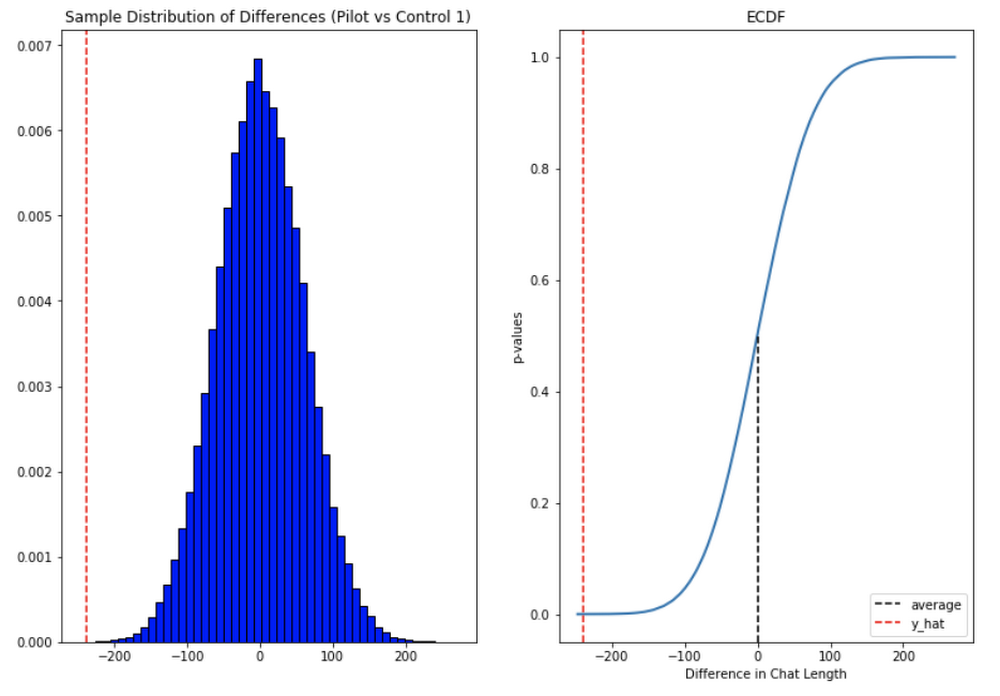
Overall we were pleased with the results. While things weren’t perfect, it looked like we were onto a good thing.
So what’s next for us?
Like any ML project, the better the data the better the result. We’ll be spending time looking into how to provide canonical suggestions to our support agents by clustering results coming from our allow list. We also want to investigate ways of making improvements to the support articles provided by the model, as anything that helps our techs, particularly the junior ones, with discoverability will be a huge win for us.
How can you do this?
A successful applied AI project always starts with data. Begin by gathering the information you have, segmenting it up, and then starting to process it. The interaction data you feed in will determine the quality of the suggestions you get, so make sure you select for the patterns you want to reinforce.
Our Contact Center AI allows tokenization, encoding and reporting, without you needing to design or train your own model, or create your own measurements. It handles all the training for you, once your data is formatted properly.
You’ll still need to determine how best to integrate its suggestions to your support system’s front-end. We also recommend doing statistical modeling to find out if the suggestions are making your support experience better.
As we gave our technicians ready-made replies to chat interactions, we saved time for our support team. We hope you’ll try using these methods to help your support team scale.
3307
Of your peers have already watched this video.
16:30 Minutes
The most insightful time you'll spend today!
Engage and Translate: Text and Audio Chat in 100+ Languages
As users worldwide connect to the internet and work remotely, it’s more important than ever to make interactive applications chat in many languages.
But when users speak 100s of languages, this quickly can get challenging. Where to start? If you are new to translation, Sarah Weldon, the Product Manager for Cloud Translation, and Dale Markowitz, an Applied AI Engineer and Developer Advocate touch on a couple of simple starters, then provide examples of how you could advance your translations once you have gone further along the learning curve.
They also share how the Translation API can quickly globalize an app, with no multilingual expertise required. Increasing language coverage can drastically increase engagement, even for internal applications. For example, when Mercy Corps integrated Translation API in their internal hub, traffic volume increased 70%. Learn about integrating the Google Cloud Translation API Advanced with a chatbot client, using the machine translation glossary feature to control a set of terms for more relevant translation.
Simplifying Unstructured Data Analytics with BigQuery ML and Vertex AI: A Comprehensive Guide

1554
Of your peers have already read this article.
6:30 Minutes
The most insightful time you'll spend today!
Unstructured data such as images, speech and textual data can be notoriously difficult to manage, and even harder to analyze. The analysis of unstructured data includes use cases such as extracting text from images using OCR, sentiment analysis on customer reviews and simplifying translation for analytics. All of this data needs to be stored, managed and made available for machine learning.
The new BigQuery ML inference engine empowers practitioners to run inferences on unstructured data using pre-trained AI models. The results of these inferences can be analyzed to extract insights and improve decision making. This can all be done in BigQuery, using just a few lines of SQL.
In this blog, we’ll explore how the new BigQuery ML inference engine can be used to run inferences against unstructured data in BigQuery. We’ll demonstrate how to detect and translate text from movie poster images, and run sentiment analysis against movie reviews.
BigQuery ML’s new inference engine
Google Cloud is home to a suite of pre-trained AI models and APIs. The BigQuery ML inference engine can call these APIs and manage the responses on your behalf. All you have to do is define the model you want to use and run inferences against your data. All of this is done in BigQuery using SQL. The inference results are returned in JSON format and stored in BigQuery for analysis.
Why run your inferences in BigQuery?
Traditionally, working with AI models to run inferences required expertise in programming languages like Python. The ability to run inferences in BigQuery using just SQL can make generating insights from your data using AI simple and accessible. BigQuery is also serverless, so you can focus on analyzing your data without worrying about scalability and infrastructure.
The inference results are stored in BigQuery, which allows you to analyze your unstructured data immediately, without the need to move or copy your data. A key advantage here is that this analysis can also be joined with structured data stored in BigQuery, giving you the opportunity to deepen your insights. This can simplify data management and minimize the amount of data movement and duplication required.
Which models are supported?
For now, the BigQuery ML inference engine can be used with these pre-trained Vertex AI models:
- Vision AI API: This model can be used to extract features from images managed by BigQuery Object Tables and stored on Cloud Storage. For example, Vision AI can detect and classify objects, or read handwritten text.
- Translation AI API: This model can be used to translate text in BigQuery tables into over one hundred languages.
- Natural Language Processing API: This model can be used to derive meaning from textual data stored in BigQuery tables. For example, features like sentiment analysis can be used to determine whether the emotional tone of text is positive or negative.
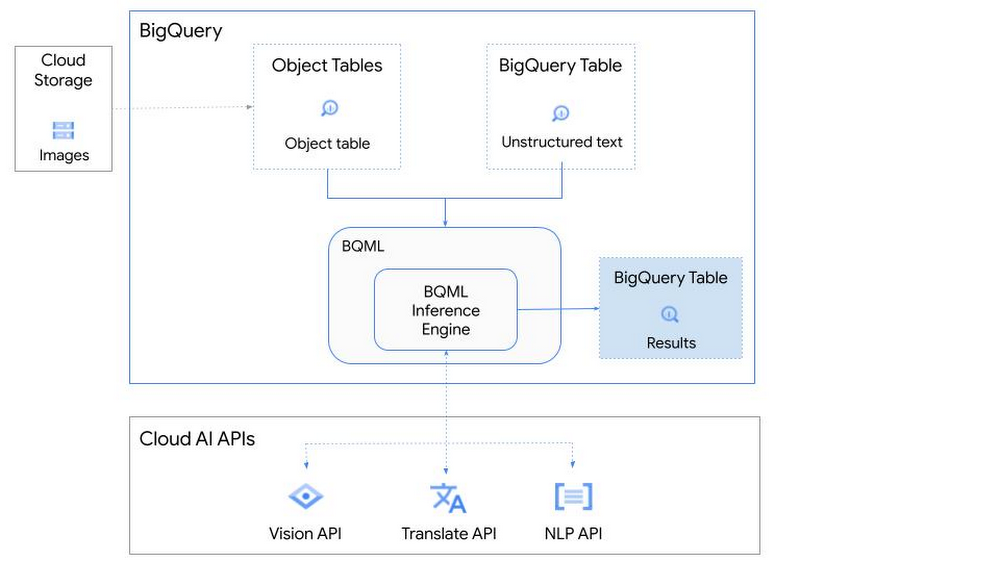
So, how does this work in practice? Let’s look at an example using images of movie posters

- We will define our pre-trained models for Vision AI, Translation AI and NLP AI in BigQuery ML.
- We’ll then use Vision AI to detect the text from some classic movie posters images.
- Next, we’ll use Translation AI to detect any foreign posters and translate them to a language of our choosing – English in this case.
- Finally, we’ll combine our unstructured data with structured data in BigQuery.
We’ll use the extracted movie titles from our movie posters to look up the viewer reviews from the BigQuery IMDB public dataset. We can then run sentiment analysis against these reviews using NLP AI.
Note: The BigQuery ML inference engine is currently in Preview. You will need to complete this enrollment form to have your project allowlisted for use with the BQML Inference Engine.
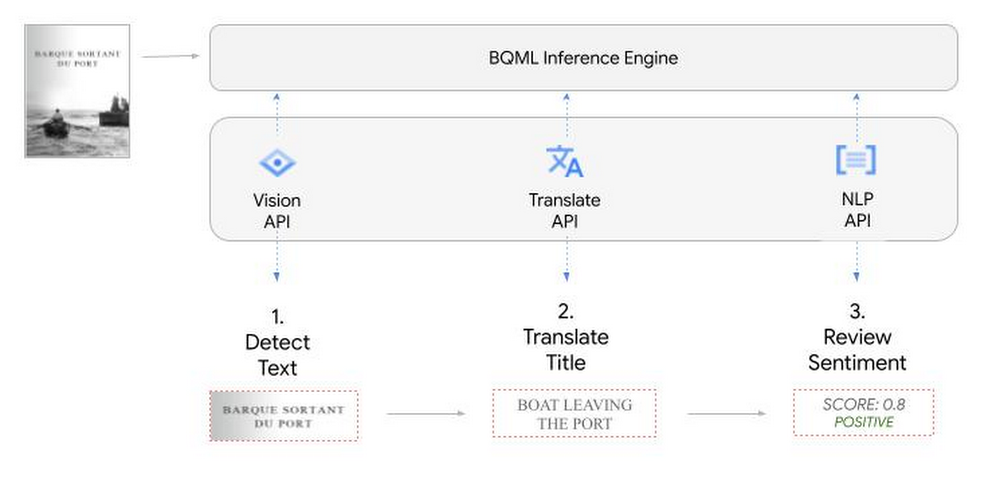
We’ll give examples of the BigQuery SQL needed to define your models and run your inferences. You’ll want to check out our notebook for a detailed guide on how to get this up and running in your Google Cloud project.
1. Define your AI Models in BigQuery
You will need to enable the APIs listed below, and also create a Cloud resource connection to enable BigQuery to interact with these services.
| API | Model Name |
| Vision AI API | Cloud_ai_vision_v1 |
| Translation AI API | Cloud_ai_translate_v3 |
| NLP AI API | Cloud_ai_natural_language_v1 |
You can then run the CREATE MODEL query for each AI service to create your pretrained models, replacing the model_name as required.
CREATE OR REPLACE MODEL
`{PROJECT_ID}.{DATASET_ID}.{VISION_MODEL_NAME}`
REMOTE WITH
CONNECTION `{PROJECT_ID}.{REGION}.{CONN_NAME}`
OPTIONS ( remote_service_type = '<model_name>' );
2. Use the Vision AI API to detect text in images stored in Cloud Storage
You will need to create an object table for your images in Cloud Storage. This read-only object table provides metadata for images stored in Cloud Storage:
CREATE OR REPLACE EXTERNAL TABLE
`{PROJECT_ID}.{DATASET_ID}.{OBJECT_TABLE_NAME}`
WITH
CONNECTION `{REGION}.{CONN_NAME}`
OPTIONS (object_metadata = 'SIMPLE', uris = ['{BUCKET_LOCATION}/*']);
To detect the text from our posters, you can then use ML.ANNOTATE_IMAGE and specify the text_detection feature.
SELECT
       ml_annotate_image_result.full_text_annotation.text AS text_content,
       *
FROM
       ML.ANNOTATE_IMAGE(
         MODEL `{PROJECT_ID}.{DATASET_ID}.{VISION_MODEL_NAME}`,
         TABLE `{DATASET_ID}.{OBJECT_TABLE_NAME}`,
         STRUCT(['TEXT_DETECTION'] AS vision_features));
A JSON response will be returned to BigQuery that includes the text content and language code of the text. You can parse the JSON to a scalar result using the dot annotation highlighted above.

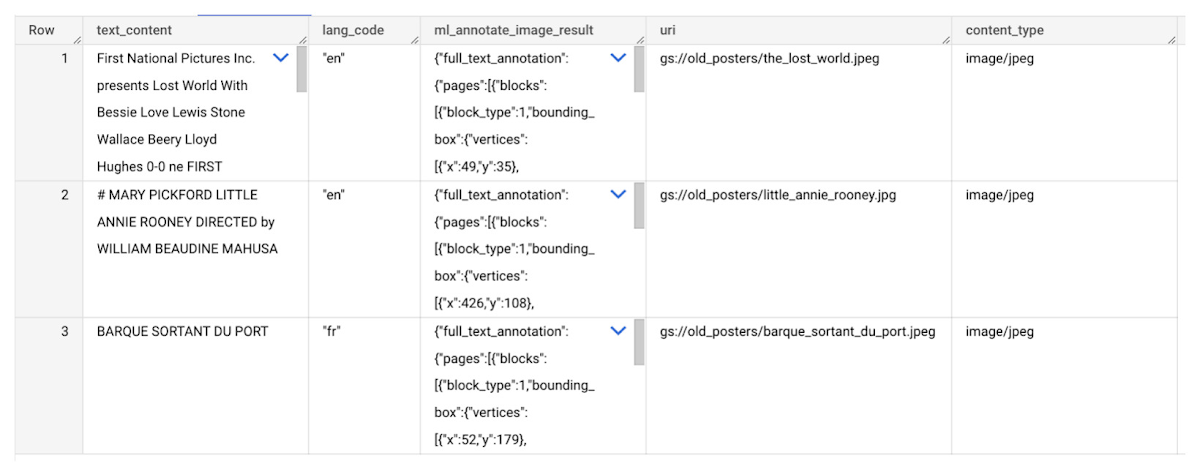
3. Use the Translation AI API to translate foreign movie titles
ML.TRANSLATE can now be used to translate the foreign titles we’ve extracted from our images into English. You just need to specify the target language and the table of the movie posters for translation:
SELECT
text_content,
STRING(ml_translate_result.translations[0].detected_language_code)
as original_language,
STRING(ml_translate_result.translations[0].translated_text)
as translated_title
FROM
  ML.TRANSLATE(
MODEL `{PROJECT_ID}.{DATASET_ID}.{TRANSLATE_MODEL_NAME}`,
TABLE `{DATASET_ID}.image_results`,
STRUCT('TRANSLATE_TEXT' as translate_mode, "en" as target_language_code));
Note: The table column with the text you want to translate must be named text_content:
The table of results will include json that can be parsed to extract both the original language and the translated text. In this case, the model has detected that title text is in French and has translated it to English:

4. Finally, use natural language processing (NLP) to run sentiment analysis against movie reviews
You can easily join inference results from your unstructured data with other BigQuery datasets to bolster your analysis. For example, we can now join the movie titles we extracted from our posters with thousands of movie reviews stored in BigQuery’s IMDB public dataset `bigquery-public-data.imdb.reviews`.
You can use ML.UNDERSTAND_TEXT with the analyze_sentiment feature to run sentiment analysis against some of these reviews to determine whether they are positive or negative:
SELECT
   primary_title, start_year, text_content AS review,
   FLOAT64(ml_understand_text_result.document_sentiment.score) AS score,
   FLOAT64(ml_understand_text_result.document_sentiment.magnitude) AS magnitude,
FROM
   ML.UNDERSTAND_TEXT(
     MODEL `{PROJECT_ID}.{DATASET_ID}.{NLP_MODEL_NAME}`,
           (
           SELECT
             primary_title, start_year, review AS text_content
           FROM
             `bigquery-public-data.imdb.title_basics` titles
           JOIN
             `bigquery-public-data.imdb.reviews` reviews
           ON
             reviews.movie_id = titles.tconst
           WHERE
             UPPER(titles.primary_title) = 'THE LOST WORLD' AND
             start_year = 1925
           ),
      STRUCT("analyze_sentiment" AS nlu_option)) ;
Note: The table column with the text you want to analyze must be named text_content:
The JSON response will include a score and magnitude. The score indicates the overall emotion of the text while the magnitude indicates how much emotional content is present:
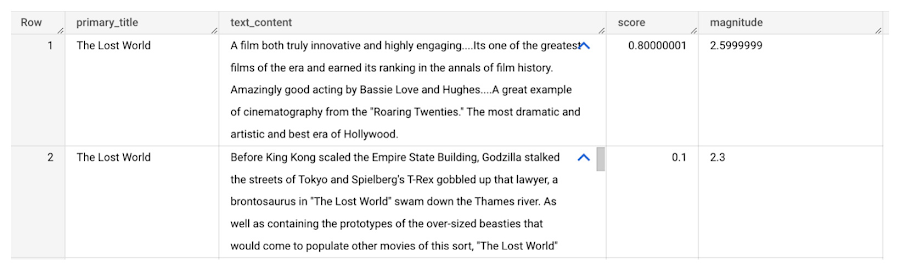
So, how did the Lost World compare with other movies that year?
To wrap up, we’ll compare the average review score of the 1925 Lost World movie to other movies released that year to see which was more popular. This can be done using familiar SQL analysis:
SELECT
 primary_title, start_year,
 AVG(FLOAT64(ml_understand_text_result.document_sentiment.score))AS av_score,
 AVG(FLOAT64(ml_understand_text_result.document_sentiment.magnitude)) AS av_magnitude
FROM
 ML.UNDERSTAND_TEXT(
   MODEL `{PROJECT_ID}.{DATASET_ID}.{NLP_MODEL_NAME}`,
         (
         SELECT
           primary_title, start_year, movie_id, review AS text_content
         FROM
           `bigquery-public-data.imdb.title_basics` titles
         JOIN
           `bigquery-public-data.imdb.reviews` reviews
         ON
           reviews.movie_id = titles.tconst
         WHERE
           start_year = 1925
         ),
   STRUCT("analyze_sentiment" AS nlu_option))
GROUP BY
   primary_title, start_year
ORDER BY
   av_score DESC;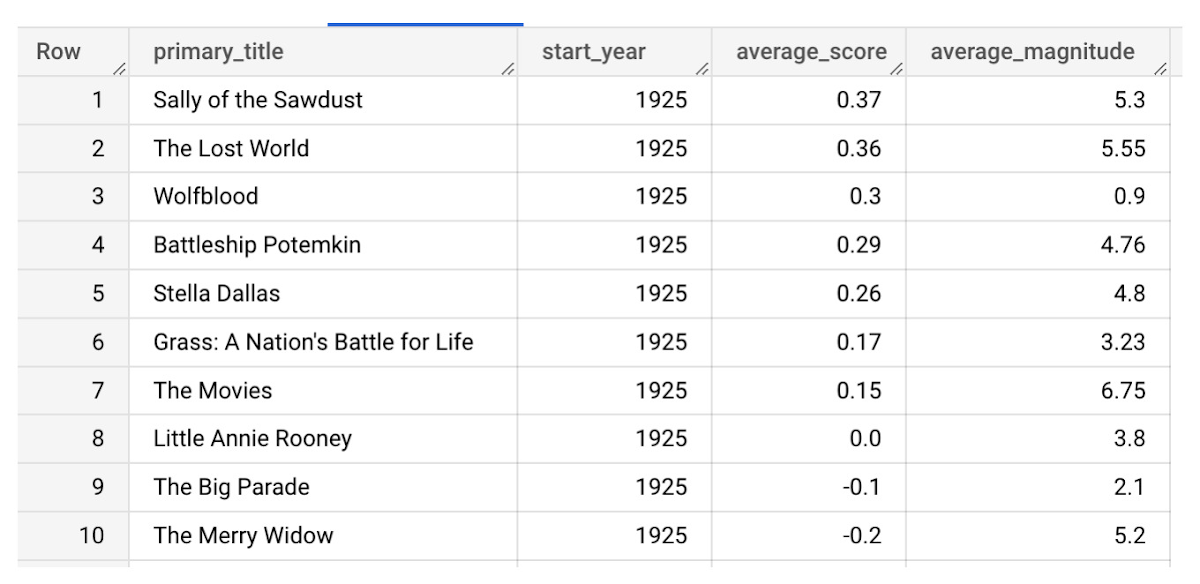
It looks like The Lost World narrowly missed out on the top spot to Sally of the Sawdust!
Want to learn more?
Check out our notebook for a step by step guide on using the BQML inference engine for unstructured data in Google Cloud. You can also check out our Cloud AI service table-valued functions overview page for more details. Curious about pricing? The BQML Pricing page gives a breakdown of how costs are applied across these services.
More Relevant Stories for Your Company




Explore the Innovations and Architecture Powering Spanner and BigQuery
Previously, databases had architectures with tightly coupled storage and compute. This resulted in higher latency, and with faster networks these constraints no longer surface. With Google Cloud's BigQuery and CloudSpanner, the storage and compute architecture have been separated, allowing for better scalability and availability to address businesses' high throughput data

Case Study: Twitter is Taking Their CX to The Next Level with AutoML
Editor’s note: Since launching its Spaces feature, Twitter has demonstrated that hearing people’s voices can bring conversations on Twitter to life in a completely new way. Next, it aimed to make it easier for customers to join and listen to live conversations they personally care about. In this blog, we

redBus: Mastering Big Data with Google BigQuery
In 2006, online travel agency redBus introduced internet bus ticketing in India, unifying tens of thousands of bus schedules into a single booking operation. (Think of it as Expedia for bus booking.) Using BigQuery, redBus crunches terabytes of booking and inventory data in mere seconds and at a fraction of

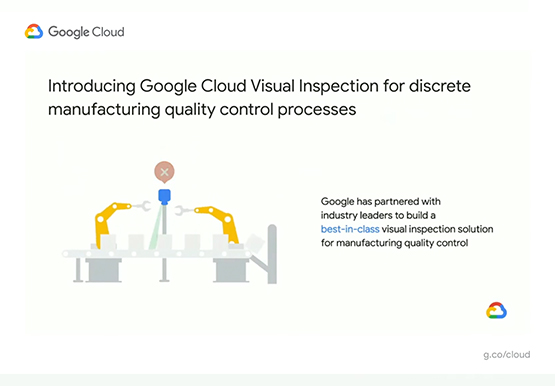
Driving Business Transformation in Manufacturing, Industrial, and Transportation Using Google Cloud and AI/ML
Google Cloud partners closely with manufacturing, industrial, and transportation organizations to drive business transformation. In this video, Mandeep Waraich, Head of Product - Industrial AI, Google Cloud, shares customer stories as well as Google Cloud’s differentiated AI products and solutions. Waraich covers the current state of automation and industrial efficiency
