





Introducing Cloud Memorystore: A fully Managed In-memory Data Store Service for Redis

3914
Of your peers have already read this article.
4:40 Minutes
The most insightful time you'll spend today!
At Redisconf 2018 in San Francisco last month, we announced the public beta of Cloud Memorystore for Redis, a fully-managed in-memory data store service. Today, the public beta is available for everyone to try. Cloud Memorystore provides a scalable, more secure and highly available Redis service fully managed by Google. It’s fully compatible with open source Redis, letting you migrate your applications to Google Cloud Platform (GCP) with zero code changes.
As more and more applications need to process data in real-time, you may want a caching layer in your infrastructure to reduce latency for your applications. Redis delivers fast in-memory caching, support for powerful data structures and features like persistence, replication and pub-sub. For example, data structures like sorted sets make it easy to maintain counters and are widely used to implement gaming leaderboards. Whether it’s simple session caching, developing games played by millions of users or building fast analytical pipelines, developers want to leverage the power of Redis without having to worry about VMs, patches, upgrades, firewall rules, etc.
Early adopters of Cloud Memorystore have been using the service for the last few months and they are thrilled with the service.
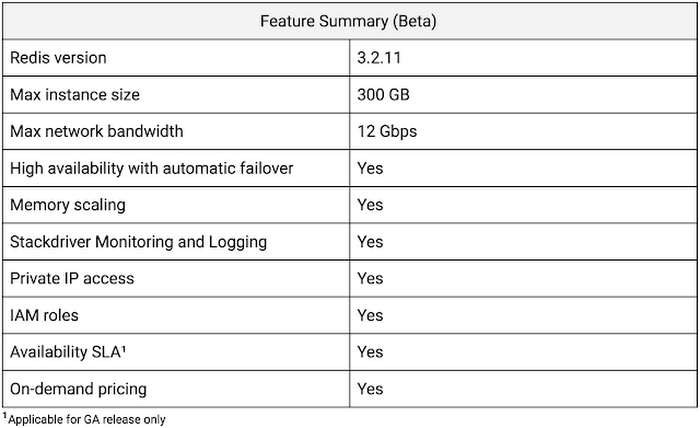
Simple and flexible provisioning
How you choose to deploy Cloud Memorystore for Redis depends on the availability and performance needs of your application. You can deploy Redis as a standalone instance or with a replica to provide high availability. But while replicating a Redis instance provides only data redundancy, you still need to do the heavy lifting of health checking, electing of a primary, client connections on failover, etc. The Cloud Memorystore service takes away all this complexity and makes it easy for you deploy a Redis instance that meets your application’s needs.
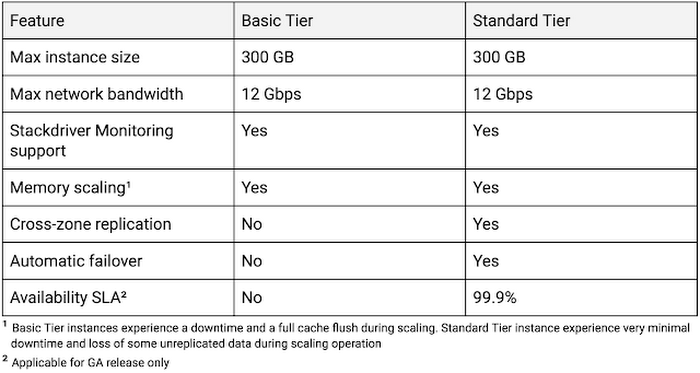
Cloud Memorystore provides two tiers of service, Basic and Standard, each with different availability characteristics. Regardless of the tier of service, you can provision a Redis instance as small as 1 GB up to 300 GB. With network throughput up to 12 Gbps, Cloud Memorystore supports applications with very high bandwidth needs.
Here is a summary of the capabilities of each tier:
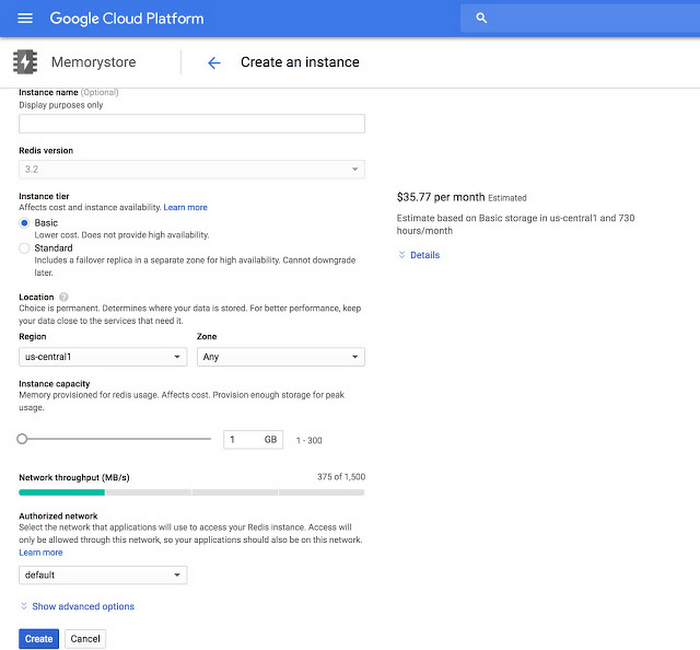
Provisioning a Cloud Memorystore instance is simple: just choose a tier, the size you need to support the instance availability and performance needs, and the region. Your Redis instance will be up and running within a few minutes.
“Lift and shift” applications
Once provisioned, using Cloud Memorystore is a breeze. You can connect to the Redis instance using any of the tools and libraries you commonly use in your environment. Cloud Memorystore clients makes use of IP addresses to connect to the instance. Applications always connect to one IP address and Cloud Memorystore ensures the traffic is directed to the primary in case there is a failover.
Other key features
Whether it’s provisioning, monitoring or scaling memory, Cloud Memorystore simplifies common management tasks.
Security
Open-source Redis has very minimal security, and as a developer or administrator, it can be challenging to ensure all Redis instances in your organization are protected. With Cloud Memorystore, Redis instances are deployed using a private IP address, which prevents the instance from being accessed from the internet. You can also use Cloud Identity & Access Management (IAM) roles to ensure granular access for managing the instance. Additionally, authorized networks ensure that the Redis instance is accessible only when connected to the authorized VPC network.
Stackdriver integration
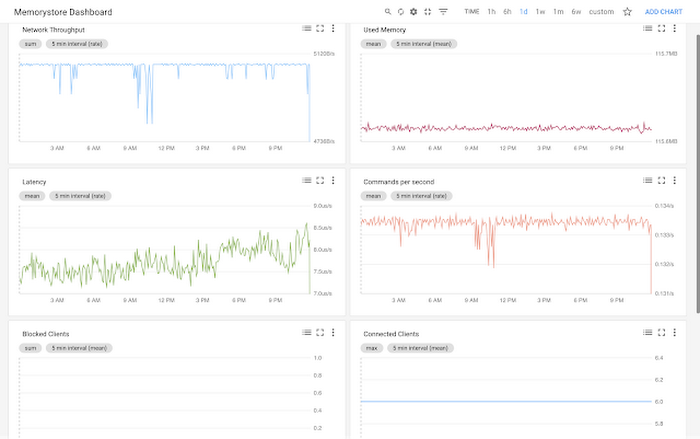
Cloud Memorystore instances publish all the key metrics into Stackdriver, Google Cloud’s monitoring and management suite. You can monitor all of your instances from the Stackdriver dashboard, and use Stackdriver Logging to get more insights about the Redis instances
Seamless memory scaling
When a mobile application goes viral, it may be necessary to provision a larger Redis instance to meet latency and throughput needs. With Cloud Memorystore you can scale up the instance with a few clicks, and the Standard High Availability tier lets you scale the instance with minimal disruption to the application.
On-demand pricing
Cloud Memorystore provides on-demand pricing with no upfront cost and has per second billing. Moreover, there is no charge for network traffic coming in and out of a Cloud Memorystore instance. For more information, refer to Cloud Memorystore pricing.
Coming soon to Cloud Memorystore
This Cloud Memorystore public beta release is just a starting point for us. Here is a preview of some of the features that are coming soon.
- New region support
- Import-Export of RDB files into a Google Cloud Storage bucket
- Support for Redis 4.0
- Support for Redis Cluster
We are excited about what is upcoming for Cloud Memorystore and we would love to hear your feedback! If you have any requests or suggestions, please let us know through Issue Tracker. You can also join the conversation at Cloud Memorystore discussion group.
Sign up for a $300 credit to try Cloud Memorystore and the rest of GCP. Start with a small Redis instance for testing and development, and then when you’re ready, scale up to serve performance-intensive applications.
Want to learn more? Register for the upcoming webinar on Tuesday, June 26th 9:00 am PT to hear all about Cloud Memorystore for Redis.
Canadian Bank’s SAP Workload Moved to BigQuery Helps Unlock New Business Opportunities

7339
Of your peers have already read this article.
2:00 Minutes
The most insightful time you'll spend today!
When ATB Financial decided to migrate its vast SAP landscape to the cloud, the primary goal was to focus on things that matter to customers as opposed to IT infrastructure. Based in Alberta, Canada, ATB Financial serves over 800,000 customers through hundreds of branches as well as digital banking options. To keep pace with competition from large banks and FinTech startups and to meet the increasing 24/7 demands of customers, digital transformation was a must. To support this new mandate, in 2019, ATB migrated its extensive SAP backbone to Google Cloud. In addition to SAP S/4 HANA, ATB runs SAP financial services, core banking, payment engine, CRM and business warehouse on Google Cloud.
In parallel, changes were needed to ATB’s legacy data platform. The platform had stability and reliability issues and also suffered from a lack of historical data governance. Analytics processes were ad hoc and manual. The legacy data environment was also not set up to tackle future business requirements that come with a high dependency on real-time data analysis and insights.
After evaluating several potential solutions, ATB chose BigQuery as a serverless data warehouse and data lake for its next-generation, cloud-native architecture. “BigQuery is a core component of what we call our data exposure enablement platform, or DEEP,” explains Dan Semmens, Head of Data and AI at ATB Financial. According to Semmens, DEEP consists of four pillars, all of which depend on Google Cloud and BigQuery to be successful:
- Real-time data acquisition: ATB uses BigQuery throughout its data pipeline, starting with sourcing, processing, and preparation, moving along to storage and organization, then discovery and access, and finally consumption and servicing. So far, ATB has ingested and classified 80% of its core SAP banking data as well as data from a number of its third-party partners, such as its treasury and cash management platform provider, its credit card provider, and its call center software.
- Data enrichment: Before migrating to Google Cloud, ATB managed a number of disconnected technologies that made data consolidation difficult. The legacy environment could handle only structured data, whereas Google Cloud and BigQuery lets the bank incorporate unstructured data sets, including sensor data, social network activity, voice, text, and images. ATB’s data enrichment program has enabled more than 160 of the bank’s top-priority insights running on BigQuery, including credit health decision models, financial reporting, and forecasting, as well as operational reporting for departments across the organization. Jobs such as marketing campaigns and month-end processes that used to take five to eight hours now run in seconds, saving over CA$2.24 million in productivity.
- Self-service analytics: Data for self-service reporting, dashboarding, and visualization is now available for ATB’s 400+ business users and data analysts. Previously, bringing data and analytics to the business users who needed it while ensuring security was burdensome for IT, fraught with recurrent data preparation and other highly manual elements. Now, ATB automates much of its data protection and governance controls through the entire data lifecycle management process. Data access is not only open to more team members but it is faster and easier to acquire without compromising security. And it’s not just raw data that users can access. ATB uses BigQuery to define its enterprise data models and create what it calls its data service layer to make it easier for team members to visualize their data.
- AI-assisted analytics and automation: Through Google Cloud and BigQuery, ATB has been able to publish data and ML models that provide alerts and notifications via APIs to customer service agents. These real-time recommendations allow customer service agents to provide more tailored service with contextualized advice and suggested new services. So far, the company has deployed more than 40 ML models to generate over 20,000 AI-assisted conversations per month. Thanks to improved customer advocacy and less churn, the bank has realized more than CA$4 million in operating revenue. During the ongoing COVID crisis, the system was also able to predict when business and personal banking customers were experiencing financial distress so that a relationship manager could proactively reach out to offer support, such as payment deferral or loan restructuring. The AI tools provided by BigQuery are also helping ATB detect fraud that previously evaded rules-based fraud detection by using broader sets of timely and accurate data.
Thanks to the speed and ease of moving data from SAP to BigQuery, ATB is using artificial intelligence (AI) and machine learning (ML) to do things it previously hadn’t thought possible, including sophisticated fraud prevention models, product recommendations, and enriched CRM data that improves the customer experience.
Using the power of Google Cloud and BigQuery, ATB Financial has been able to draw more value from its SAP data while lowering cost and improving security and reliability. Speed to provide data sets and insights to internal team members has improved 30%. The bank also has seen a 15x reduction in performance incidents while improving data governance and security. Dan Semmens projects that the digital transformation strategy built on Google Cloud and BigQuery has both saved millions compared to its on-premises environment and has also realized millions in new business opportunities.
Semmens is looking toward the future that includes initiatives like Open Banking and greater ability to provide real time personalized advice for customers to drive revenue growth. “We see our data platform as foundational to ATB’s 10-year strategy,” he says. “The work we’ve undertaken over the past 18 months has enabled critical functionality for that future.”
Learn more about how ATB Financial is leveraging BigQuery to gain more from SAP data. Visit us here to explore how Google Cloud, BigQuery, and other tools can unlock the full value of your SAP enterprise data.
The Right Datawarehouse Helps Fight Climate Change, While Improving Customer Experience

7054
Of your peers have already read this article.
4:30 Minutes
The most insightful time you'll spend today!
When you think about climate change, you might not consider a daily commute to work or a drive around town as big contributing factors. And yet, transport is the fastest growing source of CO2 emissions from fossil fuel, which in turn is the largest contributor to climate change. This is the key insight behind the mission of Spanish carbon-neutral multinational Acciona. The group, which provides sustainable solutions for infrastructure and renewable energy projects across 65 countries, launched an electric scooter sharing service called Acciona Mobility in 2018.
Aiming to contribute to the decarbonization of the transport sector while helping relieve traffic congestion within cities, Acciona Mobility enables users to rent electric scooters powered 100% by energy from renewable sources. Users can find, reserve, and rent the scooters at the tap of their mobile screens via the Acciona Mobility application and pay on the basis of minutes spent riding. The app, which is available free to download online, is also the gateway through which new users can register for the service, which welcomes anyone with a valid driver’s license for motorbikes. After having their right to drive, identity, and card details validated, citizens can start enjoying the service, available 24 hours a day, every day of the year.
“We needed to deploy a reliable infrastructure for a new service before understanding exactly what its scale and demand would be. Our strategy was to adopt a serverless architecture that can grow with us to sustain our long-term vision. This kind of thinking led us directly to Google Cloud.”
—Jose Luis Rosell, CIO Services Division, Acciona
“Acciona Mobility is exciting because it stems from our vision to make people’s lives easier in a sustainable way,” says Jose Luis Rosell, CIO of Acciona’s Services Division. “40% of the pollution near cities comes from private transportation. We want to help solve that problem with zero-carbon, electric, multimodal transportation that’s also convenient for people to use.”
However, Jose Luis says that building the appropriate IT infrastructure to bring the new service to life required external support. “We needed to deploy a reliable infrastructure for a new service before understanding exactly what its scale and demand would be. Our strategy was to adopt a serverless architecture that can grow with us to sustain our long-term vision,” he explains. “This kind of thinking led us directly to Google Cloud.”
Developing the transportation platform of the future
Because Acciona was already a Google Cloud customer, Jose Luis and his team reached the decision to develop the new service on Google Cloud with ease, as he explains: “We had a very positive experience working closely with the Google Cloud team during Acciona’s first project on Google Cloud, and that collaborative mentality is very important for us. We feel Google Cloud is a trustworthy partner that is willing to take risks with us and is flexible enough to lead us through business uncertainty with the right technology,” he says. “So we were confident that its technology and people could help us bring the Acciona Mobility service from theory to reality.”
This time, Acciona partnered with cloud consultancy Altostratus as well, to consult on a selection of Google Cloud products that would help develop the application quickly by making use of managed services. Acciona’s strategy was to launch the new services first in Madrid, where the company is headquartered, and then spread the vision across more cities later, if the idea worked out well in practice. Due to the scale of the project and its data needs, BigQuery was chosen as the primary data warehouse to store all the information related to the service, such as the location of scooters and their availability status. With all its data readily available on BigQuery, Acciona is able to run specific queries that help it to gain insights such as which urban areas have the highest volume of scooters being rented. Knowing this, Acciona can reorganize availability to make sure there are always enough scooters in that specific location.
Integrating it with Pub/Sub and Dataflow, Acciona ensures that the data generated by scooters is ingested and processed in real time so that users searching for scooters nearby, using the Acciona Mobility application on their phones, can always have up-to-date information at hand. Using Google Maps Platform APIs such as the Directions API, Acciona’s mobile app translates the geographical coordinates of scooters into an easy-to-read address displayed beside a visual map. Using Cloud SQL, Acciona automates the storage capacity management of the database as the number of scooters and active users grow.
Meanwhile, Google Cloud Armor protects the service against cyber breaches and distributed denial of service attacks to keep it running uninterrupted. In addition, Google Cloud itself helps to reinforce the cyber security measures with secure-by-default managed services, such as data encryption. “The managed services mean more resilience and more uptime, because we don’t need to worry about maintenance or external threats,“ says Jose Luis of the solutions protecting all information generated by the new service, which as CIO is a topic he holds dearly. “I face cybersecurity issues more confidently as a Google Cloud partner,” he adds.
“Today, we have data coming in every 15 seconds from 10,000 electric scooters around Europe. BigQuery and Cloud SQL-managed services help us handle that data very carefully and with precision so that our users don’t experience any lags when searching for scooters or returning them.”
—Jose Luis Rosell, CIO Services Division, Acciona
Expanding an 100% sustainable transport solution throughout Spain
Within two months of the decision to deploy Acciona Mobility on Google Cloud, the service was ready for launch, filling the streets of Madrid with 500 electric scooters that run 100% on renewable energy. By 2020, the number of scooters has grown to 10,000 and the service has scaled to multiple cities in and outside of Spain, including Lisbon, Milan, and Rome. To date, more than 3.5 million intracity rides have used the Acciona Mobility app, reducing CO2 emissions by more than 1,000 tons.
“Today, we have data coming in every 15 seconds from 10,000 electric scooters around Europe. BigQuery and Cloud SQL-managed services help us handle that data very carefully and with precision so that our users don’t experience any lags when searching for scooters or returning them,” says Jose Luis of the fast-growing scale of the project.
“Google Cloud enables us to keep our services always available and to scale quickly to respond to its growing demand. Our ratings have been very positive as a result. More importantly, our vision of transportation as a cleaner, more sustainable commodity is really spreading and resonating with the public.”
—Jose Luis Rosell, CIO Services Division, Acciona
Set to continue expanding, Acciona is using Google Kubernetes Engine to make sure the Acciona Mobility application has the computing capacity it needs to continue scaling to reach new markets and serve more users. On that note, Google operations tools (formerly Stackdriver) are also being deployed to help monitor, troubleshoot, and improve the performance of the application as it scales.
“Google Cloud enables us to keep our services always available and to scale quickly to respond to its growing demand. Our ratings have been very positive as a result. More importantly, our vision of transportation as a cleaner, more sustainable commodity is really spreading and resonating with the public,” he concludes.
Speed Up Data-driven Innovation in Life Sciences with Google Cloud

4275
Of your peers have already read this article.
1:30 Minutes
The most insightful time you'll spend today!
The last few years have underscored the importance of speed in bringing new drugs and medical devices to market, while ensuring safety and efficacy. Over this time, healthcare and life sciences organizations have transformed the way they research, develop, and deliver patient care by embracing agility and innovation.
Now, the industry is set to reap the benefits of cloud technology and overcome the existing barriers to innovation.
What’s holding back innovation?
Costly clinical trials: The process of trialing and developing new drugs and devices is still long and costly, with more than 1 in 5 clinical trials failing due to a lack of funding.1 The high failure rate comes as no surprise when you consider the average clinical trial costs $19 million and takes 10-15 years (through all 3 phases) to be approved.2
Stringent security requirements: Pre-clinical R&D and clinical trials use large volumes of highly sensitive patient data – making the life sciences industry one of the top sectors targeted by hackers.3 On top of this, the FDA and other regulatory bodies have strict requirements for medical device cybersecurity.
Unpredictable supply chains: Global supply chains are becoming increasingly complex and unpredictable. This can be brought on by anything from supply shortages, to geo-political events, and even bad weather. Making things worse is the lack of visibility into medical shipment disruptions – so when disaster strikes you’re often caught off guard.
Google Cloud for life sciences
At Alphabet, we’ve made significant investments in healthcare and life sciences, helping to tackle the world’s biggest healthcare problems, from chronic disease management, to precision medicine, to protein folding.
Together with Google, you can transform your life sciences organization and deliver secure, data-driven innovation across the value chain.
- Accelerate clinical trials to deliver life-saving treatments faster and at less cost. Clinical trials require relevant and equitable patient cohorts that can produce clinically valid data. Solutions like DocAI can enable optimal patient matching for clinical trials, helping organizations optimize clinical trial selection and increase time to value. How that patient data is collected is also important. Collection in a physician’s office captures a snapshot of the participant’s data at one point in time and doesn’t necessarily account for daily lifestyle variables. Fitbit, used in more than 1,500 published studies–more than any other wearable device–can enrich clinical trial endpoints with new insights from longitudinal lifestyle data, which can help improve patient retention and compliance with study protocols. We have introduced Device Connect for Fitbit, which empowers healthcare and life sciences enterprises with accelerated analytics and insights to help people live healthier lives. We are able to empower organizations to improve clinical trials in key ways:
- Enable clinical trial managers to quickly create and launch mobile and web RWE collection mechanism for patient reported outcomes
- Enable privacy controls with Cloud Healthcare Consent API and, as needed, remove PHI using Cloud Healthcare De-identification API
- Ingest RWE and data into BigQuery for analysis
- Leverage Looker to enable quick visualization and powerful analysis of a study’s progress and results
- Ensure security and privacy for a safe, coordinated, and compliant approach to digital transformation. Google Cloud offers customers a comprehensive set of services including pioneering capabilities such as BeyondCorp Enterprise for Zero Trust and VirusTotal for malicious content and software vulnerabilities; Chronicle’s security analytics and automation coupled with services such as Security Command Center to help organizations detect and protect themselves from cyber threats; as well as expertise from Google Cloud’s Cybersecurity Action Team. Google Cloud also recently acquired Mandiant, a leader in dynamic cyber defense, threat intelligence and incident response services.
- Optimize supply chains and enhance your data to prepare for the unpredictable. With a digital supply chain platform, we can empower supply chain professionals to solve problems in real time including visibility and advanced analytics, alert-based event management, collaboration between teams and partners, and AI-driven optimization and simulation.
Ready to learn more? We’ll be taking a deep dive into each of the challenges outlined above in our life sciences video series. Stay tuned.
- National Library of Medicine
- How much does a clinical trial cost?
- Life Sciences Industry Becomes Latest Arena in Hackers’ Digital Warfare
Firestore Cheatsheet to Unlock Application Innovation

3727
Of your peers have already read this article.
2:00 Minutes
The most insightful time you'll spend today!
Your product teams might ask – “Why does it take so long to build a feature or application?” Building applications is a heavy lift due to the technical complexity, which includes the complexity of backend services that are used to manage and store data. Every moment focused on this technical complexity is a distraction from delivering on core business value. Firestore alters this by having Google Cloud manage your backend complexity through a complete backend-as-a-service!
Firestore is a serverless, NoSQL document database that unlocks application innovation with simplicity, speed and confidence.
It acts as a glue that intelligently brings together the complete Google Cloud backend ecosystem, in-app services from Firebase and core UI frameworks & OS from Google.
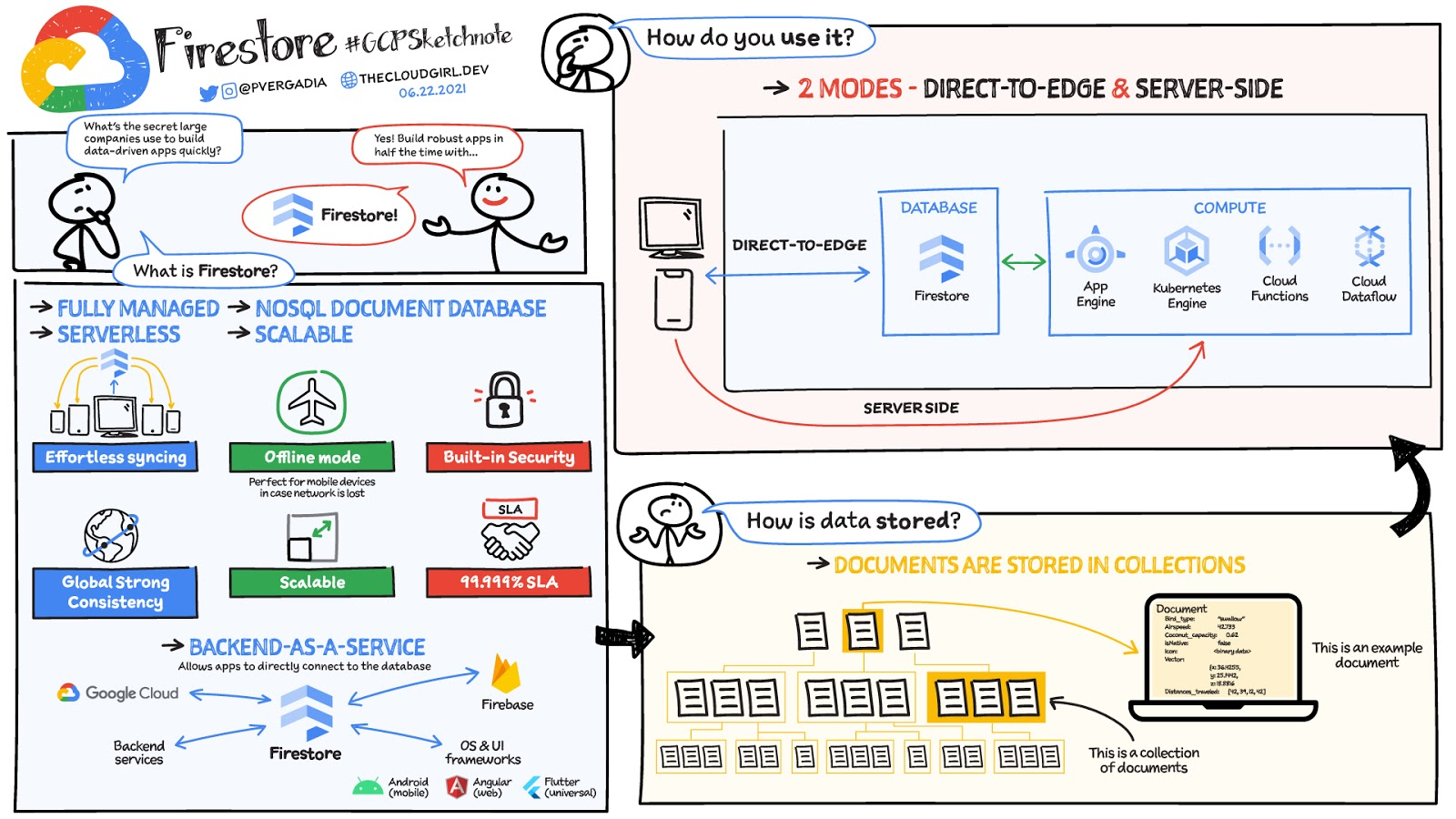
What is Firestore?
Firestore is a serverless, fully managed NoSQL document database that scales from zero to global scale without configuration or downtime. Here’s what makes Firestore unique:
- Ideal for rapid, flexible and scalable web and mobile development with direct connectivity to the database.
- Supports effortless real time data synchronization with changes in your database as they happen.
- Robust support for offline mode, so your users can keep interacting with your app even when the internet isn’t available or is unreliable.
- Fully customizable security and data validation rules to ensure the data is always protected
- Built-in strong consistency, elastic scaling, high performance & best in class 99.999% availability
- Integration with Firebase and Google Cloud services like Cloud Functions and BigQuery, serverless data warehouse.
- In addition to a rich set of Google Cloud service integrations, Firestore also offers deep one-click integrations with a growing set of 3rd party partners via Firebase Extensions to help you even more rapidly build applications.
Document-model database

Firestore is a Document-model database. All of your data is stored in “documents” and then “collections”. You can think of a document as a JSON object. It’s a dictionary with a set of key-value mappings, where the values can be several different supported data types including strings, numbers or binary values..
These documents are stored in collections. Documents can’t directly contain other documents, but they can point to subcollections that contain other documents, which can point to subcollections, and so on. This structure brings with it a number of advantages. For starters, all queries that you make are shallow, meaning that you can grab a document without worrying about grabbing all the data underneath it. And this means that you can structure your data hierarchically in a way that makes sense to you logically, without having to worry about grabbing tons of unnecessary data.
How to use Firestore?
Firestore can be used in two modes:
- Firestore in Native Mode: This mode is differentiated by its ability to directly connect your web & mobile app to Firestore. Native Mode supports up to 10K writes per second, and over a million connections.
- Firestore in Datastore Mode: This mode supports only server-side usage of Firestore, but supports unlimited scaling, including writes.
Conclusion
Whatever your application use case may be, if you want to build a feature or an application quickly using Firestore backend-as-a-service. For a more in-depth look into Firestore check out the documentation. https://www.youtube.com/embed/moglAjmwmUQ?enablejsapi=1&
For more #GCPSketchnote, follow the GitHub repo. For similar cloud content follow me on Twitter @pvergadia and keep an eye out on thecloudgirl.dev.
Migrating MySQL to Spanner? Here’s What You Need to Know

5609
Of your peers have already read this article.
2:00 Minutes
The most insightful time you'll spend today!
Since its initial release in 1995, MySQL has not only been the de-facto database for many data storage needs, but has gathered much attention over the years as one of the most well-recognized databases around when it comes to Relational Database Management Systems and transactional data processing.
Any application in retail, e-commerce, or banking has likely had its fair share of business depending on a relational database for its transactional needs. Many of these applications are built on MySQL due to its flexibility, open source nature, and strong community support.
Whether in the context of a migration from a relational database (like MySQL or PostgreSQL) , migration from a NoSQL database (like Cassandra), or a green grass workload, many companies turn to Cloud Spanner seeking a high availability SLA (99.99% for regional instances and 99.999% for multi region instances), unlimited scale, and low operational overhead – no patching required, no maintenance or other planned downtimes, just to name a few benefits.
The tooling and open source ecosystem around Spanner has evolved and grown ever since the service was introduced. HarbourBridge is a part of this ecosystem, and it’s meant to help customers port their existing MySQL or PostgreSQL schema to a Cloud Spanner schema.
Application Migration Tips
Despite helpful tools like HarbourBridge, database migrations are never trivial. Here are a few things to pay attention to when migrating from MySQL to Spanner, and how to update your application logic to address them.
Note – The following snippets use the PHP client for Cloud Spanner. A couple of the snippets reference a partial Magento port that our friends over at Searce have been working on. Once you understand the operations, you should be able to implement the same in any of the other languages that Cloud Spanner supports.
Cloud spanner enforces strict data types
In a MySQL query, the value of an attribute can be referenced as either a string or an integer. Example:
- select * from catalog_eav_attribute where attribute_id = 46;
- select * from catalog_eav_attribute where attribute_id = “46”;
Both are valid and equivalent.
In Cloud Spanner, the query will return an error if you try to reference an integer type by using a string representation.
Here is an example of a working query from Cloud Spanner:
- select * from catalog_eav_attribute where attribute_id = 46; — this will work
- Select * from catalog_eav_attribute where attribute_id = “46” — will fail, since we are supplying a string with “46”
You may use a function like the following to assist you with such transformations.
/*** Formats the SQL for Cloud Spanner* Example* Input SQL : <select statement> WHERE* (`product_id` = '340') ORDER BY position ASC* Output SQL : <select statement> WHERE* (`product_id` = 340) ORDER BY position ASC* In the above example integer*`340` is sanitized by removing single quotes.* Sanitization is required since Cloud Spanner* has strict typing* @param string $sql* @return string $sql*/public function sanitizeSql(string $sql){if (preg_match_all("/('[^']*')/", $sql, $m)) {$matches = array_shift($m);for($i = 0; $i < count($matches); $i++) {$curr = $matches[$i];$curr = filter_var($curr,FILTER_SANITIZE_NUMBER_INT);if (is_numeric($curr)) {$sql = str_replace($matches[$i],$curr, $sql);}}}return $sql;}
Using sequences in primary keys is not a Spanner best practice
Cloud Spanner does not implement a sequence generator, and it is not a Spanner best practice to use sequential IDs because doing so can cause hotspotting.
An alternative mechanism of generating a unique primary key is to use a UUID or any other similar mechanisms that result in non-sequential values. For more information, please refer to this article.
In order to convert all existing primary keys to a UUID pattern, you can change the schema using the snippet here
You may use this code snippet to modify the application code to generate the UUID for the auto increment. There are other ways to do this as well, such as using PHP built-in uniqid function.
/*** Generate UUID.* @return string*/public function getAutoIncrement(){if (function_exists('com_create_guid') === true) {return trim(com_create_guid(), '{}');}return sprintf('%04X%04X-%04X-%04X-%04X-%04X%04X%04X',mt_rand(0, 65535), mt_rand(0, 65535),mt_rand(0, 65535), mt_rand(16384, 20479),mt_rand(32768, 49151), mt_rand(0, 65535),mt_rand(0, 65535), mt_rand(0, 65535));}
Implicit casting and the need for explicit casting of field data types
Both MySQL and Cloud Spanner follow the SQL standard, hence much of the query syntax is the same. One notable difference is that the Cloud Spanner field types are implicitly cast to an appropriate data type out of the ones mentioned here. When implicit casting of the field type fails, Spanner returns a read error, so it would be safer to perform the casting to the appropriate type when issuing the SELECT statement.
Modify application code to cast to respective data type before execution of query.
$con = $this->getSpannerConnection();/*** Cloud Spanner follows strict type so cast the columns appropriately*/$select = $con->addCast($select, "`t_d`.`value`", 'string');$select = $con->addCast($select, "`t_s`.`value`", 'string');$select = $con->addCast($select, "IF(t_s.value_id IS NULL,t_d.value, t_s.value)", 'string');$values = $con->fetchAll($select);
Modify the application code to cast the column to its respective type
/*** Cast the column with type* @param string $sql* @param string $col* @param string $type* @return string*/public function addCast(string $sql,string $col, string $type){$cast = "cast(".$col." as ".$type.")";return str_replace($col, $cast, $sql);}
Using interleaved tables to improve read performance
Cloud Spanner’s table interleaving is a great choice for many parent-child relationships where the child table’s primary key includes the parent table’s primary key columns. Interleaving ensures that child rows are collocated with their parent rows, which can significantly improve query performance.
Refer to the statements here for a few samples of creating interleaved tables. To learn more about table interleaving, visit the documentation.
Conclusion
Database migrations are complicated. Hopefully, using HarbourBridge and the list of tips in this article can make that task easier. For additional tips, please take a look at this migration guide and read more about HarbourBridge.
More Relevant Stories for Your Company

Creating and Using Storage Buckets for Your Data Needs
So, you want to store objects on the cloud? But you're really new to Google Cloud or Cloud Storage and would like someone to walk you through the process step by step? Today is your lucky day! I will help you understand the big steps involved in setting up and

Mrs. T’s Pierogies Moves SAP Systems to Google Cloud for Faster Analytics Capabilities for its SAP Data
Pierogies might just be the ultimate comfort food. But when Mrs. T’s Pierogies — the leading manufacturer of frozen pierogies in the US — learned it needed to transition its existing on-premises SAP ECC to S/4HANA, the company sought a little comfort for itself. Founded in 1952, Mrs. T’s Pierogies

Countries can Tackle Food Wastage Crisis Using Google’s Data Analytics
With over ⅓ of the food in the USA ending up as waste according to the USDA, it is a compelling challenge to address this travesty. What will happen to hunger, food prices, trash reduction, water consumption, and overall sustainability when we stop squandering this abundance? Beginning with the departure

AirAsia Turns to Google Cloud to refine Pricing, Increase Revenue, and Improve Customer Experience
AirAsia needed a platform incorporating products that could capture, process, analyze, and report on data, while delivering value for money and meeting its speed and availability requirements. The airline also wanted to minimise infrastructure management and system administration demands on its technology team members. The airline conducted a proof of
