





Simplify Your Modernization Journey from Windows

4280
Of your peers have already read this article.
1:30 Minutes
The most insightful time you'll spend today!
Microsoft and Windows on Google Cloud provides a first-class experience for Windows workloads. You can self-manage workloads or leverage managed services and use license-included images or bring your own licenses. Now, easily migrate, optimize, and modernize your Windows workloads for agility and scalability.
Start with migration
Migrate to increase IT agility and reduce on-premises footprint. Tools like Migrate for Compute and Migrate for Anthos can help migrate and upgrade.
Optimize license usage to reduce cost
Optimize VM usage. Managed SQL Server and Active Directory reduce total cost of ownership. Move .NET to .NET core. Move SQL Server to Linux.
Modernize to reduce single-vendor dependency
Create an open path to modernization—containerization of Windows server, cloud-native development, and multi-cloud readiness with Anthos.
Drive a strategy for migration, optimization, and modernization
Plan for the future while reducing your Microsoft licensing dependency. Get all you need to migrate, optimize, and modernize your legacy platform.
Bring your own licenses
In addition to on-demand licenses, Google Cloud provides you with flexibility for bringing your existing licenses and running them on Compute Engine. Use Sole-Tenant Nodes to run on dedicated hardware with configurable maintenance policies to support your on-premises licenses while maintaining workload uptime and security through host-level live migration.
License-included VM images
You can deploy your Windows applications (including SQL Server) on our fully tested images with bundled licenses on Compute Engine and take advantage of many benefits available to virtual machine instances such as reliable storage options, the speed of the Google network, and autoscaling.
Fully managed SQL Server and Active Directory
Use an easy-to-manage and compatible relational database service in the cloud to reduce operational overhead. Use a highly available, hardened service to manage authentication and authorization for your AD-dependent workloads, automate AD server maintenance and security configuration, and connect your on-premises AD domain to the cloud.
Windows on Kubernetes
Running your Windows Server containers on GKE can save you on licensing costs, as you can pack many Windows Server containers on each Windows node.
Qlik and Google Cloud Combo: Extending Integration of SAP Data on BigQuery
5478
Of your peers have already read this article.
2:00 Minutes
The most insightful time you'll spend today!
If your organization is one of the 52% of SAP customers whose top analytics pain point is data integration1, Google Cloud has got you covered. By working with partners like Qlik, we are expanding our integration options and bringing real-time replication capability for SAP to BigQuery.
Integrated data for accelerated insights
BigQuery—our fully managed, enterprise data warehouse that can scale up to petabytes on demand and execute queries in seconds—allows SAP customers to consolidate enterprise data silos and confidently derive more use and value from their data. Customers can accelerate and simplify the delivery of SAP data on BigQuery with the latest Qlik Data Integration platform offering for Google Cloud which allows data integration using an automated, near real-time data pipeline through Qlik Replicate, whether data originates from legacy SAP environments, SAP HANA, or SAP application servers. Additionally, Qlik Compose for Data Warehouses can be used to easily generate and automate logical data models from SAP directly in BigQuery freeing up more time for data analysts to leverage advanced built-in capabilities such as BigQuery ML to derive greater value and insights using standard SQL without the need for advanced programming expertise.
Delivering faster results with real-time
Traditional extract-transform-load (ETL) solutions operate on a batch basis, pulling data sets from SAP daily, hourly, or every minute. These tools often require manual mapping of multiple data fields so that data flows accurately. Given SAP’s highly complex table relationships, in which a single transaction can result in multiple changes, this can be a time consuming and tedious process. ETL can also increase the burden on your SAP systems.
Qlik Replicate simplifies this with its intuitive user interface where you can set up real-time data replication between SAP and BigQuery, eliminating the need for manual coding. And, to prevent system overhead, as soon as a new transaction is entered into SAP, the resulting data is replicated into BigQuery in a process known as change data capture (CDC) from SAP’s log layer. This means that data transfer can benefit from high performance with minimal impact on the source system’s resources. Read our latest white paper to learn how to extract SAP data into BigQuery leveraging Qlik Replicate.
Solution expertise for all core SAP workloads
It doesn’t matter what database your SAP system runs on, Qlik Replicate supports all core SAP systems. It automates real-time data replication and decodes SAP’s complex, application-specific data structures into formats that flow smoothly into BigQuery. This ensures that anyone who depends on data analytics has the most current and relevant SAP data they need. For its robust solution capabilities Qlik has received a new “SAP on Google Cloud Expertise” designation for supporting:
- Fast onboarding and accelerated replication of SAP data into Google Cloud
- Real-time and continuous data replication from SAP applications to BigQuery
- Support for all core SAP modules and a broad set of data sources
- Automated data integration, which cuts resource requirements for initial delivery and ongoing maintenance
Proven customer results
Many SAP customers have experienced the benefits of leveraging Qlik alongside BigQuery for data analytics and AI at scale, including German luxury department store chain Breuninger. In order to meet its customers’ growing and changing expectations,Breuninger needed to accelerate its time to insight from data sources across a highly dispersed landscape of on-premises databases and systems, including SAP. The company uses Qlik Replicate to feed corporate data from modules in its SAP system into BigQuery and integrate its varying on-premises databases with the Google Cloud environment. This has yielded game-changing, real-time customer insights for the retailer.
What could your business do with faster, more integrated insights? Learn more about BigQuery for SAP customers and also how Qlik and Google Cloud can help you modernize and automate data integration and analytics.
Bharat Light & Power’s CEO Says Enough! It’s Time to Leverage AI and IoT

3943
Of your peers have already read this article.
4:30 Minutes
The most insightful time you'll spend today!
As community and business concern over global warming, sustainability, and energy security continues to rise, companies such as Bharat Light & Power (BLP) are working on answers.
Founded in 2010 and located in Bangalore and Delhi, BLP is one of the leading clean energy generation companies in India. According to Tejpreet Singh Chopra, Chief Executive Officer of BLP, the business started with the aim of delivering clean energy from renewable sources such as wind, solar, biomass, and hydro to the 300 million residents of India that did not have reliable access to power at that time.
However, BLP soon began experiencing problems ensuring availability of the wind turbines that powered utility-scale wind power generation across the country.
“While we were investing large amounts building wind farms, the failure of the smallest component could shut down an entire wind turbine and compromise our efficient operation,” says Chopra. “A $5,000 battery could fail and shut down a $2.5 million piece of equipment!”
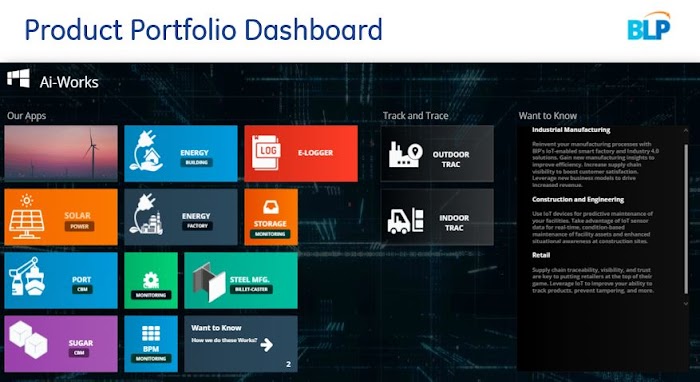
BLP transformed its legacy thinking about man, machine, technology, and process, and implemented an AI and Internet of Things (IoT) project. The business used hundreds of tags from its wind turbines to capture and send machine behavior and performance data to a control center. This data triggered an 18-month project to create AI and machine learning algorithms that would enable engineers to predict component failures in wind turbines, improve generation, and adjust maintenance and replacement schedules accordingly.
This activity provided the foundation of a technology business—one of the three companies that comprise BLP—that delivers enterprise AI for industrial uses over a platform, branded Orion.
“We provide an end-to-end solution that enables businesses in industries such as transportation, logistics, ports, infrastructure, oil and gas, supply chain manufacturing, steel, and automotive to improve productivity,” says Chopra.
As the business expanded, it began to extend beyond its core “AI for industry” mission. It recruited an IoT team to help factory owners and operators enable the programmable logic controllers (PLC) and supervisory control and data acquisition (SCADA) systems that run disparate equipment and machines—such as production line machines of different ages and countries of origin—to talk to each other and provide usable data and insights.
Agility and adaptability key
BLP’s management team realized early that the business needed to be agile and adaptable to keep pace with changes in technology.
“We knew we would have to effectively destroy and remake the business every 18–24 months to remain relevant, so we needed a service that could support our dynamic infrastructure, data, and AI needs,” says Chopra.
The business started operations on a cloud service but quickly ran into problems. “We found in the world of industry—the vast amounts of data, the variety of sources of data, and the complexity of insights required—created a very different set of challenges relative to the consumer technology environment,” says Chopra. “Our cloud provider could not provide an architecture that made sense for an industry-focused solution.”

Google Cloud to power AI and visual analytics
Within two years, BLP advanced its strategy and focused on using open source to reduce the cost of its architecture. As Orion matured and its take-up grew, the business began looking at multinational cloud services to run the forthcoming version 3.0 of the platform.
BLP found Google Cloud provided the best fit for its needs for a range of reasons, including the ease of use of Google Cloud services—likened by the BLP technology team as “the equivalent of a consumer app experience”—and its high quality database services, high availability, fast response times, and the power to run the platform’s AI and visual analytics.
BLP established as its key objective a 20% reduction in costs over its previous cloud service and availability levels exceeding 99.9%. The business completed the deployment in June 2019 following discussions and input from Google Cloud’s engineering and architecture experts prior to and during the first stage of the project.
Cloud IoT Core—a managed service that allows organizations to connect, manage, and ingest data from dispersed devices—is the cornerstone of the architecture supporting the latest latest version of the Orion platform, Orion 4.0. BLP has also created a data pipeline based on Cloud Pub/Sub event ingestion and delivery and Cloud Dataflow data processing.
Cloud Bigtable provides a high-performance NoSQL database service for the platform’s analytical workloads and BigQuery delivers a powerful analytics data warehouse. Cloud Functions enables the business’s developers to build event-driven serverless applications.
This architecture currently captures, processes, analyzes, and reports on 8 million data points in 578 turbines around the world per day and processes data from 200,000 data points in 4,000 sensors per day.
The Google Cloud architecture supports the data visualization and reporting and the AI and machine learning-powered products created by BLP. These reports and products enable users to monitor remote assets and use AI-based analytics to predict machine failures before they occur, sequence failure events, and maximize equipment uptime.
A range of benefits to customers
With Google Cloud, BLP is delivering projects with a range of benefits to customers, including increasing manufacturing productivity by at least 5% and reducing costs by about 10%.
“We’ve enabled one of the largest electrical companies in India to compare production line performance by capturing data from PLC and SCADA systems and extracting it to Google Cloud for processing, analysis, and reporting,” says Chopra. “For another customer, we’ve deployed an IoT system that has saved them about $200,000 in energy costs over six months.”
The business is also providing monitoring, reporting, and analysis to predict likely failures of gearboxes, bearings, generators, and blades in 2,000 wind turbines—that provide close over 2 GW of wind power—in countries such as France, Germany, Italy, India, Portugal, Spain, the United Kingdom, and the United States.
Furthermore, BLP is providing visual analytics to help one of the largest ports in the world detect when workers are not wearing helmets or safety equipment.
“We also do a lot of inventory track-and-trace work to help companies improve supply chains and help factories keep track of tooling through Bluetooth low-energy technologies,” says Chopra.
With Google Cloud, BLP is now ideally placed to execute its business strategy of helping customers improve productivity and increase growth, control and reduce costs, and enhance quality and safety.
“We are realizing this strategy by working to become the best company in the world at using AI to predict machine failure,” says Chopra. “Our underlying technology strategy entails enabling the most advanced IoT hardware used by industry to talk to software and the cloud, using the most powerful AI cloud around—which is why we chose to marry our AI algorithms with Google Cloud—and delivering insights through visualization.”
Testing Edge TPU
The business is now testing Edge TPU to run AI at the edge in high-performance, small-footprint, and low-power ASIC environments.
“We think that will be the next big revolution as TPU costs come down,” says Chopra. “It will be a considerable benefit performing AI at the edge rather than involving the full infrastructure of the cloud.”
BLP is keen to build on its existing relationship with and use of Google Cloud to further transform manufacturing worldwide.
“Manufacturers are pushing the boundaries of quality and cost through initiatives such as Lean Six Sigma, Zero Defects, poka-yoke, just in time, and other methodologies and approaches,” says Chopra.
“The next wave of manufacturing improvements are coming through industry 4.0, AI, IoT, and Google Cloud’s analytics, databases and other services. These are ideal to power this change in the industrial world.”
What You Can Learn from ‘Up or Out’ Framework for Cloud Adoption
3234
Of your peers have already read this article.
1:30 Minutes
The most insightful time you'll spend today!
In times of significant disruption, organizations are faced with three choices: Retrench within legacy solutions, pause and do nothing while waiting for more data or different circumstances, or press ahead, potentially even accelerating to realize the desired outcome. In such an environment, it is critical to ensure you’re delivering the greatest possible impact to the business.
In Google Cloud’s Office of the CTO, or OCTO, we have the privilege of co-innovating with customers to explore what’s possible and how we can re-imagine and solve their most strategic challenges. These collaborative innovation engagements are often core to critical transformational projects, which often include the rehosting, evolution, and at times re-architecture of existing business solutions.
We are happy to offer this brand new white paper, where we have distilled the conversations we’ve had with CIOs, CTOs, and their technical staff into several frameworks that can help cut through the hype and the technical complexity, to help devise the strategy that empowers both the business and IT. We called one such framework “up or out.” (And we don’t mean some consulting firm’s hard-nosed career philosophy.)
One model that we found can help enterprises chart their cloud adoption journey delineates cloud migration along two axes—up and out, and we’ll cover this in much greater detail in the white paper itself.
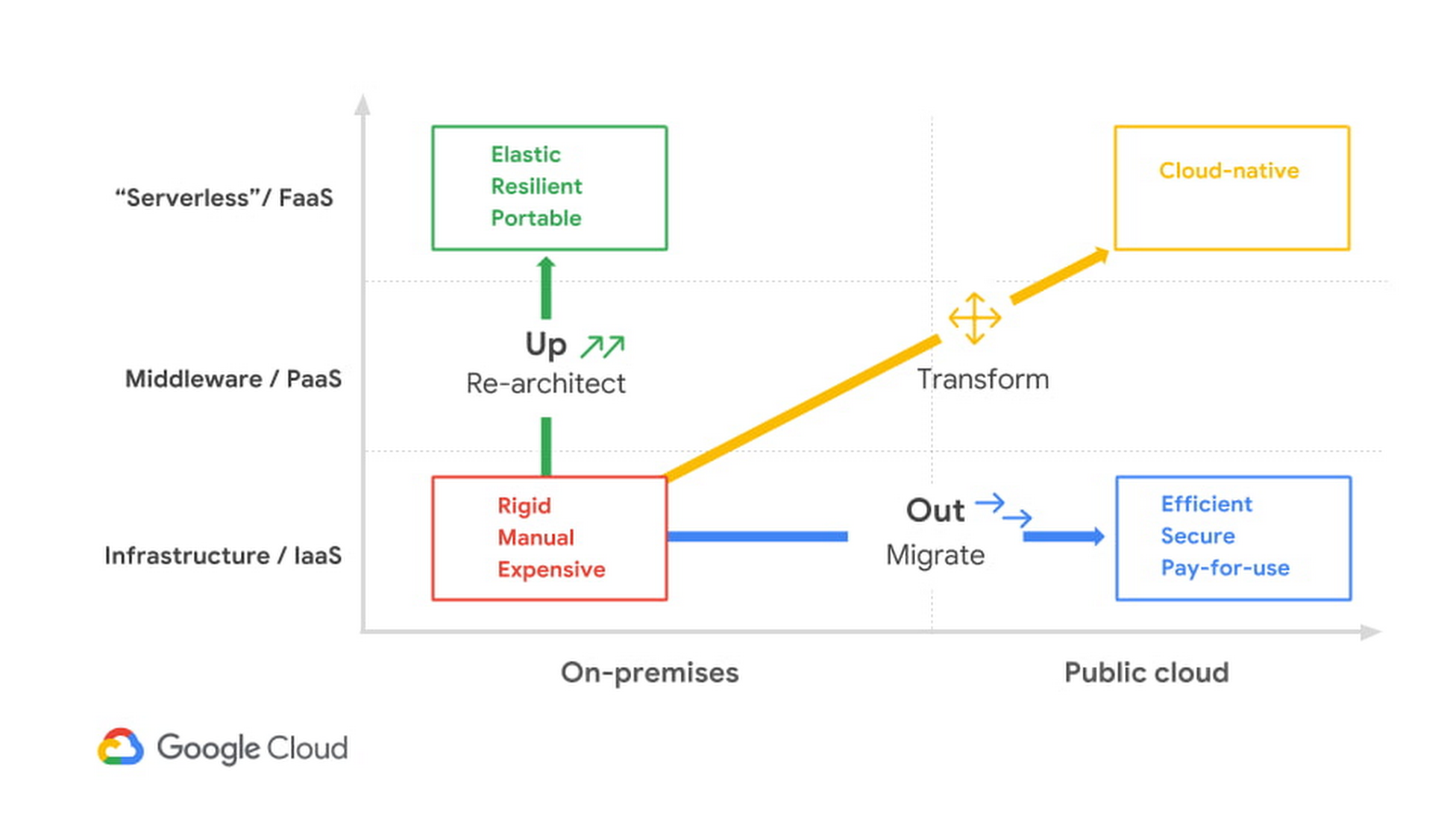
As you can see, there isn’t a single path to the cloud—not for individual enterprises and not even for individual applications. The up or out framework can help an IT organization and its leadership characterize how they can best benefit from migrating their services or workloads. The framework acts as a general pattern that highlights the continuum of approaches to explore, and you can learn all about it by downloading this detailed white paper.
Or, if you’re really ready to jump start your migration today, you can take advantage of our current offer by signing up for a free discovery and assessment.

4462
Of your peers have already downloaded this article
1:30 Minutes
The most insightful time you'll spend today!
Increasingly, technology, data, and human interactions will follow a new model of real-time inputs, enabling change without interruption and positive iteration. Cloud computing powers an important shift for information technology, and it will usher in new and better ways to serve customers, make discoveries, and build great products and services.
As part of this transformation, technology models will become more flexible, interoperable, and open; office cultures will shift toward transparency, collaboration, and constant learning. That means innovation and team building – the best parts of work – can happen more frequently and efficiently. Customer focus can sharpen and become more responsive. Corporate knowledge gained over decades of competing and innovating can be brought to bear more easily and meaningfully.
To compete effectively in this changing landscape, business and technology leaders must find ways to embrace the potential of cloud computing – whether in the tools and systems they choose, the institutional cultures they create, or the business strategies they prioritize. Today’s enterprises can set the stage for future success by infusing their unique assets – such as customer relationships, excellent service capabilities, strong partnerships, market knowhow, and technology investment – with the power of innovative IT.
Create and Protect Admin Accounts

4875
Of your peers have already read this article.
1:30 Minutes
The most insightful time you'll spend today!
Setting up your new cloud infrastructure is scary. Extra scary when you realize that someone (is it gonna be you?) gets to have phenomenal cosmic power over the whole thing.
Yes, I’m talking about the admin account, and today we’ll dig into why they are important, dangerous and different.
When the team at pistach.io got their nuts-as-a-service business growing fruitfully, they knew they needed to think carefully about admin accounts. These people would have tremendous control over their use of Google Cloud, and they could potentially cause very big problems if any were compromised. Definitely resources that require a protective shell.

Early in pistach.io’s development, an employee named Walter Nutt wanted to play a prank by changing his co-worker’s profile photo from an almond to a peanut (pretty devious, since a peanut is actually a legume). He didn’t have access to his friend’s computer, but he did have access to the company’s Cloud Storage bucket. While searching for the profile photo in question, Wally inadvertently deleted the entire contents of the bucket!
As he searched for ways to restore its contents, Wally modified access to two other pistach.io buckets. The company was ground to a halt for a week while teams worked to crack through the permissions issues.
Time to rethink permissions a bit, so this couldn’t spoil their buttery smooth operations in the future.
Following the resource manager guide, the team made a super admin email address that wasn’t tied to a particular individual or Workspace account, and secured it with strong multi-factor authentication. This would be their backup in case an admin account were to be compromised, so they could recover and repair.
The team already uses Google Workspace, so they have an organization set up already. That creation process established initial super administrators, allowing them to create and modify all other resources inside the organization. As they looked toward using Google Cloud, the super administrators could:
- Give the admin role to people, for Cloud
- Act as a point of contact for account recovery
- Modify or delete the organization if needed
Making admin users for the organization allows other people to then flesh out the resources and policies for pistach.io, before they go nuts and give everyone all the permissions. While that would speed things up, it would make it easy for an attacker to crack through the security shell because any account compromise could give ousize access. Yikes!

Instead, the IT leads specified certain people to act as organization admins, and then gave them permissions to:
- Define Identity and Access Management policies
- Structure the Resource Hierarchy
- Delegate control of specific Cloud elements to others on the team
Once those organization admins were set up, they could give management and oversight of Compute, Storage, Networking and other resource types to the relevant leads, making sure each person had just the right amount of permission for the role they needed to perform. The organization admins don’t have permissions themselves to make these resources. They just delegate.
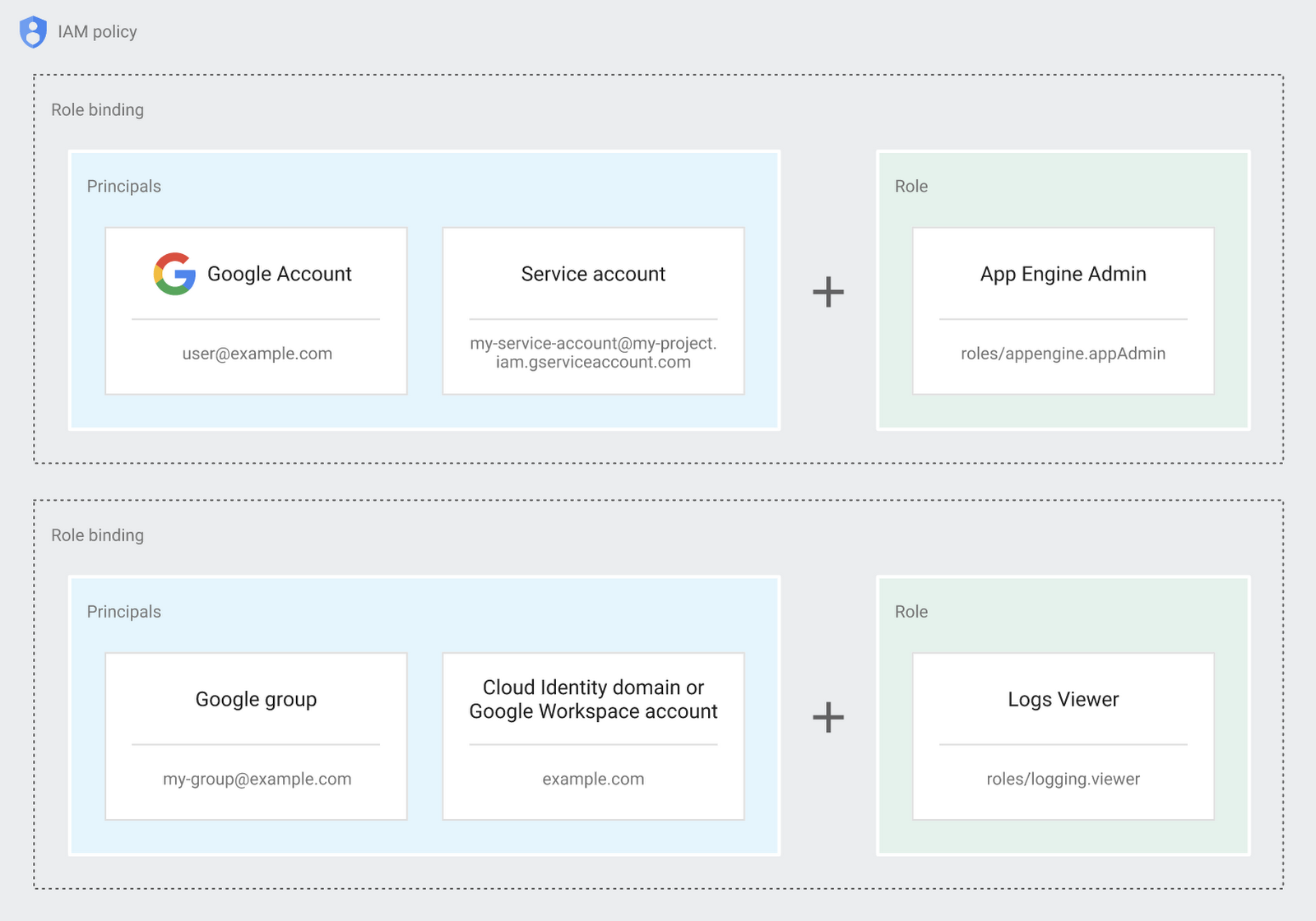
Now each person can accomplish the job they’re responsible for, but doesn’t have overly permissive access. Delegating like this keeps the entire organization safer, and limits the blast radius if someone does manage to break in.
You can go through these steps yourself with this tutorial.
By default the creation of an organization resource for the domain gives everyone the ability to create projects and billing accounts. Once they set up their Organization Admin at pistach.io they decided to remove some of these wide permissions and, in a nutshell, bring everything down to a much finer control. So people could get permissions for a folder or a project, but not the entire organization!
Remember to take care of your admin roles, as they have the power, and responsibility, to cause serious harm if not used safely. Be safe with your Identity and Access Management. And keep your data yours!
Next time we join you we’ll take a crack at creating and provisioning an app to run inside the policies and resource management frameworks created today.
More Relevant Stories for Your Company

Google Extends Support for Windows Server Containers on Anthos for Faster App Modernization and Consistent Dev Experience
Today, many applications in organizations’ data centers run on Windows Server. Modernizing these traditional Windows apps onto Kubernetes promises a host of benefits: a consistent platform across environments, better portability, scalability, availability, simplified management and speed of deployment, just to name a few. But how? Rewriting traditional .NET applications to

Google Unveils Topaz, the New Subsea Cable Connecting Asia and Canada
There’s a new subsea cable in town: Topaz, the first-ever fiber cable to connect Canada and Asia. Once complete, Topaz will run from Vancouver to the small town of Port Alberni on the west coast of Vancouver Island in British Columbia, and across the Pacific Ocean to the prefectures of

How Vertex Vizier’s Automated Hyperparameter Tuning Improves ML Models
We recently launched Vertex AI to help you move machine learning (ML) from experimentation into production faster and manage your models with confidence—speeding up your ability to improve outcomes at your organization. But we know many of you are just getting started with ML and there’s a lot to learn! In tandem

Your Roadmap to the Cloud in 4 Simple Steps
Migrating to the cloud can be complex, time consuming, and risky, especially when you have hundreds or thousands of existing workloads to move. Make your journey fast and smooth by planning ahead and using tried-and-true best practices. To help you get started, here's a handy guide that outlines four basic
