





Marks & Spencer Aims to Bring a Third of business Online and Google Contact Center AI is Key to its Success

5780
Of your peers have already read this article.
6:20 Minutes
The most insightful time you'll spend today!
“Hello, Marks & Spencer. How may we help you?”
As one of the biggest and best-loved retail brands in the UK, Marks & Spencer (M&S) is known for the personalized service it provides to its 30 million loyal customers. For 135 years and in 57 countries around the world, M&S has worked to meet and exceed customer expectations for quality and service. Since the advent of the telephone, this has meant cheerfully servicing customers who call in to M&S branches or into their contact centers, no matter what their request might be.
“Retail is in a state of flux and M&S is transforming to better serve our customers so that we can compete and win. Automating calls into our stores with Google voice recognition gives us every opportunity to get things right for our customers and keep them coming back again and again.”
—Akash Parmar, Enterprise Architect (Digital Customer Engagement), Marks & Spencer
The company now has a goal of bringing one third of its business online by 2022. In order to engage more customers online, it has opened a new voice channel hosted on Google Cloud.
The company previously had switchboards in 13 different stores across the UK and Ireland (UKI), handling up to nine million calls a year. But as its retail offering evolved across multiple channels, it was becoming increasingly difficult to quickly and effectively answer customer service requests using an outdated switchboard model.
Customers might call in to order an outfit they had seen in a store, to inquire about returning a dress they bought online, or to recover a lost umbrella in a food hall. Each of these different requests required a different routing response from staff, and if the company didn’t act soon, it knew that the cost of managing the increase in call volume would lead to a significant cost impact. M&S decided it was time to make a technological leap forward to meet customers’ expectations in the new, omnichannel retail environment.
“Retail is in a state of flux and M&S is transforming to better serve our customers so that we can compete and win,” says Akash Parmar, Enterprise Architect for Digital Customer Engagement at M&S. “Automating calls into our stores with Google voice recognition gives us every opportunity to get things right for our customers and keep them coming back again and again.”
Boosting opportunities for customer engagement with voice recognition
M&S customers were used to dealing with their local store for anything they needed. But as stores were completely separate from the online business, customers weren’t able to purchase something they’d seen online by calling stores because the store staff didn’t have access to platforms needed to place an online order securely. For a company that places a very high importance on customer experience, this was unacceptable.
Akash Parmar, Enterprise Architect for Customer Engagement, was set a the goal by Chris McGrath, M&S Programme Manager, to ensure that the right channel and the right level of assistance was available to customers at any point before, during, or after purchase. Akash set himself the challenge of building a platform that could adapt to all of these channels and scale very quickly.
“We didn’t have the resources to build a speech recognition platform. DVELP removed that obstacle. It understood what we wanted to achieve and how Google Voice APIs and Twilio could get us there. Whatever we want, DVELP builds it for us. DVELP always presents options, never problems.”
—Akash Parmar
In 2018, Akash reached out to Google Cloud partner DVELP, one of the UK’s leading experts on the Twilio programmable contact center platform and Google speech recognition technology. DVELP recommended a Google Cloud-based natural language speech recognition platform that leverages the audio stream intent detection functionality in the Contact Center AI solution, Dialogflow, as the heart of an inbound-call-handling strategy. This strategy was designed to improve routing accuracy, give customers more self-service options, and increase analyst visibility into customer journeys.
“We didn’t have the resources to build a speech recognition platform. DVELP removed that obstacle,” says Akash. “They understood what we wanted to achieve and how Google Cloud Voice APIs and Twilio could get us there. Whatever we want, DVELP builds it for us. DVELP always presents options, never problems.”
Using Google speech recognition to improve customer experience
M&S wanted to use natural language to enable customers to speak and state what help they required rather than choose from a list of options. This would help them answer the millions of calls coming in and figure out what customers needed quickly.
In order to do that, DVELP needed to consider how best to address tying customer intent to actions, while maintaining flexibility. DVELP recommended the unconventional choice of not referencing intent in the application layer, but mapping the available actions to the information required to perform them. These actions were then used to build a “declarative dictionary” for the customer service team.
By focusing on actions rather than intents, the solution enables the customer services team to configure actions to intents in virtually any combination of key-value pairs. Leveraging the fact that Dialogflow can detect and respond to customer intents in real time, M&S has already reached 92% accuracy in translating customer declarations to actionable intents.
“With Google Cloud speech recognition and Contact Center AI solutions such as Dialogflow, there’s no information that we can’t make sense of. No matter where you call from, who you are, your age, your gender: you speak, and we understand.”
—Akash Parmar
Akash recalls that once customers became comfortable with the prompt, “in a few words, how may we help you?” they started providing simple, concise responses, and the customer learning curve quickly leveled out. At that point, Google Cloud speech recognition and Dialogflow took over. “The technology worked perfectly and the result was like magic,” says Akash.
“With Google Cloud speech recognition and Contact Center AI solutions such as Dialogflow, there’s no information that we can’t make sense of,” he says. “No matter where you call from, who you are, your age, your gender: you speak, and we understand.”
Enabling self-service contact center improvements with Dialogflow
It was important to M&S that contact center employees be self-sufficient in updating the platform to reflect changes in demand. They needed to be able to easily react to a spike in inquiries about a special offer, for example, without relying on the engineering team. At the same time, neither Akash nor the DVELP team wanted the staff to have to learn error-prone JSON inside contexts, or write responses in order to get necessary information from customers.
DVELP’s creative solution was to fill out the “Action and parameters” section of every intent. This is usually reserved for collecting information from customer declarations, but was also easily adapted to implementing custom key-value pairs. This is particularly helpful in making sure that the contact center is ready to handle new promotions as they arise. As sales and special events are communicated to the contact center from the head office, staff can program specific vocabulary directly into Dialogflow, thanks to Contact Center AI, ensuring that the M&S system is immediately ready to handle related customer calls.
Rolling out the platform to the UK and Ireland
In just a few months after going live, calls are being efficiently routed to the contact center and its existing customer service platform. At the contact center, staff can quickly and easily respond to customer requests, place orders, and process returns. Thanks to the natural language capabilities of Google Cloud, a simple customer request like “order the red children’s dress in the Bath high street window in size six” not only gets correctly routed, but provides data points for future personalized interactions.
Being able to accurately recognize customer intent 92% of the time after less than four months since deployment is an important milestone for M&S. With a concurrent 89% voice-to-text accuracy rate for Dialogflow transcriptions, M&S has rolled out the successful speech recognition platform to all of its stores in UK and Ireland and customer service contact centers.
Akash is so pleased with the performance of the new Google Cloud platform that he’s focusing on what new functionality he can add next to improve customer experience even more.
“We’re working on collecting product codes from customers using natural language so we can give them stock availability details,” he shares. “We also want to use Google Cloud to enable a more conversational experience when customers are searching for help or FAQs on our website. At the same time, we’re looking at Contact Center AI and Dialogflow to provide a virtual assistant experience for our webchat journey. Thanks to our new voice solution, we can clearly understand the key issues that our customers face on a day-to-day basis; the aim now is to start solving these issues through self-service and automation.”
3554
Of your peers have already watched this video.
37:44 Minutes
The most insightful time you'll spend today!
How AutoML is Changing Machine Learning and Accelerating AI Adoption
Currently, only a handful of businesses in the world have access to the talent and budgets needed to fully appreciate the advancements of ML and AI. And if you’re one of the companies, you still have to manage the time-intensive and complicated process of building and maintaining your own custom ML models.
To close this gap, and to make AI accessible to everyone, Google Cloud introduced Cloud AutoML.
Google Cloud’s first Cloud AutoML release is AutoML Vision, a service that makes it faster and easier to create custom ML models for image recognition. Its drag-and-drop interface lets you easily upload images, train and manage models, and then deploy those trained models directly on Google Cloud.
It even has a service that allows you to upload unlabeled training data!
Watch as Sara Robinson, Developer Advocate for Google Cloud, walks you through the concepts behind AutoML, a real-world demonstration, and next steps on how to start using it yourself.
Cart.com to Transform e-Commerce for Brands Globally

8754
Of your peers have already read this article.
1:30 Minutes
The most insightful time you'll spend today!
The ecommerce playing field has been hard to navigate for most retailers, and Cart.com is on a mission to change that. Traditionally, retailers needing to run their online store, order fulfillment, customer service, marketing, and other essential activities have had to cobble together systems to get the capabilities they need – much less having access to analytics across these functions. The result is costly, siloed ecommerce operations that are difficult to manage and scale.
It’s clearly not a formula for success, yet that’s the reality facing most retailers. Cart.com, in contrast, has set out to democratize ecommerce by giving brands of all sizes the full capabilities they need to take on the world’s largest online retailers. Our end-to-end environment empowers retailers to keep more of their revenue, set up proven strategies for managing all aspects of their business, and act on valuable insights from customer data every step of the way.
Together with our talented team, we’re building a unified ecommerce platform that already provides value to many leading or up and coming brands including Whataburger, GUESS, Dr. Scholl’s, Rowing Blazers, and Howler Bros.
We’re excited about the opportunity ahead as we reimagine traditional approaches to online sales, fulfillment, marketing, accessing growth capital, providing a unified view of all ecommerce and marketing analytics, and other activities. Expectations for Cart.com are high, and we are building a company that can scale to $100B in revenue and beyond. Supported by the Startup Program by Google Cloud and Google Cloud solutions, we’re establishing a technology platform to transform all aspects of ecommerce for brands worldwide.
Partner in disruption
At Cart.com, we’re currently targeting an underserved market. Our ideal customer is beyond demonstrating product-market-fit and is now at an inflection point seeking a growth opportunity. Typically, those companies are generating between $1M and $100M in annual revenue. We’ve seen an enthusiastic response from brands and retailers as well as investors, with backing from investors in just over a year totaling $143 million in three funding rounds.
Our strategy is to build an integrated ecommerce model that combines best-of-breed solutions, many of which we gain through acquisitions and then build upon to provide a streamlined and fully integrated experience for our brands. We’ve made seven acquisitions so far to round out our online store, order fulfillment, marketing services, customer service, and we have launched some integral partnerships including easy access to growth capital through our relationship with Clearco and product protection for customers on every purchase with Extend. Instead of acquiring a data company, we’re building our data platform on Google Cloud, across each operating function for a single-view for brands to harness actionable data. We see Google Cloud as the leader for data management, analytics, machine learning (ML) and artificial intelligence (AI).
Other reasons why we’re building our business on Google Cloud include scalability, excellence, security, reach, and data analytics that are far superior to other environments.
We also feel a cultural and mission alignment with Google Cloud and envision leaning into a long-term partnership of marketing, selling, and disrupting the disruptors together. Equally important to us are the investments Google Cloud is willing to make in early-stage companies like ours. The support through the Google Cloud for Startups program has been outstanding.
Built on Google Cloud
A wide range of Google Cloud solutions provide the foundation for our platform. For instance, Cloud Pub/Sub keeps our services communicating with one another. We rely on fully managed relational databases, like Cloud SQL and Cloud Spanner, to securely handle the huge volume of brand and shopper data generated every day.
Cloud Run allowed us to develop inside of containers before our Kubernetes infrastructure was ready to go. Now, we are taking advantage of all the capabilities in Google Kubernetes Engine. BigQuery integrates with all Google Cloud solutions and offers true data streaming natively out of the box, along with Dataflow for advanced analytics. We also use Container Registry to store and manage our Docker container images. Right now, we’re testing Cloud Composer to evaluate using it for data workflow orchestration instead of Apache Airflow.
The openness of the Google Cloud environment is further enabled by Anthos, which we may deploy soon to perform data integrations quickly as we acquire more companies over the next year. For example, if we acquire a company using Azure, we can easily align it with our Google Cloud ecosystem.
Enabling ecommerce 2.0
Recently, our team has been experimenting with Google Cloud Vertex AI and the fully managed services of AI deployment and ML operations. The capabilities would save us substantial time in the management of the ML lifecycle which allows us to focus more on developing proprietary AI that will transform commerce at scale.
Because Google Cloud is so far ahead in data science, our teams benefit from deep Google Cloud expertise as we look to provide brands with unmatched insights into customers to improve services and revenue. We’re also planning to test Recommendations AI among other tools to deploy customer product recommendations and personalization as turnkey productized offerings. Moving forward, we will likely use Bigtable to aid in serving machine learning to hundreds of thousands of brands due to its low latency and scalability.
Fanatical about brand success
We know that our work with Google Cloud for Startups and use of Google Cloud solutions for best-in-class data management, analytics, ML, and AI will enable us to offer even more transformative services to brands.
We also see the opportunity to use our platform and customer insights to break down barriers between brands, enabling retailers to share information and work better together when it’s in their best interests. What we’re building today on Google Cloud is fundamentally changing what’s possible for retailers of any size everywhere.
As a startup, when recruiting talent or working with prospective customers, it helps to share our success with Google Cloud. We view them as an extension of the Cart.com team. It also validates our business as we continue building a more integrated, holistic approach to commerce that opens new opportunities and drives growth for brands worldwide.
For more details about Cart.com’s vision for unified ecommerce, check out our video.
If you want to learn more about how Google Cloud can help your startup, visit our page here to get more information about our program, and sign up for our communications to get a look at our community activities, digital events, special offers, and more.
Unlocking the Power of Computer Vision: Vision AI Made Easy with Spring Boot and Java

1187
Of your peers have already read this article.
1:30 Minutes
The most insightful time you'll spend today!
In today’s era of data-driven applications, leveraging advanced machine learning and artificial intelligence services like computer vision has become increasingly important. One such service is the Vision API, which provides powerful image analysis capabilities. In this blog, we will explore how to create a Computer Vision application using Spring Boot and Java, enabling you to unlock the potential of image recognition and analysis in your projects. The application UI will accept as input, public URLs of images that contain written or printed text, extract the text, detect the language and if it is one of the supported languages, it will generate the English translation of that text.
Spring Boot and Google Cloud
Spring Boot is a powerful open-source framework for creating Spring-based applications. It simplifies development by providing auto-configuration, starter dependencies, and embedded servers. It also offers production-ready features like metrics and health checks. With Spring Boot, you can focus on writing code and deploying efficient applications without worrying about complex configuration or dependencies. Apart from the well-known features that make it an ideal choice for enterprise apps, a new exciting development is the official support for Native Image Builder using GraalVM, enabling the creation of native standalone executables without the need for a Java Runtime and are leaner and offer a super fast startup experience. Try Spring Native on Google Cloud.
The Spring Cloud GCP library makes it easy for Spring Boot applications to use Google Cloud services. It provides Spring Boot APIs for over a dozen Google Cloud services. This means you can take advantage of the benefits of Google Cloud services without having to learn separate Google Cloud client libraries. It is very easy to migrate or create a new Spring Boot application in Google Cloud. With just one command, you can bootstrap your production-ready Spring Boot project structure and start making code changes for your requirement. Refer to the documentation for a full list of features.
Prerequisites
Before diving into the development process, make sure you have the following prerequisites in place:
- A Google Cloud account with a project created and billing enabled
- Vision API, Translation, Cloud Run, and Artifact Registry APIs enabled
- Cloud Shell activated
- Cloud Storage API enabled with a bucket created and images with text or handwriting in local supported languages uploaded (or you can use the sample image links provided in this blog)
Refer to the documentation for steps on how to enable Google Cloud APIs.
Bootstrapping a Spring Boot project
To get started, create a new Spring Boot project using your preferred IDE or Spring Initializr. Include the necessary dependencies, such as Spring Web, Spring Cloud GCP, and Vision AI, in your project’s configuration. Alternatively, you can use Spring Initializr from Cloud Shell using the below steps to bootstrap your Spring Boot application easily:
1. Open a Cloud Shell terminal and make sure it is pointing to the correct project and that you are authorized (if not you can use the command below to set the right project):
gcloud config set project <PROJECT_ID>
2. Run the following command to create your Spring Boot project:
curl https://start.spring.io/starter.tgz -d packaging=jar -d dependencies=cloud-gcp,web,lombok -d baseDir=spring-vision -d type=maven-project -d bootVersion=3.0.1.RELEASE | tar -xzvf -spring-vision is the name of your project, change it per your requirement.
bootVersion is the version of Spring Boot, make sure to update it if required at the time of your implementation.
type is the version of project build tool type, you can change it to gradle if preferred.
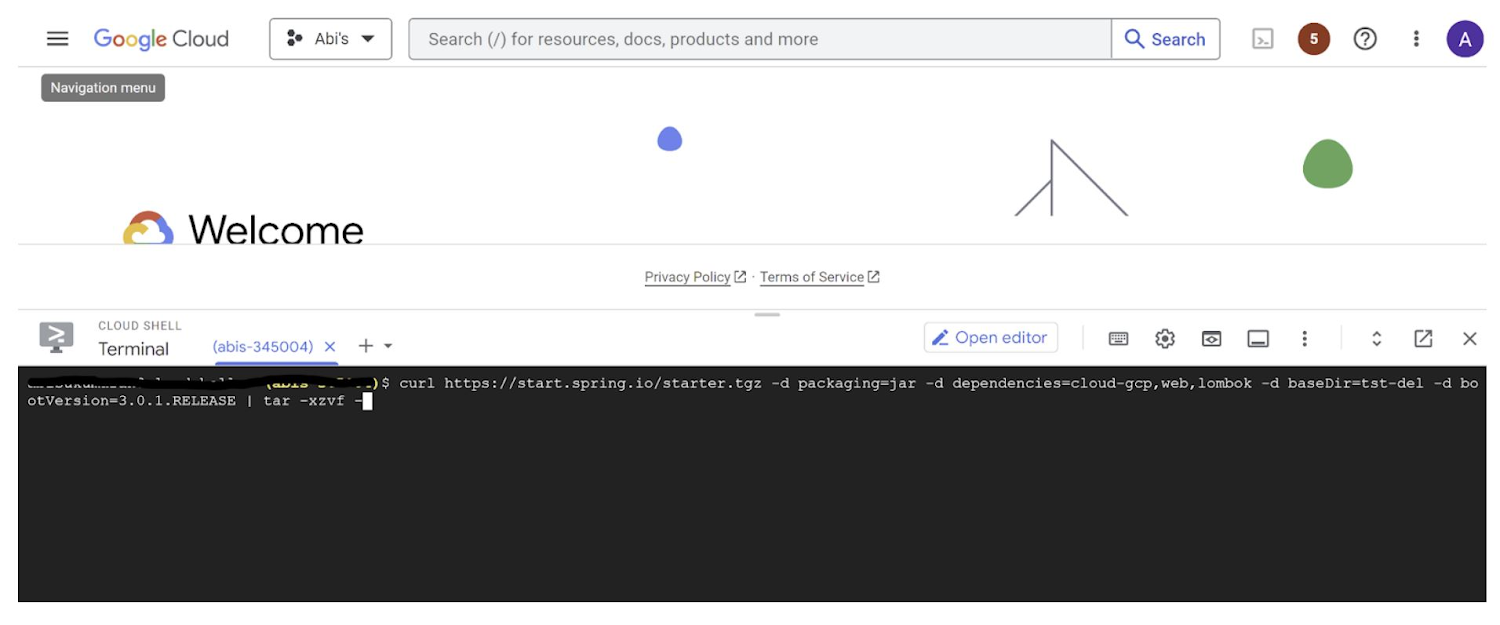
This creates a project structure under “spring-vision” as below:
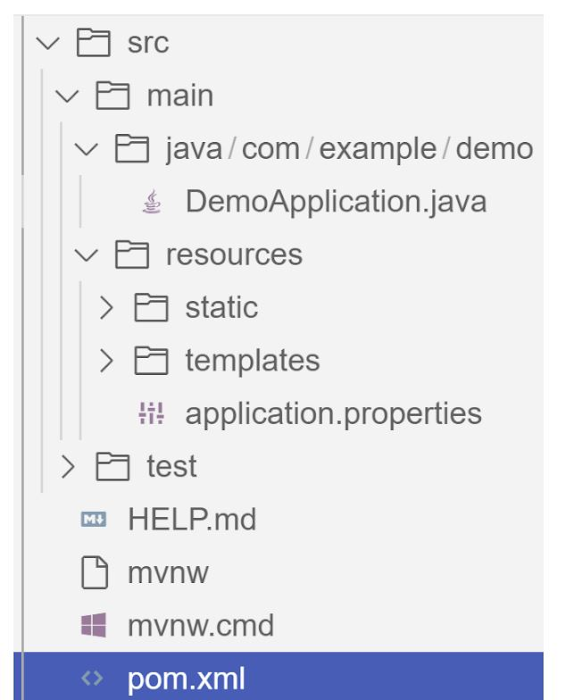
pom.xml contains all the dependencies for the project (dependencies you configured using this command are already added in your pom.xml).src/main/java/com/example/demo has the source classes .java files.resources contain the images, XML, text files and the static content the project uses that are maintained independently.application.properties enable you to maintain the admin features to define profile specific properties of the application.
Configuring the Vision API
Once you have the Vision API enabled, you have the option to configure the API credentials in your application. You can optionally use Application Default Credentials for setting up authentication. In this demo implementation however I have not implemented the use of credentials.
Implementing the vision and translation services
Create a service class that interacts with the Vision API. Inject the necessary dependencies and use the Vision API client to send image analysis requests. You can implement methods to perform tasks like image labeling, face detection, recognition, and more, based on your application’s requirements. In this demo, we will use handwriting extraction and translation methods. For this make sure you include the following dependencies in pom.xml
<dependency>
      <groupId>org.springframework.cloud</groupId>
      <artifactId>spring-cloud-gcp-starter-vision</artifactId>
</dependency>
<dependency>
<groupId>com.google.cloud</groupId>
<artifactId>google-cloud-translate</artifactId>
</dependency>Clone / Replace the following files from the repo and add them to the respective folders / path in the project structure:
Application.java(/src/main/java/com/example/demo)TranslateText.java(/src/main/java/com/example/demo)VisionController.java(/src/main/java/com/example/demo)index.html(/src/main/resources/static)result.html(/src/main/resources/templates)pom.xml
The method extractTextFromImage in the service org.springframework.cloud.gcp.vision.CloudVisionTemplate lets you extract text from your image input. The method getTranslatedText from the service com.google.cloud.translate.v3 lets you pass the extracted text from your image and get the translated text in the desired target language as response (if the source is in one of the supported languages list).
Building the REST API
Design and implement the REST endpoints that will expose the Vision API functionalities. Create controllers that handle incoming requests and utilize the Vision API service to process the images and return the analysis results.
In this demo, our VisionController class implements the endpoint, handles the incoming request, invokes the Vision API and Cloud Translation services and returns the result to the view layer. Implementation of the GET method for the REST endpoint is as follows:
@GetMapping("/extractText")
  public String extractText(String imageUrl) throws IOException {
    String textFromImage =
   this.cloudVisionTemplate.extractTextFromImage(this.resourceLoader.getResource(imageUrl));


    TranslateText translateText = new TranslateText();
    String result = translateText.translateText(textFromImage);
    return "Text from image translated: " + result;
  }
The TranslateText class in the above implementation has the method that invokes the Cloud Translation service:
String targetLanguage = "en";
 TranslateTextRequest request =
         TranslateTextRequest.newBuilder()
             .setParent(parent.toString())
             .setMimeType("text/plain")
             .setTargetLanguageCode(targetLanguage)
             .addContents(text)
             .build();
     TranslateTextResponse response = client.translateText(request);
     // Display the translation for each input text provided
     for (Translation translation : response.getTranslationsList()) {
       res = res + " ::: " + translation.getTranslatedText();
        System.out.printf("Translated text : %s\n", res);
     }
With the VisionController class, we have the GET method for the REST implemented.
Integrating Thymeleaf for frontend development
When building an application with Spring Boot, one popular choice for frontend development is to leverage the power of Thymeleaf. Thymeleaf is a server-side Java template engine that allows you to seamlessly integrate dynamic content into your HTML pages. Thymeleaf provides a smooth development experience by allowing you to create HTML templates with embedded server-side expressions. These expressions can be used to dynamically render data from your Spring Boot backend, making it easier to display the results of image analysis performed by the Vision API service.
To get started, ensure that you have the necessary dependencies for Thymeleaf in your Spring Boot project. You can include the Thymeleaf Starter dependency in your pom.xml:
<dependency>
<groupId>org.springframework.boot</groupId>
<artifactId>spring-boot-starter-thymeleaf</artifactId>
</dependency>
In your controller method, retrieve the analysis result from the Vision API service and add it to the model. The model represents the data that will be used by Thymeleaf to render the HTML template. Once the model is populated, return the name of the Thymeleaf template that you want to render. Thymeleaf will take care of processing the template, substituting the server-side expressions with the actual data, and generating the final HTML that will be sent to the client’s browser. Example:
return new ModelAndView("result", <<YOUR RESULT>>);In the case of the extractText method in VisionController, we have returned the result as a String to and not added to the model. But we have invoked the GET method extractText method on the index.html on page submit.
<form action="/extractText">

        Web URL of image to analyze:

        <input type="text"

               name="imageUrl"

               value=""

        <input type="submit" value="Read and Translate" />

</form>
With Thymeleaf, you can create a seamless user experience, where users can upload images, trigger Vision API analyses, and view the results in real-time. Unlock the full potential of your Vision AI application by harnessing the power of Thymeleaf for frontend development.
Deploying your Spring Boot application with Cloud Run
Write unit tests for your service and controller classes to ensure proper functionality under the /src/test/java/com/example folder. Once you’re confident in its stability, package it into a deployable artifact, such as a JAR file, and deploy it to Cloud Run, a serverless compute platform on Google Cloud. In this step, we will focus on deploying your containerized Spring Boot application using Cloud Run.
a. Package your application by executing the following steps from Cloud Shell(make sure the terminal is prompting at the project root folder)
Build:
./mvnw package
Once the build is successful, run locally to test:
./mvnw spring-boot:run
b. Containerize your Spring Boot Application with Jib:
Instead of manually creating a Dockerfile and building the container image, you can use the Jib utility to simplify the containerization process. Jib is a plugin that integrates directly with your build tool (such as Maven or Gradle) and allows you to build optimized container images without writing a Dockerfile. Before proceeding, you need to enable the Artifact Registry API (Use of Artifact Registry is encouraged over container registry). Then Run Jib to build a Docker image and publish to the Registry:
$ ./mvnw com.google.cloud.tools:jib-maven-plugin:3.1.1:build -Dimage=gcr.io/$GOOGLE_CLOUD_PROJECT/vision-jib
Note: In this experiment, we did not configure the Jib Maven plugin in pom.xml, but for advanced usage, it is possible to add it in pom.xml with more configuration options
c. Deploy the container (that we pushed to Artifact Registry in the previous step) to Cloud Run. This is again a one-command step:
gcloud run deploy vision-app --image gcr.io/$GOOGLE_CLOUD_PROJECT/vision-jib --platform managed --region us-central1 --allow-unauthenticated --update-env-vars
You can alternatively do this from the UI as well. Navigate to the Google Cloud Console and locate the Cloud Run service. Click on “Create Service” and follow the on-screen instructions. Specify the container image you previously pushed to the registry, configure the desired deployment settings (such as CPU allocation and autoscaling), and choose the appropriate region for deployment. You can set environment variables specific to your application. These variables can include authentication credentials (API keys etc.), database connection strings, or any other configuration needed for your Vision AI application to function correctly. When the deployment is completed successfully, you should get an endpoint to your application.
For our demo, the endpoint Cloud Run created for us is: https://vision-app-********-uc.a.run.app
Playing with your Vision AI app
For demo purposes, you can use the image URL below for your app to read and translate:
https://storage.googleapis.com/img_public_test/tamilwriting1.jfif
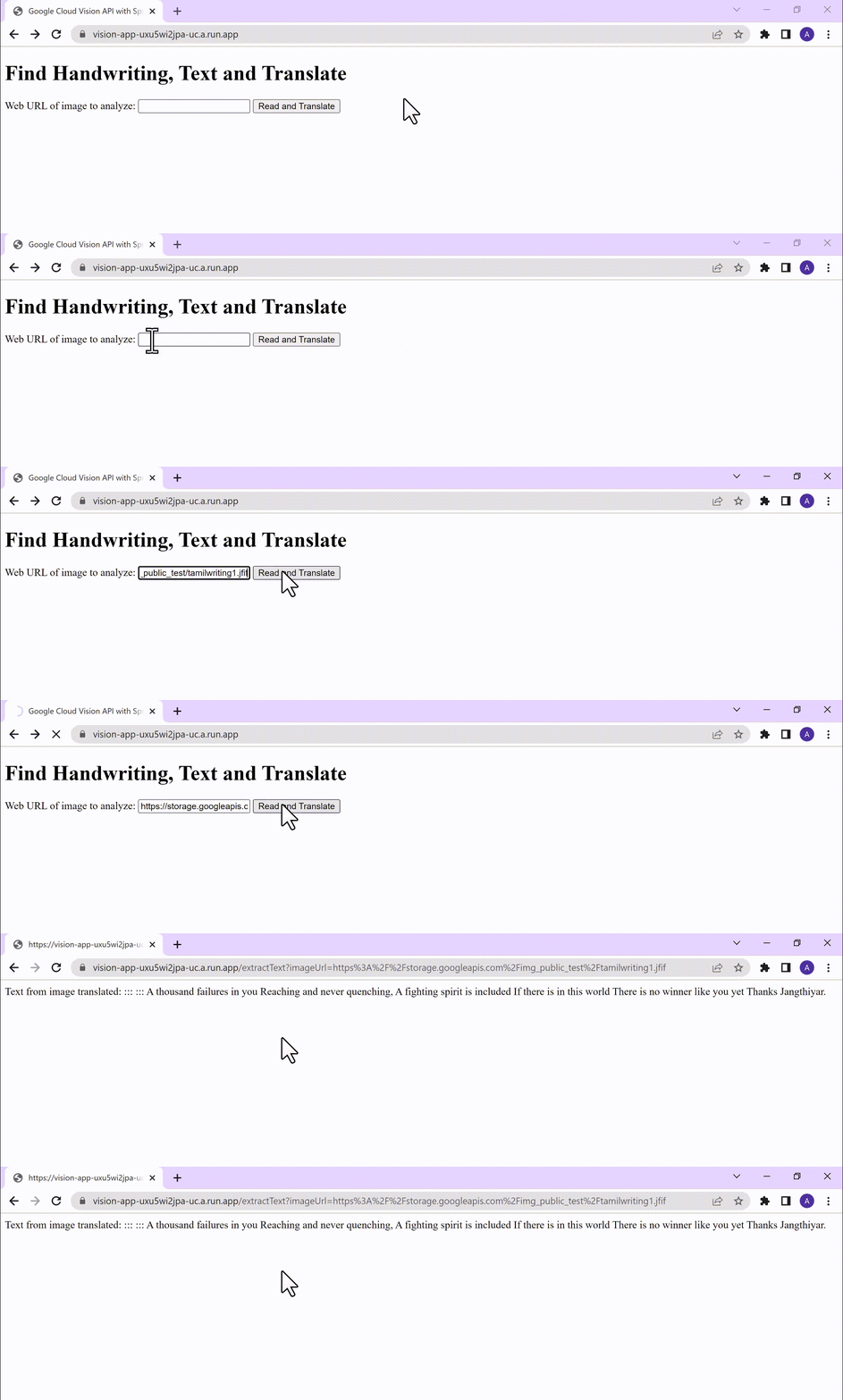
Conclusion
Congratulations! You have successfully created a Vision AI application using Spring Boot and Java. With the power of Vision AI, your application can now perform sophisticated image analysis, including labeling, face detection, and more. The integration of Spring Boot provides a solid foundation for building scalable and robust Google Cloud Native applications. Continue exploring the vast capabilities of Vision AI, Cloud Run, Cloud Translation and more to enhance your application with additional features and functionalities. To learn more, check out the Vision API, Cloud Translation, and GCP Spring docs. Try out the same experiment with the Spring Native option!! Also as a sneak-peak to Gen-AI world, checkout how this API shows up in Model Garden.
IT Prediction: The Importance of Workload-Optimized, Ultra-Reliable Infrastructure in Today’s World
2546
Of your peers have already read this article.
2:30 Minutes
The most insightful time you'll spend today!
Editor’s note: This post is part of an ongoing series on IT predictions from Google Cloud experts. Check out the full list of our predictions on how IT will change in the coming years.
Prediction: By 2025, over half of cloud infrastructure decisions will be automated by AI and ML
Google’s infrastructure is designed with scale-out capabilities to support billions of people, powering services like Search, YouTube, and Gmail every day. To do that, we’ve had to pioneer global-scale computing and storage systems and shorten network latency and distance limitations with new innovations. Along the way, we’ve come to see cloud infrastructure as more than a simple commodity — it’s a source of inspiration and new capabilities.
But even as the demand on the industry’s cloud infrastructure continues to increase, there are simultaneously plateaus in the efficiency available from the underlying hardware. In the past, we saw annual performance gains of 30-40%, levels that often enabled a single infrastructure configuration to meet the needs of the vast majority of workloads. As these improvements have slowed and new workloads such as AI/ML and analytics have emerged, we have seen a corresponding explosion in the variety and capability of infrastructure. While empowering, the burden of picking the right combination of infrastructure components for a given workload still falls on an organization’s cloud architects.
But by 2025, we predict that the burden and complexity of infrastructure decision making will disappear through the power of AI and ML automation, which will automatically combine purpose-built infrastructure, prescriptive architectures, and an ecosystem to deliver a workload-optimized, ultra-reliable infrastructure. The focus for cloud architects will therefore be on enabling business logic and innovation, rather than how that logic maps to underlying infrastructure.
Already, we are making investments to turn this vision into reality, building custom silicon like the Infrastructure Processing Unit (IPU) for our new C3 VMs or a liquid-cooled board for the new tensor processing unit. The latter, the TPU v4 platform, is likely the world’s fastest, largest, and most efficient machine learning supercomputer. It can train large-scale workloads up to 80% faster and 50% cheaper than alternatives. Put another way, TPU v4 will nearly double the performance of critical ML and AI services at half the cost, unlocking new possibilities for what organizations can achieve when leveraging large-scale learning and inference for business services.
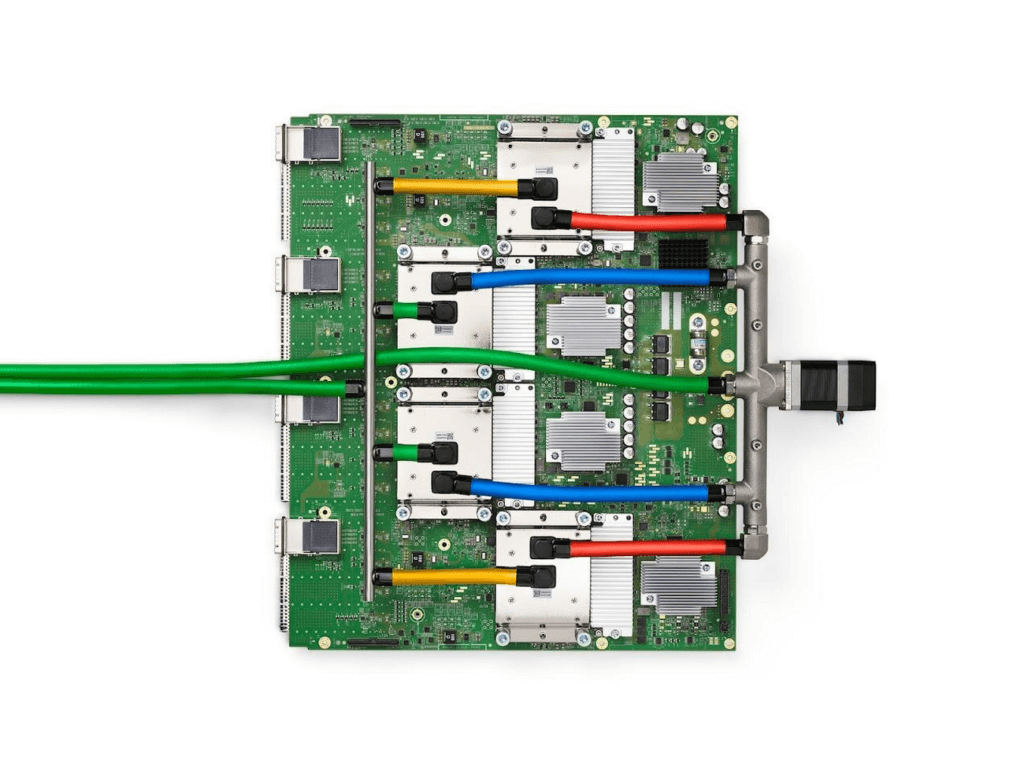
The TPUv4
These same IPUs and TPUs represent the foundation that will make it possible to automate cloud infrastructure decisions. They’ll be able to support the telemetry data and ML-based analytics for proactive infrastructure recommendations that will increase the performance and reliability of workloads.
Instead of determining hardware specifications and building the right infrastructure, you’ll only need to specify a workload. AI and ML will take over the burden and recommend, configure, and identify the best options based on your budgetary, performance, and scaling requirements. What is most exciting for us is how this will enable a much more rapid pace of service innovation, which is the primary end goal of great cloud infrastructure.
3957
Of your peers have already watched this video.
1:30 Minutes
The most insightful time you'll spend today!
90-Sec Demos of Truly Incredible Customer Care Calls Powered By AI
How real, fast, and easy do you think an AI-powered call center experience is for customers today?
It’s likely you have seen AI-powered chatbots and are deeply unimpressed with the static nature of the interaction between customers and service representatives.
But that’s not how Google Cloud’s AI-powered contact centers are.
Here have a look yourself. Here’s what a customer from a bank or financial organisation would experience.
And here’s what a customer from a telecom company would experience.
More Relevant Stories for Your Company

Built on Google Cloud, Enexor’s Bio-CHP Unit Powers 100 Homes with Renewable Energy!
Editor’s note: Earth Day reminds us that we all can contribute to creating a cleaner, healthier, and more sustainable future. Google Cloud is excited to celebrate innovative startup companies developing new technology and driving sustainable change. On this year’s Earth Day we’re highlighting Enexor BioEnergy and their initiative to produce
Data Science Teams: A Practitioners Guide to MLOps
Across industries, DevOps and DataOps have been widely adopted as methodologies to improve quality and reduce the time to market of software engineering and data engineering initiatives. With the rapid growth in machine learning (ML) systems, similar approaches need to be developed in the context of ML engineering, which handle

ShareChat Builds its Diverse, Hyperlocal Social Network. Thanks to Google Cloud
Editor’s note: Today’s guest post comes from Indian social media platform ShareChat. Here’s the story of how they improved performance, app development, and analytics for serving regional content to millions of users using Google Cloud. How do you create a social network when your country has 22 major official languages and

IBL Education’s GenAI-based chat mentor with Google
With more than 6 years of experience in building open source and Generative AI in education at scale, ibleducation.com continues to evolve its approach and services. More recently, the company became an education-focused Vertex AI integrator. They provide enterprises and academic institutions with a platform to build, train and securely customize large language models
