





IT Team Figures Out Easiest Way to Build Data Pipelines and Create ML Models

14084
Of your peers have already read this article.
5:15 Minutes
The most insightful time you'll spend today!
Building a strong brand in today’s hyper-competitive business environment takes vision. It also requires a flexible, easily managed approach to digital asset management (DAM), so marketing professionals and other stakeholders can easily share, store, track, and manipulate assets to build the brand.
Many of today’s leading companies, including JetBlue, Slack, TripAdvisor, Lyft, and HealthONE, rely on Brandfolder to deliver consistent, organized, and efficient brand experiences. Brandfolder provides an easy-to-use platform that can scale across an entire company with little end-user training, empowering customers to distribute digital assets wherever they are needed. Customers also gain much greater insight into how those assets are used, and how to use them more effectively in marketing campaigns and brand messaging.
“Google Cloud made it easy to build an ML platform to quickly iterate through different brand intelligence use cases and release data-driven product features into the Brandfolder platform.”
—Ajay Rajasekharan, Head of Data Science, Brandfolder
Brandfolder is constantly advancing its development efforts to introduce new data-driven features without complicating the user experience. Big data, artificial intelligence (AI), and machine learning (ML) are key to meeting customers’ unique business needs, and essential for Brandfolder to compete in the fast-moving DAM industry. To enhance these capabilities, Brandfolder sought a public cloud provider that could help it scale its data pipeline cost effectively while providing access to advanced AI technologies.
After graduating from the Techstars startup accelerator program in 2013, Brandfolder tried two other cloud providers before standardizing on Google Cloud Platform (GCP).
“We saw a difference with Google Cloud from the very beginning because the interactions felt like a strategic relationship,” says Jim Hanifen, Head of Product at Brandfolder. “Google gave us startup credits and a lot of face-to-face support, which we hadn’t experienced with other cloud providers. We decided to move our entire infrastructure to Google Cloud Platform.”
Building an ML platform for brand intelligence
After performing an initial lift-and-shift migration of virtual machines (VMs) onto Compute Engine, Brandfolder built an ML platform using GCP managed services to seamlessly deliver its data products. The platform leverages Cloud SQL, Cloud Storage as the data lake, Cloud Dataproc for cloud-native Apache Spark computing clusters, Cloud Composer as the batch job scheduler, Cloud Pub/Sub as the backbone data pipeline, Container Registry to store Docker images, and Google Kubernetes Engine (GKE) as the application orchestrator. Cloud Dataflow brings data into the data lake and into BigQuery for analysis.
“Google Cloud made it easy to build an ML platform to quickly iterate through different brand intelligence use cases and release data-driven product features into the Brandfolder platform,” says Ajay Rajasekharan, Head of Data Science at Brandfolder, who describes the architecture in a detailed blog. “We simply ingest raw application and event data on one end and output an ML service on the other.”
“Moving to Google Cloud Platform allows us to complete more sophisticated data analysis and ML models much faster, and at a much lower cost. We can create brand-specific ML models 12x faster and get them into production quickly to address our customers’ unique business needs.”
—Brett Nekolny, Head of Engineering, Brandfolder
For many general use cases, Brandfolder does not need to build custom ML models, and instead relies on pre-trained API models from GCP. For example, it uses Vision API and Video Intelligence API to auto-tag creative assets on import to enable fast, intuitive searches across images and videos. When more product- and brand-specific modeling is required to address unique customer use cases, Brandfolder builds and trains custom ML models using its GCP pipeline or Cloud AutoML, a suite of products built on Google transfer learning and neural architecture search technology. For example, if a Brandfolder customer makes different types of grills, Brandfolder can use AutoML Vision to train a model to recognize the different grills.
“Moving to Google Cloud Platform allows us to complete more sophisticated data analysis and ML models much faster, and at a much lower cost,” explains Brett Nekolny, Head of Engineering at Brandfolder. “We can create brand-specific ML models 12x faster and get them into production quickly to address our customers’ unique business needs.”
Industry-leading security and performance
Google Cloud’s security model helps Brandfolder give existing and prospective customers peace of mind that their data will be protected. Cloud Identity & Access Management (Cloud IAM) provides enterprise-grade access control, while Cloud Identity-Aware Proxy (Cloud IAP) enables remote users to work more securely without the hassles of a VPN client. GCP also isolates cloud resources into projects, making it easy to assign permissions and keep data and VMs organized and segregated.
“With Google Cloud, everything begins and ends with security, which makes things very easy for us,” says Jim. “If we’re under a security review, we can submit a Google security white paper. If a potential customer has security concerns, we tell them we are hosted on GCP, and those concerns go away.”
To give customers even better application performance for accessing their brand assets, Brandfolder uses Cloud Memorystore, an in-memory data store service for Redis, to cache data and provide sub-millisecond data access for production applications.
“It was much easier for us to use Cloud Memorystore versus running Redis on our compute instances,” says Brett. “The high availability, replication across zones, and automatic failover with no data loss are big for us.”
Global private network interconnects between Google Cloud and the Fastly content delivery network (CDN) dramatically reduce latency, allowing Brandfolder’s customers to deliver and update even very large creative assets quickly around the world.
“What’s beautiful about the relationship between Google and Fastly is that if one of our customers uploads a new version of an asset, we can propagate that out to Fastly, and the new version will automatically show up in all the places where it’s referenced,” says Brett.
“The ability to quickly solve problems with AI has a substantial impact on our revenue, and that’s more apparent every quarter. Few of our competitors are doing product- or brand-specific modeling because it takes a lot of time and resources. We overcame those hurdles with Google Cloud.”
—Jim Hanifen, Head of Product, Brandfolder
Improving employee and customer productivity
Brandfolder also uses Google solutions for real-time collaboration and productivity, using G Suite to connect employees with intuitive, cloud-based apps. Teams use Gmail, Calendar, Docs, Drive, Sheets, Slides, and Hangouts Meet every day to move the business forward. Many of Brandfolder’s customers are also G Suite users, and Brandfolder offers a plug-in that allows them to view their creative assets inside of Docs and pull images in as needed. Customers can also log into Brandfolder with their G Suite credentials, making the solution even easier to use.
“We’ve been using G Suite since the beginning, and it’s helped us collaborate efficiently to build a successful, growing company,” says Jim. “Our teams expect to have that kind of close collaboration, and everyone here enjoys the G Suite experience.”
Driving 99 percent annual business growth
With automated tagging and other innovative AI-based features, Brandfolder is helping customers locate and distribute assets faster. As a result, Brandfolder is building customer loyalty and increasing sales, growing its business by 99 percent year-over-year. Since moving to GCP, Brandfolder has been able to scale its analytics and data pipeline 50x without a corresponding increase in costs and has not had to expand its development team.
“The ability to quickly solve problems with AI has a substantial impact on our revenue, and that’s more apparent every quarter,” says Jim. “Few of our competitors are doing product- or brand-specific modeling because it takes a lot of time and resources. We overcame those hurdles with Google Cloud.”
How a Mid-Sized Firm is Shrinking Inventory Carryovers 50% with AI

7445
Of your peers have already read this article.
5:30 Minutes
The most insightful time you'll spend today!
For more than 10 years, NMK Textile Mills has manufactured bed linens for major retailers in the United States and Canada. As e-commerce exploded, the company’s co-founder saw an opportunity to grow the business. So, in addition to manufacturing bed linens wholesale for retail customers, NMK Textile Mills reworked its complete supply chain to manufacture products for California Design Den, which became an e-commerce retailer selling its own fashion-forward products directly to consumers online.
With California Design Den’s push into e-commerce, it became apparent the SMB company (with about 250 global employees) faced the same tough supply chain questions as large retail customers, including maintaining enough inventory to meet customer demand in a timely, efficient way.
California Design Den depended upon a myriad of systems to track its complex forecasting and reordering processes. Team members typically planned inventory manually using desktop spreadsheet software, which could lead to excess inventory. Accurately forecasting demand and supply was essential to the company’s financial success—but it was also a challenge.
A couple years ago, California Design Den partnered with Pluto7, a technology solutions provider that offers a software as a service (SaaS) called Planning In A Box. Leveraging Google Cloud Platform machine learning and artificial intelligence, Planning In A Box intelligently helps predict demand and balances it with supply.
But that was just the beginning. “Along the way, we realized that to compete with larger retailers, make quicker decisions, and move faster, we needed to go further,” says Deepak Mehrotra, Co-founder and Chief Adventurer at California Design Den.
With guidance from Pluto7, California Design Den began migrating its database to Google Cloud Platform. Using Google BigQuery, Google Compute Engine, Google Cloud SQL, and Google Cloud Storage, and experimenting with Google Cloud Vision and Google Cloud AutoML, the company is reducing inventory carryovers by more than 50%, improving the accuracy of demand planning quarter over quarter, and gaining granular insights into how individual SKUs are performing.
“We would need an army of data scientists to make faster decisions on pricing and inventory levels. With Google Cloud Platform machine learning and artificial intelligence, we don’t need that. We can make much faster pricing decisions to optimize profitability and move inventory.”
—Deepak Mehrotra, Co-founder and Chief Adventurer, California Design Den
No need for army of data scientists
“Using Google Cloud Platform machine learning and AI was essential for California Design Den if it was to compete successfully with larger retailers,” Deepak says.
For example, tastes and fashions in bed linens can change quickly and consumer prices fluctuate. With more than 2,500 SKUs, it wasn’t possible for California Design Den’s team to continuously monitor product demand and experiment with competitive pricing in real time.
“We would need an army of data scientists to make faster decisions on pricing and inventory levels,” says Deepak. “With Google Cloud Platform machine learning and artificial intelligence, we don’t need that. We can make much faster pricing decisions to optimize profitability and move inventory.”
By integrating all its data onto Google Cloud Platform, California Design Den’s team gains deeper insights into product sales over time, which in turn helps the company improve demand planning by better determining which styles to manufacture and sell in the future.
“When experienced employees leave, their knowledge leaves with them. By having all data in one place, and with machine learning and AI, California Design Den can go back in its history, look at products made or sold years ago, and analyze product performance.”
—Deepak Mehrotra, Co-founder and Chief Adventurer, California Design Den
Merging visuals with data
Before Google Cloud Platform, team members had to dig through spreadsheets and run scenarios to get a sense of how particular products had sold. The next step was to perform keyword searches across the company’s photo library in the cloud to find each product’s image. From there, a team member would insert the product images into a presentation, along with relevant data points, to provide a report for stakeholders on how particular styles performed.
Today, California Design Den, with the help of Pluto7, is integrating its entire product image library with its database on Google Cloud Platform. Experimenting with Google Cloud Vision and Google Cloud AutoML, California Design Den is moving towards a day when team members can run sales scenarios and get deep background data on individual product performance while viewing images of the relevant products.
Merging product visuals with data will help designers and team members better understand sales patterns over time and in context. In the past, making correlations between things like which sheet colors sold well in California, compared to how the same sheet colors performed on the East Coast, was something that California Design Den employees primarily did in their heads.
“When experienced employees leave, their knowledge goes with them,” says Manjunath Devadas, Founder and CEO at Pluto7. “By having all data in one place, and with machine learning and AI, California Design Den can go back in its history, look at products made or sold years ago, and analyze product performance.”
“We are literally growing the complexity of our business on all levels, including designing, manufacturing, selling, reordering, inventory holding—everything.”
—Deepak Mehrotra, Co-founder and Chief Adventurer, California Design Den
Reimagining supply-demand balancing
Pluto7’s mission statement is to democratize supply demand balancing with machine learning and AI. California Design Den is a case in point, as the combination of Planning In A Box and Google Cloud Platform gives the company greater control over its destiny.
“Big retailers used to tell us what to manufacture and how much they would pay for it,” says Deepak. “That was our primary business, and if we didn’t accept the terms, a competitor would.” Today, in addition to continuing to make products for retailers, California Design Den can design, make, and sell a variety of designs for itself, including custom and limited-edition products, thanks to Google Cloud Platform and Pluto7 software offerings. The payoff is not only in having a more diversified business. California Design Den also receives more favorable profit margins by selling its own products.
“We are literally growing the complexity of our business on all levels, including designing, manufacturing, selling, reordering, inventory holding—everything,” Deepak says. “We can make smaller batches. We can connect directly with consumers. We can identify the missing pieces—what should we produce next, when, and how much? We otherwise couldn’t afford the level of talent it would take to do this.”
Cutting through the noise
Google and Pluto7 software helped California Design Den reduce inventory carryovers by more than 50%. Inventory tracking and distribution, along with insights and visibility into product sales, are faster, more efficient, and accurate. Google Cloud Platform flexible pricing, speed, reliability, security, and scalability enable California Design Den to stay relevant and be more competitive.
In addition to benefiting from Google Cloud Platform, California Design Den relies on G Suite—also part of Google Cloud—to enhance collaboration among its global teams. Previously, the company’s email server would sometimes crash, due to the heavy load of sharing product photos and other data. “Gmail and Google Drive handle the everyday demands on the business effortlessly and reliably,” Deepak says.
“Google machine learning and AI enable us to cut through all the noise from raw data, so we can see what’s important. We can focus on analytics to guide us to success today and in the future.”
—Deepak Mehrotra, Co-founder and Chief Adventurer, California Design Den
The company is exploring additional ways to leverage Google Cloud Platform in the near future. For example, one possibility is to import customer reviews from sites where products are sold into Google BigQuery, and to use that data to perform sentiment analysis via Google Cloud Natural Language. It could provide another valuable data source to help California Design Den’s team decide where to focus future designs.
“Google machine learning and AI enable us to cut through all the noise from raw data, so we can see what’s important,” Deepak says. “We can focus on analytics to guide us to success today and in the future.”

5435
Of your peers have already downloaded this article
14:30 Minutes
The most insightful time you'll spend today!
To make great products: do machine learning like the great engineer you are, not like the great machine learning expert you aren’t.
Most of the problems you will face are, in fact, engineering problems. Even with all the resources of a great machine learning expert, most of the gains come from great features, not great machine learning algorithms. So, the basic approach is:
- Make sure your pipeline is solid end to end.
- Start with a reasonable objective.
- Add common-sense features in a simple way.
- Make sure that your pipeline stays solid.
This approach will work well for a long period of time. Diverge from this approach only when there are no more simple tricks to get you any farther. Adding complexity slows future releases.
Once you’ve exhausted the simple tricks, cutting-edge machine learning might indeed be in your future. See the section on Phase III machine learning projects.
This document is arranged as follows:
- The first part should help you understand whether the time is right for building a machine learning system.
- The second part is about deploying your first pipeline.
- The third part is about launching and iterating while adding new features to your pipeline, how to evaluate models and training-serving skew.
- The final part is about what to do when you reach a plateau.
- Afterwards, there is a list of related work and an appendix with some background on the systems commonly used as examples in this document.
Making Streaming Analytics Simpler and More Cost-Effective With Cloud Dataflow

3886
Of your peers have already read this article.
8:30 Minutes
The most insightful time you'll spend today!
Streaming analytics helps businesses to understand their customers in real time and adjust their offerings and actions to better serve customer needs. It’s an important part of modern data analytics, and can open up possibilities for faster decisions.
For streaming analytics projects to be successful, the tools have to be easy to use, familiar, and cost-effective. Since its launch in 2015, Cloud Dataflow, Google’s fully managed streaming analytics service, has been known for its powerful API available in Java and Python. Businesses have almost unlimited customization capabilities for their streaming pipelines when they use these two languages, but these capabilities come at the cost of needing programming skills that are sometimes hard to find.
To advance Google Cloud’s streaming analytics further, Google Cloud is announcing new features available in the public preview for Cloud Dataflow SQL, as well as the general availability of Cloud Dataflow Flexible Resource Scheduling (FlexRS) for a very cost-effective way of batch processing of events. These new features make streaming analytics easier and more accessible to data engineers, particularly those with database experience.
Here’s more detail about each of these new features:
Cloud Dataflow SQL to create streaming (and batch) pipelines using SQL
We know that SQL is the standard for defining data transformations, and that you want more GUI-based tools for creating pipelines. With that in mind, several months ago we launched a public preview of Cloud Dataflow SQL, an easy way to use SQL queries to develop and run Cloud Dataflow jobs from the BigQuery web UI. Today, we are launching several new features in Cloud Dataflow SQL, including Cloud Storage file support and a visual schema editor.
Cloud Dataflow SQL allows you to join Cloud Pub/Sub streams with BigQuery tables and Cloud Storage files. It also provides several additional features:
- Using Streaming SQL extensions for defining time windows and calculating window-based statistics;
- Integration with Cloud Data Catalog for storing the schema of Cloud Pub/Sub topics and Cloud Storage file sets—a key enabler for using SQL with streaming messages;
- A simple-to-use graphical editor available in the BigQuery web UI. If you are familiar with BigQuery’s SQL editor, you can create Cloud Dataflow SQL jobs.
To switch the BigQuery web UI to Cloud Dataflow SQL editing mode, open the BigQuery web UI, go to More>Query settings and select “Cloud Dataflow” as the query engine.
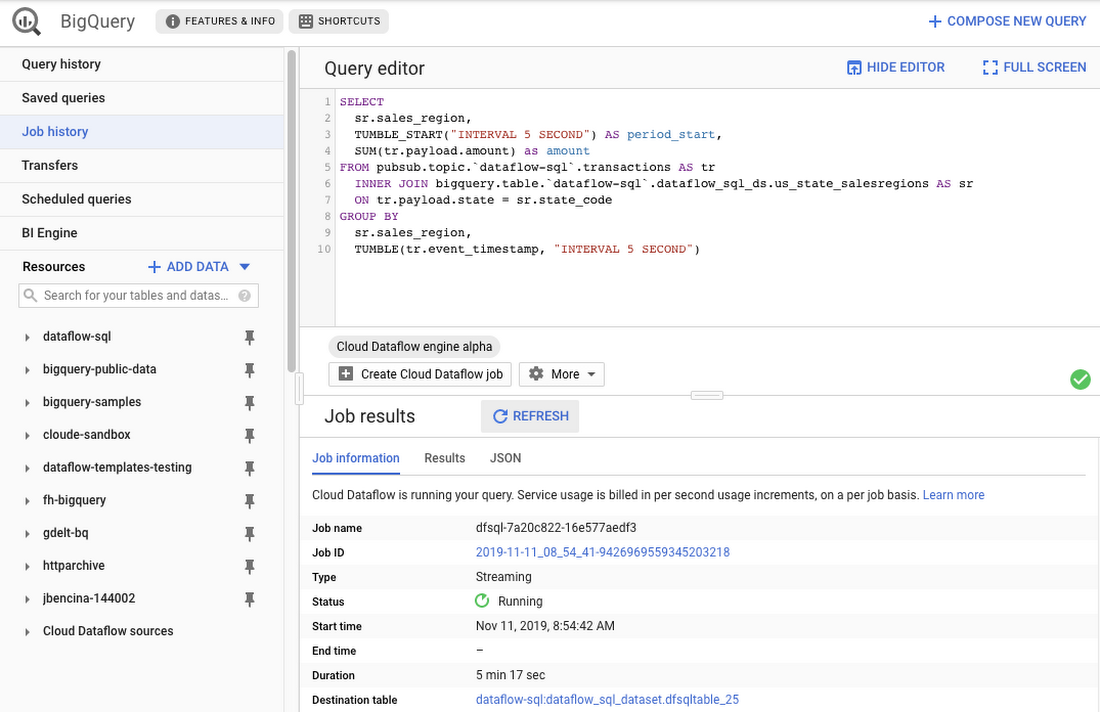
As an example, let’s say you have a Cloud Pub/Sub stream of sales transactions, and you want to build a real-time dashboard for the sales managers of your organization showing them the up-to-date stats of the sales in their regions. You can accomplish this in a few steps: write a SQL statement like the following one, launch a Cloud Dataflow SQL job, direct the output to a BigQuery table, then use one of the many supported dashboarding tools, including Google Sheets, Data Studio, and others, to visualize the results.
SELECTsr.sales_region,TUMBLE_START("INTERVAL 5 SECOND") AS period_start,SUM(tr.payload.amount) as amountFROM pubsub.topic.`dataflow-sql`.transactions AS trINNER JOIN bigquery.table.`dataflow-sql`.dataflow_sql_ds.us_state_salesregions AS srON tr.payload.state = sr.state_codeGROUP BYsr.sales_region,TUMBLE(tr.event_timestamp, "INTERVAL 5 SECOND")
In this example, we are joining the “transactions” Cloud Pub/Sub topic in the “dataflow-sql” project with a metadata table in BigQuery called “us_state_salesregions.” This table contains a mapping between the state codes (present in the “transactions” Cloud Pub/Sub topic) and the sales regions “Region_1”, “Region_2”, .., “Region_N” that are relevant to the sales managers in our example organization. In addition to the join, we’ll do a streaming aggregation of our data, using one of the several windowing functions supported by Cloud Dataflow. In our case, we will use TUMBLE windows, which will divide our stream into fixed five-second time intervals, group all the data in those time windows by the sales_region field, and calculate the sum of sales in the sales region. We also want to preserve the start of each time window, via TUMBLE_START("INTERVAL 5 SECOND"), to plot sales amounts as a time series.
To start a Cloud Dataflow job, click on “Create Cloud Dataflow job” in the BigQuery web UI.
When data starts flowing into the destination table, it will contain three fields: the sales_region, the timestamp of the period start, and the amount of sales.
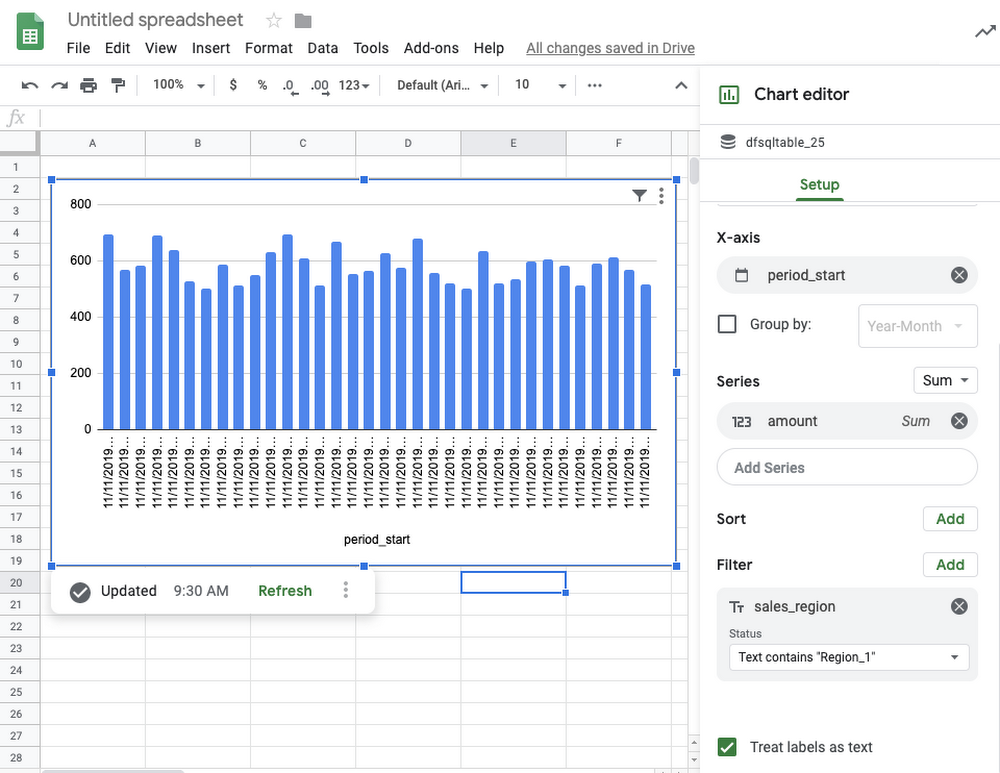
In the next step, we will create a BigQuery Connected Sheet that shows a column chart of sales in “Region_1” over time. Select the destination BigQuery table in the nav tree. In our case, it’s the dfsqltable_25 table.
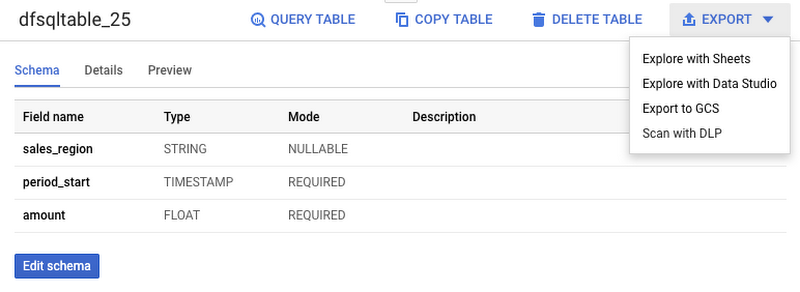
Then, select Export>Explore with Sheets to chart your data. Do it from the tab where your BigQuery table is shown, and not from the tab where your original Cloud Dataflow SQL was. In Sheets, create the column chart using the data connection to BigQuery, and choose period_start for the X-axis, amount as your data series, and add a sales_region filter. This is all you have to do to build a chart in Sheets that visualizes streaming data.
Mixing and joining data in Cloud Pub/Sub and BigQuery helps solve many real-time dashboarding cases, but quite a few customers have also asked for support of their Cloud Storage files to join those files with events in Cloud Pub/Sub or with tables in BigQuery. This is now possible in Dataflow SQL, enabled by our integration with Data Catalog’s Cloud Storage file sets.
In the following example, you’ll see an archive of transactions stored in CSV files in the “transactions_archive” Cloud Storage bucket.
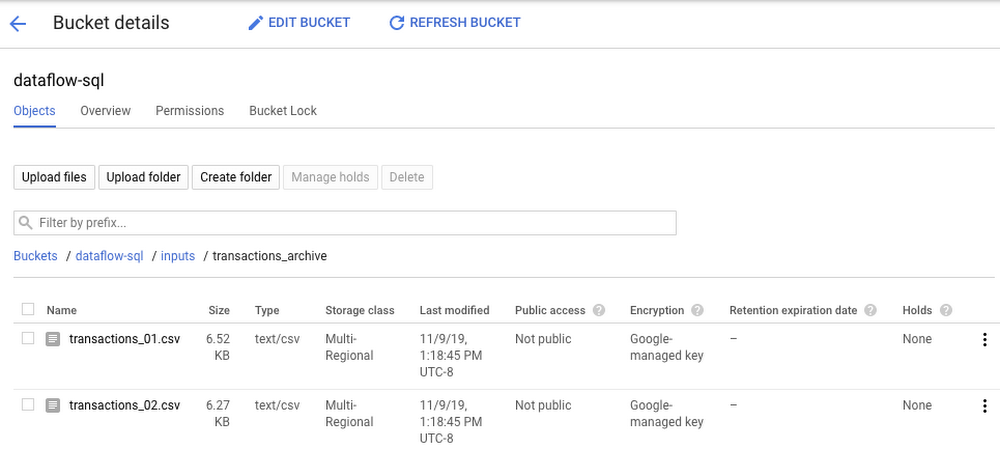
Two gcloud commands can define a Cloud Storage file set and entry group in Data Catalog.
#Create a GCS entrygroupgcloud beta data-catalog entry-groups create transactions_archive_eg --location=us-central1#Create the filesetgcloud beta data-catalog entries create transactions_archive_fs --location=us-central1 --entry-group=transactions_archive_eg --gcs-file-patterns=gs://dataflow-sql/inputs/transactions_archive/*.csv --description="Historical Archive of Transactions"
Notice how we defined the file pattern “gs://dataflow-sql/inputs/transactions_archive/*.csv” as part of the file set entry definition. This pattern is what will allow Cloud Dataflow to find the CSV files once we write the SQL statement that references this file set.
We can even specify the schema of this transactions_archive_fs file set using a GUI editor. For that, go to the BigQuery web UI (make sure it is running in Cloud Dataflow mode), select “Add Data” in the left navigation and choose “Cloud Dataflow sources.” Search for your newly added Cloud Storage file set and add it to your active datasets in the BigQuery UI.
This will allow you to edit the schema of your file set after you select it in the nav tree. The “Edit schema” button is right there on the “Schema” tab. The visual schema editor is new and works for both Cloud Storage file sets as well as for Cloud Pub/Sub topics.
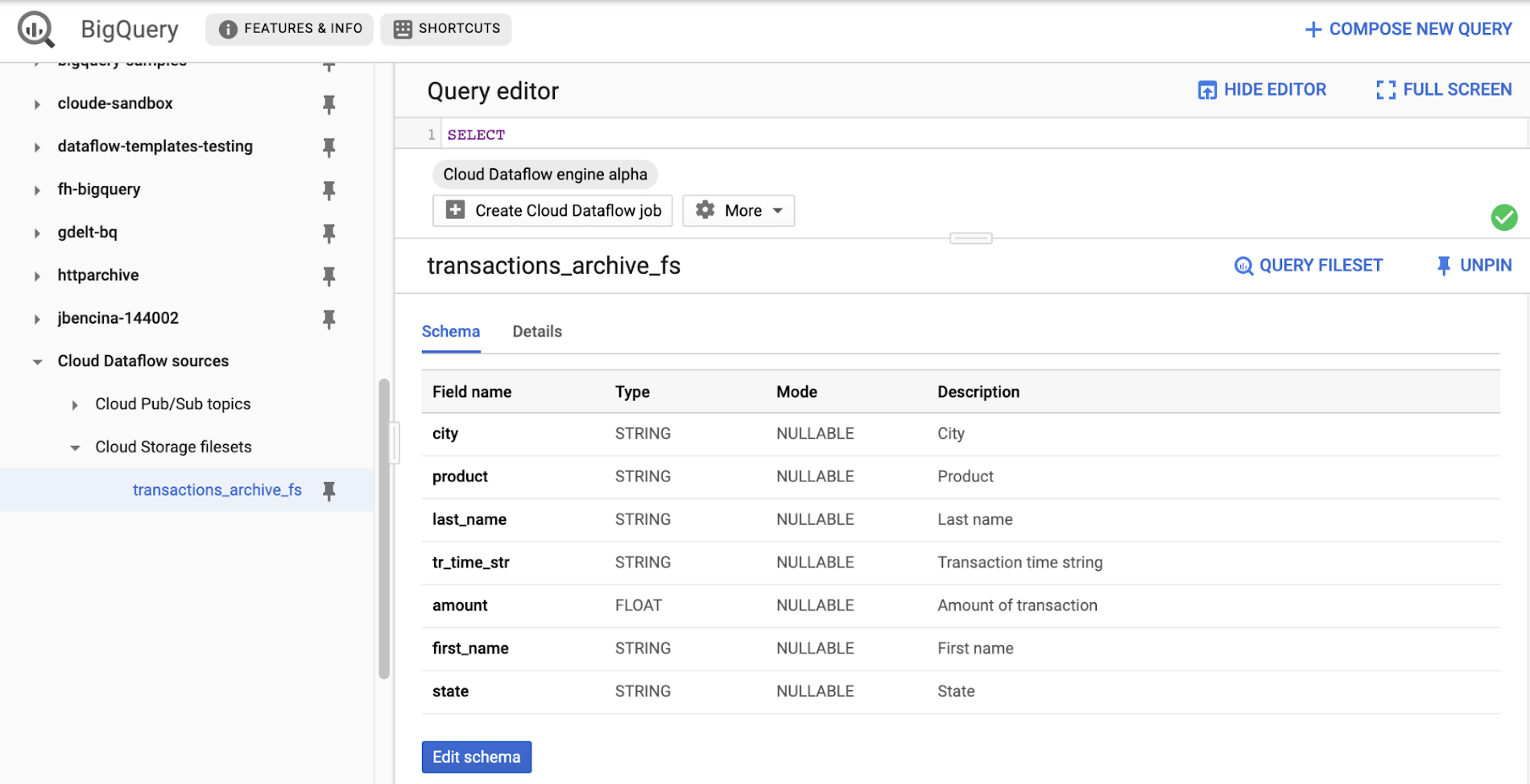
Once you’ve registered the file set in Data Catalog and defined a schema for it, you can query it in Cloud Dataflow SQL. In the next example, we’ll join the transactions archive in Cloud Storage with the metadata mapping table in BigQuery.
SELECTsr.sales_region,TUMBLE_START("INTERVAL 5 SECOND") AS period_start,SUM(tr.amount) as amountFROM datacatalog.entry.`dataflow-sql`.`us-central1`.transactions_archive_eg.transactions_archive_fs AS trINNER JOIN bigquery.table.`dataflow-sql`.dataflow_sql_ds.us_state_salesregions AS srON tr.state = sr.state_codeGROUP BYsr.sales_region,TUMBLE(CAST(tr.tr_time_str AS TIMESTAMP), "INTERVAL 5 SECOND")
Notice how similar this SQL statement is to the one that queries Cloud Pub/Sub. The TUMBLE window function even works on Cloud Storage files, although we will define the windows based on a field “tr_time_str” that is inside the files (the Cloud Pub/Sub SQL statement used the tr.event_timestamp attribute of the Cloud Pub/Sub stream). The only other difference is the reference to the Cloud Storage file set. We accomplish this by specifying datacatalog.entry.`dataflow-sql`.`us-central1`.transactions_archive_eg.transactions_archive_fs AS tr
Because both of the job inputs are bounded (batch) sources, Cloud Dataflow SQL will create a batch job (instead of a streaming job created for the first SQL statement using a Cloud Pub/Sub source) which will join your Cloud Storage files with the BigQuery table, and write the results back to BigQuery.
And now you have both a streaming pipeline feeding your real-time dashboard from a Cloud Pub/Sub topic, as well as a batch pipeline capable of onboarding historical data from CSV files. Check out the SQL Pipelines tutorial to start applying your SQL skills for developing streaming (and batch) Cloud Dataflow pipelines.
FlexRS for cost-effective batch processing of events
While real-time streaming processing is an exciting use case that’s growing rapidly, many streaming practitioners know that every stream processing system needs a sprinkle of batch processing (as you saw in the SQL example). When you bootstrap a streaming pipeline, you usually need to onboard historical data, and this data tends to reside in files stored in Cloud Storage. When streaming events need to be reprocessed due to changes in business logic (i.e., time windows get readjusted, or new fields are added), this reprocessing is also better done in batch mode.
The Apache Beam SDK and the Cloud Dataflow managed service are well-known in the industry for their unified API approach to batch and streaming analytics. The same Cloud Dataflow code can run in either mode with just minimal changes (usually replacing the data source from Cloud Pub/Sub to Cloud Storage). Remember our SQL example, where switching the SQL statement from a streaming source to a batch source was no trouble at all? And while it’s easy to go back and forth between streaming and batch processing in Cloud Dataflow, an important factor influencing the processing choice is cost. Customers who gravitate to batch processing have always looked to find the right balance between the speed of execution and costs. In many cases, that may mean you can be flexible with the amount of time it takes to process a dataset if the overall cost of processing is reduced in a significant fashion.
Our new Cloud Dataflow FlexRS feature reduces batch processing costs by up to 40% using advanced resource scheduling techniques and a mix of different virtual machine (VM) types (including the preemptible VM instances) to decrease processing costs while providing the same job completion guarantees as regular Cloud Dataflow jobs. FlexRS uses the Cloud Dataflow Shuffle service, which allows it to handle the preemption of worker VMs better because the Cloud Dataflow service does not have to redistribute unprocessed data to the remaining workers.
Using FlexRS requires no code changes in your pipeline and can be accomplished by simply specifying the following pipeline parameter:
--flexRSGoal=COST_OPTIMIZED
Running Cloud Dataflow jobs with FlexRS requires autoscaling, a regional endpoint in the intended region, and specific machine types, so you should review the recommendations for other pipeline settings. While Cloud Dataflow SQL does not yet support FlexRS, it will in the future.
Simultaneously with launching FlexRS in general availability, we are also extending its availability to five additional regions, covering all regions now where we have regional endpoints and Cloud Dataflow Shuffle:
- us-central1
- us-east1
- us-west1
- europe-west1
- europe-west4
- asia-east1
- asia-northeast1
To learn more about Cloud Dataflow SQL, check out our tutorial and try creating your SQL pipeline using the BigQuery web UI. Visit our documentation site for additional FlexRS usage and pricing information.
Check out other recently launched streaming and batch processing features:
- We deployed Cloud Dataflow Shuffle and Cloud Dataflow Streaming Engine to three additional regions, bringing total availability to seven regions.
- We launched the ability to protect your pipeline state with customer-managed encryption keys.
Python streaming support from Cloud Dataflow is now generally available.

5319
Of your peers have already downloaded this article
7:30 Minutes
The most insightful time you'll spend today!
Sure, machine learning is becoming a business imperative, but how does it work in practice—and what are the benefits for IT managers?
That’s the subject of a new step-by-step guide to solving business and IT problems with artificial intelligence and ML, based on insights gathered by IDG Research Services.
Its publication comes at a time when technology departments face growing pressure to embrace these emerging technologies, yet many have questions about how to get started.
It has real-life examples such as the health services company that used ML to reduce support ticket-resolution time from 48 minutes to six.
In another section, a financial services VP explains that cloud-based ML services enable his company to avoid spending money on computing resources that sit idle.
The guide also includes concrete tips for new ML adopters. For example, a real-estate CIO recommends the use of third-party tools that rely on AI and ML technologies, while a financial services VP highlights the challenge and potential of incorporating unstructured data into ML initiatives.
Download the guide now!
Getting Started with BigQuery: 10 Quick Steps

3799
Of your peers have already read this article.
12:30 Minutes
The most insightful time you'll spend today!
BigQuery is Google’s fully managed, petabyte scale, low cost analytics data warehouse. BigQuery is NoOps—there is no infrastructure to manage and you don’t need a database administrator—so you can focus on analyzing data to find meaningful insights, use familiar SQL, and take advantage of our pay-as-you-go model.
That’s great, right?
So let’s get started. At the end of this, you will be able to you will use Google Cloud Client Libraries for .NET to query BigQuery public datasets with C#.
This quick course will go over:
- Setup and Requirements
- Enabling the BigQuery API
- Authenticating API requests
- Setup Access Control
- Installing the BigQuery client library for C#
- Query the works of Shakespeare
- Query the GitHub dataset
- Caching and statistics
- Loading data into BigQuery
More Relevant Stories for Your Company




An Overview of Google’s Data Cloud
Data access, management and privacy has been at the center of priorities for enterprises that are aiming to be more agile, reliable and data-driven. Google Cloud's technology innovations spanning products like BigQuery, Spanner, Looker and VertexAI help organizations navigate the complexities related to siloed data in large volumes sprawled across

World’s Largest Online-only Grocery Retailer Uses AI to Figure Which Customers Need Most Attention
In the United Kingdom, the popularity of online grocery shopping is expected to surge from about 6% of the market today to 9% by 2021, according to market research firm Mintel. One of the pioneers of online-only grocery retailing is Ocado, based in Hatfield, Hertfordshire in the U.K. Since starting commercial deliveries

Transform ‘Dark Data’ from Documents with Document AI, Cloud Functions and Workflows
At enterprises across industries, documents are at the center of core business processes. Documents store a treasure trove of valuable information whether it's a company's invoices, HR documents, tax forms and much more. However, the unstructured nature of documents make them difficult to work with as a data source. We
Apache and Dataflow Help with Real-time Indices Processing for Financial Institutions
Financial institutions across the globe rely on real-time indices to inform real-time portfolio valuations, to provide benchmarks for other investments, and as a basis for passive investment instruments including exchange-traded products (ETPs). This reliance is growing—the index industry dramatically expanded in 2020, reaching revenues of $4.08 billion. Today, indices are calculated and distributed by
