





Without an API Product Owner, Your APIs Have a Limited Lifespan

3553
Of your peers have already read this article.
3:30 Minutes
The most insightful time you'll spend today!
Product teams often serve as the nexus between all organizational units within a company, ensuring that a specific line of business follows a clear roadmap and that cross-functional alignment drives success. At their most empowered, product owners are like miniature CEOs for each offering within a company.
Unfortunately, in today’s complicated IT landscape, not everything that should be thought of as a product receives the designation. In my time as a digital consultant, I’ve seen one particular technology too often dismissed as back-office minutiae — application programming interfaces, or APIs.
APIs can be the glue that binds a company’s resources together and the mechanisms through which an enterprise’s data, functionality, and other digital assets are accessed and distributed. They enable software systems to communicate and let developers leverage software for new applications and digital experiences, abstracting underlying complexity into a consistent interface that allows data and functionality to be combined and reused with unprecedented flexibility.
Unfortunately, many business leaders see APIs as middleware and thus as undeserving of the resources of a full-fledged digital product. Their organizations create APIs as one-off projects, with engineers moving on to other projects when they are done and no one looking after an API’s maintenance or whether it offers utility beyond the bespoke use case for which it was created.
This is a problem because APIs can unlock digital assets that otherwise would be captive within enterprise silos. An API that exposes a customer database can likely be used and reused for numerous purposes, for example, and treating developers as customers of this API can help increase adoption of and the amount of innovation around it. But such a powerful outcome is unlikely if an API has been created only as a system integration detail rather than as a product with an owner who oversees a full lifecycle, from ideation to adoption to iteration. Put bluntly, a project-oriented attitude toward APIs misses the boat.
Pitney Bowes, a company I’ve worked with at Google Cloud, offers a high-profile example in which a notable enterprise has treated APIs as products and given its API program the same treatment it would give to any go-to-market offering. After selling traditional mailing and shipping solutions for nearly 100 years, the company transformed itself into a provider of digital logistics and e-commerce solutions by building out 160 public APIs and 400 internal APIs. This enabled its developers and partners to easily consume the company’s location intelligence and shipping services in new, agile ways. It also accelerated the company’s internal project timelines, shortening the average project lifecycle from over a year to just a few months. What’s more, APIs not only introduced efficiencies and reduced costs, but also opened new revenue streams. Because developers can more easily leverage individual Pitney Bowes business capabilities for their applications, the company’s services are manifesting in new ways — such as when Pitney Bowes technology is harnessed to let customers print USPS shipping labels from within the context of an online marketplace.
Manage APIs as products
Traditionally, but wrongly, APIs have been considered pieces of other products. They’ve been built by the IT team at the request of product owners every time a project came up that required one. When the funding spigot is flowing, APIs generally receive support. But once the project runs its course, the APIs are neglected and quickly grow outdated.
Without consistent resources, APIs can’t be adapted to fluctuations in the enterprise and market dynamics. Worst of all, project-oriented APIs often end up siloed within the business unit that gave birth to them, which defies the benefit of modern APIs: to not only allow enterprise assets to be reused by other business units and partners but also accelerate the business’s innovation by increasing the number of developers interacting with its capabilities.
In contrast, if an API is treated as a product in its own right with its own owner lobbying for consistent funding, the API can be iterated according to shifts in internal and market trends. Ideally, the product owner should continually monitor an API’s engagement and collect and synthesize analytics to improve quality of service. Product-minded companies frequently launch APIs as minimum viable products in order to get ideas to market faster, then use API consumption analytics to understand developer engagement and refine APIs to be even more attractive, powerful, and intuitive.
With the help of management tools that facilitate dynamic changes, an API product owner can also help ensure that developers benefit from the latest and greatest build with minimal interruption.
Virtually all traditional product ownership responsibilities can be easily applied to an API. An API product owner is responsible for galvanizing the entire company around their API’s value. Their team can answer any questions users may have about the API’s value proposition or how to use it. It may sound trivial but having dedicated experts available to assist with any question that may arise can be a boon to an API’s velocity.
Additionally, if a dedicated product owner is assigned to pilot a company’s aggregate API program, they can use comprehensive monitoring and analysis of all API traffic to derive insight into which APIs drive value and which don’t. This can save considerable time and money from being wasted on the wrong bets. The product owner can also create API bundles segmented according to each developer community the program wants to serve. Here, the goal is not just to expose enterprise assets, but also to encourage repeat consumption. When it comes to third-party engagement, these bundles should seek to improve partner stickiness to cultivate and maintain new revenue channels. Just as any product is only useful if it has users adopting it and sticking with it, APIs are typically valuable when they attract communities of repeat users.
Tools and processes that turn APIs into strategic assets
To drive an API as a strategic asset, an API product manager should support the API with management tools and processes.
First off, it’s necessary to establish comprehensive security layers for an API so cross-functional internal groups and third-party partners are comfortable using it. Mechanisms that apply protection with introducing user friction — such as OAuth, API key verification, XML/JSON threat protection — are strongly encouraged. It’s also often prudent to integrate machine learning functionality that can detect bot attacks and other adversaries before they breach an API and affect either its developer users or the end users consuming those developers’ apps.
Enterprise software products are typically afforded visualization tools, dashboards, reports, and self-service functionality to drive adoption — and APIs should be no different. Comprehensive portals that highlight API features (including knowledge centers, interactive documentation, blogs, and forums) should be crafted to promote developer consumption. Anything that is likely to magnetize collaborators and expedite registration should be provided for an API. A primary goal of API-first development is to increase velocity, so offering developers a self-service experience while maintaining visibility and control over API usage is crucial.
Manage with an “outside-in” perspective
Perhaps the most important role an API product owner must fulfill is maintaining a staunch outside-in approach.
In an inside-out perspective, enterprise leaders look internally for gaps and fill them with existing IT capabilities. Internal intuition untested by the market can define planning, and the resources that IT already has — rather than those that customers demand — typically restrict options. In contrast, an outside-in approach requires the company to listen to what the market is asking for and to respond appropriately. Outside-in thinkers start by asking what the customer needs, then build strategies from there. Because customer preferences are moving targets, an outside-in perspective is constantly evolving and seeking new data. In the case of API programs, product managers should find ways to align API user data with business KPIs, which can be essential to organizing stakeholders and achieving buy-in for the program throughout the organization.
Because both consumers and developers will abandon products that do not meet their needs, an outside-in perspective is increasingly non-negotiable. The product owner needs to analyze rapidly-changing market trends, understand the competitive landscape, keep a pulse on customer and stakeholder needs, and facilitate a backlog of changes that can help the company satisfy the market. Essentially, API product owners are the end-user advocate — and that’s for both for developers using the APIs and the people touching the applications powered by those APIs.
None of this means product owners need to be entirely risk averse, however. They should have the freedom to experiment with hypotheses and to make adjustments — but to make experimentation viable over the long run, they also need to have the foresight to kill a project immediately if the early end-user response is poor. If the product owner is not learning and iterating, they probably are not pushing the API program forward.
Calling all product professionals
If an enterprise plans to pursue an API-first mandate, it’s crucial that the API program is a well-funded, autonomous business unit. Without a visionary owner, APIs will not be able to usher in the transformation experienced by companies such as Pitney Bowes. The API-first philosophy requires that APIs are built prior to applications and that the API provide a value proposition of its own — which means that if an enterprise wants to accelerate innovation and take advantage of APIs, its first step should be to hire API product managers.
How to Decide Whether to Run a Database on Kubernetes

5627
Of your peers have already read this article.
3:30 Minutes
The most insightful time you'll spend today!
Today, more and more applications are being deployed in containers on Kubernetes—so much so that we’ve heard Kubernetes called the Linux of the cloud.
Despite all that growth on the application layer, the data layer hasn’t gotten as much traction with containerization. That’s not surprising, since containerized workloads inherently have to be resilient to restarts, scale-out, virtualization, and other constraints. So handling things like state (the database), availability to other layers of the application, and redundancy for a database can have very specific requirements. That makes it challenging to run a database in a distributed environment.
However, the data layer is getting more attention, since many developers want to treat data infrastructure the same as application stacks.
Operators want to use the same tools for databases and applications, and get the same benefits as the application layer in the data layer: rapid spin-up and repeatability across environments. In this blog, we’ll explore when and what types of databases can be effectively run on Kubernetes.
Before we dive into the considerations for running a database on Kubernetes, let’s briefly review our options for running databases on Google Cloud Platform (GCP) and what they’re best used for.
- Fully managed databases. This includes Cloud Spanner, Cloud Bigtable and Cloud SQL, among others. This is the low-ops choice, since Google Cloud handles many of the maintenance tasks, like backups, patching and scaling. As a developer or operator, you don’t need to mess with them. You just create a database, build your app, and let Google Cloud scale it for you. This also means you might not have access to the exact version of a database, extension, or the exact flavor of database that you want.
- Do-it-yourself on a VM. This might best be described as the full-ops option, where you take full responsibility for building your database, scaling it, managing reliability, setting up backups, and more. All of that can be a lot of work, but you have all the features and database flavors at your disposal.
- Run it on Kubernetes. Running a database on Kubernetes is closer to the full-ops option, but you do get some benefits in terms of the automation Kubernetes provides to keep the database application running. That said, it is important to remember that pods (the database application containers) are transient, so the likelihood of database application restarts or failovers is higher. Also, some of the more database-specific administrative tasks—backups, scaling, tuning, etc.—are different due to the added abstractions that come with containerization.
Tips for running your database on Kubernetes
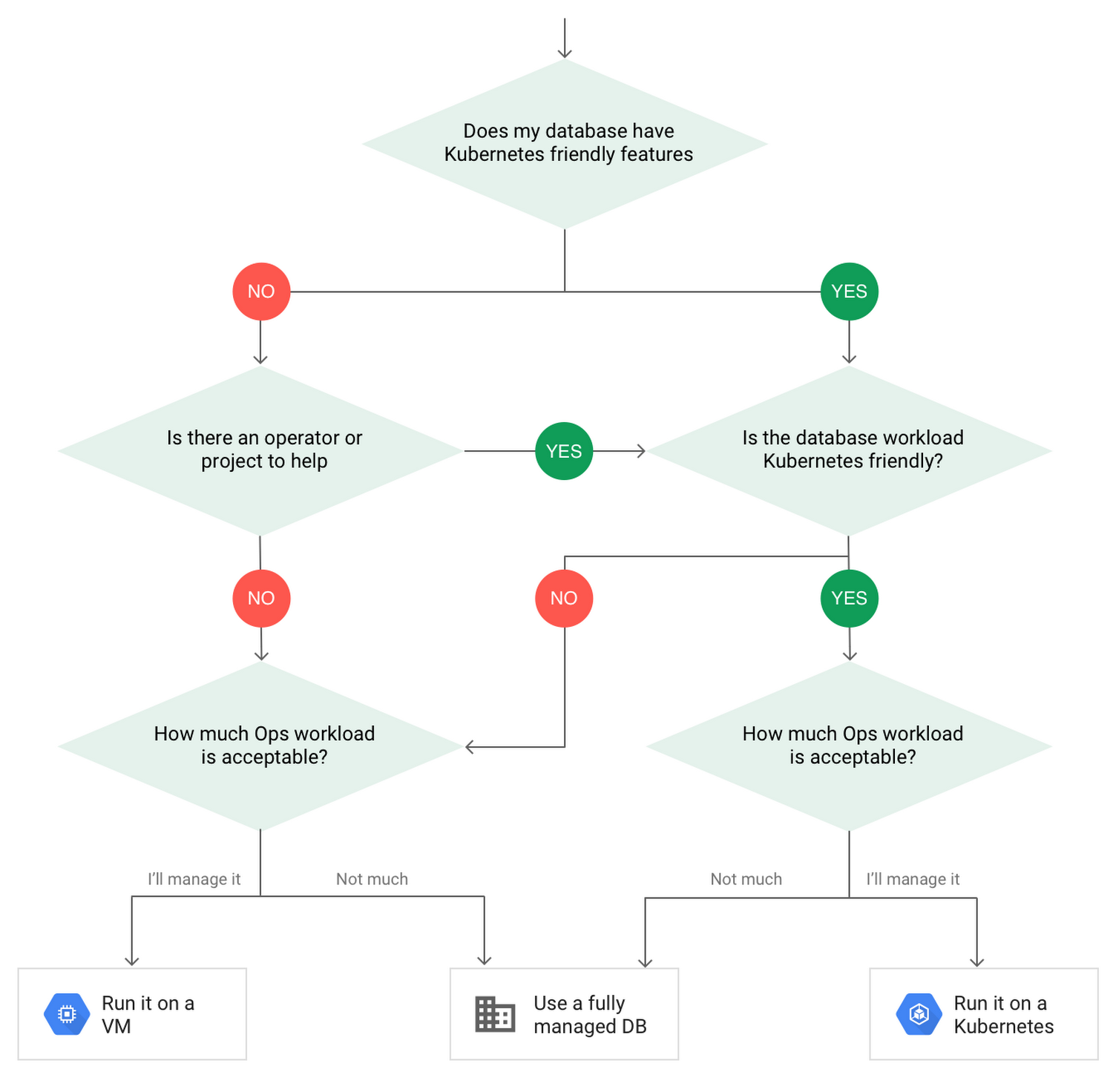
When choosing to go down the Kubernetes route, think about what database you will be running, and how well it will work given the trade-offs previously discussed.
Since pods are mortal, the likelihood of failover events is higher than a traditionally hosted or fully managed database. It will be easier to run a database on Kubernetes if it includes concepts like sharding, failover elections and replication built into its DNA (for example, ElasticSearch, Cassandra, or MongoDB). Some open source projects provide custom resources and operators to help with managing the database.
Next, consider the function that database is performing in the context of your application and business. Databases that are storing more transient and caching layers are better fits for Kubernetes. Data layers of that type typically have more resilience built into the applications, making for a better overall experience.
Finally, be sure you understand the replication modes available in the database. Asynchronous modes of replication leave room for data loss, because transactions might be committed to the primary database but not to the secondary database(s). So, be sure to understand whether you might incur data loss, and how much of that is acceptable in the context of your application.
After evaluating all of those considerations, you’ll end up with a decision tree looking something like this:
How to deploy a database on Kubernetes
Now, let’s dive into more details on how to deploy a database on Kubernetes using StatefulSets.
With a StatefulSet, your data can be stored on persistent volumes, decoupling the database application from the persistent storage, so when a pod (such as the database application) is recreated, all the data is still there.
Additionally, when a pod is recreated in a StatefulSet, it keeps the same name, so you have a consistent endpoint to connect to. Persistent data and consistent naming are two of the largest benefits of StatefulSets. You can check out the Kubernetes documentation for more details.
If you need to run a database that doesn’t perfectly fit the model of a Kubernetes-friendly database (such as MySQL or PostgreSQL), consider using Kubernetes Operators or projects that wrap those database with additional features. Operators will help you spin up those databases and perform database maintenance tasks like backups and replication. For MySQL in particular, take a look at the Oracle MySQL Operator and Crunchy Data for PostgreSQL.
Operators use custom resources and controllers to expose application-specific operations through the Kubernetes API. For example, to perform a backup using Crunchy Data, simply execute pgo backup [cluster_name]. To add a Postgres replica, use pgo scale cluster [cluster_name].
There are some other projects out there that you might explore, such as Patroni for PostgreSQL. These projects use Operators, but go one step further. They’ve built many tools around their respective databases to aid their operation inside of Kubernetes. They may include additional features like sharding, leader election, and failover functionality needed to successfully deploy MySQL or PostgreSQL in Kubernetes.
While running a database in Kubernetes is gaining traction, it is still far from an exact science. There is a lot of work being done in this area, so keep an eye out as technologies and tools evolve toward making running databases in Kubernetes much more the norm.
When you’re ready to get started, check out GCP Marketplace for easy-to-deploy SaaS, VM, and containerized database solutions and operators that can be deployed to GCP or Kubernetes clusters anywhere.
Streamlining Workflow Executions: Using Cloud Tasks in Google Cloud

901
Of your peers have already read this article.
3:30 Minutes
The most insightful time you'll spend today!
Introduction
In my previous post, I talked about how you can use a parent workflow to execute child workflows in parallel for faster overall processing time and easier detection of errors. Another useful pattern is to use a Cloud Tasks queue to create Workflows executions and that’s the topic of this post.
When your application experiences a sudden surge of traffic, it’s natural to want to handle the increased load by creating a high number of concurrent workflow executions. However, Google Cloud’s Workflows enforces quotas to prevent abuse and ensure fair resource allocation. These quotas limit the maximum number of concurrent workflow executions per region, per project, for example, Workflows currently enforces a maximum of 2000 concurrent executions by default. Once this limit is reached, any new executions beyond the quota will fail with an HTTP 429 error.
A Cloud Tasks queue can help. Rather than creating Workflow executions directly, you can add Workflows execution tasks to the Cloud Tasks queue and let Cloud Tasks drain the queue at a rate that you define. This allows for better utilization of your workflow quota and ensures the smooth execution of workflows.
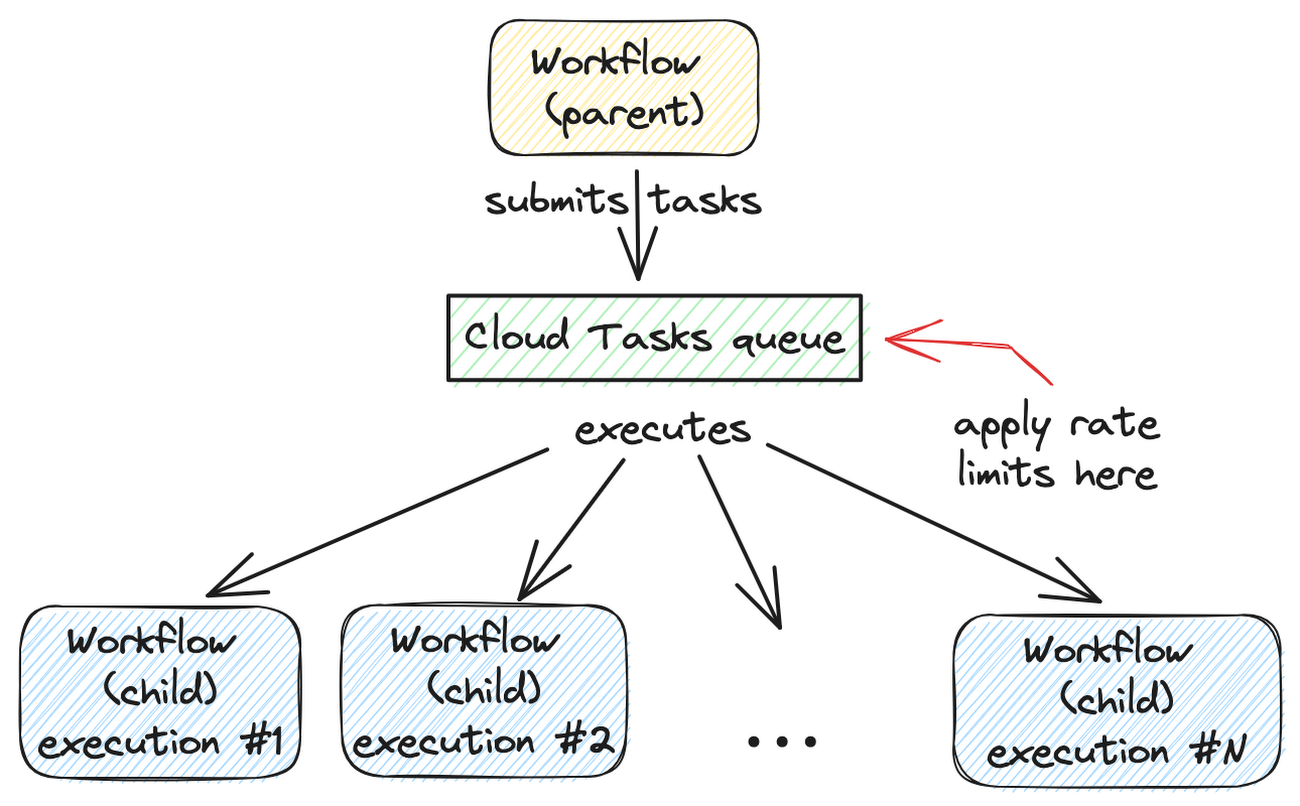
Let’s dive into how to set this up.
Create a Cloud Tasks queue
We’ll start by creating a Cloud Tasks queue. The Cloud Tasks queue acts as a buffer between the parent workflow and the child workflows, allowing us to regulate the rate of executions.
Create the Cloud Tasks queue (initially with no dispatch rate limits) with the desired name and location:
QUEUE=queue-workflow-child
LOCATION=us-central1

gcloud tasks queues create $QUEUE --location=$LOCATION
Now that we have our queue in place, let’s proceed to set up the child workflow.
Create and deploy a child workflow
The child workflow performs a specific task and returns a result to the parent workflow.
Create workflow-child.yaml to define the child workflow:
main:

  params: [args]

  steps:

    - init:

        assign:

          - iteration: ${args.iteration}

    - wait:

        call: sys.sleep

        args:

            seconds: 10

    - return_message:

        return: ${"Hello world" + iteration}
In this example, the child workflow receives an iteration argument from the parent workflow, simulates work by waiting for 10 seconds, and returns a string as the result.
Deploy the child workflow:
gcloud workflows deploy workflow-child --source=workflow-child.yaml --location=$LOCATION
Create and deploy a parent workflow
Next, create a parent workflow in workflow-parent.yaml.
The workflow assigns some constants first. Note that it’s referring to the child workflow and the queue name between the parent and child workflows:
main:
  steps:
    - init:
        assign:
          - project_id: ${sys.get_env("GOOGLE_CLOUD_PROJECT_ID")}
          - project_number: ${sys.get_env("GOOGLE_CLOUD_PROJECT_NUMBER")}
          - location: ${sys.get_env("GOOGLE_CLOUD_LOCATION")}
          - workflow_child_name: "workflow-child"
          - queue_name: "queue-workflow-child"
In the next step, Workflows creates and adds a high number of tasks (whose body is an HTTP request to execute the child workflow) to the Cloud Tasks queue:
- enqueue_tasks_to_execute_child_workflow:
        for:
          value: iteration
          range: [1, 100]
          steps:
              - iterate:
                  assign:
                    - data:
                        iteration: ${iteration}
                    - exec:
                        # Need to wrap into argument for Workflows args.
                        argument: ${json.encode_to_string(data)}
              - create_task_to_execute_child_workflow:
                  call: googleapis.cloudtasks.v2.projects.locations.queues.tasks.create
                  args:
                      parent: ${"projects/" + project_id + "/locations/" + location + "/queues/" + queue_name}
                      body:
                        task:
                          httpRequest:
                            body: ${base64.encode(json.encode(exec))}
                            url: ${"https://workflowexecutions.googleapis.com/v1/projects/" + project_id + "/locations/" + location + "/workflows/" + workflow_child_name + "/executions"}
                            oauthToken:
                              serviceAccountEmail: ${project_number + "-compute@developer.gserviceaccount.com"}
Note that task creation is a non-blocking call in Workflows. Cloud Tasks takes care of running those tasks to execute child workflows asynchronously.
Deploy the parent workflow:
gcloud workflows deploy workflow-parent --source=workflow-parent.yaml --location=$LOCATION
Execute the parent workflow with no dispatch rate limits
Time to execute the parent workflow:
gcloud workflows run workflow-parent --location=$LOCATION
As the parent workflow is running, you can see parallel executions of the child workflow, all executed roughly around the same:
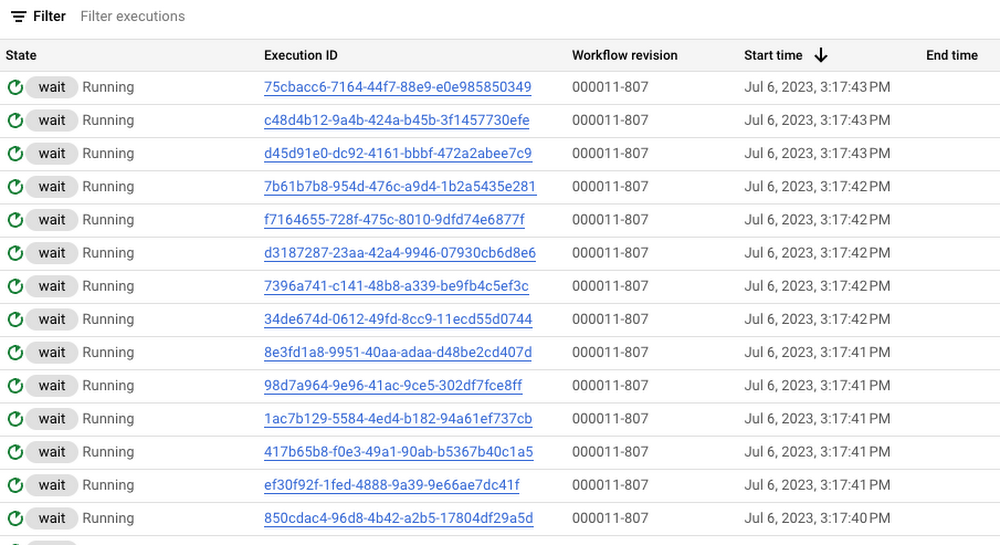
In this case, 100 executions is a well under the concurrency limit for Workflows. Quota issues may arise if you submit 1000s of executions all at once. This is when Cloud Tasks queue and its rate limits become useful.
Execute the parent workflow with dispatch rate limits
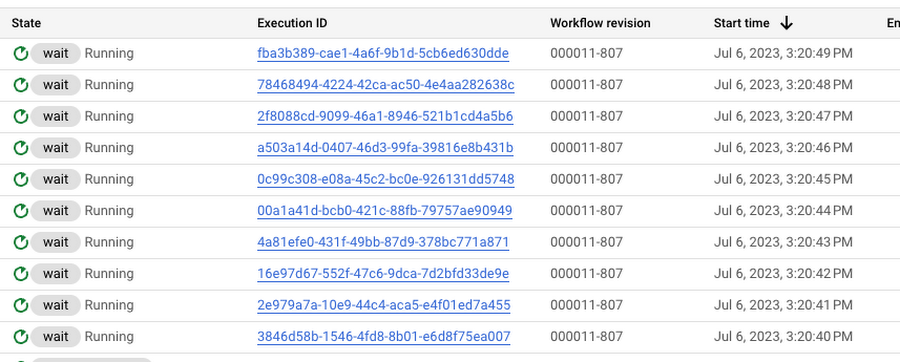
Let’s now apply a rate limit to the Cloud Tasks queue. In this case, 1 dispatch per second:
gcloud tasks queues update $QUEUE --max-dispatches-per-second=1 --location=$LOCATION
Execute the parent workflow again:
gcloud workflows run workflow-parent --location=$LOCATION
This time, you see a more smooth execution rate (1 execution request per second):
Summary
By introducing a Cloud Tasks queue before executing a workflow and playing with different dispatch rates and concurrency settings, you can better utilize your Workflows quota and stay below the limits without triggering unnecessary quota related failures.
Check out the Buffer HTTP requests with Cloud Tasks codelab, if you want to get more hands-on experience with Cloud Tasks. As always, feel free to contact me on Twitter @meteatamel for any questions or feedback.
Google Cloud Accelerates Financial Organizations’ Journey towards Digital Transformation

10495
Of your peers have already read this article.
2:00 Minutes
The most insightful time you'll spend today!
When I reflect back on the past year and the pandemic, I’m struck by how the reliance on remote work and operations has changed the fundamentals of business forever. For the financial services industry, this rings particularly true. Many conversations I’m having right now with organizations revolve around embracing a transformation cloud, and thinking of cloud computing not just as an infrastructure decision, but also as the locus for transformation throughout the company.
Today, as we welcome the industry to our Financial Services Summit, we’ll demonstrate just how Google Cloud accelerates a financial organization’s digital transformation through app and infrastructure modernization, data democratization, people connections, and trusted transactions. We hope you’ll join us.
How we’re helping financial services firms build their transformation clouds
At Google Cloud, we continue to focus on areas where we can bring the best of our capabilities to banking, capital markets, insurance, and payments customers around the world. Our work with financial services industry customers has given us a deep understanding of the real-world, specific use cases that matter most to them. This groundwork led us to engineer products and solutions that are open and flexible, not ones that force them to rip out existing investments in ERP or other early IaaS cloud implementations.
It’s why we’ve engineered solutions such as Lending DocAI, Open Banking with Apigee, and Datashare for financial services to help transform the industry. These solutions were created with our customers’ security and compliance top-of-mind and are built at the intersection of user-optimized experience, technology, and sovereignty.
At their core, financial institutions want to drive growth, reduce costs, mitigate risk, stay compliant, and increase efficiency. As a result, when we partner with them on their transformation journeys, we consider three essential focus areas:
- Enabling the human experience and connected interactions
- Building an open and intelligent data foundation for better insights
- Providing the most trusted and secure cloud in the industry
Enabling humans and connected interactions
A company’s transformation is about more than technology; people and culture ultimately drive change. HSBC, for example, recognized its business users would benefit from guided answers to common questions around risk policy compliance, and turned to Google Cloud to leverage AI and machine learning bots to assist employees, ease the burden on policy experts, and improve the user experience. Using Dialogflow, a core component of Contact Center AI, HSBC was able to build a conversational platform that quickly and accurately addresses user needs at scale.
Another example is Equifax, which used Google Workspace to support collaboration not only internally between employees, but also externally with customers. Customers can use Google Cloud solutions for financial services to build these sorts of technology-enabled human interactions quickly and easily—supporting organizational change at scale.
Building an open and intelligent data foundation for smarter, faster insights
The real impact of Google Cloud solutions for financial services comes when the whole company has access to the right information at the right time, and can act more intelligently on that data. Our solutions help businesses safely leverage their data and get a complete 360-degree view of their customers’ information, which can often be scattered across multiple systems (CRM, lending, credit, etc.). This helps financial institutions improve the overall customer experience—and sometimes even develop new products quickly.
Indeed, all financial institutions are looking for ways to grow revenue and reduce expenses, and data can be a critical ingredient to doing both effectively. As daily transactions rise, so does the volume and complexity of data. But to implement new customer experience innovations (and new revenue streams), financial institutions must first capture data effectively. This is why AXA Switzerland, for example, uses real-time analytics on Google Cloud to gain cross-industry insights about future trends and customer preferences.
Financial services organizations also need the confidence of building on a platform that provides choice, flexibility, and agility to move fast. It’s why we have an open cloud approach that allows Google Cloud services to run in different physical locations such as on-premises, other public clouds, and the edge. Customers can also harness the power of data and AI through our open APIs, machine-learning services, and analytics engines on any major cloud platform. This is why companies like Macquarie Bank are taking advantage of Google Cloud’s open, hybrid architecture to modernize and empower its developers.
Compliant and secure to address risk and regulatory needs
As a highly regulated industry, financial services is focused on security and compliance, risk and regulations, and fraud detection and prevention. Google Cloud offers unique capabilities to earn customers’ trust as part of our continuing work to be the most trusted cloud in the industry. Google Cloud provides a secure foundation that you can verify and independently control. Our cloud technology reduces risk and data loss, because it is built on comprehensive zero-trust architecture. Finally, we offer a shared-fate model built on best practices in risk management via automation, guidance, and insurance. This is why customers like BBVA have confidence anywhere their systems may operate.
On the regulatory front, global legislators and regulators continue to focus on the stability of the industry that only a decade ago went through one of the biggest liquidity crises in history. With this oversight comes strong expectations of risk mitigation. Google Cloud offers a single, global set of controls, reviewed by financial institutions and regulators around the world, and verified in collaborative audits—making compliance simpler and less costly for our customers.
Finally, Google Cloud allows financial services firms to operate confidently with advanced security tools that help protect data, applications, and infrastructure, as well as their customers from fraudulent activity, spam, and abuse. We help protect your data against threats, using the same infrastructure and security services we use for our own operations, ensuring you never have to trade-off between ease of use and security. Google Cloud encrypts data at-rest and in-transit. And we now also offer the ability to encrypt data-in use, while it’s being processed for customer VM and container workloads.
Let us help you with your transformation cloud journey
We’ve seen leading financial services companies embrace Google Cloud to help them move beyond infrastructure toward the next phase of their cloud evolution. This is an era where no company is better positioned to lead than Google Cloud, and we’re excited to help you with your journey.
Learn more about Google Cloud for financial services.
Google Launches Product Locator and Gives Store Locator Plus an Upgrade to Expand Retail Offerings

5857
Of your peers have already read this article.
1:30 Minutes
The most insightful time you'll spend today!
We all experienced, first hand, how Covid-19 has impacted the world and our communities. Last year, store closures, reduced hours, and social-distancing requirements drove people to adopt more e-commerce options, which, according to eMarketer, grew 27.6% worldwide in 2020. Meanwhile, consumer desires to shop locally also grew with Google searches for “____ near me” up 100% year over year,1 and 1 in 3 consumers having tried curbside pickup over the last year.2
As countries begin to lift Covid-19 restrictions, businesses are looking toward a post-pandemic future and asking ‘Which of these shopping trends will stick and how should I adapt?’ At Google, we expect consumers to continue demanding helpful shopping experiences that blur the line between the physical retail and digital experience, as well as help them to continue shopping locally.3 To address these changes in shopper behavior, we refreshed our retail solutions—adding a new solution, Product Locator, and updating Store Locator Plus—to help you offer the best possible online-to-offline experience and drive shoppers to your stores.
Introducing Product Locator solution: connecting online shopping to nearby stores
Under Covid restrictions, consumers have grown accustomed to having a myriad of shopping options, from curbside pickup to same-day delivery. Increased searches for ‘along my route’ and ‘in stock’ tell us that convenience is king for today’s consumer.4 Retailers can increase online conversion rates and drive store visits by including product availability and pick-up options on each of their product description pages (PDP); emphasizing the speed and convenience of these options and saving on significant shipping costs.
Our newest retail solution, Product Locator, can further help drive customers to visit by showing the exact distance stores are to the shopper and even estimated driving time, to further highlight the convenience of a store visit. A study conducted by Shopify found that showcasing local inventory boosted key store metrics including 45% of local pickup who made an additional purchase upon arrival.5 See the Product Locator solution guide to get started today.

Update your store locator page to address more of shoppers’ needs
Store locators allow shoppers to more easily find your stores and can be made even more helpful with our Store Locator Plus solution. Our updated Store Locator Plus solution refreshes the store locator page to be more informative and engaging by integrating offers redeemable in-store, online scheduling for appointments and services, and text me directions services. Implement Store Locator Plus today using the guide.
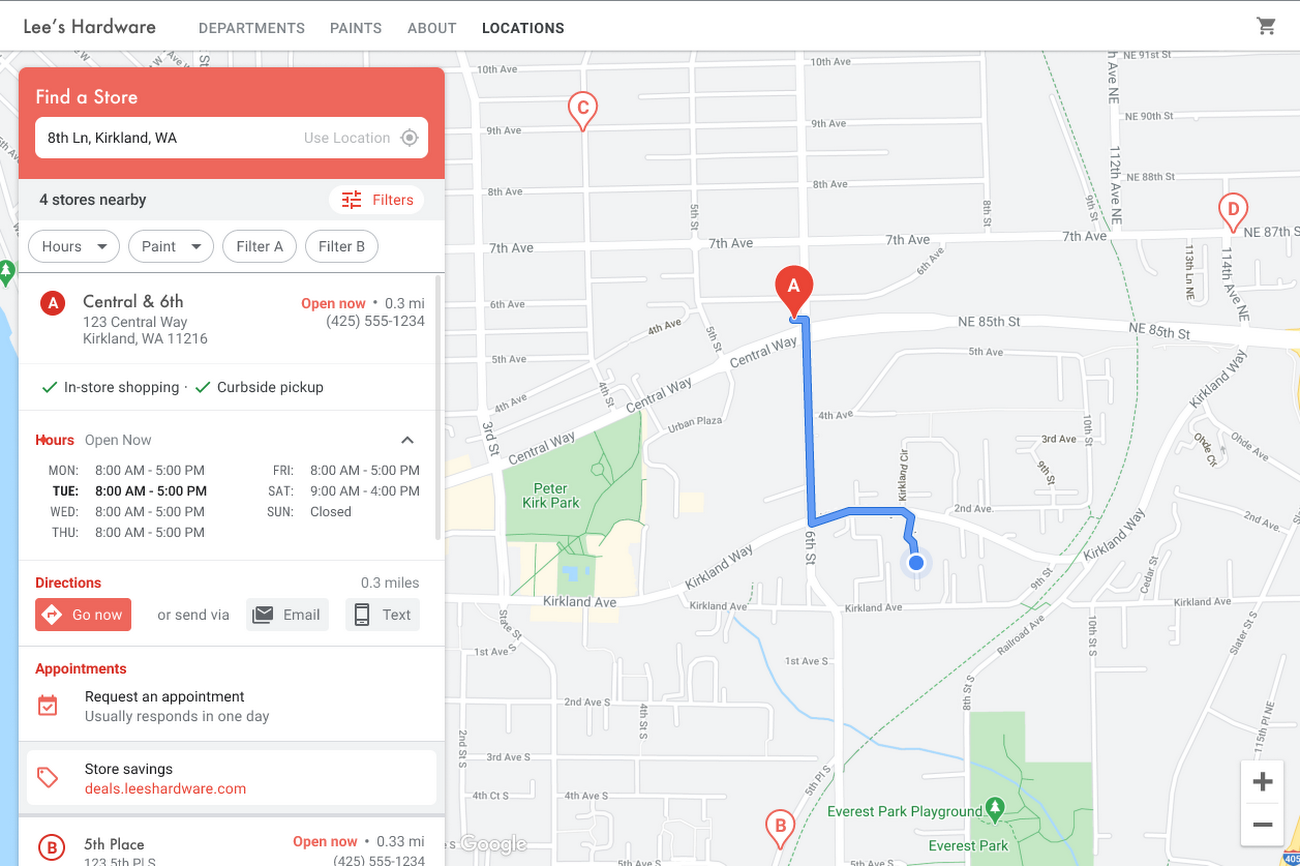
Build and customize Store Locator Plus for your business in minutes
At Google Maps Platform, we are always thinking of ways to make building a map easier and faster for our customers. In May at I/O we made Cloud-based Maps Styling generally available, enabling map updates to happen without touching a line of code. Today we’re excited to introduce Quick Builder, our free, low code builder which allows you to demo, customize and build a version of the Store Locator Plus solution for your website in minutes. Experience Quick Builder today.
To learn more about how you can start adopting these retail solutions, visit our retail solutions page.
For more information on Google Maps Platform, visit our website.
1 Global Insights Briefing: Getting back out there
2 https://www.shopify.com/pos/future-of-retail-2021
3 https://www.thinkwithgoogle.com/future-of-marketing/digital-transformation/covid-trends-1-year/
4 https://www.thinkwithgoogle.com/consumer-insights/consumer-trends/pandemic-shopping-behavior/
5 https://www.shopify.com/pos/future-of-retail-2021
4931
Of your peers have already watched this video.
9:37 Minutes
The most insightful time you'll spend today!
L’Oréal: Managing Big-data Complexity with Google Cloud
L’Oreal is a global company with a presence in 150 countries worldwide. Between managing all of its brands and requirements for different countries, L’Oreal looks to data to make insightful business decisions. How does L’Oreal unify its data across all its systems and databases? How does L’Oreal make the data accessible to thousands of employees? In this video, Antoine Castex, Enterprise Architect at L’Oreal, discusses with Martin Omander how L’Oreal built a serverless, multi-cloud warehouse based on Google Cloud.
Chapters:
0:00 – Intro
0:23 – Why does L’Oreal need a new data warehouse?
0:51 – Who is the L’Oreal group?
1:35 – Which systems does L’Oreal use?
2:14 – How does L’Oreal manage complexity?
3:59 – What is ELT?
4:57 – Who are L’Oreal’s data consumers?
5:41 – How L’Oreal built the data warehouse
8:51 – L’Oreal’s future plans
9:10 – Wrap up
Google Cloud Workflows → https://goo.gle/3q20M1V
Cloud Run → https://goo.gle/3CSWbXG
Eventarc → https://goo.gle/3B7qhFy
BigQuery → https://goo.gle/3KHgyJ3
Looker → https://goo.gle/3Rx4Ind
Checkout more episodes of Serverless Expeditions → https://goo.gle/ServerlessExpeditions
Subscribe to Google Cloud Tech → https://goo.gle/GoogleCloudTech
More Relevant Stories for Your Company

Release of Go 1.18 is A New Milestone for Development of Secure Apps
On March 15th, the Go team announced Go 1.18 GA, the latest release of the Go programming language. The culmination of over a decade of design delivers the features our developers demanded: generics, fuzzing, and module workspaces. With this release, Go becomes the first major language to integrate fuzz testing

Cutting Costs and Accelerating Development with API Management
Google Cloud Results Reduced API management costs 34%Develops new features in days versus monthsFixes issues quickly by writing codeManages 15B API calls per month without outages Austin, Texas-based Bazaarvoice switched to Apigee for its API platform because of its competitive pricing and feature set. But another benefit soon became apparent to Bazaarvoice engineers: the

3 Ways To Reduce App Downtime With Google Cloud’s API Monitoring Tools
How many times have you closed an application when you encounter the “spinning wheel of death” (a melodramatic way of saying an application that is taking too long to load)? In today’s digital economy where many organizations rely on applications as a primary source of revenue, that spinning wheel of




Learn Modern App Development Practices to Ship Software Faster
Cloud-native, Kubernetes, Serverless have been the hottest and most widely discussed topics given the velocity and agility benefits. Learn more about how you can leverage these modern app development practices to ship software faster, while reducing costs and improving security and compliance. Learn how Google Cloud lets you modernize existing
