





Cutting Costs and Accelerating Development with API Management

3507
Of your peers have already read this article.
3:00 Minutes
The most insightful time you'll spend today!
Google Cloud Results
- Reduced API management costs 34%
- Develops new features in days versus months
- Fixes issues quickly by writing code
- Manages 15B API calls per month without outages
Austin, Texas-based Bazaarvoice switched to Apigee for its API platform because of its competitive pricing and feature set. But another benefit soon became apparent to Bazaarvoice engineers: the ability to write code on the Apigee platform and “own our destiny,” says Kurtis White, Senior Development Manager in Research and Development for Bazaarvoice.
Bazaarvoice specializes in consumer-generated content marketing solutions that connect brands, retailers, and consumers. APIs do the heavy lifting in making those connections. For example, the Conversations API, the heart of the Bazaarvoice platform, lets the company’s retail clients aggregate and leverage users’ product reviews and ratings. With the Conversations API, API keys are passed along in each query string and enable Bazaarvoice customers to access the relevant customer data.
APIs are essential to the Bazaarvoice platform. During its early days the company didn’t use APIs, relying instead on direct communication links to connect its customers to what consumers were saying about them. “That approach just didn’t scale,” says White. “Without reliable APIs, it would be almost impossible for us to be in business today.”
Eight years ago, Bazaarvoice switched to APIs. From about 2013 to 2017, the company relied upon the same API management SaaS solutions provider. But the company was growing. The call volume that its APIs generated was expanding at a rapid pace, too—especially during the busy year-end shopping season. For example, in early October 2016, Bazaarvoice APIs generated nearly 9 billion calls, compared to about 12 billion calls in early December 2016.
Unfortunately, along with the pace of API calls, the costs associated with Bazaarvoice’s existing API solutions provider were also escalating—increasing 74% from early 2016 to early 2017. To keep rising expenses from stifling its own growth, and to continue offering its reliable, high-performing SaaS solution, the company’s IT team decided it was to time to find a different API solutions provider.
In April 2017, Bazaarvoice migrated to the Apigee API platform because of its feature set and, in particular, its competitive pricing. By switching to Apigee, Bazaarvoice reduced its API spend by 34%, White says.
A ticking clock
Migrating from its previous API provider to Apigee involved importing 66,000 API keys—an arduous task. Apigee engineers and business leaders worked directly with their Bazaarvoice counterparts to help ensure a successful transition. “Everyone at Apigee was very responsive to our needs,” White says. “If a problem came up, the Apigee team owned it and worked through it to give us a great experience.”
During the migration, there was a clock ticking in the background. Bazaarvoice wanted to shift 100% of its API calls to Apigee before the contract with its existing API provider came up for renewal. “I wasn’t sure we could make the deadline,” says White. “But we did, and I give a big credit to the Apigee technical team. They provided 24-hour support to our team. And once we went live, our platform was handling 15 billion API calls a month with no outages.”
Following the migration, Apigee support continues to “knock it out of the park,” he added. “Apigee is a great partner to have.”
Controlling destiny
The Bazaarvoice IT team didn’t specifically choose Apigee because of the ability to write code on the platform—but they quickly came to appreciate the feature.
“Our previous API provider was like a black box to us,” says White. “They had written some custom code for us that we depended upon. But we didn’t own that code. And if we needed changes, we had to pay them to do it for us.”
“Apigee allows us to write our own code that runs on the platform and looks at all of the API calls,” White continues. “We can put the code into a virtual control system. We can update it whenever we want to add a feature. Because of how important APIs are to our business, the ability to write code on Apigee lets us control our own destiny. It’s the Apigee number one benefit, in my opinion.” This also accelerates the time it takes Bazaarvoice to bring new features to market.
“Apigee gives us the flexibility to do things we wouldn’t have even tried before,” says White. “We can test new things easily, without getting locked into a service agreement with an external party. Before, it might have taken months to develop new product functionalities. Now it takes days.”
In addition, writing code on the Apigee platform enables the IT team to quickly address any problems that may arise. “If someone notices a problem, we can write the code to fix it right away,” White says.
“Because Apigee lets us iterate and fix problems quickly, our innovation has gone to the next level,” White added. “Before, if you had an idea, you’d wonder if you really wanted to invest $30,000 and three months in it. Probably not. Now, with Apigee, the investment is maybe one day and zero dollars.”
Experimentation pays off for Bazaarvoice and its customers. For example, during the 2017 holiday season, Bazaarvoice was able to give all its customers the capacity to handle twice the number of API calls.
“With our previous API solutions provider, it would have been such a long process to make that happen, it wouldn’t have been worth it,” says White. “But it was really easy to write the code in Apigee. Plus, we made our customers happy and kept them running smoothly during the peak holiday season—with little effort on our part.”
Personalization and monetization
Apigee has played a key role in enabling Bazaarvoice to develop new products, too. In March 2018, Bazaarvoice released a new personalization data product for its customers, built on top of an Apigee-powered API. The new product enables Bazaarvoice retail customers to recommend relevant products to their online shoppers. The products are personalized to the shoppers’ interests, based on their past behavior and what they’re shopping for.
Apigee is also serving as a strategic business advisor, helping Bazaarvoice determine the best way to price its offerings as its API call volumes continue to increase.
“We’re working with Apigee to build an industry-leading model for monetizing our APIs,” says White. “Apigee is the ideal advisor in this regard. We’re handling such large volume, the volume is continuing to grow, and Apigee enables us to power it.”

4053
Of your peers have already downloaded this article
4:30 Minutes
The most insightful time you'll spend today!
Customer and developer expectations are increasingly driving enterprise IT to employ new approaches to serving the needs of a diverse mix of users and experiences.
That’s where application programming interfaces (APIs) come into play. They are the foundation which digital business is built, allowing app developers to create apps that can serve the needs of a specific segment of users.
APIs are not new in many industries, but with the explosion of apps and experiences required in the digital world, and new customer-centric IT organizations, companies across industries need better solutions than ever to manage their APIs and API-driven businesses. API management enables you to create, manage, secure, analyze, and scale APIs.
An API management solution needs to include at least the following capabilities:
- Developer portal to attract and engage application developers, enabling them to discover, explore, purchase (or profit from), and test APIs and register to access and use the APIs
- API gateway to secure and mediate the traffic between clients and backends, and between a company’s APIs and the developers, customers, partners, and employees who use the APIs.
- API lifecycle management to manage the process of designing, developing, publishing, deploying, and versioning APIs.
More sophisticated API management provides additional capabilities including:
- An analytics engine that provides insights for business owners, operational administrators, and application developers enabling them to manage all aspects of a company’s APIs and API programs
- API monetization to enable API providers to package, price, and publish their APIs so that partners and developers can purchase access or take part in revenue sharing.
- It is typical for API management capabilities to be delivered in the cloud as a SaaS (Software as a Service) solution or on premises in a private cloud, or sometimes using a hybrid approach.
Download the full guide to understand how APIs can help your business become more user-centric.
4898
Of your peers have already watched this video.
9:37 Minutes
The most insightful time you'll spend today!
L’Oréal: Managing Big-data Complexity with Google Cloud
L’Oreal is a global company with a presence in 150 countries worldwide. Between managing all of its brands and requirements for different countries, L’Oreal looks to data to make insightful business decisions. How does L’Oreal unify its data across all its systems and databases? How does L’Oreal make the data accessible to thousands of employees? In this video, Antoine Castex, Enterprise Architect at L’Oreal, discusses with Martin Omander how L’Oreal built a serverless, multi-cloud warehouse based on Google Cloud.
Chapters:
0:00 – Intro
0:23 – Why does L’Oreal need a new data warehouse?
0:51 – Who is the L’Oreal group?
1:35 – Which systems does L’Oreal use?
2:14 – How does L’Oreal manage complexity?
3:59 – What is ELT?
4:57 – Who are L’Oreal’s data consumers?
5:41 – How L’Oreal built the data warehouse
8:51 – L’Oreal’s future plans
9:10 – Wrap up
Google Cloud Workflows → https://goo.gle/3q20M1V
Cloud Run → https://goo.gle/3CSWbXG
Eventarc → https://goo.gle/3B7qhFy
BigQuery → https://goo.gle/3KHgyJ3
Looker → https://goo.gle/3Rx4Ind
Checkout more episodes of Serverless Expeditions → https://goo.gle/ServerlessExpeditions
Subscribe to Google Cloud Tech → https://goo.gle/GoogleCloudTech
What You Need to Know About Compute Engines

6531
Of your peers have already read this article.
1:30 Minutes
The most insightful time you'll spend today!
Compute Engine is a customizable compute service that lets you create and run virtual machines on Google’s infrastructure. You can create a Virtual Machine (VM) that fits your needs. Predefined machine types are pre-built and ready-to-go configurations of VMs with specific amounts of vCPU and memory to start running apps quickly. With Custom Machine Types, you can create virtual machines with the optimal amount of CPU and memory for your workloads. This allows you to tailor your infrastructure to your workload. If requirements change, using the stop/start feature you can move your workload to a smaller or larger Custom Machine Type instance, or to a predefined configuration.
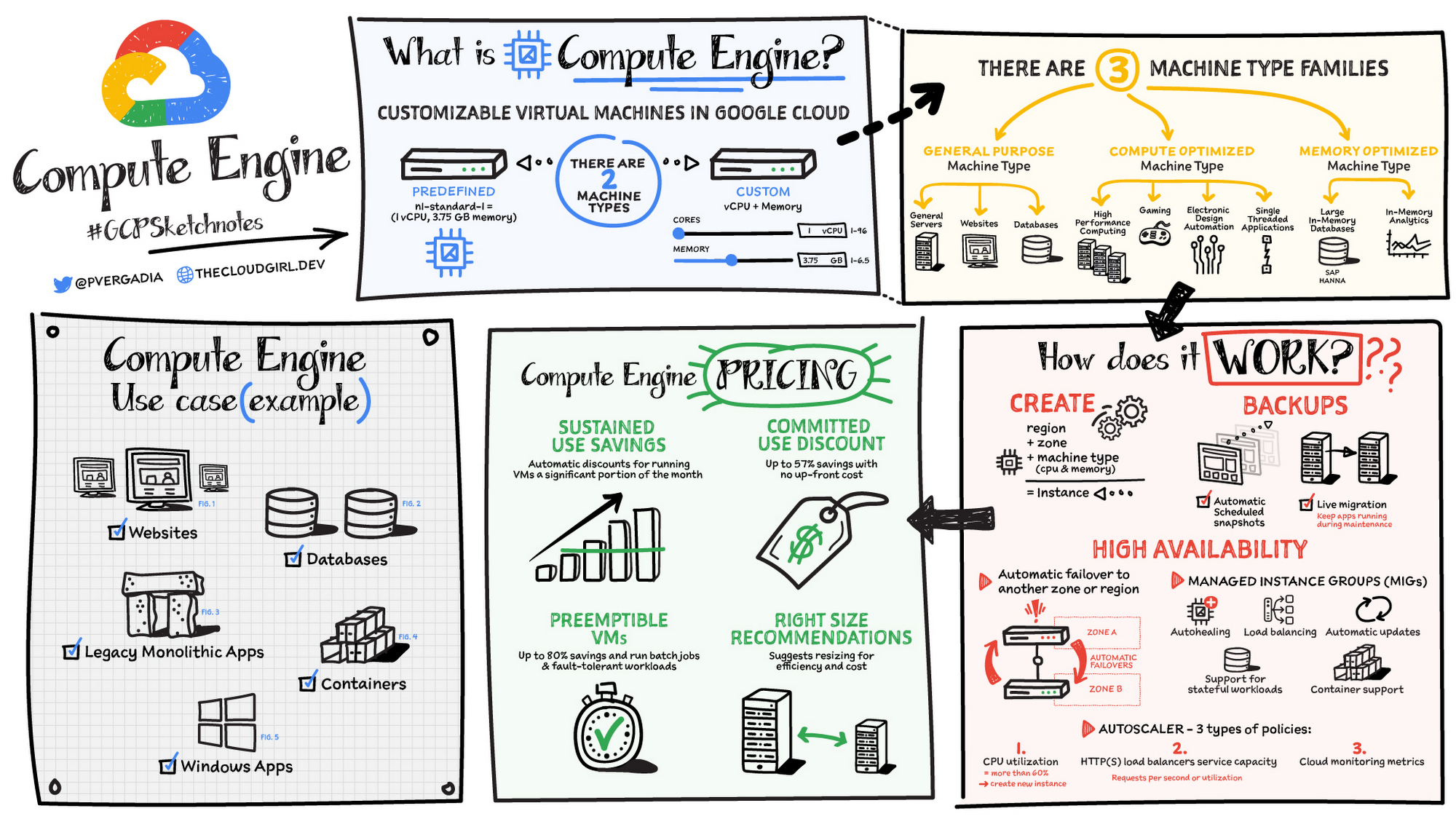
Machine types
In Compute Engine, machine types are grouped and curated by families for different workloads. You can choose from general-purpose, memory-optimized, compute-optimized and accelerator-optimized families.
- General-purpose machines are used for Day-to-day computing at a lower cost and for balanced price/performance across a wide range of VM shapes. The use cases that best fit here are web serving, app serving, back office applications, databases, cache, media-streaming, microservices, virtual desktops, development environments.
- Memory-Optimized machine are recommended for ultra high-memory workloads such as in-memory analytics and large in-memory databases such as SAP HANA
- Compute-Optimized machines are recommended for ultra high performance workloads such as High Performance Computing (HPC), Electronic Design Automation (EDA), gaming, video transcoding, single-threaded applications.
- Accelerator-Optimized machines are optimized for high performance computing workloads such as Machine learning (ML), Massive parallelized computations and High Performance Computing (HPC)
How does it work?
You can create a VM instance using a boot disk image, a boot disk snapshot, or a container image. The image can be a public operating system (OS) image or a custom one. Depending on where your users are you can define the zone you want the virtual machine to be created in. By default all traffic from the internet is blocked by the firewall and you can enable the HTTP(s) traffic if needed.
Use snapshot schedules (hourly, daily, or weekly) as a best practice to back up your Compute Engine workloads. Compute Engine offers live migration by default to keep your virtual machine instances running even when software or hardware update occurs. Your running instances are migrated to another host in the same zone instead of requiring your VMs to be rebooted.
Availability
For High Availability (HA) Compute Engine offers automatic failover to other regions or zones in event of a failure. Managed instance groups (MIGs) help keep the instances running by automatically replicating instances from a predefined image. They also provide application based autohealing health checks. If an application is not responding on a VM, the auto healer automatically recreates that VM for you. Regional MIGs let you spread app load across multiple zones. This replication protects against zonal failures. MIGs work with load balancing services to distribute traffic across all of the instances in the group.
Compute Engine offers autoscaling to automatically add or remove VM instances from a managed instance group based on increases or decreases in load. Autoscaling lets your apps gracefully handle increases in traffic, and it reduces cost when the need for resources is lower. You define the autoscaling policy for automatic scaling based on the measured load, CPU utilization, requests per second or other metrics.
Active Assist’s new feature, predictive autoscaling, helps improve response times for your applications–When you enable predictive autoscaling, Compute Engine forecasts future load based on your Managed Instance Group’s (MIG) history and scales it out in advance of predicted load, so that new instances are ready to serve when the load arrives. Without predictive autoscaling, an autoscaler can only scale a group reactively, based on observed changes in load in real time. With predictive autoscaling enabled, the autoscaler works with real-time data as well as with historical data to cover both the current and forecasted load. That makes predictive autoscaling ideal for those apps with long initialization times and whose workloads vary predictably with daily or weekly cycles. For more information, see How predictive autoscaling works or check if predictive autoscaling is suitable for your workload, and to learn more about other intelligent features, check out Active Assist.
Pricing
You pay for what you use. But you can save cost by taking advantage of some discounts! Sustained use saving are automatic discounts applied for running instances for a significant portion of the month. If you know your usage upfront, you can take advantage of committed use discounts which can lead up to significant savings without any upfront cost. And by using short lived preemptive instances you can save up to 80%, they are great for batch jobs and fault tolerant workloads. You can also optimize resource utilization with automatic recommendations. For example if you are using a bigger instance for a workload that can run on a smaller instance you can save costs applying these recommendations.
Security
Compute Engine provides you default hardware security. Using Identity and Access Management (IAM) you just have to ensure that proper permissions are given to control access to your VM resources. All the other basic security principles apply, if the resources are not related and don’t require network communication amongst themselves, consider hosting them on different VPC networks. By default, users in a project can create persistent disks or copy images using any of the public images or any images that project members can access through IAM roles. You may want to restrict your project members so that they can create boot disks only from images that contain approved software that meet your policy or security requirements. You can define an organization policy that only allows Compute Engine VMs to be created from approved images. This can be done by using the Trusted Images Policy to enforce images that can be used in your organization.
By default all VM families are Shielded VMs. Shielded VMs are virtual machine instances that are hardened with a set of easily configurable security features to ensure that when your VM boots, it’s running a verified bootloader and kernel — is the default for everyone using Compute Engine, at no additional charge. For more details on Shielded VMs refer to the documentation here.
For additional security, you also have the option to use Confidential VM to encrypt your data in use, while it’s being processed in Compute Engine. For more details on Confidential VM refer to the documentation here.
Use cases
There are many use cases Compute Engine can serve in addition to running websites and databases. You can also migrate your existing systems onto Google Cloud, with Migrate for Compute Engine, enabling you to run stateful workloads in the cloud within minutes rather than days or weeks. Windows, Oracle or VMware applications have solution sets enabling a smooth transition to Google Cloud. To run windows applications either bring your own license leveraging Sole-tenant nodes or using the included licenced images.
Conclusion
Whatever your application use case may be, from legacy enterprise applications to digital native applications, Compute Engine’s families will fit it. For a more in-depth look into Compute Engine check out the documentation.
For more #GCPSketchnote, follow the GitHub repo. For similar cloud content follow me on Twitter @pvergadia and keep an eye out on thecloudgirl.dev
MerPay Platform Scales its Reach to Millions of Users using Cloud Spanner

5277
Of your peers have already read this article.
2:00 Minutes
The most insightful time you'll spend today!
Editor’s note: To launch a new mobile payment platform, Mercari needed a database solution strong on scalability, availability, and performance. Here’s how Cloud Spanner delivered those results.
E-commerce companies need to connect customers to their services securely, reliably, with zero downtime. When Mercari, Inc. launched a new mobile payment platform, we chose Cloud Spanner as part of our data portfolio, which provided us with easy scalability to handle millions of new users, a fully managed service that minimized overhead costs, and deep integration with other Google Cloud services.
Mercari, Inc., Japan’s largest C2C marketplace, launched its app in 2013, which allows 18.2million monthly users to easily and securely buy new and used items. Mercari expanded into the United States and in 2014 and launched Merpay, a mobile payment service that can be used through Mercari in Japan in 2017. With more than 85 million users, Merpay is now accepted at 1.8 million merchants and e-commerce sites in Japan, supporting payments via the DOCOMO ID contactless system and QR code.
Prioritizing availability and scalability
When we started building Merpay, we were looking for a new database. In the past, Mercari had used MySQL with bare metal hardware. Because of the amount of data, we required additional expertise to manage and maintain the hardware, software and MySQL implementation. Having built much of the microservices architecture for our Mercari app using Google Kubernetes Engine (GKE), it was natural to look at Google Cloud’s managed services when deciding upon our new database infrastructure for Merpay.
For the database, we were focusing especially on requirements around availability, scalability, and performance. To do a single payment transaction, there were multiple steps each with writes, requiring high-write-throughput and low-latency from the database. Needing a solution that would support reliable payment processing 24/7/365, we chose Spanner, which offers up to 99.999% availability with zero downtime for planned maintenance and schema changes.
We worked closely with Google Cloud’s Premium Support, Technical Account Management (TAM), and Strategic Cloud Engineer and Cloud Consultant teams to implement Spanner, including separating the payment processing— originally one of the functions in Mercari—as a microservice.
A nod to easier nodes and better scale
After launch, the number of Merpay users reached 2 million in only a few months. We had 45 Spanner nodes at the time of launch of Merpay and about 50 nodes four months later. Because we’d optimized the application side during those four months, we didn’t have to add many nodes to keep up with the growing traffic.
Whenever we needed to scale up the serving and storage resources in our instances, Spanner made it easy to increase nodes as needed in the Cloud Console. To optimize costs, it’s easy to add nodes during a marketing campaign and remove them afterward. Even if the traffic count is different from expected, we can change the number of nodes immediately. That’s one incredible convenience of Cloud Spanner.
Building powerful pipelines
Our data pipelines are used for KPI analytics, fraud detection, credit scoring, and customer support use cases. Because Cloud Spanner integrates so easily with other Google Cloud data services, the data in Spanner is easily accessible for analytics. From the Spanner database for each microservice, we create both batch and streaming data pipelines using Pub/Sub and Dataflow, as well as Apache Flink, and load the data into BigQuery and Google Cloud Storage. We’re able to quickly aggregate the data required for data platforms such as BigQuery and Cloud Storage. The original data is stored in Spanner and managed by microservices, but analysis through BigQuery is centrally managed by the Data Platform team. This team determines the confidentiality level of data and centrally manages BigQuery permissions using Terraform. By centrally managing data access permissions on the data platform rather than on individual microservices, we’re able to set appropriate security for individual users.
Our full data portfolio also includes Looker, which we use for product analysis, accounting analysis, test performance visualization, operation monitoring, development efficiency analysis, and HR analysis. We also use Dataproc, Cloud Composer, Data Catalog, and Data Studio. The Dataflow template created for the pipeline is also published as OSS.
With Spanner and other Google Cloud services, our Merpay platform is flexible, secure, scalable and highly available. As Spanner eliminates overhead, we can devote engineering resources to developing new tools and solutions for our customers. We’re looking ahead at providing cryptocurrency service, for example, and are now working on a project to migrate Mercari’s monolithic system that is still on premises entirely over to Google Cloud.
Read more about Mercari and Merpay. Or check out our recent blog: three reasons to consider Cloud Spanner for your next project.
Picsart’s Apigee-powered Pivot: From B2C to B2B, Bringing Graphic Design Capabilities to Businesses

1187
Of your peers have already read this article.
3:30 Minutes
The most insightful time you'll spend today!
With 150 million users and counting, Picsart was originally founded as a photo and video editing app we use to enhance our everyday life before uploading them to various social media platforms. As its user numbers continue growing, the company began exploring options for incorporating its easy-to-use editing tools into other applications and services. Now, businesses looking for a low-lift solution to enhance their product offerings with Picsart’s award-winning software suite can do so. Thanks to Apigee, organizations from assorted markets, such as printers, t-shirt makers, and phone case designers, are benefiting from Picsart’s custom design APIs.
Picsart helps companies reach a new audience of customers by offering them graphic design capabilities at an affordable cost, avoiding the resource and time-intensive process of hiring developers and building these functions from scratch. The benefits of APIs are energizing Picsart’s business partners, too; with the addition of photo editing, keeping customers engaged, and returning to their apps.
“Eighty percent of our users are Generation Z and Millennials,” says Jinny Jung, vice-president of Picsart’s API program. “They’re the future of creators all over the globe. They want creative control.”
“Many of the businesses we serve are looking to tap into that audience. They really need solutions like this to take their business to the next level,” Jung adds. Having an API service also takes Picsart to the next level — thanks in part to Apigee.
How to turn a quick pivot
Moving from strictly business-to-consumer (B2C) services to a business-to-business (B2B) offering wasn’t easy for Picsart. The company had to adopt an entirely new business model and develop a new suite of API products — and they did so quickly.
When a prominent social media site contacted Picsart about offering its editing tools to their users via APIs, Picsart knew it couldn’t miss this opportunity. However, none of their developers knew how to manage APIs for external use, an endeavor involving multiple processes and fraught with logistical complications. Failing to configure APIs correctly allows malicious actors to effortlessly bypass cybersecurity protections, exposing network data.
The company quickly assembled an API business unit to plan and coordinate the creation of a secure API development process. This process would support marketing, sales, distribution, and other facets of the business, all while still delivering great functionality to the company’s original B2C customers. And voila! Picsart was reborn.
The API BU works as “a scrappy startup within a larger company,” as Jung puts it. Its budget is scrappy too. Among the unit’s first tasks: finding an API management platform that could simplify and streamline all the tasks the team faced at an affordable price. Jung says that Apigee was a clear choice.
“Apigee’s offerings gave us the flexibility to get off the ground without a huge budget and grow our business over time. It’s super easy to use, the dashboard is very intuitive, and the price came in well for us.”
The company had already used APIs internally, but had never provided them to customers or partners.
“We needed to lean on gateways and management platforms that already knew how to set everything up,” Jung says. “We really needed the shortcut.”
Her team did consider other API platforms, but being part of Google Cloud gave Apigee a natural edge.
“We were already Google Cloud clients. We were already part of the Google Cloud ecosystem. We really liked Apigee’s ease of use and the power of Google behind it.”
Apigee works seamlessly in tandem with its other Google Cloud services, including the Google Cloud Content Delivery Network (CDN) and BigQuery, Google Cloud’s fully-managed data warehouse.
“Apigee’s integration with the whole Google ecosystem makes our lives easier, and makes it quite natural for us to use,” says Tiberiu Stanescu, director of engineering for the Picsart API business unit. “It allows us to also meet our technical needs, including scalability and even improved performance with queries and, when we’re integrating the data, dashboards.”
Using Apigee for total API control
Picsart uses Apigee to manage all its external APIs, which include those that enable users to remove or change photo backgrounds, apply filters, and add text. Apigee also manages the API features for Picsart’s Editor SDK package.
Key ways in which Picsart uses Apigee include:
- API management. Apigee runs test/stage and production environments, can customize pre-and post-flows, and automatically authorize for services with different methods including API Keys and oAuth.
Apigee’s pre-built integrated portal has helped Picsart “greatly” in the time the company has been using it, Stanescu says. He praised its flexibility and its rate-limiting function, “which allows us to properly define and secure our products.”
- Developer support. With Apigee, Picsart now takes an “API-first” approach to developing new features by using microservice architectures. They’re exposing APIs via their developer portal, which allows them to describe precisely how developers can use each API.
- Apigee helps Picsart’s own developers use APIs to simplify the development process and save the company time and money. In conjunction with other Google products, Apigee is providing Picsart with the data and analytics it needs to view and monitor API-related productivity improvements.
- Security. Apigee’s out-of-the-box security requires no specialized knowledge or skill to implement. Picsart relies on Apigee security features such as including headers to set up security parameters, and custom rate-limiting policies and quotas, allowing the company to avoid stack overflow from API calls.
As a result, the company has experienced zero API-related security incidents, Stanescu notes. “We’re definitely grateful to Apigee for this,” he adds. Recently, Stanescu says, a company performed penetration testing on Picsart’s APIs, looking for vulnerabilities, but failed to discover any security flaws or threats. Apigee’s easy-to-use, but powerful security features are helping Picsart keep its clients and customers safe and secure.
From scrappy startup to business core
In the three years since implementing Google Apigee, Picsart’s API business unit has gone from a seemingly simple request to a critical product offering enabling new and recurring revenue.
“It’s part of the foundation of our business,” says Jinny Jung. “It powers our entire API external-facing business. We wouldn’t be able to sell APIs to developers and partners without the Apigee API gateway. We wouldn’t have gotten off the ground without Apigee.”
Apigee is helping Picsart in another key way, too: its integration with products like BigQuery, Google’s data analytics platform that lets it stay on top of which APIs are most used. That information guides every aspect of the business and helps the company develop and release new generative AI-powered products.
“The data absolutely informs what we choose to develop and where we put our resources,” Jung says. “Apigee makes it super easy for us to track API use and see the trends.”
With Apigee, Picsart is opening up a new world of creative design to audiences across all markets and demographics, while avoiding the stress that comes with a costly development process. Today, generative AI apps continue capturing imaginations, unlocking the ability to create awe-inspiring art with only a few natural language prompts. Picsart and Apigee will continue working together to provide a canvas through APIs no matter where an artist may be.
More Relevant Stories for Your Company

Report on API-led Digital Transformations in 2020 and the Future
In 2020, many businesses across industries turned their focus and investments towards digital strategies. APIs being an integral part of every organization's digital disruption, will grow in relevance throughout 2021. Read the report to gain more insights on driving API-led digital transformations and in-depth analysis of Google Cloud's Apigee API

Reference Guide to Get You Started with Development on GKE
Getting started with Kubernetes is often harder than it needs to be. While working with a cluster “from scratch” can be a great learning exercise or a good solution for some highly specialized workloads, often the details of cluster management can be made easier by utilizing a managed service offering. Google Kubernetes Engine (GKE)

Modernize your Windows Server Workloads using Google Cloud Platform
Application Modernization is an important enabler of Digital Transformations (DX), which fuel competitive advantage through increased productivity and business agility. Public cloud infrastructure proves to be a solid foundation for application modernization by providing Self-Service Provisioning capabilities, cloud-based & cloud-native technologies, and easier access to technology innovations such as AI/ML.

FAQs: Everything Your Need to Know About Cloud Computing
There are a number of terms and concepts in cloud computing, and not everyone is familiar with all of them. To help, we’ve put together a list of common questions, and the meanings of a few of those acronyms. You can find all these, and many more, in our learning resources.
