





3 Ways To Reduce App Downtime With Google Cloud’s API Monitoring Tools

3074
Of your peers have already read this article.
2:30 Minutes
The most insightful time you'll spend today!
How many times have you closed an application when you encounter the “spinning wheel of death” (a melodramatic way of saying an application that is taking too long to load)? In today’s digital economy where many organizations rely on applications as a primary source of revenue, that spinning wheel of death (or poor application performance) can mean lost users or revenue. And just about every modern application relies on APIs as the nervous system across distributed systems, third-party services and microservice architectures. While meeting the need for rapid release cycles and frequent API updates, it is also imperative for IT teams to ensure that your APIs are meeting SLOs, performance requirements, and proactively mitigating issues.
Why are synthetic monitoring tools not enough?
When thousands or even millions of users are making multiple requests to your APIs, just relying on synthetic monitoring tools (that rely on sampling or limited API availability information) is not enough for precision diagnoses or useful forensics. At the same time, monitoring every single aspect just increases your overhead and mean time to diagnosis. Apropos, API monitoring has become absolutely critical — and a fusion of art and science — for operations teams to make sure all APIs are running and performing as intended. If you are worried about monitoring blind spots or overheads, let us look at 3 key practices you can follow to stop dreading your sev1 alerts.
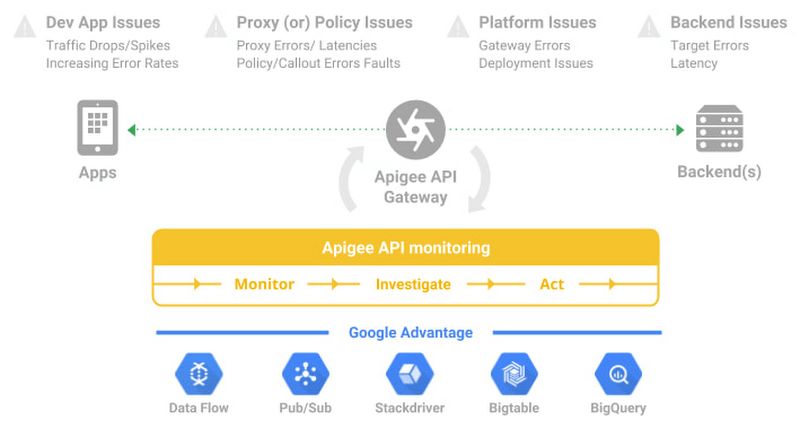
#1 Prioritize alerts for critical events requiring immediate investigation
- Ask any engineer on-call for a critical service and they will tell you about the overheads created by incorrectly prioritized alerts. For example let us imagine a distributed application with 20 APIs. Even if you set up basic alert monitors across latency, error, and traffic for these APIs, you end up monitoring and maintaining 60 alert definitions – which is a lot. To balance avoiding monitoring blindspots and alert fatigue at the same time, operations teams must develop a clear understanding of all events and prioritize configuring alerts for events supporting critical traffic.
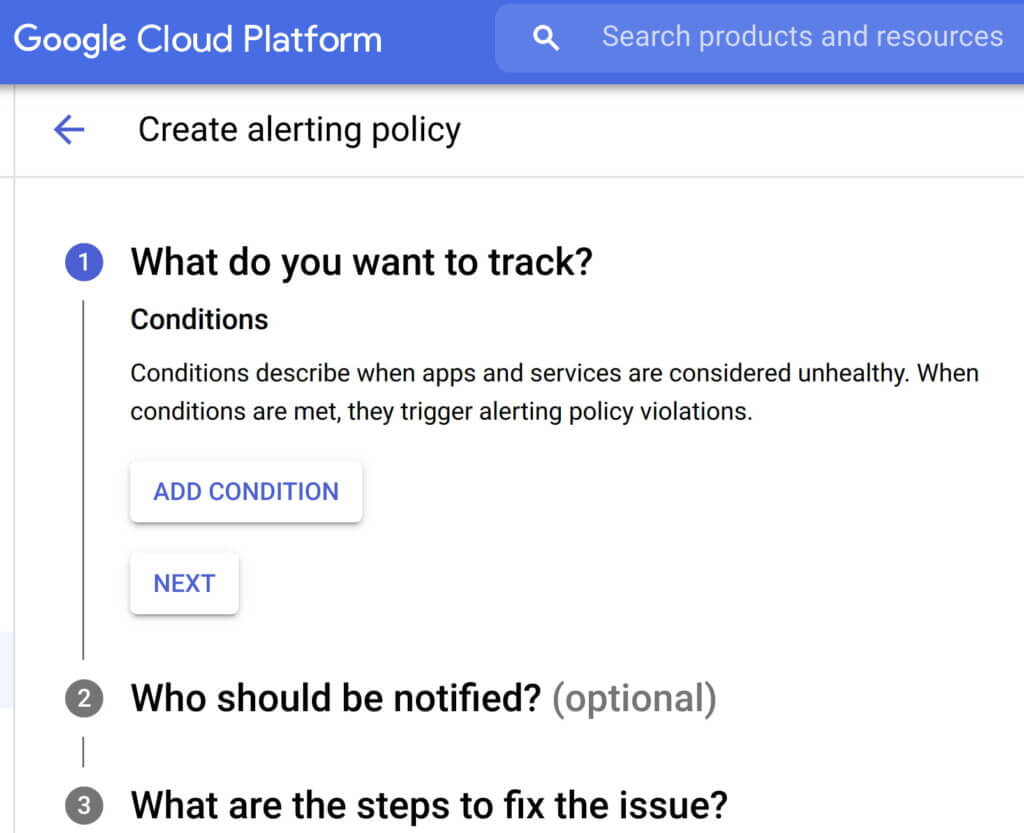
- Consider quality over quantity while defining new alert conditions where each new condition is urgent, actionable, and actively or imminently user-visible. Every alert condition created should also contain intelligence that requires active engagement from a user as opposed to a mere robotic response. Apigee’s API monitoring allows creation of alert conditions based on metrics or logs while providing actionable information (Ex: status code, rate etc.,) and playbooks for diagnosi
- In today’s multilayered systems, one team’s symptom (“what’s broken?”) is another downstream system’s cause (“Why?”). Even if some events are not suitable for actionable alerts, a failure needs to create an informational broadcast to a downstream system to mitigate the impact of the upstream dependency. In such cases, investing in automating alerts, grouping multiple incidents in notification channels, and incident tracking. For example, Apigee lets you integrate and group your alert notifications in channels like Slack, Pagerduty, webhooks etc.,
- Modern production systems are ever-evolving where an alert that’s currently rare might become frequent and automatable. Analogous to ticket backlog grooming, alert policies need to be reviewed periodically to make sure new conditions are identified and existing alerts are refined with new thresholds, prioritization and correlation. Controls like Advanced API Ops leverage AI and ML to detect anomalous traffic differentiated from random fluctuations to help define accurate alert definitions
Check out some examples of alerts here
#2 Isolate problem areas quickly with dashboards
Google’s Site Reliability Engineering book presents the case for efficient diagnosis by building dashboards that answer basic questions about every service, normally including some form of the four golden signals — latency, traffic, errors and saturation. But at the same time, capturing just these golden metrics at different levels of granularity can quickly add up. Like all software systems, monitoring can become an endless pit of complexity, complicated to change and a burden to maintain. In the same book, the most effective direction to create a well-functioning standalone system is to collect and aggregate basic metrics, paired with alerting and dashboards.
If you are running a large scale API program with a dedicated team to monitor your APIs, you can leverage the out-of-the-box monitoring dashboards in your API Management solution (like Apigee’s API monitoring) to gather real-time insights into your API performance, availability, latency, and errors. In other cases, you can use solutions like Cloud Monitoring that can provide visibility across your full application stack where individual metrics, events, and metadata can be visualized in a rich query language for rapid analysis. Leveraging a single system for your application stack provides observability in context and can reduce your time spent navigating between systems (Apigee customers can use Cloud Monitoring by default or integrate with other systems using Cloud Monitoring API)
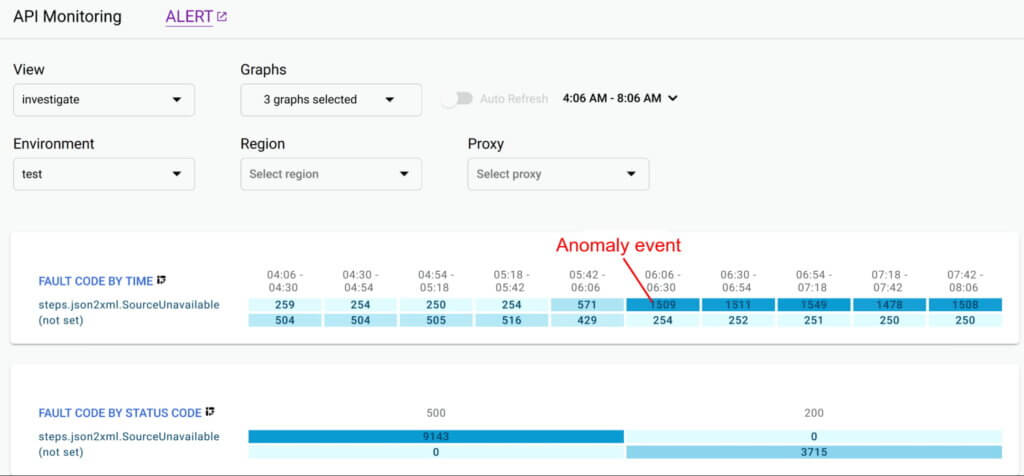
Even after you collect and aggregate the metrics, it is important to have impactful data visualizations to quickly understand the issue and identify correlations during diagnosis. In data visualizations as well, focusing on too many dashboards creates a steep learning curve and increases mean time for every diagnosis. For example, Apigee API Monitoring provides the following visualizations as a standard to balance simplicity and efficiency:
- Timeline view to diagnose traffic (in 1 min intervals), error rates (4xx and 5xx across traffic) and latencies (50th, 90th, 95th and 99th percentiles)
- Pivot tables of metrics and attributes for all API traffic, to help compare activity across different metrics
- Treemaps of recent API traffic by proxy to get a snapshot of incidents, error rates and latencies
#3 Incorporate distributed tracing into your end to end observability strategy
Modern application development accelerated the adoption of technologies and practices like cloud, containers, APIs, microservice architectures, DevOps, SRE etc. While this increases release velocity, it also introduces complexity and more points of failure in an application stack. For example, a slow response to a customer request spans across multiple micro services owned (and monitored) by various teams who might not observe any individual performance issues. Without an end-to-end contextual view of a request, it is nearly impossible to isolate the point of high latency.
In such cases, distributed tracing is the best way for DevOps, Operations and SREs to get answers to questions such as service health, root cause of defects, or performance bottlenecks in a distributed system. Organizations should invest in instrumenting their distributed applications using open source standards such as OpenCensus and Zipkin. Using tools like Cloud Trace with a broad platform, language and environment support can help easily ingest data from any source — open instrumentation or proprietary agents.
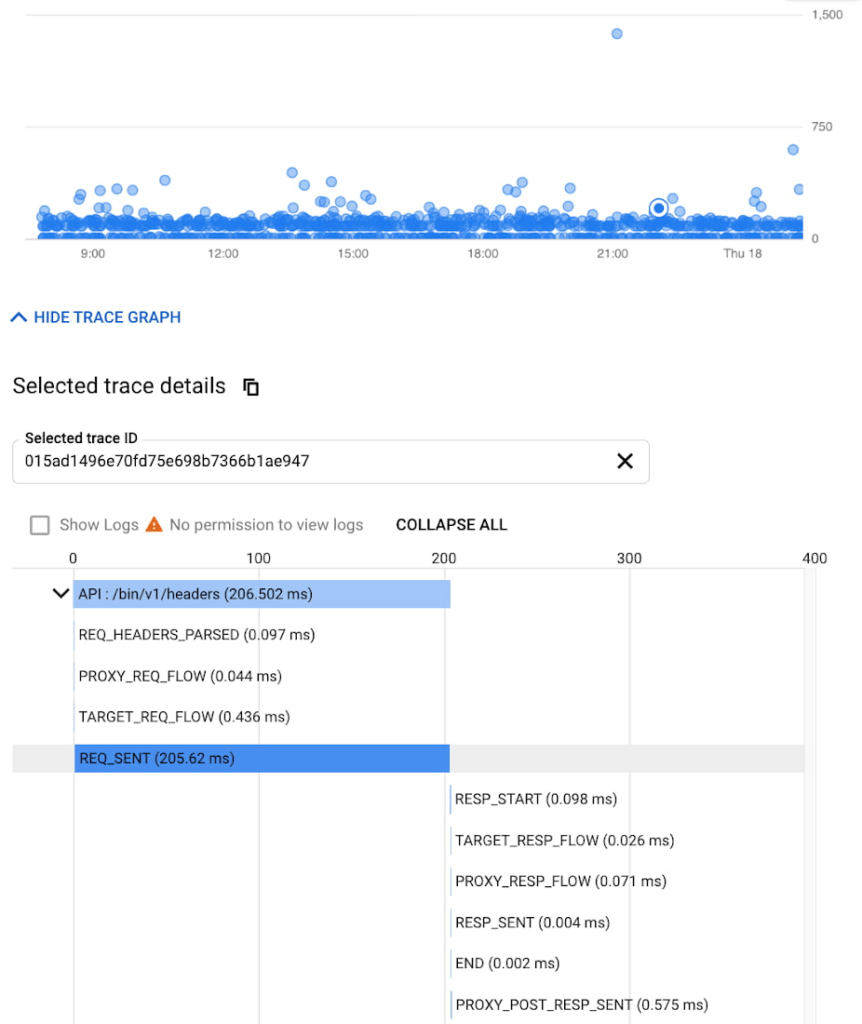
While distributed tracing helps in narrowing the issue to a given service, in some cases you might need further context to pinpoint the root cause. For example: Even if you have isolated the source of a performance issue to an API proxy, it is still a tedious process to identify the right bottleneck among multiple policies being executed. Tools like Apigee Debug enable you to zoom into an API proxy flow and probe the details of each step to see internal details like policy executions, performance issues, and routing etc.,
As soon as a request starts to span across a handful of microservices, tools like distributed tracing and Debug will become crucial elements of your monitoring strategy. When every service in a distributed system emits a trace, the amount of data can quickly become overwhelming leading to the classic “needle in the haystack” problem. In such scenarios, it becomes vital to ask the right questions and choose between head-based sampling (randomly selecting which traces will be sampled for analysis) and tail-based sampling (observe all trace information and sample the traces with unusual latency or errors) based on application complexity
Implement effective API monitoring in Apigee
Apigee’s API monitoring (based on metrics exposed by the internals of the system) capabilities work with your existing monitoring infrastructure to help reduce mean time to diagnosis and increase application resiliency. Specifically, operations teams can leverage
- Monitoring dashboards to gain in-depth insights into API availability and performance metrics.
- Debug to precisely diagnose with deeper insights into an API proxy flow without toggling multiple tools.
- Alerts and notifications to gather contextual Insights, facilitate customization, and grouping with first class integrations to various tools (like Slack, PagerDuty, email and support for webhooks).
- Best of Google technologies such as Data Flow, Pub/Sub, Stackdriver, Bigtable and BigQuery to handle massive volumes and complex metrics at scale
Using Apigee’s API monitoring will help you maintain high application resiliency with comprehensive controls to reduce mean time to diagnosis and resolution. Get started with Apigee today or explore Apigee’s API monitoring for free here. Check out our documentation for additional information on API monitoring.
Minimum Instances for Cloud Functions to Keep Performances Going for Serverless Apps
3366
Of your peers have already read this article.
2:00 Minutes
The most insightful time you'll spend today!
Cloud Functions, Google Cloud’s Function as a Service (FaaS) offering, is a lightweight compute platform for creating single-purpose, standalone functions that respond to events, without needing an administrator to manage a server or runtime environment.
Over the past year we have shipped many new important capabilities on Cloud Functions: new runtimes (Java, .NET, Ruby, PHP), new regions (now up to 22), an enhanced user and developer experience, fine-grained security, and cost and scaling controls. But as we continue to expand the capabilities of Cloud Functions, the number-one friction point of FaaS is the “startup tax,” a.k.a. cold starts: if your function has been scaled down to zero, it can take a few seconds for it to initialize and start serving requests.
Today, we’re excited to announce minimum (“min”) instances for Cloud Functions. By specifying a minimum number of instances of your application to keep online during periods of low demand, this new feature can dramatically improve performance for your serverless applications and workflows, minimizing your cold starts.
Min instances in action
Let’s take a deeper look at min instances with a popular, real-world use case: recording, transforming and serving a podcast. When you record a podcast, you need to get the audio in the right format (mp3, wav), and then make the podcast accessible so that users can easily access, download and listen to it. It’s also important to make your podcast accessible to the widest audience possible including those with trouble hearing and those who would prefer to read the transcript of the podcast.
In this post, we show a demo application that takes a recorded podcast, transcribes the audio, stores the text in Cloud Storage, and then emails an end user with a link to the transcribed file, both with and without min instances.
Approach 1: Building the application with Cloud Functions and Cloud Workflows
In this approach, we use Cloud Functions and Google Cloud Workflows to chain together three individual cloud functions. The first function (transcribe) transcribes the podcast, the second function (store-transcription) consumes the result of the first function in the workflow and stores it in Cloud Storage, and the third function (send-email) is triggered by Cloud Storage when the transcribed result is stored and sends an email to the user to inform them that the workflow is complete.

Cloud Workflows executes the functions in the right order and can be extended to add additional steps in the workflow in the future. While the architecture in this approach is simple, extensible and easy to understand, the cold start problem remains, impacting end-to-end latency.
Approach 2: Building the application with Cloud Functions, Cloud Workflows and min instances
In this approach, we follow all the same steps as in Approach 1, with a slightly modified configuration that enables a set of min instances for each of the functions in the given workflow.

This approach presents the best of both worlds. It has the simplicity and elegance of wiring up the application architecture using Cloud Workflows and Cloud Functions. Further, each of the functions in this architecture leverages a set of min instances to mitigate the cold-start problem and time to transcribe the podcast.
Comparison of cold start performance
Now consider executing the Podcast transcription workflow using Approach 1, where no min instances are set on the functions that make up the app. Here is an instance of this run with a snapshot of the log entries. The start and end timestamps are highlighted to show the execution of the run. You can see here that the total runtime in Approach 1 took 17 s.
Approach 1: Execution Time (without Min Instances)

Now consider executing the podcast transformation workflow using Approach 2, where min instances are set on the functions. Here is an instance of this run with a snapshot of the log entries. The start and end timestamps are highlighted to show the execution of the run, for a total of 6 s.
Approach 2: Execution Time (with Min Instances)
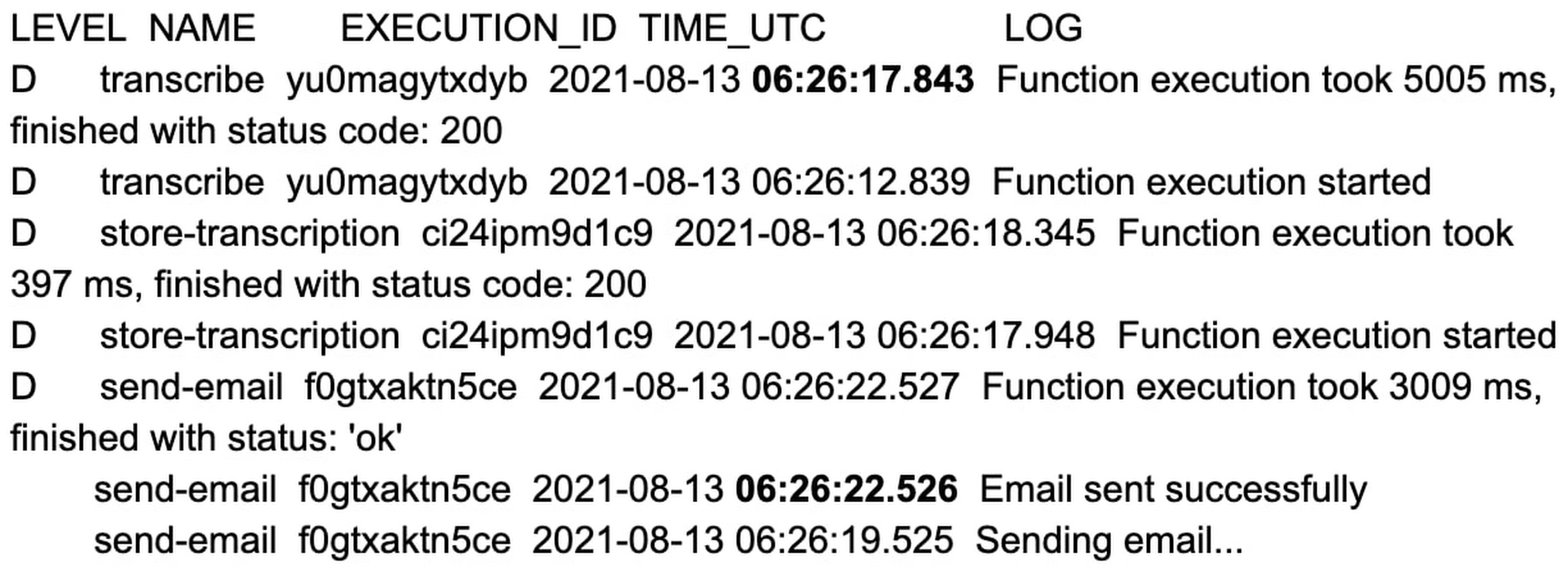
That’s an 11 second difference between the two approaches. The example set of functions are hardcoded with a 2 to 3 second sleep during function initialization, and when combined with average platform cold-start times, you can clearly see the cost of not using min instances.
You can reproduce the above experiment in your own environment using the tutorial here.
Check out min instances on Cloud Functions
We are super excited to ship min instances on Cloud Functions, which will allow you to run more latency-sensitive applications such as podcast transcription workflows in the serverless model. You can also learn more about Cloud Functions and Cloud Workflows in the following Quickstarts: Cloud Functions, Cloud Workflows.

Modernize your Windows Server Workloads using Google Cloud Platform
DOWNLOAD RESEARCH REPORTS6236
Of your peers have already downloaded this article
1:30 Minutes
The most insightful time you'll spend today!
Application Modernization is an important enabler of Digital Transformations (DX), which fuel competitive advantage through increased productivity and business agility. Public cloud infrastructure proves to be a solid foundation for application modernization by providing Self-Service Provisioning capabilities, cloud-based & cloud-native technologies, and easier access to technology innovations such as AI/ML.
Windows Server-based enterprise applications rely on the underlying infrastructure for platform performance, security, and availability. A better performing cloud platform enables them to perform better and hence prove to be more resource-optimized and cost-effective.
Download this IDC report to understand why you should move your Windows Server workloads to Google Cloud and the benefits you can derive.
Project to Platform: Financing Digital Transformation

4201
Of your peers have already read this article.
3.45 Minutes
The most insightful time you'll spend today!
Financing digital transformation poses a significant problem for many enterprises we work with. It’s not because the C-suite doesn’t support it: the need to become more agile, digital, and data-driven is nearly ubiquitous in executive public pronouncements. But most large organizations look at IT investment in a way that’s ineffective for a successful digital transformation effort.
A varied combination of factors affect an organization’s success in the digital ecosystem, and a lack of alignment between IT and business leaders can hamper even the most digitally sophisticated organizations. Empirical research by the Apigee Institute shows clear evidence that a solid digital transformation effort, aligned across business and marketing, whose progress is carefully tied to core enterprise metrics, must be supported by an investment strategy that uses a “real options” portfolio approach.
Let’s explore ways to think about funding digital transformation.
Planning for the Unimaginable
Common IT investment strategies are focused on straight-line net present value (NPV) business case calculations, which emphasize linear solutions and impacts. These methods ignore the value of enabling a range of options and potential future use cases, which an API program, with its reusable, highly consumable digital assets, makes available for the enterprise. In addition, these methods often ignore the value of the new categories of business data generated by such programs, as well as business capabilities that were impossible to imagine before the capabilities came online.
One media company we’re working with was astounded by a project that now makes key sales provisioning available to large distribution partners within two months, when previous estimates predicted two years and many millions of dollars, each.
More importantly, that functionality will now be reused across all of their numerous current partners and sales channels, and is enabling exciting new partnerships that were too costly before. This functionality was an unexpected by-product of their original API effort—it wasn’t even the main focus of the initial project.
There was no way that the impact of this capability or its implications on new business could have been predicted at the outset, and no way to formally model the outsized impact this functionality will have on the enterprise. Any attempts to do so would have been deemed ludicrous.
Breaking from the Status Quo
So how do you fund an API-driven digital transformation, which by nature emphasizes speed and optionality to unlock new ways of doing business, instead of the business-as-usual single-use, point-to-point integrations that perpetuate status quo thinking? For a world where the latter is the dominant paradigm and you don’t have a clear C-level mandate, here are three suggestions.
1. Enable your web/e-commerce teams. Many such teams find their responsibilities expanded to include mobile, kiosk, and many other digital initiatives, while being trapped in the traditional web server, do-it-yourself paradigm. These teams are actually quite open to technology, and often harbour weekend hackers who love to explore the new capabilities that are expanding the digital ecosystem at light speed. Tapping this passion by funding new approaches and quickly realizing immediate projects can create first the technical, and then the business proof points that resonate with a strategy team. These capabilities must be nurtured to move out of the lab into production, where real results are created.
2. Focus on partnerships. Opening and accelerating your relationships with partners via APIs (read more about partner API initiatives here) is high-impact and relatively easy to model. This business area can prove out an API platform, and in our experience creates clear business value that can support future justifications for other business units. What’s best about these wins is that sales operations groups are typically very tactical and demanding, so when they see the value, these groups will send a message to the rest of the organization that APIs have business value. Further, your enterprise’s core partnerships have the focus of executive attention. Adding value here will elevate the stature of the API program in the C-suite.
3. Work on your CFO/financial organization. Using your successes in e-commerce and partnerships, you can propose a more robust investment using a real options approach that leads to treatment of APIs as products. This path is predicated on what research has proven to work: the adoption of a digital KPI target, coupled with a portfolio of programs whose net result is to achieve the target KPI.
Building Toward the Big Vision
But what about the visions of ground-breaking business models, ubiquitous connectivity, and enablement of an ever-shifting set of opportunities on big platforms and with unlimited partnership possibilities? Yes, these are still the endpoints to work toward, and fundamentally comprise the strategic reasons to embark on a digital transformation. If your enterprise has the C-Level leadership (in the form of a CDO or CDO-like figure), supported by a well-funded, sophisticated investment approach, by all means, build that new world now.
However, should that vision be shared only within your business unit, a forward-thinking IT group, or a dedicated innovation team, the most important thing to do is to build your team’s capability—and your program’s credibility—while delivering value along the way. The approach we suggest here has been proven in many of the organizations we work with; once your organization begins working faster and at lower costs by orders of magnitude, you’ll have created enough leverage to change the way your organization invests in its API program.
Managed containers: An enterprise standard at Colgate-Palmolive
923
Of your peers have already read this article.
3:30 Minutes
The most insightful time you'll spend today!
Kubernetes is an increasingly key part of the application deployment strategies at large organizations, and one of the most recommended options for the teams we work with. An idea brought to life at Google, organizations throughout the world use containers and Kubernetes on-premises, in Google Cloud, or in a multi-cloud scenario, and it has emerged as a leading application deployment platform. And because it’s open source, anyone can pop the hood, so to speak, to see how each component of it works, creating a trusted, verifiable framework that users can rely on.
Customers begin their Kubernetes and containerization journeys using various offerings in our product portfolio. Some, like Colgate, started their modernization journey with Kubernetes. Colgate is an $18B global consumer products company with ~34,000 diverse and dedicated people serving over 200 countries and territories. Through science-led innovation, they drive growth and reimagine a healthier future for all people, their pets, and our planet.
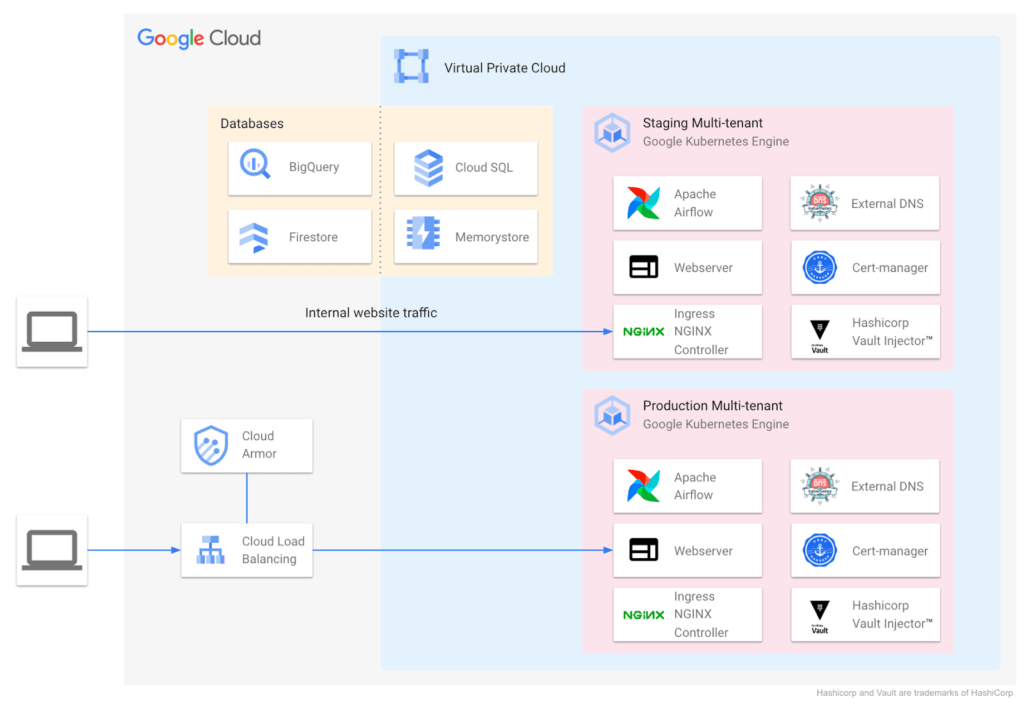
During ideation, they talked through various considerations: What technology strengths does their organization have? What skills do their teams need? What will this initiative look like a decade from now? They implemented the following Kubernetes-focused architecture:
Supporting a variety of use cases and teams
Google Cloud also helped Colgate break new ground over the years, especially in the areas of cloud-native networking, security, monitoring, pub/sub, managed containerization, and multi-tenant environments.
Over time Colgate began to leverage Google’s managed container portfolio, which includes Cloud Run. Cloud Run lets you run containers on top of a serverless platform, unlocking workload possibilities for public websites, private services, APIs and batch jobs and eliminating a lot of the time spent on infrastructure management. Cloud Run also requires no prior knowledge of Kubernetes or containers.
Simplified enterprise-level management
Many teams have found that they prefer the serverless, hands-off approach that Cloud Run provides, and Colgate now evaluates Google Cloud’s serverless solutions alongside GKE for any applications destined for the cloud. At the same time, Cloud Run lets them continue to leverage their investment in workloads based on the Open Container Initiative.
For example, Cloud Run is designed for Kubernetes compatibility with consistent management capabilities such as the ability to manage resources using kubectl via the config controller, and the ability to browse logs and metrics from both platforms in Cloud Logging and Monitoring. Cloud Run and GKE data planes are also interoperable, allowing Cloud Run and GKE services to be exposed behind a VPC behind private IPs using an internal load balancer. Cloud Run as an option has contributed to faster innovation, allowing Colgate to bring smiles to many more faces globally.
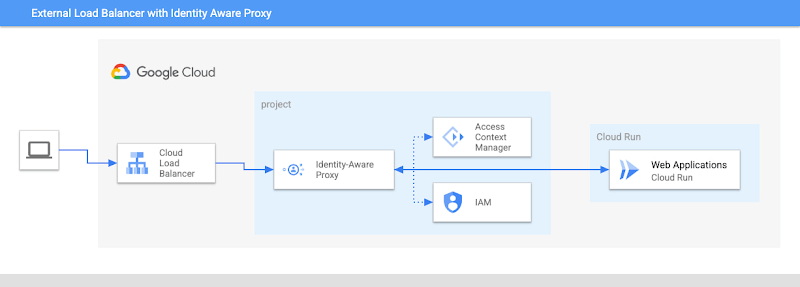
Google’s managed container offerings provide a composable and comprehensive set of solutions for customers’ applications. At Colgate, container-based managed services are used across the stack: on the front-end, where they use Identity-Aware Proxy to manage authentication and External Load Balancers to handle incoming traffic with high availability and low latency; at the application layer, where they can choose from Cloud Functions, Cloud Run, or GKE, depending on the level of control they need over the application; and at the internal load balancing level where NGINX® controllers serve internal applications. Together, these managed services ensure that Colgate has the flexibility to choose the right toolchain and maximize their goals for each use case.
Colgate wanted to build internal applications on Cloud Run in a way that complied with their organization’s policies while maximizing developer productivity. They were able to use new features like the Cloud Run Identity Aware Proxy GA to build a secure, serverless deployment for their applications.
A great partnership with Google Cloud
Colgate and Google Cloud have enjoyed a deep partnership for many years, engaging across many technologies, teams, and design patterns.
They’ve engaged with Product and Engineering across compute, networking, Kubernetes, and serverless as they brought this new way of thinking to their users.
For Colgate and many of our customers looking to address the needs of the modern user, Google’s managed container offerings are a breath of fresh air. Its reliability, scalability, and control offer the flexibility to build applications that meet the demands of both internal and external consumers. In addition, the variety of container offerings available on Google Cloud — GKE and Cloud Run — allow customers to make app deployment decisions based on the amount of Day 2 operations the users are willing to take on. Platform administrators appreciate the reduced management effort, users enjoy reduced downtime, and developers can simply deploy.
Google Cloud contributors: Rex Orioko, Rachel Tsao
Colgate-Palmolive contributors: Matthew Tattoli, Nicholas Farley, and David Wiser
3120
Of your peers have already watched this video.
12:00 Minutes
The most insightful time you'll spend today!
How Google Cloud Helps Banks and FinTech Create Cutting-edge, Digital Banking Products
Today’s customers demand sophisticated and secure banking platforms to keep up with the digital era. Banking and financial institutions spend time and investments either modernizing traditional banking products and solutions or building new cutting-edge products from the scratch. Money transfer solutions, bill payments and rewards, credit cards facilities, retail payments, loans services and more, banking products have a huge potential for leveraging Banking-as-a-service model which is a modular, cloud-native digital banking architecture that offers financial products and services via APIs and micro services. So, what typically goes under the sheets of a modern banking app that can easily build and adapt features in a matter of days and not months to keep up with the demand?
Watch the video to understand the role played by Google Cloud and its secure and scalable architecture for building digital banking products and services for today’s customers!
More Relevant Stories for Your Company

How Mailjet Sends 1.5 billion Emails a Month with Google Cloud
Mailjet allows companies to create, send, and track millions of emails to their customers and prospects around the world each month. The company’s offerings range from routing these emails to tailor-made tools that allow clients to design and send marketing campaigns with messages related to sales, user clubs, coupons and discounts,

Google Maps Platform Helps BungkusIT Fulfil its Promise of Deliveries in One Hour!
Editor’s note: Today's post is written by Hatim M, Chief Commercial Officer at BungkusIT. The on-demand delivery service delivers packages within the hour for one million customers across Malaysia and uses Google Maps Platform to create a seamless end-to-end delivery experience for its customers. Imagine it's the end of a

How to Build A Basic Image Search Utility for Natural Language Queries
This post shows how to build an image search utility using natural language queries. Our aim is to use different GCP services to demonstrate this. At the core of our project is OpenAI's CLIP model. It makes use of two encoders - one for images and one for texts. Each encoder




Indian Retailer Figures Optimizes Hyperlocal Delivery to Increase Customer Experience
Anyone who follows the Indian e-commerce scene knows that one of the largest challenges these companies face is hyperlocal delivery. That was a problem facing Wellness Forever, a retail chain of pharmacies with 150-plus stores across India. “Exactly a year ago, we started our journey of hyperlocal deliveries. This optimization
