





Don’t Just Move to the Cloud, Modernize With Google Cloud

3501
Of your peers have already read this article.
2:00 Minutes
The most insightful time you'll spend today!
Our customers tell us they don’t just want to migrate their applications from point A to point B, they want to modernize their applications with cloud-native technologies and techniques, wherever those applications may be.
Today, we’re excited to tell you about a variety of new customers that are using Anthos to transform their application portfolio, as well as new cloud migration, API management, and application development offerings:
- New customers leveraging Anthos for a variety of on-prem, cloud and edge use cases
- The general availability of Migrate for Anthos
- Apigee hybrid in general availability
- The general availability of Cloud Code
Accelerating app modernization with Anthos
Anthos was the first open app modernization platform to offer a unified control plane and service delivery across diverse cloud environments—managed cloud, on-premises and edge. Since it became generally available in the spring, organizations across a variety of industries and geographies have turned to Anthos to bring the benefits of cloud, containers and microservices to their applications.
According to the findings from Forrester’s Total Economic Impact study, customers adopting Anthos have seen up to 5x return on investment based on the savings from ongoing license and support costs, and the incremental savings from operations and developer productivity. For one customer in the financial services industry, rolling out new features and updates to their core banking application used to take at least a quarter. Now with Anthos, they were able to eliminate months long development and release cycles, and roll out on a weekly basis. That’s a 13x improvement on time to market.
This week, several new European Anthos customers will take the stage at Next UK to talk about how they’re using Anthos to transform their IT operations.
Kaeser Kompressoren SE of Coburg, Germany, is a provider of compressed air products and services. The company needed a consistent platform to deploy and manage existing on-prem SAP workloads, like SAP Data Hub, and also wanted to be able to tap into other services running in Google Cloud to get more value from those environments.
“Application modernization is enabling business innovation for Kaeser,” said Falko Lameter, CIO. “To gain better insights from data, we knew we needed to incorporate advanced machine learning and data analytics in all our applications. We chose Google Cloud’s Anthos because it offered the flexibility to incrementally modernize our legacy application on-premises without business disruption, while allowing us to run other applications on Anthos in Google Cloud and take advantage of its managed data analytics and ML/AI services.”
Then there’s Denizbank. Based in Turkey, Denizbank provides a variety of commercial banking services, and established the first Digital Banking Department in Turkey in 2012. Denizbank turned to Anthos for an open application modernization platform to help it develop its next-generation mobile banking applications.
“We operate in 11 different countries and have to comply with various regulatory requirements like data locality and sovereignty, which mandates some or all applications to reside on premises in certain countries, while the rest of the apps can move to the cloud in other countries,” said Dilek Duman, COO of DenizBank. “We chose Google Cloud’s Anthos for its flexibility to modernize our existing application investments with ease, and to deliver AI/ML powered software faster while improving operational security and governance. Anthos gives us the ability to have a unified management view of our hybrid deployments, giving us a consistent platform to run our banking workloads across environments.”
Anthos is even starting to be deployed to edge locations, where, thanks to its 100% software-based design, it can run on any number of hardware form factors. We’re in advanced discussions with customers in telecommunications, retail, manufacturing and entertainment about using Anthos for edge use cases, as well as with global hardware OEMs.
Move and modernize with Migrate for Anthos
In addition to leveraging cloud technology for their on-premises environments with Anthos, customers also want to simultaneously migrate to the cloud and modernize with containers. That’s why we’re happy to announce the general availability of Migrate for Anthos, which provides a fast, low-friction path to convert physical servers or virtual machines from a variety of sources (on-prem, Amazon AWS, Microsoft Azure, or Google Compute Engine) directly into containers in Anthos GKE.
Migrate for Anthos makes it easy to modernize your applications without a lot of manual effort or specialized training. After upgrading your on-prem systems to containers with Migrate for Anthos, you’ll benefit from a reduction in OS-level management and maintenance, more efficient resource utilization, and easy integration with Google Cloud services for data analytics, AI and ML, and more.
DevFactory aims to offload repetitive tasks in software development so that dev teams can focus on coding and productivity. As advocates for optimization through containers, they found Migrate for Anthos a key way to help deliver on their goals:
“We usually see less than 1% resource utilization in data centers. Migrate for Anthos is a remarkable tool that allows us to migrate data center workloads to the cloud in a few simple steps,” said Rahul Subramaniam, CEO, Devfactory. “By automatically converting servers and virtual machines into containers with Migrate for Anthos, we get better resource utilization and dramatically reduced costs along with managed infrastructure in the end state, which makes this a very exciting and much-needed solution.”
Migrate for Anthos is available at no additional cost, and can be used with or without an Anthos subscription.
API-first, everywhere, with Apigee hybrid
To drive modernization and innovation, enterprises are increasingly adopting API-first approaches to connecting services across hybrid and multi-cloud environments. To address the need for hybrid API management, we’re announcing the general availability of Apigee hybrid, giving you the flexibility to deploy your API runtimes in a hybrid environment, while using cloud-based Apigee capabilities such as developer portals, API monitoring, and analytics. Apigee hybrid can be deployed as a workload on Anthos, giving you the benefits of an integrated Google Cloud stack, with Anthos’ automation and security benefits.
Gap Inc. uses Apigee to publish, secure, and analyze APIs and easily onboard the development teams working with those APIs. Apigee hybrid will help Gap Inc. overcome the traditional tradeoffs between on-premises and cloud, providing the best of both worlds.
“With Apigee hybrid, we can have an easy to manage, localized runtime for scenarios where latency or data sensitivity require it. At the same time, we can continue to enjoy all the benefits of Apigee such as Apigee’s developer portal and its rich API-lifecycle management capabilities,” said Patrick McMichael, Enterprise Architect at Gap Inc.
Simplifying the developer experience
Google Cloud application development tools are designed to help you simplify creating apps for containers and Kubernetes, incorporate security and compliance into your pipelines, and scale up or down depending on demand, so you only pay for what you use.
With these goals in mind, last week, we announced the general availability of Cloud Run and Cloud Run for Anthos. Cloud Run is a managed compute platform on Google Cloud that lets you run serverless containers on on a fully managed environment or on Anthos. With Cloud Run fully managed, you can easily deploy and run stateless containers written in any language, and enjoy serverless benefits such as automatic scale up and scale down and pay-for-use—without having to manage the underlying infrastructure.
Cloud Run for Anthos, meanwhile, brings those same serverless developer experience to Anthos managed clusters, giving developers access to a modern, serverless compute platform while their organization modernizes its on-prem environment with Kubernetes.
Easier Kubernetes development with Cloud Code
Today, we’re excited to announce the general availability of another important member of the Google Cloud application development stack: Cloud Code, which lets developers write, debug and deploy code to Google Cloud or any Kubernetes cluster through extensions to popular Integrated Developer Environments (IDEs) such as Visual Studio Code and IntelliJ.
Developers are most productive while working in their favorite IDE. By embracing developers’ existing workflow and tools, Cloud Code makes working with Kubernetes feel like you are working with a local application, while preserving the investment you’ve made to configure your tools to your own specific needs. Cloud Code dramatically simplifies the creation and maintenance of Kubernetes applications.
In addition, Cloud Code speeds up development against Kubernetes by extending the edit-debug-review “inner loop” to the cloud. You get rapid feedback on your changes, ensuring that they’re of high quality. And when it comes to moving code to the production environment, Cloud Code supports popular continuous integration and delivery (CI/CD) tools like Cloud Build.
Finally, with Cloud Code, diagnosing issues does not require a deep understanding of Kubernetes, thanks to connected debuggers and cluster-wide logging that help you address issues all from the context of your favorite tool.
Toward modern, efficient applications
Application modernization means a lot of things to a lot of people. Depending on your environment, it can mean updating VMs to containers and Kubernetes, it can mean moving them to the cloud, or it can mean distributing them to edge locations and unifying workloads with consistent API and service management. For others, application modernization means using cloud-native tools and concepts like serverless and CI/CD. Whatever your definition, we can help you realize your business and modernization goals, achieving greater agility while improving overall governance.
What Our Google Cloud Experts Say About Multi-cloud Journey

3448
Of your peers have already read this article.
1:30 Minutes
The most insightful time you'll spend today!
Do you want to fire up a bunch of techies? Talk about multicloud! There is no shortage of opinions. I figured we should tackle this hot topic head-on, so I recently talked to four smart folks—Corey Quinn of Duckbill Group, Armon Dadgar of Hashicorp, Tammy Bryant Butow of Gremlin, and James Watters of VMware—about what multicloud is all about, key considerations, and why you should (or shouldn’t!) do it.
Five important insights came out of these discussions. If you’re on a multicloud journey or considering one, keep reading.
Do: Choose to do multicloud for the right reasons
Don’t do multicloud because Gartner says so, implores Corey Quinn. Before embarking on a multicloud, define a “why” focused on business value journey, says Armon Dadger. For example, you might want to use services from each public cloud because of their differentiated services, according to Tammy Bryant Butow. Armon also calls out regulatory reasons, existing business relationships, and accommodating mergers and acquisitions. On the topic of M&A, Corey points out that if you acquire a company that uses another cloud, it’s usually expensive and difficult to consolidate. It can be smarter to stay put.
Don’t: Over-engineer for workload or data portability
Thinking that you’ll build a system that moves seamlessly among the various cloud providers? Hold up, says our group of experts. Armon points out that aspects of your toolchain or architecture may be multicloud—think of some of your workflows or global network routing—but that shifting workloads or data is far from simple. Corey says that trying to engineer for “write once, run anywhere” can slow you down, and ignores the inherent uniqueness that’s part of each platform. Specifically, Corey calls out the per-cloud stickiness of identity management, security features, and even network functionality. And data gravity is still a thing, says James, that causes some to dismiss multicloud outright.
If you’re using multiple public clouds, you take advantage of the distinct value each offers, Armon says. Use native cloud services where possible so that you see the benefits from useful innovations, built-in resilience, and baked-in best practices. The value from that cloud-infused workload may outweigh the benefits of seamless portability.
Do: Recognize different stakeholder interests and needs
James smartly points out that many multicloud debates happen because people are arguing from different perspectives. Context matters. If you’re an infrastructure engineer who invests heavily in a given cloud’s identity and access management model, multicloud looks tricky. Or if you’re a data engineer with petabytes of data homed in a particular cloud, multicloud may look unrealistic. James highlights that many developers default to multicloud because their local tools—where all the work happens—are multicloud. A developer’s IDE and preferred code framework(s) aren’t tied to any given cloud. Be aware that groups within your organization will come at multicloud from distinct directions. And this may impact your approach!
Don’t: Go it alone
Corey talks about the importance of asking others what worked, and what didn’t. Tammy offers her best practices around sharing results from experiments. It’s about sharing knowledge and tapping into it for community benefit. Others have probably tried what you’re trying, and can help you avoid common pitfalls. If you’ve just made an architectural choice that didn’t work out, share it, and help others avoid the pain.
Read research from analysts, go to conferences or watch videos to observe case studies, and join online communities that offer a safe place to share mistakes and learn from others.
Do: Experiment first using techniques like multi-region deployments
If you think you can operate systems across clouds, how about you first try doing it across regions in a specific cloud, suggests Corey. Getting a system to properly work across cloud regions isn’t trivial, he says, and that experience can help you uncover where you have architectural or operational constraints that will be even worse across cloud providers.
This is great guidance if your multicloud aspirations involve using multiple clouds to power one application—versus the more standard definition of multicloud where you use different clouds for different applications—but can also surface issues in your support process or toolchain that fail when faced with distributed systems. Start with muti-region deployments and chaos engineering experiments before aggressively jumping into multicloud architectures.
The Google Cloud take
Do the things above. It’s great advice. I’ll add three more things that we’ve learned from our customers.
- Don’t fear multicloud. You’re already doing it. You don’t single-source everything. As Corey mentioned, you probably already have one cloud for productivity tools, another for source code, another for cloud infrastructure. You’ll use software and application services from a mix of providers for a single app. You have that experience in your team and have been doing that for decades. What people do rightly worry about is using more than one infrastructure service beneath an application, as that can introduce latency, security, and logistical hurdles. Make sure you know which model your team is considering.
- Embrace the right foundational components, including Kubernetes. Will everything run on Kubernetes? Of course not. Don’t try to do that. But it also represents the closest thing we have to a multicloud API. Companies are using Kubernetes to stripe a consistent experience across clouds. And this isn’t just to orchestrate containers, but also to manage infrastructure and cloud-native services. Also, consider where you need other fundamental consistency across clouds, including areas like provisioning and identity federation.
- Use Google Cloud as your anchor. Here’s a fundamental question you have to decide for yourself: Are you going to bring your on-premises technology and practices to the cloud, or bring cloud technology and practices on-prem? We sincerely believe in the latter. Anchor to where you’re trying to get to. We offer Anthos as a way to build and run distributed Kubernetes fleets in Google Cloud and across clouds. By using a cloud-based backplane instead of an on-prem one, you’re offloading toil, leveraging managed services for scale and security, and introducing modern practices to the rest of your team.
We learned a lot about multicloud through these discussions, and it seems like others did too. That’s why we’re going to do a second round of interviews with a new crop of experts so that we can keep digging deeper into this topic. Stay tuned!
4712
Of your peers have already watched this video.
10:30 Minutes
The most insightful time you'll spend today!
How Google’s Customer Data Platform Helps Retail Brands Offer Data-driven , Personalized CX
Retail companies need customer insights to deliver personalized experiences that impact revenue generation and cost savings. Watch how Google Cloud’s customer data platform helps brands integrate and build holistic view of data in silos to drive marketing and customer service success.
4048
Of your peers have already watched this video.
15:00 Minutes
The most insightful time you'll spend today!
Modernize your Windows Workloads by Migrating them to Google Cloud
Google has plenty to offer when it comes to migrating and modernizing traditional enterprise Windows workloads to the cloud. Explore different approaches for re-hosting, modernizing, and transforming Windows applications, and the benefits of moving to Google Cloud.
Learn from demos on some of the cutting-edge technologies that can offload some of the operational IT burden into optimized managed services.
Data-first Digitization Helps Leverage the Cloud for Your Mainframe Assets

6488
Of your peers have already read this article.
2:00 Minutes
The most insightful time you'll spend today!
For many enterprises, the venerable mainframe is home to decades’ worth of data about the company’s customers, processes and operations. And it goes without saying that the business would like access to that mainframe data — to report on it, to analyze it with big data analysis tools, or to use it as the basis of new machine learning and artificial intelligence initiatives.
At Google Cloud, we are eager to work with organizations to help them transform their mainframe assets for the cloud era. Of course, we can help them modernize their mainframe applications by migrating them to the cloud. At the same time, working with partners and customers, we’ve developed another, more lightweight approach that can help them start to leverage the cloud for their mainframe assets much more quickly than performing a full-fledged migration. We call this approach data-first digitization.
In this rapidly evolving digital ecosystem, it’s imperative to understand the difference between ‘modernization’ and ‘digitization.’ With modernization you start with the current state and look forward, and rely on mainframe application migration approaches such as rehosting (emulation), refactoring (automated code transformation), reengineering — or simply replacing a custom application with a commercial package. With digitization, you start with the future state that you want to achieve, and work back to what is required to get there.
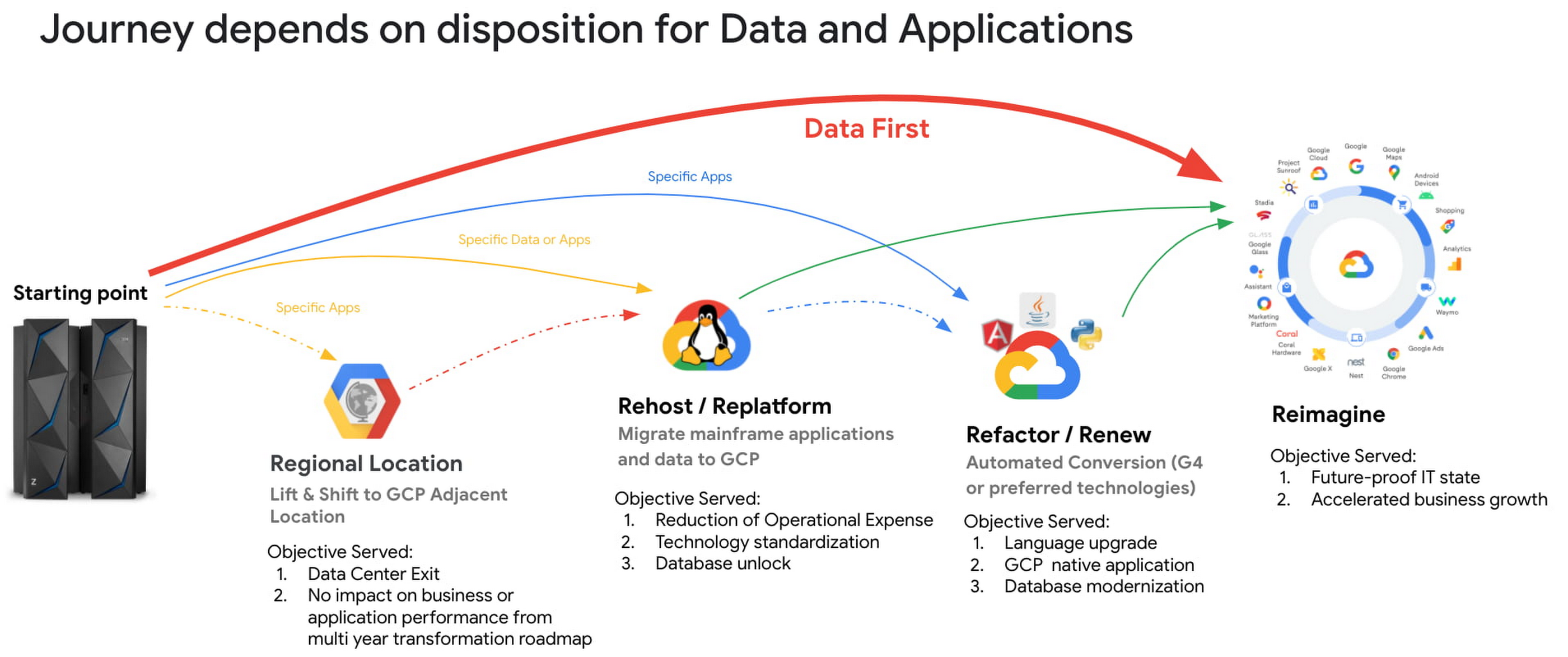
This data-first digitization approach includes a mainframe data-first integration framework comprising in-house and partner products and tools to migrate heterogeneous data sources from the mainframe to Google Cloud Storage. Once mainframe data has been copied to Cloud Storage, it can then be integrated and leveraged by Google Cloud tools such as BigQuery, AI and machine learning prodcuts and Smart and Stream analytics platforms. The integration framework covers both bulk batch data transfers and real-time data replication (change data capture).

Data-first digitization is based on the tenet that ‘applications are transient, data is permanent.’ By bringing data first to Google Cloud instead of traditional ways of modernizing applications (for example, with Gartner’s 7 options to Modernize), this allows organizations to leapfrog to new business models, use cases and innovative ways to serve end customers. For example:
- Making decisions with smart and stream analytics platforms and AI/ML engines. These tools need data to make decisions. Google is a pioneer in extracting information and value from the raw structured and unstructured data, and this approach opens up mainframe data for use by BigQuery and AI/ML models.
- Building new reporting applications. With access to mainframe data, you can use Google cloud products like Looker and Appsheet to build net-new reporting applications, expediting the process of retiring mainframe reporting applications, and accelerating your overall transformation.
In our experience, taking a data-first digitization approach to your mainframe offers a number of benefits:
- Faster time-to-business: Because data-first modernization is built on existing products, the implementation cycle is much shorter.
- Less capital investment: You spend your time integrating products, not developing applications.
- Minimized risk: Data-first integrates with existing, proven and reliable Google Cloud products.
- Faster overall mainframe transformation: When you shift your modernization center of gravity from the application to the data, you look at mainframe applications from a business perspective instead of just “keeping the lights on.” As a result, only the most business-critical applications are modernized and many support applications can be decommissioned, accelerating your transformation journey.
Taking a data-first approach to digitization is still relatively new, but we’re heartened by customers’ early successes. Watch this space for additional insights, reference architectures and technical white papers around data-first. And if you think this approach may be right for you, reach out to mainframe@google.com.
Learn more:
TVG Network Turns to Google Cloud and Saves $0.5 Million a Year

3633
Of your peers have already read this article.
2:30 Minutes
The most insightful time you'll spend today!
Google Cloud Results
- Maximizes revenue by allowing customers to place bets faster and more confidently
- Scales for major racing events with 80% less IT involvement and up to $500,000 annual savings
- Improves time to market for new product releases by more than 30x
- Helps enable richer mobile experiences to keep fans engaged
- Processes up to 6,000 bets per minute
The first Saturday of May is the biggest horse racing event in North America each year. Minutes before the race, millions of dollars in online bets will flow in through advanced deposit wagering (ADW) operators such as TVG Network. For TVG’s IT team, it’s a high-stakes game: If wagering systems can’t handle thousands of requests per second, revenue and customers will be lost.
To avoid downtime before a major race, TVG used to bombard its systems with ad-hoc load tests a month in advance. Before each big race event, a team of seven people spent eight hours a week deploying new infrastructure and testing various scenarios. But with complex legacy systems and manual processes, the team’s efforts could only go so far. If an unexpected system issue or undetected bottleneck was found during the run-up to the big race, all bets were off.
After a brush with downtime in 2016, TVG decided to move its ADW application to the cloud, taking the opportunity to rewrite the application to take advantage of modern, container-based architectures. After a short period of development on a different cloud services provider, TVG moved to Google Cloud Platform using Google Kubernetes Engine to automate container management and orchestration.
“We chose Google Cloud Platform because it was the most reliable, cost-effective, and automated cloud solution available,” says Tim Morrow, CTO at TVG Network. “We get better security, strong compliance, and the peace of mind that when the biggest race day rolls around, we won’t have any downtime.”
Placing the right bet
Moving to Google Cloud Platform gives TVG a variety of options in different regions and availability zones to satisfy regulatory requirements. Google Cloud Platform offers continuous availability and transparent maintenance, with no scheduled downtime or patching requirements.
“For our online wagering site, we prefer Google’s philosophy of continuous availability and live migration,” says Tim. “Having to plan for scheduled downtime of cloud instances just seems ridiculous in this day and age. And with Google Cloud Platform, we get much more consistent performance as we scale.”
To keep its IT team focused on value-added tasks, TVG uses Google Cloud managed services such as Cloud Bigtable, a highly scalable NoSQL database, as well as Cloud Storage for backups and Cloud Pub/Sub for real-time messaging between applications.
“We like the software-defined nature of Google Cloud Platform,” says Saeid Vafaeisefat, Vice President of IT, TVG Network. “The managed services are so easy to use. Google Cloud Platform even helps us mitigate and absorb distributed denial of service attacks with its global load balancing features, which we don’t pay extra for.”
TVG worked with SADA Systems, a Google Cloud Premier Partner, for consulting and deployment assistance. “SADA Systems helped us gain a deeper understanding of the advantages of Google Cloud Platform so we could make better decisions about how our application would perform and scale,” says Saeid. “They provided the facilitation, follow-up, and expert advice we needed to make our deployment a success.”
Scaling with 80% less work
With an active-active cloud architecture spanning multiple regions and the ability to conduct continuous, automated load tests, TVG no longer worries about downtime during major racing events—or any time, for that matter. Infrastructure and tools that used to be required to scale and provide resiliency are no longer needed, reducing CapEx. And with autoscaling replacing human intervention, accidental downtime is much less of a concern.
“With Google Cloud Platform, we can scale for major racing events with 80% less IT involvement and up to $500,000 annual CapEx savings,” says Tim. “Google Cloud Platform gives us faster deployment—we’re releasing new enhancements to our wagering site four times a week instead of every two months.”
More profitable user journeys
TVG’s success is being driven by ongoing modernization made possible in part by Google Cloud Platform, with TVG becoming the first U.S. operator to launch native iPhone and iPad apps. Lower latency means that stale data is never an issue, allowing customers to place bets faster and more confidently from anywhere they happen to be—which generates more revenue for TVG.
“Being on Google Cloud Platform has allowed us to develop our customer-facing channel faster while focusing on automated deployment and immutable infrastructure,” says Tim. “We have far greater confidence in our platform, and last year we broke records on our major race days while delivering an excellent customer experience.”
More Relevant Stories for Your Company

The Fantastic Story of How BMG Enables a Micropayments Strategy So Music Artists Get Paid
The music industry is rapidly changing. Only 20 years ago, the availability of music and the infrastructure that was required to make an album a sales success were incredibly complex and expensive. With the decline of physical sales and a fundamental shift to digital, music streaming now accounts for more
Google Cloud Leads the Pack in Cloud Security: Forrester Research
As organizations continue to move workloads to public clouds, security professionals must protect the sensitive data and digital identities found in those workloads. Once wary of cloud adoption, many security professionals now believe that the native security capabilities of large public cloud platforms actually offer more affordable and superior security


Attention CFOs: How to Save Money on the Cloud
Cutting down on wastage, saving cost, and having a better control are some of the key priorities of organizations when it comes to the cloud. According to the 2018 State of the Cloud report by Rightscale, 35% of customer cloud spend is wasted, 58% of users cite cost savings as

4 Steps to a Successful Cloud Migration
Digital transformation and migration to the cloud are top priorities for a lot of enterprises. At Google Cloud, we’re working hard to make this journey easier. For example, we recently launched Migrate for Compute Engine and Migrate for Anthos to simplify cloud migration and modernization. These services have helped customers like Cardinal Health perform successful, large-scale migrations to
