






4759
Of your peers have already downloaded this article
8:30 Minutes
The most insightful time you'll spend today!
How Air Asia’s CIO Ensures Its 22,000 Employees Service Customers Efficiently and Preserve Security

3521
Of your peers have already read this article.
2:48 Minutes
The most insightful time you'll spend today!
At AirAsia, we operate a fleet of more than 270 aircraft across 23 markets, fly to more than 150 destinations and carry 100m guests each year. We’ve also been named the world’s best low-cost carrier for 11 years running. To accomplish all of this, we rely heavily on our 22,000 Allstars (employees). As AirAsia co-founder Tony Fernandes likes to say, “it has always been about the people.”
In my role as CIO, it’s critical that I give our Allstars the tools and technology they need to get their jobs done, while at the same time ensuring that our company’s data is protected and secure. While this is challenging enough in normal circumstances, we’re also in the midst of rapidly moving from legacy on-premises technologies to the cloud. Google Cloud has been a critical partner for us on this journey.
Identity challenges
AirAsia, like many other enterprises, has relied on a legacy on-premises directory for many years. As our company has quickly grown and expanded to new markets and regions, we’ve had to manage multiple servers across a number of on-premises data centers and the public cloud, which has proved costly and time-consuming.
Our Allstars, located all across Asia, need to easily access a number of legacy on-premises apps in addition to a growing number of SaaS apps. As a business, we also needed a more seamless integration between our HR system of record and our identity solution for user provisioning and lifecycle management. Solving these challenges with our existing on-premises directory was simply not feasible for us.
In recent years, we partnered with Google Cloud to help drive our digital transformation, including moving dozens of workloads and apps to Google Cloud Platform (GCP), deploying G Suite as our collaboration and productivity solution for all of our employees, and replacing thousands of Windows laptops with fast and secure Chromebooks.
We brought up our identity concerns with the Google Cloud team, and after a number of conversations, we decided to deploy Cloud Identity, Google’s cloud-based identity, and access management solution, to help address the identity challenges we were facing.
Why Cloud Identity for AirAsia?
We ended up choosing Cloud Identity for a few key reasons. Here at AirAsia, we are eager to move to the cloud as quickly as possible, and moving identity management to the cloud is a key enabler of this and our broader digital transformation. Managing identities from the cloud also enables us to have a single identity and set of credentials for each employee, which they can use to access all of the applications they need to be productive, both in the cloud and on-premises.
In addition, deploying Cloud Identity is a key step towards enabling the BeyondCorp (or zero trust) security model, which we feel is the best approach to strengthen our security posture and fight modern threats. Cloud Identity also integrates seamlessly with our existing technologies, which includes not only Google Cloud products like GCP, G Suite, and Chrome OS, but also third-party tools like Citrix, Papercut, and others.
And finally, Cloud Identity offered us significant cost and resource savings. With Cloud Identity in place, our IT department can spend less time worrying about managing multiple on-premises directory servers and can instead focus on delivering value to our Allstar employees.
Takeaways from the Google Cloud Public Sector Summit on Prioritizing Tech Investments

4770
Of your peers have already read this article.
3:00 Minutes
The most insightful time you'll spend today!
Editor’s note: Today’s post highlights five takeaways from our session at the first ever Google Cloud Public Sector Summit. To watch the full session, check out All the Right Moves: Prioritizing Investments in Technology.
Now more than ever, government agencies need to invest in digital services to fulfill their missions and better serve communities. Yet modernization isn’t a one-and-done approach; it’s a sustained effort, with multi-year implications, and requires careful consideration of how to integrate existing investments to optimize costs. Digital transformation requires coordination between different programs and agencies, including all of their many competing considerations. In short, maximizing technology investments requires careful planning, strategic thinking, and industry partners that can provide flexibility and security and meet agencies where they are.
I sat down with Suzette Kent, former U.S. federal chief information officer, and Dominic Sale, assistant commissioner for Technology Transformation Services at the General Services Administration (GSA) for a conversation to unpack this important topic and discuss industry best practices.
The panelists had five tips for government employees who are making technology purchasing decisions for their agency.
1. Put the agency’s mission first.Avoid getting distracted by exciting new trends and focus on long-term goals that can impact which procurement strategies or funds could be used. The discussion started with how government agencies could cut through the noise about technology and prioritize which technology is best for their needs. Sale and Kent agreed that an agency should focus on its core mission outcomes and let its technology needs flow from that. Sale also emphasized the importance of having technology design respond to humans’ needs, which has historically been a challenge for government agencies.
For agencies to stay focused on their mission, final decisions about technology need to be made by the program manager who best understands each program’s mission. The government CIO’s role is to be the enabler for the technology and leverage it at the enterprise level, particularly when it comes to sharing infrastructure. The takeaway: enable mission programs by empowering your teams and providing access to authorized, compliant, innovative data platforms that programs can move confidently and quickly with.
2. Invest in interoperability. Agency employees often struggle to balance the need for a positive return on investment (ROI) with requirements for meeting mission objectives. While the panelists agreed that the total cost of ownership was important, they also emphasized taking an expanded view of ROI, including future-proofing and investing in functionality that may not realize its return for many years based on the initiative. Saving money isn’t particularly valuable if the solution doesn’t meet an agency’s needs. When choosing a technology partner, government employees should understand its long-term vision to ensure that the partner fits agency priorities. Partners’ technologies should also integrate seamlessly with existing systems so agencies don’t duplicate investment costs.
For example, Google Anthos extends Google Cloud services and engineering practices into an organization’s existing environment, establishing operational consistency across apps and modernization. With Anthos, agencies can simply and securely build and deploy applications anywhere, integrating cloud services across platforms. This allows them to enjoy a consistent DevOps experience for hybrid and multi-cloud environments and enables new innovation. Most importantly, this enables an enterprise data platform, one of the largest catalysts for mission transformation and applied AI.
3. Take advantage of artificial intelligence (AI) benefits. Over the course of the pandemic, the rapid application of AI has improved government productivity, efficiency, and the ability to deliver critical new services to the public at scale. This has further cemented AI’s role as an essential government technology for the present and future. In fact, Nextgov reports that “46% of government IT specialists plan to use AI and machine learning (ML) for embedded systems in the near future.”
As we’ve seen over the course of the pandemic, government programs can start small with AI pilots before moving into broad deployment. This can help agencies understand AI’s potential before moving to full production. People always supervise AI technologies, and the possibilities are endless. Google Cloud’s Contact Center AI (CCAI) has helped government agencies improve the customer experience, by allowing citizens to schedule vaccine appointments via a platform of their choice with up to 28 languages and dialects, and manage vaccine deployment. The U.S. Navy spends billions annually to fight rust and corrosion on its ships. Inspections of ships, aircraft and vehicles are a time-consuming and critical part of keeping the U.S. Navy at top performance so Google Cloud and Simple Technology Solutions (STS) rapidly built an AI-based corrosion-detection and analysis system. The system detected and analyzed corrosion on vessels with 90% accuracy and will eventually be used to automate inspections of vessels, aircraft, and vehicles—saving billions of dollars. Document AI helps a variety of government agencies scale their document processing, reducing the time it typically takes to process enormous amounts of data and related citizen claims.
Successful adoption of AI also depends on the quality of the data. Ultimately, agencies need high-quality enterprise data pipes so that employees and the community trust the system and public sector agencies. Sale described a GSA project that used AI bots to read legal contracts and look for particular phrases that would indicate a specific use case. Previously, an employee would have had to read through the contracts and search for the information. In this way, AI is saving the government both money and time.
4. Creating better experiences for the public. Sale observed that, “trust is the government’s currency and profit motive.” And trust comes when the public can be served with the same modern tools and technology they’re used to – in real-time and with transparency in mind. For example, agencies can provide transparency in public-facing dashboards for programs and supply services that deliver information in real-time through solutions like CCAI.
Trust also requires that constituents feel that government agencies will keep their data safe and secure. The need for a globally secure infrastructure with systems that are up-to-date and designed with security at every level, underpinned by zero-trust enterprise-wide remains paramount – particularly after the series of recent cyberattacks targeting government IT infrastructure.
5. Finding the right technology partner. Government leaders need technology partners who provide a flexible and interoperable platform to integrate existing investments and maximize technical value. Historically, public sector agencies have largely been forced to adopt private clouds, which has reduced their access to richer features, and hindered their ability to adopt a full range of security and product capabilities. The right partner won’t require government leaders to compromise on functionality or service availability to achieve compliance. The right partner can harness the power of emerging technology to make it Government-ready and the true promise of cloud– the access and integration of open data– to make missions more powerful and impactful for the constituencies they serve.
Investing for Future: Why Shifting Security Left Helps Your Bottom Line

4478
Of your peers have already read this article.
3:30 Minutes
The most insightful time you'll spend today!
The concept of “shifting left” has been widely promoted in the software development lifecycle. The concept is that introducing security earlier, or leftwards, in the development process will lead to fewer software-related security defects later, or rightwards, in production.
Shifting cloud security left can help identify potential misconfigurations earlier in the development cycle, which if unresolved can lead to security defects. Catching those misconfigurations early can improve the security posture of production deployments.
Why shifting security left matters
Google’s DevOps Research and Assessment (DORA) highlights the importance of integrating security into DevOps in the 2016 State of DevOps Report. The report discussed the placement of security testing in the software development lifecycle. The survey found that most security testing and tool usage happened after the development of a release, rather than continuously throughout the development lifecycle. This led to increased costs and friction because remediating problems found in testing may involve big architectural changes and additional integration testing, as shown in Figure 1. For example, security defects in production can lead to GDPR violations, which can carry fines up to 4% of global annual revenue.
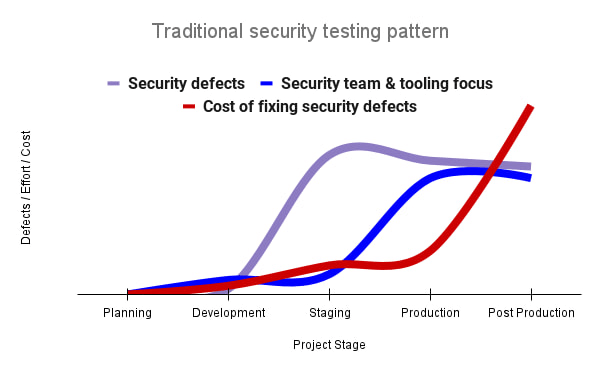
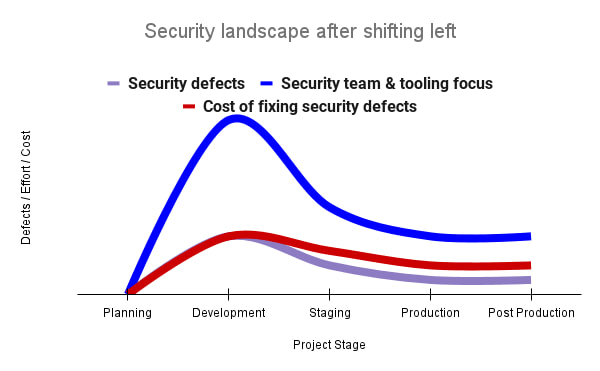
By inserting security testing into the development phase, we can identify security defects earlier and perform the appropriate remediation sooner. This results in fewer defects post-production and reduces remediation efforts and architectural changes. Figure 2 shows us that integrating security earlier in the SDLC results in overall decreases in security defects and associated remediation costs.
The 2021 State of DevOps Report expands the work of the 2016 report and advocates for integrating automated testing throughout the software development lifecycle. Automated testing is useful for continuously testing development code without the need for additional skills or intervention by the developer. Developers can continue to iterate quickly while other stakeholders can be confident that common defects are being identified and remediated.
From code to cloud
The DORA findings with regard to code security can also be applied to cloud infrastructure security. As more organizations deploy their workloads to the cloud, it’s important to test the security and configurations of cloud infrastructure. Misconfigurations in cloud resources can lead toward security incidents that could lead to data theft. Examples of such misconfigurations include overly permissive firewall rules, public IP addresses for VMs, or excessive Identity and Access Management (IAM) permissions on service accounts and storage buckets.
We can and should leverage different Google Cloud services to identify these misconfigurations early in the development process and prevent such errors from emerging in production to reduce the costs of future remediation, potential legal fines, and compromised customer trust.
The key tools in our toolshed are Security Command Center and Cloud Build. Security Command Center provides visibility into misconfigurations, vulnerabilities, and threats within a Google Cloud organization. This information is critical when protecting your cloud infrastructure (such as virtual machines, containers, web applications) against threats, or identifying potential gaps from compliance frameworks (such as CIS Benchmarks, PCI-DSS, NIST 800-53, or ISO 27001.
Security Command Center further supports shifting security left by allowing visibility of security findings at the cloud project level for individual developers, while still allowing global visibility for Security Operations. Cloud Build provides for the creation of cloud-native CI/CD pipelines. You can insert custom health checks into a pipeline to evaluate certain conditions (such as security metrics) and fail the pipeline when irregularities are detected. We will now explore two use cases that take advantage of these tools.
Security Health Checker
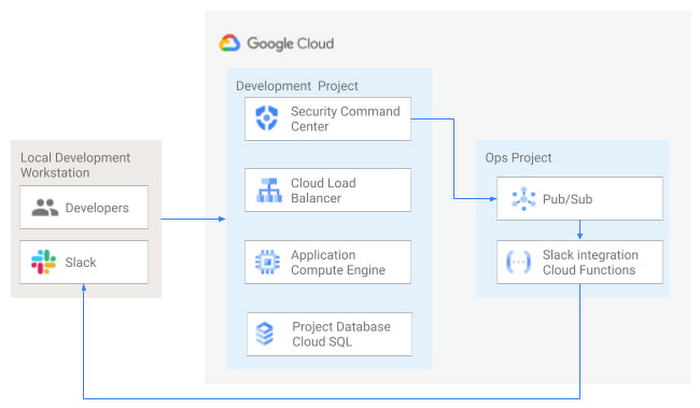
Security Health Checker continuously monitors the security health of a Google Cloud project and promptly notifies project members of security findings. Figure 3 shows developers interacting with a Google Cloud environment with network, compute, and database components. Security Command Center is configured to monitor the health of the project.
When Security Command Center identifies findings, it sends them to a Cloud Pub/Sub topic. A Cloud Function then takes the findings published to that topic and sends them to a Slack channel monitored by infrastructure developers. Just like a spell checker providing quick feedback on misspellings, Security Health Checker provides prompt feedback on security misconfigurations in a Google Cloud project that could lead to deployment failures or post-production compromises. No additional effort is required on the part of developers.
Security Pipeline Checker
In addition to using Security Command Center for timely notification of security concerns during the development process, we can also integrate security checks into the CI/CD pipeline by using Security Command Center along with Cloud Build as shown in Figure 4.
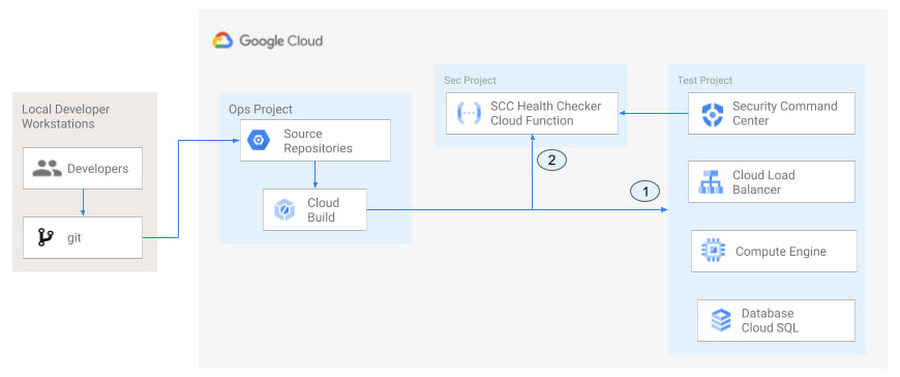
The pipeline begins with a developer checking code into a git repository. This repository is mirrored to Cloud Source Repositories. A build trigger will begin the build process. The build pipeline will include a short waiting period of a few minutes to give Security Command Center a chance to identify security vulnerabilities. A brief delay may appear undesirable at first, but the analysis that takes place during that interval can result in the reduction of security defects post-production.
At the end of the waiting period, a Cloud Function serving as a Security Health Checker will evaluate the findings from Security Command Center (Connector 1 in Figure 4). If the validator determines that unacceptable security findings exist, the validator will inject a failure indication into the pipeline to terminate the build process (Connector 2 in Figure 4). Developers have visibility into the failure triggers and remediate them before successfully deploying code to production. This is in contrast to the findings in the 2016 State of DevOps Report wherein organizations that didn’t integrate security into their DevOps processes spent 50% more time remediating security issues than those who “shifted left” on security.
Closing thoughts
DORA’s 2016 State of DevOps report called out the need for “shifting left” with security, introducing security earlier in the development process to identify security vulnerabilities early to reduce mitigation efforts post-production. The report also advocated for automated testing throughout the software development lifecycle.
We looked at two ways of achieving these objectives in Google Cloud. The Security Health Checker provides feedback to developers using Security Command Center and Slack to notify developers of security findings as they pursue their development activities. The Security Pipeline Checker uses Security Command Center as part of a Cloud Build pipeline to terminate a build pipeline if vulnerabilities are identified during the build process. To implement the Security Heath Checker and the Security Pipeline Checker, check out the GitHub repository. We hope these examples will help you to “shift left” using Google Cloud services. Happy coding!
This article was co-authored with Jason Bisson, Bakh Inamov, Jeff Levne, Lanre Ogunmola, Luis Urena, and Holly Willey, Security & Compliance Specialists at Google Cloud.
How Ocado Technology revolutionized the online grocery space by applying technology and automation

2853
Of your peers have already read this article.
2:30 Minutes
The most insightful time you'll spend today!
Grocery shopping has changed for good and Ocado Group has played a major role in this transformation. We started as an online supermarket, applying technology and automation to revolutionise the online grocery space. Today, after two decades of innovation, we are a global technology company providing state-of-the-art software, robotics, and AI solutions for online grocery. We created the Ocado Smart Platform, which powers the online operations of some of the world’s most forward-thinking grocery retailers, from Kroger in the U.S. to Coles in Australia.
With the global penetration of the Ocado Smart Platform and the increasing complexity of our operations, we’re paying close attention to our security estate. To proactively identify and tackle any security vulnerabilities, we decided to introduce Google Cloud’s Security Command Center (SCC) Premium as our centralized vulnerability and threat reporting service.
Gaining consolidated visibility into Ocado’s cloud assets
From the start, we were impressed with the speed of deployment and security findings surfaced with SCC. Where it would take several weeks in the past with other software vendors, we were able to quickly set up SCC in our environment and we could immediately start identifying our most vulnerable assets.
Today, we use SCC to detect misconfigurations and vulnerabilities across hundreds of projects throughout our organization and we use it to get an aggregated view of our security health findings. We filter the findings and then use Pub/Sub or Cloud Functions to send alerts directly to the tools each division is working with, such as Splunk or JIRA. This way, each of our teams can discover and respond to the security findings in their own environment, with SCC acting as the single source of truth for our security-related issues.
Driving autonomy by delegating security findings
Autonomy fuels innovation at Ocado Technology, which is why we want to make our teams as self-sufficient as possible. SCC helps to make our divisions more autonomous from the central organization. It delivers all the security insights technology teams need to make smart decisions on their own and at pace.
Here’s where SCC’s delegation features providing folder and project level access control come in. The platform’s fine-grained access control capabilities enable us to delegate SCC findings to specific teams, without having to give them a view of the entire Ocado Technology organization. Business units no longer need to contact us in the security team to track down vulnerabilities, they can do it themselves in a compliant and secure manner. It makes our work more efficient and autonomous, allowing everyone to focus on their own areas of expertise and environments.
Identifying and remediating multiple medium and high vulnerabilities
SCC’s findings are very rich and don’t end with the identification of the potential misconfigurations and vulnerabilities. It goes beyond this, recommending solutions to resolve any issues and providing clear guidelines on next steps. That’s why the feedback from our users across the organization has been so good.
SCC delivers on both quality and quantity. Since implementation, it has helped us identify and remove hundreds of medium and high vulnerabilities from our Google Cloud estate. The number of security related findings have also gone down each quarter, indicating real and tangible improvements in our security posture. SCC is so useful in maintaining our security posture as once we know where the issues are, tackling them is easy.
From 8-hour security scans to instant insights
One particular issue we’ve been able to handle well with SCC are vulnerabilities targeting the Apache logging system Log4j. SCC informed us about attempted compromises, active compromises, or the vulnerability exposure of our Dataproc images. During Log4j response, all these would have been otherwise very hard to track down, especially with limited resources. With SCC, we were able to leverage the security expertise of Google Cloud to identify the latest vulnerabilities, based on the most up-to-date security trends, and act on them quickly.
Obviously, speed is of the essence when it comes to threat mitigation and SCC has enabled us to fix issues faster, making us less exposed to outside threats. In the past, just scanning everything once could take up to eight hours. SCC sped things up from the start and findings have been nearly instantaneous since it rolled out real-time Security Health Analytics.
Strengthening compliance and demonstrating standards to stakeholders
SCC helps us to achieve better compliance standards, and demonstrate these standards to our stakeholders. We recently ran an internal audit exercise across the Ocado Technology organization, for example, where we identified the projects with the most numerous and severe security-related findings. Without the reports from SCC, this would have been extremely hard or even impossible.
We also use the Security Health Analytics information from SCC to visualize the data per project, creating a kind of heat map of security across the organization. This helps us assign our resources to the right projects and prioritize our efforts accordingly, informing our strategic decisions.
From top-down to a developer-led security
There’s been a paradigm shift in security operations, and things are moving from a top-down approach to a more developer-led and autonomous process. SCC helps drive that change at Ocado Technology. It enables us to place the responsibility for security-related issues closer to the resource owners. By making sure that the teams most impacted by a potential problem are the ones who get to fix it, we empower teams to resolve issues proactively and efficiently.
Looking forward, we can’t wait to see SCC evolve further. One of the features we’re most excited about is the ability to create custom findings (currently in preview) and additional integration capabilities that enable automation. We’re still not using everything SCC has to offer, but it is already a vital tool for our security team.
At Ocado Technology, we’re pioneering the future of online grocery shopping, and this future needs a strong security foundation. SCC helps us to strengthen and maintain that foundation, making profitable, scalable, and secure online grocery shopping possible for even more businesses around the world.
You Need Enhanced Security for a Successful Cloud Transformation

2631
Of your peers have already read this article.
1:30 Minutes
The most insightful time you'll spend today!
Twenty years ago, organizations discovered the magic of server virtualization. Among the many benefits of virtualization, it heralded the end of the need for one physical server per application and the beginning of managing software-defined infrastructure. It helped automate building and installing systems, and it helped lay foundations for today’s Continuous Integration/Continuous Delivery mechanisms and DevOps practices. However, the adoption of virtualization was not always smooth and several hurdles stood in its path. Today’s organizations are facing similar obstacles in their journey to the cloud.
Organizations that wanted to virtualize their server environment two decades ago faced a significant challenge that was neither technical nor budgetary, but organizational, stretching across IT teams and beyond. The first team to be concerned about virtualization was the one in charge of installing the physical servers in the racks of the datacenter, managing the physical network connections and operating environmental controls, such as HVAC and power systems. These tasks were drastically reduced, if not outright eliminated.
The second team affected by this shift in technology was the one responsible for installing the operating system and running the post-install procedures. Their job almost completely disappeared as most virtual machines were automatically instantiated from templates.
As a result, successful adoption relied on the ability to smooth these organizational changes. Along the way, training the staff and making sure they acquire the new skills necessary to operate the virtualization infrastructure was critical. And usually, the affected teams eventually found that their new responsibilities were different but still essential to the organization, and perhaps even more appealing.
Virtualizations lessons for cloud transformation regulators
Discussions on virtualization didn’t end with these internal changes when organizations were operating in a regulated environment. They needed to engage closely with their regulators. Regulated organizations often considered the hypervisor solely as an additional layer of software with potential vulnerabilities.
This viewpoint raised risks (such as virtual machine escape) that didn’t exist with physical servers. Even if this is taken into account and the risks mitigated, it should have been considered in balance with all the benefits of machine virtualization, including security benefits such as asset identification, harmonization, and smoother patch management.
While the relevance and benefits of virtualization are now widely accepted, history has repeated itself as similar issues have arisen for organizations facing cloud migrations. When large cloud service providers (CSP) began supporting critical workloads for their customers, regulators increased their oversight over CSPs and issued guidance concerning cloud adoption. This happened in the European financial sector, with guidelines from the European Supervisory Authorities (European Banking Authority, European Securities and Market Authority and European Insurance and Occupational Pensions Authority,) and the coming Digital Operational Resilience Act regulation.
These regulations can help establish trust between providers and customers. As regulator decisions are vital for organizations, there is an opportunity now with cloud technology to balance the risks with the benefits and take into consideration all the ways CSPs can help organizations improve their overall security and compliance levels.
Cultural transformation can drive cloud transformation
Another similarity between cloud transformation and the journey to virtualization is the required internal transformation. When an organization decides to start its journey to the cloud, training its staff with the new technology and tools is a necessary step, but probably not the first nor the most arduous to make. A change of mindset is paramount to fully incorporate all the cloud benefits, in particular regarding security.
This new approach begins with a deep transformation at the organizational level. Organizations should avoid viewing the cloud as a datacenter because there’s so much more potential to cloud technology. This new approach and its accompanying organizational transformation is driven by two factors: The burdens that the CSP removes from the customer, and the new flexibility that software-defined infrastructure brings to the table.
The CSP directly manages several tasks and services, and their security, which means that they’re no longer a direct concern for the customer. These responsibilities include data center management, security-hardened hardware, default encryption for data at rest and data in transit, and resilient network management.
Since all the infrastructure used by the organization to manage its workloads is software defined, it brings much more flexibility to what can be done with it. Software-defined infrastructure can more easily enable security guardrails and continuous compliance that weren’t possible before.
While there’s a temptation to approach an organization’s cloud transformation as merely a “lift and shift” operation from on-premises infrastructure, the reality is that approach reduces the potential gains a cloud transformation can bring to an organization. Moving systems to the cloud accounts for a small portion of the potential impact, while updating the mindset can be truly transformational. Development, architecture and security processes need to be rebuilt; this inevitably requires a deeper transformation of the organization.
The next step is to transform the operations, to align them with the overall organization and the new defined processes, operationalize CI/CD and build DevOps practices. After that, the technological gap will be adjusted, moving the new tools and teaching teams how to best use them.
The important point here is the order of the transformation to manage: organization, operations and technologies (O-O-T) and not the other way round (T-O-O). Of course, these three steps should not be considered completely sequential, as technology plays an important role in the organization and the operations. However, it is essential to support the development of personnel and frameworks to take full advantage of the transformation opportunity, rather than primarily focusing on the tooling.
In addition, at Google Cloud, we believe in a shared fate that goes far beyond the usual shared responsibility model. We think it is part of our duty to help our customers to achieve their goals in their scope of responsibility. We prepare secure landing zones and guide the customers, we bring transparency to security controls and help them with cyber-insurance.
Our shared objective with our customers is to continuously improve security. Our Google Cybersecurity Action Team initiative helps us to be engaged alongside our customers, provide them with necessary guidance, support them in their security and compliance strategies, and assist their organizational and operational transformation in their cloud journey.
- Listen to a related podcast “How to Apply Lessons from Virtualization Transition to Make Cloud Transformation Better”
- Listen to “Preparing for Cloud Migrations from a CISO Perspective, Part 1”
- Read “The journey to the cloud mitigates enterprise risk”
- Also, review “Megatrends drive cloud adoption—and improve security for all”
- Visit Google Cybersecurity Action Team website
More Relevant Stories for Your Company

Encryption in Transit: The Next Level in Cloud Security
Security is often a deciding factor when choosing a public cloud provider. At Google Cloud, security is of the utmost importance and the security strategy encompass authentication, integrity, and encryption, for both data at rest and in transit. Hence, Google Cloud encrypts and authenticates all data in transit at one

Confidential GKE Nodes: Now Available on Compute Optimized C2D VMs
Today, we are happy to announce that Confidential GKE Nodes are available on compute optimized C2D VMs. Many companies have adopted Google Kubernetes Engine (GKE) as a key component in their application infrastructure. In some cases, the advantages of using containers and Kubernetes can surpass those of traditional architectures, but

Best Practices for Cost Optimization in the Cloud
When customers migrate to Google Cloud Platform (GCP), their first step is often to adopt Compute Engine, which makes it easy to procure and set up virtual machines (VMs) in the cloud that provide large amounts of computing power. Launched in 2012, Compute Engine offers multiple machine types, many innovative features, and is available in



Application Development with Kpt
Learn how to create and customize configuration packages with Kpt to build applications and adhere to configuration-as-data philosophy.
