






Google is the Top Provider for Continuous Integration Tools, According to Forrester
READ FULL INTRODOWNLOAD AGAIN3598
Of your peers have already downloaded this article
12:30 Minutes
The most insightful time you'll spend today!

Reference Guide to Get You Started with Development on GKE

5564
Of your peers have already read this article.
1:30 Minutes
The most insightful time you'll spend today!
Getting started with Kubernetes is often harder than it needs to be. While working with a cluster “from scratch” can be a great learning exercise or a good solution for some highly specialized workloads, often the details of cluster management can be made easier by utilizing a managed service offering. Google Kubernetes Engine (GKE) allows for an easier end-to-end developer experience with convenient tooling and built-in integrations along with the convenience of offering Kubernetes clusters as a managed service.
GKE is the most mature container orchestration service available today, delivering a fully-managed service and hands-off experience with the GKE Autopilot mode of operation. GKE provides industry-first capabilities such as release channels, multi-cluster support, unique four-way auto scaling, node auto repair, and can support up to 15K nodes in a single cluster.
Our modern, end-to-end platform is built on cloud-native principles you are already familiar with and prioritizes speed, security, and flexibility, in ways that are highly differentiated from other cloud platforms.
We have put together a new reference guide for you as you begin your journey developing on GKE. It covers every step of your journey from writing, running, operating, to managing code. Even if it isn’t your first time using GKE, this e-book will be a valuable resource highlighting important considerations and best practices. By implementing the technical recommendations, following the steps, and utilizing the tools described, you can reach the following goals:
- Write, deploy, and debug code faster with Cloud Code and Cloud Shell
- Continuously integrate and deliver updates with Cloud Build
- Run easily, securly, cost effectively at scale with GKE
- Monitor and troubleshoot with Google Cloud’s operations suite
Kick-start your journey by downloading the e-book and join us live June 22 at 9am PDT for our half-day Cloud OnBoard event: Getting Started with Google Kubernetes Engine.
The Latest in Spring Cloud GCP: Upgrading the Sample Bank of Anthos App

1401
Of your peers have already read this article.
3:30 Minutes
The most insightful time you'll spend today!
We’re excited to announce that Spring Cloud GCP version 4.0 is now generally available! In this post, we’ll be describing what the new major version has to offer, and demonstrating the process of using the migration guide on one of our reference architectures, Bank of Anthos.
What’s new?
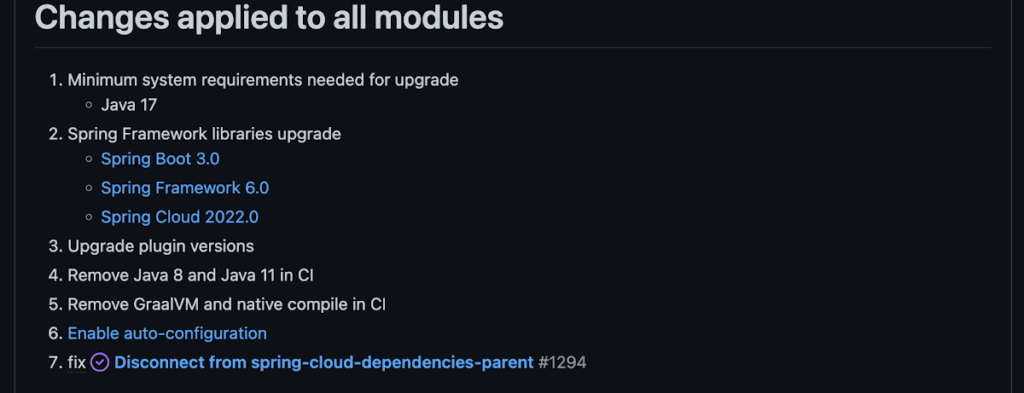
With this release, Spring Cloud GCP officially supports Spring Boot 3.x. However, this migration involves a number of breaking changes as outlined in the migration guide. The full list of changes made is available on Github, but the one of the most significant differences is that Java 17 is now a minimum requirement.
Another notable feature of this release is the addition of starter artifacts – Spring Boot starters for Google Cloud – that provide dependencies and auto-configurations for 80+ Google Client libraries. Just as the name suggests, these starters can serve as helpful starting points when working with a new client library. For now, they’re in preview.
These starters are not included in the BOM by default and need to be added as a dependency to your project before they can be used. For example, if you wanted to get started with Cloud Text-to-Speech, you would include the following:
<dependency>
    <groupId>com.google.cloud</groupId>
    <artifactId>google-cloud-texttospeech-spring-starter</artifactId>
    <version>4.0.0-preview</version>
  </dependency>
The upgrade process
We prepared a migration guide to help answer any questions involved with moving from 3.x to 4.x. Let’s follow those instructions to migrate Bank of Anthos.
We’ll start by cloning and building the application before the upgrade, according to the quickstart and development guide:
PROJECT_ID=<YOUR-PROJECT-ID>
gcloud services enable container --project ${PROJECT_ID}

git clone https://github.com/GoogleCloudPlatform/bank-of-anthos.git
cd bank-of-anthos/

gcloud services enable container.googleapis.com monitoring.googleapis.com \
  --project ${PROJECT_ID}

REGION=us-central1
gcloud container clusters create-auto bank-of-anthos \
  --project=${PROJECT_ID} --region=${REGION}

gcloud container clusters get-credentials bank-of-anthos \
  --project=${PROJECT_ID} --region=${REGION}

skaffold run --default-repo=gcr.io/${PROJECT_ID}/bank-of-anthos
At the end of this, you should see a “deployment stabilized” message:
Deployments stabilized in 9.657 secondsWith the environment set up for development, we’re ready to move on to the actual migration. The migration is already complete at time of writing, but here’s the full list of changes made:
- We began by checking the current Java, Spring Boot and Spring Cloud GCP versions.
- Our Java version is okay, but the other two are out of date, and will need to be updated.
We can also add the Spring Cloud GCP BOM to manage our versions going forward while we’re here.
- Our Java version is okay, but the other two are out of date, and will need to be updated.
- Then, in no particular order, we can make the following code changes:
- Remove the explicit type declarations from our ResponseEntity instantiations.
- Replace all javax.* imports with Jakarta.* counterparts, since Spring 3.0 makes use of Jakarta EE 9.0
With those changes in place, the app is upgraded and ready to re-deploy!
Live example
For a finished example of this migration, check out the Bank of Anthos repository on Github. It’s an excellent sample application that showcases a polyglot Java & Python app, served on Kubernetes and Google Cloud. All CI/CD and configurations are open source, so it may be instructive as you approach this migration.
Thanks for reading, and feel free to provide comments or feedback on Twitter, or in the issues section of the repository.
Develop for Compute Engine in your IDE with Cloud Code

2816
Of your peers have already read this article.
2:30 Minutes
The most insightful time you'll spend today!
When developing services with Compute Engine, our customizable compute service that lets you create and run virtual machines on Google’s infrastructure, you’ll likely find yourself frequently switching between your code editor, terminal, and the Google Cloud Console.
Cloud Code is a set of IDE plugins for popular IDEs like VS Code and IntelliJ that make it easier to develop applications that use Google Cloud services. And now, Cloud Code makes it easy to develop with Compute Engine by incorporating common workflows with your favorite IDE’s user interface.
Specifically, this new integration between Compute Engine and Cloud Code makes it easier to manage your commonly used virtual machines in the IDE, view details about them, connect to them over SSH, upload your application files to them, and view their logs.
Before you begin
Let’s demonstrate how the new integration works in Cloud Code for VS Code. Install Cloud Code for VS Code, and once installed, open its icon on the activity bar on the left and find “Compute Engine”:
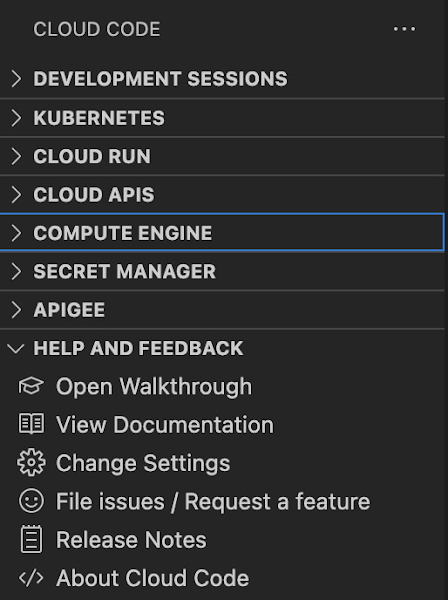
Cloud Code for Jetbrains IDEs (such as IntelliJ) could be installed similarly, and you will find Compute Engine in the list of your IDE tool windows.
View your VMs
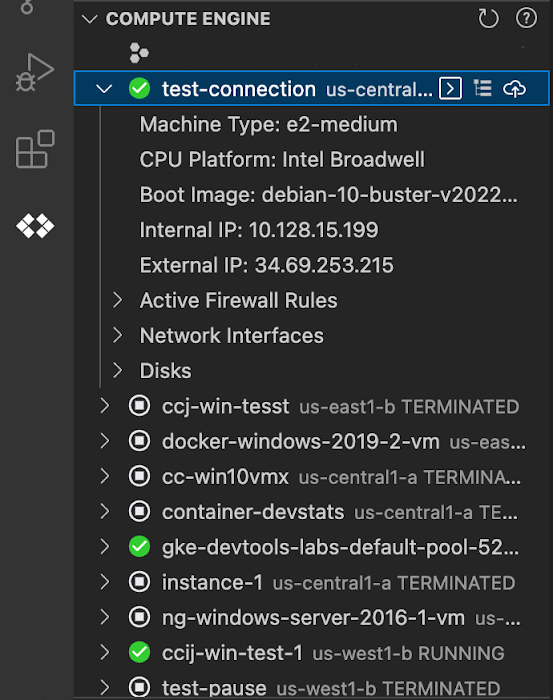
Cloud Code makes it easy to see all relevant VMs in your GCP project and view details needed to effectively work with the VM from the IDE. To start working with a Compute Engine VM in the IDE, navigate to Cloud Code’s new Compute Engine explorer. From there, you can see all the VMs in your current Cloud project. Clicking on a VM will display details such as machine type, boot image, IP address and more. You can also right click on a VM for a quick link to the Google Cloud Console where you can take additional action.
Connect to your VMs over SSH
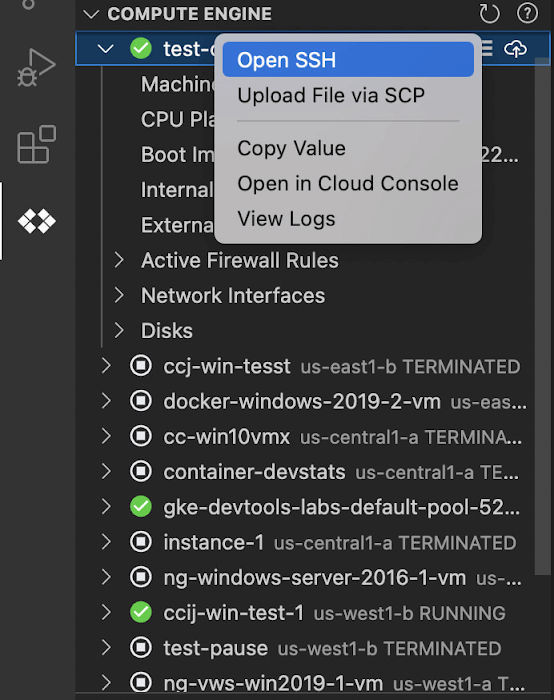
Once you’ve found the VM you want to work with, Cloud Code makes it easy to connect to that VM over SSH. Again, find the VM you want to connect to in Cloud Code’s Compute Engine explorer, right click it, and select “Open SSH”. Cloud Code will then establish an SSH connection from your IDEs terminal into the VM. If there’s any difficulty establishing a connection, Cloud Code can run a troubleshooting diagnostic to help resolve the issue.
Many organizations maintain VMs that don’t have a public IP address, making it difficult to establish an SSH connection to them. For those VMs that use Identity-Aware Proxy, Cloud Code can still securely connect to them over SSH, even without a public IP address.
Upload files to your VMs
You might want to try a debug version of your application, run a script, or try a new code in an environment identical to production, in this case on a development VM instance which might not have access to full source code or is not a part of your CI/CD pipeline. Cloud Code provides an easy way to upload your code files into a VM instance.
Find the VM you want to connect to in Cloud Code’s Compute Engine explorer, right click it, and select “Upload File via SCP”. Choose a file from your local system and Cloud Code will upload it to a VM instance using SCP. Once upload completes, Cloud Code offers to open a new SSH connection to access the files and work with them on a remote VM instance. Again, if there’s any difficulty establishing a connection, Cloud Code can run a troubleshooting diagnostic to help resolve the issue.
View your VM logs
As you’re working with your VM, you can right click it and select to view the VM instance logs. From Visual Studio Code this will open a logs viewer in the IDE. From IntelliJ, the logs viewer in the Cloud Console will be opened. If you’ve configured application logs to be collected with Cloud Logging, you can also view those in these logs viewers as well.
Get Started
We invite you to try out Compute Engine with Cloud Code to better streamline your development workflow. To learn more, check out the Compute Engine documentation for Visual Studio Code and JetBrains IDEs. If you’re new to development with IDEs, you can take the first step by installing Visual Studio Code or IntelliJ.

Customer Voices: How Firms from Across Industries Leverage Google Cloud
DOWNLOAD CASE STUDY14104
Of your peers have already downloaded this article
1:30 Minutes
The most insightful time you'll spend today!
From powering everyday operations and accelerating application innovation, to providing tools for specific business needs and executing on big ideas, to advancing the security of technology solutions, companies from across industries have leveraged Google Cloud for business benefits.
Companies from across industries have turned to Google Cloud for transforming their business, modernizing their infrastructure, and gleaning intelligence from data. For instance:
- Johnson & Johnson achieved a 41% increase in search results from high-quality job applicants, significantly improving the company’s ability to quickly hire top talent.
- Sony Network Communications now processes 10 billion monthly queries faster, which advances data analysis.
- University College Dublin saw significant 6-figure savings by eliminating legacy hardware, software, and maintenance.
And there are many such examples. Read the collection of case studies to find out how companies from across industries and geographies leveraged Google Cloud for measurable business benefits and for solving complex problems.
Why America’s Leading Mortgage Technology Provider Runs its Business on Apigee

3987
Of your peers have already read this article.
3:30 Minutes
The most insightful time you'll spend today!
Black Knight is a leading provider of technology, data, and analytics to the mortgage industry, catering to both large and mid-tier banks in the United States. Over the past few decades, we tended to manage customer integrations on a case-by-case basis. Whenever a bank needed to connect with a Black Knight app, we’d launch another integration project. Lather, rinse, repeat. Needless to say, this was inefficient; we knew we had to do something to centralize this process.
Building versus buying an API management platform
To start, we created some homegrown API solutions. Despite being largely successful with one of these solutions, we saw that technology advances were outpacing our capacity to update our solutions in-house. We knew we needed to move toward an API platform that would support RESTful architecture and that would fully enable mobile solutions. It also had to be extremely secure. Knowing how complicated such a platform would be to build ourselves, we decided that our developers were better off focusing on providing core solutions to Black Knight clients; engaging with an outside provider was the right way for us to advance our API strategy.
After a lengthy proof-of-concept process, we went into production with the Apigee API Management Platform from Google Cloud in 2018. In our opinion, Apigee was the most complete, robust, technically sound and full-featured option from among all of the API management tools we evaluated. Its ease of use was the deciding factor for our developers, and the Apigee analytics capabilities provided considerable insight into the anatomy of an API call—something the other platforms we considered didn’t do as well.
Choosing Apigee meant that we didn’t have to focus on developing and maintaining a tool or spend enormous amounts of money trying to keep up with security patching. For a large company like Black Knight, an API management tool is something we don’t want to spend a lot of time on. We know that Google Cloud devotes tremendous resources to it, and it would be difficult to replicate that in-house.
Black Knight has more than 150 client-facing applications. Almost half of them now are built with APIs that are externally facing, and many of these apps use APIs that integrated with other Black Knight applications. Add to that the huge number of applications out there that come from clients and third-party vendors, and suddenly, we had a management challenge from an API perspective.
Driving cultural change
We came to Apigee with the goal of containing and empowering our huge ecosystem of APIs, customers, third parties, and internal users.
Given Black Knight’s size, our developers and customers understandably each have different business goals, so getting everyone to come to a centralized platform is a great opportunity. My role is to help people consider other options so they can be open to the benefits that Apigee brings us.
Now that we’ve engaged with Apigee for over a year, we see two big benefits. First, the huge reduction in point-to-point integrations has produced tremendous efficiencies for us and our customers, who now get instant integration once they’ve been authorized for a particular API. Second, Apigee’s capacity for mobile enablement lets us satisfy our customers’ needs for secure mobile apps.
Simplifying security
From a technical perspective, security is complicated for mobile apps. We’re often accessing sensitive information on a mobile device that can’t always be trusted. This kind of scenario requires us to implement a number of security precautions to help ensure confidential information remains protected.
The Apigee API management platform addresses these needs in the simplest way possible. It solves complex problems related to security without having to deploy a new API proxy each time we need to support a particular mobile device upgrade. Our back-end applications remain protected because Apigee helps manage security, requests, access tokens, and authorizations. Today, our back-end applications work with Apigee to communicate with mobile devices or servers coming over the internet.
Apigee has also enabled us to do a better job sharing a variety of APIs. The developer portal lets us stitch together APIs and get more creative about how we can innovate and build new solutions based on these collections of APIs. At this point, anybody that has a nondisclosure agreement with us can register for the developer portal. The nature of our business is such that we can’t just open up our APIs to anybody, but it’s available to our contracted third parties.
Our Apigee journey has been exciting, and we’re making great progress. I’m looking forward to what innovations we will come up with next, thanks to the way Apigee enables us to create, implement, and deliver.
More Relevant Stories for Your Company

State of DevOps 2019
The 2019 Accelerate State of DevOps Report confirms analyst reports that DevOps is crossing the chasm with the proportion of elite performers almost tripling compared to last year. The report finds that delivering software quickly, reliably, and safely is at the heart of technology transformation and organizational performance. The report

Trimoz Technologies and Google Cloud-built Vaccination Appointment Scheduler Managed 365,000 Appointments Daily!
When public health officials in Quebec set out to provide COVID-19 vaccination services for their 8 million residents in February 2021, they needed an easy-to-use, scalable solution to schedule appointments online. To make it simple for Quebecers to register for vaccines, the goal was to use Clic Santé, a familiar




Video: How Pitney Bowes Leveraged Apigee to Create New Revenue Streams
Headquartered in Stamford, Connecticut, Pitney Bowes helps businesses navigate the complex world of commerce. They enable organizations to send parcels and packages across the globe. Pitney Bowes serves 90 percent of Fortune 500 companies, has 90 plus years of innovation, supports 1.5 million small businesses and has 15,000 employees globally.

How APIs Helped PWC Open New Revenue Streams Using Existing Data
PwC, one of the “Big Four” accounting firms, is well-known for professional services structured around auditing, insurance, tax, legal, and traditional management consulting. In Australia, the PwC Innovation and Ventures group has taken the global lead in building new, technology-based, turnkey lines of business outside of PwC’s traditional service areas.
