






Gartner Names Google Cloud a Leader in the 2019 Cloud Infrastructure as a Service Market
READ FULL INTRODOWNLOAD AGAIN3537
Of your peers have already downloaded this article
2:30 Minutes
The most insightful time you'll spend today!
Linking the Middle East with Southern Europe and Asia: Google’s New Subsea Cables to Be Ready by 2024!
3362
Of your peers have already read this article.
1:30 Minutes
The most insightful time you'll spend today!
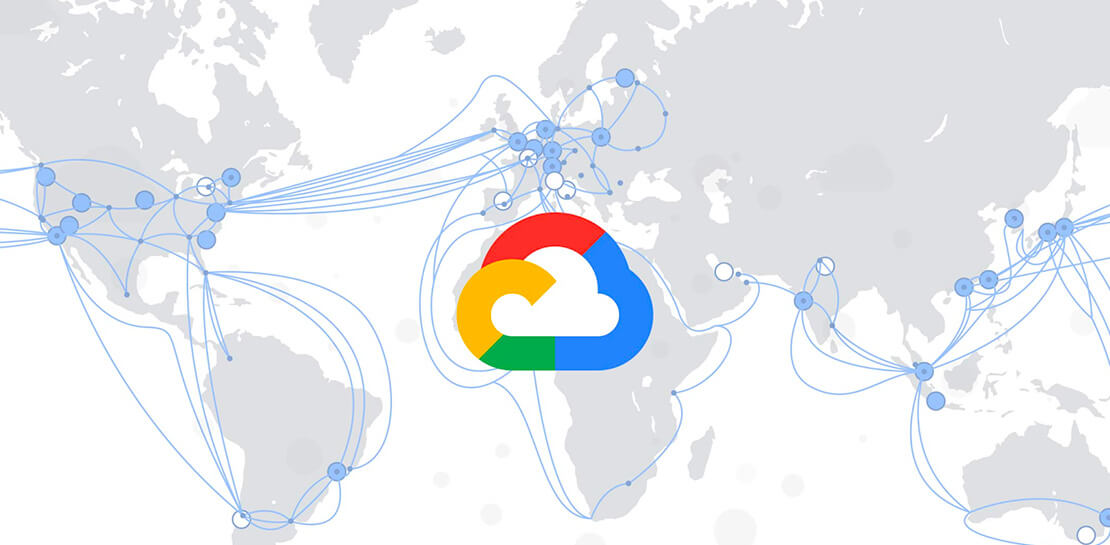
Today, we’re announcing that we are collaborating with Sparkle and others to build and operate two submarine cable systems linking the Middle East with southern Europe and Asia: the Blue Submarine Cable System connecting Italy, France, Greece, and Israel; and the Raman Submarine Cable System connecting Jordan, Saudi Arabia, Djibouti, Oman and India.
Developing additional network capacity and routes is critical to Google users and customers around the globe, who depend on robust connectivity to power their online lives, and communicate with friends, family and business partners. Google users and Google Cloud customers will benefit from increased capacity and decreased latency to regions in the area.
Each equipped with 16 fiber optic pairs, the Blue and Raman Submarine Cable Systems are expected to be ready for service in 2024. In time, consortium members hope to make additional landings and connect the two systems through terrestrial network assets.
Like with other infrastructure projects, building a subsea cable is an opportunity to pay tribute to a regional luminary who has advanced human understanding. The Raman cable is named for Sir Chandrasekhara Venkata Raman, an Indian physicist who won the 1930 Nobel Prize in Physics—the first Asian to receive that honor in science. C.V. Raman’s work centered on light scattering, which finds that when light traverses a transparent material, some of the deflected light changes wavelength and amplitude. This so-called Raman effect is a foundational principle in the field of optics that enables any underwater network cable. A trip across the Mediterranean also prompted him to ask why the sea is blue, when water itself is clear? Thanks to C.V. Raman, we now know that the sea isn’t simply reflecting the sky, but because the water itself causes blue light to scatter.
With Blue and Raman, we now have 18 investments in subsea cables around the world, including Google-funded cables like Curie, Dunant, Equiano, Firmina and Grace Hopper, and consortium cables like Echo, JGA, INDIGO and Havfrue. You can learn more about Google Cloud’s network and infrastructure here.
Mambu’s Journey: Modernizing Core Banking with Google Cloud

927
Of your peers have already read this article.
3:30 Minutes
The most insightful time you'll spend today!
When our founders began Mambu in 2011, their goal was to bring the latest digital technologies to the banking and finance world. Banking, in particular, is an industry built on decades of deep legacy technology. So initially, Mambu was embraced by microfinance — 100 organizations in 26 countries in just the first two years.
Since then, acceptance of modernizing core banking services by using composable, cloud technologies has grown across financial services institutions (FSIs). We now service top-tier banks, fintech startups, and other finance organizations across six continents, helping them deliver flexible, personalized, customer-centric banking products and services that their customers can depend upon.
One of the main reasons we’ve been able to scale the Mambu composable banking platform across the globe and at our current pace is our partnership with Google Cloud. The decision to move forward with Google Cloud happened for several reasons.
1. Flexibility and openness. Many FSIs are on hybrid and multicloud technology stacks, as they may still be transitioning from legacy systems, or have data residency requirements that have led them to use different clouds in different regions. Mambu meets customers wherever they are in their cloud journeys. We support interoperability without vendor lock-in. This need for openness, as well as the scalability benefits, led Mambu to evolve our platform on Google Kubernetes Engine (GKE). Many customers use open-source Kubernetes because, this common foundation can help streamline integration, speed up time to market, and reduce development. Just as important, the Google Cloud open cloud approach matches our company values.
2. Security and data residency. For customers in highly regulated finance industries, security isn’t just top of mind, it’s the No. 1 requirement. In addition to Google Cloud’s secure infrastructure, external audit certifications, and encryption, its wide array of regions has allowed us to expand into more countries, where we serve banks that must meet local data residency requirements. For example, Google Cloud’s Jakarta Cloud Region, has allowed us to support Bank Jago in Indonesia as it brings more financial inclusion to the unbanked in that country.
3. Availability. It’s critical for banks to maintain basic financial functionality, like accepting deposits and serving cash, even amid a service disruption. We needed a cloud partner with impeccable redundancy, failover, and disaster recovery capabilities.
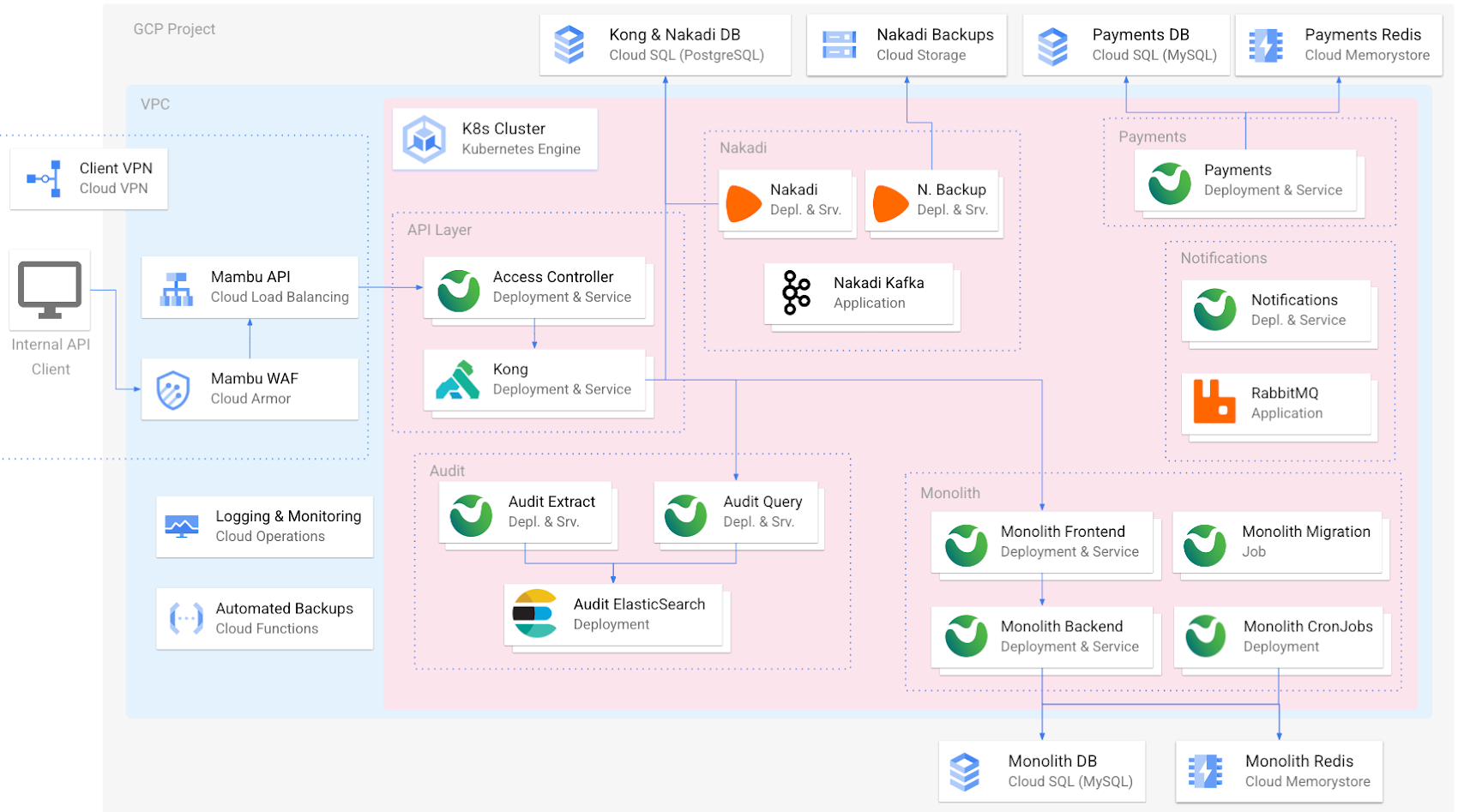
In addition to GKE, the Mambu platform uses several other Google Cloud services for specific functions, including Cloud Armor, Cloud Load Balancing, Cloud VPN, Cloud Memorystore, and Google Cloud Operations.
Another important reason we chose to partner with Google Cloud was its expansive ecosystem and commitment to innovation. We are midway into a three-year journey to modernize our own technology stack to meet customer needs.
Building a roadmap with Google Cloud
Our customers need a core banking technology platform that will grow with them as they bring to market innovative services built on the latest technology advances. For Mambu to be that platform, we need a cloud partner that supports and scales with our growth. While we originally built our cloud architecture on GKE and Compute Engine (among a few other Google Cloud services), we’re now looking to a serverless future where we can scale more easily and leverage managed services within Google Cloud and its partner ecosystem to focus on our core offerings.
These are just some of the modernization and customer-led innovations that we’re cooking up:
- More workloads in GKE: Like many companies, our cloud transformation is a work in progress. While much of our codebase is in GKE, we’re continuing to break up some larger pieces of code into microservices to increase agility and velocity, enabling us to make consistent updates to discrete areas of our platform without affecting the whole. GKE is the leader for orchestrating microservices at scale and continues to be a natural fit.
- Native BigQuery integration: Mambu customers collect a tremendous amount of data within the platform that can be used for analytics, personalization, and other use cases. We’re planning to create a seamless integration for feeding core banking data from Mambu into BigQuery so that customers can better leverage their valuable data.
- CloudSQL vs. self-managed MySQL: We have almost completed migrating from our own MySQL instances to managed Cloud SQL databases, which will open up new opportunities to implement customer-centric solutions such as BigQuery integration.
- A serverless future with Cloud Run: Compute Engine is working well for Mambu, providing the flexibility to choose the virtual machines that best balance performance and cost needs. As we seek even more time and cost efficiencies, we believe the elastic scalability of a serverless architecture built on Cloud Run will get us there, and we’re considering going serverless in the future. Doing so would abstract infrastructure for simpler management, while allowing us to fire up containers to meet our customers’ high transactions-per-second needs, spin them down when not needed, and pay only when they run. It would also boost security: Without long-running compute, there are no patches or fixes, and each new instance is isolated and fresh by default.
These are just a handful of examples of the ways we want to best leverage Google Cloud services to simplify how we manage our tech stack, as well as continue to bolster security, scalability, and performance. There are many other ideas we’re exploring: using Dataproc and Datastream to support the specific data needs of Islamic banking, Cloud Functions so that customers can run their own queries against Mambu, and AI-enabled features.
At Mambu, our mission is to empower our customers to deliver great modern financial experiences easily to everyone around the world. Every time Google Cloud opens a new data center, we can enter a new market. Every time we move to a new-to-us managed service via the Google Cloud Marketplace, we free up time to build new ways to deliver customer-centric banking solutions. And so, we look forward to continuing this partnership with Google Cloud well into the future.
10 Reasons that Make Google Cloud the Champion of IaaS

10399
Of your peers have already read this article.
5:00 Minutes
The most insightful time you'll spend today!
When you choose to run your business on Google Cloud you benefit from the same planet-scale infrastructure that powers Google’s products such as Maps, YouTube, and Workspace.
We have picked 10 ways in which Google Cloud Infrastructure services outshine alternatives in the market in how they simplify your operations, save money, and secure your data.
1. Custom Machine Types means no wasted resources
Compute Engine offers predefined machine types that you can use when you create a VM instance. A predefined machine type has a preset number of vCPUs and a preset amount of memory; each type is billed at a set price as described on the Compute Engine pricing page.
If predefined machine types don’t meet your needs, you can create a VM instance with a custom number of vCPUs and custom amount of memory, effectively building a custom machine type. Custom machine types are available only for general-purpose machine families. When you create a custom machine type, you are deploying a custom machine type from the E2, N2, N2D, or N1 machine family on GCP. No other leading cloud vendor offers custom machine types so extensively.
Custom machine types are a good idea for workloads that aren’t a good fit for the predefined machine types and for workloads that require more processing power or memory but don’t need all of the upgrades provided by the next machine type level. This translates into lower operating costs. They are also useful for controlling software licensing costs that are based on the number of underlying compute cores.
Jeremy Lloyd, Infrastructure and Application Modernization Lead at Appsbroker, a Google partner:
“Custom machine types coupled with Google’s StratoZone data center discovery tool provides Appsbroker with the flexibility we need to provide cost efficient virtual machines matched to a virtual machine’s actual utilization. As a result, we are able to keep our customers’ operating costs low while still providing the ability to scale as needed.”
2. Compute Engine Virtual Machines are optimized for scale-out workloads
For scale-out workloads, T2D, the first instance type in the Tau VM family, is based on 3rd Gen AMD EPYC processors and leapfrogs VMs for scale-out workloads of any leading public cloud provider today, both in terms of performance and price-performance. Tau VMs offer 56% higher absolute performance and 42% higher price-performance compared to general-purpose VMs from any leading public cloud vendor (source). The x86 compatibility provided by these AMD EPYC processor-based VMs gives you market-leading performance improvements and cost savings, without having to port your applications to a new processor architecture. Sign up here if you are interested in trying out T2D instances in Preview.
For SAP HANA, Google Cloud has demonstrated with SAP how we can run the world’s largest scale-out HANA system in the public cloud (96TB). With such innovation, you are covered as your business grows exponentially.
3. Largest single node GPU-enabled VM
Google is the only public cloud provider to offer up to 16 NVIDIA A100 GPUs in a single VM, making it possible to train very large AI models. Users can start with one NVIDIA A100 GPU and scale to 16 GPUs without configuring multiple VMs for single-node ML training, without crossing the VM layer.
Additionally, customers can choose smaller GPU configurations—1, 2, 4 and 8 GPUs per VM—providing the flexibility to scale their workload as needed.
The A2 VM family was designed to meet today’s most demanding applications—workloads like CUDA-enabled machine learning (ML) training and inference, for example. This family is built on the A100 GPU which offers up to 20x the compute performance compared to the previous generation GPU and comes with 40 GB of high-performance HBM2 GPU memory. To speed up multi-GPU workloads, the A2 VMs use NVIDIA’s HGX A100 systems to offer high-speed NVLink GPU-to-GPU bandwidth that delivers up to 600 GB/s. A2 VMs come with up to 96 Intel Cascade Lake vCPUs, optional Local SSD for workloads requiring faster data feeds into the GPUs and up to 100 Gbps of networking. A2 VMs provide full vNUMA transparency into the architecture of underlying GPU server platforms, enabling advanced performance tuning. Google Cloud offers these GPUs globally.
4. Non-disruptive maintenance means you worry less about planned downtime
Compute Engine offers live migration (non-disruptive maintenance) to keep your virtual machine instances running even when a host system event, such as a software or hardware update, occurs. Google’s Compute Engine live migrates your running instances to another host in the same zone without requiring your VMs to be rebooted. Live migration enables Google to perform maintenance that is integral to keeping infrastructure protected and reliable without interrupting any of your VMs. When a VM is scheduled to be live-migrated, Google provides a notification to the guest that a migration is imminent.
Live migration keeps your instances running during:
- Regular infrastructure maintenance and upgrades
- Network and power grid maintenance in the data centers
- Failed hardware such as memory, CPU, network interface cards, disks, power, and so on. This is done on a best-effort basis; if a hardware component fails completely or otherwise prevents live migration, the VM crashes and restarts automatically and a hostError is logged.
- Host OS and BIOS upgrades
- Security-related updates
- System configuration changes, including changing the size of the host root partition, for storage of the host image and packages
Live migration does not change any attributes or properties of the VM itself. The live migration process transfers a running VM from one host machine to another host machine within the same zone. All VM properties and attributes remain unchanged, including internal and external IP addresses, instance metadata, block storage data and volumes, OS and application state, network settings, network connections, and so on. This has the benefit of reducing operational and maintenance overhead, helps you build a more robust security posture where infrastructure can be consciously revamped from a known good state and minimizes risks for advanced persistent threats.
Refer to Lessons learned from a year of using live migration in production on Google Cloud from the Google engineering team.
5. Trusted Computing: Shielded VMs guard you against advanced, persistent attacks
Establishing trust in your environment is multifaceted, involving hardware and firmware, as well as host and guest operating systems. Unfortunately, threats like boot malware or firmware rootkits can stay undetected for a long time, and an infected virtual machine can continue to boot in a compromised state even after you’ve installed legitimate software.
Shielded VMs can help you protect your system from attack vectors like:
- Malicious guest OS firmware, including malicious UEFI extensions
- Boot and kernel vulnerabilities in the guest OS
- Malicious insiders within your organization
To guard against these kinds of advanced persistent attacks, Shielded VMs use:
- Unified Extensible Firmware Interface (UEFI) BIOS: Helps ensure that firmware is signed and verified
- Secure and Measured Boot: Helps ensure that a VM boots an expected, healthy kernel
- Virtual Trusted Platform Module (vTPM): Establishes root-of-trust, underpins Measured Boot, and prevents exfiltration of vTPM-sealed secrets
- Integrity Monitoring: Provides tamper-evident logging, integrated with Stackdriver, to help you quickly identify and remediate changes to a known integrity state
The Google approach allows customers to deploy Shielded VMs with only a simple click, thereby easing implementation.
6. Confidential Computing encrypts data while in use
Google Cloud was a founding member of the Confidential Computing Consortium. Along with encryption of data in transit and at rest using customer-managed encryption keys (CMEK) and customer-supplied encryption keys (CSEK), Confidential VM adds a “third pillar” to the end-to-end encryption story by encrypting data while in use. Confidential Computing uses processor-based technology that allows data to be encrypted in use while it is being processed in the public cloud. Confidential VM allows you to to encrypt memory in use on a Google Compute Engine VM by checking a single checkbox.
All Confidential VMs support the previously mentioned Shielded VM features under the covers—you can think of Shielded VM as helping to address VM integrity, while Confidential VM addresses the memory encryption aspect which relies on CPU features. With the confidential execution environments provided by Confidential VM and AMD Secure Encrypted Virtualization (SEV), Google Cloud keeps customers’ sensitive code and other data encrypted in memory during processing. Google does not have access to the encryption keys. In addition, Confidential VM can help alleviate concerns about risk related to either dependency on Google infrastructure or Google insiders’ access to customer data in the clear.
See what Google Cloud partners say about Confidential Computing here.
7. Advanced networking delivers full-stack networking and security services with fast, consistent, and scalable performance
Google Cloud’s network delivers low latency, reduces operational costs and ensures business continuity, enabling organizations to seamlessly scale up or down in any region to meet business needs. Our planet-scale network uses advanced software-defined networking and security with edge caching services to deliver fast, consistent, and scalable performance. With 28 regions, 85 zones, and 146 PoPs connected by 16 subsea fiber cables around the world, Google Cloud’s network offers a full stack of layer 1 to layer 7 services for enterprises to run their workloads anywhere. Enterprises can be assured that they have best-in-class networking and security services connecting their VMs, containers, and bare metal resources in hybrid and multi-cloud environments with simplicity, visibility, and control.
Google Cloud’s network has protected customers from one of the world’s largest DDoS attacks at 2.54 Tbps. With our multi-layer security architecture and products such as Cloud Armor, our customers ran their business with no disruptions. Furthermore, our recent integration of Cloud Armor with reCAPTCHA Enterprise adds best-in-class bot and fraud management to prevent volumetric attacks. Cloud Armor is deployed with our Cloud Load Balancer and Cloud CDN, extending the secure benefits at the network edge for traffic coming into Google Cloud so customers have security, performance, and reliability all built in. Furthermore, we are excited to offer Cloud IDS in preview, which was co-developed with security industry leader, Palo Alto Networks, to run natively in Google Cloud.
Our advanced networking capabilities also extends to GKE and Anthos networking. With the GKE Gateway controller, customers can manage internal and external HTTPS load balancing for a GKE cluster or a fleet of GKE clusters with multi-tenancy while maintaining centralized admin policy and control. Unlike other Kubernetes offerings, we offer eBPF dataplane which brings powerful tooling such as Kubernetes network policy and logging to GKE. eBPF is known to kernel engineers as a “superpower” for its unique architecture to load and unload modules in kernel space, and now this capability is built in with Google Cloud networking.
For observability and monitoring, our customers deploy Network Intelligence Center, Google Cloud’s comprehensive network monitoring, verification and optimization platform. With four key modules in Network Intelligence Center, and several more to come, we are working towards realizing our vision of proactive network operations that can predict and heal network failures, driven by AI/ML recommendations and remediation. Network Intelligence Center provides unmatched visibility into your network in the cloud along with proactive network verification. Centralized monitoring cuts down troubleshooting time and effort, increases network security and improves the overall user experience.
8. Regional Persistent Disk for High Availability
Regional Persistent Disk is a storage option that provides synchronous replication of data between two zones in a region. Regional Persistent Disks can be a great building block if you need to ensure high availability of your critical applications as they offer cost-effective durable storage and replication of data between two zones in the same region.
Regional Persistent Disks are also easy to set up within the Google Cloud Console. If you are designing robust systems or high availability services on Compute Engine, Regional Persistent Disks combined with other best practices such as backing up your data using snapshots enable you to build an infrastructure that is highly available and recoverable in a disaster. Regional Persistent Disks are also designed to work with regional managed instance groups. In the unlikely event of a zonal outage, Regional Persistent Disks allow continued I/O through failover of your workloads to another zone. Regional Persistent Disks can help meet zero RPO and near-zero RTO requirements and other stringent SLAs that your critical applications might require by maximizing application availability and protection of data during events such as host/VM failures and zonal outages.
9. Cloud Storage’s single namespace for dual-region and multi-region means managing regional replication is incredibly simple
Similar to how Persistent Disk makes data more available by replicating data across zones, Cloud Storage provides similar benefits for object storage. Cloud Storage within a region is cross-zone by definition, reducing the risk that a zonal outage would take down your application. Cloud Storage adds to this by also providing a cross-region option that can protect against a regional outage and gets your data closer to distributed users. This comes in the form of Dual-region or Multi-region settings for a bucket. These are the simplest to implement cross-region replication offerings in the industry—just a simple button or API call to enable them. In addition to being simple to implement, they offer an added advantage of using a single bucket name that spans regions.
This is unique in the industry. Competitive offerings currently require setting up and managing two distinct buckets, one in each region and they don’t offer the strong consistency properties Cloud Storage offers across regions. Operations and app development are burdened by this design. Google’s single namespace approach dramatically simplifies application development (the app runs on single region or dual/multi-region without any changes), and provides simpler application restarts and testing for DR.
10. Predictive autoscaling
Customers use predictive autoscaling to improve response times for applications with long initialization times or for applications with workloads that vary predictably with daily or weekly cycles. When you enable predictive autoscaling, Compute Engine forecasts future load based on your Managed Instance Group’s history and scales out the MIG’s in advance of predicted load, so that new instances are ready to serve when the load arrives. Without predictive autoscaling, an autoscaler can only scale a group reactively, based on observed changes in load in real time.
With predictive autoscaling enabled, the autoscaler works with real-time data as well as with historical data to cover both the current and forecasted load. Forecasts are refreshed every few minutes (faster than competing clouds) and consider daily and weekly seasonality, leading to more accurate forecasts of load patterns.
For more information, see How predictive autoscaling works and Checking if predictive autoscaling is suitable for your workload.
These are just a few examples of customer-centric innovation that set Google Cloud infrastructure apart. Bring your applications and let the platform work for you.
Get started by learning about your options for migration, or talk to our sales team to join the thousands of customers who have embarked upon this journey.
Acknowledgement
Special thanks to Dheeraj Konidena (Google) for contributing to this article.
Dassana: Choosing Google Workspace and Google Cloud to accelerate growth and reach goals
3033
Of your peers have already read this article.
2:30 Minutes
The most insightful time you'll spend today!
When Dassana co-founders Gaurav Kumar and Parth Shah, formerly founder and founding engineer at RedLock (now Prisma Cloud by Palo Alto Networks), set out on a new startup journey in 2020, they knew exactly where to start: sign up for Google Workspace.
“Every startup I’ve been at, we used Google Workspace,” said Kumar. “We’ve been using it for so long, and we’re all used to it. It’s like drinking water—you don’t think about it.”
“We’re big on user experience,” explained Shah. “Google is one of the few companies out there that is all about building the right kind of user experience that’s easy to follow. The sharing capabilities are amazing and, of course, easy to use. Docs, Sheets, Slides—we use all of it.”
Dassana, which emerged from stealth with $5 million in seed funding earlier this year, is a next-generation security data lake. It provides a holistic picture of security risk across an organization and its business units by ingesting large volumes of structured data in a schema-less fashion. Their success is a great testament to why startups are choosing not only Google Workspace, but a range of Google Cloud products.
Though the Dassana team was comfortable with Workspace from the start, not all their early technology choices were the best fit for the company, and Google Cloud services became more crucial as the startup evolved. For example, the team opted to use Amazon Web Services (AWS) to start their cloud journey, but ultimately started to explore other cloud options when they decided to run their technology platform on Kubernetes.
“We started looking into which cloud platforms provide the best Kubernetes experience,” said Kumar. “Hands-down, Google Kubernetes Engine (GKE) had the best experience. If you look at product velocity and how GKE has evolved over time, from its early days to GKE Autopilot and all the features and other native integrations—nothing even comes close.”
In particular, Kumar noted that the native integration between Google Workspace and GKE was particularly unique and useful. “When I go to Google Workspace and then go to GKE, my identity is already there,” he said. “I don’t have to integrate or manage anything. If I disable an account in Workspace, it’s also disabled on GKE.”
Another advantage is that GKE allows you to set up Google Groups to work with Kubernetes role-based access control (RBAC) for GKE clusters. This lets administrators maintain users and groups outside of GKE and assign RBAC permissions directly to Groups in Workspace without any extra engineering work or overhead management.
“I can actually use my Workspace identity to give granular controls to my GKE workloads. The integration of Google Groups in GKE and Kubernetes is a lifesaver. It’s saved us a lot of hassles,” said Kumar. Kumar also noted that the platform delivers better performance compared to other solutions thanks to the low latency of Google Cloud’s global network.
Like many startups, Dassana has found a powerful combination in Google Workspace and GKE on Google Cloud that lets them connect technologies, easily collaborate with their teams, and rapidly build their product. The team also recognizes the necessity of continued innovation, and is exploring additional Google Cloud products to help them accelerate their momentum. For example, Dassana plans to use the performance and scale of Cloud Storage buckets to store the company’s data. The team is also investigating how to save time by using Pub/Sub to integrate data directly from Google Workspace and other sources for security analytics.
To learn more about why startups like Dassana are choosing Google Workspace and Google Cloud to accelerate their growth and reach their goals, visit our startup solutions pages for Google Workspace and Google Cloud.
6 Tips for Stress-Free Google Cloud Billing

1318
Of your peers have already read this article.
1:30 Minutes
The most insightful time you'll spend today!
If you took one look at the title of this blog and thought, “just show me how, because I already know a million reasons why I’m stressed about billing things” then check out the interactive tutorial right here.
For everyone else, read on, because we’ll walk through some common sense tips, and a few step-by-step tutorials for all things billing related. If you’ve ever wished you could sit down with someone from Google Cloud, and walk through your bill, the console, and your options — you’re in the right place! Consider this Cloud Billing 101 – an intro level course that’ll get you started on the right foot.
6 simple tips to manage your Google Cloud billing accounts:
- Get to know your billing statement and console: Knowledge is power, after all. Take a tour of the billing console so you can better understand your options, along with what’s included in your monthly bill and the different components.
- Set up authorized users, alerts and budgets: Make sure anyone who needs to have access to payment settings is authorized. Allocate budgets for projects, and get notifications when your usage or spending exceeds a certain amount so you can take action as needed.
- Use cost-saving tools: We’ve got a range of tools and services to help you save money, like Committed Use Discounts, and even Recommenders for actionable, AI-powered intelligent recommendations around your cost trends and product usage.
- Optimize your resources: Use the Google Cloud Resource Manager to see how your resources are being used and identify areas for optimization, temporarily suspend, or even shut down unused projects.
- Review your billing history with reporting and data visualization: Regularly check your billing history with reports to help track your spending, identify any trends or patterns, and even anticipate future costs. You can even export your data to BigQuery for detailed analysis, or use a tool like Google Data Studio to visualize your data.
- Use the pricing calculator: Estimate your monthly costs and make informed decisions with the Google Cloud pricing calculator. It can help you get a ballpark figure for your usage, and determine if your use case fits within cost-free parameters.
I hope these common sense pointers and tutorials empower you to effectively manage your Google Cloud billing and stay on top of your spending. Get started right now by managing your billing methods and payment settings in this 5-minute tutorial, and then take a tour of the billing console to get familiar with your setup.
More Relevant Stories for Your Company

Reducing Data Costs by 80% with Google Cloud: Inshorts’ Success in the Indian Mobile News Market
Across India, hundreds of millions of people turn to their smartphones for news that will enhance their lives and help them achieve their goals. According to Professor Rasmus Kleis Nielsen, Director of the Reuters Institute for the Study of Journalism: “The past few years have seen explosive growth in mobile

The Total Economic Impact of SAP on Google Cloud
Through customer interviews, a survey, and data aggregation, Forrester concluded that migrating and running SAP on Google Cloud has a number of benefits, including financial benefits. Download this Forrester infographic to understand the 3-year financial impact it can have on your organization.
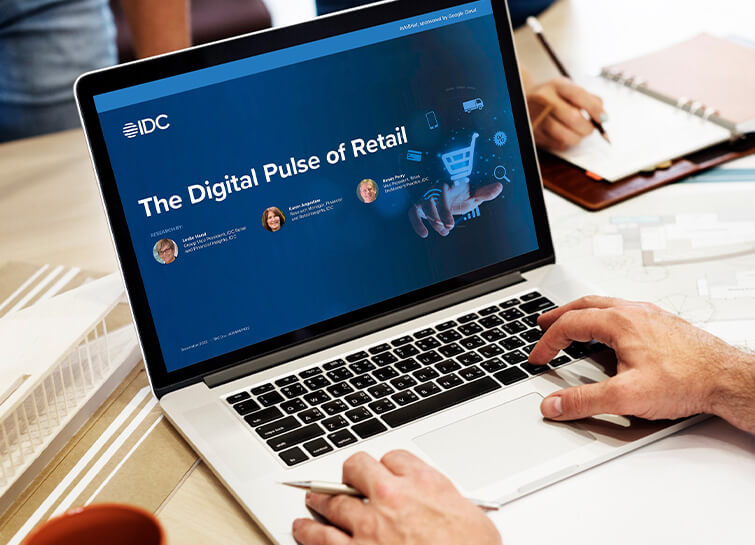
IDC Retail Insights: The Digital Pulse of Retail
Google partnered with IDC Retail Insights to conduct a survey of retailers across the globe to assess the state of transformation and develop an index of digital maturity. Learn more about the changes in digital resilience over the last year and the areas of innovation over the next 12 months.

World’s Largest Online-only Grocery Retailer Uses AI to Figure Which Customers Need Most Attention
In the United Kingdom, the popularity of online grocery shopping is expected to surge from about 6% of the market today to 9% by 2021, according to market research firm Mintel. One of the pioneers of online-only grocery retailing is Ocado, based in Hatfield, Hertfordshire in the U.K. Since starting commercial deliveries
