





Bigbasket: Delivering Groceries Across 25 Cities in India

7324
Of your peers have already read this article.
1:30 Minutes
The most insightful time you'll spend today!
When Bigbasket was founded in December 2011, it guaranteed to deliver goods within a one-hour delivery slot of its customers’ choosing or it would refund them 10 percent of their orders. The company also introduced an express service, delivering groceries within 90 minutes of an order being placed.
Bigbasket needed a mapping platform that could help it meet its delivery times, and offer a familiar interface to customers. MediaAgility, a digital consulting company, recommended Google Maps Platform to Bigbasket.
When customers use the Bigbasket mobile app to place orders, they select their locations on a Google Map. The prices and availability of groceries varies according to location, so a customer’s location determines the cost of the order and what can be ordered.
Google Maps Platform Results
- Bigbasket handles more than one million orders per month, and delivers in more than two dozen cities in India
- Bigbasket now has more than four million customers
- Orders are delivered on time, increasing customer loyalty
It is also used to determine driver routes. Bigbasket used the Maps Javascript API to build a web-based app for the company’s backend that tracks all orders and delivery progress. Dispatchers use the Directions API to match drivers with orders and customers, and the Distance Matrix API to get estimate the time of arrival for deliveries. As dispatchers track the progress of deliveries on the map, they can tweak routes as necessary.
“We’ve built Bigbasket from the ground up using Google Maps Platform. It makes sure we have the right customer locations and deliver to them on time. We couldn’t have started Bigbasket without Google Maps. It helps us to be fast and efficient, and make sure our customers get what they’ve ordered quickly,” said Pramod Jajoo, Chief Technology Officer, Bigbasket
Develop for Compute Engine in your IDE with Cloud Code

2821
Of your peers have already read this article.
2:30 Minutes
The most insightful time you'll spend today!
When developing services with Compute Engine, our customizable compute service that lets you create and run virtual machines on Google’s infrastructure, you’ll likely find yourself frequently switching between your code editor, terminal, and the Google Cloud Console.
Cloud Code is a set of IDE plugins for popular IDEs like VS Code and IntelliJ that make it easier to develop applications that use Google Cloud services. And now, Cloud Code makes it easy to develop with Compute Engine by incorporating common workflows with your favorite IDE’s user interface.
Specifically, this new integration between Compute Engine and Cloud Code makes it easier to manage your commonly used virtual machines in the IDE, view details about them, connect to them over SSH, upload your application files to them, and view their logs.
Before you begin
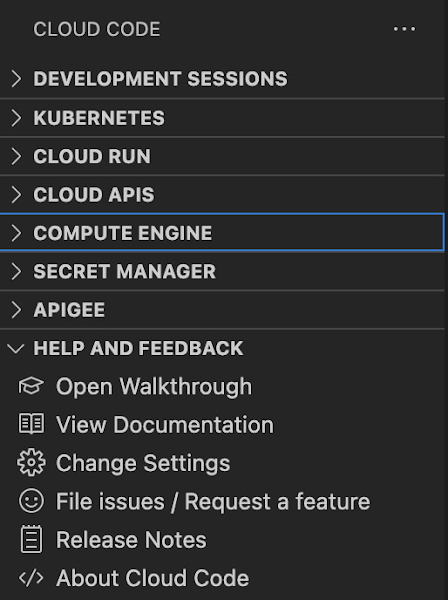
Let’s demonstrate how the new integration works in Cloud Code for VS Code. Install Cloud Code for VS Code, and once installed, open its icon on the activity bar on the left and find “Compute Engine”:
Cloud Code for Jetbrains IDEs (such as IntelliJ) could be installed similarly, and you will find Compute Engine in the list of your IDE tool windows.
View your VMs
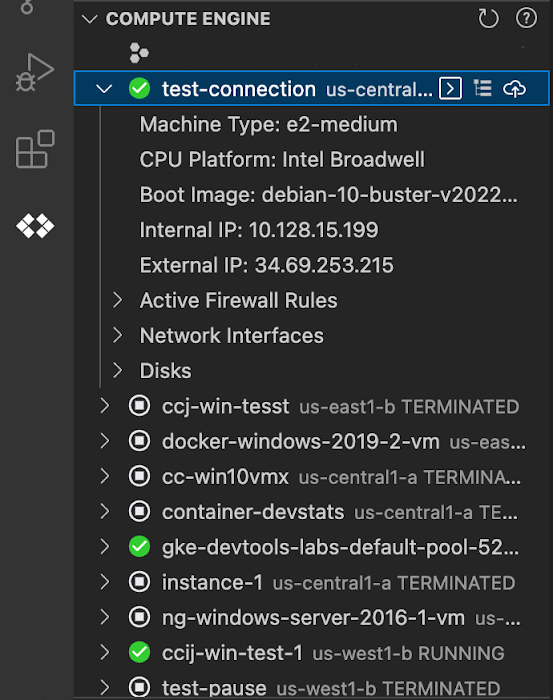
Cloud Code makes it easy to see all relevant VMs in your GCP project and view details needed to effectively work with the VM from the IDE. To start working with a Compute Engine VM in the IDE, navigate to Cloud Code’s new Compute Engine explorer. From there, you can see all the VMs in your current Cloud project. Clicking on a VM will display details such as machine type, boot image, IP address and more. You can also right click on a VM for a quick link to the Google Cloud Console where you can take additional action.
Connect to your VMs over SSH
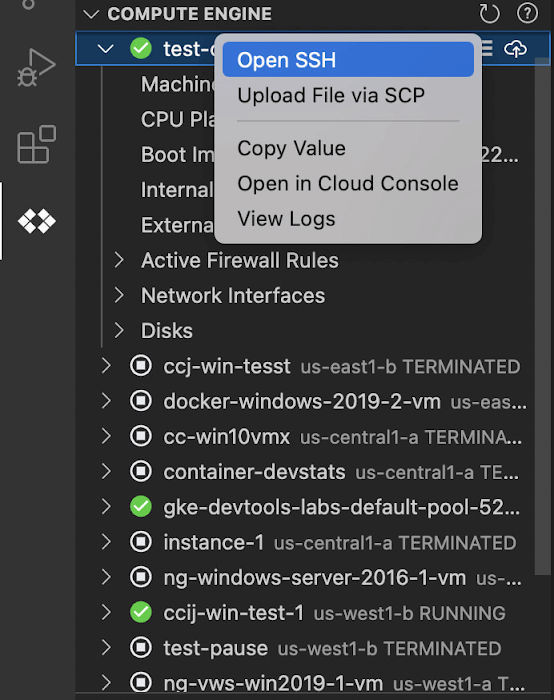
Once you’ve found the VM you want to work with, Cloud Code makes it easy to connect to that VM over SSH. Again, find the VM you want to connect to in Cloud Code’s Compute Engine explorer, right click it, and select “Open SSH”. Cloud Code will then establish an SSH connection from your IDEs terminal into the VM. If there’s any difficulty establishing a connection, Cloud Code can run a troubleshooting diagnostic to help resolve the issue.
Many organizations maintain VMs that don’t have a public IP address, making it difficult to establish an SSH connection to them. For those VMs that use Identity-Aware Proxy, Cloud Code can still securely connect to them over SSH, even without a public IP address.
Upload files to your VMs
You might want to try a debug version of your application, run a script, or try a new code in an environment identical to production, in this case on a development VM instance which might not have access to full source code or is not a part of your CI/CD pipeline. Cloud Code provides an easy way to upload your code files into a VM instance.
Find the VM you want to connect to in Cloud Code’s Compute Engine explorer, right click it, and select “Upload File via SCP”. Choose a file from your local system and Cloud Code will upload it to a VM instance using SCP. Once upload completes, Cloud Code offers to open a new SSH connection to access the files and work with them on a remote VM instance. Again, if there’s any difficulty establishing a connection, Cloud Code can run a troubleshooting diagnostic to help resolve the issue.
View your VM logs
As you’re working with your VM, you can right click it and select to view the VM instance logs. From Visual Studio Code this will open a logs viewer in the IDE. From IntelliJ, the logs viewer in the Cloud Console will be opened. If you’ve configured application logs to be collected with Cloud Logging, you can also view those in these logs viewers as well.
Get Started
We invite you to try out Compute Engine with Cloud Code to better streamline your development workflow. To learn more, check out the Compute Engine documentation for Visual Studio Code and JetBrains IDEs. If you’re new to development with IDEs, you can take the first step by installing Visual Studio Code or IntelliJ.
Khan Academy’s Shortcut to Growth: The Trick Behind the Scenes

3592
Of your peers have already read this article.
4:15 Minutes
The most insightful time you'll spend today!
Based in Mountain View, California, Khan Academy is a not-for-profit that produces and posts a vast collection of free educational online videos about math and science topics ranging from algebra and trigonometry to biology and economics.
Millions of students, educators, and self-learners around the world watch the videos, both on the Khan Academy’s YouTube channel and on its hugely popular website (www.khanacademy.org), where students answer some 1.5 million practice questions per school day. The Khan Academy development team continually tweaks the site based on how visitors choose to learn.
Challenge
Khan Academy’s beginnings date back to 2004, when Sal Khan’s cousin asked him to remotely tutor her daughter in math. Khan was happy to help and more than qualified, given his three MIT degrees and his Harvard MBA.
As more relatives and friends asked Khan for tutoring assistance, he began videotaping short lessons and posting them to YouTube. His knack for distilling complex concepts into easy-to-follow tutorials helped the videos go viral.
Sal knew he needed to offload the technical and maintenance concerns so he could work on what was important. To grow, it was important for him to be able to stop worrying about things like deployment issues and running his own server.
Ben Kamens, lead developer for Khan Academy
Khan maintained a website for his growing video library for several years, but the platform experienced limitations as traffic increased.
At the same time, media attention was growing, and technology industry leaders, including Microsoft founder Bill Gates and Silicon Valley venture capitalist John Doerr, began lending their support and evangelizing Khan’s mission and work. It was at this point that Khan quit his job as a hedge fund analyst to devote his full-time attention to the site’s growing potential.
“With Google App Engine, we don’t need a system administrator or anyone dedicated to deploying our app, so 99 percent of our time is spent working on our application,” says Ben Kamens, lead developer, Khan Academy.
“Sal knew he needed to offload the technical and maintenance concerns so he could work on what was important, which was to make more videos for the Khan Academy library,” explains Ben Kamens, lead developer for Khan Academy. “To grow, it was important for him to be able to stop worrying about things like deployment issues and running his own server.”
Solution
Khan Academy chose App Engine as its hosting and application development platform because App Engine could easily house its growing collection of 2,000-plus videos, resolving the organization’s overall server and maintenance issues with a single solution.
Using App Engine freed the team to focus on the user experience and the array of content that makes the academy such a powerhouse.
“A lot of what the Khan Academy is about is collecting data on student behavior so we can teach them better,” Kamens says. “Did they use a hint? Have they watched the video before? That data is being stored on Google App Engine so we can figure out what the most effective videos are, or where students struggle the most.”
Khan Academy provides individual profiles to students so they can analyze their learning progress, which means the organization needs systems running in the background to collect and track of all this data. Because App Engine takes care of server support, Khan Academy’s five developers can spend almost all of their time improving site functionality.
“If we didn’t have Google App Engine, we’d be spending a lot more time figuring out server setup and working on routers,” Kamens says. “Our ability to focus on the actual product is the benefit of Google App Engine.”
With the App Engine dashboard, which provides information like response time, uptime, and error rates, the development team also has an easy way to watch over site performance. “It lets us see what the average response time is, so we can keep it really low,” Kamens explains.
Results
During the US school year, Khan Academy receives more than 3.8 million unique visits a month — all served through App Engine. To support this much traffic, a typical company would need an internal system administration staff.
“With Google App Engine, we don’t need a system administrator or anyone dedicated to deploying our app, so 99 percent of our time is spent working on our application,” explains Kamens. “Our application lives on Google App Engine, and we bank all of our scalability and traffic concerns on Google App Engine. Even huge traffic spikes from Sal’s media appearances don’t worry us since we know that Google App Engine will handle the spike.”
Kamens also likes the fact that he and his team can turn to the Google App Engine support team for assistance when they need it. He also finds helpful tips on the Google App Engine blog.
The Khan Academy staff has come to completely rely on App Engine. “We are constantly using more of Google App Engine’s capabilities and have been happy with the performance,” Kamens says. “It’s nice to have an easy deployment process since we deploy the site on average at least once a day, [and] sometimes up to nine or 10 times [a day].”
A Pro’s Tip on Choosing the Right Google Cloud Compute Options

5744
Of your peers have already read this article.
2:00 Minutes
The most insightful time you'll spend today!
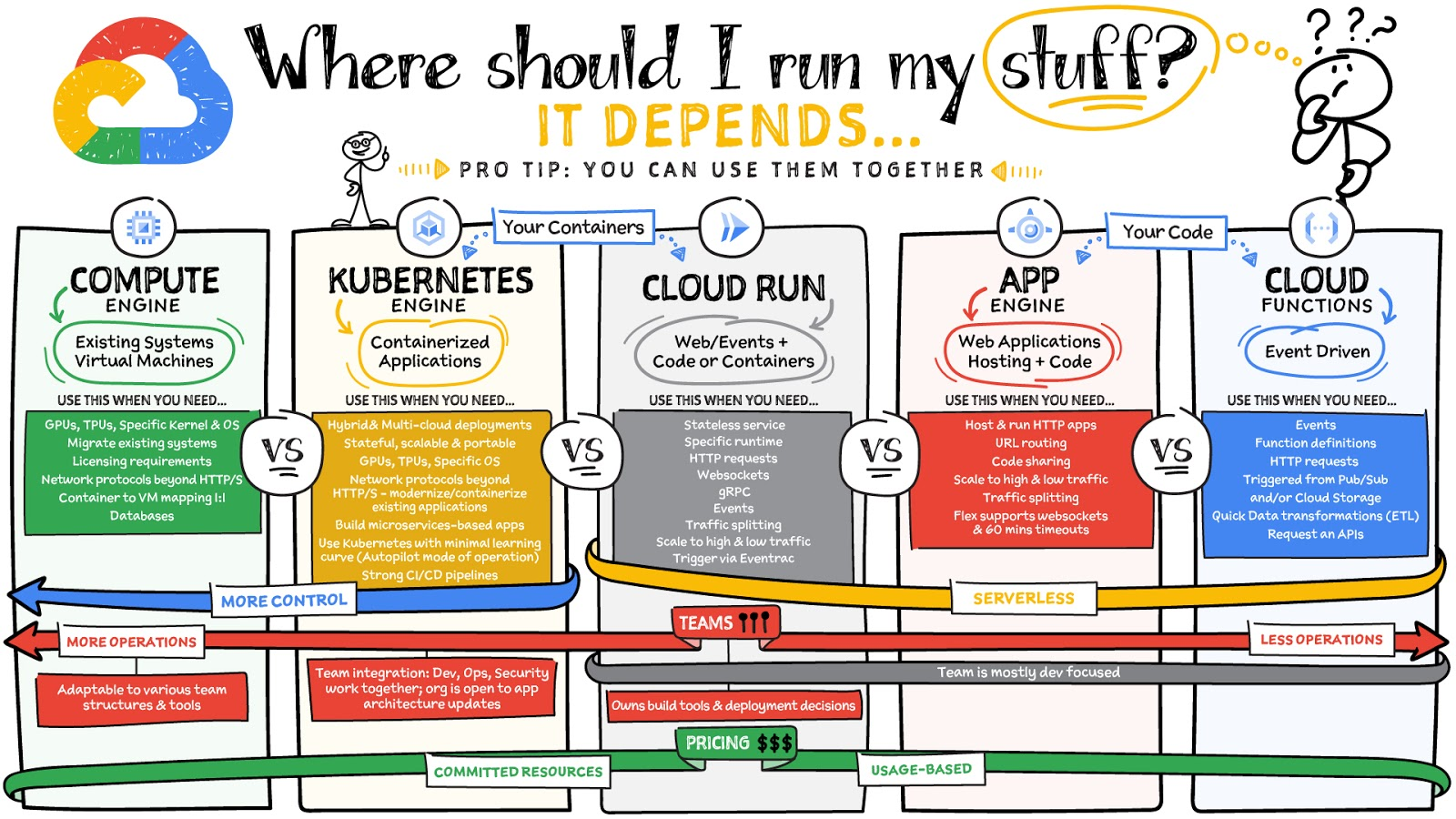
Where should you run your workload? It depends…Choosing the right infrastructure options to run your application is critical, both for the success of your application and for the team that is managing and developing it. This post breaks down some of the most important factors that you need to consider when deciding where you should run your stuff!
What are these services?
- Compute Engine – Virtual machines. You reserve a configuration of CPU, memory, disk, and GPUs, and decide what OS and additional software to run.
- Kubernetes Engine – Managed Kubernetes clusters. Kubernetes is an open-source system for automating deployment, scaling, and management of containerized applications. You create a cluster and configure which containers to run; Kubernetes keeps them running and manages scaling, updates and connectivity.
- Cloud Run – A fully managed serverless platform that runs individual containers. You give code or a container to Cloud Run, and it hosts and auto scales as needed to respond to web and other events.
- App Engine – A fully managed serverless platform for complete web applications. App Engine handles the networking, application scaling, and database scaling. You write a web application in one of the supported languages, deploy to App Engine, and it handles scaling, updating versions, and so on.
- Cloud Functions – Event-driven serverless functions. You write individual function code and Cloud Functions calls your function when events happen (for example, HTTP, Pub/Sub, and Cloud Storage changes, among others).
What level of abstraction do you need?
- If you need more control over the underlying infrastructure (for example, the operating system, disk images, CPU, RAM, and disk) then it makes sense to use Compute Engine. This is a typical path for legacy application migrations and existing systems that require a specific OS.
- Containers provide a way to virtualize an OS so that multiple workloads can run on a single OS instance. They are fast and lightweight, and they provide portability. If your applications are containerized then you have two main options.
- You can use Google Kubernetes Engine, or GKE, which gives you full control over the container down to the nodes with specific OS, CPU, GPU, disk, memory, and networking. GKE also offers Autopilot, when you need the flexibility and control but have limited ops and engineering support.
- If, on the other hand, you are just looking to run your application in containers without having to worry about scaling the infrastructure, then Cloud Run is the best option. You can just write your application code, package it into a container, and deploy it.
- If you just want to code up your HTTP-based application and leave the scalability and deployment of the app to Google Cloud then App Engine — a serverless, fully-managed option that is designed for hosting and running web applications — is a good option for you.
- If your code is a function and just performs an action based on an event/trigger, then deploying it with Cloud Functions makes sense.
What is your use case?
- Use Compute Engine if you are migrating a legacy application with specific licensing, OS, kernel, or networking requirements. Examples: Windows-based applications, genomics processing, SAP HANA.
- Use GKE if your application needs a specific OS or network protocols beyond HTTP/s. When you use GKE, you are using Kubernetes, which makes it easy to deploy and expand into hybrid and multi-cloud environments. Anthos is a platform specifically designed for hybrid and multi-cloud deployments. It provides single-pane-of-glass visibility across all clusters from infrastructure through to application performance and topology. Example: Microservices-based applications.
- Use Cloud Run if you just need to deploy a containerized application in a programming language of your choice with HTTP/s and websocket support. Examples: websites, APIs, data processing apps, webhooks.
- Use App Engine if you want to deploy and host a web based application (HTTP/s) in a serverless platform. Examples: web applications, mobile app backends
- Use Cloud Functions if your code is a function and just performs an action based on an event/trigger from Pub/Sub or Cloud Storage. Example: Kick off a video transcoding function as soon as a video is saved in your Cloud Storage bucket.
Need portability with open source?
If your requirement is based on portability and open-source support take a look at GKE, Cloud Run, and Cloud Functions. They are all based on open-source frameworks that help you avoid vendor lock-in and give you the freedom to expand your infrastructure into hybrid and multi-cloud environments. GKE clusters are powered by the Kubernetes open-source cluster management system, which provides the mechanisms through which you interact with your cluster. Cloud Run for Anthos is powered by Knative, an open-source project that supports serverless workloads on Kubernetes. Cloud Functions use an open-source FaaS (function as a service) framework to run functions across multiple environments.
What are your team dynamics like?
If you have a small team of developers and you want their attention focused on the code, then a serverless option such as Cloud Run or App Engine is a good choice because you won’t have to have a team managing the infrastructure, scale, and operations. If you have bigger teams, along with your own tools and processes, then Compute Engine or GKE makes more sense because it enables you to define your own process for CI/CD, security, scale, and operations.
What type of billing model do you prefer?
Compute Engine and GKE billing models are based on resources, which means you pay for the instances you have provisioned, independent of usage. You can also take advantage of sustained and committed use discounts.
Cloud Run, App Engine, and Cloud Functions are billed per request, which means you pay as you go.
Conclusion
It’s important to consider all the relevant factors that play a role in picking appropriate compute options for your application. Remember that no decision is necessarily final; you can always move from one option to another.
To explore these points in more detail, please take a look at the “Where Should I Run My Stuff?” video.
For more #GCPSketchnote, follow the GitHub repo & thecloudgirl.dev. For similar cloud content follow us on Twitter at @pvergadia and @briandorsey
What’s New in Retail: Bits from Google Cloud’s Retail & Consumer Goods Summit

7978
Of your peers have already read this article.
3:00 Minutes
The most insightful time you'll spend today!
Today we’re hosting our Retail & Consumer Goods Summit, a digital event dedicated to helping leading retailers and brands digitally transform their business. For me, this is a personally exciting moment, as I see tremendous opportunities for those companies that choose to focus on their customers and leverage technology to elevate experiences.
Our event includes breakout sessions to help retailers and brands become customer centric, embrace the digital moment and transform their operations. Some of my favorite sessions include:
- Why Search Abandonment is the metric that matters, highlighting Retail Search, and featuring a conversation with Macy’s
- Driving Consumer Closeness in a Privacy-Centric World, discussing how retailers and brands can create a successful first party data strategy, featuring a conversation with P&G
- The Modern Store: 7 Innovation Hotspots, sharing how retailers and brands can approach store transformation to unlock the most value from technology, featuring a conversation with The Home Depot.
I’ll be speaking in our Retail Spotlight session, discussing the current retail landscape and our industry approach, followed by conversations with Albert Bertilsson, Head of Engineering – Edge at IKEA Retail (Indga Group) and Neelima Sharma, Senior Vice President, Technology Ecommerce, Marketing and Merchandising at Lowe’s.
Let me share a bit more about the topics we’ll discuss in that session.
In retail specifically, digital-first shopping journeys are blurring the lines between the physical and digital brand experience. Shoppers want to know what’s available before they visit your stores, and they expect fulfillment options like curbside pickup. We see this when tracking trends for interest in curbside pickup or in-stock items.

This has left many retailers asking how they can get smarter with their data, tackle the $300 billion dollar problem of “search abandonment,” move faster to create new customer experiences, and do a better job of connecting their employees and customers – with confidence.
Our team has been spending time thinking about how we can rise and succeed in this new era together. We continue to focus on areas where we can bring the best of our capabilities to our retail customers around the world. And we’re focused on ways we can bring the best of what Google has to offer through cloud integrations.
Our goal is to help retailers become customer-centric and data-driven, capture digital and omni-channel revenue growth, create the modern store and drive operational improvement.

Let’s dig into each of these strategic pillars in a bit more detail.
Become customer centric and data driven
Customers today expect experiences that are timely, targeted, and tailored for them and their needs, and reject experiences that can’t deliver these features. Data modeling, legacy technology, and siloed systems often prevent retailers from providing that level of personalized experience.
At Google Cloud, we work with global retailers and our ecosystem partners to activate and bring value from first-party data, particularly in the field of customer data platforms (CDPs). This includes integrations from Google Cloud, such as our business intelligence platform Looker and other popular platforms to power one source of customer data through the organization. We also help retailers modernize their data warehouse with Looker for gathering business intelligence across their organization. This is important not just for consumer data, but inventory, supply chain, and store operations as well.
Capture Digital and Omnichannel Growth
We power some of the largest e-commerce sites in the world, helping them scale for Black Friday, Cyber Monday, and other holiday events. While scale is critically important, it’s also important to consider the quality of the online experience. How do your customers find products? How can you help deliver seamless online and omnichannel experiences?
To help, we’re building product discovery solutions that bring together the best of our technologies that help retailers drive engagement with their consumers. Retail Search, for example, gives retailers the ability to provide Google-quality search on their own digital properties – search that is customizable for their unique business needs and built upon Google’s advanced understanding of user intent & context.
The imperative is clear. Recent research found that retailers lose more than $300 billion to search abandonment — when purchase intent is not converted into a sale due to bad search results — every year in the US alone.
Today, we announced that Retail Search is available to a larger set of retailers. If you are interested in learning more about Retail Search you can contact your sales representative for additional details.
Create the modern store
With the rise of buying trends like curbside pickup and proximity-based search, our Google Maps Platform team is working on new products and features to help raise inventory awareness for your shoppers. We want to help you make it easier for them to understand what’s available to purchase in their channel of choice.
With Product Locator, each product page connects customers with information they need for local pickup and delivery options. This ensures customers are aware of pickup and delivery options throughout the buying journey—not just checkout.
Awareness of local inventory can boost a wide range of key metrics for your business. Shopify recently shared that shoppers who opt for local pickup over delivery had a +13% higher conversion rate and that 45% of local pickup customers make an additional purchase upon arrival.
This is just one quick example of how our Google Maps Platform team can improve experiences for your shoppers.
Operational improvement
It can be challenging to operate in a world and at a time when consumer behavior and supply chains are so disrupted and volatile, and where entire retail teams had to go remote during the pandemic and beyond.
We’re working with retailers to leverage artificial intelligence (AI) to improve consumer experience through chat bots or conversational commerce that solves problems for customers from anywhere. You can learn more about these offerings in our Conversational Commerce with Google breakout session, featuring Albertsons.
As the need for digital transformation continues to accelerate, Google Cloud is helping retailers stay ahead of the curve with solutions for digital and omnichannel growth, data-driven and customer-focused experiences, and operational improvement. For every era of cloud technologies, from the past into the future, Google Cloud is committed to providing solutions to retailers.
Read more about our solutions for retail, and check out additional sessions, including the CPG Industry Spotlight Session How To Grow Brands in Times of Rapid Change – Featuring L’Oréal at our Retail & Consumer Goods Summit.
BPAY: Uncovering New Business Opportunities with APIs

4021
Of your peers have already read this article.
3:15 Minutes
The most insightful time you'll spend today!
Editor’s note: Today we hear from Jon White and Angela Donohoe from BPAY Group. BPAY Group is best known for BPAY, the leading electronic bill payment system in Australia, handling one-third of the market. Learn how BPAY Group is positioning the organization for the future by using APIs to streamline workflows for existing customers and new businesses.
BPAY has been a leader in the bill payment industry in Australia for 22 years and provides a secure, fast, and convenient way to connect individuals, businesses, and banks to help people stay on top of their bills.
One of the reasons that BPAY is the preferred bill payment service for so many Australians is our commitment to human-centered design. We’re continuously talking with customers and looking at ways that we can deliver better experiences, products, and services, such as peer-to-peer payments. During these conversations, we noticed some ways that our processes were causing friction for existing or potential customers.
For example, we traditionally used a batch processing system to handle requests between billing companies and banks. But that could cause headaches for some customers, as an error in even one request could cause the whole batch to be rejected. Plus, many “neobanks” (new types of digital-only banks) wanted to work with real-time transactions instead of batch processes, which take longer to complete.
We realized that APIs had the potential to solve many of the challenges impacting customers while opening the doors for future product and business development. We developed a few customer-facing APIs and tested them in closed betas. This experiment went far better than we expected, and we realized that there was a huge appetite for APIs among our biller customers.
While we had developed many APIs for internal systems, developing APIs that were easy to consume by our customers was a new challenge. We needed to move away from our home-grown API development approach and make our API environment more powerful, versatile, and easier to use. The API experts at The Singularity worked with us to develop a strong API strategy. We decided that we would need to support our new strategy with a scalable API management platform.
After a rigorous search, we landed on the Apigee API Management Platform. Apigee was the only solution that met all our technology and business requirements. With Apigee, we have a solid foundation for APIs that will help us deliver more value for all customers.
Creating a custom development environment
BPAY is a trusted brand in Australia, so it was very important to us that we maintain our reputation for excellent customer experiences. When setting up our developer portal, we started with a closed pilot and used developer feedback to make the portal as convenient and simple to use as possible. The Apigee developer portal has many built-in features to help us customize experiences, and if we run into roadblocks, the Apigee team at Google listens and helps us create the custom experience we want.
The developer portal has already proven to be extremely popular. In its first month live, we registered 104 developers in the sandbox environment and 10 developers in the production environment. That was before we even started marketing our developer portal, so we expect those numbers to rise quickly.
Breaking new ground with APIs
We’ve already released four foundational APIs, with a goal of eventually releasing dozens. Our APIs are helping us create smoother experiences for customers. We mentioned that when processing a batch of payment files, one mistake could cause the entire batch to get rejected. Our APIs now enable businesses to validate all payment information before submitting a batch file, dramatically reducing the chances of errors. They can even use our APIs to automatically generate batch files in the right format for different banks.
While APIs improve service for current customers, they also open the doors for new areas of business. Buy now, pay later (BNPL) services, which enable customers to spread out payments across weeks or months, are already popular in retail spaces. After releasing our first APIs, we connected with two BNPL billing services. These companies use our APIs to validate customers’ bill payment information and then pay the bill in full on behalf of customers. This was a completely new use case for us, one that could not have been implemented without our APIs.
The payment service NoahPay also adopted our APIs to validate payment information and let customers pay bills using funds from their WeChat accounts. This is an exciting new market for us, as it’s one of the first examples of how we can connect to international digital wallets through our new APIs. It’s also a great way to introduce users of WeChat, a messaging app used by more than 1 billion people in China, to the BPAY brand.
Planning for the future of bill pay
We have big plans for APIs in the future, and Apigee helps make these plans a reality. We plan to establish a generous freemium monetization model that will allow customers to make up to 200,000 API calls for free each month with tiered payment plans above that. This will enable us to open the doors for smaller organizations while providing optimal support for larger businesses and banks that might need to make millions of calls. Having powerful end-to-end monetization features built in to Apigee means that we can process monetized transactions with ease.
Built-in reporting functionality will also help us make sure that we’re understanding the market’s need for APIs and always providing our customers with valuable services and support.
Apigee greatly streamlines creating self-service API environments. Even as we grow our business, our internal teams will be able to continue providing excellent customer service without needing extra staff to answer questions, help with integration support, and constantly check API security. APIs are the way of the future, and Apigee prepares us meet the challenges that come along with it.
More Relevant Stories for Your Company

Best Practices for Cost Optimization in the Cloud
When customers migrate to Google Cloud Platform (GCP), their first step is often to adopt Compute Engine, which makes it easy to procure and set up virtual machines (VMs) in the cloud that provide large amounts of computing power. Launched in 2012, Compute Engine offers multiple machine types, many innovative features, and is available in




Guide: How to Accelerate App Development with Google Cloud
Cloud-native, Kubernetes, Serverless have been the hottest and most widely discussed topics given the velocity and agility benefits. Learn more about how you can leverage these modern app development practices to ship software faster, while reducing costs and improving security and compliance. Learn how Google Cloud lets you modernize existing

Apigee Helps Bank BRI Rewrite its Digital Future and Achieve Financial Inclusion
About Bank BRI Bank Rakyat Indonesia is one of the largest banks in Indonesia and is committed to increasing financial inclusions among un-banked Indonesians. Bank BRI specializes in using modern digital banking to facilitate microfinance lending across its network of over 10,000 branches and thousands of branchless agents. Google Cloud

Release of Go 1.18 is A New Milestone for Development of Secure Apps
On March 15th, the Go team announced Go 1.18 GA, the latest release of the Go programming language. The culmination of over a decade of design delivers the features our developers demanded: generics, fuzzing, and module workspaces. With this release, Go becomes the first major language to integrate fuzz testing
