





DR for Cloud: Architecting Microsoft SQL Server with Google Cloud

3758
Of your peers have already read this article.
2:45 Minutes
The most insightful time you'll spend today!
Database disaster recovery (DR) planning is an important component of a bigger DR plan, and for enterprises using Microsoft SQL Server on Compute Engine, it often involves critical data.
When you’re architecting a disaster recovery solution with Microsoft SQL Server running on Google Cloud Platform (GCP), you have some decisions to make to build an effective, comprehensive plan.
Microsoft SQL Server includes a variety of disaster recovery strategies and features, such as Always On availability groups or Failover Cluster Instances.
And Google Cloud is designed from the start for resilience and availability. There are several types of data centers available within GCP where you can map SQL Server’s availability features based on your specific requirements: zones and regions. Zones are autonomous data centers co-located within a GCP region. These regions are available in different geographies such as North America or APAC.
However, there is no single disaster recovery strategy to map Microsoft SQL Server DR features to Google Cloud’s data center topology that satisfies every possible combination of disaster recovery requirements.
As a database architect, you have to design a custom disaster recovery strategy based on your specific use cases and requirements.
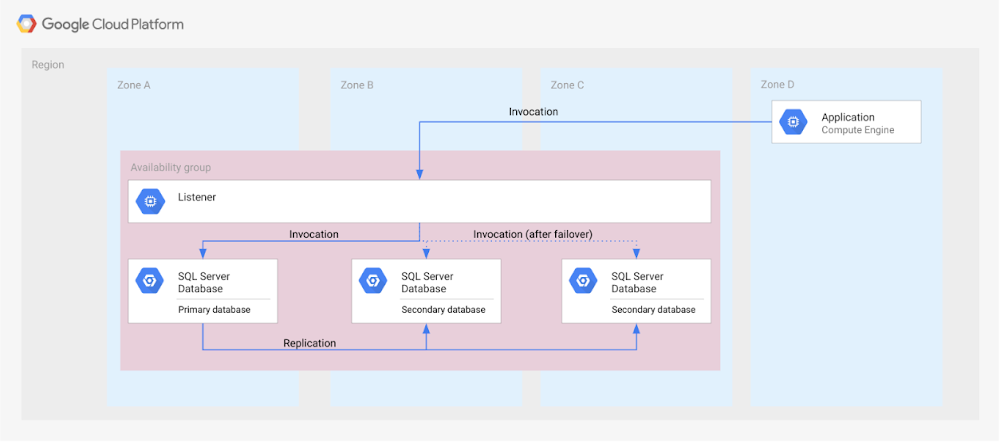
Our new Disaster Recovery for Microsoft SQL Server solution provides information on Microsoft’s SQL Server disaster recovery strategies, and shows how you can map them to zones and regions in GCP based on your business’s particular criteria and requirements. One example is deploying an availability group within a region across three zones (shown in the diagram below).
For successful DR planning, you should have a clear conceptual model and established terminology in place. In this solution, you’ll find a base set of concepts and terms in context of Google Cloud DR. This includes defining terms like primary database, secondary database, failover, switchover, and fallback.
You’ll also find details on recovery point objective, recovery time objective and single point of failure domain, since those are key drivers for developing a specific disaster recovery solution.
Building a DR solution with Microsoft SQL Server in GCP regions
To get started with implementing the availability features of Microsoft SQL Server in the context of Google Cloud, take a look at this diagram, which shows the implementation of an Always On availability group in a GCP region, using several zones:
In the new solution, you’ll see other availability features, like log shipping, along with how they map to GCP. In addition, features in Microsoft SQL Server that are not deemed availability features—like server replication and backup file shipping—can actually be used for disaster recovery, so those are included as well.
Disaster recovery features of Microsoft SQL Server do not have to be used in isolation and can be combined for more complex and demanding use cases. For example, you can set up availability groups in two regions with log shipping as the transfer mechanism between the regions.
Disaster Recovery for Microsoft SQL Server also describes the disaster recovery process itself, how to test and verify a defined disaster recovery solution, and outlines a basic approach, step-by-step.
Two Ways to Deploy SAP HANA System on Google Cloud

7867
Of your peers have already read this article.
4:00 Minutes
The most insightful time you'll spend today!
Many of the world’s leading companies run on SAP—and deploying it on Google Cloud extends the benefits of SAP even further. Migrating your current SAP S/4HANA deployment to Google Cloud—whether it resides on your company’s on-premises servers or another cloud service—provides your organization with a flexible virtualized architecture that lets you scale your environment to match your workloads, so you pay only for the compute and storage capacity you need at any given moment. Google Cloud includes built-in features, such as Compute Engine live migration and automatic restart, that minimize downtime for infrastructure maintenance. And it allows you to integrate your SAP data with multiple data sources and process it using Google Cloud technology such as BigQuery to drive data analytics.
SAP server-side architecture consists of two layers: the SAP HANA database, and the Netweaver application layer. In this blog post, we’ll look at the options and steps for moving the database layer to Google Cloud as a lift and shift or rehost, a straightforward approach that entails moving your current SAP environment unchanged onto Google Cloud.
Deploying an SAP HANA system on Google Cloud
Google Cloud offers SAP-certified virtual machines (VMs) optimized for SAP products, including SAP HANA and SAP HANA Enterprise Cloud, as well as dedicated servers for SAP HANA for environments greater than 12TB. (For a complete list of VM and hardware options, visit the Certified and Supported SAP HANA Hardware Directory.)
Before proceeding with a rehost migration to Google Cloud, your current (source) environment and Google Cloud (target) environments should meet these specifications:
Prerequisites:
- The configuration of the Google Cloud environment (i.e., VM resources, SSD storage capacity) should be identical to that of the source environment. If the underlying hardware is different, however, you must use Option 2 for your migration, detailed below.
- Both environments should be running the same operating system (SUSE or RHEL Linux).
- The HANA version, instance number, and system ID (SID) should be identical.
- Schema names must remain the same.
- Establishing the network connection between the on-premises environment and Google Cloud will be required in this phase to support rehost of the SAP application.you can use Cloud VPN or Dedicated Interconnect. Learn more about Dedicated Interconnect and Cloud VPN.
Note: Depending on your internet connection and bandwidth requirements, we recommend using a Dedicated Interconnect over Cloud VPN for production environments.
We offer a number of automated processes to accelerate your cloud journey. To deploy the SAP HANA system on Google Cloud, you can use the Google Cloud Deployment manager or Terraform and Ansible scripts available on GitHub with configuration file templates to define your installation. For more details, see the Google Cloud SAP HANA Planning Guide.
Note: To deploy SAP HANA on Google Cloud machine types that are certified by SAP for production, please review the Certification for SAP HANA on Google Cloud page.
Moving an SAP HANA Database to Google Cloud
There are two different options you can use to rehost your SAP HANA database to Google Cloud, and each has pros and cons that you should consider when deciding on your approach.
Option 1: Asynchronous replication uses SAP’s built-in replication tool to provide continuous data replication from the source system (also known as the primary system) to the destination or secondary system—in this case residing on Google Cloud. It’s best for mission-critical applications for which minimum downtime is a high priority, and for large databases. In addition, the high level of automation means that the process requires less manual intervention. Here’s where you can learn more on HANA Asynchronous Replication.
Option 2: Backup and restore relies on SAP’s backup utility to create an image of the database that is then transferred to Google Cloud, where it is restored in the new environment. Downtime for this method varies by database size, so large databases may require more downtime via this method vs. asynchronous replication. It also involves more manual tasks. However, it requires fewer resources to perform, making it an attractive option for less urgent use cases. Here’s where you can learn more on SAP HANA database Backup and restore.

How to migrate the SAP HANA database to Google Cloud using Asynchronous Replication

- Create and configure Dedicated Interconnect or Cloud VPN between the current environment and Google Cloud.
- Set up SAP HANA asynchronous replication. You can configure system replication using SAP HANA Cockpit, SAP HANA Studio, or hdbnsutil. See Setting Up SAP HANA System Replication in the SAP HANA Administration Guide.
- Be sure to use the same instance number and HANA SID in the template as the primary instance.
- Configure the Google Cloud instance as the secondary node for using HANA Asynchronous replication.
- Perform data validation once full data replication is completed to the SAP HANA database in Google Cloud. To learn more: HANA System Replication overview.
- Perform an SAP HANA takeover on your standby database. This switches your active system from the current primary system onto the secondary system on Google Cloud. Once the takeover command runs, the system on Google Cloud becomes the new primary system.To learn more: HANA Takeover.
How to migrate the SAP HANA database to Google Cloud using Backup and Restore

- Create a full backup of your SAP HANA database in your current environment.
- Create a new storage bucket in your Google Cloud environment. Visit Creating Storage Buckets in the Google Cloud Storage documentation.
- Download and install gsutil onto the source environment and run it to upload the HANA backup to the Google Cloud storage bucket. To install gsutil utility on any computer or server, visit Install gsutil in the Google Cloud Storage documentation.
Note: You can run parallel multi thread/multi processing in gsutil to copy large files more quickly. - Recover the HANA database on Google Cloud using SAP’s RECOVER DATABASE statement. See RECOVER DATABASE Statement (Backup and Recovery) in the SAP HANA SQL Reference Guide for SAP HANA Platform.
Note: BackInt agent is an integrated SAP interface tool used for HANA database on Google Cloud.Backint agent for SAP HANA can be used to store and retrieve backups directly from Google Cloud Storage. It is supported and certified by SAP on Google Cloud. To learn more: SAP HANA Backint Agent on Google Cloud.
In summary, we recommend using Asynchronous Replication (Option 1) for mission-critical applications that require the lowest downtime window. For all other applications, we recommend Backup and Restore (Option 2), as this approach requires fewer resources. It’s also a great way to implement the backup and restore functionality on Google Cloud.
A rehost migration is the most straightforward path to getting your SAP on HANA system up and running on Google Cloud. And the sooner you migrate, the sooner you can take advantage of the many benefits Google Cloud brings to your SAP solution. For more information on the different migration options please review: SAP on Google Cloud: Migration strategies.
Learn more about deploying SAP on Google Cloud. Technical resources can be found here.
4946
Of your peers have already watched this video.
49:30 Minutes
The most insightful time you'll spend today!
How to Migrate an Oracle Database to Google Cloud
As more enterprises migrate a growing number of workloads to the cloud, migrating databases, too, has become a key focus.
But migrating databases is also really tough. This is due to a number of different reasons.
The first one is that there’s a lot of proprietary technology and functionality that’s built into a lot of the legacy database technologies.
With Oracle, for example, that may be things like stored procedure, custom functions, Oracle RAC, so on and so forth.
This makes it really hard for database administrators to migrate to an equivalent cloud-native technology.
The second challenge is that historical on-prem databases are all quite monolithic.
These are humongous servers which don’t really fit into the cloud way of doing things.
So often, database administrators have to split these up into multiple servers in the cloud.
The third challenge, which a lot of companies underestimate, is the reliance of applications on databases.
Say, you are a company that’s been around for 10 to 15 years. As the business has grown, it’s added tens to hundreds of apps, both internal- and external-facing, that are all relying on the database.
So as you’re thinking about migration, it’s really important to consider the risks that are associated of migrating to different cloud technologies. Obviously, you would like to minimize your company’s exposure.
With that background, here are the steps, procedures, best practices, and how to solve the challenges associated with migrating on-premises Oracle databases to Google Cloud SQL PostgreSQL.
From source database migration assessment to schema conversion, data replication, and performance tuning, we will cover all of the basics required to get you started with your first Oracle to Cloud SQL migration project.
MerPay Platform Scales its Reach to Millions of Users using Cloud Spanner

5273
Of your peers have already read this article.
2:00 Minutes
The most insightful time you'll spend today!
Editor’s note: To launch a new mobile payment platform, Mercari needed a database solution strong on scalability, availability, and performance. Here’s how Cloud Spanner delivered those results.
E-commerce companies need to connect customers to their services securely, reliably, with zero downtime. When Mercari, Inc. launched a new mobile payment platform, we chose Cloud Spanner as part of our data portfolio, which provided us with easy scalability to handle millions of new users, a fully managed service that minimized overhead costs, and deep integration with other Google Cloud services.
Mercari, Inc., Japan’s largest C2C marketplace, launched its app in 2013, which allows 18.2million monthly users to easily and securely buy new and used items. Mercari expanded into the United States and in 2014 and launched Merpay, a mobile payment service that can be used through Mercari in Japan in 2017. With more than 85 million users, Merpay is now accepted at 1.8 million merchants and e-commerce sites in Japan, supporting payments via the DOCOMO ID contactless system and QR code.
Prioritizing availability and scalability
When we started building Merpay, we were looking for a new database. In the past, Mercari had used MySQL with bare metal hardware. Because of the amount of data, we required additional expertise to manage and maintain the hardware, software and MySQL implementation. Having built much of the microservices architecture for our Mercari app using Google Kubernetes Engine (GKE), it was natural to look at Google Cloud’s managed services when deciding upon our new database infrastructure for Merpay.
For the database, we were focusing especially on requirements around availability, scalability, and performance. To do a single payment transaction, there were multiple steps each with writes, requiring high-write-throughput and low-latency from the database. Needing a solution that would support reliable payment processing 24/7/365, we chose Spanner, which offers up to 99.999% availability with zero downtime for planned maintenance and schema changes.
We worked closely with Google Cloud’s Premium Support, Technical Account Management (TAM), and Strategic Cloud Engineer and Cloud Consultant teams to implement Spanner, including separating the payment processing— originally one of the functions in Mercari—as a microservice.
A nod to easier nodes and better scale
After launch, the number of Merpay users reached 2 million in only a few months. We had 45 Spanner nodes at the time of launch of Merpay and about 50 nodes four months later. Because we’d optimized the application side during those four months, we didn’t have to add many nodes to keep up with the growing traffic.
Whenever we needed to scale up the serving and storage resources in our instances, Spanner made it easy to increase nodes as needed in the Cloud Console. To optimize costs, it’s easy to add nodes during a marketing campaign and remove them afterward. Even if the traffic count is different from expected, we can change the number of nodes immediately. That’s one incredible convenience of Cloud Spanner.
Building powerful pipelines
Our data pipelines are used for KPI analytics, fraud detection, credit scoring, and customer support use cases. Because Cloud Spanner integrates so easily with other Google Cloud data services, the data in Spanner is easily accessible for analytics. From the Spanner database for each microservice, we create both batch and streaming data pipelines using Pub/Sub and Dataflow, as well as Apache Flink, and load the data into BigQuery and Google Cloud Storage. We’re able to quickly aggregate the data required for data platforms such as BigQuery and Cloud Storage. The original data is stored in Spanner and managed by microservices, but analysis through BigQuery is centrally managed by the Data Platform team. This team determines the confidentiality level of data and centrally manages BigQuery permissions using Terraform. By centrally managing data access permissions on the data platform rather than on individual microservices, we’re able to set appropriate security for individual users.
Our full data portfolio also includes Looker, which we use for product analysis, accounting analysis, test performance visualization, operation monitoring, development efficiency analysis, and HR analysis. We also use Dataproc, Cloud Composer, Data Catalog, and Data Studio. The Dataflow template created for the pipeline is also published as OSS.
With Spanner and other Google Cloud services, our Merpay platform is flexible, secure, scalable and highly available. As Spanner eliminates overhead, we can devote engineering resources to developing new tools and solutions for our customers. We’re looking ahead at providing cryptocurrency service, for example, and are now working on a project to migrate Mercari’s monolithic system that is still on premises entirely over to Google Cloud.
Read more about Mercari and Merpay. Or check out our recent blog: three reasons to consider Cloud Spanner for your next project.
Memorystore for Redis Read Replicas to Scale App Read Requests by 6X

5505
Of your peers have already read this article.
2:00 Minutes
The most insightful time you'll spend today!
Modern applications need to process large-scale data at millisecond latency to provide experiences like instant gaming leaderboards, fast analysis of streaming data from millions of IoT sensors, or real-time threat detection of malicious websites. In-memory datastores are a critical component to deliver the scale, performance, and availability required by these modern applications.
Memorystore makes it easy for developers building applications on Google Cloud to leverage the speed and powerful capabilities of the most loved in-memory store: Redis. Memorystore for Redis standard tier instances are a popular choice for applications requiring a highly available Redis instance. Standard tier provides a failover replica across zones for redundancy and provides fast failover with a 99.9% SLA. However, in some cases, your applications will require more read throughput from a standard tier instance. One of the common patterns customers use to scale read queries in Redis is leveraging read replicas.
Introducing Memorystore for Redis Read Replicas
Today we are excited to announce the public preview of Memorystore for Redis Read Replicas, which allows you to seamlessly scale your application’s read requests by 6X with the click of a button.
With read replicas, you can easily add up to five replicas and leverage the read endpoint to automatically load balance read queries across all the available replicas, increasing read performance linearly with each replica added. Additionally, Memorystore’s support for Redis 6 introduced multi-thread I/O, increasing performance significantly for M3 and higher configurations. Combined, you can achieve read requests of more than a million requests per second.
You will benefit from this new functionality in several ways. You will be able to scale on demand with up to five read replicas and use read endpoint with any redis client to easily load balance read queries across multiple replicas. This new functionality will also improve availability with automatic distribution of replicas across multiple zones. With read replicas, you will also be able to minimize application downtime with fast failover to the replica with the least replication lag. In the future, Memorystore will also easily enable read replicas on existing standard tier instances to increase read throughput.
You can learn more about how to configure and use read replicas in the Read Replicas Overview.
Improving performance with Read Replicas and Redis 6
With the launch of read replicas, you can easily increase the read throughput of a Memorystore instance. You can further enhance the read performance by leveraging Redis version 6 along with read replicas.
To understand why combining read replicas and Redis 6 can significantly improve your application’s read performance, let’s look at the various Memorystore configurations that you can use with your applications today. Memorystore Basic and Standard offerings provide different capacity tiers. The capacity tier determines the single node performance of a basic and standard tier instance.
The table below outlines the configuration of the various capacity tiers:
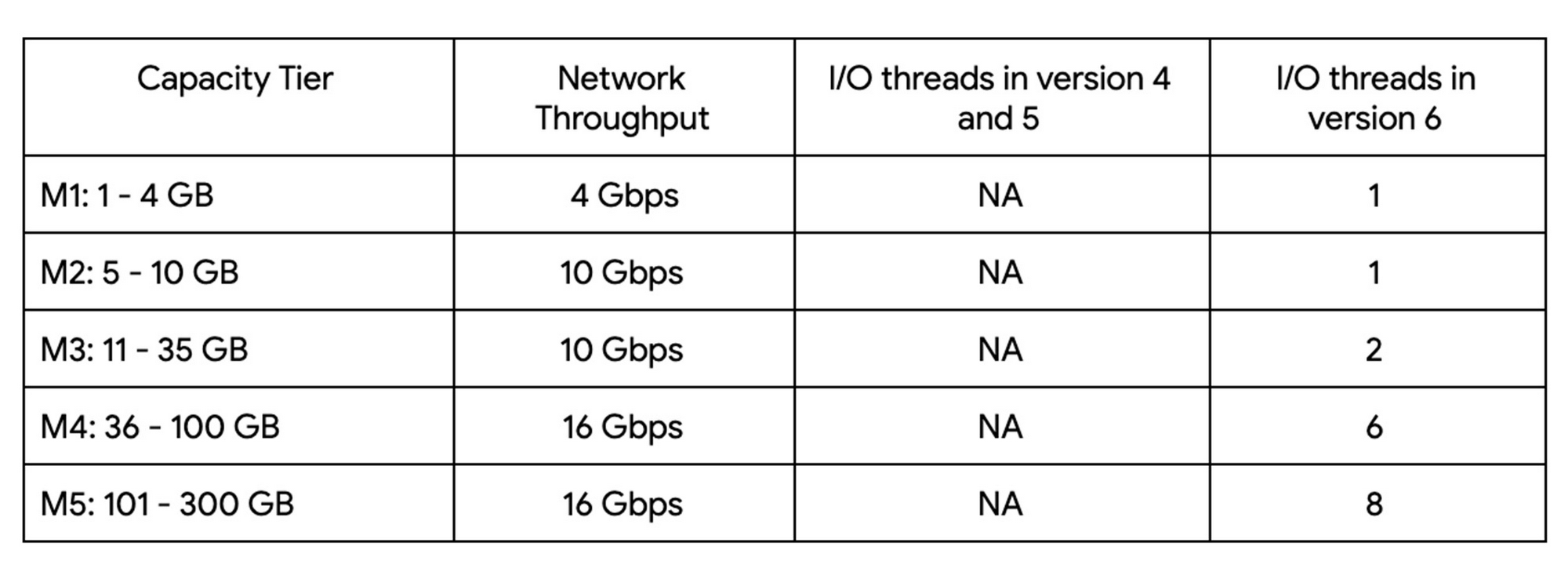
Up until version 5, Redis processed commands using a single thread. The processing involved reading the request, parsing the request, processing the request, and writing the response back to the socket. This approach means that all of the processing, which includes writing the response, was sequentially processed by a single vCPU regardless of the number of vCPUs available in the instance.
Redis 6 introduced I\O threading which allows writing the response using parallel threads. This functionality enables Redis 6 to more effectively leverage available vCPUs, thereby increasing the overall throughput compared to lower versions. Memorystore for Redis version 6 leverages I\O threading and automatically configures the optimal number of I\O threads to achieve the best possible performance for the various capacity tiers. We have also improved the overall network throughput for all redis versions by leveraging improvements in the Google Cloud infrastructure. Together these improvements deliver significant performance improvements and come at no additional cost to you.
So what can you expect from using Redis 6? As outlined in the table, Redis version 5 and lower uses a single thread to process the write requests for all tiers while Redis 6 uses a larger number of I\O threads at higher capacity tiers which provides substantially incremental throughput for higher capacity tiers.
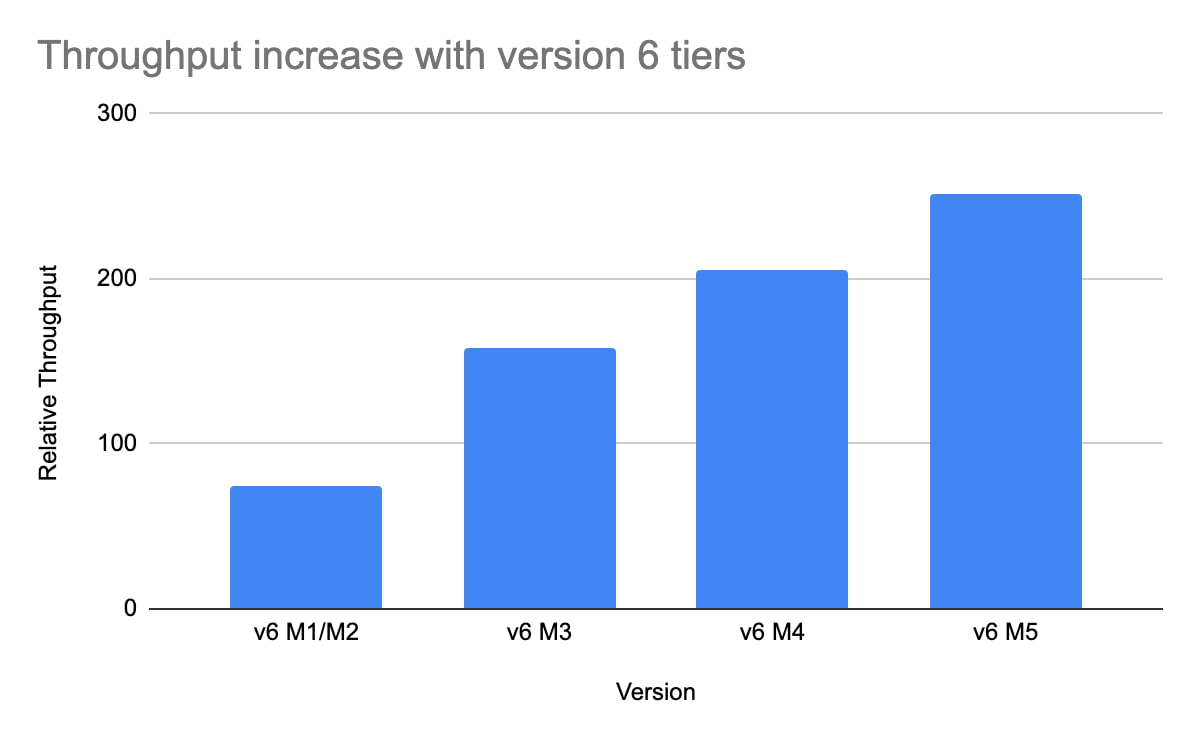
For example, using a Redis 6 standard tier instance with a capacity of 101 GB (M5), we have observed up to a 200% improvement in read/write performance compared to version 5, though the actual value you’ll see is dependent on your workload. You can get the benefits of Redis 6 by upgrading an existing instance or by deploying a new instance.
By enabling read replicas on an instance using Redis 6, you can further improve the read performance. Read throughput scales linearly with the number of replicas so you can increase your read queries on an instance by up to 500% using five read replicas. By combining Redis 6 and read replicas, you can see a 10X increase in read performance compared to a version 5 standard tier instance with no read replicas.
We are excited about the launch of read replicas but this is just one step in our journey to deliver the scale you need at the best price-performance. You can learn more about read replicas pricing on our Memorystore pricing page and get started using the Read Replicas Overview.
Three New Features in Cloud SQL for SQL Server Extends its Functionality

3383
Of your peers have already read this article.
4:00 Minutes
The most insightful time you'll spend today!
As a product with a long history in the database ecosystem, SQL Server offers numerous native capabilities that help provide scalability and security to its users. However, it can be time consuming and complex to take advantage of these features. Google Cloud SQL for SQL Server saves your team time by eliminating much of the unnecessary toil (OS patching, version upgrades, replica setup etc.) while still allowing you to leverage the functionality you’re used to. Three new features for Cloud SQL for SQL Server take its functionality even further.
A few months ago, we announced Active Directory (AD) integration had entered preview; now, it is generally available. Equally exciting, we are releasing Cross-Region Replicas (based on SQL Server’s Always On Availability Groups) in preview. Finally, you can try out this great new functionality in our managed database service with the latest release of SQL Server 2019, which is now generally available.
Simple and Secure Windows Authentication with Active Directory
As one of the most requested and critical security capabilities for Cloud SQL for SQL Server, we are pleased to now provide Windows Authentication via Managed Service for Microsoft Active Directory as generally available. Customers should feel confident onboarding their business critical production workloads to the managed service while still maintaining the authentication best practices they rely on today. While identities can be created and managed directly within the managed AD service, many customers choose to establish a trust relationship with their existing on-prem AD footprint to leverage existing identity objects.
What is Cross-Region Replica for SQL Server?
Bringing parity in the Cloud SQL portfolio alongside MySQL and PostgreSQL, Cross-region replica makes it easy to create a fully managed read replica in a different region than that of the primary instance. You can create a replica in any Google Cloud region. The difference for SQL Server is the Availability Group based architecture that paves the way for the service to continue to offer more core compatibility with the SQL Server features our customers depend on. Cloud SQL greatly simplifies the traditional process of provisioning Availability Groups and streamlines it into a few-step workflow.

Using read replicas will allow you to horizontally scale your read workloads. For example, you can configure a reporting dashboard to work against a read replica, and because it’s only reading, it will not affect the primary instance. You can also promote replicas to be Cloud SQL instances and that could help you reduce your recovery point objective (RPO) and recovery time objective (RTO). It can help you with the RPO because the data is constantly replicated and the replica is probably more up to date than your latest backup. It can help you with RTO because promoting the replica, especially in an automated way, is a relatively short process. To get started, check out the documentation for Cross-Region Replica
What’s new in SQL Server 2019?
Providing the most current major and minor versions is a key aspect of maintaining compatibility and security for your database workload. Cloud SQL provides an easy provisioning experience that will now allow you to select from four editions of SQL Server 2019 similar to our current SQL Server 2017 options of Enterprise, Standard, Web, and Express. A few key considerations as you are evaluating the new version should be:
- Compatibility level – A newly created database on a Cloud SQL for SQL Server 2019 Databases instance has a compatibility level of 150 by default.
- Accelerated Database Recovery – Allows instances to reduce the availability impact of restarts and shutdowns.
- TempDB changes – While we recently provided you more control to manage your tempdb files, 2019 also brings optimization to improve performance as well.
- Intelligent query processing – SQL Server 2019 provides direct improvements to the query engine itself which may improve overall query processing and performance.
- Many other performance improvements – capabilities such as verbose truncation warnings, resumable index build, and others. Learn more about supported features here.
To get started, check out documentation for SQL Server 2019.
In conclusion
These three features have been the most common requests from our enterprise customers. Finally, you can bring your own Active Directory domain for SQL Server authentication and authorization, use the latest features from SQL Server 2019 and scale your read workloads as well as leveraging the cross regional replicas for faster disaster-recovery.
To get started, check out the documentation for Cross-Region Replica, Active Directory, and SQL Server 2019. All are available with any new instance created via the console or API, simply follow the instructions in the documentation.
More Relevant Stories for Your Company

What Drives Your Organization to be Data-driven?
Every organization has its own unique data culture and capabilities. Yet each is expected to use technology trends and solutions in the same way as everyone else. Your organization may be built on years of legacy applications, you may have developed a considerable amount of expertise and knowledge, yet you

Migrating From Oracle OLTP System to Cloud Spanner
Spanner uses certain concepts differently from other enterprise database management tools, so you might need to adjust your application to take full advantage of its capabilities. You might also need to supplement Spanner with other services from Google Cloud to meet your needs. Migration constraints When you migrate your application

What is Google Cloud SQL?
Cloud SQL is a fully managed relational database for MySQL, PostgreSQL, and SQL Server. It reduces maintenance cost and automates database provisioning, storage capacity management, replication, and backups. It offers quick setup, with standard connection drivers and built-in migration tools. How Do You Set It Up? Cloud SQL is easy

Creating and Using Storage Buckets for Your Data Needs
So, you want to store objects on the cloud? But you're really new to Google Cloud or Cloud Storage and would like someone to walk you through the process step by step? Today is your lucky day! I will help you understand the big steps involved in setting up and
