





YoungCapital Scales Up with Ease With Chrome Enterprise and G Suite

4288
Of your peers have already read this article.
2:45 Minutes
The most insightful time you'll spend today!
When your business is rapidly adding new employees, expanding to new countries, and always focused on staying ahead of the competition, you have to take a hard look at the tools that are slowing you down—and swap them out for better ones that can keep pace with the company.
We’re expanding YoungCapital in Germany, which means more offices, more people, and more technology to make the business run smoothly.
As we scale, Google Cloud tools like Chromebooks and G Suite help us grow our business efficiently. They free us up from sluggish, time-intensive technology that’s hard to maintain and repair, and give us the freedom to work together in faster, smarter ways.
Free from hours of device setup. Some months, there are as many as 40 new employees starting at YoungCapital—and as we continue to expand that number will continue to rise, especially now that we’ve opened three new offices in Germany.
With our old Windows desktops, setting up new computers could take up to an hour per employee (which can add up to about 40 hours a month for IT). Today, using Chrome Enterprise tools, it takes about five minutes to get an Acer Spin or Pixelbook ready to hand off to a new hire—saving us more than three months per year of device setup time.
Free from VPNs. Our previous Windows machines required a complicated virtual private network (VPN) for accessing corporate files outside of the office.
Using a VPN was complicated for our employees because the software wasn’t intuitive; if an employee had trouble signing into the VPN while at home or traveling, they could not log in and work as quickly as they needed to. With Chromebooks, all you need is an online connection to sign into G Suite to access files and work from anywhere.
From our perspective, Chromebooks are resistant to threats like ransomware and phishing attacks, giving us confidence that our data can stay secure.
With Chrome Enterprise Upgrade, our IT admins can strengthen security even further: for example, by enabling advanced security features that help block vulnerabilities, locking down lost or stolen devices right away, and setting device security policies in the cloud so devices everywhere are safer.
Free from infrastructure. We used to have to invest in servers, and then add more time and money to keep them running. Now we don’t have to run the business on infrastructure or hire people to maintain it—we can just use Google’s cloud.
NextNovate is helping us make the most of Google Cloud Platform, like integrating some of our proprietary applications with G Suite and building our own add-ons. For example, we created a button for Gmail that connects to our job candidate database; when candidates email us, we can click on the button and see their profiles and work experience.
Free from multiple passwords and logins. Chrome Browser and G Suite with single sign-provider SAML are the portal to all the productivity apps our employees need. Once people log in to G Suite, they don’t have to remember a bunch of other user names and passwords. The IT team loves it too, because we don’t have to spend hours zeroing out passwords and creating new ones.
Free to manage cross-country devices easily in the cloud. Our four-person IT support team, which keeps our systems humming, hasn’t grown, even though we’ve doubled the number of employees.
When we were on Windows devices, we fielded roughly 1,800 IT support requests every month. Now we get about 1,300 requests a month, from a much bigger employee base. This translates to nearly 30% fewer requests for our lean support team, which reduces their workload significantly even though we have roughly 20% more employees—all made possible with Chrome Enterprise.
Being free of slow, high-maintenance technology doesn’t just make the IT department happy—people are actually changing how they work. They no longer send files to each other by email or struggle to keep track of versions; they store everything in Google Drive and work together in Google Docs on a single document at the same time.
And instead of traveling to other offices, connecting with each other in video conferences on Hangouts Meet has become a completely natural way to do business.
With Chromebooks and G Suite, we’re ready for anything: more new markets, more employees, and more-flexible ways to work together and shake up the staffing industry.
Google’s Latest ‘Carbon Footprint’ can Flag Users about Carbon Emission Levels from their Cloud Usage

7103
Of your peers have already read this article.
4:00 Minutes
The most insightful time you'll spend today!
Google Cloud is proud to support our customers with the cleanest cloud in the industry. For the past four years, we’ve matched 100% of our electricity use with renewable energy purchases, and we were the first company of our size to commit going even further by running on carbon-free energy 24/7 by 2030. As we work to achieve 24/7 carbon-free energy, we help you take immediate action to decarbonize your digital applications and infrastructure. We’re also working with our customers across every industry to develop new solutions for the unique climate change challenges that organizations face. Today, we’re excited to expand our portfolio of carbon-free solutions and announce new partnerships that will help every company build a more sustainable future.
First, we’re launching Carbon Footprint, a new product that provides customers with the gross carbon emissions associated with their Google Cloud Platform usage. Now available to every GCP user for free in the Cloud Console, this tool helps you measure, track and report on the gross carbon emissions associated with the electricity of your cloud usage. Of course, the net operational emissions associated with your Google Cloud usage is still zero. With growing requirements for Environmental Social and Governance (ESG) reporting, companies are looking for ways to show their employees, boards and customers their progress against climate targets. Using Carbon Footprint, you have access to the gross energy related emissions data you need for internal carbon inventories and external carbon disclosures, with one click.
Built in collaboration with customers like Atos, Etsy, HSBC, L’Oréal, Salesforce, Thoughtworks and Twitter, our Carbon Footprint reporting introduces a new standard of transparency to support you in meeting your climate goals. You can monitor your gross cloud emissions over time, by project, by product and by region, giving IT teams and developers metrics that can help them reduce their carbon footprint. Our detailed calculation methodology is published so that auditors and reporting teams can verify that their cloud emissions data meets GHG Protocol guidance.

“The power of knowledge combined with the power of technology innovation plays a vital role in proactively responding to the climate crisis we are facing. With Google Carbon Footprint reporting, Atos feeds emissions data in our Decarbonization Data Platform, demonstrating potential emissions reductions from the Google Cloud Platform to our customers. This reporting opens up new levels of emissions transparency, trajectory planning, and data insight to support our customers in meeting, and potentially accelerating towards, their climate goals.”—Nourdine Bihmane, Head of Decarbonization Business Line, Atos
“The capability to measure and understand the environmental footprint of our Public Cloud usage is among the key axis of our sustainable tech roadmap. With Google Cloud Carbon Footprint, we are now able to directly follow the impact of our sustainable infrastructure approach and architecture principles.”—Hervé DUMAS, Sustainability IT Director, L’Oreal
While digital infrastructure emissions are just one part of your environmental footprint, accurately accounting for IT carbon emissions is necessary to measure progress against the carbon reduction targets required to avert the worst consequences of climate change. To help you account for emissions beyond our cloud and across your organization, we’re excited to partner with Salesforce Sustainability Cloud, integrating our Google Cloud Platform emissions data into their carbon accounting platform.
“As we face unprecedented climate challenges, companies across the globe need to embed sustainability into the core of their business in order to meet growing customer and stakeholder expectations, and reduce their environmental impact. Together, Google Cloud and Salesforce Sustainability Cloud can help our joint customers accelerate their path to Net Zero, leveraging data-driven insights and visualizations to track and reduce their carbon emissions to drive sustainable change.”—Ari Alexander, GM of Salesforce Sustainability Cloud.
From information to action
With the gross energy-related emissions footprint of data associated with your Google Cloud usage now available, we’re committed to providing tools to not only measure your carbon footprint, but help you reduce it. We recently launched low-carbon region icons to help you choose cleaner regions to locate your Google Cloud resources. New users who see the icons are over 50% more likely to choose clean regions over others, ensuring their applications emit less carbon over time.
For current Google Cloud users, we’re pleased to announce that Active Assist Recommender will include a new sustainability impact category, extending its original core pillars of cost, performance, security, and manageability. Starting with the Unattended Project Recommender, you’ll soon be able to estimate the gross carbon emissions you’ll save by removing your idle resources. Unattended Project Recommender uses machine learning to identify, with a high degree of confidence, projects that are likely abandoned based on API and networking activity, billing, usage of cloud services, and other signals, and provides actionable recommendations on how to remediate those abandoned projects. By deleting these projects, not only can you reduce costs and mitigate security risks, but you can also reduce your carbon emissions. In August, Active Assist analyzed the aggregate data from all customers across our platform, and over 600,000 gross kgCo2e was associated with projects that it recommended for cleanup or reclamation. If customers deleted these projects they would significantly reduce future gross carbon emissions. Check out this blog to learn more about Active Assist.

Solutions for climate resilience
Many of our customers face difficult questions about how their business impacts the natural environment today, and how it will be affected by climate change in the future. Answering these questions requires rich datasets about the planet, better analytics tools and smarter models to predict potential outcomes. For over a decade Google Earth Engine has supported scientists and developers with hyperscale computing power and the world’s largest catalog of satellite image data. Today, we are delighted to announce the preview of Earth Engine as part of Google Cloud Platform. Now, you can access Earth Engine and combine it with other geospatial-enabled products like BigQuery. By extending Earth Engine’s powerful platform to enterprises through Google Cloud, we are bringing the best of Google together.
Over the past year we’ve worked with a number of organizations to use Earth Engine technology with tools like BigQuery and the Cloud AI Platform to develop new solutions for responsible commodity sourcing, sustainable land management and carbon emissions reduction. Earth Engine enables companies to track, monitor and predict changes in the Earth’s surface due to extreme weather events or human-caused activities, thus helping them save on operational costs, mitigate and better manage risks, and become more resilient to climate change threats. This new offering will wrap the unique data, insights and functionality of Earth Engine with a fully-managed, enterprise-grade experience and reliability.
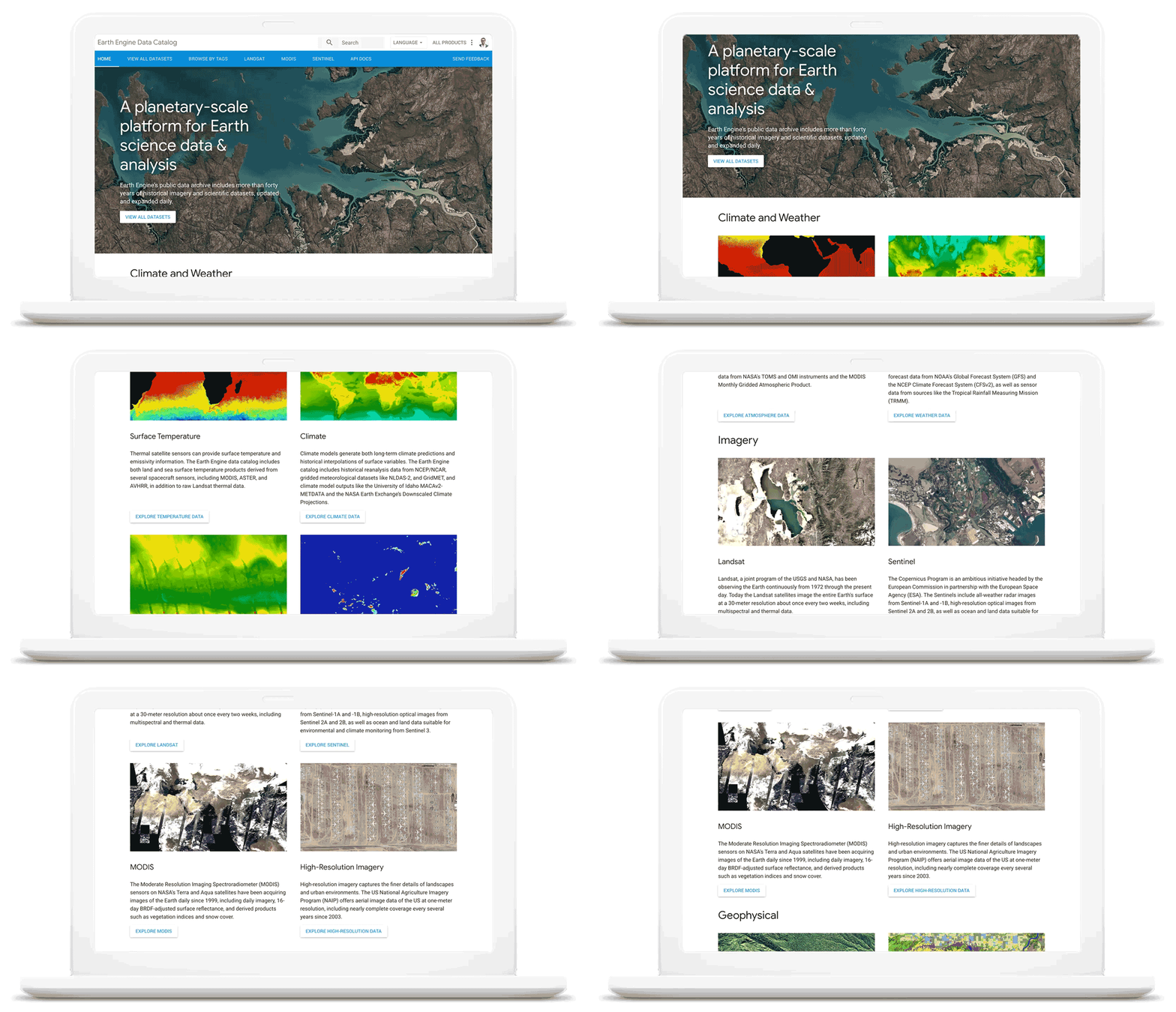
As we work with our customers to accelerate their sustainability initiatives, earth observation data is proving critical to effectively plan for the long-term impacts of climate change. To extend our geospatial and sustainability use cases we’re also expanding our partnerships with CARTO, Climate Engine, Geotab, NGIS, and Planet to bring their data and core applications to Google Cloud.
These partners will each make their existing platforms and datasets available globally on Google Cloud, giving you low-latency and reliable access to critical data and applications that will inform your sustainability initiatives. By integrating water availability, agricultural data, weather risks, and extensive daily satellite imagery into Earth Engine and BigQuery, you can achieve more ambitious goals for the sustainability of your business and our planet.
Committing to help you meet your climate goals
With each of these tools, we’re working to reduce the barriers you face in adopting more sustainable technology practices. We understand that building more sustainable applications and infrastructure is not easy. You face competing priorities, technical challenges, and the perception that climate action is costly.
It doesn’t have to be this way. Today, we are making a sustainability pledge to you: teams across Google Cloud are committing to eliminating the barriers you face in building a more sustainable digital future for your organization, and will help you take action today to realize your climate goals. We’ll do this in a number of ways:
- In digital transformation projects and workshops, sustainability teams will always have a seat at the planning table, so we can work together on using cloud technology to build a more sustainable future.
- We’re putting low-carbon signals natively into our products to help developers choose more sustainable options early in their application development.
- We’ll ensure carbon impact is measured consistently with other key performance indicators. Leveraging the social cost of carbon, the ROI models and value assessments you conduct with Google Cloud will project your emissions impact too.
- We’ll be transparent about our carbon impact, by publishing third-party reviewed reports and methodologies, so you can trust the data for your own reports and disclosures.
- We’ll continue to work with the industry on best practices, including educational resources like Sustainable IT – Decoded, a new masterclass created in partnership with Intel, that shares the expertise of sustainability thought leaders.
For the next decade we need to work together to avert the worst consequences of climate change. We’ve made tremendous progress in building technology that helps everyone do more for the planet, and we’re excited to see what you do with it. Visit this page to learn more about Google Cloud’s sustainability efforts.
16 Popular Chrome Insider Posts to Help You Simplify Browser Deployments

4447
Of your peers have already read this article.
1:00 Minutes
The most insightful time you'll spend today!
We launched the Chrome Insider blog in 2019 to share tips and best practices with IT admins so they could better deploy, manage, and secure Chrome browser. Since then, the series has covered everything from supporting legacy browsers to protecting enterprise credentials to simplifying deployments. To make it even easier to find and browse the series, we’ve pulled together all the posts to date here so you can read them all in one place or bookmark them for later.
Managing Chrome tips and tricks
- Understanding Policy Precedence for Chrome browser
- Protecting enterprise credentials with Password Alert
- Managing Chrome browser in a controlled environment
- Simplifying Chrome deployments on macOS
- Configuring Chrome browser in your VDI environment
- Know your options for Modern Enterprise Browser Management
- Managing policies and extensions across operating systems in Chrome Browser
Improving extension management and reporting
- Improving Chrome browser extension management through permissions
- Publishing custom extensions for the enterprise
- Enhanced extension reporting with Chrome Browser’s Takeout API
Ensuring your organization is secure
- Managing BeyondCorp Enterprise’s threat and data protection capabilities in Chrome
- A primer on enterprise private browsing modes
Increasing your organization’s productivity
- Ready, set, Chrome—Improvements and polices to make Chrome more performant
- Troubleshooting with Chrome Browser
- Preparing your enterprise for Flash deprecation
- Apps from the past? Fear not with legacy browser support in Chrome Enterprise
Although the series is 16 posts strong, there are plenty more Chrome Insider posts to come. You can read these posts and more on our Chrome Enterprise channel.
6904
Of your peers have already watched this video.
14:21 Minutes
The most insightful time you'll spend today!
How Anthos Helps Organizations Implement Multi and Hybrid Cloud Strategy
Organizations have become increasingly focused on using modernization solutions to build competitive advantage, for faster time to market, serve customers better and seamlessly operate in hybrid and multi-cloud environments. Anthos by Google Cloud, a managed application platform plays an important role in application modernization and also in empowering customers to deploy a hybrid or multi-cloud strategy with opensource technologies and platforms like Kubernetes.
Watch the video to refer to the real use-cases of Anthos for application modernization and hybrid/multi cloud deployment across retail, digital natives, banking and manufacturing space.
Also, explore the latest tool, Migrate for Anthos if you are a traditional enterprise looking to skip rewriting of applications and lift-and-shift process!
TELUS and Google Cloud Partner to Move Towards a More Sustainable Future

4497
Of your peers have already read this article.
2:30 Minutes
The most insightful time you'll spend today!
Environmental sustainability is a key priority for TELUS, a world-leading communications technology company. It continues to rank in the top 100 most sustainably managed companies in the world, and seeks to make a healthier planet for all by leveraging its global-leading technology, compassion to drive social change and reduce our collective carbon footprint through innovative technologies and sustainable business practices.
TELUS surpassed its sustainability objectives in 2019 and is now on a journey to procure all of its electricity from renewable or low-emitting sources by 2025. Next, it aims to achieve net carbon neutrality for its operations by 2030. TELUS has also been named to the Dow Jones Sustainability Index for 21 consecutive years, a feat unmatched by any other North American telecom or cable company. In 2021, it became the first company in Canada to release a Sustainability-linked bond (SLB) framework and complete an SLB offering, formally linking TELUS financing to its environmental performance.
“We’ve spent the last decade becoming a global leader in sustainability, helping make the planet healthier by ensuring that our operations are as environmentally responsible as possible,” said Geoff Pegg, Head of Sustainability and Environment at TELUS.
In part, TELUS’ strategy is focused on three key areas:
- Seek the best renewable energy options available
- Focus on migrating workloads to the cloud
- Embrace a multiplier effect through the use of sustainable partners
Renewable energy impact
Part of this environmental responsibility involves investing heavily in renewable energy sources through power purchase agreements (PPAs) that help renewable energy providers like wind farms and solar companies develop their infrastructure. TELUS executed PPAs with four Alberta-based solar and wind facilities to provide 100 per cent of its electricity load demand in a province where one-third of the grid is powered by coal.
As a technology company, electricity represents a large portion of TELUS’ energy needs: 80 percent of the operational carbon footprint comes from the power requirements for TELUS’ network and administrative buildings, Pegg explains. While TELUS is using renewable energy sources and low-emitting energy grids to power its buildings and network, there’s also the often-forgotten part of the carbon emissions equation: the energy it takes to power data centers. As the International Energy Agency recently reported, data centers represent 1 percent of the global electricity demand and that figure is expected to keep rising as the world increases usage of data-heavy technologies.
“It’s probably no surprise that everyone, whether you’re a business or a consumer, is concerned about reducing carbon emissions,” said Chris Talbott, the Google Cloud Sustainability Lead. “A lot of us think about the carbon emissions associated with our cars or with the electricity that powers our homes, but oftentimes we forget about the carbon emissions that come from the digital services that we use or the networks required to deliver that data.”
As a leader in sustainability, how can TELUS meet the energy demands of its customers while also protecting the environment? One way is through the company’s previously announced collaboration with Google Cloud. The two companies are working together to build a more sustainable world through technology and reduce TELUS’ carbon footprint, create value along the entire supply chain, and optimize industry solutions for social impact through data analytics and machine learning.
Taking a cloud first approach — reducing carbon emissions with green cloud computing
Google became carbon neutral in 2007 and has achieved 100 per cent renewable energy matching every year since 2017. Google has invested in renewable energy to match the electricity we use across our entire operations, including Google Cloud, meaning every workload that TELUS runs on Google Cloud has been matched with renewable energy purchases.
“The operational carbon footprint of running anything on Google Cloud is zero,” Talbott said. Also, by working with Google, TELUS gets the benefit of economies of scale using less electricity. Not only is TELUS leveraging Google data centers, it’s also relying on the digital collaboration made possible by Google Workspace to reduce the amount of travel required by employees attending meetings in different offices. Collaboration tools like Google Meet can reduce the carbon footprint of in-person conferences by 94 percent.
Google compensates for the environmental footprint of any electricity used in the data center and out to the edge network. “You can feel pretty good about using Google Meet because it’s carbon-neutral,” Talbott said.
Multiplier through sustainable partnerships — green cloud computing radiates out
By supporting TELUS in its environmental sustainability efforts, Google Cloud is also enabling TELUS to do the same for its various partnerships. For example, powered by Google Cloud’s infrastructure and data analytics capabilities, TELUS is partnering with Picacity (formerly NXN Digital) and Google Cloud to deliver an ecosystem of integrated smart technologies that enable cities to improve the lives of their residents.
From dynamic traffic signaling that reduces congestion and emissions, to data analytics that create smarter, more efficient city planning, the partnership is transforming the way municipalities operate in our increasingly digital world.The partnership is built on four foundational pillars of infrastructure and environmental sustainability, intelligent transportation, public safety and security, and health. In the case of intelligent transportation, this means sensors, cameras, and other devices are built into or near roads, sidewalks, and bike paths to provide data for innovative software to improve traffic flow in real time. The data can then foster informed decisions about infrastructure, city planning, fleet optimization, and public safety.
All of these environmental measures may seem small when compared with the enormity of the problem that is climate change, but as Talbott said, “Change begins with the small decisions we make every day such as paying attention to the practices of companies that we’ve come to rely on daily in the modern world. They may seem small and in the margins, but at scale, this is how we can make a real impact.”
No-code Development Platforms Help Employees Reclaim their Time and Talent

3897
Of your peers have already read this article.
4:00 Minutes
The most insightful time you'll spend today!
As offices reopen, businesses aren’t keeping to a single formula. Many are embracing hybrid models, with employees splitting time between home and the office. Some are staying 100% remote. Others are returning the full workforce to offices with a greater focus on digitization.
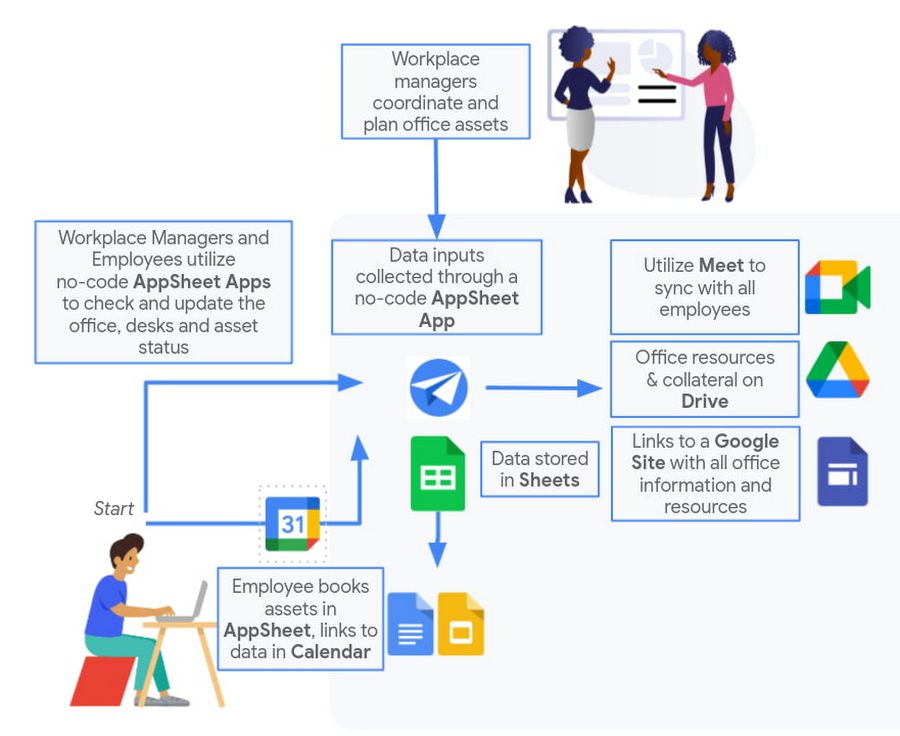
Regardless of their model, one thing is certain: technology is more central than ever to organizations’ ability to work smarter and more effectively. In particular, organizations need technology that can be tailored to specific business needs. For example, a retail store manager may need a way to ensure improved sanitation practices, or office workers may need to create an app to manage desk reservations.
Google Workspace can help by bringing together everything you need to get things done, all in one place—including the ability to build custom apps and automations with AppSheet. AppSheet, Google Cloud’s no-code development platform, lets employees–even those with no programming experience–reclaim their time and talent by building custom apps and automations.
Building solutions with AppSheet is often easier and faster than traditional coding, as AppSheet leverages Google’s machine learning expertise to help you quickly go from idea to solution, helping your business to match the pace and agility that today’s landscape requires. In this article, we’ll explore how you can use AppSheet to create custom solutions that will help your business adapt to shifting business needs. To illustrate, we’ll focus on a use case many businesses face: reservation and management of meeting rooms and other office resources, but this process can easily be adapted for a wide variety of use cases, from apps for retail pickup to incident reporting and more.
Simplify and centralize with apps
The first thing to consider is whether your solution would be best managed via a custom interface. If you’re trying to simplify a process for someone, such as inspections or inventory tracking, or centralize information, such as resource portals or events calendars, creating a custom app is the way to go.
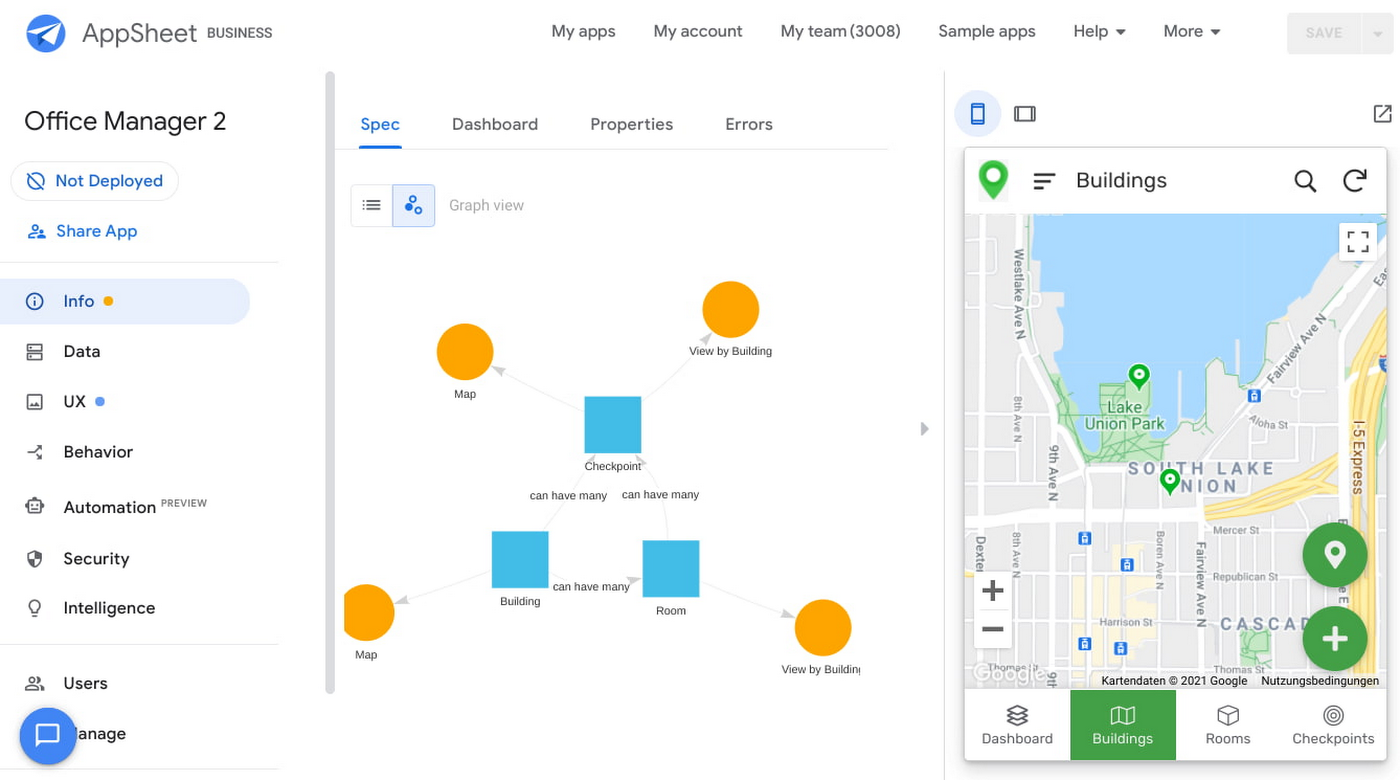
For this example app, we created a simple Google Sheet to hold our backend data. Sheets are ideal backend data sources when we know the amount of data will not grow exponentially, especially when piloting to a first office or group of users. We can switch our data seamlessly at any time to a scalable Google Cloud SQL database or other database if needed.
The example app has several worksheets to manage the different buildings, rooms, checkpoints and people (including their roles).

We can build an app in AppSheet directly from our Sheet by selecting Tools > AppSheet > Create an App.
After creating our app, we see an overview of the data that we’ve connected, how pieces of data relate to each other, the views that are presented to the user, and a live interactive preview of the app. Refining the app is intuitive. When you input keywords, for instance, AppSheet surfaces appropriate functionality options that can be further customized. If we have address or location data, it’s automatically turned into a map view that we can further customize.
Our office management app will offer building managers and cleaners administrative features for managing equipment, disinfection schedules, and maintenance information, and it will also offer views for employees to check occupancy and safely reserve desks and equipment.
Opening an office and then a room in the app gives us an overview of both the floorplan and the occupancy and reservations for spaces and equipment in the room.
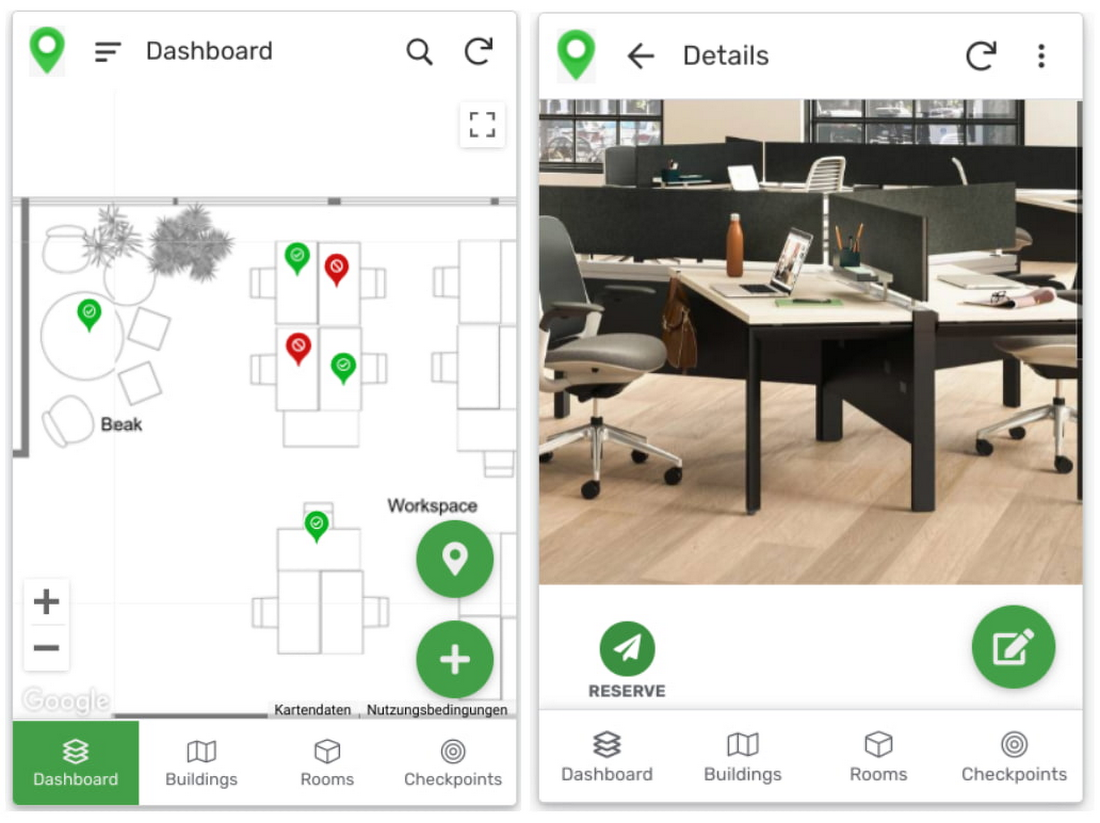
Users can then reserve spaces and equipment in the app, without having to first search for a form or page in the intranet, or even log onto their work computer. The reservation is an automation routine in AppSheet, which performs pre-configured actions when triggered.
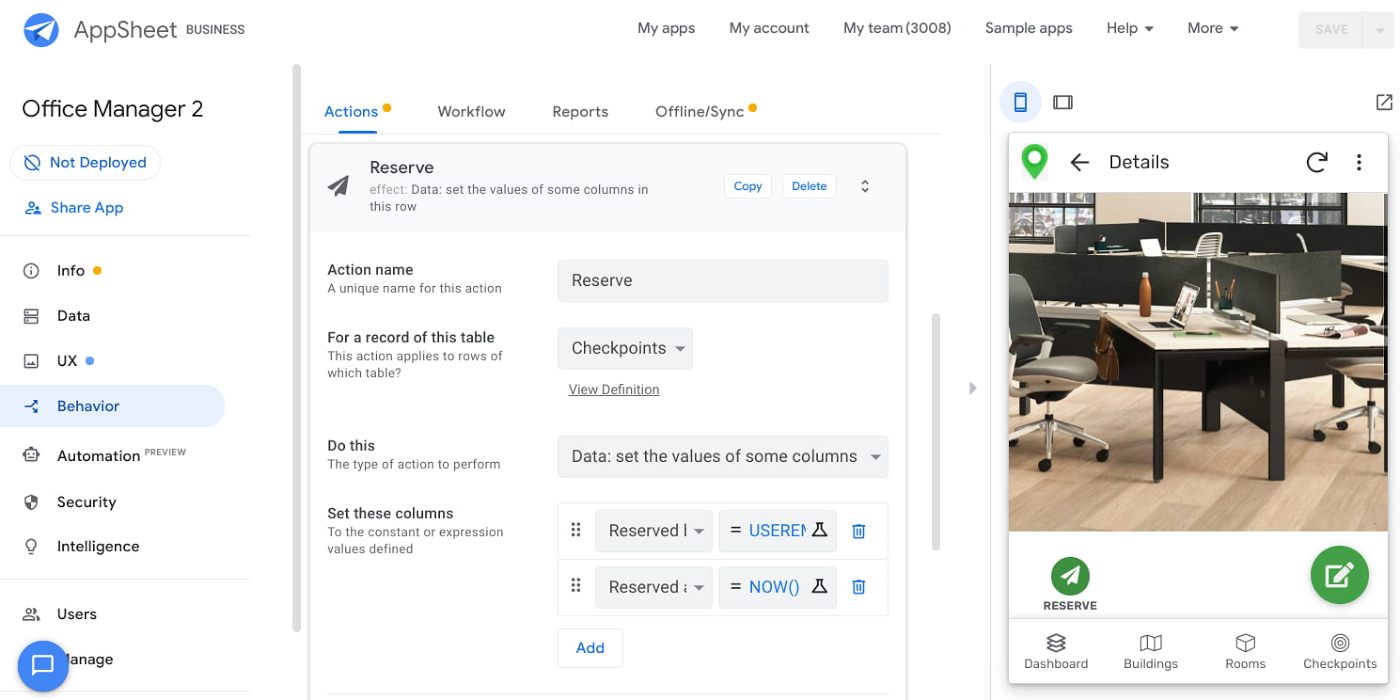
As illustrated in the screenshot above, when the action is triggered either by pressing a button in the app, scanning a QR code, or tapping an RFC tag, the action simply sets the “Reserved by” and “Reserved at” columns to the current user and timestamp.
Streamline with automations
AppSheet Automation, which was recently made generally available, makes it possible to reduce repetitive tasks and streamline processes even further.
In this example, one challenge you may encounter is that users often forget to release a desk or resource when they’re finished, which means those reservations stay blocked until an administrator releases all blocked reservations. However, it’s also important that resources aren’t immediately released, as they first need to be cleaned and disinfected before being made available to new users.
AppSheet Automation can solve this challenge by periodically checking all resources that have been reserved for longer than four hours, then alerting the user to either re-reserve them or release them to be cleaned. If there is no answer, the automation can trigger the resources to be cleaned, then released.

We can configure this as a recurring event, and create a bot that sends the notifications and triggers actions based on the user input (or lack of input).
Optimize for multiple roles
Creating an app for one user is one thing–creating an app that fits the needs of multiple types of users is another. AppSheet has you covered for this kind of complexity because it lets you build multiple roles into a single app.
In our office management app, for example, the office manager can have a particular view and dashboard, and workers in the office can have their own views and functionalities front and center. This makes it possible to automate tasks for all types of users with a single app.
Likewise, AppSheet Automation lets you easily react to real-time changes in data, send notifications to groups of users, and initiate additional workflows using data shared between the app and the users. If a group needs to reserve a conference space for an important late-breaking meeting, for example, there might be ripple effects across a number of user groups. The ability to automate all these updates and interactions can ultimately save a lot of time and effort.
AppSheet also supports advanced features such as QR codes, NFC, and bluetooth sensor integration. This could help users check into locations or workspaces, further streamlining the task of helping people safely navigate and collaborate within the office.
Mission critical solutions, faster than ever
In the past, the type of app explored in this article would have required a central data store, distribution to specific groups of users, management and dashboard capabilities, as well as smartphone sensor integration for NFC and image capturing. This would have necessitated a mammoth implementation project and a team of professional coders.
But with no-code, you can effectively design and implement these requirements in hours and days rather than months and years. Changes can be made on the fly in any browser, including pushing out new versions to users. Though AppSheet opens up app building and digital automations to any knowledge worker, it also includes robust security and governance controls, ensuring that as you manage getting employees back into office, you don’t neglect IT security.
Try out your own back-to-the-office app for free today at AppSheet.com, or explore and copy our sample app.
More Relevant Stories for Your Company

Chrome OS Helped Ocwen Achieve Remote Workplace in Just 2 Weeks during the 2020 Pandemic
Editor’s note: Today’s post is by Parveen Chander Aery, CIO, and Rishi Gupta, Head of Global IT Infrastructure, of Ocwen, a provider of residential and commercial mortgage loan services. The U.S.-based company adopted Chrome OS devices to help global contact center teams work productively together. We’re used to deployments of new

Go Green with Google’s Latest Tool and Pick the Most Sustainable Cloud Region
As a Google Cloud customer, your carbon footprint is already carbon neutral: Google first achieved carbon neutrality in 2007, and has been purchasing enough solar and wind energy to match 100% of its global electricity consumption since 2017. Now, Google is targeting a new sustainability goal: operating on carbon-free energy (CFE) 24/7,

Tau VMs Joins Google Cloud to Offer Cost-effective Performance of Scale-out Workloads
Scale-out workloads demand the best combination of performance and price to bring down the cost of delivering applications, all while providing an excellent user experience. We are excited to announce a new virtual machine (VM) family, Tau VMs, coming to Google Cloud. Tau VMs extend Compute Engine’s VM offerings with a new option
Guide to Google’s Underwater Infrastructure
From data centers and cloud regions to subsea cables, Google is committed to connecting the world. Our investments in infrastructure aim to further improve our network—one of the world’s largest—which helps improve global connectivity, supporting users and Google Cloud customers. Our subsea cables play a starring role in this work,
