





How Rustomjee Increased speed, agility, and worker mobility with Google Cloud Platform

4214
Of your peers have already read this article.
6:30 Minutes
The most insightful time you'll spend today!
Operating for 23 years, Rustomjee has carved a niche for itself in the ever-growing real estate sector. Rustomjee’s portfolio includes 14.32 million square feet of completed projects; 12 million square feet of ongoing development; and another 28 million square feet of planned development. These projects span the best locations of the Mumbai Metropolitan Region. Rustomjee adds value to the lives of its homeowners through its core business, its corporate social responsibility initiatives, and its philanthropy. The business strives to ensure that every blueprint includes child-friendly spaces for parks, playgrounds, and learning rooms, encouraging families to spend quality time with each other.
In the 17 years Rustomjee’s Corporate Head of Information Systems, V M Samir, has worked with the business, it has grown from 100 employees to more than 800 employees – primarily professionals such as engineers, architects, lawyers, accountants, and regulatory consultants. The remainder work in marketing, sales, administration, security, human resources, and other associated areas.
Historically, Samir says, the real estate industry globally has lagged in embracing new workplace technologies, making building business cases, securing sponsorship, completing implementations, and encouraging adoption a difficult task.
G Suite powers cloud journey
Rustomjee started operations running an on-premises email service. However, the business wanted to upgrade its anti-spam capabilities and, in 2007, turned to G Suite. “There was no practical way I could build an anti-spam engine within that service that could match the power of the G Suite anti-spam engine and the intelligence held within its databases,” says Samir. “Our second key reason for moving was the lower cost of G Suite relative to an on-premises service that required us to spend on compute, backup, storage, and administration resources. Running G Suite would also help ensure users could still access their emails if their machines experienced an outage.”
Finally, G Suite enabled Rustomjee to access and compose emails from any location – a luxury for a real estate organization whose workers often attended construction projects with poor connectivity. “Finally, G Suite was the only service in those days that integrated calendar, meeting, and storage repositories through single sign-on. Google was so far ahead of the curve at that time and we saw the potential of G Suite to transform our communications and ultimately our business.”
“We did not have to shut down the business operations during the migration because Google Cloud Platform complemented every idea we had. And when my business users came to work on the Monday morning [after the final migration], everything was stable and the performance had improved. We told them our infrastructure had changed and they should start thanking Google Cloud!”
—V M Samir, Corporate Head, Information Systems, Rustomjee
The business started its cloud and IT modernization journey by decommissioning its on-premises email servers and using G Suite for Business. It began testing in March 2007 and went live with all production email services for 500 users in June 2008.
The intuitive nature and ease of use of G Suite made the transition seamless. “I did not have to undertake a large-scale change management exercise,” says Samir. “Users bought into the program and acquired the necessary knowledge quickly, meaning our adoption rate was extremely fast.”
With G Suite, email became the new norm to complete a range of tasks at Rustomjee. “We started exchanging CAD drawings, videos, high-resolution images, and other large files with our consultants,” says Samir. “These files had been difficult to store in on-premises environments.”
Rustomjee has improved collaboration and performance with G Suite, primarily due to four services. Gmail enables workers to communicate seamlessly externally and with each other, while Calendar enables them to set up and synchronize meetings. These meetings can be conducted through Hangouts Meet. “If a group of people internally need to discuss a work order or contract, they can coordinate calendars, sit at different locations within our organization, and collaborate using audio and video on a common service,” says Samir. “They can also work from and update a single document in Drive.”
With email and other collaboration applications running smoothly, Rustomjee saw an opportunity to enhance its technology infrastructure. The business had started operations running workplace applications on servers in small air-conditioned rooms. These servers ran databases and applications that sent data across a network to endpoints including desktops and laptops.
Expansion and the changing demands of workplace technology prompted Rustomjee to upgrade its capabilities, and the business commissioned a data center. However, Rustomjee’s continuously fast-growing compute and storage requirements, as well as the need to access new technologies to innovate and compete, quickly strained its technology model. “We required eight weeks each time we needed to add new compute and storage to our environment,” says Samir. “In addition, the heavy investments in our captive data center meant we were unable to easily leverage new technologies and decommission old technologies.”
Public cloud supports growth
Rustomjee reviewed its options and decided public cloud services could best meet its ongoing needs. “The rising cost of maintaining old hardware would force us to refresh data center technologies every five to seven years,” says Samir. “More broadly, a hardware-defined data center could not adapt quickly in the cloud-computing world, making it difficult to align compute with growth.”
The business started by moving its corporate website and microsites to a public cloud service to accommodate increased traffic delivered from a change in business strategy. “We saw an opportunity to shift our marketing and advertising from print advertising to digital platforms,” says Samir. “We wanted to be available to buyers from the point at which they start looking at properties online.”
However, Rustomjee’s digital marketing teams found it difficult to scale instances in line with demand, and work with complex user administration screens and control panels.
“With Google Cloud Platform, we’ve achieved a considerable reduction in timelines and simplified technology management and administration. All of our business users are delighted.”
—V M Samir, Corporate Head, Information Systems, Rustomjee
Google Cloud Platform presented an opportunity for Rustomjee to run its websites and microsites in a reliable, scalable, and responsive infrastructure. “Our evaluation confirmed Google Cloud Platform could support our growing demand for compute and storage,” says Samir. ‘In addition, because we undertake projects that are geographically distributed, networking – not only within the data center, but that could be accessed from any location – was very important. Only Google Cloud Platform had its own networking infrastructure.”
“More broadly, in a cloud environment, we could select any database we needed and start consuming operating systems as a service,” he adds. “In addition, we did not have to invest capital in licenses and hardware and we could always resize network bandwidth. Further, we could take advantage of pay-as-we-use cloud services, and link this to business growth.”
Google Cloud Platform also allowed Rustomjee to reduce the size of the teams needed to manage and operate its infrastructure. “When you have infrastructure running in the data center and in disaster recovery locations, you need to have a large pool of resources working around the clock to ensure constant uptime, sound backup, and good replication measures in place,” says Samir. “With the cloud, everything is simplified and we do not have to consider issues like how many hard drives have failed in on a particular morning.”
The business started testing and created its first virtual machine instance to Google Cloud Platform in April 2017. Because the Mumbai data center was not yet operating Rustomjee initially hosted its instances in the Google Cloud Platform Singapore Region. This initial move enabled the business to reduce the number of required virtual machine instances from six to one. After a year of running the website on Google Cloud Platform, the business found the simplicity of scaling compute resources meant its digital marketing teams were running more campaigns and servicing more leads, while compute spend had fallen by 56 percent. Furthermore, Rustomjee was not experiencing latency that impacted the user experience.
The opening of the Google Cloud Platform Region in Mumbai in late 2017 gave Rustomjee an opportunity to use compute, storage, and networking services located domestically. The business decided to go all-in on Google Cloud Platform and migrated a range of applications to the service.
These included an SAP enterprise resource planning system, running initially on Oracle but moved to the SAP HANA in-memory computing platform, with the assistance of advisory consultants from a leading firm. This system is integral to Rustomjee’s successful operations, meaning it has to be highly available and responsive. “All our financials are captured and stored in this system, as well as projects, materials management, order management, financial systems, and sales ordering systems, both procurement and supply-side,” says Samir. “In short, we cannot live without SAP ERP!”
Rustomjee turned to SAP specialist partner InfraBeat Technologies, a leading network implementation provider, and Google engineers to complete the migration successfully. “We were all in this together and collaborated closely to deliver the project successfully,” says Samir. “We were very impressed by the expertise and skills of everyone involved.”
A nine-day migration
With assistance from Google Cloud and the partners, Rustomjee moved all its SAP workloads, from sandbox to development, development to quality, and quality to production, in just nine calendar days, without impacting the business. “We did not have to shut down the business operations during the migration because Google Cloud Platform complemented every idea we had,” says Samir. “And when my business users came to work on the Monday morning [after the final migration], everything was stable and performance had improved. We told them our infrastructure had changed and they should start thanking Google Cloud!”
Moving to Google Cloud Platform enabled the business to complete certain customer invoicing workloads in just two hours, down from 13 hours previously. Backups of the SAP enterprise resource planning system that had taken up to six hours, were now being completed in six minutes.
“We have now fully embraced a cloud-first approach and have moved 100 percent of our workloads to the cloud. We depend totally on Google Cloud Platform to run our business.”
—V M Samir, Corporate Head, Information Systems, Rustomjee
Eight weeks down to 20 minutes
Rustomjee has also cut the eight-week cycles needed to set up the infrastructure and applications for a new real estate project, and integrate it into the SAP system, to just 20 minutes. “With Google Cloud Platform, we’ve achieved a considerable reduction in timelines and simplified management and administration,” says Samir. “All of our business users are delighted.”
With its website and enterprise resource planning system running successfully on Google Cloud Platform, the business decided to move its virtual application delivery environment into the service. “We decided to move all 800 of our employees into the cloud, so they could access applications through any endpoint, be it a mobile phone, tablet, thin client, desktop, or laptop,” says Samir.
The business decided to replace an existing application virtualization product with public images available on Compute Engine, with testing of Android, iOS and Windows operating systems across a range of devices proving highly successful. “Running the remote desktop service in Compute Engine and using public images enabled us to operate a leaner, simplified desktop as a service environment,” says Samir. “We have been able to deploy business function-specific virtual machine instances on the cloud and compartmentalize data to the business functions that need them. The business completed the move – including 8.1TB of data – in just six weeks. “The only workloads we did not move during that period were intensive workloads for visualization,” says Samir.
However, the four teams that did not use the remote desktop as a service environment – and that created visualization-intensive workloads – were working in traditional ways, compromising productivity and increasing risk. “They used to be given a desk in their respective offices and their workstations loaded with the applications,” says Samir. “There was no way of taking hourly backups of these devices and there was no recovery mechanism for the applications, because they were not in the data center.
“The other challenge was what happens to the data, because we operate out of multiple locations. The users in these four teams always had to come back to pre-assigned desks and continue working from there. This was counterproductive.”
The business subsequently implemented virtual machine instances with GPU access for visualization-intensive workloads. “We started evaluating Nvidia T4 (Tesla) GPUs in the Mumbai Region on 13 February and went live on 11 March in Mumbai,” says Samir. “By moving these 40 team members to Google Cloud Platform, we have enabled them to work with visualization workloads from any location, improving productivity and flexibility.”
Focus on core business
With Google Cloud Platform, Rustomjee can focus on running real estate projects and using technology to enable them. “I don’t have to refresh my technology every five to seven years, and I can leverage new technologies as they come on stream,” says Samir.
Reliable application access
With the flexibility and scalability of Google Cloud Platform, Rustomjee is now well-positioned to support further growth and operate in accordance with the time-limited nature of the real estate industry in India. “If we have promised to hand over the keys to a customer by a certain deadline and we fail to do so, we face a penalty of 10 percent of the cost of the project,” explains Samir. “The Indian Government introduced this regime in 2017 and business and technology have to align with its requirements.
“Google Cloud Platform is the right service to move us forward and enable us to overcome these challenges,” he adds. “We have now fully embraced a cloud-first approach and have moved 100 percent of our workloads to the cloud. We depend totally on Google Cloud Platform to run our business.”
New Histogram Features in Cloud Logging Make it Easier to Track Log Volumes, Errors and Anomalies!
3394
Of your peers have already read this article.
2:30 Minutes
The most insightful time you'll spend today!
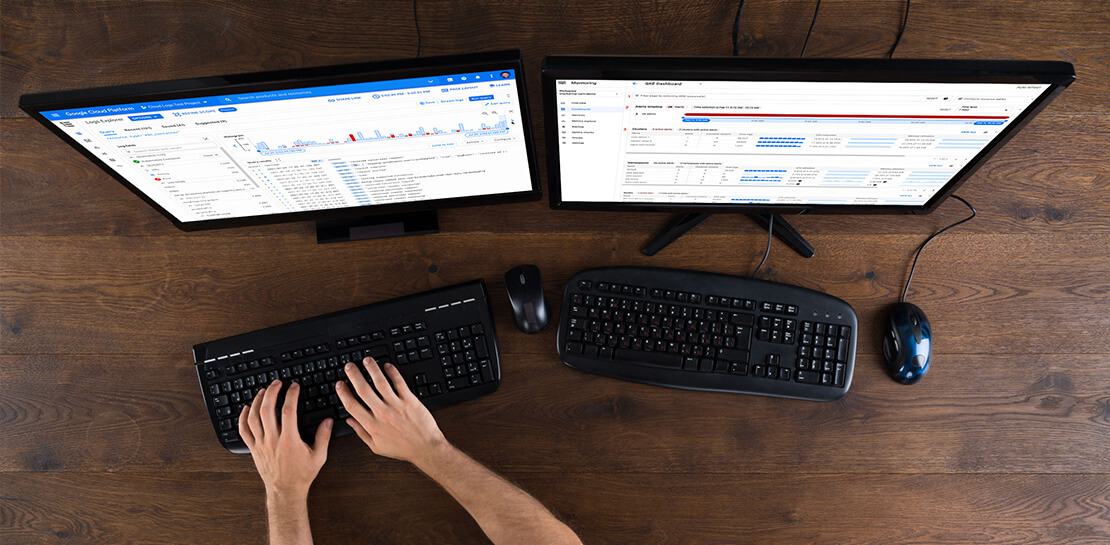
Visualizing trends in your logs is critical when troubleshooting an issue with your application. Using the histogram in Logs Explorer, you can quickly visualize log volumes over time to help spot anomalies, detect when errors started and see a breakdown of log volumes. But static visualizations are not as helpful as having more options for customization during your investigations.
That’s why we’re excited to announce that we recently added three new query controls along with separate colors for log severity to the histogram. These new features make it even easier to refine and analyze your logs by time range. The new histogram controls help find logs before or after the current period, jump to a specific time range represented in a histogram bar and zoom in/out of the current time window in the histogram.
Histogram colors
The histogram now makes it easier to view the breakdown of logs by severity with the introduction of color coding. For example, the severity colors make it easy to spot an increasing number of errors even when the volume of requests is relatively constant. Looking at the histogram below, the red vs blue shading makes it clear that there has been an increase in overall log volume and provides a visual breakdown of errors within that log volume.

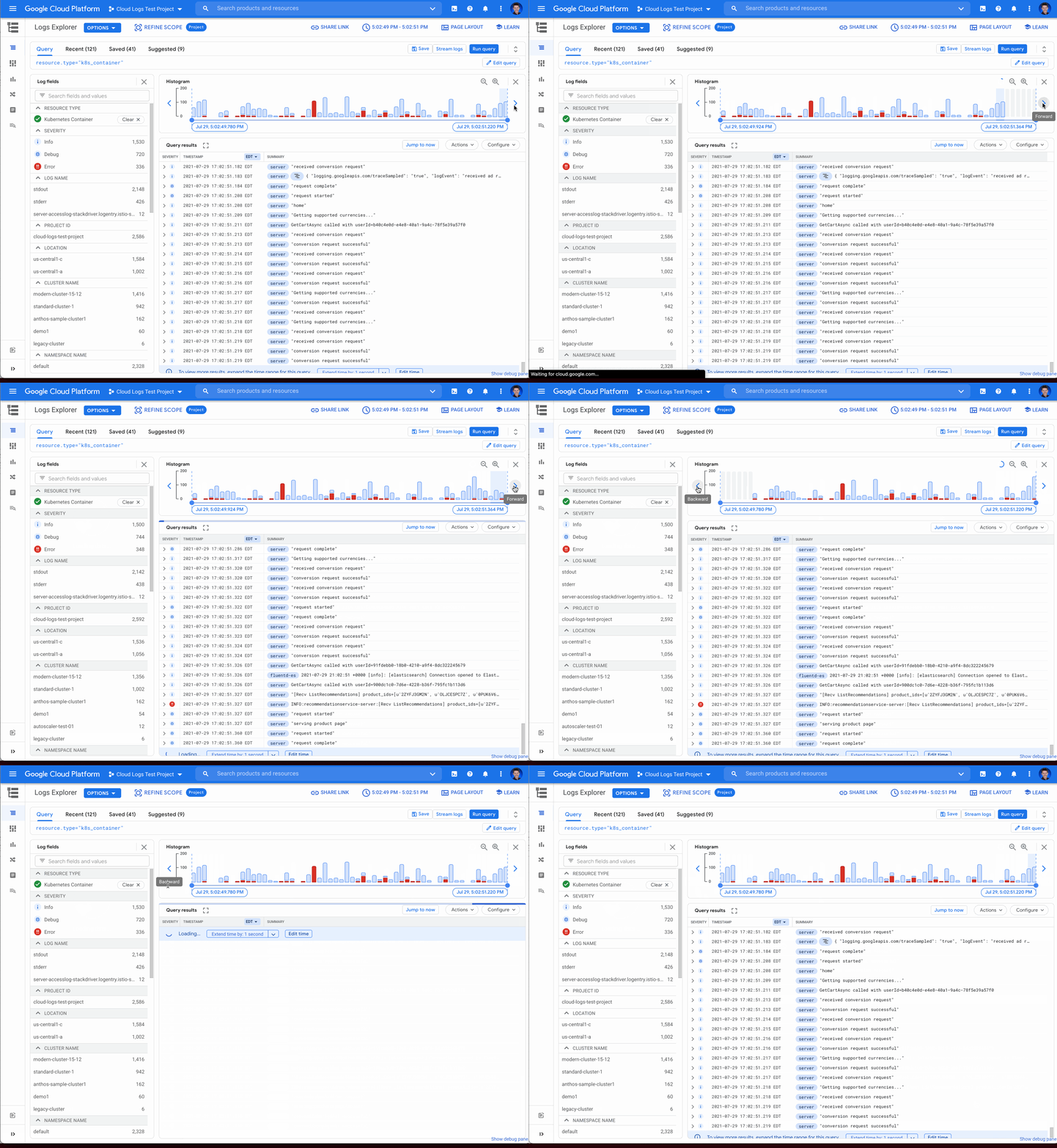
Pan left/right to scroll through time
Sometimes in your troubleshooting journey, you may want to look at the logs directly before or after the current set of logs. Perhaps there was an unexpected spike in errors at the beginning of the time range and you need to see the logs in the time period directly preceding the current time range. Pressing the left arrow on the left side of the histogram shifts the time range earlier while the arrow on the right side of the histogram shifts the time range ahead. Either arrow will refine the time range in the query and rerun the query to return the logs in the new time range.
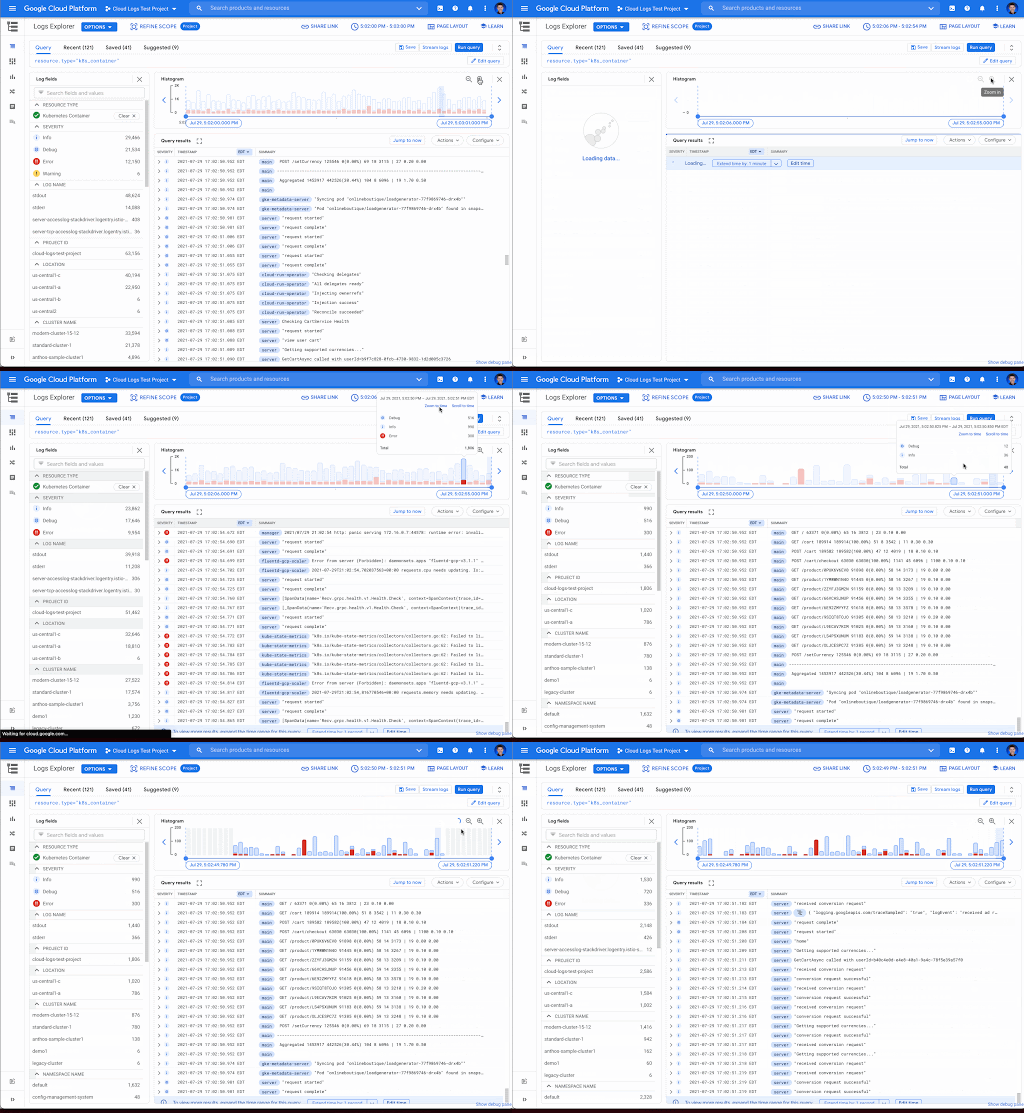
Zooming in or out
Zooming in or out from a given time range may be useful to visualize fine-grained details or a broader trend Clicking the zoom in or out icons in the upper right corner of the histogram refines the time range in the query and then reruns the query, returning the logs in the newly defined time range.
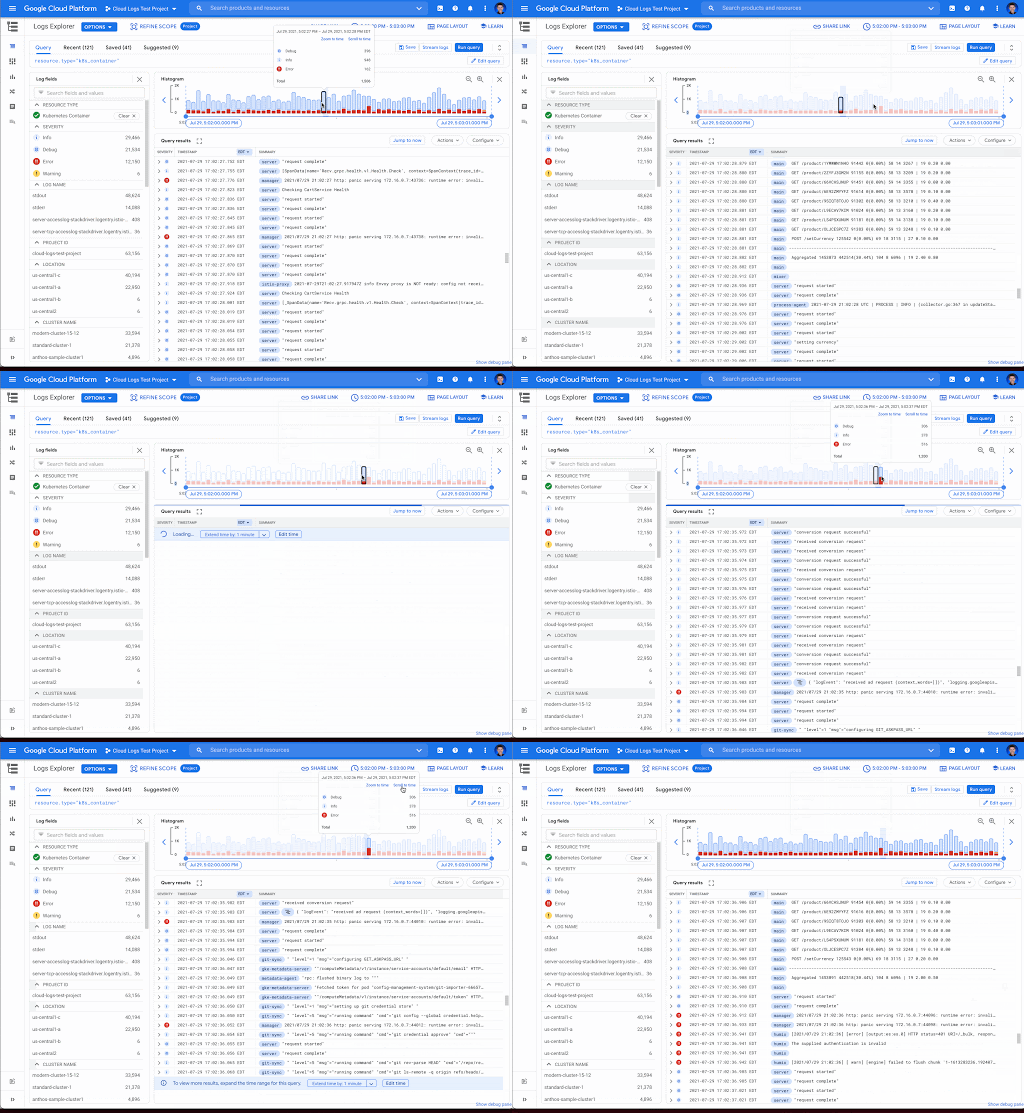
Scrolling to time
If you see a large spike in logs volume in the histogram, it’s useful to quickly review the logs generated during that spike. Clicking on the histogram bar that contains the spike now scrolls you to the logs generated during that time period.
Where to find the histogram
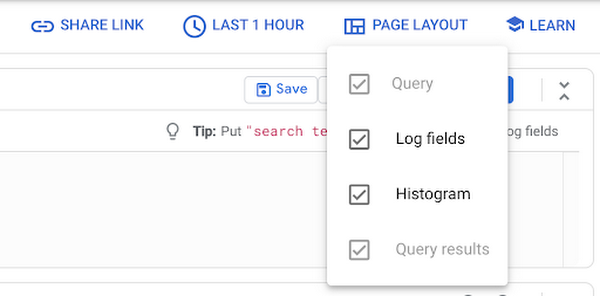
The histogram is a panel in Logs Explorer that can be displayed or hidden using the controls in the Page Layout menu. When you no longer want to display the histogram, click the “X” button in the upper right corner to quickly close it. To open it again, use the same Page Layout menu to enable the histogram display.
Get started with the histogram
These improvements move the histogram from a utility for visualization to an integral part of the troubleshooting journey. We are continuously working to launch new features that make Cloud Logging the best place to troubleshoot your Google Cloud logs. If you are not already a Cloud Logging user, review this getting started documentation or watch a quick video on troubleshooting services on Google Kubernetes Engine (GKE) to learn more. If you have specific questions or feedback, please join the discussion on our Google Cloud Community, Cloud Operations page.

3359
Of your peers have already downloaded this article
3:30 Minutes
The most insightful time you'll spend today!
The need for agility and flexibility in the face of accelerating innovation and disruptions from competitors is the primary driver for cloud adoption across businesses both big and small. However, simply moving and shifting legacy system to the cloud does not sufficiently meet enterprise needs.
The systems and applications running in production environment that are built with a monolithic architecture are often not the best fit for complex cloud-based systems and are holding the companies back from realizing their goals.
What is needed is a cloud-native approach with microservices that helps in migrating a working monolithic system and transform it for the cloud world to derive the true business benefits that organizations truly desire.
Download this whitepaper and understand why a different architecture is needed to maximize the cloud investments and how this new architecture is better suited for the cloud.
Making Mothers’ Day Special: How Google Cloud Migration for 1-800-FLOWERS.COM, Inc Impacts CX

6824
Of your peers have already read this article.
2:30 Minutes
The most insightful time you'll spend today!
Editor’s note: In honor of Mother’s Day, we look at how 1-800-FLOWERS.COM, Inc. migrated to Google Cloud as part of its digital transformation to quickly deploy seamless and convenient customer experiences across multiple brands on Mother’s Day and every day.
As a leading provider of gifts designed to help customers express, connect, and celebrate, 1-800-FLOWERS.COM, Inc. has embraced cloud technologies to grow and transform its business through constant innovation. As part of our digital transformation, we recently completed the migration of our ecommerce platform and other services to Google Cloud. We’ve transitioned from a monolithic to a microservices platform, moved many workloads from our on-premises data centers to our Google Cloud environment, and scaled both horizontally and vertically.
Since our migration, we’ve developed efficient processes to launch new brands, improved the customer experience across all brands, and seen significantly increased site traffic.
Nurturing a more delightful customer journey
Customer delight is at the core of everything we do. Whether it be with a flower bouquet, a sweet treat, or a personalized keepsake, our mission is to deliver smiles. With the rise of the COVID-19 pandemic, we’ve all been challenged to find unique and safe ways to continue honoring the special connections in our lives and celebrating occasions with loved ones. Our customers have adapted by doing things such as sending gifts to isolated loved ones, sharing the same meal together virtually, or using video to engage with others through group activities like flower arranging and building charcuterie boards.
The customer experience is a top priority for us, and we constantly look for innovative ways to enhance the customer journey across our ecommerce platform of more than a dozen brands. As a result, we’ve continued to see a rise in demand as customers enjoy the ease and convenience of our site and discover our full family of brands.
Migrating to a cloud-first mindset
As we’ve continued to innovate and iterate on the customer experience, we knew we wanted to evolve our platform. We wanted to shift to a microservices platform, which would allow our team the opportunity to release updates to our site more often and set up the right continuous integration/continuous deployment (CI/CD) practices.
Working with Google Cloud, we were able to move our ecommerce platform to the cloud and standardize our site and brand deployment by building one release that could then be repeated across all of our brands. We built everything in a modular fashion, including microservices and code libraries, so that sites could be easily constructed and replicated for each brand. And because of this, we were able to launch Shari’s Berries extremely quickly after we acquired the brand in 2019.
Moving our platform to a completely homegrown solution of microservices was a daunting task. But our team handled it beautifully through load-testing, stress-testing, and building new monitoring tools. And with Google Cloud supporting us all along the way, managing the migration process was simple and easy from start to finish.
Arranging a better bouquet of services
Currently, we’ve migrated every customer-facing touchpoint for all of our brands to Google Cloud—whether it’s on the web or mobile, our AI bots, or our chat interfaces.
- We run on Google Kubernetes Engine and Istio.
- We have nearly 200 microservices built to help power our entire ecommerce stack across several cloud services running on Google Cloud.
- We’re utilizing BigQuery for our offline intelligence.
Results are coming up roses
Our new stack on Google Cloud has benefits for both us and our customers. We moved from a session-based to a token-based system, which provides enhanced security as well as a consistent, convenient experience across all our brands. Using service workers and a single-page app, we are able to download all the relevant site content to the browser in under two seconds to create an instant-click experience for each and every customer. We also use Google Analytics to measure our user interactions and provide personalized results to each customer. Our hope is that with this new system, we can learn from customer behavior to offer gift givers a more personalized shopping experience during each visit.
The benefits of our new tech stack have not only helped us enhance the solutions we offer to customers today, they’ve also enabled us to offer new ones at lightning speed. With our legacy system, we used to release new code once a week or once a month. Now, even during our peak periods, we’re able to release 10 to 15 times a day and can deploy and pivot quickly to create new microservices and microsites on the fly—often without having to touch any code.
Efficiencies abound
The benefits of moving our platform to Google Cloud have extended to our internal teams as well. Before the migration, we had only two environments for developing and testing, which made it time-consuming to test updates before they went into production. Now with Google Cloud, we have several different journey teams—which are made up of developers, product owners, and technical owners—all working in several different environments, solving problems, and creating new solutions together.
Everyone is now empowered to be self-sufficient, developing and releasing microservices on their own when they’re ready. This has given our developers more time to take part in continued development and learning opportunities. For example, we offer lunch-and-learn sessions as well as other resources for everyone to take advantage of so they can continue to learn and refine their skills.
Planting the seeds for future growth
As we look to the future and think about how we help our customers express, connect, and celebrate, we’ll continue to collaborate across teams to deliver solutions that spread smiles. Specifically, we’re exploring additional use of AI to help us better serve our customers across all our brands.
We’ve enjoyed the ongoing support we’ve received from the Google Cloud team as they help us build new solutions and design a road map for the future. Their support has helped the 1-800-FLOWERS.COM, Inc. team to realize the power of the cloud and bring the very best experience to our customers.
Learn more about 1-800-FLOWERS.COM, Inc., or check out our recent blog about cloud migration for the real world.
Google Cloud Platform Gives Us 5x the Processing Power to Analyze Physician Performance at 75% Lower Cost

6721
Of your peers have already read this article.
6:30 Minutes
The most insightful time you'll spend today!
Patients about to undergo a healthcare procedure understandably want the best medical professionals they can get. But how can they know which doctors have had the most experience and the best outcomes with that particular procedure? How can they make an informed decision about which doctor to select when the information they have is limited to the doctor’s practice area and subjective reviews from other patients?
MD Insider is working to solve that problem using machine learning (ML) to objectively analyze doctor performance. By analyzing data from thousands of institutions and millions of doctor-patient interactions and medical events, MD Insider identifies physician performance insights based on their experience and outcomes. Insights are then integrated into a triage engine, that enables consumers to search for and schedule appointments with providers who meet their clinical criteria and convenience preferences, such as insurances accepted, office hours, locations, and language.
MD Insider also offers robust data APIs to help health systems, health plans, and employers reduce costs and improve quality of care. Payers use the APIs to curate high-quality provider networks and manage provider directories. Examples of MD Insider’s data APIs include Provider Experience and Share of Practice metrics, Provider Quality and Outcomes, Network Modeling, Expert Clinical Search Taxonomy, Find a Provider, Acute-Care Hospital Quality, and Provider and Facility Metadata.
“We use Google Cloud Platform the way the cloud was supposed to be used. By comparison, other cloud providers feel like you’re renting somebody else’s data center.”
—Ed Holsinger, Lead Data Engineer and Head of Data Science, MD Insider
MD Insider is continuously ingesting the latest performance data about physicians and analyzing billions of rows of data. Requiring constant scalability, the company was born in the cloud; however, it had difficulty configuring server instances for the optimal balance of memory and CPU, and its Hadoop cluster had to be kept running 24/7. Network performance was often slow for no apparent reason. As a result, failure rates from node timeouts increased, and costs grew along with the data. MD Insider had to estimate its usage and pay up front, and received little financial benefit from sustained use commitments.
Knowing that data would continue to grow, MD Insider decided to move its data services — the most demanding and complex portion of its infrastructure — to Google Cloud Platform (GCP), and took advantage of GCP managed services for container management and big data analytics.
“One of the reasons we decided to move to Google Cloud Platform is because it feels like a unified, well-designed cloud architecture and pricing model,” says Ed Holsinger, Lead Data Engineer and Head of Data Science at MD Insider. “We use Google Cloud Platform the way the cloud was supposed to be used. By comparison, other cloud providers feel like you’re renting somebody else’s data center.”
“Moving to Google Cloud Platform and using Kubernetes Engine gave us 5x the processing power for analyzing physician performance at 75% less cost. Our data scientists have more power than ever before to generate insights for our customers.”
—Ed Holsinger, Lead Data Engineer and Head of Data Science, MD Insider
5x the performance, 75% less cost
MD Insider now uses Kubernetes Engine to automate container management and deploy clusters in minutes with just a few clicks. When hundreds of machines are required to analyze a large dataset, automation in Kubernetes Engine deploys ML models as containers, each of which manages the full lifecycle of its task, including scaling up resources, deploying results, and scaling back down when the task is finished. It’s easy for MD Insider to specify exactly how much CPU and memory each container needs, helping maximize performance while reducing costs.
“Moving to Google Cloud Platform and Kubernetes Engine gave us 5x the processing power for analyzing physician performance at 75% less cost,” says Ed. “Our data scientists have more power than ever before to generate insights for our customers. Data scoring jobs that used to take three business days now take four hours.”
Adds Galen Meurer, Senior Software Engineer at MD Insider: “Even if all Google Cloud Platform had to offer was Kubernetes Engine, I would still want to use it. Previously we spent up to 30% of our time managing our container infrastructure, which we can now use for product development.”
A foundation for data science
MD Insider was happy to find that GCP offers a wide variety of managed services. For example, the company is supplementing its Kubernetes Engine clusters with BigQuery for its big data masters and selection jobs, enabling scientists to analyze new and different types of data as well as analyze larger datasets in less time. MD Insider also uses Cloud Storage for big data staging and Cloud Dataproc to run managed Apache Spark clusters for data processing.
“Google Cloud Platform gives us an incredibly powerful cloud architecture for data engineering and data science,” says Eric Wilson, CEO of MD Insider. “That gives our scientists independence, they can do what they need to do without waiting and with no contention between them.”
A developer-friendly platform
Migrating its data services was such a success that MD Insider decided to move the rest of its infrastructure to GCP, including the front end for its web application. Since the migration, MD Insider has experienced no unplanned downtime on GCP, allowing it to easily meet the 99.5% uptime SLA it promises to customers. It’s also taking advantage of Build Triggers in Kubernetes Engine to automate container builds and reduce build times by more than 40%. Production code can be updated in seconds, with no impact to end users other than making new features available.
“GCP has simplified our workflow in so many ways, from intelligent load balancing to content delivery and automating builds,” says Matthew Frey, Software Engineer. “Everything on GCP is cohesive and developer friendly, with a superior UI and better network performance than other cloud providers.”
Ryan Beaini, Senior Software Engineer at MD Insider, agrees: “Since we moved to GCP, our developers are definitely happier. The pain and the headaches we experienced because of the limitations of our previous toolset all went away.”
“We’re a small company, but what we’re doing is incredibly important. We’re helping people make decisions about healthcare providers that could impact their lives and even be life-saving. Google Cloud Platform is helping us make our mission bigger, better, and brighter.”
—Eric Wilson, CEO, MD Insider
Securing billions of rows of clinical and non-clinical healthcare data
As a healthcare technology company, MD Insider processes billions of rows of clinical and non-clinical healthcare data. To control user access to GCP, it uses Identity & Access Management (IAM) along with Yubico YubiKeys for hardware-based two-factor authentication when logging into Google Workspace. MD Insider takes comfort that GCP encrypts data at rest by default, and encrypts and authenticates data in transit when data moves outside physical boundaries not controlled by Google or on behalf of Google.
“On GCP, everything that we need to be encrypted for compliance purposes is encrypted, which is fantastic,” says Eric. “When I tell our potential clients and partners about the resources that Google has dedicated to security, it gives them the confidence that their data will be protected.”
Transforming how teams work
As a growing company, MD Insider must collaborate seamlessly between offices in California, Colorado, and Illinois. It relies on Google Workspace for communication and productivity, using Docs, Sheets, and Slides to drive the business. Employee and team files are stored in Drive, and meetings are conducted via Google Meet with Chromebox for Meetings videoconferencing hardware kits. Google Workspace also helps MD Insider maintain information security by authenticating email domains with digital signatures in Gmail and scanning outgoing email using Gmail Data Loss Prevention (DLP).
“I use Google Workspace every day, and everyone else here does too,” says Eric. “Team Drives are a big time saver for us. We’ve let our previous office software expire, because there’s no need to pay for those licenses anymore.”
Promoting healthcare transparency
With GCP helping MD Insider increase velocity and momentum, the company is making exciting progress. For example, it has entered into a strategic partnership with Zelis Healthcare, which will use MD Insider’s API to provide insights for a next-gen analytics platform that will give health plans unprecedented transparency around physician performance.
“We’re a small company, but what we’re doing is incredibly important,” says Eric. “We’re helping people make decisions about healthcare providers that could impact their lives and even be life-saving. Google Cloud Platform is helping us make our mission bigger, better, and brighter.”
*Google Workspace was formerly known as G Suite prior to Oct. 6, 2020.
Innovation in the Clouds: Sky’s Blue-Sky Approach to FinOps

2912
Of your peers have already read this article.
2:30 Minutes
The most insightful time you'll spend today!
Google Cloud’s partnership with Sky Group, one of Europe’s largest media and entertainment companies, dates back more than four years to when Sky first became a Google Cloud customer moving diagnostic data from millions of its Sky Q TV boxes to its Google Cloud data platform.
In June 2019, a few years into their cloud adoption journey, Sky was faced with a challenge they had anticipated from the start. Their recent bill across all major cloud providers had been increasing rapidly, reaching their planned yearly budget after only six months. Sky wasn’t sure if they’d undershot their forecasts, if they were overspending, or both.
“In the beginning, we were given a brief to investigate internal cloud spend with the aim of finding out where we could make savings, but in reality we didn’t know what we would expect to find,” said Nathan King, a cloud architect in the Cloud Enablement Center and now Head of Cloud Financial Management (FinOps) at Sky since the start of 2020.
Nathan assembled a small team who started to explore Google Cloud spend using the Cloud Billing tool. At first, they drilled into their biggest Google Cloud cost categories and discovered some immediate cost optimizations with BigQuery, Compute Engine and Cloud Storage. Over the course of the next six months, through careful analysis, they managed to find over $1.5m in immediate savings, exceeding expectations.
Yet they soon realized this was just the tip of the iceberg—it was clear there were millions of pounds more savings to be made, but actually achieving them at scale would require careful planning. “We formed a FinOps function to target these savings, but with 600 to 700 projects for Google Cloud alone, spanning four Google Cloud organizations, it would have been a manual process and difficult for teams to digest our recommendations,” Nathan said.
After attending a Google-led FinOps workshop and shaping their FinOps strategy, Nathan’s team focused on iterating through the FinOps lifecycle phases of Inform, Optimize, Operate and generating savings over time. Here’s how they did it:
Inform: Make Information Visible
The first step was focused on developing a clear vision for cost allocation and recharge, which required partnering closely with the finance, procurement and tax teams (particularly for international and affiliates) to understand the supporting business logic and processes. With a lot of hard work, the team managed to break down barriers to implement and embed new processes into broader business functions like finance.
WIth the recharge model in place, the team ran a number of pilots to find the right FinOps tooling to meet their needs. They ran a number of pilots, including using Data Studio and visualizing BigQuery exports. Given their ambitions to scale across the enterprise globally, the team chose Google Cloud’s Looker to realize their vision, building intuitive dashboards to visualize spend and recommendations across all cloud providers. “We wanted one view across all clouds, where customers can dynamically see cloud spend and intelligent optimization recommendations in just one place,” Nathan said.
After less than three weeks of development, the Looker dashboards were ready to go and have been a game changer ever since. “The moment our leadership and different departments started seeing the Looker dashboards, the value we were adding as a FinOps team became immediately clear,” Nathan said.
There are different report pages for each stakeholder group, each custom developed and automated using Looker and BigQuery. The BigQuery Optimization page, for example, provides insights on Slots consumed across the organization, down to granular query data like the cost of each query, how it was written, who submitted it and number of slots utilized. The dashboards also highlight potential areas of optimization, like BigQuery datasets without retention policies set or where data isn’t partitioned.
A recent breakthrough has been building pages for business teams, showing the related cloud spend contributing to a business unit of value, such as the cost per live stream or per subscriber in Sky’s case. Although this is an inherently difficult metric to capture, the opportunity has been made possible with the FinOps team’s progress and is starting to drive business investment decisions.
Optimize: Drive Cloud Efficiency
The second stage of the FinOps lifecycle focuses on delivering optimizations. As Sky’s FinOps dashboards were operationalized and highlighted savings opportunities, they enabled users to generate more than $3 million in Google Cloud savings alone in 2020 and over $800,000 in other cloud providers.
The team began with focusing on the top four products by spend: BigQuery, Compute Engine, Cloud Dataflow and Cloud Storage. Working with their Google account team and studying Google whitepapers and blog posts like Cloud cost optimization: principles for lasting success, they developed their own best practice guidance and embedded recommendations into the dashboards.
Creating their own recommenders and leveraging Google Cloud’s recommenders, the team discovered a plethora of cost optimization opportunities. “Key examples were overly expensive queries, storage buckets set without retention policies, and VMs without autoscaling enabled,” Nathan said. Teams were then empowered to make their own savings, like the NowTV business unit that had been forecast to overspend for the year until they received their dashboard with thousands of optimization recommendations. After just three weeks, the team had implemented more than 90% of recommendations and brought their spend under budget for the year, saving more than 50%.
The FinOps team still searches for new recommendations every day and have been collaborating with Google product managers to take their insights to the next level. “We’ve loved partnering with Google product managers, who encourage us to give feedback on new features before they go to market. We’ve also shared some of our in-house recommenders to influence the features being developed by Google, including the Idle VM and Idle Persistent Disk Recommenders as part of Active Assist,” Nathan said.
Operate: Embed FinOps & Drive Self-Sufficiency
Now that teams could visualize their cloud spend and make real-time decisions based on cost optimization recommendations, the FinOps team has begun working on embedding processes, leveraging machine learning, and improving efficiency in their own ways of working.
Looker’s extensive capabilities continue to play a role in this. “Before we started using Looker, our most popular report was an electricity bill showing customers’ detailed monthly cloud spend, previous month comparisons and forecasts for months ahead,” Nathan said. “This report took days, sometimes weeks to run. With Looker, we’ve automated the entire process and brought that time down to just minutes.”
More teams are embedding the dashboards into their own processes, like finance, which now uses the interactive dashboards in meetings instead of static report snapshots, or in-house Google Cloud architects, who use the recommendations to optimize their cloud spend before deploying any technology.
As the FinOps team continues to operate like a product function, designing with CX/UX in mind and iteratively releasing new features like anomaly reporting, budget alerts, and forecasting based on machine learning, it’s becoming clear that Cloud Financial Management is a key capability and mindset that can impact wide-reaching parts of the business at scale.
Elevating Sky’s FinOps journey to the next level
Indeed, as more business teams collaborate with the FinOps function, the opportunities are growing. “The FinOps team has changed the way we view and manage cloud spend, enabling us to partner with finance and show digestible reports to the CFO. We’re now looking further to broaden our range of insights, like elevating our dashboards to understand how using Google Cloud is supporting Sky’s Net carbon zero ambitions by incorporating Google’s data center sustainability metrics,” says Vince Marco, Architecture Manager at Sky.
So, after being unsure of drivers for their increasing cloud spend in 2019, 18 months later Sky is far more confident about its investment decisions. The team knows that every dollar spent is being used optimally and driving maximum value for its investment.
If you’re an enterprise using cloud, but want to better manage cloud costs, consider setting up a FinOps capability and creating a FinOps mindset. Looker can help you get started by providing reporting and insights into cloud expenditures to identify initial savings. As you learn more and scale, empower teams to make their own savings utilizing built-in actionality for monitoring and customizing for business billing activity nuances and department-specific chargebacks. Reimagine how cloud finances can be managed and optimized as Sky is doing.
To learn more about Looker’s Cloud Cost Management Block visit Looker Marketplace.
More Relevant Stories for Your Company


Value Realization with Google Cloud for Retail SAP Data
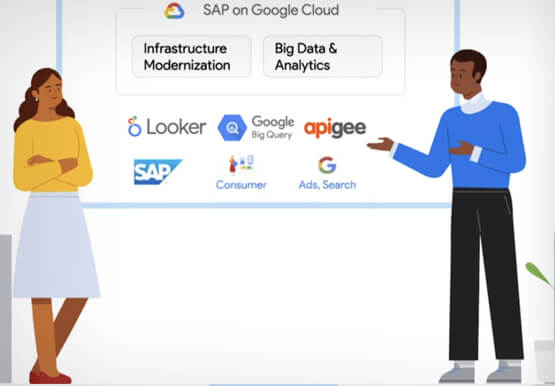
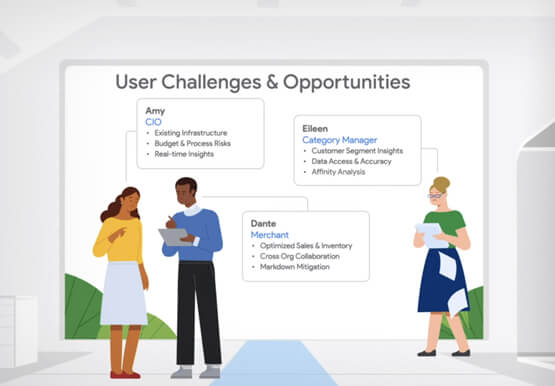
Retail engagements have changed drastically over the last few years, and by the virtue of COVID-19 pandemic, retail data and customers' expectations plummeted. To drive value and transformation across the entire value-chain retailers can make most of Google Cloud's secure, reliable IaaS by migrating their SAP systems and taking advantage

Three Typical Connectivity Use Cases to Pick the Right Option for Your Enterprise
Enterprises today have a very broad mix of networks — from SD-WANs, dedicated WANs such as MPLS, cloud interconnects, to VPNs. At the same time, they’re moving those WANs to the cloud to take advantage of faster turn-up, lower cost, and increased feature velocity. As workloads migrate to the cloud

Bharat Light & Power’s CEO Says Enough! It’s Time to Leverage AI and IoT
As community and business concern over global warming, sustainability, and energy security continues to rise, companies such as Bharat Light & Power (BLP) are working on answers. Founded in 2010 and located in Bangalore and Delhi, BLP is one of the leading clean energy generation companies in India. According to Tejpreet Singh

Forrester Focus Report on Indian BFSI: We’re Betting On…
The banking and financial services industry (BFSI) in India is going through a period of unprecedented innovation. Customers in India have more information than ever before to make better-informed decisions and can pick the banking and other financial services they need from a wide range of providers. New players like
