





How Moving Database to the Cloud Helped Recruit Technologies Gain Higher Availability and Lower Cost
5458
Of your peers have already read this article.
1:30 Minutes
The most insightful time you'll spend today!
There are just under 8 billion people on Earth, depending on the source. Here at Recruit, our work is to develop and maintain an email marketing system that sends personalized emails to tens of millions of customers of hundreds of web services, all with the goal of providing the best, most relevant customer experience.
When Recruit was founded in 1960, the company was focused on helping match graduates to jobs. Over the years, we’ve expanded to help providers that deal with almost every personal moment and event a person encounters in their life. From travel plans to real estate, restaurant choices to haircuts, we offer software and services to help providers deliver on virtually everything and connect to their end-customers.
Recruit depends on email as a key marketing vehicle to end-customers and to provide a communications channel to clients and advertisers across its services. To maximize the impact of these emails, we customize each email we send. To help power this business objective, we developed a proprietary system named “Soup” that we host on Google Cloud Platform (GCP). Making use of Google Cloud Spanner, Soup is the connective tissue that manages the complex customization data needed for this system.
Of course, getting from idea to functioning product is easier said than done. We have massive datasets so requirements like high availability and serving data in real-time are particularly tricky. Add in a complex existing on-premises environment, some of which we had to maintain in our journey to the cloud creating a hybrid environment, and the project became even more challenging.
A Soup Primer
First, why the name “Soup”? The name of the app is actually “dashi-wake” in Japanese, from “dashi,” a type of soup. In theory, Soup is a fairly simple application: its API returns recommendation results based on the data we compute about a user via the user’s user ID. Soup ingests pre-computed recommendations and then serves those recommendations to the email generation engine and tracks metrics. While Soup doesn’t actually send the customer emails, it manages the entire volume of personalization and customization data for tens of millions of users. It also manages the computed metrics associated with these email sends such as opens, clicks, and other metadata.
Soup leverages other GCP services such as App Engine Flex (Node.js), BigQuery, Data Studio, and Stackdriver in addition to Cloud Spanner.
Soup Requirements
High availability
If the system is unavailable when a user decides to open an email they see a white screen with no content at all. Not only is that lost revenue for that particular email, it makes customers less likely to open future emails from us.
Low latency
Given a user ID, the system needs to search all its prediction data and generate the appropriate content—an HTML file, an image, multiple images, or other content—and deliver it, all very quickly.
Real-time log ingestion and fast JOINs
In today’s marketing environment, tracking user activity and being able to make dynamic recommendations based on it is a must-have. We live in an increasingly real-time world. In the past, it might have been OK to take a week or longer to adapt content based on customer behavior. Now? A delay of even a day can make the difference between a conversion and a lost opportunity.
The Problem
Pushing out billions of personalized emails to tens of millions of customers comes with some unique challenges. Our previous on-premises system was based on Apache HBase, the open-source NoSQL database, and Hive data warehouse software. This setup presented three major obstacles:
Cluster sizing
Email marketing is a bursty workload. You typically send a large batch of emails, which requires a lot of compute, and then there’s a quiet period. For our email workloads, we pre-compute a large set of recommendations and then serve those recommendations dynamically upon email open. On-premises, there wasn’t much flexibility and we had to resize clusters manually. We were plagued by errors whenever loads of email opens and the resulting requests to the system outpaced the traffic we could handle, because the cluster size of our HBase/Hive system couldn’t keep up.
Performance
The next issue was optimizing the schema model for performance. Soup has a couple of main functions: services write customer tracking data to it, and downstream “customers” read that data from it to create the personalized emails. On the write side, after the data is written to Soup, the writes need to be aggregated. We initially did this on-premises, which was quite difficult and time consuming because Hbase’s doesn’t offer aggregation queries, and because it was hard to scale in response to traffic bursts.
Transfer delays
Finally, every time we needed to generate a recommendation model for a personalized email blast, we needed to transfer the necessary data from HBase to Hive to create the model, then back to HBase. These complex data transfers were taking two-to-three days. Needless to say, this didn’t allow for the type of agility that we need to provide the best service to our customers.
Cloud Spanner allows us to store all our data in one place, and simply join the data tables and do aggregates; there’s no need for a time-intensive data transfer. Using this model, we believe we can cut the recommendation generation time from days to under a minute, bringing real-time back into the equation.
Why Cloud Spanner?
Compared to the previous application running on-premises, Cloud Spanner offers lower cost, lower operations requirements and higher availability. Most critically, we wanted to calculate metrics (KPIs) in real time without data transfer. Cloud Spanner allows us to do this by pumping SQL queries into a custom dashboard that monitors KPIs in real time.
Soup now runs on GCP, although the recommendations themselves are still generated in an on-premise Hadoop cluster. The computed recommendations are stored in Cloud Spanner for the reasons mentioned above. After moving to GCP and architecting for the cloud, we see an error rate of .005% per second vs. a previous rate of 4% per second, an improvement of 1/800. This means that for an email blast sent to all users in Japan, one user won’t be able to see one image in one email. Since these emails often contain 10 images or more, this error rate is acceptable.
Cloud Spanner also solved our scaling problem. In the future, Soup will have to support one million concurrent users in different geographical areas. Likewise, Soup has to perform 5,000 queries per second (QPS) at peak times on the read side, and will expand this requirement to 20,000 to 30,000 QPS in the near future. Cloud Spanner can handle all the different, complex transactions Soup has to run, while scaling horizontally with ease.
Takeaways
In migrating our database to Cloud Spanner, we learned many things that are worth taking note of, whether you have 10 or 10 million users.
Be prepared to scale
We took scaling into account from Day One, sketching out specific requirements for speed, high availability, and other metrics. Only by having these requirements specifically laid out were we able to choose—and build—a solution that could meet them. We knew we needed elastic scale.
With Cloud Spanner, we didn’t have to make any of the common trade-offs between the relational database structure we wanted, and the scalability and availability needed to keep up with the business requirements. Likewise, with a growing company, you don’t want to place any artificial limits on growth, and Cloud Spanner’s ability to scale to “arbitrarily large” database sizes eliminates this cap, as well as the need to rewrite or migrate in the future as our data needs grow.
Be realistic about downtime
For us, any downtime can result in literally thousands of lost opportunities. That meant that we had to demand virtually zero downtime from any solution, to avoid serving up errors to our users. This was an important realization. Google Cloud provides an SLA guarantee for Cloud Spanner. This solution is more available and resistant to outages than anything we would build on our own.
Don’t waste time on management overhead
When you’re worrying about millions of users and billions of emails, the last thing you have time to do is all the maintenance and administrative tasks required to keep a database system healthy and running. Of course, this is true for the smallest installations, as well. Nobody has a lot of extra time to do things that should be taken care of automatically.
Don’t be afraid of hybrid
We found that a hybrid architecture that leverages the cloud for fast data access but still using our existing on-premises investments for batch processing to be effective. In the future, we may move the entire workload to the cloud but data has gravity, and we currently have lots of data stored on-premises.
Aim for real-time
At this time, we can only move data in and out of Cloud Spanner in small volumes. This prevents us from making real-time changes to recommendations. Once Cloud Spanner supports batch and streaming connections, we’ll be able to enable an implementation to provide more real-time recommendations to deliver even more relevant results and outcomes.
Overall, we’re extremely happy with Cloud Spanner and GCP. Google Cloud has been a great partner in our move to the cloud, and the unique services provided enable us to offer the best service to our customers and stay competitive.
Key Highlights on Data Analytics to Smooth Your Organization’s Data Journey

4863
Of your peers have already read this article.
2:00 Minutes
The most insightful time you'll spend today!
As the Olympics kicked off in Tokyo at the end of July, we found ourselves reflecting on the beauty of diverse countries and cultures coming together to celebrate greatness and sportsmanship. For this month’s blog, we’d like to highlight some key data and analytics performances that should help inspire you to reach new heights in your data journey.
Let’s review the highlights!
BigQuery ML Anomaly Detection: A perfect 10 for augmented analytics
Identifying anomalous behavior at scale is a critical component of any analytics strategy. Whether you want to work with a single frame of data or a time series progression, BigQuery ML allows you to bring the power of machine learning to your data warehouse.
In this blog released at the beginning of last month, our team walked through both non-time series and time-series approaches to anomaly detection in BigQuery ML:
- Non-time series anomaly detection
- Autoencoder model (now in Public Preview)
- K-means model (already in GA)
- Time-series anomaly detection
- ARIMA_PLUS time series model (already in GA)
These approaches make it easy for your team to quickly experiment with data stored in BigQuery to identify what works best for your particular anomaly detection needs. Once a model has been identified as the right fit, you can easily port that model into the Vertex AI platform for real-time analysis or schedule it in BigQuery for continued batch processing.
App Analytics: Winning the team event
Google provides a broad ecosystem of technologies and services aimed at solving modern day challenges. Some of the best solutions come when those technologies are combined with our data analytics offerings to surface additional insights and provide new opportunities.
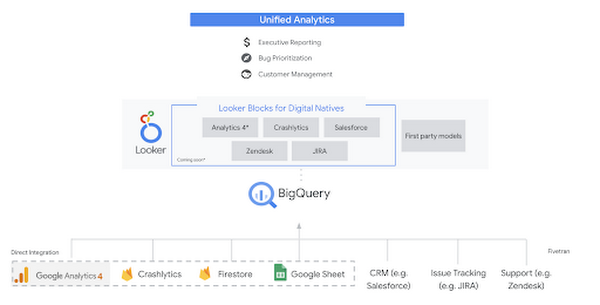
Firebase has deep adoption in the app development community and provides the technology backbone for many organization’s app strategy. This month we launched a design pattern that shows Firebase customers how to use Crashlytics data, CRM, issue tracking, and support data in BigQuery and Looker to identify opportunities to improve app quality and enhance customer experiences.
Crux on BigQuery: Taking gold in the all-around data competition
Crux Informatics provides data services to many large companies to help their customers make smarter business decisions. While they were already operating on a modern stack and not on the hunt for a modern data warehouse, BigQuery became an enticing option due to performance and a more optimal pricing model. Crux also found advantages with lower-cost ingestion and processing engines like Dataflow that allow for streaming analytics.… when it came to building a centralized large-scale data cloud, we needed to invest in a solution that would not only suit our current data storage needs but also enable us to tackle what’s coming, supporting a massive ecosystem of data delivery and operations for thousands of companies.
Mark Etherington
Chief Technology Office, Crux Informatics
Technology is a team sport, and Crux found our support team responsive and ready to help. This decision to more deeply adopt Google Cloud’s data analytics offerings provides Crux with the flexibility to manage a constantly evolving data ecosystem and stay competitive.
You can read more about Crux’s decision to adopt BigQuery in this blog.
Google Trends: A classic emerges a champion
Following up on the launch of our Google Trends dataset in June, we delivered some examples of how to use that data to augment your decision making.
As a quick recap of that dataset, Google Cloud, and in particular BigQuery, provide access to the top 25 trending terms by Nielsen’s Designated Market Area® (DMA) with a weekly granularity. These trending terms are based on search patterns and have historically only been available on the Google Trends website.https://www.youtube.com/embed/9FJAXMF0ASc?enablejsapi=1&
The Google Trends design pattern addresses some common business needs, such as identifying what’s trending geographically near your stores and how to match trending terms to products to identify potential campaigns.
Dataflow GPU: More power than ever for those streaming sprints
Dataflow is our fully-managed data processing platform that supports both batch and streaming workloads. The ability of Dataflow to scale and easily manage unbounded data has made it the streaming solution of choice for large workloads with high-speed needs in Google Cloud.
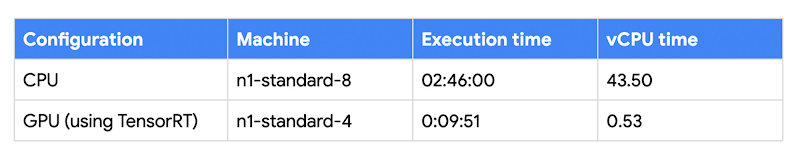
But what if we could take that speed and provide even more processing power for advanced use cases? Our team, in partnership with NVIDIA, did just that by adding GPU support to Dataflow. This allows our customers to easily accelerate compute-intensive processing like image analysis and predictive forecasting with amazing increases in efficiency and speed.
Take a look at the times below:
Data Fusion: A play-by-play for data integration’s winning performance
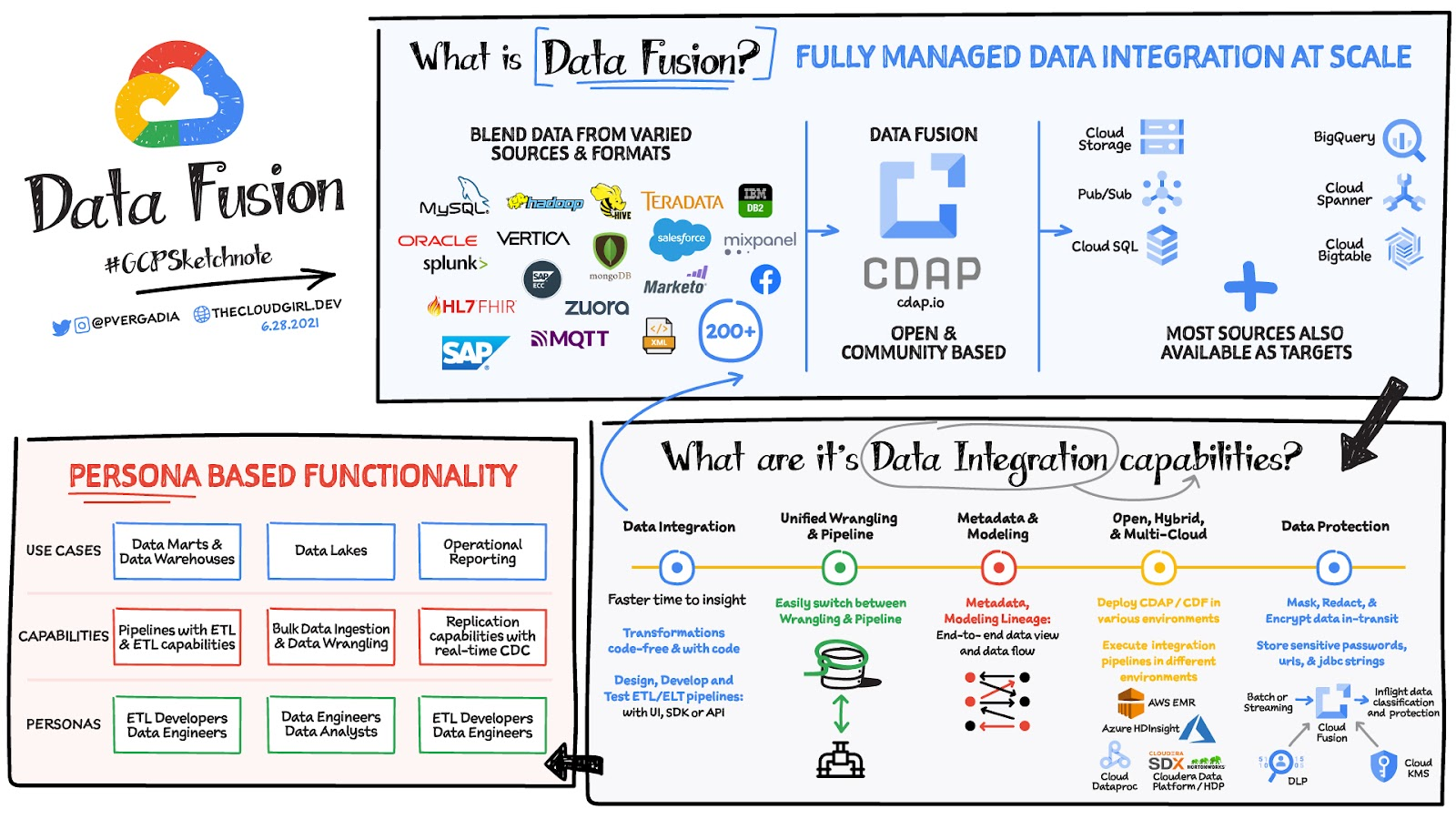
Data Fusion provides Google Cloud customers with a single place to perform all kinds of data integration activities. Whether it’s ETL, ELT, or simply integrating with a cloud application, Data Fusion provides a clean UI and streamlined experience with deep integrations to other Google Cloud data systems. Check out our team’s review of this tool and the capabilities it can bring to your organization.
4958
Of your peers have already watched this video.
49:30 Minutes
The most insightful time you'll spend today!
How to Migrate an Oracle Database to Google Cloud
As more enterprises migrate a growing number of workloads to the cloud, migrating databases, too, has become a key focus.
But migrating databases is also really tough. This is due to a number of different reasons.
The first one is that there’s a lot of proprietary technology and functionality that’s built into a lot of the legacy database technologies.
With Oracle, for example, that may be things like stored procedure, custom functions, Oracle RAC, so on and so forth.
This makes it really hard for database administrators to migrate to an equivalent cloud-native technology.
The second challenge is that historical on-prem databases are all quite monolithic.
These are humongous servers which don’t really fit into the cloud way of doing things.
So often, database administrators have to split these up into multiple servers in the cloud.
The third challenge, which a lot of companies underestimate, is the reliance of applications on databases.
Say, you are a company that’s been around for 10 to 15 years. As the business has grown, it’s added tens to hundreds of apps, both internal- and external-facing, that are all relying on the database.
So as you’re thinking about migration, it’s really important to consider the risks that are associated of migrating to different cloud technologies. Obviously, you would like to minimize your company’s exposure.
With that background, here are the steps, procedures, best practices, and how to solve the challenges associated with migrating on-premises Oracle databases to Google Cloud SQL PostgreSQL.
From source database migration assessment to schema conversion, data replication, and performance tuning, we will cover all of the basics required to get you started with your first Oracle to Cloud SQL migration project.
ActivStat: Enhancing Live Sports Broadcast with Real-time Stats and Metrics

5104
Of your peers have already read this article.
2:00 Minutes
The most insightful time you'll spend today!
Millions of people annually view esports, as top players and teams compete in thrilling, fast-paced tests of reflexes, strategy, and teamwork. Fans are a diverse group, sharing a passion for action. A new, revolutionary project we’re working on with Call of Duty League just made that action a lot better.
ActivStat brings fans, players, and commentators the power of competitive statistics in real-time—stats that matter not only to the game at hand, but also for a full roster of competitors globally. Using ActivStat, live broadcasts will soon be enhanced with more depth and color-of-play while they’re happening, building excitement and adding to the overall experience.
Technically, ActivStat is an entirely new capability for esports. It’s a constantly updating catalog of statistics that is sourced, analyzed, updated, and delivered in an easy-to-consume way across global-scale computing systems, with a latency of milliseconds or seconds, rather than minutes or hours. By comparison, many of these stats today are available to fans after a day or more of processing.
Call of Duty League plans to begin rolling out ActivStat during the 2021 season. The initial rollout will include critical information like player and team standings and winning ratios across multiple aspects of virtual combat—including ultimately what these numbers mean for rankings. ActivStats are delivered both in raw statistics and via visualizations and graphics, providing commentators with fast access to the types of insights fans crave.
For engineers at both companies, building the service has been an epic success all its own. Due to a sponsorship with Call of Duty signed last February, our dedicated game engineering team quickly innovated a new solution incorporating high-speed networking, data pipelines from multiple cloud sources, and data warehousing to create a user-friendly dashboard. Real data was flowing into commentator dashboards by April.
Esports are more complex to cover in many ways than regular sports. Instead of a well-defined physical playing field (often a simple rectangular space), multiplayer games involve complex and sprawling virtual environments that can be the size of a large campus or airport with multiple levels and hidden locations.
Gameplay between competitors happens across many of these locations simultaneously. In addition, competitors also each choose their own configurations of equipment, known as “loadouts,” which can dramatically affect gameplay and strategy. All of this additional complexity in online gaming involves data that needs to be captured, analyzed, and communicated to the fans in insightful ways.
Two Google Cloud technology capabilities play central roles in the operations of ActivStat. BigQuery—a planet-scale data warehouse that can store and query petabytes of information in real time—is the foundation of the ActivStat platform for gathering and summarizing millisecond-level statistics. Looker, an intuitive analytic dashboard, surfaces those insights to commentators in an easy-to-use, real-time dashboard that enables the commentators to speak to compelling insights and statistics in sync with the gameplay as it is happening in the live broadcast.
While the initial release of ActivStat for this season of Call of Duty League provides compelling and powerful capabilities, it’s only the beginning of this Call of Duty League-Google Cloud co-innovation partnership. Our future vision is mapping gameplay hotspots on the field, and predicting where to place cameras with machine learning as the match evolves–enabling broadcast producers to build excitement for fans by always being in the middle of the best action. Call of Duty League and Google will also look to drive statistics and metrics directly into the broadcast feed.
The implications of the real-time statistical capabilities of ActivStat go beyond gaming and esports. Historically, gaming has been at the leading edge of what computer processing, computer graphics, wide-area networking, data analysis, and insight can do. The real-time data ingestion and output used in ActivStat could one day be useful powering live broadcasts in other types of sporting events, as well as blending live video feeds and data to support use cases in media & entertainment, healthcare, finance, manufacturing, and other verticals. We’re excited about the potential for this bold new solution and partnership between Call of Duty League and Google in esports and beyond.
To learn more about Call of Duty League-Google Cloud partnership, visit our press release.
Why and How to Migrate to Google BigQuery

5378
Of your peers have already read this article.
6:30 Minutes
The most insightful time you'll spend today!
Over the past few decades, organizations have mastered the science of data warehousing. They have increasingly applied descriptive analytics to large quantities of stored data, gaining insight into their core business operations. Conventional Business Intelligence (BI), which focuses on querying, reporting, and Online Analytical Processing, might have been a differentiating factor in the past, either making or breaking a company, but it’s no longer sufficient.
Today, not only do organizations need to understand past events using descriptive analytics, they need predictive analytics, which often uses machine learning (ML) to extract data patterns and make probabilistic claims about the future. The ultimate goal is to develop prescriptive analytics that combine lessons from the past with predictions about the future to automatically guide real-time actions.
Traditional data warehouse practices capture raw data from various sources, which are often Online Transactional Processing (OLTP) systems. Then, a subset of data is extracted in batches, transformed based on a defined schema, and loaded into the data warehouse. Because traditional data warehouses capture a subset of data in batches and store data based on rigid schemas, they are unsuitable for handling real-time analysis or responding to spontaneous queries. Google designed BigQuery in part in response to these inherent limitations.
Innovative ideas are often slowed by the size and complexity of the IT organization that implements and maintains these traditional data warehouses. It can take years and substantial investment to build a scalable, highly available, and secure data warehouse architecture. BigQuery offers sophisticated software as a service (SaaS) technology that can be used for serverless data warehouse operations. This lets you focus on advancing your core business while delegating infrastructure maintenance and platform development to Google Cloud.
BigQuery offers access to structured data storage, processing, and analytics that’s scalable, flexible, and cost effective. These characteristics are essential when your data volumes are growing exponentially—to make storage and processing resources available as needed, as well as to get value from that data. Furthermore, for organizations that are just starting with big data analytics and machine learning, and that want to avoid the potential complexities of on-premises big data systems, BigQuery offers a pay-as-you-go way to experiment with managed services.
With BigQuery, you can find answers to previously intractable problems, apply machine learning to discover emerging data patterns, and test new hypotheses. As a result, you have timely insight into how your business is performing, which enables you to modify processes for better results. In addition, the end user’s experience is often enriched with relevant insights gleaned from big data analysis, as we explain later in this series.
The migration framework
Undertaking a migration can be a complex and lengthy endeavor. Therefore, we recommend adhering to a framework to organize and structure the migration work in phases:
- Prepare and discover: Prepare for your migration with workload and use case discovery.
- Assess and plan: Assess and prioritize use cases, define measures of success, and plan your migration.
- Execute: Iterate the following steps for each use case:
- Migrate (offload): Migrate only your data, schema, and downstream business applications.
- Migrate (full): Alternatively, migrate the use case fully end-to-end. The same as Migrate (offload), with the addition of the upstream data pipelines.
- Verify and validate: Test and validate the migration to assess return on investment.
The following diagram illustrates the recommended framework and shows how the different phases are connected:

For a deeper understanding, read Migrating data warehouses to BigQuery: Introduction and overview
How We Built a Brand New Bank on Google Cloud and Cloud Spanner: The First Scalable, Enterprise-grade, Database Service

6565
Of your peers have already read this article.
6:30 Minutes
The most insightful time you'll spend today!
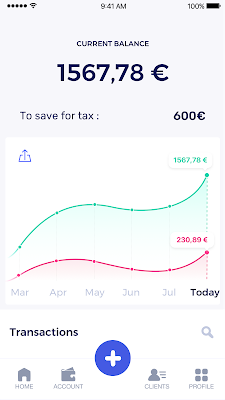
Editor’s note: Technology today lets companies of any size take on entire industries simply with an innovative business model plus digital distribution. Take Shine, a French startup whose platform helps freelancers manage their finances — and their administrative commitments. Here, Raphael Simon, Shine’s CTO and co-founder, talks about why Shine built a new bank on Google Cloud Platform, and in particular Cloud Spanner.
More and more people are deciding to take the plunge and start a freelance career. Some of them by choice, others out of necessity. One of their biggest pain points is dealing with administrative tasks.
In some countries, especially in Europe, the administrative burden of being a freelancer is similar to what a company of 10 or more people deals with. A freelancer doesn’t necessarily have the time or skills to manage all this paperwork. So we are building a new bank for freelancers from the ground up that helps automate administrative tasks associated with their business.
Shine’s banking services and financial tools make it as easy to work as a freelancer as it is to work for a larger company. We deal with administrative tasks on behalf of the freelancer so that he or she can focus on their job: finding and wowing clients.

Building our infrastructure
As a new bank, we had the opportunity to build our infrastructure from the ground up. Designing an infrastructure and choosing a database presents tough decisions, especially in the financial services world. Financial institutions come under tremendous scrutiny to demonstrate stability and security. Even a tiny leak of banking data can have tremendous consequences both for the bank and its clients, and any service interruption can trigger a banking license to be suspended or a transaction to be declined.
At the same time, it’s vital for us to optimize our resources so we can maximize the time we spend developing user-facing features. In our first six months, we iterated and validated a prototype app using Firebase, and secured our seed funding round (one of the largest in Europe in 2017).
Based on our positive experience with Firebase, plus the ease-of-use and attractive pricing that Google Cloud offered, we decided to build our platform on Google Cloud Platform (GCP).
We were drawn to GCP because it has a simple, consistent interface that is easy to learn. We chose App Engine flexible environment with Google Cloud Endpoints for an auto-scaling microservices API. These helped us reduce the time, effort, and cost in terms of DevOps engineers, so we could invest more in developing features, while maintaining our agility.
We use Cloud Identity and Access Management (Cloud IAM) to help control developer access to critical parts of the application such as customer bank account data. It was quite a relief to lean on a reliable partner like Google Cloud for this.
Database decisions
Next came time to choose a database. Shine lives at the financial heart of our customers’ businesses and provides guidance on things like accounting and tax declaration. The app calculates the VAT for each invoice and forecasts the charges they must pay each quarter.
Due to the sensitivity of our customers’ data, the stakes are high. We pay careful attention to data integrity and availability and only a relational database with support for ACID transactions (Atomicity, Consistency, Isolation, Durability) can meet this requirement.
At the same time, we wanted to focus on the app and user experience, not on database administration or scalability issues. We’re trying to build the best possible product for our users, and administering a database has no direct value for our customers. In other words, we wanted a managed service.
Cloud Spanner combines a globally distributed relational database service with ACID transactions, industry-standard SQL semantics, horizontal scaling, and high availability. Cloud Spanner provided additional security, high-availability, and disaster recovery features out-of-the-box that would have taken months for us to implement on our own. Oh, and no need to worry about performance — Cloud Spanner is fast. Indeed, Cloud Spanner has been a real asset to the project, from the ease-of-use of creating an instance to scaling the database.
Cloud Spanner pro tips
We began working with Cloud Spanner and have learned a lot along the way. Here are some technical notes about our deployment and some best practices that may be useful to you down the road:
- Cloud Spanner allows us to change a schema in production without downtime. We always use a NOT NULL constraint, because we generally think that using NULL leads to more errors in application code. We always use a default value when we create an entity through our APIs and we use Cloud Dataflow to set values when we change a schema (e.g., adding a field to an entity).
- With microservices, it’s generally a good practice to make sure every service has its own database to ensure data isolation between the different services. However, we adopted a slightly different strategy to optimize our use of Cloud Spanner. We have an instance on which there are three databases — one for production, one for staging and one for testing our continuous integration (CI) pipeline. Each service has one or more interleaved tables that are isolated from others services’ tables (we do not use foreign-keys between tables from different services). This way our microservices data are not tightly “coupled”.
- We created an internal query service that performs read-only queries to Cloud Spanner to generate a dashboard or do complex queries for analytics. It is the only service where we allow joins between tables across services.
- We take advantage of Cloud Spanner’s scalability, and thus don’t delete any data that could one day be useful and/or profitable.
- We store all of our business logs on Cloud Spanner, for example connection attempts to the application. We append the ‘-Logs’ suffix to them.
- When possible, we always create an interleave.
In short, implementing Cloud Spanner has been a good choice for Shine:
- It’s saved us weeks, if not months, of coding.
- We feel we can rely on it since it’s been battle-tested by Google.
- We can focus on building a disruptive financial services product for freelancers and SMBs.
And because Cloud Spanner is fully managed and horizontally scalable, we don’t have to worry about hardware, security patches, scaling, database sharding, or the possibility of a long and risky database migration in the future. We are confident Cloud Spanner will grow with our business, particularly as we expand regionally and globally. I strongly recommend Cloud Spanner to any company looking for a complete database solution for business-critical, sensitive, and scalable data.
More Relevant Stories for Your Company

Power up Caching with Memorystore for Memcached
In-memory data stores are a fundamental infrastructure for building scalable, high-performance applications. Whether it is building a highly responsive ecommerce website, creating multiplayer games with thousands of users, or doing real-time analysis on data pipelines with millions of events, an in-memory store helps provide low latency and scale for millions


Business Modernization with Oracle Workloads in Google Cloud
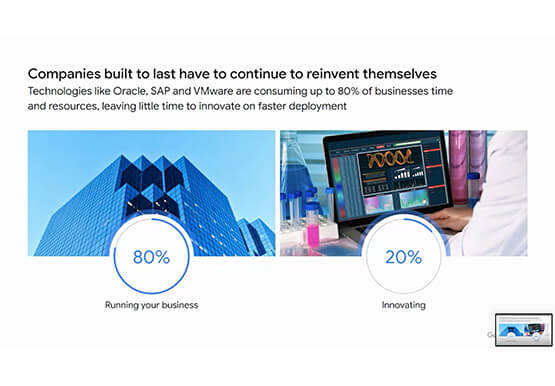
With today's ever-changing business dynamics, business continuity is a key focus for all of us, and enterprise databases like Oracle play a critical role. We’ll explore how running Oracle workloads in Google Cloud creates a variety of solutions, from a Bare Metal Solution to open source and cloud-native databases, to
What’s Google Cloud Firestore Database and What are its Benefits for Business and Developers?
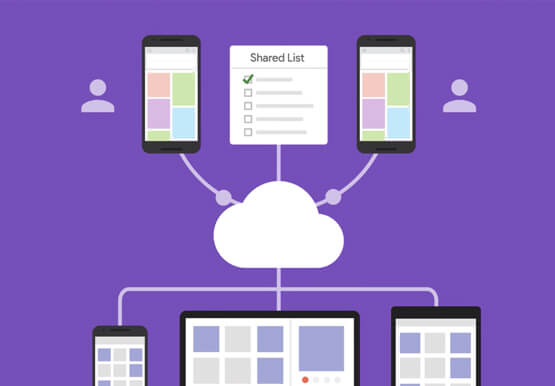
Cloud Firestore is a NoSQL document database that simplifies storing, syncing, and querying data for your mobile and web apps at global scale. Cloud Firestore is a fast, fully managed, serverless, cloud-native NoSQL document database that simplifies storing, syncing, and querying data for your mobile, web, and IoT apps at

How Pantheon Improved Performance and Reliability by Moving to Google Cloud
Google Cloud Results Improves performance and reliability, enabling Pantheon to serve larger customersSupports 99.95% uptime across 200,000+ websitesReduces cloud infrastructure costs by 40%Enables future analytics offerings based on machine learning and big data analytics Nearly every business needs a web presence—but the vast majority of companies don’t want to be
