





5 Features IT Departments Love About Google Cloud

3670
Of your peers have already read this article.
5:30 Minutes
The most insightful time you'll spend today!
Throughout the past couple of years, I have helped a good number of companies, big and small, migrate their systems to the Google Cloud Platform (aka GCP). During the course of these migrations, there are always a few of those moments where people look at a specific Google Cloud feature and say, “now, that’s cool!”.
More often than not, it is because, coming from other platforms, they have gotten used to some features requiring multiple steps, or some operations being complicated, etc. And often they find out that in GCP you can do this specific operation in a couple of clicks, or by setting up a simple text-based configuration. Then you see that light bulb turning on in their head, and there you go… happy customer.
A few of these happen so often that I compiled them in a list to share with others who might also benefit from these “aha!” moments. You could say these are the five things I wish they told me when I started using Google Cloud.
Projects: Naturally Group Resources Together
A project is a namespace where resources live. Every resource you instantiate in GCP, from load balancers to Kubernetes clusters to virtual machines, belongs to a single project, and has no access (by default) to resources in other projects. User roles and authorisations can be defined per-project and trickle down to everything in it. This has two immediate benefits: you can group things that belong together in neat logical units, and things that don’t belong together are isolated from each other (and isolation is a Good Thing)
This is powerful and quite simple, but it often takes new users off-guard. I’ve had many clients call me and ask me “How can I make sure my developers cannot access the production machines? What’s the best way to create access policies? ”
The answer to this is actually super-simple:
- have a project for development where your developers have rights,
- have a project for production where they don’t.
- That’s it.
Every machine/other resource in the production project won’t be accessible to developers.
Of course there is a lot more to it, and you can refine roles and permissions to a much greater degree using Organizations, Folders, etc. Not to mention all the crazy things you can do with per-project billing. But at least you can say “hey, if it’s a machine in the staging environment then it can be found in the “staging” project”.
Global Virtual Networks Are *Truly* Global
Imagine you are using a Cloud provider and that you have servers in the US, and servers in Singapore, and that they need to communicate.
So you create a VPC (Virtual Private Cloud) network in the US data center, another one in the Singapore data center, and then you will connect them by setting up inter-region VPC peering or a VPN (Virtual Private Network) or a transit VPC or other routing magic.
Lots of work, right? And many moving parts, so lots of opportunities for things to break.
With GCP, however, what makes my clients go “aha!” is when they realize that in GCP a single VPC network covers the entire planet. Only subnets are attached to a geographic location, and virtual machines communicate between subnets on private IPs (good old RFC1918 addresses) — no extra routing needed.
So, to make your server communicate across continents on GCP, here are the steps:
- create a VPC network
- create a subnet in the US, put your US servers in it
- create a subnet in Singapore, put your Singapore servers in it
That’s all there is to it. Your VPC network spanning 2 continents is ready to use. Below is a screenshot of how it looks on my account, for a VPC network called ‘my-global-network’ with 2 subnets. The first column (“us-central1” and “asia-southeast1”) contains the name of the GCP regions (read: data centers). The second column is the subnet name that I picked when I created them.

A machine in the US (on the “us-central” subnet) with IP 10.0.0.5 can communicate directly with a machine in Singapore (on the “singapore”) subnet with IP 10.10.0.8.
Nothing else to set up.
And thanks to the way these networks work, the Google Cloud Load Balancer can present a single IP to the world, and forward traffic to the instances that are the closest to you geographically without having to setup a tedious DNS-based load balancing. But that’s worth an entire blog. I’ll save it for another day.
Firewalls with Tags and (Almost) No IP Addresses
There is no network security without a firewall so unsurprisingly GCP comes with one built-in.
Now, I don’t know about you, but nothing makes my brain hurt like a list of firewall rules displaying IP ranges and addresses and ‘Allow/Deny’ directives. It looks a bit like this:

If you imagine a normal network with a few dozen (hundred?) servers, you can quickly see how this can get out of control. You’d better have a solid printout of your network layout to refer to when you start adding and changing rules. And good luck debugging things!
Wouldn’t it be nice if, instead, you could just tell the firewall: “the HTTP traffic from outside can only reach the HTTP servers and the MySQL database is only reachable by the HTTP server(s) on the same network?”
Turns out it’s pretty simple on GCP by using a little thing called network tags. As the documentation says:
“Network tags are text attributes you can add to Compute Engine virtual machine (VM) instances. Tags allow you to make firewall rules and routes applicable to specific VM instances.”
So let’s see how it works. Firewall rules in GCP are defined in terms of source and target (the traffic flows from the source to the target). You can define filtering rules that apply to the source or the target, and in both cases you can use tags.
This is simpler shown with an example. The rule below states that on the default network, the traffic to the VMs with the tag mysql-server can come from the VMs with the tag http-appserver. Any other traffic is “Deny”-ed by default.

All you have to do is to tag your machines properly, and they will automatically be covered by the rule. You don’t need to enter their IP range.
That’s neat if you ask me. It makes it a lot simpler to grasp what’s happening.
Of course, there’s a TON more to firewalls in GCP. Tags also apply to routes and you can mix and match IP-based rules with tag-based rules. Not to mention that thing called service accounts, but I’ll leave those for another day.
The bottom line is that you can create most rules by just expressing a business need and not having to remember complicated network layouts. I have no hard stats, but I’m pretty sure this has saved me hours of work.
Console Access to VMs from the Browser
Easily access virtual machines (VMs) from the Google Cloud console was one of my first “aha!” moments when I started using GCP.
This is a screen capture of my Google Cloud console, with a virtual machine and its internal IP.

The last column has a header that says “Connect” and when you click on the word “SSH” a separate windows pops up. You wait for a few seconds, and… this is what you get. Your personal shell access — in a browser popup no less.

You are connected through ssh to the virtual machine of your choice. You did not have to download ssh keys and put them in the ~/.ssh directory, do the correct chmod command and run a long-winded ssh -i ~/.ssh/somekey me@<it-took-me-forever-to-copy-paste-the-address-here>
In addition, you have access to a few nifty features such as uploading and downloading files, changing the user etc. Just use the menu behind the cog icon at the top right.
In truth, you should not need to connect directly that often, but when you have to, this is a godsend.
Your Personal Jumphost from the Google Cloud Console
The Google Cloud console has a cool trick: you can actually connect to a virtual environment that is managed by the Google Cloud console itself. It serves a bit as a jump host. You can access most resources from the projects from it, and you can activate it directly from the top menu with, no particular setup on your side. It’s called the Cloud Shell.
This is how it looks at the top right of the console:

When you activate the Cloud Shell, the session opens at the bottom of the console. You get a command line prompt and it’s fully configured with the gcloud command line tool (the jack-of-all-trades of Google Cloud scripting).

You can do a great many things from there, and this even includes uploading and downloading files, editing code or deploying it, a web preview for your AppEngine application, and more.
So you can get access to a fully configured shell environment in your project from any laptop where you can connect with your credentials. On top of this, it persists between connections so you can fine-tune it to your needs and have these changes available the next time you re-connect.
This has saved me many times during my previous life as a traveling consultant!
Live migration
Did I say 5 “Aha!” moments ? Well, you’ve been patient reading all the way to here, so here’s one more for free.
Google Cloud has an amazing way to literally “teleport” a running virtual machine between physical hosts without stopping it. It’s called Live Migration. It allows Google to move your virtual machine away from a defective host, or a host that needs a patch or an upgrade, or for any other infrastructure related reason.
It’s all done in the background, and is totally transparent, so you never really see it happening. Unless you look VERY closely. I once did a demo to a client, where a machine was live migrated while he was simulating a solid network load — and we did not lose a single packet, with no noticeable degradation in latency.
And that’s a wrap!
So there you go. These are 5+1 things that made me go “Aha!” when I became more familiar with the Google Cloud Platform, and that still make my clients do the same.
There is a lot of depth to the platform, and my examples above only scratch the surface of our features. I encourage you to try it yourself. There is a generous free tier, and when you are ready to take the plunge and create that new company, please contact us at Google Cloud for Startups. We’ll get you up and running in no time.
Jerome is a Startup Architect at Google Cloud. Based in Singapore, he helps startups make the most of the Google Cloud Platform.
3366
Of your peers have already watched this video.
10:00 Minutes
The most insightful time you'll spend today!
Transform Your Business with Google’s Open, Hybrid, and Multi-Cloud Enterprise Network
Modernization and digital transformation starts with the network, which must enable agile access to the innovation promised by cloud, as well as simplified models for multi-cloud, multi-platform deployments. The network must evolve to provide agility, simplicity, and openness that is needed to power this transformation.
Google’s enterprise network is revolutionizing the enterprise networks paradigm, enabling you to use Google’s network as your own to connect your offices, branches, data center, Google, and other public clouds. It provides innovative technical and business models for open multi-cloud, application-centric networks, and integrates with a partner ecosystem, so that you can leverage your current on-premises site investments.
Mrs. T’s Pierogies Moves SAP Systems to Google Cloud for Faster Analytics Capabilities for its SAP Data

6864
Of your peers have already read this article.
1:30 Minutes
The most insightful time you'll spend today!
Pierogies might just be the ultimate comfort food. But when Mrs. T’s Pierogies — the leading manufacturer of frozen pierogies in the US — learned it needed to transition its existing on-premises SAP ECC to S/4HANA, the company sought a little comfort for itself.
Founded in 1952, Mrs. T’s Pierogies now produces more than 650 million pierogies a year. Moving that many pierogies requires a powerful ERP system — and an equally powerful IT infrastructure on which to run it. Mrs. T’s realized that the SAP-mandated transition of its ERP solution to SAP S/4HANA was an opportunity to move its SAP systems to Google Cloud and gain real-time analytics capabilities for faster sales forecasting, more effective trade promotions, and more sophisticated planning.
From necessity to opportunity
Mrs. T’s successfully ran its SAP ECC solution on its own on-premises servers for years. But after SAP decided to sunset the product, Mrs. T’s realized that it faced multiple challenges, including:
- Migrating its SAP ECC 6.0 system from an on-premises leagcy OS to a cloud-based Linux environment
- Moving data from its SAP DB2 database to HANA
- Transitioning from ECC to SAP S/4HANA
That complex transition needed to take place with little or no downtime, since nearly all of the company’s invoices, warehouse movements, and transfer orders used the Electronic Data Interchange (EDI) protocol. Missing even a few hours of EDI transactions would put significant revenue at stake. Adding to the challenge: Some Mrs. T’s customers would not accept an invoice past five days, which left little room for error. Mrs. T’s chose Rackspace Technology, a longtime Google Cloud partner, to oversee the move.
Mrs. T’s could have chosen to run S/4HANA on its legacy hardware but saw migration to Google Cloud as an opportunity to improve key aspects of its business, in particular data analytics. Historically, sales planning and forecasting involved time-consuming manual processes. But the speed, availability, and scalability of Google Cloud meant that Mrs. T’s could take advantage of S/4HANA’s embedded analytics capabilities. Migrating could also open the door to leveraging Google Cloud’s native integration of SAP data to power Google tools such as BigQuery, Google Cloud AI Building Blocks, and more.
The move to Google Cloud also gave Mrs. T’s an opportunity to update its disaster recovery process. Previously, the company backed up to tape. So, if its SAP systems went down, a member of the IT department would have to drive the most recent tape backups an hour to its cold site, where the disaster recovery partner would load the SAP backup tape, boot the system up, switch network connections to that site, and cross their fingers. Not only would downtime be significant, but restored data would be limited to the periodic tape backup.
“Everything just worked”
Once Mrs. T’s decided to migrate to Google Cloud, the company worked with Rackspace Technology to implement the system. The first phase focused on moving the SAP production environment from on-premises infrastructure to Google Cloud and updating its database to HANA, which took place over 12 weeks. The switchover occurred over a weekend and was all but invisible to users. “We came in on Monday and everything just worked,” recalls Timothy Coyle, Director of Information Systems & Technology. In a second four-month phase, the company transitioned from ECC to S/4.
The move to Google Cloud paid dividends immediately. Batch transactions occurred twice as fast and on-screen end-user transactions rendered instantly. The upgrade also gave the finance team access to embedded analytics and monitoring for the first time. With everything now in the cloud, disaster recovery could be dynamic and nearly instantaneous, with a worst-case scenario of just 5 to 10 minutes of downtime.
“Mrs. T’s needed a skilled and experienced partner that could move its SAP environment to Google Cloud with no negative impacts to its business. We knew this migration was a key initiative in Mrs. T’s digital transformation journey,” says Chuck Britton, Google Partner Development Manager at Rackspace. “We also knew that running SAP on Google Cloud would give the business the fast and flexible analytical capabilities it needed for its SAP data.”
From ideation to production, Mrs. T’s migrated from its legacy on-premises infrastructure to a modern SAP S/4HANA solution on Google Cloud in only seven months, with minimal downtime and zero disruptions. Now that the migration is complete, Mrs. T’s has a flexible, highly scalable environment to run the SAP applications and data that fuel the business. Says Coyle, “Our strategic intent for IT is to make processes simpler, people more productive, and infrastructure more secure. This project fits right square in the middle of that strategic philosophy.”
Learn more about ways in which Google Cloud can transform your SAP experience and about Rackspace Google Cloud solutions for SAP customers.
Forrester and IDC’s Research Confirms Quantifiable Benefits of Running SAP on Google Cloud
3648
Of your peers have already read this article.
3:00 Minutes
The most insightful time you'll spend today!
Cloud migration is top of mind for most companies with SAP applications. While the advantages of the cloud for SAP customers is generally understood, the move itself can be complicated and disruptive. So what actually are the business benefits and cost savings? How long will it take to recoup such an investment? Two recently published reports from Forrester and IDC can help to quantify the benefits and ROI.
Getting answers to the million-dollar questions
Forrester and IDC bring different methodologies to the table; they asked somewhat different questions and used different models to calculate their financial KPIs. This allows you to get two different points of view on the same basic questions about value, risk, and ROI.
As it turns out, both reports found that customers who migrate their SAP environments to Google Cloud see an impressive return on their investments. From uptime and infrastructure to efficiency and productivity—both Forrester and IDC identified major benefits to companies that have made the move to Google Cloud.
Let’s walk through some of the highlights from both reports.
Forrester’s TEI model spotlights the power of uptime improvements
Based on in-depth conversations and quantitative research with six companies, here are the key findings from the Forrester Total Economic Impact (TEI) study for companies running SAP systems on Google Cloud:
- Direct cost savings. When they compare cloud subscription and related costs to what they spent on legacy systems and infrastructure, most IT leaders expect a cloud migration to deliver up-front savings. But according to Forrester, the companies interviewed reported average savings of more than $3 million a year, including eliminated hardware purchases, right-sized software licensing, staffing efficiencies, and other operational cost savings.
- Dramatically improved uptime. Customers told Forrester that migrating SAP to Google Cloud pretty much eliminates downtime—planned or unplanned—as a significant IT concern. According to Forrester, companies realized an average of $1.5 million in savings per year by avoiding the revenue and user productivity losses that had once been a fact of life for their IT teams.
- Significant efficiency gains. Because Google Cloud works to mitigate performance bottlenecks, infrastructure mishaps, network delays and more, the companies Forrester interviewed reported a yearly average of $500,000 in productivity gains for SAP business users and frontline workers.
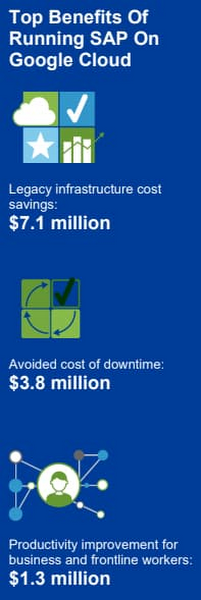
Companies also reported an annual average of $500,000 in additional IT efficiency gains after migrating SAP to Google Cloud. This quantifies what happens when IT practitioners no longer have to deal with the bottlenecks that come with legacy systems, and are able to spend their time on tasks that actually build value and help the business. Based on the Forrester analysis, the companies interviewed could expect average three-year net benefits of about $15.4 million.
“We benefit from any technical innovation in the infrastructure area because Google Cloud is doing that for us,” one customer told Forrester. “So, whenever there’s new hardware available or new processes or whatever, I don’t have to run the specific project to migrate from A to B.”
IDC finds that good things happen when SAP downtime is reduced
The IDC report highlights four areas where Google Cloud generates the most value for customers:
1. Cutting infrastructure costs. According to IDC, customers running SAP on Google Cloud spent 31% less on infrastructure each year, or an average of $233,000 less per company. The ability to scale SAP environments dynamically and to keep them right-sized was a major factor; so were the advantages of automated infrastructure monitoring and savings on software licenses once these companies could stop overprovisioning.
2. Giving a team better things to do. IDC found that the infrastructure, database, and security teams of the companies they interviewed reduced the time they need to maintain and manage SAP environments by an average of 66% per year, for a savings of $443,000, per company. As a result, these companies got the equivalent of a major staff expansion from their SAP migrations—giving them both the staff time and the expertise to focus on far more valuable activities.
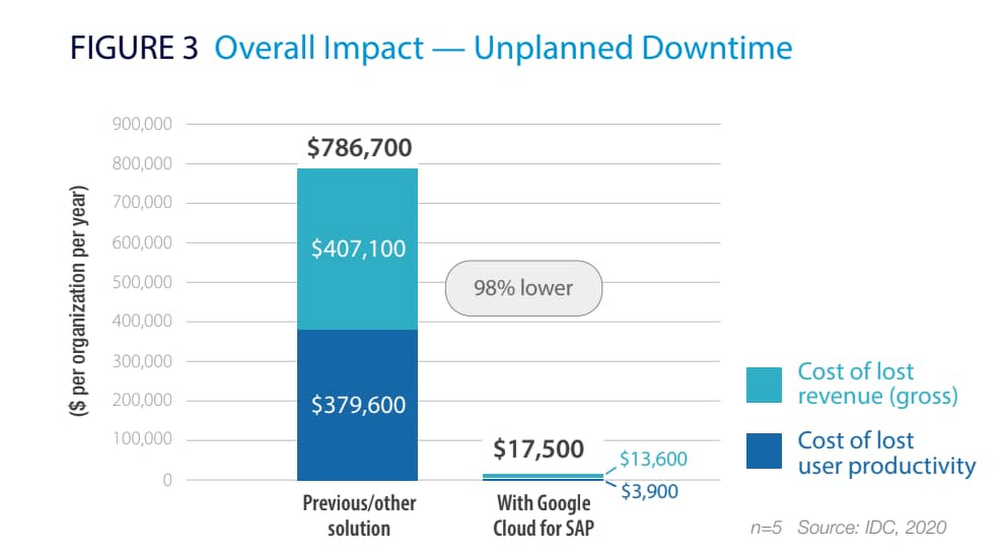
3. Limiting unplanned downtime. These companies reported to IDC an average 98% reduction in unplanned downtime. Migrating SAP to Google Cloud significantly reduces the threat of downtime and saves the business an average of nearly $770,000 per year in lost revenue and user productivity. For some firms, the downtime savings topped $1 million per year.
4. Making users more productive. The companies interviewed told IDC that by avoiding downtime and disruptions associated with upgrade and maintenance tasks for their legacy SAP systems, they saved an average of $363,000 annually in user productivity. But there’s an even more interesting under-the-hood stat contributing to these gains: These companies reduced the time required to deploy new SAP compute and storage resources from an average of 8.8 days to 1 hour.
When IDC added up these and other savings associated with running SAP on Google Cloud, it found an average three-year savings of more than $3.5 million and a five-month payback period.
“We acquired another company, so basically overnight we needed to be able to deal with that increase,” said one customer IDC spoke with. “We doubled our footprint overnight, and we had to take on hundreds of additional employees. We needed a platform that we could easily scale up if we required, and that’s the benefit of running SAP on Google Cloud for us.”
Explore the reports
There is a lot to think about when considering a move of SAP systems to the cloud. The cloud has many advantages, but migration can seem complicated and tricky; we appreciate that you are looking to understand the full picture. These papers are a great place to start.
Download the reports—Forrester’s “Total Economic Impact of SAP on Google Cloud” and IDC’s “Business Value of SAP for Google Cloud Environments.” Then, get in touch.
Google Cloud Extends Research Credits to Non-profit Research Projects

3377
Of your peers have already read this article.
1:30 Minutes
The most insightful time you'll spend today!
To fuel the breakthroughs of the future, today’s researchers need easy access to the most innovative cloud technologies. That’s why we are delighted to announce the latest expansion of Google Cloud research credits beyond its previous scope of government and academic research institutions to researchers at nonprofit institutions. This initiative is part of our ongoing efforts to make the advantages of cloud research available to more people everywhere–and to drive more discoveries faster.
To serve researchers outside of academia, we are now offering nonprofit institutions access to Google’s research credit program. Leading centers of scientific knowledge like the New York Genome Center, Scripps Research Institute, the Vector Institute in Toronto, the Ontario Institute for Cancer Research, and the Allen Institute for AI (AI2) have already benefited from the efficiencies of managing and analyzing their datasets on Google Cloud.
Michael Schmitz, Director of Engineering at AI2, reports that “Google Cloud has been essential for our research program. While we have an on-premise installation for custom hardware, the ability to use Google Cloud for isolated workstations (where researchers always have guaranteed access to a development environment) and bursting with increased need (such as our summer intern surge or a hyperparameter tuning just before our deadline) has been a critical part of conducting our research.”
Also, to better support Ph.D. students, we are updating the terms of Google Cloud credits for use toward advanced research. Now, Ph.D. students can apply for up to $1,000 grants that are renewable over the five years of their programs. We know that the researchers of the future need the best resources now.
Hassaan Maan, Ph.D. student at the University of Toronto/Vector Institute, says “when the pandemic started, I began working on a web-based platform to help researchers analyze genome sequences of the COVID-19 virus in real time and compare with data from labs around the world. Deploying the Covid Genotyping Tool (CGT) platform was challenging, as I had minimal experience hosting web applications and we required a scalable and fine-tuned deployment. Google Cloud’s comprehensive user interface and thorough documentation made for a seamless deployment, and I was able to get the platform up and running in less than two weeks. Google Cloud was a huge factor in the success of this project, and I hope to be able to use it further during my Ph.D. studies.”
To ramp up your own research project with Google Cloud, apply now for free credits in selected countries. To supplement your own learning on Google Cloud, sign up to earn four Google Cloud skills badges that you can share on your social platforms.
3457
Of your peers have already downloaded this article
1:30 Minutes
The most insightful time you'll spend today!
Enterprises developing digital leadership are increasingly moving out of their data centers to focus on core business innovation, and save on complex infrastructure costs. This puts challenges related to demand peaks and business continuity under a magnifying glass.
Many CIOs are under pressure to complete migrations quickly — 68% of CIOs are seeking to migrate existing applications to the cloud, according to Forrester. Motivations range from cost or risk reductions, to refocusing on agility and speed.
As they assess their options, many enterprises face an enormous challenge of balancing the function of their existing infrastructure with a new operating model in the cloud. This involves thousands of variables, different technologies, different processes and skills, disparate teams, and competing interests.
Download this guide and see hoo to craft a strategy out of the data center and into public cloud. It surfaces typical industry patterns, key dimensions to be taken into account while designing the journey, as well as Google’s capabilities and approach to executing a successful modernization, to help you drive lower costs and increased agility.
More Relevant Stories for Your Company

No More Migration Challenges: How Nine Clients of Google Cloud Achieved Success
Google Cloud's hands-on, tailored partnerships and solutions have helped many businesses around the world to ease their cloud migration journey and achieve desired outcomes! Download the E-book to observe the public cloud landscape and understand the common hurdles to cloud adoption, the benefits of multi-phased migration with Google Cloud, cloud

Cloud IoT Core Helps Businesses Leverage their IoT Data to Build a Competitive Edge
The ability to gain real-time insights from IoT data can redefine competitiveness for businesses. Intelligence allows connected devices and assets to interact efficiently with applications and with human beings in an intuitive and non-disruptive way. After your IoT project is up and running, many devices will be producing lots of

Application Modernization Made Easy
Modernizing apps on the cloud isn’t an “all or nothing” decision. Businesses want the option to modernize on-premises or choose multi-cloud solutions that meet their needs. That’s why we created a new solution for running apps anywhere – simply, flexibly, and securely. Embracing open standards, Anthos lets you run your applications, unmodified,
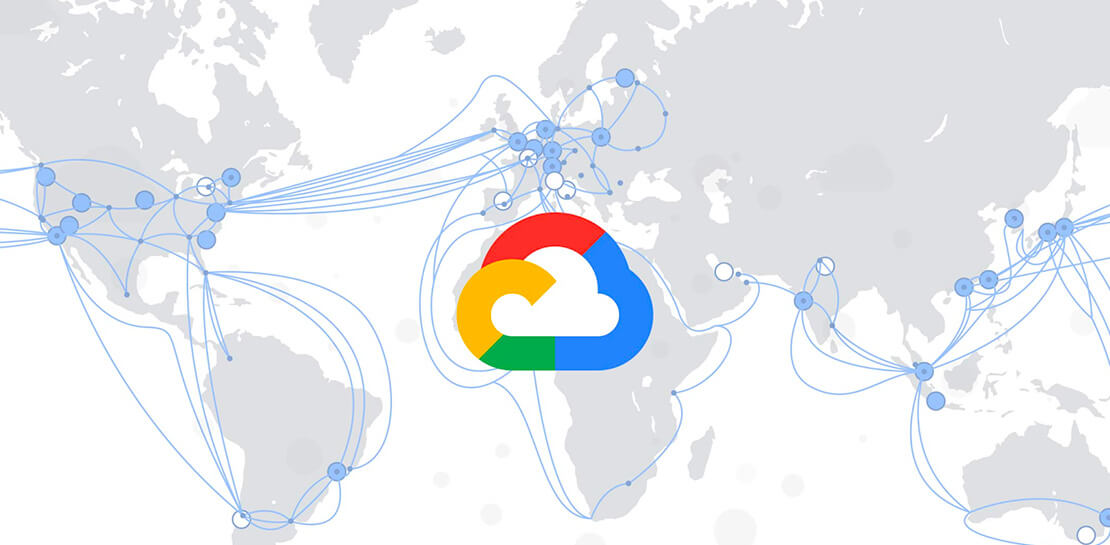
Linking the Middle East with Southern Europe and Asia: Google’s New Subsea Cables to Be Ready by 2024!
Today, we’re announcing that we are collaborating with Sparkle and others to build and operate two submarine cable systems linking the Middle East with southern Europe and Asia: the Blue Submarine Cable System connecting Italy, France, Greece, and Israel; and the Raman Submarine Cable System connecting Jordan, Saudi Arabia, Djibouti, Oman and
