





Centralized Analytics: Apigee and Cloud Run API Management

895
Of your peers have already read this article.
3:30 Minutes
The most insightful time you'll spend today!
Most enterprise companies enforce strict requirements for how APIs should be exposed to the public internet that require centralized handling of the authentication credentials, the collection of metrics metrics and other classic API management capabilities. Before the introduction of sidecars in Cloud Run, developers either had to implement these requirements within the service itself or add a full-lifecycle API management platform in front of their service as described in a previous blog post.
In this post we want to demonstrate a new way to fulfill the requirement for API management in Cloud Run. Specifically we want to look at how the recently announced multi-container feature in Cloud Run enables a sidecar pattern that can be used by developers of Cloud Run services to add pre-packaged API management capabilities. This includes self-service developer onboarding in a developer portal, credential validation and quota enforcements. As an additional operational benefit the described solution also adds centralized analytics and metrics for APIs that are exposed via Cloud Run.
Our solution for adding API management capabilities for Cloud Run is provided by the following three components:
- The Cloud Run service that hosts a traditional RESTful web application and is fronted by a vanilla Envoy proxy.
- An Apigee Envoy Adapter aka. Remote service that runs in GKE Autopilot and acts as a policy decision point PDP for Envoy’s external authorization filter and is responsible for accepting or rejecting calls to the Cloud Run service.
- An Apigee API Platform that is used to manage the API lifecycle of the Cloud Run service. Apigee also offers a turn-key developer portal where developers can obtain access credentials to access an API.
The user journey of an incoming request to our new Cloud Run Service with API management looks as follows:
- An API Developer self-registers in the Apigee Developer Portal and obtains access credentials for the API
- They call the Cloud Run endpoint and provide their credential for authentication
- In Cloud Run service the Envoy proxy container intercepts the request and initiates a gRPC call to the Apigee Envoy adapter to authenticate the client.
- The Apigee Envoy adapter verifies the request’s credentials and identifies the corresponding API product as defined in Apigee. The Envoy adapter also verifies the call quota associated with the client and sends the analytics data and access logs back to the control plane.
- If the credentials are valid and the client hasn’t exhausted their call quota the Apigee Envoy adapter forwards the request to its co-located container in the Cloud Run service.
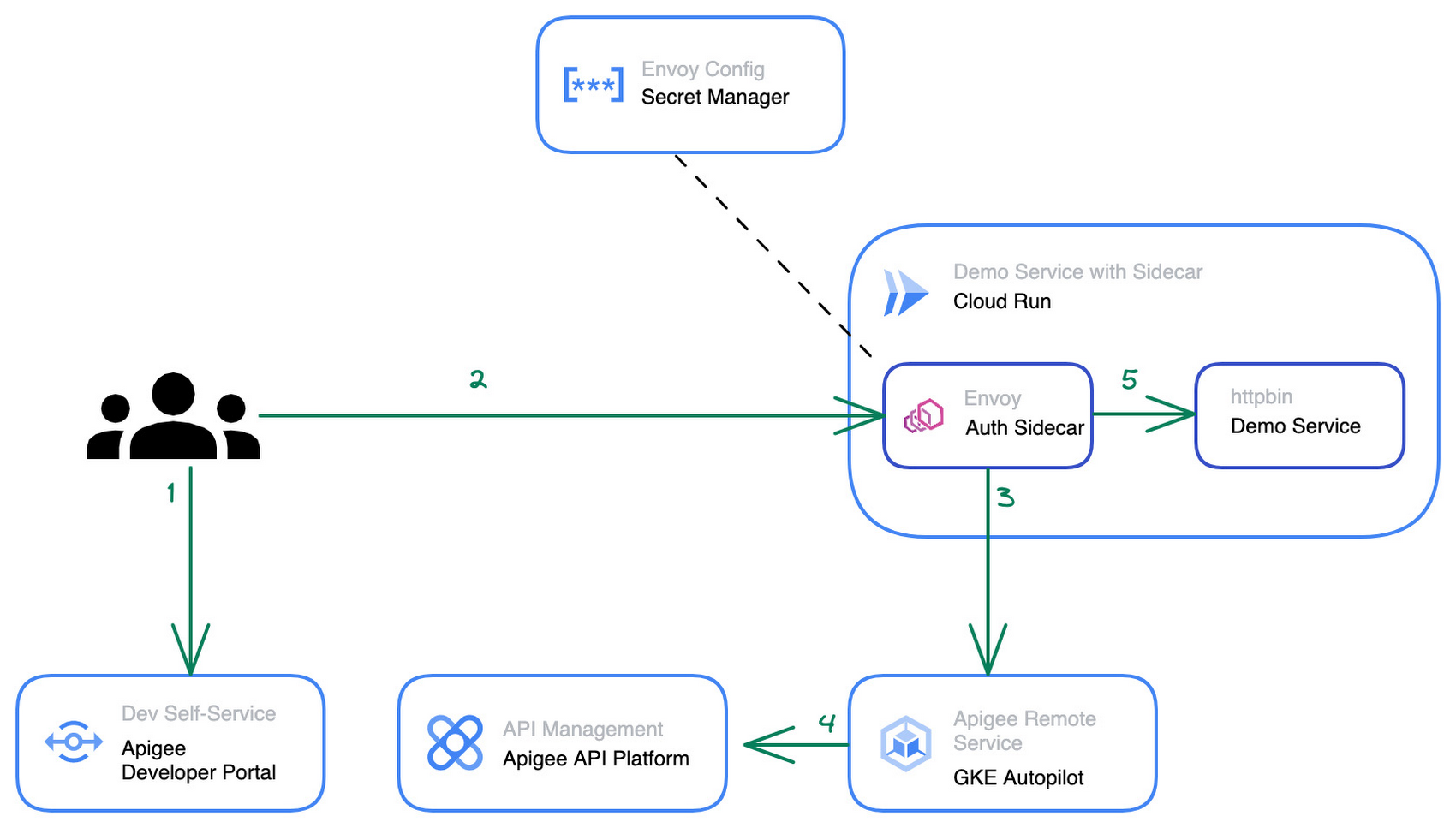
The step by step instructions for how to configure the architecture above can be found in this blog post.
Starting from a pre-existing Apigee installation the Apigee Envoy adapter is used to connect back to the Apigee runtime and control plane for accessing the API product definitions to link the incoming requests to the issued credentials and quotas. The Apigee remote service component can be replicated for high availability and is shared between multiple Cloud Run services that require a gRPC target for the sidecar’s external authorization filter.
The Cloud Run service connects to the Apigee Remote Service via an Envoy proxy that acts as a sidecar to the main application. The configuration for the envoy proxy can either be embedded within a customized Envoy image or mounted via the secret manager integration of cloud run as shown in the diagram above. Externalizing the configuration simplifies the maintenance and upgrade of the sidecar container as it can just pull the latest patch version of Envoy regularly.
The newly added API management capability is transparent for the primary application container within the Cloud Run service and does not require any changes in the application source code. Once the Cloud Run service is re-deployed with the sidecar in place, consuming applications can start to use credentials that they obtained via the Apigee API Management platform or the API developer portal to consume the Cloud Run service. At an operations level the platform operators will start to see requests to the Cloud Run service popping up in Apigee’s analytics dashboards and be able to track consumption and exposure at an API product level.
Next Steps
If you are interested in trying the multi-container support for Cloud Run yourself, check out the release announcement with many more use case descriptions. For another example and a detailed walkthrough on how to use sidecars in Cloud Run to report custom metrics to Google Cloud managed service for Prometheus you can head over to this tutorial in the Cloud Run documentation. Lastly, if you’re interested in the broader picture of how the latest features in Cloud Run are moving serverless forward, then make sure you check out this video.
3334
Of your peers have already watched this video.
4:56 Minutes
The most insightful time you'll spend today!
API Management with Istio
Kubernetes can be a great orchestration platform for your microservices but these services can grow complex and difficult to manage. Istio simplifies the life of organizations contemplating a “microservices” approach, or who are simply deploying many services that communicate with each other. Istio creates a “service mesh” that routes traffic between interrelated services in a secure and robust way so that the developers of each individual service can focus on what a service does rather than the details of how it communicates. Both Istio and Apigee provide complementary capabilities to teams building APIs and services in today’s world.
Join us as we walk you through Istio and several ways it can help you wrangle your applications. In this video, we’ll be working with Apigee to manage a full API.
Application Rationalization: Your App Development Team is Gonna Love It!

3595
Of your peers have already read this article.
2:00 Minutes
The most insightful time you'll spend today!
On April 6th, 2022, Google Cloud established a new partnership with CAST, to help accelerate the migration and application modernization programs of customers worldwide, complementing the Google capabilities already available through the Google Cloud Application Modernization Program (CAMP).
Application Rationalization (App Rat) is the first step towards a cloud adoption or migration journey, through which you go over the application inventory to determine which applications should be Retired, Retained, Refactored, Replatformed, or Reimagined.
Why is this important to you?
Have the majority of your in-house applications still not moved to the cloud? How much time does your development team spend on support (bug fix, tickets, etc.) versus feature(s) development? Have Infrastructure/Platform dependencies ever delayed product rollout? Would an auto-scalable, managed cloud, increase stakeholder buy-in?
Can Google simplify this journey?
Google Cloud Application Modernization Program (CAMP) has been designed as an end-to-end framework to help guide organizations through their modernization journey by assessing where they are today, and provide a path forward. When it comes to App Rationalization, this depends on what your role is.
Step 1 (Assess): Who is the target audience? The Platform team (or) the Application team?
This determines what kind of challenges we are trying to solve. For e.g. the centralized platform team wants to set some guardrails on how the App teams deploy their apps. Streamlining this would allow the platform team to mature themselves into the SRE territory. The application team, on the other hand, loves flexibility, and the ability to perform Continuous Delivery.
These examples are only the tip of the iceberg. Most of the enterprise customers have a majority of their applications in the legacy world. Unless we move those business critical applications to the cloud, it’s impossible to mature as an enterprise. For more information, check State of DevOps 2021 report.
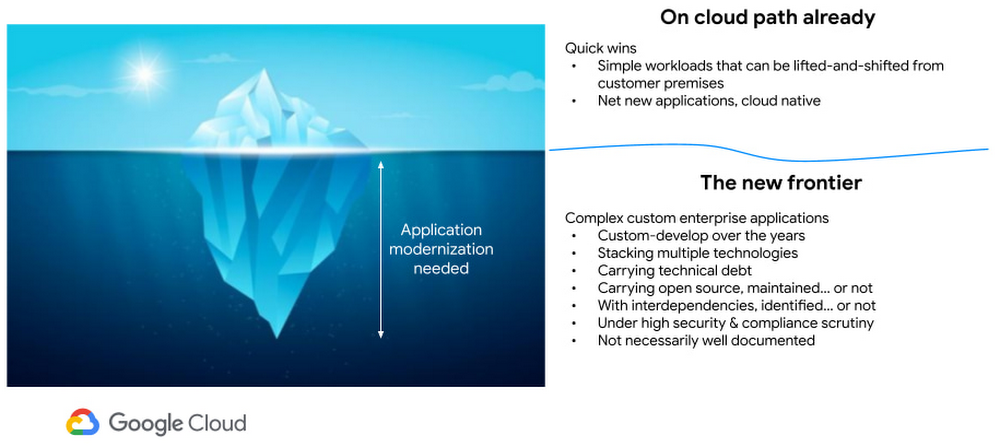
Step 2 (Analyze): Google Cloud offers the tooling and the framework to analyze your legacy applications.
Platform Owner (persona), usually have very little information on which workloads are a good fit for modernization.
Google’s StratoZone® SaaS platform provides customers with a data-driven cloud decision framework. The StratoProbe® Data Collector Application delivers the ability to easily deploy and scale the discovery of a customer’s IT environment for Private, Public, or Hybrid-cloud planning. To ease and accelerate the VM migration journey, Google Cloud offers assistance and guidance in making the right decisions when deciding to go to cloud.
Google’s mFit aims at unblocking customers in their transformation by providing workload selection for successful on-boarding, at scale, to Anthos, GKE and Cloud Run , in both pre-sales (e.g. proof-of-concept/proof-of-value) and post-sales (e.g. pilot and at scale execution) scenarios.
App and/or Business Owners (persona), get involved in a 1-week workshop, using CAST Highlight, which would provide rapid portfolio assessment through automated source code analysis for Cloud Readiness, Open Source risks, Resiliency, and Agility.
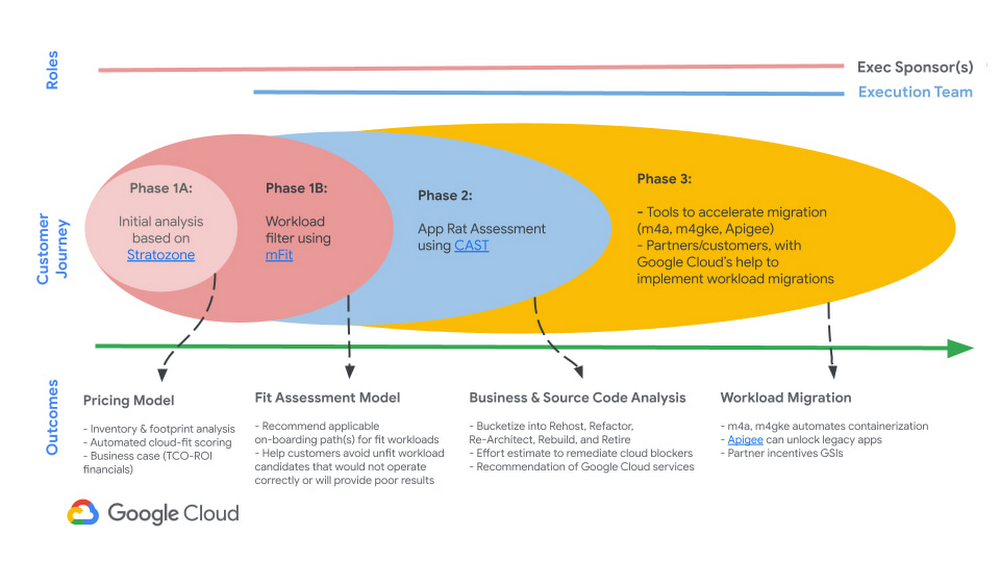
Step 3 (Plan & execute): Each organization is different. Some may follow the “Migration Factory” approach, and some may follow “Modernization Factory”, and some may follow both. Irrespective of which approach you choose to follow, it is important to plan just enough, so that you can start your execution. Ensure to set the OKRs, that would help with the right measurements, before you start the execution. The actual learning from the execution helps the team(s) to learn more about the cloud migration process, and refine it based on their organization.
Using CAST Highlight in the assessment step previously, we get the recommendation for the analyzed applications. From there, for certain workloads, we can use Migrate to Containers, to automate the containerization of suitable workloads. However, there are certain applications that require manual code changes. You have a few options for that,
- Our experts can help you get started.
- Our partners can help you
Step 4 (Measure & reiterate): Measure the progress using the predefined metrics in the previous step. Celebrate the wins. Consistently share the learnings and best practices with the developer community. Pick the next challenge
Take the next step
Tell us what you’re solving for. A Google Cloud expert will help you find the best solution.
GCP Launches Datastream, A Serverless Change Data Capture and Replication Service

5593
Of your peers have already read this article.
1:30 Minutes
The most insightful time you'll spend today!
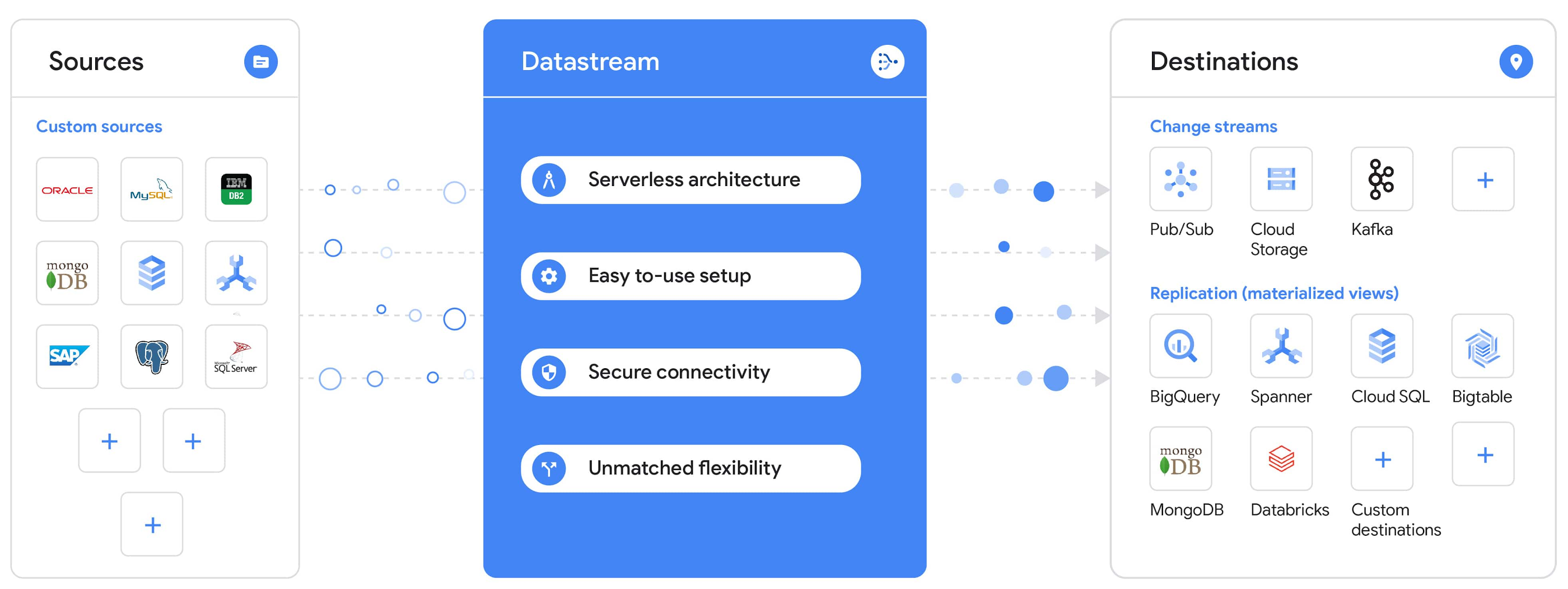
Today, we’re announcing Datastream, a serverless change data capture (CDC) and replication service, available now in preview. Datastream allows enterprises to synchronize data across heterogeneous databases, storage systems, and applications reliably and with minimal latency to support real-time analytics, database replication, and event-driven architectures. You can now easily and seamlessly deliver change streams from Oracle and MySQL databases into Google Cloud services such as BigQuery, Cloud SQL, Google Cloud Storage, and Cloud Spanner, saving time and resources and ensuring your data is accurate and up-to-date.
“Global companies are demanding change data capture to provide replication capabilities across disparate data sources, and provide a real-time source of streaming data for real-time analytics and business operations,” says Stewart Bond, Director, Data Integration and Intelligence Software Research at IDC.
However, companies are finding it difficult to realize these capabilities because commonly used data replication offerings are costly, cumbersome to set up, and require significant management and monitoring overhead to run flexibly or at scale. This leaves customers with a difficult-to-maintain and fragmented architecture.
Datastream’s differentiated approach
Datastream is taking on these challenges with a differentiated approach. Its serverless architecture seamlessly and transparently scales up or down as data volumes shift in real time, freeing teams to focus on delivering up-to-date insights instead of managing infrastructure. It also provides the streamlined customer experience, ease of use, and security that our customers have come to expect from Google Cloud, with private connectivity options built into the guided setup experience.
Datastream integrates with purpose-built and extensible Dataflow templates to pull the change streams written to Cloud Storage, and create up-to-date replicated tables in BigQuery for analytics. It also leverages Dataflow templates to replicate and synchronize databases into Cloud SQL or Cloud Spanner for database migrations and hybrid cloud configurations.
Datastream also powers a Google-native Oracle connector in Cloud Data Fusion’s new replication feature for easy ETL/ELT pipelining. And by delivering change streams directly into Cloud Storage, customers can leverage Datastream to implement modern, event-driven architectures.
Customers tell us about the benefits they’ve found using Datastream. That includes Schnuck Markets, Inc., “Leveraging Datastream, we’ve been able to replicate data from our on-premises databases to BigQuery reliably and with little impact to our production workloads. This new method replaced our batch processing and allowed for insights to be leveraged from BigQuery quicker,” says Caleb Carr, principal technologist from Schnuck Markets. “Furthermore, implementing Datastream removed the need for our analytics group to reference on-premises databases to do their work and support our business users.”
Cogeco Communications, Inc. used Datastream to also realize the value of low-latency data access. “Datastream unlocked new customer interaction opportunities not previously possible by enabling low-latency access in BigQuery to our operational Oracle data.” says Jean-Lou Dupont, Senior Director, Enterprise Architecture, Cogeco Communications, Inc. “This streamlined integration process brings data from hundreds of disparate Oracle tables into a unified data hub. Datastream enabled us to achieve this with 10X time and effort efficiency.”
In addition, Major League Baseball (MLB) used Datastream’s replication capabilities to migrate their data from Oracle to Cloud SQL for PostgreSQL. “As we’re modernizing our applications, replicating the database data reliably out of Oracle and into Cloud SQL for PostgreSQL is a critical component of that process,” says Shawn O’Rourke, manager of technology at MLB. “Using Datastream’s CDC capabilities, we were able to replicate our database securely and with low latency, resulting in minimal downtime to our application. We can now standardize on this process and repeat it for our next databases, regardless of scale.”
Our partner HCL has worked with many organizations looking to get more out of their data and plan for the future. “HCL customers across every industry are looking for ways to extract more value out of their vast amounts of data,” says Siva G. Subramanian, Global Head for Data & Analytics at HCL Google Business Unit. “CDC plays a big part in the solutions we offer to our customers using Google Cloud. Datastream enables us to deliver a secure and reliable solution to our customers that’s easy to set up and maintain. CDC is a key and integrated part of Google Cloud Data Solutions.”
“Google Cloud’s new CDC offering, Datastream, is a differentiator for Google among hyperscale cloud service providers, by supporting replication of data from Oracle and MySQL databases into the Google Cloud environment using a serverless cloud-native architecture, which removes the burden of infrastructure management for organizations, and provides elastic scalability to handle real-time workloads,” says Stewart Bond, Director, Data Integration and Intelligence Software Research at IDC.
Datastream under the hood
Datastream reads CDC events (inserts, updates, and deletes) from source databases, and writes those events with minimal latency to a data destination. It leverages the fact that each database source has its own CDC log—for MySQL it’s the binlog, for Oracle it’s LogMiner—which it uses for its own internal replication and consistency purposes. Using Google-native, agentless, high-scale log reader technology, Datastream can quickly and efficiently generate change streams populated by events based on the database’s CDC log while minimizing performance impact on the source database.
Each generated event includes the entire row of data from the database, with the data type and value of each column. The original source data types, whether it’s, for example, an Oracle NUMBER type or a MySQL NUMERIC type, are normalized into Datastream unified types. The unified types represent a lossless superset of all possible source types, and the normalization means data from different sources can easily be processed and queried downstream in a source-agnostic way. Should a downstream system need to know the original source data type, it can perform a quick API call to Datastream’s Schema Registry, which stores up-to-date, versioned schemas for every data source. This also allows for in-flight downstream schema drift resolution as source database schemas change.
The generated streams of events, referred to as “change streams,” are then written as files, either in JSON or Avro format during preview or in other formats like Parquet in the future, into a Cloud Storage bucket organized by source table and event times. Files are rotated as table schemas change, so events in a single file always have the same schema, as well as on a configurable file size or rotation frequency setting. This way customers can find the best balance between the speed of data availability and the file size that makes the most sense for their business use case.
Through its integration with Dataflow, Datastream powers up-to-date, replicated tables for analytics over BigQuery, and for data replication and synchronization to Cloud SQL and Spanner. Datastream refers to these constantly updated tables as “materialized views.” They are kept up-to-date via Dataflow template-based upserts into Cloud SQL or Spanner, or through consolidations into BigQuery. The consolidations, performed as part of the Dataflow template, take the change streams that are written into a log table in BigQuery, and push those changes into a final table, which mirrors the table from the source.

Datastream offers a variety of secure connectivity methods to sources, so your data is always safe in transit. And with its serverless architecture, Datastream can scale up and down readers and processing power to seamlessly keep up with the speed of data and ensure minimal latency end to end. As data volumes decrease, Datastream automatically scales back down—the result is a “pay for what you use” pricing model, where you never have to pay for idle machines or worry about bottlenecks and delays during data peaks.
Get started with Datastream
Datastream, now available in preview, supports streaming change data from Oracle and MySQL sources, hosted either on-premises or in the cloud, into Cloud Storage. You can start streaming your data today for $2 per GB of data processed by Datastream.
To get started, head over to the Datastream area of your Google Cloud console, under Big Data, and click Create Stream. There you can:
- Initiate stream creation, and see what actions you need to take to set up your source and destination for successful streaming.
- Define your source and destination, whose connectivity information is saved as connection profiles you can re-use for other streams. Sources support multiple connectivity options, with both private and public connectivity options to suit your business needs.
- Select the source data you’d like to stream, and which you’d like to exclude.
- Test your stream to ensure it will be successful when you’re ready to go.
Start your stream and your database’s CDC data will start to flow to your Cloud Storage bucket! From there you can integrate with Dataflow templates to load data into BigQuery, Spanner, or Cloud SQL. Datastream’s preview is supported in us-central1, europe-west1, and asia-east1, with additional regions coming soon.https://www.youtube.com/embed/FZG4w4Vbj38?enablejsapi=1&
Datastream will become generally available later this year, and will soon expand its support to also include PostgreSQL and SQL Server as sources, as well as out-of-the-box integration with BigQuery for easy delivery of up-to-date replicated tables for analytics, and message queues like Pub/Sub for real-time change stream access.
For more resources to help get you started with change streaming, check out the Datastream documentation.
3 Ways To Reduce App Downtime With Google Cloud’s API Monitoring Tools

3073
Of your peers have already read this article.
2:30 Minutes
The most insightful time you'll spend today!
How many times have you closed an application when you encounter the “spinning wheel of death” (a melodramatic way of saying an application that is taking too long to load)? In today’s digital economy where many organizations rely on applications as a primary source of revenue, that spinning wheel of death (or poor application performance) can mean lost users or revenue. And just about every modern application relies on APIs as the nervous system across distributed systems, third-party services and microservice architectures. While meeting the need for rapid release cycles and frequent API updates, it is also imperative for IT teams to ensure that your APIs are meeting SLOs, performance requirements, and proactively mitigating issues.
Why are synthetic monitoring tools not enough?
When thousands or even millions of users are making multiple requests to your APIs, just relying on synthetic monitoring tools (that rely on sampling or limited API availability information) is not enough for precision diagnoses or useful forensics. At the same time, monitoring every single aspect just increases your overhead and mean time to diagnosis. Apropos, API monitoring has become absolutely critical — and a fusion of art and science — for operations teams to make sure all APIs are running and performing as intended. If you are worried about monitoring blind spots or overheads, let us look at 3 key practices you can follow to stop dreading your sev1 alerts.
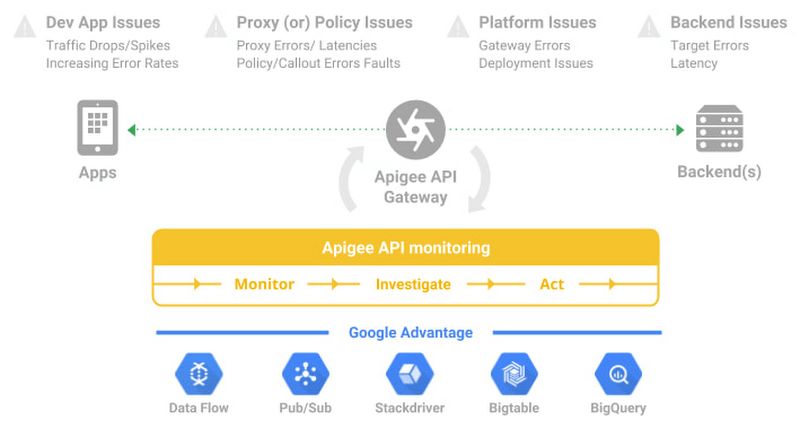
#1 Prioritize alerts for critical events requiring immediate investigation
- Ask any engineer on-call for a critical service and they will tell you about the overheads created by incorrectly prioritized alerts. For example let us imagine a distributed application with 20 APIs. Even if you set up basic alert monitors across latency, error, and traffic for these APIs, you end up monitoring and maintaining 60 alert definitions – which is a lot. To balance avoiding monitoring blindspots and alert fatigue at the same time, operations teams must develop a clear understanding of all events and prioritize configuring alerts for events supporting critical traffic.
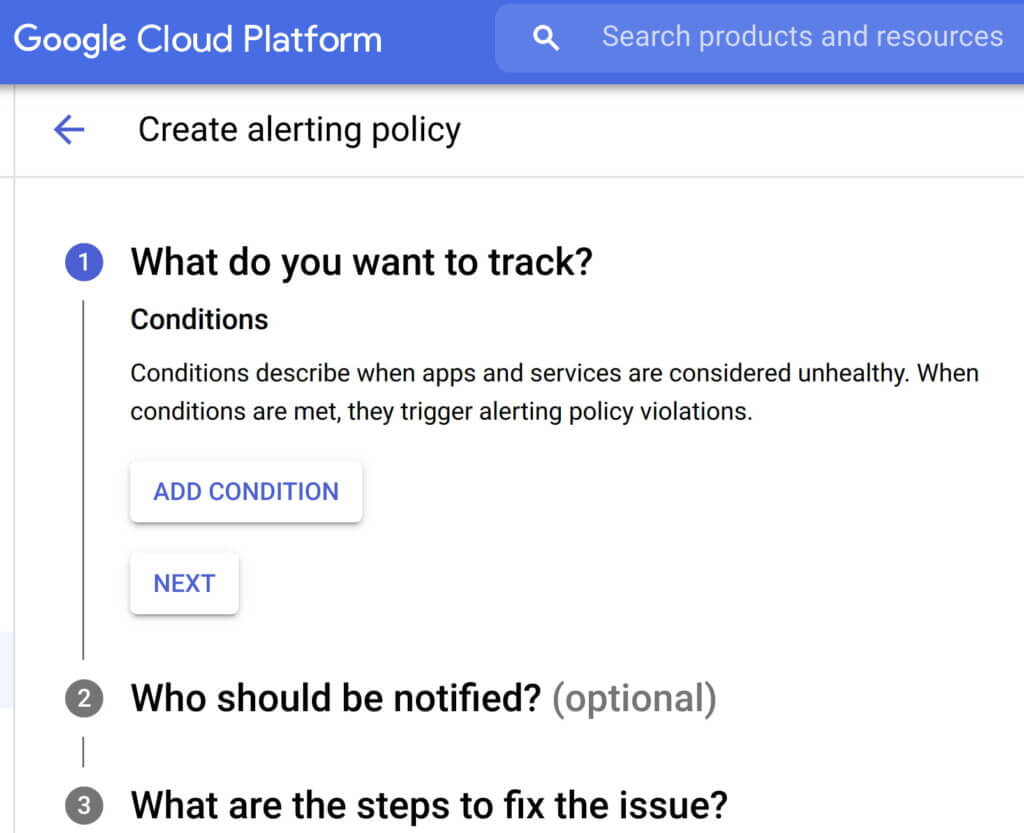
- Consider quality over quantity while defining new alert conditions where each new condition is urgent, actionable, and actively or imminently user-visible. Every alert condition created should also contain intelligence that requires active engagement from a user as opposed to a mere robotic response. Apigee’s API monitoring allows creation of alert conditions based on metrics or logs while providing actionable information (Ex: status code, rate etc.,) and playbooks for diagnosi
- In today’s multilayered systems, one team’s symptom (“what’s broken?”) is another downstream system’s cause (“Why?”). Even if some events are not suitable for actionable alerts, a failure needs to create an informational broadcast to a downstream system to mitigate the impact of the upstream dependency. In such cases, investing in automating alerts, grouping multiple incidents in notification channels, and incident tracking. For example, Apigee lets you integrate and group your alert notifications in channels like Slack, Pagerduty, webhooks etc.,
- Modern production systems are ever-evolving where an alert that’s currently rare might become frequent and automatable. Analogous to ticket backlog grooming, alert policies need to be reviewed periodically to make sure new conditions are identified and existing alerts are refined with new thresholds, prioritization and correlation. Controls like Advanced API Ops leverage AI and ML to detect anomalous traffic differentiated from random fluctuations to help define accurate alert definitions
Check out some examples of alerts here
#2 Isolate problem areas quickly with dashboards
Google’s Site Reliability Engineering book presents the case for efficient diagnosis by building dashboards that answer basic questions about every service, normally including some form of the four golden signals — latency, traffic, errors and saturation. But at the same time, capturing just these golden metrics at different levels of granularity can quickly add up. Like all software systems, monitoring can become an endless pit of complexity, complicated to change and a burden to maintain. In the same book, the most effective direction to create a well-functioning standalone system is to collect and aggregate basic metrics, paired with alerting and dashboards.
If you are running a large scale API program with a dedicated team to monitor your APIs, you can leverage the out-of-the-box monitoring dashboards in your API Management solution (like Apigee’s API monitoring) to gather real-time insights into your API performance, availability, latency, and errors. In other cases, you can use solutions like Cloud Monitoring that can provide visibility across your full application stack where individual metrics, events, and metadata can be visualized in a rich query language for rapid analysis. Leveraging a single system for your application stack provides observability in context and can reduce your time spent navigating between systems (Apigee customers can use Cloud Monitoring by default or integrate with other systems using Cloud Monitoring API)
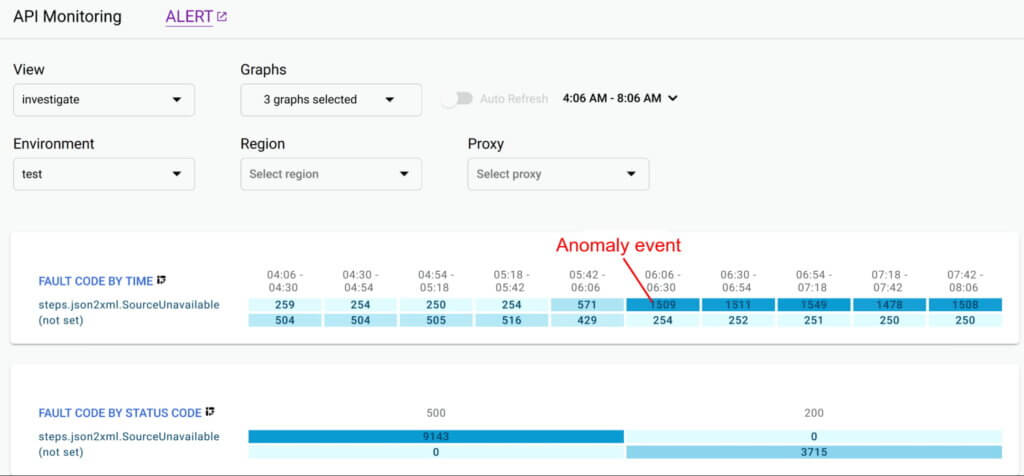
Even after you collect and aggregate the metrics, it is important to have impactful data visualizations to quickly understand the issue and identify correlations during diagnosis. In data visualizations as well, focusing on too many dashboards creates a steep learning curve and increases mean time for every diagnosis. For example, Apigee API Monitoring provides the following visualizations as a standard to balance simplicity and efficiency:
- Timeline view to diagnose traffic (in 1 min intervals), error rates (4xx and 5xx across traffic) and latencies (50th, 90th, 95th and 99th percentiles)
- Pivot tables of metrics and attributes for all API traffic, to help compare activity across different metrics
- Treemaps of recent API traffic by proxy to get a snapshot of incidents, error rates and latencies
#3 Incorporate distributed tracing into your end to end observability strategy
Modern application development accelerated the adoption of technologies and practices like cloud, containers, APIs, microservice architectures, DevOps, SRE etc. While this increases release velocity, it also introduces complexity and more points of failure in an application stack. For example, a slow response to a customer request spans across multiple micro services owned (and monitored) by various teams who might not observe any individual performance issues. Without an end-to-end contextual view of a request, it is nearly impossible to isolate the point of high latency.
In such cases, distributed tracing is the best way for DevOps, Operations and SREs to get answers to questions such as service health, root cause of defects, or performance bottlenecks in a distributed system. Organizations should invest in instrumenting their distributed applications using open source standards such as OpenCensus and Zipkin. Using tools like Cloud Trace with a broad platform, language and environment support can help easily ingest data from any source — open instrumentation or proprietary agents.
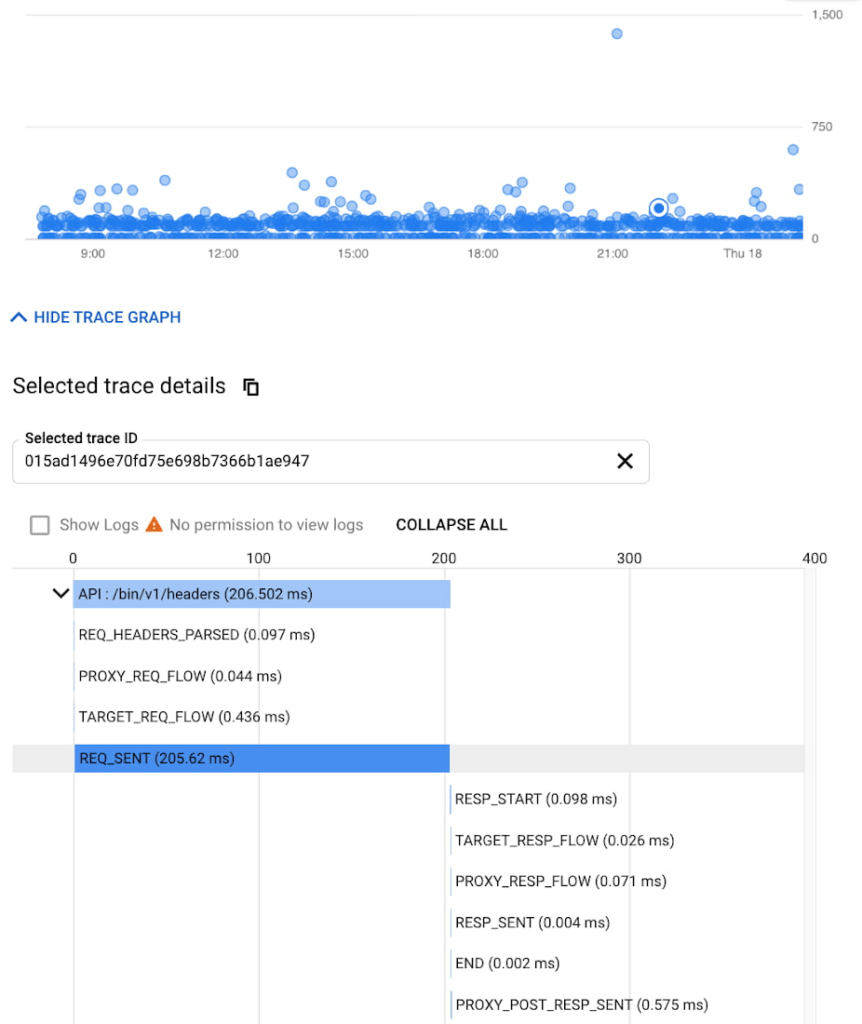
While distributed tracing helps in narrowing the issue to a given service, in some cases you might need further context to pinpoint the root cause. For example: Even if you have isolated the source of a performance issue to an API proxy, it is still a tedious process to identify the right bottleneck among multiple policies being executed. Tools like Apigee Debug enable you to zoom into an API proxy flow and probe the details of each step to see internal details like policy executions, performance issues, and routing etc.,
As soon as a request starts to span across a handful of microservices, tools like distributed tracing and Debug will become crucial elements of your monitoring strategy. When every service in a distributed system emits a trace, the amount of data can quickly become overwhelming leading to the classic “needle in the haystack” problem. In such scenarios, it becomes vital to ask the right questions and choose between head-based sampling (randomly selecting which traces will be sampled for analysis) and tail-based sampling (observe all trace information and sample the traces with unusual latency or errors) based on application complexity
Implement effective API monitoring in Apigee
Apigee’s API monitoring (based on metrics exposed by the internals of the system) capabilities work with your existing monitoring infrastructure to help reduce mean time to diagnosis and increase application resiliency. Specifically, operations teams can leverage
- Monitoring dashboards to gain in-depth insights into API availability and performance metrics.
- Debug to precisely diagnose with deeper insights into an API proxy flow without toggling multiple tools.
- Alerts and notifications to gather contextual Insights, facilitate customization, and grouping with first class integrations to various tools (like Slack, PagerDuty, email and support for webhooks).
- Best of Google technologies such as Data Flow, Pub/Sub, Stackdriver, Bigtable and BigQuery to handle massive volumes and complex metrics at scale
Using Apigee’s API monitoring will help you maintain high application resiliency with comprehensive controls to reduce mean time to diagnosis and resolution. Get started with Apigee today or explore Apigee’s API monitoring for free here. Check out our documentation for additional information on API monitoring.
What to Look for from Cloud CISO Perspective
6603
Of your peers have already read this article.
2:30 Minutes
The most insightful time you'll spend today!
May is a big month for the security industry. It’s been over a year since we gathered for RSA in San Francisco for one of 2020’s last major in-person events. While we likely won’t be together in person this year, it’s an important time for the security community to come together and reflect on many accomplishments, and to consider the challenges still ahead of us. As the world focuses on security incidents and all the risks that still need resolving, it is important to stand back, on occasion, and also note that immense progress has been made by large numbers of small, medium and large enterprises to protect themselves and their customers against increased threats. What is also amazing is to see organizations do this while accelerating their digital transformations, supporting and protecting customers and managing ongoing remote working challenges. We are privileged to play our part in supporting those great teams.
It’s also been a busy month for us here at Google Cloud since our inaugural CISO perspectives blog post in April. Today, I’ll recap our cloud security and industry highlights, a sneak peak of what’s ahead from Google at RSA and more.
Thoughts from around the industry
- Risk Governance of Digital Transformation in the Cloud – In our latest Office of the CISO whitepaper, we shared guidance on both the challenges and opportunities of cloud transformation for Chief Risk Officers, Chief Compliance Officers, Heads of Internal Audit and their teams. A misconception we sometimes see among these executives is that moving to the cloud creates more risk to manage. Having held these leadership positions in previous roles, I believe that the cloud is as much a means of managing security, resilience and other risks as it is a risk in its own right. The whitepaper dives deep into considerations for each of these leadership functions as their organization embarks on a digital transformation journey.
- The importance of meeting global compliance requirements – Compliance is critical for building trust with customers in regulated industries, especially the public sector. It is worth remembering that in any critical industry, where there can be material impact from incidents, strong industry practices and standards to protect customers are vital (I wrote about this last summer). At Google Cloud, we’re regularly adding new compliance and security certifications to meet our customers’ needs globally. Recently, we expanded our list of FedRAMP High-certified products to include Cloud DNS, and helped our customers in the Asia-Pacific region address various compliance requirements to meet new government regulations for security and data protections. Google Cloud was also the only cloud service provider to complete an annual pooled audit with the Collaborative Cloud Audit Group (CCAG), which is a syndicate of 39 leading European financial institutions and insurance companies who depend on cloud infrastructure and technologies to deliver innovative solutions and experiences for their customers. Having spent most of my career in the financial services industry, I know firsthand the importance of managing risk assessments for outsourced vendors to provide the necessary assurances customers need from their cloud providers.
RSA 2021
We have a great lineup of speaking sessions and keynotes from Googlers at RSA this year. Below are the highlights you don’t want to miss:
- I’ll be doing a session on May 20 about supply chain resilience, where a panel of experts will dive into how we can adjust risk and security initiatives to handle the next “punch to the supply chain.” Additionally, on May 18 I’ll join many of my esteemed CISO leaders from various industries and governments for a keynote discussion on our top security insights, lessons learned and best practices for how we move forward as an industry to address the next wave of challenges.
- Google’s Senior Director of Information Security Heather Adkins will deliver a session on how to build secure and reliable systems at scale, which will cover principles from Google’s Site Reliability Engineering book with the same title (available for free download here). I’m most looking forward to Heather’s advice for how we as an industry can reshape our security thinking, based on modern architectures and technologies that can help organizations design scalable and reliable systems that are fundamentally secure.
- Nelly Porter, Senior Product Manager at Google Cloud Security, will participate in a panel discussion with security experts on the importance of Confidential Computing technology, how it’s changing the security landscape and where it’s headed. Google Cloud has made great progress in delivering a Confidential Computing portfolio for our customers in regulated industries over the past year, and we’re excited for new milestones in 2021.
Google cloud security highlights
- Infrastructure and SRE spotlight – Before I joined Google Cloud, I always admired the infrastructure and benefits this organization delivers that are uniquely Google – from the subsea cable innovations to SRE inventions and principles. Security and resiliency are baked into every layer of our infrastructure. Many of the Googlers who build and support our platform have sat in the same seat as our customers, so they understand those needs intimately. Over the last few months it’s been amazing to watch our technical infrastructure team grow, and the direct reliability, operational resilience and security benefits that team brings to our customers. For example, we’ve opened a new region in Poland, announced the first subsea cable that will directly connect the U.S. to Singapore with fiber pairs over an express route, and released an SRE book focused on how organizations can complete a successful cloud migration.
- New security foundations blueprint guide – As part of our mission to deliver the industry’s most trusted cloud, we strive to operate in a shared-fate model for risk management in conjunction with our customers. This includes sharing opinionated step-by-step guidance with key decision points and focus areas for how our customers deploy workloads in Google Cloud. This is why we’ve updated our Google Cloud security foundations guide and corresponding Terraform blueprint scripts. These blueprints are tremendously helpful to many stakeholders within an enterprise, like a CISO that needs to understand our key principles for cloud security, or a C-Suite business leader that needs to quickly identify the skills their teams need to meet an organization’s security, risk, and compliance needs on Google Cloud.
When we think about the types of features to build into products, we have many principles we follow. But the two that I keep coming back to as crucial are:
- The need for secure products not just security products. All products should have security built in and while we do build great security products our security and other teams remain focused on constantly enhancing the base levels of security and the security features in all our products.
- Defense in Depth. We don’t just focus on defense in depth from attacks – for ourselves and our customers. We also prioritize defense in depth from configuration errors or other hazards.
As you see below in some of the highlights of new features and products, these represent our commitment to secure products and all forms of defense in depth.
- Workload identity federation – Service account keys are powerful credentials, and can represent a security risk if they are not managed correctly. A safer approach is to use workload identity federation, using IAM to grant external identities IAM roles, including the ability to impersonate service accounts. This lets you access resources directly and eliminates the maintenance and security burden associated with service account keys. We also offered related overall guidance on the best way to use and authenticate service accounts on Google Cloud.
- VPC-SC Directional Policies – With VPC Service Controls (VPC-SC), admins can define a security perimeter around Google-managed services to control communication to and between those services. Using VPC-SC, you can isolate your production GCP resources from unauthorized VPC networks or the internet. But what if you need to transfer data between isolated environments that you’ve set up? VPC-SC directional policies is a new secure data exchange feature that allows you to configure efficient, private, and secure data exchange between isolated environments.
- Anthos service mesh supports VMs as well as clusters – Most enterprise compute resources are still in VMs and many will remain there for a long time to come. In Anthos 1.7, your VM-based workloads can now take advantage of the same mesh functionality as your container-based workloads.
- Cloud Spanner CMEK and Access Approvals – Cloud Spanner is Google Cloud’s fully managed relational database that offers unlimited scale, high performance, strong consistency across regions and high availability. Spanner now supports customer-managed encryption keys (CMEK) and Access Approval, Google Cloud’s industry-leading controls to require approval before access to your content by Google support and engineering teams.
- External Key Manager enhancements – In early 2020 we launched Cloud External Key Manager (Cloud EKM), the industry’s leading Hold-Your-Own-Key (HYOK) product. Using Cloud EKM, the keys used to protect your data stored and processed in Google Cloud are completely hosted and managed outside of Google Cloud infrastructure. Cloud EKM initially launched with support for BigQuery and GCE/PD; we expanded support for Cloud SQL, GKE, Dataflow Shuffle, and Secret Manager, with CMEK support currently in beta. We also provided in-depth documentation on the functionality, architecture and use cases for Cloud EKM in a new whitepaper.
- Web App and API Protection solution – Web applications and public APIs are increasingly important to how organizations interface with their customers and partners, and we’ve seen increased investment in tools to protect these resources from fraud and abuse. Google Cloud’s new Web App and API protection solution is based on the same technology Google uses to protect its public-facing services against web application exploits, DDoS attacks, fraudulent bot activity, and API targeted threats. It provides protection across clouds and on-premises environments.
- Threat Intel for Chronicle – Most threat intelligence feeds require security teams to do the implementation and legwork. With our new Threat Intel for Chronicle offering, however, our intelligence insights are applied automatically across your security telemetry to present unique observations within your environment. Threat Intel for Chronicle is exclusively curated for enterprise customers by Uppercase, Google Cloud’s intelligence research and applications team to provide our perspective on threats across the internet and surface them as relevant alerts.
That wraps up another month of thoughts and highlights. If you’d like to have this Cloud CISO Perspectives post delivered every month to your inbox, click here to sign-up, and we’ll see you in June!
More Relevant Stories for Your Company

Fully-managed-zero-trust Security Solution, Traffic Director Integrated with CA Service
We created Traffic Director to bring to you a fully managed service mesh product that includes load balancing, traffic management and service discovery. And now, we’re happy to announce the availability of a fully-managed zero-trust security solution using Traffic Director with Google Kubernetes Engine (GKE) and Certificate Authority (CA) Service. When platform administrators and security
How Google Anthos Can Help Modernize Application Security
Anthos is a modern app management platform from Google Cloud that aims to deliver a consistent development, operations, and security experience across cloud environments. Anthos is designed for enterprise organizations that want to accelerate the development and deployment of dynamic apps and who value service automation, cost governance, and security

App Engine Basics to Help You Build and Deploy Low-latency, Scalable Apps
App Engine is a fully managed serverless compute option in Google Cloud that you can use to build and deploy low-latency, highly scalable applications. App Engine makes it easy to host and run your applications. It scales them from zero to planet scale without you having to manage infrastructure. App

How to Build an API Program That Doesn’t Suck
Modern web APIs allow businesses to build compelling experiences that generate, consume, and combine digital assets. They’ve become the foundation upon which digital business is built. But the path to success can be unclear, rough, and challenging. The game has changed, after all, and this requires tossing out many of
