






4758
Of your peers have already downloaded this article
8:30 Minutes
The most insightful time you'll spend today!
Ten Videos to Help You Get Started with Anthos

3451
Of your peers have already read this article.
2:00 Minutes
The most insightful time you'll spend today!
Do you need to develop, run and secure applications across your hybrid and multicloud environments? Look no further than Anthos, our managed application platform that extends Google Cloud services and engineering practices to your environments so you can modernize apps faster and establish operational consistency across them.
To help you get started, we created the Anthos 101 video learning series. It’s a great starting point for understanding the basics of Anthos—and you can watch the whole series in less than an hour.
Let’s dive in.
1. What is Anthos?
Discover what Anthos is and how it helps enterprises manage their applications. You’ll learn about the different tools Anthos offers—like the ability to create environs and platform administrators—to help you modernize and manage your application infrastructure.
https://youtube.com/watch?v=Qtwt7QcW4J8%3Fenablejsapi%3D1%26
2. How to get started with Anthos on Google Cloud
Ready to get started with Anthos? In this lesson, you’ll create your own Anthos deployment. You’ll learn about the different tools on the Anthos dashboard—like the Service Mesh card and Cluster Status cards—plus how to deploy and alter Google Kubernetes Engine (GKE) clusters and Anthos Service mesh via Google Compute Engine.
https://youtube.com/watch?v=ghFiaz7juoA%3Fenablejsapi%3D1%26
3. How to modernize and run Windows apps in Anthos
Running a Windows application that’s in need of modernization? In this lesson, you’ll discover how you can create and deploy a Windows-based application on Anthos, allowing you to modernize existing workloads and manage your application seamlessly. You’ll even learn to do this without requiring access to source code, re-writing, or re-architecting your existing application.
https://youtube.com/watch?v=w6tzIjZhTIk%3Fenablejsapi%3D1%26
4. How to build modern CI/CD with Anthos
Continuous integration? Continuous delivery? These are two things that developers need to think about with container adoption for hybrid or multicloud environments. Learn how Anthos helps you increase your development velocity without compromising the security of your application.
https://youtube.com/watch?v=ayRz5NmM6pI%3Fenablejsapi%3D1%26
5. How to adopt a multi-cluster strategy for your applications in Anthos
There are a number of use cases that might require a multi-cluster strategy, such as maintaining multiple clusters on the cloud and in your own data center. In this lesson, learn the different tools that Anthos offers—such as GKE, Anthos Config Management, and Anthos Service Mesh—to help deploy and manage multiple clusters.
https://youtube.com/watch?v=ZhF-rTXq-Us%3Fenablejsapi%3D1%26
6. How to improve observability using golden signals in Anthos
Observability is important in application development, but without the right tools monitoring your services can be time consuming. In this episode, learn more how Anthos Service Mesh can help you monitor and manage the four Golden Signals—latency, traffic, errors, and saturation—for your application.
https://youtube.com/watch?v=EDcy3KwV22o%3Fenablejsapi%3D1%26
7. How to modernize legacy Java apps with Anthos
Looking to modernize legacy Java applications? In this lesson, you’ll learn the three categories of Java applications and their unique paths for modernization via Anthos. This can help you reduce your dependency on high-cost proprietary software, decrease operational overhead, and increase software delivery speed.
https://youtube.com/watch?v=hQWcx9iyF7E%3Fenablejsapi%3D1%26
8. How to apply a zero trust model for your deployments using Anthos
It’s time to rethink traditional security models when it comes to network observability and consistency for IAM permissions. In this lesson, learn how you can adopt a zero trust posture with Anthos. This allows you to better secure your network, detect underlying network compromises, and ensure workloads are secure before deployment.
https://youtube.com/watch?v=_qG2vazlozY%3Fenablejsapi%3D1%26
9. How to go beyond business continuity with Anthos
Sometimes a business continuity plan that only covers traditional backup and disaster recovery methods simply isn’t enough. In this lesson, learn how Anthos helps resolve issues like data redundancy, scaling without code changes, implementing measurable SLOs, and much more. You’ll also discover how Anthos can help you manage your application beyond the confines of traditional backup and disaster recovery approaches.
https://youtube.com/watch?v=kUxqdjbgcXs%3Fenablejsapi%3D1%26
10. How to simplify identity with Anthos
Managing identities across hybrid and multicloud environments can be troublesome and hard to keep track of. Luckily, Anthos is capable of simplifying identity management for users and workloads. In this lesson, you’ll learn how Anthos can extend and enable existing capabilities, while allowing you to manage IAM permissions across multiple Anthos and GKE environments.
https://youtube.com/watch?v=6P-4ZEwZqZQ%3Fenablejsapi%3D1%26
11. How to optimize costs with Anthos
Learn how you can optimize costs with Anthos through greater observability, improving existing operations, and many other practices.
https://youtube.com/watch?v=8mGICSTRoYw%3Fenablejsapi%3D1%26
Keep learning
This is just a starting point for learning about Anthos. To deepen your knowledge, check out our free on-demand training: Getting started with Anthos. Or, you can download our Anthos Under the Hood ebook, or get hands-on right now with the Anthos sandbox.
New Visual Interface for Google Cloud’s Speech-to-Text API Makes API Easy to Use !

4655
Of your peers have already read this article.
2:00 Minutes
The most insightful time you'll spend today!
At Google Cloud, we’re committed to making artificial intelligence (AI) accessible to everyone and easier to harness for new use cases. That’s why we’re excited to announce the general availability of our intuitive, new visual user interface for Google Cloud’s Speech-to-Text (STT) API, right in Google Cloud Console, which makes the API much simpler and easier for developers to use.
The STT API lets developers convert speech into text by leveraging Google’s years of research in automatic speech recognition and transcription technology. As advancements in AI continue to bring speech to new interfaces and devices, the STT API helps developers add speech functionality to their applications in order to better meet consumer demands.
The STT API covers a wide variety of use cases, from dictation and short commands, to captioning and subtitles. Getting the most of STT, however, can be a complicated process. To achieve the highest accuracy on any AI use case requires careful testing and tuning.
Previously, developers building on the STT API had to do this work manually by carefully experimenting with our API. Just to get started, developers needed familiarity with GCP integration concepts and had to either build their own tools or manage various scripts and API calls to fully understand the API documentation. These actions required cumbersome and time-consuming effort and made measuring, customizing, and improving models even more difficult.
Today’s announcement significantly simplifies the process, facilitating iteration and integration of models into developers’ applications by letting developers perform every API function from within the Google Cloud Console. These tools will make it easier for developers to integrate the STT API with their products or services. This update also gives developers the ability to manage and quickly iterate on their STT model customizations with Model Adaptation.
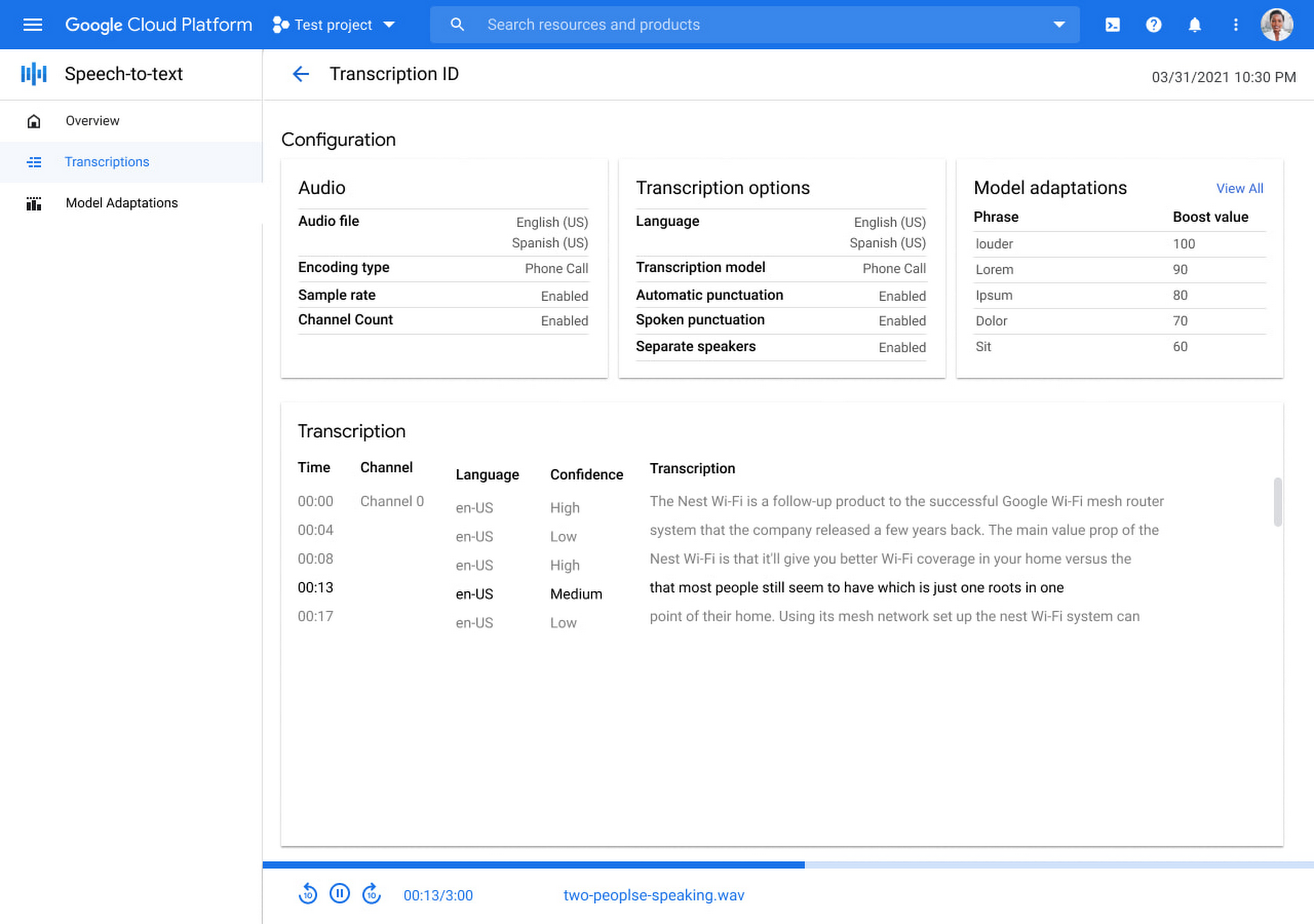
Model Adaptation allows developers to customize STT specifically for their domains or use cases. Developers can maintain lists of words and weights that will be applied to either every request or just single requests, depending on their needs. Model adaptations are reusable and composable, so once developers have seen good results in the STT Cloud Console, they can deploy to their entire solution.
The Speech-to-Text Cloud Console and Model Adaptation API is available now in all Google Cloud regions and languages and is accessible to all GCP users with no additional cost to that of the underlying API usage. The STT API supports over 70 languages in 120 different local variants. If you’re a developer looking for an easy to use, easy to integrate, and high-quality STT experience, sign up for our free trial and try our new interface on your own datasets today!

Upgrade Your Contact Center with Knowlarity’s AI-powered Speech Analytics for Higher CX
DOWNLOAD E-BOOK6201
Of your peers have already downloaded this article
7:00 Minutes
The most insightful time you'll spend today!
Did you know, everyday about 56 million hours worth of phone conversations, equalling to 420 billion spoken words are handled by contact centers? Knowlarity, a renowned cloud business communication service provider with nearly 6,000 customers and over a million virtual users, leverages AI-powered speech analytics that offer insights to gauge customer preferences and emotions, campaign performance, agent’s effectiveness and much more. Knowlarity’s programmatic speech analytics platform is built with Google Cloud to optimize contact center performance by transcribing and analyzing millions of calls to impact savings, operations, CX, customer loyalty and retention, and revenue generation.
Download the e-Book to learn more about Knowlarity’s speech analytics for your business’ contact centers and elevate your agents’ performance by leveraging ML, natural language processing (NLP) and AI capabilities.
Master AI Prompt Engineering with 6 Proven Tips

1035
Of your peers have already read this article.
2:30 Minutes
The most insightful time you'll spend today!
As AI-powered tools become increasingly prevalent, prompt engineering is becoming a skill that developers need to master. Large language models (LLMs) and other generative foundation models require contextual, specific, and tailored natural language instructions to generate the desired output. This means that developers need to write prompts that are clear, concise, and informative.
In this blog, we will explore six best practices that will make you a more efficient prompt engineer. By following our advice, you can begin creating more personalized, accurate, and contextually aware applications. So let’s get started!
Tip #1: Know the model’s strengths and weaknesses
As AI models evolve and become more complex, it is essential for developers to comprehend their capabilities and limitations. Understanding these strengths and weaknesses can help you, as a developer, avoid making mistakes and create safer, more reliable applications.
For example, an AI model that is trained to recognize images of blueberries may not be able to recognize images of strawberries. Why? Because the model was only trained on a dataset of blueberry images. If a developer uses this model to build an application that is supposed to recognize both blueberries and strawberries, the application would likely make mistakes, leading to an ineffective outcome, and poor user experience.
It’s important to note that AI models have the ability to be biased. This is due to AI models being trained on data that is collected from the real world, and so it can reflect the inequitable power dynamics inherently rooted in our social hierarchy. If the data that is used to train an AI model is biased, then the model will also be biased. This can lead to problems if the model is used to make decisions that affect people by reinforcing societal biases. Addressing these biases is important to ensure that data is fair, promoting equality, and ensuring the responsibility of AI technology. Prompt engineers should be aware of training limitations or biases so they can craft prompts more effectively and understand what kind of prompting is even possible for a given model.
Tip #2: Be as specific as possible
AI models have the ability to comprehend a variety of prompts. For instance Google’s PaLM 2 can understand natural language prompts, multilingual text, and even programming codes like Python and JavaScript. Although AI models can be very knowledgeable, they are still imperfect, and have the ability to misinterpret prompts that are not specific enough. In order for AI models to navigate ambiguity, it is important to tailor your prompts specifically to your desired outcome.
Let’s say you would like your AI model to generate a recipe for 50 vegan blueberry muffins. If you prompt the model with “what is a recipe for blueberry muffins?”, the model does not know that you need to make 50 muffins. It is thus unlikely to list the larger volume of ingredients you’ll need or include tips to help you more efficiently bake such a large number of muffins. The model can only go off the context that is provided. A more effective prompt would be “I am hosting 50 guests. Generate a recipe for 50 blueberry muffins.” The model is more likely to generate a response that is relevant to your request and meets your specific requirements.
Tip #3: Utilize contextual prompts
Utilize contextual information in your prompts to help the model gain an in-depth understanding of your requests. Contextual prompts can include the specific task you want the model to perform, a replica of the output you’re looking for, or a persona to emulate, from a marketer or engineer to a high school teacher. Defining a tone and perspective for an AI model gives it a blueprint of the tone, style, and focused expertise you’re looking for to improve the quality, relevance, and effectiveness of your output.
In the case of the blueberry muffins, it is important to prompt the model using the context of the situation. The model might need more context than generating a recipe for 50 people. If it needs to be aware that the recipe must be vegan friendly, you might prompt the model by asking it to answer by emulating a skilled vegan chef.
By providing contextual prompts, you can help ensure that your AI interactions are as seamless and efficient as possible. The model will be able to more quickly understand your request and it will be able to generate more accurate and relevant responses.
Tip #4: Provide AI models with examples
When creating prompts for AI models, it is helpful to provide examples. This is because prompts act as instructions for the model, and examples can help the model to understand what you are asking for. Providing a prompt with an example looks something like this: “here are several recipes I like – create a new recipe based on the ones I provided.” The model can now understand the your ability and needs in order to make this pastry,
Tip #5: Experiment with prompts and personas
The way you construct your prompt impacts the model’s output. By creatively exploring different requests, you will soon have an understanding of how the model weighs its answers, and what happens when you interfuse your domain knowledge, expertise, and lived experience with the power of a multi-billion parameter large language model.
Try experimenting with different keywords, sentence structures, and prompt lengths to discover the perfect formula. Allow yourself to step into the shoes of various personas, from work personas such as “product engineer” or “customer service representatives,” to parental figures or celebrities such as your grandmother, a celebrity chef, and explore everything from cooking to coding!
By crafting unique, and innovative, requests replete with your expertise and experience, you can learn which prompts provide you with your ideal output. Further refining your prompts, known as ‘tuning,’ allows the model to have a greater understanding and framework for your next output.
Tip #6: Try chain-of-thought prompting
Chain of thought prompting is a technique for improving the reasoning capabilities of large language models (LLMs). It works by breaking down a complex problem into smaller steps, and then prompting the LLM to provide intermediate reasoning for each step. This helps the LLM to understand the problem more deeply, and to generate more accurate and informative answers. This will help you to understand the answer better and to make sure that the LLM is actually understanding the problem.
Conclusion
Prompt engineering is a skill that all workers, across industries and organizations, will need as AI-powered tools are becoming more prevalent. Remember to incorporate these five essential tips the next time you communicate with an AI model, so you can generate the accurate outputs that you desire. AI will forever continue to develop, constantly refining itself as we use it, so I encourage you to remember that learning, for mind and machine, is a never ending journey. Happy Prompting!
1 Developer. 5 Months. A Revenue Generating App With 100K Users With Firebase

7861
Of your peers have already read this article.
5:30 Minutes
The most insightful time you'll spend today!
This is a guest post authored by Firebase customer, Anton Ivanov, Founder & CEO of DealCheck
Real estate investing is a fantastic way to build a stream of passive income and grow your wealth. Numerous studies have pointed out that real estate investing has created more millionaires throughout history than any other form of investing (like this one and this one). So why don’t more people do it?
I asked myself this very question a few years ago after talking to a group of friends about the success I’ve had with real estate, and listening to their reasons why they think it’s out of their reach.
A common theme among them was that they viewed it as something too difficult to learn and master. There were too many steps, the learning curve was steep and there was a lot of room for mistakes for somebody just starting out, especially when analyzing the financial performance of potential investment properties.
Traditionally, most investors used spreadsheets to do the math – which works only if you know what and how you’re calculating something. But if you don’t know that, it’s very easy to make mistakes and overlook things. And no one wants to make mathematical errors before a huge purchase like an investment property.

Where do I even begin?!
And that’s when I had the idea to build DealCheck – a cloud-based, easy-to-use property analysis tool for real estate investors and agents. I wanted to create a platform that would help new investors learn the ropes and avoid costly mistakes, but at the same time provide the flexibility to perform more advanced analysis with a click of a button.
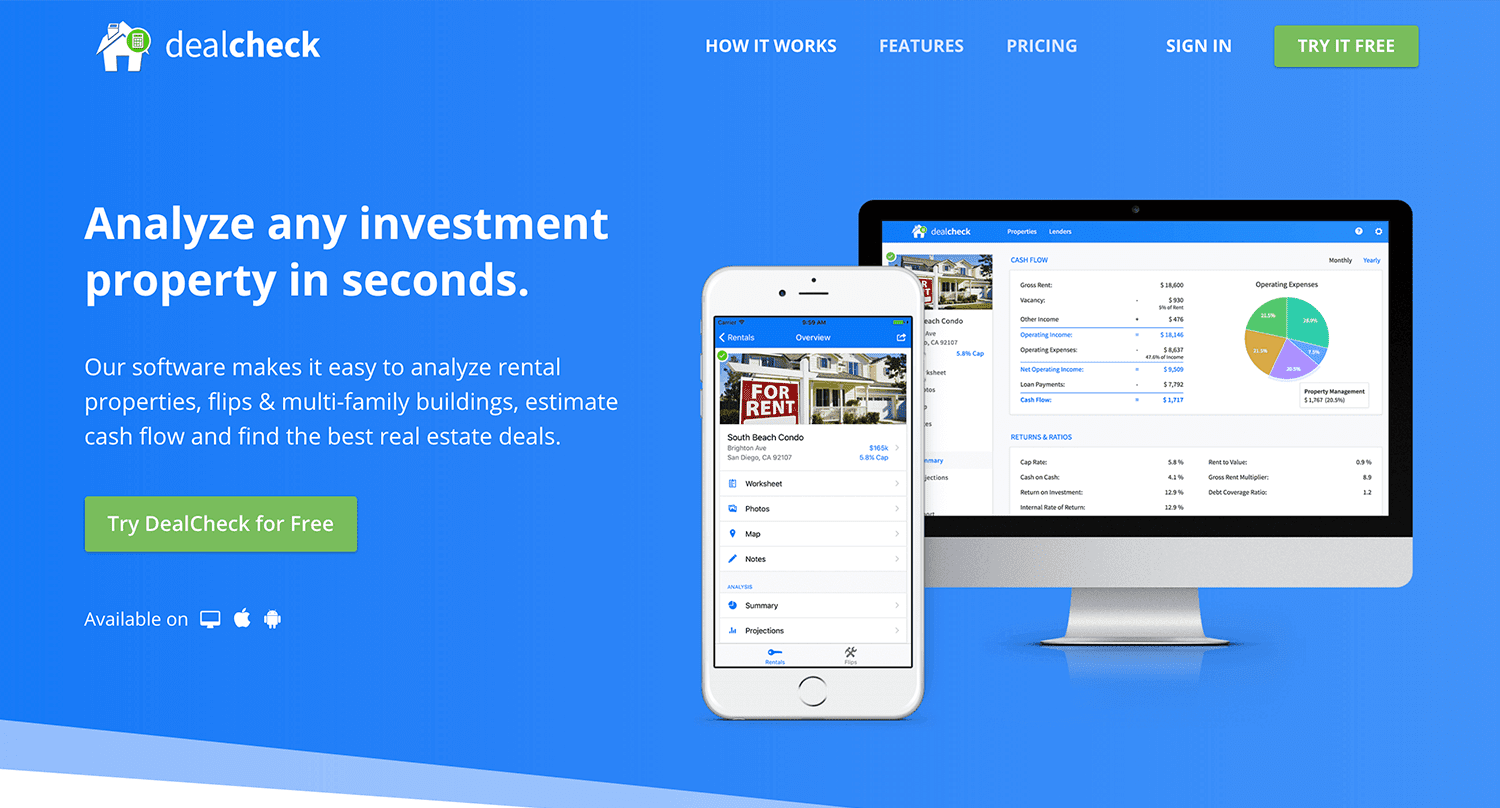
Making real estate investing easier and more accessible.
The Challenges of Solo Development
I was working as a front-end engineer at the time, so I knew I could build the UI myself, but what about the back-end, data storage, authentication, and a bunch of other things you need for a full-functioning cloud app?
I didn’t know anybody I could bring on as a co-founder, so I set out to research what technologies and platforms I could leverage to help me with the back-end and server infrastructure.
Firebase kept popping up again and again and I began to look at it in more detail. It was then recently acquired by Google and its collection of BaaS (backend-as-a-service) modules seemed to offer the exact solution I needed to build DealCheck.
I was especially impressed with the documentation for each feature and how well all of the different technologies could be tied together to create one unified platform.
It wasn’t long before I signed up and started building the first MVP of the app.
Using Firebase to Quickly Build a Scalable Backend
As the only developer on the project, I had limited time and resources to spend on building the back-end, so I set out to use every Firebase feature that was available at the time to my advantage.
My goal was actually to write as little server-side code as possible and instead focus on leveraging the different Firebase modules to solve three specific challenges:
Challenge #1 – Authentication and User Management
The first one was authentication and user management. DealCheck’s users needed the ability to create their accounts so they can view and analyze properties on any device (more on that later). I wanted to have the ability to sign in with email, Facebook or a Google account.
Firebase Authentication was designed specifically for this purpose and I used it to handle pretty much the entire authentication flow. Out-of-the-box, it has support for all the major social networks, cross-network credential linking and the basic account management operations like email changes, password resets and account deletions.
There was no server-side code required at all – I just needed to build the UI on the front-end.
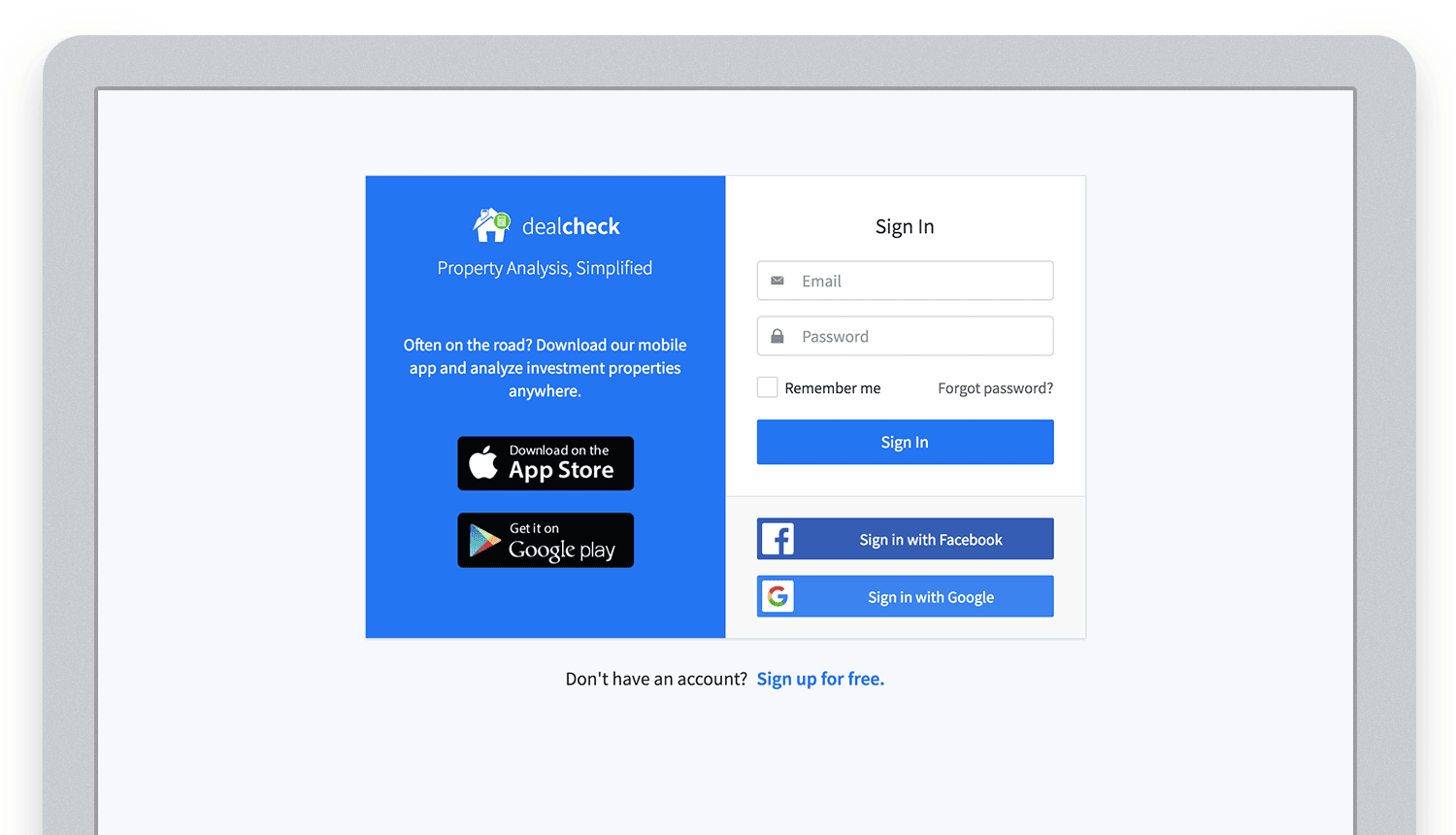
Email, Facebook and Google sign in powered by Firebase.
And as an added benefit, Firebase Authentication ties directly into the Realtime Database product to create a declarative permissions and access control framework that’s easy to implement and maintain. This helped me make sure user data was protected from unauthorized access, but also facilitate data sharing among users.
Challenge #2 – Cloud Storage with Cross-Device Sync
Next up was data storage. I knew that I wanted DealCheck’s users to be able to use the app and analyze properties online, on iOS and Android. So I needed a real-time, cloud-based database solution that could sync data across any device.
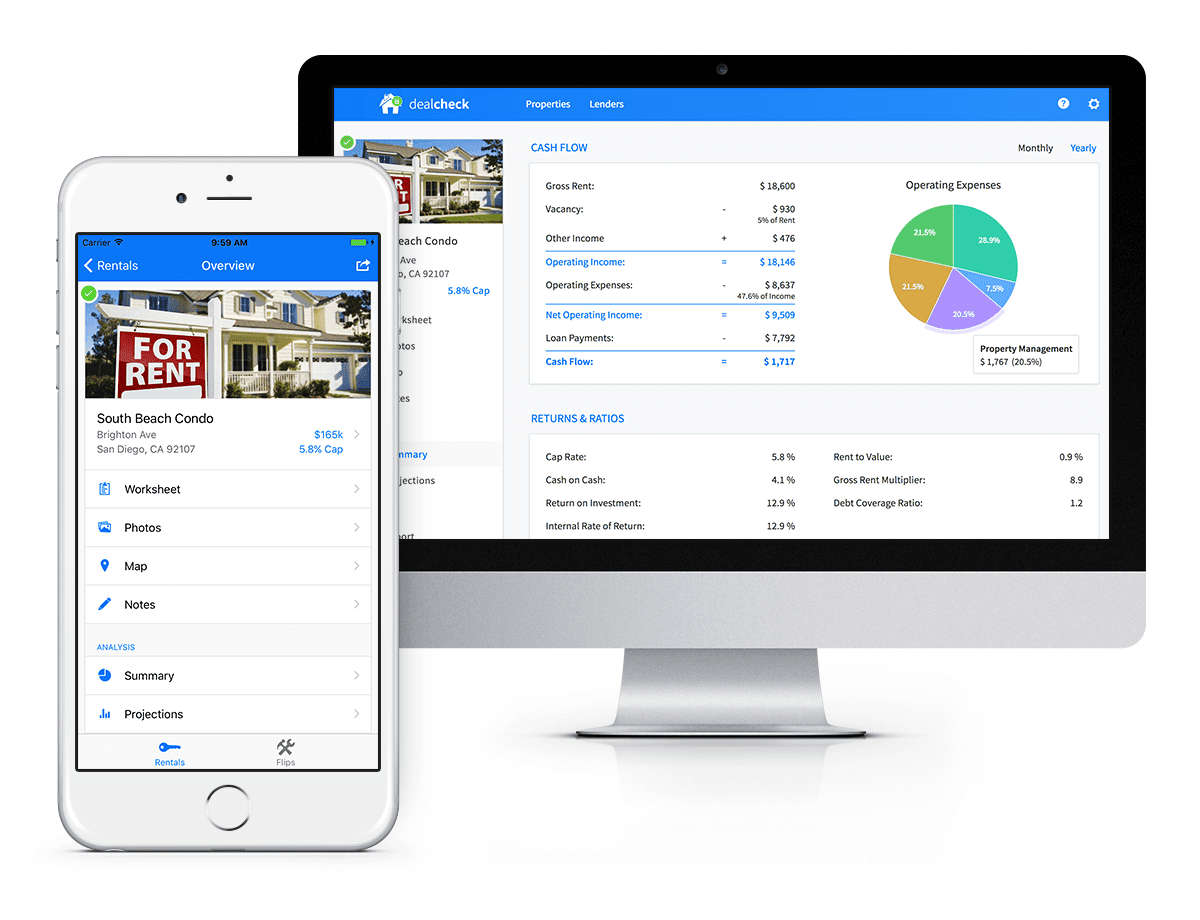
Syncing data across web and mobile is not easy!
Firebase Realtime Database is a NoSQL, JSON-based database solution that was designed exactly for this purpose, and I was actually surprised how great it worked. I used the official AngularJS bindings for Firebase on the front-end to read and write to it directly from the client.
I had to do some extra work on mobile to implement an offline mode with syncing after reconnections, but all-together the code required to make everything work was minimal.
As I mentioned, Firebase Authentication tied directly to the database to facilitate access control, so I really didn’t need to do anything extra there. And I was able to set up automatic daily backups of all the data with a click of a button.
Challenge #3 – Third-Party Integrations
Up to now, I had written exactly 0 lines of server-side code and everything was handled by the client directly. As DealCheck’s development progressed, however, I knew that I would need a server to handle some operations that could not be done in the client.
I wasn’t very experienced with server maintenance and DevOps, but fortunately the Firebase Cloud Functions product was able to solve all of my needs. Cloud Functions are essentially single-purpose functions that can be triggered (or executed) based on a specific HTTP request or events coming from the Authentication, Realtime Database or other Firebase products.
Each function can be run once based on a specific event trigger to perform its prescribed task. You don’t have to worry about provisioning a server instance or managing load – everything is done automatically for you by Firebase.
What’s even cooler, is that Cloud Functions can access the Realtime Database and Cloud Storage buckets of the same project, performing operations on them server-side, as needed.
This is how DealCheck processes subscription payments through Stripe, validates Apple and Google Play mobile subscription receipts, integrates with third-party APIs and updates database records without user interaction.
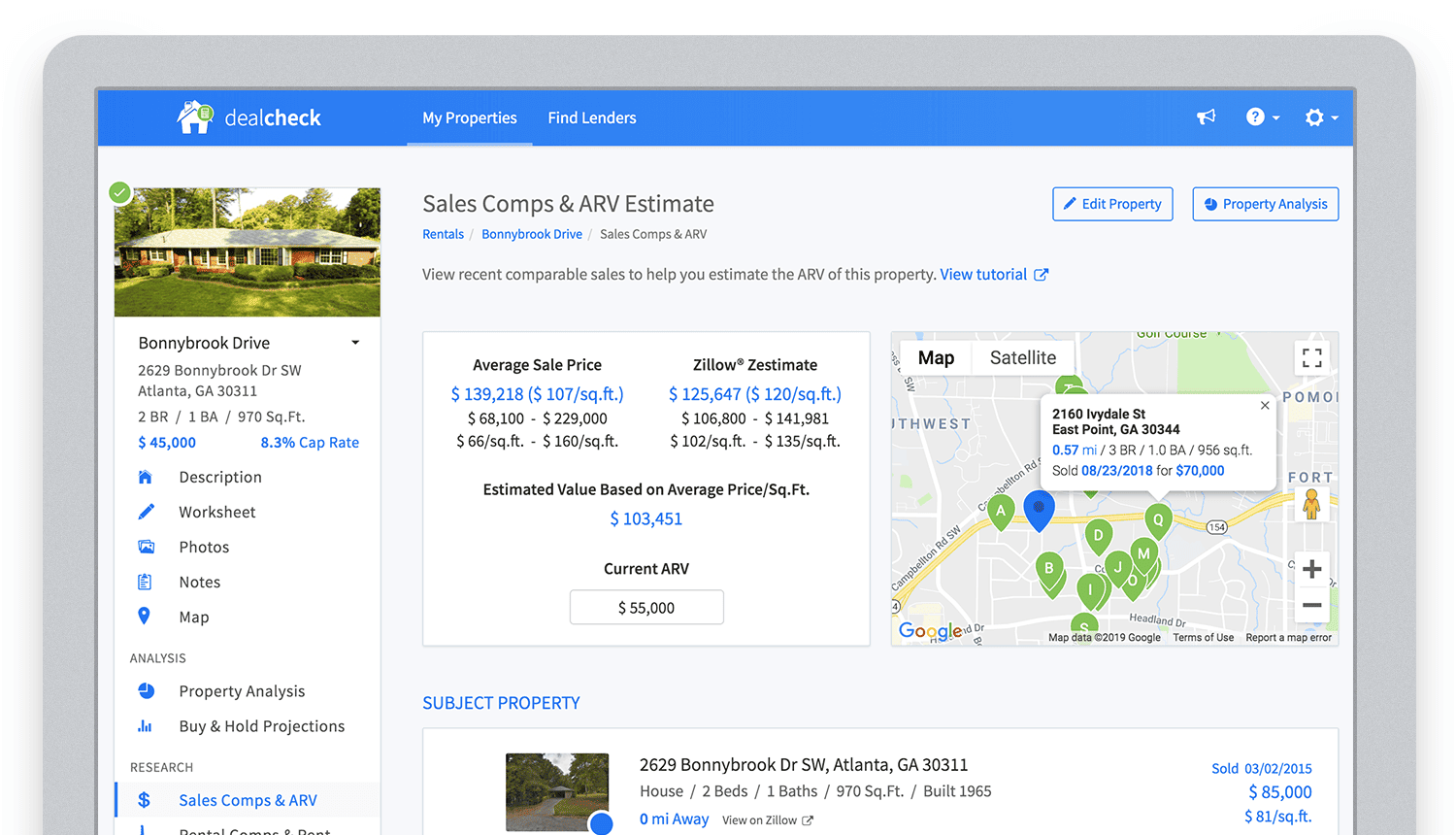
Bringing in sales comparable data from third-party providers into DealCheck.
Cloud Functions became the “glue” that tied the entire back-end infrastructure together.
Growing from an MVP to 100,000 Users with Firebase
The first version of the DealCheck app was built and launched in less than 5 months with just me on the development team. I definitely don’t think that would have been possible without Firebase powering the back-end infrastructure. Maybe the project wouldn’t have ever launched at all.
While Firebase is awesome for quick MVP development, it’s definitely designed to power production applications at scale as well. As DealCheck grew from a small side-project to one of the most popular real estate apps with over 100k users, all of the Firebase products that we use scaled to support the increasing load.
Moreover, the fantastic interoperability of all Firebase modules allows us to develop and release new features much faster because of the reduced coding requirements and ease of configuration.
So next time you’re looking to build an ambitious project with a small team – take a look at how Firebase can help you reduce development time and provide a suite of powerful tools that scale as your business grows.
This is exactly how DealCheck grew from a simple idea to make property analysis easier and faster, to an app that is helping tens of thousands of people grow their wealth and passive income through real estate investing. It’s a truly awesome and fulfilling experience to see your work positively impact so many people and it wouldn’t have been possible without Firebase.
More Relevant Stories for Your Company

Meet the 8 Sponsors of 2021 State of DevOps Reports
Google Cloud and the DORA research team are excited to announce our eight sponsors for the 2021 State of DevOps report. We recently launched the 2021 State of DevOps survey, a 25-min survey for the DevOps community to share how they are using DevOps to improve software delivery performance. So if you haven’t

Bigbasket: Delivering Groceries Across 25 Cities in India
When Bigbasket was founded in December 2011, it guaranteed to deliver goods within a one-hour delivery slot of its customers' choosing or it would refund them 10 percent of their orders. The company also introduced an express service, delivering groceries within 90 minutes of an order being placed. Bigbasket needed

Predict User Churn on Gaming Apps with Google Analytics Data using BigQuery ML
User retention can be a major challenge for mobile game developers. According to the Mobile Gaming Industry Analysis in 2019, most mobile games only see a 25% retention rate for users after the first day. To retain a larger percentage of users after their first use of an app, developers can

Google Cloud Helps LiveRamp Capture, Manage, Process and Visualize Data at Scale
Editor’s note: Today we’re hearing from Sagar Batchu, Director of Engineering at LiveRamp. He shares how Google Cloud helped LiveRamp modernize its data analytics infrastructure to simplify its operations, lower support and infrastructure costs and enable its customers to connect, control, and activate customer data safely and securely. LiveRamp is a data
