





Creation of Go applications on Google Cloud Made Easy

904
Of your peers have already read this article.
2:30 Minutes
The most insightful time you'll spend today!
Go is the world’s leading programming language for cloud-based development, used by millions of developers to build and scale their cloud applications and business-critical cloud infrastructure. Whether it’s building CLIs, web applications, or cloud and network services, developers find Go easy to learn, easy to maintain, and packed with useful features such as built in concurrency and a robust standard library.
And now, getting started with Go on Google Cloud is a little bit easier. Following Go’s recent announcement of gonew, an experimental tool for instantiating new projects in Go from predefined templates, Google Cloud is releasing four templates for gonew that developers can use to bootstrap their Go applications across several Google Cloud products. This includes common use cases such as creating a simple HTTP handler Cloud Function, subscribing to a Cloud Pub/Sub topic, or creating an HTTP Server on Cloud Run.
Google Cloud Go templates
- httpfn: A basic HTTP handler (Cloud Function)
- pubsubfn: A function that is subscribed to a PubSub topic handling a Cloud Event (Cloud Function)
- microservice: An HTTP server that can can be deployed to a serverless runtime (Cloud Run)
- taskhandler: An basic app that handles tasks from requests (App Engine)
Let’s get started
- Make sure you have Go installed on your machine, if not you need to download/install from here .
- Start by installing gonew using go install:
$ go install golang.org/x/tools/cmd/gonew@latest
To generate a basic HTTP Handler Cloud Function, instantiate the existing httpfn template by running gonew in your new project’s parent directory. As of now, gonew’s syntax expects two arguments: first, the path to the template you wish to invoke, and second, the module name of the project you are creating. For example:$ gonew github.com/GoogleCloudPlatform/go-templates/functions/httpfn yourdomain.com/httpfn - Deploy this new go module to Cloud Functions by following the steps listed here, you can also try this in the Cloud Shell editor.
What’s next?
We have big plans for Go on Google Cloud, with several new enhancements on our roadmap. In the meantime, please try out these new templates, deploy them to Google Cloud using the instructions provided and let us know how we can make them better. Please use this to report any issues.
Your Guide to Kubernetes Best Practices

3429
Of your peers have already read this article.
2:30 Minutes
The most insightful time you'll spend today!
Kubernetes made a splash when it brought containerized app management to the world a few years back. Now, many of us are using it in production to deploy and manage apps at scale. Along the way, we’ve gathered tips and best practices on using Kubernetes and Google Kubernetes Engine (GKE) to your best advantage. Here are some of the most popular posts on our site about deploying and using Kubernetes.
- Use Kubernetes Namespaces for easier resource management. Simple tasks get more complicated as you build services on Kubernetes. Using Namespaces, a sort of virtual cluster, can help with organization, security, and performance. This post shares tips on which Namespaces to use (and not to use), how to set them up, view them, and create resources within a Namespace. You’ll also see how to manage Namespaces easily and let them communicate.
- Use readiness and liveness probes for health checks. Managing large, distributed systems can be complicated, especially when something goes wrong. Kubernetes health checks are an easy way to make sure app instances are working. Creating custom health checks lets you tailor them to your environment. This blog post walks you through how and when to use readiness and liveness probes.
- Keep control of your deployment with requests and limits. There’s a lot to love about the scalability of Kubernetes. However, you do still have to keep an eye on resources to make sure containers have enough to actually run. It’s easy for teams to spin up more replicas than they need or make a configuration change that affects CPU and memory. Learn more in this post about using requests and limits to stay firmly in charge of your Kubernetes resources.
- Discover services running outside the cluster. There are probably services living outside your Kubernetes cluster that you’ll want to access regularly. And there are a few different ways to connect to these services, like external service endpoints or ConfigMaps. Those have some downsides, though, so in this blog post you’ll learn how best to use the built-in service discovery mechanisms for external services, just like you do for internal services.
- Decide whether to run databases on Kubernetes. Speaking of external services: there are a lot of considerations when you’re thinking about running databases on Kubernetes. It can make life easier to use the same tools for databases and apps, and get the same benefits of repeatability and rapid spin-up. This post explains which databases are best run on Kubernetes, and how to get started when you decide to deploy.
- Understand Kubernetes termination practices. All good things have to come to an end, even Kubernetes containers. The key to Kubernetes terminations, though, is that your application can handle them gracefully. This post walks through the steps of Kubernetes terminations and what you need to know to avoid any excessive downtime.
For even more on using GKE, check out our latest Containers and Kubernetes blog posts.
Are You Providing Sufficient Digital Leadership?

4984
Of your peers have already read this article.
5:00 Minutes
The most insightful time you'll spend today!
It has been seven years since Marc Andreesen’s famous article “Why Software is Eating the World” was published in the Wall Street Journal, and given the slow pace of change in many companies, some executives still may not be taking the threat of being “eaten” seriously enough.
Software, and platform business models based on software, have the potential to deliver powerful economic forces into virtually any company or industry. Every company has valuable assets—such as data, expertise or access to certain services or user bases—and most of these assets can be delivered via software. Once an asset is expressed as software in a modern way—that is, as an application programming interface (API)—it can be combined with other software to create new applications and digital experiences.
Benefits of this approach, just to name a few, include near-zero marginal cost to scale up APIs for new users or use cases; global reach for both partners using APIs and end users consuming the digital experiences those APIs power; and network effects triggered as more partners use a given company’s digital assets and spread its services into new markets and use cases.
Disruption by software-powered business models
In the last two decades we’ve seen individual companies and entire industries upended by these kinds of software-powered business models. Examples abound: Amazon and the retail industry, Netflix and movie rentals, Uber and ride hailing, Airbnb and hotels, etc. We’ve reached the point that these companies’ names have become verbs synonymous with being “eaten” by software (e.g., “Amazoned” or “Netflixed”).
The most famous examples of digital disruption involve digital natives, of course, but legacy businesses are leveraging software to evolve too. Brazilian retailer Magazine Luiza—a company I’ve worked with through my employer, Google Cloud’s Apigee team—has enjoyed enormous revenue growth and seen its stock soar, for example, as it has built out its digital platform capabilities and transitioned from a primarily brick-and-mortar model to an omnichannel one. The point is, whether a company has been in business five decades, five years or five months, software remains ravenous and is always looking for new companies and industries to “eat.”
Change in the face of serious threats
Facing this threat, how should corporate leadership respond? There are some excellent examples of CEOs who have galvanized their companies and led them through the massive, gut-wrenching change required to pivot in the face of a serious threat. A few of the biggest examples include:
- In 1995, it became apparent to Microsoft co-founder and then-CEO Bill Gates that the internet was “the most important single development to come along since the IBM PC,” and, if not embraced in haste, a threat to many of Microsoft’s businesses. In May of that year he published the “The Internet Tidal Wave” memo and focused all of Microsoft on adopting and building for the internet. Almost 20 years later, current Microsoft CEO Satya Nadella similarly made the bold decision to redirect the company for a cloud-first world.
- Facebook went public at $38 per share in May of 2012 but within months, stocks could be had for a little over half that. The concern? Facebook was a desktop-optimized website without a polished mobile presence, and by 2012, consumer attention had begun to accelerate towards mobile at a much higher rate than many initially predicted. Facebook CEO Mark Zuckerberg reacted by not only proclaiming Facebook a mobile-first company, but also backing up that proclamation with action.
- Turning to another company I’ve worked with via Apigee, T-Mobile launched its highly visible “Uncarrier” campaign—which offers streamlined, customer-friendly plans and services—while also investing in and executing a new IT vision dedicated to ongoing digital transformation. T-Mobile execs have credited the technology effort, spearheaded by CEO John Legere, with helping the company to introduce new services and better service customers. T-Mobile’s market cap has more than doubled since Legere took over in 2012.
Keeping pace with changing customer needs
In the face of an existential threat, strong executive leadership is required to pivot the company to safety, as these examples attest. Digital transformationisn’t about deploying new technologies just to make an existing approach more efficient or to add a few new apps or features to the status quo; digital transformation is about keeping pace with changing customer needs by leveraging software platforms to continuously evolve how the business operates. This can be akin to turning an enormous ship—and a ship can’t turn very well without her captain, first mate, and other leaders showing the way.
Research supports this. A recent Deloitte survey, for example, found that over “80 percent of respondents from digitally maturing organizations say their leaders have sufficient knowledge and ability to lead the company’s digital strategy,” compared to only “22 percent of early-stage business respondents [who] have the same belief.” Similarly, Gartner research finds that CEOs are seeking a “deeper understanding of digital business” as they shift their focus from growth in general to how technology helps them attain it.
More recently, the onslaught of software devouring the world has been further accelerated by machine learning making everything smarter, voice interfaces changing how people interact with devices, and more. To keep pace, corporate leaders need to galvanize their companies to build and deploy software faster, make systems and data easily accessible inside and outside their companies, and improve digital experiences through not only machine learning but also constant data-driven iteration.
Seven years after Andreesen’s editorial, the pace of digital disruption is still increasing, and so is the need for strong leadership to pivot fully into digital. Over half of the Fortune 500 has been acquired, merged or declared bankruptcy since 2000—and the companies that survive in coming years won’t be those whose leaders treat technology as an IT concern rather than a core part of the business.
3232
Of your peers have already watched this video.
2:00 Minutes
The most insightful time you'll spend today!
Simplified Document Processing with AppSheet Automation
Move over legacy, time-consuming systems and processes to update data from documents and invoices into disparate data systems. AppSheet integrates no-code development with Google Cloud’s state-of-the-art Document AI to automate the data extraction and validation from invoices, documents, receipts, etc.
You can end all ‘guesstimates’ and rely on the accuracy of the intelligent document processing feature, and set custom triggers for automation events or the way data is displayed from its unstructured source. Watch the video to understand how your business can save time and resources with automation and seamlessly manage high-volume, unstructured data.
Optimizing Cloud Load Balancing in Hybrid and Multicloud Architectures

2770
Of your peers have already read this article.
3:30 Minutes
The most insightful time you'll spend today!
Today’s enterprise applications are often assembled across distributed environments. This includes the integration of services across multi-cloud, multi-SaaS and on-premises environments. While the approach has the advantage of enabling enterprises to choose the best service available to support their applications, it adds the complexity of delivering services across heterogeneous environments. To solve this, Cloud Load Balancing supports an open cloud strategy, which includes:
- Supporting universal traffic management policies across heterogeneous environment by leveraging open source and open standards
- Enabling a global front-end so applications can leverage a common set of policies and security postures
- Providing tools that give your users the highest possible performance and reliability
Universal traffic management with open source and open standards
Kubernetes is a great solution for managing containers across environments. We believe that traffic management policies should also be supported across environments. Cloud Load Balancing creates homogeneous traffic policies across highly distributed heterogeneous environments by supporting standard-based traffic management in a fully managed solution, and allowing open source Envoy Proxy sidecars to be used on-premises or in a multi-cloud environment, using the same traffic management as our fully managed Cloud Load Balancers.
As enterprises start modernizing services and refactor monolithic applications, they require solutions that can provide consistent traffic management across distributed systems at scale. But organizations want to invest their time and resources innovating and building new applications — not on the infrastructure and networking required to deploy and manage these services. Envoy is an open-source high-performance proxy that runs alongside the application to deliver common platform-agnostic networking capabilities, including:
- New load balancing algorithms, (e.g. round robin, ring hash, least conns)
- Weighted traffic splitting
- Fault injection
- Request mirroring
- Outlier detection
- Additional header transformation options
- Request retries
- Additional backend session affinity options
- Cross-origin resource sharing (CORS)
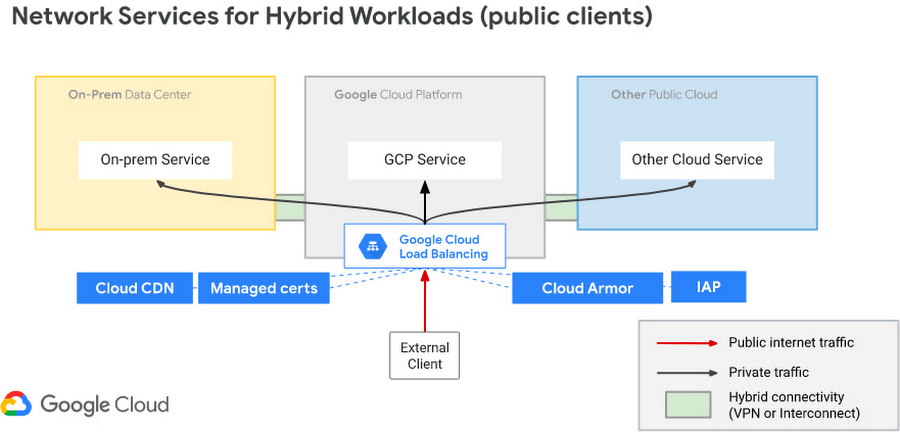
Hybrid Load Balancing across multi-cloud and private clouds
Over the years Google has deployed Load Balancers across 173+ Edge Pop locations, delivering customer applications at massive-scale on Google infrastructure. And now Google Cloud has introduced Hybrid Load Balancing, extending our Load Balancing capabilities beyond Google’s network to on-premises private clouds and multi-cloud solutions. This allows our customers to migrate applications to the cloud iteratively, or build hybrid applications that are assembled from services that are running across heterogeneous environments.
Supporting modern application delivery with HTTP3/QUIC
Cloud Load Balancing is a fully distributed load balancing solution that balances user traffic (HTTP(s), HTTPS/2, HTTPS/3 with gRPC, TCP/SSL, UDP, and QUIC) to multiple backends to avoid congestion, reduce latency, increase security, and reduce costs. It is built on the same frontend-serving infrastructure that powers Google services, supporting millions of queries per second with consistent high performance and low latency.
To serve massive amounts of traffic, Google built the first scaled-out software-defined load balancing, Maglev, which has been serving global traffic since 2008. It has sustained the rapid global growth of Google services, and it also provides network load balancing functions for Google Cloud Platform customers. To accommodate ever-increasing traffic, Maglev is specifically optimized for packet processing performance with Linux Kernel Offload. Maglev is also equipped with consistent hashing and connection tracking features, to minimize the negative impact of unforeseen faults and failures on connection-oriented protocols.
Another key enabler to support this global-scale is that our Cloud Load Balancers are built on top of QUIC(RFC9000), a protocol developed from the original Google QUIC) (gQUIC). HTTP/3 is supported between the External HTTP(S) Load Balancer, Cloud CDN, and end clients. And once enabled, customers typically see dramatic improvements in performance and throughput.

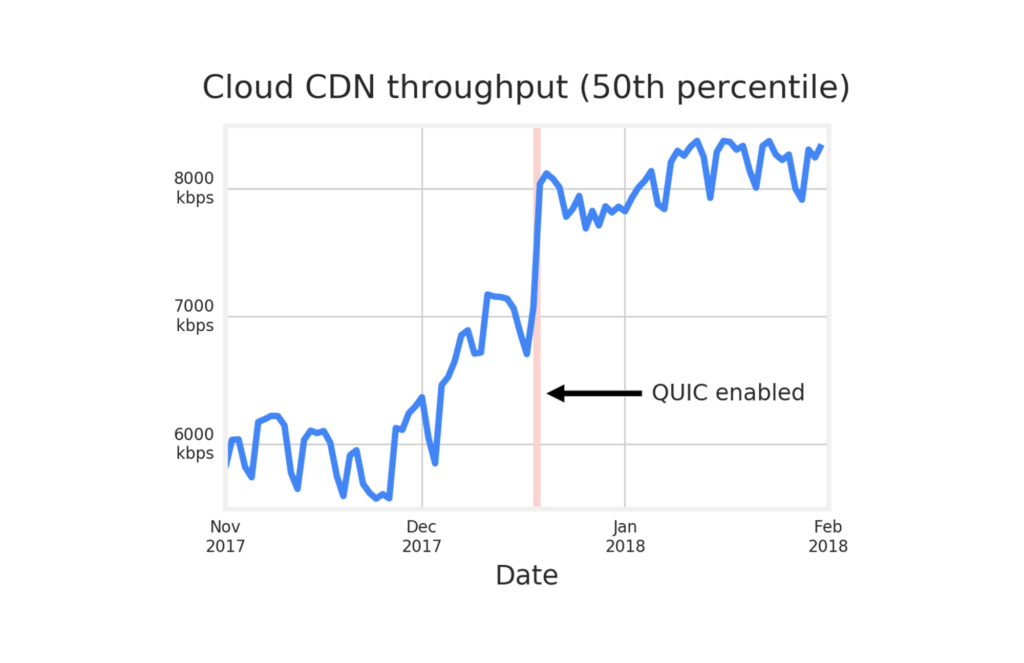
Google Cloud already supports HTTP3 in Cloud Load Balancer. To use HTTP/3 for your applications, you can enable it on your external HTTPS Load Balancers via the Google Cloud Console or the gCloud SDK with a single click.
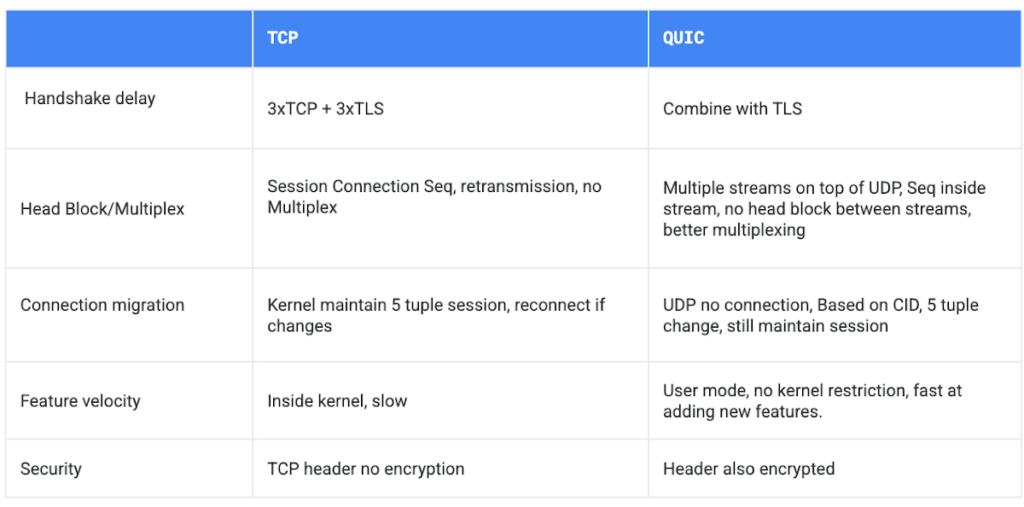
If your service is sensitive to latency, QUIC will make it faster because it establishes connections with reduced handshakes. When a web client uses TCP and TLS, it requires two to three round trips with a server to establish a secure connection before the browser can send a request. With QUIC, if a client has connected with a given server before, it can start sending data without any round trips, so your web pages will load faster.
QUIC has advantages over legacy TCP as follows.
Summary
Since 2008, Google has been an innovator in software-defined networking, supporting applications running at massive scale. Google Cloud Load Balancers support HTTP3 and QUIC as a next generation web transport protocol, which significantly improves customer traffic latency. Google Load Balancers also have incorporated the Envoy proxy as a foundational technology, providing our customers with advanced traffic management that’s compatible with the open source Envoy ecosystem. This allows our users to have the choice to combine Google’s fully-managed Cloud Load Balancers with open source Envoy Proxies, to enable consistent traffic management capabilities across a multi-cloud distributed environment. And with Hybrid Load Balancing, customers can leverage our 173+ world wide PoPs to seamlessly manage traffic across Google Cloud, on-premises and other cloud providers.
Google Cloud Load Balancers include all these capabilities natively. And when used together, they support globally-scaled applications that run seamlessly across the heterogeneous environments many enterprises deploy today.
Scaling with Breaking News: BBC’s Serverless Infrastructure on Google Cloud

1281
Of your peers have already read this article.
3:30 Minutes
The most insightful time you'll spend today!
Editors note: Today’s post is from Neil Craig at the British Broadcasting Corporation (BBC), the national broadcaster of the United Kingdom. Neil is part of the BBC’s Digital Distribution team which is responsible for building the services such as the public-facing www bbc.co.uk and .com websites and ensuring they are able to scale and operate reliably.
The BBC’s public-facing websites inform, educate, and entertain over 498 million adults per week across the world. Because breaking news is so unpredictable, we need a core content delivery platform that can easily scale in response to surges in traffic, which can be quite unpredictable.
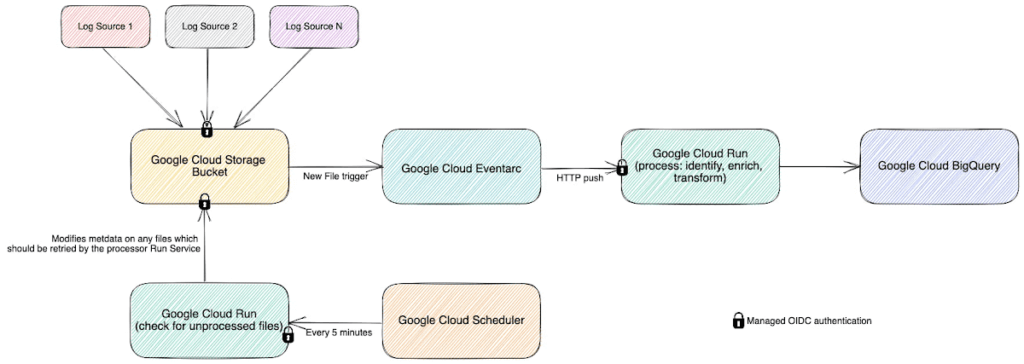
To this end, we recently rebuilt our log-processing infrastructure on a Google Cloud serverless platform. We’ve found that the new system, based on Cloud Storage, Eventarc, Cloud Run and BigQuery, enables us to provide a reliable and stable service without us having to worry about scaling up during busy times. We’re also able to save license fee payers money by operating the service more cost effectively than our previous architecture. Not having to manually manage the scale of major components of the stack has freed up our time, allowing us to spend it on using, rather than creating the data.
A log in time
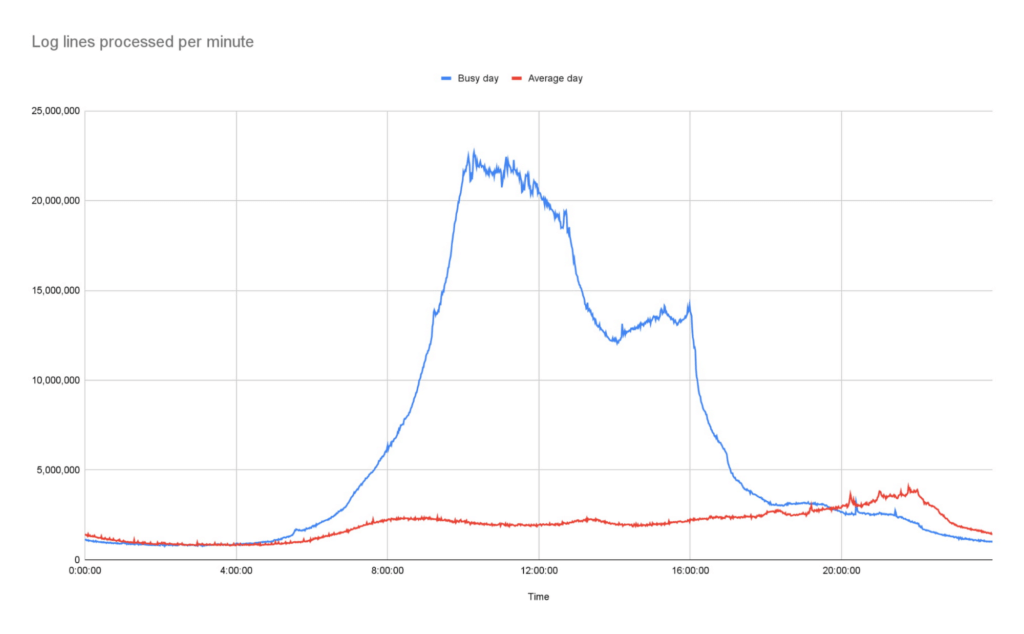
To operate the site and ensure our services run smoothly we continually monitor Traffic Manager and CDN access logs. Our websites generate more than 3B log lines per day, and handle large data bursts during major news events; on a busy day our system supports over 26B log lines in a single day.
As initially designed, we stored log data in a Cloud Storage bucket. But every time we needed to access that data, we had to download terabytes of logs down to a virtual machine (VM) with a large amount of attached storage, and use the ‘grep’ tool to search and analyze them. From beginning to end, this took us several hours. On heavy news days, the time lag made it difficult for the engineering team to do their jobs.
We needed a more efficient way to make this log data available, so we designed and deployed a new system that deals with logs and reacts to spikes more efficiently as they arrive, improving the timeliness of critical information significantly.
In this new system, we still leverage Cloud Storage buckets, but on arrival, each log generates an event using EventArc. That event triggers Cloud Run to validate, transform and enrich various pieces of information about the log file such as filename, prefix, and type, then processes it and outputs the processed data as a stream into BigQuery. This event-driven design allows us to process files quickly and frequently — processing a single log file typically takes less than a second. Most of the files that we feed into the system are small, fewer than 100 Megabytes, but for larger files, we automatically split those into multiple files and Cloud Run automatically creates additional parallel instances very quickly, helping the system scale almost instantly.
The nature of running a global website which provides news coverage means we see frequent, unpredictable large spikes of traffic. We learn from these and optimize our systems where necessary so we’re confident in the system’s ability to handle significant traffic. For example, around the time of the announcement of the Queen’s passing in September, we saw some huge traffic spikes. During the largest, within one minute, we went from running 150 – 200 container instances to over 1000…. and the infrastructure just worked. Because we engineered the log processing system to rely on the elasticity of a serverless architecture, we knew from the get-go that it would be able to handle this type of scaling.
Around the time of the announcement of the Queen’s passing in September, we saw some huge traffic spikes. During the largest, within one minute, we went from running 150 – 200 container instances to over 1000…. and the infrastructure just worked
Our initial concern about choosing serverless was cost. It turns out that using Cloud Run is significantly more cost-effective than running the number of VMs we would need for a system that could survive reasonable traffic spikes with a similar level of confidence.
Switching to Cloud Run also allows us to use our time more efficiently, as we no longer need to spend time managing and monitoring VM scaling or resource usage. We picked Cloud Run intentionally because we wanted a system that could scale well without manual intervention. As the digital distribution team, our job is not to do ops work on the underlying components of this system — we leave that to the specialist ops teams at Google.
Another conscious choice we made whilst rebuilding the system was to use the built-in service-to-service authentication in Google Cloud. Rather than implementing and maintaining the authentication mechanism ourselves, we add some simple configuration which instructs the client side to create and send a OIDC token for a service account we define and the server side to authenticate and authorize the client. Another example is pushing events into Cloud Run, where we can configure Cloud Run authorization to only accept events from specific EventArc triggers, so it is fully private.
Going forward, the new system has allowed us to make better use of our data safely. For example, BigQuery’s per-column permissions allow us to open up access to our logs to other engineering teams around the organization, without having to worry about sharing PII that’s restricted to approved users.
The goal of our team is to empower all teams within the BBC to get the content they want on the web when they want it, make it reliable, secure, and make sure it can scale. Google Cloud serverless products helped us to achieve these goals with relatively little effort and require significantly less management than previous generations of technology.
More Relevant Stories for Your Company

Transforming the Bank of Anthos App with Spring Cloud GCP 4.0
We’re excited to announce that Spring Cloud GCP version 4.0 is now generally available! In this post, we’ll be describing what the new major version has to offer, and demonstrating the process of using the migration guide on one of our reference architectures, Bank of Anthos. What’s new? With this release, Spring Cloud



Modernize Your Security Posture for Cloud-Native Applications with Anthos
Modern security approaches have moved beyond a traditional perimeter-based security model. As many organizations seek to adopt cloud-native architectures and are deploying applications in hybrid and multi-cloud environments they demand a more flexible and extensible approach towards security. Learn how to address security issues as early in the development and

A Winner’s Story of Optimizing IT Operations for Informed Business Decisions with Google Cloud
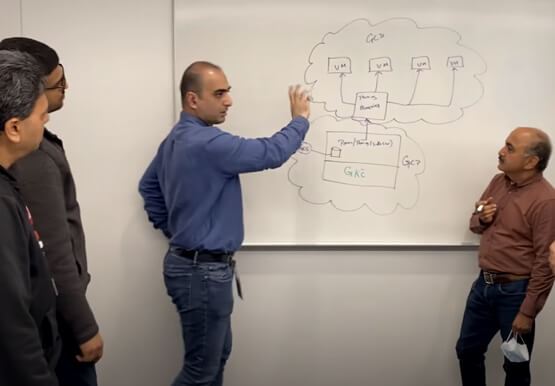
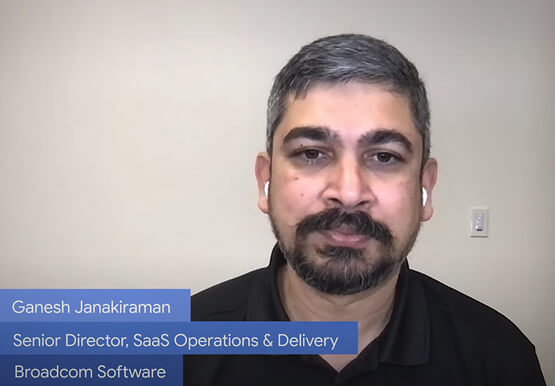
An award-winning leader in the enterprise software industry, Broadcom Software is known for modernizing, securing and optimizing the most complex and largest hybrid environments. It's broad portfolio of industry-leading, enterprise infrastructure and security software built on different tech stack and vision of tech leaders, are run on on-prem, private and

Report on API-led Digital Transformations in 2020 and the Future
In 2020, many businesses across industries turned their focus and investments towards digital strategies. APIs being an integral part of every organization's digital disruption, will grow in relevance throughout 2021. Read the report to gain more insights on driving API-led digital transformations and in-depth analysis of Google Cloud's Apigee API
