





Report on API-led Digital Transformations in 2020 and the Future

6811
Of your peers have already read this article.
1:30 Minutes
The most insightful time you'll spend today!
In 2020, many businesses across industries turned their focus and investments towards digital strategies. APIs being an integral part of every organization’s digital disruption, will grow in relevance throughout 2021. Read the report to gain more insights on driving API-led digital transformations and in-depth analysis of Google Cloud’s Apigee API Management Platform usage data, case studies and third-party surveys conducted with tech leaders.

3694
Of your peers have already downloaded this article
2:30 Minutes
The most insightful time you'll spend today!
In today’s connected digital world, people expect their various applications to work together seamlessly. The key to making this happen is APIs. A robust library of APIs allows developers to connect applications and deliver new services quickly and easily. But to get the most out of APIs, companies need an API management platform that will deliver manageability and security.
However, as the Citrix team looked to quickly expand its API library, it realized that the company needed a leading API platform. “We researched every API platform and the clear leader was Apigee Edge,” says Adam Brancato, Senior Manager of Customer Applications at Citrix. “With Apigee Edge, we expanded our API support from 10 APIs to more than 50 APIs in a year.”
As a result, Citrix now supports a wide range of APIs for both internal and external use, including email, support cases, single sign- on, licensing, accounts, assets management, contacts, Salesforce integration, order validation, and more.
Download this case study to understand how the Citrix team leveraged Apigee to save time and boost productivity.
3332
Of your peers have already watched this video.
23:30 Minutes
The most insightful time you'll spend today!
Ship Faster, Spend Less by Going Multi-Cloud with Anthos
Today’s success depends more than ever on making the most of both on-premises investments and the various cloud offerings available to you.
Learn about how Google Cloud is bringing simplified operations everywhere to help ensure success in a world of hybrid, multi cloud and edge scenarios that could otherwise threaten to fragment your deployment. Use Anthos to take an uncompromising stand on quality infrastructure everywhere for your applications.
Artifact Registry: An Extension Capabilities of Container Registry

3558
Of your peers have already read this article.
1:30 Minutes
The most insightful time you'll spend today!
Enterprise application teams need to manage more than just containers in their software supply chain. That’s why we created Artifact Registry, a fully-managed service with support for both container images and non-container artifacts.
Artifact Registry improves and extends upon the existing capabilities of Container Registry, such as customer-managed encryption keys, VPC-SC support, Pub/Sub notifications, and more, providing a foundation for major upgrades in security, scalability and control. While Container Registry is still available and will continue to be supported as a Google Enterprise API, going forward new features will only be available in Artifact Registry, and Container Registry will only receive critical security fixes.
Below, we’ll highlight the key improvements Artifact Registry provides over Container Registry, as well as the steps to start using it today.
A unified control plane for container, OS and language repositories
Artifact Registry includes more than just container images: as a developer, you can store multiple artifact formats, including OS packages for Debian and RPM, as well as language packages for popular languages like Python, Java, and Node. In addition, you can manage them all from a single, unified interface.
A more granular permission model with Cloud IAM
Artifact Registry comes with fine-grained access control via Cloud IAM. Unlike Container Registry, this allows you to control access on a per-repository basis, rather than all images stored in a project. This enables you to scope permissions as granularly as possible, for example to specific regions or environments as necessary.
Repositories in the region of your choice
Artifact Registry supports the creation of regional repositories, which allows you to put your artifacts and data directly in the location that they’ll be used, allowing for higher availability and speed. In Container Registry, you’re limited to “multi-regions”: for example, the closest multi-region for Australia is Asia. However, with Artifact Registry’s regional support, you can create a repository directly in the Sydney data center.
A pricing model that respects your region
While Artifact Registry’s pricing is still based on a combination of network egress and storage usage, support for regional repositories means that you can choose in what region to host your container repositories. Although per unit storage costs are higher for Artifact Registry, optimizing the locations of your repositories to be hosted in the same region where they are used can result in cost savings, because any network traffic within the same region is not considered egress and is thus free.
Part of a secure supply chain
Artifact Registry was designed from the ground up to integrate into our suite of secure supply chain products. This means that it can optionally use Container Analysis to scan your container images for vulnerabilities as they’re uploaded to Artifact Registry, and works directly with Binary Authorization to secure your deployments.
We’re here to help you migrate
If you already use Container Registry, you can take advantage of all the current and upcoming features of container image storage with Artifact Registry by migrating to it. To help, we’ve prepared the following guides:
- Transitioning from Container Registry provides an overview of how to use Artifact Registry instead of Container Registry in a backwards-compatible way
- Copying images from Container Registry guide you to move container images from an existing repository to an Artifact Registry repository
If you’re currently hosting your container images with a third party, you can begin using Artifact Registry directly, by following the instructions in our guide, Migrating containers from a third-party registry, which shows you how to avoid rate limits on image pulls or third-party outages which can disrupt your builds and deployments.
And if you’re just getting started storing container images, you can begin using Artifact Registry as your image repository right away. To learn how, check out Artifact Registry quickstart for Docker, a guide to using Artifact Registry as a single location for managing private packages and Docker container images.
Join our community
Our Artifact Registry communities are also great resources to help answer your questions and for guidance on best practices:
- Ask questions on Stack Overflow using the google-artifact-registry tag
- Visit the Google Cloud Slack community and ask a question in the #artifact-registry channel. If you haven’t already joined the Slack community, use this form to sign up.
Anthos Makes Hybrid and Multi-Cloud Deployments Easy

3665
Of your peers have already read this article.
1:30 Minutes
The most insightful time you'll spend today!
Most enterprises have applications in disparate locations—in their own data centers, in multiple public clouds, and at the edge. These apps run on different proprietary technology stacks, which reduces developer velocity, wastes computing resources, and hinders scalability. How can you consistently secure and operate existing apps, while developing and deploying new apps across hybrid and multicloud environments? How can you get centralized visibility and management of the resources? Well, that is why Anthos exists!
This post explores why traditional hybrid and multicloud deployments are difficult, and then shows how Anthos makes it easy to manage applications across multiple environments.
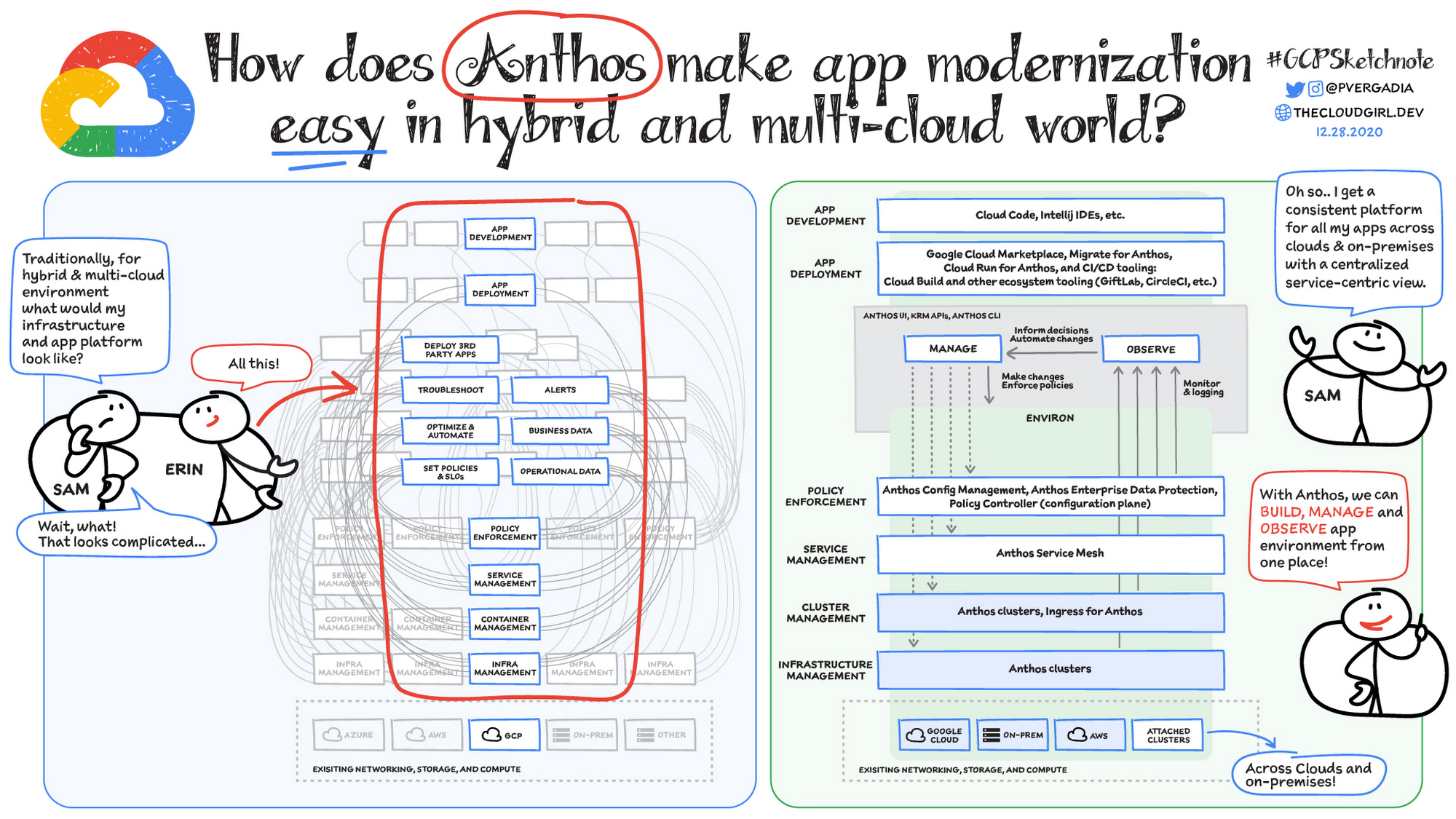
Why is traditional hybrid and multicloud difficult?
In hybrid and multicloud environments, you need to manage infrastructure. Let’s say you use containers on the clouds, and you develop apps using services on Google Cloud and AWS. Regardless of environment, you will need policy enforcement across your IT footprint. To manage your apps across the environment, you need monitoring and logging systems. You need to integrate that data into meaningful categories, like business data, operational data, and alerts.
Digging further, you might use operational data and alerts to inform optimizations, implement automations, and set policies or SLOs. You might use business data to do all those things, and to deploy third-party apps. Then, to actually enact the changes you decide to implement, you need to act on different parts of the system. That means digging into each tool for policy enforcement, securing services, orchestrating containers, and managing infrastructure. Don’t forget, all of this work is in addition to what it takes to develop and deploy your own apps.
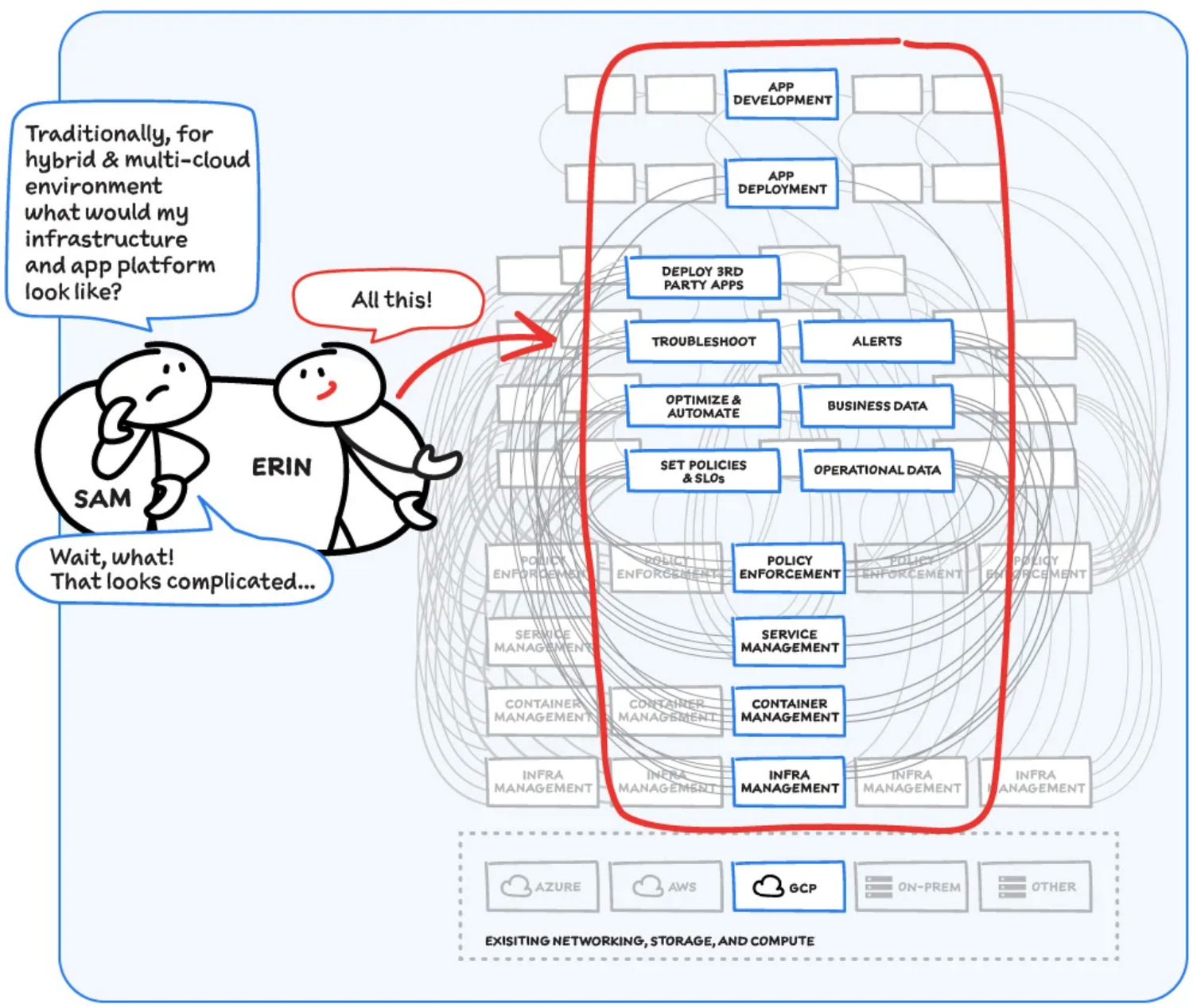
Now, consider repeating this set of tasks across a hybrid and multicloud landscape. It becomes very complex, very quickly. Your platform admins, SREs, and DevOps teams who are responsible for security and efficiency have to do manual, cluster-by-cluster management, data collection, and information synthesis. With this complexity, it’s hard to stay current, to understand business implications, and to ensure compliance (not to mention the difficulty of onboarding a new hire). Anthos helps solve these challenges!
How does Anthos make hybrid and multicloud easy?
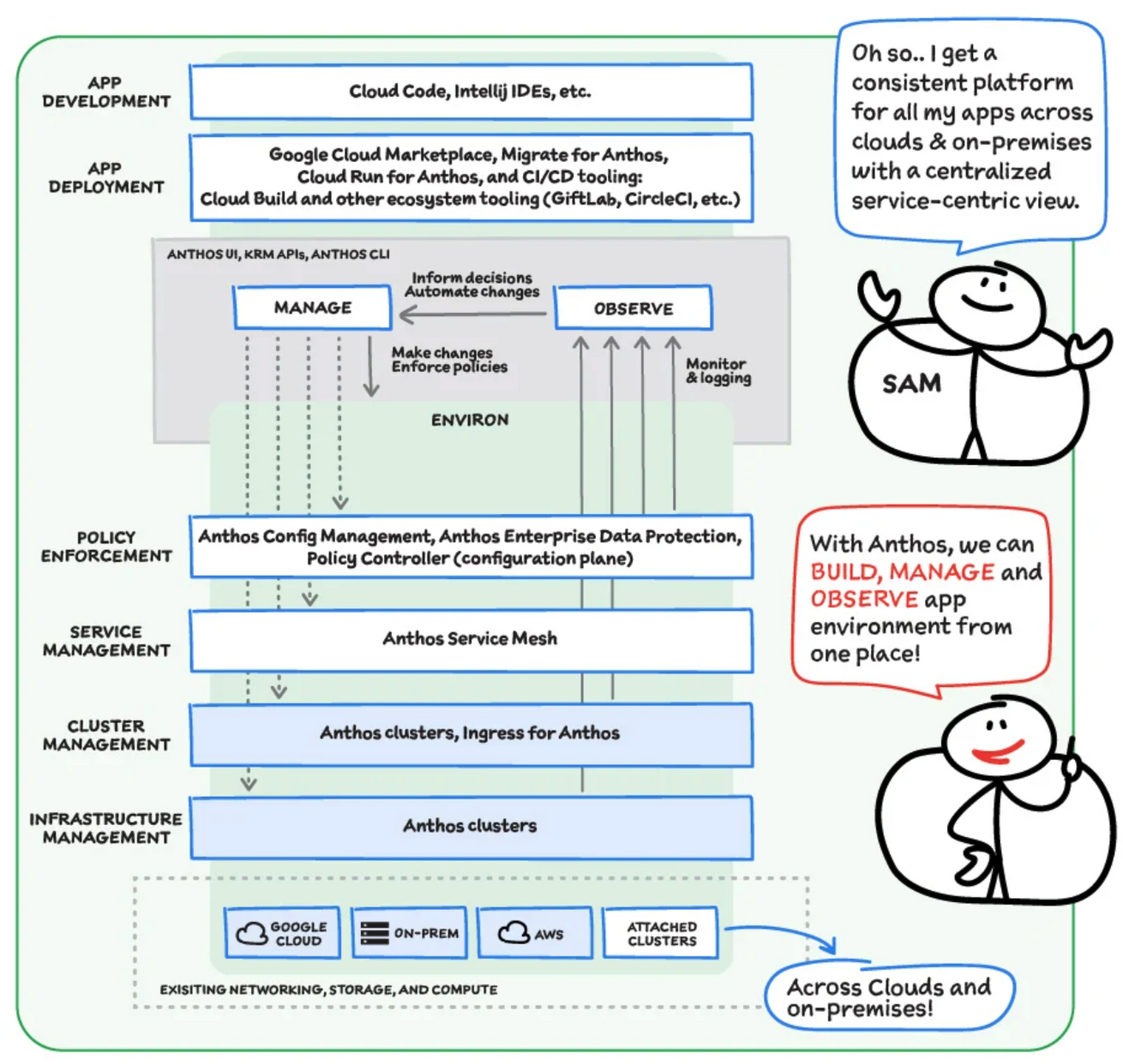
With Anthos, you get a consistent way to manage your infrastructure, with similar infrastructure management, container management, service management, and policy enforcement across your landscape.
As a result, you have observability across all your platforms in one place, including access to business information, alerts, and operations information. With this information you might decide to optimize, automate, and set policies or SLOs.
Digging deeper into Anthos
Environs
You may have different regions that need different policies, and also have different development, staging, or production environments that need different permissions. Some parts of your work may need more security. That’s where environs come in! Environs are a way to create logical sets of underlying Kubernetes clusters, regardless of which platform those clusters live on.
By considering, grouping, and managing sets of clusters as logical environs, you can think about and work with your applications at the right level of detail for what you need to do, be it acquiring business insights over the entire system, updating settings for a dev environment, or troubleshooting data for a specific cluster. Using environs, each part of the functional stack can take declarative direction about configuration, compliance, and more.
Modernize application development
Anthos also helps modernize application development because it uses environs to enforce policies and processes, and abstracts away the cluster and container management from application teams. Anthos enables you to easily abstract away infrastructure from application teams, making it easy for them to incorporate a wide variety of CI/CD solutions on top of environs. It lets you view and manage your applications at the right level of detail, be it business insights for services across the entire system, or troubleshooting data for a specific cluster. Anthos also works with container-based tools like buildpacks to simplify the packaging process. It offers Migrate for Anthos to take those applications out of the VMs and move them to a more modern hosting environment.
What’s in it for platform administrators?
Anthos provides platform administrators a single place to monitor and manage their landscape, with policy control and marketplace access. This reduces person-hours needed for management, enforcement, discovery, and communication. Anthos also provides administrators an out-of-the-box structured view of their entire system, including services, clusters, and more, so they can improve security, use resources more efficiently, and demonstrate measurable success. Administrators also save time and effort by managing declaratively, and they can communicate the success, cost savings, and efficiency of the platforms without needing to manually combine data.
Interested in getting started with Anthos? Check out the free on-demand training here and my YouTube series.
For more resources, you can also read the Anthos ebook at no cost. For more #GCPSketchnote and similar cloud content, follow me on twitter @pvergadia and keep an eye out on thecloudgirl.dev
Streamlining Workflow Executions: Using Cloud Tasks in Google Cloud

897
Of your peers have already read this article.
3:30 Minutes
The most insightful time you'll spend today!
Introduction
In my previous post, I talked about how you can use a parent workflow to execute child workflows in parallel for faster overall processing time and easier detection of errors. Another useful pattern is to use a Cloud Tasks queue to create Workflows executions and that’s the topic of this post.
When your application experiences a sudden surge of traffic, it’s natural to want to handle the increased load by creating a high number of concurrent workflow executions. However, Google Cloud’s Workflows enforces quotas to prevent abuse and ensure fair resource allocation. These quotas limit the maximum number of concurrent workflow executions per region, per project, for example, Workflows currently enforces a maximum of 2000 concurrent executions by default. Once this limit is reached, any new executions beyond the quota will fail with an HTTP 429 error.
A Cloud Tasks queue can help. Rather than creating Workflow executions directly, you can add Workflows execution tasks to the Cloud Tasks queue and let Cloud Tasks drain the queue at a rate that you define. This allows for better utilization of your workflow quota and ensures the smooth execution of workflows.
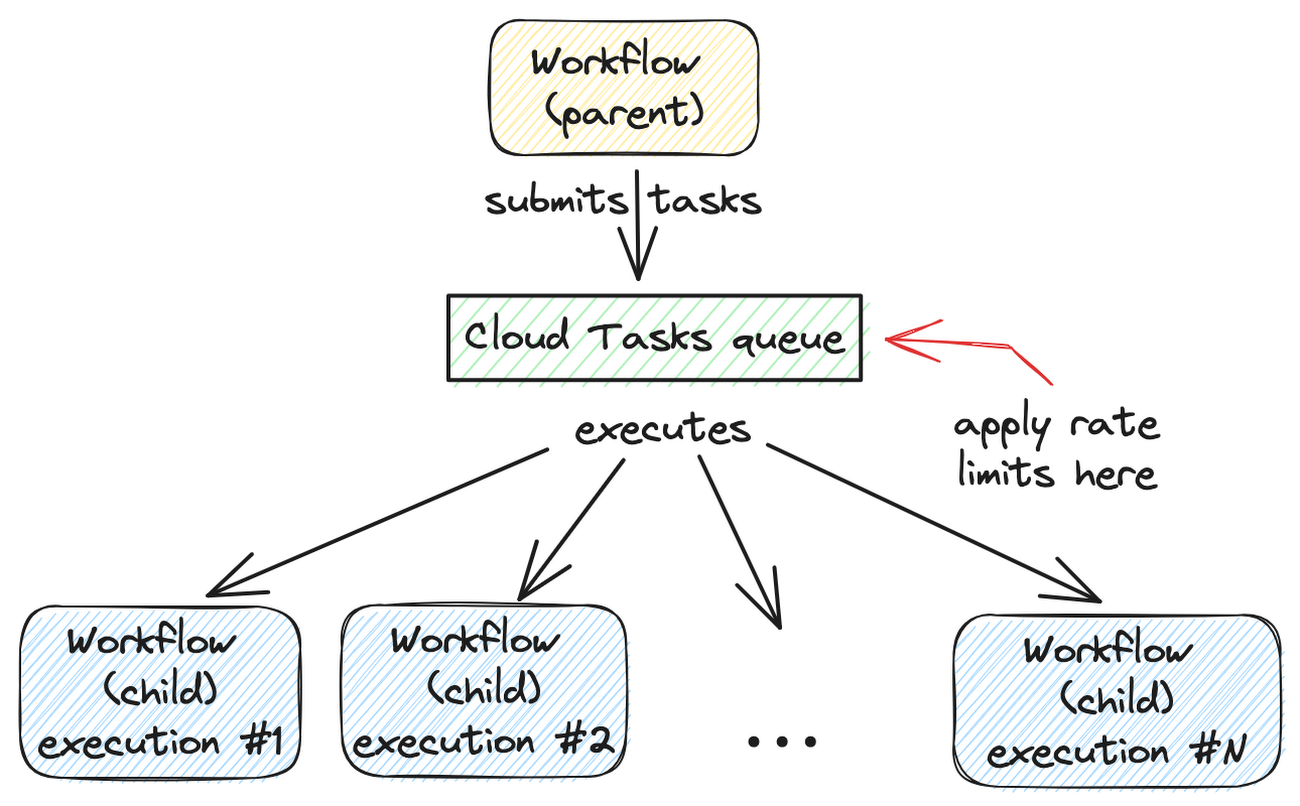
Let’s dive into how to set this up.
Create a Cloud Tasks queue
We’ll start by creating a Cloud Tasks queue. The Cloud Tasks queue acts as a buffer between the parent workflow and the child workflows, allowing us to regulate the rate of executions.
Create the Cloud Tasks queue (initially with no dispatch rate limits) with the desired name and location:
QUEUE=queue-workflow-child
LOCATION=us-central1

gcloud tasks queues create $QUEUE --location=$LOCATION
Now that we have our queue in place, let’s proceed to set up the child workflow.
Create and deploy a child workflow
The child workflow performs a specific task and returns a result to the parent workflow.
Create workflow-child.yaml to define the child workflow:
main:

  params: [args]

  steps:

    - init:

        assign:

          - iteration: ${args.iteration}

    - wait:

        call: sys.sleep

        args:

            seconds: 10

    - return_message:

        return: ${"Hello world" + iteration}
In this example, the child workflow receives an iteration argument from the parent workflow, simulates work by waiting for 10 seconds, and returns a string as the result.
Deploy the child workflow:
gcloud workflows deploy workflow-child --source=workflow-child.yaml --location=$LOCATION
Create and deploy a parent workflow
Next, create a parent workflow in workflow-parent.yaml.
The workflow assigns some constants first. Note that it’s referring to the child workflow and the queue name between the parent and child workflows:
main:
  steps:
    - init:
        assign:
          - project_id: ${sys.get_env("GOOGLE_CLOUD_PROJECT_ID")}
          - project_number: ${sys.get_env("GOOGLE_CLOUD_PROJECT_NUMBER")}
          - location: ${sys.get_env("GOOGLE_CLOUD_LOCATION")}
          - workflow_child_name: "workflow-child"
          - queue_name: "queue-workflow-child"
In the next step, Workflows creates and adds a high number of tasks (whose body is an HTTP request to execute the child workflow) to the Cloud Tasks queue:
- enqueue_tasks_to_execute_child_workflow:
        for:
          value: iteration
          range: [1, 100]
          steps:
              - iterate:
                  assign:
                    - data:
                        iteration: ${iteration}
                    - exec:
                        # Need to wrap into argument for Workflows args.
                        argument: ${json.encode_to_string(data)}
              - create_task_to_execute_child_workflow:
                  call: googleapis.cloudtasks.v2.projects.locations.queues.tasks.create
                  args:
                      parent: ${"projects/" + project_id + "/locations/" + location + "/queues/" + queue_name}
                      body:
                        task:
                          httpRequest:
                            body: ${base64.encode(json.encode(exec))}
                            url: ${"https://workflowexecutions.googleapis.com/v1/projects/" + project_id + "/locations/" + location + "/workflows/" + workflow_child_name + "/executions"}
                            oauthToken:
                              serviceAccountEmail: ${project_number + "-compute@developer.gserviceaccount.com"}
Note that task creation is a non-blocking call in Workflows. Cloud Tasks takes care of running those tasks to execute child workflows asynchronously.
Deploy the parent workflow:
gcloud workflows deploy workflow-parent --source=workflow-parent.yaml --location=$LOCATION
Execute the parent workflow with no dispatch rate limits
Time to execute the parent workflow:
gcloud workflows run workflow-parent --location=$LOCATION
As the parent workflow is running, you can see parallel executions of the child workflow, all executed roughly around the same:
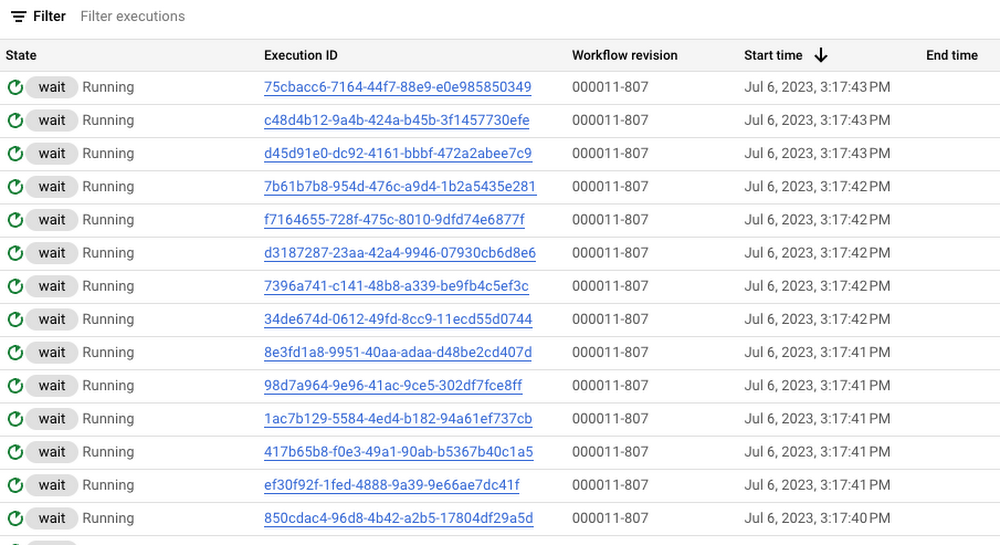
In this case, 100 executions is a well under the concurrency limit for Workflows. Quota issues may arise if you submit 1000s of executions all at once. This is when Cloud Tasks queue and its rate limits become useful.
Execute the parent workflow with dispatch rate limits
Let’s now apply a rate limit to the Cloud Tasks queue. In this case, 1 dispatch per second:
gcloud tasks queues update $QUEUE --max-dispatches-per-second=1 --location=$LOCATION
Execute the parent workflow again:
gcloud workflows run workflow-parent --location=$LOCATION
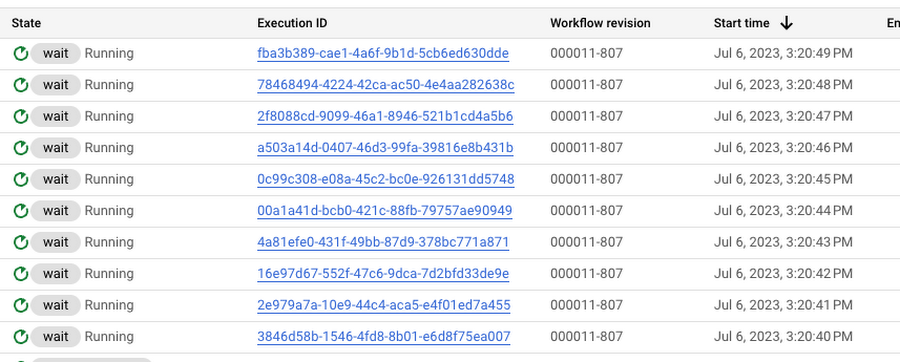
This time, you see a more smooth execution rate (1 execution request per second):
Summary
By introducing a Cloud Tasks queue before executing a workflow and playing with different dispatch rates and concurrency settings, you can better utilize your Workflows quota and stay below the limits without triggering unnecessary quota related failures.
Check out the Buffer HTTP requests with Cloud Tasks codelab, if you want to get more hands-on experience with Cloud Tasks. As always, feel free to contact me on Twitter @meteatamel for any questions or feedback.
More Relevant Stories for Your Company

Customer Voices: How Firms from Across Industries Leverage Google Cloud
From powering everyday operations and accelerating application innovation, to providing tools for specific business needs and executing on big ideas, to advancing the security of technology solutions, companies from across industries have leveraged Google Cloud for business benefits. Companies from across industries have turned to Google Cloud for transforming their

Largest Beauty Retailer in the US Powers Digital Transformation with Google Cloud Smart Analytics
Digital technology offers increasing flexibility and choice to consumers. As a result, the retail industry is dramatically shifting toward more tailored and personalized experiences for shoppers, and businesses are rethinking how they deliver value to customers. This couldn’t be more true for the beauty retailing industry where leading companies are

Cloud IoT Core Helps Businesses Leverage their IoT Data to Build a Competitive Edge
The ability to gain real-time insights from IoT data can redefine competitiveness for businesses. Intelligence allows connected devices and assets to interact efficiently with applications and with human beings in an intuitive and non-disruptive way. After your IoT project is up and running, many devices will be producing lots of

Master AI Prompt Engineering with 6 Proven Tips
As AI-powered tools become increasingly prevalent, prompt engineering is becoming a skill that developers need to master. Large language models (LLMs) and other generative foundation models require contextual, specific, and tailored natural language instructions to generate the desired output. This means that developers need to write prompts that are clear,
