





Unlocking Efficient API Management with Apigee and CI/CD Pipelines

924
Of your peers have already read this article.
3:30 Minutes
The most insightful time you'll spend today!
In modern software development, automating delivery using Continuous Integration and Continuous Deployment (CI/CD) pipelines draws parallels to automotive assembly lines that doubled the production while cutting down costs by 65%. According to a recent report from Postman, over 51% of respondents indicated that their organizations devote more than half of their development efforts to APIs. APIs are a big part of development, so let’s explore why you should integrate them into your CI/CD pipelines. We will also share best practices and tools for integrating Apigee within your organization’s CI/CD processes.
4 reasons to automate your API delivery with CI/CD pipelines
Apigee is a feature-rich API management platform that provides developers with the necessary tools to build, secure, manage, and publish APIs. But what if you want to automate the process of deploying your APIs to Apigee? That’s where CI/CD comes in. By incorporating Apigee into your CI/CD pipeline, you can automate API deployment, promote consistency across environments, and monitor API performance in real-time. Four of these benefits include:
- Cut time to market by and respond faster to customer demands by automating API deployments.
- Catch defects earlier and improve API security by automating the process of testing and securing APIs.
- Slash costs by saving on staffing, tools, and infrastructure required to deploy and manage APIs.
- Improve visibility and compliance by tracking and auditing API usage.
Key tools and useful tips to effectively automate API delivery and management
Integrating API delivery into CI/CD pipelines using products like Cloud Build streamlines the development process. For example, a developer building an application on Google Cloud can deliver APIs side by side with other workloads in tools such as Cloud Run, Google Kubernetes Engine (GKE), Cloud Functions, and App Engine.
Operational automation can include a list of seemingly endless aspects of the development process. But at a high-level, the key components of an effective CI/CD pipeline for API management include:
1. Building and testing API proxies
- If you are new to Apigee, utilize the comprehensive visual tools in the console to build and deploy API proxies using a convenient drag and drop interface. You can elevate their API proxy development by leveraging the VS Code extension and Apigee Emulator. This local setup enables you to use auto-complete features along with local proxy deployment, testing, and seamless code commit to trigger the pipeline for further deployment across Apigee environments.
- Useful tip: Maximize the utility of Apigee, use the Debug tool to inspect every detail of an API transaction. Lastly, remember to export your proxy from the Apigee console and commit it to your source repository. With these best practices in hand, you’re all set to make the most of your Apigee journey.
2. Store and version your API code:
- Ensure robust source code management – foundation of every CI/CD pipeline – to easily track, and manage changes. Use Cloud Source Repositories, a fully managed Git repository for seamless integration with other GCP development (or) leverage common tools like GitHub, GitLab, BitBucket and many more depending on your organization’s approach
- Useful tip: Employing the right branching strategy helps reduce complexity and keeps delivery lean. Check out this community post for different branching strategies and choose the right one for your use case. Ensure frequent commits and merges to your source code to keep your codebase healthy and up-to-date. Regular code reviews also help refine your code and create quality checkpoints.
3. Ensure code quality with static code analysis:
- Regular static code analysis can help you to improve the quality of your code by detecting potential errors and security vulnerabilities. It can also help you to promote code standardization by ensuring that your code follows a consistent style. For static code analysis you can use apigeelint (for analyzing Apigee bundles), JSHint and ESLint (for JavaScript analysis), Checkstyle and PMD (for Java analysis), or SonarQube (for multi-language support)
- Useful tip: Integrate the tool with your code editor so that you can see the results of the analysis as you write code. Define quality gates/thresholds and run the tool as part of your build pipeline. Mark the build as failed if it does not meet the thresholds.
4. Ensure code resilience with unit testing and Code coverage:
- Unit tests focus on individual units of code, such as methods or classes. They help to ensure that each unit of code works as expected. Code coverage measures the percentage of code that is covered by unit tests. A high code coverage percentage indicates that more of your code is being tested, which can help to reduce the risk of errors. You can use these tools for unit testing and code coverage: Mocha and Chai (for JavaScript), JUnit (for Java), Cobertura and Istanbul (nyc) (for code coverage)
- Useful tip: Write unit tests for all of your code. This includes both new code and existing code. Run unit tests during the build process. This will help to ensure that your code is always passing unit tests before it is deployed. Set coverage thresholds and mark the build as failed if it does not meet the thresholds. This will help to ensure that your code is sufficiently covered by unit tests.
5. Configure, Package and Deploy your code:
- Creating a successful API deployment is like constructing a sturdy building. You need a strong blueprint (your Apigee code) that has been carefully planned, packaged into a deployable format (a zip file), and then implemented (imported into Apigee and deployed to an Apigee environment). During the packaging phase, the blueprint is detailed with metadata and manifest, similar to labeling and preparing architectural plans for construction. Moreover, all your Apigee configurations, except sensitive info, can be integrated into your blueprint, ready to be brought to life with the right tools. In terms of tooling, you can choose from a variety of open-source options that are built on Apigee APIs. Some of the commonly utilized ones are Apigee Deploy Maven plugin, apigee cli, apigee-sackmesser, and custom scripts using the Apigee APIs.
- Useful tip: Use an artifact system to store these bundles. This will make it easy to manage and track your bundles. Maintain all the necessary configurations like Target server, Key Value Map, etc as part of the source code repo. This will make it easier to deploy your code to different environments. Use the pipeline and the source code to promote the proxies from lower environments to production. This will help you to ensure that your code is always up-to-date in production.
6. Verify the changes with Functional or integration testing:
- Consider integration testing as a rigorous dress rehearsal for your API’s debut performance. It’s your chance to verify if your API plays its part flawlessly under various scenarios, including when it has to share the stage with third-party systems. To ensure the API is working as expected, you have some powerful tools at your disposal such as Apickli (based on cucumber.js), Postman, and JUnit
- Useful tip: Manage these tests as part of the source code and run different test suites based on the environment deploying to. This will make it easy to track and manage your tests. Run these tests right after the deployment and mark the build as failed if it does not meet the threshold. This will help you to identify and fix any issues that may have been introduced during the deployment. Create rollout plans when the functional tests fail by rolling out to the previous working/stable version. This will help you to minimize the impact of any issues that may have been introduced during the deployment.
Additionally, here are some optional trail markers you can consider on your journey to perfecting your pipeline:
- Testing Your API’s Endurance: Running performance tests ensures your API can withstand the long haul.
- Clear and Accessible Documentation: Keep your developer portal up-to-date with the latest API documentation. Tools like the Apigee Smartdocs Maven plugin can make this a breeze, particularly with the Drupal developer portal.
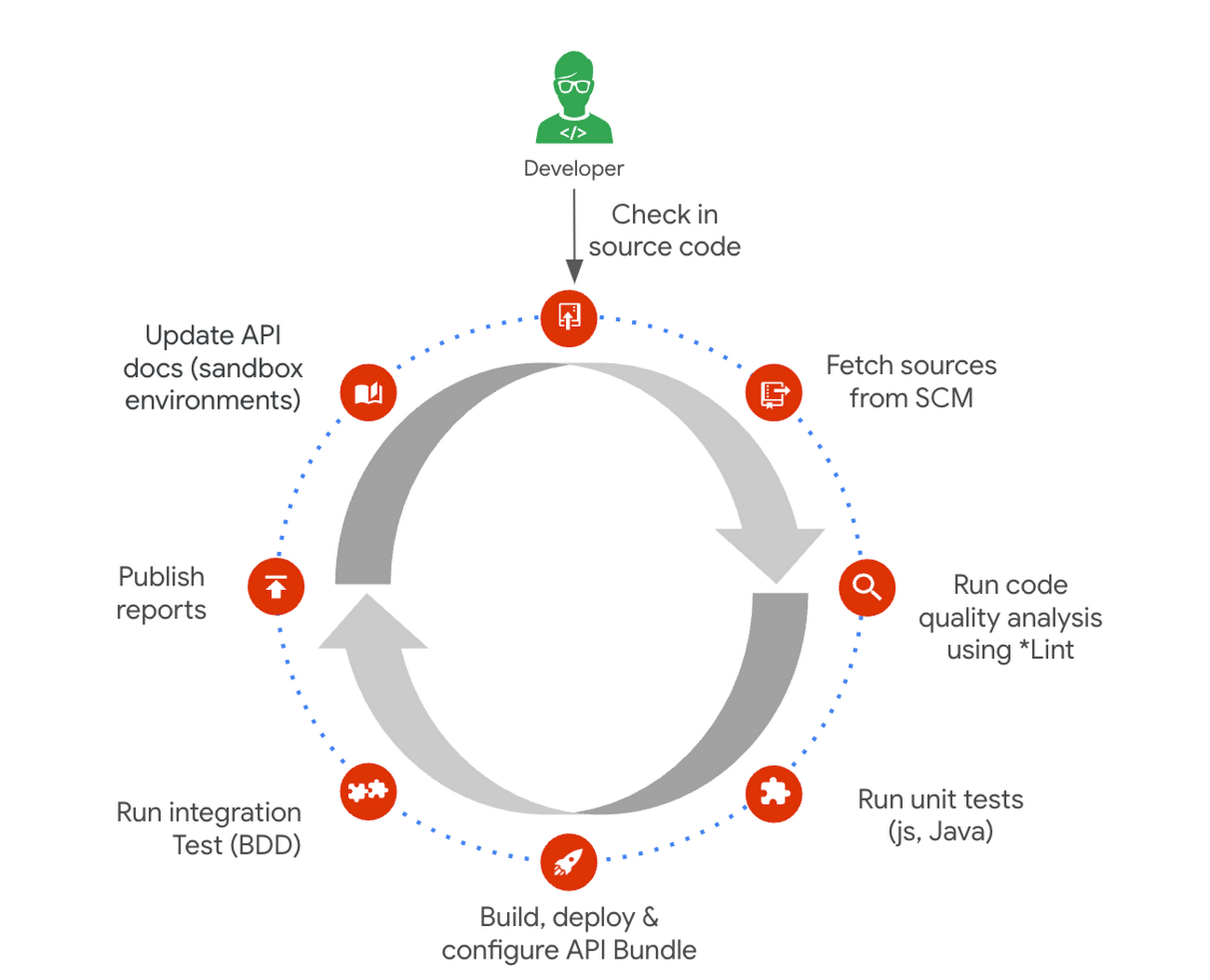
Here is a typical pipeline example with a comprehensive reference implementation we see with most of our customers. It triggers when the developer commits the code to the repo. The pipeline can be executed by any CI/CD platform like Cloud Build.
Get started today
Why wait? Kickstart your Apigee journey today directly from the console or evaluate it for free. Leverage our Accelerators to jumpstart your development using examples or advanced technical guidance. Should you have any questions or need support along the way, our Apigee Community is teeming with experts ready to lend a hand.
Building Unique Customer Experiences with Speed & Scale: Sprinklr & Google Cloud

8219
Of your peers have already read this article.
2:00 Minutes
The most insightful time you'll spend today!
Enterprises are increasingly seeking out technologies that help them create unique experiences for customers with speed and at scale. At the same time, customers want flexibility when deciding where to manage their enterprise data, particularly when it comes to business-critical applications.
That’s why I’m thrilled that Sprinklr, the unified customer experience management (Unified-CXM) platform for modern enterprises, has partnered with Google Cloud to accelerate its go-to-market strategy and grow awareness among our joint customers. Sprinklr will work closely with our global salesforce, benefitting from our deep relationships with enterprises that have chosen to build on Google Cloud.
Akin to Google Cloud’s mission to accelerate every organization’s ability to digitally transform their business through data-powered innovation, Sprinklr’s primary objective is to empower the world’s largest and most loved brands to make their customers happier by listening, learning, and taking action through insights. With this strategic partnership now in place, Sprinklr and Google Cloud will go-to-market together with the end-customer as our sole focus.
Traditionally, brands have adopted point solutions to manage segments of the customer journey. In isolation, these may work — but they rarely work collaboratively, even when vendors build “Frankenstacks” of disconnected products. These solutions can’t deliver a 360° view of the customer, and often reinforce departmental silos. All of which creates point-solution chaos.
Sprinklr’s approach is fundamentally different and is the way out of the aforementioned point-solution chaos. As the first platform purpose-built for unified customer experience management (Unified-CXM) and trusted by the enterprise, Sprinklr’s industry-leading AI and powerful Care, Marketing, Research, and Engagement solutions enable the world’s top brands to learn about their customers, understand the marketplace, and reach, engage, and serve customers on all channels to drive business growth.
Sprinklr was built from the ground up as a platform-first solution, designed to evolve and grow with the rapid expansion of digital channels and applications. The results? Faster innovation. Stronger performance. And a future-proof strategy for customer engagement on an enterprise scale.
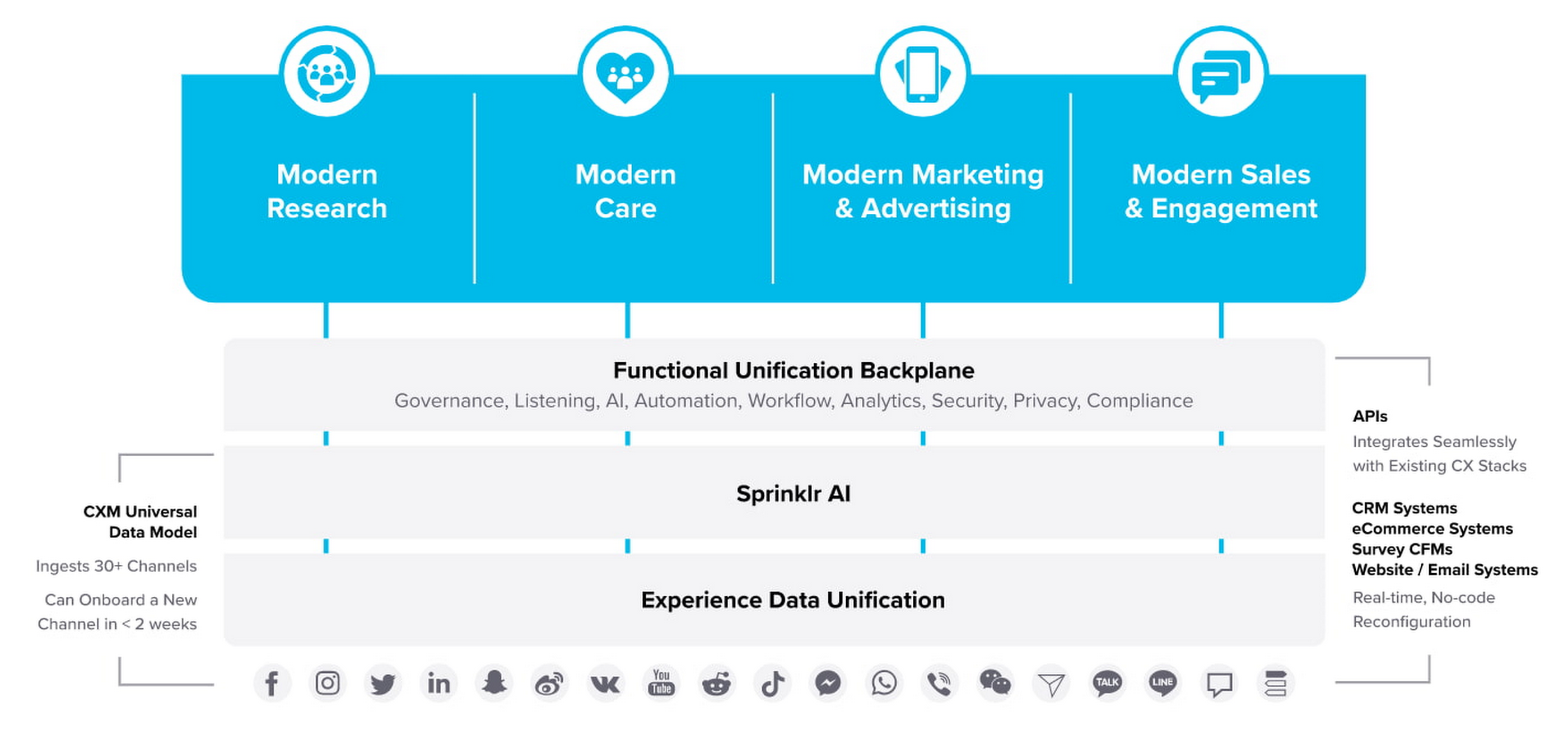
“Sprinklr works with large, global companies that want flexibility when deciding where to manage their enterprise data and consider our platform a business-critical application,” said Doug Balut, Senior Vice President of Global Alliances, Sprinklr. “Giving our customers the opportunity to manage Sprinklr on Google Cloud empowers them to create engaging customer experiences while maintaining the high security, scalability, and performance they need to run their business.”
To learn more about this exciting partnership and the challenges we jointly solve for customers, check out the recent conversation between Google Cloud’s VP of Marketing, Sarah Kennedy, and Sprinklr’s Chief Experience Officer, Grad Conn. Or read the press release on the partnership.
BigQuery Omni: Your Solution for Multi-Cloud Geospatial Analytics

1499
Of your peers have already read this article.
6:30 Minutes
The most insightful time you'll spend today!
As we become increasingly reliant on technology to make decisions, geospatial data is becoming more critical than ever. It is a powerful resource that can be used to solve a variety of problems, from tracking the movement of goods, identifying interest areas and potential areas of disaster.
Geospatial data incorporates data with a geographic component, such as latitude and longitude coordinates, addresses, postal codes, or place names, and can be obtained from a variety of sources, including satellites, sensors, and surveys, making it an incredibly powerful tool with a broad range of applications.
One of the key features of BigQuery, Google Cloud’s serverless enterprise data warehouse, is its ability to analyze geospatial data. However, oftentimes geospatial data sits in a variety of public clouds, not just Google Cloud. To access it effectively, you need a multi-cloud analytics solution that lets you capitalize on the distinct capabilities of each cloud platform, while extracting insights and value from data sitting across multiple cloud platforms.
BigQuery Omni is a multi-cloud analytics solution that enables the analysis of data stored across public cloud environments, including Google Cloud, Amazon Web Services (AWS) and Microsoft Azure, without the need to transfer the data. With BigQuery Omni, users can employ the same SQL queries and tools used to analyze data in Google Cloud to analyze data in other clouds, making it easier to gain insights from all data, regardless of the storage location. For businesses using multiple clouds, BigQuery Omni is an excellent tool to unify analytics and optimize the value of data.
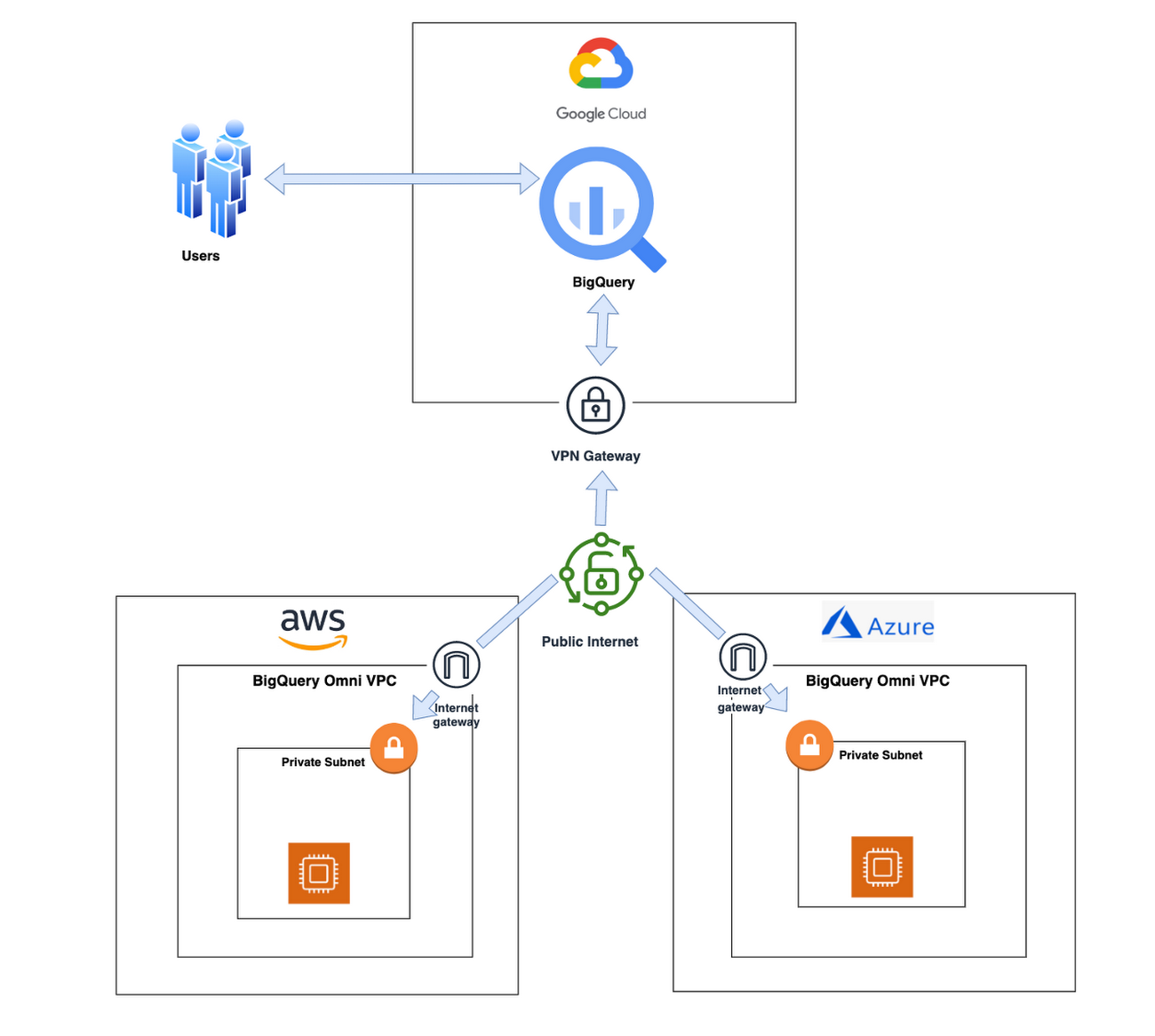
With BigQuery Omni, organizations can analyze location-based information or geographic components, such as latitude and longitude coordinates, addresses, postal codes, or place names without even copying their data to Google Cloud. For example, you could use BigQuery Omni to analyze data from a fleet of delivery vehicles to track their location and identify potential problems.
BigQuery Omni and geospatial data analysis
If you are working with geospatial data, BigQuery Omni is a powerful tool that can help you to get insights from your data. It is scalable, reliable, and secure, making it a great option for unifying your analytics and getting the most out of your data.
Here are a few examples of ways organizations might use BigQuery Omni for geospatial data:
- A transportation company could use BigQuery Omni to analyze data from GPS sensors in its vehicles to track the movement of its fleet and identify potential problems.
- A retail company could use BigQuery Omni to analyze data from its point-of-sale systems to track customer behavior and identify trends.
- A government agency could use BigQuery Omni to analyze data from its weather sensors to track the movement of storms and identify areas at risk of flooding.
BigQuery Omni and geospatial data can be used together to gain insights into a variety of business problems. Specifically, some of the advantages of using BigQuery Omni and geospatial data include:
- Access to quality geospatial data: BigQuery supports loading of newline-delimited GeoJSON files and provides built-in support for loading and querying geospatial data. Data from public data sources like BigQuery public datasets, the Earth Engine catalog, and the United States Geological Survey (USGS) can be easily integrated into your BigQuery environment. Earth Engine has an integrated data catalog with a comprehensive collection of analysis-ready datasets, including satellite imagery and climate data. This data can be combined with proprietary data sources such as SAP, Oracle, Esri ArcGIS Server, Carto, and QGIS.
- Loading and preprocessing of geospatial data: BigQuery has built-in support for loading and querying geospatial data types, and you can use partner solutions such as FME Spatial ETL to load data.
- Working with different geospatial data types and formats: BigQuery supports a variety of file types and formats including WKT, WKB, CSV and GeoJSON.
- Coordinate reference systems: BigQuery’s geography data type is globally consistent. That means that your data is registered to the WGS84 reference system and your analyses can span a city block or multiple continents.
Overall, geospatial analytics with BigQuery Omni provides a wide range of technical capabilities for processing and analyzing geospatial data, making it a powerful tool for businesses that need to work with location-based data.
Analyzing geospatial data with BigQuery Omni
Imagine a retailer who has a large chain of department stores with locations all over the country. They are looking to expand their business and want to identify areas with high sales potential. They want a way to get a better understanding of their sales volume within specific geographic boundaries. To achieve this goal, the retailer turns to the GIS (Geographic Information System) functions built into BigQuery. Here are the steps what the retailer takes to analyze this dataset:
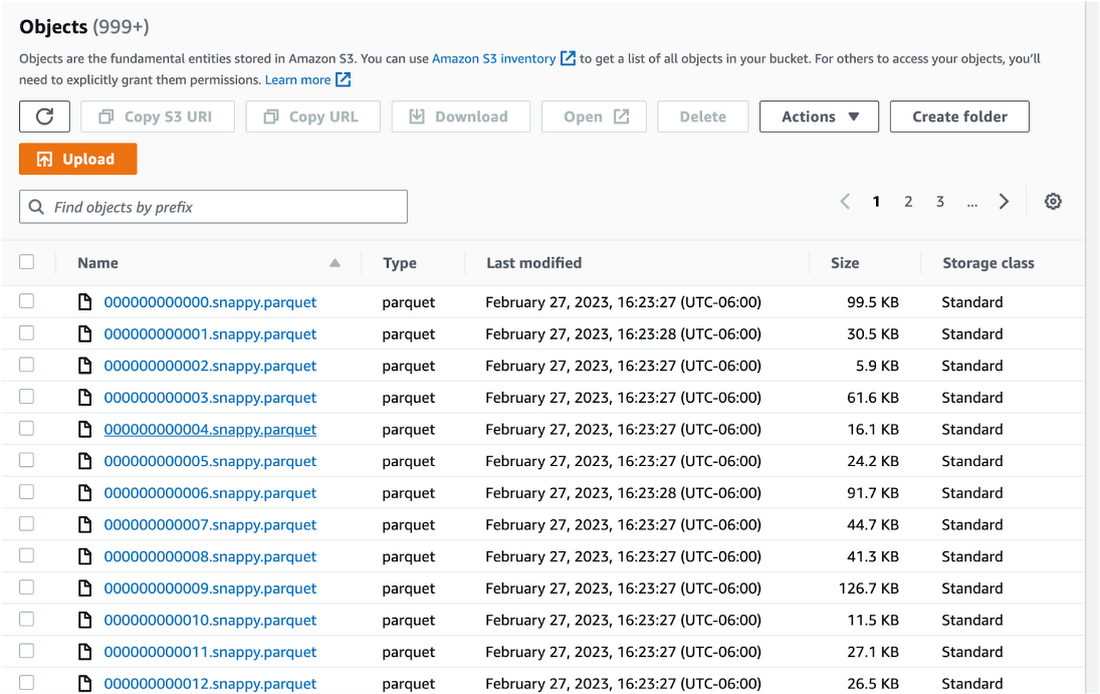
Step 1 : An initial orders dataset on AWS S3 contains 5.54 million rows, and with separate locations (300 rows) and zipcode (33144 rows) metadata files on AWS S3.
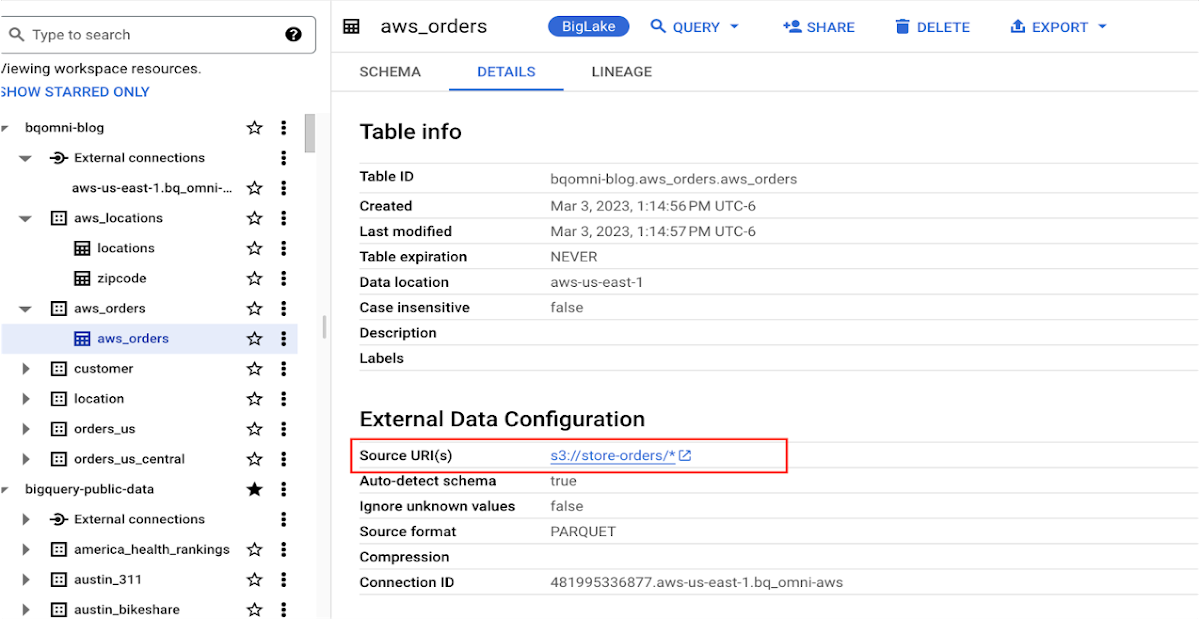
Orders Parquet files:
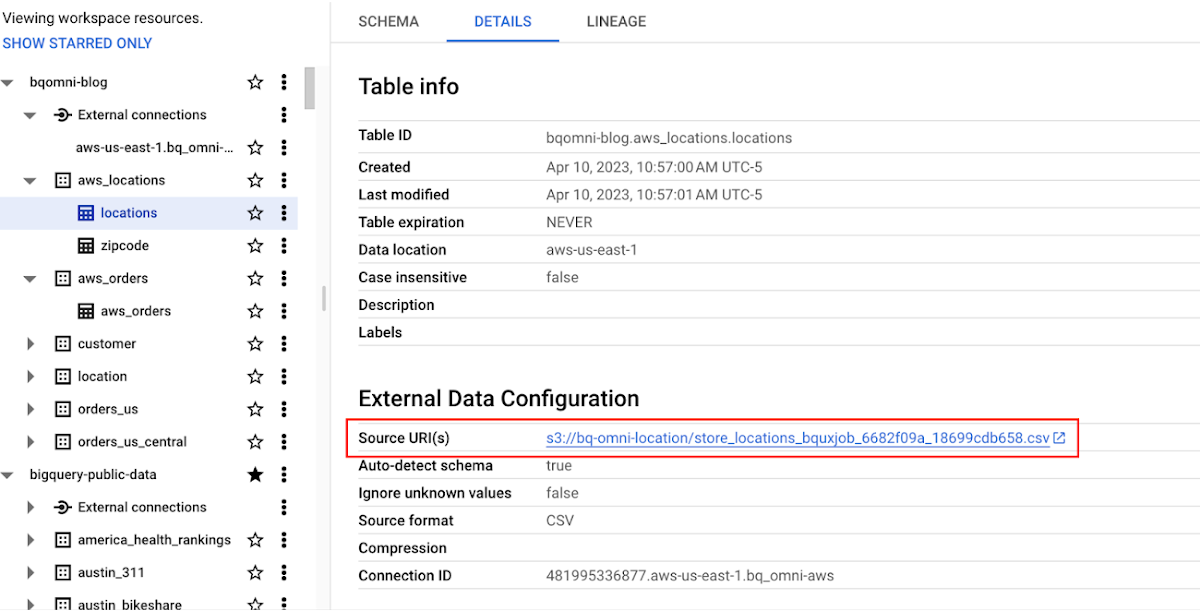
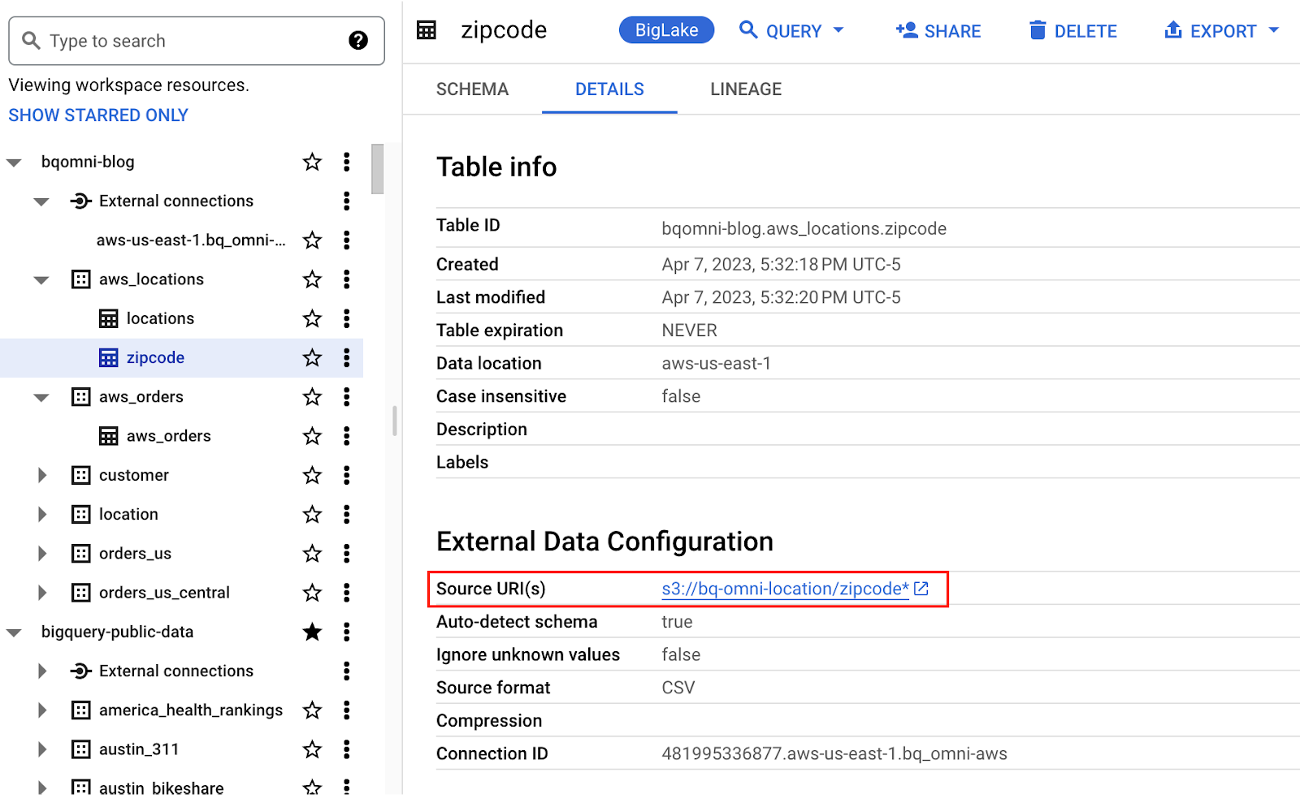
Location and Zipcode files:

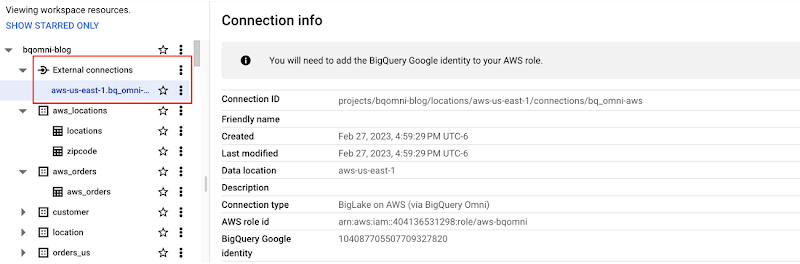
Step 2 : The retailer uses BigQuery Omni to establish a connection between the data stored in AWS and BigQuery, enabling them to access the S3 datasets externally.
External Connection for AWS
External Table for orders
External Table for locations
External Table for zipcode
Step 3 : They combine the orders and locations datasets using BigQuery Omni, and remotely aggregate the data on AWS. Joining this dataset with geospatial datasets helps them derive geospatial coordinates.
The final aggregated dataset is reduced to 23 rows. Subsequently, they bring back the result dataset, which contains just 23 rows. This helps them reduce the extraction of millions of rows to just 23 rows for their geospatial analytics.
Select sales.store_city store_city,
sales.number_of_sales_last_10_mins number_of_sales_last_10_mins,
sales.store_zip store_zip,
 ST_GeogPoint(zip_lat_lng.longitude ,
   zip_lat_lng.latitude  ) geo
FROM (
 SELECT
   FORMAT_DATETIME("%X",
     CURRENT_DATETIME("America/Los_Angeles")) current_time,
   MAX(DATETIME(time_of_sale,
       "America/Los_Angeles")) time_of_last_sale,
   COUNT(1) number_of_sales_last_10_mins,
   locations.city store_city,
   locations.zip store_zip
 FROM
   `bqomni-blog.aws_locations.orders_small`  sales
 JOIN
   `bqomni-blog.aws_locations.locations` locations
 ON
   sales.store_id = locations.id
 GROUP BY
   locations.city,
   locations.zip ) sales
JOIN
   `bqomni-blog.aws_locations.zipcode` zip_lat_lng
ON
 cast(sales.store_zip as INT) = cast(zip_lat_lng.zipcode as INT)
 WHERE ST_WITHIN( ST_GeogPoint(zip_lat_lng.longitude , zip_lat_lng.latitude  ) ,ST_GeogFromText(zip_lat_lng.zipcode_geom ) )
 AND zip_lat_lng.state_name  = "New York"
 ORDER BY number_of_sales_last_10_mins
Aggregated Sales data by region
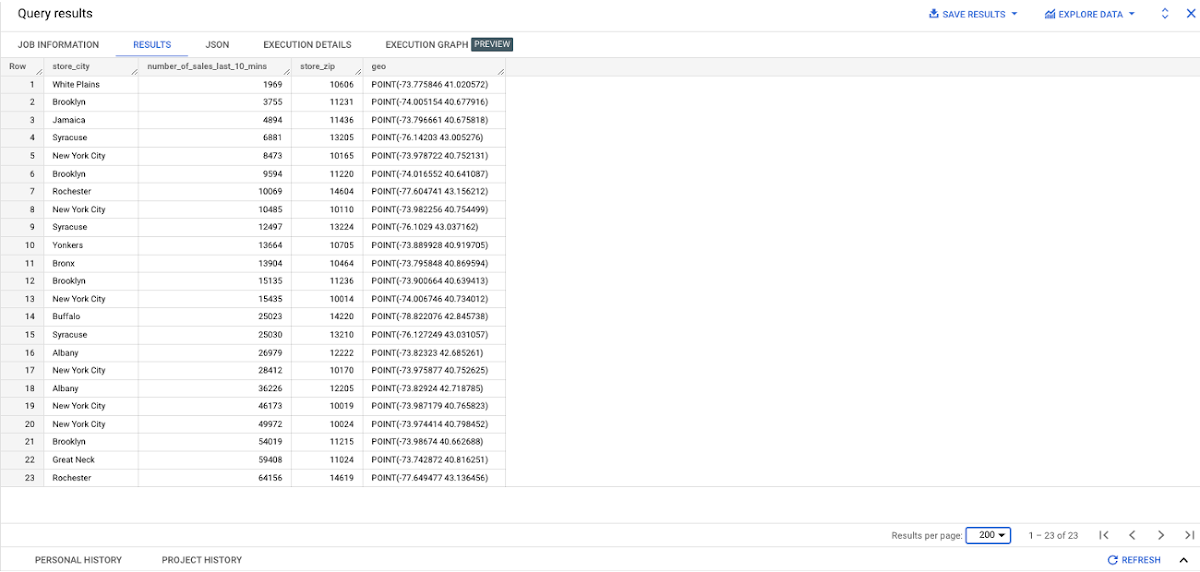
To build richer views of their sales volume data, the retailer uses BigQuery GeoViz integration, a powerful tool that allows for visualizing geographic data on maps.BigQuery Geo Viz is a web tool for visualization of geospatial data in BigQuery using Google Maps APIs. You can run a SQL query and display the results on an interactive map
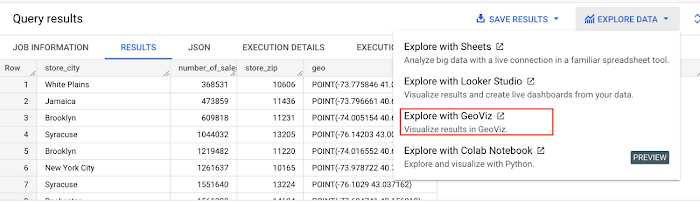
BigQuery Geo view for sales data analysis
With the geo-tagged data in place, the retailer can now see regional sales volume, sales density, distribution by department by time, and distribution within department, all powered through BigQuery.
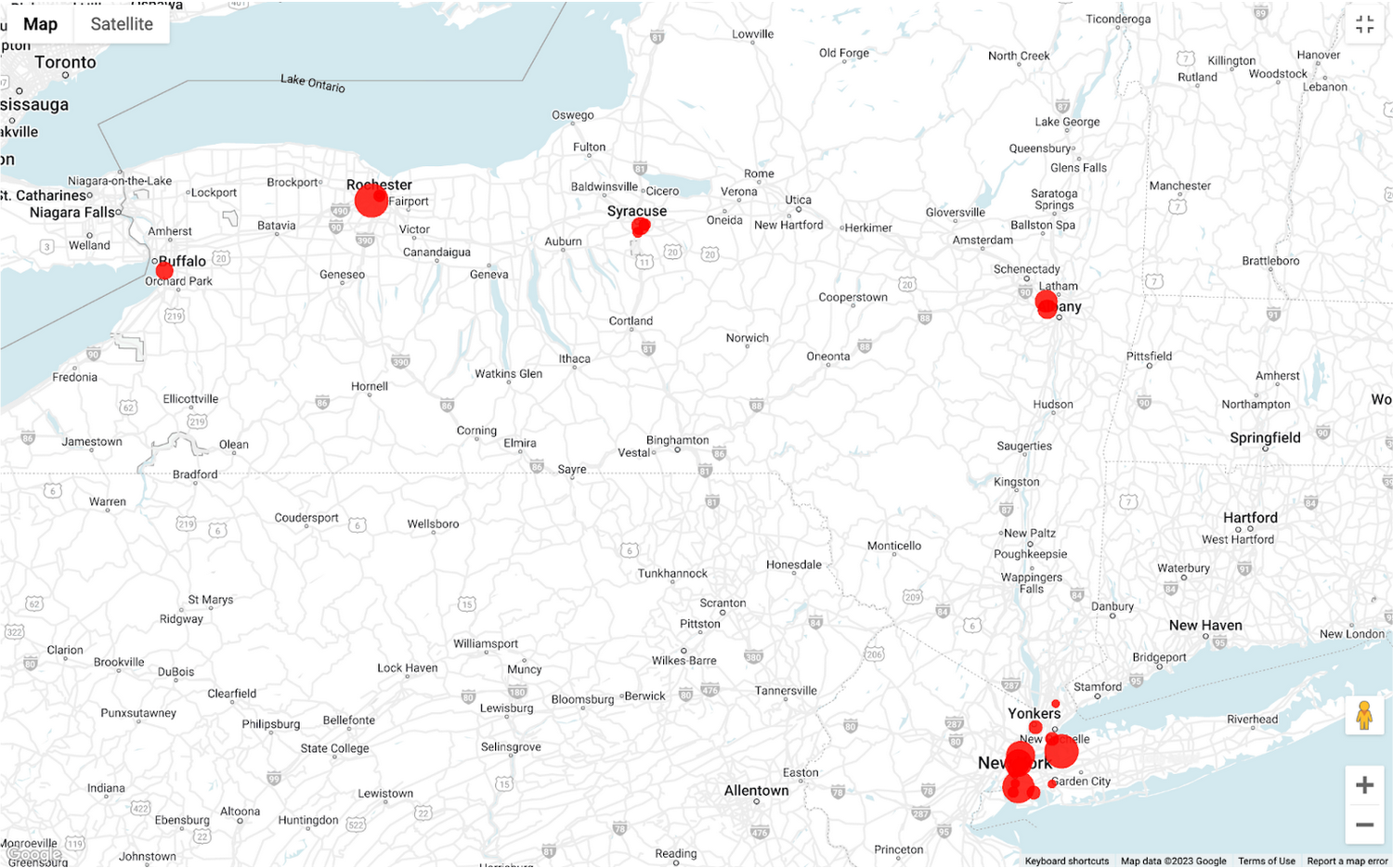
Satellite view

Benefits of using BigQuery Omni
Beyond geospatial analysis, BigQuery Omni offers a number of benefits, including:
Reduced costs: BigQuery Omni’s ability to eliminate data transfers between clouds can help organizations reduce costs and simplify data management, making it a valuable tool for multi-cloud analytics. Also, the ability to access and analyze data across multiple clouds can reduce the need for data replication and synchronization, which can further simplify the ETL process and improve data consistency.
Unified governance: BigQuery Omni uses the same security controls as BigQuery, which include features such as encryption, access controls, and audit logs, to help protect data from unauthorized access.
Single pane for analytics: BigQuery Omni provides a single interface for querying data across all three clouds, which can simplify the process of analyzing data and reduce the need for organizations to use multiple analytics tools.
Flexibility: Analyze data stored in any of the supported cloud storage services, giving organizations the flexibility to work with the data they have regardless of where it’s located.
BigQuery Omni is a valuable tool for geospatial analysis because it allows you to analyze data from multiple sources without having to move the data. This can save you time and money, and it can also help you to get more accurate insights from your data.If you are looking for a way to improve the accuracy, efficiency, and decision-making of your business, using BigQuery Omni to analyze geospatial data can be a powerful tool.
References
- Omni-introduction
- Omni-benefits
- Omni-aws-create-connection
- Omni-azure-create-connection
- BigQuery Omni Retail Demo on Looker
- Omni-pricing
- Working with Geospatial Data
- Geospatial Analytics – Intro
Learn more about how BigQuery Omni can help your organization.
What to Look for from Cloud CISO Perspective

6624
Of your peers have already read this article.
2:30 Minutes
The most insightful time you'll spend today!
May is a big month for the security industry. It’s been over a year since we gathered for RSA in San Francisco for one of 2020’s last major in-person events. While we likely won’t be together in person this year, it’s an important time for the security community to come together and reflect on many accomplishments, and to consider the challenges still ahead of us. As the world focuses on security incidents and all the risks that still need resolving, it is important to stand back, on occasion, and also note that immense progress has been made by large numbers of small, medium and large enterprises to protect themselves and their customers against increased threats. What is also amazing is to see organizations do this while accelerating their digital transformations, supporting and protecting customers and managing ongoing remote working challenges. We are privileged to play our part in supporting those great teams.
It’s also been a busy month for us here at Google Cloud since our inaugural CISO perspectives blog post in April. Today, I’ll recap our cloud security and industry highlights, a sneak peak of what’s ahead from Google at RSA and more.
Thoughts from around the industry
- Risk Governance of Digital Transformation in the Cloud – In our latest Office of the CISO whitepaper, we shared guidance on both the challenges and opportunities of cloud transformation for Chief Risk Officers, Chief Compliance Officers, Heads of Internal Audit and their teams. A misconception we sometimes see among these executives is that moving to the cloud creates more risk to manage. Having held these leadership positions in previous roles, I believe that the cloud is as much a means of managing security, resilience and other risks as it is a risk in its own right. The whitepaper dives deep into considerations for each of these leadership functions as their organization embarks on a digital transformation journey.
- The importance of meeting global compliance requirements – Compliance is critical for building trust with customers in regulated industries, especially the public sector. It is worth remembering that in any critical industry, where there can be material impact from incidents, strong industry practices and standards to protect customers are vital (I wrote about this last summer). At Google Cloud, we’re regularly adding new compliance and security certifications to meet our customers’ needs globally. Recently, we expanded our list of FedRAMP High-certified products to include Cloud DNS, and helped our customers in the Asia-Pacific region address various compliance requirements to meet new government regulations for security and data protections. Google Cloud was also the only cloud service provider to complete an annual pooled audit with the Collaborative Cloud Audit Group (CCAG), which is a syndicate of 39 leading European financial institutions and insurance companies who depend on cloud infrastructure and technologies to deliver innovative solutions and experiences for their customers. Having spent most of my career in the financial services industry, I know firsthand the importance of managing risk assessments for outsourced vendors to provide the necessary assurances customers need from their cloud providers.
RSA 2021
We have a great lineup of speaking sessions and keynotes from Googlers at RSA this year. Below are the highlights you don’t want to miss:
- I’ll be doing a session on May 20 about supply chain resilience, where a panel of experts will dive into how we can adjust risk and security initiatives to handle the next “punch to the supply chain.” Additionally, on May 18 I’ll join many of my esteemed CISO leaders from various industries and governments for a keynote discussion on our top security insights, lessons learned and best practices for how we move forward as an industry to address the next wave of challenges.
- Google’s Senior Director of Information Security Heather Adkins will deliver a session on how to build secure and reliable systems at scale, which will cover principles from Google’s Site Reliability Engineering book with the same title (available for free download here). I’m most looking forward to Heather’s advice for how we as an industry can reshape our security thinking, based on modern architectures and technologies that can help organizations design scalable and reliable systems that are fundamentally secure.
- Nelly Porter, Senior Product Manager at Google Cloud Security, will participate in a panel discussion with security experts on the importance of Confidential Computing technology, how it’s changing the security landscape and where it’s headed. Google Cloud has made great progress in delivering a Confidential Computing portfolio for our customers in regulated industries over the past year, and we’re excited for new milestones in 2021.
Google cloud security highlights
- Infrastructure and SRE spotlight – Before I joined Google Cloud, I always admired the infrastructure and benefits this organization delivers that are uniquely Google – from the subsea cable innovations to SRE inventions and principles. Security and resiliency are baked into every layer of our infrastructure. Many of the Googlers who build and support our platform have sat in the same seat as our customers, so they understand those needs intimately. Over the last few months it’s been amazing to watch our technical infrastructure team grow, and the direct reliability, operational resilience and security benefits that team brings to our customers. For example, we’ve opened a new region in Poland, announced the first subsea cable that will directly connect the U.S. to Singapore with fiber pairs over an express route, and released an SRE book focused on how organizations can complete a successful cloud migration.
- New security foundations blueprint guide – As part of our mission to deliver the industry’s most trusted cloud, we strive to operate in a shared-fate model for risk management in conjunction with our customers. This includes sharing opinionated step-by-step guidance with key decision points and focus areas for how our customers deploy workloads in Google Cloud. This is why we’ve updated our Google Cloud security foundations guide and corresponding Terraform blueprint scripts. These blueprints are tremendously helpful to many stakeholders within an enterprise, like a CISO that needs to understand our key principles for cloud security, or a C-Suite business leader that needs to quickly identify the skills their teams need to meet an organization’s security, risk, and compliance needs on Google Cloud.
When we think about the types of features to build into products, we have many principles we follow. But the two that I keep coming back to as crucial are:
- The need for secure products not just security products. All products should have security built in and while we do build great security products our security and other teams remain focused on constantly enhancing the base levels of security and the security features in all our products.
- Defense in Depth. We don’t just focus on defense in depth from attacks – for ourselves and our customers. We also prioritize defense in depth from configuration errors or other hazards.
As you see below in some of the highlights of new features and products, these represent our commitment to secure products and all forms of defense in depth.
- Workload identity federation – Service account keys are powerful credentials, and can represent a security risk if they are not managed correctly. A safer approach is to use workload identity federation, using IAM to grant external identities IAM roles, including the ability to impersonate service accounts. This lets you access resources directly and eliminates the maintenance and security burden associated with service account keys. We also offered related overall guidance on the best way to use and authenticate service accounts on Google Cloud.
- VPC-SC Directional Policies – With VPC Service Controls (VPC-SC), admins can define a security perimeter around Google-managed services to control communication to and between those services. Using VPC-SC, you can isolate your production GCP resources from unauthorized VPC networks or the internet. But what if you need to transfer data between isolated environments that you’ve set up? VPC-SC directional policies is a new secure data exchange feature that allows you to configure efficient, private, and secure data exchange between isolated environments.
- Anthos service mesh supports VMs as well as clusters – Most enterprise compute resources are still in VMs and many will remain there for a long time to come. In Anthos 1.7, your VM-based workloads can now take advantage of the same mesh functionality as your container-based workloads.
- Cloud Spanner CMEK and Access Approvals – Cloud Spanner is Google Cloud’s fully managed relational database that offers unlimited scale, high performance, strong consistency across regions and high availability. Spanner now supports customer-managed encryption keys (CMEK) and Access Approval, Google Cloud’s industry-leading controls to require approval before access to your content by Google support and engineering teams.
- External Key Manager enhancements – In early 2020 we launched Cloud External Key Manager (Cloud EKM), the industry’s leading Hold-Your-Own-Key (HYOK) product. Using Cloud EKM, the keys used to protect your data stored and processed in Google Cloud are completely hosted and managed outside of Google Cloud infrastructure. Cloud EKM initially launched with support for BigQuery and GCE/PD; we expanded support for Cloud SQL, GKE, Dataflow Shuffle, and Secret Manager, with CMEK support currently in beta. We also provided in-depth documentation on the functionality, architecture and use cases for Cloud EKM in a new whitepaper.
- Web App and API Protection solution – Web applications and public APIs are increasingly important to how organizations interface with their customers and partners, and we’ve seen increased investment in tools to protect these resources from fraud and abuse. Google Cloud’s new Web App and API protection solution is based on the same technology Google uses to protect its public-facing services against web application exploits, DDoS attacks, fraudulent bot activity, and API targeted threats. It provides protection across clouds and on-premises environments.
- Threat Intel for Chronicle – Most threat intelligence feeds require security teams to do the implementation and legwork. With our new Threat Intel for Chronicle offering, however, our intelligence insights are applied automatically across your security telemetry to present unique observations within your environment. Threat Intel for Chronicle is exclusively curated for enterprise customers by Uppercase, Google Cloud’s intelligence research and applications team to provide our perspective on threats across the internet and surface them as relevant alerts.
That wraps up another month of thoughts and highlights. If you’d like to have this Cloud CISO Perspectives post delivered every month to your inbox, click here to sign-up, and we’ll see you in June!
All About Cloud Run, its Scalability and Management Features

7396
Of your peers have already read this article.
3:00 Minutes
The most insightful time you'll spend today!
Mindful Containers is a fictitious company that is creating containerized microservice applications. They need a fully managed compute environment for deploying and scaling serverless containerized microservices. So, they are considering Cloud Run.
They are excited about Cloud Run because it abstracts away the cluster configuration, monitoring, and management so they can focus on building the features for their apps. Cloud Run is a fully-managed compute environment for deploying and scaling serverless containerized microservices.

What is Cloud Run?
Cloud Run is a fully-managed compute environment for deploying and scaling serverless HTTP containers without worrying about provisioning machines, configuring clusters, or autoscaling.
- No vendor lock-in – Because Cloud Run takes standard OCI containers and implements the standard Knative Serving API, you can easily port over your applications to on-premises or any other cloud environment.
- Fast autoscaling – Microservices deployed in Cloud Run scale automatically based on the number of incoming requests, without you having to configure or manage a full-fledged Kubernetes cluster. Cloud Run scales to zero— that is, uses no resources—if there are no requests.
- Split traffic – Cloud Run enables you to split traffic between multiple revisions, so you can perform gradual rollouts such as canary deployments or blue/green deployments.
- Custom domains – You can set up custom domain mapping in Cloud Run and it will provision a TLS certificate for your domain.
- Automatic redundancy – Cloud Run offers automatic redundancy so you don’t have to worry about creating multiple instances for high availability
How to use Cloud Run
With Cloud Run, you write your code in your favorite language and/or use a binary library of your choice. Then push it to Cloud Build to create a container build. With a single command—“gcloud run deploy”—you go from a container image to a fully managed web application that runs on a domain with a TLS certificate and auto-scales with requests.
How does Cloud Run work?
Cloud Run service can be invoked in the following ways:
HTTPS: You can send HTTPS requests to trigger a Cloud Run-hosted service. Note that all Cloud Run services have a stable HTTPS URL. Some use cases include:
- Custom RESTful web API
- Private microservice
- HTTP middleware or reverse proxy for your web applications
- Prepackaged web application
gRPC: You can use gRPC to connect Cloud Run services with other services—for example, to provide simple, high-performance communication between internal microservices. gRPC is a good option when you:
- Want to communicate between internal microservices
- Support high data loads (gRPC uses protocol buffers, which are up to seven times faster than REST calls)
- Need only a simple service definition you don’t want to write a full client library
- Use streaming gRPCs in your gRPC server to build more responsive applications and APIs
WebSockets: WebSockets applications are supported on Cloud Run with no additional configuration required. Potential use cases include any application that requires a streaming service, such as a chat application.
Trigger from Pub/Sub: You can use Pub/Sub to push messages to the endpoint of your Cloud Run service, where the messages are subsequently delivered to containers as HTTP requests. Possible use cases include:
- Transforming data after receiving an event upon a file upload to a Cloud Storage bucket
- Processing your Google Cloud operations suite logs with Cloud Run by exporting them to Pub/Sub
- Publishing and processing your own custom events from your Cloud Run services
Running services on a schedule: You can use Cloud Scheduler to securely trigger a Cloud Run service on a schedule. This is similar to using cron jobs. Possible use cases include:
- Performing backups on a regular basis
- Performing recurrent administration tasks, such as regenerating a sitemap or deleting old data, content, configurations, synchronizations, or revisions
- Generating bills or other documents
Executing asynchronous tasks: You can use Cloud Tasks to securely enqueue a task to be asynchronously processed by a Cloud Run service. Typical use cases include:
- Handling requests through unexpected production incidents
- Smoothing traffic spikes by delaying work that is not user-facing
- Reducing user response time by delegating slow background operations, such as database updates or batch processing, to be handled by another service,
- Limiting the call rate to backend services like databases and third-party APIs
Events from Eventrac: You can trigger Cloud Run with events from more than 60 Google Cloud sources. For example:
- Use a Cloud Storage event (via Cloud Audit Logs) to trigger a data processing pipeline
- Use a BigQuery event (via Cloud Audit Logs) to initiate downstream processing in Cloud Run each time a job is completed
How is Cloud Run different from Cloud Functions?
Cloud Run and Cloud Functions are both fully managed services that run on Google Cloud’s serverless infrastructure, auto-scale, and handle HTTP requests or events. They do, however, have some important differences:
- Cloud Functions lets you deploy snippets of code (functions) written in a limited set of programming languages, while Cloud Run lets you deploy container images using the programming language of your choice.
- Cloud Run also supports the use of any tool or system library from your application; Cloud Functions does not let you use custom executables.
- Cloud Run offers a longer request timeout duration of up to 60 minutes, while with Cloud Functions the requests timeout can be set as high as 9 mins.
- Cloud Functions only sends one request at a time to each function instance, while by default Cloud Run is configured to send multiple concurrent requests on each container instance. This is helpful to improve latency and reduce costs if you’re expecting large volumes.
Pricing
Cloud Run comes with a generous free tier and is pay per use, which means you only pay while a request is being handled on your container instance. If it is idle with no traffic, then you don’t pay anything.
Conclusion
After learning about the ease of set up, scalability, and management capabilities of Cloud Run the Mindful Containers team is using it to deploy stateless microservices. If you are interested in learning more, check out the documentation.https://www.youtube.com/embed/oR4btKLRdn4?enablejsapi=1&
For more #GCPSketchnote, follow the GitHub repo. For similar cloud content follow me on Twitter @pvergadia and keep an eye out on thecloudgirl.dev
Managed containers: An enterprise standard at Colgate-Palmolive
927
Of your peers have already read this article.
3:30 Minutes
The most insightful time you'll spend today!
Kubernetes is an increasingly key part of the application deployment strategies at large organizations, and one of the most recommended options for the teams we work with. An idea brought to life at Google, organizations throughout the world use containers and Kubernetes on-premises, in Google Cloud, or in a multi-cloud scenario, and it has emerged as a leading application deployment platform. And because it’s open source, anyone can pop the hood, so to speak, to see how each component of it works, creating a trusted, verifiable framework that users can rely on.
Customers begin their Kubernetes and containerization journeys using various offerings in our product portfolio. Some, like Colgate, started their modernization journey with Kubernetes. Colgate is an $18B global consumer products company with ~34,000 diverse and dedicated people serving over 200 countries and territories. Through science-led innovation, they drive growth and reimagine a healthier future for all people, their pets, and our planet.
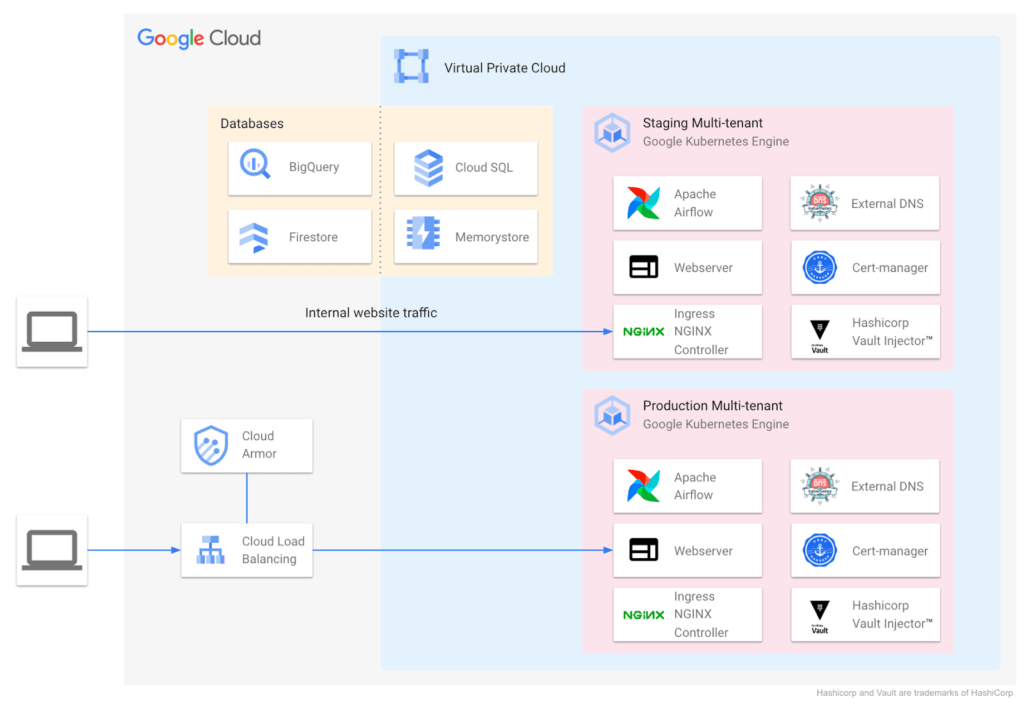
During ideation, they talked through various considerations: What technology strengths does their organization have? What skills do their teams need? What will this initiative look like a decade from now? They implemented the following Kubernetes-focused architecture:
Supporting a variety of use cases and teams
Google Cloud also helped Colgate break new ground over the years, especially in the areas of cloud-native networking, security, monitoring, pub/sub, managed containerization, and multi-tenant environments.
Over time Colgate began to leverage Google’s managed container portfolio, which includes Cloud Run. Cloud Run lets you run containers on top of a serverless platform, unlocking workload possibilities for public websites, private services, APIs and batch jobs and eliminating a lot of the time spent on infrastructure management. Cloud Run also requires no prior knowledge of Kubernetes or containers.
Simplified enterprise-level management
Many teams have found that they prefer the serverless, hands-off approach that Cloud Run provides, and Colgate now evaluates Google Cloud’s serverless solutions alongside GKE for any applications destined for the cloud. At the same time, Cloud Run lets them continue to leverage their investment in workloads based on the Open Container Initiative.
For example, Cloud Run is designed for Kubernetes compatibility with consistent management capabilities such as the ability to manage resources using kubectl via the config controller, and the ability to browse logs and metrics from both platforms in Cloud Logging and Monitoring. Cloud Run and GKE data planes are also interoperable, allowing Cloud Run and GKE services to be exposed behind a VPC behind private IPs using an internal load balancer. Cloud Run as an option has contributed to faster innovation, allowing Colgate to bring smiles to many more faces globally.
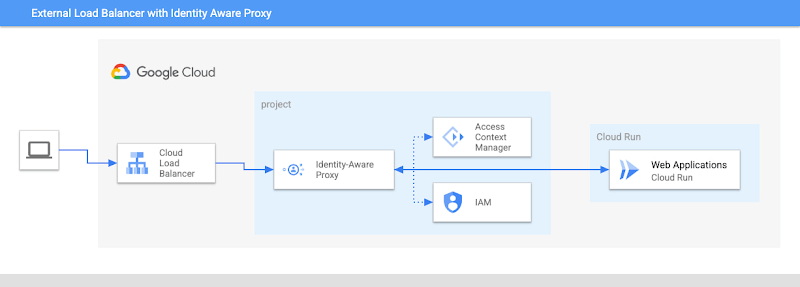
Google’s managed container offerings provide a composable and comprehensive set of solutions for customers’ applications. At Colgate, container-based managed services are used across the stack: on the front-end, where they use Identity-Aware Proxy to manage authentication and External Load Balancers to handle incoming traffic with high availability and low latency; at the application layer, where they can choose from Cloud Functions, Cloud Run, or GKE, depending on the level of control they need over the application; and at the internal load balancing level where NGINX® controllers serve internal applications. Together, these managed services ensure that Colgate has the flexibility to choose the right toolchain and maximize their goals for each use case.
Colgate wanted to build internal applications on Cloud Run in a way that complied with their organization’s policies while maximizing developer productivity. They were able to use new features like the Cloud Run Identity Aware Proxy GA to build a secure, serverless deployment for their applications.
A great partnership with Google Cloud
Colgate and Google Cloud have enjoyed a deep partnership for many years, engaging across many technologies, teams, and design patterns.
They’ve engaged with Product and Engineering across compute, networking, Kubernetes, and serverless as they brought this new way of thinking to their users.
For Colgate and many of our customers looking to address the needs of the modern user, Google’s managed container offerings are a breath of fresh air. Its reliability, scalability, and control offer the flexibility to build applications that meet the demands of both internal and external consumers. In addition, the variety of container offerings available on Google Cloud — GKE and Cloud Run — allow customers to make app deployment decisions based on the amount of Day 2 operations the users are willing to take on. Platform administrators appreciate the reduced management effort, users enjoy reduced downtime, and developers can simply deploy.
Google Cloud contributors: Rex Orioko, Rachel Tsao
Colgate-Palmolive contributors: Matthew Tattoli, Nicholas Farley, and David Wiser
More Relevant Stories for Your Company

Announcing reCAPTCHA Enterprise’s Mobile SDK to Help Protect iOS, Android apps
reCAPTCHA Enterprise is Google’s online fraud detection service that leverages more than a decade of experience defending the internet. reCAPTCHA Enterprise can be used to prevent fraud and attacks perpetrated by scripts, bot software, and humans. When installed inside a mobile app at the point of action, such as login,

Neo4J & Google Cloud: Graph Data in Cloud to Address Challenges in FinServ Industry
Over the last decade, financial service organizations have been adopting a cloud-first mindset. According to InformationWeek, lower costs and enhanced scalability were the biggest drivers for cloud adoption in financial services, and cloud-native applications allow access to the latest technology and talent, enabling adopters to rebuild transaction processing systems capable of

Google Maps’ Cloud-based Styling Features Betters UX, Control and Flexibility
This year at Google I/O, we announced the general availability of Cloud-based maps styling for the Maps JavaScript API. In an effort to provide you with more options and more control to help create the best experience for your users, today we’re releasing new features to Cloud-based maps styling. You may

Best Practices for Crafting Interfaces that Developers Love
Web APIs use HTTP, by definition. In the early days of web APIs, people spent a lot of time and effort figuring out how to implement the features of previous-generation distributed technologies like CORBA and DCOM on top of HTTP. This led to technologies like SOAP and WSDL. Experience showed
