





Boost Your ML Training Speed with GKE’s NCCL Fast Socket

878
Of your peers have already read this article.
1:30 Minutes
The most insightful time you'll spend today!
Large Machine Learning (ML) models – such as large language models, generative AI, and vision models – are dramatically increasing the number of trainable parameters and are achieving state-of-the-art results. Increasing the number of parameters results in the model being too large to fit on a single VM instance thus demands distributed compute to spread the model across multiple nodes. Google Kubernetes Engine (GKE) has built-in support for NCCL Fast Socket, to help improve the time to train large ML models with distributed, multi-node clusters.
Enterprises are looking for faster and cheaper performance to train their ML models. With distributed training, communicating gradients across nodes is a performance bottleneck. Optimizing inter-node latency is critical to reduce training time and costs. Distributed training uses collective communication as a transport layer over the network between the multiple hosts. Collective communication primitives such as all-gather, all-reduce, broadcast, reduce, reduce-scatter, and point-to-point send and receive are used in distributed training in Machine Learning.
The NVIDIA Collective Communication Library (NCCL) is commonly used by popular ML frameworks such as TensorFlow and PyTorch. It is a highly optimized implementation for high bandwidth and low latency between NVIDIA GPUs. Google developed a proprietary version of NCCL called NCCL Fast Socket to optimize performance for deep learning on Google Cloud.
NCCL Fast Socket uses a number of techniques to achieve better and more consistent NCCL performance.
- Use of multiple network flows to attain maximum throughput. NCCL Fast Socket introduces additional optimizations over NCCL’s built-in multi-stream support, including better overlapping of multiple communication requests.
- Dynamic load balancing of multiple network flows. NCCL can adapt to changing network and host conditions. With this optimization, straggler network flows will not significantly slow down the entire NCCL collective operation.
- Integration with Google Cloud’s Andromeda virtual network stack.This increases overall network throughput by avoiding contentions in virtual machines (VMs).
We tested (NVIDIA NCCL tests) the performance of NCCL Fast Socket vs NCCL on various machine shapes with 2 node GKE clusters.
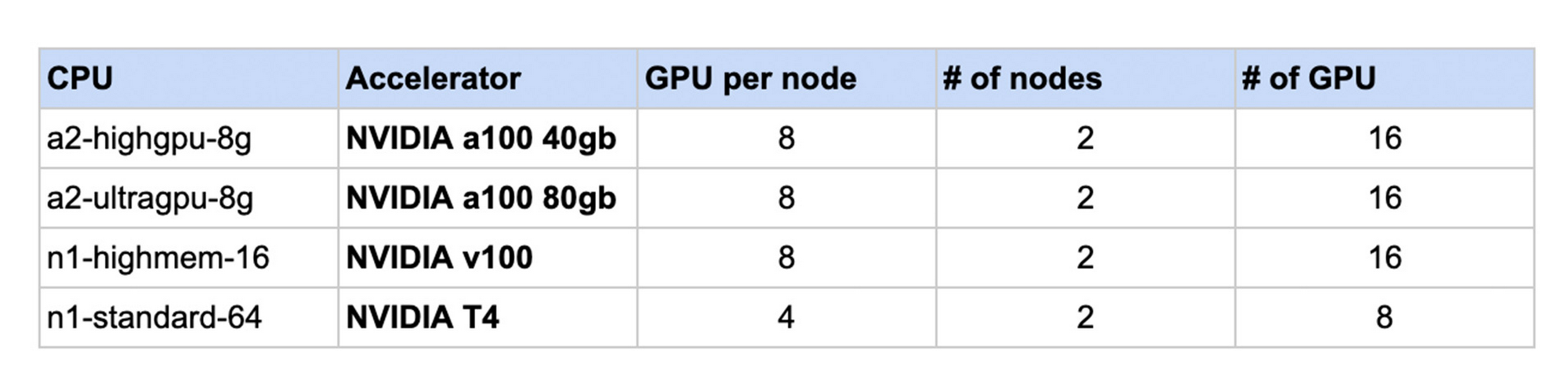
The following chart shows the results. For each machine shape, the NCCL performance without Fast Socket is normalized to 1. In each case, using NCCL Fast Socket demonstrated increased performance in a range of 1.3 to 2.6 times faster internetwork communication speed.

As a built-in feature, GKE users can take advantage of NCCL Fast Socket without changing or recompiling their applications, ML frameworks (such as TensorFlow or PyTorch), or even the NCCL library itself. To start using NCCL Fast Socket, create a node pool that uses the plugin with the --enable-fast-socket and --enable-gvnic flags. You can also update an existing node pool using gcloud container node-pools update.
gcloud container node-pools create NODEPOOL_NAME \
    --accelerator type=ACCELERATOR_TYPE, count=ACCELERATOR_COUNT \
    --machine-type=MACHINE_TYPE \
    --cluster=CLUSTER_NAME \
    --enable-fast-socket \
    --enable-gvnic
To achieve better network throughput with NCCL, Google Virtual NICs (gVNICs) must be enabled when creating VM instances. For detailed instructions on how to use gVNICs, please refer to the gVNIC guide.
To verify that NCCL Fast Socket has been enabled, view the kube-system pods:
kubectl get pods -n kube-system
And the output should b similar to:
NAME                         READY   STATUS    RESTARTS   AGE
fast-socket-installer-qvfdw  2/2     Running   0          10m
fast-socket-installer-rtjs4  2/2     Running   0          10m
fast-socket-installer-tm294  2/2     Running   0          10m
To learn more visit GKE NCCL Fast Socket documentation. We look forward to hearing how NCCL Fast Socket improves your ML Training experience on GKE.
How Vertex AI NAS is Suitable for Most Advanced ML Workloads

4457
Of your peers have already read this article.
3:00 Minutes
The most insightful time you'll spend today!
Vertex AI launched with the premise “one AI platform, every ML tool you need.” Let’s talk about how Vertex AI streamlines modeling universally for a broad range of use cases.
The overall purpose of Vertex AI is to simplify modeling so that enterprises can fast track their innovation, accelerate time to market, and ultimately increase return on ML investments. Vertex AI facilitates this in several ways. Features like Vertex AI Workbench, for example, speed up training and deployment of models by five times compared to traditional notebooks. Vertex AI Workbench’s native integration with BigQuery and Spark means that users without data science expertise can more easily perform machine learning work. Tools integrated into the unified Vertex AI platform, such as state of the art pre-trained APIs and AutoML, make it easier for data scientists to build models in less time. And for modeling work that lends itself best to custom modeling, Vertex AI’s custom model tooling supports advanced ML coding, with nearly 80% fewer lines of code required (compared to competitive platforms) to train a model with custom libraries. Vertex AI delivers all this while maintaining a strong focus on Explainable AI.
Yet organizations with the largest investments in AI and machine learning, with teams of ML experts, require extremely advanced toolsets to deliver on their most complex problems. Simplified ML modeling isn’t relegated to simple use cases only.
Let’s look at Vertex AI Neural Architecture Search (NAS), for instance.
Vertex AI NAS enables ML experts at the highest level to perform their most complex tasks with higher accuracy, lower latency, and low power requirements. Vertex AI NAS originates from the deep experience Alphabet has with building advanced AI at scale. In 2017, the Google Brain team recognized we need a better way to scale AI modeling, so they developed Neural Architecture Search technology to create an AI that generates other neural networks, trained to optimize their performance in a specific task the user provides. To the astonishment of many in the field, these AI-optimized models were able to beat a number of state of the art benchmarks, such as ImageNet and SOTA mobilenets, setting a new standard for many of the applications we see in use today, including many Google-internal products. Google Cloud saw the potential of such a technology and shipped in less than a year a productized version of the technique (under the brand AutoML). Vertex AI NAS is the newest and most powerful version of this idea, using the most sophisticated innovation that has emerged since the initial research.
Customer organizations are already implementing Vertex AI NAS for their most advanced workloads. Autonomous vehicle company Nuro is using Vertex AI NAS, and Jack Guo, Head of Autonomy Platform at the company, states, “Nuro’s perception team has accelerated their AI model development with Vertex AI NAS. Vertex AI NAS have enabled us to innovate AI models to achieve good accuracy and optimize memory and latency for the target hardware. Overall, this has increased our team’s productivity for developing and deploying perception AI models.”
And our partner ecosystem is growing for Vertex AI NAS. Google Cloud and Qualcomm Technologies have collaborated to bring Vertex AI NAS to the Qualcomm Technologies Neural Processing SDK, optimized for Snapdragon 8. This will bring AI to different device types and use cases, such as those involving IoT, mixed reality, automobiles, and mobile.
Google Cloud’s commitments to making machine learning more accessible and useful for data users, from the novice to the expert, and to increasing the efficacy of machine learning for enterprises are at the core of everything we do. With the suite of unified machine learning tools within Vertex AI, organizations can take advantage of every ML tool they need on one AI platform.
Ready to start ML modeling with Vertex AI? Start building for free. Want to know how Vertex AI Platform can help your enterprise increase return on ML investments? Contact us.
How the Telegraph is Reimagining Media with Google Cloud

10153
Of your peers have already read this article.
3:30 Minutes
The most insightful time you'll spend today!
Whether they’re reading the newspaper on the way to work, or catching up on the latest headlines on their smartphones, readers expect up-to-the-minute news wherever and whenever makes the most sense for them. As a result, media companies are increasingly looking for ways to improve, expand, and simplify their offerings, and they’re increasingly looking to the cloud to do it.
For more than 160 years The Telegraph has been counted on by readers across the United Kingdom and globally for award-winning news and journalism. An early adopter of cloud technology, it’s been a G Suite customer since 2008 and has already been using Google Cloud Platform to analyze digital behaviors to improve engagement and advertising performance since 2016.
Recently, The Telegraph announced it’s migrating fully to Google Cloud. By migrating all their production and pre-production services, they aim to deliver content faster, provide compelling experiences to readers, and reduce environmental impact.
“We are delighted to announce our newest collaboration with Google Cloud,” said Chris Taylor, Chief Information Officer, The Telegraph. “We have always worked closely with Google as they help us to provide our readers with great experiences on our digital products, collaboration software and internet scale through search. Their continued leadership in projects such as Kubernetes are enabling us to build flexible development environments that truly support DevOps.”
Powering the Digital Publishing Ecosystem
The Telegraph produces large volumes of digital content every day. It was imperative for them to find a cloud provider they could trust to support this ecosystem. By working with Google Cloud they have changed the way they see and engage with data: they can collect new information about their products every second and use that to continually hone their strategy. The Telegraph are placing more confidence and trust in the data captured about their content and now have one of the best available pieces of technology for capturing and analyzing the stories they publish in real-time.
Leveraging AI to support journalists
Time is critical when journalists are on a story, and The Telegraph wants to put important data in the hands of its journalists right when they need it. To do this, it will be using AutoML to classify content for journalists and make it more discoverable. For example, a reporter will be able to bring up relevant assets that link to their stories. It will also apply AutoML to classify Telegraph stock photos to help journalists attach compelling visual content to their stories faster.
Building compelling reader experiences with the help of APIs
Readers have an ever-increasing expectation of personalization. To meet this need, The Telegraph launched My Telegraph, currently live in beta, to offer registered readers personalized news experiences based on their interests or the particular journalists they want to follow. My Telegraph was developed on an API management platform provided by Google Cloud’s Apigee. You can learn more about how it’s applying API management to My Telegraph, in this blog post.
Working for environmental good
The Telegraph is the biggest selling quality newspaper in the UK, an accolade which requires it to print and distribute hundreds of thousands of copies each day. Optimal management of print production is important, and by using a combination of the cloud and machine learning, The Telegraph is better able to predict demand for physical newspapers, maximizing sales and minimizing waste. This makes great business sense for The Telegraph but also has great environmental benefit.
Generative AI Takes Center Stage at Google I/O Conference 2023

1185
Of your peers have already read this article.
7:00 Minutes
The most insightful time you'll spend today!
Over the past decade, artificial intelligence has evolved from experimental prototypes and early successes to mainstream enterprise use. And the recent advancements in generative AI have begun to change the way we create, connect, and collaborate. As Google CEO Sundar Pichai said in his keynote, every business and organization is thinking about how to drive transformation. That’s why we’re focused on making it easy and scalable for others to innovate with AI.
In March, we announced exciting new products that infuse generative AI into our Google Cloud offerings, empowering developers to responsibly build with enterprise-level safety, security, and privacy. They include Gen App Builder, which lets developers quickly and easily create generative chat and enterprise search applications, and Generative AI support in Vertex AI, which expands our machine learning development platform with access to foundation models from Google and others to quickly build, customize and deploy models. We also introduced our vision for Google Workspace, and delivered generative AI features to trusted testers in Gmail and Google Docs that help people write.
Last month we introduced Security AI Workbench, an industry-first extensible platform powered by our new LLM security model Sec-PaLM, which incorporates Google’s unique visibility into the evolving threat landscape and is fine-tuned for cybersecurity operations.
Today at Google I/O, we are excited to share the next steps not only in our own AI journey, but also those of our customers and partners as well. We’ve already seen a number of organizations begin to develop with and deploy our generative AI offerings. These organizations have been able to move their ideas from experimentation to enterprise-ready applications with the training models, security, compute infrastructure, and cost controls needed to provide their customers with transformative experiences. Our open ecosystem, which provides opportunities for every kind of partner, continues to grow as well. And we are also pleased to share new services and capabilities across Google Cloud and Workspace, including Duet AI—our AI-powered collaborator—to enable more users and developers to start seeing the impact AI can have on their organization.
Customers bringing ideas to life with generative AI
Leading companies in a variety of industries like eDreams ODIGEO, GitLab, Oxbotica, and more, are using our generative AI technologies to create engaging content, synthesize and organize information, automate business processes, and build amazing customer experiences. A few examples we showcased today include:
- Adore Me, a New York-based intimate apparel brand, is creating production-worthy copy with generative AI features in Docs and Gmail. This is accelerating projects and processes in ways that even surprised the company.
- Canva, the visual communication platform, uses Google Cloud’s rich generative AI capabilities in language translation to better support its non-English speaking users. Users can now easily translate presentations, posters, social media posts, and more into over a hundred languages. The company is also testing ways that Google’s PaLM technology can turn short video clips into longer, more compelling stories. The result will be a more seamless design experience while growing the Canva brand.
- Character.AI, a leading conversational AI platform, selected Google Cloud as its preferred cloud infrastructure provider because we offer the speed, security and flexibility required to meet the needs of its rapidly growing community of creators. We are enabling Character.AI to train and infer LLMs faster and more efficiently, and enhancing the customer experience by inspiring imagination, discovery, and understanding.
- Deutsche Bank is testing Google’s generative AI and large language models (LLMs) at scale to provide new insights to financial analysts, driving operational efficiencies and execution velocity. There is an opportunity to significantly reduce the time it takes to perform banking operations and financial analysts’ tasks, empowering employees by increasing their productivity while helping to safeguard customer data privacy, data integrity, and system security.
- Instacart is always looking for opportunities to adopt the latest technological innovations, and by joining the Workspace Labs program, they have access to the new features and can discover how generative AI will make an impact for their teams.
- Orange is exploring a next-generation contact center with Google Cloud. With customers in 26 countries, the global telecommunications firm is testing generative AI to transcribe the call, summarize the exchange between the customer and service representatives, and suggest possible follow up actions to the agent based on the discussion. This experiment has the potential to dramatically improve both the efficiency and quality of customer interactions. Orange is working closely with Google to help ensure data protection and make sure that systematic employee review of Generative AI output and transparency can be implemented.
- Replit is developing a collaborative software development platform powered by AI. Developers using Replit’s Ghostwriter coding AI already have 30% of their code written by generative AI today. With real-time debugging of the code output and context awareness of the program’s files, Ghostwriter frees up developers’ time for more challenging and creative aspects of programming.
- Uber is creating generative AI for customer-service chatbots and agent assist capabilities, which handle a range of common service issues with human-like interactions with the aim of achieving greater customer satisfaction and cost efficiency. Additionally, Uber is working on using our synthetic data systems (a technique for improving the quality of LLMs) in areas like product development, fraud detection, and employee productivity.
Wendy’s is working with Google Cloud on a groundbreaking AI solution, Wendy’s FreshAI, designed to revolutionize the quick service restaurant industry. The technology is transforming Wendy’s drive-thru food ordering experience with Google Cloud’s generative AI and LLMs—with the ability to discern the billions of possible order combinations on the Wendy’s menu. In June, Wendy’s plans to launch its first pilot of the technology in a Columbus, Ohio-area restaurant, before expanding to more drive-thru locations.
Partnering creates a strong ecosystem of real-world options for customers
At Google Cloud, we are dedicated to being the most open hyperscale cloud provider, and that includes our AI ecosystem. Today, we are excited to expand upon the partnerships announced earlier this year for every layer of the AI stack—chipmakers, companies building foundation models and AI platforms, technology partners enabling companies to develop and deploy machine learning (ML) models, app-builders solving customer use cases with generative AI, and global services and consulting firms that help enterprise customers implement all of this technology at scale.
We announced new or expanded partnerships with SaaS companies like Box, Dialpad, Jasper, Salesforce, and UKG; and consultancies including Accenture, BCG, Cognizant, Deloitte, and KPMG. Together with our previous announcements with companies like AI21 Labs, Aible, Anthropic, Anyscale, Bending Spoons, Cohere, Faraday, Glean, Gretel, Labelbox, Midjourney, Osmo, Replit, Snorkel AI, Tabnine, Weights & Biases, and many more, they provide the a wide range of options for businesses and governments looking to bring generative AI into their organizations.
Introducing new generative AI capabilities for Google Cloud
To help cloud users of all skill levels solve their everyday work challenges, we’re excited to announce Duet AI for Google Cloud, a new generative AI-powered collaborator. Duet AI serves as your expert pair programmer and assists cloud users with contextual code completion, offering suggestions tuned to your code base, generating entire functions in real-time, and assisting you with code reviews and inspections. It can fundamentally transform the way cloud users of all skill sets build new experiences and is embedded across Google Cloud interfaces—within the integrated development environment (IDE), Google Cloud Console, and even chat.
For developers looking to create generative AI applications more simply and efficiently, we are also introducing new foundation models and capabilities across our Google Cloud AI products. And to continue to enable and inspire more customers and partners, we are opening up generative AI support in Vertex AI and expanding access to many of these new innovations to more organizations.
- New foundation models are now available in Vertex AI. Codey, our code generation foundation model, helps accelerate software development with code generation, code completion, and code chat. Imagen, our text-to-image foundation model, lets customers generate and customize studio-grade images. And Chirp, our state-of-the-art speech model, allows customers to more deeply engage with their customers and constituents inclusively in their native languages with captioning and voice assistance. They can each be accessed via APIs, tuned through our intuitive Generative AI Studio, and feature enterprise-grade security and reliability, including encryption, access control, content moderation, and recitation capabilities that let organizations see the sources behind model outputs.
- Text Embeddings API is a new API endpoint that lets developers build recommendation engines, classifiers, question-answering systems, similarity matching, and other sophisticated applications based on semantic understanding of text or images.
- Reinforcement Learning from Human Feedback (RLHF) allows organizations to incorporate human feedback to deeply customize and improve model performance.
Underpinning all of these innovations is our AI-optimized infrastructure. We provide the widest choice of compute options among leading cloud providers and are excited to continue to build them out with the introduction of new A3 Virtual Machines based on NVIDIA’s H100 GPU. These VMs, alongside the recently announced G2 VMs, offer a comprehensive range of GPU power for training and serving AI models.
Extending generative AI across Google Workspace
Earlier this year, we shared our vision for bringing generative AI to Workspace, and gave many users early access to features that helped them write in Gmail and Google Docs. Today, we are excited to announce Duet AI for Google Workspace, which brings together our powerful generative AI features and lets users collaborate with AI so they can get more done every day. We’re delivering the following features to trusted testers via Workspace Labs:
- In Gmail, we’re adding the ability to draft responses that consider the context of your existing email thread—and making the experience available on mobile.
- In Google Slides and Meet, we’re enabling you to easily generate images from text descriptions. Custom images in slides can help bring your story to life, and in Meet they can be used to create custom backgrounds.
- In Google Sheets, we’re automating data classification and the creation of custom plans—helping you analyze and organize data faster than ever.
Moving the industry forward, responsibly
Customers continue to amaze us with their ideas and creativity, and we look forward to continuing to help them discover their own paths forward with generative AI. While the potential for impact on business is great, we remain committed to taking a responsible approach, guided by our AI Principles. As we gather more feedback from our customers and users, we will continue to bring new innovations to market, with a goal to enable organizations of every size and industry to increase efficiency, connect with customers in new ways, and unlock entirely new revenue streams.
Discover Gen App Builder: Transform Search and Conversational Experiences Through Generative AI

1244
Of your peers have already read this article.
3:30 Minutes
The most insightful time you'll spend today!
If you’ve been exploring recently-launched consumer generative AI tools like Bard and thinking about how to build similar experiences for your business, Generative AI App Builder, or Gen App Builder for short, is here to get you started.
Gen App Builder is part of Google Cloud’s recently announced generative AI offerings and lets developers, even those with limited machine learning skills, quickly and easily tap into the power of Google’s foundation models, search expertise, and conversational AI technologies to create enterprise-grade generative AI applications.
“Google Cloud’s leading AI technology enables STARZ customers to discover more relevant content, increasing engagement with, and the likelihood of completing the content served to them,” says Robin Chacko, EVP Direct-to-Consumer, STARZ. “We’re excited about how generative AI-powered search will help users find the most relevant content even easier and faster.”
Gen App Builder is exciting because unlike most existing generative AI offerings for developers, it offers an orchestration layer that abstracts the complexity of combining various enterprise systems with generative AI tools to create a smooth, helpful user experience. Gen App Builder provides step-by-step orchestration of search and conversational applications with pre-built workflows for common tasks like onboarding, data ingestion, and customization, making it easy for developers to set up and deploy their apps. With Gen App Builder developers can:
- Build in minutes or hours. With access to Google’s no-code conversational and search tools powered by foundation models, organizations can get started with a few clicks and quickly build high-quality experiences that can be integrated into their applications and websites.
- Combine the power of foundation models with information retrieval to find relevant, personalized information. Enterprises can build apps that understand user intent via natural language, and surface the right information with associated citations and attributions from a company’s public and private data. They can also fully control what data their applications access and the content or topics they want to address.
- Build multimodal apps that can respond with text, images, and other media. Gen App Builder supports not just text, but also other modalities such as images and videos. It allows developers to build apps using a combination of text and images as inputs to find information across documents, photos, and video content, enabling richer customer interactions.
- Combine natural conversations with structured flows. Developers can granularly blend the output of foundation models with controls to ground answers in enterprise content, and step-by-step conversation orchestration to guide customers to the right answers.
- Provide the ability to transact and connect to third party apps and services. Gen App Builder makes it simple to create digital assistants and bots that not only serve content, but also connect to purchasing and provisioning systems to enable transactions from the conversational UI, and escalate customer conversations to a human agent when the context demands.
A new generation of conversational AI experiences and assistants
Consumers of enterprise applications expect to interact with technology in a seamless, conversational way to quickly find the information they need and act on it. Gen App Builder can help reinvent these customer and employee experiences by ingesting large, complex datasets that are specific to your company–from websites, documents, and transactional systems like billing and inventory, to emails, chat conversations, and more. These AI-powered apps can synthesize information across all of these sources to provide specific, actionable responses, using only the data you have provided.
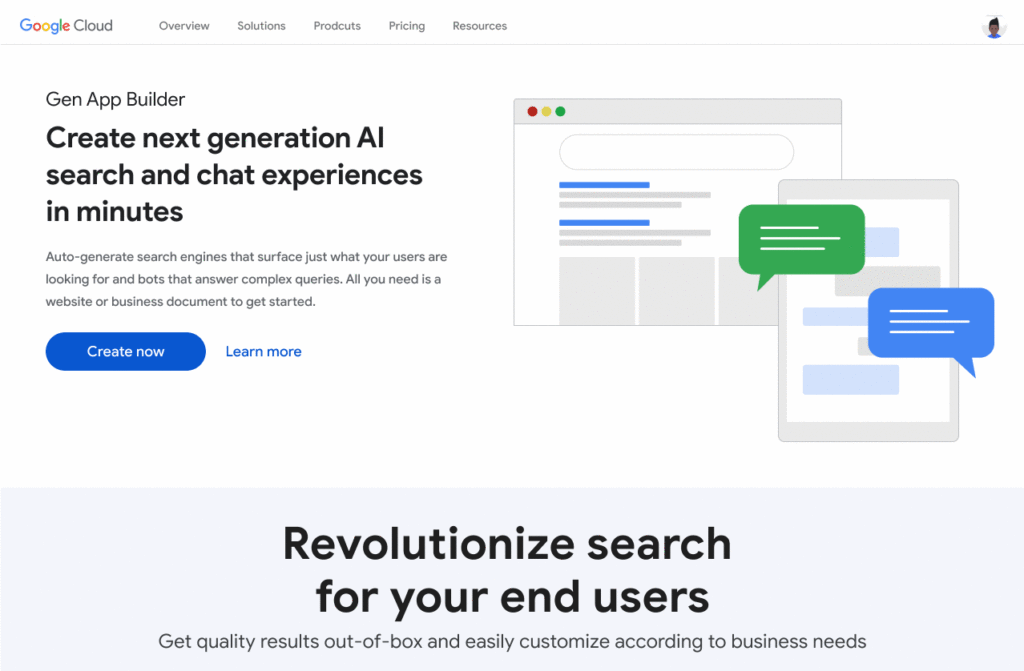
Some of the most popular uses are in customer service, where generative apps can contribute to increasing revenue, customer satisfaction, and customer loyalty. For example, if a retail customer reaches out to modify an order, a virtual agent can help them change it to another product. The customer doesn’t even need to provide the new product name—they can just upload an image and let the agent guide them through the rest. Watch this demo to see how a retail chatbot can use multimodal capabilities to help a consumer navigate various options on the website, including giving the customer ideas on how to use the product and even helping them complete the purchase with the ability to transact within the conversational UI. This scenario could apply to multiple industries and use cases, ranging from consumer goods and public services, to finance and internal corporate systems like intranets.
Combining the power of Google-quality search with foundation models
Finding the right information from data across the organization is a critical requirement within any enterprise. Yet it can be challenging to build high-quality enterprise search experiences with existing tools. Current systems struggle to understand user intent, are difficult to implement and customize, and don’t provide a high-quality user experience.
One of the most exciting features of Gen App Builder is the ability to combine the power of Google-quality search with generative AI to help enterprises find the most relevant and personalized information when they need it. With Gen App Builder, enterprises can build conversational search experiences across their public and private data in minutes or hours with no coding experience.
Enabling multimodal search across text, images and video within the enterprise is a key aspect of the search experiences in Gen App Builder. In addition to providing high-quality search results, Gen App Builder can conveniently summarize the results and provide corresponding citations in a natural, human-like fashion. Gen App Builder also automatically extracts key information from the data and enables personalized results for users. Watch this demo to see how these capabilities can come together to transform the search experience for employees at a financial services firm. The ability to integrate Google-quality search within the enterprise’s applications means they can enjoy a new level of data utilization, drive increased process efficiencies, and provide delightful experiences to their employees and customers.
“Customers have been shopping at Macy’s for generations. Being able to deliver 360° personalization and contextual recommendations will help ensure that Macy’s is still providing future generations of shoppers with a seamless, exceptional experience,” said Bennett Fox-Glassman, Senior Vice-President, Customer Journey, Macy’s. “We’ve already realized an increase in revenue per visit and conversion rates had great success using Google Cloud’s AI technology and are looking forward to exploring how these latest announcements bring together Natural Language Processing and Generative AI capabilities to deliver next-gen search and conversational experiences for our customers.”
The ability to intuitively interact with complex data across a variety of sources allows organizations to better serve their customers and deliver more relevant offerings. Combined with conversational and fulfillment abilities, the potential for improving customer engagement and employee productivity is immense. We’re excited to see how developers and enterprises use a mix of these capabilities to power new experiences and revenue opportunities.
If you’re interested in a closer look at the Gen App Builder, tune into this session at the Data Cloud & AI Summit. Take a step forward to getting hands-on and join the waitlist for our trusted tester program. And finally, bookmark our generative AI landing page to keep abreast of the latest news, updates and possibilities from this exciting new world of Gen Apps.
10133
Of your peers have already watched this video.
1:00 Minutes
The most insightful time you'll spend today!
Predict User Churn on Gaming Apps with Google Analytics Data using BigQuery ML
User retention can be a major challenge for mobile game developers. According to the Mobile Gaming Industry Analysis in 2019, most mobile games only see a 25% retention rate for users after the first day. To retain a larger percentage of users after their first use of an app, developers can take steps to motivate and incentivize certain users to return. But to do so, developers need to identify the propensity of any specific user returning after the first 24 hours.
In this blog post, we will discuss how you can use BigQuery ML to run propensity models on Google Analytics 4 data from your gaming app to determine the likelihood of specific users returning to your app.
You can also use the same end-to-end solution approach in other types of apps using Google Analytics for Firebase as well as apps and websites using Google Analytics 4. To try out the steps in this blogpost or to implement the solution for your own data, you can use this Jupyter Notebook.
Using this blog post and the accompanying Jupyter Notebook, you’ll learn how to:
- Explore the BigQuery export dataset for Google Analytics 4
- Prepare the training data using demographic and behavioural attributes
- Train propensity models using BigQuery ML
- Evaluate BigQuery ML models
- Make predictions using the BigQuery ML models
- Implement model insights in practical implementations
Google Analytics 4 (GA4) properties unify app and website measurement on a single platform and are now default in Google Analytics. Any business that wants to measure their website, app, or both, can use GA4 for a more complete view of how customers engage with their business. With the launch of Google Analytics 4, BigQuery export of Google Analytics data is now available to all users. If you are already using a Google Analytics 4 property, you can follow this guide to set up exporting your GA data to BigQuery.
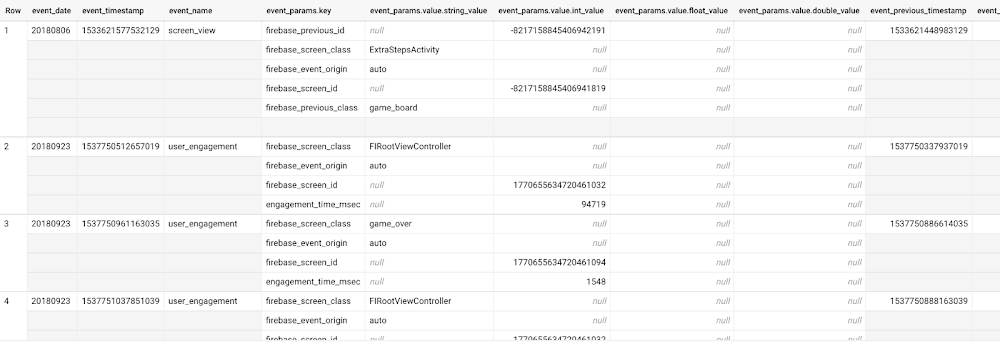
Once you have set up the BigQuery export, you can explore the data in BigQuery. Google Analytics 4 uses an event-based measurement model. Each row in the data is an event with additional parameters and properties. The Schema for BigQuery Export can help you to understand the structure of the data.
In this blogpost, we use the public sample export data from an actual mobile game app called “Flood It!” (Android, iOS) to build a churn prediction model. But you can use data from your own app or website.
Here’s what the data looks like. Each row in the dataset is a unique event, which can contain nested fields for event parameters.
SELECT *FROM `firebase-public-project.analytics_153293282.events_*`TABLESAMPLE SYSTEM (1 PERCENT)
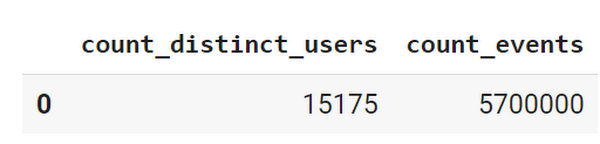
This dataset contains 5.7M events from over 15k users.
SELECTCOUNT(DISTINCT user_pseudo_id) as count_distinct_users,COUNT(event_timestamp) as count_eventsFROM`firebase-public-project.analytics_153293282.events_*
Our goal is to use BigQuery ML on the sample app dataset to predict propensity to user churn or not churn based on users’ demographics and activities within the first 24 hours of app installation.
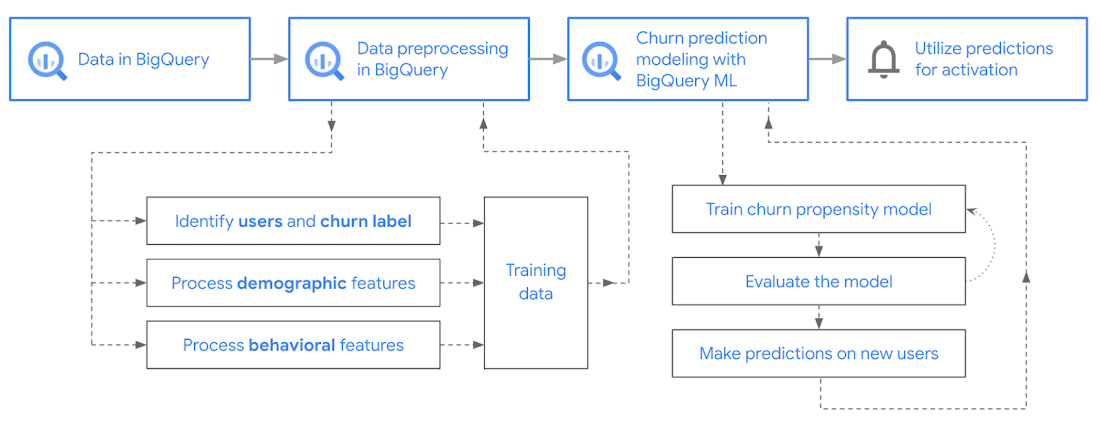
In the following sections, we’ll cover how to:
- Pre-process the raw event data from GA4
- Identify users & the label feature
- Process demographic features
- Process behavioral features
- Train classification model using BigQuery ML
- Evaluate the model using BigQueryML
- Make predictions using BigQuery ML
- Utilize predictions for activation
Pre-process the raw event data
You cannot simply use raw event data to train a machine learning model as it would not be in the right shape and format to use as training data. So in this section, we’ll go through how to pre-process the raw data into an appropriate format to use as training data for classification models.
This is what the training data should look like for our use case at the end of this section:
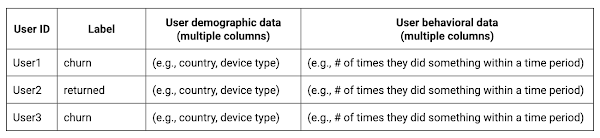
Notice that in this training data, each row represents a unique user with a distinct user ID (user_pseudo_id).
Identify users & the label feature
We first filtered the dataset to remove users who were unlikely to return the app anyway. We defined these ‘bounced’ users as ones who spent less than 10 mins with the app. Then we labeled all remaining users:
- churned: No event data for the user after 24 hours of first engaging with the app.
- returned: The user has at least one event record after 24 hours of first engaging with the app.
For your use case, you can have a different definition of bounce and churning. Also you can even try to predict something else other than churning, e.g.:
- whether a user is likely to spend money on in-game currency
- likelihood of completing n-number of game levels
- likelihood of spending n amount of time in-game etc.
In such cases, label each record accordingly so that whatever you are trying to predict can be identified from the label column.
From our dataset, we found that ~41% users (5,557) bounced. However, from the remaining users (8,031), ~23% (1,883) churned after 24 hours:
SELECTbounced,churned,COUNT(churned) as count_usersFROMbqmlga4.returningusersGROUP BY 1,2ORDER BY bounced
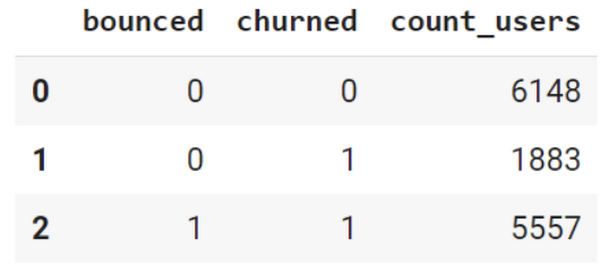
To create these bounced and churned columns, we used the following snippet of SQL code.
...#churned = 1 if last_touch within 24 hr of app installation, else 0IF (user_last_engagement < TIMESTAMP_ADD(user_first_engagement,INTERVAL 24 HOUR),1,0 ) AS churned,#bounced = 1 if last_touch within 10 min, else 0IF (user_last_engagement <= TIMESTAMP_ADD(user_first_engagement,INTERVAL 10 MINUTE),1,0 ) AS bounced,...
You can view the Jupyter Notebook for the full query used for materializing the bounced and churned labels.
Process demographic features
Next, we added features both for demographic data and for behavioral data spanning across multiple columns. Having a combination of both demographic data and behavioral data helps to create a more predictive model.
We used the following fields for each user as demographic features:
geo.countrydevice.operating_systemdevice.language
A user might have multiple unique values in these fields — for example if a user uses the app from two different devices. To simplify, we used the values from the very first user engagement event.
CREATE OR REPLACE VIEW bqmlga4.user_demographics AS (WITH first_values AS (SELECTuser_pseudo_id,geo.country as country,device.operating_system as operating_system,device.language as language,ROW_NUMBER() OVER (PARTITION BY user_pseudo_id ORDER BY event_timestamp DESC) AS row_numFROM `firebase-public-project.analytics_153293282.events_*`WHERE event_name="user_engagement")SELECT * EXCEPT (row_num)FROM first_valuesWHERE row_num = 1 #first engagement);
Process behavioral features
There is additional demographic information present in the GA4 export dataset, e.g. app_info, device, event_params, geo etc. You may also send demographic information to Google Analytics through each hit via user_properties. Furthermore, if you have first-party data on your own system, you can join that with the GA4 export data based on user_ids.
To extract user behavior from the data, we looked into the user’s activities within the first 24 hours of first user engagement. In addition to the events automatically collected by Google Analytics, there are also the recommended events for games that can be explored to analyze user behavior. For our use case, to predict user churn, we counted the number of times the follow events were collected for a user within 24 hours of first user engagement:
user_engagementlevel_start_quickplaylevel_end_quickplaylevel_complete_quickplaylevel_reset_quickplaypost_scorespend_virtual_currencyad_rewardchallenge_a_friendcompleted_5_levelsuse_extra_steps
The following query shows how these features were calculated:
WITHevents_first24hr AS (SELECTe.*FROM`firebase-public-project.analytics_153293282.events_*` eJOINbqmlga4.returningusers rONe.user_pseudo_id = r.user_pseudo_idWHERETIMESTAMP_MICROS(e.event_timestamp) <= r.ts_24hr_after_first_engagement)SELECTuser_pseudo_id,SUM(IF(event_name = 'user_engagement', 1, 0)) AS cnt_user_engagement,# ... repeated for all behavior data ...SUM(IF(event_name = 'use_extra_steps', 1, 0)) AS cnt_use_extra_steps,FROMevents_first24hrGROUP BY1
View the notebook for the query used to aggregate and extract the behavioral data. You can use different sets of events for your use case. To view the complete list of events, use the following query:
SELECTevent_name,COUNT(event_name) as event_countFROM`firebase-public-project.analytics_153293282.events_*`GROUP BY 1ORDER BYevent_count DESC
After this we combined the features to ensure our training dataset reflects the intended structure. We had the following columns in our table:
- User ID:
user_pseudo_id
- Label:
churned
- Demographic features
countrydevice_osdevice_language
- Behavioral features
cnt_user_engagementcnt_level_start_quickplaycnt_level_end_quickplaycnt_level_complete_quickplaycnt_level_reset_quickplaycnt_post_scorecnt_spend_virtual_currencycnt_ad_rewardcnt_challenge_a_friendcnt_completed_5_levelscnt_use_extra_stepsuser_first_engagement
At this point, the dataset was ready to train the classification machine learning model in BigQuery ML. Once trained, the model will output a propensity score between churn (churned=1) or return (churned=0) indicating the probability of a user churning based on the training data.
Train classification model
When using the CREATE MODEL statement, BigQuery ML automatically splits the data between training and test. Thus the model can be evaluated immediately after training (see the documentation for more information).
For the ML model, we can choose among the following classification algorithms where each type has its own pros and cons:
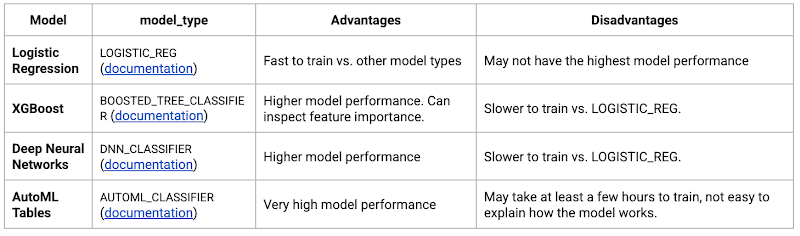
Often logistic regression is used as a starting point because it is the fastest to train. The query below shows how we trained the logistic regression classification models in BigQuery ML.
CREATE OR REPLACE MODEL bqmlga4.churn_logregTRANSFORM(EXTRACT(MONTH from user_first_engagement) as month,EXTRACT(DAYOFYEAR from user_first_engagement) as julianday,EXTRACT(DAYOFWEEK from user_first_engagement) as dayofweek,EXTRACT(HOUR from user_first_engagement) as hour,* EXCEPT(user_first_engagement, user_pseudo_id))OPTIONS(MODEL_TYPE="LOGISTIC_REG",INPUT_LABEL_COLS=["churned"]) ASSELECT*FROMbqmlga4.train
We extracted month, julianday, and dayofweek from datetimes/timestamps as one simple example of additional feature preprocessing before training. Using TRANSFORM() in your CREATE MODEL query allows the model to remember the extracted values. Thus, when making predictions using the model later on, these values won’t have to be extracted again. View the notebook for the example queries to train other types of models (XGBoost, deep neural network, AutoML Tables).
Evaluate model
Once the model finished training, we ran ML.EVALUATE to generate precision, recall, accuracy and f1_score for the model:
SELECT*FROMML.EVALUATE(MODEL bqmlga4.churn_logreg)

The optional THRESHOLD parameter can be used to modify the default classification threshold of 0.5. For more information on these metrics, you can read through the definitions on precision and recall, accuracy, f1-score, log_loss and roc_auc. Comparing the resulting evaluation metrics can help to decide among multiple models.Furthermore, we used a confusion matrix to inspect how well the model predicted the labels, compared to the actual labels. The confusion matrix is created using the default threshold of 0.5, which you may want to adjust to optimize for recall, precision, or a balance (more information here).
SELECTexpected_label,_0 AS predicted_0,_1 AS predicted_1FROMML.CONFUSION_MATRIX(MODEL bqmlga4.churn_logreg)
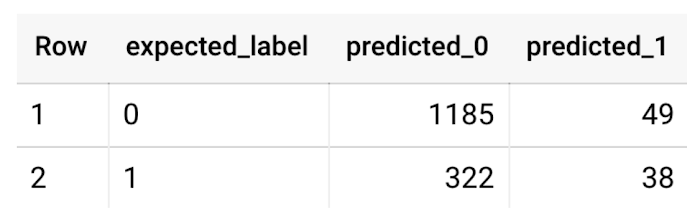
This table can be interpreted in the following way:

Make predictions using BigQuery ML
Once the ideal model was available, we ran ML.PREDICT to make predictions. For propensity modeling, the most important output is the probability of a behavior occurring. The following query returns the probability that the user will return after 24 hrs. The higher the probability and closer it is to 1, the more likely the user is predicted to return, and the closer it is to 0, the more likely the user is predicted to churn.
SELECTuser_pseudo_id,returned,predicted_returned,predicted_returned_probs[OFFSET(0)].prob as probability_returnedFROMML.PREDICT(MODEL bqmlga4.churn_logreg,(SELECT * FROM bqmlga4.train)) #can be replaced with a proper test dataset
Utilize predictions for activation
Once the model predictions are available for your users, you can activate this insight in different ways. In our analysis, we used user_pseudo_id as the user identifier. However, ideally, your app should send back the user_id from your app to Google Analytics. In addition to using first-party data for model predictions, this will also let you join back the predictions from the model into your own data.
- You can import the model predictions back into Google Analytics as a user attribute. This can be done using the Data Import feature for Google Analytics 4. Based on the prediction values you can Create and edit audiences and also do Audience targeting. For example, an audience can be users with prediction probability between 0.4 and 0.7, to represent users who are predicted to be “on the fence” between churning and returning.
- For Firebase Apps, you can use the Import segments feature. You can tailor user experience by targeting your identified users through Firebase services such as Remote Config, Cloud Messaging, and In-App Messaging. This will involve importing the segment data from BigQuery into Firebase. After that you can send notifications to the users, configure the app for them, or follow the user journeys across devices.
- Run targeted marketing campaigns via CRMs like Salesforce, e.g. send out reminder emails.
You can find all of the code used in this blogpost in the Github repository:
What’s next?
Continuous model evaluation and re-training
As you collect more data from your users, you may want to regularly evaluate your model on fresh data and re-train the model if you notice that the model quality is decaying.
Continuous evaluation—the process of ensuring a production machine learning model is still performing well on new data—is an essential part in any ML workflow. Performing continuous evaluation can help you catch model drift, a phenomenon that occurs when the data used to train your model no longer reflects the current environment.
To learn more about how to do continuous model evaluation and re-train models, you can read the blogpost: Continuous model evaluation with BigQuery ML, Stored Procedures, and Cloud Scheduler
More resources
If you’d like to learn more about any of the topics covered in this post, check out these resources:
- BigQuery export of Google Analytics data
- BigQuery ML quickstart
- Events automatically collected by Google Analytics 4
- Qwiklabs: Create ML models with BigQuery ML
Or learn more about how you can use BigQuery ML to easily build other machine learning solutions:
- How to build demand forecasting models with BigQuery ML
- How to build a recommendation system on e-commerce data using BigQuery ML
Let us know what you thought of this post, and if you have topics you’d like to see covered in the future! You can find us on Twitter at @polonglin and @_mkazi_.Thanks to reviewers: Abhishek Kashyap, Breen Baker, David Sabater Dinter.
More Relevant Stories for Your Company




How e-Com Firm Bukalapak Achieved 5X ROAS With Machine Learning
In 2018, Indonesia accounted for 94% of SEA’s $23 billion e-commerce industry. Today, the country’s massive e-commerce sector continues to grow, along with the number of brands looking for innovative ways to compete for a piece of the pie. As one of the largest e-commerce companies in the region, Bukalapak receives a high

Johnson & Johnson Increases it’s Ability to Find Highly Qualified Staffers for Business Critical Roles by 41% with Easy-to-Use AI
Job seekers can often feel lost or disconnected—like the right opportunity is out there, but they don’t know where or how to look. Employers face a similar challenge when trying to attract the right candidates. Many companies, especially large enterprises, face a talent shortage across a range of critical roles. For global

Siemens: What Smarter New Age Recruiting Looks Like
Siemens aims to shape the future—and has the scale, culture, and know-how to realize its ambitions. The Germany-headquartered industrial manufacturing business operates in more than 120 countries and focuses on electrification, automation, and digitalization. Siemens' extensive portfolio includes industrial production digitalization and automation technologies, diagnostic and therapeutic imaging for healthcare, and

Incorporating Custom Holidays into Your Time-Series Models with BigQuery ML
About three years ago, JCB, one of the biggest Japanese payment companies, launched a project to develop new high-value services with agility. We set up a policy of starting small from scratch without using the existing system, which we call the concept of “Dejima”, where we focused on improving various aspects
