





Cloud FinOps: Maximizing Business Value and Optimizing Cloud Spend

1177
Of your peers have already read this article.
6:30 Minutes
The most insightful time you'll spend today!
We’ve been saying it for years, the benefits and potential of the cloud abound.
And yet, more than 80% of respondents in a survey of 753 business leaders point to managing cloud spend as their top organizational challenge, and these same respondents estimate that nearly 1/3 of their cloud spend is inefficient or wasted (Flexera, 2023). Many organizations are new to optimizing cloud costs and ensuring resources are used efficiently.
As your organization digitally transforms you may be realizing what other organizations are realizing too: When it comes to business value, simply migrating to the cloud isn’t enough. Achieving the full benefits of cloud requires fundamental changes to both mindset and behaviors around existing financial-management practices. It requires changing the way your disparate teams work together.
Enter the Cloud FinOps Building Blocks
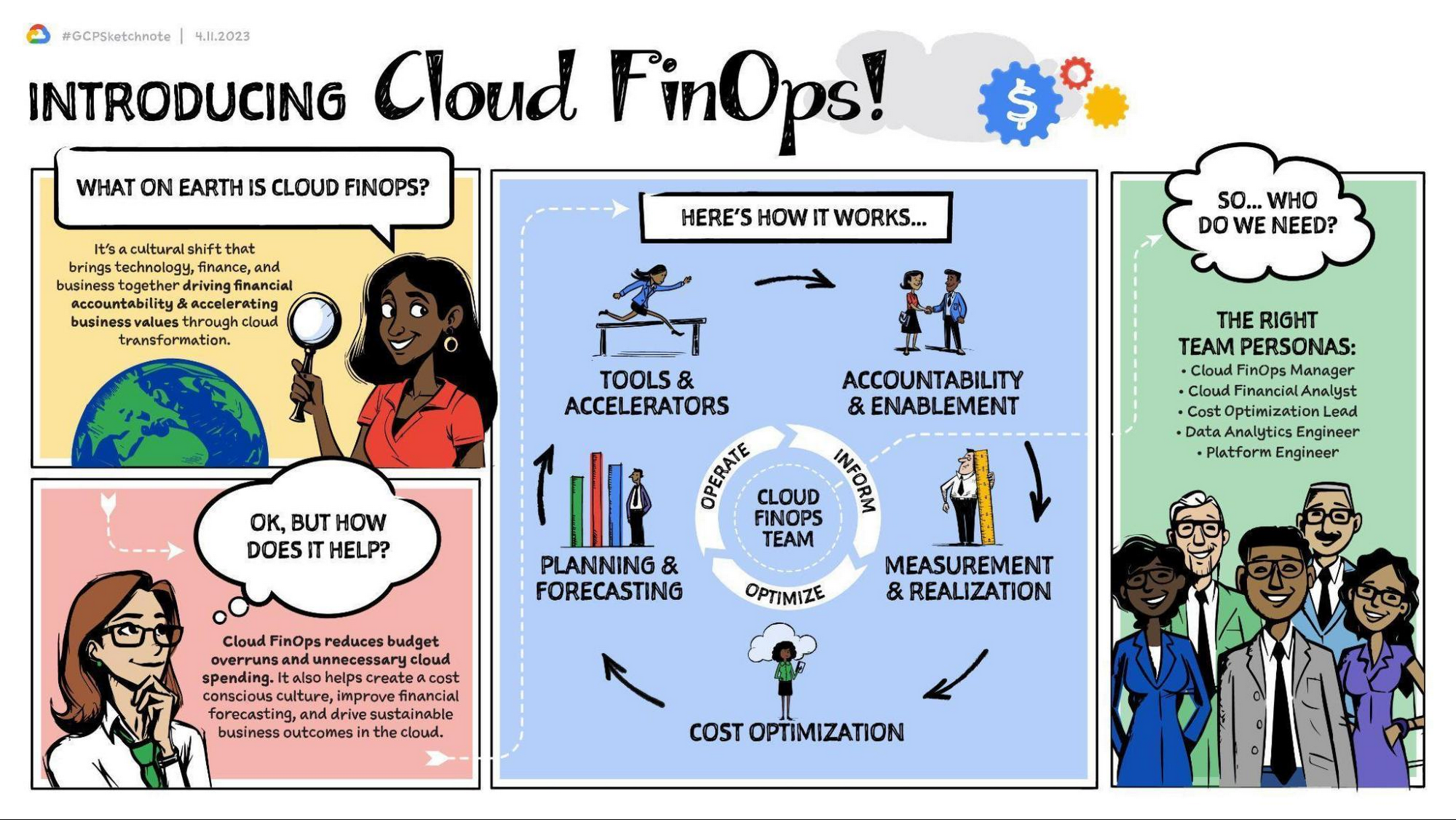
Cloud FinOps is a framework, discipline, and cultural shift combining people, processes, and technology to drive financial awareness and accountability. FinOps practices align engineering, finance, technology and business leaders and teams under a primary objective: to maximize business value from the cloud. With Cloud FinOps practices, every business stakeholder is charged not only to take responsibility for their spending and costs, but also to optimize them. These practices enable businesses to manage consumption and make sound, data-informed cloud-spend decisions. Cloud FinOps is comprised of five building blocks:
- Accountability and enablement
Establishing governance and policies to manage cloud spend and realize business value. - Measurement and realization
Driving financial accountability and value realization with a defined set of KPIs and success metrics. - Cost optimization
Providing financial visibility and recommendations of IT resource usage to optimize cloud spend. - Planning and forecasting
Modernizing budgeting, forecasting, and chargeback methods to allow for iterative, innovative and cost effective development practices. - Tools and accelerators
Deploying and integrating a set of cloud cost tooling to effectively manage and track cloud spend. Learn more here.
For a general overview of the Cloud FinOps framework and more on the five building blocks, check out these resources:
- Video | What is FinOps and 3 reasons why you should care about it.
This 5-minute video provides an overview of FinOps, the 5 building blocks, and how they can benefit your organization. - Podcast | FinOps with Joe Daly
In this podcast, Joe Daly of the FinOps Foundation shares about the key principles of FinOps, which he refers to as financial DevOps. Daly discusses how this framework is helping companies make better and more efficient financial decisions while taking advantage of the cloud. - Blog | Decoding Cloud FinOps to accelerate digital transformation
This blogpost discusses the critical role of FinOps in a successful digital transformation. It outlines key metrics to help measure and track business value and to increase visibility into the effects of digital transformation on top-line revenue. - Article | Cloud FinOps: The secret to unlocking the economic potential of public cloud
This Forbes article profiles OpenX, the first major advertising exchange platform to migrate entirely to the cloud. It details the 5 key pillars of the Cloud FinOps framework, which OpenX leveraged in their digital transformation strategy. In just 9 months, they reduced their per-unit costs by more than 60%.
Importantly, Cloud FinOps isn’t about saving money; it’s about making money. It’s about promoting a cost-conscious culture, financial accountability, and business agility in the cloud. Whatever stage of the cloud journey you’re at, cloud FinOps practices will help you get the most value out of Google Cloud. This framework can help to remove blockers, implement the building blocks, and empower your teams to make better business decisions.
The Cloud FinOps Journey
Implementing Cloud FinOps is neither a destination nor a box your organization will check then archive. Rather, Cloud FinOps is an ongoing journey and discipline. It’s inherently iterative. As such, growth and maturity across processes, capabilities, and domains requires action, repetition, and continuous learning.
Across the five FinOps building blocks, we’ve identified 50 subprocesses to best understand organizations’ FinOps proficiency, capabilities, practice domains, and blind spots. We scale them from 1 to 5 and categorize them in one of three phases of maturity: Crawl, Walk, or Run. Organizations in the Crawl phase tend to focus on technical problem solving and cloud-cost visibility. Organizations in the Walk phase emphasize strategic improvements such as employing cost visibility dashboards to realize better business value. And organizations in the Run phase are focused primarily on transformational change and strategic innovation, factoring cost considerations into both processes and cloud architecture.
Through this “crawl, walk, run” maturity model, we can evaluate proficiency, establish a benchmark, and recommend a targeted action plan for FinOps adoption. And whatever your level of maturity, your organization can take quick scalable action not only to foster improvement but also to evaluate outcomes and gain insights.
The key here is that regardless of your organization’s Cloud FinOps maturity level, you can take small steps now toward continuous improvement. Here are some common focus areas and several more resources organized by maturity level that you can access.
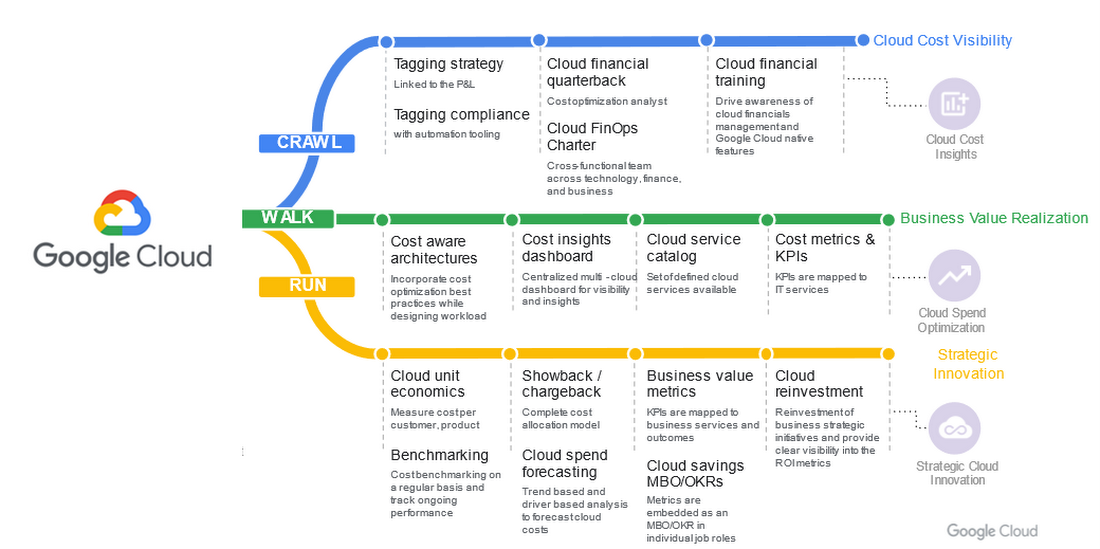
Crawl phase
Improve cloud-cost visibility.
- Whitepaper | Drive Cloud FinOps at scale with Google Cloud Tagging
Tags and labels can be useful and flexible tools to help your organization segment cloud spend and allocate costs. This whitepaper introduces Google Cloud Tags and best practices for implementing them. It differentiates tags, which offer reliable reporting and governance features, from labels, which can be prone to problems, including poor coverage and a lack of integrity in data labeling. - Whitepaper | Unlocking the value of Cloud FinOps with a new operating model
This white paper unpacks the details of the FinOps operating model, including roles, organizational alignment, and driving culture change. It details how to establish strong financial governance and a cost-conscious culture. - Whitepaper | Cloud FinOps: Shared services cost allocation
In this whitepaper, you’ll explore the elements of cost allocation as well as the complexities and challenges associated with shared-services cost allocation. While some of these concepts and models are interchangeable between legacy and cloud environments, this whitepaper focuses primarily on cloud computing and associated services.
Walk phase
Improve business-value realization.
- Blog | 5 key metrics to measure Cloud FinOps impact in your organization in 2022 and beyond
To drive business growth and topline revenue, business leaders must be able to connect cloud investments to business outcomes. As such, traditional IT metrics and KPIs must continue to evolve. In this blogpost, we’ll explore five key business-value metrics aligned to the five Cloud FinOps building blocks. - Whitepaper | Maximize business value with Cloud FinOps
The cloud introduces new complexity and challenges to traditional IT financial management. As such, it requires strategic financial governance, processes, and partnership across the organization. This whitepaper explains how Cloud FinOps helps enterprises that have invested in cloud to drive financial accountability and accelerate business value.
Run phase
Improve strategic cloud innovation.
- Whitepaper | Unit costing: The next frontier in cloud
In this whitepaper, you’ll explore the nature of and need for cloud unit costing, the standard by which FinOps practitioners obtain full business context for their cloud costs. It features examples from cloud-first organizations that have pioneered FinOps practices. Additionally, it examines several cloud forecasting and budgeting methods, ranging from least to most rigorous. - Blog | You get what you pay for: Principles for designing a chargeback process
Chargeback, a crucial Cloud FinOps capability, is the process of mapping cloud consumption to internal users within an organization. It provides transparency, facilitates accountability, enables recovery of cloud costs, and fosters a culture of fiscal responsibility. This blogpost will walk you through some best practices in designing an effective chargeback process in Google Cloud.
Success with Cloud FinOps
As global markets continue to face challenges, there’s never been a better time to increase the return on your cloud investments. Adopting and implementing FinOps practices will help. For some real-world examples of how organizations across a range of FinOps maturity levels have collectively saved millions of dollars on their overall cloud spend, check out these customers’ stories.
- Video | Next 2022: Top 10 ways to lower your costs on Google Cloud with General Mills
In this video, which highlights ten leading cloud cost optimization practices, hear how General Mills, which is on pace to increase their cloud footprint by 60%, has approached the discipline of cost savings and accelerated their adoption of Cloud FinOps to drive waste out of their cloud usage. - Video | How Nuro optimized their costs on Google Cloud
In this video, you’ll get an overview of the Google Cloud FinOps framework, a deep dive on cost-optimization best practices, and hear about how startup Nuro AI has adopted their own cost-savings discipline and Cloud FinOps practice. - Video | How OpenX reduce per unit costs by 60%
In this video, you’ll learn how to establish a cost center of excellence within your cloud practice, explore several cost-optimization recommendations, and hear from OpenX about how they reduced their costs on Google Cloud. - Case Study | How Sky saved millions with Google Cloud
In this case study, read how a few years into their cloud adoption journey, media and entertainment company, Sky Group discovered over $1.5 million in savings and optimized costs with BigQuery, Compute Engine, and Cloud Storage. - Case Study | Etsy: Doing more with less cost and infrastructure
In this case study, read how after migrating their data center and ecommerce platform to the cloud, Etsy realized more than 50% savings in compute energy and leveraged committed use discounts (CUDs) to reduce their compute costs by 42%.
It’s important to remember that FinOps success looks different for different organizations. It’s neither a one-time fix nor a destination reached by way of a single path. But for every organization, success requires small actions, refinement, and continuous improvement. As you leverage Google Cloud FinOps resources and tools, your organization can:
- Drive financial accountability and visibility.
- Optimize cloud usage and cost efficiency.
- Enable cross organizational trust and collaboration.
- Prevent cloud-spend sprawl.
- Break down departmental silos.
- Accelerate innovation.
Getting started with Cloud FinOps
At Google, we have a team of experts in leading FinOps practices dedicated to helping you create an actionable plan to optimize cloud spend and drive cost efficiency. We’ve created numerous resources to help you get started from any stage in the FinOps journey.
Whitepaper | Maximize Business Value with Cloud FinOps
This whitepaper outlines steps to help your organization implement FinOps. It details required teams and processes as well as the optimal behaviors, approaches, and outcomes to help maximize your investment on Google Cloud.
With Google Cloud FinOps, your organization can also accelerate business value in the cloud. To find out more, join us on the Google Cloud Twitter channel twice a month for open Twitter Spaces discussions or reach out to your Google Cloud Sales Representative for a 1:1 discussion.
Medical Data Breakthrough: Google Aids PicnicHealth’s Growth

4875
Of your peers have already read this article.
3:30 Minutes
The most insightful time you'll spend today!
In the fragmented world of U.S. healthcare, patients often have to wait in line or on hold, navigate multiple patient portals, and fill out numerous request forms—all in pursuit of their own medical history. Healthcare technology startup PicnicHealth is on a mission to put control back with the patient, where it belongs.
PicnicHealth’s growth, from closing successful venture rounds to winning machine learning (ML) competitions, speaks to not only improvements and opportunities in healthcare, but also how startups are leveraging Google Workspace and Google Cloud services to accelerate momentum.
The company does the heavy lifting of collecting records and leverages human-in-the-loop ML to transcribe and validate them with an abstraction team of medical professionals. The records are then structured into a complete medical history that patients can access and share with providers to get better care.
But PicnicHealth helps to improve patient health on more than one front. It allows patients to contribute their data to de-identified medical research, building high-quality, anonymized datasets that researchers and life sciences companies can use to better understand disease progression and treatment in the real world.
Google Workspace has been part of PicnicHealth from day one, helping the founders collaborate and shape the company’s vision using cloud-synced documents and spreadsheets to collaborate and model predictions. “I’ve had a Gmail account since 2006, and in college 100% of people worked out of Google Docs. Workspace continues to be the best choice for online collaboration, and that’s why it’s still the default standard for startups,” said Troy Astorino, CoFounder & CTO of PicnicHealth. “When we started PicnicHealth, my co-founder Noga Leviner was in San Francisco and I was in Southern California, and of course we used Workspace.”
Today, Google Workspace continues to play a central role in the company’s collaboration. “We create design documents in Google Docs, primarily for engineering and product changes, and get really healthy, vibrant discussions through comments,” noted Astorino. “This practice has grown beyond engineering and is used for everything from how the company operates to communication norms.”
Google Workspace offers everything the team needs to collaborate, no matter where employees are. PicnicHealth’s team has spread from San Francisco to being distributed across the country and around the world. Instant collaboration is crucial.
“We work in a complex domain where people need a lot of information to make good decisions,” said Astorino. “Google Workspace allows us to operate in a mode of default transparency, where people can easily get the information they need even if it wasn’t intentionally or directly shared with them. Whether it’s working in Docs or scheduling in Calendar, we can operate much more effectively than we could otherwise.”
By any measure, PicnicHealth’s trajectory is one of record success. The startup is a 2014 alumni of Y Combinator, a program that helped launch household names like Airbnb, DoorDash, and Dropbox. Three years later, the team went on to win the $1 million grand prize at Google’s Machine Learning Competition. And the momentum has continued— PicnicHealth has recently announced a $60 million Series C round, bringing the amount raised to date to over $100 million. With the Series C, PicnicHealth is investing in expanding its reach to more patients across over 30 diseases.
As a healthcare startup, PicnicHealth faced a very particular set of challenges, especially when working with and accessing data. Data fragmentation and interoperability are only some of the challenges of realizing the value of big data in the cloud. The healthcare industry is notoriously difficult to navigate due to sensitive data protection laws and regulations like the Health Insurance Portability and Accountability Act (HIPAA).
PicnicHealth started in the cloud on Amazon Web Services (AWS). However, after migrating over to Kubernetes and facing an expanding list of requirements for HIPAA compliance, the company started to explore alternatives.
“We needed to be HIPAA compliant, which was going to be painful on AWS, and we wanted to get away from managing and operating our own Kubernetes clusters,” recalled Astorino. “We had heard good things about GKE (Google Kubernetes Engine). And particularly valuable for us, — many technical requirements you need for HIPAA compliance are configured by default on Google Cloud.”
PicnicHealth would have had to implement a lot of changes and get specialized instance types to get their existing configuration to work. So, they began experimenting with Google Cloud and discovered a much smoother experience.
“It was a lot easier to manage in terms of product setup and developer experience,” said Astorino. “There is a sane product hierarchy of resources you can access and use through Google Cloud and the relationships between them, from coordinated IAM (identity and access management) to using Google Groups for granting permissions. Overall, it’s cleaner.”
Astorino added that the move has also opened the doors to taking advantage of other services in the Google Cloud ecosystem like Cloud SQL, BigQuery, and Cloud Composer. PicnicHealth also uses Security Command Center because it easily integrates with everything but also helps meet various compliance frameworks’ requirements, providing visibility, near-real-time asset discovery, and security information and event management.
But most importantly, the integrated ecosystem has simplified the work needed for PicnicHealth to create a secure environment for employees to use when working with sensitive medical records while still providing all the tools they need. For example, abstractors not only use Google Workspace but also have Chromebooks because they are easy to manage and secure.
Altogether, Google Cloud helps form a technology stack that has enabled the startup to build a massive labeled dataset containing over 100 million labeled medical data concepts. In turn, it accelerates PicnicHealth’s ability to generate highly-performant AI models and feed other ML pipelines, which has been vital for processing and reviewing data at scale.
To learn more about how Google Workspace and Google Cloud help startups like PicnicHealth accelerate their journey, visit our startups solutions pages for Google Workspace and Google Cloud.
6352
Of your peers have already watched this video.
2:15 Minutes
The most insightful time you'll spend today!
What’s Google Cloud Firestore Database and What are its Benefits for Business and Developers?
Cloud Firestore is a NoSQL document database that simplifies storing, syncing, and querying data for your mobile and web apps at global scale.
Cloud Firestore is a fast, fully managed, serverless, cloud-native NoSQL document database that simplifies storing, syncing, and querying data for your mobile, web, and IoT apps at global scale.
Its client libraries provide live synchronization and offline support, while its security features and integrations with Firebase and Google Cloud Platform (GCP) accelerate building truly serverless apps.
Here’s other stuff it’s good at:
Sync data across devices, on or offline
With Cloud Firestore, your applications can be updated in near real time when data on the back end changes. This is not only great for building collaborative multi-user mobile applications, but also means you can keep your data in sync with individual users who might want to use your app from multiple devices.
With Firebase Realtime Database, we felt we had built the best force-plate testing software on the market. Thanks to Cloud Firestore, in only two weeks, we built a system that’s significantly better and includes features we never thought possible to ship on Day 1.
Chris Wales, CTO, Hawkin Dynamics
Cloud Firestore has full offline support, so you can access and make changes to your data, and those changes will be synced to the cloud when the client comes back online. Built-in offline support leverages local cache to serve and store data, so your app remains responsive regardless of network latency or internet connectivity.
Simple and effortless
Cloud Firestore’s robust client libraries make it easy for you to update and receive new data while worrying less about establishing network connections or unforeseen race conditions. It can scale effortlessly as your app grows. Cloud Firestore allows you to run sophisticated queries against your data. This gives you more flexibility in the way you structure your data and can often mean that you have to do less filtering on the client, which keeps your network calls and data usage more efficient.
Enterprise-grade, scalable NoSQL
Cloud Firestore is a fast and fully managed NoSQL cloud database. It is built to scale and takes advantage of GCP’s powerful infrastructure, with automatic horizontal scaling in and out, in response to your application’s load. Security access controls for data are built in and enable you to handle data validation via a configuration language.

3389
Of your peers have already downloaded this article
10:00 Minutes
The most insightful time you'll spend today!
Business Value of Google Cloud for SAP Environments examines the impact of how migrating SAP workloads, data, and applications to Google Cloud can benefit organizations. Through interviews with Google Cloud customers, IDC developed a Business Value model to show the clear value of running their SAP environments on Google Cloud.
In this IDC Business Value paper sponsored by Google Cloud, you’ll learn how organizations:
- Saw 46% lower cost of operations by running equivalent SAP environments on Google Cloud;
- Enabled IT infrastructure, database, and security teams to work 56% more efficiently and effectively;
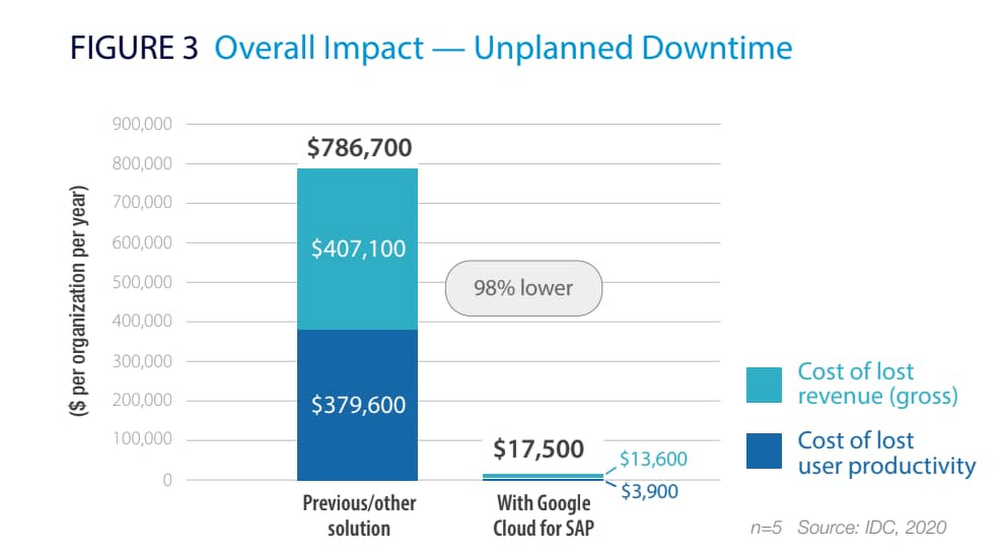
- Minimized productivity and revenue losses by 98% associated with unplanned outages; and
- Achieved three-year benefits of $4.8 million per organization based on infrastructure cost savings, staff efficiencies, and employee productivity and revenue gains as described.
Download this white paper now to learn how moving your SAP environment to Google Cloud can give your company a competitive edge.
Ease Your Migration and Modernization Journey with Microsoft and Windows on Google Cloud Demo Center

8263
Of your peers have already read this article.
2:00 Minutes
The most insightful time you'll spend today!
If you’re looking to migrate and modernize your Microsoft and Windows workloads, Google Cloud is your premiere destination. No matter what migration strategy you’ve selected or what value you’re looking to achieve, with Google Cloud you’re able to:
- simplify your migration and modernization journey
- reduce your on-prem footprint and increase agility
- optimize license usage to reduce costs
- modernize to reduce single-vendor dependencies
- rely on enterprise-class support backed by Microsoft
Whether you’re looking to migrate applications running on Windows virtual machines, adopt Windows containers in Google Kubernetes Engine (GKE), convert SQL databases to Cloud SQL, or something else, Google Cloud offers you the first-class experience you need.
But we don’t want you to take our word for it. Try it out yourself with our new online Microsoft and Windows on Google Cloud Demo Center without any commitment or friction.

The demo center uses hands-on guided simulations to walk you through several scenarios for solving business critical challenges with Google Cloud’s Microsoft and Windows solutions. Because these are all simulated, you’ll see how it works without any deployment, configuration, or commitment. It’s a seamless way for you to see exactly how Google Cloud can help you.
Run dedicated hardware and optimize with sole tenant
Sometimes you might want to run your workloads on dedicated hardware (with oversubscription options) for compliance, licensing, and management. Google Cloud provides sole-tenant nodes that allow you to easily deploy your virtual machines onto dedicated machines to avoid “noisy neighbor” issues, address regulatory or licensing constraints, and optimize inter-VM communications.
Plus, the CPU Overcommit option allows oversubscribing sole-tenant node resources by up to 2x, therefore helping save on per-physical core licensing for many licensed workloads like SQL Server.
Learn how to set up a sole tenant group and node.
Optimize license costs with premium images & custom VMs
One of the easiest ways to optimize your cloud experience with virtual machines (VM) is to pick the right VM image. Google Cloud provides premium license-included VM images that are thoroughly tested and optimized, including SQL Server options with pay-as-you-go licensing. These are great for workloads that don’t need to run all the time or when you do not have spare licenses for bring your own license (BYOL).
Explore some Windows & SQL images and learn how CPU/Memory options can help optimize deployment and save on licensing.
Modernize your databases with Managed SQL Server
Sometimes you need to manage your SQL Server instance to achieve certain business or operational goals. But more often, managing SQL Server deployments can be undifferentiated: backups, high-availability, updates, and patching are just some of the many things you have to take care of when going the do-it-yourself route. One way to modernize your database tier is to migrate to a managed service like Cloud SQL, which is a fully managed Relational Database service for SQL.
Explore the process of creating an instance in just a few clicks!
Extract apps from VMs and move to containers in GKE with Migrate for Anthos
Many Windows workloads running on virtual machines such as Internet Information Services (IIS) are ideal candidates for migrating to containers without major changes like rewriting or rearchitecting. However, doing this migration manually can be tedious, which is why Migrate for Anthos can help easily re-platform a .NET app running on IIS into a container-based app.
Simulate intelligently extracting, migrating, and modernizing applications to run natively on containers in GKE and Anthos clusters.
Move .NET applications to GKE on Windows without code changes
When you’re looking to go fully cloud native, you can leverage Windows containers in GKE without rewriting your .NET applications. Simply create clusters with Windows nodes and deploy containerized Windows workloads in a few clicks, even alongside Linux containers. These deployments reduce operational overhead with features such as auto-upgrade, auto-repair, and release channels.
Learn how easy it is to build a GKE cluster with a Windows node and deploy an app.
Now that you’ve gotten a feel for what’s available, go check out the Demo Center. You can also visit us at Windows and Microsoft on Google Cloud to learn more.
Forrester and IDC’s Research Confirms Quantifiable Benefits of Running SAP on Google Cloud
3628
Of your peers have already read this article.
3:00 Minutes
The most insightful time you'll spend today!
Cloud migration is top of mind for most companies with SAP applications. While the advantages of the cloud for SAP customers is generally understood, the move itself can be complicated and disruptive. So what actually are the business benefits and cost savings? How long will it take to recoup such an investment? Two recently published reports from Forrester and IDC can help to quantify the benefits and ROI.
Getting answers to the million-dollar questions
Forrester and IDC bring different methodologies to the table; they asked somewhat different questions and used different models to calculate their financial KPIs. This allows you to get two different points of view on the same basic questions about value, risk, and ROI.
As it turns out, both reports found that customers who migrate their SAP environments to Google Cloud see an impressive return on their investments. From uptime and infrastructure to efficiency and productivity—both Forrester and IDC identified major benefits to companies that have made the move to Google Cloud.
Let’s walk through some of the highlights from both reports.
Forrester’s TEI model spotlights the power of uptime improvements
Based on in-depth conversations and quantitative research with six companies, here are the key findings from the Forrester Total Economic Impact (TEI) study for companies running SAP systems on Google Cloud:
- Direct cost savings. When they compare cloud subscription and related costs to what they spent on legacy systems and infrastructure, most IT leaders expect a cloud migration to deliver up-front savings. But according to Forrester, the companies interviewed reported average savings of more than $3 million a year, including eliminated hardware purchases, right-sized software licensing, staffing efficiencies, and other operational cost savings.
- Dramatically improved uptime. Customers told Forrester that migrating SAP to Google Cloud pretty much eliminates downtime—planned or unplanned—as a significant IT concern. According to Forrester, companies realized an average of $1.5 million in savings per year by avoiding the revenue and user productivity losses that had once been a fact of life for their IT teams.
- Significant efficiency gains. Because Google Cloud works to mitigate performance bottlenecks, infrastructure mishaps, network delays and more, the companies Forrester interviewed reported a yearly average of $500,000 in productivity gains for SAP business users and frontline workers.
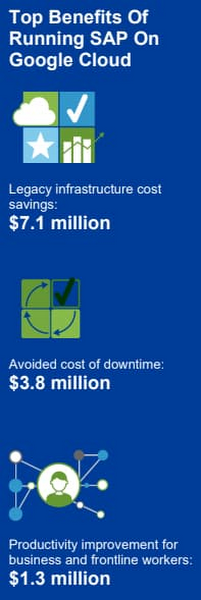
Companies also reported an annual average of $500,000 in additional IT efficiency gains after migrating SAP to Google Cloud. This quantifies what happens when IT practitioners no longer have to deal with the bottlenecks that come with legacy systems, and are able to spend their time on tasks that actually build value and help the business. Based on the Forrester analysis, the companies interviewed could expect average three-year net benefits of about $15.4 million.
“We benefit from any technical innovation in the infrastructure area because Google Cloud is doing that for us,” one customer told Forrester. “So, whenever there’s new hardware available or new processes or whatever, I don’t have to run the specific project to migrate from A to B.”
IDC finds that good things happen when SAP downtime is reduced
The IDC report highlights four areas where Google Cloud generates the most value for customers:
1. Cutting infrastructure costs. According to IDC, customers running SAP on Google Cloud spent 31% less on infrastructure each year, or an average of $233,000 less per company. The ability to scale SAP environments dynamically and to keep them right-sized was a major factor; so were the advantages of automated infrastructure monitoring and savings on software licenses once these companies could stop overprovisioning.
2. Giving a team better things to do. IDC found that the infrastructure, database, and security teams of the companies they interviewed reduced the time they need to maintain and manage SAP environments by an average of 66% per year, for a savings of $443,000, per company. As a result, these companies got the equivalent of a major staff expansion from their SAP migrations—giving them both the staff time and the expertise to focus on far more valuable activities.
3. Limiting unplanned downtime. These companies reported to IDC an average 98% reduction in unplanned downtime. Migrating SAP to Google Cloud significantly reduces the threat of downtime and saves the business an average of nearly $770,000 per year in lost revenue and user productivity. For some firms, the downtime savings topped $1 million per year.
4. Making users more productive. The companies interviewed told IDC that by avoiding downtime and disruptions associated with upgrade and maintenance tasks for their legacy SAP systems, they saved an average of $363,000 annually in user productivity. But there’s an even more interesting under-the-hood stat contributing to these gains: These companies reduced the time required to deploy new SAP compute and storage resources from an average of 8.8 days to 1 hour.
When IDC added up these and other savings associated with running SAP on Google Cloud, it found an average three-year savings of more than $3.5 million and a five-month payback period.
“We acquired another company, so basically overnight we needed to be able to deal with that increase,” said one customer IDC spoke with. “We doubled our footprint overnight, and we had to take on hundreds of additional employees. We needed a platform that we could easily scale up if we required, and that’s the benefit of running SAP on Google Cloud for us.”
Explore the reports
There is a lot to think about when considering a move of SAP systems to the cloud. The cloud has many advantages, but migration can seem complicated and tricky; we appreciate that you are looking to understand the full picture. These papers are a great place to start.
Download the reports—Forrester’s “Total Economic Impact of SAP on Google Cloud” and IDC’s “Business Value of SAP for Google Cloud Environments.” Then, get in touch.
More Relevant Stories for Your Company




Indian Retailer Figures Optimizes Hyperlocal Delivery to Increase Customer Experience
Anyone who follows the Indian e-commerce scene knows that one of the largest challenges these companies face is hyperlocal delivery. That was a problem facing Wellness Forever, a retail chain of pharmacies with 150-plus stores across India. “Exactly a year ago, we started our journey of hyperlocal deliveries. This optimization

Learning Should be Your Resolution for 2022: Register for Google Cloud Skills Boost
Start your 2022 New Year’s resolutions by learning at no cost how to use Google Cloud with the following training opportunities: 30 day access to Google Cloud Skills Boost Register by January 31, 2022 and claim 30 days free access to Google Cloud Skills Boost to complete the Getting Started with

Value Realization with Google Cloud for Retail SAP Data
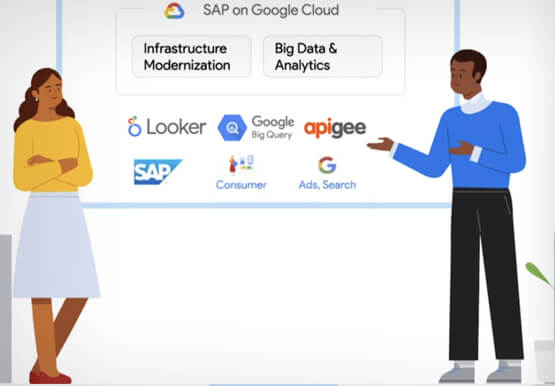
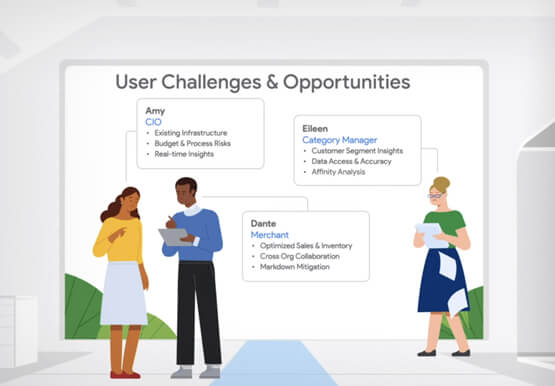
Retail engagements have changed drastically over the last few years, and by the virtue of COVID-19 pandemic, retail data and customers' expectations plummeted. To drive value and transformation across the entire value-chain retailers can make most of Google Cloud's secure, reliable IaaS by migrating their SAP systems and taking advantage

Relax: Support on Google Cloud is Easy and Efficient
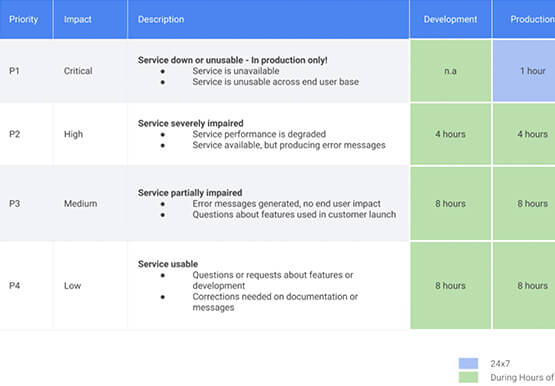
To navigate the complexity of today’s cloud environment and to get the most out of your investment, you need robust support that is fast, efficient, and available at the time of need. Google Cloud Platform support checks all the boxes and helps you architect for the inevitable and quickly resolve
