





Streamlining Business Processes with Google’s Document AI: Invoices, Contracts, and Beyond

1146
Of your peers have already read this article.
3:30 Minutes
The most insightful time you'll spend today!
Editor’s note: In this post, I’ll be showing some amazing ways Document AI can help you extract meaning from your documents – keep reading, or jump directly into a tutorial using the Cloud Console!
Documents are a crucial part of most businesses, used to store and communicate important information. The variety is vast: invoices, contracts, receipts, applications, plus documents unique within industries and geographies. Unfortunately, making the information contained in these documents accessible can be a time-consuming and manual process.

Document AI is a document understanding platform in Google Cloud that takes unstructured data from documents and transforms it into structured data, making them easier to understand, analyze, and consume. By using this technology, you can streamline your document processing workflows, reduce errors, and unlock insights that were previously buried in mountains of paperwork.
Whether you’re a small business owner or an enterprise looking to bring efficiency to your operations, Document AI has something to offer. So let’s take a look and see what it can do!
Understanding documents with Document AI
When we say that Document AI can understand documents, we mean that it is able to analyze the content within documents and derive meaningful insights from it. This goes beyond simply recognizing the characters and words within a document (which is what traditional OCR technology does) – Document AI can actually comprehend the meaning behind the text.
For example, let’s say you have a contract that needs to be processed. Traditional OCR technology might be able to extract the text from the document, but it would not be able to understand the legal terms and clauses within it. Document AI, on the other hand, can actually interpret the meaning of the text and extract key information such as parties involved, terms and conditions, dates, and signatures.
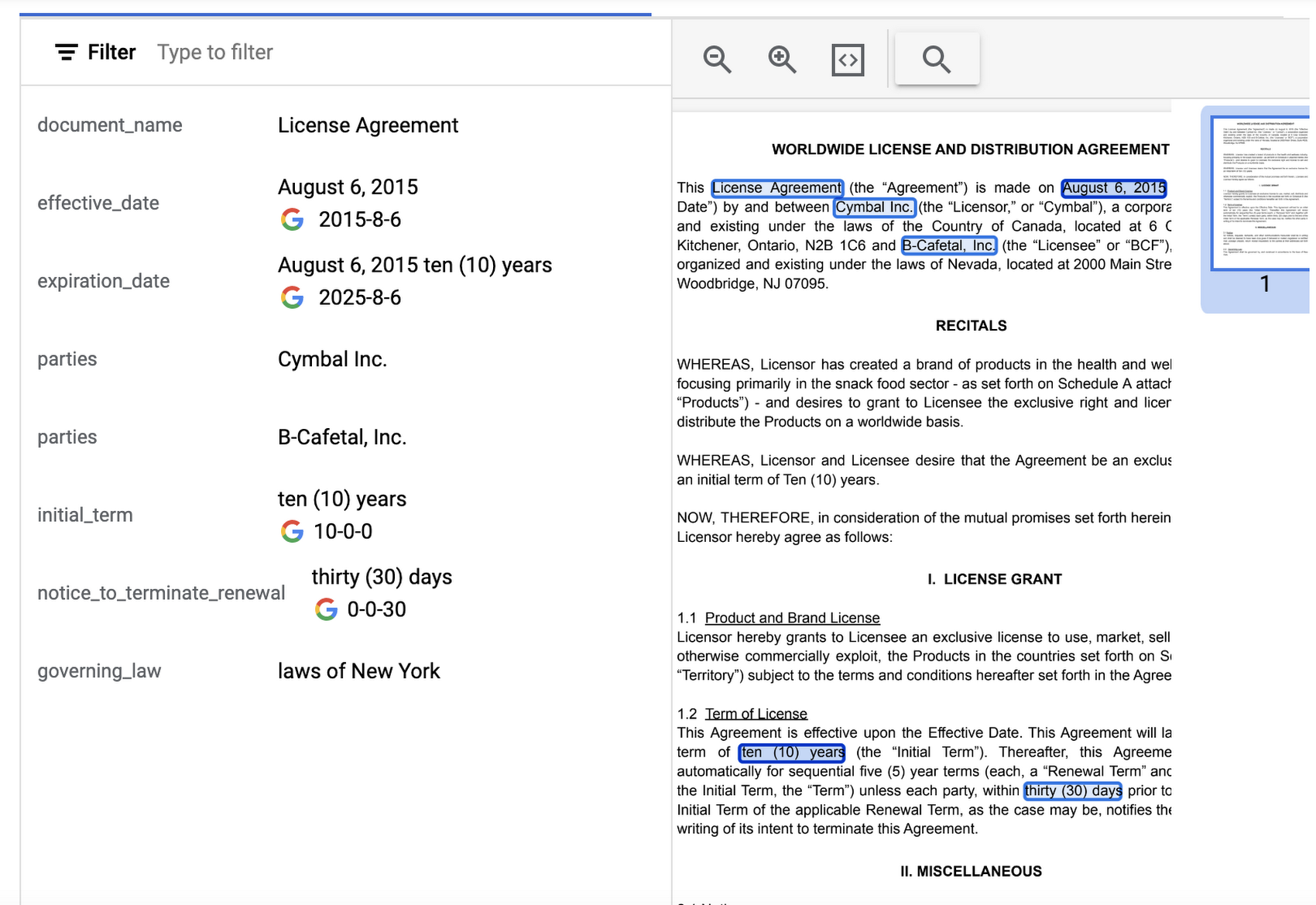
Document AI offers several pre-built models and processors that are specifically designed to extract different types of data from various document types. Within the specific document types, the processors can perform several tasks such as Optical Character Recognition (OCR), form parsing, splitting, classification or entity extraction. These processors can be customized and combined to create powerful document processing workflows that are tailored to a business’s unique needs.
Let’s look closer at a few of the processors available in Document AI, including the Form Parser, Invoice Parser, Expense Parser, Identity Document Proofing Parser, and Intelligent Document Quality Processor.
Form Parser
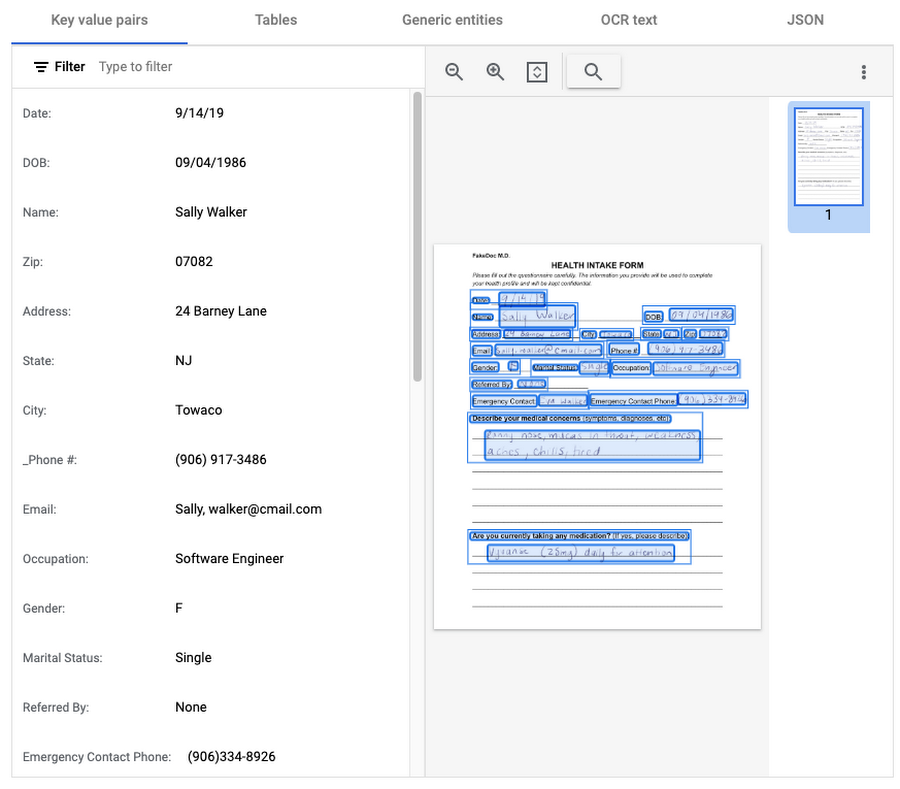
This general processor is designed to extract structured data from forms such as application forms, surveys, and questionnaires. It automatically identifies and extracts data from form fields (key-value pairs), such as names, addresses, dates, and other types of structured data; even checkboxes and tables. This processor also leverages deep learning models to extract generic entities that are common in various document types, meaning it can identify if something is an email address, phone number, datetime, organization, quantity, price, person, and more.
In this visualization of the API response, you can see that Document AI has identified several key value pairs that correspond to the form’s fields and the responder’s answers.
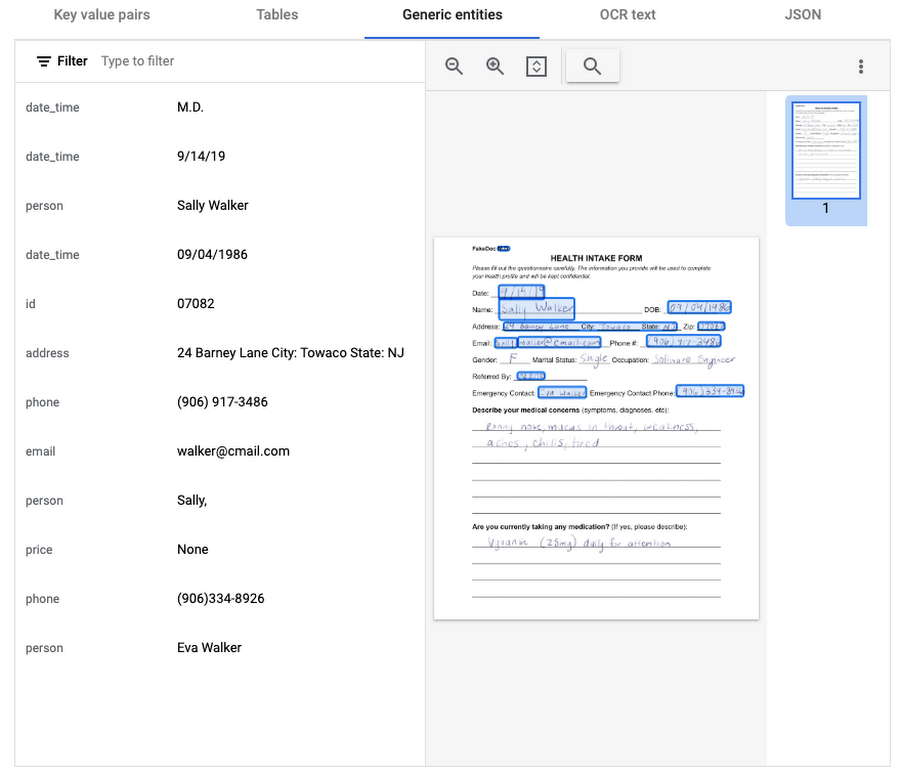
Also of interest is that the form parser recognized certain generic entities including: several dates, an address, phone numbers, email, and two people (the responder and their listed emergency contact).
Invoice Parser
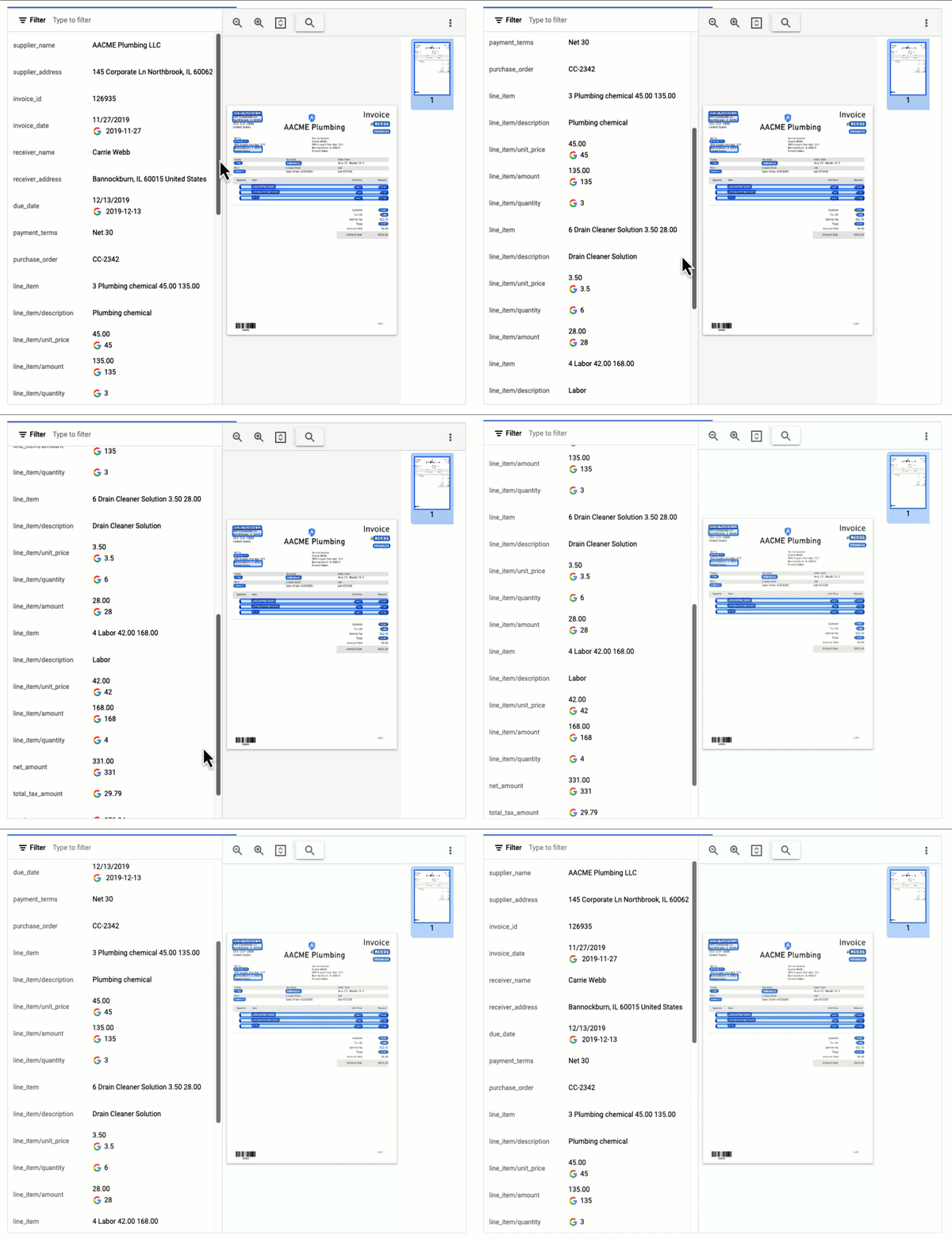
This parser is designed to identify and extract relevant information from invoices including a large number of typical invoice fields, but can also be customized (uptrained) to recognize different invoice layouts, languages, and data fields. Invoices are a critical part of the accounts payable process, making this functionality valuable across industries and companies building A/P features into their products.
In this visualization of the API response, you can see that Document AI has extracted a large number of key-value pairs and even provided normalized values for several of the fields.
Expense Parser
This specialized processor is designed to extract data from receipts and invoices, such as vendor name, date, and total amount paid. It can also identify line items within an invoice and categorize them based on the type of expense (e.g. meals, travel, office supplies). The expense parser makes it easier for you to process expense reports and other financial documents, and it can integrate with other tools and systems to completely automate the entire expense reporting process.
In this visualization of the API response, you can see that Document AI has extracted the text from the receipt and identified several typical entities such as purchase date and time, payment type, and total amount.

Identity Document Proofing Parser
This processor is designed to help predict the validity of ID documents with four different signals.
- is_identity_document detection: Predicts whether an image contains a recognized identity document.
- suspicious_words detection: Predicts whether words are present that aren’t typical on IDs.
- image_manipulation detection: Predicts whether the image was altered or tampered via an image editing tool.
- online_duplicate detection: Predicts whether the image can be found online.
If suspicious words are detected or the image can be found online, additional information is provided to explain these signals.
This can be particularly useful for businesses that need to verify the identity of customers or employees as part of their operations. This processor could be used in conjunction with other processors that extract key information such as name, date of birth, ID number, and expiration date from specific identity documents (US Driver License Parser, US Passport, France National ID Parser, etc.).
In this visualization of the API response, you can see that Document AI has passed the document on the first detection point (is_identity_document), but failed the document for the other three items and provided additional information in the evidence fields.

Intelligent Document Quality Processor
This general use processor is designed to detect a variety of document quality issues, such as missing pages, blurry images, low contrast, inconsistent formatting, and incorrect data, and flag these potential issues which could affect their usability, accuracy, or compliance. It can also identify sensitive information that has not been redacted or missing information required by regulatory standards.
This quality assessment is returned as a quality score from 0 to 1, where 1 means perfect quality. If the quality score detected is lower than 0.5, a list of negative quality reasons (sorted by the likelihood) is also returned.
In this visualization of the API response, you can see that Document AI has determined a quality_score of 0.006 and also provided a list of several reasons including document and text cutoff, blurriness, and glare (among others).

Next steps
These are just a few examples of the types of processors that Document AI offers. Perusing the current documentation, you can find it has more than 40 processors, with each providing several functions, to explore. Document AI also offers you the ability to uptrain certain processors and supports the option to build your own custom processor. Across the board, if a document contains structured or unstructured text, Document AI has the capability to extract valuable data from it.
Get started and learn more by heading to our tutorials in the Cloud Console:
VCP Peering and Private Endpoints on Vertex AI to Better Security and Predictions in Near Real-time

4493
Of your peers have already read this article.
2:00 Minutes
The most insightful time you'll spend today!
One of the biggest challenges when serving machine learning models is delivering predictions in near real-time. Whether you’re a retailer generating recommendations for users shopping on your site, or a food service company estimating delivery time, being able to serve results with low latency is crucial. That’s why we’re excited to announce Private Endpoints on Vertex AI, a new feature in Vertex Predictions. Through VPC Peering, you can set up a private connection to talk to your endpoint without your data ever traversing the public internet, resulting in increased security and lower latency for online predictions.
Configuring VPC Network Peering
Before you make use of a Private Endpoint, you’ll first need to create connections between your VPC (Virtual Private Cloud) network and Vertex AI. A VPC network is a global resource that consists of regional virtual subnetworks, known as subnets, in data centers, all connected by a global network. You can think of a VPC network the same way you’d think of a physical network, except that it’s virtualized within GCP. If you’re new to cloud networking and would like to learn more, check out this introductory video on VPCs.
With VPC Network Peering, you can connect internal IP addresses across two VPC networks, regardless of whether they belong to the same project or the same organization. As a result, all traffic stays within Google’s network.
Deploying Models with Vertex Predictions
Vertex Predictions is a serverless way to serve machine learning models. You can host your model in the cloud and make predictions through a REST API. If your use case requires online predictions, you’ll need to deploy your model to an endpoint. Deploying a model to an endpoint associates physical resources with the model so it can serve predictions with low latency.
When deploying a model to an endpoint, you can specify details such as the machine type, and parameters for autoscaling. Additionally, you now have the option to create a Private Endpoint. Because your data never traverses the public internet, Private Endpoints offer security benefits in addition to reducing the time your system takes to serve the prediction when it receives the request. The overhead introduced by Private Endpoints is minimal, achieving performance nearly identical to DIY serving on GKE or GCE. There is also no payload size limit for models deployed on the private endpoint.
Creating a Private Endpoint on Vertex AI is simple.
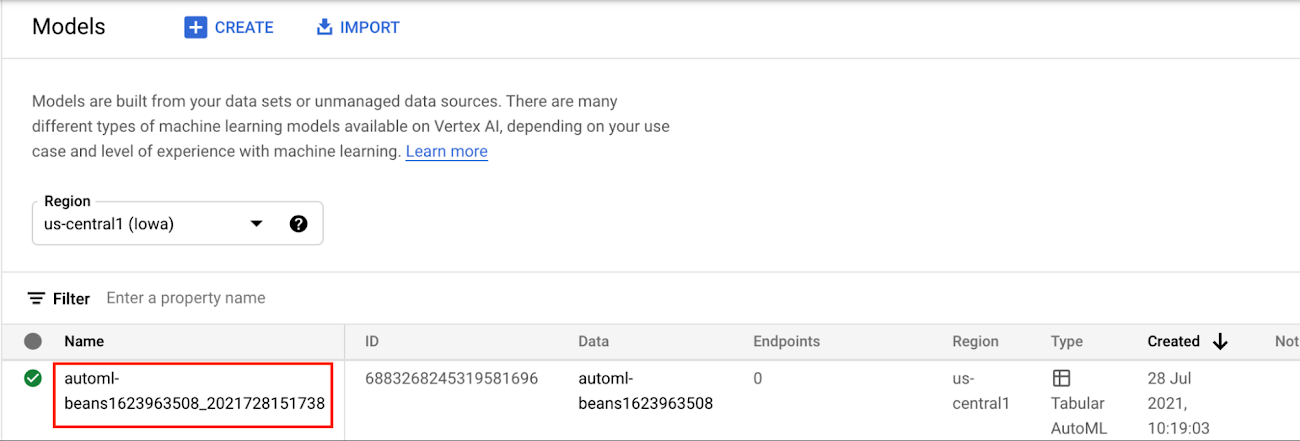
In the Models section of the Cloud console, select the model resource you want to deploy.
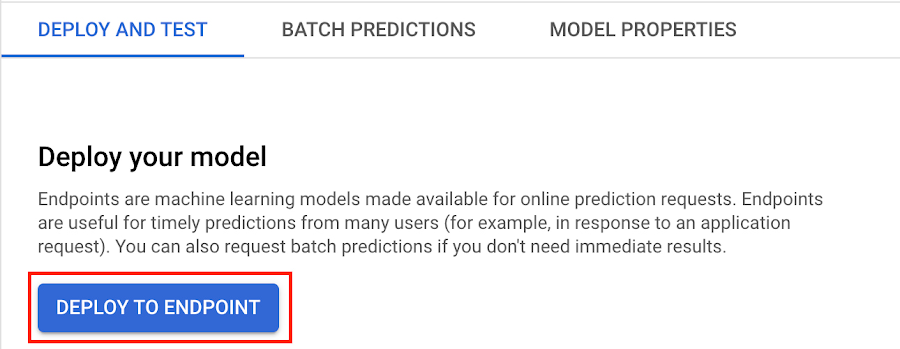
Next, select DEPLOY TO ENDPOINT
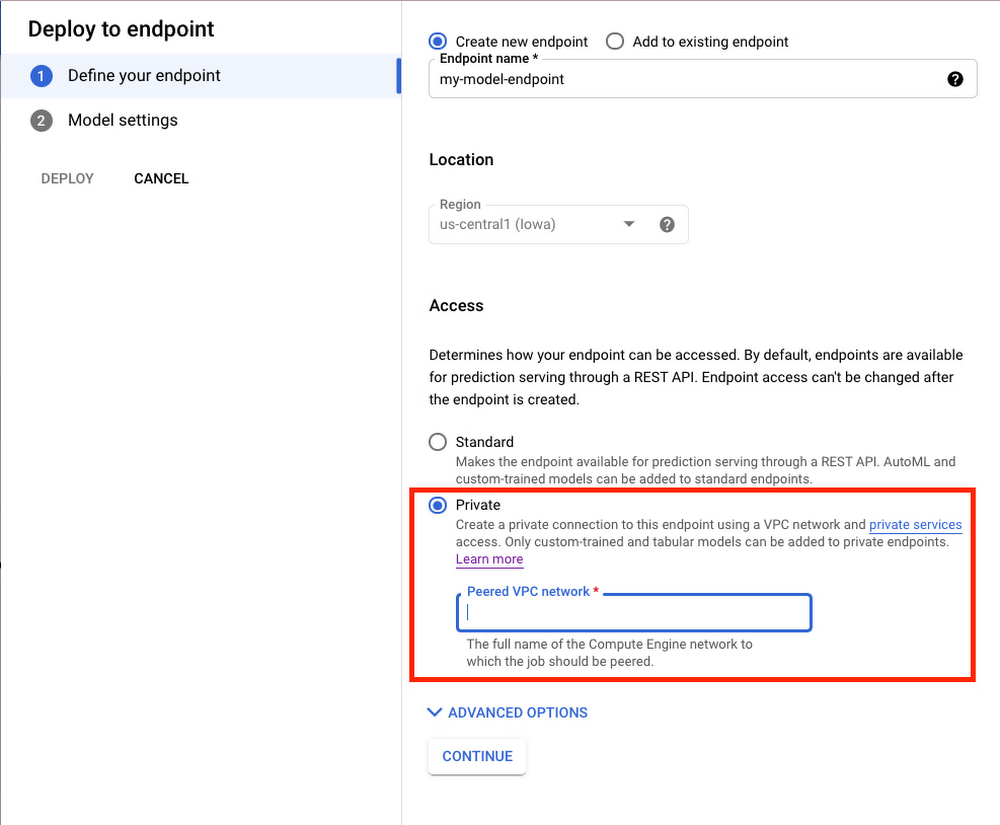
In the window on the right hand side of the console, navigate to the Access section and select Private. You’ll need to add the full name of the VPC network for which your deployment should be peered.
Note that many other managed services on GCP support VPC peering, such as Vertex Training, Cloud SQL, and Firestore. Endpoints is the latest to join that list.
What’s Next?
Now you know the basics of VPC Peering and how to use Private Endpoints on Vertex AI. If you want to learn more about configuring VPCs, check out this overview guide. And if you’re interested to learn more about how to use Vertex AI to support your ML workflow, check out this introductory video. Now it’s time for you to deploy your own ML model to a Private Endpoint for super speedy predictions!
Enabling Real-time AI with Streaming Ingestion in Vertex AI

2513
Of your peers have already read this article.
2:30 Minutes
The most insightful time you'll spend today!
Many machine learning (ML) use cases, like fraud detection, ad targeting, and recommendation engines, require near real-time predictions. The performance of these predictions is heavily dependent on access to the most up-to-date data, with delays of even a few seconds making all the difference. But it’s difficult to set up the infrastructure needed to support high-throughput updates and low-latency retrieval of data.
Starting this month, Vertex AI Matching Engine and Feature Store will support real-time Streaming Ingestion as Preview features. With Streaming Ingestion for Matching Engine, a fully managed vector database for vector similarity search, items in an index are updated continuously and reflected in similarity search results immediately. With Streaming Ingestion for Feature Store, you can retrieve the latest feature values with low latency for highly accurate predictions, and extract real-time datasets for training.
For example, Digits is taking advantage of Vertex AI Matching Engine Streaming Ingestion to help power their product, Boost, a tool that saves accountants time by automating manual quality control work.“Vertex AI Matching Engine Streaming Ingestion has been key to Digits Boost being able to deliver features and analysis in real-time. Before Matching Engine, transactions were classified on a 24 hour batch schedule, but now with Matching Engine Streaming Ingestion, we can perform near real time incremental indexing – activities like inserting, updating or deleting embeddings on an existing index, which helped us speed up the process. Now feedback to customers is immediate, and we can handle more transactions, more quickly,” said Hannes Hapke, Machine Learning Engineer at Digits.
This blog post covers how these new features can improve predictions and enable near real-time use cases, such as recommendations, content personalization, and cybersecurity monitoring.

Streaming Ingestion enables real-time AI
As organizations recognize the potential business impact of better predictions based on up-to-date data, more real-time AI use cases are being implemented. Here are some examples:
- Real-time recommendations and a real-time marketplace: By adding Streaming Ingestion to their existing Matching Engine-based product recommendations, Mercari is creating a real-time marketplace where users can browse products based on their specific interests, and where results are updated instantly when sellers add new products. Once it’s fully implemented, the experience will be like visiting an early-morning farmer’s market, with fresh food being brought in as you shop. By combining Streaming Ingestion with Matching Engine’s filtering capability, Mercari can specify whether or not an item should be included in the search results, based on tags such as “online/offline” or “instock/nostock.”

Mercari Shops: Streaming Ingestion enables real-time shopping experiment
- Large-scale personalized content streaming: For any stream of content representable with feature vectors (including text, images, or documents), you can design pub-sub channels to pick up valuable content for each subscriber’s specific interests. Because Matching Engine is scalable (i.e., it can process millions of queries each second), you can support millions of online subscribers for content streaming, serving a wide variety of topics that are changing dynamically. With Matching Engine’s filtering capability, you also have real-time control over what content should be included, by assigning tags such as “explicit” or “spam” to each object. You can use Feature Store as a central repository for storing and serving the feature vectors of the contents in near real time.
- Monitoring: Content streaming can also be used for monitoring events or signals from IT infrastructure, IoT devices, manufacturing production lines, and security systems, among other commercial use cases. For example, you can extract signals from millions of sensors and devices and represent them as feature vectors. Matching Engine can be used to continuously update a list of “the top 100 devices with possible defective signals,” or “top 100 sensor events with outliers,” all in near real time.
- Threat/spam detection: If you are monitoring signals from security threat signatures or spam activity patterns, you can use Matching Engine to instantly identify possible attacks from millions of monitoring points. In contrast, security threat identification based on batch processing often involves potentially significant lag, leaving the company vulnerable. With real-time data, your models are better able to catch threats or spams as they happen in your enterprise network, web services, online games, etc.
Implementing streaming use cases
Let’s take a closer look at how you can implement some of these use cases.
Real-time recommendations for retail
Mercari built a feature extraction pipeline with Streaming Ingestion.
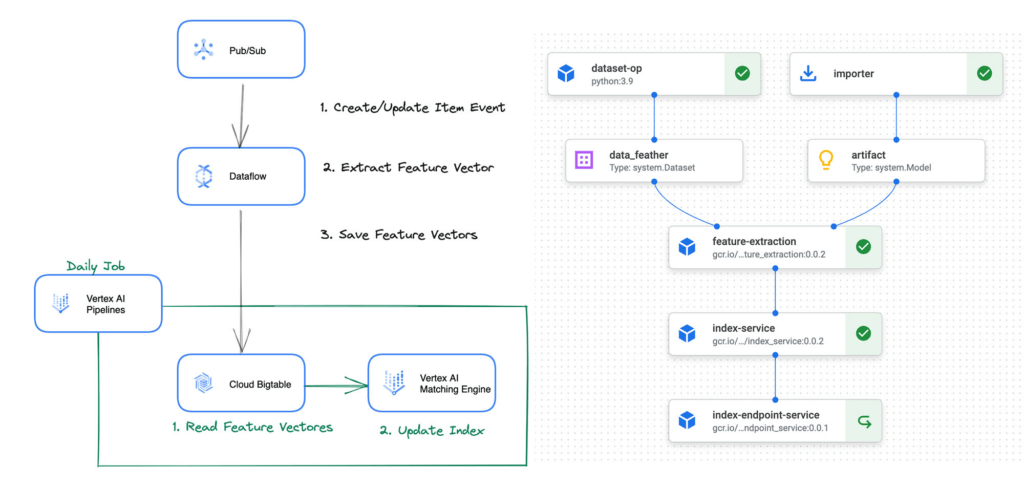
The feature extraction pipeline is defined with Vertex AI Pipelines, and is periodically invoked by Cloud Scheduler and Cloud Functions to initiate the following process:
- Get item data: The pipeline issues a query to fetch the updated item data from BigQuery.
- Extract feature vector: The pipeline runs predictions on the data with the word2vec model to extract feature vectors.
- Update index: The pipeline calls Matching Engine APIs to add the feature vectors to the vector index. The vectors are also saved to Cloud Bigtable (and can be replaced with Feature Store in the future).
“We have been evaluating the Matching Engine Streaming Ingestion and couldn’t believe the super short latency of the index update for the first time. We would like to introduce the functionality to our production service as soon as it becomes GA, ” said Nogami Wakana, Software Engineer at Souzoh (a Mercari group company).
This architecture design can be also applied to any retail businesses that need real-time updates for product recommendations.
Ad targeting
Ad recommender systems benefit significantly from real-time features and item matching with the most up-to-date information. Let’s see how Vertex AI can help build a real-time ad targeting system.
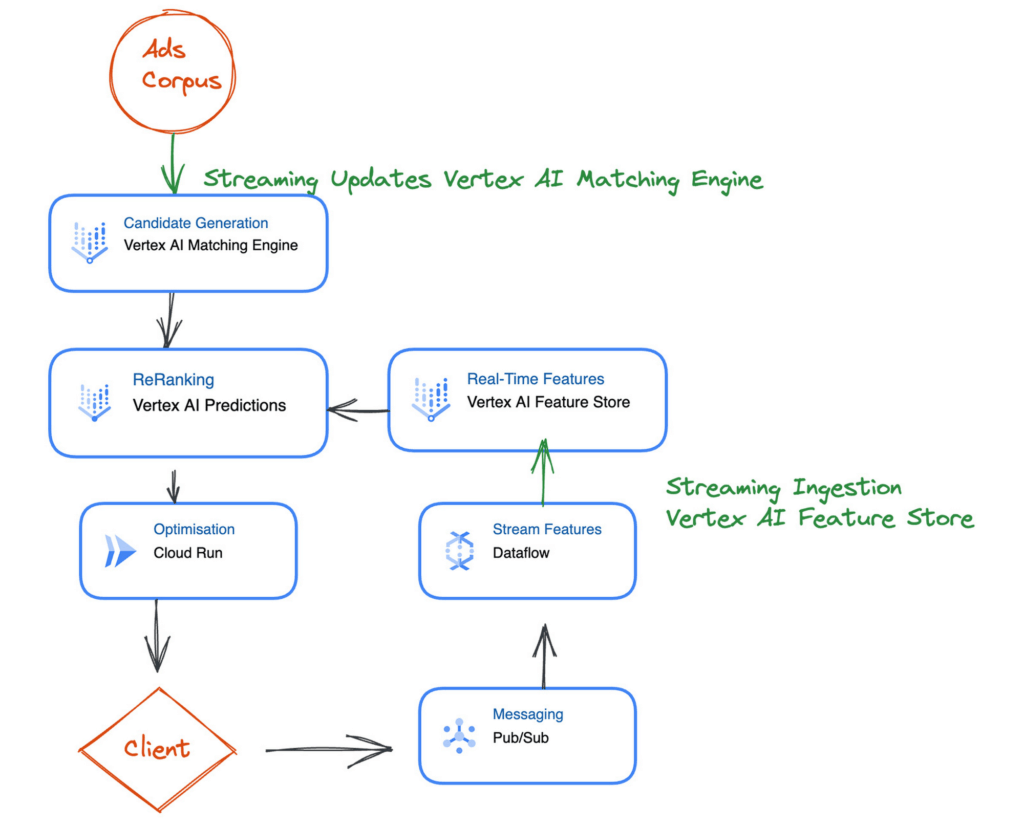
The first step is generating a set of candidates from the ad corpus. This is challenging because you must generate relevant candidates in milliseconds and ensure they are up to date. Here you can use Vertex AI Matching Engine to perform low-latency vector similarity matching, generate suitable candidates, and use Streaming Ingestion to ensure that your index is up-to-date with the latest ads.
Next is reranking the candidate selection using a machine learning model to ensure that you have a relevant order of ad candidates. For the model to use the latest data, you can use Feature Store Streaming Ingestion to import the latest features and use online serving to serve feature values at low latency to improve accuracy.
After reranking the ads candidates, you can apply final optimizations, such as applying the latest business logic. You can implement the optimization step using a Cloud Function or Cloud Run.
What’s Next?
Interested? The documents for Streaming Ingestion are available and you can try it out now. Using the new feature is easy: For example, when you create an index on Matching Engine with the REST API, you can specify the indexUpdateMethod attribute as STREAM_UPDATE.
{
    displayName: "'${DISPLAY_NAME}'",
    description: "'${DISPLAY_NAME}'",
    metadata: {
       contentsDeltaUri: "'${INPUT_GCS_DIR}'",
       config: {
          dimensions: "'${DIMENSIONS}'",
          approximateNeighborsCount: 150,
          distanceMeasureType: "DOT_PRODUCT_DISTANCE",
          algorithmConfig: {treeAhConfig: {leafNodeEmbeddingCount: 10000, leafNodesToSearchPercent: 20}}
       },
    },
    indexUpdateMethod: "STREAM_UPDATE"
}
After deploying the index, you can update or rebuild the index (feature vectors) with the following format. If the data point ID exists in the index, the data point is updated, otherwise, a new data point is inserted.
{

datapoints: [

{datapoint_id: "'${DATAPOINT_ID_1}'", feature_vector: [...]},
        {datapoint_id: "'${DATAPOINT_ID_2}'", feature_vector: [...]}

]
}
It can handle the data point insertion/update at high throughput with low latency. The new data point values will be applied in any new queries within a few seconds or milliseconds (the latency varies depending on the various conditions).
The Streaming Ingestion is a powerful functionality and very easy to use. No need to build and operate your own streaming data pipeline for real-time indexing and storage. Yet, it adds significant value to your business with its real-time responsiveness.
To learn more, take a look at the following blog posts for learning Matching Engine and Feature Store concepts and use cases:
Sopra Steria’s Next-gen Virtual Voice Assistants Powered by Google’s AI and Cisco Contact Center by Activeo

3073
Of your peers have already read this article.
1:30 Minutes
The most insightful time you'll spend today!
With people expecting to access products and services through easy, always-on experiences delivered across channels, transforming approaches to digital services is a must for every business. As a result, business leaders have to strive to provide employees with these same frictionless experiences.
Sopra Steria is a European leader in consulting, digital services and software development, with 46,000 employees in 25 countries that generated revenue of €4.3 billion in 2020. It provides end-to-end solutions that help customers drive their digital transformation to obtain tangible and sustainable benefits, by combining in-depth knowledge of a wide range of business sectors and innovative technologies.
To accomplish its goals, Sopra Steria planned to use conversational artificial intelligence as part of their strategy and began working closely with Google Cloud, Cisco, and Activeo. It believed that, by building out more advanced Virtual Agents for its customers to use to serve them, it could usher in a new era of frictionless experiences in the End-User support services.
“To address customer demands for office and business applications support services, we looked to integrate a new generation of virtual voice assistant into our platform,” says Xavier Leroux, CTO End User Services at Sopra Steria. “We did this using Google’s proven AI and integrated it with our Cisco Contact Center by Activeo.”
As many companies have learned, the need to provide customers with advanced experiences is directly attached to the services offered to their employees. By providing more contextual information and other forms of digital support to staff, those same team members will be better positioned to serve customers.
Solving a complex problem with ease
Sopra Steria sought to solve several challenges for its customers, enabling them to:
- Provide all their employees with seamless, quick access to IT and business support,
- Offer 24/7 phone support capabilities for employees,
- Make services easily deployable, flexible, agile, and available in multiple languages,
- Reduce costs associated with delivering better support services.
Sopra Steria chose Google Cloud Contact Center AI (CCAI), built by Google Cloud and Cisco, as the best option to achieve its vision. Google Cloud CCAI is currently used in some of the world’s largest call centers, building on Google’s expertise in natural language processing.
Sopra Steria implemented CCAI as its new Virtual Assistant on phone channels managed by a Cisco telephony solution, and used Activeo for its integration and implementation support.
The new Virtual Assistant allows Sopra Steria clients to qualify employee requests and direct them to the right agent based on Natural Language Understanding while offering self-service options for basic requests such as password resets. These Virtual Assistants also fully automate complex incident tickets creation in synchronization within the IT service management system.
Google Cloud CCAI covers three main use cases:
- Autonomously handles full-length conversations using natural language,
- Augments operator support through contextual assistance through a desktop application based on live conversation analysis,
- Semantic analysis of all audio and text conversations processed by customer service through Google Cloud machine learning.
Cisco provides native integration of CCAI within its Cisco Contact Center solution as a part of its global partnership with Google Cloud.
“The work we have done with Google Cloud has allowed Sopra Steria to create innovative and personalized conversational services to enhance both employee satisfaction and operator productivity without sacrificing security,” says Christian Laloy, EMEA Contact Center Sales Specialist at Cisco.
Unlocking new, more powerful contact center experiences
Since standing up the new CCAI solution, Sopra Steria has been able to enhance its service catalog through Virtual Assistants. The offering has generated immense interest among existing and new Sopra Steria clients because it can simultaneously reduce average waiting and handling and resolution times while dramatically decreasing service costs.
“The Virtual Assistant serves both the user and operator alike,” says Xavier Leroux. “The user gets a conversational experience like no other and a seamless journey to resolve their requests. With Google Cloud, Cisco and Activeo, we have increased operator efficiency, so they can focus more on adding value to every business interaction.”
Southwire Completes SAP Migration to Google Cloud as a First Step of its Tech Evolution

4946
Of your peers have already read this article.
1:30 Minutes
The most insightful time you'll spend today!
“Talk about tough times, right?”
That’s how Dan Stuart, Senior Vice President of IT Services at Southwire Company, refers to the months following a December 2019 ransomware event, and the COVID crisis that began in spring of 2020. Those events hit just as the company was preparing for an overhaul of their SAP environment. This comprehensive plan included three key elements. First, the company wanted to upgrade their SAP ECC environment to take advantage of the latest functionality available for this critical ERP system. Second, Southwire aimed to deploy SAP Business Warehouse on SAP HANA to accelerate vital reporting for all business users. Third, the company wanted to upgrade to the latest version of SAP Process Orchestration—an essential component that touches key manufacturing interfaces in all Southwire facilities.
Southwire had looked at multiple options for the upgrades, including remaining entirely on-premises, colocation, and full cloud migration. “Going to the cloud seemed a lot more compelling,” says Joe Schleupner, Southwire’s Senior Director of PMO & ITS planning and implementation. “We were going to the cloud eventually, so why take these intermediary steps? Let’s just get it done.”
After looking at several options, Southwire decided to migrate to Google Cloud. “We wanted to be on a platform for SAP that was flexible, scalable, and secure; that we could count on to get up and running quickly,” says Stuart. “We chose Google Cloud not only for those reasons, but also because we recognize that Google has other assets that we may be able to take advantage of down the line, such as technologies like artificial intelligence (AI).”
More stability, less worry
As one of the leading manufacturers of wire and cable used in the transmission and distribution of electricity, Southwire aids the delivery of power to millions of people worldwide. They have more than 30 manufacturing facilities across the United States running 24/7. Any downtime directly affects productivity and revenue. With help from Google Cloud and their implementation partner NIMBL, Southwire completed the SAP migration to Google Cloud over a planned maintenance weekend on July 4th.
The migration itself, while complex, went quickly and smoothly. “Just moving to the cloud was quite a feat because we were dealing with so much data, but in total the SAP system was down for only ~16 hours,” says Schleupner.
“As a project manager, I always felt that Google Cloud had my back” Schleupner says. The Process Orchestration (PO) migration was of particular concern, considering that it controlled all of Southwire’s manufacturing interfaces across the entire company. “Every critical piece of information that goes from SAP down to the manufacturing system goes through that system,” says Schleupner.
Even after migrating, Southwire discovered that making changes to the system was fast, easy, and resulted in no downtime. Normally, certain types of changes would have involved taking down SAP for at least an hour.
The Southwire team also appreciates the fact that the modern cloud architecture means spending less time on routine infrastructure maintenance. “It’s one less thing for me to worry about,” Stuart says, “I can focus on the business side of the house and move the technology and responsibilities to what we do within the Google Cloud Platform.”
What comes next?
While the cloud migration will increase stability, uptime, performance, and security, there is much more to come. Southwire is currently working on a disaster recovery implementation for their SAP environment on Google Cloud. Stuart and Schleupner are excited about where Google Cloud can further take Southwire. They are considering an SAP Hybris e-commerce implementation as well as connected factory and/or factory automation initiatives that can take advantage of artificial intelligence and machine learning.
To Stuart and Schleupner, the migration of Southwire’s SAP environment to Google Cloud, as important as it was, really represents the first step in the company’s tech evolution. Now that much of the heavy lifting is complete, Southwire’s digital transformation can begin in earnest. “There’s no shortage of areas where I think Google Cloud will come into play,” Stuart says, “and we intend to look at these things with an open mind to understand how we can leverage current investments to take our organization where we want to go.”
Learn more about Southwire’s SAP on Google Cloud deployment and how Google Cloud can transform the way you work with your SAP enterprise applications. Visit cloud.google.com/solutions/sap.
ML Models Built on Google Cloud Solutions Help You Virtually Participate in National Muffin Day!

2959
Of your peers have already read this article.
2:00 Minutes
The most insightful time you'll spend today!
If you’re here you’re probably wondering: what on Earth is the connection between muffins and machine learning, and what is National Muffin Day? To understand this, let’s start with National Muffin Day: an annual holiday co-founded by Jacob and his friend Julia Levy in 2015 to bake muffins and raise money for homelessness. National Muffin Day will occur on Sunday, February 20 this year. For more information on how to participate in National Muffin Day (which involves delicious baked goods and donations to people in need), please see the information at the bottom of this post. Last year, a colleague connected Jacob with Sara, who had done several baking projects that used machine learning to generate new recipes. They decided to collaborate for this year’s National Muffin Day, adding a new muffin recipe created with the help of machine learning.
In this post, we’ll explain how Sara used Google Cloud to develop a new muffin recipe, show you how you can participate virtually in National Muffin Day, and of course—share the recipe.
Machine learning for muffins
At its core, machine learning is the process of finding patterns in data and using those patterns to make predictions on new data. After a lot of baking over the past few years, Sara learned that baking is also based on patterns. For example, the ratio of flour, fat, liquid, and sugar that make up a cookie is very different from the ratio of those ingredients for a bread, a pie crust, or a muffin. She used that discovery to create a recipe for a hybrid cake + cookie, and a cake filled with Maltesers. Next up: muffins!
The first step was figuring out how to translate the task of generating a new muffin recipe into a machine learning task. To solve this, she planned to use numerical data on the amounts of different ingredients in a muffin recipe to train the model. Sara considered two types of models for this task: classification and regression. A classification model would categorize muffin recipes into different muffin types based on their ingredient amounts, and a regression model would do the reverse: take a type of muffin and return the amount of each ingredient needed to make it. She decided to build a regression model, since it would be more fun for the model to return ingredient amounts, rather than tell you which type of muffin recipe you’re already making.
Implementing this first required identifying a few muffin categories and collecting recipe data. This presented a new challenge, since her previous baking models used categories for distinct baked goods (i.e. cakes, cookies, breads). After scouring through quite a few recipes, Sara discovered that many muffins fall into two types: those that use only traditional ingredients as their base (flour, sugar, butter, milk, etc.), and those that include an alternative ingredient, most commonly a pureed fruit, to make the base (like bananas, applesauce, or pumpkin). Using those two categories, the model would take the type of muffin as input and return the amounts of base ingredients required to make that recipe. Here, the inputs can be any values adding up to 100%:
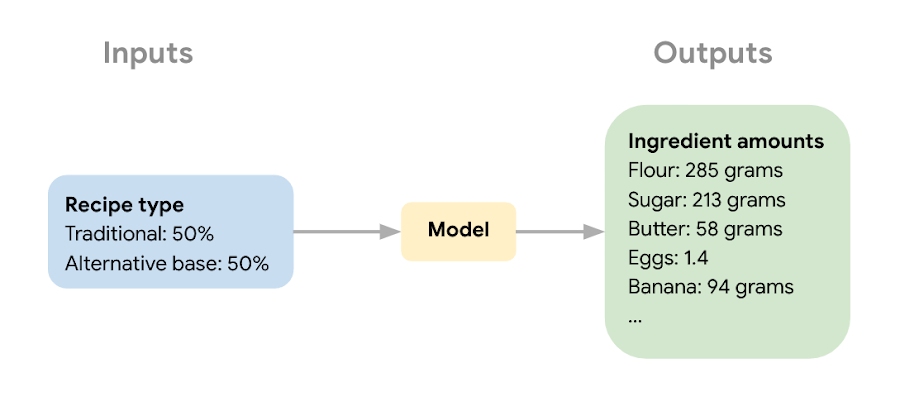
The next step in the ML process was collecting recipe data to use for model training and narrowing down the ingredients used to train the model. Sara wanted the model to learn the combination of core ingredients that make up a muffin batter, rather than flavorings and additions like blueberries, vanilla extract, or chocolate chips. These tasty additions could be added after the model helped create the muffin batter. Once she gathered enough recipes, she removed extra ingredients for training purposes and converted ingredients from different recipes into the same unit (grams, milliliters, and teaspoons).
Building a muffin model with Vertex AI
Sara uploaded the muffin ingredient data into BigQuery, and then created a notebook instance in Vertex AI Workbench to analyze the data. With the new Workbench managed instances, you can interactively query BigQuery tables directly from your instance and copy the code to download your data to a notebook as a Pandas DataFrame:

From her notebook instance, Sara experimented with different ML frameworks and model types. She landed on a Scikit-learn regression model to solve this task, and to mimic a real-world production environment, decided to convert this workflow into a ML pipeline. Using the Kubeflow Pipelines SDK, she ran the following on Vertex Pipelines:
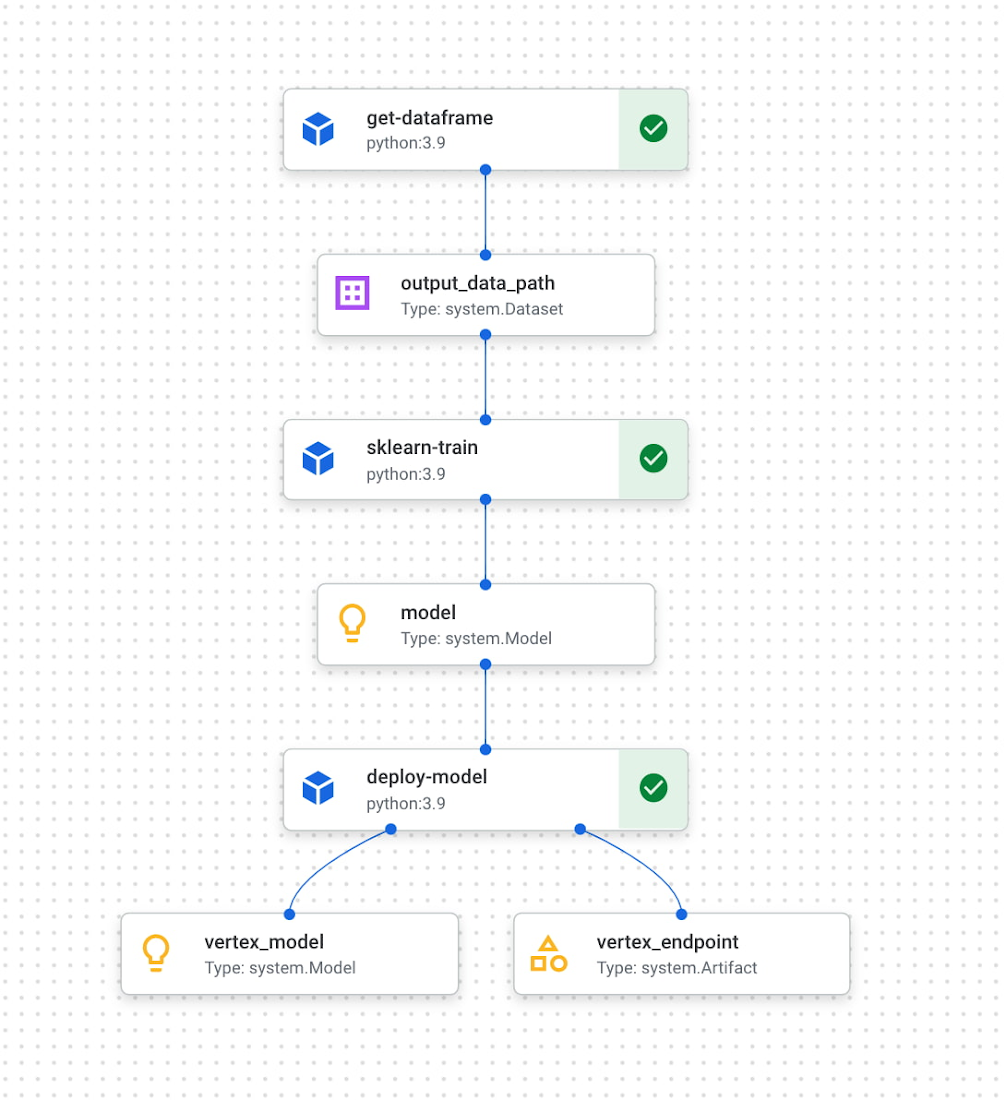
The first component reads the ingredient data from BigQuery and converts it into a Pandas DataFrame which is passed to the next pipeline step. In this step, we train a custom Scikit-learn model on the recipe data. Finally, this model is deployed to an endpoint in Vertex AI. To put it all together, Sara built a web app that allowed her to easily generate ingredient amounts for different muffin types. The web app uses the Vertex AI SDK to call the deployed model endpoint and return ingredient amounts.
The recipe
With a deployed recipe generation model, the only thing left to do was test recipes in the kitchen! Because the model only returns ingredient amounts, there were still many key human elements to complete the baking process: adding yummy additions to the core muffin batter, making adjustments to optimize taste, determining the method for adding ingredients, baking time, and more. After testing a few recipes generated by the model, we landed on a favorite which we’re very excited to share with you here.
Berry ML Muffins

Makes 12 muffins
Flour 285 grams (2 cups)
Granulated sugar 250 grams (1 cup)
Baking powder 2 teaspoons
Baking soda ¼ teaspoon
Salt ½ teaspoon
Cinnamon ½ teaspoon
Milk 170 ml (⅔ cup), room temperature
Butter 55 grams (¼ cup), melted and slightly cooled
Eggs 1 egg plus 1 egg white, room temperature
Canola or vegetable oil 50 grams (¼ cup)
Sour cream 50 grams (3 tablespoons + ¾ teaspoon), room temperature
Vanilla extract 1 ½ teaspoons
Blueberries or raspberries 240 grams (1 ½ cups)
Coarse sugar, like demerara or turbinado (optional for topping) 1 tablespoon
- Measure your three cold ingredients and allow them to come to room temperature: 1 egg + 1 egg white, sour cream, and milk.
- Preheat the oven to 375 F / 190 C. Line a 12-muffin tin with cupcake liners or lightly grease with baking spray.
- In a large bowl, whisk together flour, baking powder, baking soda, salt, and cinnamon. Set aside.
- Melt your butter in a medium heat proof bowl, and allow it to cool slightly for a few minutes. Whisk in sugar until combined. Then add egg, oil, and vanilla, milk, and sour cream and whisk until fully incorporated.
- Pour the wet ingredients into the dry ingredients, mixing with a spatula until just combined. Be careful not to overmix, it’s ok if there are a few lumps in your batter.
- Prepare your fruit. If you can’t decide whether to use blueberries or raspberries, divide your batter into two bowls and do both! Crush half of your fruit and fold it into the batter. Then mix in the remaining whole berries.
- Divide the mixture evenly into the muffin tin. Optionally (but extra tasty), sprinkle the tops of each muffin with about ⅛ teaspoon of coarse sugar. Turbinado or demerara sugar work well for this. This will caramelize and add a nice texture to the tops of your muffins.
- Bake at 375 for 22 – 24 minutes, or until a toothpick inserted in the center comes out clean. For best results, do a toothpick test in a few muffins since not all ovens have an even temperature throughout. Let the muffins cool in the muffin tin for a few minutes, then transfer to a wire rack to cool completely.
- Enjoy!
How can you participate in National Muffin Day?
Participation in National Muffin Day is as easy as 1-2-3!
- On February 20, Bake Muffins. It’s time to dust those muffin tins, grab your blueberries, chocolate chips, rhubarb, and favorite ingredients, and create some magical scrumdiddlyumptiousness! If you want to join Jacob in a virtual baking party, you can register here.
- Then, Give. In non-pandemic years, we asked our bakers to personally hand muffins to hungry folks in their cities. While this is a valuable and rewarding experience, the current state of Covid means this practice is still unsafe, so we request that you refrain from doing this. Instead, if it feels safe, we encourage you to take your delicious baked goods and donate them to local homeless shelters, which can distribute them to those in need. Alternatively, you can share your muffins with friends and families and then make a donation to an organization that benefits people experiencing homelessness, like the ones listed below in step 3.
- Share Your Muffin Pics on Social Media. We’d love to see your muffins! Share your pictures on Twitter or Instagram with the hashtags #givemuffins, or share them to our official Facebook Event page. For each individual baker who participates, we will make donations to Project Homeless Connect, which provides much needed resources to people experiencing homelessness in San Francisco, Family promise, which supports unhoused families nationwide, and Pine Street Inn which provides resources for people experiencing homelessness in Boston. Donations will be on a per-baker basis (with up to $80 donated per baker!), so please feel free to loop in your significant others, kids, nieces and nephews, roommates, friends, and anybody else with a giving spirit who loves deliciousness!
More Relevant Stories for Your Company

Unified, Flexible and Accessible: How Companies’ Data Help Them Achieve More on Google Cloud
As the volume of data that people and businesses produce continues to grow exponentially, it goes without saying that data-driven approaches are critical for tech companies and startups across all industries. But our conversations with customers, as well as numerous industry commentaries, reiterate that managing data and extracting value from

How Google Helped the Indian Govt Choose Airport Sites: The Inside Story
Setting out a plan for facility locations is a classic challenge for organizations of all shapes and sizes. This is the case for companies around the world—from retailers to governments and corner stores to department stores. But, in India, it's an especially hard problem to crack. Healthy returns and high




How L&T Financial Services Processes 95% of Motorcycle Loans in Less Than Two Minutes
L&T Financial Services is one of the largest lenders in India. India’s demonetization policy in recent years has led to a shift from cash transactions to digital payments. In 2016, the government withdrew 500 and 1000 rupee notes from circulation and encouraged a heavily cash-based population to deposit their canceled notes



How e-Com Firm Bukalapak Achieved 5X ROAS With Machine Learning
In 2018, Indonesia accounted for 94% of SEA’s $23 billion e-commerce industry. Today, the country’s massive e-commerce sector continues to grow, along with the number of brands looking for innovative ways to compete for a piece of the pie. As one of the largest e-commerce companies in the region, Bukalapak receives a high
