





Statsig’s Journey to Seamless Data Management with Google BigQuery

1195
Of your peers have already read this article.
3:30 Minutes
The most insightful time you'll spend today!
Statsig is a modern feature management and experimentation platform used by hundreds of organizations. Statsig’s end-to-end product analytics platform simplifies and accelerates experimentation with integrated feature gates (flags), custom metrics, real-time analytics tools, and more, enabling data-driven decision-making and confident feature releases. Companies send their real-time event-stream data to Statsig’s data platform, which, on average, adds up to over 30B events a day and has been growing at 30-40% month over month.
With these fast-growing event volumes, our Spark-based data processing regularly ran into performance issues, pipeline bottlenecks, and storage limits. In turn, this rapid data growth negatively impacted the team’s ability to deliver product insights on time. The sustained Spark tuning efforts that we were dealing with made it challenging to keep up with our feature backlog. Instead of spending time building new features for our customers, our engineering team was controlling significant increases in Spark’s runtime and cloud costs.
Adopting BigQuery pulled us out of Spark’s recurring spiral of re-architecture and into a Data Cloud, enabling us to focus on our customers and develop new features to help them run scalable experimentation programs.
The growing data dilemma
At Statsig, our processing volumes were growing rapidly. The assumptions and optimizations we madea month ago would become irrelevant the next month. While our team was knowledgeable in Spark performance tuning, the benefits of each change were short lived and became obsolete almost as quickly as it was implemented. As the months passed, our data teams were dedicating moretime to optimizing and tuning Spark clusters instead of building new data products and features. We knew we needed to change our data cloud strategy.
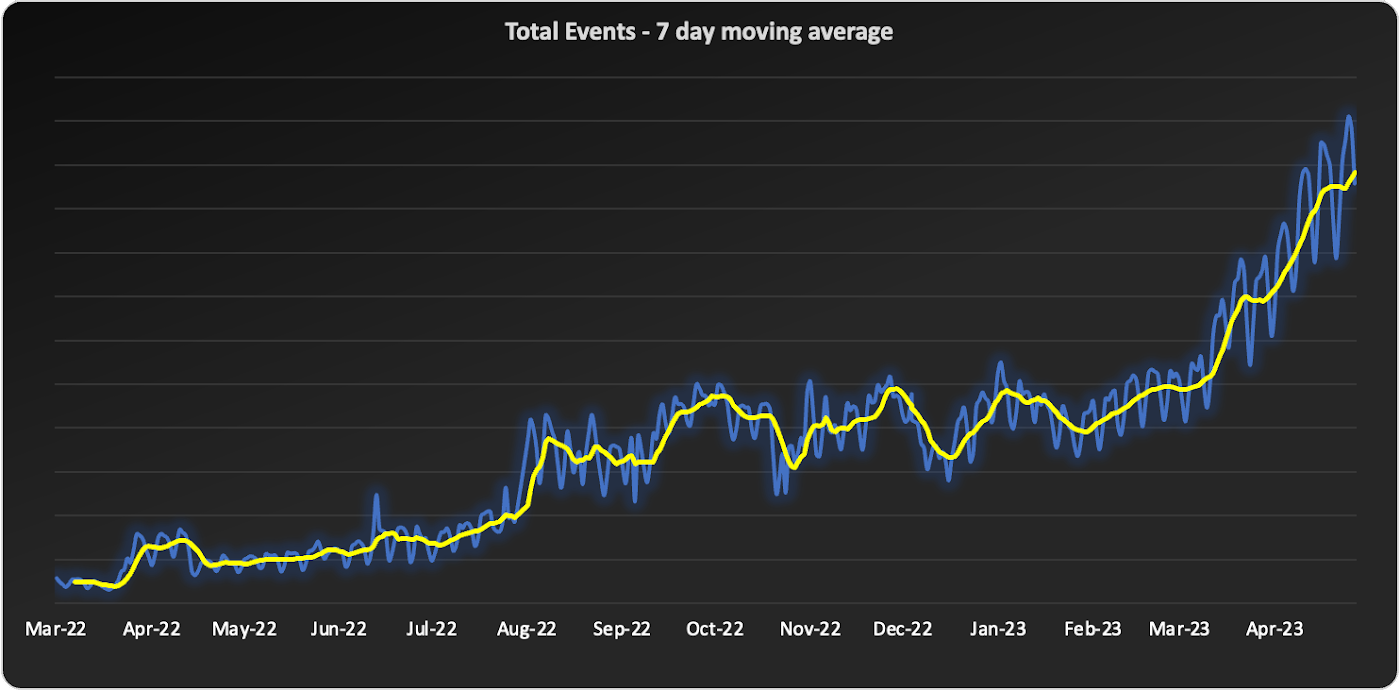
We started to source advice from companies and startups who had faced similar data scaling challenges – the resounding recommendation was “Go with BigQuery.” Initially, our team was reluctant. For us, a BigQuery migration would require an entirely new data warehouse and a cross-cloud migration to GCP.
However, during a company-wide hackathon, a pair of engineers decided to test BigQuery with our most resource-intensive job. Shockingly, this unoptimized job finished much faster and at a lower cost than our current finely-tuned setup. This outcome made it impossible for us to ignore a BigQuery migration any longer. We set out to learn more.
Investigating BigQuery
When we started our BigQuery journey, the first and obvious thing we had to understand was how to actually run jobs. With Spark, we were accustomed to daunting configurations, mapping concepts like executors back to virtual machines, and creating orchestration pipelines for all the tracking and variations required.
When we approached running jobs on BigQuery, we were surprised to learn that we only needed to configure the number of slots allocated to the project. Suddenly, with BigQuery, there were no longer hundreds of settings affecting query performance. Even before running our first migration test, BigQuery had already eliminated an expensive and tedious task list of optimizations our team would typically need to complete.
Digging into BigQuery, we learned about additional serverless optimizations that BigQuery offered out of the box that addressed many of the issues we had with Spark. For example, we often had a single task get stuck with Spark because virtual machines would be lost or the right VM shape needed to be attainable. With BigQuery’s autoscaling, SQL jobs are much more granularly defined and can move resources as needed between multiple jobs. As another example, we sometimes encountered a storage issue with Spark due to the shuffled data overwhelming a machine’s disk. On BigQuery, there is a separate in-memory shuffle service that eliminates the need for our team to worry about predicting and sizing shuffle disk sizes.
At this point, it was clear that the migration away from the DevOps of Spark and into the serverless BigQuery architecture would be worth the effort.
Spark to BigQuery migration
When migrating our pipelines over, we ran into situations where we had to rewrite large blocks of code, making it easy to introduce new bugs. We needed a way to simultaneously stage this migration without committing to huge rewrites . Dataproc is a very useful tool for this purpose. Dataproc provides us with a simple yet flexible API to spin up Spark clusters and gives us access to the full swath of configurations and optimizations that we’re accustomed to from our previous Spark deployments.
Additionally, BigQuery offers a direct Spark integration through stored procedures with Apache Spark, which provides a fully managed and serverless Spark experience native to BigQuery and allows you to call Spark code directly from BigQuery SQL. It can be configured as part of the BigQuery autoscaler and called from any orchestration tool that can execute SQL, such as dbt.
This ability to mix and match BigQuery SQL and multiple options for Spark gave us the flexibility to move to BigQuery immediately but roll out the entire migration on our timeline.
With BigQuery, we’re back to building features
With BigQuery, we could to tap into performance improvements, direct cost savings, and experienced a reduction in our data pipeline error rates. However, BigQuery really changed our business by unlocking new real-time features that we didn’t have before. A couple of examples are:
1. Fresh, fast data results
On our Spark cluster, we needed to pre-compute tens of thousands of possible results each day if a customer wanted to look at a specific detail. While only a small percentage of results would get viewed each day, we couldn’t predict which results would be needed, so we had to pre-compute it all. With BigQuery, the queries run much faster, so we now compute specific results when customers need them. We benefit from avoiding expensive jobs. To our customers, this translates into fresher data.
2. Real-time decision features
Since our migration to BigQuery began, we have rolled out several new features powered by BigQuery’s ability to compute things in near real-time, enhancing our customers’ ability to make real-time decisions.
1) A metrics explorer that lets our customers query their metric data in real-time.
2) A deep dive experience that lets our customers instantly dig into a specific user’s details instead of waiting on a 15-minute Spark job to process.
3) A warehouse-native solution that lets our customers use their own BigQuery project to run analysis.
Migrating from Spark to BigQuery has simplified many of our workflows and saved us significant money. But equally importantly, it has made it easier to work with massive data, reduced the strain on our perpetually stretched-thin data team, and allowed us to build awesome products faster for our customers.
Getting started with BigQuery
There are a few ways to get started with BigQuery. New customers get $300 in free credits to spend on BigQuery. All customers get 10GB storage and up to 1TB queries free per month, not charged against their credits. You can get these credits by signing up for the BigQuery free trial. Not ready yet? You can use the BigQuery sandbox without a credit card to see how it works.
The Built with BigQuery advantage for ISVs
Google is helping tech companies like Statsig build innovative applications on Google’s data cloud with simplified access to technology, helpful and dedicated engineering support, and joint go-to-market programs through the Built with BigQuery initiative.
More on Statsig
Companies want to understand the impact of their new features on the business, test different options, and identify optimal configurations that balance customer success with business impact. But running these experiments is hard. Simple mistakes can cause you to make wrong decisions, and lack of standardization can make results hard to compare, and reduce user trust. When implemented poorly, an experimentation program can become a bottleneck, causing feature releases to slow down or, in some cases, causing teams to skip experimentation altogether. Statsig provides an end-to-end product experimentation and analytics platform that makes it simple for companies to leverage best-in-class experimentation tooling.
If you’re looking to improve your company’s experimentation process, visit statsig.com and explore what our platform can offer. We have a generous free tier and a community of experts on Slack to help ensure your efforts are successful. Boost your business’s growth with Statsig and unlock the full potential of your data.
Wunderkind Leverages Google Cloud to Address the Growing Needs of its Customer Base

5321
Of your peers have already read this article.
1:30 Minutes
The most insightful time you'll spend today!
Editor’s note: We’re hearing here how martech provider Wunderkind easily met the scaling demands of their growing customer base on multiple use cases with Cloud Bigtable and other Google Cloud data solutions.
Wunderkind is a performance marketing channel and we mostly have two kinds of customers: online retailers, and publishers like Gizmodo Media Group, Reader’s Digest, The New York Post and more. We help retailers boost their e-commerce revenue through real-time messaging solutions designed for email, SMS, onsite, and advertising. Brands want to provide a one-to-one experience to more of their customers, and we use our extensive history with best practices in email marketing and technology to help brands reach more customers through targeted messaging and personalized shopping experiences. With publishers, it’s a different value proposition, we use the same platform to provide a non disruptive and personalized ad experience for their website. For example, if you are on their site and then you left, we might show an ad tailored to you when you come back later – depending on the campaign.
After running into limitations with our legacy database system, we turned to Cloud Bigtable and Google Cloud, which helped us be more flexible and easily scale for high traffic demand – which can be a stable 40,000 requests per second, and meet the needs of our growing number of data use cases.
Three different databases power our core product
In our core offering, companies send us user events from their websites. We store these events and later decide (using our secret sauce) if and how to reach out to those users on behalf of our customers. Because many of our customers are retailers, Black Friday and Cyber Monday are big traffic days for us as. On such days, we can get 31 billion events, sometimes as many as 200K events per second. We show 1.6 billion impressions that have seen close to 1 billion pageviews. And at the end of all this, we securely send about 100 million emails. We noticed the same thing for election time; traffic reached the same high volume. We need scalable solutions to support this level of traffic as well as the elasticity to let us pay only for what we use, and that’s where Google Cloud comes in.
So how does this work? Our externally facing APIs, which are running on Google Kubernetes Engine, receive those user events—up to hundreds of thousand per second. All the components in our architecture need to be able to handle this demand. So from our APIs, those events go to Pub/Sub, Dataflow and from there they are written to Bigtable and BigQuery, Google Cloud’s serverless, and highly scalable data warehouse. This business user activity data underpins almost all our products. Events can be things like product views or additions to shopping carts. When we store this data in Bigtable, we use a combination of email address and the customer ID as the Bigtable key and we record the event details in that record.
What do we do with this information next? It’s important to mention that we also mark the last time we received an event about a user in Memorystore for Redis, Google Cloud’s fully managed Redis service. This is important because we have another service that is periodically checking Memorystore for users that have not been active for a campaign-specific period of time (it can be 30 minutes, for example), then deciding whether to reach out to them.
How we decide when we reach out is an intelligent part of our product offering, based on the channel, message, product, etc. When we do reach out, we use Memorystore for Redis as a rate limiter or token bucket. In order not to overwhelm the email or texting providers we send API requests to, we throttle those requests using Memorystore. (We prefer to preemptively throttle the outgoing API requests as opposed to handling errors later.)
When we do reach out, often we will need details for a specific product—let’s say if the website belongs to a retailer. We usually get that information from the retailer through various channels and we store product information in Cloud SQL for MySQL. We pull that information when we need to send an email with product information, and we use Memorystore for Redis to cache that information, since many of the products are repeatedly called. Our Cloud SQL instance has 16 vCPUs, 60GBs of memory and 0.5TB of disk space and when we perform those product information updates, we have about a thousand write transactions per second. We are also in the process of migrating some tables from a self managed MySQL instance, and we keep those tables synchronized with Cloud SQL using Datastream.
Our user history database was originally stored in AWS DynamoDB, but we were running into problems with how they structured the data, and we’d often get hot shards but with no way to determine how or why. That led to our decision to migrate to Bigtable. We set up the migration first by writing the data to two locations from Pub/Sub, performed some backfill of data until that was up and running, and then started working on the reading. We performed this over a few short months, then switched everything to Bigtable.
So, as mentioned, we are using Bigtable for multiple databases. The instance that stores our user events has about 30 TB with about 50 nodes.
Profile management
A second use case for Bigtable is for user profile management, where we track, for example, user attributes based on subscription activity, whether they’ve opted in or out of various lists, and where we apply list-specific rules that determine which targeted emails we send out to users.
Our very own URL shortener
Our third use case for Bigtable is our URL shortener. When our customers build out campaigns and choose a URL, we append tracking information to the query string of the URLs and they become long. Many times, we are sending them via SMS texts, so the URLs need to be short. We originally used an external solution, but made the determination that they couldn’t support our future demands. Our calls tend to be very bursty in nature, and we needed to plan for a future state of supporting higher throughput. We use a separate table in Bigtable for this shortened URL. We generate the short slug that is 62 bit-encoded and use it as the rowkey. We use the long slug as a Protobuf-encoded data structure in one of the row cells and we also have a cell for counting how many times it was used. We use Bigtable’s atomic increment to increase that counter to track how many times the short slug was used.
When the user receives a text message on their phone, they click the short URL, which goes through to us, and we expand it to the long slug (from Bigtable) and redirect them to the appropriate site location. Obviously, for the URL shortener use case, we need to make the conversion very quickly. Bigtable’s low latency helps us meet that demand and we can scale it up to meet higher throughput demands.
Meeting the future with Google Cloud
Our business has grown considerably, and as we keep signing up new clients, we need to scale up accordingly, and Bigtable has met our scaling demands easily. With Bigtable and other Google Cloud products powering our data architecture, we’ve met the demand of incredibly high traffic days in the last year, including Black Friday and Cyber Monday. Traffic for these events went much higher than expected, and Bigtable was there, helping us easily scale on demand.
We are working on leveraging a more cloud native approach and using Google Cloud managed services like GKE, Dataflow, pub/sub, Cloud SQL , Memorystore, BigQuery and more. Google has those 1st party products and we don’t see the value in rolling out or self managing such solutions ourselves..
Thanks to Google Cloud, we now have reliable and flexible data solutions that will help us meet the needs of our growing customer base, and delight their users with fast, responsive, personalized shopping messaging and experiences.
Learn more about Wunderkind and Cloud Bigtable. Or check out our recent blog exploring the differences between Bigtable and BigQuery.
11994
Of your peers have already watched this video.
3:26 Minutes
The most insightful time you'll spend today!
How L&T Financial Services Processes 95% of Motorcycle Loans in Less Than Two Minutes
L&T Financial Services is one of the largest lenders in India. India’s demonetization policy in recent years has led to a shift from cash transactions to digital payments. In 2016, the government withdrew 500 and 1000 rupee notes from circulation and encouraged a heavily cash-based population to deposit their canceled notes in banks. Financial institutions needed to pivot to a new way of doing business to stay competitive. L&T Financial Services modernized its IT infrastructure to keep up with changes and capture digital opportunities.
“Working capital is crucial to stimulate growth in rural communities. Our role as a lender is to provide access to funds. We don’t want to burden borrowers with the complexities of getting a loan. Towards this end, digitization is an important step,” says Dinanath Dubhashi, Managing Director and CEO at L&T Financial Services. “Google Cloud helps us streamline service delivery and identify the right customers. By offering the fastest processing time in the industry, we want to be the go-to lender for all customers.”
L&T Financial Services considered multiple cloud providers before choosing Google Cloud. According to Dinanath, Google Cloud understands both the need for businesses to move fast and the need for IT to modernize at different speeds. “We weren’t forced to abandon existing IT systems and migrate lock, stock, and barrel to Google Cloud on day one.”
L&T Financial Services engaged Google Cloud Professional Services to guide its digital transformation journey. The smooth migration from proof of concept to full-scale deployment on Google Cloud took a matter of months.
“Collaboration: a small idea with big opportunities. G Suite helps us connect remote branches with the head office, easily access shared files to submit and track approvals, and conduct face-to-face discussions to accelerate approval processes.”
—Dinanath Dubhashi, MD and CEO, L&T Financial Services
Digitizing the workforce with G Suite
The move to the cloud at L&T Financial Services started in 2017 when the company introduced G Suite to its 14,500 employees. The legacy email system was cumbersome to use, especially for frontline staff who need email access while they are on the road. Using Gmail, employees can connect with customers and co-workers from anywhere, on any device. Employees save time by scheduling meetings with Calendar, collaborating on Docs, and conducting video calls using Hangouts Meet.
Converting data into credit insights using BigQuery
Taking data intelligence one step further, L&T Financial Services adopts a responsible lending approach by applying algorithm-based data analytics to improve credit standards. Beyond traditional data such as credit score and credit payment history, the company also considers macro-economic indicators for risk audits. For example, a farmer’s ability to pay off the loan of his new tractor depends on a successful planting and harvest. So L&T Financial Services feeds long-term data into BigQuery and runs queries to predict loan defaults based on rainfall and crop yield.
Daffodil Software Saves Hundreds of Hours Managing Databases with Google Cloud SQL

4712
Of your peers have already read this article.
4:30 Minutes
The most insightful time you'll spend today!
Daffodil Software is an India-based information technology services company with 180 employees and satellite offices in the US, Singapore, and the United Arab Emirates.
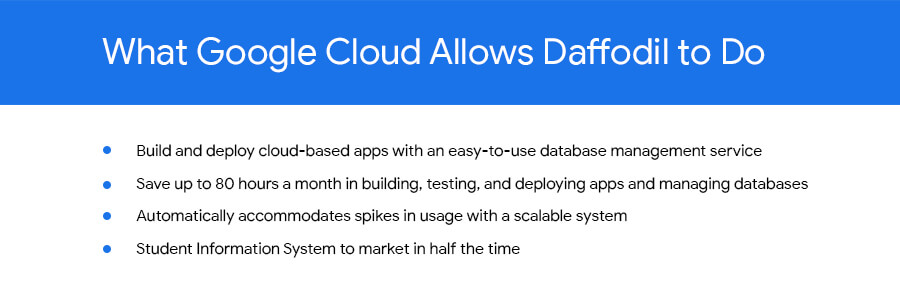
Its product: A suite of web-based applications, including a business customer relationship management (CRM) program and an enterprise resource planning (ERP) app for schools.
Daffodil’s Challenge
Daffodil needed a cloud-based hosting platform for its applications that would save money and time over in-house hosting. The company tried Amazon Elastic Cloud Compute (EC2) with MySQL to manage the databases that its applications depended on. The potential was there, but building, testing and deploying the applications took too long, and scalability was also an issue.
“The old system provided the option to scale up if many users accessed our applications at the same time, but we had to do this manually,” says Gaurav Sharma, assistant head of Daffodil’s product team.
Soon, Daffodil switched to Google App Engine, which allows businesses to build and host web apps on the same infrastructure that powers Google applications.
Integration with App Engine lets Sharma and his team quickly build, test and deploy applications and allows them to automatically accommodate fluctuations in the number of users so they don’t have to manually manage the system when demand increases.
Although App Engine’s built-in Datastore was useful, they found that they wanted more SQL-like functionality for their data-driven programs.
Google’s Solution
At Google’s suggestion, Daffodil migrated to Cloud SQL three months later to take advantage of the system’s database indexing and dynamic filtering abilities, which speed up data sorting for Daffodil’s end users.
“Using Google App Engine and Google Cloud SQL make our applications go live in half the time and have provided us with hassle-free control over all processes.”
—Yogesh Agarwal, CEO, Daffodil Software
Besides indexing and dynamic filtering, Cloud SQL has simplified database management for the Daffodil team. Sharma can easily import their databases and administer them through an intuitive interface, while Google handles backend maintenance and administration.
Google Cloud SQL replicates data among multiple geographic regions, giving Daffodil CEO Yogesh Agarwal peace of mind that users’ data held by the applications is protected.
“The safety of our customers’ data is a major concern, so we appreciate that we don’t need to worry about data loss,” he says.
The Results
With App Engine and Cloud SQL, the Daffodil team is saving about 80 hours of development time every month because of easier deployment, no active management for scaling, and simplified database management. They have also slashed the time it takes to bring new products to market.
“The shift to Google Cloud SQL has allowed us to focus on making our applications even better.”
—Yogesh Agarwal, CEO, Daffodil Software
“Using Google App Engine and Google Cloud SQL make our applications go live in half the time and have provided us with hassle-free control over all processes, such as development, deployment and monitoring,” Agarwal says. “We’re able to deploy our applications much faster and spend less time managing them.”
Going forward, the Daffodil team plans to add other Google services to their applications, including Prediction API, which allows CRM application users to better predict the probability of a lead becoming a customer, and App Engine’s Full Text Search API, which helps users retrieve customer data more easily.
Agarwal is happy with the move to App Engine and Cloud SQL. “The shift has allowed us to focus on making our applications even better,” he says.
How Arvind Fashions Ltd leads the fashion industry with powerful data analytics on BigQuery

4110
Of your peers have already read this article.
3:30 Minutes
The most insightful time you'll spend today!
Arvind Ltd has been in the apparel industry for more than 90 years, with its retail powerhouse Arvind Fashions Ltd being the backbone of well-known names in the retail fashion industry in India.
Arvind Fashions Ltd (Arvind) has seen significant growth in its portfolio with new franchises being added every year. The six high conviction brands include Tommy Hilfiger, Calvin Klein, Sephora, Arrow, U.S. Polo Assn. & Flying Machine.
To secure a foundation for future growth, the company has embarked on a digital transformation (DX) journey, focusing on profitability and improving the customer experience. The key objectives for Arvind’s DX is to unlock the value of existing applications, gain new insights, and build a solid workflow with resilient systems.
Getting Google Cloud to address the challenges around insights & analytics was a natural step forward, since Arvind had already formed a relationship with Google Cloud, starting with its productivity and collaboration tools during the pandemic.
Key Challenges
Arvind’s enterprise applications estate is a mix of SAP, Oracle POS, logistics management systems and other applications. Having so many different applications made it a challenge for the company to bring all of this data together to drive retail insights and at the same time maintain the freshness of its products.
As a case in point, the existing sales reporting and inventory reconciliation process had been enabled by a mix of automated and semi-automated desktop applications. There were challenges to scale the infrastructure in order to process large amounts of data at a low latency.
The synchronization of master data across functions was critical to build the data platform that provides consistent insights to multiple stakeholders across the organization.
Solution Approach – Modern Data Platform
There are several ways to solve the challenges above and do more by building a modern data analytics platform. For example, using a data lake based approach that builds use case by use case, hybrid data estates and so on. Regardless of the approach, it is important to define the solution based on certain principles.
In Arvind’s scenario, the key business principles considered are that data platforms should support Variety, Variability, Velocity and Volume. Each of these 4 V’s are critical business pivots to successful fashion retailing. Variety in SKU’s to deal with myriad fashion trends every season, Variability in shopping footfalls due to different festivities, weekends and special occasions, Velocity to be agile and responsive to customer needs, and Volumes of data that bring richer insights.
This is where Google BigQuery enabled data platform comes in, as it is able to meet the needs above.
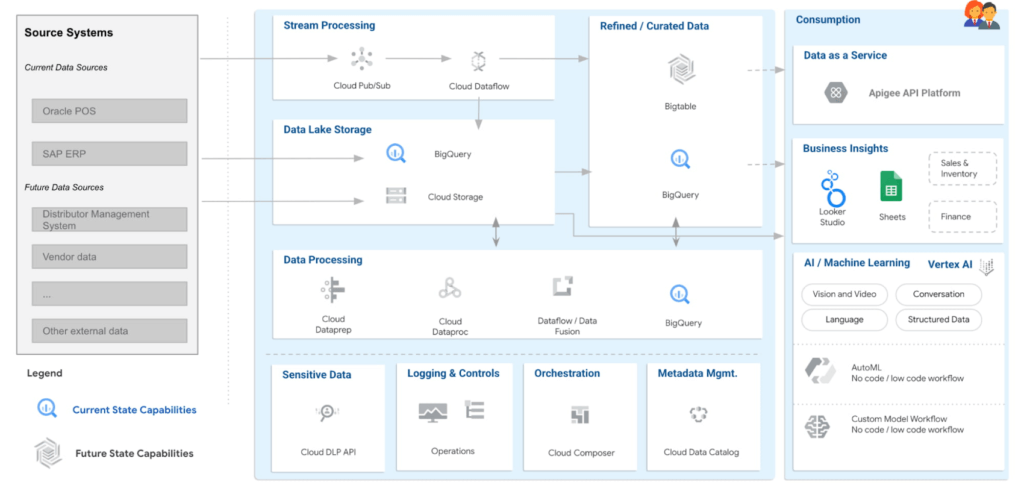
Solution Architecture – Current Capabilities & Future Vision
BigQuery is the mothership of the data and analytics platform on Google Cloud. Its serverless construct ensures that data engineering teams focus only on insights & analytics. Storage and compute is decoupled and can be independently scaled. BigQuery has been leveraged to service both the raw as well as the curated data zones.
With BigQuery procedures, it is possible to process the data natively within the data warehouse itself. Procedures have been leveraged to process the data in a low latency manner with the familiar SQL.
But then what happens to advanced analytics and insights? With simplicity being our key guiding principle, BigQuery machine learning ensures that data analysts can create, train and deploy analytics models even with complex requirements. It can also consume data from Looker Studio, which is seamlessly integrated with BigQuery.
Here are the key principles and highlights of the data platform that have been achieved:
- Simple, yet exhaustive – We needed a solution with vast technical capabilities such as data lake & data warehouse, data processing, data consumption, analytics amongst others. And at the same time it needed to be simple to implement and run ongoing operations.
- Agility – High quality analytics use cases typically require a significant amount of time, effort and skill set. While building a simple solution we ensured that the selection of technology services ensured agility in the long term.
- Security – An organization can be truly successful if the insights and analytics operations are democratized. But while data is made available to a wider community, we need to ensure data governance and security.
- Ease of operations – Data engineering teams spend a lot of time doing infrastructure setting and management operations. With BigQuery, teams can put in more effort on building the data pipelines and models to feed into analytics instead of worrying about the infrastructure operations.
- Costs – Decoupling storage and compute allows for flexible pricing. A pay-as-you-go model is the ideal solution to managing costs.
Business Impact
The ingestion frequency of the store level inventory (~800 stores) has now been changed to daily. With the additional data volumes and processing the scaling on BigQuery has been seamless. There are new processes and dashboards to address the reconciliation and root cause analysis. Operational efficiencies have improved leading to better productivity and turn around time of critical processes.
The discrepancies in various reconciliation activities have drastically reduced by an order of magnitude of 300X due to the capabilities offered by the data platform. Not only is it possible to identify discrepancies but the data platform has also enabled in identifying the root causes for the same as well.
Arvind Fashions Ltd have also been able to enhance some of the existing business processes and systems with insight from the data platform.
It’s going to be an exciting journey for Arvind Fashions Ltd and Google Cloud. There are several initiatives ready for kick off such as getting more apps on the edge devices, warehouse analytics, advanced customer data platforms, predicting the lifecycle of designs, style codes and other exciting initiatives.
Discover Effingo: Google’s Solution to Moving Data at Massive Scale

1353
Of your peers have already read this article.
3:30 Minutes
The most insightful time you'll spend today!
Every hour of every day, Google moves a lot of data around the world. But how? With the Effingo (Latin for ‘to duplicate’ or ‘copy’) data copying service, a Google-only service that moves data internally and on Google Cloud customers’ behalf.
As a Google Cloud customer perhaps you move data with Storage Transfer Service, a managed transfer option that provides out-of-the-box security, reliability, and performance, that eliminates the need to optimize and maintain scripts, and handle retries. Storage Transfer Service is useful for consolidating data from separate projects, to move data into a backup location, or to change the location of your data.
Likewise, Google’s internal services need very similar functionality to manage their data. This includes data that is in charge of the ecosystem of Google Cloud services, such as BigQuery and Cloud Spanner.
Effingo solves a challenging problem of data movement at a global scale. It supports a wide range of workloads with different traffic characteristics and different requirements for data replication, durability, and latency. In this article we will explore the main motivations behind data movement and solutions to core infrastructure problems that we face when copying exabytes of data on a daily basis.
Why move data in the first place?
But first, let’s think about why you even want to move or geographically distribute your data.
For one thing, you want to replicate your data for durability and reliability. You definitely don’t want to keep a single copy of your data. In the end, we’re talking about a file that is stored on a hard drive. Any hard drive can fail at any point. For this reason, keeping copies of your data in different locations helps ensure that at any point of time there is a copy of your file that you can read from. Moreover, these locations should be geographically distant from each other to avoid even temporary data loss due to natural disasters, network cuts, and other incidents that can impact a local area.
Second, you want your data to be close to your users to reduce latency. You want to serve data with minimal delay to give a great user experience. In many cases, delays caused by data transfers from remote locations can spoil the usability of your application or create the perception that your service doesn’t work. According to Google research, 53% of mobile users abandon sites that take over 3 seconds to load. There are other consequences of lack of data proximity: for example, transferring data from distant locations wastes network resources, which can have a negative impact on the environment. Google has been carbon-neutral for our operations since 2007, and we have matched 100% of the electricity consumption of our operations with renewable energy purchases annually since 2017, but we aim higher: Our goal is to run all our data centers and offices on carbon-free energy, 24/7, by 2030.
The third reason to geographically distribute your data is to balance storage capacity between clusters. This reduces the cost of storing data because it enables us to increase the overall capacity of our data centers and use computation power in less loaded clusters. We can then limit the amount of wasted resources and use otherwise idle hardware. This is especially relevant for batch processing and storing cold data where the exact storage location is not that important.
What are the challenges?
Operating at such a large scale as Google makes data movement a challenging problem for several reasons. Here are a few examples.
Data must be secure and consistent at its destination. Achieving this is complex. For example, to copy a file from one location to another, you need the following: throughput to read and write to disks, network capacity to transfer bytes between data centers, and compute resources to instrument the whole operation.
Considering the volume of data that Google operates on, high and predictable throughput is one of the key features of a copy service at scale. It is typical to transfer terabytes of data per second, and so it’s essential to have a scalable service that can handle traffic with sometimes rapidly changing patterns. It poses a further question: how to run such a service and still be resource efficient?
Finally, it’s crucial to ensure high system availability. Google infrastructure is dynamic and copying data between any two clusters may behave differently at different points of time. Effingo needs to be resilient to cluster turndowns, network bottlenecks, rapid changes in resource demands and capacity, and so on.
How do we solve (some) of these problems?
One of the core use cases for data movement is replication. If you want to ensure that your data is reliable, you want to keep more than one copy, ideally in different locations, to be less prone to data loss.
Let’s consider the following example. You have a file in cluster A, and you want to make copies in destinations B – G.
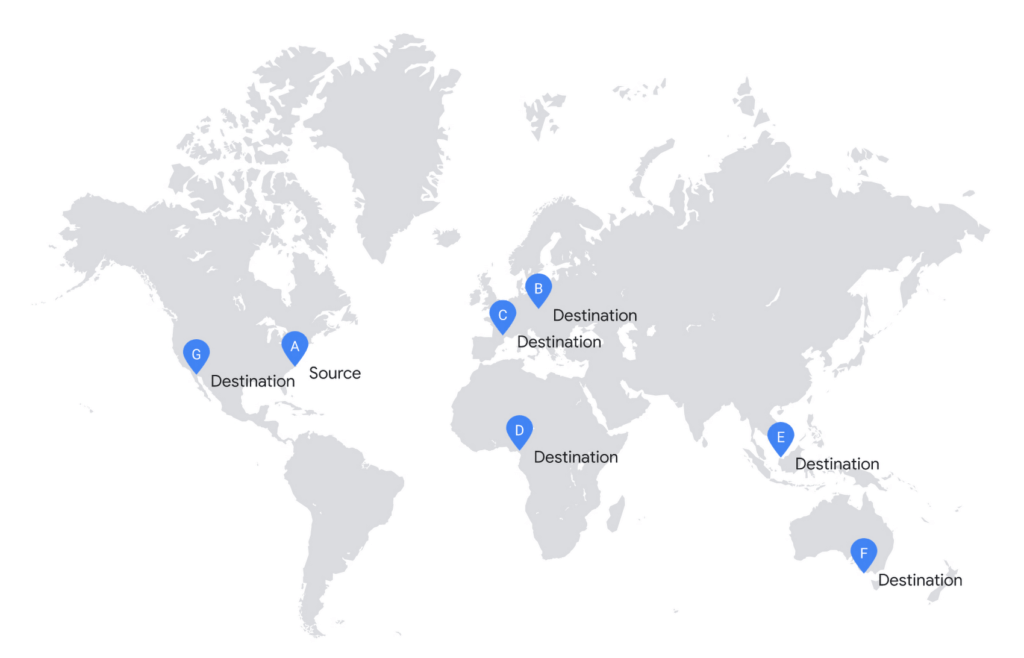
In the simplistic approach, you would start copying to all destinations in parallel.
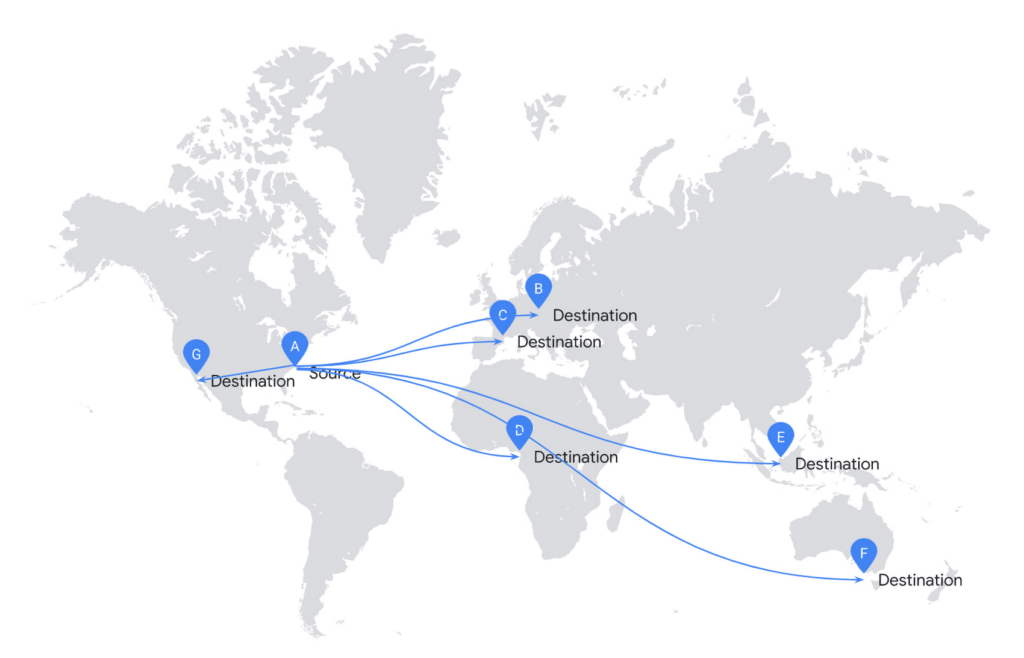
Unfortunately, it is highly inefficient to replicate your file this way. This solution doesn’t scale and requires significant investment in infrastructure.
If you consider the cost of network infrastructure, moving data across the ocean is an expensive operation. Effingo creates data transfer plans that reduce the volume of data to transfer across the ocean. If possible, it reuses already replicated data as a new source.
To create data transfer plans Effingo needs to know alternative data sources and be aware of the network topology.
If it goes to the alternative sources, Effingo stores a recent history of transferred files together with their metadata and time-bound permissions to access the files. Whenever a new copy is issued, Effingo checks whether there were copies of the original file that could serve as the same source but in the alternative location. Worth noting is that Effingo is very strict in verifying that both files — the requested source file and the alternative transfer file — are indeed the same to follow high security standards. Effingo not only checks whether the same user issued a copy from the same source but also if file properties including checksum, ciphertext checksum, mtime and several others match.
Once Effingo knows the source files and their alternative sources, it creates a transfer plan over the Google network. Effingo has a model of the network in the form of a graph where each location is a node and each edge is a weighted link between each node. For each copy Effingo creates a Minimum Spanning Tree over such a graph, which serves as an input to the transfer engine. Thanks to this approach we can select a plan that is optimal for each copy.
In the next example, we show a more efficient approach. Effingo first makes an expensive copy to a remote location and then uses it as a new source. For instance, Effingo first copies a file from the US (source A) to Europe (destination C) and then uses the Europe-based file as a copy source for copies on the same continent. Note that Effingo never stores files in temporary locations for optimization purposes – the service only uses locations explicitly requested by our users.
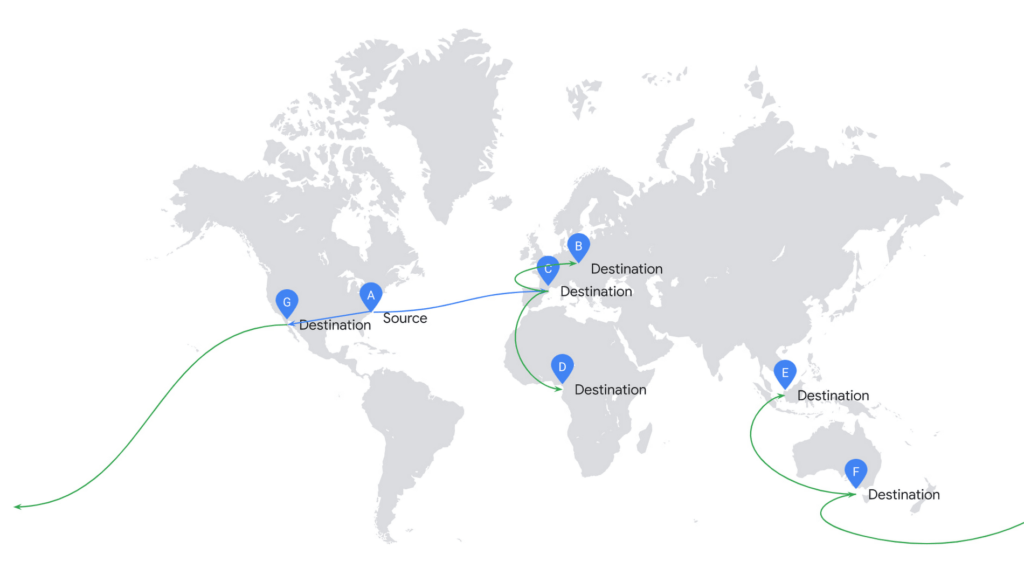
In addition to resource efficiency, the main challenge is to ensure high throughput of data transfer. We solve this problem by applying several approaches that address different problems that may arise.
As described above, our customers’ workloads exhibit a range of different traffic patterns, which results in dynamic changes in capacity on each network link. For this reason, Effingo not only needs to respond to altering resource availability, but also to ensure user fairness in such conditions. In other words, Effingo wants all copy operations to progress while using resources in the best possible way. To achieve this, it uses sophisticated parallelism controls. These controls scale the service up to meet increased demand and limit service capacity if there is service overload, performance degradation, or resource waste.
Further, Effingo must be very resilient and react quickly to errors. On the file level, the service extensively uses retries for transient failures and aborts transfers quickly if it detects non-retryable errors. Effingo uses metrics, logs, and other observability signals to adjust data transfers when needed. For example, it can detect that copies from a specific source are slow and there is another file replica available. Effingo then reconfigures the copy operation to use the other replica to complete the data move.
Data movement at global scale is hard
Hopefully at this point you have a better understanding of why moving data is a challenging problem for infrastructure that operates at Google’s global scale. Effingo supports a range of services that run on Google infrastructure, including Google Cloud services and many internal Google services. While moving data at large scale requires a lot of attention to resource usage and resilience to support high throughput, there is good news: We keep working on this problem and make our infrastructure better every day, so you can run your business on Google Cloud and all data movement is transparent to you.
More Relevant Stories for Your Company

Mrs. T’s Pierogies Moves SAP Systems to Google Cloud for Faster Analytics Capabilities for its SAP Data
Pierogies might just be the ultimate comfort food. But when Mrs. T’s Pierogies — the leading manufacturer of frozen pierogies in the US — learned it needed to transition its existing on-premises SAP ECC to S/4HANA, the company sought a little comfort for itself. Founded in 1952, Mrs. T’s Pierogies

Quick Watch on Six Database Trends
In a data-driven, global, always-on world, databases are the engines that let businesses innovate and transform. As databases get more sophisticated and more organizations look for managed database services to handle infrastructure needs, there are a few key trends we’re seeing. Here’s what to watch.

HarbourBridge Schema Assistant Allows Quick, Bulk Migration to Cloud Spanner
Today we’re announcing the HarbourBridge Schema Assistant, which provides a guided schema-design workflow for migrating from MySQL or PostgreSQL to Spanner. HarbourBridge imports dump files (from mysqldump or pg_dump) or directly connects to your source database, and converts the source database schema to an equivalent Spanner schema. The new Schema Assistant

Empower Your Firm’s Data Decisions with Dataplex Data Lineage
Today, we are excited to announce the general availability of Dataplex data lineage — a fully managed Dataplex capability that helps you understand how data is sourced and transformed within the organization. Dataplex data lineage automatically tracks data movement across BigQuery, BigLake, Cloud Data Fusion (Preview), and Cloud Composer (Preview),
